Latest Insights On

GenAI, Tech, and Digital Transformation 

Stay updated with expert insights, success stories, and real-world applications of cutting-edge technology.

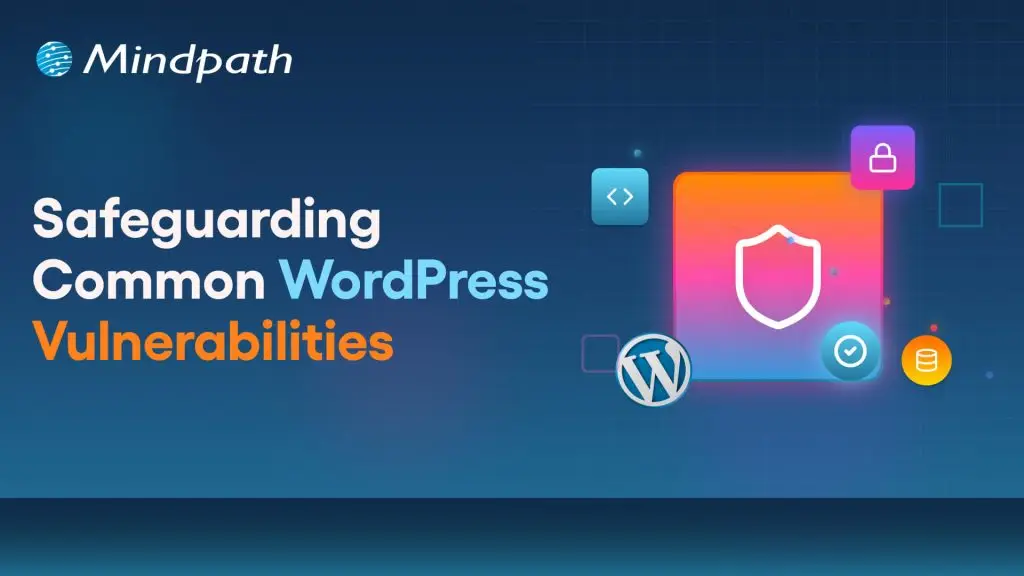
WordPress Vulnerabilities

WordPress powers more than 43.4 percent of the websites (Source: W3Techs), making it a top choice among businesses, developers, and bloggers. However, with immense popularity comes a higher risk. WordPress’s widespread use and open-source nature have made it a prime target for malicious exploits, cyberattacks, and data breaches. So, it is crucial for site owners to understand and mitigate WordPress vulnerabilities.

A compromised website can cause various devastating consequences, including damage to your business reputation and financial loss. Some major reasons behind security breaches are weak credentials, outdated software, insecure configuration, and third-party plugins. 

This detailed guide will help you learn more about the common WordPress security vulnerabilities. Besides, you will explore some actionable strategies to protect your website. 

If you want to safeguard your WordPress site against attacks, expert intervention can make all the difference. Mindpath offers WordPress development services where we focus on building secure websites according to your business needs.

How Secure is WordPress- Is it Really Vulnerable?

Given WordPress’s dominance on the web, it is no surprise that it attracts malicious attacks frequently. Vulnerabilities in third-party plugins and themes are the most common entry points, a pattern confirmed repeatedly in the WordPress vulnerability database. A notable example is CVE-2024-10924, a critical authentication bypass flaw in the “Really Simple Security” plugin. It allowed attackers to log into WordPress sites with administrative rights and execute code across millions of sites remotely.

There are other WordPress security issues that can expose your site to attackers, like exposed endpoints, arbitrary file uploads, and path traversal. These are regularly documented in the WordPress vulnerability database. While this CMS remains a robust platform, these threats have forced businesses to focus more on ongoing vigilance.

Why Should Businesses Prioritize WordPress Security?

Before exploring the “how”, let’s understand the ”why”. Remember that a security breach can lead to disastrous consequences for businesses. Some impactful consequences of WordPress exploits are: 

1. Search Engine Blacklisting

If your website is compromised, search engines can flag it as malicious redirects, malware, or spammy backlinks. As a result, your site may get blacklisted, affecting your organic traffic and visibility. 

2. Dat Breaches

A vulnerable website makes it easier for hackers to access sensitive data, including users’ names, payment details, addresses, passwords, and more. This can erode customer trust and attract legal penalties. 

3. Downtime

Cyberattacks can lead to a complete shutdown or defacement of your website. Besides, it can take several days or weeks to recover your site, leaving your business inaccessible to customers. 

4. Financial Fallout

The cost of a data breach can go beyond just technical cleanup. Affected businesses face legal penalties, reputational damage, and more. For small businesses, it can be catastrophic.

5. Loss of Admit Control

Attackers can lock out users, escalate privileges, and change credentials, making it challenging to regain admin control without technical intervention. 

The only way to avoid such consequences is by securing your WordPress site with proper security measures. Besides, it is crucial to check website safety regularly. Read on to know more about WordPress Vulnerabilities and how to fix them. 

Do you want your website to be accessible to every visitor? Learn how to improve WordPress web accessibility can help you reach more users and create an inclusive online experience.

Major WordPress Security Vulnerabilities and Solutions

While WordPress itself is regularly maintained and updated, WordPress exploits generally arise from outdated components, insecure integration, etc. Understanding those security risks is the first step toward creating a resilient and secure website. Below, we have listed some common vulnerabilities along with effective mitigation tactics.

1. Outdated Components- The Biggest Threat

Most dangerous and frequent WordPress vulnerabilities arise from outdated components, such as plugins, themes, and the core. Outdated components can offer an easy entry point to hackers. WordPress core updates come with crucial security patches, and the same applies to plugins and themes. 

 Solutions:

  • Regularly check for updates to plugins, core, and themes. 
  • Enable automatic updates wherever possible.
  • Remove unsupported and unused extensions. 
  • Use a WordPress vulnerability scanner to check the website regularly. 

2. Brute Force Attacks

Attackers use trial-and-error methods to guess user login credentials, exploiting common and weak passwords. Once they gain access, hackers can take over the site and carry out various malicious actions.

Solutions:

  • Deploy robust password policies and create passwords combining special symbols and numbers. 
  • Enable 2FA or two-factor authentication to access the admin panel. 
  • Use security plugins such as Limit Login Attempts Reloaded to prevent unauthorized logins. 
  • Be careful while assigning user roles. 

3. Vulnerable Themes and Plugins

Not all plugins are the same. Poorly coded extensions can lead to serious security issues, including XSS or Cross-site Scripting, SQL injection, as well as remote code execution. 

Solutions:

  • Check update history, active installations, and reviews before installing a plugin.
  • Install plugins and themes only from WordPress.org and trusted developers, like the WordPress Cue theme. 
  • Use powerful security plugins such as Sucuri and Wordfence to effectively monitor WordPress plugins vulnerabilities
  • Stay away from pirated themes to prevent potential malware attacks.  

4. Malware Infections

Malicious software programs are designed to steal data, damage systems, and disrupt regular operations. Malware can take different forms, like trojans, ransomware, or spyware. These infections are challenging to detect. 

Solutions:

  • Keep the system updated and ensure you are using the latest version of WordPress. 
  • Limit admis access and follow secure login practices. 
  • Schedule regular malware and backups utilizing advanced tools. 

5. Cross-Site Scripting

This is a common type of injection attack where attackers inject malicious scripts into websites. Poor security configurations and outdated components let attackers inject JavaScript or client-side scripts into a website. Once injected, attackers can access credentials, session cookies, and can also redirect visitors to a malicious site. 

Solutions:

  • Validate and sanitize every user input. 
  • Prefer to encode output data to avoid script execution.
  • Carry out a detailed WPcheck and use response headers to control browser behavior.

Unsure whether your WordPress project is following the right development standards and best practices? Check out our WordPress developer checklist to make sure every essential step is covered for a smooth and successful build.

6. SQL Injections

This WordPress vulnerability happens when attackers inject SQL code through input fields such as contact forms, login, or signup to access the database. This vulnerability can expose sensitive information, compromise credentials, and alter your site content. 

Solutions:

  • Change the WordPress database prefix in the config.php file. 
  • Install a WAF or Web Application Firewall to prevent injection attempts. 
  • Properly sanitize as well as validate user inputs. 

7. DDoS Attacks

Distributed Denial-of-Service is a type of attack where attackers overwhelm servers with fake traffic, making your website inaccessible to visitors. This can cause SEO damage, and downtime. 

Solutions:

  • Carefully monitor your website traffic patterns for unusual spikes.
  • Use rate-limiting tools and extra server bandwidth.
  • Deploy a firewall service or CDN, such as Cloudflare or Bunny.net, to reduce the risk of DDoS.

8. Poor Hosting Platforms

Shared or insecure hosting platforms can expose your site to various WordPress vulnerabilities from other websites using the same hosting environment. A compromised server can damage multiple websites, causing widespread damage. 

Solutions:

  • Choose a trusted and managed WordPress hosting provider.
  • Ensure that the hosting has strong security protocols.
  • Opt for a dedicated IP address.
  • Ensure the hosting offers regular backups, malware scanning, and firewalls

9. Phishing Attacks

Deceptive messages and emails trick users into sharing personal data or clicking on malicious links. After clicking the links, attackers get access to credentials and can inject malware into websites. 

Solutions:

  • Don’t respond to unknown senders or URLs. 
  • Regularly inspect the website’s code to identify and remove phishing pages. 
  • Take backups of your website regularly and before changing code. 

10. CSRF or Cross-Site Request Forgery

Also known as session riding, it tricks visitors into carrying out unintended activities through deceptive forms or links. A CSRF attack can lead to admin-level exploits, data exposure, and unauthorized transactions. 

Solutions:

  • Deploy session validation and secure coding practices.
  • Educate admins and users about social engineering techniques and phishing tactics. 
  • Verify user requests using CSRF tokens. 

Now that you understand the common WordPress vulnerabilities and how to fix them, it’s time to explore some powerful tools that can help you in this. 

Want to make sure your WordPress website runs seamlessly with the latest technology? Discover how WordPress PHP compatibility can protect your site and enhance its performance.

Top WordPress Security Plugins to Consider

To effectively protect your site from a wp vulnerability, using the right security plugins is crucial. Security Plugins listed below offer proactive monitoring, protection, as well as recovery features, helping to reduce the risk. 

Plugin Key Features
Sucuri Security Remote malware and WordPress vulnerabilities scanning, website firewall, malware removal, CDN, and security activity auditing
Wordfence Security Malware scanner, country blocking, live traffic monitoring, and login security
MalCare One-click malware removal, regular malware scanning, offsite scanning, and brute force protection
SecuPress Anti-brute force, security scanner, 2FA, backup and malicious IPs blocking
Cloudflare Turnstile CAPTCHA, free SSL certificate, email routing, and DNSSEC- Domain Name System Security Extension 
SolidWP Magic Link, version management, regular backups, and continuous monitoring
Defender Pro Firewall rules, malware scanning, IP blocking, login protection, and vulnerability reports
Jetpack Security Real-time backups, brute-force protection, spam filtering, and downtime monitoring 

Selecting the right WordPress vulnerable plugins depends on your WordPress website’s requirements. However, installing any of these can boost your website’s security features. 

Planning to upgrade your website but unsure if switching from HTML to WordPress is the right move? Learn the benefits of converting HTML to WordPress and how it can boost your site’s performance, scalability, and user experience.

WordPress Post-Hack Protocol- Follow These Steps

Even with the best WordPress vulnerability scanner and necessary security strategies, no site is 100 percent safe. If your WordPress site has been hacked, a strategic and swift action is crucial. With a clear post-hack strategy, you can restore functionality and regain control. 

1. Immediately restrict public access to your site to prevent further damage. 

2. Change the database password and administrative passwords immediately. 

3. Restore your website using a backup created before the hack. 

4. Use reliable security plugins to detect infected files, entry points, and unauthorized changes. 

5. After restoring your site, patch all the components with the latest updates. 

6. Change default login URLs, implement strong firewalls, and disable the file editing function. 

7. Establish continuous security scans and monitor activity logs to identify potential threats early. 

8. If the hack has exposed user data, inform your users about the breach. 

9. In the wp-config.php file, change the security salts and keys. 

A proactive WordPress recovery plan ensures your site bounces back more secure and stronger from WordPress vulnerabilities.

Wondering how to hire the right WordPress developer to help your business grow online? Explore our detailed guide on Hiring a WordPress Developer to discover expert insights that guide you toward making the best hiring decision.

Build A Secure and Resilient Website with The Right Security Measures

Securing your WordPress website against these WordPress vulnerabilities is vital in this digital world, where cyberattacks are common and increasing. Understanding major flaws, applying the right security measures, and partnering with a trusted WordPress developer can reduce the chance of cyberattacks while keeping your site running smoothly.

Mindpath’s web development team has years of experience in creating secure, accessibility-compliant, and scalable WordPress websites. Our experts keep themselves updated with the latest WordPress security problems and vulnerabilities to offer you end-to-end WordPress development services. From plugin vetting and WordPress vulnerability audits to security configuration and continued support, we will help you stay ahead of every WordPress exploit while ensuring a seamless user experience. 

Frequently Asked Questions

Drupal vs wordpress

At present, the debate of Drupal vs WordPress is more relevant than ever. WordPress is already powering a large number of websites all across the world. Gradually, Drupal has been strengthening its foothold in enterprise as well as government projects. This has given rise to an important question among businesses and professionals: Is Drupal better than WordPress, or is WordPress still the easier choice for users? 

The guide gives a comprehensive insight into both Drupal and WordPress. You need to get a holistic insight into these platforms so that you can choose the best solution that perfectly fits your needs.  An in-depth comparison between these novel platforms has been made, which can simplify your selection process and help identify the right CMS for your needs in 2026.

Want to build a CMS in your online presence that is flexible, user-friendly, and reliable? Our WordPress development services help you with custom solutions focused on delivering a secure and future-proof CMS tailored to your business needs.

What is WordPress?

In 2026, WordPress remains the world’s most popular free, open-source Content Management System (CMS), enabling anyone to build and manage websites without writing code. Originally launched as a blogging platform in 2003, it now powers over 43% of all websites on the internet. The platform is known for its ease of use, along with a massive plugin library. The availability of flexible full-site editing tools makes WordPress perfect for professionals as well as small and medium-sized entities.

Some of the unique attributes of WordPress that make it a useful CMS solution are the availability of a plethora of themes coupled with robust SEO plugin support. The existence of a thriving developer community allows users to get the optimum value by choosing WordPress.

What is Drupal?

Drupal is a free, open-source Content Management System (CMS) and web development framework built on PHP. Designed for building, managing, and scaling complex websites and web applications, it has earned deep trust from government agencies, large enterprises, and universities worldwide.

Drupal is known for its security and flexibility. Moreover, it is capable of handling a large volume of content and complex user workflows. These characteristics make Drupal a world-class CMS platform that is suitable for meeting the needs of content-heavy platforms. It is time to dive deeper and look at the differences, as now you have clarity about Drupal and WordPress

Planning to, but don’t know what to look for when hiring a professional to handle your WordPress development needs? Discover our guide to hiring WordPress developers to help you make a smart, confident, and informed hiring decision. 

Comparison Between WordPress and Drupal

Are you wondering – Is Drupal similar to WordPress? The answer is Yes! However, even though WordPress Drupal are web content management systems, they have a number of differences. If you are planning on developing a website or web application, you need to have clarity on Drupal vs WordPress. Some of the main differences between WordPress and Drupal include

1. Ease of Use

When it comes to ease of use, WordPress is undoubtedly the clear winner in the year 2026. WordPress offers unmatched accessibility for beginners. Moreover, it can be scaled to handle complex projects. Some of the key features of WordPress include its Full Site Editing as well as the Gutenberg block editor. These elements make it easy for beginners to not only design but also publish pages without having to rely on coding. Furthermore, thousands of pre-built themes and plugins are available, which allow users to launch a site within a few hours.

However, Drupal has a steeper learning curve. You need to remember that its interface is less intuitive for non-developers. Moreover, configuring its modules requires technical knowledge. Experienced developers can leverage the tool, and it can offer them great flexibility and control.

2. Security

There exist differences between Drupal and WordPress when it comes to security. Security is undoubtedly one of the best features of Drupal. Drupal continues to be the ultimate CMS tool that is preferred by government websites and enterprise organizations. It not only offers a dedicated security team but also detailed advisories for minimizing vulnerabilities.

Even though WordPress can be considered to be secure at its core, it faces a greater risk. This is mainly because of its massive plugin ecosystem. Vulnerabilities may often arise from third-party plugins as well as outdated themes. Thus, in terms of security, Drupal is the clear winner out of the two CMS solutions. 

3. Performance

While making a comparison between Drupal or WordPress, the former shines when it comes to performance. Drupal delivers exceptional performance thanks to its advanced caching as well as API-first design. Moreover, its optimized architecture ensures that users can derive optimum value from the CMS tool. The entities that handle millions of pageviews can certainly rely on Drupal without having to sacrifice speed and efficiency. 

Over the years, the performance delivered by WordPress has improved. The improvement has been mainly because of the modern PHP versions coupled with block-based design. Similarly, the headless options have also contributed to improved performance. Users can derive immense value if they pair WordPress with strong hosting and caching layers. This can certainly help WordPress to scale well. However, users must bear in mind that the CMS tool typically requires more plugins as well as third-party optimizations.

4. Cost

A common question that one may have is: What is the cost of using CMS tools? The core software is free in the case of WordPress. Moreover, several themes as well as lug-ins are free or low-cost. Furthermore, the development costs are lower because of the availability of a large talent pool.  

The Drupal software is free. However, users need to remember that the development as well as maintenance costs are higher. Currently, skilled and talented Drupal developers are in short supply in the labor market. This automatically makes Drupal development more costly in comparison to WordPress. It is important that users bear in mind while choosing between WordPress and Drupal. 

5. Flexibility

Flexibility is another important dimension that you must take into consideration while comparing WordPress and Drupal. WordPress definitely serves as a more flexible tool for everyday users. However, Drupal is better in terms of flexibility if you are working on highly structured and enterprise-level sites. These CMS tools adopt a different approach, which influences their overall flexibility. 

WordPress mainly thrives on its plugin and theme ecosystem. These elements make it flexible for individuals as well as small businesses. However, Drupal excels in areas such as complex workflow as well as content modeling. The fact that it focuses on granular user permissions and enterprise-grade content management enables developers to tailor Drupal to meet their complex needs. 

6. SEO Capabilities

SEO is indispensable in 2026, and both CMS tools offer solid, strong SEO options. WordPress is known to have popular SEO plugins such as Rank Math as well as Yoast. They provide beginner-friendly tools along with AI-driven optimization tips for users. Another benefit in the case of WordPress revolves around the presence of mobile-first templates.

When it comes to Drupal, it lacks plug-and-play tools. However, it offers granular control over SEO, including URL structure and metadata. These are other features as well relating to multilingual optimization, as well as structured content management. These features are highly appealing to enterprise SEO teams who are in search of precision.

Do you want your website to be accessible to every visitor? Learn how to improve WordPress web accessibility can help you reach more users and create an inclusive online experience.

WordPress vs Drupal: A Quick Comparison

Now that you have gone through the various comparison factors to understand the differences between Drupal and WordPress, let’s have a look at the quick comparison table. The table below gives an overview of the differences between WordPress and Drupal. 

Features WordPress Drupal
Ease of Use User-friendly  Ideal for Experienced developers
Security Low Security High security 
Performance Efficient performance for small and mid-sized sites High performance for enterprise-scale sites 
Cost Less Expensive More Expensive 
Flexibility High flexibility for everyday users Ideal for highly structured websites 
SEO Capability Better for quick SEO optimization Better for advanced SEO strategies 

Which Is Better, WordPress or Drupal?

The answer regarding which is better – Drupal or WordPress depends on your specific needs as a user. Whether you are a professional or a business entity, you need to know – WordPress versus Drupal. The insight can certainly help you choose between the two robust CMS platforms. 

WordPress is better for users who are looking for a user-friendly CMS tool. It can act as an easy-to-use CMS solution that will allow fast setup. The rich plugin options that are available make it ideal for blogs and the marketing sites of small and medium-sized enterprises. 

On the other hand, Drupal is a top content management system for handling enterprise projects. You can choose the solution if you are looking for top-grade security, a custom workflow, and excellent multilingual support. At present, both WordPress and Drupal have established themselves as amazing CMS solutions for businesses and professionals.   

Curious which platform will better support your website’s growth and design needs? Discover WordPress vs Webflow to understand their differences and choose the best option for your business.

Which CMS Is Actually the Right Fit for Your Business in 2026?

When it comes to WordPress versus Drupal, you need to bear in mind that there is no one-size-fits-all solution. WordPress has been dominating the market for ease of use, as well as affordability. It is the ideal choice for blogs and small and medium-sized businesses. However, Drupal is built for high complexity. It offers unmatched security along with enterprise-level content management.

If you want to leverage WordPress to the fullest, you must certainly choose our WordPress development services. The experts at Mindpath ensure that you get immense value from the novel CMS solution. Whether you are a business owner or a professional, you must consider leveraging these solutions to witness your website flourish.

Frequently Asked Questions

AI consultant

How can organizations navigate the dizzying speed of change in technology while being sure that they are creating action at every juncture? This is where the AI consultant comes in. The AI consultant is a facilitator who provides leaders with the ability to make decisions that create real change, instead of jumping from trend to trend with no direction other than the next trend. The role of AI consultant is all about actions that create a clear path forward. Isn’t it better to trust expertise that brings certainty to uncertainty?

Digital transformation then clearly becomes a much less daunting task. With appropriate direction, businesses can streamline processes, strengthen data-driven decisions, and increase customer experience.  Leaders can then invest in strategies that produce measurable results. No more guessing. Once each leader knows the target, transformation becomes an adventure where challenges can be tackled with purpose and growth can become scalable. In this blog, we will get into how an AI consultant can support companies pursuing digital transformation.

The expertise brought in by the AI consulting brings technical insights as well as strategic thinking. Mindpath’s AI Consulting Services help unlock new effectiveness and innovations in your business.

Why Do Businesses Need an AI Consultant?

An artificial intelligence consultant provides businesses with insight into how artificial intelligence can not only solve the problems they currently face but also improve operational effectiveness. They assess the company and what it needs and determine options for AI tools based on those needs, ensuring alignment through every stage of growth, operational efficiency, and an enhanced decision-making process going forward.

The consultant can also help address the gap between innovating AI technology and implementing that technology into the enterprise. They have both technical depth and strategic insight and offer organizations a roadmap to assist leaders in planning and applying solutions to achieve succinct outcomes. The prime focus is on measuring outcomes that create value, improve competitiveness, and position organizations for a digital transformation journey in the months and years ahead.

Responsibilities of an AI Consultant

By partnering with an AI consulting firm, businesses are able to work with experts who know how to make technology work for them. Their work includes strategy and planning as well as execution, ensuring AI solutions fit the overall business goals and create value that can be measured.

1. Finding the Right AI Opportunities

An AI consultant analyzes the existing processes of an organization to identify how artificial intelligence can offer measurable business value. They identify the use cases for an organization, including, but not limited to, automation, predictive insights, or improved customer experience, that can help to drive better results. This essentially creates the foundation for organizations to develop better opportunities from standard quotidian tasks that allow for AI business transformation.

2. Selecting the Right Tools and Platforms

An AI consulting service helps organizations determine the correct platforms and technology for their size, budget, and goals. For large enterprises, the consultant might recommend complex on-premises systems. For startups, a cloud solution might be the better choice. The right choice means that overall, AI adoption will go more smoothly, and you’re more likely to get better results from every project.

3. Training and Testing AI Models

The AI consultant regulates the building, training, and evaluation process before deployment. The AI consultant creates test cases for both accuracy and performance so that the solution sufficiently meets the business requirements. This process is crucial to the establishment of AI that can produce reliable and predictable results and information. This is also a part of AI consulting for business growth.

4. Preparing and Analyzing Data

All AI solutions require quality data, and this is why the AI consultant is so important. They clean, structure, and prepare datasets to make sure machine learning models can run reliably and accurately. Investing your data quality efforts in these specific steps provides the best foundation for solution scenarios like churn prediction or demand forecasting.

5. Monitoring and Improving AI Systems

Once deployed, AI systems require ongoing attention and refinement to remain effective. The AI consultant updates and operates the AI models, ensures the system scales, and deals with ethical implications. This continuing process facilitates flexible technology to adapt to the changing needs of the client’s business and ensures ongoing return on investment resulting from AI business transformation.

AI consulting is helping businesses in strategy making to become industry leaders. If you also want to know how, check out our blog: AI in business startegy

How Does an AI Consultant Drive Digital Transformation?

Understanding how AI consultants propel transformation is important for businesses that want to make better decisions and remain competitive. They can help organizations use AI in a more effective way and make sure that everything they do will lead to real change and long-lasting success.
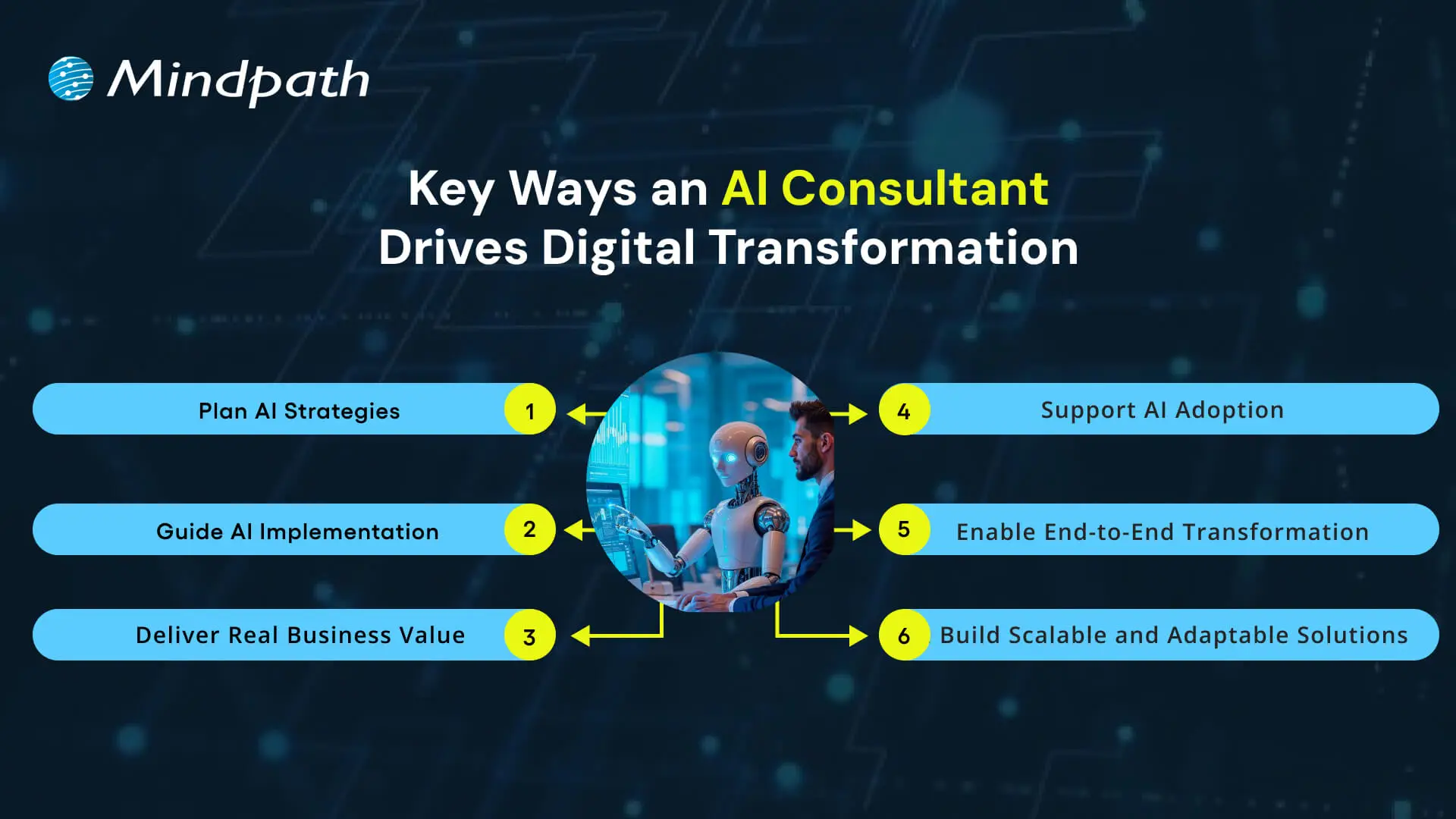
Key Ways an AI Consultant Drives Digital Transformation

1. Plan AI Strategies

An AI consultant assists organizations in synchronizing AI initiatives with fundamental business priorities while emphasizing outcomes over simply tools. They structure strategies that will connect data, technology, and business objectives into practical plans of action that ensure that digital transformation with AI delivers measurable outcomes throughout the organization.

2. Guide AI Implementation

Experts ensure teams apply AI technologies correctly in the right context, considering infrastructure, data, and practical implementation throughout the process. The increased exposure ensures reduced failed experiments, while returning greater proportions of success to AI projects.

3. Deliver Real Business Value

They emphasize outcomes that impact performance, not to simply automate. They work with experts to help companies develop smarter products, optimize workflows, and enhance the customer experience. All AI solutions are focused on achieving measurable outcomes and long-term benefits.

4. Support AI Adoption

Utilizing AI is much more than a technical shift; it’s an organizational change. They provide teams with tools to help them change their workflows, train them, and support their integration of AI tools into their regular workflows; all of which encourage a short adoption window, continued use of AI across the organization.

5. Enable End-to-End Transformation

Experts advocate total digital transformation through the alignment of people, processes, and technology, connecting leadership with technical and non-technical teams to maximize the impact of AI on transforming the future. The holistic nature of these AI consultant roles makes them central to any successful long-term transformation program.

6. Build Scalable and Adaptable Solutions

They will help provide assurance that these AI systems can be flexible and scalable to adapt to future needs when business requirements change. They monitor the AI systems are performing correctly and making iterative improvements as the businesses grow continuously. The continuous support allows organizations to realize the best potential of their AI systems over extended periods.

AI consulting is transforming the way modern businesses grow and compete in the market. Discover more on why organizations need AI consulting services to unlock growth and drive innovation in a rapidly changing market.

Want to Unlock the Full Potential of AI for Your Business?

Digital transformation is only effective when organizations thoughtfully and strategically leverage AI to transform processes, decisions, and experiences. An AI consultant partners with organizations to identify overall goals, align technology to deliver on those goals, build actionable plans, and deliver measurable results. With AI applied in a measured and thoughtful manner across all functions and operations, organizations can gain long-term growth, efficiency, and competitive advantage while using technology as a true driver and enabler of success.

We at Mindpath provide expert AI consulting services that guide businesses through planning, implementation, and scaling of AI solutions. Our team ensures every initiative aligns with strategic priorities, enabling measurable results and continuous improvement. By combining technical expertise with business insight, we empower organizations to leverage AI effectively and gain lasting value from their digital transformation efforts.

Frequently Asked Questions

1. How does an AI consultant actually drive digital transformation without disrupting what is already working in a business?

That balance is exactly what separates a good consultant from a generic one. They assess existing workflows first, identify where AI adds value without breaking things, and implement changes gradually. The goal is progress without unnecessary operational chaos or team resistance.

2. What is the difference between hiring an AI consultant and simply purchasing an AI software solution for the business?

Software gives you a tool. A consultant gives you a strategy for using it correctly. Without proper alignment to business goals, even the best AI platform underdelivers. Consultants ensure the technology actually solves the right problems rather than creating new ones.

3. How do businesses know whether an AI consultant is genuinely delivering results or just running up hours?

Set clear KPIs before the engagement begins. Results should show up in operational metrics, cost savings, or customer experience improvements within defined timeframes. A trustworthy consultant welcomes accountability and ties every recommendation directly to measurable business outcomes from day one.

4. Do businesses need to have existing AI infrastructure in place before working with a consultant?

Not at all. Many engagements start from scratch. Consultants begin by assessing what exists, identifying gaps, and building a roadmap suited to the current state. Starting without infrastructure is common and often makes the consulting process cleaner and more focused.

5. How long does it typically take before a business starts seeing tangible results from an AI consulting engagement?

Quick wins can appear within the first few months through process automation or better data use. Deeper transformation across departments takes longer, often six months to a year. Realistic timelines set upfront prevent frustration and keep expectations aligned throughout the engagement.
AI consulting services

In today’s competitive environment, organizations are consistently searching for more intelligent ways to grow, innovate, and differentiate themselves. AI consulting services support organizations to seize the opportunities that become realizable by developing distinct ways to harness data and technology as opportunities. As the velocity of digital innovation changes radically for organizations, it is clear that we can no longer take the same approaches. Why not explore the tools and experience that enable organizations to remain fluid and agile?

While organizations continue to embrace new technologies, the challenge comes in figuring out how to apply them effectively. The value of having expert advice is where the innovation matches business objectives, ultimately with measurable outcomes. Instead of being confused when adopting new technology, organizations are provided with clarity and direction as a result of skilled consultants. The right balance between strategy and technology allows organizations to leverage their growth journey with smarter decisions and sustainable results. This blog will explore why today’s organizations should consider AI consulting services as their path forward.

Want to lead the future with the use of AI in your organization, but don’t know where to begin? Our AI consulting services will guide you at every step to stay ahead and unlock measurable growth.

The Growing Demand for AI Consulting Services

Future Market Insights projects that the global AI consulting services market will grow from USD 11.07 billion in 2025 to USD 90.99 billion in 2035, representing a CAGR of 26.2% during this period. This increase represents a substantial business demand for specialist expertise as businesses look to consulting firms to navigate the additional complexities around AI adoption.

Among various industries, such as finance, healthcare, retail, and manufacturing, are generating demand from their businesses through their significant investments in AI-driven transformation. Many industries have developed into vastly different businesses fueled by big data, cloud computing, and advanced analytics, and companies are seeking AI consulting firms to provide clout to their AI strategy, system integration, governance, and security. As the use of digital technology expands through adoption, consulting firms help ensure the efficiency, ethics, and scale of innovation.

Also Read: AI in Healthcare.

Why Modern Businesses Need AI Consulting Services?

A powerful AI strategy for business growth will help organizations remain competitive in a digital world. Here are the key points to illustrate the significance of AI consulting services for contemporary businesses.

1. Expertise That Drives Value

AI consulting services give businesses the opportunity to have professionals who understand machine learning, natural language processing, and data analytics review the work. Their job is to take complex technology and make it into solutions that provide measurable outcomes. This prevents companies from spending time on unscheduled or misguided AI initiatives.

2. Building the Right Strategy

Building an AI business strategy necessitates linking technology to the company’s goals. AI consultants collaborate with the leadership teams of the companies to develop a strategy that places short-term wins and the ultimate goal into context. Understanding that context to forge the innovation pathway creates more informed decisions than through deliberations without a guide, which highlights the value of AI consulting services.

3. Assessing AI Readiness

An effective AI readiness assessment enables organizations to determine where they have gaps in data, infrastructure, and skills. Before deploying a project, AI experts from consulting firms will assess these aspects to mitigate risks and adopt AI with far fewer hurdles. This preparation will allow organizations to take advantage of the potential upside expected from their AI investment, with support from AI consulting services.

4. Guiding Through Adoption

Companies using AI adoption consulting move faster from experimentation to actual production performance. The consultant will work to apply these frameworks and best practices in a manner that creates successful adoption of AI within the company’s workflow, while avoiding disruption to current operations. The consultants direct what companies should be doing to innovate at a reasonable execution speed that allows safe scaling of that innovation.

5. Risk and Compliance Management

AI raises ethical, fairness, and compliance issues. AI consulting services provide a risk management set of capabilities that will enable organizations first to satisfy impending laws, second to safeguard their reputation, and third to make sure that every AI solution that is implemented is fair, transparent, and trusted.

Curious about what the actual benefit of AI consulting provides to your business in managing complex operations? Discover our blog on the benefits of AI consulting to understand how AI expertise and guidance can help business growth.

6. Cost-Effective Solutions

To pursue an AI consultant for businesses is likely cheaper than assembling a large internal AI team. The consultant already has the knowledge and reuses it. This minimizes time spent building knowledge and making mistakes. As such, companies are spending their time and money growing rather than waiting for long training cycles, which is why many turn to AI consulting services.

7. Driving Innovation Across Industries

Artificial Intelligence consulting companies are experts in new technology. They bring businesses new opportunities that leverage predictive analytics, computer vision, and automation that the in-house team may not even be aware of. This engages the workforce to think innovatively and keeps the enterprise ahead of the competition.

8. Tailored Support for Smaller Enterprises

AI consulting for small businesses ensures that even the smallest of businesses have access to cutting-edge expertise. The consultants are used to delivering tailored and scalable solutions that meet the budget but still provide excellent value. It allows start-ups and SMEs to compete using AI.

9. Creating a Practical Guide

An AI Consulting guide developed by consultants helps organizations understand the steps from planning to deployment. This guide covers tools, talent, risks, and governance practices tailored to the company. It acts as a reference point for making confident AI decisions.

10. Partnering With AI Consulting Firms for Growth

The biggest reason for hiring AI consulting firms is that they can integrate strategy, technology, and execution. The consultants help customers accelerate projects, reduce risks, and build systems that yield predictable business outcomes. Therefore, consultants become trusted partners under long-term digital transformation.

Many businesses have successfully driven digital transformation with the help of AI consultants. Learn more about this in our blog on the role of AI consultant.

Ready to Unlock Your Business Potential with AI?

AI consulting services enable organizations to use technology to improve processes, facilitate innovation, and demonstrate value. With the help of professional advice, organizations can navigate their AI adoption, mitigate risks, and scale their efforts and solutions. This can help align the use of AI to specific business goals and generate demonstration efficiencies, growth, and long-term value amid a rapidly changing digital and competitive landscape.

At Mindpath, we offer customized consulting services for AI that help organizations develop actionable plans, realize more advanced solutions, and optimize outcomes. Mindpath experts assist organizations with AI readiness, AI adoption, and AI innovation. They ensure that the technology aligns with unique business objectives. Mindpath focuses on measurable impact to enable enterprises to speed up growth, lower risks, and achieve ongoing success.

Frequently Asked Questions

full stack development benefits

In our fast-paced digital world, businesses are seeking better and smarter solutions for their digital presence. One proven method is embracing full-stack development benefits to handle both visual and functional components of web and app development projects. Full-stack development enables a company to be more responsive to market demand and build a seamless overall digital experience. One approach to ensure you are keeping up and growing with the pace of technology is to study full-stack development for long-lasting success.

By combining front-end and back-end development in one united team, it serves to harmonize your collaboration and streamline your processes. When one team completes the entire process, it enables faster turnarounds, greater risk control, and cost savings. Full-stack development is a workable option whether you’re a startup or a large organization looking for an efficient way to scale. In this blog, we’ll explore how full-stack development can bring these advantages to your business. So, let’s dig in!

Want to use full-stack development benefits in your business? Mindpath’s full-stack development services will help you in designing an effective way to scale your business.

What is Full-Stack Development?

Full-stack development is the complete process of building a web application from beginning to end, including both the client-side and server-side aspects. Full-stack developers will work with front-end technologies like HTML, CSS, and JavaScript, as well as back-end technologies such as Node.js and PHP, or Ruby on Rails. They deal with the interface that the user sees, as well as the server-side logic that operates behind the scenes as it interacts with APIs and databases.

A full-stack developer is comfortable working on both front-end and back-end development, which means they can handle the entire application lifecycle. They write code, test and deploy that code, and interact with databases. They often integrate third-party services into their applications as well. These professionals know how each layer of the web application connects, from the user interaction to processing data. Their variable skill set makes them important in a team setting where communication is essential between the layers, specifically for performance, scalability, and maintenance.

Key Components of Full-Stack Development

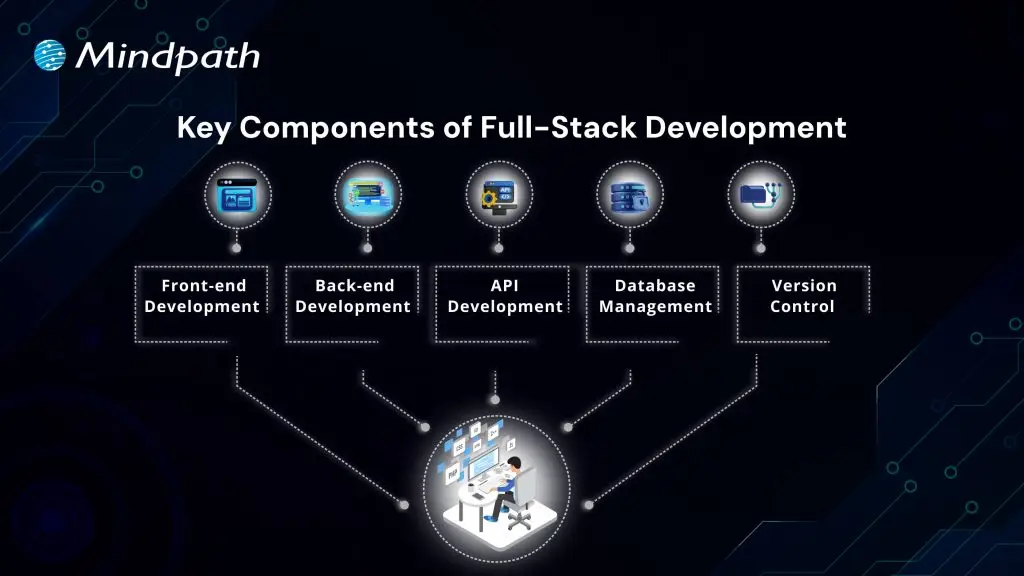
Getting an idea of the major components of full-stack development for business is necessary for creating effective and scalable digital products. These different components ensure that each piece of the application operates seamlessly together.
Key Components of Full-Stack Development

1. Front-end Development

Front-end development focuses on building the user interface using technologies like HTML, CSS, and JavaScript. It ensures that users can interact smoothly with the application through a responsive and visually clear layout.

2. Back-end Development

Back-end development handles the server-side logic, managing tasks like database operations, server communication, and authentication. Developers use languages such as Python, Java, or Node.js to ensure that the core application functions run efficiently.

Looking for an effective way through which you can build scalable applications? Discover how full-stack development with Node.js can enhnace your business growth.

3. API Development

API development allows applications to communicate with each other by creating structured pathways for data exchange. One of the full-stack development benefits is the ability to build and manage APIs that integrate various services into a single application.

4. Database Management

This involves designing and maintaining structured databases using systems like MySQL, MongoDB, or PostgreSQL. Efficient database management is key to ensuring secure data storage, fast retrieval, and overall system reliability.

5. Version Control

Version control helps teams manage code changes and collaborate effectively using tools like Git. It keeps track of every update, allowing developers to maintain stability, fix bugs quickly, and work on features without conflicts.

Full-Stack Development Benefits for Businesses

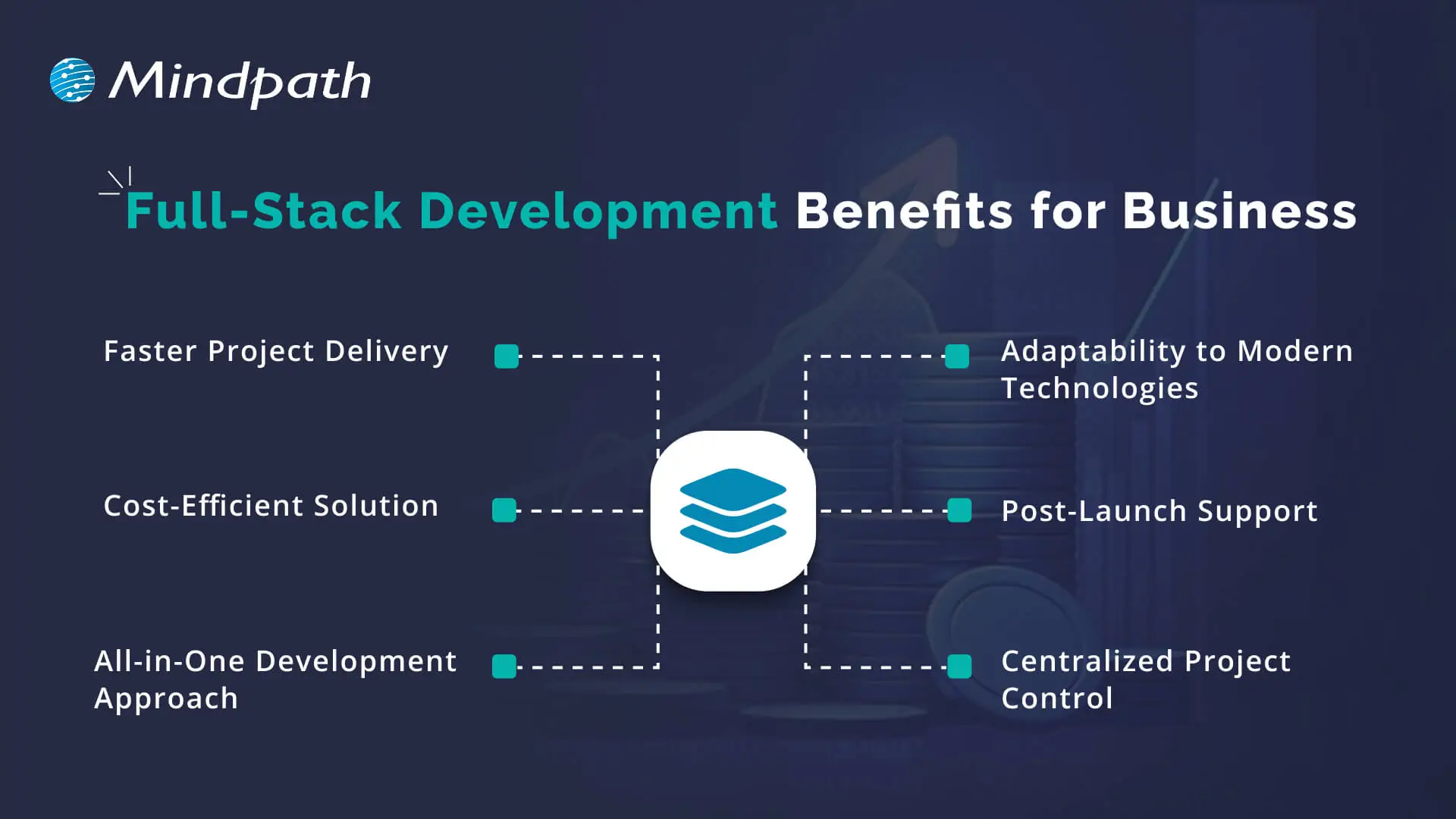
Many businesses today are choosing full-stack development to streamline their digital projects and improve overall efficiency. Here are some key advantages of full-stack development for businesses that highlight why this approach is gaining popularity across industries.
full stack development benefits for business

1. Faster Project Delivery

One of the key full-stack web development advantages is faster project completion, as the same team handles both front-end and back-end tasks. This reduces delays caused by waiting on separate teams and keeps the development flow going smoothly. With better collaboration and fewer hands-off, businesses can launch products more quickly and efficiently.

2. Cost-Efficient Solution

Hiring freelance Full-stack developers helps cut costs by handling the entire development process without needing multiple experts. This simplifies team structure and lowers overall development expenses. This business benefit of full-stack developers is especially valuable for startups and growing companies with limited budgets.

3. All-in-One Development Approach

Full-stack developers have the skills to manage every layer of a web application, including frontend, backend, and databases. Their broad knowledge allows them to build efficient, stable, and well-integrated solutions. This results in fewer errors, faster development, and a smoother launch process.

4. Adaptability to Modern Technologies

Full-stack development benefits include staying aligned with evolving technologies like AI, machine learning, and modern web frameworks. Developers apply the right tools to build responsive, feature-rich applications that match today’s user expectations. Their up-to-date knowledge of full-stack development trends supports faster innovation and long-term system improvements.

5. Post-Launch Support

Full-stack development benefits businesses by offering complete support even after the product goes live. Developers can manage updates, fix bugs, and maintain both frontend and backend systems efficiently. This ongoing support ensures long-term stability and performance for digital applications.

6. Centralized Project Control

Full-stack developers take full responsibility for the entire codebase, covering both front-end and backend. This avoids delays caused by switching between separate teams and helps solve issues faster. With complete control, the development process stays organized and efficient.

Business Use Cases of Full-Stack Development

Full-stack development offers flexible solutions that fit a wide range of business needs. Here are some practical use cases where this approach adds value across different industries and project types.

1. Enterprise Applications

Companies use full-stack development to build scalable enterprise tools that support internal workflows and boost productivity. These applications can connect departments, automate tasks, and improve overall business performance.

2. Content Management Systems (CMS)

With full-stack development, businesses can create flexible CMS solutions tailored to their content strategies. These systems make it easier to manage digital assets, add SEO tools, and track performance through built-in analytics.

3. Real-time Applications

Applications like messaging platforms and live dashboards rely on real-time data updates and user interactions. Full-stack development benefits these projects by ensuring fast communication between front-end and back-end components.

4. E-commerce Platforms

Full-stack development supports building responsive and secure e-commerce websites with integrated features like product search, payments, and user accounts. It allows businesses to deliver a seamless shopping experience while managing inventory and customer data effectively.

5. Big Data and Analytics Platforms

Businesses use full-stack development to build platforms that handle and visualize large volumes of data efficiently. Full-stack development benefits these solutions by enabling the smooth integration of data processing, analysis tools, and user-friendly dashboards.

Curious about how different developer roles can transform your business needs?? Explore our detailed blog on front-end vs back-end vs full-stack.

Looking to Scale Smarter with Full-Stack Development?

Full-stack development benefits help businesses simplify workflows, reduce costs, and build stronger digital solutions. With complete control over the front-end and back-end, it brings speed, flexibility, and long-term support. From e-commerce platforms to real-time apps, full-stack development continues to be a smart choice for businesses aiming to stay competitive in a fast-changing digital world.

At Mindpath, we offer expert full-stack development services tailored to your business needs. Our skilled team brings deep technical knowledge, reliable support, and fast delivery. If you’re ready to hire full-stack developers who deliver results, we’re here to help you scale with confidence.

Frequently Asked Questions

1. What are the real full-stack development benefits for a business that is just starting out digitally?

For early-stage businesses, the biggest advantage is simplicity. One team handles everything, which means fewer miscommunications, lower costs, and faster launches. You get a working product without the complexity of managing separate frontend and backend teams pulling in different directions.

2. How does full-stack development actually save money compared to hiring separate specialists?

When one developer or team handles both sides of a project, you eliminate handoff delays, reduce coordination overhead, and cut hiring costs. For businesses watching budgets closely, that efficiency adds up significantly across the entire development timeline.

3. Is full-stack development a good fit for complex projects, or does it work better for simpler builds?

It works well across both. Simpler projects benefit from the speed and cost savings. Complex ones benefit from having developers who understand how every layer connects, which reduces integration issues and makes troubleshooting far more efficient when problems arise.

4. What happens when a full-stack developer is not familiar with a newer technology the project requires?

This is worth asking upfront. Good full-stack developers are generally adaptable and quick learners, but verifying their experience with specific frameworks or tools before starting a project saves a lot of time and avoids rework later.

5. How do you decide between hiring a freelance full-stack developer versus working with a development company?

Freelancers suit smaller, well-defined projects with tight budgets. A development company brings team depth, accountability, and long-term support. For anything requiring ongoing maintenance, scaling, or complex integrations, a structured team is usually the more reliable choice.
custom wordpress development

In the rapidly changing digital age, your website is more than just a digital face or a virtual business card. It creates a foundation to support your brand identity, marketing strategy, and customer experience. With more than 43% of websites powered by WordPress (source: w3techs), it is clear that WordPress is an excellent choice for website development. There are different pre-built WordPress themes that provide you with an affordable and easy way to bring your business online. However, they may not be able to meet the unique requirements of your growing business. This is where a custom WordPress development comes in.

Whether you are a local business, an enterprise, or a startup, a custom-built website can unlock performance, long-term growth, and brand credibility. In this guide, you will learn more about custom WordPress development and understand why it is crucial for your business. Besides, we will also discuss the best practices and how to choose the right custom WordPress development company to enjoy the desired results.

Want to elevate your online presence with a custom WordPress site tailored to your business objectives? Mindpath’s offers wordpress developemnt services that help you in creating a unique digital website that sets you apart from your competitors.

Custom WordPress Development- An Introduction

In simple words, custom WordPress development involves creating a website from scratch, tailored to your unique requirements. Instead of using pre-made themes or inefficient plugins, a professional WordPress developer utilizes tailored themes, functionalities, and plugins that align with your business goals. It gives you complete control over all aspects of your website, including performance, security, scalability, and design. Custom development can be an excellent solution for organizations looking for:

1. Advanced functionality

2. Unique custom WordPress website design and branding

3. Optimized SEO and performance

4. Hassle-free third-party integration

5. Robust security and long-term scalability

Custom WordPress development services can transform your generic site into a strategic digital asset to drive growth.

Now that you understand what it is, let’s understand the limitations of using a standard WordPress theme and the benefits you will witness by opting for custom development.

The Need for Custom WordPress Development

Pre-built themes are easy to use, and you can use them with minimal technical knowledge. However, they come with various drawbacks that can greatly affect your site’s potential.

1. Bloated Code

WordPress’s theme store has a lot of themes with a large number of unnecessary plugins and features. Such features and code can reduce your website’s performance, affecting ranking and user experience.

2. Security Issues

If the themes are not updated regularly by the developer, it can become a major security risk, damaging your business’s credibility.

3. Generic Design

You can find a pre-made theme being used by thousands of websites. Using them, it will be challenging for your site to stand out. Such themes lack uniqueness and may not meet your brand’s needs.

4. Lack of Functionality

Such themes offer limited functionalities and features. You will have to use additional plugins to add more features, and this can cause compatibility issues and reduced speed.

Planning upgrading your website but unsure if switching from HTML to WordPress is the right move? Learn the benefits of converting HTML to WordPress and how it can boost your site’s performance, scalability, and user experience.

Key Benefits of Custom WordPress Development

Generic themes may help you get your brand online, but as mentioned above, you will have to compromise on a lot of things. By opting for custom development services, you can create a tailor-made digital asset. Here are some major benefits of custom WordPress development.

1. Tailored Design

Your website should have elements to reflect your brand’s unique tone, personality, and value. Custom development lets you create a custom WordPress website design and a unique user interface based on your target audience. Developers can integrate creative layouts to boost user interaction. Besides, you can customize various website elements, from color schemes and typography to animation and layouts, to make your website stand out.

2. Enhanced Security

Custom WordPress websites allow you to add and configure advanced security mechanisms. This way, you can ensure data confidentiality, integrity, as well as availability. You can implement security measures like SSL certificates, custom security plugins, two-factor user authentication, data validation, and more.

3. Optimized Website Performance

Custom WordPress sites are faster as they don’t have unnecessary plugins and bloated code. As your site will load faster, you will witness improvements in bounce rates, SEO rankings, and user experience. Besides, developers can use techniques such as caching, lazy loading, CDN integration, and image compression to reduce load time.

4. Scalability

As your business expands, your website should grow with it. Custom WordPress websites are developed with future scalability in mind. It allows you to add new pages, new features, additional external tools such as payment gateways, CRM tools, and more. Custom WordPress development will make it easier to adjust your site for increasing traffic without facing any performance issues.

5. Optimized SEO Aspects

Custom websites have structured data, optimized speed, and clean code, which are crucial for better search engine visibility. Developers can use custom metadata, URL structure, and advanced schema markup to boost organic traffic.

6. Hassle-Free Third-Party Integrations

Do you want to connect your website with useful tools like Salesforce, Mailchimp, HubSpot, etc.? Well, custom website developers ensure seamless API integrations designed for your workflow. This will improve data flow as well as automation across multiple platforms.

7. Content Management Flexibility

With a custom site, users will enjoy flexible backend interfaces. As a result, non-technical users can easily manage content. Developers can create custom fields, taxonomies, and post types, simplifying content updates and publishing.

Are you unsure if your website development project is on the right track? Discover our WordPress developer checklist to ensure every critical step is covered for a smooth and successful website launch.

Major Components of Custom WordPress Development

A custom WordPress design and development may include multiple components based on your business goals. However, some core components are:

1. Custom Website Development

It involves creating a fully functional website with custom design, structure, functionalities, and features. It also includes performance optimization, layout design, navigation configuration, etc.

2. Custom Theme Development

Developers create unique themes that meet your brand identity. It includes creating responsive themes that can offer a seamless user experience.

3. Backend Customization

It covers customization of the admin panel to make it easy to use for users. Developers may add user roles, dashboards, custom taxonomies, and post types while prioritizing the site’s security.

4. Plugin Development

Developing custom plugins for your WordPress site that can help increase functionality without affecting performance. Experts focus on creating scalable and secure plugins based on your unique needs.

5. Migration Services

It includes offering migration services for hassle-free data transfer with minimal downtime.

6. API Integration

This process involves connecting your site with third-party platforms, marketing tools, CRMs, or payment gateways.

Want to make sure your WordPress website runs seamlessly with the latest technology? Discover how WordPress PHP compatibility can protect your site and enhance its performance.

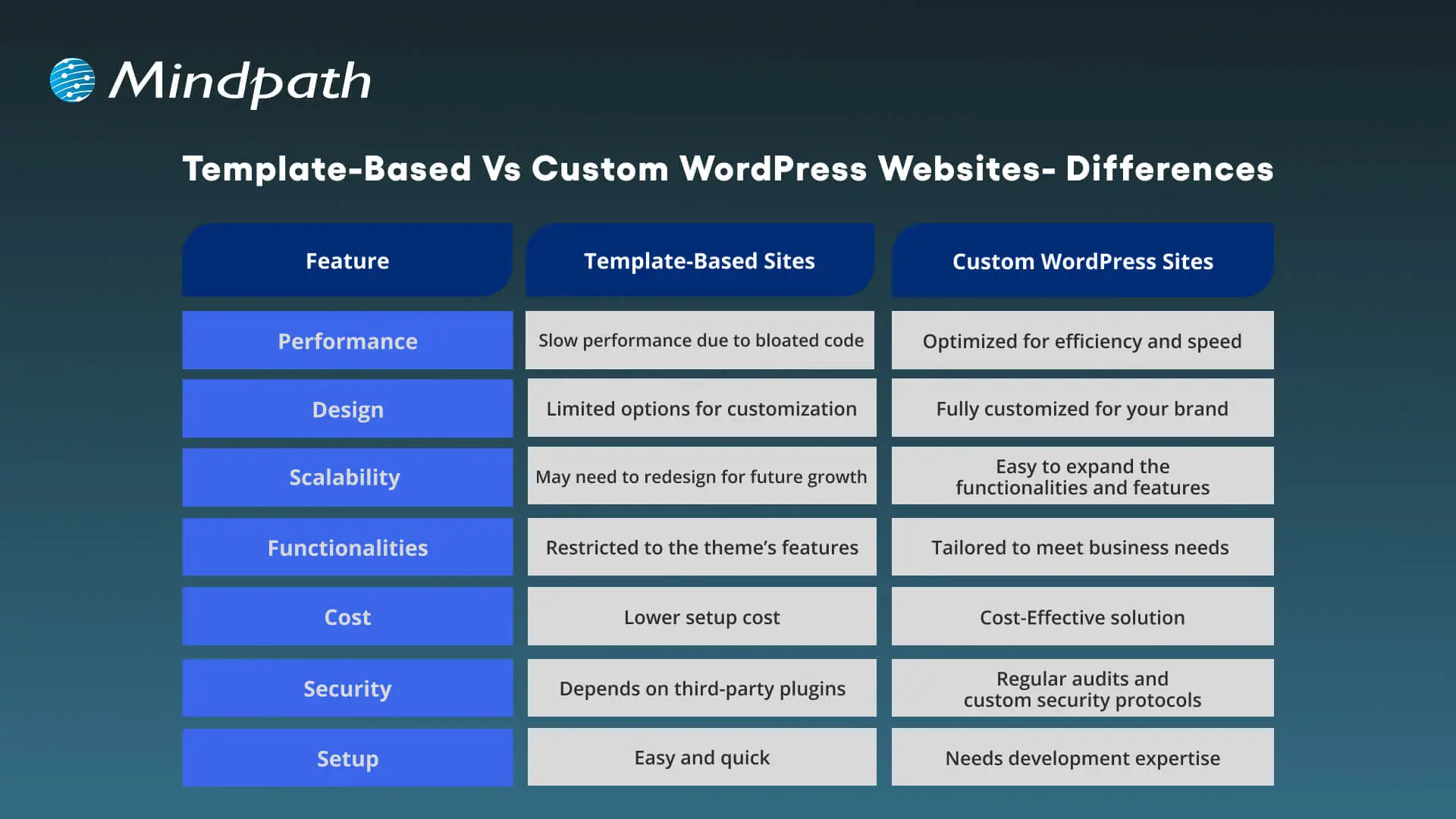
Template-Based Vs Custom WordPress Websites – Differences

Choosing between a custom WordPress site and a template-based site can greatly impact scalability, flexibility, as well as cost. Understanding the differences will help you make the right decision.
Template-Based Vs Custom WordPress Websites

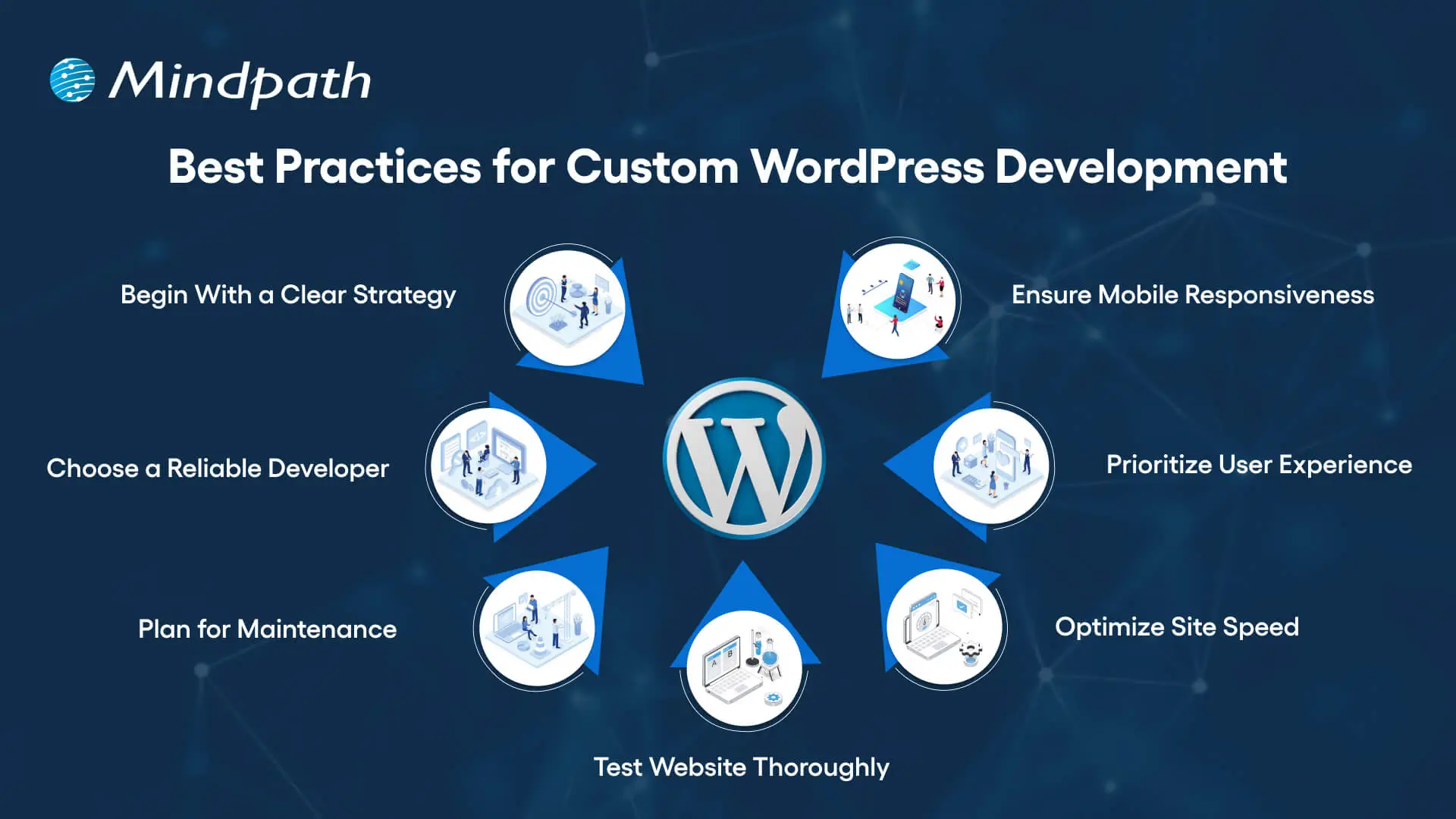
Best Practices for Custom WordPress Development

To make sure your new custom WordPress development project offers desired results, it is advisable to follow these best practices:
Best Practices for Custom WordPress Development

1. Begin With a Clear Development Strategy

Whether you need WordPress development for a small business or a large organization, you should first understand your target audience, desired functionalities, and goals. A well-documented strategy can help prevent scope creep, and you can ensure a perfect alignment between developers and stakeholders.

2. Focus on Mobile Responsiveness

With people increasingly using mobile phones and tablets for browsing, you should ensure that your website is responsive across all browsers and screen sizes. Custom WordPress development involves the use of a mobile-first design, which can boost SEO and usability.

3. Prioritize User Experience

Even though you have a beautiful website, it will be useless if users face issues while using it. An experienced developer will focus on a smooth user experience, making it easier for visitors to locate the things they need.

4. Optimize Your Site for Maximum Speed

Utilize techniques such as caching, image compression, CDN, and lazy loading to make sure your site loads faster. Tools such as Lighthouse, GTmetrix, Pingdom, and SEO Site Checkup can be used to detect bottlenecks.

5. Test Your Website Thoroughly

Before you make your site live, make sure that it has gone through proper testing. It helps identify compatible issues, loopholes, and missing functionalities. Prefer to carry out device testing, usability testing, and cross-browsing testing. Refine UX and optimize elements based on user feedback.

6. Plan For Smooth Maintenance

A custom WordPress site needs regular security checks, backups, and updates. So, create a proper maintenance plan or work with a professional WordPress developer to ensure constant support. Ongoing maintenance is crucial to keep your site functional and secure.

7. Partner With a Reliable Developer

Work with an experienced and trustworthy development company with a proven track record of offering quality WordPress website development services and creating high-performance websites. While helping you with technical execution, they can offer strategic input.

Do you want your website to be accessible to every visitor? Learn how to improve WordPress web accessibility can help you reach more users and create an inclusive online experience.

Tips to Choose The Right WordPress Development Company

Choosing the right expert for custom WordPress development is crucial to ensure success. While looking for the best one, prefer to consider the following points:

1. Evaluate The Experience

Ensure that the developer has years of experience in WordPress, especially in custom development. Go through their portfolio and check if they have ever created similar websites that you want to create. They should have a deep knowledge of the best practices and core functionalities of WordPress.

2. Technical Expertise

Confirm that the service provider has proficiency in JavaScript, CSS, MySQL, HTML, PHP, plugins, and more. Choose one with strong technical skills for the desired results.

3. Check Their Process:

Ask the company who they plan, carry out, and test the development projects. Ensure that they can offer a comprehensive custom development service based on your requirements.

4. Transparency and Communication

Only a trusted partner can keep you informed through the WordPress development project and will remain transparent about the costs and timelines. Choose one who prioritizes clear reporting and reacts to your queries promptly.

5. SEO Knowledge

The custom WordPress development expert should have a proper understanding of the latest SEO trends and be able to deploy necessary on-page optimization from the beginning. Furthermore, they should know how to configure different SEO plugins.

6. Post-Launch Support

Without regular updates and maintenance, your site will become vulnerable to various issues. So, partner with a development company that offers additional support along with maintenance services to keep your site performing at its best.

This is how you can hire an expert for professional WordPress web development to get your website listed higher in SERPs.

Wondering how to hire the right WordPress developer to help your business grow online? Explore our detailed guide to hire WordPress Developer to discover expert insights that guide you toward making the best hiring decision.

Looking to Elevate Your Business with Custom WordPress Development?

Undoubtedly, WordPress offers organizations the flexibility, affordability, and speed they need to start. Custom WordPress development is more than just writing code and creating a website. It is a strategic process to craft a unique digital experience that can effectively support your organizational goals, reflect your brand, and scale with you. It provides you with robust security, future scalability, and innovations that you will not get with template-based solutions.

If you want to elevate your business’s online presence and are looking for a future-proof platform, you can always count on Mindpath’s WordPress development service. As a leading WordPress development company, we combine custom development with scalable architecture and creative design to bring your unique vision to life. At Mindpath, we understand that every business needs uniqueness when it comes to developing a website. That’s why we offer tailored solutions that can set you apart from your competitors. We specialize in CMS development, custom plugin development, theme development, and more. Create a solid presence in this evolving digital landscape with us!

Frequently Asked Questions

1. Is custom WordPress development really worth the extra investment compared to just using a free theme?

For businesses serious about growth, yes. Free themes come with limitations that quietly cost more over time through poor performance, security risks, and constant plugin workarounds. A custom build gives you a site that actually works for your specific goals.

2. How long does a custom WordPress development project typically take from start to finish?

It depends on the complexity and features required. A straightforward custom site can take four to eight weeks, while larger projects with complex integrations and custom functionality can run three to six months. Clear planning upfront keeps timelines on track.

3. Can a small business afford custom WordPress website development, or is it only practical for larger companies?

Small businesses can absolutely invest in custom development, especially when the site is central to revenue. Many development companies offer phased approaches, meaning you build what you need now and scale later without rebuilding the entire site from scratch.

4. What happens to the website after launch and who is responsible for keeping it maintained?

Maintenance is often overlooked during planning. Regular updates, security patches, backups, and performance checks are essential. Most reliable development partners offer post-launch support packages so the site stays secure and functional well after it goes live.

5. How do you know if the WordPress development company you are considering is actually the right fit?

Look beyond the portfolio. Ask how they handle communication, testing, and unexpected problems mid-project. A good partner is transparent about timelines and costs, asks the right questions early, and treats your goals as their own throughout the entire process.
Benefits of AI consulting

In today’s fast-paced digital world, organizations need direction, as well as technology. Understanding the benefits of AI consulting can help companies see their way through the muddy landscape of choices and complex AI opportunities. Organizations need to understand how AI can be a catalyst for efficiency, better decision-making, and other growth-related opportunities; it is vital to bring experts who guarantee concrete results.

AI consultants help organizations turn abstract possibilities into concrete, achievable strategies that generate measurable outcomes and prepare the organization for the future. Working alongside AI specialists, organizations can identify high-value opportunities for companies to take action and execute a plan of action that blends seamlessly with their day-to-day work.

AI consultants provide clarity through roadmaps to success, help organizations identify pain points, and create value while ensuring projects remain aligned with strategic goals. Working together smooths the pathway toward innovation, builds organizational AI capabilities, and instills confidence for teams to lead AI adoption. In this blog, we will discuss AI consulting benefits and the superiority of helping your organization succeed.

Curious about how AI is transforming business as a game-changer? Explore our AI Consulting Services to discover how we turn cutting-edge technology into powerful growth opportunities.

Why Do Businesses Need AI Consulting?

Businesses regularly encounter obstacles such as complicated AI technologies and limitations of expertise in-house. Hiring an experienced AI consultant helps organizations overcome these complications by designing tailored solutions for companies that build towards their strategic goals. By doing this, they make sure that AI initiatives return value, increase efficiencies, and have longevity so that AI can be adopted organization-wide in a fluid and meaningful way.

AI consulting provides organizations with the guidance and direction to be successful with artificial intelligence. The major benefits of hiring an AI consultant include improved operations, smarter decision-making, and actionable productivity yields. AI consultants offer specialized as well as targeted strategies for businesses or organizations. They engage businesses to analyze their needs, flag viable AI applications, and pinpoint an ideal approach to navigating operational demands.

Key Benefits of AI Consulting

As AI continues to drive change across the landscape of business and industry, companies are often grappling with knowing and deploying it effectively. Below are the benefits of AI consulting and notes about why organizations are increasingly turning to professionals with expertise in complex AI decision-making and delivering solutions.

1. Expert AI Guidance

AI consulting firms possess specialized knowledge in machine learning, predictive analytics, and natural language processing. They will help to design solutions for your complex problems to assist you in developing creative and customized solutions for your business. They will also guide you through applying the newest methods and tools and the industry’s best practices to yield measurable and sustainable results for your company.

2. Tailored AI Solutions

The benefits of AI consulting include developing solutions built around your business goals and business challenges. The AI consultant evaluates your business and recognizes areas where AI can improve efficiencies, increase automation, and drive enhanced customer experiences. They provide a comprehensive, customized service to ensure your business achieves higher outcomes and makes the most of its return on investment.

3. Scalability and Flexibility for Growth

AI business consulting focuses on creating systems that are adaptable to shifting business necessities and workloads. Consultants build solutions that can accommodate more data better and new capabilities or functionalities at your pace as your business grows. The key to unlocking your long-term AI return on investment is flexibility to change and support new long-term growth.

4. Cost Efficiency

Companies get a much higher ROI from AI consulting when they prioritize the high-impact areas and avoid spending unnecessarily. AI consultants then deliver scalable solutions that save costs compared to having a hospitality AI team in-house. By working with a consultant, it also lowers the cost of trial and error and optimizes value from every AI initiative.

5. Data-Driven Decision Making

AI consulting for enterprises helps to analyze extremely large amounts of data to make sense of it. AI consultants use an AI analytics tool to identify trends, improve processes, support strategic decisions, and answer more complex questions. These insights give companies speed to insight, speed to decisions, and maintain their market competitiveness.

Want to know how an AI Consultant helps businesses in driving digital transformation? Explore our detailed blog on the role of AI consultant.

6. Enhanced Customer Experience

The benefits derived from AI consulting are enhancing the way businesses think about their relationship with customers through the interaction of AI-powered tools. AI consultants offer chatbots, recommendation engines, and sentiment analysis to help provide instant, thorough, and personalized support for every question. All these features can help increase engagement, loyalty, and satisfaction for AI consulting customers.

7. Reduced Business Risks

The benefits of AI consulting also cover risks associated with how companies use and apply AI technologies. Consultants will address issues around data security, compliance with regulations and other operational issues. In general, the consultant’s expertise helps lower operational and legal risk, thus implementing AI is a safer and more reliable prospect.

8. Stronger Competitive Edge

A benefit of AI in business strategy consulting is that we support organizations in implementing innovative solutions that give them an advantage in the marketplace. We help consultants create and develop AI tools for improving operations, delivering services, and minimizing expenses. Positioning improvements like these take you to the forefront of your field and maximize your chances for sustainable growth.

9. Ongoing Support and Optimization

The benefits of AI consulting services are more extensive due to continuous support for maintaining AI systems. In general, consultants make updates as needed, optimize algorithms, and resolve problems quickly. A lasting commitment on the part of consultants equates to effectiveness, dependability, and consistency in delivering results will be sustained over time.

10. Stay Ahead with Latest Innovations

One of the major benefits of AI consulting is allowing your business to maintain knowledge about current and developing AI technologies, etc. Consultants will keep your systems fresh, modern, efficient, and relevant to the marketplace. This way, you give your company every chance to prepare for the future and remain competitive.

Organizations are relying on AI, but don’t know the right way to use it effectively. Discover why organizations need AI consulting services to unlock growth and guide their business towards success.

Want to Unlock the Full Potential of AI?

AI consulting advances organizations to operate smarter and faster while driving real business value. By collaborating with an expert, organizations can undertake AI initiatives that can be scaled, adjusted, and cost-controlled while delivering tangible benefits to customer experiences, decreasing operational and legal risks, and enhancing competitive edge. Working with an AI consultant allows organizations to implement strategies with confidence and better utilize their resources while monitoring changing technology trends that can prepare them for the future and help sustain innovation and success.

Our AI consulting services help businesses create and implement AI strategies that align with organizational goals. The team provides ongoing support, integrates state-of-the-art AI technologies, and ensures every AI project maximizes return on investment. Mindpath enables smooth implementation, operational efficiencies, and ongoing value by providing practical, hands-on solutions to companies.

Frequently Asked Questions

1. What are the actual benefits of AI consulting beyond just having someone to guide your technology decisions?

The real value shows up in operations, not just strategy. Consultants help cut unnecessary costs, reduce risk, improve customer experiences, and build systems that scale. The outcomes are measurable and tied directly to what the business is trying to achieve long term.

2. How is working with an AI consultant different from simply hiring an in-house AI team?

An in-house team works within the limits of what they know. Consultants bring broader exposure across industries, tools, and use cases. They also tend to be more cost-effective for businesses that need expertise without the overhead of building a full internal department from scratch.

3. At what stage should a business actually bring in an AI consultant, early planning or later implementation?

Bringing one in early saves far more time and money. A consultant helps avoid costly mistakes before they happen, identifies the right use cases, and builds a strategy that actually fits the business rather than retrofitting AI into something that was never designed for it.

4. Can AI consulting work for smaller businesses or is it primarily designed for large enterprises?

It works across business sizes. Smaller businesses often benefit more because they cannot afford expensive mistakes. A consultant helps them start focused, allocate budget wisely, and build toward scalable solutions without overcomplicating things in the early stages.

5. How do you measure whether an AI consulting engagement is actually delivering value for your organization?

Track the KPIs agreed upon at the start, things like cost savings, faster turnaround times, customer satisfaction scores, or error reduction rates. A good consultant will define these metrics upfront and revisit them regularly so progress stays visible and accountable.

AI readiness checklist

Artificial intelligence has heralded the beginning of a new era, the one of swift digital transformation with AI. The equation of AI and digital transformation has attracted the attention of businesses in almost every sector. As a matter of fact, adopting AI for digital transformation is no longer considered a luxury but a necessity. However, many business leaders feel that their organization is not ready for AI.

As artificial intelligence changes the course of digital transformation in the next few years, you cannot sit on the sidelines. Business leaders have to identify the best practices for integrating AI in their existing systems and workflows to solve real problems and create sustainable value. Let us discover a checklist to find out whether your business is “AI-ready”.

AI can revolutionize your business, but it requires the right guidance and support. Mindpath’s AI development services are designed to turn your challenges into opportunities and help you build future-ready solutions.

Why is AI Readiness Important in 2025?

No other technology trend has had a disruptive impact like artificial intelligence. The growth in demand for AI-driven digital transformation is not just an aftermath of the hype around AI. As a matter of fact, artificial intelligence has been responsible for inducing fundamental changes in the global business landscape. You can come across some of the common use cases of AI in every industry, such as automation of repetitive tasks and offering customer data analytics. 

Business owners must find the ideal solutions to harness the transformative power of AI unless they want to risk falling behind their competitors. On top of it, they must also understand that AI transformation is not just about adding new software to their workflow. It is important to acknowledge that adopting AI implies a paradigm shift in how an organization operates, competes in the market, and fosters innovation.  

Anyone cannot just introduce AI in their business and expect it to work like magic without preparing a strong foundation. The journey of AI-powered transformation of a business requires a holistic approach that blends technology with data, people, processes, governance, and strategy. When your business fulfills all the criteria of AI readiness, you can tap into the full potential of artificial intelligence.  

Why Do You Need an AI Checklist for Your Business?

The advantages of AI for businesses offer a credible set of reasons to embrace AI adoption right away. On the other hand, adopting AI directly without preparation can lead to poor implementation and wasted resources. At this point in time, you must know the answer to “What is an AI readiness checklist?” and how the checklist can help you with AI adoption. The readiness checklist can work as a manual for preparation to welcome AI into your organization. 

Business owners need the artificial intelligence readiness checklist to make smarter decisions for integrating AI in their operations and systems. Most importantly, the checklist can help in addressing most of the implementation challenges, such as resistance from teams. 

Important Points in Artificial Intelligence Readiness Checklist

The checklist to measure the AI readiness of your business might vary from source to source. However, the best AI readiness checklist is one that covers the essential facets that you must consider before embracing AI. You can use the following checklist for the critical evaluation of the preparedness of your business for artificial intelligence. 

1. Availability of Centralized and Clean Data

Data is the lifeblood of AI, and without quality data, artificial intelligence is helpless. You may have multiple artificial intelligence business ideas and still fail due to the lack of data. What is the significance of centralized and clean data? Centralization of data ensures that it is not scattered across different systems. Clean data is also essential for AI adoption as it ensures freedom from inconsistencies, duplicates, and errors in the data. 

Assume an example of an e-commerce company that wants to use AI for offering personalized product recommendations. With the browsing data, demographic information and purchase history of customers spread across different databases, the company cannot use AI to build accurate customer profiles. The same outcome is expected in cases where the data contains inaccuracies or errors. Therefore, you must check whether you have a centralized data warehouse and clean data before adopting AI.

2. Alignment of AI Use Cases and Business Goals

Businesses cannot just adopt AI without any purpose unless they want to waste resources. The AI readiness checklist for businesses also focuses on identifying clear AI use cases that directly address specific business problems. On top of it, the use cases should align with the broader strategic goals of your business. The use cases of AI in business may bring opportunities such as improving customer service, enhancing product recommendations, and automating internal communications. 

You can think of an example of a manufacturing plant that uses AI for predictive maintenance to reduce operational costs and machinery downtime. The manufacturing plant uses AI for a specific application to achieve its overall strategic goal of enhancing operational efficiency. 

3. Perception of AI by Teams in an Organization

One of the common misconceptions about AI is that it will replace humans from many jobs. On the contrary, businesses must show that AI will empower teams in an organization with diverse functionalities. Most of the guides on how to prepare for digital transformation with AI emphasize redesigning workflows where AI adds the most value for teams. If the teams in your organization perceive AI as a threat to their roles, then you might encounter trouble in AI adoption.

The best way to ensure that teams understand how AI fits into their workflows requires mapping the current process. Business leaders must recognize repetitive and data-intensive tasks that can be augmented or automated with AI. You have to make employees believe that AI is their partner to tap into the best of artificial intelligence.

4. Commitment of Leadership to AI-powered Innovation

Does your business leadership want to promote innovation with AI? The answer to such questions is crucial for business transformation using AI, as leadership plays a major role in successful AI adoption. Business leaders set the tone for AI integration initiatives and provide the strategic direction alongside access to essential resources.

Active participation of leaders in championing AI initiatives showcases the significance of AI to every member in the organization. For instance, if the CEO publicly endorses an AI-powered project and allocates a dedicated budget to the project, then they show their commitment to AI. As a result, more employees will buy into the projec,t and leaders can avoid potential roadblocks.       

5. Support for Cloud Solutions in the Technical Infrastructure

Business owners must also know that AI systems require significant amounts of computational power and data storage. Therefore, cloud-based solutions have emerged as the most beneficial components in the technical infrastructure of modern AI systems. The ideal checklist for AI-powered business transformation will ask you to prepare a robust technology infrastructure that supports cloud-based solutions.  

Let us assume that a business wants to use AI for analyzing large volumes of transaction data for fraud detection. The business owner must choose scalable cloud infrastructure like Google Cloud, Azure, or AWS that offers the flexibility and power to handle the humongous collection of transaction data. 

6. Attention to Data Privacy and Compliance Protocols

The dependency of AI on data calls for unconditional attention to the concerns of data privacy and compliance. You can guide your business through strategic AI adoption only with robust data privacy and compliance protocols. Some of the notable protocols that businesses should not ignore are GDPR and HIPAA. The primary purpose of these protocols is to ensure ethical data management and mitigation of legal risks. 

You can notice that healthcare providers using AI are the best examples of why data privacy and compliance protocols are important. For example, a healthcare institution using AI for patient diagnosis should follow strict patient data privacy rules. Protocols for secure data storage and data anonymization can safeguard sensitive information and earn the trust of users.

7. Accessibility of Ideal AI Tools and Technology Partners

The successful implementation of AI in your business operations and workflows depends a lot on the selection of the right AI tools and strategic partners. Businesses can improve their readiness for AI and automation with custom-built solutions or off-the-shelf AI platforms. Some leaders may also opt for collaborations with AI consulting firms or development services to integrate AI in their business.

What would a small e-commerce business do while implementing AI-powered personalized recommendations? A pre-built solution with AI features might be the best answer. On the other hand, a larger organization should collaborate with an AI development company to create custom solutions aligned with business requirements and goals.

8. Support for Experimentation and Agile Innovation

AI adoption is not a one-time process, as many business owners might have believed. Adopting AI in your processes and systems requires an iterative approach and calls for continuous learning and improvement. As a business leader, your digital transformation roadmap for AI must emphasize experimentation and agile methods. You must be comfortable with learning from failures and adapting your strategies according to emerging requirements.

Consider the example of a software development company that aims to use AI for optimizing code generation. The company can rely on experiments and agile approaches to test different AI models and collect feedback. Subsequently, the company can repeat the process to create more refined AI solutions.        

9. Clear Metrics to Evaluate AI Outcomes

Without the KPIs or Key Performance Indicators for your AI projects, you will be shooting in the dark. Business owners can measure the value of AI for their organization only with KPIs that will also guide improvements in their AI adoption strategy. The metrics for your AI projects must align with your business goals.

If you want to use an AI chatbot for customer service, then the KPIs will focus on the number of escalated tickets or an increase in customer satisfaction scores. A clear definition of KPIs helps businesses determine the effectiveness of AI and make data-driven decisions for improvement.

10. Willingness of Staff to Learn AI Skills

The success of your AI initiatives also depends significantly on the dedication of the workforce to learn AI skills. You cannot think about preparing your business for AI integration without resistance from employees. Therefore, you must foster a culture of continuous learning and upskilling to encourage employees to learn how to work with AI tools. 

Business owners must design special training programs to help their employees understand how to use AI-powered platforms and solutions. With a proactive approach to AI training and upskilling, your organization can harness the full power of the human element in your AI initiatives.

11. Realistic Expectations for AI Budget

The budget of a business for AI initiatives also plays a crucial role in determining the success of the initiatives. As a business owner, you must set some realistic expectations for the budget of AI projects. It will ensure that your AI project does not get derailed due to a lack of funds. 

The budget for AI adoption must include the initial development and licensing costs as well as the cost of ongoing maintenance, training, and data infrastructure. In addition, you should also pay attention to the costs of data acquisition and integration with existing systems.

12. Opportunities for Cross-Functional Collaboration

The scope of AI projects will include multiple departments, thereby calling for cross-functional collaboration. The best practices for future-proofing business with AI require business owners to understand how cross-functional collaboration can offer diverse perspectives on AI projects. 

You can promote cross-functional collaboration by developing a set of shared goals and creating open communication channels between relevant departments. Cross-functional collaboration offers a more holistic approach to AI integration while addressing the needs of every stakeholder.

13. Pilot or Prototype for AI Use Cases

Running a pilot project before full-scale deployment can help you save a lot of resources. The pilot use case or prototype for AI projects helps in testing and refining AI systems within controlled environments. For instance, you might use an AI-powered fraud detection system on a subset of transactions for the pilot use case.

The pilot use cases or prototype help in identifying potential issues, especially in the areas of model accuracy and data quality. On top of it, a successful pilot project will improve your confidence and offer valuable insights about AI systems before large-scale deployment.

14. Continuous Improvement with Feedback Loops

AI models have to go through dynamic changes as they learn from new data. Therefore, businesses must have frameworks for continuous monitoring and refining the models. Business leaders must implement feedback loops that allow AI systems to learn and evolve with time. 

The best example of continuous improvement with feedback loops is an AI-powered customer service chatbot. For instance, the chatbot can analyze user interactions, identify its weaknesses, and give that information to the model for retraining. As a result, the AI will not only provide effective answers but also adapt to new conditions and data.

15. Long-Term Roadmap for AI Adoption

The search for answers to “How can AI drive digital transformation in business?” will help you understand that AI adoption is a long-term journey. Businesses must have a long-term AI adoption roadmap to follow a strategic plan to expand their AI initiatives. The AI adoption roadmap will also guide business owners for deeper integration of AI in their business. 

The adoption roadmap must include an outline of future AI projects, planned updates, ongoing training requirements, and necessary infrastructure upgrades. With a clear roadmap, your business can follow the best strategic direction for AI investments and ensure sustained growth.

Ready to Turn Your AI Readiness Into Real Business Results?

The AI readiness checklist shows the most important things you must keep in mind while embracing AI in your business. As the popularity of artificial intelligence gains momentum, every business wants to measure its preparedness for AI. Mindpath is one of the prominent emerging leaders in end-to-end AI solution development for businesses across all industries. 

We have become the best choice for end-to-end AI development services due to our ability to articulate client requirements into tangible solutions. Our experts pay attention to client requirements, such as scalability, data privacy, and cost transparency, to help them embrace AI seamlessly in all business processes. Consult with our experts to find out the best path for integrating AI in your business systems, processes, or workflows now.

Frequently Asked Questions

1. How do you know if your business is actually ready for AI, or just thinks it is?

Readiness goes beyond having the budget or the enthusiasm. It comes down to whether your data is clean, your teams are aligned, and your goals are specific. Many businesses skip these fundamentals and struggle later when implementation begins.

2. What is an AI readiness checklist and does every business really need one?

An AI readiness checklist is essentially a structured way to evaluate whether your operations, data, people, and infrastructure can support AI adoption. Without it, businesses tend to rush in without a foundation, which leads to wasted resources and failed projects.

3. Can small businesses benefit from AI transformation, or is it mostly for large enterprises?

Absolutely, small businesses can benefit just as much. Pre-built AI tools make entry-level adoption very accessible today. Starting small with one specific use case, like customer support or inventory management, often delivers quicker results than large-scale rollouts.

4. What usually goes wrong when a company tries to adopt AI without proper preparation?

The most common problems are poor data quality, resistance from employees, and unclear goals. Teams that were never consulted during planning tend to push back hard. Without defined KPIs, there is also no way to measure whether the AI is actually working.

5. How long does it realistically take for a business to see results after adopting AI?

It depends heavily on the complexity of the use case and how prepared the organization was before starting. A focused pilot project can show measurable results within a few months, while broader transformation across departments typically takes a year or more to fully stabilize.

web development vs software development

You are a business owner preparing your digital strategy and have difficulty finding the ideal option for software and web development. The web development vs software development comparison might be difficult to understand for a layman without technical expertise. One of the common misconceptions about the two terms is that they both mean the same thing.

Business owners must recognize the differences between software development and web development to pick the ideal approach for their digital strategy. Web development is all about establishing the online presence of a business. On the other hand, software development deals with creating customized software solutions for different needs. A deep dive into the comparison between web development and software development can help you understand which one is right for you.

Looking for the right software development partner to bring your ideas to life? Mindpath’s software development services offer end-to-end solutions tailored to your business goals, from strategy and design to development and deployment.

Fundamental Difference between Web and Software Development

The emerging requirements of the digital landscape have had businesses thinking about the best ways to reach their target audience. As the software development vs web development debate becomes a focal point of discussion, it is important to understand how they are different from each other. With an overview of the definition of the two terms, you can find a starting point to compare them.

What is Web Development?

You will get no prizes for guessing that web development is the process of creating websites. Web development involves creating everything from the server logic and databases to the visual elements that make a website attractive. Without websites, businesses will struggle to have an online presence and showcase their brand. 

You can identify the difference between a software developer and a web developer from the primary components involved in website development. Web developers have to address the requirements of frontend and backend development alongside a content management system for websites. 

Frontend development focuses on the part of a website that users see, including the layout, design, text, images, and buttons. The significance of backend development is evident from the fact that it involves the creation of the server logic and databases. Another crucial component in web development projects points to content management systems or CMS platforms. The intuitive interface of CMS tools offers easy solutions for managing and updating the content of a website.  

What is Software Development?

The next prominent approach for your digital strategy is software development. As the name implies, software development focuses on the complete development lifecycle from ideation to the deployment and maintenance of a project. You can notice the difference between a web developer and a software developer from the fact that software developers have more responsibilities. The scope of tasks in software development is bigger as it requires the creation of custom solutions to deal with specific business needs.

Software developers can create mobile apps, complex software systems for large organizations, or custom internal software. The solutions created by software developers serve distinct goals for businesses. For instance, mobile apps serve as effective tools to reach the target audience of a business and enhance customer engagement. On the other hand, custom internal software solutions can help businesses manage different business functions with ease.

Diving Deeper into the Web Development vs Software Development Debate

The overview of web development and software development reveals the fundamental difference between the two terms. The following sections will provide a more detailed comparison between web development and software development on the basis of different factors.

1. Objectives of the Process

One of the foremost pointers for differentiating web development from software development is the objective of the process. What do the two development approaches help you achieve? The answer will help you take the best pick from a web developer vs software developer comparison. Web development focuses primarily on establishing an online presence for your organization and showcasing your brand. It is one of the most common approaches to drive customer engagement through intuitive web apps or websites.

Software development process, on the other hand, focuses on addressing specific business problems with custom solutions. Businesses can rely on software development to create software for managing different business functions or custom internal software that can be deployed on various platforms. The primary objectives of software development revolve around enhancing productivity and streamlining operations.    

2. Complexity of the Process

The next point in the comparison between web development and software development focuses on their complexity. In the case of web development, you can rely on templates or content management systems for creating web apps. 

Software development requires the creation of fully customized solutions according to the requirements of the business. Developers can create software solutions from scratch by using the client’s requirements as their reference. 

3. Maintenance Requirements

Another prominent aspect in the software developer vs web developer comparison is their responsibility for maintenance. Web developers can address the maintenance requirements through continuous security updates and frequent modifications to content. In addition, web developers also take care of the maintenance of web apps by updating the design according to the latest trends.

The responsibilities of maintenance in software development focus on introducing new features and bug fixes. Apart from addressing the errors in the functionalities of software solutions, a software developer also takes care of performance improvements.

Want technology that truly supports your business rather than slowing it down? Discover the key custom software development benefits that help companies optimize operations and innovate faster.

4. Technology Stack

The review of differences between software and web development will also draw attention towards the technology stack required for the two approaches. It is one of the biggest factors in a web development vs software development comparison, and also determines the complexity. The technology stack for website development involves frontend and backend frameworks with CMS platforms. The notable frontend frameworks include HTML, JavaScript, React, Angular, and CSS, while backend frameworks include Python, Ruby, and PHP. Some of the popular CMS platforms for web development include Joomla, WordPress, and Drupal.

For software development, the tech stack includes programming languages, cloud platforms, and databases. The most commonly used languages in software development are Java, Python, Swift, and Ruby. Software developers can use SQL or NoSQL database management systems and one of the big cloud platforms, such as AWS, Google Cloud, or Microsoft Azure.

5. Cost of Development

The most crucial pointer in the comparison between web development and software development is the development cost. You can determine whether you need a web developer or a software developer by identifying the type of project. At the same time, you must also take your budget into account before making the final choice. Web development requires a lower initial cost, primarily due to the use of templates. You can also choose a custom design for web development, which may increase the development cost. However, you will have to invest more in continuous updates of the website or web app to adapt to user requirements.

Software development costs are generally higher than those of web development projects due to many reasons. Building a custom software solution requires a lot of development time, which will lead to the consumption of more resources. On top of it, software development projects are more complex than web development projects, thereby increasing the costs. Most important of all, the customization of software solutions according to business requirements will also add more costs to the project.

Ever wondered why some websites just feel effortless while others fall flat? Discover the hidden benefits of custom website development services that turn a simple site into a powerful, user-friendly business tool.

Here is an overview of the web development vs software development comparison in a table.

Criteria Web Development Software Development
Objectives of the Process Web development focuses on building your online presence and showcasing your brand. Software development aims to resolve specific business issues and improve productivity.
Complexity Web development is a simple process with the use of templates and CMS tools. Software development is extremely complex and requires creating custom solutions from scratch.
Maintenance Requirements Maintenance tasks in web development involve ongoing updates for security, content modifications, and changes in design. Maintenance tasks in software development focus on introducing new features, performance improvements, and fixing bugs.
Technology Stack The technology stack for web development includes frontend and backend development frameworks alongside CMS platforms. The technology stack for software development includes programming languages, cloud platforms, and database management systems.
Cost of Development The initial cost of web development is lower than software development. The cost of software development is higher due to the complexity and customization needs.

Ready to Choose the Right Development Solution for Your Business?

The differences between software development and web development showcase that each approach has its distinctive advantages. You might face the web developer vs software engineer dilemma while thinking about resource requirements for your next project. The final choice will ultimately depend on the requirements and scope of your project. For instance, a new e-commerce business should look for web development to establish its online presence. On the other hand, a healthcare organization will need a software developer to create an ERP system.

At Mindpath, we have been delivering trust and efficiency in our expert, world-class software development services for every client. Our focus on understanding the client’s vision and requirements empowers us to deliver competent solutions that stand out in a crowded digital landscape. We have a team of dedicated experts in web development and software development, thereby offering you a one-stop solution. Pick the best talent for your next development project from our team and gain the momentum you need in this digital world now.

Frequently Asked Questions

1. Can a business need both web development and software development together?

Yes. Many businesses use websites for customer interaction and custom software for internal operations. Combining both helps improve customer experience while also making daily business processes more efficient and organized.

2. Which option is better for startups with limited budgets?

Startups usually begin with web development because it is more affordable and helps build an online presence quickly. As the business grows, they can invest in custom software solutions for advanced operations and automation.

3. How long does a typical web or software development project take?

Web development projects can take a few weeks to months depending on complexity. Software development usually takes longer because it involves custom features, testing, integrations, and ongoing improvements tailored to business needs.

4. How do businesses know when to switch from web solutions to custom software?

When daily operations become difficult to manage manually or existing tools no longer support growth, businesses often move toward custom software. It helps improve productivity, automate workflows, and handle more complex requirements efficiently.

5. What factors should businesses consider before choosing a development approach?

Businesses should evaluate their goals, target audience, budget, scalability needs, and operational challenges. The right choice depends on whether the focus is customer-facing digital presence or solving internal business problems with custom technology solutions.

Multi Cloud vs Hybrid Cloud

Deciding between multi-cloud vs. hybrid cloud strategies is becoming an important choice for organizations that want to remain agile and scalable. Every organization needs to find a way to balance flexibility, security, and performance, and this holds true with cloud architecture as well. The more complex challenge is determining which model can optimize operations while allowing the teams in the organization to innovate unhindered. As technology progresses to new heights, a strong cloud architecture can be a differentiating element within an organization’s growth.

It is essential to be certain of how both cloud models serve your business objectives and technical goals to make the better decision. It is not just an issue about infrastructure, but positioning your organization for the future and digital resilience. Understanding their differences helps organizations make confident and data-driven decisions in a world where technology changes rapidly. In this blog, we will explain some of the fundamental principles of multi-cloud and hybrid cloud so that the decision on which is best for you will be less difficult.

Want to determine which cloud strategy will be ideal for your organization? Contact us to get DevOps Consultation & Implementation services and make smart business decisions that lead to future growth.

Understanding the Fundamentals of Hybrid Cloud and Multi-Cloud

A hybrid cloud is an IT architecture that combines on-premises infrastructure or private cloud environments with public cloud services such as AWS, Google Cloud, or Microsoft Azure. Organisations can house sensitive data in a private cloud to protect it, while still utilizing the on-demand, scalable, and cost-effective computing of the public cloud. Hybrid clouds offer enhanced control, resource utilisation, and performance. This approach allows organisations to efficiently manage workloads across both environments, keeping critical data secure while scaling non-sensitive operations through the public cloud.

A multi-cloud strategy is the intentional use of two or more public cloud providers, such as AWS, Microsoft Azure, and Google Cloud, to distribute workloads and achieve specific corporate objectives. In the multi-cloud vs. hybrid cloud debate, companies will tend to prefer multi-cloud solutions for flexibility, avoiding being locked into a single vendor platform, and minimizing operational risks such as downtime or loss of data. Each application in a multi-cloud environment can run on a public cloud platform or private cloud platform based on relative performance or cost needs.

Wondering how application architecture impacts multi-cloud and hybrid cloud success? Explore cloud-native development to learn how cloud-native apps improve scalability and flexibility.

Advantages of Hybrid Cloud

A hybrid cloud gives companies the right combination of flexibility and control, helping companies manage data securely and securely provide scalability and efficiency for operations.

1. Strong Security and Data Control

Hybrid cloud allows companies to maintain improved control of sensitive data and mission-critical systems. Companies can use private servers to store private information and public clouds for everyday tasks, allowing for a balance between security and freedom.

2. Smarter Cost Management

Businesses can reduce their costs by maintaining constant workloads on private systems, while variable workloads can move to the public cloud. This model allows for a pay-as-you-go system that reduces risk of overspending and improves cost optimization.

3. Faster Performance and Low Latency

Hybrid cloud enhances performance by positioning time-sensitive jobs, such as analytics or IoT applications, nearer to the end user. The configuration call for helps to reduce latency and increase response times for the users.

4. Reliable Disaster Recovery

Businesses are able to store crucial data in the public cloud while ensuring that a main version is also preserved on their premises and if there is a systems failure, they can quickly restore and resume business as usual with minor interruptions.

5. Greater Scalability on Demand

Organizations can easily scale their capacity up or down via the public cloud when they find themselves in busy periods or running promotional activities that bring in high traffic. After the busy period ends, they can scale down their capacity, so they aren’t wasting money and resources.

6. Better Compliance and Data Governance

Hybrid cloud helps companies follow data protection rules by keeping customer data on local servers. At the same time, they are still able to carry out non-sensitive work in a public cloud, thus making an informed decision on multi-cloud vs hybrid cloud.

7. Boosted Innovation and Flexibility

Teams can experiment with fresh tools and services in the public cloud without interfering with core systems. This illustrates that the difference between multi-cloud vs hybrid cloud can drive business innovation and flexibility within the digital age.

Is your cloud strategy aligned with long-term digital growth goals? Discover digital transformation for businesses to understand how the right cloud approach accelerates innovation.

Examples of Hybrid Cloud

These are some real-world hybrid cloud examples and how organizations use this approach to improve business flexibility, security, and efficiency.

1. Digital Transformation

A hybrid cloud modernizes IT systems with a remote workforce and protects data in a secure environment.

2. Disaster Recovery

Hybrid clouds help your business continue operating normally by recovering data at a fast speed in the event of outages.

3. Development and Testing

Developers develop and test apps in their public clouds, then port to private clouds.

4. Cloud Bursting

During peak traffic, additional workloads move from private clouds to public clouds without impacting performance.

5. Edge Computing

Delivers and processes data near the user, resulting in faster and lower latency experiences.

6. AI & Machine Learning

A hybrid cloud supports AI workloads with the best scalability and the security of their data.

Looking for ways to optimize costs and scale applications seamlessly in complex cloud setups? Discover serverless architecture in cloud computing to explore how serverless solutions support modern cloud architectures.

Advantages of Multi-Cloud

The following are the main benefits of a multi-cloud strategy that will help to improve business performance and facilitate better operations.

1. Business Continuity Edge

In comparing multi-cloud vs. hybrid cloud, one advantage of multi-cloud is that it allows operations to continue even if one of the providers has an outage. By spreading workloads across a combination of platforms, businesses provide continued performance and reliability.

2. Flexible Cost Management

In the hybrid cloud vs. multi-cloud comparison, another of the advantages of multi-cloud is improved cost control. This allows companies to choose the cheapest cloud provider for each workload and optimize resources effectively.

3. Customized Security Approach

Multi-cloud allows organizations to engage with providers that best suit their compliance and security requirements. This helps to ensure improved data security and better alignment with regulatory standards.

4. Independent Provider Choice

Using a multi-cloud strategy, organizations will have less reliance on one vendor. They will have the flexibility to move workloads, negotiate terms, and meet changing demand in the market.

5. Optimized Technology Access

Each cloud provider has a service that they do best, e.g., AI, analytics, or integration. Multi-cloud allows organizations to select the cream of the crop and combine them together to get the best performance and innovation.

6. Enhanced Global Reach

Multi-cloud allows applications to be deployed across multiple locations to minimize latency and enhance speed. This is especially useful for global companies that need to provide consistent, reliable speeds globally.

7. Ongoing Innovation Power

By utilizing countless ecosystems in the cloud, firms are able to engage with new, emerging technologies that give them flexibility and even a competitive advantage regarding innovation and continued growth.

Curious about where cloud adoption is heading next? Explore cloud computing trends to discover emerging technologies shaping multi-cloud and hybrid strategies.

Examples of Multi-Cloud

Here are real-world examples of multi-cloud that demonstrate how businesses use multiple providers to enhance their performance, flexibility, and reliability.

1. Specialized Services

A business may use Google Cloud for analytics and AWS or Azure for AI tools to get the best of each platform.

2. Disaster Recovery & Continuity

A financial firm can rely on OCI for core apps and IBM Cloud as a backup to ensure uninterrupted operations.

3. Cost & Performance Balance

A retailer may host its e-commerce site on one cloud and run analytics on another to save costs and improve speed.

4. Diverse SaaS Usage

An organization can follow a multi-cloud approach by using Salesforce for CRM and Workday for HR management.

5. Compliance & Data Security

A healthcare provider may store patient data in a private cloud while using a public cloud for general operations.

Looking to build healthcare software that meets strict compliance and data security standards? Explore our blog on healthcare software to discover how secure cloud-based solutions protect sensitive patient data.

Multi-Cloud vs. Hybrid Cloud: A Comparison Table

Below is a brief comparison table showcasing the primary differences between hybrid cloud and multi-cloud, so you can gauge which model may work better for your business requirements.

Aspect Hybrid Cloud Multi Cloud
Definition Combines private and public clouds to work as one integrated environment. Uses multiple public cloud providers for different workloads.
Primary Goal Balance security with scalability by keeping sensitive data on private clouds. Maximize flexibility and performance by choosing the best services from each provider.
Architecture Integrates on-premise infrastructure with one or more cloud services. Operates across multiple independent cloud platforms without tight integration.
Data Management Data moves between private and public clouds based on need. Data is distributed across several cloud platforms for specific tasks.
Security Control Offers stronger control and compliance for sensitive workloads. Security depends on each provider’s standards and your management strategy.
Cost Efficiency Reduces cost by keeping predictable workloads in private environments. Optimizes cost by comparing pricing and using best-fit providers.
Use Case Ideal for regulated industries needing data privacy and scalability. Perfect for businesses aiming for high availability and vendor flexibility.
Example A bank using private cloud for transactions and public cloud for analytics. A retailer using AWS for e-commerce, Google Cloud for data, and Azure for AI.

Ready to Choose the Right Cloud Strategy for Your Business?

Deciding between multi-cloud vs. hybrid cloud depends on your organization’s needs for flexibility, performance, and security. Both approaches empower businesses to innovate and scale effectively. Understanding their core differences helps you design a cloud strategy that aligns with your goals and builds a strong foundation for long-term digital success.

At Mindpath, we deliver expert cloud computing services to help businesses design secure and scalable environments. Our team builds tailored multi-cloud vs. hybrid cloud solutions that enhance performance, reduce costs, and boost efficiency. Partner with us to create a future-ready infrastructure that keeps your business innovative, adaptable, and competitive in a fast-changing digital world.

Frequently Asked Questions

Learn the key differences between multi-cloud and hybrid cloud strategies and discover how Mindpath’s cloud services can help.
Data-Driven Decision Making

In current business practices, smart choices enable success. Data-driven decision-making protects organizations from using assumptions only and enables them to act with clarity and confidence. When organizations pay close attention to what the data articulates, they will create strategies that are more accurate and outcome oriented. In many ways, the evolution of technology has made informed decisions necessary to stay ahead in a competitive field.

Due to increasing access to digital tools and analytics, data has become the most priceless asset a business can possess. With data, businesses can anticipate trends, monitor risk, and develop opportunities for expansion based on sound data. This is the difference between guessing what will work and knowing what will work. In this blog, we will discuss how data-driven decision-making enables businesses to make better decisions and ensure lasting success.

Ready to strengthen your data-driven decision-making strategy? Our AI development services help you build intelligent systems that convert complex data into a clear business direction.

What is Data-Driven Decision-Making?

Data-driven decision-making refers to the practice of using data and measurable results to inform business decisions. It means collecting data from key performance indicators, analyzing it, and then making it into usable insights to influence strategically better planning. This methodology allows companies to make decisions on quantitative data rather than instinct and intuition. By relying on accurate data, businesses will improve performance, identify new opportunities, and with greater accuracy achieve their goals.

What are Data-Driven Decisions?

Data-driven decisions are decisions based on factual information, data and analysis, rather than gut feelings. These data-based decisions will help companies to understand trends, measure performance, and select the best next steps. With factual data, companies can make better decisions that improve outcomes and can reduce uncertainty.

Importance of Data-Driven Decision-Making

DDDM is more than simply using numbers. It is a solid foundation for more intelligent business planning that allows organizations to act with clear and confident decision-making.

1. Making decisions based on data improves accuracy by grounding decisions in real facts which also leads to more reliable decision-making and reduced risk.

2. It enhances efficiency and profits by detecting waste, optimizing available resources, and enhancing overall performance.

3. When relating to planning and forecasting, data provides insights into potential patterns that enable more intelligent approaches.

4. Data supports enhanced customer knowledge, which helps businesses determine which personalized services provide the best levels of satisfaction.

5. Businesses can use data insights to engage in continual innovation and improvement of business strategy.

6. Data provides a competitive advantage by allowing businesses to undertake strategies faster and stay ahead of competitors.

7. Data-driven decision-making supports transparency and accountability when businesses set targets and make decisions based on measured facts.

Want to know more in detail? Explore our blog on the importance of data-driven decision-making to understand how data insights lead to smarter and more impactful business decisions.

Benefits of Data-Driven Decision Making

Organizations that embed data in decision-making empower themselves to move with certainty and confidence. Data turns information into a meaningful and actionable outcome that enhances strategy and improves decision-making.

1. Smarter Decisions That Save Time and Resources

Using data-driven decision-making, businesses can move quicker and make smarter decisions. It creates efficiencies in processes, decreases waste, and allocates resources where most needed or impactful. For instance, analyzing sales data and patterns allow businesses to manage inventories more effectively and decrease costs that aren’t necessary, and have efficiency improvements.

2. Stronger Market Alignment and Competitive Growth

Businesses benefit from data analytics in relation to market trends and shifts in customer needs. By tracking changes early, businesses can make adjustments to their strategy or develop a new offering that meets consumer needs. In turn, they can build a favorable market position that keeps them ahead of the competition.

3. Clear Accountability Across Teams

Using data to inform decisions makes it much easier to track results and see what worked. This increased clarity allows for accountability and transparency in every aspect of the work. The team will learn from both successes and failures and will create more enhanced results from the learnings.

4. Continuous Improvement Through Data Insights

Analyzing what has been successful before gives organizations an understanding of success factors. Additionally, conducting regular data analyses will identify inefficiencies and allow organizations to make better decisions in the future. This cyclical process keeps businesses flexible, creative, and committed to continuous growth.

5. Confident and Faster Decision Making

Data-driven decision making provides assurance by removing ambiguity, making things more factual. Leadership can act faster with confidence, knowing that their decision is based on workable data. This fast, assured decision making allows companies to take advantage of looking after positively into opportunities and challenges.

Wondering how businesses turn raw data into smarter and faster decisions? Explore AI in decision making to discover how artificial intelligence enhances data-driven strategies.

Key Steps for Making Data-Driven Decisions

Using data properly begins with a clear and structured process. Thoughtfully adhering to the necessary steps allows a business to convert raw data into valuable intelligence, which can inform better decisions.
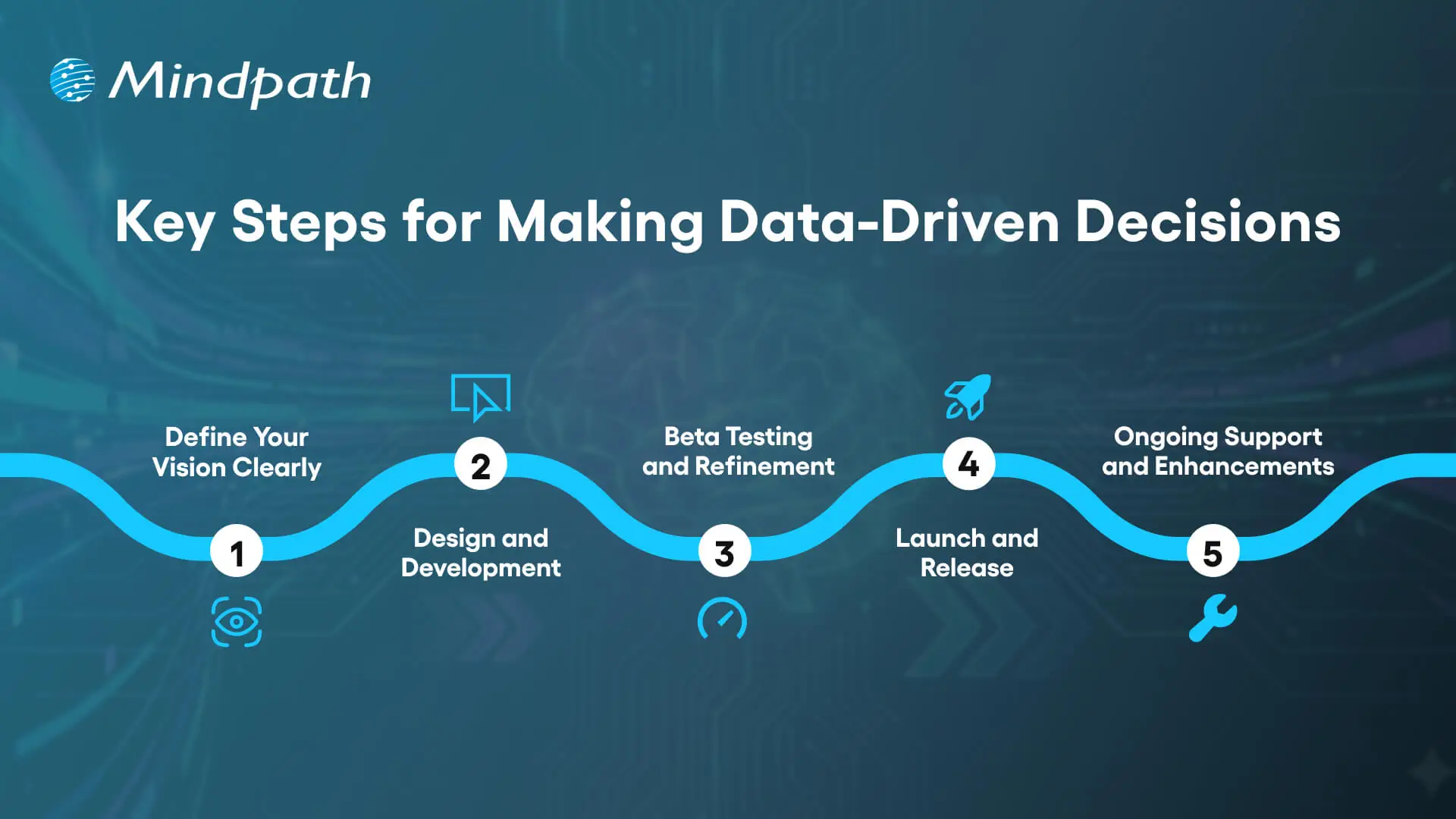
Key Steps for Making Data-Driven Decisions

1. Define Your Vision Clearly

Start by understanding your company’s main goals and direction before diving into the data. If you have a direction, that gives you an idea of how you can utilize the insights coming from the analysis as part of your overall business strategy. Data driven decision making is effective when each data point will drive measurable and long-lasting goals.

2. Identify Reliable Data Sources

After you’ve established your vision, it’s time to determine which tools and platforms are best suited to collect your data. Use sources that best match your business objectives: internal reports, customer analytics, market trends, etc. Having trustworthy data ensures that your data-driven decisions remain accurate and relevant.

3. Organize and Visualize Your Data

Consolidating key information into a clear and predetermined structure provides insight. Dashboards or reporting tools make visualization and a higher level of understanding simpler. Organized data allows for more timely and confident business decision-making, and teams can start to see connections.

4. Analyze to Discover Insights

Carefully analyze the information you’ve compiled for trends, opportunities, and challenges. Use your performance data along with genuine customer feedback to develop an even clearer picture. When you are analyzing data together with others, you can be confident that decisions represent a more comprehensive and accurate picture of your business.

5. Act on Your Conclusions

Following analysis, you should outline specific conclusions that summarize what the data is telling you, and what actions to take next. You will want to focus on linking conclusions to realizable goals and measurable results. Making conclusions and creating action steps develops from raw data to actionable steps and infers an ongoing step you will take in their continuous growth and improvement.

How can data-driven insights shape long-term business strategy? Read our blog on AI in business strategy to take a deeper understanding of how intelligent decisions fuel competitive advantage.

Tools and Technologies for Data-Driven Decision Making

Using the right tools and technology can speed up, simplify, and substantiate data-driven decision making. Beneficial technology allows organizations to collect, analyze, and visualize data to give investigators the tools to convert complicated information into digestible information in the form of insights for decision making.

1. Business Intelligence Platforms

Business‌‍ intelligence tools such as Tableau, Power BI, and Qlik Sense are utilized by businesses to display their data visually and to develop interactive dashboards. They break down complicated data sets into simple insights that can be quickly acted upon by the business. These platforms are instrumental in opening up and involving more people in the process of making decisions based on ‍‌data.

2. Programming Languages for Data Analysis

Massive datasets and high-level analytics are unimaginable without the use of programming languages like Python and R. In general, Python is the tool of choice when it comes to statistical modeling and automation, whereas R is more effective when the focus is on data visualization and statistical computing. Together they are a force to reckon with for all those professionals that solve problems and make decisions on the basis of ‍‌data.

3. Data Management and Manipulation Tools

SQL and Microsoft Excel are still the main tools used for organizing and analyzing data. SQL is used for managing and querying relational databases in an efficient manner, whereas Excel is utilized for carrying out quick analysis and generating reports. Combined, they are the means to keep data accurate and make it accessible for decisions to be taken at any level of the business.

4. Data Collection and Integration Tools

Google Analytics, Apache Airflow, and SQL databases are examples of platforms that retrieve and integrate data from various sources. They are instrumental in measuring the performance of a website, keeping an eye on the progression of tasks, and maintaining the data exchange between systems in a trouble-free manner. Such instruments provide a convenient way to obtain trustworthy data that can be used as a basis for making decisions.

5. Advanced Analytics and Machine Learning Tools

Information technologies such as SAS and Apache Spark are employed to handle massive data collections and to produce resulting projections. These tools enable businesses to foresee changes in the market and to tailor their tactics accordingly for maximum advantage. The use of machine learning in analytics further enhances the basis of data-driven decision-making.

6. Generative AI for Data Insights

Generative AI is changing the way companies understand and utilize their data. They get it done at much faster speeds with the help of AI, where it can also unveil the hidden patterns, and use predictive modeling to get the best results. This innovative technology is like an extra layer of depth and brains in the whole data-driven decision‌‍ ‍‌process.

Data-Driven Decision-Making Examples

Decision-making based on data is changing how companies manage strategies, operations, and growth, as it aids organizations to leverage real insights to make more intelligent and effective business decisions.
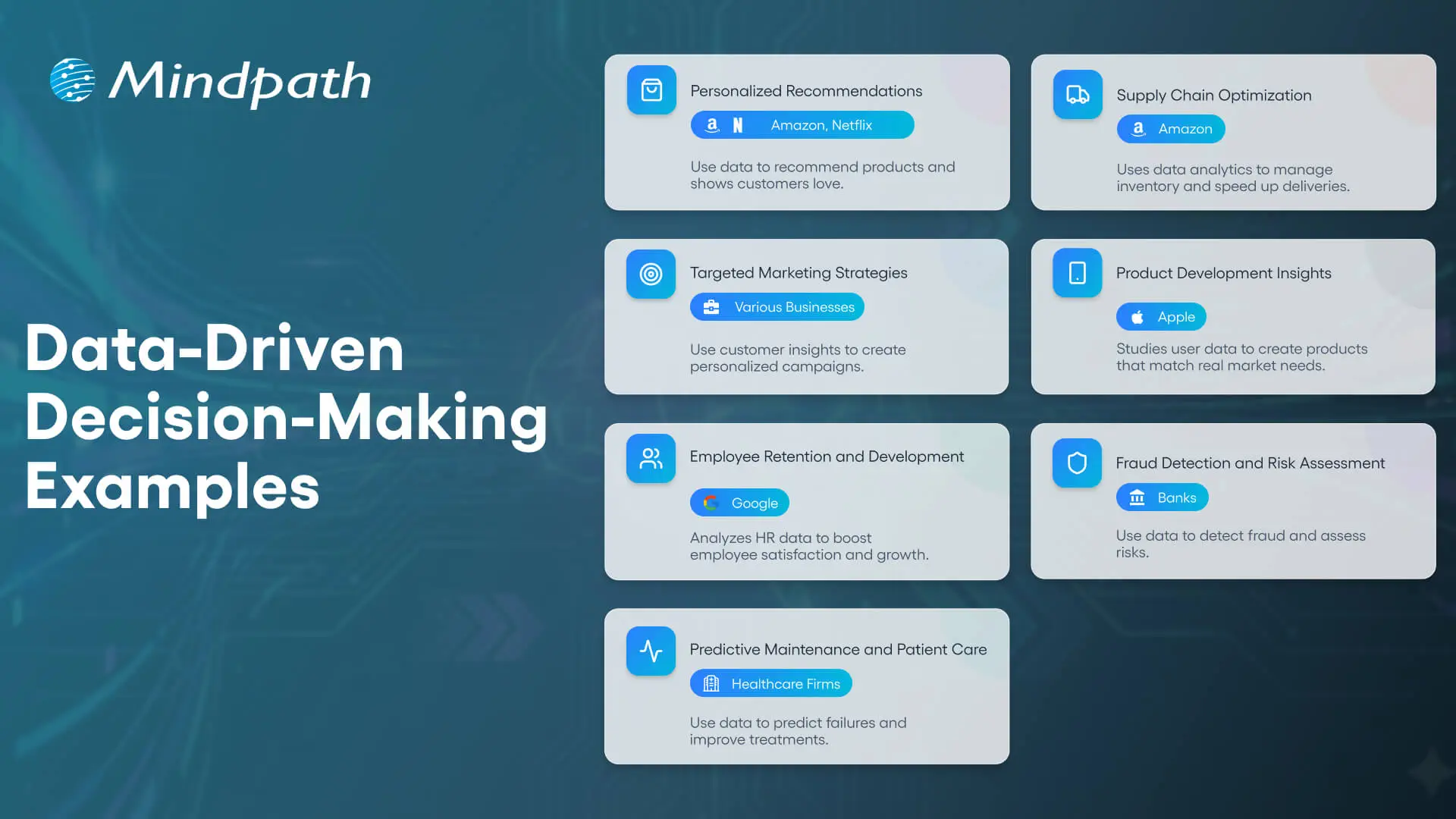
Data-Driven Decision-Making Examples

1. Personalized Recommendations

Interactive ‍data is a valuable source of information for online retailers like Amazon and for streaming services like Netflix. Based on this data, these companies suggest products or content that the customers might be interested in. As a result, customers become more engaged, produce more sales and have a better experience of the‍‌ service.

2. Supply Chain Optimization

Companies like Amazon evaluate stock levels, consumer need, and delivery time to achieve optimal efficiency in logistics while minimizing delay and cost, and ultimately completing orders faster and more efficiently.

3. Targeted Marketing Strategies

Companies look into customer data to predict buying habits and carry out an intelligent and personalized marketing campaign. The use of empirical methods has been demonstrated to be effective in raising brand awareness and increasing the conversion rate through the use of ‍‍‌data.

4. Product Development Insights

Companies such as Apple analyze data to identify user needs and market trends. This insight fosters innovation, allowing companies to create products that truly align with consumer needs.

5. Employee Retention and Development

The HR teams analyze survey data, along with performance data, to examine root causes of turnover and ways to increase employee satisfaction. Insights are also used to develop targeted training programs that can close gaps in knowledge or training to further their own career advancement.

6. Fraud Detection and Risk Assessment

Banks and other financial services organizations deploy data analytics to identify unusual behavior and reduce fraud. They also analyze customer data for risk assessment and improved product development.

7. Predictive Maintenance and Patient Care

Manufacturers use sensor data to catch and resolve a potential failure in the machinery early to mitigate down-time and related costs of maintenance. In the health care sector, using data from a patient’s medical chart will improve the quality of care by creating a more proactive treatment plan.

Looking to improve healthcare outcomes through better decision-making? Explore hospital management system insights to discover how real-time data drives operational and clinical efficiency.

Common Challenge While Implementing Data-Driven Decision Making

Without the right strategy and systems to properly execute data-driven decision-making, it can be complicated. Many organizations face challenges, often slowing their ability to adopt data-driven decision-making and, as a result, impacting the accuracy or impact of their decisions.

1. Poor data quality can lead to wrong insights and poor outcomes, making it vital to maintain accurate, consistent, and complete data.

2. Protecting sensitive information is essential, and organizations must ensure strong security measures and compliance with data privacy regulations.

3. Resistance to change can slow progress, so clear communication and proper training help employees adapt to data-driven decision-making.

4. Managing large datasets requires modern tools like cloud platforms and data lakes to ensure efficiency and accessibility.

5. Limited data skills can hold back growth, making it important to train teams and build confidence in using data effectively.

Looking to see data-driven decision-making in action? Discover AI chatbot examples that increased conversions to understand how insights improve customer engagement and sales.

Ready to Turn Data into Smarter Business Decisions?

Data-driven decision making helps businesses act with precision, clarity, and confidence. It turns raw information into actionable insights that lead to better strategies, improved performance, and stronger growth. By trusting data over assumptions, organizations can make choices that truly create impact and drive long-term success.

At Mindpath, we provide advanced AI development services that help businesses harness the full potential of data. From predictive analytics to intelligent automation, our AI solutions empower smarter, faster, and more informed decisions. Partner with Mindpath to transform your business insights into measurable outcomes and achieve sustainable success in a data-driven world.

Frequently Asked Questions

1. How can small businesses start using data-driven decision-making without a large budget?

Small businesses can begin with simple tools like Google Analytics, Excel, or CRM dashboards. Start by tracking a few important metrics, understand customer behavior, and make gradual improvements based on what the data shows.

2. How often should businesses review their data before making decisions?

It depends on the business type and goals. Some companies review data daily for operations, while others analyze it weekly or monthly for strategy. Regular reviews help businesses react faster and stay aligned with changing trends.

3. Can data-driven decision-making improve employee performance?

Yes. Data helps managers identify productivity patterns, training needs, and workflow gaps. This allows teams to work more efficiently, set clear goals, and improve performance with measurable progress instead of assumptions.

4. What happens if businesses rely on outdated data?

Outdated data can lead to poor planning, missed opportunities, and wrong business decisions. Businesses should update and verify data regularly to ensure decisions are based on current customer behavior and market conditions.

5. Is data-driven decision-making useful for industries beyond technology?

Absolutely. Industries like healthcare, retail, finance, manufacturing, and education use data to improve operations, customer experiences, forecasting, and long-term planning. Any business that wants smarter decisions can benefit from using data effectively.
Discover how data-driven decision-making enhances business strategies, improves outcomes, and fosters accountability for long-term success.
AI in Cybersecurity

Imagine being in a world where each online action gets monitored, analyzed, and at times, even targeted. In this world, safeguarding digital data is one of an organization’s biggest challenges. This is where AI in cybersecurity takes effect because it brings intelligence and speed to the way we identify and halt a threat. It allows the system to learn, adapt, and respond in real time, creating a more intelligent defence against an ever-evolving threat environment.

As cyberattacks become more sophisticated, companies are searching for solutions that can think faster than the attackers can. AI accomplishes this by providing a way to leverage raw data into insights that drive security improvements. AI is changing cybersecurity from a reactive to a predictive process. In this post, we will discuss how AI is improving cybersecurity and helping organizations to secure themselves in today’s digital world.

In today’s digital world, cyber threats are evolving fast. Our AI development services will help you in building smarter defenses that will protect against attacks and keep your data and system safe.

Understanding the Concept of AI in Cybersecurity

AI ‍‍in cybersecurity means the application of AI technologies such as machine learning, deep learning, and data analytics to security issues that result from evil actors on the net. By doing so, the systems become capable of going through a huge volume of security logs, finding the abnormal patterns, and foreseeing the potential attacks with a much higher level of accuracy and in less time as compared to conventional security‍‌‍ ‍‍‌measures.

When AI and cybersecurity combine, they create intelligent defense systems that detect and adjust to continuously evolving threats. These defense systems continuously learn from every new piece of data, becoming increasingly smart, adaptive, and flexible with each new piece of data. Organizations are able to utilize human judgment in conjunction with AI-enabled data analysis to develop defenses that are stronger, faster, and more dependable to protect their networks and digital ecosystems.

Concerned about securing applications against evolving cyber threats? Explore application security best practices for web and mobile apps to discover proven methods for strengthening digital defenses.

Benefits of Using AI in Cybersecurity

With AI, cybersecurity is changing the manner in which enterprises are protecting their digital systems. One of the key features of this technology is that the introduced intelligent tools are capable of quick thinking, learning, and acting, thus they can be a great support to the overall protective measures against cyber risks which keep on ‍‌evolving.

1. Smarter Threat Detection

AI in cybersecurity expedites the identification of threats by utilizing enormous amounts of data from multiple sources. It will find strange behaviors and advanced attacks that humans would not normally be able to put together. With AI detection, organizations are then better prepared to make timely decisions and strengthen cybersecurity.

2. Adaptive Learning Against New Threats

AI tools are distinct from conventional tools in that they also learn from recent data and attacking behaviours. Ongoing learning enables a rapid adaptation to new and unknown threats, even before they spread. With this flexibility, the effectiveness of AI cybersecurity and reliance on it will only grow in the future.

3. Automated Processes with Fewer Errors

Artificial Intelligence takes over the tedious security tasks that are usually done wrong by humans. It will handle monitoring, scanning, and alerting in a more timely and accurate manner. This allows security teams to shift their attention towards the strategy and high-priority security decisions.

Also Read: AI Consulting

4. Stronger Vulnerability Detection

AI in cybersecurity examines systems and applications to uncover vulnerabilities before an attacker can exploit them. It points out anything that may require immediate action, and can help avoid problems down the line. When issues are detected and resolved in real-time, organizations can better protect their digital environments.

5. Faster Incident Handling

AI decreases response time through automation, performing alerting and preliminary analysis, increasing recovery time through threat prioritizing and assisting the expert in additional fast decision-making. Rather promptly, taking action reduces the potential for damage or disruption while helping mitigate the impact on systems.

6. Deeper Behavioral Insights

AI’s examination of ordinary usage and activity behavior leads to the detection of deviant behaviour patterns. A change in behaviour can indicate an insider threat, or a compromised account and/or device. AI’s behavioural insights give organizations the ability to respond quickly and maintain a higher level of control over their digital assets.

How can organizations respond faster to security threats using intelligent insights? Read about AI in decision-making to understand how AI improves cybersecurity decisions.

Use Cases of AI In Cybersecurity

The intersection of cybersecurity and AI technologies will change the way businesses identify, prevent, and respond to digital attacks. Through the utilization of intelligent systems which learn and adapt, organizations can construct greater and more proactive security strategies for the contemporary digital environment.
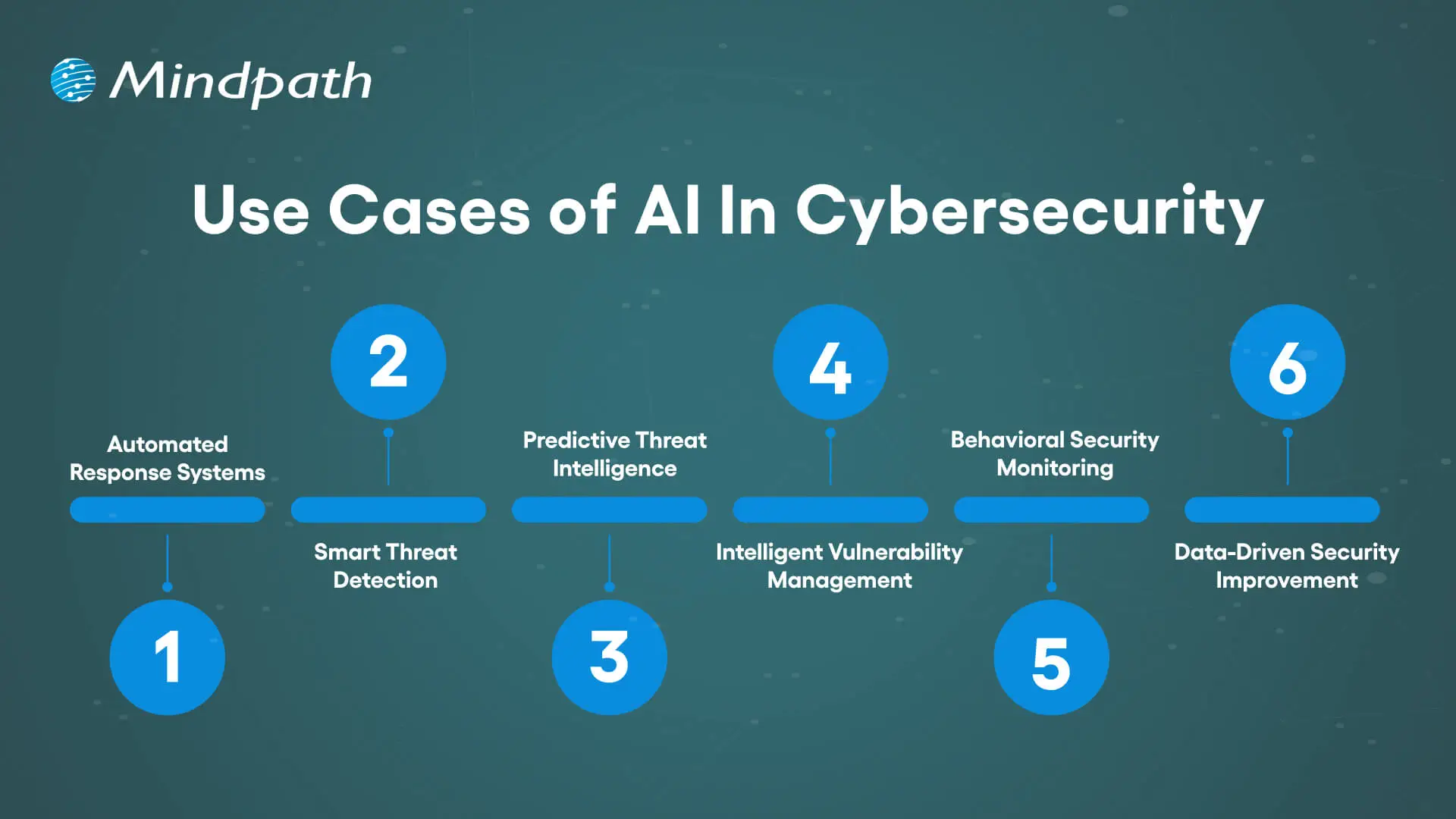
Use Cases of AI In Cybersecurity

1. Automated Response Systems

With AI, security incidents can be detected and acted instantly by taking actions such as isolating devices, or blocking malicious IPs, which mitigates attack impact and time to respond.

2. Smart Threat Detection

Artificial intelligence will scan data in near real-time, detect abnormal patterns, and uncover hidden, discreet threats that traditional tools may miss, such as phishing or network intrusions.

3. Predictive Threat Intelligence

AI will analyze behaviors and outside factors related to threats around the world and can predict and potentially prevent the next attack by turning data into actionable and meaningful defense-in-depth.

4. Intelligent Vulnerability Management

To help organizations stave off attacks, AI in cybersecurity finds all system vulnerabilities and ranks them based on severity, so that teams can manage the top-priority vulnerabilities and patch the most critical ones first.

5. Behavioral Security Monitoring

Cybersecurity and AI combine security monitoring with tracking users and better monitoring for suspicious behavior, stopping insider attacks and credential-based attacks before damage occurs.

6. Data-Driven Security Improvement

AI in cybersecurity changes data into usable intelligence based on the data, helping organizations improve detection, prevention, and overall protection.

Struggling to manage cybersecurity risks with limited visibility? Explore the importance of data-driven decision-making for businesses to discover how data strengthens security strategies.

Ready to Strengthen Your Cybersecurity with AI?

Artificial intelligence in cybersecurity is transforming the methods by which organizations protect their digital systems. It adds intelligence, speed and agility to security operations enabling organizations to proactively identify, prevent and respond to threats in real time. Given the growth of cyber risks, AI helps organizations be prepared, proactive, and resilient in the digital age.

At Mindpath, we offer advanced AI development solutions that help businesses enhance security and efficiency. Our expert team builds intelligent systems that detect risks, automate responses, and strengthen digital protection. With innovative AI-driven strategies, Mindpath helps organizations stay ahead of threats and achieve a safer, smarter, and more secure future.

Frequently Asked Questions

1. Can AI completely replace human cybersecurity experts?

No, AI works best when combined with human expertise. AI can quickly detect threats and automate repetitive tasks, but human professionals are still needed for strategy, investigation, and handling complex security situations that require judgment and

experience.

2. Is AI cybersecurity only useful for large enterprises?

Not at all. Small and medium businesses also face cyber threats every day. AI-powered security tools are becoming more accessible and affordable, helping businesses of all sizes improve protection, monitor risks, and respond to attacks more efficiently.

3. How long does it take to implement AI in cybersecurity systems?

The timeline depends on the size of the organization, existing infrastructure, and security goals. Some AI security tools can be integrated within weeks, while more advanced enterprise-level implementations may require several months for proper setup and training.

4. Can AI help prevent ransomware attacks?

Yes, AI can identify unusual behavior patterns linked to ransomware before major damage happens. It can detect suspicious file activity, unauthorized access attempts, and abnormal network behavior, helping security teams respond faster and reduce the impact of attacks.

5. What industries benefit the most from AI in cybersecurity?

Industries handling sensitive data benefit greatly from AI-powered security. Healthcare, banking, e-commerce, government, and education sectors use AI to protect customer information, detect fraud, secure networks, and manage growing cybersecurity risks more effectively.
Discover how AI enhances cybersecurity with smarter threat detection, faster responses, and proactive vulnerability management to protect your business in the digital age.

Join our Newsletter!

categories

Join the world's largest training library and unlock new opportunities!

Featured Posts

Turn Insights Into
Real Business Solutions

Exploring trends is only the beginning. Whether you’re planning AI adoption, modernizing legacy systems, or building scalable software, our experts help transform ideas into practical business outcomes.