WordPress and PHP Compatibility: Guide for Business Owners

Join our Newsletter!

Featured Posts

Support Is One Click Away

Home

WordPress and PHP Compatibility: Guide for Business Owners

Wordpress and php

WordPress and PHP Compatibility: Guide for Business Owners

In the technology-driven times, WordPress has been continuously recommending running the latest PHP versions. In fact, PHP 8.3 is now the standard for performance, security, and long-term support. It is a must for business owners to keep track of WordPress and PHP compatibility. This is because it can directly impact the performance and SEO ranking of their websites. Moreover, it can also impact customer trust, which is of high importance in the competitive business world.

As PHP evolves quickly, many sites still run outdated versions that no longer receive security updates. Hence, they face cyber risks. Businesses must comprehend the WordPress recommended PHP version and learn how to check the current WordPress PHP version. You should also possess knowledge of WordPress PHP compatibility so that you can future-proof your website. Let us discuss what business owners must know about WordPress and PHP compatibility.

Are you ready to make sure that your WordPress site works well with the newest versions of PHP and that all of your users have a good experience? Mindpath’s WordPress development services provide expert guidance to keep your site secure, fast, and highly reliable for your visitors.

An Insight into WordPress

In the prevailing digital world, WordPress has emerged as the leading content management system in the world. It has been powering a large number of websites that are available online today. In the year 2025, WordPress continues to grow in the digitalized business world. When WordPress first came into existence, it served as a blogging platform. But it has evolved into a versatile platform for businesses and professionals over the years.

The CMS platform has become highly popular thanks to its open-source nature and large plugin ecosystem. Furthermore, the presence of customizable themes that allow organizations of diverse sizes to build professional websites makes it a highly popular platform in the current times. A key aspect of the success of WordPress is its compatibility with modern technologies, such as PHP, which powers its core.

An Insight into PHP

PHP is the short form of Hypertext Preprocessor. It is one of the most widely used open-source scripting languages for web development that exists today. Since its launch, PHP has powered millions of websites. In fact, it remains the backbone of popular platforms such as WordPress and Drupal. The key factors that contribute to its popularity include its lightweight nature and easy integration with HTML. Therefore, PHP acts as an essential language for dynamic as well as interactive websites.

Over the years, PHP has undergone major transformations. It has developed from PHP 5.x to the current PHP 8.3. The latest version offers improvements in performance and security. It has numerous useful features, including Just-in-Time compilation and improved error handling. These advancements are pivotal for businesses that have WordPress sites.

Unsure which platform can better support your website’s design, features, and long-term growth? Explore our WordPress vs Webflow comparison to understand their key differences and choose the best fit for your business.

Chief PHP Versions Businesses Need to Know

PHP has been evolving quickly, and each version has new features, performance improvements, and security fixes. The business entities that use WordPress need to understand different PHP versions, as outdated versions expose websites to vulnerabilities and risks. But newer versions can deliver speed and stability to websites. The top PHP Versions that businesses must be aware of include:

  • PHP 8.5 – It is an active development branch for the upcoming PHP release. PHP 8.5 is scheduled for release in November 2025.
  • PHP 8.4 – PHP 8.4 is known as a feature-rich PHP version. It has several new features, such as asymmetric visibility, property hooks, and many more.
  • PHP 8.3 – It is the latest stable PHP version. It has introduced several enhancement features that improve type safety, developer experience, and performance.
  • PHP 8.2 – This PHP version brings significant benefits when it comes to site performance as well as health, especially in relation to speed and security.

There are other PHP versions like PHP 8.1 and PHP 8.0. Even though these versions were regarded as valuable tools for businesses before they became outdated, they give rise to security threats today. PHP 7.4 is another older version that has reached its end of life. It means that the specific version does not receive any official security updates currently.

PHP 8.3 is the latest release. At present, it is the recommended standard for WordPress websites. WordPress PHP 8.3 delivers significant performance boosts, advanced language features, and long-term support. It is essential for businesses to choose the right PHP version so that plugins, themes, and custom code can run smoothly.

Must Read: Custom WordPress Development

The Need for WordPress and PHP Compatibility

WordPress and PHP compatibility serve as the ultimate foundation of a top-quality website. As WordPress is built on PHP, the version your site runs directly affects its speed and stability. Outdated PHP versions basically lack security patches, thereby making websites vulnerable to cyberattacks, data breaches, and compliance issues.

Another critical factor that businesses need to bear in mind revolves around performance. Newer PHP versions, such as PHP 8.3, are capable of delivering faster load times. The selection of the best PHP version for WordPress is vital to reduce server resource usage and improve scalability.

The business enterprises that rely on lead generation or content-heavy sites can tremendously benefit from the latest PHP versions for WordPress. Without the latest PHP version, a WordPress business site may become slow or unstable. It may frustrate visitors and affect their experience.

Another critical factor is compatibility, which businesses need to bear in mind. It can ensure the smooth operation of plugins and themes. If your website runs an unsupported WP PHP version, it may lead to errors and broken features. It may also lead to downtime and disrupt the experience of customers. Businesses need to choose the WordPress-recommended PHP version so that they can safeguard the functionality of their website and streamline the maintenance aspects.

Facing recurring security issues, but not sure what’s causing them? Read our safeguarding WordPress vulnerabilities guide to uncover common risks and learn how to prevent them effectively.

Procedure to Update PHP for WordPress Websites

It is a must for businesses to update the PHP version of their website. This is a key step that can help maintain security as well as compatibility. Below are the steps you must follow to update the PHP version for your website to get optimum WordPress PHP version support.

Step 1 – Current PHP Version Validation

Business owners need to check the PHP version of their business site. You can check this from the admin dashboard. In case you find that your website does not run the latest PHP version, you need to update it instantly.

Step 2 – Creating a Backup of your Website

In the next step, it is time to create a backup of your website. This step you need to take as a precautionary measure in case something goes wrong during the process. In case your hosting provider does not provide backups as part of its service, you can use plugins in order to create a full backup. You have to make sure that you capture details such as the database, themes, plugins, and media files.

Step 3 – Testing Changes in a Staging Environment

Now it is time to try the new version in the staging environment instead of going live. It serves as a reliable way of checking the compatibility between WordPress and the latest PHP version.

Step 4 – Updating the PHP Version

After verifying whether your business website works or not with the new PHP WordPress version, you need to log in to your hosting control panel. Then you must find the built-in PHP manager. The exact steps may vary depending on control panels, but they are mostly similar. Then you need to update the PHP version. After making the modification, you have to wait for the update to finish so that the upgrade can be done successfully. You need to choose the latest version so that you can get the necessary WordPress PHP support to manage your website.

Step 5 – Testing Website Functionality

After the update is over, you need to test the functionality of the live website. You have to do this in the front end as well as the back end in order to see if everything works in the desired way. You have to make sure that you review the common WordPress functions along with the plugin features.

Do you want your website to be accessible to every visitor? Learn how to improve WordPress web accessibility can help you reach more users and create an inclusive online experience.

Best Practices for Business Owners

There are certain best practices that business entities need to follow so that they can run their website smoothly while using the latest WordPress PHP versions. If you have a WordPress site for your business, you certainly need to follow these best practices.

1. Staying on Top of PHP Updates

You need to make sure that the WordPress core, plugins, and themes are current at all times. It is a must for businesses to keep a lookout for the latest PHP updates. This step can enhance the overall performance and functionality of your business website.

2. Practice of Backing Up

It is critical to back up all the necessary data before the actual update. A full site backup can ensure that your business website is in safe hands. In case things do not go according to plan, the backup can serve as a safety net.

3. Keeping Clean Code

You must ensure that if you use custom code, it must follow WordPress’s PHP coding standards. This practice is pivotal since it can prevent conflicts with core WordPress functions.

4. Testing in Staging

Many businesses may fail to realize the importance of a staging environment. However, it is essential for you to understand its significance. In fact, you need to use a staging environment in order to test updates.

Ready to upgrade your HTML site to something more powerful and manageable? Explore why converting HTML to WordPress can streamline updates and improve your online presence.

Final Words

In the digital landscape of 2025, businesses need to stay current with WordPress and PHP compatibility to ensure their success. PHP 8.3 is now the recommended version for business websites. Thus, business owners need to make the update so that they can gain the benefits relating to stronger security, better performance, and smoother functionality of the website. On the other hand, if businesses ignore PHP upgrades, their risks relating to cyberattacks and plugin conflicts increase, which can affect customer trust.

Mindpath’s WordPress development services can make PHP upgrading a simpler process for your business. Businesses can leverage the excellent services to improve the security and performance of their business website. Our experts will make sure that your website can run in an efficient manner.


Related Post

Discover how AI is transforming the world. Explore the top 10 benefits of artificial intelligence, from solving complex problems to enhancing customer experiences.

Related Post

React JS Trends

Are you curious about what’s next for React JS in 2025? With the fast-paced world of web development, it’s essential to stay ahead of the curve. What new features, tools, or practices will shape the future of React JS? In this blog, we will explore the key trends and innovations that will define React JS in 2025. 

ReactJS is a popular tool for developers to create websites and applications. It makes it easier to design interactive and quick user interfaces by breaking down significant web pages into smaller, reusable elements known as components. Think of it as a website building block approach that simplifies and speeds up its construction. ReactJS is changing along with technology. Keeping up with the newest ReactJS trends for 2025 helps developers remain ahead of the competition. Understanding these trends will enable you to employ the finest tools, enhance your abilities, and design more efficient and contemporary websites. Whether you’re a newbie or an experienced developer, knowing what’s coming in ReactJS will help you stay competitive and prepared for the future. 

Let’s delve into the ReactJS trends 2025! 

ReactJS Trends 2025

1. Server-Side Rendering (SSR)

Server-Side Rendering (SSR) is a technique in which the server generates the first version of a webpage and provides it to the browser as HTML. This improves website performance and SEO since search engines can read the pre-rendered material. React JS supports SSR via frameworks like Next.js and Gatsby. These frameworks pre-render pages on the server before providing them to the client, resulting in speedier website load times and a better user experience. SSR decreases load times, particularly on slower connections. Users can see content rapidly due to SSR, which eliminates the need to load all of JavaScript. It also helps to improve search engine rankings because the material is freely available to crawlers. 

2. WebAssembly

WebAssembly is a low-level binary format that runs natively in web browsers, with performance comparable to native programs. It enables web applications to do complicated tasks considerably more quickly, making it perfect for high-performance activities like gaming, video editing, and data processing in the browser. WebAssembly improves React JS performance by offloading expensive calculations, making the app quicker and more responsive. It also enables React to interface with other languages such as Rust, C++, and WebGPU, allowing developers to combine the benefits of various technologies in a single program. As the web advances, WebAssembly is becoming an essential tool for developing high-performance online applications. Its ability to run code rapidly and operate with many technologies makes it a significant trend to watch in 2025 for React JS.  

3. Improved Developer Tools

Better developer tooling is crucial for increasing productivity and enhancing the quality of React JS development. React JS already has strong tools such as React DevTools, Create React App, and React Testing Library, which help developers work quicker and more efficiently. In the future, React JS is intended to provide even more tools and functionalities. One such feature is React Fast Refresh, which allows for hot reloading while maintaining component state, making development more efficient. Another interesting feature is React Profiler, a tool that allows developers to evaluate and optimize the performance of React JS apps, ensuring that they execute smoothly. Furthermore, the React Developer Roadmap will offer advice on learning and mastering React, allowing developers to plan their path with the framework. These tools modifications will ease the development process, allowing developers to create faster, more powerful apps.  

4. Concurrent Mode Features

Concurrent Mode is an upcoming React JS feature that allows many components to render simultaneously without interfering with the main thread or influencing user interaction. This increases the efficiency and responsiveness of React apps, allowing them to function more smoothly and quickly. Concurrent Mode enables React to handle complicated updates more effectively, allowing for additional features such as suspense, which helps manage loading states, transitions, for smoother UI changes, and error boundaries, which give improved error handling. The concurrent option is currently experimental and must be activated manually; however, it is intended to become the default rendering option in future versions of React JS. React apps that employ Concurrent Mode will be able to give a better user experience through quicker and more responsive interfaces.  

5. Focus on Mobile Development

With the increasing popularity of mobile devices, mobile-first development has become important. React JS already enables mobile app development with React Native, which blends React JS and native components to create cross-platform mobile applications. This enables developers to create apps that run on both iOS and Android using a single codebase. Looking ahead, React Native is projected to gain even more strength and complexity. It will continue to leverage React JS’s features, as well as advances in mobile technology, to improve connectivity with native platforms such as SwiftUI, Jetpack Compose, and Expo. These enhancements will accelerate mobile app development and give customers smoother, more native-like experiences. As mobile usage continues to climb, React Native will be essential in helping developers generate high-quality, cross-platform apps.  

ReactJS Development at Mindpath

Our skilled React.js developers at Mindpath have the necessary abilities and expertise to construct contemporary, engaging user interfaces that increase user engagement and satisfaction. Whether you want to create a web application from scratch, upgrade an existing one, or quickly get your product to market, Mindpath is here to help with cost-effective solutions, quick development timeframes, and dependable support. Here’s a review of the services we offer:  

1. ReactJS Front-End Development

We are involved in creating responsive and dynamic user interfaces to improve user experience and interaction with your website.  

 2. React Native App Development

Our team develops cross-platform mobile apps with React Native and gives them the native look and feel across iOS and Android devices.  

3. ReactJS Consulting

We expertly guide you on the usage of ReactJS in your projects so that the development strategy and architecture may be better optimized for the projects.  

4. ReactJS API Integration

We will integrate your ReactJS applications easily with external APIs and connect them seamlessly for smooth data and functionality exchange.  

5. ReactJS Enterprise App Development

We develop scalable and reliable applications that large organizations can use to take up complex requirements with high performance and efficiency.  

6. ReactJS Maintenance & Support

Continuous maintenance and support services that keep your ReactJS applications in motion, fixing any issues fast.  

7. React Web Design

We design engaging and user-friendly web interfaces that provide an impressive user experience through a focus on aesthetics and functionality using ReactJS.  

8. Custom React JS App Development

Build customized ReactJS applications that meet your business requirements, providing personalized solutions to all your needs. 

9. ReactJS Upgradation

Upgrade your existing ReactJS applications to their latest versions, offering you brand new features and improved performance.

10. ReactJS Product Development

We develop innovative products with ReactJS; high quality and performance-driven applications that fulfill your business needs.

11. ReactJS Ecommerce Development

We will build robust, interactive e-commerce platforms using ReactJS to ensure a great online shopping experience.  

12. ReactJS Migration

We help migrate your existing applications to ReactJS while ensuring smooth transitioning and improved performance.  

13. ReactJS Plugin Development

Developing custom plugins for ReactJS that extend functionality and fit in perfectly with other tools and systems.  

14. ReactJS Social Media & Interactive Apps

 Let us help you create engaging social media and interactive applications using ReactJS that improve user interaction and their experiences.  

15. ReactJS Customization Services

We will customize ReactJS components and applications according to your needs and wishes.  

Wrapping Note!

As we approach 2025, React JS is expected to introduce new advancements that will improve both development and user experience. Server-Side Rendering (SSR), WebAssembly, and Concurrent Mode are three key technologies that promise to increase app speed and response time. Mobile-first development using React Native will continue to advance, making it easier to create cross-platform mobile applications. By staying on top of these changes, developers can build speedier, more efficient apps while remaining competitive. Mindpath’s React JS development services are designed to help you fully use these breakthroughs, from front-end development to mobile app production and continuous maintenance. 

Ready to bring your ideas to life with cutting-edge React JS solutions?

Partner with Mindpath for expert development and innovative results.

Discover React JS trends for 2025, including SSR, WebAssembly, etc. to create faster, smarter, and future-ready applications.
full-stack development for web projects 

Building a website today is about combining design, speed, and performance, all in one place. That’s where full-stack development for web projects plays a big role, as it encompasses everything from the look of a site to how it performs. As websites grow bigger and more complex, the full-stack development approach allows teams to work smarter rather than harder and deliver stronger solutions without any delay or confusion. This is why full-stack development is an increasingly popular way to develop truly distinct web projects.

By managing the front-end and back-end together, teams can react more quickly to updates and allow them to maintain their website without interruptions. In addition, it allows for greater control of the entire process, which leads to much better user experiences. Many companies are adopting this approach to develop websites that will grow and improve over time. Curious to know more? Well, in this blog, we will discuss how full-stack development is going to shape the future of web projects in detail.

Want to bring future-ready development to your business? Explore how Mindpath’s full-stack development services can help you stay ahead and provide end-to-end support.

Fundamentals of Full-Stack Development

Full-stack development means building both the front-end and the back-end of a website or app. The front part is what we interact with and see, such as buttons, images, menus, and links. The back part is what is going on behind the screen to make everything work: saving things, logging in, sending emails, etc. A full-stack developer knows how to build and manage both parts of a project, so it all works properly from beginning to end.

Companies want websites that are visually appealing, load quickly, and are easy to navigate. Most companies prefer hiring one full-stack developer rather than two separate developers (one for front-end and one for back-end) because this saves time and avoids paying for two separate developers. Full-stack developers can build complete web projects on their own. That’s why companies continue to search for strong full-stack developers that can do the full job and help make better websites quicker.

Planning to scale quickly? Learn why hiring a freelancer full-stack developer boosts your project.

Reasons Why Full-Stack Development is the Future of Web Projects

Full-stack development makes end-to-end web development more effective by combining both the visual design and the behind-the-scenes logic into one smooth process. As we move toward full-stack development in 2025, more businesses are choosing this method for its flexibility, speed, and complete control over web projects. Here are some key reasons why:

Top Reasons to choose full-stack development for web projects

1. Complete Technical Expertise

Full-stack development for web projects requires knowledge of both front-end and back-end technologies. Developers in this field work with HTML, CSS, and JavaScript for user interfaces and use tools like Node.js or Python for server-side logic. They also manage databases such as MySQL or MongoDB to store and retrieve data efficiently. This complete skill set makes full-stack development for businesses highly practical and reliable.

2. Optimized Development Efficiency

One of the key advantages of full-stack development for web projects is the ability to complete tasks faster without needing multiple specialized developers. It reduces development time, lowers project costs, and helps deliver results more quickly. Teams can avoid delays caused by handovers between front-end and back-end teams. That’s why many companies now prefer full-stack development to keep their projects on track and within budget.

3. High Project Flexibility

Developers skilled in full-stack development can switch between tasks easily based on what the project needs. They are comfortable using different tools and frameworks and can adjust to changes without slowing down progress. This flexibility is valuable when requirements evolve or when rapid updates are needed. It also supports the use of the best tech stack for web projects tailored to each client’s goals.

Also Read: Full-stack Development Benefits

4. Stronger Problem-Solving Capability

A full-stack developer understands how both the client-facing side and the server work together. This broad view helps in identifying issues quickly and finding effective solutions without back-and-forth between teams. It leads to fewer errors and a more stable final product. As a result, full-stack development for web projects brings stronger control and problem-solving to the entire build process.

5. Improved Team Communication

Fewer handoffs mean fewer communication gaps between developers and project managers. In full-stack development for web projects, one person or a small team handles most of the workflow, which keeps messaging clear and consistent. This improves team collaboration and speeds up approvals and fixes. It also supports better planning throughout the stages of full-stack web development.

6. Growing Market Demand

With digital needs growing, full-stack development has become one of the most valuable skills in the tech world. Companies are hiring developers who can handle everything from front-end to database, increasing demand across industries. It also offers room to grow in multiple areas, including project leadership and architecture, through understanding full-stack development trends. This rise is a direct result of businesses investing more in full-stack development for modern digital solutions.

Key Skills Required in a Full-Stack Web Project Team

A successful full-stack web project relies on more than just writing code. It needs the right mix of skills across the team, covering everything from design to database management for smooth and efficient web solutions. Let’s have a quick look at the skills:

1. Front-End Development

Developers need strong skills in HTML, CSS, and JavaScript to build the structure and style of web pages. Frameworks like React, Angular, or Vue.js help create dynamic and responsive user interfaces.

2. Back-End Development

Understanding server-side languages such as Node.js, Python, or Java is essential for creating logic and functionality. Frameworks like Express.js or Django support faster and more organized development.

Planning to build smarter web solutions? Discover how full-stack development with Node.js can streamline your digital growth.

3. Database Management

Developers should know how to use both SQL and NoSQL databases like MySQL, PostgreSQL, or MongoDB. Good database skills help manage, store, and retrieve data efficiently.

4. API Development

Designing RESTful APIs is important for connecting front-end and back-end systems. APIs must be secure, scalable, and easy to maintain in web projects.

5. DevOps and Deployment

Version control with Git and CI/CD tools helps automate code testing and deployment. Cloud platforms like AWS or Azure make it easier to launch and scale applications smoothly.

6. Soft Skills for Team Performance

Effective communication, adaptability, and time management help teams meet deadlines and solve problems together. These qualities support a smooth workflow in full-stack development for web projects.

Confused between full stack and traditional web development? Discover how smart businesses choose from full-stack vs traditional web development for the success of project. 

Full-Stack vs Front-End and Back-End: A Comparison Table

Understanding the difference between full-stack vs front-end and back-end roles helps in choosing the right approach for a web project. Below is a comparison table that highlights their core responsibilities and capabilities.

Full-Stack vs Front-End and Back-End A Comparison Table

Ready to Elevate Your Next Web Project with Full-Stack Development?

Full-stack development for web projects offers a balanced, future-ready approach that blends front-end creativity with back-end power. It simplifies workflows, speeds up launches, and ensures better user experiences. As digital needs continue to evolve, adopting full-stack practices gives businesses the edge to build smarter and scale faster with fewer roadblocks.

At Mindpath, we offer full-stack development services tailored to support your business growth. Our expert full-stack developers handle everything from user interface to server-side logic, ensuring smooth performance and cohesive functionality. With deep technical knowledge and a collaborative mindset, we deliver reliable, scalable, and efficient digital solutions that meet your unique project needs.

how generative ai work in creative industry

In a digital environment where GenAI is emerging as a new place to start innovating, we are often faced with questions like, can AI be creative? Have you ever thought about how generative AI work in creative industry today? Well, generative AI is no longer just technology; it is a creative partner. It can assist with day-to-day entries to concepts, to producing full designs or content. GenAI solutions are beginning to change how professionals will manage their work moving forward. It is creating new opportunities to bring imagination together with intelligent automation. How exciting is that, right?

As more professionals utilize AI to support their creative processes, the impact is becoming apparent across multiple industries. According to a study by The Business Research Company, the generative AI market in creative industries grew from $3.08 billion in 2024 to an expected $4.09 billion in 2025, and it’s projected to reach $12.61 billion by 2029. With open-source tools, rising interest, and cross-industry use, the landscape is evolving fast. Want to know about this in depth? In this blog, we’ll be taking a closer look at how generative AI is changing creative work and the impact it will have on the future of the industry.

Looking for ideas to reshape your business with generative AI? Unlock smarter growth, faster innovation, and personalized customer experiences with our AI-powered solutions.

What is Generative AI?

Generative AI is a type of technology that enables computers to produce new content such as text, images, music, or even computer code. Instead of just producing answers or analyzing data, generative AI will generate new content on its own by analyzing a data set or learning from examples. For companies, this opens the door for them to use generative AI to save time, produce content faster, and create even more personalized experiences for their customers. It allows teams to be more productive collaboratively and be more creatively enabled.

How does Generative AI Work?

Generative AI works by learning from large amounts of data like text, images, or audio, and then creating something new based on that learning. It uses neural networks, which are computer systems designed to understand patterns, such as how sentences are written or how pictures are formed.

These systems are trained using different types of learning methods, often with very little labeled data. This helps build foundation models that can do many tasks. Generative AI examples include tools like ChatGPT, which can write stories or articles from short prompts, and DALL·E, which creates simple images from written descriptions.

How Generative AI Work in Creative Industry?

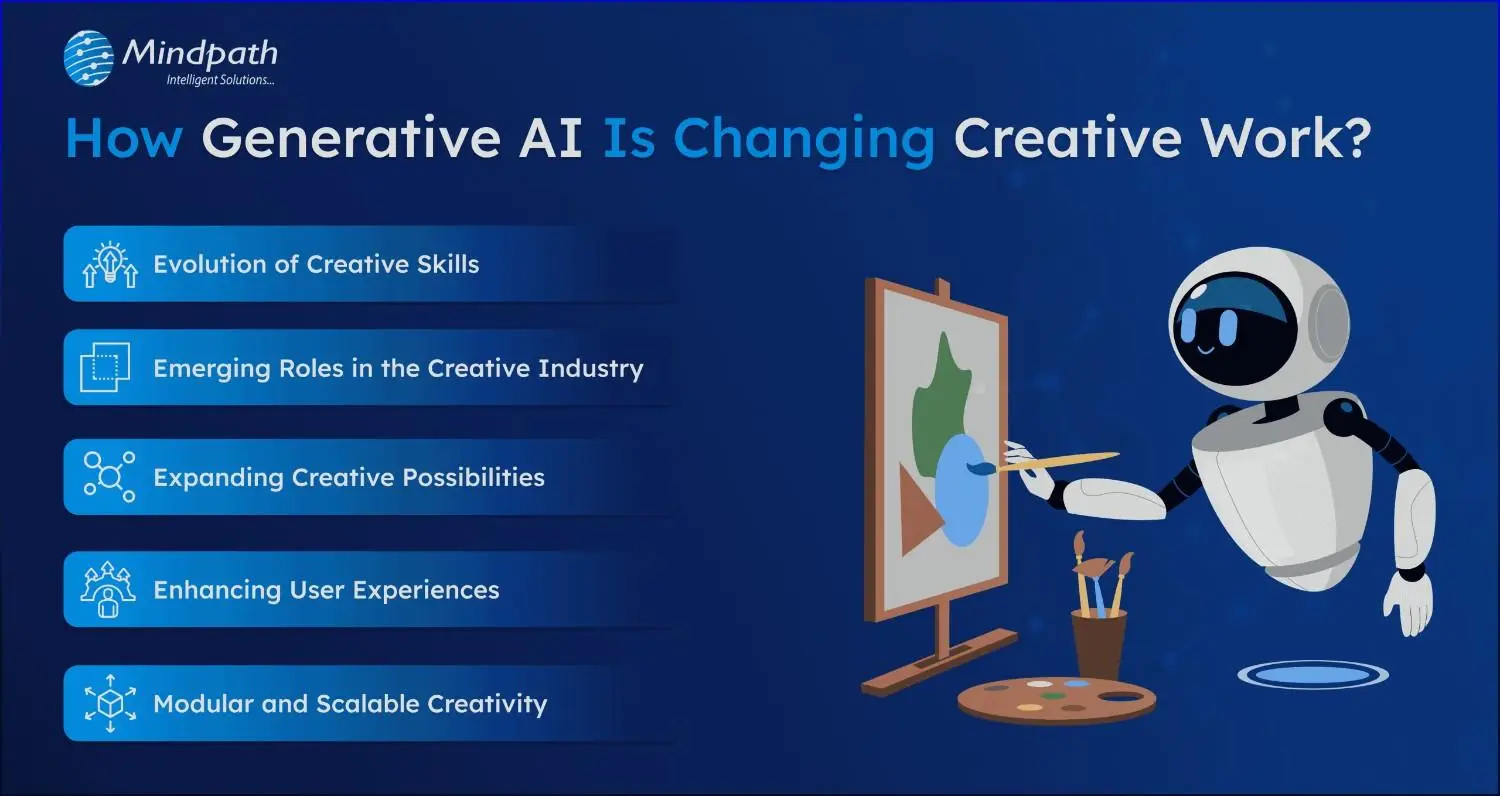
Creative work is changing in many exciting ways with the help of GenAI. It’s helping people come up with new ideas, save time, and try things that were not possible before. If you’re curious about how does generative AI affect creativity, here are the ways it’s making the creative process easier, faster, and more inspiring.

how-genAI-is-changing-creative-work-scale

1. Evolution of Creative Skills

Today’s creative professionals need more than just talent. They also need to understand how to use generative AI tools wisely and make thoughtful, responsible choices. Skills like curation help them pick and improve AI-generated ideas, while AI fluency means knowing how to use tools like ChatGPT or DALL·E. Most importantly, they must think ethically to ensure their work respects people and values.

2. Emerging Roles in the Creative Industry

As AI becomes a regular part of creative work, new types of roles are starting to appear. These jobs mix creative thinking with technical skills, showing how generative AI work in creative industry. For example, Prompt Engineers write clear instructions to help AI create content, while AI Art Directors use AI tools to design visuals quickly. There are also roles like Synthetic Media Producers and AI UX Designers who focus on virtual content and improving user experiences.

How are different industries leveraging Generative AI today? Find out in our blog on Generative AI Use Cases across Industries—from content creation to customer service and beyond.

3. Expanding Creative Possibilities

Generative AI is removing many of the limits that once held creative ideas back. Now, artists, marketers, and musicians can quickly try out new concepts without worrying about time or cost. They can test visuals, messages, sounds, and styles almost instantly. This freedom encourages bold thinking and opens the door to more creative experiments than ever before.

4. Enhancing User Experiences

Creative work is becoming more interactive and personalized, thanks to the use of generative AI. Brands and creators are now building experiences that adapt in real time, giving users a chance to take part in the creative process. From custom storylines to co-designed fashion and dynamic game worlds, AI is adding a new layer of engagement. Rather than replacing creativity, it’s helping people bring their ideas to life in exciting new ways.

5. Modular and Scalable Creativity

Generative AI is making it easier to create content in parts, or modules, that can be reused and adapted for different needs. This helps teams customize content for various platforms and audiences without starting from scratch each time. Marketing teams can turn one idea into ads, videos, or social posts quickly. Designers and writers are now building flexible templates that save time and boost creativity.

Also Read: Top GenAI Tools Shaping the Future of AI Development

Real-World Examples of GenAI Transforming Creative Industries

Generative AI is making a real difference in how creative work happens across different industries. Many companies and creators are already using it in ways that are smart, fast, and effective. Here are a few real-world examples showing its growing impact.

1. Entertainment Industry

GenAI is helping creators in entertainment and gaming bring stories and virtual worlds to life more quickly and creatively. Game developers are using AI to design characters, build game levels, and create realistic dialogue. It also supports features like deepfake voices and more dynamic non-player characters. In filmmaking, tools like Runway ML make it easier to edit videos and add visual effects in real time.

2. Writing and Publishing Industry

Writers are now using generative AI to boost both creativity and productivity. From coming up with ideas to drafting and editing, AI tools help simplify the writing process. Platforms like ChatGPT offer support when writers face blocks or need quick content suggestions. Publishers are also using AI to create short stories, newsletters, and SEO content at a larger scale.

3. Advertising and Sales Industry

Generative AI supports sales teams by helping them write personalized emails, prepare reports, and test different sales pitches more efficiently. It also assists in understanding products, markets, and risks by analyzing use cases and offering clear insights. Tools like ChatGPT and Gemini can explain complex visuals and data, making it easier to make informed decisions. Platforms like Jasper even help sales teams expand globally by translating content into multiple languages.

4. Marketing Industry

Marketing is one of the industries seeing the biggest impact from generative AI. It allows companies to personalize content at scale, create high-quality visuals and videos quickly, and manage large volumes of work in less time. Tools like ChatGPT, Jasper, and Einstein Copilot help with ad optimization, brand design, and social media content. These tools also support strategy by building customer profiles, analyzing competitors, and predicting market trends.

5. Media Industry

GenAI is helping media industries create content faster by assisting with writing, editing, and transcribing. News outlets use it for generating headlines, interview questions, and social media posts. Some broadcasters also use AI anchors and tools to automate simple news stories. While a few bold moves faced setbacks, many media groups now rely on AI to improve efficiency and scale content production.

Curious about where Generative AI is headed next? Explore the top Generative AI Trends for 2025 and stay ahead of the innovation curve.

Ready to Transform Your Creative Process with Generative AI?

Generative AI is transforming how creative professionals work by making tasks faster, smarter, and more flexible. It supports everything from writing and design to marketing and media. By understanding how generative AI work in creative industry, teams can unlock new levels of innovation, improve productivity, and explore fresh ideas without limits.

At Mindpath, we offer advanced Generative AI development services that help businesses simplify creative work and scale innovation with unexpected solutions. Whether you’re looking to generate content, design visuals, or build engaging user experiences, our expert team and tools are ready to support your goals. We work closely with you to deliver practical, AI-powered solutions that drive results. With Mindpath, your ideas turn into impact—faster, smarter, and with creative confidence.

Ready to Elevate Your Creativity? Dive into Mindpath’s generative AI solutions for faster, smarter, and more effective creative work. Contact Us

Discover how is generative AI changing creative work by boosting efficiency and making tools more accessible for all creators.