Home

AI Agents That Work Across CRM, ERP, and Business Systems

AI Agents That Work Across CRM, ERP, and Business Systems

Join our Newsletter!

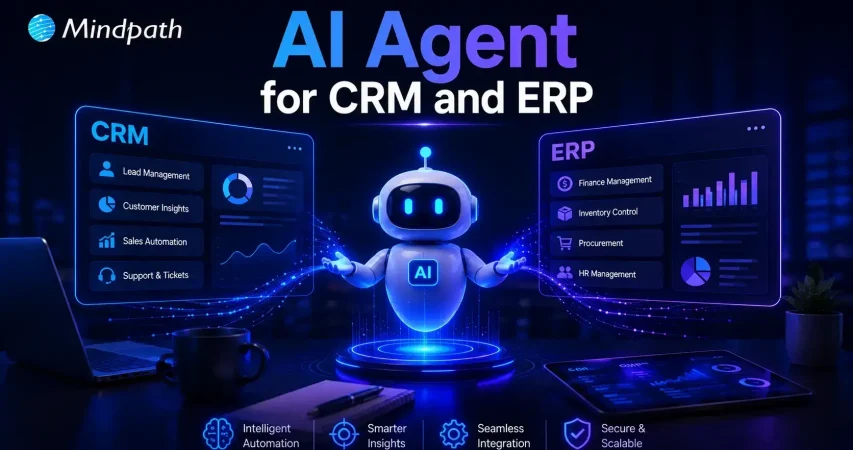
AI Agent for CRM & ERP

Artificial intelligence is changing how organizations manage everyday operations. AI agents for CRM and ERP help businesses connect systems, automate workflows, and reduce manual effort. They improve data accuracy, support faster decisions, and keep teams working with consistent information across departments.

Key Takeaways

  • 01
    AI agents connect CRM, ERP, and enterprise systems to create a unified business ecosystem.
  • 02
    They automate repetitive workflows while improving speed, efficiency, and accuracy.
  • 03
    Real-time synchronization enables faster business decisions and better collaboration.
  • 04
    Businesses can automate sales, inventory, invoicing, forecasting, and customer service.
  • 05
    A phased implementation ensures secure integration, scalability, and long-term value.

Yet many organizations still struggle with disconnected software, scattered data, and inefficient processes. What makes AI agents different from traditional automation, and why are enterprises adopting them rapidly? In this blog, we’ll explore how AI agents connect CRM, ERP, and business systems to improve efficiency and drive smarter operations.

Ready to build AI agents that seamlessly connect your CRM, ERP, and business systems? At Mindpath, we offer AI Agent Development Services to create intelligent, scalable AI agents tailored to your business needs.

Why Do Businesses Need AI Agents Across CRM, ERP, and Enterprise Systems?

In today’s enterprises, connected systems are essential for efficient operations. AI agents eliminate disconnected workflows, automate routine tasks, and enable intelligent decision-making across departments.

1. Eliminating Data Silos

AI agents connect CRM, ERP, and other enterprise applications into a single source of truth. This removes duplicate records and ensures every department works with accurate, real-time information.

2. Synchronizing Cross-System Data

Customer records, inventory updates, purchase orders, and financial transactions remain synchronized across multiple platforms. Employees no longer need to manually transfer information, reducing delays and human errors.

3. Automating End-to-End Workflows

AI agents execute complete business processes automatically from processing customer requests to validating invoices and updating ERP records—reducing repetitive work and accelerating operations.

4. Managing Exceptions Proactively

Instead of waiting for employees to identify issues, AI agents monitor workflows continuously. They detect shipment delays, invoice mismatches, approval bottlenecks, and vendor issues before they impact operations.

5. Improving Predictive Decision-Making

By analyzing historical and real-time business data, AI agents forecast customer demand, optimize inventory, improve cash flow planning, and reduce operational risks.

6. Supporting Faster Business Decisions

Business leaders receive real-time insights gathered from multiple enterprise systems in one place, enabling quicker responses to customer needs, financial performance, and supply chain changes.

How Do AI Agents Connect CRM, ERP, and Other Business Applications?

Modern organizations rely on enterprise software integration to keep information flowing seamlessly. AI agents act as intelligent connectors that automate data exchange and coordinate workflows.

1. Connecting Through APIs

AI agents securely exchange data between CRM, ERP, and other business applications using APIs, eliminating manual transfers.

2. Synchronizing Business Data

Customer information, inventory records, financial data, and sales information stay consistent across all connected systems.

3. Automating Cross-System Workflows

AI agents coordinate tasks involving multiple business applications from start to finish, reducing manual work and improving operational speed.

4. Triggering Intelligent Actions

When predefined business events occur, AI agents automatically create tasks, update records, notify teams, or initiate the next workflow.

5. Providing Real-Time Insights

AI agents collect data from different platforms and present a unified business view, helping decision-makers access actionable insights quickly.

6. Maintaining Secure Data Exchange

AI agents follow enterprise security policies and access controls while transferring business information, ensuring secure and reliable integration.

Real Business Use Cases of AI Agents for CRM and ERP Integration

Understanding how AI agents connect CRM and ERP becomes easier by looking at real-world business applications. These intelligent agents streamline operations, improve data accuracy, and automate workflows across multiple departments with minimal human intervention.

1. Sales Order Processing

AI agents capture customer orders directly from the CRM and instantly update the ERP system. This reduces manual data entry, speeds up order fulfillment, and minimizes processing errors.

2. Inventory Management

By combining real-time ERP inventory data with CRM sales information, AI agents monitor stock levels, predict demand, and help businesses avoid stock shortages or overstocking.

3. Customer Service Automation

Support teams gain instant access to complete customer histories by combining CRM and ERP data. This enables faster issue resolution and delivers a more personalized customer experience.

4. Invoice and Payment Management

AI agents automatically generate invoices after verifying completed orders and delivery status. They also synchronize payment updates with financial records to improve accounting accuracy.

5. Sales Forecasting and Planning

AI agents analyze CRM sales pipelines together with ERP financial and operational data to generate more accurate forecasts for budgeting, resource planning, and business growth.

6. Procurement and Vendor Coordination

AI agents monitor inventory thresholds and automatically initiate procurement workflows. They update vendor records, track purchase orders, and ensure timely replenishment of inventory.

Key Benefits of AI Agents for Enterprise Workflow Automation

AI agents help organizations automate complex business processes while improving operational efficiency, reducing manual work, and enabling intelligent decision-making.

1. Autonomous Task Execution

AI agents execute multi-step workflows without continuous human intervention. From order processing to invoice approvals, they complete tasks consistently and accurately.

2. Seamless Cross-System Integration

AI agents connect CRM, ERP, finance, HR, and other enterprise applications, eliminating information silos and enabling smooth data flow across departments.

3. Greater Accuracy and Fewer Errors

Before updating enterprise systems, AI agents validate information automatically, reducing manual errors and ensuring high-quality business data.

4. Improved Scalability

As business operations grow, AI agents handle increasing workloads without requiring additional employees, allowing organizations to scale efficiently.

5. Faster Business Operations

By automating repetitive administrative work, AI agents reduce processing times from hours to minutes, helping businesses respond faster to customer and market demands.

6. Intelligent Decision Support

AI agents analyze enterprise data from multiple systems and generate real-time insights, enabling business leaders to make informed strategic decisions.

7. Adaptive Problem Resolution

When workflow exceptions occur, AI agents identify issues automatically, recommend corrective actions, and keep business operations running with minimal disruption.

8. Higher Workforce Productivity

By taking over repetitive operational tasks, AI agents allow employees to focus on innovation, strategic planning, customer relationships, and higher-value business activities.

How to Successfully Implement AI Agents Across Your Business Systems

A structured implementation strategy helps businesses maximize the value of AI agents while minimizing deployment risks. By focusing on the right processes, systems, and governance, organizations can achieve long-term success.

1. Identify High-Impact Workflows

Start by identifying repetitive, time-consuming business processes that provide the greatest opportunity for automation. Prioritize workflows that deliver measurable business value.

2. Connect Enterprise Systems

Integrate AI agents with CRM, ERP, HR, finance, and other core business applications using secure APIs. Seamless connectivity ensures consistent data across every system.

3. Establish Data Governance

Ensure high-quality data, strong security policies, role-based access controls, and compliance standards before deploying AI agents across enterprise systems.

4. Monitor and Optimize Performance

Continuously track workflow accuracy, automation efficiency, business KPIs, and user adoption. Regular optimization helps AI agents deliver greater long-term value.

5. Scale Gradually

Begin with a pilot project, validate business results, and expand AI agents to additional departments and workflows as confidence grows.

Ready to Implement AI Agents for CRM and ERP?

AI agents are transforming enterprise operations by connecting systems, automating workflows, and enabling smarter business decisions. Organizations that embrace AI-powered automation can eliminate manual processes, improve operational efficiency, and create a connected digital ecosystem that supports sustainable growth.

If you’re looking for reliable AI agents for business automation, Mindpath delivers multi-agent development services and enterprise integration solutions. Our experts design, develop, and optimize AI agents that seamlessly connect CRM, ERP, and enterprise applications to accelerate digital transformation and drive measurable business outcomes.


Frequently Asked Questions

Frequently Asked Questions

Yes. AI agents integrate with existing CRM, ERP, and enterprise applications through APIs and connectors, allowing businesses to automate workflows without replacing their current software investments.
Implementation timelines depend on business size, system complexity, and integration requirements. Most organizations begin with pilot deployment before expanding AI agents across additional departments.
Businesses should prioritize repetitive, high-volume processes such as order management, invoice processing, customer support, inventory updates, and approval workflows to achieve faster returns.
AI agents continuously synchronize data between connected systems, validate information before updates, and reduce manual data entry, helping maintain consistent and reliable business records.
Businesses should evaluate data quality, integration readiness, security policies, workflow priorities, and performance goals to ensure successful deployment and long-term value from AI agents.

Support Is One Click Away

Featured Posts

Related Post

Business Benefits of Chatbots

Suppose a customer is browsing your website during the weekend, and then asks a question related to your product, and your chatbot answers that without any delay. Won’t that benefit your business and satisfy your customers? Well, that is precisely one of the key benefits of chatbots. Yes, you heard that right. Chatbots can help businesses respond faster, guide customers smoothly, and improve the overall customer experience. Now-a-days business leaders are starting to see how chatbots can make everyday tasks easier and more efficient.

An interesting report from Tidio reveals that around 60% of B2B companies and 42% of B2C companies already use chatbot software. By 2025, this number is expected to grow by 34%. With better tools, smarter features, and clear business value, AI chatbots are turning into a must-have. If you are curious to know what are the typical benefits of AI chatbot for business, then this blog can guide you perfectly. So, what are you waiting for? Let’s dive in!

What is a Chatbot?

A chatbot is a software application that enables a user to engage in a conversation that imitates a human. In many cases, a chatbot can engage either through text or vocal conversation. By doing this, chatbots enable customers to answer questions, resolve problems, or complete tasks much quicker. Some chatbots adhere to a pre-set script. However, many modern chatbots rely heavily on artificial intelligence (AI) and natural language processing (NLP), to understand what the user is asking, and provide a thoughtful and natural response.

To put this in perspective, let’s assume you arrive at a bank’s website and begin typing your question (example: “How can I open a savings account?”). The chatbot will not only understand that you are asking about a savings account, but also guide you through the steps to take, without the help of any human agent.

The chatbot market is growing fast. According to a study by Grand View Research, the global chatbot market size was valued at USD 7.76 billion in 2024 and is projected to reach USD 27.29 billion by 2030, growing at a CAGR of 23.3% from 2025 to 2030. This rapid growth is driven by advancements in artificial intelligence and machine learning, making chatbots smarter, faster, and more valuable for businesses across industries.

What exactly is a chatbot, and why is everyone talking about them? Explore our in-depth guide: What is a Chatbot – Everything You Need to Know.

What are the Benefits of Chatbots?

If you are wondering what are the benefits of using AI chatbot, here is the answer. AI chatbots are becoming an essential part of modern business operations. Designed to assist in day-to-day tasks, they offer practical support across various business functions.

Here are some benefits of chatbots for businesses:

1. Smart Routing for Better Support

AI chatbots can handle simple questions and tasks on their own. When the issue needs a human touch, the chatbot collects key details from the customer at the beginning. It then sends the conversation to the right agent based on who is available and best suited to help. This smooth handover saves time and makes the support experience faster and more efficient.

2. Improves with Every Interaction

AI chatbots learn from each interaction to improve their responses over time. They collect data, understand patterns, and offer more accurate and personalized replies. They also recognize when to involve a human agent. By picking up on customer emotions, they provide better and more thoughtful support.

3. Enhance Sales

One of major benefits of chatbots is its ability to support sales teams by handling routine tasks. Chatbots can collect lead details, schedule demos, and guide visitors through your website. They also help move potential customers through the sales funnel by answering questions and sharing product information. This leads to higher conversions, fewer drop-offs, and better cross-sell and upsell opportunities.

4. Cost Effective Solution

Managing costs is important for any growing business. While chatbots need some setup at first, they help save money in the long run by handling common tasks and reducing the need for extra staff. They can quickly direct conversations to the right place, making support more efficient. With easy-to-use tools like no-code builders, businesses can launch chatbots faster and start seeing results sooner.

5. Generate Leads

AI chatbots can start natural conversations that feel more personal than standard forms. Instead of sending users to fill out long details, bots gather useful customer data while answering questions in real time. They use conversational AI to understand voice or text and guide the chat smoothly. This helps capture valuable information like visited pages, cart activity, location, and user preferences, making lead generation more effective.

Benefits of Chatbot For Customers

Let us also learn about the benefits of chatbots for customers:

1. Offers Omnichannel Support

Today’s customers use many platforms to reach out; like email, social media, websites, and messaging apps. They expect smooth conversations no matter which channel they choose. AI chatbots can help by answering common questions across all platforms and keeping the conversation connected. This creates a faster, more consistent experience that meets customers where they are.

2. Provides Multilingual Support

As businesses reach global audiences, language should not be a barrier to great service. AI chatbots can offer multilingual support by asking for the customer’s language or detecting it through the conversation. They can chat naturally in multiple languages through text, voice, or messaging. This helps provide clear and friendly support to every customer, no matter where they are.

3. Delivers 24/7 Customer Service

Customers expect fast and reliable service at any time of the day. AI chatbots make this possible by offering 24/7 support without delays, even during peak hours. They handle the first interaction instantly, reducing wait times and helping customers find answers quickly. This ensures a smooth and responsive experience, no matter when the customer reaches out.

4. Create More Personalized Customer Experiences

AI chatbots can offer tailored support by using customer data from tools like CRM or marketing software. They adjust messages based on where a customer is in their journey and suggest products that match their interests. Bots can also answer questions about orders or shopping carts without asking for extra details. When used thoughtfully, this creates a smooth, human-like experience that feels personal and helpful.

5. Ensure Proactive Customer Support

AI chatbots can take the first step by reaching out to customers based on their activity on your website. They can answer common questions, guide users through tricky pages, or remind them about unfinished tasks like a full cart or pending form. This kind of timely support helps reduce drop-offs and improves customer experience. When needed, chatbots can also suggest connecting with a human agent to move things forward smoothly.

Curious about the role of conversational AI in modern business strategy? Dive into Conversational AI Chatbots for Business Growth to see how companies are using them to gain a competitive edge.

Disadvantages of AI Chatbots

While AI chatbots offer many benefits, they also come with a few limitations that businesses should be aware of. Understanding these challenges can help you use chatbots more effectively and plan for the right balance between automation and human support.

1. Struggles with Complex Questions: AI chatbots may not understand sarcasm, unclear grammar, or complicated queries, leading to wrong answers.

2. Lacks Human Emotion: Chatbots can’t show empathy or handle emotional conversations the way a human can.

3. Takes Time to Set Up: Building a chatbot with the right questions, answers, and flow can take time and effort.

4. Can Risk Data Security: If not properly protected, chatbots may expose sensitive customer information to security threats.

5. Bias Responses: If trained on biased data, chatbots can unknowingly give unfair or inappropriate responses.

6. Hallucination: Chatbots can make up answers or provide incorrect details, which can confuse or mislead users.

Ready to Experience the Real Benefits of Chatbots?

Chatbots are helping businesses respond faster, cut costs, and improve customer service. From lead generation to 24/7 support, they make things easier and quicker. While they can’t replace humans fully, they’re a smart way to enhance service and give customers a better overall experience.

At Mindpath, we offer chatbot development services built to match your needs. We create smart, easy-to-use AI bots that improve support, boost engagement, and connect smoothly across platforms. Let us help you deliver faster, better service with a solution designed just for you.

Frequently Asked Questions

1. How do businesses measure the success of chatbot implementation?

Businesses usually track metrics like response time, customer satisfaction, resolution rate, and lead conversions. These insights help understand how well the chatbot is performing. Regular monitoring and improvements ensure the chatbot continues to deliver value and supports overall business goals effectively.

2. What are the benefits of chatbots for businesses beyond customer support?

The benefits of chatbots go beyond answering queries. They help automate repetitive tasks, qualify leads, assist in marketing campaigns, and improve internal workflows. By handling multiple roles, chatbots increase efficiency and allow teams to focus on more strategic and high-value activities.

3. Can chatbots be customized based on different business needs?

Yes, chatbots can be fully customized to match specific business requirements. From conversation style to features and integrations, they can be tailored to suit different goals. This flexibility ensures that businesses can create a chatbot experience aligned with their brand and customer expectations.

4. How secure are chatbots when handling customer information?

Chatbots can be secure if built with proper data protection measures. Encryption, secure APIs, and compliance with data privacy standards help safeguard user information. Regular updates and monitoring also play an important role in ensuring that customer data remains protected during interactions.

5. What are the benefits of chatbots for improving customer engagement?

The benefits of chatbots include keeping customers engaged through quick replies, proactive messages, and personalized interactions. They help maintain continuous communication, reduce waiting time, and guide users smoothly, creating a more interactive and satisfying experience that encourages users to stay connected longer.

Angular vs React vs Vue

Do you want to create web applications for your business, but are unsure about which framework to choose? Choosing the correct framework for your next project can be challenging because it must be perfect in terms of speed, performance and creating attractive UIs. When we discuss ideal frameworks; React, Angular and Vue are the most popular ones that come to our minds. But the main question is – which one should you choose from these three, i.e., Angular vs React vs Vue?

Confused, right? Well, we got you covered! This blog will walk you through the difference between Angular vs React vs Vue which will give you a clear idea about which one to choose for your next project. So, let us find out! 

Confused about whether Angular, React, or Vue is the right framework for your next project? Mindpath offers expert ReactJS development services to help you choose and build scalable, high-performing web applications.e

Overview of Angular, React, and Vue

When you’re setting out to develop a website or web application, one of the initial choices is selecting an appropriate front-end framework. Angular, React, and Vue are three of the leading choices today. All three work differently, and the choice of the best one is based on your project requirements, your team’s expertise, and your long-term objectives. Let us try to understand their fundamentals: 

What is Angular?

Angular is a popular, open-source front-end framework maintained by Google, designed to build dynamic, single-page web applications (SPAs). Built with TypeScript, a type-safe variant of JavaScript, it gives developers a complete toolkit to handle UI rendering, routing, forms, and client-server communication without relying on third-party libraries. This makes it particularly well-suited for large and complex applications.

One of the greatest things about Angular is that it only gets better with periodic updates, every six months. Such updates tend to introduce new features, enhancements, and bug fixes, which make your app up-to-date and secure. 

Here are the important features of Angular:

1. Dependency Injection

Angular makes it easy to share data and logic between parts of your app using services. These services are “injected” where needed, helping keep your code clean and testable.

2. Angular CLI

Angular comes with a command-line tool that helps you quickly create, test, and build apps. It saves time by automating common tasks like generating files or setting up projects.

3. Cross-Platform Development

With Angular, you can use the same code to build web, mobile, or even desktop apps. This means faster development and less work for different platforms.

4. MVC Architecture

Angular organizes your code into three parts: data (model), display (view), and logic (controller). This structure keeps things neat and easy to manage.

5. Reactive Programming

Angular handles real-time updates smoothly using reactive programming. It helps your app respond to user actions instantly without waiting on the server.

Want to know how React skills can help you build portfolio-ready applications? Explore our detailed ReactJS web development guide to understand its real-world potential.

What is React?

React is a free, open-source JavaScript library used for building interactive user interfaces (UIs). Maintained by Meta (formerly Facebook) and a large open-source community, it is designed primarily for creating web and mobile applications.

One of the reasons developers adore React is that it’s so flexible. You can use the tools and features you require, without being locked into a rigid structure. This allows you to have greater control over how your app is constructed. React also makes development quicker by enabling you to reuse snippets of code in various portions of your application.  

Here are the important features of React:

1. Virtual DOM

React uses a virtual copy of the real DOM to check for changes before updating the screen. This avoids reloading everything and makes the app faster.

2. One-Way Data Binding

In React, data flows in just one direction, data transferred from top to bottom. This makes it easier to control how data moves in the app.

3. JSX (JavaScript + HTML)

JSX lets you write HTML inside JavaScript, which makes the code cleaner and easier to understand. It helps developers work faster without switching between languages.

4. High Performance

Due to virtual DOM and reusable components, React apps run very smoothly. Only the parts that change are updated, which saves time.

5. Component-Based Structure

React breaks the app into small pieces called components. Each one handles its own look and logic, and you can reuse them anywhere. 

Wondering how to keep your React app fast as it becomes more complex? Explore our detailed guide on optimizing React performance for large applications to learn easy ways to keep your app fast and smooth.

What is Vue?

Vue (pronounced “view”) is an open-source, progressive JavaScript framework for building interactive user interfaces and web applications. It focuses on front-end development and is flexible enough to scale from a simple script on a single page to a full-scale single-page application (SPA), all while staying fast and lightweight.

What distinguishes Vue is that it brings together useful aspects of React and Angular. It’s easy to learn and suits well for developing apps that must be fast to market without compromising on performance or quality. Due to its clean structure and simple syntax, developers can start using Vue easily and develop apps that are easy to maintain. 

Here are the important features of Vue:

1. Lightweight and Fast

Vue is a small framework (just 21KB), allowing for quick load times and faster development. It enables developers to write clean, concise code and speed up the process.

2. Excellent Performance

With its virtual DOM lighter than React, Vue updates only what’s needed, making apps faster and more efficient. It delivers impressive performance, even with large data sets or complex tasks.

3. Easy Debugging

Vue provides live feedback on how the UI looks as you write code, making debugging quick and straightforward. This helps developers catch errors early, even if they’re new to coding.

4. Built-in Tools

Vue includes Vue Router for easy navigation and Vuex for efficient state management. These built-in features save time by providing everything needed to build a full application.

5. Flexibility and Reactivity

Vue can be used for both small and large apps, giving developers flexibility. Its reactive system ensures real-time updates when data changes, keeping the app fast and responsive.

Now that we have understood the fundamentals of Angular, React and Vue, let us learn about the difference between Angular vs Vue vs React.

Planning to build your next project with React but not sure what expertise to prioritize? Discover the key ReactJS developer skills you should look for by reading this comprehensive breakdown.

Angular vs React vs Vue – A Quick Comparison

Here’s a quick comparison of React, Angular, and Vue to help you understand their strengths in terms of popularity, ecosystem, learning curve, performance, and architecture. This will give you a clear view of what each offers:  

1. Popularity

React is extremely popular in web development with most big players using it to support their front-end requirements. Angular is robust in features, commonly used by big applications and top companies like Google and Upwork. Vue is becoming more popular as a light, adaptive framework, a favorite among both businesses and developers. 

2. Ecosystem

In the debate of React vs Vue vs Angular, React has a robust ecosystem with state management in React using tools like Redux, and the ability to create mobile apps with React Native. Angular also supports state management and mobile development with NativeScript while providing a structured framework for building apps. Vue offers useful libraries, state management with Vuex, and smooth integration with Laravel for full-stack development.

3. Learning Curve

In Angular vs React vs Vue comparison, Angular comes with a steeper learning curve due to its complex project structure and TypeScript requirement while React is easier to start with, due to its simpler, component-based approach and Vue, though a bit more complex than React, is still beginner-friendly and has a syntax similar to HTML, making it accessible for most developers.

4. Performance and Memory

For performance in Vue vs React vs Angular, Angular uses real DOM, which can slow down larger applications, while React and Vue leverage virtual DOM for faster rendering and better memory management. This makes React and Vue more efficient in handling dynamic web apps and scaling performance effectively.

5. Architecture

React, when compared with Vue vs Angular architecture, is flexible without having a set design pattern and emphasizes components as building blocks. Angular has the MVC pattern but is component-based and gives a clean structure. Vue uses the MVVM pattern but is flexible enough to use different patterns and can integrate smoothly with third-party tools.

Need a clear path to build React expertise across your team? Discover a strategic React roadmap that helps teams build scalable, high-quality applications faster.

ReactJS vs Angular vs Vue Comparison Table

Here’s a quick comparison of Angular, React, and Vue across key factors. This table highlights their unique strengths to help you choose the right framework for your project: 

reactjs vs angular vs vue

Choose the Right Framework for your Web Applications

Selecting between Angular vs React vs Vue is based on your project and team expertise. Each offers distinct advantages for web applications today. Angular is best for big-scale, enterprise-oriented applications with a full toolkit. React provides flexibility, reusability, and an enormous ecosystem and is best for dynamic and quick-loading UI. Vue is small in size, simple to learn, and ideal for small to medium-sized applications with a nice balance of simplicity and performance. 

At Mindpath, we specialize in delivering high-performance web solutions with our ReactJS development services. Our experienced developers build scalable, responsive, and feature-rich applications tailored to your business needs. No matter if you’re upgrading an existing product or starting from scratch, our team ensures seamless development and fast delivery, backed by modern tools and proven practices. 

Frequently Asked Questions

Cloud cost optimization

Cloud expenses continue to grow with the expansion of apps, new services, and bolt-on speedy releases. Cloud cost optimization is now the core of every intelligent IT plan. You spend on flexibility and speed, but at the end of the month, you are surprised by the costs, which often exceed your budget due to unforeseen usage spikes and the complexity of managing multiple cloud services. So, what drives this gap? More importantly, how can you gain control without hindering innovation?

Contemporary companies require performance, safety, and swiftness simultaneously. Uncontrolled resources, idle work loads and lack of visibility, however, consume budgets very fast. Hence, leaders should reconcile finance and engineering using well-defined cost objectives. Intelligent budgeting turns cloud expenditure into quantifiable value. This blog will show a practical way of gaining control of cloud investments.

Ready to take control of your cloud costs and get more from your investment? Mindpath offers cloud managed services to help businesses optimize cloud usage, reduce waste, and scale efficiently.

What is Cloud Cost Optimization?

Cloud cost optimization is the strategic, ongoing process of reducing cloud computing expenses while maintaining or improving system performance. Companies check the usage, eliminate unnecessary services, and select appropriate pricing frameworks, ensuring resources are right-sized and properly utilized rather than left idle or oversized. This will enhance performance and minimize unwarranted expenditure as well as keep cloud investment in line with business objectives.

Cloud cost management helps in this endeavor to track, analyze, and plan cloud expenditure. Teams create the budgets, keep track of their usage, and reallocate the resources according to the demand. A combination of these practices aids companies in becoming financially clear, enhancing efficiency, and making superior decisions in long-term growth.

Why is Cloud Cost Optimization Important?

Cloud services enable businesses to invest heavily in order to achieve growth, speed, and innovation. The reasons why cloud cost management is of critical importance in safeguarding budgets and enhancing financial control are as follows.

benefits of cloud cost optimization

1. Maximize ROI

Cloud expense optimization enables businesses to match expenditures with objective goals. They make sure that each dollar helps in growth, performance, and quantifiable business worth.

2. Eliminate Waste

Teams eliminate wastage of resources and storage before their expenses increase. Cloud cost optimization assists businesses in ceasing spending on services that are unnecessary.

3. Improve Performance

Organizations right-size the workloads on the basis of actual demand. This balance is also fast and reliable, as it keeps the costs down, which ultimately supports the organization’s ability to invest in new projects and innovations.

4. Enable Financial Clarity

Leaders follow usage real-time and make budgets confidentially. Being visible will avert the presence of surprise bills and enable smarter forecasting, which allows leaders to make informed financial decisions and allocate resources more effectively.

5. Support Innovation

Firms invest saved amounts in product development and online expansion. Expenditures that are managed efficiently leave opportunity for new ideas and expediency.

6. Strengthen Sustainability

Economic utilization of resources minimizes energy wastage and decreases carbon influence. Clear governance also develops team and departmental accountability.

Want to reduce cloud costs while also making your infrastructure more eco-friendly? Explore sustainable technology to build efficient and environmentally responsible systems.

Cloud Cost Optimization Strategies for Modern Businesses

Contemporary companies require effective means to regulate cloud expenses without compromising performance and scalability. Some major strategies that help companies achieve effective cloud cost optimization include the following.

cloud cost optimization for modern businesses

1. Build a Cost-Aware Culture

Clear ownership and shared responsibility are the beginning of strong cloud cost optimization. Leaders establish FinOps team and establish explicit spending policies. Teams go through regular reviews on usage and align the decisions with the business goals.

2. Automate Idle Resource Control

Unutilized servers and storage add up to high bills. Teams automate the scheduling of shutdowns and the removal of unused assets. Automation enhances the ability to optimize cost in the cloud because it avoids silent waste, which refers to the ongoing costs associated with unused resources that are not actively managed or monitored.

3. Choose Smart Discount Options

Cloud service providers also have savings plans and spot instances regarding flexibility in workloads. Workload stability is examined by teams, and then discount models are chosen. Smart commitments minimize the long-term expenses without jeopardizing performance.

Want to protect your cloud environment while optimizing costs? Explore cloud security to safeguard your systems and data effectively.

4. Right Size Every Workload

Excessively provisioned resources cost money and minimize efficiency. The teams keep tracking the CPU, memory, and storage usage. They align types of instances to actual workload requirements to facilitate cost optimization of clouds.

5. Detect Spending Spikes Early

Unplanned cost surges are hurtful to budgets and slow down planning. Real time alerts are used by teams to spot unusual usage in a short time. Timely behavior safeguards the financial control and enhances the cloud cost optimization.

6. Review Bills and Usage Regularly

The frequent examination of bills discloses outliers of costs and inefficiencies. The teams compare the present usage and the trends to identify gaps. This is followed up by constant monitoring of expenditure to ensure its congruence with approved budgets.

7. Use Data to Plan Commitments

Long-term contracts demand proper forecasting and clarity. Before commitment plans are locked teams analyze performance metrics. Data based decisions minimize risk and lead to a higher cost-efficiency.

Curious about how cloud migration supports cost optimization strategies? Check out the benefits of cloud migration to maximize your ROI.

Key Cloud Cost Optimization Tools

Businesses today need the appropriate tools to manage their expenditure and enhance visibility in the cloud setting. These are some of the important tools that can enable successful cloud cost optimization and smarter financial decisions.

1. Azure Cost Management + Billing assists teams to monitor their spending, budget and optimize Azure resources with visibility.

2. CloudZero relates cloud costs to products, features, and teams to make decisions related to the business.

3. AWS Cost Explorer and Trusted Advisor share cost-related information, usage data, and can offer recommendations applicable to make the process efficient.

4. Finout provides in-depth cost allocation analysis between various cloud and SaaS providers.

5. Google Cloud Cost Management helps to track spending and optimize usage in the GCP setups.

6. ProsperOps automates Savings Plans and Reserved Instances in order to make the maximum savings in the long term.

7. CloudHealth Victor by VMware provides business-level management, visibility and cost control in the environment.

8. Vantage provides visualized current multi cloud cost with straightforward and accurate reporting.

9. nOps applies AI based recommendations on the most economical AWS resources.

Wondering which cloud model can help you control costs and improve performance? Explore multi cloud vs. hybrid cloud to gain the clear insights.

Ready to Take Control of Your Cloud Spending?

Cloud cost optimization is beneficial to the modern business to perform cost control and enhance the performance and visibility. Businesses that audit usage, optimize resources, and automate the process of waste elimination obtain better financial control. Definite plans transform the investments in clouds into quantifiable value. By having teams focus on finance as well as engineering, teams eliminate surprise and develop long term and sustainable growth.

Mindpath is a leading provider of cloud infrastructure services, according to your business objectives. Our team is an analysis of how we use, and how we could use to waste less and be smarter with automation. We assist in the process of visibility enhancement, enhanced governance and increased returns on cloud investments. Collaborate with Mindpath to turn cloud spending into a competitive edge.

Frequently Asked Questions