Home

10 Everyday Business Tasks You Can Automate with AI Today  

10 Everyday Business Tasks You Can Automate with AI Today  

Lorem ipsum dolor sit amet, consectetur adipiscing elit. Ut elit tellus, luctus nec ullamcorper mattis, pulvinar dapibus leo.

Join our Newsletter!

Business task automation

Business process automation is changing how companies manage routine work without adding unnecessary complexity. Many daily activities still consume valuable time, even though AI can now complete them faster and with greater accuracy. Businesses adopting intelligent automation are creating more space for innovation, better customer experiences, and sustainable growth.

Key Takeaways

  • 01
    Business process automation eliminates repetitive work while improving efficiency across everyday operations.
  • 02
    AI enables smarter automation by handling decisions, language, and unstructured business data.
  • 03
    Prioritizing high-impact workflows delivers faster results and a stronger return on investment.
  • 04
    Successful automation requires secure integration, employee training, and continuous performance monitoring.
  • 05
    Custom AI solutions create scalable automation tailored to evolving business goals and processes.

Choosing the right tasks to automate often delivers greater value than simply adopting new technology. Understanding where AI fits within existing workflows helps organizations improve efficiency without disrupting essential operations. In this blog, you’ll discover ten everyday business tasks that can be automated with AI. So, let’s keep reading!

Want to automate more than just everyday business tasks? Explore Mindpath’s AI Development Services to build custom AI solutions that streamline operations, improve productivity, and support long-term business growth.

What is Business Process Automation?

Business process automation refers to the use of technology to streamline repetitive workflows and reduce manual effort across business operations. It automates routine tasks using predefined rules, helping organizations improve efficiency, maintain consistency, reduce errors, and complete everyday processes faster while allowing teams to focus on more valuable work.

Today, AI is making business process automation more intelligent by handling tasks that require analysis, language understanding, and decision-making. Instead of following fixed rules alone, AI learns from data and adapts to changing situations. This shift is driving smarter business task automation across departments and industries.

Key Benefits At a Glance

  • 01
    Reduces Manual Errors: Standardized workflows improve accuracy and minimize mistakes in everyday business operations.
  • 02
    Improves Operational Efficiency: Automated processes complete routine tasks faster with minimal human intervention.
  • 03
    Optimizes Employee Productivity: Teams spend less time on repetitive work and more on strategic priorities.
  • 04
    Lowers Business Costs: Automation reduces operational expenses by minimizing manual effort and repetitive workloads.

Why Businesses are Prioritizing AI Automation?

Businesses are accelerating AI adoption as automation becomes a competitive advantage rather than a future investment. According to Gartner, 80% of CEOs expect AI to significantly reshape their operational capabilities, reflecting a shift toward smarter and more autonomous business operations. As organizations look to automate repetitive tasks, AI is helping them improve efficiency, agility, and long-term business value.

1. Improved Productivity

AI completes repetitive work quickly and operates without interruptions. This allows employees to focus on strategic and creative responsibilities.

2. Better Customer Experience

AI-powered assistants respond instantly and provide support throughout the day. Faster responses help improve customer satisfaction and engagement.

3. Smarter Decision Making

AI analyzes large volumes of business data within minutes. These insights help leaders make faster and more informed decisions.

4. Reduced Operational Costs

Automating routine workflows lowers administrative effort and operating expenses. It also minimizes costly manual errors across business processes.

5. Higher Accuracy

AI follows consistent rules when processing information and completing tasks. This improves data quality and reduces the chances of human mistakes.

6. Easier Business Growth

AI for business operations helps organizations handle increasing workloads efficiently. Businesses can scale processes without expanding teams at the same pace.

10 Everyday Business Tasks You Can Automate with AI Today

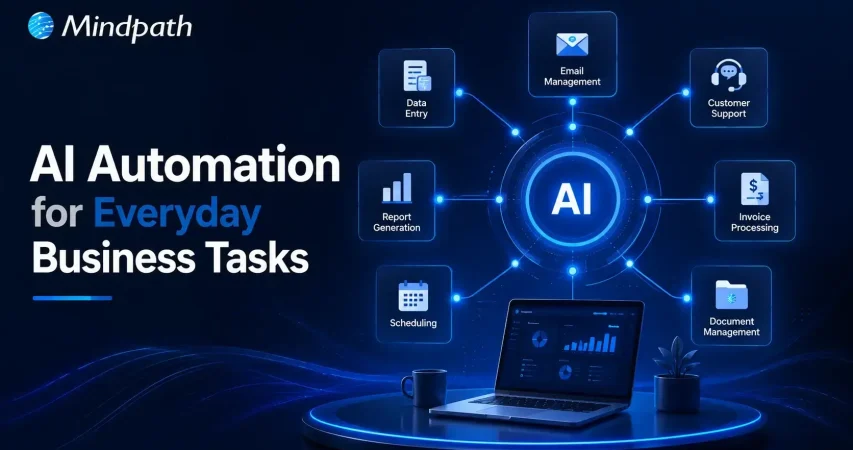
Business process automation helps organizations eliminate repetitive work and improve everyday efficiency with AI. Here are ten common business tasks that businesses can automate today to save time, reduce errors, and support sustainable growth.

1. Customer Support

AI chatbots answer common customer questions instantly and provide support around the clock. This reduces response times and allows support teams to handle more complex issues.

2. Email Management

AI organizes inboxes, prioritizes important messages, and drafts professional replies. Teams spend less time managing emails and more time on meaningful work.

3. Meeting Summaries

AI records conversations, creates concise meeting notes, and highlights action items. Everyone stays aligned without manually documenting every discussion.

4. Lead Management

AI captures new leads, qualifies prospects, and updates CRM records automatically. This helps sales teams respond faster and improve conversion opportunities.

5. Invoice and Expense Processing

AI generates invoices, categorizes expenses, and tracks payment reminders efficiently. Business task automation reduces manual effort while improving financial accuracy.

6. Social Media Content

AI creates captions, suggests content ideas, and repurposes existing materials. Marketing teams can maintain consistent posting with less manual work.

7. Document Review

AI summarizes lengthy documents and identifies important information within seconds. It speeds up reviews while helping teams make informed decisions.

8. Data Reporting

AI analyzes business data and generates dashboards with meaningful insights. Leaders can monitor performance without spending hours preparing reports.

9. Inventory Management

AI tracks inventory levels and predicts future demand using historical trends. Businesses can avoid stock shortages and improve supply planning.

10. Internal Knowledge Support

AI assistants help employees quickly find policies, documents, and training resources. These are among the most valuable business tasks that can be automated to improve workplace productivity.

How to Decide Which Business Tasks to Automate First?

Knowing how to automate business tasks starts with identifying processes that consume the most time and resources. Focusing on the right workflows first helps businesses achieve faster results and long-term operational improvements.

  • Identify Repetitive Tasks: Automate activities performed every day across business workflows. Business task automation saves valuable time and improves overall productivity.
  • Choose Rule-Based Processes: Select workflows with simple and consistent decision-making. These processes are easier to automate with reliable accuracy.
  • Reduce Manual Errors: Prioritize tasks where human mistakes happen frequently. Automation improves consistency and minimizes costly operational errors.
  • Start with Quick Wins: Focus on processes delivering immediate measurable business improvements. Early success builds confidence for broader automation initiatives.
  • Improve Employee Experience: Automate routine administrative work that slows daily productivity. Employees can concentrate on higher value and strategic responsibilities.

Best Practices for Successful Business Process Automation

Successful automation begins with clear goals and well-defined business processes. Choosing the right AI automation tools helps organizations improve efficiency while achieving consistent and scalable results.

  • Start with One Process: Automate a single workflow before expanding across the organization.
  • Integrate Existing Systems: Connect AI with everyday business applications for smoother workflows.
  • Review AI Outputs: Verify AI-generated results before using them in critical business tasks.
  • Protect Sensitive Information: Choose secure AI platforms that safeguard business and customer data.
  • Train Employees Effectively: Equip teams with practical AI skills for successful adoption.

Ready to Transform Your Business with AI Automation?

Business process automation is no longer limited to large enterprises. Organizations of every size can automate routine workflows, improve operational efficiency, and reduce manual effort with the right AI strategy. Starting with high impact tasks allows businesses to achieve measurable results while building a strong foundation for long term growth and innovation.

At Mindpath, we develop custom AI solutions that align with your business goals and existing workflows. From intelligent automation and AI agents to enterprise AI applications, our experts help organizations streamline operations, improve productivity, and accelerate digital transformation with scalable AI development services.


Frequently Asked Questions

Track metrics such as time saved, error reduction, operational costs, employee productivity, and customer satisfaction to evaluate the impact of automation.
The right choice depends on business goals, existing systems, scalability needs, and the level of customization required for long term growth.
Simple workflows can deliver measurable improvements within weeks, while larger automation projects may require several months to achieve full business value.
Yes. Modern AI solutions can integrate with many CRM, ERP, accounting, and collaboration platforms without replacing existing infrastructure.
After initial success, businesses should prioritize high impact workflows that involve repetitive tasks, multiple departments, or frequent manual processing.

Support Is One Click Away

Featured Posts

Related Post

cloud computing trends

Have you been following the newest cloud computing trends? It seems that every day, there is something new to change how we store, share, and secure data. Perhaps you’ve been wondering if your business is missing out on smarter ways of working or worried about staying ahead of the game in this digital world. Whatever your thoughts are, there is one thing for sure: cloud technology is not just for tech giants anymore; it is shaping the way we all connect, create, and grow.

As we move to 2026, these cloud trends will continue to open bigger opportunities for businesses, no matter how big or small. With faster, many times AI-driven services, greener cloud solutions, a flexible and secure future is more promising than ever. Being aware of what is next will enable you to make an informed decision about the future and give you a competitive edge. If you’re wanting to find out more about where the cloud is headed, continue reading. In this blog, you will learn what’s coming next.

Looking to build scalable, secure cloud applications that drive business growth? Mindpath offers expert cloud development services to help you design and optimize cloud solutions tailored to your needs

Understanding Cloud Computing

Cloud computing is the on-demand delivery of computing services, including servers, storage, databases, networking, and software, over the internet, instead of storing and accessing everything on your computer’s hard drive. Rather than owning and maintaining physical data centers, businesses and individuals can rent access to these resources from cloud providers, typically on a pay-as-you-go basis. This internet-based model also means less maintenance on your end, which translates into lower costs for storing files, documents, images, and more. Overall, cloud computing offers flexibility while keeping important data secure and available.

It works through remote servers hosted online that store, manage, and process data rather than relying on local hardware. Users can access these resources whenever they need and scale them up or down as their needs change. This makes it easy to save money on physical infrastructure, increase efficiency, and keep operations running smoothly with more reliability and speed.

The market for this technology keeps expanding rapidly as more businesses adopt cloud solutions. According to Grand View Research, the global cloud computing market size was around USD 752.44 billion in 2024 and is projected to reach USD 2,390.18 billion by 2030. This growth is mainly driven by the rise of big data, artificial intelligence, and machine learning, which all depend on powerful and scalable cloud infrastructure.

Curious how modern cloud apps run without servers? Explore our blog on Serverless Architecture in Cloud Computing to see how serverless solutions are shaping the future of cloud trends.

What are the Latest Trends in Cloud Computing?

Staying updated with cloud computing trends 2026 can help your business stay competitive and ready for what’s next. Companies everywhere are paying close attention to the current trends in cloud computing to boost efficiency and security. Here are some key developments you should watch for in the coming year.

Cloud computing trends

1. Rise of Multi & Hybrid Cloud

Many companies now use a multi-cloud strategy and hybrid cloud approach to run workloads across different cloud providers and their own data centers. This setup lets them combine the strengths of public and private clouds while keeping sensitive data secure. Using multi and hybrid cloud solutions also gives businesses more flexibility and better control over risks.

2. Automation

One of the latest trends in cloud computing is using automation to make systems work faster and more efficiently. Good automation helps teams deliver better results, reduce downtime, and improve overall quality. With better AI tools and user-friendly platforms, cloud providers are making automation easier for everyone to use.

3. AI/ML Capabilities

Better AI and machine learning are becoming the next big thing in cloud computing. Many providers now offer smart tools that help businesses use advanced analytics and automation. These cloud computing trends make it easier to build intelligent applications and boost efficiency without needing deep technical skills.

4. Cloud Cost Management

Managing expenses is a big part of the future of cloud computing as more businesses move to the cloud. New tools and services help companies track and control their spending more easily. These cost management features make it simple to budget, monitor usage, and find ways to save money.

5. Edge Computing

Edge computing is one of the cloud latest trends bringing data processing closer to where it’s created. This helps reduce delays and cuts down on the amount of data that needs to travel long distances. By doing this, businesses can work faster and use their networks more efficiently.

6. Low-Code and No-Code Services

One of the growing cloud services trends is using low-code and no-code tools to build apps faster. These solutions help people create software without needing advanced programming skills. Such cloud computing trends save time and lower development costs for businesses.

7. Open-Source Cloud Solutions

One of the growing cloud computing trends is the move toward open-source cloud solutions. These solutions give businesses more control and flexibility to adjust their cloud setup as needed. Open-source options can also help companies save money compared to traditional cloud providers.

8. Cloud-Native Applications

Building cloud-native applications is an important part of the future of cloud computing. These apps are made to run smoothly on cloud systems and use all the benefits the cloud offers. More tools are now available to help businesses create and launch these apps quickly and easily.

9. Focus on DevSecOps

DevSecOps brings security into every step of software development instead of adding it later. This approach helps teams find and fix issues early, keeping systems safe. Many cloud providers now offer tools that make it easier for businesses to build secure applications from the start.

10. Green Computing Initiatives

One of the important cloud computing trends is the push for greener solutions. Providers are using renewable energy and building energy-efficient systems to cut down on carbon emissions. These efforts help businesses meet their sustainability goals while using cloud services.

Struggling with speed, collaboration, or automation in DevOps? Our DevOps Challenges and Solutions blog explains how modern businesses address these issues.

Which Industries are Adopting Cloud the Fastest?

Many industries are moving to the cloud to work faster and serve their customers better. Companies see cloud solutions as a way to cut costs and stay flexible in a changing market. Let’s look at which sectors are adopting cloud the fastest right now.

Top Industries Accelerating Cloud Adoption

1. Retail: Real-Time Data Control

Retailers use the cloud to manage sales, stock, and customer data in one system. Real-time updates improve supply chains and marketing campaigns. This boosts profits and keeps work going smoothly.

2. Financial: Stronger Data Security

Banks and financial firms trust the cloud for secure data storage and better protection. They can handle tasks like billing and client help more easily. Better security helps them grow safely.

3. Media: Better Content Delivery

Media companies use the cloud to create, store, and share content worldwide. Teams can work together from different places and finish faster. They handle big audiences without spending more.

4. Telecom: Scalable Network Support

Telecom companies use cloud solutions to manage networks and huge data. This helps them handle changing demands and roll out 5G and IoT services. Cloud computing trends keep people connected and ready for new tech.

5. Insurance: Smarter Risk Insights

Insurance companies use the cloud for flexible data and cost savings. They analyze big data to predict risks and detect fraud early. This helps them stay competitive with better customer service.

6. Education: Better Learning Tools

Schools adopt the cloud to manage tight budgets and get new technology. Teachers and students can share lessons and resources in one secure place. This makes learning flexible and improves teamwork.

Looking for ways to optimize your cloud strategy? Explore our Multi-Cloud Strategy blog to see why businesses are spreading workloads across multiple clouds.

Is Your Business Cloud Ready for 2026?

Staying on top of cloud computing trends can help any business unlock new opportunities, save money, and stay secure. As you’ve seen, trends like automation, AI, green computing, and smart cost management are shaping the way companies grow and compete. Keeping an eye on what’s next means you’re always ready to adapt and make smarter technology decisions.

At Mindpath, we help you stay ahead with trusted cloud computing services designed to match your goals. Our team can support your move to the cloud, help manage costs, and keep your data secure. We focus on delivering solutions that fit your business needs today and tomorrow. Connect with us and see how we can make your cloud journey easier.

Frequently Asked Questions

energy efficient computing

In every digital action and decision we make, from storing information to running software, energy is consumed. The more companies leverage technology, the more they are transitioning to energy-efficient computing to lower their power usage, while reducing their environmental impact. This approach is looking at technology used in business from an energy usage standpoint but still achieving the same performance. This will help companies save money and become more responsible corporate citizens.

With pressure mounting for organizations to meet their sustainability commitments, companies are becoming greener within their technology strategies. Whether utilizing data center migrations to improve performance or selecting devices with lower energy usage, every decision counts toward a more sustainable future. This blog is going to detail how energy-efficient computing allows for long-term business success and creates technology solutions for both the environment and performance.

Ready to make your business more sustainable and cost-effective? Partner with Mindpath today to explore how our energy-efficient solutions can transform your operations!

What is Energy Efficiency in Computing?

Energy efficiency in computing is when technology is used in a way that lowers power consumption while continuing to offer good performance. Energy efficiency is often used interchangeably with the term green computing, which refers to the design and use of systems that can perform a task with less energy to lower overall electrical consumption.

In a way, energy efficiency improves the management and use of IT resources. Energy efficiency supports sustainable development through the mitigation of energy waste, reduced operating costs, and reduced environmental impact of digital systems. Green computing has a significant role in building more sustainable and responsible technology ecosystems for the future.

Principles of Energy-Efficient Computing

To build sustainable IT solutions, it’s important to follow key principles that reduce energy use without affecting performance. These principles guide the design and management of systems that are both powerful and smart.

1. Algorithm Optimization

Writing efficient code helps computers do tasks faster using less power. When algorithms are simple and well-structured, they reduce processing time and save energy naturally.

2. Efficient Hardware Design

Using devices that need less power but still work well is a big part of saving energy. This includes better-designed chips, improved memory, and smarter storage systems.

3. Power Management

Smart systems can lower energy use by adjusting power based on what the computer is doing. For example, they slow down the processor or turn off parts when they’re not needed.

4. Sustainable Practices

Using eco-friendly materials and cleaner processes helps reduce the impact of making devices. Recycling old equipment, working from home, and checking energy use regularly also support energy-efficient goals.

Curious how small businesses can leverage technology to boost efficiency and sustainability? Check out emerging technologies for small businesses to discover tools and strategies that can transform your IT operations.

Benefits of Energy-Efficient Computing

Energy efficiency in computing is becoming a key focus as digital systems continue to grow. It supports a smarter approach to technology by encouraging responsible energy use in everyday operations. Here are some of the key benefits it can offer:

1. Reduces Energy Use and Power Bills

Sustainable computing helps lower the amount of electricity used across devices and systems. By using energy-efficient computing systems and optimized processes, businesses can cut down on unnecessary energy waste. This directly leads to lower electricity bills over time. It also supports a more sustainable and cost-aware IT environment.

2. Supports a Healthier Environment

When technology uses less energy, it puts less pressure on natural resources. Responsible device use helps reduce carbon emissions and limit electronic waste. These practices also help conserve fuel and raw materials needed for power. As a result, green computing has become a key step toward protecting the planet.

3. Builds a Responsible Brand Image

Companies that follow green practices show their commitment to sustainability. Using energy-efficient computing systems sends a positive message to customers and employees. It shows the company cares about the environment and long-term impact. This can improve brand loyalty and attract people who value responsible businesses.

4. Saves Money with Smarter Solutions

Choosing energy-efficient solutions means spending less on electricity and cooling. Using energy-efficient algorithms and virtual systems helps reduce the need for extra hardware. Over time, this leads to fewer devices, lower maintenance costs, and less electronic waste. All of this adds up to significant long-term savings for companies.

5. Helps Meet Environmental Rules

Governments are putting strict rules in place to reduce energy waste and pollution. By using energy-efficient data centers and low-energy devices, companies stay in line with environmental laws. This helps them avoid fines and builds a more trustworthy business. Following energy efficiency practices also prepares companies for future regulations.

Want to stay ahead in optimizing IT infrastructure while reducing energy consumption? Explore cloud computing trends to learn how the latest cloud innovations are driving efficiency and sustainability in enterprise computing.

Want to Make Your Technology Smarter and Greener?

Energy-efficient computing is becoming essential for companies that want to grow responsibly. It helps reduce power use, cut costs, and lessen the environmental impact of digital systems. By improving how we design and manage technology, companies can still achieve high performance while using fewer resources. This shift supports long-term success and builds a stronger foundation for growth. As more organizations focus on sustainability, energy-efficient computing becomes a smart and necessary step toward a cleaner and more efficient future for everyone.

At Mindpath, we specialize in sustainable software development that helps businesses reduce energy use while keeping systems fast and reliable. We create sustainable IT solutions by using efficient coding practices, smart architecture choices, and scalable technologies that use fewer resources. Our approach helps clients lower operating costs, reduce their carbon footprint, and meet environmental goals with ease.

Whether you’re upgrading systems or starting from scratch, we design digital solutions that support both your business growth and the planet. Let us help you build software that’s future-ready and environmentally responsible.

Frequently Asked Questions

1. How can energy-efficient computing improve long-term business performance?

Energy-efficient computing helps businesses run systems smoothly while using less power. This leads to lower operating costs, better system performance, and reduced downtime. Over time, it supports consistent growth by making IT operations more reliable, cost-effective, and aligned with sustainability goals.

2. What are some simple ways to start energy-efficient computing in daily operations?

Energy-efficient computing can start with small steps like using energy-saving devices, optimizing software, and turning off unused systems. Moving to cloud-based solutions and monitoring power usage regularly also helps businesses gradually reduce energy consumption without affecting daily performance.

3. Does energy-efficient computing affect system speed or performance?

Energy-efficient computing is designed to maintain or even improve performance while reducing energy usage. Optimized algorithms, smart hardware, and better power management ensure systems run efficiently without slowing down, making it possible to achieve both sustainability and high performance together.

4. How can businesses measure the impact of energy-efficient computing?

Businesses can measure impact by tracking energy usage, system performance, and cost savings over time. Tools that monitor power consumption and efficiency levels provide clear insights. These metrics help companies understand improvements and make better decisions for future technology investments.

5. Why is energy-efficient computing important for future-ready businesses?

Energy-efficient computing supports long-term sustainability by reducing environmental impact and operational costs. As regulations and awareness grow, businesses that adopt efficient practices stay ahead. It helps build a responsible image while ensuring systems are prepared for future technological and environmental challenges.

Discover how energy-efficient computing can reduce costs, helping businesses create a sustainable, future-ready infrastructure.
website design company

Your website is the foundation of your online growth strategy, brand identity, and user experience. Whether you want to launch a new website, upgrade, or rebrand your digital presence, hiring the best website design company is a vital decision. A small mistake in this, and you would end up with a site that is unappealing, slow, and poorly optimized. 

However, with hundreds of web development agencies promising fast turnarounds and impressive designs, how do you pick the right web design company? Well, it lies in asking the right questions when hiring. 

This detailed guide breaks down the top 10 questions that you need to ask a website development company before making your final decision. Let’s get started with this. 

Want to build a high-performing website that defines uniqueness and provides you competitive advantage? Mindpath’s web development services will bring your ideas to life.

Why Choosing the Right Web Designer Partner Matters?

Selecting a professional website designer is an important decision that directly influences your business’s digital success. The right agency will be your strategic partner, helping you create a platform that can effectively drive conversions, growth, and engagement. Looking for more reasons to partner with a reliable website development company? Check the points below. 

1. SEO Optimization

Professional agencies deploy the best SEO practices into design and development, making your site attract more organic traffic and rank higher. 

2. User Experience

A certified website design company crafts intuitive navigation, responsive layouts, and fast-loading web pages to keep visitors engaged. 

3. Flexibility and Scalability

The right digital partner will offer solutions by keeping the future growth in mind. For this, they will ensure smooth integration, timely performance enhancement, and easy updates. 

4. Accessible Web Design

These experts create inclusive design and follow the POUR or Perceivable, Operable, Understandable, and Robust guidelines. That means your site will remain accessible to all audiences, including users with disabilities. 

5. Performance and Security

Professional web designers use secure coding practices. Besides, they optimize the code for speed, lowering bounce rates. It would not be wrong to say that investing in the top website design company can help you set a robust foundation for your current and future digital success. 

Want to see how AI can change the game for building and maintaining websites? Check out our post on AI in web development to learn how AI can make your site smarter, faster, and more efficient.

10 Questions to Ask a Website Design Company

Hiring a web design company is a process of choosing a strategic partner who can understand your business, long-term goals, and audience. Here are 10 questions you should ask before hiring these experts to avoid any costly mistakes in the future.

1. Do You Have Experience with My Business Type or Industry?

Remember that not all web design agencies are the same. While some specialize in service-based businesses, others are in e-commerce. By understanding an agency’s industry experience, you can decide whether they can create a site for your audience. 

Why It Matters:

  • You don’t have to spend hours explaining your business model.
  • Familiarity with necessary compliance is important.
  • Industry-specific expertise can result in a better understanding of UI/UX design trends and decisions. 

2. Do You Use Templates or Create Custom Designs? 

This question helps you analyze the agency’s design capabilities. Templates are cost-effective, but custom designs are great for uniqueness, scalability, and flexibility. Other benefits you will enjoy are: 

  • Accurate reflection of your brand identity 
  • smooth integrations and long-term growth
  •  Robust security features

3. What Are Your Strategies to Make a Site Mobile Responsive? 

Your website should look and function perfectly across desktops, tablets, smartphones, and web browsers. Ensure that their strategies include the following points: 

  • Creation of clear menus
  • Testing across various screen sizes and devices 
  • Checking compatibility with Edge, Chrome, Safari, etc.
  • Use of plugins for image optimization

4. What CMS Do You Always Recommend and Why?

The CMS, or Content Management System, decides how smoothly you can manage content, update the site, and scale. Some widely used platforms are Drupal, WordPress, Shopify, Webflow, and Joomla. With a robust CMS, you will enjoy benefits like: 

  • Solid security
  • Plugin compatibility
  • Ease of use 
  • Better SEO
  • Hassle-free integration with third-party systems

5. What is Your SEO Implementation Strategy in the Design Process?

Even though you have a great site, it will be useful if it is not ranking. An expert should implement the right SEO techniques during the design process. This may include site architecture, on-page optimization, and technical SEO. Things that you need to consider are: 

  • Core Web Vitals and mobile optimization
  • Faster loading and clearer code
  • Keyword-friendly metadata and URLs
  • Schema markup  

Ask them whether they provide a detailed SEO audit after the launch.

Must Read: WordPress vs Drupal

6. What type of Quality Assurance and Testing Method Do You Use?

Before the final launch, it is crucial to carry out rigorous testing of your site to detect bugs, layout issues, bottlenecks, and broken links. Only a trustworthy website design company will follow a structured QA process. Look at their checklist and ensure that it covers: 

  • Performance and load testing 
  • Functional testing of elements like navigation, forms, buttons, etc. 
  • Security audits 
  • Accessibility check following WCAG guidelines 

To know more, you can ask for a sample report of their previous projects.

7. Why Should I Select You Over Other Agencies?

This is a crucial question that can help you understand what sets a website design company apart. A transparent and confident agency will never fail to explain the reasons clearly. A reliable agency will highlight factors like: 

  • Their past results and expertise
  • Commitment to customer satisfaction and quality
  • Their approach aligns with your unique business goals
  • Process transparency

If they are not clear and confident while answering this question, you should look for another web design and development service provider agency.

8. What Ongoing and Website Maintenance Solutions Do You Offer?

Your website is a living asset. To keep running smoothly, they need backups, bug fixes, performance monitoring, and regular updates. So, while hiring an expert, clarify what type of support they offer and what will be billed separately. Some common support options to consider are: 

  • Plugin management
  • CMS update
  • Uptime monitoring and security patches
  • Monthly maintenance packages 
  • Performance reports 

Ask the agency about Service Level Agreements and evaluate their response times for support queries.

9. How Will You Communicate About the Project Progress?

We all know that clear communication is key to successful collaboration. So, while hiring web developers and designers, ask about the tools they use to communicate, their project management style, and the frequency of updates. Some important things to clarify are: 

  • Communication channels they use, i.e., Slack, Asana, Trello, email, etc. 
  • Point of contact (developer, designer, or project manager) 
  • Feedback and optimization protocols
  • Milestone reviews or weekly updates 

Apart from this, you should also understand how they handle unexpected delays and scope changes.

10. What Is Your Pricing Method, and What Is Covered?

Transparency in pricing can help prevent surprises in the future. So, clearly understand what is included in the service quote and what may lead to extra charges. In general, pricing models can include: 

  • Hourly billing
  • Fixed project charge
  • Monthly packages 
  • Cost of logo design, content creation, custom fonts, and custom graphics 
  • Hosting fees and domain registration

Always ask for a comprehensive quote and proposal with clear timelines, payment terms, and deliverables. 

Looking for a website that truly reflects your brand and scales with your growth? Check out our blog on the benefits of custom website development services to discover why custom development pays off in the long run.

Common Red Flags to Consider

As mentioned above, selecting the web design and development agency is a strategic decision. While asking questions, it is also crucial to understand the warning signs that may lead to issues. So, watch out for these five red flags while hiring an agency. 

1. Evasive or Vague Response

If a firm struggles to explain their web design process, gives generic answers, and doesn’t share their past work, stay away from the firm. It clearly shows a lack of transparency and experience. 

2. Overpromising

Be careful with the agencies that guarantee higher rankings, unrealistic timelines, and instant conversions without any analytics and case studies to support their claims. 

3. No Clear Timeline

A reliable website design company should clearly outline deliverables, milestones, as well as review cycles. A lack of a structured plan can lead to scope creep and delays. 

4. Not Focusing on Mobile Optimization and Accessibility

Well, these are non-negotiables when it comes to making your digital asset successful. If these are not present on your site, it may fall short on compliance reach and performance. 

5. Selection of Wrong CMC Platform

A bad agency may use a low-quality CMS, as it will be easier for them to create a beautiful website. But it would lack the features your business needs. 

Always opt for a web development company that is transparent, listens to your needs, and is committed to your long-term success. 

Want to build a complete website without coordinating with multiple developers? Explore our post on full-stack development for web projects to discover how a full-stack approach simplifies your workflow and accelerates delivery.

Make the Right Choice for a Successful Digital Future

Partnering with the right website design company sets the foundation your business needs to achieve the desired online success. By asking these questions and understanding red flags, you can make an informed decision. Remember that only the right agency can align with your business goals and develop a website that will not only look great, but also scale, perform, and convert. 

Choosing Mindpath as your website design and development partner can help you stay ahead in this competitive market. We always go beyond surface-level web design. Our experienced team combines the latest SEO strategies, an accessibility-first approach, as well as platform-specific optimization to offer websites that are high-performing and inclusive. Let Mindpath assist you with your next web development project and witness remarkable results. 

Frequently Asked Questions