Generative AI for Business: Your Key to Success

Join our Newsletter!

Featured Posts

Support Is One Click Away

Home

Generative AI for Business: Your Key to Success

generative ai for business

Generative AI for Business: Your Key to Success

Ever imagined a machine that could produce articles, logos, and new content to power your business? Sounds intriguing, isn’t it? Well, that is what generative AI can do for your business. This new-generation artificial intelligence is transforming future of businesses by generating new content, images, product designs and even strategy concepts from patterns it has acquired by analyzing the existing data. In this blog, we are going to discuss how generative AI for business can create innovation and give a competitive advantage.

So, before we learn about how generative AI can transform businesses, let’s understand what is generative AI.

Looking for ideas to reshape your business with generative AI? Unlock smarter growth, faster innovation, and personalized customer experiences with Mindpath’s AI-powered solutions

What is Generative AI?  

In simple terms, generative AI is an artificial intelligence that takes huge datasets and algorithms to learn the pattern and then generates new outputs based on its understanding. While AI is all about recognizing data, classifying it, or predicting, generative AI takes it a step further—it produces new content. For instance, it can author customer emails, create social media posts, produce product descriptions, and even assist in designing user experiences. 

Generative AI has the ability to provide enterprises with numerous benefits like enhancing innovation and creativity, enhancing productivity and reducing expenses. Generative AI also facilitates original idea creation, speed in product development, and custom-built customer experiences. In addition, it has the potential to enable workers to focus on more critical activities and reinforce security and raise the satisfaction levels of customers. 

Also Read: Generative AI Revolution

Let’s dive in how generative AI can drive business innovation and creativity for businesses. But before that have a quick look at the Google Trends for Generative AI for Business.

generative ai for business trends

How does Generative AI Drive Innovation for Businesses? 

In today’s fast-moving digital world, innovation is the key to staying ahead. Generative AI in business is assisting companies in igniting new ideas, enhancing content, and accelerating processes. Let us see how generative AI for innovation is changing the way companies think and create. 

1. Personalization Fuels Innovation 

Building a strong customer connection helps in driving business growth and personalization plays a major role in it. Companies can deliver tailored content and better user experiences with the help of smart tools that can understand customer behavior. This is precisely where generative AI for innovation can make a huge difference by helping businesses personalize at a scale which is much faster and more accurate than manual efforts.  

2. AI Creativity and Human Creativity: A New Partnership 

There is much discussion circulating about AI creativity vs. human creativity. It shouldn’t be about who is superior, but how they can both contribute to success. Humans can provide emotion, context and novel ideas to which AI can provide structure and new insights based on data. Merging the two can assist businesses to work more smartly. For example, how generative AI can augment human creativity is seen when it rapidly produces ideas or content, and humans are able to edit and make them work for the brand’s voice and objectives. This also ties into how AI is redefining job roles in tech, showing the evolving collaboration between human expertise and AI capabilities.

3. Unlocking Potential through Data-Driven Creativity 

Generative AI for business enables companies to convert information into intelligent ideas through analysis of customer behaviors, market patterns, and performance outcomes to develop valuable content, product layouts, or advertising campaigns. Humans contribute creativity, passion, and profound meaning, while AI contributes pace, logic, and the capacity to process vast volumes of data rapidly. When combined both, companies are able to develop meaningful experiences that connect with people and result in improved outcomes. aligning with the latest Gen AI trends in business intelligence.

4. Streamlining Operations 

When used properly, Generative AI in business enables companies to save time by automating routine work and processing large sets of data. This allows teams more time to come up with new ideas and more efficient ways of working. When businesses apply this type of thinking, they can grow more quickly, plan more smartly, and stay ahead of market change. That’s how generative thinking helps businesses innovate smarter because it provides them with the space, tools, and insights to grow more smartly. 

5. Securing Financial Transactions 

Generative AI is becoming a necessity for securing financial systems and mitigating risks. It enables companies to identify potential financial risks by processing vast amounts of data efficiently and accurately. The technology also helps in forecasting market trends, enhancing decision-making. Additionally, generative AI is improving fraud and suspicious activity detection in real-time. It’s transforming trading by offering insights from enormous data sets, ensuring smarter and safer transactions. 

Wondering how generative AI is influencing content creation and design strategies? Check out our blog generative AI changing creative industries  to see how AI-driven creativity is shaping the future of industries.

Use Cases of Generative AI for Business Growth 

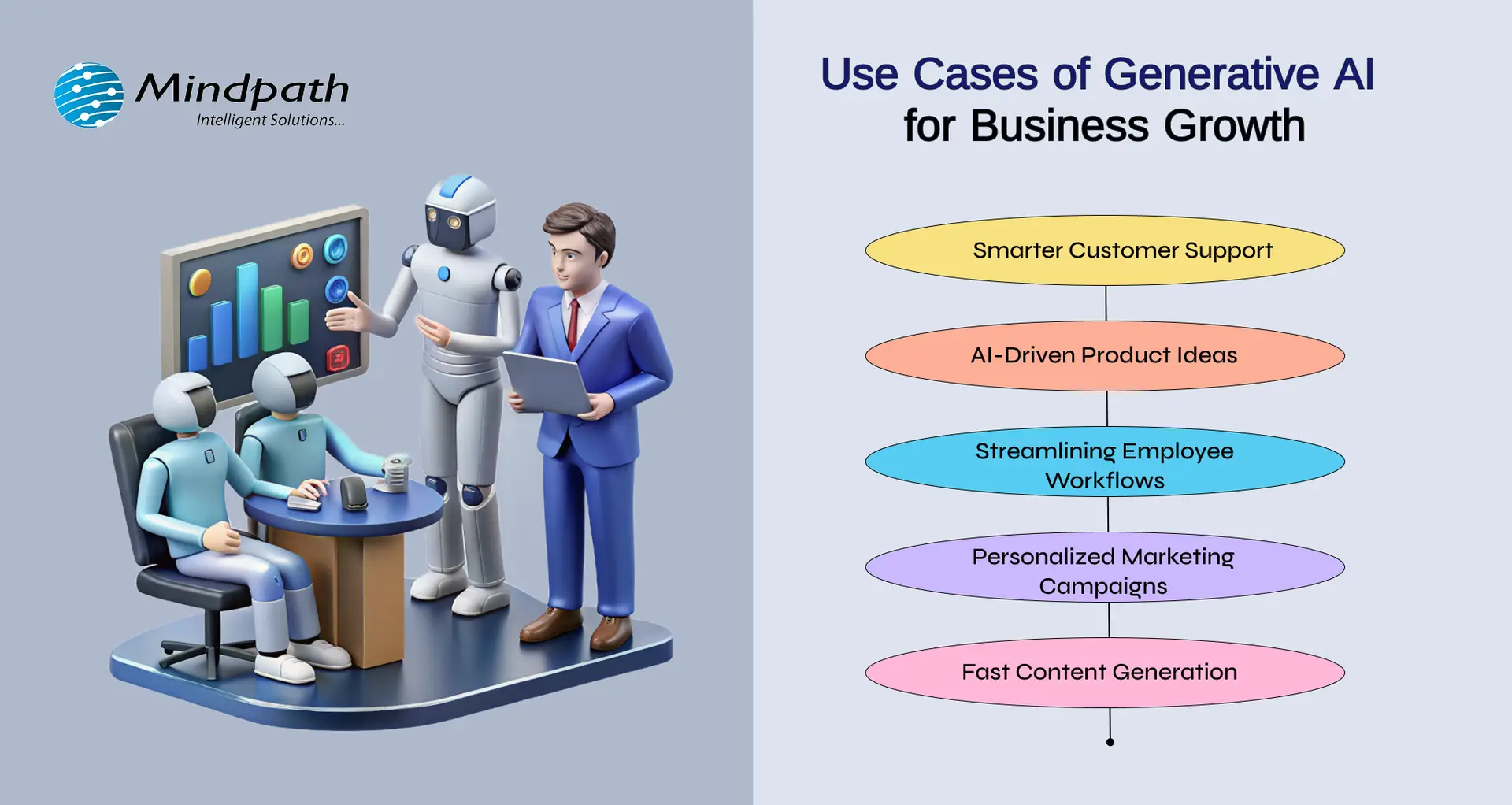
Generative AI for business is revolutionizing the way companies develop by enhancing customer experience, increasing productivity of employees, and accelerating innovation. From conversational tools like ChatGPT, Bard, and Midjourney to live business applications, the effects are tangible. Here are some simple yet impactful generative AI use cases that fuel business growth today:
Use Cases of Generative AI for Business Growth 

1. AI-Driven Product Ideas

With tools such as Midjourney, businesses are able to create product ideas, packaging, and graphics. It illustrates how AI can be applied in innovation, by assisting teams to come up with creative ideas quicker and validate what is effective with actual audiences.

2. Smarter Customer Support

Tools like ChatGPT help companies create AI-powered chatbots that answer customer questions instantly. This improves response time and frees up human agents to focus on complex issues. It’s a simple way to offer 24/7 support and boost customer satisfaction.

3. Streamlining Employee Workflows

According to the McKinsey Generative AI Report, generative AI can automate tasks that take up 60–70% of employees’ time today. This includes writing emails, summarizing reports, and generating presentations—especially helpful for knowledge workers and high-skill roles.

4. Personalized Marketing Campaigns

Generative AI technology assists companies in crafting customized ads and suggestions based on user data. This renders marketing more precise and efficient, enabling more engagement and sales while saving time for marketers.

5. Fast Content Generation

With platforms like Bard, teams can quickly write blogs, product descriptions, and emails. This saves time and allows employees to focus on strategy. It’s one of the most practical generative AI examples used daily across industries. 

Looking to leverage generative AI for smarter, more adaptive app solutions? Explore our blog on Generative AI in App Development highlights practical applications, transformative benefits, and strategies to stay ahead in the digital landscape.

Ready to Make Your Business AI-Ready? 

Generative AI is changing the way businesses work, think, and grow. It’s not just about automation, it’s about helping teams be more creative, make faster decisions, and offer better experiences to customers. Be it creating content, improving support, or building new ideas, generative AI for business is making every day work smarter and more efficient. 

At Mindpath, we specialize in delivering cutting-edge AI development services tailored to meet the unique needs of modern businesses. Our expertise in generative AI enables companies to streamline operations, boost productivity, and create intelligent solutions that drive real value. Whether you’re looking to implement AI-powered automation, enhance customer engagement, or accelerate innovation, Mindpath is your trusted technology partner for consistent business growth! 

Frequently Asked Questions

1. What is generative AI for business users?

Generative AI for business refers to AI systems that create new content, ideas, designs, or solutions based on existing data. Instead of only analyzing information, it generates emails, reports, marketing copy, product concepts, and more. Business users can apply it to improve creativity, automate tasks, and make smarter decisions faster.

2. What are some applications of generative AI in business?

Businesses use generative AI for content creation, customer support chatbots, product design concepts, personalized marketing campaigns, and financial risk analysis. It also helps generate reports, automate emails, and create digital assets. These applications support innovation, reduce manual work, and improve overall operational efficiency.

3. How can we implement GenAI to improve efficiency?

To implement GenAI effectively, businesses should first identify repetitive tasks and content-heavy processes. Next, integrate AI tools with existing systems like CRM or ERP platforms. Start with pilot projects, measure performance, and scale gradually. Proper data management and employee training are essential for long-term success.

4. What is the future of GenAI in business?

The future of Generative AI for business looks highly promising. It will continue enhancing personalization, predictive decision-making, and intelligent automation. As technology advances, AI systems will become more context-aware and collaborative, working alongside humans to drive innovation, improve productivity, and create smarter digital ecosystems.

5. What is one limitation of generative AI in business?

One major limitation of Generative AI for business is its dependence on data quality. If trained on biased or inaccurate data, outputs may be misleading. It also lacks true human judgment and emotional understanding, which means human oversight remains necessary to ensure accuracy, brand alignment, and ethical use.

Related Post

Explore common myths about AI, uncover the truths behind them, and learn how Mindpath’s AI development services can transform your business.
Discover the benefits of a multi-cloud strategy for modern enterprises, including improved security, flexibility, cost savings, and risk management.

Related Post

web development vs software development

You are a business owner preparing your digital strategy and have difficulty finding the ideal option for software and web development. The web development vs software development comparison might be difficult to understand for a layman without technical expertise. One of the common misconceptions about the two terms is that they both mean the same thing.

Business owners must recognize the differences between software development and web development to pick the ideal approach for their digital strategy. Web development is all about establishing the online presence of a business. On the other hand, software development deals with creating customized software solutions for different needs. A deep dive into the comparison between web development and software development can help you understand which one is right for you.

Looking for the right software development partner to bring your ideas to life? Mindpath’s software development services offer end-to-end solutions tailored to your business goals, from strategy and design to development and deployment.

Fundamental Difference between Web and Software Development

The emerging requirements of the digital landscape have had businesses thinking about the best ways to reach their target audience. As the software development vs web development debate becomes a focal point of discussion, it is important to understand how they are different from each other. With an overview of the definition of the two terms, you can find a starting point to compare them.

What is Web Development?

You will get no prizes for guessing that web development is the process of creating websites. Web development involves creating everything from the server logic and databases to the visual elements that make a website attractive. Without websites, businesses will struggle to have an online presence and showcase their brand. 

You can identify the difference between a software developer and a web developer from the primary components involved in website development. Web developers have to address the requirements of frontend and backend development alongside a content management system for websites. 

Frontend development focuses on the part of a website that users see, including the layout, design, text, images, and buttons. The significance of backend development is evident from the fact that it involves the creation of the server logic and databases. Another crucial component in web development projects points to content management systems or CMS platforms. The intuitive interface of CMS tools offers easy solutions for managing and updating the content of a website.  

What is Software Development?

The next prominent approach for your digital strategy is software development. As the name implies, software development focuses on the complete development lifecycle from ideation to the deployment and maintenance of a project. You can notice the difference between a web developer and a software developer from the fact that software developers have more responsibilities. The scope of tasks in software development is bigger as it requires the creation of custom solutions to deal with specific business needs.

Software developers can create mobile apps, complex software systems for large organizations, or custom internal software. The solutions created by software developers serve distinct goals for businesses. For instance, mobile apps serve as effective tools to reach the target audience of a business and enhance customer engagement. On the other hand, custom internal software solutions can help businesses manage different business functions with ease.

Must Read: Types of Software Development

Diving Deeper into the Web Development vs Software Development Debate

The overview of web development and software development reveals the fundamental difference between the two terms. The following sections will provide a more detailed comparison between web development and software development on the basis of different factors.

1. Objectives of the Process

One of the foremost pointers for differentiating web development from software development is the objective of the process. What do the two development approaches help you achieve? The answer will help you take the best pick from a web developer vs software developer comparison. Web development focuses primarily on establishing an online presence for your organization and showcasing your brand. It is one of the most common approaches to drive customer engagement through intuitive web apps or websites.

Software development process, on the other hand, focuses on addressing specific business problems with custom solutions. Businesses can rely on software development to create software for managing different business functions or custom internal software that can be deployed on various platforms. The primary objectives of software development revolve around enhancing productivity and streamlining operations.    

2. Complexity of the Process

The next point in the comparison between web development and software development focuses on their complexity. In the case of web development, you can rely on templates or content management systems for creating web apps. 

Software development requires the creation of fully customized solutions according to the requirements of the business. Developers can create software solutions from scratch by using the client’s requirements as their reference. 

3. Maintenance Requirements

Another prominent aspect in the software developer vs web developer comparison is their responsibility for maintenance. Web developers can address the maintenance requirements through continuous security updates and frequent modifications to content. In addition, web developers also take care of the maintenance of web apps by updating the design according to the latest trends.

The responsibilities of maintenance in software development focus on introducing new features and bug fixes. Apart from addressing the errors in the functionalities of software solutions, a software developer also takes care of performance improvements.

Want technology that truly supports your business rather than slowing it down? Discover the key custom software development benefits that help companies optimize operations and innovate faster.

4. Technology Stack

The review of differences between software and web development will also draw attention towards the technology stack required for the two approaches. It is one of the biggest factors in a web development vs software development comparison, and also determines the complexity. The technology stack for website development involves frontend and backend frameworks with CMS platforms. The notable frontend frameworks include HTML, JavaScript, React, Angular, and CSS, while backend frameworks include Python, Ruby, and PHP. Some of the popular CMS platforms for web development include Joomla, WordPress, and Drupal.

For software development, the tech stack includes programming languages, cloud platforms, and databases. The most commonly used languages in software development are Java, Python, Swift, and Ruby. Software developers can use SQL or NoSQL database management systems and one of the big cloud platforms, such as AWS, Google Cloud, or Microsoft Azure.

5. Cost of Development

The most crucial pointer in the comparison between web development and software development is the development cost. You can determine whether you need a web developer or a software developer by identifying the type of project. At the same time, you must also take your budget into account before making the final choice. Web development requires a lower initial cost, primarily due to the use of templates. You can also choose a custom design for web development, which may increase the development cost. However, you will have to invest more in continuous updates of the website or web app to adapt to user requirements.

Software development costs are generally higher than those of web development projects due to many reasons. Building a custom software solution requires a lot of development time, which will lead to the consumption of more resources. On top of it, software development projects are more complex than web development projects, thereby increasing the costs. Most important of all, the customization of software solutions according to business requirements will also add more costs to the project.

Ever wondered why some websites just feel effortless while others fall flat? Discover the hidden benefits of custom website development services that turn a simple site into a powerful, user-friendly business tool.

Here is an overview of the web development vs software development comparison in a table.

Criteria Web Development Software Development
Objectives of the Process Web development focuses on building your online presence and showcasing your brand. Software development aims to resolve specific business issues and improve productivity.
Complexity Web development is a simple process with the use of templates and CMS tools. Software development is extremely complex and requires creating custom solutions from scratch.
Maintenance Requirements Maintenance tasks in web development involve ongoing updates for security, content modifications, and changes in design. Maintenance tasks in software development focus on introducing new features, performance improvements, and fixing bugs.
Technology Stack The technology stack for web development includes frontend and backend development frameworks alongside CMS platforms. The technology stack for software development includes programming languages, cloud platforms, and database management systems.
Cost of Development The initial cost of web development is lower than software development. The cost of software development is higher due to the complexity and customization needs.

Final Thoughts

The differences between software development and web development showcase that each approach has its distinctive advantages. You might face the web developer vs software engineer dilemma while thinking about resource requirements for your next project. The final choice will ultimately depend on the requirements and scope of your project. For instance, a new e-commerce business should look for web development to establish its online presence. On the other hand, a healthcare organization will need a software developer to create an ERP system.

At Mindpath, we have been delivering trust and efficiency in our expert, world-class software development services for every client. Our focus on understanding the client’s vision and requirements empowers us to deliver competent solutions that stand out in a crowded digital landscape. We have a team of dedicated experts in web development and software development, thereby offering you a one-stop solution. Pick the best talent for your next development project from our team and gain the momentum you need in this digital world now.

cloud native development

Cloud-native development is redefining the way organizations are evolving in the digital-first world. It enables teams to develop applications that are resilient, can be easily updated, and allow sophisticated scaling without compromising development speed. An increasing number of organizations are gravitating towards a cloud-native approach to meet the modern-day demands for agility, innovation, and customer experience. If your organization values being competitive and evolving at the speed the digital world enables, but not constrained by legacy solutions, cloud-native development could be the evolution opportunity you are seeking.

This method of breaking up large applications into smaller constituents via microservices allows organizations the opportunity to manage and improve everything much easier. With new technologies enabling containers and automation, organizations with the right supporting tools are able to deliver, test, and fix features faster than ever. It is no longer just about trying to keep pace; it is about leading a system that embraces change. In this blog post, we will discuss how cloud-native development enables organizations to scale up their businesses with greater control, pace, and certainty. So, let’s explore!

Looking to elevate your business with Cloud-Native Development? Contact us, and our experts will turn your ideas into high-performing cloud-native solutions.

What Is Cloud Native?

Cloud-native computing is a way of building and running applications that are built for the cloud. Cloud-native development provides developers with a way to build software that is flexible, adaptable, and able to handle dramatic change without breaking the overall architecture. Instead of building one huge system or application, the developer builds the application in independent pieces called microservices that work together. This approach allows for building and testing in more manageable pieces over time.

According to MarketsandMarkets, the cloud native applications market is expected to grow from USD 5.9 billion in 2023 to USD 17.0 billion by 2028. This shows that more companies are choosing this method to stay competitive and meet user demands. Tools like containers and automation help developers launch updates quickly without stopping the service. Cloud native makes it possible to move faster, reduce costs, and build stronger, more reliable software.

Must Read: Multi Cloud vs. Hybrid Cloud

Components of Cloud-Native Development

Cloud-native relies on a set of modern tools and practices that work together to build fast, flexible, and reliable applications. Here are the key components that make this approach effective:

1. Containers

Containers bundle code with everything it needs to run, making apps work smoothly across different environments. Tools like Kubernetes and Amazon ECS manage these containers to help with deployment, scaling, and maintenance. They are a key part of cloud native technologies, ensuring consistency and efficiency.

2. APIs

APIs, or Application Programming Interfaces, allow different software parts to communicate with each other. In cloud native development, microservices rely on APIs to share data and functions. This setup is lightweight and uses fewer resources compared to traditional systems.

3. Microservices

Microservices are small, independent parts of an application that work separately but communicate with each other using APIs. They are easy to update without affecting the whole system, which makes the app more stable. This structure supports cloud native development by making applications easier to build, test, and scale.

4. CI/CD Pipelines

CI/CD pipelines are used to automate the process of building, testing, and deploying code. They allow developers to work faster and reduce errors by using shared code repositories and automated workflows. This approach plays an important role in the cloud native landscape.

5. DevOps

DevOps brings together development and operations teams to automate and streamline the app development process. It helps in delivering software quickly and reliably with a focus on collaboration. DevOps practices are essential in the cloud native landscape to keep up with modern development needs.

Struggling with speed, collaboration, or automation in DevOps? Our DevOps Challenges and Solutions blog explains how modern businesses address these issues.

Benefits of Cloud Native Development

Cloud-native approach offers clear advantages that go beyond just building applications differently. These benefits are helping businesses improve the way they deliver, manage, and scale digital solutions across industries.

1. Reduced Operational Costs

Using open-source tools and serverless models helps cut down infrastructure and licensing costs. Businesses only pay for what they use, saving money and resources.

2. Effortless Scaling and Deployment

Cloud-native workflows automate how apps and infrastructure are deployed. With container orchestration, apps scale easily based on real-time demand.

3. Modernized Legacy Applications

Older apps can be updated to work better with modern cloud systems. Cloud-native development makes it easier to improve and connect them with new projects.

4. Greater Development Flexibility

Containers package apps with everything they need to run across different setups. This gives developers the freedom to build without being tied to one system.

5. Efficient Microservice Management

Kubernetes helps manage and scale container-based apps more efficiently. It simplifies deploying microservices while ensuring better performance.

6. Improved Application Stability

Cloud systems stay available even when one part fails. Microservices architecture ensures the app keeps working smoothly without full downtime.

7. Aligned Tech and Business Goals

A product-based approach aligns tech efforts with business goals. It boosts teamwork and supports faster responses to changing needs.

8. Boosted DevOps Efficiency

Cloud-native practices help speed up development, testing, and deployment. This leads to quicker, more reliable updates with fewer manual steps.

9. Low-Code and No-Code

Low-code and no-code platforms allow more people to build apps with simple tools. This makes development faster and less dependent on technical teams.

10. Minimized Vendor Lock-In

Cloud-native applications can run across multiple cloud platforms. This gives businesses the freedom to switch providers and avoid getting locked in.

Want to know what’s next for the cloud in 2025? Read our blog on Cloud Computing Trends to discover the technologies and innovations shaping the future of business.

Best Practices for Cloud-Native Development

To get the most out of cloud-native development, it’s important to follow proven methods that support speed, reliability, and scalability. These best practices help teams build stronger applications while keeping systems flexible and efficient.

1. Use Containers Effectively

Containers package apps with their dependencies, making them easy to run across different environments. This boosts reliability and simplifies deployment, helping teams work faster and more efficiently.

2. Take Ownership of Products

Following a product-focused mindset gives teams control over development from start to finish. It encourages innovation and quality, aligning with the goals of the cloud native foundation.

3. Automate CI/CD Pipelines

Continuous Integration and Continuous Deployment (CI/CD) automate testing and delivery, reducing errors and saving time. This helps teams release updates faster with higher confidence.

4. Build with Microservices

Microservices divide the application into smaller, focused services that can be built, deployed, and managed independently. This structure improves fault tolerance, speeds up development, and supports scalable cloud native solutions.

5. Apply Infrastructure as Code (IaC)

IaC lets teams manage infrastructure with code, allowing easy updates, version control, and automation. It brings consistency and reduces the chances of manual errors during setup or changes.

6. Focus on Resilience and Fault Tolerance

Design apps to handle failure using retries, timeouts, and automated recovery. This ensures your cloud native applications stay stable and available during unexpected problems.

Want to cut costs and speed up app deployments? Read our blog on Serverless Architecture in Cloud Computing to see how your business can scale efficiently.

Unlocking the Power of Cloud-Native Development

Cloud-native development is helping businesses move faster, scale smarter, and build more resilient applications. From modernizing legacy systems to enabling flexible and efficient operations, it’s shaping the future of digital transformation. By adopting the right strategies and tools, organizations can respond to change with greater confidence and deliver value to customers more effectively.

At Mindpath, we help businesses transform their software approach with our expert cloud-native development services. From planning architecture to seamless deployment, our team supports every step. We simplify operations, modernize infrastructure, and create scalable applications that align with your goals. With Mindpath, you build software that’s fast, flexible, and ready for what’s next.

Frequently Asked Questions

1. How is cloud-native development different from traditional application development?

Cloud-native development focuses on building applications specifically for cloud environments using microservices, containers, and automation. Traditional development often relies on monolithic systems that are harder to scale and update. This modern approach allows faster releases, better resilience, and easier scalability across environments.

2. What kind of businesses benefit the most from cloud-native development?

Businesses that require scalability, frequent updates, and high availability benefit the most. This includes startups, SaaS companies, and enterprises handling dynamic workloads. It is especially useful for organizations aiming to innovate quickly and deliver consistent digital experiences across multiple platforms.

3. Is migrating to cloud-native architecture a complex process?

Migration can be complex depending on existing systems and architecture. It often involves breaking down monolithic applications, adopting new tools, and retraining teams. A phased approach, starting with smaller components, helps reduce risk and ensures smoother transition without disrupting ongoing operations.

4. How does cloud-native development improve application reliability?

Cloud-native systems are designed with fault tolerance in mind. If one microservice fails, others continue to function without affecting the entire application. Features like automated scaling, monitoring, and self-healing systems help maintain performance and ensure minimal downtime for users.

5. What skills are important for teams working with cloud-native technologies?

Teams need skills in containerization, microservices architecture, cloud platforms, and automation tools. Knowledge of CI/CD pipelines, DevOps practices, and infrastructure as code is also important. Continuous learning is essential as cloud-native technologies evolve rapidly and require up-to-date expertise.

Discover the power of cloud-native development! Learn its benefits and how it helps businesses enhance security, efficiency, and performance.
benefits of devops

While building software, just think that the developers and the operations teams are working like a well-coordinated crew, being fast, smooth and always on the same page. Isn’t it an interesting combination? Well, that’s the power behind embracing the benefits of DevOps. It is a new method to simplify your software process, in a way that will help teams work more effectively in an increasingly fast-paced digital world.

As we approach 2026, DevOps continues to evolve the way businesses build and run software. DevOps is not just a fast way to deliver software; it is a cultural approach that allows for speed, scale, agility, and reliability. This blog will look at how DevOps is rewriting the development process and why it is now essential for progressive teams. 

Are you looking to implement DevOps in your organization? Mindpath provides customized solutions to help teams speed up the development process and reach quantifiable goals.

What is DevOps?

DevOps refers to the collaboration of development and IT operations teams working together for the software development processes. It helps them to build, test as well as launch software faster and smoother. The major idea behind DevOps is better teamwork, faster delivery, and fewer problems during the software process. 

Even though it is not a tool or a product, it often includes using helpful technologies such as cloud platforms, containers and real-time communication tools. A big part of it is CI/CD, which stands for continuous integration and continuous delivery. This helps teams update software more often without slowing down. With DevOps, both developers and operations teams can share tasks, improve quality, and make sure the final product reaches users quickly and safely. 

How Does DevOps Work?

DevOps works by bringing development and operations teams together to make software faster and more reliable. The process follows a cycle that includes planning, coding, building, testing, releasing, deploying, operating, monitoring, and collecting feedback. Each step is connected to keep the work smooth and continuous. What is the main purpose of DevOps? It is to create software that meets user needs, runs well from the start, and is delivered without delays. 

To support this, teams use DevOps tools like automation platforms, monitoring systems, and CI/CD pipelines. These tools help developers work independently and speed up tasks that used to take longer. For example, with continuous integration, developers can update shared code several times a day and quickly catch bugs. Teams also follow shared rules for testing and quality, so everyone stays on the same page. 

Planning to modernize your DevOps approach using automation and stronger safeguards? Check out our blog on DevSecOps to learn why automated security integration is essential for speed, stability, and resilience.

What are the Key Benefits of DevOps?

Adopting DevOps brings real improvements to how teams build and deliver software. The DevOps benefits focus on making the development process more efficient, reliable, and easier to manage. Let’s have a look at some of it: 

top benefits of devops

1. Lower Costs

Combining updates and maintenance in one process helps teams work more efficiently. DevOps reduces the need for last-minute fixes and wasted effort. This saves money and helps teams do more with the same resources.  

2. Higher Team Productivity

Open communication and fewer repeated tasks let teams focus on real progress. Everyone knows what to do and can work on high-value goals. As a result, productivity rises, and team members feel more involved.  

3. A More Stable Work Environment

DevOps helps create a calmer and more organized workplace by reducing the pressure of constant changes. Teams can handle updates with ease, due to smoother processes and clear communication. This balance helps everyone stay focused and productive. 

4. Faster Delivery

With DevOps, updates and new features can be launched more quickly. DevOps for business helps in meeting customer needs faster and staying ahead of the competition. Streamlined deployment also helps with fewer delays and more consistent results. 

5. Better Product Quality

Frequent feedback and testing throughout development help improve the final product. DevOps uses automation to catch up on problems early, before they grow. This keeps the focus on delivering quality and reduces the need for rework. 

Must Read: DevOps Trends 

6. Fix Issues Quickly

DevOps makes it easier to detect and solve issues early. Smaller releases and constant monitoring help teams act fast when something goes wrong. This keeps systems running smoothly and reduces downtime. 

7. Greater Flexibility

DevOps supports teamwork across different departments, helping companies respond quickly to change. Breaking down barriers between teams encourages flexibility in how work gets done. This leads to quicker decisions and faster progress. 

8. Frees Up Space for Innovation

When tasks like testing and deployment are automated, teams have more time for creative thinking. Developers can focus on building new ideas instead of repeating the same steps. This makes work more exciting and leads to better solutions. 

9. Guarantees Continuous Updates

DevOps supports a smooth flow of updates and new features with every release. Automation and teamwork make sure each change is tested and delivered quickly. This gives users regular improvements while keeping everything stable. 

10. Minimal Mistakes

Frequent code releases and testing help teams catch up with problems early. This keeps software quality high and prevents bigger issues later on. It’s a key benefit of DevOps that helps teams move forward with confidence. 

Aiming to enhance operational efficiency and reduce development risks? Check out our blog on DevOps Challenges and Solutions to discover proven approaches that improve performance, stability, and cross-team cooperation.

DevOps Best Practices

Following the right approach is key to getting the most out of DevOps. It helps teams collaborate better, improve software quality, and speed up delivery. Here are some of the most effective DevOps best practices to consider: 

1. Build a Culture of Trust and Teamwork

To make DevOps work well, teams need to feel safe to share ideas and learn from mistakes. When there is trust and open communication, collaboration becomes much easier. Breaking down walls between departments helps everyone work toward a shared goal. A culture of trust and empathy makes it easier to adopt DevOps smoothly.

2. Continuous Integration and Delivery

CI/CD DevOps practices involve adding small code changes frequently to a shared space. This helps teams spot issues early and keep the code clean. Once the code is tested, it moves into production smoothly through continuous delivery. This process saves time and gives developers confidence when releasing updates.

3. Automate Testing Early On

Automated testing is a key part of a strong CI/CD pipeline. Instead of waiting for manual tests, automated tests run every time a change is made. These tests can include everything from unit to load testing, depending on your needs. This helps reduce bugs and makes sure the software stays reliable.

4. Track the Right Metrics

To keep improving, teams need to measure what matters. Metrics like deployment speed, failure rates, and time to fix issues give a clear picture of performance. Each team may focus on different metrics based on their goals. It’s also important to collect logs and monitor systems to quickly fix problems and improve how everything runs.

5. Automate Repetitive Tasks

Manual tasks can slow down development and lead to mistakes. Automating these tasks speeds things up and keeps results consistent. It also frees up teams to focus on more valuable work. A reliable automation process adds confidence and improves overall efficiency.

Planning to strengthen your software delivery lifecycle? Explore our blog on DevOps vs DevSecOps to understand how shifting from simple automation to integrated security can elevate speed, reliability, and protection.

Ready To See How DevOps Can Boost Your Business?

The benefits of DevOps include enhanced collaboration, faster software delivery, and improved product quality. It also reduces costs while fostering a stable and efficient work environment. Through automation and continuous feedback, teams can quickly adapt and respond to changes, making DevOps a vital approach for building reliable software in today’s dynamic digital landscape. 

At Mindpath, we specialize in helping organizations successfully implement DevOps practices. We focus on automating processes, strengthening team collaboration, and accelerating software delivery with quality and security. Our expert guidance ensures your DevOps transformation aligns with your business objectives, enabling smoother and more efficient software development. 

Frequently Asked Questions

1. How can DevOps help a business recover faster from unexpected failures?

DevOps practices, like automated testing, monitoring, and CI/CD pipelines, allow teams to detect and fix issues early. Quick rollback mechanisms and real-time alerts reduce downtime, ensuring the business can recover faster while maintaining service continuity for customers.

2. Can adopting DevOps change the way teams collaborate beyond development and operations?

Yes. DevOps fosters cross-functional collaboration, breaking silos between teams like QA, security, and product management. Shared responsibility, transparent workflows, and continuous feedback enhance coordination, resulting in faster decision-making and smoother project delivery across the organization.

3. How do the benefits of DevOps extend to customer experience?

DevOps accelerates release cycles, enabling frequent updates and faster bug fixes. Continuous monitoring ensures software stability, while automation reduces errors. Together, these practices deliver a reliable, responsive, and high-quality user experience that aligns with evolving customer expectations.

4. What is the role of automation in reducing operational risks within DevOps?

Automation handles repetitive and error-prone tasks such as deployments, configuration management, and testing. By minimizing human intervention, it lowers the risk of mistakes, ensures consistency across environments, and enhances overall system reliability, even under high-demand scenarios.

5. How can DevOps support businesses preparing for rapid growth or scaling?

DevOps enables scalable infrastructure through containerization, microservices, and cloud integration. Continuous monitoring and automated deployment pipelines allow applications to handle increasing traffic without performance degradation, making growth smoother and reducing technical bottlenecks as demand rises.