Home

Understanding the Real Cost of Hiring ReactJS Developers

Understanding the Real Cost of Hiring ReactJS Developers

Join our Newsletter!

Cost of Hiring Reactjs Developers

Without a robust and engaging web presence, your business is going nowhere, and this might be a perfect reason to hire ReactJS developers. Once you know the cost of hiring ReactJS developers, you can measure the value they will bring to your web projects. Let us discover why you must know the costs of hiring React developers and the factors that influence hiring costs.

Understanding hiring costs upfront prevents budget surprises later in the project. Every business has different needs, and costs vary based on experience, location, and engagement model. Knowing what drives these numbers helps you make smarter hiring decisions. In this article, we break down everything that shapes the real cost of hiring ReactJS developers.

Want to adopt ReactJS in your next project? Mindpath’s ReactJS development services will provide expertise that will help you in building interactive web applications according to your business requirements.

Reasons to Focus on ReactJS

ReactJS is a component-based, open-source JavaScript library that has been the favorite pick for frontend development since 2013. It is still one of the most powerful tools for creating visually appealing UIs. Any business that thinks of hiring frontend developers should focus on ReactJS for its distinctive features. Some of the notable features of React include component-based architecture, cross-platform development with React Native, virtual DOM, and a strong community. ReactJS not only facilitates faster development but also ensures that you get web applications that offer better performance and scalability.

While hiring guides can help you pick the right talent for your teams, it is important to learn about the costs of hiring React developers. Why? Many hiring managers will believe that the cost of hiring a ReactJS developer is all about their salary. Interestingly, employers must also consider other factors, such as location and experience, along with additional costs, to determine hiring costs.

Cost of Hiring a ReactJS Developer

Professional ReactJS developers can help you craft the best user experiences in web applications. However, the expertise of ReactJS developers comes at a cost. The search for answers to “How much does it cost to hire a ReactJS developer?” might lead you directly to salary forecasts for React developers. On the other hand, the salary is not the only thing that you must consider in the cost of hiring a ReactJS developer. The following factors will help you understand how to determine the ideal compensation for React developers in your web projects.

1. Experience of the Developer

The foremost factor that influences the salary of ReactJS developers is their experience. Junior or entry-level developers have limited professional experience and can build basic components, work on simpler tasks, and support senior developers. Mid-level developers have a better understanding of React concepts and can work on complex features alongside contributing to architecture design.

Senior developers are the top-tier talent with more than five years of professional experience and can design the whole application architecture. Senior ReactJS developers can also guide junior developers, optimize performance, and scale up web applications with ease. The estimates for ReactJS developer cost in 2025 suggest that senior developers can earn more than $150,000 per year. Similarly, junior developers can earn almost $70,000 annually, while mid-level developers can ask for $100,000 to $120,000 per year.

2. Geographical Location

Hiring managers must also take the geographical location into account while calculating the costs of recruiting React developers. Location is an important factor in determining the hiring cost as it implies variations in market competitiveness, demand for talent, and cost of living. For instance, the cost of hiring a ReactJS developer in North America will be higher than the global average. Why? You can find tech hubs like Silicon Valley and New York, along with major Canadian cities that have a higher cost of living.

The average annual salary of a ReactJS developer in North America can vary from $90,000 to $120,000. The only other competitive market for ReactJS development is Western Europe, where countries like the UK, Germany, and France seek high-quality talent. One of the best choices for a cost-effective React development solution is the Asia-Pacific region, which includes India, China, and the Philippines. The annual salary for React developers in the Asia-Pacific region is considerably lower than in Western countries.

Want to scale your application seamlessly as your customer base grows? Learn how the benefits of ReactJS development services make large-scale, high-traffic apps easier to maintain and expand.

3. Scope and Complexity of the Project

Employers must also pay attention to the scope and complexity level of their web project while calculating the hiring costs for a ReactJS developer. You may want to build simple web apps, mid-sized applications, or large-scale enterprise applications with ReactJS. Each type of project will demand a specific level of expertise, which indirectly influences the cost of ReactJS developers. For instance, junior developers can create simple applications with basic UIs or static websites with minor features.

The estimates for ReactJS project development cost might be a little higher for medium-sized applications, which will require mid-level to senior developers. Such types of applications may need custom designs, dynamic features, or integrations with third-party APIs, which call for experts and more costs. Large enterprise applications that need complex architectures and intricate state management will require senior and lead developers, thereby increasing costs.

4. Hiring Model

One of the key factors that determines the cost of hiring a ReactJS developer is the hiring model. Do you want a full-time in-house developer or a freelancer? If you hire an in-house developer to work on a full-time basis, it will cost you the most. The recruitment costs for in-house developers in the USA can vary between $5000 and $20,000 for each hire. The primary reason to hire an in-house React developer is the assurance of maximum control.

Hiring managers can opt for freelance developers or hire developers on a contractual basis to reduce costs and ensure flexibility. You should hire freelancers only when you need access to specialized skills and faster onboarding. Some employers also choose cost-effective ReactJS development services through outsourcing or dedicated remote teams. Outsourcing offers access to a vast talent pool and better options for scalability with fewer administrative setbacks.

5. Other Additional Costs

The direct salary or hourly compensation for ReactJS developers is only the tip of the iceberg. Employers and hiring managers must also pay attention to the additional costs of hiring React developers. The notable additional costs include recruitment costs, training costs, infrastructure costs, and benefits for full-time developers.

Recruitment costs include the costs of job board posting, agency fee, and the time invested in screening and interviews. Infrastructure costs point to the cost of laptops, cloud services, testing tools, and software licenses for IDEs, developer tools, and communication. Training and onboarding costs, along with benefits and perks like health insurance, stock options, and bonuses, also determine the hiring costs of React developers.

Want to ensure your next digital product is built by a partner who truly understands your business goals? Discover what matters most when choosing the right React development company for your business.

Is Your Business Getting Real Value From Its ReactJS Investment?

The list of answers to “What factors affect ReactJS developer rates?” reveals that the salary is not the only cost. Hiring managers can determine the salary by considering different factors such as experience, geographical location, and hiring model. The additional costs of hiring a React developer include training and onboarding costs, recruitment costs, and infrastructure costs.

The cost of ReactJS projects at Mindpath also encompasses support and maintenance without imposing additional costs. On top of it, with reliable platforms like Mindpath, you will get transparent cost estimates for ReactJS development services. Explore the most cost-effective ReactJS development solutions for your projects with Mindpath.

Frequently Asked Questions

1. Is it cheaper to hire a ReactJS developer from another country?

Yes, geographical location significantly impacts the cost of hiring ReactJS developers. Developers in regions like India and Southeast Asia offer competitive rates without compromising quality. However, businesses must also factor in time zone differences, communication workflows, and project management overhead before committing to an offshore hiring decision.

2. How do you decide between hiring a freelance ReactJS developer or an agency?

Freelancers work well for short-term, well-defined tasks with limited scope. Agencies or dedicated teams are better suited for complex, long-term projects needing consistent collaboration. The decision ultimately depends on budget, project timeline, and how much ongoing support and accountability the business requires after initial development is complete.

3. What is a realistic budget for a mid-sized ReactJS web project?

A mid-sized ReactJS project typically requires mid-level to senior developers, third-party integrations, and custom UI work. Depending on location and hiring model, budgets can range from $15,000 to $60,000. Defining scope clearly before hiring helps avoid unexpected cost escalations during the development process.

4. Does the cost of hiring ReactJS developers change based on industry type?

Industry complexity directly influences ReactJS developer cost. A fintech or healthcare platform demands stricter security, compliance, and performance standards than a standard business website. These requirements call for more experienced developers and longer timelines, which naturally push the overall hiring and development costs higher.

5. How can businesses reduce ReactJS hiring costs without sacrificing quality?

Businesses can reduce costs by clearly defining project requirements upfront, choosing the right hiring model, and considering remote or offshore talent. Avoiding scope creep, investing in proper onboarding, and hiring developers with proven React expertise from the start significantly reduces rework costs down the line.


Need Skilled React.js Developers?

Build high-performing web applications with experienced React.js developers aligned with your goals.

Frequently Asked Questions

Support Is One Click Away

Featured Posts

Related Post

AI and Cloud Computing

The modern-day digital development depends on the intelligence, scalability, and flexibility advancing concurrently. This transformation is driven by AI and cloud computing, which help companies to make more efficient decisions by analyzing data faster. Executives see visible improvements in operations, products and customer experience. Consequently, the subject of conversation is not just trends but actually implementation. Teams want to have systems that learn, adapt and spur growth with minimum friction or delays.

With the increased adoption, there are heightened expectations in every industry. Decision makers want to have clarity, control and enduring value. They have to strike a balance between innovation and stability and cost consciousness. Additionally, it depends on choosing the correct strategy at the initial stage to succeed. Strategy is crucial and so is the technology. So, in this blog, we shall analyze the major advantages and the best practices of AI and cloud computing.

Keep reading further to learn more about this strategic synergy!

Want to optimize your business operations and scale effortlessly with the cloud? Mindpath offers cloud-managed services to provide secure, efficient, and fully managed cloud solutions.

Understanding the Core Fundamentals of AI and Cloud Computing

Artificial Intelligence (AI) facilitates machines to carry out tasks that would otherwise be carried out by human intelligence. It studies based on data, reasoning, identifies patterns, and comprehends language. Some of these major fields are machine learning, deep learning and natural language processing. AI helps companies to increase their efficiency, create smarter tools, and discover insights. Artificial intelligence and cloud computing tend to collaborate in order to improve outcomes.

Cloud computing involves computing resources, which include servers, storage as well as software offered via the Internet. It allows businesses to scale fast, pay as per their usage and access services anytime. The basic models include IaaS, PaaS and SaaS. This adaptability reduces the cost, accelerates the development, and supports the contemporary applications.

AI applications run effectively and successfully on cloud computing. AI and cloud computing go hand in hand to develop smarter and quicker systems. Cloud provides scalable storage and high-performance computing of AI models. AI will introduce intelligent cloud services via analytics, automation and optimization of resources. They all facilitate chatbots, predictive insights, and data analysis. The companies can operate cloud-based AI to take advantage of more advanced AI tools without substantial initial expenses and data analysis. Companies can access advanced AI tools on cloud platforms without huge upfront costs.

Looking to streamline cloud operations with intelligent solutions? Explore AI tools for DevOpss to see how automation and analytics optimize development and deployment workflows.

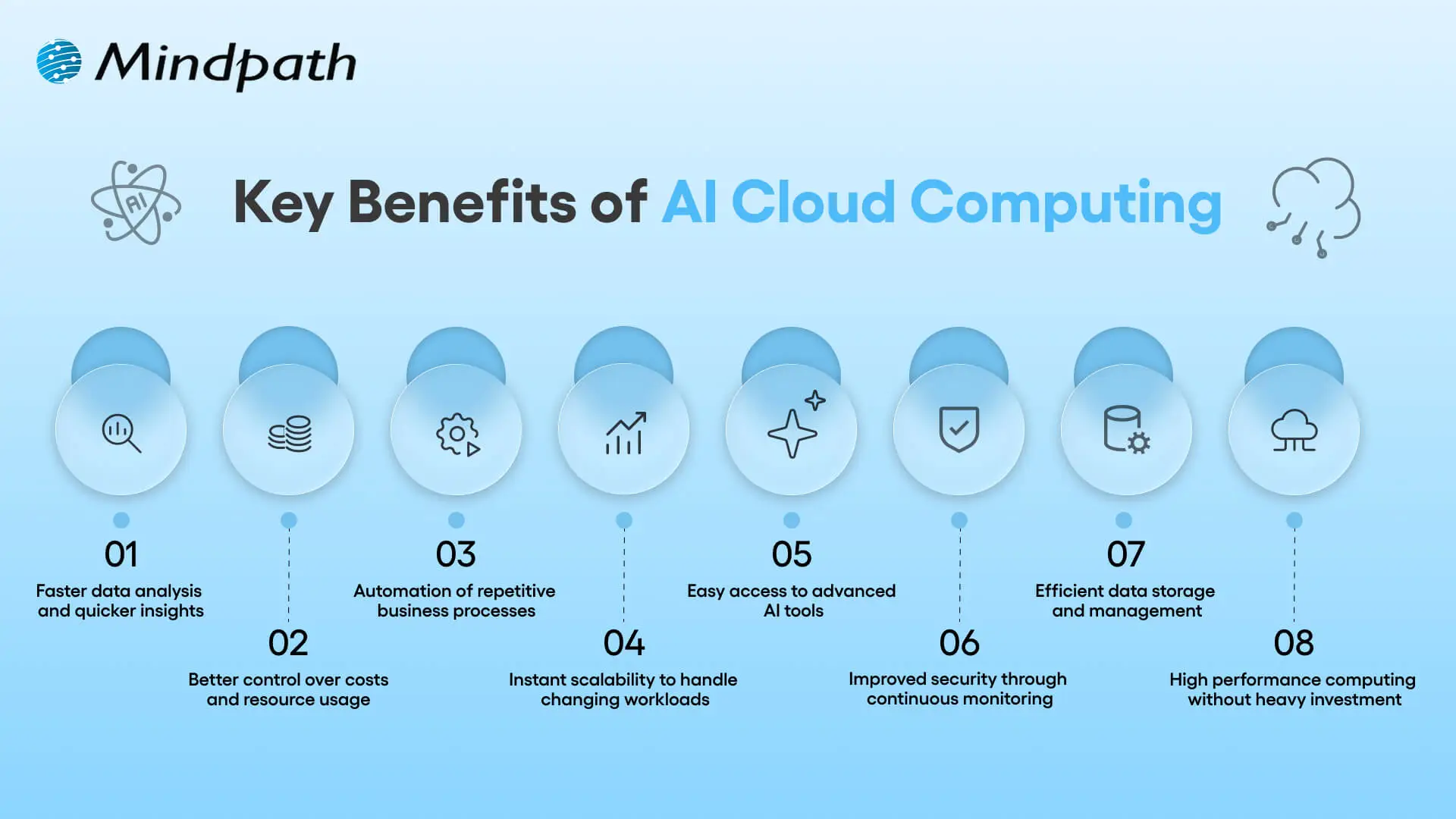
Key Benefits of AI Cloud Computing

AI and cloud computing are transforming the world of business and technologies. They open up fresh opportunities of development, productivity, and better decision making. Organizations look into how to make use of this combination. These are the best advantages that companies can embrace to remain competitive.

key benefits of AI Cloud Computing

1. Faster Data Insights

AI and cloud computing have excellent assistance in analyzing large data sets within a short period of time. Businesses bridge the data sources at ease and identify patterns that can make better decisions. This pace facilitates planning and minimizes guesswork in the operations.

2. Smarter Cost Control

AI and cloud computing minimize excessive expenditure on computers and their support. Businesses purchase resources as they consume and spend as demand increases. This strategy maintains flexible and predictable budgets.

3. Intelligent Automation

AI and cloud is used to automate repetitive workflow processes. Systems acquire knowledge and enhance processes through time. Teams are more strategic oriented as operations proceed normally.

4. Flexible Scaling Power

With AI and cloud computing, scaling up and down of resources is done on demand. Businesses either expand or contract without hesitation. This scalability helps in the development and unexpected increase in workload.

5. Easy Access to AI Tools

Cloud services provide ready-to-use AI services to business needs. Teams combine analytics, language processing, and vision tools within a short period of time. In combination, cloud computing and artificial intelligence eliminate technical restrictions.

6. Stronger Security Oversight

Cloud systems that operate based on AI keep a constant watch on activity. They identify threats at an early stage and react quicker to threats. This enhances security without retarding processes.

7. Better Data Management

Cloud services are an easy way of organizing, storing and retrieving data. AI assists in the automation of information classification and management. Companies have smarter data to analyze and report.

8. High Performance Computing

Artificial intelligence workloads require resources with high computing capabilities to operate. The cloud platforms offer on-demand GPUs and fast processors. Businesses deal with complicated activities that are not heavily capitalized.

Planning to deploy AI solutions at scale in the cloud? Explore cloud security tools to see how modern technologies secure AI pipelines and cloud infrastructure.

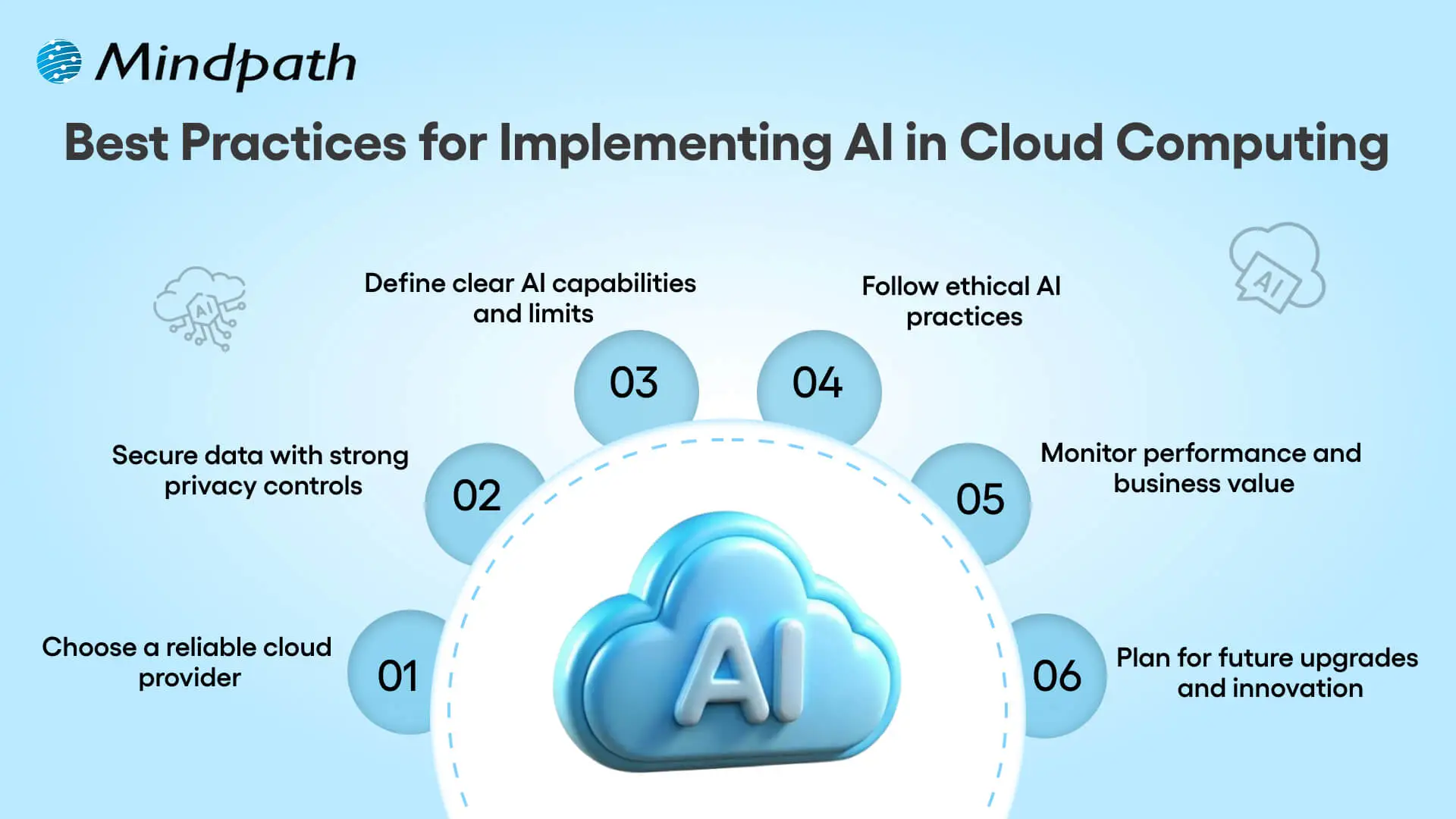
Best Practices for Implementing AI in Cloud Computing

AI and cloud computing need a more explicit and deliberate way of developing real value. Before adopting systems, teams need to plan, set goals and prepare systems. Technology is as important as strategy. These best practices demonstrate the way to apply AI in cloud computing in an effective and responsible manner.

Best Practices for Implementing AI in Cloud Computing

1. Select a Trusted Cloud Provider

Select a provider with the track record of working with AI and cloud services. Assess its standards of reliability, scalability, and compliance. Powerful partner will facilitate safe expansion and stable long-term operations.

2. Prioritize Data Privacy and Security

Encrypt and implement control access to sensitive information. Review security policies on a regular basis in order to minimize risks. High level of security instills trust in cloud systems and AI.

3. Define Clear AI Capabilities and Limits

Know what AI is capable of providing under the circumstances of the quality of the data. Track models regularly in order to identify bias or performance problems. Good expectations can make teams use AI in a responsible and effective way.

4. Establish Ethical AI Practices

Instruct employees on how to use AI fairly, transparently, and accountably. Ethical consciousness results in an improved decision-making process within teams. Conscientious operations enhance the confidence of cloud-based AI.

5. Monitor Performance and Business Impact

Monitor behavior and business performance of the track systems. Assess value through measurement of efficiency, accuracy and cost. Consistent reviews help to maintain AI and cloud investments in accordance with the objectives.

6. Prepare for Future Innovation

Anticipate changing regulations and elements of technology. Architecture Software Build scalable systems, which welcome upgrades and additional features. A visionary roadmap would guarantee success in the long term with AI and cloud computing.

Wondering how AI applications can scale efficiently in the cloud? Check out serverless architecture in cloud computing to learn how server-free designs enable faster, cost-effective, and scalable deployments.

Ready to Turn AI and Cloud Computing into Real Business Value?

Artificial intelligence and cloud computing are transforming the nature of modern business development, competition, and innovation. They allow making smarter decisions, executing them faster, and operating flexibly together. It takes proper planning, excellent data, and responsible usage in order to be successful. By linking technology to the objectives of the firms, companies mitigate risk and create value in the long term. The approach will assist teams to develop systems which are adaptable, scalable and perform well.

Mindpath AI cloud services assist companies to embrace AI clearly and confidently. Our professionals develop safe and scalable solutions which are practical to the business requirements. We put an emphasis on performance, ethics, and quantifiable results. Mindpath provides organizations with a dependable service in terms of planning, deployment, and optimization. Our strategy will make AI and cloud computing produce useful outcomes and not complications.

types of software development

Picture a scenario in which you are running a growing business, and things are moving at a fast pace. At this point, your customers will expect more; teams will need better tools, and competition will just be a click away. You must keep in mind that the real game changer isn’t just having software but rather, its choosing the right kind of software. For this, understanding the types of software development can make a huge difference.  

Behind every great digital solution, there lies a specific type of development which is tailored to a specific need. Understanding the key categories of software development enables businesses to make smarter, confident investments while choosing the right technology teams to partner with for the future. So, if you are interested in knowing about the software development types, then this blog will guide you perfectly. We will explore the major kinds of software development, which every business should know to make smarter investments and drive meaningful growth. 

To begin with, let us first have a basic understanding of software development. 

PaAre manual operations draining time and resources from your business growth? At Mindpath, we offer end-to-end software development services to automate processes and enhance efficiency.

What is Software Development?

Software development refers to the act of creating, designing, testing, and maintaining applications or systems that run on devices or computers. It combines the imaginative and creative process with the technical process of building software that can help your business work smarter and serve your clients better. Developers take your ideas and combine programming languages, libraries and frameworks to develop working software that solves real problems. 

There are many benefits of custom software development for businesses. It can increase productivity via automation and lower costs by streamlining processes. It also increases customer satisfaction through user-friendly overall features and allows companies to stay ahead of competitors by providing innovative solutions. Software can also be customized to provide better management of growth within the business and can enhance data cybersecurity protocols and processes while supporting better collaboration across teams.  

What are the 5 Principles of Software Development?

Strong software development relies on key principles that guide the process and ensure reliable, high-quality results. These principles help teams build software that is efficient, adaptable, and easy to maintain over time. 

1. Working in Iterations

Working in short cycles allows teams to test, adjust, and improve regularly. This keeps the software flexible and ready for change. 

2. Reuse Components

Building with ready-to-use parts speeds up development and keeps the software consistent. It also makes updates and maintenance much easier. 

3. Set Quality Standards

Setting clear quality standards from the start helps catch problems early. It ensures the final product meets expectations and works reliably. 

4. Plan Architecture First

A strong foundation starts with early architectural planning. It helps avoid confusion, improves decisions, and sets the direction for smooth development. 

5. Control Changes Effectively

A clear system for handling changes keeps the project stable. It helps teams adapt without causing confusion or risk to the software. 

Curious why software development prices can vary so much? Explore the factors behind software development costs before your next project and avoid common budgeting mistakes.

What are the Different Types of Software Development?

Software development comes in many forms, each designed to meet specific business or user needs. Understanding these different types helps businesses choose the right solutions for their goals and growth. 

1. Frontend Development

Frontend development is a software development type that focuses on the part of an application users see and interact with. It involves creating user interfaces that are smooth, responsive, and visually clear. Frontend developers work with tools and technologies like React, CSS, JavaScript, and Flutter. Their goal is to ensure a great user experience on both web and mobile platforms. 

2. Backend Development

Backend development focuses on the parts of an application that users don’t see. It includes building servers, databases, and the internal logic that powers the software. Backend developers use technologies like Java, Python, and Django to make sure everything runs smoothly. They connect the front end with data and functions to keep the application working behind the scenes. 

3. API Development

API development is about creating connections that let different software systems talk to each other. Developers build APIs to help applications share data and work together more easily. This is useful for adding features like payment systems, login tools, or maps from other services. API development makes software more flexible and able to work with a wide range of platforms. 

4. Cloud Computing Development

Cloud computing development is the software development process of building applications that run on platforms like AWS, Microsoft Azure, or Google Cloud. It helps businesses store data, manage services, and scale their systems more easily. Cloud developers set up secure and flexible environments tailored to company needs. This process supports smooth operations and better performance without relying on local servers. 

5. Database Development

Database development focuses on building systems to store, manage, and organize data. Developers work with different types like SQL for structured data and NoSQL for more flexible, unstructured data. Some databases are made to handle huge amounts of information, often used for big data and real-time analytics. The goal is to keep data accurate, secure, and easy to access when needed. 

6. DevOps

DevOps engineering combines development and operations to build and deliver software more efficiently. It focuses on teamwork, automation, and continuous improvement throughout the project. DevOps engineers use skills like coding, testing, and scripting with languages such as Python, Java, and PHP. One big advantage is that quality checks continue even after the software is launched. 

7. Full-Stack Development

Full-stack development covers both front-end and back-end work to create complete, user-friendly software. A full-stack developer understands how to build smooth interfaces and also manage server-side systems that power the application. They often use a wide range of software development tools to deliver reliable and efficient results. Teams can also achieve this by having front-end and back-end developers work closely together. 

8. Mobile Development

Mobile development focuses on creating apps for smartphones and tablets. Developers may specialize in building for Android using Kotlin or Java, or for Apple devices using Swift or Objective C. Some also work on hybrid apps that run on multiple platforms, which need special skills. Mobile developers handle coding, design, and maintenance to make sure apps work well on different screen sizes and devices. 

Wondering what makes a software engineer truly effective in driving business success? Discover and understand the top qualities of a good software engineer that set top developers apart.

Which Type of Software Development Fits Best for Your Business Needs?

Understanding the various types of software development helps businesses choose the right solutions to grow and succeed. Each type plays a unique role in creating software that meets specific goals, improves efficiency, and enhances user experience. Knowing these types allows smarter decisions and better investments in technology. 

At Mindpath, we provide expert software development services tailored to your business goals. Our skilled team works with you to build reliable, efficient, and user-friendly software solutions. Partner with us to get the right development support and technology expertise for your next project. 

Discover how AI is transforming the world. Explore the top 10 benefits of artificial intelligence, from solving complex problems to enhancing customer experiences.
React state management

React has no doubt changed the way modern web applications are created. This library has become beneficial for many high-profile companies in making their web applications efficient and user-centric. Because of its features like UI elements and component-based architecture, it handles updates effortlessly. As per the trends, React usage has significantly increased, with around 100,000 new websites for better interfaces. But if the complexities of your app grow over time, it might be challenging for you to manage the state.

Key Takeaways

  • 01
    React state management helps developers manage, share, and update dynamic data across React applications.
  • 02
    React state can be global, local, derived, or server state, depending on how and where the data is used.
  • 03
    Built-in tools such as useState and useReducer can handle many local and complex state management requirements.
  • 04
    External libraries such as Redux can help manage complex global state requirements in larger React applications.
  • 05
    Keeping state simple, splitting it logically, managing side effects, and using debugging tools can improve maintainability and scalability.

So, in this blog, we will go through an in-depth analysis of React state management. No matter if you are a beginner dealing with the struggles of uplifting your state or an experienced developer who is curious about Context API, this guide includes everything for your reference.

Want a faster, smarter web app that boosts your business? At Mindpath, we offer expert ReactJS development services to build high-performance, scalable apps tailored to your needs.

What Does ReactJS State Interprets?

A state is an essential object present in React that involves significant data related to a component. It prominently represents the components that might change with time because of some critical events. Unlike props that pass down to child components from parents, the state remains mutable, and you can manage it within the component only.

ReactJS state is a crucial fundamental for giving rise to interactive React components while enabling seamless UI whenever your data changes or adopts certain updates. State is effectively used for conditionally rendering elements or to update form inputs. Further, it traces user interactions like inputs and clicks and stores API responses. Here, you can go through some key characteristics of the state.

1. Enables Re-renders

React is capable of re-rendering a component automatically when it sees changes in the state. This ensures your UI is in sync with the core data.

2. Local Scope

State is generally local to a component, but it can be easily shared with other components with the use of props.

3. Fixed Updates

It is necessary to update the state with the usage of dedicated methods like setState or the useState hook. State objects directly mutating can lead to unpredictable attributes and bugs.

Curious about the latest trends shaping React development and how they impact your projects? Explore our in-depth guide on ReactJS trends to stay ahead and make informed decisions.

The Core Difference between State and Props

Before we move forward with state management in React, it is necessary to understand how state differs from props.

  • Props are generally read-only values that pass down from parent to child components.
  • On the other hand, the state is managed within a component and can differ over time.

While props help in passing the data down the component tree, state manages the dynamic data. Moreover, issues arise when the state needs to be shared over multiple components. This leads developers to review how it manages and structures the state precisely.

What Does State Management in React Define?

State management in React refers to how the data or state is managed, shared, or updated in your React app. Further, state management ReactJS ensures that all the valuable components are in sync with the app’s state. This assures the developers of leveraging a seamless user experience.

  • You need state management to handle dynamic data and critical UI changes.
  • This is also valuable to share your data between the components.
  • It ensures the app’s maintainability and scalability.
  • Further, it simplifies the debugging and developmental approaches.
Looking for ways to optimize your React development workflow? Explore how leveraging ReactJS and AI can transform your frontend development in our detailed guide.

What are the Essential Types of ReactJS State?

Not all states available in a React application serve the same purpose. So, it is necessary for you to understand the type of ReactJS state to choose the right one for your management strategies. This will also help you prevent unnecessary complexities when your application grows.

1. Global State

It is shared over multiple components and highlights the data that needs to be accessed throughout the application. Some prominent examples include language preferences, user data, and much more. Further, handling the global state efficiently is viable for large-scale apps, as poor management can ruin your performance.

2. Local State

This state is famous among developers as it helps them manage UI-centric aspects. Moreover, this includes handling input values. You can discover its utmost potential by using React hooks. This keeps the components intact while keeping the handling seamless.

3. Derived State

This state management React is not stored directly, but you can calculate it from the existing state or props. While it minimizes duplication, overusing this state can give rise to severe risks. Further, it makes the debugging practices more challenging.

4. Server State

This state refers to data from external APIs like reports or dashboards. Unlike UI state, server state needs precise handling of loading states along with proper synchronization and caching.

What are Some of the Best Tools for React State Management?

React includes a series of native tools that can be the legit foundation for your app’s state management. Here, you can go through the list of eminent tools that major developers use.

1. UseState

UseState is the simplest way of state management in React. It is highly beneficial for straightforward use cases where data changes within a component locally. However, with the growth of your application, handling several UseState hooks through multiple components can be challenging for you.

2. UseReducer

useReducer can offer you a seamless structure when the state logic invites a series of complexities. It gives rise to a single source of truth and predictable state transitions. Further, your complex workflows can adopt quick and impactful debugging features. useReducer is exceptionally beneficial for multi-step processes, forms, and states that heavily depend on previous values.

External Libraries for Modern React State Management

With the scaling up of applications, developers usually turn to external libraries to handle complex state requirements more efficiently. So, out of all eminent options, Redux has turned out to be a beneficial choice as it handles global state in React apps. Apart from this, it offers a centralized store and predictable state updates. If you want to build large-scale applications, Redux can be a perfect match.

Developers in the recent scenario have shifted their interest towards adopting flexible solutions that can reduce risks while encouraging scalable features. So, some alternatives that you can prefer instead of Redux include state containers and hook-based global state solutions. However, picking the solution completely depends on your team’s experience and requirements.

Wondering how mastering React’s state management can impact your project’s growth? Exploring building scalable applications with React can provide the strategies and best practices you need.

Tips for Effective State Management in React

To be assured of seamless and valuable state management in ReactJS, you need to approach the process with the right elements. Some effective steps can help you achieve better growth while managing your state precisely.

1. Start Simple

Make sure to never over-architect your application. In fact, make sure to only store values that actually change over time in your React state. Further, your computed data should be calculated when required to avoid inefficiencies of duplication. Moreover, it can reduce the chances of inconsistent data.

2. Lift State Only When Required

You must lift the state to a common parent component only when multiple components need access to similar data.

3. Logically Split State

Instead of handling one large state object, make sure to divide the state into smaller pieces. This approach offers readability while making the updates more user-centric. Moreover, you can prevent your app from uncertain side effects.

Struggling to decide which framework to use for your next web application? Read this guide to explore how ReactJS for progressive web app development complements effective state management.

4. Maintain the Side Effects Effectively

It is useful to leverage hooks like useEffect only to maintain side effects such as API calls. So, segmenting the side effects from the state logic can assure you of clean and effective components.

5. Use Debugging Tools

To keep your React state management productive, you can leverage tools like React DevTools. This is how you can monitor and debug the changes when required.

What are Some Common Mistakes that a Developer Must Avoid in React State Management?

Experienced developers might commit some mistakes while doing React state management. For your reference, we have mentioned the major ones here.

  • Mutating the state directly instead of generating new copies.
  • Storing too much state globally.
  • Making your simple state logic heavily complex.
  • Ignoring essential performance implications.

So, being aware of such challenges can help your React applications to be extremely scalable while maintaining their performance for the user base.

Curious about how efficient ReactJS app development can improve your state management strategies? Read this in-depth guide on ReactJS app development to enhance your workflow.

Conclusion

React state management is considered to be the backbone of any successful React app. So, a thoughtful approach towards state management, React combined with the right tools, can help your app to be extremely scalable and enjoyable to work with. Organizations that want to create robust React solutions benefit from teams that understand how React works.

This is where you must prioritize partnership with experienced development partners like Mindpath. Here, the professionals can incorporate their technical aspects to keep your project unique. Further, you can customize your development process to suit your business goals.

Master state management in React with this in-depth guide. Learn about local state, global state, and third-party libraries.