10 Real-Life Examples of AI Chatbots That Increased Conversions 

Join our Newsletter!

Featured Posts

Support Is One Click Away

Home

10 Real-Life Examples of AI Chatbots That Increased Conversions 

Chatbot examples

10 Real-Life Examples of AI Chatbots That Increased Conversions 

AI chatbots are molding the future of customer engagement in 2026 by providing accuracy and efficacy. The real-life chatbot examples demonstrate how intelligent systems analyze user interactions, offer relevant and timely recommendations, and aid in decision-making as it unfolds. Organizations that are leveraging these types of solutions notice concrete results in user satisfaction and conversions. This clearly shows that AI chatbot assistants can convert complex customer journeys into simple, actionable experiences.

These examples of chatbots have also shown us the benefits of predictive insights and targeted communication. When brands effectively leverage AI chatbots, they minimize friction in their customer journey, maximize retention, and achieve measurable growth. By looking at these real-life use cases, we can evaluate the strategies we can adopt to improve digital experiences and obtain better data-driven results. So, keep reading this blog as we are going to showcase real-life examples of AI chatbots that have aided businesses in increasing conversion.

Want to engage your audience, provide instant support, or personalize their experience? At Mindapth, our custom chatbot development services are designed to deliver solutions that match your business requirements.

Market Demand of AI Chatbots

According to Fortune Business Insights, the global AI chatbot market is growing rapidly, from USD 9.90 billion in 2026 to USD 65.94 billion by 2032, a CAGR of 31.1%. Customer demand for instant service, cost savings through automation, advances in NLP, wider industry adoption, and the rise of generative AI with human-like conversations are driving this growth.

These important figures illustrate the strong market demand: Outgrow says that sales through chatbots are up 67%, Tidio states that 62% of users prefer to chat rather than wait for a human agent, Master of Code says 26% of sales transactions begin with a bot, and 35% of leaders said that they closed sales because of digital assistants. Outgrow also states that 57% of businesses have seen better ROI, and that 45% of businesses have seen reduced response time through chatbots. Looking at these numbers, it shows that AI chatbot examples are demonstrating how businesses can become more efficient, collaborative, and create greater sales.

Also Read: Benefits of Chatbots

How AI Chatbots Increase Conversions?

Do chatbots really increase conversions? Businesses worldwide are beginning to embrace AI chatbots to transform customer experiences and make them smoother, faster, and more personalized. Here are the insights that demonstrate that chatbots are very much influencing conversions.
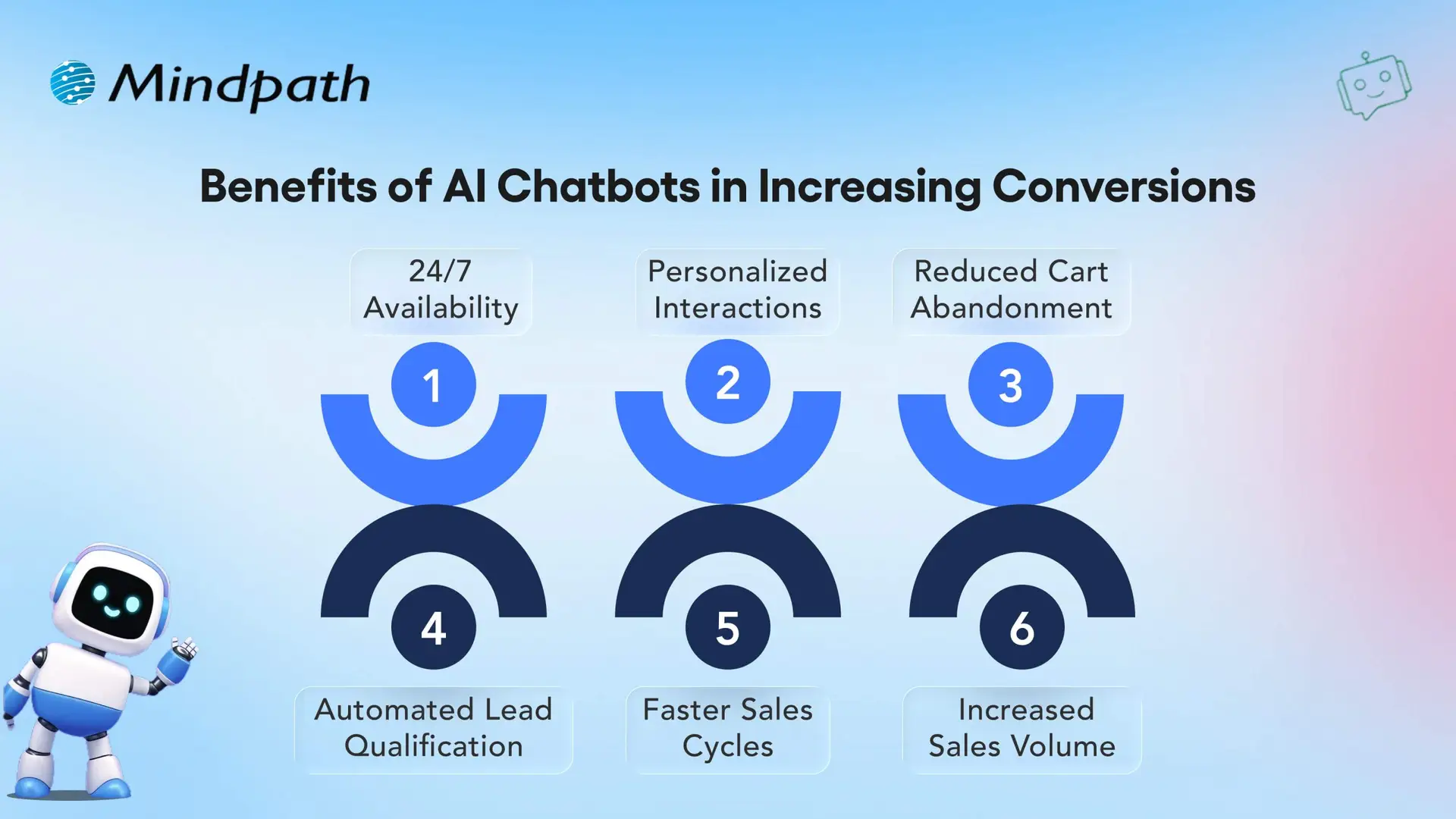
Benefits of AI Chatbots in Increasing Conversions

1. 24/7 Availability

AI chatbots are always-on and provide 24/7 access for customers to quickly find answers for whoever, whenever they want assistance. Being constantly available keeps customers engaged and increases the likelihood of execution of a purchase.

2. Personalized Interactions

Real-world Chatbot examples illustrate how AI reads customer engagement data to provide personalized recommendations, product suggestions, etc. This personalization creates more meaningful conversations and promotes higher conversion rates.

3. Reduced Cart Abandonment

AI chatbots minimize cart abandonment by helping consumers through checkout and by answering last-minute questions. This kind of assistance is simple, but improves selling and makes customers feel good about purchasing.

Also Read: AI for Customer Service

4. Automated Lead Qualification

Chatbot applications can qualify leads with the right questions and key details. The sales team will not have to waste time with any unqualified prospects.

5. Faster Sales Cycles

Utilizing conversational AI for business growth by speeding up the sales process, provides immediate support and follow-ups to customers. The quickness is what allows businesses to turn a lead into a customer quickly and effectively.

6. Increased Sales Volume

Successful chatbot examples illustrate how AI recommends products, engages customers, and inspires repeat purchases. These real-world examples show businesses can also drive revenues while lower acquisition costs.

Want to reduce operational costs while improving customer engagement? Discover how conversational AI chatbots streamline business operations and drive efficiency across teams.

10 Real-life Examples of AI Chatbots

Real-life examples of artificial intelligence chatbots highlight how companies are using artificial intelligence (AI) to innovate the way that organizations interact with potential and current customers. More and more companies are turning to chatbots for lead generation and conversions, thus effectively proving their worth as tools for enhancing sales and ultimately customer experience.
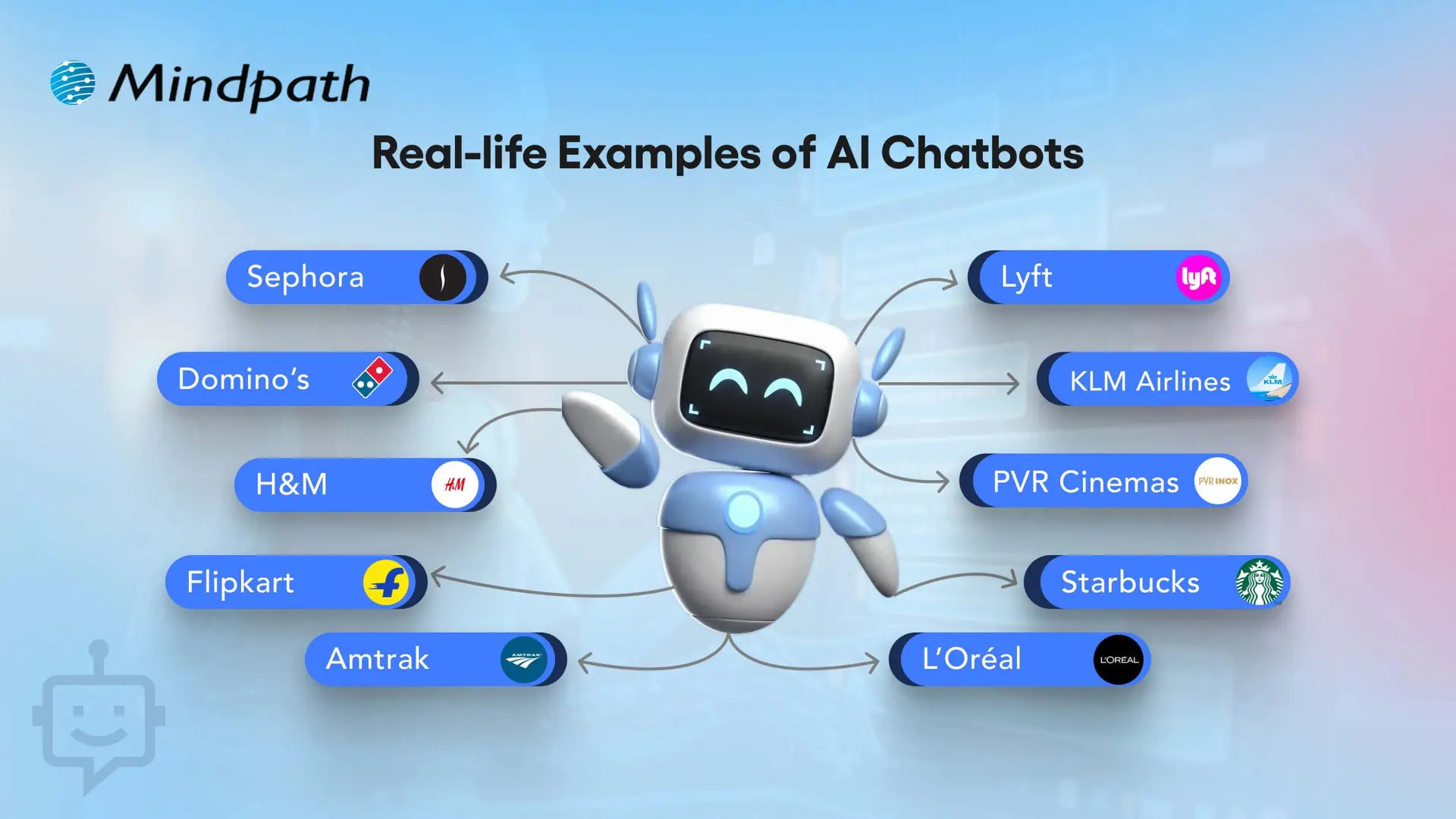
10 Real-life Examples of AI Chatbots

1. Sephora – Personalized Shopping Assistant

Sephora utilizes an AI chatbot to assist customers in selecting makeup and skincare products, to support customers based on their preferences. This chatbot example assists shoppers in finding the right products, much quicker than a human, resulting in higher conversions overall. This video definitely ranks as one of the best chatbot examples in the retail world.

2. Domino’s – Easy Food Ordering

Domino’s has incorporated a chatbot that allows the customers to order pizza directly through a messaging app. This practical application of chatbot makes ordering easy while also cutting down on wait time and increases customer satisfaction. It is one of the most effective AI chatbots that increased sales in the food industry.

3. H&M – Style Recommendations

H&M has a chatbot that suggests clothing based on user style preferences. These website-chatbot examples improve the shopping experience by making it more personal. It shows how real-life examples of AI chatbots in business can drive higher engagement.

4. Flipkart – Seamless E-commerce Recommendations

Flipkart’s chatbot provides personalized product suggestions based on browsing history and preferences. This example of chatbots enhances shopping experiences, boosts conversions, and increases customer satisfaction. It is among the best AI chatbot examples in online retail.

5. Amtrak – Julie Virtual Assistant

Amtrak’s virtual assistant Julie answers millions of passengers queries every year. These examples of chatbots on websites save time for both customers and staff. The company reported significant cost savings and better chatbot ROI examples.

Must Read: AI in E-Commerce

6. Lyft – Ride Booking Made Easy

Lyft allows users to book rides via its chatbot on Messenger or Slack. This real-life example of AI chatbots in business shows how brands can remove friction in customer journeys. It directly improves bookings and conversions.

7. KLM Airlines – Travel Assistant

KLM Airlines uses a chatbot to provide booking confirmations, flight updates, and boarding passes. This website chatbot example streamlines travel support. It is one of the AI chatbots that increased sales through seamless customer care.

8. PVR Cinemas – Movie Booking Assistant

PVR Cinemas uses a chatbot to help customers check movie schedules, book tickets, and view offers instantly. This chatbot example simplifies the booking process, improves customer engagement, and drives higher ticket sales. It is one of the best AI chatbot examples in the entertainment and cinema industry.

9. Starbucks – Coffee Ordering Chatbot

Starbucks has a chatbot that lets customers place their orders ahead via mobile. This application of chatbot reduces wait time and encourages repeat purchases. It’s among the strongest chatbot ROI examples in food service.

10. L’Oréal – Beauty Genius for Personalized Shopping

L’Oréal launched ‘Beauty Genius’, an AI chatbot that gives personalized beauty tips and product recommendations. It uses AI and AR to analyze selfies and suggest the best skincare and makeup from over 750 products. This chatbot improves customer engagement and drives more conversions for the brand.

Looking for AI systems that can plan and act independently for your business? Discover Agentic AI to learn how intelligent agents are transforming decision-making and workflow automation.

Want to Transform Your Business with Chatbot Solutions?

AI chatbots play a vital role in boosting sales, improving efficiency, and creating better customer experiences. These chatbot examples highlight how leading brands use AI to personalize interactions, reduce friction, and drive measurable growth. By learning from real-life cases, your business can adopt similar strategies to maximize ROI and conversions.

At Mindpath, we specialize in developing bespoke chatbot solutions designed to align with your unique business needs. Our tailored approach ensures your chatbot goes beyond generic automation and instead creates real value through seamless user journeys. With expertise in crafting solutions inspired by the best chatbot examples, we help you enhance engagement, streamline processes, and accelerate business growth.
Related Post

Learn how Cloud Disaster Recovery safeguards your business with flexible, cost-effective solutions for fast recovery and data protection.

Related Post

AI in healthcare

Can you imagine a scenario of walking into a hospital where doctors are assisted by intelligent machines which can predict diseases, suggest treatments and even monitor your health in real time? Sounds futuristic, doesn’t it? Have you ever pondered how artificial intelligence is transforming the future of healthcare? Well, that’s precisely where AI in healthcare stands out! Interested to know more about this unique combination of AI and healthcare? Let us learn more about it! 

Want to deploy AI solutions that drive smarter medical decisions and improve patient experiences? At Mindpath Tech, we provide healthcare software development services designed to make technology work seamlessly for your organization.

Role of AI in Healthcare

AI in healthcare refers to the use of artificial intelligence to assist doctors and nurses in hospitals and clinics. These programs look at a lot of medical data such as test results and scans and find patterns which can help in detecting health problems of patients early. They can even help in suggesting the best treatments based on each patient’s health history. Not only this, but AI is also used to carry out routine tasks like setting appointments or checking records, so that staffs can get more time to care for patients. 

The benefits of AI are being used in many parts of healthcare. It is helping doctors to read X-rays and scans so that health problems can be spotted earlier. Intelligent robots will assist doctors to perform surgery with ease. AI assists researchers in discovering new drugs at a quicker rate by analyzing vast amounts of information. Even patients can use AI-based apps to monitor their health and receive reminders about taking medications or adhering to treatment regimens. 

According to a Grandview’s Market Research Survey, the worldwide AI in healthcare market was valued at more than 26 billion dollars in 2024, and it’s expanding very quickly. Experts predict that it can expand by as much as 39% annually until 2030. Why? Because more clinics and hospitals want to work faster, make fewer errors, and help patients feel better sooner. 

AI in Healthcare - Market
Source: www.grandviewresearch.com

Benefits of AI in Healthcare

Hospitals nowadays are challenged with providing quicker and improved care with fewer resources. Technologies such as AI are assisting them in doing it more effectively. following are some advantages of AI in Healthcare that is important to know: 

Top Benefits of AI in Healthcare

1. Improving Team Coordination

AI for healthcare facilitates easier sharing of critical patient information among doctors and nurses. It consolidates everything into a single place to enable teams to communicate with each other easily and quickly. This translates to quicker decisions, improved treatments, and more efficient teamwork. AI for hospitals enables various departments to communicate with one another, which is crucial during emergencies. When everybody has the proper information at the right moment, patients receive their care on time without confusion or delays. 

2. Better Patient Follow-Up

AI assists hospitals in tracking patients and ensuring that they do not miss any important check-ups. By identifying potential health problems early, AI facilitates doctors to act early and administer the appropriate care. This ensures that patients are treated on time and follow-ups are handled more efficiently. Hospitals can track patients more efficiently with AI, resulting in improved long-term care and healthier patients. AI consulting services can guide hospitals in selecting the right tools and workflows for patient monitoring.

4. Boosting Healthcare Performance

AI in medical field enables healthcare systems to achieve significant objectives, referred to as the quadruple aim. The aims prioritize better patient care, low healthcare expenses, facilitation of medical staff, and enhanced overall health. Thanks to AI, hospitals can individualize care, minimize waiting times, and optimize the entire process. This results in improved patient outcomes, reduced expenses, and a healthier, less stressful medical team.  

5. Turning Data into Actionable Insights

Hospitals can use AI to gather and organize a lot of data from various sources. This enables doctors and nurses to make quick and easy decisions. By making all that information useful, medical teams are able to provide patients with more accurate and timely care. This streamlines the process, eliminates errors, and ensures that patients receive the proper treatment based on current information available. 

6. Improves Patient Outcomes

Patients receive faster and more precise treatment with the use of AI in healthcare. It assists doctors in identifying health issues earlier and making the correct decision on treatment without wasting time. This results in quicker admissions, reduced hospital stays, and improved recovery. Everything goes more smoothly, and patients are more comfortable. By making the care process more efficient, this technology promotes improved health outcomes and allows hospital staff to spend more time in taking care of patients. 

Looking to understand which programming languages are best for developing AI solutions? Explore our blog on AI Programming Languages to gain practical insights to get started.

Let us now look at some of the real-world AI in healthcare examples that show how this technology is being used to improve patient care, speed up diagnosis, and support medical teams in everyday hospital tasks: 

Real World AI in Healthcare Examples

These artificial intelligence examples in healthcare highlight how hospitals are using AI to improve diagnosis, speed up treatment, and support better decisions. Each example shows the positive impact of AI in daily medical practice: 

1. Faster MR Scans

AI accelerates MRI image acquisition, allowing radiology departments to manage more patients more effectively. AI enhances image quality, reduces scanning time, and increases patient comfort, particularly for patients who are anxious or experience pain during the test. 

2. Smarter CT scans 

AI helps ensure patients are correctly positioned for CT scans, reducing errors and improving image quality. It also enhances image reconstruction, supporting better diagnostics while helping radiology teams work more efficiently with consistent and clear results. 

3. Assist in Image Reading for Radiologists

AI assists radiologists by highlighting areas of interest in medical images and supporting segmentation tasks. This allows them to focus on deeper analysis and make quicker, more confident decisions, ultimately improving both workflow and patient care. 

4. Better Teamwork in Cancer Care

AI brings together data from radiology, pathology, genomics, and health records to give a clear view of a patient’s condition. This helps care teams make faster, more informed decisions to guide personalized treatment and improve outcomes. 

5. Guiding Doctors in Surgery

AI helps doctors during minimally invasive procedures by quickly analyzing CT images and sharing results across teams. It supports accurate planning and guidance, helping physicians work more efficiently and make timely decisions for better patient care. 

6. Simplifying Ultrasound Measurements

AI streamlines ultrasound by automating measurements, reducing manual effort and variability. It ensures fast, consistent results, allowing healthcare professionals to focus on clinical judgment while enhancing diagnostic accuracy and improving the experience for both patients and staff. 

7. Remote Cardiac Patient Monitoring

AI-powered analysis of remote ECG recordings enables early detection of heart rhythm disturbances like atrial fibrillation. This allows clinicians to provide faster, more efficient care, enhancing patient outcomes by offering timely and proactive cardiac treatment outside the hospital setting. 

Wondering how healthcare organizations can implement AI effectively and achieve better patient outcomes? Read our blog on the role of AI consultant explains how expert AI consulting can guide healthcare providers in overcoming challenges, and unlocking the full potential of advanced technologies.

Ready to Embrace the Future of Healthcare with AI?

AI is revolutionizing healthcare by simplifying operations, enhancing diagnosis accuracy, and facilitating quicker, more tailored treatment. By automating mundane tasks, AI enables healthcare workers to spend more time on patient care, leading to better overall outcomes. With its ability to process large volumes of data, AI also facilitates proactive interventions, minimizing errors and enhancing efficiency in hospitals globally.  

At Mindpath, we offer healthcare software development services with expertise in using the latest AI technology to develop innovative solutions for medical facilities. Our tailored AI-powered platforms enhance hospital efficiency, provide smooth patient care, and enable medical staff to make informed decisions with ease. Learn how Mindpath can assist in revolutionizing your healthcare practice with innovative solutions designed specifically for you. 

Frequently Asked Questions

1. Is AI in healthcare safe and reliable for patient treatment?

AI in healthcare is designed to support medical professionals, not replace them. When properly implemented and monitored, AI systems improve accuracy and reduce human errors. However, final medical decisions are always made by qualified doctors to ensure patient safety and ethical care standards.

2. How can small clinics benefit from AI in healthcare?

AI in healthcare is not limited to large hospitals. Small clinics can use AI for appointment scheduling, patient monitoring, medical record management, and diagnostic support. These tools help reduce administrative workload, improve efficiency, and deliver faster, more personalized care without requiring large infrastructure investments.

3. Does AI increase the cost of healthcare services?

While initial implementation may require investment, AI often reduces long-term operational costs. By automating routine tasks, minimizing diagnostic errors, and improving efficiency, healthcare providers can save resources. Over time, this can make services more affordable while maintaining high-quality patient care.

4. Can AI help in preventing diseases before they become serious?

Yes, AI systems can analyze patient history, lifestyle data, and test results to detect early warning signs. This enables doctors to take preventive measures sooner. Early detection reduces complications, supports proactive treatment, and improves overall health outcomes for patients.

5. How does AI impact patient privacy and data security?

Healthcare organizations use strict data protection measures when implementing AI systems. Advanced encryption, secure servers, and compliance with healthcare regulations help safeguard patient information. Proper governance and monitoring ensure that sensitive medical data remains confidential and protected from unauthorized access.

Security Practices for E-Commerce Website
Is your e-commerce website truly secure? In an era where online threats are constantly evolving, safeguarding your business and customers is more critical than ever. Have you implemented the essential security practices needed to protect sensitive data and build customer trust? In this blog, we will explore the key practices every e-commerce site should follow to stay secure and reliable.   Keeping an e-commerce website secure is crucial since it safeguards both the company and its customers. When customers purchase online, they provide personal information such as names, addresses, and payment information. If a website is not secure, hackers can access this information, resulting in financial loss and identity theft for clients. A security breach can damage a company’s brand, cost it revenue, and even land it in legal problems. So, robust security promotes client trust, safeguards crucial data, and keeps the organization running efficiently.  Let’s explore the key practices for securing the e-commerce website! 

Best Practices to Secure E-Commerce Website

1. Authentication

Establishing secure password guidelines is the first move in protecting your e-commerce website. Encourage users to choose complicated passwords that are difficult to guess. It also helps to remind people to update their passwords on a frequent basis. Adding two-factor authentication (2FA) is another wise decision, as it demands users to authenticate their identity with something they own, such as a phone, in addition to their password. 

Use role-based access controls for administrative accounts and anybody who requires special access. This implies crucial elements of your site, such as client data or order information, can only be accessed by specific people depending on their roles. Limiting access reduces the likelihood of unauthorized alterations or leakage. 

2. Awareness

Regular employee training is essential for keeping your e-commerce site secure, since many cyber dangers take advantage of human errors. A well-designed training program should include subjects such as identifying phishing emails, generating strong passwords, managing sensitive data, and reporting suspicious behavior. It’s also beneficial to keep personnel informed about the newest security trends and concerns so they know what to look out for. 

Consider doing simulations, such as mock phishing exams, to allow staff to practice recognizing fraud in a safe setting. Encourage a security-conscious culture in which workers are comfortable reporting possible risks. The more aware your staff is about cybersecurity, the more prepared they will be to safeguard the company and customer information from attacks. 

3. Security Audits

Regular security audits are essential for securing your e-commerce website. Routine external security evaluations and penetration tests can reveal hidden vulnerabilities before they cause issues. These tests simulate real-world cyber-attacks to highlight any flaws and identify areas for improvement in your security procedures. 

In addition to these planned audits, continual monitoring is crucial. With 24/7 monitoring, your system can notice odd activity, such as numerous logins attempts or access from unexpected devices, which can indicate an issue with security. This real-time tracking enables you to immediately respond to threats and remain ahead of cyber concerns. Combining these proactive and continuous security methods can dramatically lower the likelihood of an attack on your website and your customer’s data. 

4. Payment Gateways

Using reliable third-party payment gateways is one of the most effective ways to ensure secure transactions on your e-commerce website. These gateways are built with robust security features to secure crucial payment information, such as credit card numbers, throughout each transaction. Processing payments using reputable suppliers reduces the danger of handling sensitive data yourself, which is more prone to breaches. 

It’s also important to avoid keeping sensitive payment information, such as credit card numbers, on your own servers. By placing this sensitive data in the hands of the payment processor, you reduce security risks and guarantee that both your company and your customers are better secured from potential data theft. 

5. Regular Software Updates

Keeping all software up to date is crucial for ensuring the security of your e-commerce website. This includes your content management system (CMS), any plugins that improve your site’s functionality, and any third-party tools you utilize. Software updates frequently include crucial safety fixes that address vulnerabilities that hackers may exploit. 

You can safeguard your website against known risks by checking for updates regularly and implementing them as soon as possible. Set up automatic updates whenever feasible to avoid missing key patches. Keeping up with software changes ensures that your website functions efficiently and securely, giving customers a safe purchasing experience. 

6. HTTP

HTTPS is essential for safeguarding your e-commerce site. This entails installing an SSL/TLS certificate that encrypts sensitive data, such as payment information, while it passes between your server and your clients. Encryption prevents hackers from intercepting and accessing this data during transmission. 

When selecting an SSL certificate, there are three options: Extended Validation (EV), Organization Validation (OV), and Domain Validation. Each category provides varying levels of validation and security. An EV SSL certificate is recommended for e-commerce sites as well as enterprises in the financial or banking industries. This kind gives the highest level of validation and demonstrates to clients that your website is trustworthy. 

Avail Security Practices for Your E-Commerce at Mindpath

Mindpath provides essential security techniques to help keep your online store safe. We help you create strong passwords, employ secure payment methods, and keep your website software up to date. Our team also trains your employees how to identify internet risks and what to do if they see anything strange. We use encryption to ensure the security of client information, such as payment data. With our assistance, you can safeguard your business and develop trust with customers, ensuring they feel comfortable buying on your site. Let us assist you with maintaining the security and functionality of your e-commerce website! 

Wrapping Up!

In today’s digital age, protecting the security of your e-commerce website is not a choice; it is a requirement. You can create a strong defense against cyber-attacks by applying the best practices we’ve outlined, such as strong authentication, staff awareness training, frequent security audits, trusted payment gateways, up-to-date software, and the usage of HTTPS. 

These safeguards not only protect your company from financial losses and legal concerns, but they also develop confidence with your customers by assuring them that their personal information is secure when purchasing on your website. At Mindpath, we are dedicated to assisting you in establishing and maintaining these crucial safety procedures, so you can concentrate on expanding your organization. Together, we can develop a safe and efficient online buying experience for your customers. 

Ready to secure your e-commerce website? 

Partner with Mindpath today to learn how our expert security practices can protect your business and enhance customer trust!

Discover essential security practices to protect your e-commerce website, ensuring safe transactions and building trust with your customers.
hiring a wordpress developer

WordPress remains a top choice for website development due to its scalability, ease of use, and flexibility. However, to unlock WordPress’s true potential, it is crucial to hire the right developer- an expert who can understand your goals, the technical nuances of WordPress, and your customers. Yet, hiring a WordPress developer is a major investment.

It is not just about finding a professional who can write code; it is a strategic partnership between your business and an expert who can offer you the required solutions. Besides, it involves more than just checking technical skills. This detailed hiring WordPress developer guide will guide you through the hiring process, helping you make an ultimate hiring a WordPress developer checklist.

Are you looking for expert help to build your WordPress site? At Mindpath, you can hire WordPress developers who are highly skilled and dedicated to building high-performing websites that drive measurable results.

Top Reasons for Hiring a WordPress Developer

Before diving into the WordPress developer checklist to ensure a successful hiring, let’s understand why you should hire expert WordPress developer.

Top Reasons for Hiring a WordPress Developer

1. Customized Solutions

A professional WordPress developer can provide custom WordPress development for the site to match your unique brand identity, functional requirements, and user experience goals. Pre-built themes or plugins won’t offer you such flexibility.

2. Efficient and Clean Code

Skilled developers always prioritize writing scalable, secure, and optimized code. This ensures better SEO scores, fewer compatibility issues, and faster load times.

3. SEO Optimization

Developers know how to develop a website for search engines. For example, they use schema markup, semantic HTML, image optimization tools, and caching techniques that boost visibility and improve rankings.

4. Compliance and Security

From database protection to SSL configuration and plugin installation, professional WordPress developers deploy best security practices to protect your site from data breaches and malware. Besides, they ensure that all the plugins and elements are updated to the latest versions.

5. Advanced Functionality

Do you need a custom API integration or booking system? Well, a skilled WordPress developer knows how to integrate complex features that align with your user needs and business goals. They can also create custom plugins to expand the features of your site.

6. Strategic Insight

Apart from coding, WordPress developers help businesses to get detailed insight into conversion optimization, user behavior, latest trends, and more. All these things will help businesses in making smarter decisions.

Want to make sure your WordPress site is accessible to everyone? Check out our post on improve WordPress web accessibility to learn practical steps for making your site more inclusive and user-friendly.

Types of WordPress Experts- Which One Should You Hire

Understanding the benefits and value a developer can bring is just the beginning. To make the right decision on hiring a WordPress Developer, it is crucial to learn about the different types of WordPress developers you can hire. Remember that each brings a unique focus area and skill set.

1. Front-End WordPress Developers

These experts specialize in interactive and visual aspects of websites. They manage styling, layouts, and user experience and responsiveness using JavaScript, CSS, page builders, and HTML.

2. Back-End WordPress Developers

They focus on database management, server-side functionality, custom theme development, and plugin development. They work with WordPress core functions, MySQL, PHP, and more to create scalable websites.

3. Full-Stack WordPress Developers

Such experts handle back-end and front-end development tasks. They can create a website from scratch while ensuring seamless integration.

While hiring dedicated WordPress developer, you should choose the right type of developer to ensure your project aligns with the design goals, technical needs, and vision.

Curious about which developer’s role best suits your project? Dive into our article on Front-End vs Back-End vs Full-Stack to understand each role and decide which path aligns with your website’s needs.

WordPress Developer Checklist- Skills to Consider

Your hiring WordPress developer checklist should cover the key skills of WordPress developers. HTML, CSS, PHP, MySQL, and JavaScript rank among the key languages for WordPress development. Most developers are familiar with these languages, but knowledge of these technologies is not enough. Here are some skills that matter the most.

Hard Skills or Technical Capabilities

  • Knowledge of using core languages such as jQuery, JS, HTML5, CSS3, PHP, MySQL, React.js, and other languages.
  • Clear understanding of plugin architecture and WordPress core.
  • Building and customizing themes from scratch, and experience with various page builders like Beaver Builder, Gutenberg, Thrive Architect, Elementor, and Themify Builder.
  • Familiarity with REST API.
  • Knowledge of various optimization methods like scheme markup, image compression, caching, Core Web Vitals, minifying CSS, use of CDN, and more.
  • Understating security issues and applying fixes

Soft Skills

  • Ability to explain technical concepts in practical and simple terms.
  • Habit of making clear documentation.
  • Clarity and responsiveness in replies.
  • Ability to collaborate with backend teams and designers.
  • Familiarity with various management tools such as Jira, Trello, and Slack.
  • Willingness to accept feedback and incorporate it quickly.

Some Bonus Skills that Add Value

These skills are not that important for every project, but they can make a developer more valuable. These skills can include:

  • Experience in handling WooCommerce.
  • Knowledge about Headless WordPress configurations.
  • Use of Git or similar tools to manage collaborative workflows and code.
  • Experience in creating responsive and accessible designs to help websites meet the legal requirements of ADA.gov, etc.
  • A better understanding of the business’s goals, like lead generation, conversions, etc.

Want a more flexible and user-friendly website than a static HTML page can offer? Explore our blog on converting HTML to WordPress to see how shifting to WordPress can simplify maintenance and boost performance.

Hiring A WordPress Developer: Best Practices

Hiring a skilled WordPress developer can be a challenging process. That’s why utilizing a structured hiring a WordPress developer checklist is vital. A well-defined hiring checklist can help you save time, and you can hire the best talent for your projects. Here is how to begin your process to hire expert WordPress developer using a proven checklist.

1. Understand your Project Requirements and Goals

Before starting to search for a WordPress developer, it would be better for you to understand your project requirements. Do you want to create a new WordPress site from scratch or optimize an existing site? Are you creating a blog site, business website, or eCommerce platform?

Understanding these things will help narrow down the skills required. For instance, if you want to integrate APIs or advanced features into your site, then hiring a developer with skills in JavaScript or PHP would be a great choice.

Avoiding this step can lead to mismatched expectations. The more precise your needs, the easier your hiring a WordPress developer would be.

2. Selecting the Right Hiring Model

While hiring a WordPress developer, selecting the right engagement model is vital to aligning your development project budget, timeline, and scope. In general, WordPress developers come under three key categories these are:

  • Freelancers: Ideal for short-term and small projects due to their cost-effectiveness and flexibility.
  • Agencies: Offer complete solutions, including website design, development, SEO optimization, and maintenance. Agencies are ideal for large-scale and complex projects.
  • In-House Web Developers: They are best for organizations with ongoing development requirements. Businesses will enjoy faster turnaround and full control. However, this model requires businesses to invest in salaries, management overhead, and benefits.

Consider your budget, long-term objectives, and project size to choose the right model.

3. Developer’s Industry Experience

When using a hiring WordPress developer checklist, an important factor to consider is the developer’s industry-specific experience.

Working with a WordPress developer familiar with your business niche can significantly improve the outcomes while reducing costly trial and error. For instance, for creating an eCommerce website, hiring a developer with WooCommerce expertise will be the best option.

On the other hand, for a blog site, you should prefer to hire an expert with deep SEO and performance optimization knowledge.

This approach will accelerate development and boost functionality. And always ask developers whether they have built websites like yours.

4. Check References and Review Portfolios

Start by examining developers’ portfolios for design consistency, quality, and diversity of development projects that match your business niche. Also, check the custom developer tasks completed by developers to get an idea about their technical skills as well as problem-solving skills.

If possible, assess site performance, usability, and responsiveness to understand the developer’s attention to detail. Also, go through client references to confirm the developer’s support quality, professionalism, and reliability.

5. Conduct Technical Tests and Interviews

Don’t just rely on resumes. Conduct thorough practical tests and interviews. Start by creating targeted interview questions. For instance, you can ask, “How do you solve plugin conflicts”? Or “How do you check a site’s responsiveness?”

Practical tests can include fixing a site speed problem or creating a custom feature or post type. Such tests show developers’ technical skills, efficiency, and creativity. Besides, it helps you to know whether they can work under pressure. This step is pivotal for confident hiring decisions.

Stuck deciding whether WordPress or Drupal is a better match for your business? Our WordPress vs Drupal guide breaks down key differences to help you pick the perfect solution.

Common Mistakes to Avoid

Even with a solid WordPress checklist, mistakes can happen. Here are some common mistakes that you should avoid during the hiring process.

1. Don’t hire an expert based on just low rates. Focusing on the cost factor over quality can lead to poor site performance, missed deadlines, and you may end up with a site that may not meet your business goals.

2. Avoid developers who don’t want to sign confidential agreements. After all, keeping your business data, personal information, and intellectual property safe is important, especially when sharing sensitive details and backend access.

3. Don’t overlook maintenance service and ongoing support offered by the developer. Without this, your site may become vulnerable to bugs and security issues, affecting user experience, speed, and scalability.

4. Don’t ignore red flags such as lack of references, unclear communication, or vague answers.

5. Don’t make your hiring process long and complicated. Excessive interview rounds and lengthy assessments can frustrate candidates, and you may lose top talent.

6. Developers can only create and customize your site. They are not content strategist or designers. So, expecting them to handle everything would be a big mistake, leading to missed opportunities and misaligned results.

Want to ensure your WordPress site is running on the right PHP version for top performance and security? Check out our guide on WordPress PHP compatibility to keep your site efficient, stable, and future-ready.

Hire Smart and Built Better with Mindpath

Hiring a WordPress developer is a major investment that you make in your business. This can greatly influence your business’s digital future. By following this detailed WordPress developer checklist, you can avoid common mistakes and find a WordPress developer who can create a website that will boost your online presence.

If you are searching for a trusted platform to hire an experienced WordPress developer, you may not find a better option than Mindpath. We specialize in providing the industry’s best WordPress developers, who combine creative design skills, deep technical knowledge, and commitment to quality to develop a perfect solution. Your website needs creative vision, thoughtful design, and expert attention that can bring your brand to life. And for this, you can always count on Mindpath.

Discover the essential factors for hiring a top WordPress developer. Learn about expertise, communication, experience, cost, and finding the right platform.