Home

Top Benefits of Using AI for Customer Service

Top Benefits of Using AI for Customer Service

Join our Newsletter!

Benefits of AI in Customer Service

Have you recognized how AI for customer service is changing the way you receive services from your favorite brands? Perhaps you’ve engaged with a virtual assistant at midnight or received an immediate answer without waiting on hold. It feels good, right? That’s the benefit of smart technology working behind the scenes for you. Companies all around the world are now depending on AI to deliver fast, friendly, and 24/7 customer support. It’s amazing that using AI is transforming the future of customer service; every interaction you have will ultimately be quicker and more personal.

The adoption of smart tools is indeed one of the most important ways businesses gain an edge and keep you satisfied in 2026. From chatbots that understand your problem much better than any human agent to virtual agents that don’t get tired of responding, it makes you feel like somebody is listening and making sure you are being helped every time you reach out. The benefits of chatbots help brands get better at solving problems faster and even predict what you might want next, resulting in an environment that you would love to come back to. In this blog, you’ll learn about the top benefits of using AI for customer service in 2026.

Planning to gain a competitive edge by providing exceptional customer support? Mindpath’s AI development services can help you deliver exceptional customer experience and unlock growth! 

What is AI in Customer Service?

AI in customer service is all about using intelligent technology to support customers in accessing customer support efficiently and conveniently. It includes services like chatbots and virtual assistants that can understand questions, respond to questions, and fix basic issues 24/7. This means consumers can access customer support for basic requests and not wait in long queues or hold to speak with a person.

With AI taking care of regular tasks such as order tracking, password resets, or account changes, human agents can dedicate their time and energy to more personalized or complex issues that need a human touch. AI can also provide insight into the customer’s previous interactions to make the service seem more tailored to the customer and more supportive in general. AI in business strategy helps businesses to better understand the needs of customers. Overall, AI makes the service process faster, more efficient, and more comfortable for both businesses and customers.

Benefits of AI for Customer Service

There are numerous advantages of AI for customer service that are changing the way customer relations are formed. Companies today use intelligent tools to improve the performance of their service and the way they follow through on solving problems. Let’s look closely at what makes this initiative worthwhile.
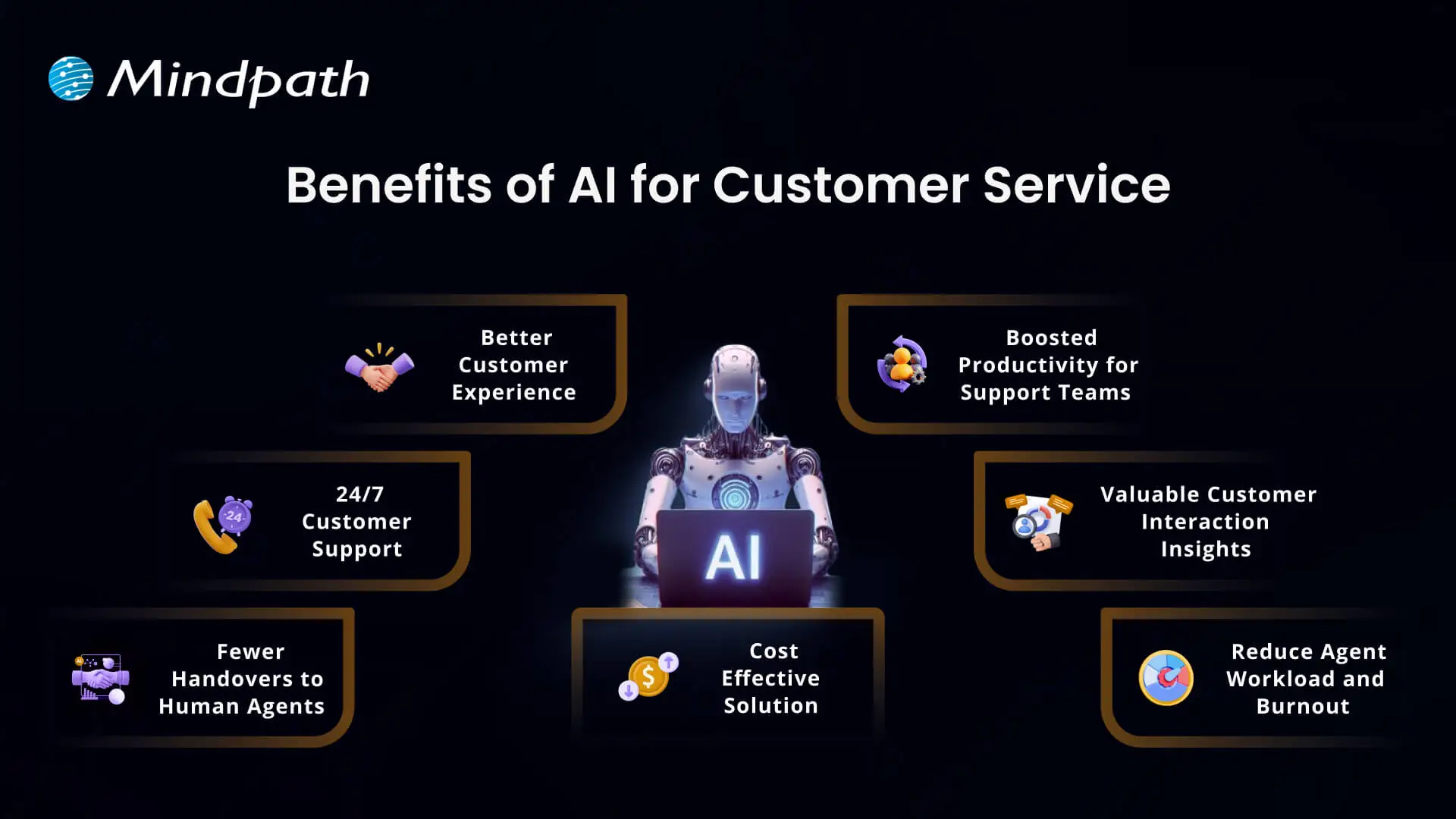
Benefits of AI for Customer Service

1. Better Customer Experience

AI can help create a better experience in customer service by making every interaction easier and more efficient for the customer. People are more comfortable engaging in conversations with chatbots and virtual assistants to get instant answers to their questions than they ever were before. AI tools such as agent assist and sentiment analysis can break down what customers want and prioritize how to respond, which allows support teams to drive a faster and more personal experience to satisfy customers.

2. 24/7 Customer Support

One of the main benefits of AI is that it offers businesses the opportunity to provide customer support 24/7 and every day of the year. With customer service AI tools such as virtual agents and voice bots, customers can get help immediately, even outside normal business hours. This has the impact of conveniences customers and keeping them happy. It also demonstrates how the benefits of AI chatbots improve customer service, making it quicker, easier, and always available.

3. Fewer Handovers to Human Agents

With smarter chatbots today, AI tools for customer service are becoming more human-like in their conversations and helping customers with simple questions. As a result, customers receive a quick answer, without having to wait for a human agent. Support teams now spend more time aiding customers with complex issues which require a more human touch. This solution was designed to balance the workload and ultimately improve the overall support experience.

4. Cost Effective Solution

Using AI customer services helps companies spend less on handling customer questions and problems. Chatbots and voice bots can answer many requests on their own, which means fewer calls and messages for human agents. These AI tools work all day and night without extra pay or breaks. This saves money on hiring, training, and keeping large support teams.

5. Boosted Productivity for Support Teams

AI makes customer service agents more productive by handling simple tasks automatically. It can sort and route requests and even suggest answers, so agents work faster and more accurately. This means they have more time to focus on complex problems that need a human touch. So, AI helps support teams get more done and provide better service.

6. Valuable Customer Interaction Insights

Using AI to track how customers feel during calls gives businesses a clearer picture of every interaction. It helps measure customer satisfaction and see where service can improve. Managers can also spot training needs for their team based on these insights. Looking at past data, AI can even help predict what customers might expect in the future.

7. Reduce Agent Workload and Burnout

Working in customer service can be stressful and lead to burnout when agents handle too many repetitive tasks. AI helps by taking care of simple questions and routine work, so agents have more time for important tasks. This reduces daily pressure and keeps the workload more balanced. Over time, it can help teams feel more supported and less burned out.

Want to know if your business is ready to implement AI in the right way? Explore our blog – AI Readiness Checklist.

Examples of Utilizing AI for Customer Service

Companies across industries are finding new ways to use AI to improve how they help their customers. This smart technology is making customer service more effective and reliable than ever. Let’s explore some real-world examples of how this is happening.
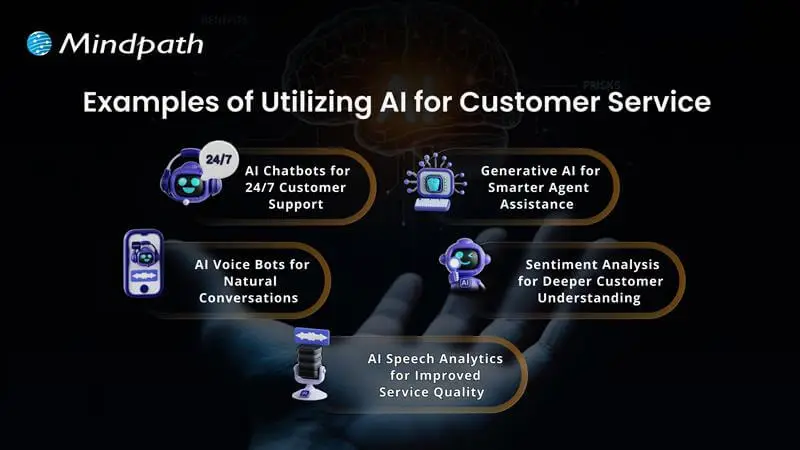
Examples of Utilizing AI for Customer Service 

1. AI Chatbots for 24/7 Customer Support

Conversational AI chatbots help businesses assist customers in getting answers any time, day or night. They can handle common questions, check orders, and even help with returns. This keeps support teams free for more complex problems.

2. AI Voice Bots for Natural Conversations

AI voice bots answer calls and talk to customers naturally, just like a human agent. They can share product details, update accounts, or book appointments. This reduces routine calls for human teams and keeps service smooth.

3. AI Speech Analytics for Improved Service Quality

AI speech analytics tools listen to customer calls to find useful patterns. They help managers see what customers care about and how agents are doing. This helps improve service and spot issues early.

4. Sentiment Analysis for Deeper Customer Understanding

Sentiment analysis uses AI to understand how a customer feels during a call. It looks at tone and pitch to score conversations as positive, neutral, or negative. This helps companies see where they can do better and train their teams.

5. Generative AI for Smarter Agent Assistance

Generative AI helps support agents work faster by giving them ready-made answers. It pulls information from your knowledge base and CRM, so agents don’t waste time searching. This means customers get quicker, more accurate help.

Ready to adopt the recent trends of Gen AI into your business? Read our detailed blog on Gen AI trends, which provides a deeper understanding of how to implement Gen AI into your business for future growth.

Ready to Unlock the Full Potential of AI for Customer Service?

Using AI for customer service is one of the smartest ways to keep your customers happy and your support teams working smoothly. From 24/7 chatbots to tools that understand customer feelings, AI makes service faster and more personal. By adding these smart solutions now, businesses can handle more requests, save time, and build stronger customer trust for the future.

At Mindpath, we provide custom AI development services that help companies improve customer service and stay ahead of the curve. Our team can build AI chatbots, voice bots, analytics, and more, all tailored to your business goals. We focus on making your service more efficient and personal. Connect with our experts to see how our AI development services can transform your customer experience.


Frequently Asked Questions

1. What are the most practical benefits of AI for customer service that businesses see immediately?

The most immediate wins are 24/7 availability, faster response times, and reduced agent workload on repetitive queries. Customers stop waiting on hold for basic requests, agents focus on complex issues, and overall satisfaction improves noticeably. Businesses typically see measurable cost reductions and efficiency gains within the first few months of implementation.

2. Will AI customer service tools eventually replace human support agents entirely?

Not realistically. AI handles routine, repetitive tasks exceptionally well but struggles with emotionally complex or nuanced situations that genuinely require human judgment. The most effective customer service models combine both, letting AI manage high-volume simple requests while human agents focus their energy on interactions that truly need a personal, empathetic touch.

3. How does sentiment analysis actually improve the customer service experience?

Sentiment analysis reads tone and emotional cues during customer interactions, flagging negative experiences in real time. This allows managers to intervene before situations escalate and identify recurring pain points across thousands of conversations simultaneously. Over time, these insights directly shape better training, smarter responses, and noticeably improved overall service quality.

4. Is AI customer service only practical for large enterprises with big budgets?

Not anymore. Scalable AI tools have become significantly more accessible and affordable for businesses of all sizes. Small and mid-sized businesses now deploy chatbots and voice bots without massive infrastructure investments. The cost savings from reduced staffing needs and improved efficiency typically outweigh implementation costs relatively quickly regardless of company size.

5. How does AI actually reduce burnout among customer service teams?

By consistently absorbing the high volume of repetitive, low-complexity queries that drain agent energy daily. When AI handles password resets, order tracking, and FAQs automatically, agents spend their time on meaningful, engaging work. This shift in daily responsibilities keeps teams more motivated, reduces turnover, and creates a noticeably healthier working environment.

Support Is One Click Away

Featured Posts

Related Post

travel technology

Technology has helped in transforming various industries, including finance, retail, and tourism. The advent of travel technology has created new opportunities to enhance the value propositions in tourism, alongside enhancing productivity. Which technology has had the biggest influence on the travel and tourism industry? You can find the answers to this question in an overview of the top technological trends in tourism.

The transformative impact of different technologies has created endless possibilities for enhancing guest experience and customer service. With the adoption of technology in travel and tourism, businesses can find an effective solution to add value to the lives of customers. Let us learn about the top technology trends that have the potential to revolutionize tourism. 

Technology is redefining the travel experience, and businesses must adopt these technologies to stay ahead in the competitive market. Mindpath’s services in AI development, custom chatbots, and web development will support your business journey towards digital transformation.

Understanding Travel Technology

The travel and tourism industry came to a halt for almost a year in response to the global pandemic in 2020. However, change was inevitable, and the tourism industry recognized the importance of embracing technology and digital transformation like other sectors. The introduction of tech in tourism brought a new wave of opportunities to address existing flaws and pursue innovation in delivering better customer experiences. 

According to the World Travel and Tourism Council, the total global economic contribution of the tourism sector is expected to be almost $11.7 trillion in 2025 (Source). For an industry with such potential, technology is no longer a luxury as organizations compete with each other to achieve an advantage. 

The basic premise of travel technology involves the use of IT, e-commerce, and other technologies in the domain of travel and tourism. It primarily aims at enhancing the customer experience while assisting businesses and employees in the tourism and hospitality sector.

One of the best examples of the use of technology in the domain of travel and tourism points at mobile apps for booking trips online. The apps not only provide an easy solution to book tickets and hotels but also represent a shift towards technology-driven experiences in tourism.

Struggling to keep up with changing traveler expectations and digital innovation? Explore our blog digital transformation for businesses to learn how technology drives efficiency, personalization, and growth.

Is Technology Really Necessary for Travel and Tourism?

The example of online booking apps in the travel and tourism sector is not the only instance of the use of technology in the industry. As companies embrace technology in the tourism industry in various forms, it is reasonable to wonder about its relevance. How will technology help in the travel, tourism, and hospitality sector? Technology can help in streamlining and automating processes that require consistent human involvement. As a result, businesses can reduce costs and staffing requirements while achieving better financial results.

The impact of technology in the domain of travel and tourism is also evident in easier access to advanced data insights. With the help of technology, businesses can collect huge amounts of data to improve informed decision-making. In-depth understanding of customer behavior and market trends can help a business create better strategies. The use of technology in the tourism industry will also create the ideal grounds for continuous innovation. Businesses in travel and tourism can leverage technology to stay relevant and attract new customers with improved experiences.   

Curious which technologies help travel apps scale and perform globally? Discover our blog mobile app development technologies to learn how modern development stacks support innovation in the travel industry.

Unraveling the Biggest Tech Trends in Travel and Tourism

The utility of technology in the travel and tourism sector is not limited to booking apps. You can find different technologies in the tourism industry making waves with their ability to revolutionize travel experiences. What are the notable tech trends that will have a significant impact on tourism? The following technology trends will stand out as the biggest contenders for transforming the travel and tourism sector.

1. Sustainable Technology

The growing awareness of the environmental impact of tourism has led many people to think of sustainable solutions. Therefore, travel and tourism companies have to think of innovative technological solutions that have minimal impact on the environment. 

Sustainability will be one of the keywords for tourism technology of the future, as evident in the existing customer behavior trends. For instance, more travelers prefer eco-friendly destinations and use technology for all travel-related needs that reduce the wastage of natural resources.

2. Artificial Intelligence

If you take a look around in the modern technological landscape, AI might be the brightest trend you will notice among other technologies. Artificial intelligence has redefined the benchmarks of efficiency in the approaches to embracing technology in the travel industry with its diverse capabilities. AI and machine learning can bring a lot of benefits to travel and tourism businesses in customer service, demand forecasts, and service recommendations. 

Many companies in the travel and tourism sector leverage AI and ML to predict customer demand and offer personalized recommendations. How would you feel if a travel operator recommends hotels and restaurants that serve your favorite food? AI can also help travel and tourism companies in the form of chatbots and smart virtual assistants. The AI-powered solutions can not only answer customer queries but also offer personalized itineraries and travel plans.

3. Augmented and Virtual Reality

The evolution of virtual reality and augmented reality has offered new ways to experience the world around us, along with virtual worlds. AR/VR technologies provide one of the most promising examples of the potential of travel industry technology to offer better customer experiences. Augmented reality helps in changing how travellers think about their experiences before booking their vacations or business trips. 

The best example of using AR/VR technologies is evident in the case of some airline companies that help passengers experience the in-flight facilities before boarding the flight. Travellers can also get 360-degree virtual tours of hotels or travel destinations while sitting in their homes with AR/VR technologies. Augmented and virtual reality will emerge as the most powerful marketing tools for travel and tourism companies.     

Also Read: Top AI Trends

4. Hyper-Personalization

Another big trend that redefines the utility of technology in tourism is hyper-personalization. The emphasis on hyper-personalization has increased significantly as travel and tourism companies want to deliver exactly what their customers want. Artificial intelligence has made this easier as innovative AI solutions can help in personalizing travel experiences to varying degrees of customer satisfaction.

Travel and tourism companies can leverage AI to generate personalized recommendations and plans for their customers. Custom AI tools can help travel operators find insights from analysis of past behavior, weather conditions, and preferences of travelers. The extensive use of information technology for tourism has enabled easier access to huge collections of user data. Subsequently, those insights can help the companies recommend personalized travel plans that improve customer satisfaction while achieving business efficiency.

5. Voice Search and Voice Control

Voice assistants are one of the prominent highlights in the existing tech landscape. The growing dependence on voice assistants for search is one of the travel tech trends that is hard to ignore. Almost half of all travelers search for travel accommodations and book tickets through voice commands. It is just a matter of time before voice search and voice control become the norm in tourism and hospitality.

Voice search has already become an attractive feature in hotels that allow guests to control room temperature and adjust lighting. You can expect this technology to grow in the future and promote innovations in the travel industry while attracting new customers. Voice assistants in hotel rooms can also help customers request hotel services without interacting with the front desk, thereby improving their experience.

6. Generative AI

The utility of generative AI in travel and tourism also deserves special mention among notable tech trends in the industry. Generative AI can blend tourism and technology in an intuitive manner with the help of language models like ChatGPT. Travel and tourism companies can use ChatGPT or similar tools to create new content for their marketing efforts. On top of it, the language models can help companies provide prompt replies to customer queries and enhance customer satisfaction.

The significance of generative AI in strengthening the technology tourism connection is visible in its different use cases. One of the foremost outcomes of adopting generative AI tools in tourism is the assurance of better productivity. For instance, generative AI tools can help companies with booking and reservations, alongside providing personalized solutions to customer queries.

Wondering how travel businesses can leverage AI beyond basic automation? Learn from our blog about generative AI use cases in diverse industries to see how intelligent content and virtual assistants drive engagement.

Final Thoughts

The top tech trends in travel and tourism showcase that customer experience is the biggest goal of the industry’s transformation. Artificial intelligence, AR/VR, sustainable technology, and voice control are a few of the notable trends that will shape the future of travel technology and the industry itself. Without effective solutions to tap into these technologies, your business is not going anywhere. What do you think is the biggest tech trend that your travel and tourism business should be capitalizing on?

We, at Mindpath, specialize in services for AI development, custom chatbot development, and custom web development. Our end-to-end IT solutions cater to the needs of various sectors, including the travel and hospitality industry. Over the years, our experts have looked at the evolution of technology and the tourism industry from close quarters. We have created many customer success stories with our strategic approach to every project. Contact us to discover the next big tech trend for your travel and tourism company now.

Discover top tech trends transforming the travel industry, from AI to IoT, and learn how Mindpath can help your business stay ahead.
Node.js libraries 

In the modern application development landscape, having speed, flexibility, and smart tools is paramount to success. This is why Node.js libraries are so valuable to both developers and businesses, in that they are all about making a complex task easy, reducing development time, and inspiring innovation. In fact, you can think of libraries as the building blocks of development that enable you to focus on truly valuable features rather than repeatable boilerplate code.

Now, the issue isn’t even finding libraries but just figuring out which is the right one to choose. Each year, new alternatives come out, which provide interesting features and improved performance. So, which libraries really made a difference in 2026? Looking at the top 25 libraries below gives you a good glimpse into what aspects of development are affecting Node.js. Let’s walk through the best options to help you shape your projects for speed, ease of use, and reliability.

Choosing right NodeJS libraries is just the beginning of a successful project. Mindpath’s Node.js development services help you implement latest libraries and best practices effectively for seamless development.

What is a Node.js Library?

Many developers are curious and often wonder: Is Node.js a library? The answer is no. Node.js is a runtime environment that allows JavaScript to run outside of a browser. It is the groundwork to build fast, scalable applications, but it is not a library itself. It can be used with libraries, and it has the possibility to run countless libraries.

When we refer to Node.js libraries, we will consider them as tools explicitly designed to run in the Node.js environment. These libraries are reusable chunks of code that help you with repetitive or simple tasks, such as handling a database, authentication, or file processing. They give developers the freedom to add features without having to rewrite functions. Libraries also do not dictate the structure of a project like frameworks might; they allow developers to develop more intelligently and rapidly.

Top 25 Libraries in Node.js

Choosing a Node library can drastically improve the speed and efficiency of your application build. These libraries can provide you with a pre-packaged solution to a common challenge, so you don’t need to write the code from scratch. Let’s take a look at the top 25 libraries that Node.js developers are using in 2026.

1. Async.js

Async.js is one of the most valuable Node.js libraries that enhances asynchronous code without complication. It inhibits render-blocking JavaScript, allowing webpages to load faster and make more fluid transitions. JavaScript content loads asynchronously alongside other page elements, resulting in better overall performance and user experience.

2. Request

Request is a widely used library for making HTTP calls in Node.js apps, and it is super easy and reliable to connect with external entities such as APIs or websites through the HTTP protocol and later retrieve data from them. There are so many libraries for Node.js, but developers often choose Request for tasks like authentication and establishing communication between apps.

3. Express

Express is one of the most popular libraries in Node.js for building fast and scalable web applications. It is important because it is designed to be minimal. This means that it is flexible enough for developers to add features as they like and not worry about excessive complexity. Express is one of the most downloaded NPM packages because it’s popular for building APIs and server-side applications.

4. Socket.io

Socket.io is a reliable library to help developers create real-time applications quickly. It allows for advanced two-way communication between servers and clients, making it ideal for chat apps, live feeds, or real-time updates of any kind. Counted as one of the most popular Node packages used today, the benefits of Socket.io include speed, reliability, and platform compatibility.

5. Jest

Jest is an open-source testing framework for React, Vue, and Angular projects. It is made up of a test runner, mocking library, and assertion library, all in one. Jest is trusted amongst the best Node.js libraries and minimizes velocity, allowing developers to ensure quality with a quick and safe test process.

Is your application quality strong enough to avoid costly bugs after launch? Learn how the right NodeJS development company ensures reliable testing and long-term stability.

6. CORS

CORS is part of the Express Libraries that enables cross-origin requests for Node.js applications. It ultimately allows the server to enable which domains can access it as a resource. It is one of the essential libraries and would enable developers to build a secure and modern web application.

7. UglifyJS2

UglifyJS2 is by far one of the best libraries for minifying and compressing JavaScript files with Node.js. It will minimize the file size, take up space on computer systems, and improve the ability for your pages to load quickly. Many developers utilize this option to improve performance for their web applications.

8. Ethers.js

Ethers.js is a fairly small library that can be used to build Ethereum-based apps. It has a clean API for wallets, smart contracts, and transactions. Developers like to use it because of its security, its flexibility, and its strong community support for Ethereum.

9. Mongoose

Mongoose is an Object Data Modeling library that allows developers to connect MongoDB to Node.js with ease. It provides schemas, validations, and hooks that allow developers to organize and manage data more conveniently. This library allows for a more organized and easier workflow when working with databases.

10. Multer

Multer is a Node.js middleware for handling file uploads. It is specifically for multipart forms, which handle file uploads gracefully. It is a very fast and lightweight middleware for managing files uploaded by the user.

Do heavy file uploads slow down your app and impact user experience? Explore how hiring skilled NodeJS developers helps optimize performance at scale.

11. Gulp

Gulp is a task runner used for automating repetitive tasks in a development process. Its job includes file minifications, compiling CSS, and optimizing a workflow. Gulp is one of the popular Node.js libraries that allows teams to save time and be more effective.

12. PM2

The PM2 is a process manager built to run Node.js applications in production, and has the ability to restart apps if necessary, monitor performance, and handle scaling. PM2 keeps serious applications running without any downtime.

13. Passport

Passport is a flexible authentication middleware that works smoothly with Express applications. It is easy to add new login methods as it can be extended by many plugins. Developers like it for its modularity, simplicity, and power to secure their apps.

14. Browserify

Browserify brings Node.js modules into the browser. It bundles dependencies for convenience when writing a client. It structures and organizes front-end projects.

15. Parser

In Node.js, parser middleware allows a developer to use something with a request body. Developers create parsers to take data from forms or JSON files. Parsers give developers a fast and clean way to interact with data.

Want to leverage your application data to build smarter, AI-driven features? Explore the top Node.js libraries for AI integrations to unlock business intelligence.

16. Nodemailer

Nodemailer sends emails using Node.js. Teams often use it for alerts, notifications, and transactions. It is simple to set up and very reliable.

17. Sequelize

Sequelize is an Object-Relational Mapping tool for Node.js and databases. It works with MySQL, PostgreSQL, SQLite, and more. It simplifies how developers work with data through its query and relation methods.

18. JSHint

JSHint is a linter for JavaScript code that looks for errors, syntax issues, and bad practices. It saves time by catching issues early.

19. Axios

Axios is a client based on promises to make HTTP requests. Works in Node.js and the browser. Among other libraries for Node.js, experts consider it safe and note that it supports modern clients.

20. Morgan

Morgan is middleware for Express applications dedicated to logging. It logs requests, responses, and errors. It can help you monitor your app and even debug.

Can you track performance issues before they impact your customers? Learn the key factors to consider when hiring NodeJS developers who build reliable, well-monitored applications.

21. Dotenv

Dotenv is a module that can manage your environment variables in your project. It helps keep sensitive information like passwords private. It’s safe, small, and very simple to use.

22. Faker

Faker generates fake data to test with. It’s quick to create names, emails, and addresses. Node.js libraries, such as Faker, help you build mock datasets quickly.

23. Puppeteer

Puppeteer is a powerful tool that automates Chrome and helps with tasks like frontend testing and performance checking. It makes website crawling and UI testing much faster and easier for developers.

24. Lodash

Lodash is a utility library that offers many functions to simplify common programming tasks. It helps developers keep their code clean, short, and easy to manage.

25. Winston

Winston is a logging library that helps manage and store logs in one place. It supports multiple formats and storage options, making application monitoring more reliable.

Can your business afford downtime caused by unseen application errors? Discover how expert NodeJS developers build high-performance apps with proactive logging and monitoring.

Ready to Choose the Right Node.js Libraries?

Exploring the top Node.js libraries in 2026 shows how much they improve speed, reliability, and ease of development. These tools help developers focus on features that matter most without wasting time on repetitive work. From testing and logging to database management and performance optimization, each library adds value and creates smoother workflows for modern applications.

At Mindpath, we offer expert Node.js development services that help businesses build scalable, secure, and efficient applications. Our skilled developers use proven Node.js libraries to design solutions tailored to your goals. With deep technical expertise and a focus on quality, we deliver results that save time and enhance performance. Let us help you bring your project to life.

Frequently Asked Questions

1. How do you actually decide which Node.js libraries are worth using when there are hundreds of options available?

Evaluate download frequency, maintenance history, and community activity on NPM before committing to anything. A library that has not received updates in over a year carries risk. Peer recommendations and open GitHub issues also reveal real-world reliability that documentation alone does not always reflect.

2. Can using too many Node.js libraries in a single project create performance or compatibility problems?

Yes, and this is a common oversight. Every addition increases bundle size and introduces potential dependency conflicts. The selection should remain purposeful and lean. A library earns its place only when it genuinely reduces meaningful development complexity or solves something that would otherwise require significant custom engineering.

3. Is it legally safe to use open-source Node.js libraries in commercial or client-facing applications?

Most widely used libraries operate under MIT or Apache licenses, which are generally business-friendly. However, license terms should always be verified before inclusion in any commercial project. Certain licenses carry restrictions that may create legal complications, and a brief review upfront prevents considerably larger issues later.

4. How do development teams manage library updates and security patches across large Node.js projects effectively?

Tools such as npm audit and Dependabot automate much of this process by flagging outdated or vulnerable packages and recommending updates. Incorporating scheduled dependency reviews into the standard development workflow is considerably more reliable than addressing vulnerabilities only after an issue has already surfaced.

5. What is the practical difference between a Node.js library and a framework, and why does that distinction matter?

A library performs a specific function and is called upon as needed. A framework governs the entire application structure and imposes its own patterns throughout. Selecting a framework is a long-term architectural commitment, whereas libraries offer the flexibility to replace or adjust individual components as project requirements evolve.

UX audit

The digital landscape has gone beyond normal trends. 8 out of 10 users are willing to pay more for a detailed user experience. Further, research shows that around USD 1 invested in UX is supposed to bring USD 100 in return (Source). So, any usability defect on your website is way more than just a design flaw. Your users are not just directly comparing you with your competitors. But they are comparing you to the seamless and effective digital experience they have ever experienced.

This is where the relevance of a UX audit comes into the picture. So, this process doesn’t just verify visual inconsistencies or defective navigation. In fact, it unveils hidden frictions that can make your users frustrated and abandon the site.

Ready to enhance your user experience and uncover opportunities for improvement? Contact us today to get expert guidance and start optimizing your website for better engagement and conversions.

What is a UX Audit?

A UX audit is generally known as a user experience audit. It is a systematic evaluation of digital interfaces like mobile applications, websites, or any software platforms. Further, this approach is used to identify usability issues that can affect your users’ ability to reach their goals. According to the research by the Nielsen Norman Group, an average website loses around 67% of its visitors before they reach a certain conversion point.

So, a website UX audit can help you understand what is working well and what is not. Everything is decided based on the research, data, and industry-standard UX regulations.

How is a UX Audit Different from a UI Audit?

A UI UX audit majorly prioritizes the visual design of the interface. So, it mainly includes color contrast, visual hierarchy, spacing, and all. On the other hand, a UX audit targets the entire journey of the users that includes certain factors as given below.

  • Interaction flows.
  • User behavior and interest.
  • Clarity of the content.
  • Conversion barriers.

Most of the audits combine both UX and UI elements to offer a detailed analysis of the performance of your digital product. This is why a UX and user interface audit is necessary for maximum results.

Looking to design experiences that captivate and retain users? Discover our guide on UI/UX design trends to explore approaches that boost usability and appeal.

Why You Should Conduct a User Experience Audit for Robust Digital Performance?

Investing in UX audit services offers strategic benefits to your digital product. Additionally, here are some effective UX audit benefits listed below.

1. Better Conversion Rate

It eliminates friction in major user flows like purchases, sign-ups, and form submissions. Further, it can directly boost your goal completions.

2. Encourages User Satisfaction

If your navigation remains intuitive along with clear content, your users will feel more connected to your products, and the engagement rate will increase.

3. Strong Brand Perception

A well-maintained and consistent user interface can build credibility while boosting your trustworthiness in the marketplace.

4. Data-Rich Redesigns

Insightful data from the website UX audit can value UX improvements while eliminating the guesswork. Further, it can prevent you from costly redesign mistakes.

5. Keeps You Ahead

Even a small usability improvement can keep you unique in this competitive edge. So, users are more likely to trust you over your competitors.

Looking to enhance your UX audit process with scalable and efficient tools? Discover the benefits of SaaS to explore how cloud-based solutions can streamline workflows and improve collaboration.

Who Can Benefit from a UX Audit?

No doubt, UX audits can be beneficial for anyone who is developing a SaaS product or complicated web apps. However, they are more reliable for a certain type of business, as given below.

  • Organizations that are aware of their product requirements but are confused about where and how to begin.
  • Businesses without any research of UX design teams and a desire to refine their UI/UX values in the digital space.
  • Companies that are willing to do Agile product development want to be assured that their UC enhancements are aligned with the users’ expectations.

What are Some Efficient Types of UX Audit Techniques?

There is no one-size-fits-all approach. So, UX audits have been divided into many significant types that developers should be aware of.

1. Usability Audit

This approach goes deeper into your users’ journey to discover if they have been facing any usability issues. So, usability testing can be incorporated to analyze essential factors like interaction design, navigation flow, and overall functionality. This ensures that your users are seamlessly navigating your product without any frustration.

2. Information Architecture Audit

This type assesses the structure of your content labelled along with the product. Further, it also verifies if users can effectively locate what they require. Further, such an audit type easily reveals your content gaps along with confusing structures that can hinder the users’ journey.

3. Accessibility Audit

An accessibility audit can assure you of your product’s usability to everyone, including people who are differently abled. Additionally, this audit proves compliance with WCAG by valuing the color schemes, keyword navigation, and screen reading metrics.

4. Design Audit

This kind of UI UX audit takes care of the design components. This includes the product’s color schemes along with your brand consistency. This ensures the design aligns with your brand identity while keeping your visual experience intact. By effectively assessing each of your design references, the visual audit ensures that the visuals support usability.

5. Content Audit

Content audit includes evaluating the relevance, quality, and tone of your product content. Moreover, it ensures that the content matches the requirements of users while sticking to your brand values. By refining the content, your business can easily strengthen users’ trust while bringing clarity and engagement.

Planning to create a website that combines stunning design with seamless functionality? Discover our guide on web design and development services to explore how professional solutions can elevate your digital presence.

How to Initiate a UX Audit Thoroughly for the Best Results?

Here, you can go through the structured process to make sure your audit UX UI is efficient and result-driven. Apart from this, when you desire to carry out a UX audit, you need to consider whether it is viable for your in-house team or if you should hire an external agency.

1. Be Assured of Your Objectives

It is important to conduct a meeting with all your stakeholders. This approach can streamline your objectives while increasing conversions. You can easily enhance your user experience while addressing suitable goals. This effective alignment can help your team plan the tasks.

2. Gather Product Insights and UX Metrics

Before initiating the assignment, it is important to assess the documents, such as the goals of the product, the user journey, and the user behavior. Additionally, this can help you understand the intent behind the project.

After this phase, you need to gather all necessary performance analytics that include your users’ time spent on certain pages, clicks, and frequency. So, these relevant data can help you assess how the users are engaging with your product.

3. Perform UX Design Audit

After verifying the defective areas in your user experience, you need to apply Usability Heuristics and design principles to assess multiple design mishaps. Such a step in the UX Audit website can be used to evaluate the interface with consistent design, error prevention, flexibility, etc.

4. Run User Testing Sessions

Invite your representative users to complete the real necessary tasks. This includes observing the points of confusion and navigation errors. User testing can offer you authentic details about how your users think and behave in a real scenario.

5. Get a UX Report

Once you are done with gathering all the crucial data, it’s time for you to effectively document your findings into a structured UX audit report. The report generally includes severity rating, issues verified, evidence, expected impact, etc.

A strong report ensures your stakeholders can understand and act as per the requirements.

Planning to work with a web design firm but unsure which questions will reveal their expertise? Check out our guide on questions to ask a website design company to learn how to evaluate potential partners.

A Completely Free UX Audit Checklist

Here is a detailed UX audit checklist you can thoroughly apply to any of your interfaces.

1. Navigation and Structure

  • Logical menu structure.
  • Streamlined menu labels.
  • Effective search functionality.
  • Breadcrumbs, if necessary.

2. Visual Design and UI Elements

  • Precise contrast level for readability.
  • Consistent color schemes and typography.
  • Clickable and attractive buttons and links.
  • Intuitive and meaningful icons.

3. Content and Messaging

  • CTAs are available above the fold.
  • Headlines are clear and to the point.
  • Body content is aligned with proper subheadings.
  • No fluff and jargon.

4. Form and Crucial Inputs

  • Labels are specific and goal-oriented.
  • Errors are displayed clearly.
  • Submit buttons should communicate actions.

5. Interaction and Feedback

  • Loading times are bearable.
  • User actions have confirmation.
  • Interactive elements.
  • No unnecessary or broken links.

6. Mobile and Responsiveness

  • Buttons are spaced effectively.
  • Layouts can be adjusted to all screen sizes.
  • Content fits without needing any horizontal scroll.
  • Navigation suits mobile devices.

7. Conversion Management

  • Secondary CTAs are effective and non-intrusive.
  • Primary call to action remains unique.
  • Trust indicators like feedback and reviews are present.
  • Funnels have minimal friction.

Wondering how much it really costs to build a professional and effective website? Discover our guide on website development cost to explore factors that impact pricing and plan your budget wisely.

Real-World UX Audit Examples

There are certain real-world UX audit examples that can deepen your understanding. Further, it can encourage you to go through the checklist for being authentic.

1. E-commerce Checkout

Many e-commerce sites abandon their purchases at the payment step. So, a UX audit checklist can help you discover unexpected shipping charges and complicated multi-step checkout. You can address this by simplifying the form while adding the progress bar.

2. SaaS Onboarding Flow

When a SaaS company discovers through session recordings and heatmaps that users drop off mid-onboarding, the audit can make you aware of a lack of a progress indicator and an inefficient CTA. You can simplify the features to improve your product’s CTA.

When Should You Conduct a UX Audit?

A UX audit can easily fix what is broken and can accelerate the experience of your users. While you can leverage a UX audit at any stage, there are some critical moments that are essential to consider.

1. Pre-launch and Redesigning

Before you go live with your product, verifying the usability issues in the early phase can minimize the risks while preventing you from costly mishaps. Further, a UX audit report can assess the current experience of your consumers while helping you track the elements that are desirable.

2. As a Critical Part of Your Ongoing Improvement

Doing UX audits twice a year might help you maintain your quality, as your users’ expectations might change with the evolving trends. Moreover, adding new functionalities and features can disturb your existing workflows. An audit can keep the user experience intact.

3. To Battle Performance Issues

Fewer session times and minimal return visits can highlight that there are some issues with your UX. So, to back up your engagement, you need to value the UX audit as very critical. If your users are not completing their key actions, an audit can help you address the real issue behind the drop-off.

4. For Strategic Insights

Comparing your user experience with your competitors can reveal gaps and opportunities. So, demonstrating a strong and effective experience can boost your business value.

How to Prioritize UX Audit Findings?

A UX audit template unveils a series of opportunities. So, value the issues as per these standards.

Priority Level of Impact Implementation Effect
Major Fixes High High
Quick Wins High Low
Minor Improvements Low Low

Challenges You Might Expect in UX Audit

Apart from a series of UX audit benefits, the process might leverage certain challenges, especially when your team depends on assumptions instead of real user data. Limited access to users and biased internal opinions can lead you towards misleading conclusions. You might face a problem in balancing business goals with your user requirements.

Looking for an UX Audit Service Provider for your Website?

A UX audit checklist can be noted as a practical tool that offers structure to your evaluation process. Further, it can help you identify areas that need improvement and help enterprise products become more user-friendly. It also aligns the user experience with your business motive and enhances the overall customer satisfaction.

If you are also ready to leverage the best of UX audit services from the professionals, Mindpath can be your reliable partner. The experts here can help you elevate your user experience and product performance to another level.

Frequently Asked Questions

1. How Long Does It Take to Complete the Whole UX Audit Process?

A UX audit can be completed within one to six weeks. However, it completely depends on your data availability and business motive.

2. How is a UX Audit Different from Usability Testing?

A UX audit is a detailed assessment using multiple methods. On the other hand, usability testing specifically observes real users completing the tasks.

3. Is It Possible to Handle A UX Audit on Our Own?

It is possible, but it includes multiple perspectives that a professional can handle. As a result, you can have better and in-depth insights.

4. Is a UX Audit Only Initiated for Websites?

You can apply UX audits to your mobile apps, desktop software, and physical and digital products.

5. How Much Does a Professional UX Audit Service Cost?

The pricing of UX audits varies based on the complexity of your projects, along with their deliverables and the expertise of the professionals.