Mastering Full-Stack Development with Node.js

Join our Newsletter!

Featured Posts

Support Is One Click Away

Home

Mastering Full-Stack Development with Node.js

full stack nodejs

Mastering Full-Stack Development with Node.js

Companies are now seeking scalable and robust applications, which can meet both years of functional performance and user expectations. That’s when full-stack Node.js development comes into play, uniting the power of frontend and backend within a single environment. It allows developers to build faster and smarter while creating applications to remain adaptable as the business continues to grow.

In this way, constructing end-to-end solutions is more fluid and intelligent. With cohesive databases, APIs, and user interfaces integrating and interfacing, developers can automate some of the hassle proactively. Understanding full-stack Node.js ultimately gives developers an advantage to think forward as technology grows and gives organizations tangible opportunities to grow with applications that perform and scale easily. So, let’s dive in to know how this expertise truly makes a difference.

Want to build an advanced application without compromising performance? At Mindpath, our full-stack development services will help you provide the best solutions, handling both front-end and back-end with efficiency.

Understanding the Fundamentals of Full-Stack Development

Full-stack development means developing on the front end and back end of a web application. The front end refers to all the things that the user responds to and interacts with, such as buttons, layouts, designs, etc. The back end refers to all of the things that run in the background, like databases, servers, etc., and all the logic that makes it run smoothly, working together.

A full-stack developer has the capability to deal with both sides. They are capable of building UX and the technology that serves the app. This gives them agile skills that allow them to build comprehensive applications entirely from front to back.

Understanding the Basics of Node.js

Node.js is a platform that allows you to run JavaScript code in a JavaScript runtime outside of the browser. It is built on Google’s V8 engine, which is extremely fast and built to be efficient. Node.js allows developers to write server-side applications using the same exact language as for the front end, making development and management easier and smoother.

An advantage of Node.js is that it operates asynchronously, which allows tasks to not have to wait for one another to complete, meaning that applications can handle multiple requests at once. Because of this, the use of full-stack Node.js is quickly becoming a good choice when building scalable, real-time, and modern applications.

The success of using Node.js in full-stack development depends on hiring the best developer. Discover the key Factors to Consider while Hiring Node.js Developers.

Why is Node.js Important for Full-Stack Development?

Utilizing Node.js full-stack technology is an impressive approach to developing a complete web application. Here are reasons that Node.js is a valuable technology option in the full-stack.
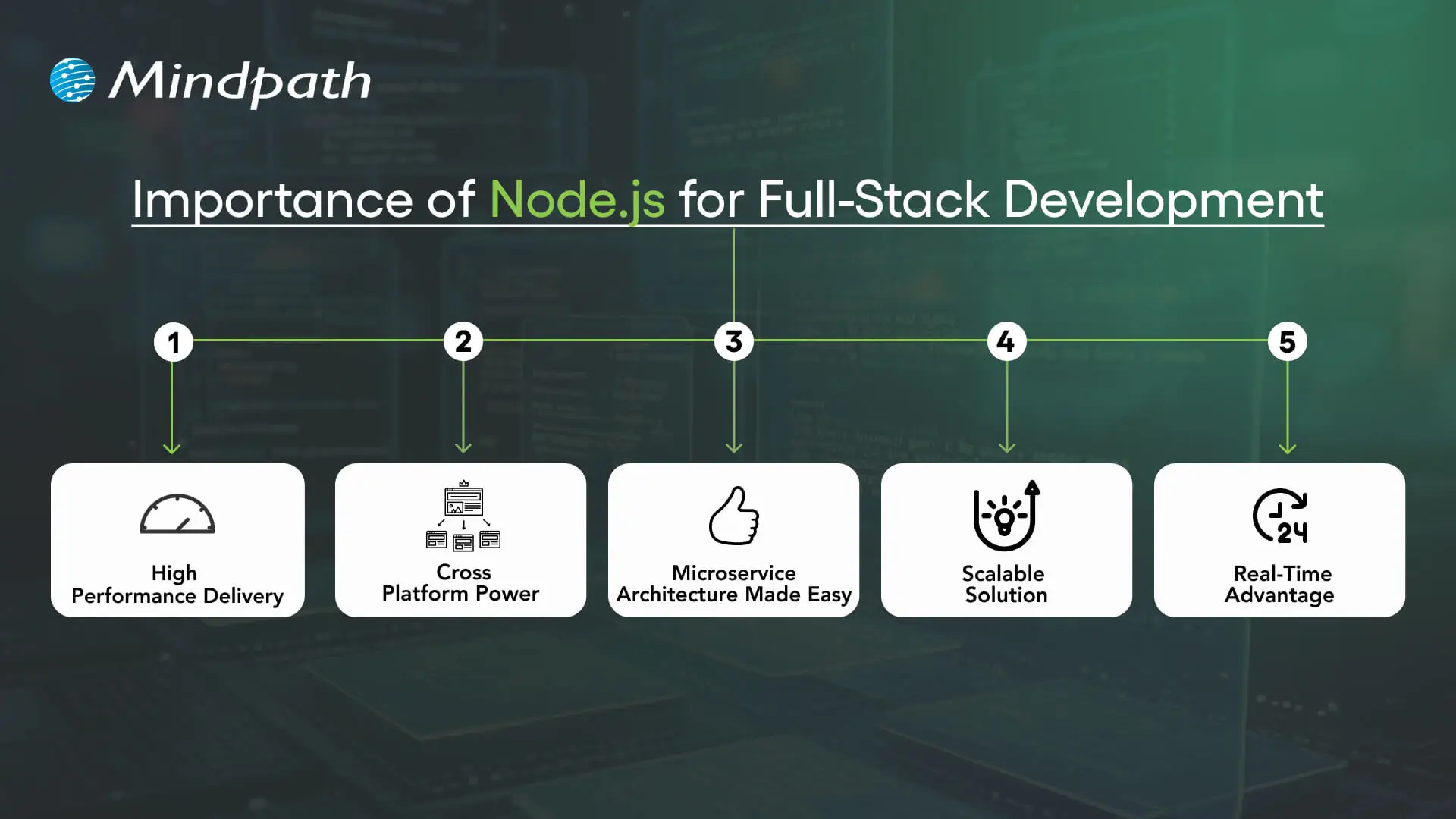
Importance of Node.js for Full-Stack Development

1. High Performance Delivery

Node.js utilizes a non-blocking I/O hardware model that can handle hundreds or even thousands of requests simultaneously, providing faster response times and greater user-specific.

2. Cross-Platform Power

With the Node.js full stack, developers can write mobile and desktop apps to run on Windows, macOS, Linux, and more. By relying on a single JavaScript code base, developers can save time and effort writing for multiple platforms.

3. Microservice Architecture Made Easy

Full-stack Node allows users to break one larger application down to multiple smaller independent services using infrastructure that is easier to work with. This approach lets developers build faster, stay flexible, and rely on proven solutions.

4. Scalable Solution

Full-stack Node.js is used by major players like Walmart, Uber, and Trello to handle millions of users. It helps to lower load time significantly, and it ensures your applications will scale seamlessly, as your demands increase.

5. Real-Time Advantage

When it comes to applications that leverage chat, live streaming, food delivery, or payments, Node.js full-stack is the way to go. It seamlessly provides real-time updates to keep the user engaged and connected.

Also Read: Full-stack Development for Web Projects

Key Steps to Use Node.js in Full-Stack Development

A full-stack Node.js developer is involved in both the front end and the back end of web application development and will work to build complete web applications. Below is a synopsis of the primary steps to utilize Node.js in full-stack development that is easy and productive.
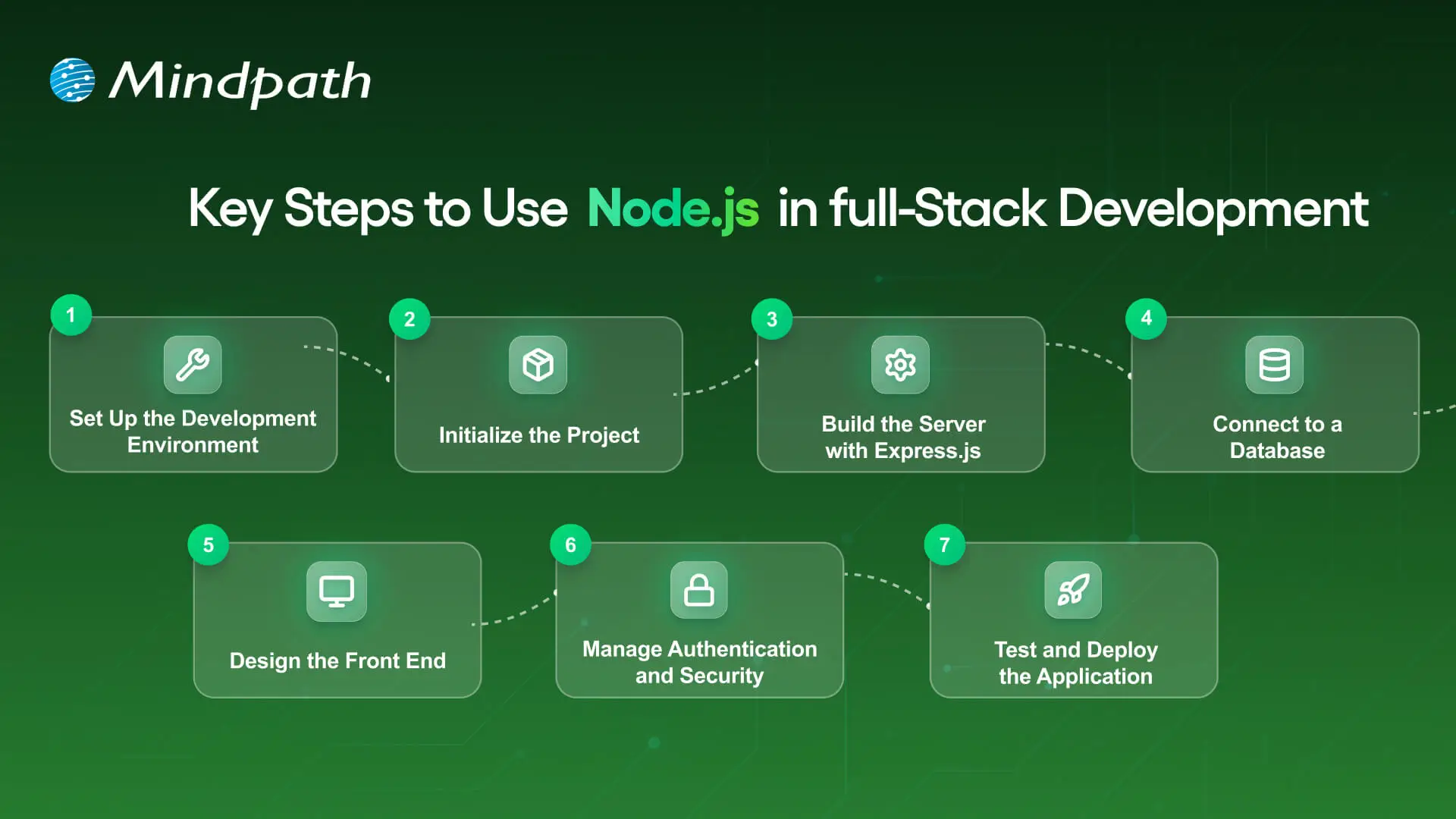
Key Steps to Use nodejs in full stack development

1. Set Up the Development Environment

To begin your application-building experience, you will need to install Node.js and npm (Node Package Manager). These tools will allow you to execute JavaScript beyond the browser, and they will also help manage libraries with ease. Verify the setup by checking versions with simple commands in your terminal.

2. Initialize the Project

Make a new folder for your app, and use ‘npm init’ to create a ‘package.json’ file. A package.json file holds important information, such as your project name, dependencies, and scripts. It will serve as the basis for managing everything in your project.

3. Build the Server with Express.js

Install Express.js so you’ll be able to set up the backend server and handle all of the different routes. Express.js makes handling requests, responses and APIs supposedly easy. This step will ensure the backend runs appropriately with the frontend.

Must Read: Full-stack development trends

4. Connect to a Database

Based on your needs for this project, select a database like MongoDB or PostgreSQL. This should be paired with a Node.js library like Mongoose or Sequelize, which will allow you to connect to and perform both read and write operations on your data. At this point, you will have the ability for your application to persist and retrieve your data.

5. Design the Front-End

Build the front-end using a library such as React, Angular, or Vue. You can link the front-end through RESTful APIs or GraphQL to your Node.js back end. At this point, players will finish the bridge for a Full-stack Node.js application.

6. Manage Authentication and Security

Use libraries like Passport.js or JWT to add secure login and registration. Secure necessary paths so that any authorized user can get to those routes. You should always consider security in any Full-stack Node.js application.

7. Test and Deploy the Application

Create unit and integration tests to ensure that your application does what you intended. Deploy the application to cloud hosting solutions like Google Cloud, AWS, or Heroku. To utilize your Full-stack Node.js application’s performance tool on different scales, you should monitor its performance!

Looking to integrate AI in your Node.js projects? Explore our Ultimate Guide to Node.js Libraries for AI Integration to discover the most effective libraries for building smart, scalable, and future-ready applications.

Ready to Unlock the Power of Full-Stack Node.js?

Full-stack Node.js has proved to be a smart choice for building scalable, high-performing, and real-time applications. It unites front-end and back-end seamlessly, helping developers create complete solutions with speed and flexibility. With its ability to handle microservices, cross-platform apps, and real-time updates, it has become an essential technology for modern web development.

At Mindpath, we provide expert full-stack development services designed to match your business goals. Our skilled Node.js developers bring deep technical knowledge and practical experience to build secure, scalable, and user-friendly applications. If you are looking to transform your digital ideas into reality, hiring a Node.js expert from our team ensures growth and lasting impact.


Related Post

Discover the top tech trends for 2024 and how Mindpath’s cutting-edge IT services, from modernization to AI, can help you stay ahead and drive innovation.
Discover the top Node.js trends shaping digital technology in 2024, from AI and TypeScript to IoT and cloud computing. Explore how Node.js drives innovation!
Explore the top ReactJS trends for 2025, including AI integration, performance optimization, and React Native growth.

Related Post

Web development trends

The landscape of web development is evolving faster than ever. What was an innovation just a few years ago is now obsolete. Developers and businesses should stay ahead of the curve to remain relevant and competitive. From decentralized technology to AI-powered automation, the latest web development trends are redefining how web apps and websites are developed and optimized. 

These trends do not just revolve around making technical upgrades. They involve strategic shifts that influence digital growth and user experience. By embracing these advancements early, you can enjoy a decisive edge in this competitive digital world. Following a well-structured web development roadmap can help you prioritize the right technologies, tools, and methodologies for maximum impact.

In this blog, we will talk about some major trends in web development processes, methodologies, and tools that are constantly transforming this landscape. 

Using these trends in your business requires expert guidance. At Mindpath, we offer web development services where our guidance will provide you with the direction you need to stay ahead of the competition.

The New Era of Web Development

Web development is now entering a transformative era, significantly driven by user-centric designs and technological innovations. In the future, we can expect to see faster, personalized, and smarter websites.

Besides, the demand for Progressive Web Apps will increase as these apps provide users with an app-like experience without downloading an app. What’s more? With machine learning and IoT widely integrated into websites, the web will evolve into a more responsive, intelligent, and interactive ecosystem. 

Must Read: AI in Web Development

Let’s further explore the top web development trends that are shaping the next generation of digital experience.  

Top Web Development Trends 2026

As we move deeper into 2026, here are some trends that are reshaping how web applications and websites are built and deployed. These innovations enhance scalability, performance and align with increasing demand for transparency, security and personalization.

1. Code Will Become Optional: AI-Assisted Development

In 2026, AI-powered web development tools will streamline multiple tasks, from code creation to UX enhancement. Platforms such as OpenAI Codex, GitHub Copilot, Tabnine, and more help developers by suggesting improvements, writing boilerplate code, debugging, and more. 

Besides, web application development trends in 2026 include predictive analytics, AI-assisted personalization, intelligent chatbots, etc. Such intelligent capabilities have become integral to modern web development projects with source code, reducing development time and enhancing user engagement. 

2. The Rise of Jamstack Architecture

Jamstack (which combines JavaScript, APIs, and Markup) has become one of the most popular web development technologies. This modern architecture decouples the front-end from the back-end. It leads to improved security, better scalability, as well as faster load times. For marketing pages, e-commerce sites, and content-heavy platforms, Jamstack would be an excellent choice 

3. Blockchain Technology

Blockchain is here to facilitate continuous flows of records and transactions, called blocks. This technology is cryptographically secure and records every transaction in a tamper-proof and transparent manner.  

Web developers can use this to create high-performance, decentralized applications that eliminate centralized control and intermediaries. 

4. Progressive Web Apps

By combining the features and functionalities of native mobile apps and websites, PWAs are changing the web development process. These apps offer an app-like experience while being cost-effective and accessible. 

A report indicates that the global PWA market is projected to grow from USD 1.9 billion in 2014 to USD 9.7 billion by the end of 2034 (Source: Emergen Research). This clearly shows the rising adoption of PWAs by businesses.

5. Machine Learning in Browsers

Thanks to the latest web development technologies like TensorFlow.js and WebAssembly, web developers can easily run various machine learning models in browsers. This facilitates voice recognition, real-time personalization, predictive UX, and more. It is now possible to create privacy-conscious and faster applications that can adapt to user behaviour. 

Are your web apps providing the best possible experience for users? Discover UI/UX design trends in web application development to learn how modern design trends can enhance usability and engagement.

6. Micro-Frontends

It breaks down the complete UI into manageable, smaller components. This modular approach significantly enhances scalability and facilitates parallel development. This can be an excellent solution for large-scale development projects. 

7. No-Code and Low-Code Platforms

Low-code development is getting popular among developers. Platforms such as Bubble, OutSystems, and Webflow let non-technical users create functional websites with minimal coding. It reduces costs and accelerates prototyping. Low-code or no-code development is one of the impactful dev trends in 2026 for small businesses and startups.  

8. Single Page Applications

These web apps are created as a single page, and they can dynamically update content in real-time. SPAs help reduce costs, and businesses can use cloud technology to attain scalability. Some examples of popular SPAs are Google Maps, Facebook, Airbnb, Twitter, and Netflix. 

9. WebRTC Advancements

WebRTC is a major technical advancement in the field of web app development. It is an open-source technology and uses HTML and JavaScript APIs to add communication features to browsers. There is no need to use any external software or plugins.

With the help of RTCPeerConnection, RTCDataChannel, and MediaStream, it enables peer-to-peer data, video, and audio sharing. 

10. Edge Computing

It refers to the processing of data closer to the source instead of depending on centralized data centers. It reduces latency, improves privacy and performance while helping businesses to keep costs low. 

Edge computing is becoming significantly crucial for business, and it is estimated that by 2028, it will reach USD 378 billion (Source: IDC Research). 

Choosing the right technologies is crucial for building a high-performing web app. Explore the tech stack for your web app success to discover the best tools and frameworks for your project.

11. Motion UI Frameworks

These frameworks help bring a static interface to life by integrating optimized transitions and animations. For example, Animate.css offers ready-to-use animations that are compatible with multiple browsers. It is a great option for sliders and home pages. 

You can implement animations that are not just visually appealing but also serve functional purposes, such as highlighting vital information, guiding visitors through a certain process, etc. 

12. Adaptive and Responsive Design

Web development trends in 2026 also include the wide use of adaptive designs. With wearables and foldable devices entering the mainstream, adaptive design is now evolving. Developers are prioritizing gesture optimization, context-centric layouts, and device-specific breakpoints. 

This shift is central to modern web development trends, ensuring a consistent user interface across screens and devices. 

13. Server-Driven UI

It enables servers to identify the behaviour and structure of the front-end for dynamic content rendering and quick updates. It transmits JSON-based instructions to the frontend and controls the UI layouts.

This development approach allows faster deployment, seamless CMS integration, personalization, and cross-platform consistency. It is a strategic shift in today’s web development trends.

14. Data-Driven UX and Real-Time Analytics

Developers are now integrating session recording, heatmaps, real-time user behaviour tracking, and more for design decisions. This approach reduces guesswork and assumptions while enhancing user satisfaction. 

Product metrics, email analytics, Google Analytics, and social media analytics are some commonly used analytics tools to get important quantitative data. This approach aligns with new web development trends and can also boost conversion rates. 

15. AI-Assisted SEO Optimization

With search engines, SEO is also evolving. AI tools are now helping with content scoring, meta tag generation, keyword clustering, and improving internal linking. 

For developers and content strategists, it means better alignment with user needs and faster optimization cycles. 

Looking to build a website that drives engagement and conversions? Explore web design and development services to discover how professional design and development make an impact.

Latest Web Development Languages for 2026

Staying updated with the Latest Web Development Languages is also important to create future-proof and scalable web applications. Here are some key languages that cater to frontend as well as backend needs.

1. JavaScript

The backbone of front-end development, and it helps create interactive and dynamic user interfaces. 

2. TypeScript

An ideal option for large-scale projects due to its error reduction and maintainability. 

3. Go

Also called Golang, it is popular for its concurrency and speed. It is widely used for websites requiring high performance. 

4. PHP

A dominating language for server-side scripting. Frameworks such as Laravel are modernizing PHP development.

5. Rust

Well-known for performance and memory safety, Rust works well for secure backend systems and web assembly projects. 

Want a web application built to match your workflow perfectly? Discover our custom web development services to learn how we create bespoke digital experiences.

Dev Trends to Watch in 2026

In 2026, the application development trends cover CI/CD automation, AI coding, and more. Here are some major dev trends you should consider. 

1. Mico Frontends

Dividing user interfaces into independently-deployed, smaller parts with an aim to achieve flexibility, collaboration, and scalability. 

2. AI-Assisted Coding

Smart testing tools and code generation tools powered by AI are simplifying workflows. 

3. CI/CD Pipelines

Automated testing ensures that web applications and websites are updated on time and faster. 

4. Sustainable Development

Coding architectures and practices that meet global accessibility standards and reduce energy consumption are getting popular in dev trends. 

5. 5G Integration

Developers can leverage 5G technology to optimize CDNs or Content Delivery Networks and create high-performing websites. 

It can be said that the future of web development holds more such exciting innovations. 

Integrating CI/CD into your development cycle can boost productivity. Explore CI/CD Pipelines to discover tools and techniques for seamless automation.

It’s Time to Embrace the Trends

The 2026 web development trends clearly signal a shift toward adaptability, speed, and intelligence. Businesses optimizing their landing pages or creating new websites from scratch, these new technologies in web development can offer strategic opportunities to enhance the digital experience.  

If you are searching for an expert who can guide you through this evolving landscape, Mindpath would be the best option for you. We offer comprehensive web development solutions designed to take your digital experience to a whole new level. Our experts keep themselves updated with the current web development trends so that you can enjoy the desired results. Let us develop a perfect website integrated with advanced features and capabilities, and stand out in this competitive market.  

what is a chabot

In this fast-paced world of business, companies are actively seeking smarter tools to improve customer service and communication. Chatbots are one of the most common, and a great way to get attention. If you have engaged with a virtual assistant on a website, chances are that you have seen it in action. So, what is a chatbot? You may have wondered about this when you are chatting with a brand online or if you are shopping on a website where you are getting instant replies.

As these types of digital assistants proliferate, they are quickly becoming an essential aspect of how businesses operate in 2026. With faster response times and the ability to interact with multiple customers at once, it is no surprise that chatbots are altering how companies relate to their customers. In this blog, we will provide you with everything you need to know about chatbots including benefits, features and examples of chatbots in action.

Struggling to keep up with customer queries or deliver 24/7 support efficiently? Mindpath’s GenAI-driven chatbot development services can help you manage customer service and boost business performance.

What is a Chatbot in Simple Words?

A chatbot is an artificial intelligence (AI) software application that is designed to have human-like conversations. They use natural language processing (NLP) to understand what users are stating and respond in a way that feels natural in a conversation and is helpful. They can help with answering questions, can guide the user, and can perform some tasks.

Chatbots can be a part of a website, an app, a messaging app, or a voice assistant. AI chatbots help businesses communicate with customers 24/7. They can perform tasks like making bookings, solving common problems, and providing information. AI chatbots are invaluable tools for improving customer experience and communication.

How does a Chatbot Work?

Chatbots work by using artificial intelligence and natural language processing to understand what users are saying. When someone types or speaks to a chatbot, it reads the message and tries to figure out what the person wants. It does this by matching the message with words or phrases it already knows.

Once the chatbot understands the request, it picks the most suitable response and replies to the user. Some chatbots follow simple rules, while others learn from past conversations to improve over time. This process allows chatbots to provide quick and helpful replies in a natural and professional way.

What are the Benefits of Using AI Chatbots for Businesses?

AI chatbots are now widely used by businesses to improve customer interaction and automate routine tasks. Here are some of the key benefits of chatbot technology that can help boost your business:

benefits-of-ai-chatbots-scale

1. Improve Sales

Chatbots can increase sales by showing new products or offering special discounts to website visitors. They send helpful messages that guide users toward making a purchase. These bots also assist in product selection and order placement. This makes it easier for new visitors to become paying customers.

2. Lead Generation

Chatbots help gather leads even before a conversation starts. They ask visitors for basic details like name and email to begin the chat. They can also qualify these leads by asking relevant questions based on customer needs. This helps your sales team know who they’re speaking with and what the customer is looking for.

3. Boost Customer Engagement

Chatbots make online experiences more interactive and personal. Instead of searching through a website, users can chat and get instant answers. Bots reply with clear information based on user questions. This keeps customers engaged and helps them find what they need quickly.

4. Reduce Costs

Using chatbots is more affordable than hiring multiple support agents. They can handle many tasks like answering FAQs or booking appointments, which saves time and money. You’ll still need some team members, but bots make the process faster. This is especially helpful for managing high volumes without extra costs.

5. Understand Your Customers Better

As chatbots collect important customer data during conversations, they can also run surveys to check customer satisfaction. By reviewing these chats, businesses can find out what customers like or dislike. This feedback helps improve products and services over time.

Wondering why chatbots are becoming essential for modern businesses? Explore the top Benefits of Chatbots Every Business Leader Should Know and learn how they drive growth.

6. Fewer Support Requests

Chatbots handle many common questions, which reduces the number of queries sent to human agents. This helps agents focus on more complex issues. It also improves customer satisfaction by providing quick solutions. A chatbot for business can balance automation and personal support effectively.

7. Multilingual Support

Multilingual support allows chatbots to speak different languages. This is helpful if your business has customers from various countries. The bot can reply in the language your customer prefers. This makes a chatbot for small businesses and large companies more accessible to global audiences.

8. 24/7 Customer Support

Chatbots are always available, even when your team is offline. If someone is browsing late at night and needs help, the bot can step in. It can guide them to the right product or answer their questions. This leads to better customer service and more satisfied clients.

9. Lower Bounce Rates

Chatbots can keep users on your site longer by offering help when someone is about to leave. They provide answers or discounts that encourage people to stay. This improves your website’s engagement and SEO performance. Visitors feel supported and are more likely to explore further.

10. Boost Marketing

Marketing chatbots can suggest products, offer deals, and guide customers through the buying process. They also collect useful data for future campaigns. One of the ideas can be a spinning wheel offering discounts, which encourages users to buy. This creates an engaging and effective marketing strategy.

How can conversational AI take your customer engagement to the next level? Explore the power of Conversational AI Chatbots for Business Growth and discover how they drive results.

Real-World Use Cases of Chatbots

Chatbots are being used across many industries to simplify tasks and improve customer experiences. Here are some real-world chatbot examples that show how businesses are using them effectively for different needs.

use-cases-of-chatbots-scale

1. Help Customers Book Tickets Easily

A chatbot can answer common questions like seat availability, movie timings, and refund policies while guiding users to book tickets smoothly. PVR Cinemas uses this on their website to help visitors quickly complete bookings and check offers.

2. Make Customer Experience More Engaging

Chatbots can add personality by offering quizzes, jokes, and product suggestions in a fun and helpful way. LEGO’s chatbot Ralph helps users find the right gift through playful questions and interactive chat.

3. Handle Event-related Queries at Scale

When thousands of people need answers about an event, a chatbot can respond instantly with details like schedules, speakers, and directions. Slush uses one to manage large volumes of attendee questions efficiently on their event site.

4. Assist With Product Searches and Suggestions

A chatbot can search inventory and offer personalized product recommendations based on customer preferences. Sephora’s chatbot does this well by guiding users to suitable makeup products and checking stock availability.

5. Provide Updates on Orders and Shipping

Instead of navigating emails and websites, customers can enter their order ID in a chatbot to get instant shipping updates. H&M allows shoppers to track their deliveries directly through its chatbot.

Thinking about Using Chatbots to Elevate Customer Experience?

Chatbots are transforming how businesses interact with customers by offering fast, helpful, and personalized service. From booking tickets to answering questions, these tools simplify tasks and improve user satisfaction. With so many benefits, it’s no surprise that more companies are embracing chatbot technology to stay ahead in 2026.

At Mindpath, we offer custom chatbot development tailored to your business goals. Our chatbot development services are designed to help you improve customer interactions, increase engagement, and streamline operations. Whether you need a simple support bot or a fully integrated solution for sales, marketing, or service, our expert team builds smart, reliable chatbots that deliver real results.

Frequently Asked Questions

1. How can a chatbot improve customer experience on a website?

A chatbot improves customer experience by offering instant responses, guiding users to the right information, and reducing wait times. It creates a smooth journey by helping visitors find what they need quickly, which increases satisfaction and encourages them to stay longer on the website.

2. What is a chatbot used for in daily business operations?

A chatbot is used for handling routine tasks like answering FAQs, booking appointments, collecting customer data, and assisting with purchases. It helps teams save time by automating repetitive work while ensuring customers receive quick and consistent support throughout their interaction.

3. Can chatbots work effectively for both small and growing businesses?

Yes, chatbots are useful for both small and growing businesses. They help manage customer queries without needing a large team, making operations more efficient. As the business grows, chatbots can scale easily to handle more interactions without increasing costs significantly.

4. What should businesses consider before implementing a chatbot?

Before implementing a chatbot, businesses should define clear goals, understand customer needs, and choose the right type of chatbot. It is also important to plan integration with existing systems and ensure proper testing to deliver a smooth and effective user experience.

5. What is a chatbot’s role in improving website engagement?

A chatbot plays an important role in keeping users engaged by starting conversations, offering assistance, and providing relevant suggestions. It reduces bounce rates and encourages interaction, helping businesses create a more interactive and user-friendly website experience that keeps visitors interested.

Augmented reality in ecommerce

The e-commerce model has led to the transformation of how business operations are conducted in the 21st century. This novel concept has expanded the boundaries for businesses. E-commerce businesses are in a position to exploit a broad range of advanced technologies. A new technology that has been redefining the e-commerce landscape is augmented reality.

Augmented reality in e-commerce has the potential to enhance the online shopping experience of customers. This is possible since AR commerce blends digital products with the real-world environment of customers. Thus, augmented reality allows customers to view as well as interact with virtual products before making the purchase. It is the perfect time to learn how the augmented reality process is revolutionising the e-commerce setting. 

Want to prepare your online store for the growing demand for immersive and interactive shopping experiences? Connect with Mindpath to discover how you can bring advanced AR capabilities into your business.

What is Augmented Reality?

Before exploring the impact of augmented reality in e-commerce, you need to know what is augmented reality. Augmented reality refers to the technology that is capable of overlaying digital information on how a user views the real world in real time. This advanced technology enhances their reality by adding computer-generated elements to it. 

Within a short span of time, augmented reality has gained massive popularity. This is because it can merge the physical and digital worlds, thereby creating an interactive experience for users. You can have such a surreal experience either through a smartphone, AR glasses, or a tablet.  

Is your e-commerce business ready for the next phase of digital innovation? Explore digital transformation for businesses to discover how AR fits into modern growth strategies.

How E-commerce Businesses are Using Augmented Reality?

Although the AR technology is in its infancy, its application in the e-commerce space has been surging. Many e-commerce businesses have been leveraging the technology in diverse ways to shape the experiences of their customers. 

1. Virtual Try-Ons

While purchasing apparel, people usually prefer to try on the garments. You do not need to physically try on apparel thanks to the use of Augmented reality in e-commerce. This is because you can try it out virtually before deciding whether to buy it or not. Therefore, the augmented reality technology helps online shoppers comprehend what they are purchasing and how the items will look on them. 

2. Interactive User Manuals

An interactive user manual is considered to be a great application of AR in e-commerce. This is especially useful when customers buy a product that has a learning curve before it can be used easily. Such manuals can be a great help for users as they can refer to them to understand how the product works. Interactive user manuals are capable of responding to the actions of users. Moreover, they can offer on-page contextual support while using a website or software. 

3. Preview Placement

The preview placement gives customers a view in real-time of what a product will look like in their own environment. This can be extremely helpful when you decide to buy furniture or a television set for your home. Many brands have started using AR in order to help their customers visualize how their products will fit in the homes of customers. It has undoubtedly simplified the overall shopping experience for modern customers. 

4. Social Media Filters

There was a time when social media filters were used by online users just for fun. However, a number of brands have started leveraging social media filters to showcase their products. Many brands have already come to realize that the novelty factor relating to AT filters has the potential to boost customer engagement. Such strategic use of AR by brands has been wowing customers today. 

How do businesses measure the real impact of AR on conversions and engagement? Explore the importance of data-driven decision-making for Businesses to discover how insights optimize e-commerce performance.

Benefits of Augmented Reality for Businesses

The proper use of AR by e-commerce businesses can give rise to immense value for them. The capabilities of Augmented Reality can give an edge to modern businesses while they create value for their customers. 

1. Better Customer Engagement 

You need to bear in mind that augmented reality technology is highly interactive in nature. Thus, it can make it easier for customers to get hooked on the sites of online businesses. The longer they stay on the site, the higher the chances for them to make a purchase. Even if they do not make a purchase, it will create an opportunity for them to build a relationship with the brand. Thus, the quality of customer engagement can improve. 

2. Reaching Out to New Customers

In the highly competitive e-commerce landscape, businesses need to constantly look for new customers. The use of Augmented Reality can certainly give you an edge as a business. In the noisy world, it can serve as a suitable tool that can help grab the attention of your potential customers. You can create a highly engaging AR campaign in order to make your business seen and heard by online users. 

3. Reduced Returns

When businesses use AR technology, they not only empower themselves but also empower their customers. As customers have a lot of information, when businesses use AR, the possibility of product returns drops considerably. The application of AR makes it possible for customers to get a glimpse of how certain products will look in their personal space. So they can be more sure while making their purchase decisions. 

4. Possible Challenges That May Arise

The rising number of augmented reality examples shows that the future of AR in e-commerce is full of new possibilities. However, it is crucial for businesses to bear in mind that they may face a number of challenges while adopting AR technology. The insight can help them prepare themselves to use the novel technology in a strategic manner.

Wondering how artificial intelligence complements augmented reality in online shopping? Explore AI in e-commerce to discover how intelligent technologies personalize experiences and increase conversions.

5. High-Quality 3D Models

A common technological challenge that businesses may encounter is related to achieving high-quality 3D models. Businesses must keep in mind that the models need to be realistic in nature in order to boost customer engagement and experience. However, in the technical sense, it may not be an easy task to achieve. In order to reduce this kind of complexity, it is advisable for businesses to use robust tools. 

6. Balancing Efficiency and Cost

It is very important to bear in mind that generating 3D assets can be a costly affair. In fact, the costs may range between a few hundred and several thousand dollars per product. In order to strike a balance between cost and efficiency, businesses can consider leveraging cloud infrastructure. 

7. Seamless Integration with Workflow

Another challenge that may arise in the path of businesses revolves around the integration of AR technology with the existing workflow.  Complexities may arise when online retailers try to integrate 3D assets into their current product catalogue. It is vital to remember that this specific process needs to be smooth and streamlined. It must also be scalable to enhance overall customer satisfaction. 

It is essential for online retailers to effectively address these challenges. By addressing these obstacles and bottlenecks, they can leverage AR technology to the fullest and offer a highly engaging experience to their target audience. 

Planning to deliver AR experiences through mobile commerce apps? Discover mobile app development technologies to explore tools that power interactive shopping journeys.

Final Words

Augmented Reality has emerged as a breath of fresh air in the prevailing e-commerce landscape. The novel technology has been gaining high momentum as it creates a plethora of benefits for businesses in the form of better customer engagement, the ability to reach out to new customers, and reduced returns.

Mindpath’s innovative services relating to augmented reality can create immense value for modern businesses. Our experts will ensure that your businesses can boost customer engagement by leveraging augmented reality technology. You can capitalise on the real potential of AR technology and witness your business reach new heights.  

Discover how Augmented Reality (AR) is transforming e-commerce with immersive shopping experiences, boosting engagement, and improving sales.