Home

AI Agents: Everything You Need to Know in 2026

AI Agents: Everything You Need to Know in 2026

Lorem ipsum dolor sit amet, consectetur adipiscing elit. Ut elit tellus, luctus nec ullamcorper mattis, pulvinar dapibus leo.

Join our Newsletter!

ai agents

Just think if there was a digital assistant that not only obeyed commands, but was able to understand goals, make decisions and learn from experience? Sounds exciting, right? What if we told you this already exists? Yes, you heard correctly. This is where AI Agent comes in, which is a smart system that is intelligent enough to work independently and get the job done without having to check in with a human often, truly showcasing how AI is transforming future possibilities.

These days, companies are turning to automation and intelligence-based tools, which would make artificial intelligence agents important, no matter where you are in business. They can assist organizations in their own endeavors. They can make a company’s operations more efficient, provide real-time personalization for customers, and provide companies with less effort or worry, especially when dealing with complex operations. Do you want to know more? Well, we have you covered. This blog will guide you through everything you need to know about AI agents. 

To start with, let’s understand the meaning of AI agent!

Want to turn AI agent concepts into real, high-performing applications? Mindpath offers Agentic AI development services, where we design and deliver intelligent systems tailored for future-ready organizations.

What is an AI Agent?

AI agents are smart computer programs that can think and act on their own. They look at everything around them and understand what is going on and then decide what they should do next in order to accomplish a specific objective. These agents gather input from their environment through sensors or data feeds and respond by carrying out actions through digital systems or physical devices. They are like good digital employees that don’t require someone to keep an eye on them at all times.

What is unique about artificial intelligence agents is that they can learn and make decisions on their own. They act according to rules, operate on data, and in some cases, learn from experience so that they become more efficient in what they do. You will encounter them in numerous fields such as business, science, and technology where they assist in accomplishing things quicker and more efficiently. These agents are increasingly becoming a significant aspect of how we utilize technology today. 

Types of AI Agents 

AI agents come in different types, each designed to handle tasks in unique ways depending on their abilities. Understanding these types helps us see how they solve problems and make decisions in various situations. Below are some common kinds of AI agents and examples of how they work in real life:

1. Model-Based Agents

These use an internal idea, or model, of their environment to make smarter choices. They can remember what happened and plan ahead based on how things are connected. A GPS navigation system is a good example as it uses traffic and map data to suggest the best route in real time, showing how AI agent architecture works with memory and planning.

2. Goal-Based Agents

This type of agents are mainly focused on reaching a goal and making decisions by thinking about what might happen next. They pick actions that move them closer to what they want to achieve. For example, a self-driving car makes choices like stopping or changing lanes based on the goal of getting passengers to their destination safely.

3. Reactive Agents

These are the simplest kind that respond only to what’s happening right now. They don’t remember anything from the past and follow basic “if this happens, then do that” rules. A common AI agent example for this is a thermostat that turns heating or cooling on based on the current room temperature.

4. Utility-Based Agents

These take it a step further by not only pursuing goals but considering what choice provides the best outcome. They opt for actions based on what is most useful or gratifying. For example, a delivery drone can take a longer route to escape adverse weather while ensuring it reaches its destination on time and securely.

5. Learning Agents

These get better over time by learning from what they do and how well it worked. They have different parts that help them act, learn, and explore new options. A Netflix-style recommendation system is one such AI agent platform, improving suggestions as it learns what users like.

Curious about how AI agents deliver faster, smarter real-time responses? Our in-depth blog on Conversational AI explains how these systems understand users, learn from interactions, and continuously improve.

As we now have a basic idea about artificial intelligence agents, here are some benefits it can offer. 

Understanding the Benefits of AI Agents

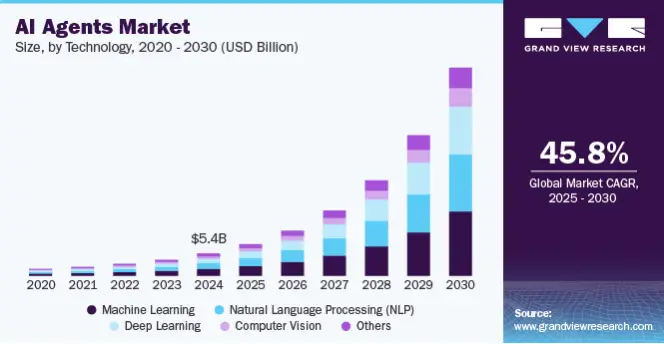
According to Grand View Research, the global AI agents market size was estimated at USD 5.40 billion in 2024 and is expected to grow at a CAGR of 45.8% from 2026 to 2030. This rapid growth is driven by the increasing adoption of open-source AI agents that offer flexibility and innovation across industries. These intelligent systems bring numerous benefits such as: 
AI Agents Market Size & Trends

1. Ensure Accuracy

These tools can check their own work, find missing details, and fix mistakes. This helps keep results more accurate, even when things move quickly. It’s a smart way to keep quality high without slowing down. 

2. Cut Operational Costs

Automation helps cut down the cost of manual work and mistakes. It also reduces the need for constant back-and-forth between teams. That means more money saved on everyday business tasks. making AI in business strategy a valuable investment for long-term growth.

3. Build Custom Applications

Companies can develop tailored tools trained on their specific data and requirements. These solutions are designed to perform tasks according to the organization’s unique workflows and preferences. This makes AI for developers more effective and aligned with individual business goals. 

4. 24/7 Availability

AI tools can keep working in the background, even after work hours. They help with projects or answer customer questions at any time. This makes support and progress continue non-stop. 

5. Free Up Team Responsibilities

By handling repetitive tasks, these tools give team members more time to focus on creative ideas and big projects. It eases the load of daily tasks. This opens space for planning, strategy, and innovation. 

6. Boost Efficiency

Agentic AI tools help teams save time by handling many small decisions in complex tasks. This means people don’t need to step in every time, which makes work faster. With the right AI agent frameworks, teams can finish more in less time. 

Curious about which technologies are truly driving the next era of AI innovation? Explore our blog on GenAI tools to discover the most powerful solutions shaping the future of AI development.

Let us next learn how to create an AI agent:

Steps to Build an Artificial Intelligence Agent

Building an artificial intelligence agent involves a clear and structured process to ensure it performs effectively. Here’s a simple overview of the essential steps involved in creating a reliable and intelligent AI agent: 

1. Set Clear Goals and Purpose

Begin by clearly defining the specific tasks and functions the artificial intelligence agent will perform. Identify the problems it should solve and the target users it will serve, ensuring its goals match your business needs. Consider real-world use cases to determine the features and capabilities required. 

2. Gather and Prepare the Right Data

Gather data that reflects the type of interactions the artificial intelligence agent will handle, such as chat transcripts, voice recordings, or past user activity logs. Clean the data by removing errors and inconsistencies, then label it to help the agent understand user intent and context. Proper preparation of high-quality data is essential for accurate learning. 

3. Pick the Right Machine – Learning Model

Select a machine learning model suitable for your AI agent’s task, like neural networks for understanding language or reinforcement learning for decision-making. With your data in mind, determine if you can use a pre-trained model, or if you need to train a model from scratch instead. Fine-tuning pre-trained models can help calibrate them to your needs. and this is an area where the role of AI consultant becomes crucial in guiding the right model selection.

4. Train Your AI Agent to Learn

You will now configure your training environment and load the cleaned/labeled data you have. In the same way as traditional essential machine learning, the data has to be separated into training and testing data. The parameters need to be set like learning rate, epochs, and start training. Be aware of the performance metrics, the training metrics to make sure the model is learning as expected and when adjustments are needed. 

5. Test It to Make Sure It Works Well

Evaluate the artificial intelligence agent by running the AI agent through designated tasks, measuring accuracy, response time, and quality interaction with the user. You will use different testing methods like unit testing, user testing, and A/B testing to figure out its relative strengths and weaknesses. Lastly, you will also informally call out any open issues about the experience such as overfitting and refining the training or changing data as required. 

6. Launch and Keep Monitoring

Launch the AI agent on a dedicated platform, website, app, or voice interface and make sure that the integration is seamless. Monitor its usability using real-time analytics and user feedback to have a clear understanding of its performance and any analytics issues as soon as they arrive. To sustain systems and achieve the original intended purpose of engagement, systems should be routinely maintained, updated and improved. 

Wondering if your business is prepared to adopt AI and harness its full potential? Check out is your business ready for AI to assess readiness and start building a smart, future-proof strategy.

Are You Looking to Experience the Power of AI Agents?

AI agents have changed the way we interact with machines by letting systems do things on their own, learn on their own, and achieve more results in a shorter time. They provide freedom from manual effort, support better decisions, and improve efficiency in most industries and business functions. 

At Mindpath, we offer AI development services that fit your business needs. Our AI agents automate the routine tasks, improve the customer engagement experience, and support smarter ways of working, so that you can do things better in an increasingly competitive and tech-driven landscape. 
Frequently Asked Questions

1. How do AI agents fit into existing business systems without disrupting current workflows?

AI agents are designed to integrate with existing tools through APIs and automation layers. They can work alongside current systems without replacing them entirely. This allows businesses to improve efficiency gradually while maintaining stability and avoiding major operational disruptions during implementation.

2. What kind of tasks are best suited for AI agents in a business environment?

AI agents perform best in tasks that involve repetitive decision-making, data analysis, or real-time responses. Examples include customer support, workflow automation, data monitoring, and recommendations. Their ability to process large data quickly makes them valuable for improving speed and accuracy in operations.

3. How secure are AI agents when handling sensitive business or customer data?

AI agents can be highly secure when built with proper safeguards such as encryption, access controls, and compliance with data protection standards. Regular monitoring and updates are essential to maintain security. A well-designed system ensures that sensitive data is handled responsibly and protected from potential risks.

4. Do AI agents require continuous human supervision to perform effectively?

AI agents are built to operate with a level of independence, but they still require periodic monitoring and updates. Human oversight ensures that the system stays aligned with business goals, adapts to changes, and continues delivering accurate and relevant outcomes over time.

5. How can businesses measure the real impact of AI agents after implementation?

The impact of AI agents can be measured through key performance indicators such as reduced operational time, improved accuracy, cost savings, and better customer response rates. Tracking these metrics helps businesses understand how effectively the agents are contributing to overall performance and efficiency.

Support Is One Click Away

Featured Posts

Related Post

ai automation for small businesses

Small businesses today lose countless productive hours to tasks that AI automation for small businesses can now handle faster, smarter, with around the clock intelligence, and speed. The majority of SMBs are still dealing with many morning hours spent in the inbox, updating spreadsheets by hand, or following up. AI agents have smoothly transcended the “experimental” phase. Now they take over entire business processes end to end without any human.

Key Takeaways

  • 01
    AI automation moves beyond rule-based scripts by learning, adapting, and solving problems independently.
  • 02
    SMBs that automate high-impact workflows first gain measurable results within weeks.
  • 03
    AI agents work around the clock, handling leads, support, and scheduling without human supervision.
  • 04
    Starting with one workflow is enough. You scale automation gradually as confidence builds.
  • 05
    The right AI tools reduce overhead, improve accuracy, and free your team for strategic work.

The question isn’t if AI can aid your business. It already assists thousands such as you. But then the question becomes, what workflows are best to streamline first that you can feel the impact right away? Certain automations can save hours each day. Others avoid unnecessary mistakes that are expensive. Some even enhance the customer experience in a single night! So, in this blog, we will explore the 10 business workflows that every SMB should consider automating with AI agents today. Let us keep reading further to know more!

Ready to automate more than just a few tasks? Explore our AI Development Services to build custom AI agents that streamline your business workflows.

What is AI Automation? A Quick Overview

AI automation involves using AI technology to handle tasks that would otherwise demand human cognition, such as decision-making, interpreting complex information, and grasping context. It does not require rules to learn and adapt to new situations; it handles exceptions on its own. It is more of a thinking system than a programmed script.

Once business is familiar with how it works, the process makes their adoption choices smarter. AI-powered business automation combines Robotic Process Automation with advanced cognitive technologies. In machine learning, patterns are identified and predictions made. It has Natural Language Processing, which is the ability to read and write human language. Computer vision is the ability to process visual information, such as in the reading of documents and images.

Why Should Small Businesses Automate Business Workflows with AI Agents Right Now?

The timing has never been better. AI automation for small businesses has moved from expensive enterprise territory to accessible, plug-and-play solutions any team can adopt today. SMBs that automate now gain a serious competitive edge before the window narrows.

1. 24/7 Customer Support

AI agents for small businesses instantly respond to customer queries, qualify leads, and book appointments around the clock. You never need to manage night shifts or miss a potential sale again.

2. Massive Time Savings

Automating repetitive tasks saves professionals an average of 2.25 hours daily, freeing roughly 11 hours every week. Your team redirects that time toward strategic planning and revenue-generating work.

3. Autonomous Problem-Solving

Agentic AI handles unpredictable tasks intelligently, learns from real data, and adapts to changing workflows over time. It goes far beyond following rigid, pre-set rules.

4. Drastically Lower Overhead

AI agents transform SMBs by taking over data entry, invoicing, and scheduling without costly human errors. This directly reduces the pressure to hire additional administrative staff.

5. Data-Driven Insights

AI quickly analyzes sales trends, tracks inventory, and forecasts customer demand in real time. This helps you make smarter decisions faster than your competitors ever could.

10 Business Workflows Every SMB Should Automate with AI Agents Right Now

Not every automation delivers equal value. The smartest move is starting with workflows that drain your team’s time and directly impact revenue. Here are the ten workflows where AI agents for SMB businesses create the fastest, most measurable results.

1. Lead Qualification

When a new lead submits a form, an AI agent enriches their data, scores purchase intent, and routes them to the right sales rep instantly. Platforms like Clay or HubSpot AI make this ai agents for automating business workflow a plug-and-play reality for growing teams.

2. Support Triage

An AI agent reads incoming messages across email, WhatsApp, and social media, resolves common Tier-1 queries, and escalates complex issues to human agents. Tools like Intercom and Zendesk AI handle this autonomously, cutting response times dramatically.

3. Invoice Reconciliation

Invoices arrive in different formats, and an AI agent extracts line-item data, matches it against purchase orders, and pushes approved invoices directly into your accounting software. Make combined with AI document extractors handles this entire cycle without human intervention.

4. Cold Outreach

A sales agent researches target accounts, writes hyper-personalized cold emails referencing recent company news, and schedules follow-ups based on recipient engagement automatically. Apollo.io and Lindy.ai are strong AI workflow automation tools built precisely for this use case.

5. Meeting Intelligence

An AI agent joins your virtual meetings, transcribes conversations in real time, and creates assignable tasks directly inside your project management board. Otter.ai and ClickUp Brain eliminate the need for anyone to take manual notes ever again.

6. Reputation Management

Every time a customer leaves a review on Google, Yelp, or Facebook, an AI agent analyzes the sentiment and crafts a context-aware response within minutes. Birdeye or Zapier-based workflows make this one of the smartest wins in AI automation for small businesses.

7. HR Onboarding

An internal AI agent answers policy questions around the clock, automates software account provisioning, and collects onboarding paperwork without HR lifting a finger. Microsoft 365 Copilot Studio and Siit handle this seamlessly across growing teams.

8. Content Repurposing

Upload a blog post, podcast, or YouTube video and an AI agent generates summaries, pulls key quotes, and formats tailored content for X, Instagram, and LinkedIn automatically. Jasper AI and Hootsuite turn one piece of content into a full week of social posts.

9. Ad Management

Marketing agents continuously analyze campaign performance across Google and Meta, reallocating budgets toward top-performing creatives and audience segments in real time. Madgicx and native ad platform AIs maximize your return on ad spend without daily manual oversight.

10. Admin Assistance

An AI agent accesses your inbox, identifies high-priority meetings, coordinates across time zones, and updates your calendar without back-and-forth emails. This workflow alone gives busy founders back hours every single week.

Ready to Put AI Agents to Work for Your Business?

The ten workflows above are not future possibilities. They are working solutions that SMBs actively use today. AI automation for small businesses is no longer optional. It is the difference between scaling efficiently and falling behind competitors who have already made the move.

At Mindpath, we provide AI development services that help small businesses design, build, and deploy intelligent agents tailored to their exact workflows. We turn complexity into clarity. Contact us today, and we will help you automate smarter and grow faster.

Frequently Asked Questions

Magento vs wordpess

The question relating to Magento vs WordPress is not new in 2025. However, businesses as well as professionals need to know how these platforms are different from one another so that they can make a wise selection. With Adobe pushing major updates to Magento WordPress has been continuing to dominate the CMS landscape like never before. 

Several modern businesses and professionals all across the globe have been wondering, “Which is better, Magento or WordPress?” You should be able to answer this question as well. This is because the WordPress vs Magento debate has been directly impacting how online stores compete with each other in the crowded digital marketplace. Let us look at these platforms at a deeper level so that you can choose the ideal tool that perfectly aligns with your needs. 

Selecting the right platform can define website success. At Mindpath, we offer WordPress development services that help you elevate your business by creating a custom website that maximizes performance and drives results.

What is Magento?

Magento is a popular open-source e-commerce platform used by businesses to build and manage online stores, founded in 2008. Acquired by Adobe in 2018, it is now officially known as Adobe Commerce. Over the years, it has emerged as a powerful eCommerce platform built for mid-to-large enterprises, growing online retailers, and B2B businesses.

One of its unique features that has contributed to its popularity is its scalability. Magento supports large product catalogs and multi-store management. It has novel B2B features going beyond the capabilities of usual CMS platforms. It offers businesses robust tools for diverse purposes, including checkout optimization and marketing automation. Over the years, Magento has gained high popularity in the dynamic business community. 

What is WordPress?

WordPress is a free, open-source content management system (CMS) that powers over 43% of all websites on the internet. Built for flexibility and ease of use, it comes with a vast plugin ecosystem that lets businesses launch everything from blogs and corporate sites to online stores, without worrying about high development overhead. Custom WordPress development takes this further by tailoring the platform to unique business needs, giving companies a scalable foundation that grows with them.

Some of the core strengths of WordPress lie in content publishing as well as SEO optimization with robust tools such as Yoast and Rank Math. Another unique feature of WordPress is the ability to scale through a large number of themes and extensions. It is time to answer the question: Is Magento better than WordPress?

Key Differences between Magento and WordPress

WordPress and Magento have emerged as revolutionary forces in the contemporary business world. It is a must for professionals and businesses, especially e-commerce businesses, to know about Magento vs WordPress. Some of the major differences between WordPress vs Magento that you must take into account are

1. Purpose of the Platform

One of the key differences between Magento and WordPress is related to the purpose of the platforms. Magento or Adobe Commerce has been built primarily for enterprise-grade eCommerce. Its unique features relating to catalog management and multi-store support are specifically designed to create value for e-Commerce businesses. especially as AI in e-commerce becomes more influential in driving personalization and automation. WordPress was originally created as a content management system. However, it can be extended into the e-Commerce realm through plugins. It is specifically ideal for small to medium-sized online stores.

2. Performance and Scalability

Magento is capable of handling large product catalogs and high traffic. It is also an ideal tool that is designed for complex integrations. It certainly serves as the best tool for mid-sized and large enterprise businesses. It is definitely easier to set up WordPress. In fact, users can scale it for moderate traffic. However, the specific platform may require managed hosting or heavy optimization for handling large stores.

3. Ease of Use

While choosing a platform, it is fundamental for you to take into account the ease of use. WordPress is certainly more user-friendly than Magento. In fact, professionals as well as businesses can easily navigate the tool even if they have limited technical knowledge. However, that is not the case with Magento. This is because it is more complex in nature and requires technical knowledge. You need to bear in mind that it is not beginner-friendly. In case you plan to use Magento, you need to seek support from experts. 

Worried about security risks and vulnerabilities on your WordPress site? Read our guide on safeguarding WordPress vulnerabilities to learn how to protect your site and keep it secure against threats.

4. Customization

Both WordPress and Magento offer extensive customization to users. Magento allows business entities to build custom product pages. You can also integrate third-party tools in a seamless manner. Users even have the option to capitalize on its advanced features and capabilities so that their needs can be perfectly met. Even though WordPress is also customizable in nature, it highly relies on plugins. It is true that essential e-Commerce functionalities are available. However, business entities may require additional plugins for features relating to payment gateways and inventory management.  

5. SEO Capabilities

If you wish to compare WordPress or Magento, it is a must to look at their SEO capabilities. This is because search engine optimization is a must for the success of e-commerce businesses in the prevailing business landscape. Both WordPress and Magento offer robust SEO capabilities to users. But WordPress has a small edge over Magento thanks to its large library of SEO plugins. The specific tool makes it easier for businesses to optimize their content and meta tags. You can certainly leverage these capabilities of WordPress and help your business website rank higher online. Although Magento offers excellent SEO capabilities, you need to possess technical knowledge to leverage them in an optimal manner. 

6. Security Features

One of the most common concerns for online businesses today revolves around cybersecurity. So it is critical to take into account the security features while choosing a novel platform for your e-Commerce business. One of the key strengths of Magento is related to its robust security features. It has built-in security patches along with data encryption features. Another key feature that you should not miss is related to advanced fraud protection features. These security features undoubtedly make Magento a reliable and safe choice for e-commerce businesses.  In the case of WordPress, the security fundamentally depends on third-party plugins. As WordPress is commonly used, there is a chance for you to get targeted by online hackers or cybercriminals. 

Ready to make your hiring process smooth and avoid picking the wrong developer? Our WordPress Developer Checklist gives you a clear, step-by-step framework to evaluate every candidate.

Magento vs WordPress – Comparison Table

The table below gives an insight into the major differences between WordPress and Magento. As the WordPress Magento debate is gaining momentum in the e-commerce realm, you need to look at the differences so that you can choose the ideal platform that best suits your needs. However, an important thing to bear in mind while looking at the differences is that users can use Magento in WordPress in order to use them together.

Magento WordPress
Platform Purpose Designed for e-Commerce Content Management System and can be extended to e-Commerce 
Performance and Scalability Ideal for large e-Commerce businesses Well-suited for small and medium-sized business sites 
Ease of Use Need for technical knowledge Easier to use 
Customization
SEO Capabilities Depends on technical expertise  Better SEO Capabilities 
Security Features High security  Lower security

Who is the Winner: WordPress or Magento?

The exact choice between Magento and WordPress entirely depends on the needs of the users, including their business size, goals, and technical needs. You need to remember that there is no clear winner between these two platforms. 

Magento is suited for enterprise-level stores, and it is ideal for high-volume sales along with multi-store management. In case your business needs advanced features such as B2B support along with custom checkout flows, you must choose the specific platform. You can definitely leverage its strong scalability and enterprise-grade security. However, you need to remember that if you choose Magento, your business must be ready to make a higher investment, and it must possess the necessary technical expertise.

WordPress is definitely a better choice for small to mid-sized businesses. It is an excellent choice for users who are in search of a simple and pocket-friendly tool. The strengths of WordPress, such as its excellence in content publishing and SEO flexibility, can create value for both businesses and professionals. 

Want to ensure your WordPress site is running on the right PHP version for top performance and security? Check out our guide on WordPress PHP compatibility to keep your site efficient, stable, and future-ready.

Final Words

While making the comparison between Magento vs WordPress, you need to remember that there exists no one-size-fits-all solution. Magento stands out for enterprises and fast-scaling retailers that depend on novel features. WordPress is a simpler choice for small and medium-sized businesses. It is great for you if you are in search of flexibility and lower upfront costs. The best platform for you entirely depends on your business needs and goals, its size, and the available technical resources.

If you’re planning to build a website and want to use the best of WordPress, Mindpath WordPress development services will help you with that. Our experts ensure that the capabilities and functionalities of the platform can be optimally utilized to create value for your business. The decision can certainly give an edge to your business in the competitive space.  

Frequently Asked Questions

Remote work tools

The global workforce went through a seismic shift in the last four to five years, with remote work gaining momentum. Just like many other remote jobs, developers need remote work tools to deliver their best in all tasks. As remote development teams become the norm in many organizations, it is important to know which tools can boost their productivity and efficiency.

Remote work has introduced many opportunities, such as easier access to global talent, cost reduction, and flexibility to work. At the same time, you must also take note of the prominent challenges for remote development teams, such as communication gaps and a lack of transparency. Therefore, remote development teams need reliable tools to achieve better results in their work.

Ready to boost your development capacity with the talented remote experts whom you can trust? At Mindpath, we will match you with skilled developers according to your specific requirements.

Do Remote Developers Need Special Tools?

Yes, every remote developer needs tools that help them improve their productivity. The utility of different tools for remote workers revolves around the fact that they don’t have an office-like infrastructure in their homes. Remote developers have complex responsibilities, which call for attentiveness and focus on strategic tasks. How will developers achieve all this while working in collaboration with other teams? You must look for tools that can help remote workers with different aspects of their work in the comfort of their homes.

Remote developers need different types of tools to boost their productivity in every stage of the development lifecycle. Development teams can use tools for remote work to streamline unwanted complexities in coding and tracking work. The diverse assortment of working from home productivity tools for developers focuses on development environments, collaboration tools, virtual assistants, and complete developer platforms. Developers working from their homes can leverage these tools to boost their productivity and deliver results in alignment with business goals. 

Unraveling the Top Remote Work Tools for Developers in 2025

The growing adoption of remote work in almost every organization is a testament to the fact that workers will need tools that fill essential resource gaps. For instance, the top 10 remote working tools for developers will not only allow them to communicate with their teammates but also find spaces for shared programming. An overview of the distinct traits of different tools used for remote work by development teams in 2025 can help you understand their significance.

1. GitHub

You can pick any list of developer tools used worldwide, and there’s no way you wouldn’t find GitHub on it. GitHub is the most popular tool used by developers and offers a comprehensive development experience with access to various tools. It is one of the best tools for remote working as it facilitates the benefits of code collaboration and DevOps in one package. 

Development teams can use GitHub Copilot as their AI coding partner to boost their productivity. GitHub also provides cloud-based development environments through Codespaces, thereby reducing resource requirements. On top of it, the features for code scanning, dependency updates, and secret detection help in identifying vulnerabilities before they enter the production stage.

2. Slack

Communication is one of the biggest priorities for any remote development team. Slack is the best tool for remote work in development teams as it centralizes communication for the entire development workflow. For instance, the Huddles feature in Slack allows developers to conduct quick calls without scheduling. 

The best thing about Slack is that it manages all conversations across the toolchain on one interface. With Slack, you can know when Jira updates the ticket status or GitHub provides notifications for pull requests. Another crucial feature of Slack is ChatOps, which offers a command-line approach to development operations on a simple chat interface.      

3. Visual Studio Live Share

The workflow of remote development teams will be incomplete without screen sharing. Some of the best tools for remote work in the domain of software development are screen sharing apps. Remote developers can use screen sharing to review code or write it together. Virtual Studio Live Share offers a transformative experience in shared programming, which empowers developers with control and flexibility.

VS Live Share is a powerful tool for shared debugging or welcoming new developers to the team. It offers a collaborative debugging feature that helps remote development teams streamline the process. Senior developers can inspect the variables and set important breakpoints that serve as guiding lights for junior developers. On top of it, junior developers can also ask questions in real-time and learn crucial debugging techniques.  

4. Zoom

Collaboration through video can be a prominent strength or a setback for remote development teams. Zoom is probably one of the best working from home tools that remote workers rely on for video conferencing. It can help you handle team meetings, client calls and even shared programming sessions. The biggest positive point of Zoom is video quality, which helps remote developers run critical operations without glitches in communication.

One of the prominent features of Zoom that helps developers is the set of robust APIs that help in building custom integrations. In addition, developers can also utilize the SDK options in Zoom for video embedding in the applications they create. The screen sharing feature offers the facility of annotations, which makes it easier for participants to communicate consistently. 

5. Figma

The collection of top tools for remote development teams in 2025 also includes Figma, a reliable design and development platform. It is one of the best tools for remote developers to solve one of the most troublesome aspects in product development. Figma helps in managing the transition from design to code with ease by leveraging different features. The real-time collaboration feature of Figma allows multiple users to edit code simultaneously. 

When combined with the Dev Mode of Figma, the real-time collaboration feature helps in bridging the gap between creativity and practical solutions. The component-based approach of Figma brings the best of modern development frameworks, thereby making it a must-have for remote developers.

Looking to boost productivity and innovation while working remotely? Explore our blog on the top GenAI Tools driving the future of AI development to understand how these tools are empowering developers beyond traditional remote work platforms.

6. Jira

Thousands of developers vouch for Jira as their first choice for project management, especially in remote teams. It is one of the digital working tools that come with a steep learning curve albeit with undisputed benefits for remote developers. Jira is a formidable software development tool that offers extensive customization options and the value advantages of agile methodologies. 

Engineering teams can capitalize on Jira for sprint planning, issue tracking and tracing the entire development lifecycle. With the right configuration and training, remote developers can use Jira to create any workflow model. Furthermore, the Jira Query Language also helps remote development teams extract relevant and productive insights.

7. Confluence

The next top tool for remote development teams is Confluence, a reliable tool for structured documentation. It is a trusted addition in the list of WFH tools that offer a broad set of features and options for better scalability. The support for Jira integration in Confluence streamlines the workflow, starting from ideation and planning to deployment. 

Confluence also helps in maintaining comprehensive documentation with the flexibility for arranging information according to project requirements. The most crucial advantage of Confluence is the assurance of access to updated information and extensive search capabilities.

8. Linear

The competition for effective project management tools in remote work is growing continuously, and Linear is a top competitor. It is a promising remote work tool for project management that works effectively for fast-paced development workflows. Linear provides one intuitive platform for tracking issues, team collaboration, and project planning. 

Remote development teams can capture, categorize, and resolve bugs in their apps with Linear and access real-time updates for better collaboration. The clear interface and collection of features, such as an issue tracker and team collaboration tools, make it a trusted alternative to popular project management tools.

9. Notion

Can developers find tools that offer an all-in-one workspace? Notion has the answer as it is a trusted remote working platform with the flexibility required by developers. It can help in creating engineering knowledge bases with database links for team members, technical decisions, and projects. 

Many remote development teams have adopted Notion for project documentation, combining meeting notes, personal task management, and onboarding guides. On top of it, developers can also leverage Notion AI for generating content and summaries.

10. Miro

The final addition to this list of promising tools for remote development teams is Miro. It is an online whiteboard platform on which developers can collaborate with each other through visual tools. Miro is the top pick among apps for remote workers that make collaboration as easy as possible. The unlimited canvas allows remote developers to organize massive volumes of information while creating a visualization of complex ideas.

Miro can help remote developers in brainstorming with other team members, contributing to the session in real-time. It also facilitates built-in communication tools that allow remote development teams to conduct interactive meetings and workshops. 

Wondering how teams can work smarter in remote environments? Explore how AI Consulting helps in enhancing productivity, collaboration, and decision-making by AI-driven strategies.

Ready to Choose the Right Tools for Remote Development Success?

The insights on some of the most commonly used tools by remote development teams reveal that each tool brings something unique to the table. Many teams want to try free remote work tools before taking the subscription, and that holds them back from experiencing the best tools for remote development. Whether it is a workspace or a collaboration tool, remote developers must pick the ideal tools that enhance their productivity without any burden.

At Mindpath, we help businesses build efficient remote development ecosystems by guiding them in selecting and using the right tools. Our experts ensure seamless integration, optimized workflows, and better collaboration so your teams can perform at their best consistently. Contact us today and achieve smarter and more efficient remote development.

Discover the top 7 tools for managing remote development teams, boosting collaboration, communication, and productivity.