Cloud Computing Trends 2026: What’s Coming Next?

Join our Newsletter!

Featured Posts

Support Is One Click Away

Home

Cloud Computing Trends 2026: What’s Coming Next?

cloud computing trends

Cloud Computing Trends 2026: What’s Coming Next?

Have you been following the newest cloud computing trends? It seems that every day, there is something new to change how we store, share, and secure data. Perhaps you’ve been wondering if your business is missing out on smarter ways of working, or worried about staying ahead of the game in this digital world. Whatever your thoughts are, there is one thing for sure: cloud technology is not just for tech giants anymore; it is shaping the way we all connect, create, and grow.

As we move to 2026, these cloud trends will continue to open bigger opportunities for businesses, no matter how big or small. With faster, many times AI-driven services, greener cloud solutions, a flexible and secure future is more promising than ever. Being aware of what is next will enable you to make an informed decision about the future and give you a competitive edge. If you’re wanting to find out more about where the cloud is headed, continue reading. In this blog, you will learn what’s coming next.

Looking to build scalable, secure cloud applications that drive business growth? Mindpath offers expert cloud development services to help you design and optimize cloud solutions tailored to your needs

Understanding Cloud Computing

Cloud computing is simply the storing and accessing of data and programs over the internet instead of your computer’s hard drive. It is considered internet-based computing, allowing businesses and individuals to use servers, storage, and software that is also provided by cloud providers. One of the benefits is that maintenance is limited, which means there are lower costs associated with users storing files, documents, images, etc. Cloud computing offers flexibility in keeping important data secure and available.

It works through remote servers hosted online that store, manage, and process data rather than relying on local hardware. Users can access these resources whenever they need and scale them up or down as their needs change. This makes it easy to save money on physical infrastructure, increase efficiency, and keep operations running smoothly with more reliability and speed.

The market for this technology keeps expanding rapidly as more businesses adopt cloud solutions. According to Grand View Research, the global cloud computing market size was around USD 752.44 billion in 2024 and is projected to reach USD 2,390.18 billion by 2030. This growth is mainly driven by the rise of big data, artificial intelligence, and machine learning, which all depend on powerful and scalable cloud infrastructure.

Curious how modern cloud apps run without servers? Explore our blog on Serverless Architecture in Cloud Computing to see how serverless solutions are shaping the future of cloud trends.

What are the Latest Trends in Cloud Computing?

Staying updated with cloud computing trends 2026 can help your business stay competitive and ready for what’s next. Companies everywhere are paying close attention to the current trends in cloud computing to boost efficiency and security. Here are some key developments you should watch for in the coming year.
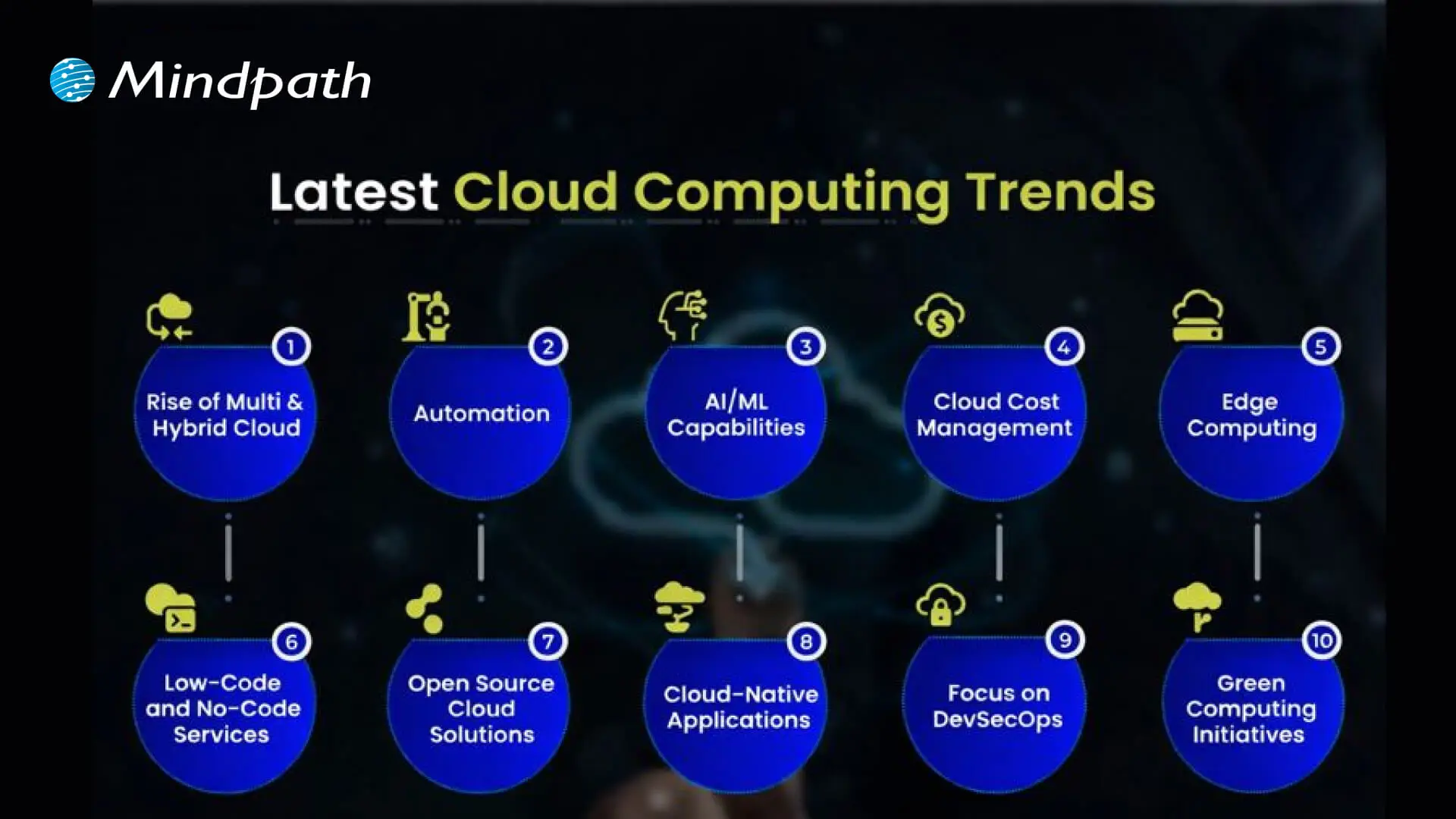
Cloud computing trends

1. Rise of Multi & Hybrid Cloud

Many companies now use a multi-cloud strategy and hybrid cloud approach to run workloads across different cloud providers and their own data centers. This setup lets them combine the strengths of public and private clouds while keeping sensitive data secure. Using multi and hybrid cloud solutions also gives businesses more flexibility and better control over risks.

2. Automation

One of the latest trends in cloud computing is using automation to make systems work faster and more efficiently. Good automation helps teams deliver better results, reduce downtime, and improve overall quality. With better AI tools and user-friendly platforms, cloud providers are making automation easier for everyone to use.

3. AI/ML Capabilities

Better AI and machine learning are becoming the next big thing in cloud computing. Many providers now offer smart tools that help businesses use advanced analytics and automation. These cloud computing trends make it easier to build intelligent applications and boost efficiency without needing deep technical skills.

4. Cloud Cost Management

Managing expenses is a big part of the future of cloud computing as more businesses move to the cloud. New tools and services help companies track and control their spending more easily. These cost management features make it simple to budget, monitor usage, and find ways to save money.

5. Edge Computing

Edge computing is one of the cloud latest trends bringing data processing closer to where it’s created. This helps reduce delays and cuts down on the amount of data that needs to travel long distances. By doing this, businesses can work faster and use their networks more efficiently.

6. Low-Code and No-Code Services

One of the growing cloud services trends is using low-code and no-code tools to build apps faster. These solutions help people create software without needing advanced programming skills. Such cloud computing trends save time and lower development costs for businesses.

7. Open-Source Cloud Solutions

One of the growing cloud computing trends is the move toward open-source cloud solutions. These solutions give businesses more control and flexibility to adjust their cloud setup as needed. Open-source options can also help companies save money compared to traditional cloud providers.

8. Cloud-Native Applications

Building cloud-native applications is an important part of the future of cloud computing. These apps are made to run smoothly on cloud systems and use all the benefits the cloud offers. More tools are now available to help businesses create and launch these apps quickly and easily.

9. Focus on DevSecOps

DevSecOps brings security into every step of software development instead of adding it later. This approach helps teams find and fix issues early, keeping systems safe. Many cloud providers now offer tools that make it easier for businesses to build secure applications from the start.

10. Green Computing Initiatives

One of the important cloud computing trends is the push for greener solutions. Providers are using renewable energy and building energy-efficient systems to cut down on carbon emissions. These efforts help businesses meet their sustainability goals while using cloud services.

Struggling with speed, collaboration, or automation in DevOps? Our DevOps Challenges and Solutions blog explains how modern businesses address these issues.

Which Industries are Adopting Cloud the Fastest?

Many industries are moving to the cloud to work faster and serve their customers better. Companies see cloud solutions as a way to cut costs and stay flexible in a changing market. Let’s look at which sectors are adopting cloud the fastest right now.
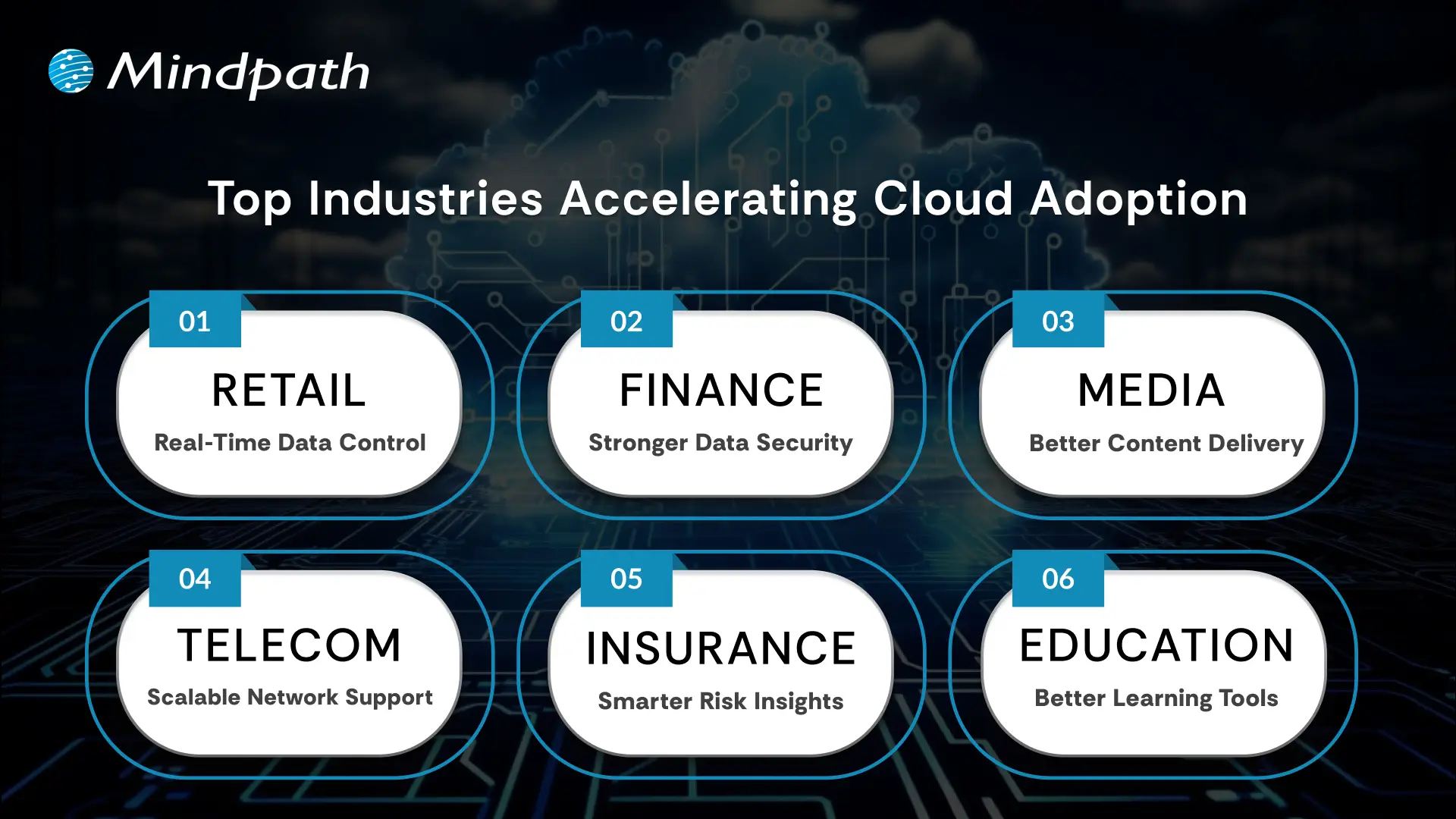
Top Industries Accelerating Cloud Adoption

1. Retail: Real-Time Data Control

Retailers use the cloud to manage sales, stock, and customer data in one system. Real-time updates improve supply chains and marketing campaigns. This boosts profits and keeps work going smoothly.

2. Financial: Stronger Data Security

Banks and financial firms trust the cloud for secure data storage and better protection. They can handle tasks like billing and client help more easily. Better security helps them grow safely.

3. Media: Better Content Delivery

Media companies use the cloud to create, store, and share content worldwide. Teams can work together from different places and finish faster. They handle big audiences without spending more.

4. Telecom: Scalable Network Support

Telecom companies use cloud solutions to manage networks and huge data. This helps them handle changing demands and roll out 5G and IoT services. Cloud computing trends keep people connected and ready for new tech.

5. Insurance: Smarter Risk Insights

Insurance companies use the cloud for flexible data and cost savings. They analyze big data to predict risks and detect fraud early. This helps them stay competitive with better customer service.

6. Education: Better Learning Tools

Schools adopt the cloud to manage tight budgets and get new technology. Teachers and students can share lessons and resources in one secure place. This makes learning flexible and improves teamwork.

Looking for ways to optimize your cloud strategy? Explore our Multi-Cloud Strategy blog to see why businesses are spreading workloads across multiple clouds.

Is Your Business Cloud Ready for 2026?

Staying on top of cloud computing trends can help any business unlock new opportunities, save money, and stay secure. As you’ve seen, trends like automation, AI, green computing, and smart cost management are shaping the way companies grow and compete. Keeping an eye on what’s next means you’re always ready to adapt and make smarter technology decisions.

At Mindpath, we help you stay ahead with trusted cloud computing services designed to match your goals. Our team can support your move to the cloud, help manage costs, and keep your data secure. We focus on delivering solutions that fit your business needs today and tomorrow. Connect with us and see how we can make your cloud journey easier.


Frequently Asked Questions

1. How can a business choose the right cloud model for its needs?

Choosing the right cloud model depends on factors like data sensitivity, budget, and scalability needs. Businesses should evaluate whether public, private, or hybrid cloud fits their operations best. A clear understanding of workloads and long-term goals helps in making a practical and cost-effective decision.

2. What are the biggest risks businesses should consider when moving to the cloud?

Common risks include data security concerns, vendor dependency, and unexpected costs. Without proper planning, businesses may face compliance issues or performance challenges. Implementing strong security practices, monitoring usage, and choosing reliable providers can help reduce these risks effectively.

3. How does cloud computing support business growth in competitive markets?

Cloud computing allows businesses to scale resources quickly, launch services faster, and respond to market changes efficiently. It supports innovation by enabling access to advanced tools like analytics and AI, helping companies stay competitive and deliver better customer experiences.

4. Is it expensive to maintain cloud infrastructure over time?

Cloud costs vary based on usage and management. While it reduces upfront investment in hardware, ongoing costs can increase without proper monitoring. Using cost management tools and optimizing resources ensures businesses maintain efficiency while keeping expenses under control over time.

5. How can businesses ensure data security in cloud environments?

Data security requires a combination of strong encryption, access controls, and regular monitoring. Businesses should follow best practices like multi-factor authentication and compliance standards. Working with trusted cloud providers and maintaining clear security policies helps protect sensitive information effectively.

Related Post

Discover the advantages of IT staff augmentation over traditional hiring. Learn how it offers flexibility, cost savings, and quick access to specialized talent for your projects.
Discover how AI is transforming the world. Explore the top 10 benefits of artificial intelligence, from solving complex problems to enhancing customer experiences.

Related Post

reactjs app development

Are you considering developing a quick, responsive application for your next project? With so many technologies options which one are you thinking to prefer? This can be challenging, right? What if we say, ReactJS app development can be the ideal solution you are looking for?  

Developers around the world appreciate React for its component-based structure, which allows them to build complex interfaces with reusable code.  Whether for startups or enterprises, ReactJS ensures flexibility, smooth maintenance, and rapid development. Report says, React has been used on around 4.8% of all websites across the world, which is over 11 million sites. Many high-traffic websites also trust React, with about 6.2% of the top 10,000 websites utilizing it.

Mindpath offers professional ReactJS development services to help companies to create reliable, effortless applications. ReactJS is a leading framework for modern app development for the following reasons.

What is ReactJS?

Famed for its flexibility and performance, ReactJS is a well-known JavaScript library which is utilized to develop efficient and user-centric web and mobile applications. Created by Facebook and officially released in 2015, it was designed to simplify the process of building dynamic and engaging user interfaces. 

React is favorite among developers and organizations with a 5.9% share of the global market, cementing its position as a leading solution for ReactJS app development due to its versatility, speed, and resilience. Curious to know why is React used for application development? Let us learn more about its benefits for app development! 

Must Read: ReactJS Trends

Advantages of Choosing ReactJS for App Development

ReactJS continues to be a preferred tool for modern application development and its real value becomes clearer when you look at how it supports better performance and flexibility. Here are some reasons why it works so well for app development: 

Advantages of ReactJS for App Development

1. Fast and Safe Updates with Virtual DOM

ReactJS implements a Virtual DOM, which makes updates instantly without impacting the entire app. When any developer makes any updates, the Virtual DOM identifies what is the update and updates only that specific piece, thus making the app smoother and quicker. This is highly impactful in enterprise app development, where apps are enormous and intricate. Developers can safely test the updates within the Virtual DOM prior to updating it to the app if the change is safe. In this way, the app performs smoothly, and risks are minimized prior to release. 

2. Reusable Components

One of the greatest advantages of working with React app development is reusability of components. This implies that the developers don’t have to write the same code over and over again. They can create new features by reusing bits of the app which have already been created. These reusable pieces of the app are referred to as components. As every component remains independent, adjustments done to one will not impact others. This saves time and makes the app reliable. It also simplifies the maintenance and future update of the app.  

3. Ideal Framework for Flexible Development

ReactJS is widely regarded as a highly flexible framework. It is capable of adapting to what developers or projects require with ease. This ensures that the ReactJS development for applications is easy and less stressful. Its source code is easy and uncomplicated, allowing developers to make adjustments without stress. Thanks to this, companies can save time and money in developing their apps. Also, developers can rapidly inspect, edit, and maintain various segments of the application with the help of React developer tools. It is one of the primary reasons that several organizations prefer using ReactJS to create up-to-date and simple to maintain apps. 

Seeking a development approach that reduces complexity while enhancing functionality? Read why React Web Development is ideal for modern projects.

4. Encourage Hybrid App Development

In the current competitive environment, it is important to reach a larger crowd, and ReactJS makes hybrid app development very easy. It enables developers to create React native apps with a single codebase, which means no need for a different code for Android and iOS. Not only does this save time, but also maintenance and updates are made easy because the same code works smoothly on both platforms. By using ReactJS for app development, the developers can provide a seamless and uniform user experience on devices, making it the perfect choice for companies that wish to increase their reach and provide high-quality apps with efficiency. 

5. Versatility in Enterprise App Development

For any business, building an app that can grow smoothly is very important. With ReactJS, it’s easier to develop apps that can handle more users, data, and new features without any problems. In enterprise app development, ReactJS helps manage the code and structure in a simple way. Developers can easily update or expand the app without affecting other parts. This means ReactJS apps stay strong and efficient even when the business grows. Because of its flexible and reliable nature, ReactJS is a great choice for creating scalable enterprise applications that are easy to maintain and improve. 

6. Seamless Learning Curve

ReactJS is famous for being easy to learn, particularly for developers who are already familiar with JavaScript. Its straightforward architecture and reusable components allow it to be easier to create and maintain applications. That’s why most teams use ReactJS for app development because it allows them to work faster with fewer hassles. Whether you’re just beginning or need to scale, it’s simple to create React apps that are flexible and efficient. This seamless learning curve saves time and is therefore an intelligent decision for companies that are eager to develop robust and easy-to-use applications without wasting any time. 

While choosing the right tool for front-end development, React vs Vue is a common debate. Are you confused between React and Vue as well? Read our blog: React vs Vue: Which JavaScript Framework is Best for Frontend Development?

Ready to Build a High-Performance App with ReactJS?

ReactJS has become a preferred choice for building fast, reliable, and scalable web and mobile applications. Its component-based architecture and Virtual DOM make updates seamless and improve app performance. Developers can easily manage large projects with reusable code, reducing time and cost. ReactJS also supports hybrid app development, allowing businesses to reach a wider audience across platforms. With its simple learning curve and strong community support, it remains a go-to solution for modern digital products. Choosing ReactJS means choosing efficiency, innovation, and long-term growth for your app development journey. 

Planning to use ReactJS for app development for your business? At Mindpath, we specialize in delivering powerful ReactJS development services tailored to your business goals. Our expert developers know how to build scalable apps that work smoothly across devices. Mindpath also offers expert support if you’re looking to hire ReactJS developers for your next project. Our team consists of skilled professionals who are well-versed in building responsive, scalable, and user-friendly ReactJS applications and can turn your app idea into a powerful digital product.  

Frequently Asked Questions

1. Is ReactJS app development suitable for both small and large business applications?

Yes, ReactJS works well for both small projects and large-scale applications. Its component-based structure helps manage simple features as well as complex systems, making it easier to scale applications as business needs grow over time without major changes.

2. How does ReactJS app development help in reducing development time?

ReactJS speeds up development by allowing developers to reuse components instead of building everything from scratch. This reduces repetitive work and helps teams deliver features faster while maintaining consistency across the application, especially in projects with frequent updates.

3. Can ReactJS be used for both web and mobile app development?

Yes, ReactJS can be used for web applications, while React Native allows developers to build mobile apps using similar concepts. This makes it easier to maintain consistency across platforms and reduces the effort required to manage separate codebases.

4. What makes ReactJS a good choice for long-term app maintenance?

ReactJS makes maintenance easier because of its structured and modular code. Developers can update or fix one part of the application without affecting others. This helps businesses keep their apps updated, stable, and adaptable as new requirements arise.

5. Does ReactJS require a highly experienced team to get started?

ReactJS is relatively easy to learn for developers familiar with JavaScript. While complex projects may need experienced developers, smaller applications can be built by teams with basic knowledge, making it a practical option for businesses starting their app development journey.

prototype vs. proof of concept

Businesses have to come up with new products to maintain their competitive edge and expand market share alongside meeting new user expectations. You may have an exciting idea for a new digital product or an application and still not be able to find how to translate the idea into a real solution. This is where you must know about the prototype vs. proof of concept debate and how to use them to validate your product ideas. 

As the competition and challenges for businesses continues growing, you need more than a brilliant idea to be successful. Business owners must understand that the transition of an idea into a full-fledged product is not a process to complete in one step but a journey. The proof of concept or POC and prototype are two distinct milestones in product development that offer methodical validation. Understanding the differences between them will empower you to navigate the journey of product development with ease.

Wondering how to validate your idea before building a full product? Mindpath offers Proof-of-Concept (POC) development services to help businesses test concepts quickly and reduce risk of investing in ideas that may not succeed.

Unraveling the Best Explanation for Proof of Concept

The most common assumption that business owners share is that a proof of concept is the same as a prototype. This assumption arises from the lack of a clear understanding of the definition of both terms. The easiest way to draw out a proof of concept vs. prototype comparison is to reflect on an ideal explanation of their definitions. Proof of concept or POC is a feasibility study that helps businesses in validating new product ideas. The primary goal of developing a POC revolves around testing the general assumptions associated with the idea and verifying whether it can be executed in the real world.

You should know that a proof of concept is not a basic version of the product you want to build with minimal features. On the contrary, it is a standalone project tailored specifically to validate a product idea. If the proof of concept delivers a negative result, then businesses can avoid spending time and money on the project. In the case of a positive result, you can have the assurance of building the complete product. The proof of concept works like an experiment where you find out whether your product idea can be technically feasible. 

Wondering how you can translate a validated concept into a full software solution? Check out MVP for software development to efficiently move from POC to a functional product.

Why Do You Need a Proof of Concept?

Many business owners may believe that investing in a proof of concept is a waste of time and resources. The difference between proof of concept and prototyping tells otherwise as there are many reasons to start a POC project. Every business owner should know that a proof of concept offers more than technical validation for their product ideas. It plays a major role in saving resources and reducing development concepts while pushing your potential for competition and innovation. 

The data and feedback obtained for your proof of concept can provide strong reasons to attract initial investment and stakeholders. Your proof of concept also serves as a useful resource to help your team understand how the product works. At the same time, it enables easier identification of bugs and risks in early stages of development. The proactive identification of risks helps you prepare the most effective mitigation strategies and accelerates time-to-market for new products.

Looking to bring your idea closer to the market while reducing risks? Learn how MVP development helps startups and businesses build products quickly after validation.

Understanding the Actual Meaning of a Prototype

Business owners are also likely to think that a prototype is similar to the minimum viable product or MVP. Even though they share some similarities, a prototype is not exactly the minimum viable product you would introduce to target users. The comparison between a proof of concept and prototype becomes easier when you know that a prototype is a visualization of how your product would look like. It is a preliminary version of your product that helps in testing the user interface and user experience with different functionalities of the product. 

The primary objective of creating a prototype for your product is to determine whether your users are having a positive experience with the product. You can rely on a prototype to understand how users will navigate your product and identify its utility. In simple words, you can think of a prototype as the first draft for your product after you validate an idea with proof of concept. Business owners should know that prototyping is a more complex and iterative process than developing a POC. The proof of concept offers technical validation for your product idea and a prototype helps you obtain initial feedback on how users feel about your product.

Curious how to transform your prototype into a product that users can interact with? Discover how to build MVP to bridge the gap between prototypes and final products.

Why Do You Need a Prototype?

People who don’t know the difference between proof of concept and prototype are likely to think that a prototype is not necessary when you have proof of concept. On the contrary, a prototype is a critical milestone in product development journeys as they help in determining potential flaws in product design. Prototyping offers immediate feedback on the reaction of your target users to the UX of a product. You can draw a similarity between POCs and prototypes in the fact that both of them save your time and resources by identifying issues in early stages of product development.

One of the significant reasons for every business owner to build a prototype is the ability to attract more early adopters and investors. The prototype serves as a better representation of how your final product will look like. As a result, investors and stakeholders can gain confidence in the market potential of your product. You can rely on a prototype to refine the product design before you move to the next step or developing the MVP.

Want to create a minimal version of your product to test in real conditions? Check out MVP for startups to validate market fit and gain early adopters efficiently.

Decoding the Differences between Proof of Concept and Prototype

The definitions of proof of concept and prototypes provide a lot of clarity on the differences between them. You can achieve a seamless shift from concept to prototype only by learning how a POC is different from prototype. Any confusion between the two terms can land you up with wasted resources and lack of direction for product development. Business owners, startup founders, development teams and product managers must know the unique role of POCs and prototypes.

1. Objectives

The foremost line of comparison between POCs and prototyping is evident in their objectives. The primary objective of a proof of concept is to validate the technical feasibility of a product idea. On the other hand, a prototype aims to test the product design and its user interface and user experience. The primary goal of a prototype is to show you how a product will look and feel.

2. Target Audience

You can expand the POC vs. prototype comparison by looking at the target audience they are intended for. The proof of concept is created for the technical stakeholders, investors and internal teams of an organization. However, the prototype is exposed to stakeholders, investors and early adopters.

3. Cost and Resources

Another critical point of difference between proof of concepts and prototypes revolves around the cost and resources required for them. In the case of a proof of concept, a business will have to incur limited expenses due to low coding and resource requirements. Developing a prototype requires more costs and resources as it involves coding and expenses on product design.

4. Expected Outcomes

The next notable aspect in the difference between POC and prototype is about the outcomes expected from them. A proof of concept will offer technical validation for a product idea and help in determining the ideal technology stack. The POC provides a clear demonstration of the feasibility of the concept you have for a product. Upon completing prototype development, you will have a visual representation of the product and a first draft for your MVP. The prototype showcases the working of a specific functionality and the UI/UX of your product.

Planning to stay ahead of design trends while developing prototypes and MVPs? Learn about the latest UX/UI design trends to enhance user experience and engagement in your product.

Here is an overview of the differences between proof of concept and prototype in a table.

Criteria Proof of Concept Prototype
Objectives Validating technical feasibility of product ideas. Testing the design and UI/UX of the product.
Target Audience Internal teams, stakeholders and investors. Stakeholders, investors and early adopters.
Cost and Resources Low costs due to limited coding and resource requirements. Higher costs than POC development due to expenses on product design and coding.
Expected Outcomes Technical validation for product idea and identifying relevant technology stack. Visual representation of the product design and its user interface and user experience.

Final Thoughts

If you want to shape your next big idea into a product that drives sustainable business, then you need a proof of concept and prototypes. Most important of all, you should understand the notable points in a prototype vs. proof of concept comparison to learn about their significance in the product development journey. An overview of their objectives, target audience and expected outcomes can help you capitalize on their value efficiently.

Mindpath is your best option when it comes to developing proof of concept and prototypes for your brilliant product ideas. We leverage years of experience and the most relevant tools to help you determine whether your idea can transform into a profitable product. Our POC development services and experts will guide you through the different stages of product development with clear roadmaps and continuous support. Reach out to us for your first consultation and turn your ideas into reality now.

DevOps challenges

DevOps has played a crucial role in transforming conventional approaches to software development. Businesses utilize DevOps to ensure faster software delivery with improved quality and better collaboration between development and operations teams. However, the discussions about DevOps challenges don’t come into the limelight, with most of the emphasis being on the benefits of DevOps.

Most of the teams working with the DevOps approach experience many struggles and roadblocks, which can be frustrating at times. Awareness of the prominent challenges for DevOps and their solutions can help a business owner find the best strategic approach for DevOps implementation. This post will help you discover some of the prominent challenges in DevOps and their potential solutions.

Don’t know how to tackle the challenges in the DevOps process? Our experts will provide practical strategies that help you move forward and streamline your operations. Contact us to get personalized support to achieve successful DevOps implementation.

Why does DevOps Face Challenges?

The most common answers to “What is DevOps?” paint it as a combination of software development and IT operations. However, you need to dive a little deeper to understand what DevOps actually entails. DevOps is not about introducing a new department in the organization or bringing a specific set of tools for better results. As a matter of fact, DevOps is a paradigm shift that requires businesses to change how they think about collaboration and communication.

You can notice that success in DevOps initiatives is more about the cultural and philosophical shift rather than the technical aspects. Even with the undeniable benefits of DevOps attracting the eyes of business owners, there is no way to ignore the challenges. Many organizations fail in DevOps implementation due to their inability to recognize the challenges that are not purely technical.

Exploring the Most Prominent DevOps Challenges

The utility of DevOps is clearly evident in the different advantages like faster time to market, easier recovery from incidents, reduced deployment failures, and enhanced efficiency. However, a lack of awareness of the challenges with DevOps can lead businesses to waste resources and end up with substandard results. The following sections will help you learn about the most critical challenges for DevOps implementation.

1. Cultural Resistance and Fragmentation

The most prominent challenge for DevOps is the cultural shift that comes with it. The traditional approach to software development involved development and operations teams working in silos. Both teams had different goals, mindsets, and metrics for the same project, thereby leading to conflict. For instance, developers focus on faster delivery and innovation, while the operations team emphasizes stability above everything.

The fundamental difference between the two teams can create problems in the adoption of the DevOps methodology for new projects. One of the notable problems that arises from differences between the development and operations teams is the ‘us vs. them’ mentality. In addition, professionals in both teams accustomed to traditional workflows will showcase resistance to new tools and practices. Furthermore, the lack of active involvement of leadership also creates difficulties for the cultural shift required in DevOps.

2. Complexity of Tools and Integration Process

Any business that wants to embrace DevOps can capitalize on a wide range of tools for every phase of the software development lifecycle. You can find DevOps tools for almost everything, including CI/CD, security, version control, and monitoring. The assurance of access to so many tools offers the flexibility to choose any tool according to your needs. At the same time, it also creates challenges for DevOps projects as choosing the right tools can be a considerably daunting task. Some businesses end up adopting a lot of tools that don’t align with each other, thereby leading to inefficiencies.

Businesses have to face difficulties in achieving seamless integration between different DevOps tools. On top of it, DevOps teams must learn about a wide range of tools, which calls for investing a lot of time in training. The challenges due to the complexity of tools also focus on the inconsistencies in development, testing and production environments that lead to deployment failures.

Looking to optimize your CI/CD pipeline with smarter automation and streamlined processes? Visit our blog on DevOps Best Practices to discover the strategies high-performing teams use to achieve consistent, stable releases.

3. Lack of Attention to Security

The next prominent challenge for businesses in the adoption of DevOps is the lack of attention to security. Since DevOps aims at ensuring faster software delivery, most of the focus of DevOps solutions is on speed. However, businesses forget about security until the final stages of the software development cycle. Pushing security to the later stages of development as an afterthought is responsible for many challenges in DevOps. One of the most critical outcomes of ignoring security till the last stage of development focuses on compliance issues. Without integrating security practices from the beginning, any DevOps initiative is likely to face regulatory penalties.

The delayed attention to security results in the discovery of bugs and errors in the final stages of development. As a result, businesses have to spend more resources and time fixing such errors. The possibilities of bugs passing undetected through different stages of development can lead to the creation of insecure code. The problems arising from insecure code, such as data loss and breaches, can damage the reputation of an organization.

4. Rigidity of Legacy Systems

Most of the organizations embracing DevOps work with legacy systems and applications in their infrastructure. The adoption of DevOps for businesses with legacy systems is a daunting task, as the old systems were not designed for agile paradigms. You can think of monolithic architectures that involve large and tightly coupled applications, which create difficulties in frequent modification, testing, and deployment.

The automation-first principle in DevOps is not applicable in legacy processes that rely heavily on manual configuration and deployment. Businesses have to go through nightmares to discover the complex dependencies in legacy systems during transformation efforts. At the same time, businesses must also remember that older systems have more security vulnerabilities, making it difficult to integrate them into a DevOps pipeline.

Planning to integrate security into your DevOps workflow? Explore our blog on DevSecOps to learn how automated security checks and continuous monitoring strengthen every stage of development.

Discovering the Ideal Solutions to DevOps Challenges

The insights on challenges for DevOps reveal that adopting a unified approach to development and IT operations is not easy. However, businesses can overcome these challenges by following a holistic approach to address the limitations of people, processes, and technology. The following sections offer an overview of some of the proven solutions to the challenges of DevOps implementation.

1. Culture of Collaborating and Sharing Responsibility

The foremost addition among the biggest DevOps trends points to efforts to break down silos and establish cross-functional teams. DevOps initiatives require shared goals around desired business objectives rather than focusing on KPIs of individual departments. Business owners must foster open communication and transparency between teams to create new paths for collaboration and knowledge sharing. Most important of all, leaders must showcase active participation in the projects and communicate with team members. When all team members share the same goals and responsibilities, the chances of cultural resistance and conflicts are reduced by a huge margin.

2. Adoption of Standardized Combination of Tools

The large assortment of tools for DevOps is obviously one of the most complex challenges for business owners. However, the solution suggests that adopting a standard set of tools with a thoughtful approach can prevent confusion. For instance, businesses must identify the critical areas for automation while choosing DevOps services and select tools that perform the best in the concerned areas. Most important of all, businesses must choose tools that facilitate easier integration with existing systems. Platforms such as Azure DevOps or GitLab can be the best picks for DevOps with their integrated version control, project management, and CI/CD capabilities.

3. Security from Early Stages

Another proven solution to a formidable DevOps challenge is the adoption of security as a shared responsibility in all stages of the development cycle. Integration of security practices and tools in the early stages of development can involve scanning the source code during development and testing applications to identify vulnerabilities in the running state. DevOps teams should also use techniques like software composition analysis to recognize and resolve open-source vulnerabilities. The other proven solutions to embrace security in the early stages include automated security checks for CI/CD pipelines and security training.

Looking to combine fast DevOps practices with automated security checks? Check out our blog on DevOps vs DevSecOps to understand how DevSecOps adds proactive, automated safeguards to every stage of your pipeline.

Want to Simplify DevOps and Achieve Faster Time to Market?

The overview of the notable DevOps challenges and the solutions recommended for them showcases that embracing DevOps is not easy. On the other hand, a holistic and strategic approach to fighting against the challenges can help businesses embrace DevOps easily. The right DevOps strategy will not only ensure faster time to market but also achieve new benchmarks of competitive advantage.

We at Mindpath have been serving our clients with end-to-end IT solutions, including DevOps services tailored to their needs and vision. Our experts have the experience required to understand the client’s vision and offer relevant solutions. Talk to our DevOps consultants and discover the ideal way to make the most of DevOps benefits now.

Frequently Asked Questions

1. Why do some DevOps implementations fail despite having the right tools?

Failure often happens when organizations focus only on tools and ignore cultural alignment. Without proper collaboration, shared goals, and leadership support, even the best tools cannot deliver results. DevOps success depends equally on mindset, communication, and well-defined processes.

2. How can organizations measure the success of their DevOps adoption?

Success can be measured through key indicators such as deployment frequency, lead time for changes, system reliability, and recovery time after failures. These metrics help assess efficiency, stability, and the overall impact of DevOps practices on business performance.

3. What role does leadership play in overcoming DevOps challenges?

Leadership plays a critical role in driving cultural change and setting clear goals. Strong leadership ensures team alignment, encourages collaboration, and supports continuous improvement. Without active involvement from leadership, DevOps initiatives may struggle to gain momentum and direction.

4. How can teams manage the transition from legacy systems to a DevOps environment?

The transition should be gradual, starting with identifying critical systems and modernizing them step by step. Breaking monolithic systems into smaller components, automating processes, and testing continuously helps reduce risks and ensures a smoother shift to DevOps practices.

5. Why is continuous learning important in a DevOps environment?

DevOps involves evolving tools, practices, and technologies. Continuous learning helps teams stay updated, adapt to changes, and improve their workflows. It also enables better problem-solving and ensures that teams can effectively handle new challenges as they arise.

Discover key DevOps challenges and effective solutions to streamline development and operations, and boost deployment efficiency.