Home

Serverless Architecture in Cloud Computing: Complete Guide for 2026

Serverless Architecture in Cloud Computing: Complete Guide for 2026

Join our Newsletter!

serverless architecture in cloud computing

Have you heard a lot about serverless architecture in cloud computing and are still unsure of what it is? If so, you’re not alone. Many developers, startups, and business owners wonder how this model works and how their approach to building and deploying apps will change with it. So, what is the hype about, and why is it catching everyone’s attention in 2026?

Serverless architecture in cloud computing is a smarter way of providing a scalable application without the hassle of server management. With serverless computing, you rely on the cloud provider to do all the provisioning, scaling, and maintenance, leaving you to deal with just the code and get features delivered faster. Since more companies are evolving into modern cloud solutions, serverless is becoming a common approach to delivering applications. In this blog, we will cover everything you need to know. So, let’s dig in!

Ready to transform your cloud infrastructure with serverless architecture? Connect with us, and our team will guide you from planning to deployment, ensuring maximum efficiency and scalability.

What is Serverless Architecture in Cloud Computing?

Serverless architecture in cloud computing is a modern way to bring software to market. Rather than having to manage a server’s infrastructure, developers develop and run applications without having to deal with the environment. The developer doesn’t need to worry about servers, updates, scaling, and instead just writes code and deploys. The cloud provider takes away all of the backend tasks, such as server provisioning, maintenance and scaling, making the team’s development as a whole faster without focusing on technology-driven software engineering.

In a serverless model, application code is decomposed into independent functions, commonly known as Function as a Service (FaaS). Each function performs a specific function with the ability to respond to events such as HTTP requests or file uploads. Once the application is deployed, the cloud provider executes the function when required. If no servers are available, the provider spins one up for you automatically. Developers do not take part in this process; it is handled for them on their behalf without the developers noticing.

Fundamental Concepts in Serverless Computing Architecture

To understand how serverless computing truly works, it’s important to grasp its core principles. Here are the fundamental concepts that define serverless architecture and how they support modern application development:

1. Cold Start

If a function hasn’t run in a while, it might take longer to start up. This is called a cold start.

2. Warm Execution

When a function runs quickly because it was recently used, it’s called a warm execution.

3. Invocation

Every time a serverless function runs, it’s called an invocation.

4. Duration

This is the total time a function takes to run from start to finish.

5. Orchestration

Orchestration means managing how different serverless functions work together in a sequence.

6. Function-as-a-Service (FaaS)

FaaS lets developers write small functions that run automatically when certain events happen.

7. Event

An event is what triggers a function to run, like an HTTP request or file upload.

8. Stateless

Serverless functions don’t remember anything from one run to the next.

Ever wondered how cloud apps grow without server management? Read our blog on Cloud-Native Development to see how it powers agile and resilient serverless architectures.

Advantages of Serverless Architecture

Serverless architecture helps businesses build and deploy apps faster with less infrastructure management. According to Grand View Research, the global serverless architecture market was valued at USD 9.42 billion in 2023 and is expected to grow at a 28.2% CAGR from 2024 to 2030. Here are some key advantages that make serverless a popular choice in cloud computing today:

1. Cost-Effective Usage Model

Serverless platforms charge only for actual function execution time. There are no costs for idle servers, making it highly economical, especially for applications that run on demand or infrequently.

2. Faster Time-to-Market

Cloud functions enable developers to build and deploy features quickly. This rapid development approach helps businesses stay agile and respond faster to market needs.

3. Auto Scaling Capabilities

Applications built on cloud functions can easily scale up or down based on real-time user demand. This automatic scaling ensures performance stays smooth during traffic spikes without any manual effort.

4. Simplified Backend Management

With serverless architecture in cloud computing, developers no longer need to manage servers, updates, or scaling. It allows teams to focus on development while the cloud provider handles operations behind the scenes.

5. Modular and Clean Code

Each function in a serverless setup performs a specific task, promoting modular design. This leads to easy maintenance, especially when working with components like a serverless database or microservices.

6. Ideal for Event-Based Solutions

Serverless architecture in cloud computing supports event-driven applications, making it perfect for real-time analytics, chatbots, IoT, and more. It allows seamless integration with tools that react instantly to user actions or data changes.

How do teams deploy serverless apps faster and more reliably? Explore our DevOps blog to learn how automation and collaboration make it possible.

Serverless Architecture Use Cases

Serverless architecture in cloud computing is changing the way developers build and manage applications. It’s perfect for handling tasks that run occasionally or need to scale quickly without manual setup. Here are some common and practical use cases:

1. Automated CI/CD Workflows

Serverless tools help speed up software delivery by automating tasks. For example, pushing code can trigger a function to build the app or run tests right away.

2. Scalable APIs

You can use serverless Lambda with tools like Amazon API Gateway to build RESTful APIs. These APIs grow with your traffic, so you never have to worry about performance limits.

3. Event-Driven Actions

Serverless architecture in cloud computing is ideal for user actions that trigger automated tasks. For example, when someone signs up, it can update a serverless database and send a welcome email using cloud functions.

4. Background Processing

Serverless functions are great for behind-the-scenes work like video processing or updating product details. These tasks run in the background without slowing down the main app.

5. Flexible Growth

With serverless architecture in cloud computing, teams can move parts of an app one step at a time. It’s easy to expand later by adding more functions or connecting to a serverless database.

6. Smarter Security Tasks

Cloud functions can check new containers for security risks or support safer login methods. They’re also useful for things like two-factor authentication and SSH key validation.

Securing serverless applications can be challenging, how is it done? Discover about DevSecOps to see how security is built into every stage of cloud development.

What is the Difference Between Serverless Architecture and Cloud Architecture?

While both serverless architecture and cloud architecture use cloud environments to run applications, they differ in how infrastructure is managed and how applications are built. Here’s a quick comparison to help you understand the key differences between the two:

Aspect Cloud Architecture Serverless Architecture
Definition A broad model where computing resources are delivered over the internet. A model where apps run without managing servers directly.
Infrastructure Management Developers may manage virtual machines or containers or use managed services. All server management is handled by the cloud provider.
Scalability Manual or auto-scaling needs to be configured. Automatically scales based on demand.
Cost May include fixed costs for allocated resources, even if unused. Pay only for the time and resources your code actually uses.
Development Focus Requires DevOps involvement for setup, monitoring, and updates. Developers focus only on writing and deploying code.
Flexibility Offers a range of service models like IaaS, PaaS, and SaaS with customizable resources. Designed for small, modular functions that respond to specific events.
Examples AWS (EC2, S3), Microsoft Azure (VMs), Google Cloud (Compute Engine) AWS Lambda, Azure Functions, Google Cloud Functions

Is Your Business Ready to Go Serverless in the Cloud?

Serverless architecture in cloud computing offers a powerful way to build fast, scalable, and cost-efficient applications. With no server maintenance to worry about, developers can focus fully on innovation. As businesses aim for agility and flexibility in 2026, serverless becomes the smart choice for modern app development and digital transformation.

At Mindpath, we offer expert cloud computing services tailored to your business goals. From setting up serverless frameworks to managing cloud resources and infrastructure, we help you scale with ease. Partner with us to streamline your operations and deliver high-performing cloud-based solutions with confidence.

Frequently Asked Questions

1. When does serverless architecture make the most sense for a business?

Serverless architecture works best for applications with unpredictable traffic, event-driven workflows, or rapid scaling needs. It is especially useful for startups and growing platforms that want to reduce infrastructure management while focusing on faster development and efficient resource utilization.

2. Does serverless architecture completely eliminate the need for backend management?

Serverless reduces infrastructure management, but backend responsibilities still exist. Developers must manage application logic, APIs, databases, and integrations. Monitoring performance, handling errors, and ensuring security remain important to maintain a reliable and scalable application environment.

3. How does serverless impact application performance during high traffic?

Serverless platforms automatically scale based on demand, allowing applications to handle sudden traffic spikes efficiently. However, performance can sometimes be affected by cold starts. Proper architecture design and optimization strategies help ensure consistent and smooth performance even under heavy loads.

4. Is serverless architecture suitable for large and complex applications?

Serverless can support complex applications, but it requires careful planning. Breaking applications into smaller, independent functions improves scalability and maintainability. For highly complex systems, a hybrid approach combining serverless with traditional cloud services may offer better flexibility and control.

5. What should be considered before adopting serverless architecture?

It is important to evaluate factors like application type, execution frequency, cost patterns, and vendor dependency. Understanding limitations such as cold starts, debugging complexity, and monitoring challenges helps in making informed decisions and ensures successful adoption of serverless architecture.


Ready to Simplify Cloud Application Development?

Build scalable applications with flexible, cost-efficient serverless architecture.

Frequently Asked Questions

Support Is One Click Away

Featured Posts

Related Post

Mobile app development 

In this fast-paced digital world, mobile app development has become a key channel for businesses to help grow and support their customers. Every tap, click and swipe is part of the user’s experience and lasting commitment to the brand. As customers rely more on their smartphones for shopping, entertainment, and other services, those companies that develop an intuitive e-commerce mobile app will have a better competitive advantage and will have their customers engaged with them.

As technology progresses every day, businesses can no longer rely solely on traditional platforms. Mobile apps now offer convenience, personalization, and live interaction that websites often cannot provide. Mobile apps help brands deliver seamless experiences and help build awareness and growth. This blog post will provide key advantages of mobile app development and help take your business to new heights.

Want to fully experience the benefits of mobile app development in your business? Mindpath offers mobile app development services, which help your business unlock new opportunities through innovative design and seamless functionality.

What is Mobile App Development?

Mobile app development refers to building software applications that are operated on mobile devices such as smartphones and tablets. Mobile app development is simply the process of designing the app’s interface and coding the app itself. These apps are designed to serve particular functions, which means they will facilitate the ability for a user to use services, shop online, or stay connected to others.

Mobile applications are capable of making use of the integrated functionality offered by a device, such as GPS, camera, bluetooth, and microphone, which sets them apart from traditional software. Developers today create the majority of applications for the Android or iOS platforms because these two dominate the worldwide market. Developers may use various frameworks & tools to construct applications that function smoothly, are visually attractive, and work seamlessly across devices.

What is the Process of Mobile App Development?

Developing a mobile application involves several necessary steps to take your idea to a working app. Each step plays a role in enabling usability, reliability, and scalability of the mobile app that is aligned with the business goals.

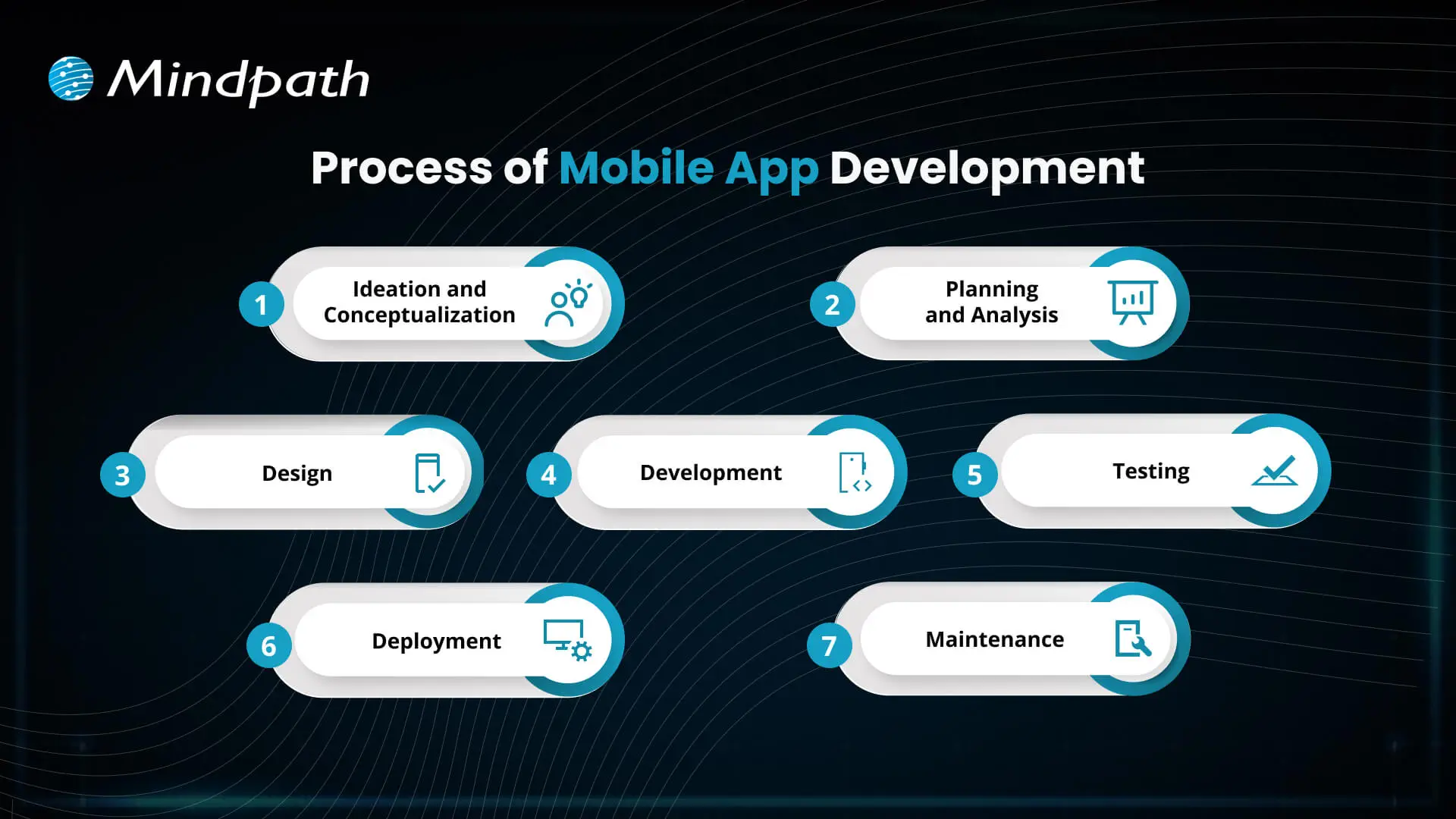
Process of Mobile App Development

1. Ideation and Conceptualization

The first step in the mobile app development process is coming up with a concept for your app. The teams think of an exciting mobile app development idea, find a way to solve problems for users, depict their target audiences, and identify key features.

2. Planning and Analysis

During this step, the teams conduct market research, determine app features, and establish goals. A proper framework documents timelines, budgets, and resources that will enable mobile app development startups and teams to stay on track.

3. Design

Designers create the aesthetic design and layout of the app to ensure it looks pleasing and is easy to use. Designing with simplicity and enjoyment in mind will allow users to navigate the app easily and have a positive experience while working.

4. Development

This is where developers start coding and building both the front and back ends of the app. The mobile app development process at this stage focuses on creating functional features that bring the design to life.

5. Testing

Before an app is launched, several tests are conducted to identify any malfunctions, like bugs or performance problems. This is a necessary step in order to ensure that the app is performing normally and responding correctly for the users.

6. Deployment

After the application has successfully gone through the testing stage, the app is published on the app stores, i.e., Google Play or Apple App Store. Companies that provide mobile app development will also develop a listing and promotional materials to be prepared for the launch.

7. Maintenance

Once the app has launched, it should be updated on a regular basis to fix bugs and continue to work with new devices or software versions. Maintaining the app will give users satisfaction, and enjoying the app for an extended period of time will keep users active.

Is your business app prepared to handle today’s security challenges? Discover how application security best practices for web and mobile apps keep user data safe while supporting sustainable growth.

Benefits of Mobile App Development

The advantages of mobile app development support businesses in more easily reaching customers and accelerating growth. By utilizing a mobile app development service, businesses can build simple and effective mobile apps that enhance user experience and increase engagement.

1. Enhance Customer Engagement

Mobile apps enable users to engage with your brand more often, keeping your business top of mind and relevant. Mobile app development allows businesses to develop features such as favorites, shopping lists, and review capabilities, all of which act as tools to enhance engagement.

2. Build Strong Brand Identity

An app that is well-designed becomes a permanent ambassador for your brand. Mobile app developers can collect relevant user data through the app, which can help improve your brand and continue to deliver value to your audience.

3. Increase Customer Loyalty

Mobile applications can host loyalty programs that encourage customers to revisit and repeat purchases. By giving discounts or rewards instantly, the app creates a sense of engagement with the app and helps build longer-term positive relationships.

4. Improve Customer Interaction

Mobile applications provide a convenient way for customers to purchase products because the app saves payment details and even previously favorite products. This all allows for an easier customer experience, which leads to convenience, improves customer satisfaction, and increases future conversions.

5. Personalize Marketing Efforts

Businesses can provide targeted offers and recommendations based on how users interact with their app. Personalized communication helps make users feel appreciated and encourages engagement.

Looking to build apps faster and smarter? Explore how mobile app development tools streamline development and boost productivity.

6. Boost Profits

Mobile apps typically drive sales and reduce marketing expenses by improving engagement, loyalty, and the overall user experience. Investing in the app is worthwhile because it is an efficient means of maximizing return.

7. Leverage Social Media Integration

Mobile applications can seamlessly connect to their social media channels, allowing individuals to easily share products or submit reviews. This advertising practice provides brands with exposure and social proof.

8. Provide Unique Value to Customers

Apps can offer features that are not available anywhere else, such as augmented reality try-ons, AI in mobile app development for intelligent chat support, and app-exclusive discounts. This adds convenience and encourages individuals to visit again.

9. Target Your Niche Market

Mobile apps provide a competitive advantage over other markets with specialized features and experiences. Businesses can effectively target and engage a broader segment of their target market.

10. Strengthen Communication

Push notifications ability and geotargeting gives businesses the ability to communicate with users in real time. Apps allow businesses to send relevant and time-sensitive messages without interruption from other communication channels.

Want to stay ahead in app innovation? Discover how mobile app development technologies power scalable, future-ready applications

Ready to Elevate Your Business with Mobile Apps?

Mobile app development offers businesses a powerful way to engage customers, build loyalty, and boost growth. By leveraging AI in mobile apps, companies can deliver smarter personalization, real-time support, and data-driven user experiences that stand out in competitive markets.. Leveraging the benefits of mobile apps helps businesses strengthen their brand, improve customer experience, and maximize sales in today’s digital world.

Mindpath provides professional mobile app development services to help businesses turn ideas into functional, user-friendly apps. Our team of experts focuses on designing apps that engage users, integrate key features, and deliver measurable results. With Mindpath, companies can launch high-quality apps that drive growth, enhance customer experience, and ensure long-term success.

LLM - Powered App Development Cost

Imagine you’ve got an idea for a custom LLM-powered app. Maybe you want to automate customer support, build an AI assistant, or transform how your team works. But here’s what stops most entrepreneurs and business leaders cold: they don’t really know how much LLM-powered app development costs actually impact their budget. The price tag feels mysterious, unpredictable, and frankly, intimidating.

Key Takeaways

  • 01
    LLM app costs vary based on complexity, integrations, infrastructure, and scale.
  • 02
    SMBs can start AI projects with manageable budgets and phased investments.
  • 03
    API-based models offer faster deployment and lower upfront development costs.
  • 04
    RAG solutions improve AI performance without expensive model fine-tuning requirements.
  • 05
    Careful planning and cost optimization help maximize long-term AI value.

Good news: you’re definitely not alone. Hundreds of companies across the UK, US, Europe, Australia, and Canada wrestle with this exact question daily. They want real answers, not guesswork. They need clarity on what drives costs when building AI solutions. We’ve analyzed the numbers, industry benchmarks, and actual project data. Ready to cut through confusion? Everything unfolds in this blog.

Ready to build a custom LLM-powered application? Explore Mindpath’s AI development services to create scalable, intelligent solutions tailored to your business needs.

Why Can’t Businesses Ignore LLM-Powered App Development Anymore?

AI stopped being a trend years ago. Every competitor is moving forward with intelligent apps while you’re watching from the sidelines. Companies that skip LLM-powered app development risk becoming irrelevant faster than you’d think.

The payoff is real and measurable. Better customer service, faster workflows, and smarter operations aren’t theoretical anymore. Your team knows what needs fixing. AI solves it. LLM development pricing makes sense when the alternative is falling behind.

Here are the 5 reasons why AI integration is no longer negotiable:

1. Massive Productivity Gains

Your team does less tedious work today. Real-time returns show up immediately.

2. Enhanced Customer Retention

Support gets faster and smarter simultaneously. Customers notice better service instantly.

3. Hyper Efficiency in Workflows

Humans focus on strategic work instead. Automation handles repetitive stuff every day.

4. Rapid Market Growth

The AI space is expanding aggressively right now. Early movers have significant advantages.

5. Competitive Positioning in Your Industry

Your competitors are already building AI solutions. LLM-powered app development cost becomes minimal when you’re losing market share.

Key Factors Driving LLM-Powered App Development Costs

1. Model Architecture & Selection

API models keep your initial costs down. Custom models demand expensive computing power.

2. Data Preparation & Management

Building clean data takes real time. Proprietary knowledge needs special architecture setup.

3. System Integration & Infrastructure

Enterprise systems integration requires custom backend work. Self-hosted models need serious cloud infrastructure.

4. Regulatory Compliance & Security

Regulated industries need advanced protection standards.

5. Inference & Ongoing Maintenance

LLM token costs scale with user volume. Models need constant monitoring and optimization

LLM App Development Pricing for Different Business Scenarios

Every business is different, so your AI app development cost varies wildly depending on what you’re actually building. Let’s break down real pricing for the scenarios most companies face today.

1: Basic AI Chatbot or MVP

Build Cost: $20,000–$50,000 with a 2-4 month development timeline. Ideal for customer support, lead qualification, and knowledge retrieval. Running costs typically range from $50–$500 per month, while LLM Fine Tuning Cost remains minimal.

2: Mid-Level Business Assistant

Build Cost: $50,000–$150,000 with a 4–8 month implementation timeline. Includes custom dashboards, workflow automation, and business system integrations. Running costs generally range from $500–$5,000 per month.

3: Complex Enterprise AI

Build Cost: $150,000–$500,000+ with development timelines exceeding 9 months. Building LLM-powered applications at enterprise scale requires private infrastructure and compliance measures. Running costs can range from $5,000–$40,000+ per month.

How Much Should SMBs Budget for an LLM-Powered Application?

LLM-powered automation for SMBs is becoming more affordable and accessible than ever before. Understanding the expected budget helps businesses plan smarter investments and avoid unnecessary development expenses.

1. Proof of Concept & Business Analysis ($3,000 – $15,000)

Every successful AI project starts with validating the idea before full-scale development begins. This stage helps businesses identify valuable use cases, assess feasibility, and reduce the risk of costly changes later.

2. Data Preparation & Ingestion ($5,000 – $30,000)

AI systems perform only as well as the data they receive. Preparing, cleaning, and organizing business documents ensures the model can deliver accurate and relevant responses.

3. Application & Integration Development ($5,000 – $40,000)

This phase focuses on building the user experience and connecting AI with existing business systems. It often includes interfaces, workflows, databases, and Retrieval-Augmented Generation (RAG) capabilities.

4. API Usage Costs ($200 – $2,000/month)

Many SMBs choose cloud-based AI models because they eliminate large infrastructure investments. Costs increase with application usage, making scalability easier to manage during growth.

5. Infrastructure for Self-Hosted Deployments ($3,000 – $15,000/month)

Businesses requiring complete control over data may choose private model hosting environments. This approach increases the LLM-Powered App Development Cost but provides stronger privacy, security, and customization options.

6. Vector Database Hosting ($500 – $5,000/month)

Vector databases allow AI applications to search and retrieve business knowledge efficiently. They play a critical role in improving response accuracy and delivering context-aware answers.

7. AI Gateway & Observability ($0 – $300/month)

Monitoring tools help organizations track model performance, usage patterns, and operational expenses. Early visibility into system behavior prevents unexpected costs and improves reliability.

8. Maintenance & Updates ($1,000 – $5,000/month)

AI applications require continuous optimization to maintain performance as business needs evolve. Regular updates, prompt improvements, and data management ensure long-term value from the investment.

API vs Self-Hosting: Which Option Delivers Better Long-Term Value?

The initial development budget is only part of the investment. Businesses must also evaluate ongoing operational expenses, scalability requirements, security needs, and long-term maintenance costs before choosing an AI deployment strategy.

The right choice depends on how frequently the application is used, the level of data privacy required, and the organization’s growth plans. Understanding both approaches helps businesses avoid unexpected costs as their AI adoption expands.

Factor API-Based Models Self-Hosted Models
Upfront Cost Low initial spend High setup cost
Monthly Cost Usage-based pricing Fixed infrastructure cost
Deployment Time Weeks to launch Months to deploy
Data Privacy Shared environment Full data control
Maintenance Provider managed In-house management
Best For SMBs, startups Large enterprises

How to Reduce LLM-Powered App Development Costs?

Building an LLM-powered application does not always require a large budget. With the right strategy, businesses can reduce development expenses while still creating a reliable and scalable AI solution. Here are some practical ways to control costs:

1. Start with an MVP

Validate ideas early before investing heavily in full development.

2. Use API-Based Models

Reduce infrastructure costs with ready-to-use cloud AI services.

3. Implement RAG First

Improve responses using business data without expensive model training.

4. Reuse Existing Data

Leverage current business information to reduce preparation expenses significantly.

5. Prioritize High-Impact Use Cases

Focus resources on projects delivering maximum business value first.

6. Scale Infrastructure Gradually

Expand resources only when application demand and usage increase.

7. Optimize Prompts Regularly

Improve output quality while lowering token consumption and costs.

8. Partner with Experts

Avoid costly mistakes through experienced AI development guidance.

Ready to Build an AI Solution That Fits Your Budget?

Understanding the budget to build LLM-powered app in 2026 helps businesses make smarter technology investments. From development and infrastructure to maintenance and scaling, knowing the cost factors allows you to plan effectively and build AI solutions that support long-term business growth.

At Mindpath, we provide AI development services tailored to your business goals and budget. Our team helps organizations build scalable LLM-powered applications, from MVPs to enterprise solutions, with the right strategy, technology, and support for successful implementation.

remote work security

Remote work security refers to the practices, technologies, and policies that protect corporate data and networks when employees work outside a traditional office environment. Teams operate across devices, networks, and locations every day, and without corporate firewalls in place, even small gaps can create serious vulnerabilities. The risks evolve quickly, which is why businesses need protection strategies built on strict user verification, encrypted network connections, and continuous endpoint monitoring without disrupting daily workflows or user experience.

Decisions on security must be clear and consistent as organizations increase remote setups. Leaders need to pose the correct questions and take actions. Meanwhile, employees require straightforward and easy to use systems that facilitate day-to-day operations. Consequently, there is a need to have a balanced approach to succeed in the long term. This blog will provide explanations of important aspects of remote work cybersecurity in a clear and practical manner. So, keep reading further!

Ready to secure your remote workforce and protect your business from evolving cyber threats? Contact us to explore how our team can help you build a safer and more resilient remote work environment.

The Growing Cyber Risk in Remote Work Environments

Not only in the office, remote work also faces rising cyber threats today. Remote work security is vital because employees are using their personal networks and devices to access systems. These are some of the weak points that hackers attack. Consequently, minimal security breaches have the potential to compromise business information and interrupt routine business activities within a short time.

Simultaneously, remote workforce cybersecurity is exposed to increasing threats as the techniques of attacks advance daily. Phishing, ransom, and identity attacks are growing at a high rate. Remote setups are fast to adapt to cybercriminals. Thus, organizations need to remain vigilant and increase security to manage these changing threats.

Want to better understand how to scale teams without increasing security risks? Explore the benefits of hiring remote developers to balance flexibility with control.

Here are some of the remote workforce security risks:

1. Unsecured Network Risks

At home or cafes, employees tend to connect to unsecured networks. These connections can easily be intercepted by attackers to get sensitive data.

2. Weak Password Security Risks

A large number of users use the same password on several accounts. A single breach may reveal multiple systems within a short time.

3. Personal Device Security Risks

Individual gadgets frequently lack frequent security patches and safeguards. This provides malware and attacks with easy entry points.

4. Phishing and Social Engineering Risks

To deceive users, hackers use spoofed emails, or messaging. Such attacks seek to steal usernames or confidential information.

5. Shadow IT Security Risks

Employees sometimes use apps without company approval for convenience. This bypasses security controls and increases risk.

6. Software Update Security Risks

Remote devices might not get security patches in a timely manner. This exposes systems to well-known threats and vulnerabilities.

7. Physical Security Risks

The devices may be lost or found in high-traffic or communal areas. Critical business information may be put at risk as a result of unauthorized access.

Looking to simplify how your remote teams stay connected and secure daily? Discover powerful remote work tools that support safer collaboration.

Importance of Cybersecurity in Remote Work

Remote work security is key in safeguarding data and systems when working remotely. Here are the reasons why solid cybersecurity is still needed in the daily remote work setting.

1. Protecting Expanding Digital Entry Points

Remote work adds devices, networks and points of access to systems. Cybersecurity for remote work helps control risks in these expanded environments.

2. Securing Sensitive Business Data

Every day, employees gain access to and share crucial information that is not secured by office infrastructure. Work from home security will also protect data when storing and transferring data.

3. Reducing Phishing and Online Fraud Risks

Users who are distantly located are faced with rising phishing attacks in the form of emails and fraudulent communications. High level of security awareness will avoid unintentional sharing of sensitive login information.

4. Maintaining Strong Security Standards

Both personal and shared devices may not have consistent security updates and protection tools. The use of consistent policies guarantees similar protection standards across all systems.

5. Ensuring Business Continuity

Cyber attacks have the ability to interrupt workflow and slow down processes happening remotely. Good security control mechanisms assist in stability and prompt recovery exercises.

6. Building Trust and Meeting Compliance

Data security breaches may destroy reputation and decrease customer confidence within a short time. Adequate security would keep the rules and guard business reputation.

Planning to strengthen your security foundation as your business grows? Read about application security best practices to protect your systems effectively.

Cybersecurity Best Practices

Remote working security requires effective habits to safeguard information and systems in remote configurations. These are the best practices that can be implemented in order to enhance safety and minimize risks.

1. Safe Network Access (VPN Use)

Connect with secure VPN to all remote work activities on a daily basis. This secures information transfer among the commonly shared and open internet systems.

2. Home Network Protection

Protect home routers by using strong passwords and updating encryption parameters. Store smart devices on different networks to minimize security risks.

3. Timely Software Updates

Automatically update all systems and security applications. Frequent patches seal identified vulnerabilities and thwart cyber attacks in real-time.

4. Stronger Login Protection (MFA)

Implement several authentication measures whenever accessing the company system. Remote work security enhances safety of access via additional authentication measures.

5. Strong Password Management

Use different passwords on each account using secure password tools. Do not use the same passwords in personal and work accounts.

6. Employee Security Awareness

Train employees on how to detect phishing emails and suspicious online activities. Establish a powerful security culture to avoid unintentional data breaches.

Is Your Organization Truly Ready for Strong Remote Workforce Security?

Remote work has transformed the way teams work and exchange information on a daily basis. Powerful Remote Work Security assists in safeguarding information, hardware, and networks during the increase in cybercrime. It guarantees safer communication, stronger control, and minimized risks in the distributed work setting in the long term business stability and trust.

At Mindpath, we offer remote work security solutions to secure modern distributed teams with robust, trustworthy systems. Our strategy revolves around safe access, data security and risk mitigation. We assist companies to create secure remote working environments that do not affect productivity at all.

Learn essential cybersecurity practices for remote work and how Mindpath can help protect your business with expert solutions.