DevOps Best Practices for Business in 2026

Join our Newsletter!

Featured Posts

Support Is One Click Away

Home

DevOps Best Practices for Business in 2026

devops best practices

DevOps Best Practices for Business in 2026

Does your team prepare itself well enough to handle the fast pace of software development in 2026? As there are so many changes happening in the way businesses build and deliver products, it is very important to pause and think about what’s working and what’s not, isn’t it? The perfect solution for this lies in following DevOps best practices, so that you can keep your software development processes smooth and your teams connected.  

Well, DevOps can help your business improve teamwork, speed up release, and even reduce errors. Its goal is to create a robust process supporting development and operations. If you are asking what the best practices for DevOps are, and how they may help your business improve on delivery, performance, and collaborate between teams, then this blog can serve you better. 

Before delving into the main topic, let us first understand the fundamentals of DevOps. 

Want to reduce downtime and accelerate software delivery? Mindpath offers expert DevOps services, which help streamline your workflows, automate deployments, and improve overall efficiency.

What is DevOps?

DevOps is a proactive approach to linking development and IT operations teams to collaboratively work in a way that transforms the software development process. With DevOps, both teams can share responsibilities in building, testing, and releasing software. The main purpose of it is to improve speed, reduce errors, and deliver better results.

DevOps also improves communication across teams, which reduces delays and results in fewer disruptions. Automating repetitive tasks gives teams more time to focus on solving problems. It also allows for faster feedback loops, meaning teams can address problems quickly and improve product quality over time. This approach allows teams to adapt to change more easily while also scaling systems and keeping up with customer demand. 

Looking to elevate your business with smarter workflows? Check out our Benefits of DevOps blog to learn how it accelerates innovation while fostering collaboration across teams.

What are the 7 Key Principles of DevOps?

There are several main principles that define how teams work and deliver software. These principles provide an underpinning to enhance collaboration, automation, and improvement across a work ecosystem. Now, let’s explore the 7 key principles of DevOps: 

1. Strong Team Collaboration

DevOps brings developers and operations teams together to work as one. This helps solve problems faster and build better software. 

2. Customer-Centric Approach

Every decision is made by keeping the customer in mind. Teams collect feedback and use real-time tools to improve the user experience. 

3. Data-Driven Decisions

DevOps teams rely on real data-driven decisions before making changes. This helps them choose the right tools and improve their results with confidence. 

4. Automation Across the Workflow

Tasks like testing, deployment, and setup are automated to save time. This lets teams focus on planning, solving problems, and improving the product. 

5. Continuous Improvement

DevOps supports small and frequent updates instead of waiting for one big release. This helps teams meet user needs quickly and make steady progress. 

6. Embracing Failure as Learning

If something goes wrong, teams treat it as a chance to learn. This mindset helps them improve and make smarter decisions in the future. 

7. Shared Responsibility

In DevOps, the entire team takes responsibility for the software from beginning to end. Developers and operations work closely at every stage to build, test, and fix issues together. 

Struggling with speed, collaboration, or automation in DevOps? Our DevOps Challenges and Solutions blog explains how modern businesses address these issues.

What are the DevOps Best Practices?

To get the most out of DevOps, teams follow a set of proven methods that support faster delivery, better quality, and stronger teamwork. These top DevOps practices help create smooth workflows and make it easier to manage changes and fix problems quickly. Let’s explore the most effective DevOps methods that can drive real results. 

1. Continuous Integration/Continuous Deployment (CI/CD)

One helpful way to speed up your CI/CD pipeline is by using a smart testing platform that runs tests faster and more efficiently. It allows teams to run large sets of tests in parallel, get faster feedback, and use resources wisely to lower costs. A key benefit is that it keeps your tests stable across different environments, which helps improve software quality and delivery speed. 

2. Use Infrastructure as Code (IaC) for Better Control

Infrastructure as Code lets teams manage and set up their infrastructure using code instead of doing it manually. This makes deployments faster and keeps environments consistent across all stages of software delivery. Using IaC also helps track changes easily and improves teamwork by allowing developers to handle infrastructure in a clear and organized way. 

3. Integrate Security into Your DevOps Process

Adding security checks early in the development pipeline helps find and fix vulnerabilities before they cause problems. This approach keeps your software safe and ensures it meets important security rules. Using automated security tools makes it easier for teams to maintain strong protection without slowing down delivery. 

4. Leverage Configuration Management Tools

Configuration Management tools help automate system setup and updates to keep environments consistent across teams. They work well with CI/CD pipelines to speed up deployments and make collaboration easier. By using these tools, teams can also enforce security rules and track changes to meet compliance requirements. 

5. Adopt Shift-Left Testing for Faster Issue Detection

Starting to test early in the development process helps find problems before they grow bigger. Using automated and AI-driven testing tools makes it easier to catch errors quickly and improve the quality of the code. This approach also speeds up delivery by reducing the time spent fixing issues later on. 

Must Read: DevOps Trends

6. Automate Testing for Reliable Software

Automated testing is a key DevOps best practice that helps check code quality quickly and consistently. By using automated test tools in your DevOps pipeline, teams can find and fix problems early. This ensures every change is tested before going live, making software more reliable and ready for continuous delivery.  

7. Use Cloud Services for Flexibility and Speed

Cloud services make it easy to quickly set up and scale resources as needed while automating many tasks. They support key DevOps practices like automated pipelines, security integration, and managing infrastructure with code. Using cloud platforms helps teams deliver software faster and maintain smooth, reliable operations. 

8. Adopt Containerization

Using containerization is a smart DevOps best practice that helps keep software running the same way in development, testing, and production. Containers make it easier to scale applications and use resources more efficiently. This approach reduces errors and speeds up delivery by ensuring consistency across all stages. 

9. Implement Microservices Architecture

Microservices break down applications into smaller, independent parts that can be updated and scaled down on their own. This makes it easier for teams to manage and improve specific services without affecting the whole system. To make this work well, strong monitoring, testing, and automation are important to keep everything running smoothly. 

10. Focus on Continuous Improvement

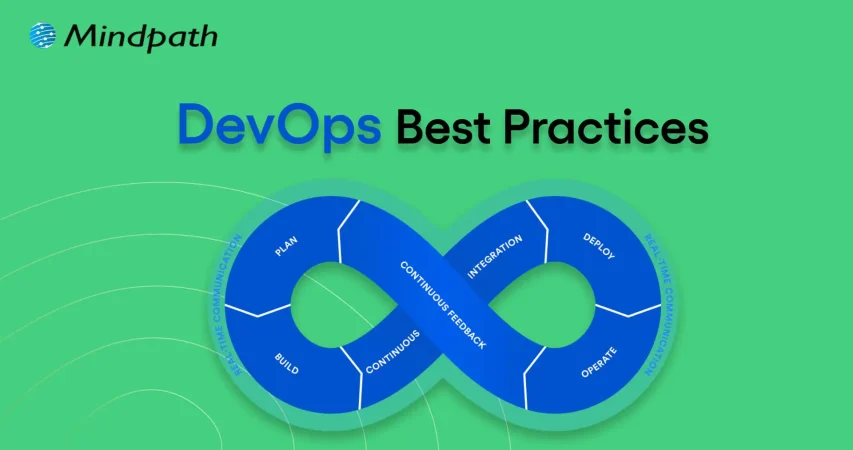
Continuous improvement means always looking for ways to do things better by learning from past experiences. Teams can use the Plan-Do-Check-Act cycle to test small changes, check results, and keep improving. This helps them build better software faster and fix issues more quickly. 

Wondering how DevOps can accelerate growth and efficiency in your organization? Read our blog on DevOps for Businesses to discover strategies that streamline operations, enhance collaboration, and improve software delivery.

Want to Transform Your Software Delivery with DevOps Best Practices?

Following DevOps best practices helps teams build software faster, reduce errors, and work better together. By using automation, cloud tools, and early testing, your team can improve software quality and speed up delivery. These practices make workflows smoother and help your business keep up with fast-changing demands with time. 

At Mindpath, we apply proven DevOps practices like CI/CD, containerization, and infrastructure as code to streamline software delivery. Our expert teams focus on collaboration, automation, and continuous improvement to ensure secure, high-quality releases. With our DevOps-centric approach, your business can achieve better performance and faster results. 

Frequently Asked Questions

1. What are the main benefits of following DevOps best practices for a business?

Implementing DevOps best practices improves collaboration between development and operations teams, speeds up software delivery, reduces errors, and enhances system reliability. It also allows businesses to respond faster to market changes while maintaining consistent quality and security across applications.

2. How can DevOps best practices improve software delivery speed?

By automating repetitive tasks, integrating CI/CD pipelines, and using containerization and infrastructure as code, DevOps practices streamline workflows. Early testing and continuous feedback loops help teams detect and fix issues faster, reducing bottlenecks and enabling quicker, reliable releases.

3. Why is security integration important in DevOps workflows?

Integrating security early in the DevOps pipeline ensures vulnerabilities are identified and resolved before software goes live. Automated security checks maintain compliance, prevent data breaches, and protect user information without slowing down development or delivery processes.

4. How do microservices and containerization contribute to DevOps efficiency?

Microservices break applications into independent modules, allowing updates or scaling without affecting the entire system. Containerization ensures consistent environments across development, testing, and production. Together, they reduce errors, improve scalability, and make deployment faster and more reliable.

5. Can small businesses adopt DevOps best practices effectively?

Yes, DevOps practices are scalable for businesses of all sizes. Even small teams can leverage automation, cloud infrastructure, and CI/CD pipelines to improve collaboration, speed up releases, and maintain software quality. Early adoption supports growth while keeping operational costs efficient.

Related Post

Discover the benefits of a multi-cloud strategy for modern enterprises, including improved security, flexibility, cost savings, and risk management.
Discover how hiring remote developers can drive startup success by tapping into global talent, enhancing productivity, and reducing costs.

Related Post

benefits of cloud migration 

The contemporary business strives after speed, control, and smarter growth on daily basis. Those objectives are currently propelled by technology. That is where the benefits of cloud migration begin to have a bearing. Businesses desire rapid and easy-scaled systems. They also seek transparency in terms of expenditure and performance. The use of clouds provides a clear solution to those requirements. It transforms teamwork, planning, and value delivery. Being a technology-oriented organization, we believe this change transforms the decision-making process in industries. The debate on cloud has continued to become intense.

Additionally, cloud migration does not feel like an experiment anymore. It is powerful like a strategic move. Companies demand fluidity, trust, and space to become innovative. They desire mechanisms that will aid growth without dragging the momentum. Cloud systems assist teams to be more collaborative and adapt more easily. They also make the operations and planning easy. These benefits are directly related to long-term competitiveness. So, this blog discusses the actual business value realized through cloud migration in the currently digital-first world. Let’s dive in further!

Want to simplify moving to the cloud while keeping expenses in check? Mindpath’s cloud infrastructure services make it easy to migrate, optimize, and scale efficiently.

What is Cloud Computing Migration?

Cloud migration refers to the process of transferring information, applications, and systems from the local servers to the cloud. Companies make this decision in order to modernize IT activities. The migration to cloud computing helps teams work with online infrastructure instead of physical setups. It transforms the manner in which businesses handle technology and day-to-day workload.

This involves the migration of files, software, and complete environments to cloud. Planning is an important part of teams to prevent disruption. The benefits of cloud migration often drive interest, but understanding the process comes first. An obvious strategy assists companies to be geared towards long-term digitalization.

Must Read: Cloud Computing Trends 2026

What is the Process for Cloud Migration?

The process of cloud migration has a systematic way of movement so that there is control and smooth flow of systems. The knowledge of cloud migration phases assists businesses to plan better and prevent risks of operations before the process of cloud migration can take place.

1. Assess and Plan

Teams establish specific objectives in the business and evaluate the existing systems. This step builds the base for the benefits of cloud migration without rushing decisions.

2. Create the Foundation

Teams create a cloud-enabled team and work out the foundation. They prepares security, network and storage to allow smooth movement.

3. Migrate and Improve

Teams migrate data and applications in a predetermined sequence. Their performance and security are tested immediately after the move.

4. Monitor and Optimize

Teams monitor the performance and manage cloud costs on a daily basis. They optimize systems to ensure that the operations are efficient and stable.

Wondering how to balance performance and cost in your cloud environment? Explore cloud cost optimization to achieve better financial control.

Why Migrate to Cloud?

The following are the major reasons why businesses opt to adopt the cloud today. The benefits of moving to the cloud align closely with speed, flexibility, and modern operational needs.

key benefits of cloud migration

1. Scalable Performance on Demand

Cloud platforms are adaptable and modify resources in real-time. Elimination of team performance problems when there are traffic spikes. During peak demand systems remain stable. This flexibility highlights the benefits of cloud migration clearly.

2. Faster Product Innovation

Cloud environments have fast development and testing processes. In a team, features are released quicker without heavy infrastructure undertakings. The use of automation enhances faster delivery schedules. These gains reflect core benefits of cloud migration for growing businesses.

Want to understand the potential risks that come with cloud migration? Explore cloud computing vulnerabilities to strengthen your security strategy.

3. Strong Business Continuity

Cloud implementations operate in different locations. During system failures, there is no downtime in the teams. The recovery process occurs very fast following disruptions. This reliability shows key benefits of cloud migration in action.

4. Smarter Cost Control

Cloud pricing is equivalent to real usage patterns. Spending is tracked by the use of transparent dashboards by teams. The planning of the budget is simplified and precise. Cost clarity remains one of the benefits of cloud migration.

5. Improved Security Management

Cloud platforms also have built-in security controls. There are defined roles in access control by teams. The process of monitoring is continuous and centralized. Such controls enhance risk management in general.

Must Read: Cloud Security Tools

6. Better Data Insights

The analytics tools are used in cloud processing to analyze data in real time. Teams have quicker decision-making knowledge. Information is used to support operations and strategy on a daily basis. This capability reflects real cloud migration benefits.

7. Higher Developer Productivity

Ready environments are available and set up without delays by the developers. Repetitive work is eliminated through automation. Teams are more concerned with feature building. Long-term innovation objectives are supported in productivity.

8. Faster Market Adaptation

Cloud systems are able to facilitate a speedy service change. Teams experiment and change direction easily. Companies become responsive to customer demands. This agility shows clear advantages of moving to the cloud.

9. Sustainable IT Operations

Cloud vendors upgrade to energy-saving infrastructure. The businesses cut down on the general waste of resources. Scalable systems work effectively. Sustainability is in line with the present-day business demands.

Looking to optimize energy usage in your cloud infrastructure? Learn from sustainable technology to improve efficiency and reduce waste.

10. Stronger Team Collaboration

Shared cloud environments connect teams easily. Developers and operations work closer together. Feedback loops stay fast and clear. Collaboration improves delivery quality.

11. Flexible Business Models

Cloud architectures support hybrid and multi-cloud setups. Businesses avoid dependency on one provider. Teams design solutions for future growth. Flexibility drives long-term resilience and innovation.

Curious about building applications without handling server management? Check out serverless architecture in cloud computing for a modern cloud approach.

Ready to Move Your Business to the Cloud with Confidence?

The benefits of cloud migration help companies to remain dynamic, safe, and future proof. It helps to accelerate innovation, wiser scaling, and enhanced system control. Organizations become adaptable to change and evolve in a steady manner. By making migration a transparent process in teams, cloud adoption will form a powerful base of digital advancement and success in a competitive market.

At Mindpath, we assist companies to map and implement cloud journeys without any hassles through our cloud infrastructure services. Our specialists aim at safe architecture, scalable design, and comprehensible cost management. We match cloud strategies and business objectives. Mindpath also provides organizations with dependable support, current cloud computing, and a systematic strategy that will propel performance, stability, and long-term digital advancement.

FAQs

1. What does cloud migration mean for a business?

Cloud migration refers to the transfer of applications, data, and systems to cloud-based systems. It assists companies in the modernization of IT processes. Teams become more flexible and have improved control of the system. The transformation helps in the development of digital and equips organizations with evolving technology requirements.

2. Is cloud migration suitable for small and mid-sized businesses?

Yes, cloud migration can be effective with small and mid-sized companies. It minimizes the infrastructure load and enhances the scalability. Companies only pay on what they use. This strategy will enable emerging businesses to compete without excessive spending on technologies.

3. How long does a typical cloud migration take?

Migration schedules are based on the size and complexity of systems. Small workloads are fast to execute with planning. Depending on the size of the environment, a staged implementation is required. Having goals and evaluation can prevent any delays and maintain stable operations during transitions in teams.

4. How does Mindpath support cloud migration projects?

Mindpath supports cloud migration through structured planning and expert execution. Our teams design secure architectures and scalable environments. They focus on performance and cost clarity. This approach helps businesses move confidently and maintain long-term cloud efficiency.

5. Why should businesses choose Mindpath for cloud computing services?

Mindpath cloud computing services align technology with business goals. Experts guide strategy, migration, and optimization. Teams ensure smooth transitions and reliable operations. Businesses gain a trusted partner focused on growth, stability, and modern cloud success.

Image showing a person using a digital tablet.

Eliza, the first ever publicly demonstrated chatbot, was created using a rule-based approach in the 1960s. With the onset of artificial intelligence and big data, these chatbots have now become advanced with capabilities like providing information and feedback, clear doubts, etcetera, and are transforming the face of education in the best possible way.

Artificial intelligence (AI) provides advanced education solutions and is being leveraged at scale by various institutions to achieve their digital transformation goals. This is evident with the growing demand for AI-driven online learning platforms with AI in education market revenue unanticipated to cross $20billion by 2027.

Illustration of the letters AI

Source: 

AI Chatbots In Education- The Need Of The Hour.

In a 2016 interview, Microsoft founder Bill Gates pointed out the relevance of AI in improving the quality and effectiveness of personalized teaching approaches.

“The idea that you could talk to an [virtual] advisor that would understand different misconceptions and arbitrary linguistics around it, that’ll certainly come in the next decade. And they’ll be a very nice supplement”– Bill Gates.

Truly so, after almost half a decade, AI chatbots are being instrumental in helping institutions provide interactive, streamlined, and personalized learning environments for students.

Conversational AI or AI chatbots are a subset of AI solutions. It is constantly explored to fill the gaps between teaching and learning, and achieve seamless education at all levels.

How do AI Chatbots Help In Teaching And Learning?

AI chatbots use natural language processing(NLP) to decode the intent and keywords according to a specific algorithm, and perform a set of functions.

NLP is among the most promising branches of AI which uses data science to facilitate interaction of humans and computers. The effectiveness of NLP in making computers as smart as people, fueled its growth, with the NLP market anticipated to reach $28.6 billion in 2026.

The AI chat bot processes a set of commands to understand the questions and offer appropriate answers to the same. It can either be in the form of text, or audio-video, pictures, etc.  In the educational realm, this proves to be an interactive way for institutions, both online and offline, to create intuitive and interactive classrooms.

Impact of AI Chatbots on Education

The new-age technology has seemingly replaced the physical library with search engines and created virtual classrooms that have students from different parts of the world.

Apart from these visible technological advancements, conversational AI is also driving the future of eLearning and has already shown signs of transformation in the education realm. As students gain more easy access to high-speed internet and mobile devices, the use-cases of such modern technology also increase.

Let us now look at how AI chatbots are changing the landscape of the traditional education system.

1.    Enhanced Personalized Learning

Personalized learning promotes self-advocacy skills in students. It helps them to focus on their flaws and empower their skills. It involves creating a learning structure that is tailored to each student’s abilities in a way that motivates them. This way, teachers can ensure every student learns together but at their learning rate.

However, in a traditional classroom, providing such assistance can be an excruciating task for the teachers. With AI-enabled chatbots, it is easy to optimize teaching as per the learning abilities of each student. It ensures every student continues to follow the curriculum but at their own pace.

AI chatbots interact with students and understand their specific needs via a set of standard text, audio, and video messages. These chatbots use their inference to create a personalized curriculum that matches their needs.

2.    Smart And Quick Feedback

Feedback whether from a student or a teacher is effective only if it specifically addresses the areas of improvement. Conventionally, feedback would be in the form of written applications or online forums that take time to process and produce relevant results.

With the power of AI, an interactive way to understand the point of view of a student or teacher through surveys is now possible. The AI chatbot automatically cumulates and analyses the responses and publishes the results, making the whole process simple and fast. It provides results on time which the institutions can use to amend their teaching or administrative ways.

For students, detailed feedback from teachers is a comprehensive way to explore their inner strengths and flaws as a learner. For teachers, such feedback is an effective means to understand their student’s expectations and improve their teaching methods accordingly.

3.    Improved Student Engagement

Effective student engagement involves developing the knowledge absorbing skills of students by imbibing a positive thirst to learn new things. AI chatbots break the long lectures into small text or interactive media messages so that it looks like a virtual chat room. This way the tedious lecturers transform into an interactive learning experience.

Many universities have deployed chatbots to streamline student-teacher communication.

For instance, the University of Murcia, Spain rolled out AI chatbots to answer queries from students regarding matters of campus and field of study. The chatbot successfully answered with 91% accuracy to around 38,708 questions.

4.    Better Teaching Assistance

AI chatbots are dedicated virtual teaching assistants that are available 24/7 to help students with clearing the concepts. It also helps teachers to evaluate test papers and detect plagiarism and grammar issues.

With AI chatbots, teachers can optimize their tasks and leverage the time in creating strategies that impart quality education to their students.

5.    Better Student Support

As technology advances, AI chatbots are being trained to provide more personalized counseling sessions to students and guide them to choose the best course.  The AI chatbots mainly focus on three factors responsible for higher student persistence as perceived by Vincent Tinto, University Professor of Sociology (emeritus) at Syracuse University- students’ self-efficacy, sense of belonging and perceived value of the curriculum.

AI chatbots with human monitoring can also be used for improving on-campus mental health counseling, and help students manage their stress efficiently.

Illustration of the letter 'A' and the number

Source:

Bottom Line

The education industry is now witnessing a major paradigm shift from traditional ways of teaching. Even though no AI chatbot can replace a passionate and dedicated teacher, it can surely improve the quality of the overall learning experience.

Choosing the right chatbot is crucial in determining the effectiveness of AI-based tutoring. eBotify has all the elements that make it a perfect choice to deploy as a virtual administrative, teaching, and student assistant.

Contact us with your requirements and our technical team will provide the solutions for you right away!


Explore how AI chatbots are revolutionizing the education sector, providing personalized learning, smart feedback, improved engagement, teaching assistance, and better student support.
Headless CMS

The digital landscape always adopts unique approaches that engage audiences widely. So, accordingly, businesses are striving to offer exceptional online experiences to be prominent in the digital world. To achieve this, a systematic content-management system can play a critical role. However, traditional CMS systems might limit your performance while restricting your content delivery over multiple channels. 

This is where a headless CMS can be a desirable option to rely upon. As per the statistics, the estimated market of headless CMS software is going to touch USD 7,113.6 million by 2035. This is efficiently transforming the way businesses manage and distribute their content. 

Looking for a website that attracts more customers and grows your business? At Mindpath, we offer professional web development services to build fast, secure, and high-converting websites for your business.

What is a Headless CMS, and How Does It Work?

A headless CMS is known to be a content management system that generally decouples the backend from the front-end. Talking about the traditional CMS platforms, they were able to analyze how content is displayed. But a headless CMS allows developers to prefer their desired front-end technology, making the process more adaptable and versatile. 

A headless CMS uses APIs to deliver content and ace its way for making your customers’ experience more user-centric. Now, you are well aware of what is a headless CMS. Further, let us learn about its working capabilities. 

  • Through a headless CMS architecture, content developers can work within the backend, where they can seamlessly add, modify, or organize content as per their requirements. 
  • The backend is considered to be a repository or a database. So, instead of creating HTML pages, the headless CMS offers content through APIs. This allows your developers to fetch it and display it over multiple platforms. 
  • Accordingly, front-end developers can use JavaScript frameworks like Angular, React, or Vue.js to present the content in a more appealing way. This ensures your brand values have been implemented properly into the content.

Want to understand how digital transformation is changing the way businesses manage content and technology? Explore our blog on digital transformation trends to discover the key innovations driving modern digital experiences.

How a Headless Content Management System Can Be Beneficial for Your Business?

A headless content management system comes with a series of benefits that can escalate the versatility of your business in the digital landscape. 

1. Efficient Omnichannel Service

A headless content management system allows your team to channelize content seamlessly through different channels. No matter if you prefer IoT devices, a website, or a mobile app, your content will remain consistent. This is how your users will love the interactive experience while fueling your brand values. 

2. Enhanced Flexibility

Your business doesn’t have to work with pre-defined layouts, as a headless CMS will always help you perform uniquely. You can easily understand the power of your front-end technologies while allowing you to leverage your creativity and custom efforts. 

No matter if you want a personalized website or a mobile app with a unique interface, a headless CMS platform can offer you flexibility while bringing life to your vision. 

Must Read: Top Mobile App Development Technologies

3. Offers Scalability and Keeps Your Business Future-Proof

Headless CMS offers scalability to your designs. With your business growth, you might discover new channels and technologies. So, a headless CMS makes it easier for integration. The decoupled architecture ensures your content can be efficiently distributed without disturbing your active work structure. 

So, no matter if you want to diversify your product line or want to reach new markets, headless CMS can completely support your growth. 

4. Better Market Delivery

With the backend and front-end separated in a headless CMS platform, it ensures your workflow is not disturbed. This allows your business to initiate rapid content updates, respond swiftly, and launch detailed campaigns faster as per the market demands. 

This valuable approach offers you a great significance in the competitive edge. With better turnaround times, your business can gather better opportunities while reacting to changing trends. 

5. Easy Customization

Businesses can easily personalize their content with the help of headless CMS options. This can be done to satisfy your users’ preferences and behavior. By delivering data-rich insights, you can easily target your audience segments for better reach. Further, this step can enhance your customer engagement while escalating their satisfaction rate. 

For your information, personalization always breeds loyalty, and a headless CMS always equips you with tools that tailor content as per individual user requirements. Moreover, it creates memorable experiences that give rise to long-term customer relationships. 

Wondering how modern technologies and strategies are reshaping the way businesses operate? Read our detailed blog on digital transformation for business to understand how it drives growth and innovation.

Where You Should Utilize a Headless CMS?

A headless CMS can be your ultimate solution for a series of scenarios, as given below. Discover where the headless CMS options can be your viable preference. 

1. Custom Front-end Development

If you require a unique and custom front-end experience, a headless CMS can allow your front-end developers to effectively discover their creativity. So, your user experience and designs are not limited to any pre-built templates. It allows you to generate a unique digital experience that can make your customers happy. 

2. Multi-platform Requirements

If you want your content delivery to be seamless through multiple platforms, a headless CMS architecture can be your suitable pick. It simplifies content distribution while keeping your user experience valuable over different channels. 

3. Content-first Integrations

There are many organizations that desire content marketing. So, a headless CMS can easily align your content creation with its delivery. Apart from this, it accesses your markets to acknowledge engagement while your development team can handle the technical aspects. 

Thinking about how emerging AI technologies can enhance your digital ecosystem alongside Headless CMS? Read about the most impactful AI trends shaping the future of technology.

4. E-commerce Applications

Headless CMS can be a suitable choice for your e-commerce platforms, where you need to endlessly update your content and products. Moreover, it allows you to initiate swift updates in your pricing, product listing, and promotional content. 

5. IoT Applications

Headless CMS can easily manage and offer content to a variety of connected devices in IoT applications. It includes healthcare devices, smart applications, and even manufacturing equipment. Further, headless CMS architecture ensures real-time updates and proper content distribution to these devices. 

6. Personal Web Application

Organizations that create custom web apps or websites with unique approaches and functionality requirements can adopt the values of Headless CMS. You can use APIs to access and display content as per your requirements, offering you greater flexibility in layout and designs. 

Struggling to understand how modern businesses build scalable digital systems to support flexible content architectures? Read our guide on custom software development to see how businesses build future-ready platforms.

How to Implement Headless CMS with Best Practices?

Integrating a headless CMS is not random, as you need to adopt a better plan. 

1. Assess Your Requirements

In the initial phase, start by identifying your content delivery needs. This might include the type of content and the number of platforms you want to target.

2. Opt for the Right CMS

Prefer a headless CMS that fulfills your business motive. You can consider elements like ease of use, scalability, content modeling ease, etc. 

3. Data Migration

In the next step, you need to think about migrating your existing content to the headless CMS platform. This includes transferring all the content from your existing CMS platform to the new one. 

4. Content Modeling

Next, you need to think about content modeling that can match your business’s unique requirements. 

5. API Integration

There are many headless CMS platforms that offer APIs to access and further retrieve the content. So, you can develop APIs for your front-end apps. 

Curious about how AI models can be trained to generate more relevant and contextual content for modern CMS platforms? Learn how OpenAI fine-tuning API works and how it can enhance your content strategy.

Conclusion

The digital landscape is changing in a blink. So, brands that can offer consistent and engaging content through multiple channels are more likely to survive in the market. So, a headless CMS platform can make your modern development teams unique by offering them the flexibility they desire. 

No matter if you want to extend your digital presence or just want to elevate your engagement rate, a headless CMS can provide you with a good foundation to be successful. Here, Mindpath can be your ultimate partner. This company can help you with the best CMS implementation while keeping you ahead with your unique innovations and dedicated content. 

Discover the benefits of headless CMS for faster content delivery, personalized experiences, and seamless integration.