Benefits of DevOps – Transform Your Development Process in 2025

Join our Newsletter!

Featured Posts

Support Is One Click Away

Home

Benefits of DevOps – Transform Your Development Process in 2025

benefits of devops

Benefits of DevOps – Transform Your Development Process in 2025

While building software, just think that the developers and the operations teams are working like a well-coordinated crew, being fast, smooth and always on the same page. Isn’t it an interesting combination? Well, that’s the power behind embracing the benefits of DevOps. It is a new method to simplify your software process, in a way that will help teams work more effectively in an increasingly fast-paced digital world.

As we approach 2025, DevOps continues to evolve the way businesses build and run software. DevOps is not just a fast way to deliver software; it is a cultural approach that allows for speed, scale, agility, and reliability. This blog will look at how DevOps is rewriting the development process and why it is now essential for progressive teams. 

Are you looking to implement DevOps in your organization? Mindpath provides customized solutions to help teams speed up the development process and reach quantifiable goals.

What is DevOps?

DevOps refers to the collaboration of development and IT operations teams working together for the software development processes. It helps them to build, test as well as launch software faster and smoother. The major idea behind DevOps is better teamwork, faster delivery, and fewer problems during the software process. 

Even though it is not a tool or a product, it often includes using helpful technologies such as cloud platforms, containers and real-time communication tools. A big part of it is CI/CD, which stands for continuous integration and continuous delivery. This helps teams update software more often without slowing down. With DevOps, both developers and operations teams can share tasks, improve quality, and make sure the final product reaches users quickly and safely. 

How Does DevOps Work?

DevOps works by bringing development and operations teams together to make software faster and more reliable. The process follows a cycle that includes planning, coding, building, testing, releasing, deploying, operating, monitoring, and collecting feedback. Each step is connected to keep the work smooth and continuous. What is the main purpose of DevOps? It is to create software that meets user needs, runs well from the start, and is delivered without delays. 

To support this, teams use DevOps tools like automation platforms, monitoring systems, and CI/CD pipelines. These tools help developers work independently and speed up tasks that used to take longer. For example, with continuous integration, developers can update shared code several times a day and quickly catch bugs. Teams also follow shared rules for testing and quality, so everyone stays on the same page. 

We’ll take a closer look at the benefits of DevOps now: 

What are the Key Benefits of DevOps?

Adopting DevOps brings real improvements to how teams build and deliver software. The DevOps benefits focus on making the development process more efficient, reliable, and easier to manage. Let’s have a look at some of it: 
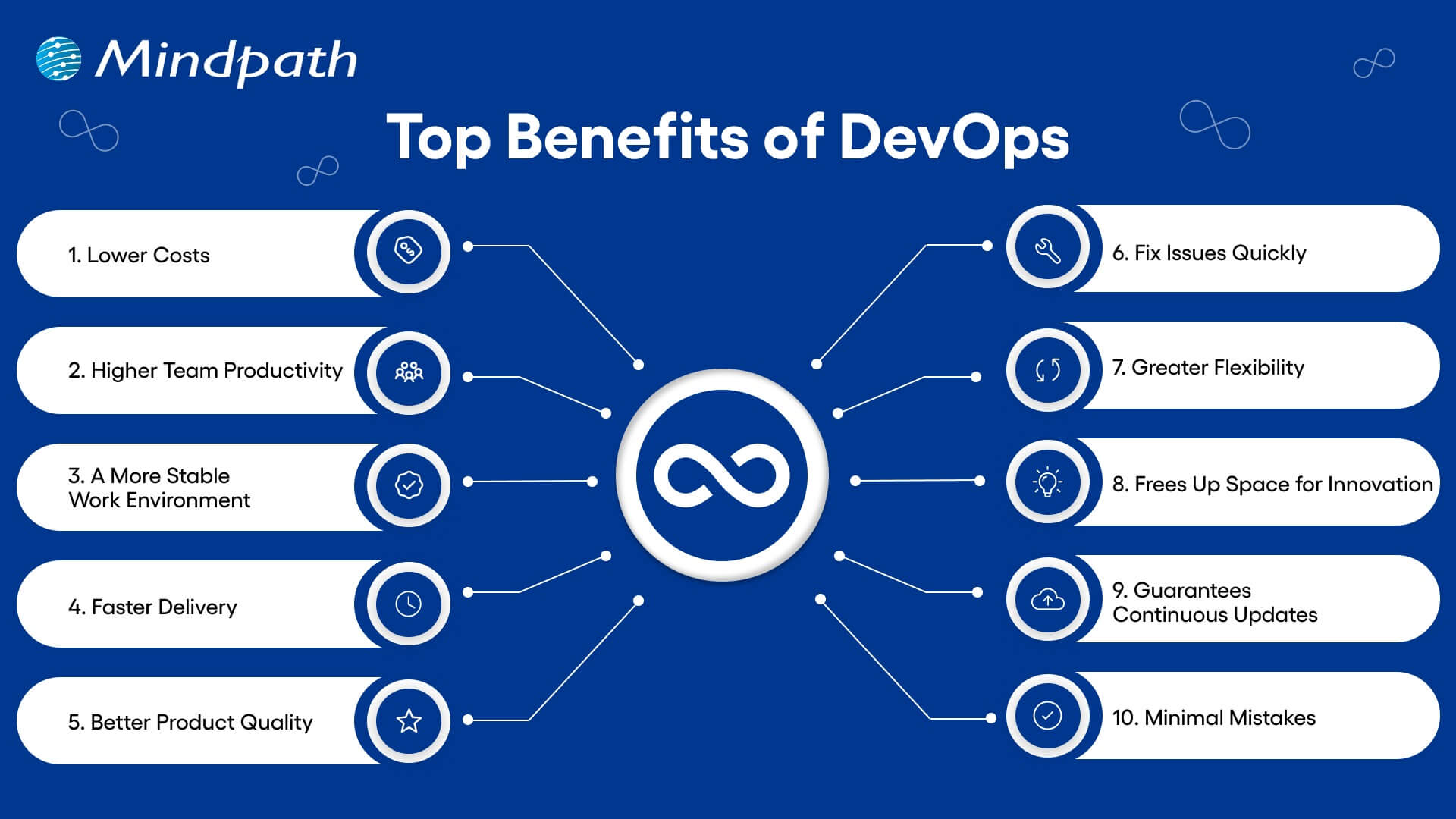
1. Lower Costs

Combining updates and maintenance in one process helps teams work more efficiently. DevOps reduces the need for last-minute fixes and wasted effort. This saves money and helps teams do more with the same resources.  

2. Higher Team Productivity

Open communication and fewer repeated tasks let teams focus on real progress. Everyone knows what to do and can work on high-value goals. As a result, productivity rises, and team members feel more involved.  

3. A More Stable Work Environment

DevOps helps create a calmer and more organized workplace by reducing the pressure of constant changes. Teams can handle updates with ease, due to smoother processes and clear communication. This balance helps everyone stay focused and productive. 

4. Faster Delivery

With DevOps, updates and new features can be launched more quickly. This helps businesses meet customer needs faster and stay ahead of the competition. Streamlined deployment also helps with fewer delays and more consistent results. 

5. Better Product Quality

Frequent feedback and testing throughout development help improve the final product. DevOps uses automation to catch up on problems early, before they grow. This keeps the focus on delivering quality and reduces the need for rework. 

6. Fix Issues Quickly

DevOps makes it easier to detect and solve issues early. Smaller releases and constant monitoring help teams act fast when something goes wrong. This keeps systems running smoothly and reduces downtime. 

7. Greater Flexibility

DevOps supports teamwork across different departments, helping companies respond quickly to change. Breaking down barriers between teams encourages flexibility in how work gets done. This leads to quicker decisions and faster progress. 

8. Frees Up Space for Innovation

When tasks like testing and deployment are automated, teams have more time for creative thinking. Developers can focus on building new ideas instead of repeating the same steps. This makes work more exciting and leads to better solutions. 

9. Guarantees Continuous Updates

DevOps supports a smooth flow of updates and new features with every release. Automation and teamwork make sure each change is tested and delivered quickly. This gives users regular improvements while keeping everything stable. 

10. Minimal Mistakes

Frequent code releases and testing help teams catch up with problems early. This keeps software quality high and prevents bigger issues later on. It’s a key benefit of DevOps that helps teams move forward with confidence. 

After learning about the advantages of DevOps, let’s proceed to know some of its best practices: 

DevOps Best Practices

Following the right approach is key to getting the most out of DevOps. It helps teams collaborate better, improve software quality, and speed up delivery. Here are some of the most effective DevOps best practices to consider: 

1. Build a Culture of Trust and Teamwork

To make DevOps work well, teams need to feel safe to share ideas and learn from mistakes. When there is trust and open communication, collaboration becomes much easier. Breaking down walls between departments helps everyone work toward a shared goal. A culture of trust and empathy makes it easier to adopt DevOps smoothly.

2. Continuous Integration and Delivery

CI/CD DevOps practices involve adding small code changes frequently to a shared space. This helps teams spot issues early and keep the code clean. Once the code is tested, it moves into production smoothly through continuous delivery. This process saves time and gives developers confidence when releasing updates.

3. Automate Testing Early On

Automated testing is a key part of a strong CI/CD pipeline. Instead of waiting for manual tests, automated tests run every time a change is made. These tests can include everything from unit to load testing depending on your needs. This helps reduce bugs and makes sure the software stays reliable.

4. Track the Right Metrics

To keep improving, teams need to measure what matters. Metrics like deployment speed, failure rates, and time to fix issues give a clear picture of performance. Each team may focus on different metrics based on their goals. It’s also important to collect logs and monitor systems to quickly fix problems and improve how everything runs.

5. Automate Repetitive Tasks

Manual tasks can slow down development and lead to mistakes. Automating these tasks speeds things up and keeps results consistent. It also frees up teams to focus on more valuable work. A reliable automation process adds confidence and improves overall efficiency.

Ready To See How DevOps Can Boost Your Business?

The benefits of DevOps include enhanced collaboration, faster software delivery, and improved product quality. It also reduces costs while fostering a stable and efficient work environment. Through automation and continuous feedback, teams can quickly adapt and respond to changes, making DevOps a vital approach for building reliable software in today’s dynamic digital landscape. 

At Mindpath, we specialize in helping organizations successfully implement DevOps practices. We focus on automating processes, strengthening team collaboration, and accelerating software delivery with quality and security. Our expert guidance ensures your DevOps transformation aligns with your business objectives, enabling smoother and more efficient software development. 

Related Post

Related Post

Devops vs devsecops

DevOps vs. DevSecOps is a topic that will often arise when companies look for better and faster software delivery. Businesses are looking to release applications and software faster than ever, but they are also mindful of the growing sophistication of security threats. So where can businesses find the balance of speed and safety? This is where the transition from DevOps to DevSecOps comes into play; the need for speed is balanced with more stringent security requirements.

In today’s fast-moving digital age, the speed of development plays an important role, but it’s hardly enough. In addition to wanting systems that develop software quickly, organizations want systems that will also withstand vulnerabilities at each stage. That is why there’s so much interest in DevSecOps. DevSecOps does not replace DevOps; it enhances it by using continuous security assessments and ongoing protection. A clear understanding of these differences allows businesses to make better choices that can balance innovation with resilience. So, keep reading further to know the difference between DevOps and DevSecOps in this blog.

Still unaware of how DevOps benefits your business? Get in touch with us to gain full insight into adopting DevOps services that makes your operations seamless.

What is DevOps?

DevOps brings together development and operations to deliver software faster and better-quality software. Its foundation is collaboration, automation, and continuous delivery. DevOps can help break down silos in an organization and execute on shared goals while realizing common objectives and reducing risk. It can also simplify processes, enable teams to become more efficient, and fulfill the goals of the technology department while keeping the goals of their customers and their company in mind.

Furthermore, it drives a cultural change that values accountability, empathy, and shared responsibility. With automation, fast iterations, and rapid feedback, businesses are able to deliver secure and reliable software. In addition to this, not only does the process encourage innovation and creativity, but it also gives businesses flexibility and resilience in a competitive marketplace.

Here are some of the benefits of DevOps: 

1. Faster Delivery

Development cycles can go a lot quicker with automation and simplified processes. This enhanced delivery allows more frequent releases and decreases time to market.

2. Collaborative Teamwork

Development teams, operations, and other teams are all working toward common goals. Good team collaboration eliminates silos and improves project quality.

3. Smarter Efficiency

Automation eliminates repetitive tasks and optimizes workflows. Teams have the ability to save time and focus on activity that produces value, instead of spending time on manual processes.

4. Continuous Integration and Delivery (CI/CD)

Continuous integration and continuous delivery allow for reliable and consistent deployments. Your users can get new features and fixes fast and seamlessly.

5. Real-Time Insights

Monitoring tools enable instant visibility across the ecosystem. Teams can identify problems early, troubleshoot quickly, and improve performance.

These points explain how DevOps speeds up collaboration and delivery when comparing DevOps vs. DevSecOps, while DevSecOps extends an approach that has been inherently faster approach by adding stronger security practices.

What is DevSecOps?

DevSecOps is the process of integrating security into every single aspect of software development. It unites development, security, and operations teams so they can plan, build, test, and release applications together. In return, DevSecOps allows for faster, more reliable processes, ensuring that the software has security built in from the beginning of development.

To better understand the three pillars of DevSecOps, simply think of collaboration, automation, and continuous security. Collaboration ensures that everyone is sharing the responsibility, automation introduces automated security checks into CI/CD pipelines, and continuous security ensures that monitoring is continuous. With the three pillars of DevSecOps, organizations are able to create dependable applications while implementing continuous security measures to defend them against constantly evolving threats.

Here are the benefits of DevSecOps:

Benefits of DevSecOps

1. Early Risk Detection

DevSecOps allows for the identification of vulnerabilities during the development phase rather than at the end of the development process. Finding and remediating risk early in this way saves time and expense and means that users receive secure applications.

2. Faster Release Cycles

As teams can impact security testing in their workflow, delays are prevented, human error is removed, and developers get new features into the hands of users sooner.

3. Stronger Compliance

DevSecOps processing can assist software teams in meeting compliance obligations with strict regulatory guidelines. Automated checks and secure development practices ensure that data continues to be protected, while developers can be assured that they meet industry standards.

4. Security-First Perspective

Treating security as a shared responsibility, teams practicing DevSecOps have developers, security professionals, and operations staff collaborating to manage risks actively and ensure they minimize incidents throughout the development period.

5. Safe Feature Delivery

With DevSecOps, teams can deliver new functionality faster while also guaranteeing that security practices are undertaken throughout the development period. This can be one of the key differences in terms of DevOps vs. DevSecOps: how features are delivered.

DevSecOps vs. DevOps: Key Differences

DevOps vs. DevSecOps reveals how software teams value speed, teamwork, and security. While DevOps emphasizes faster delivery, DevSecOps enhances that process, making security a priority at every step of the development process.

1. Security Focus

The primary distinction between DevOps vs DevSecOps is security. DevOps puts movement between development and operations to speed up the delivery of software, but its security processes are usually significant afterthoughts. DevSecOps has security processes established from start to finish and considers them a core capability. By treating security as a core capability, vulnerabilities are eliminated upstream, so they are remedied before deployment.

2. Collaboration Culture

DevOps emphasizes collaboration between development teams and operations teams to promote continuous integration and delivery. Security is often treated as an independent effort, which creates holes in the development process. DevSecOps emphasizes the work of the security team interacting directly with developers and operations teams in every phase of development. This develops a culture of security being everyone’s responsibility.

3. Timing of Security

Conventional DevOps teams often include security at the final phase of the development cycle. If bugs occur towards the end of the process, they can delay the project significantly. DevSecOps reinforces timing by introducing a shift-left strategy with security at the beginning of the development process to build secure and reliable applications.

4. Tools and Automation

In contrast, when discussing DevOps vs. DevSecOps tools, the distinction is clear. DevOps follows automated processes for build, test, and deploy; however, normally, the security tools are still standalone. With DevSecOps, you use drive-by automated security scans, code analysis, and continuous monitoring in the CI/CD pipeline. It allows teams to detect threats in real-time without having to slow their delivery pace.

5. Salary Comparison

There is a notable salary gap when looking at DevOps vs. DevSecOps salaries in the UK. DevOps Engineers generally earn from £65,000 to £92,500+ with a difference based on skills and location, while DevSecOps Engineers receive a greater salary, with salaries for senior roles exceeding £130,000+ a year, particularly for positions based in London.

DevOps vs. DevSecOps: A Comparison Table

When exploring DevOps vs. DevSecOps, it’s clear that both approaches aim to improve software delivery but take different routes to get there. This table highlights the main distinctions, making it easier to see how DevSecOps builds on DevOps with an added focus on security.

Aspect DevOps DevSecOps
Core Goal Focused on speeding up development and deployment cycles. Balances speed with security to deliver safe, reliable software.
Team Culture Collaboration between development and operations teams. Shared responsibility among development, operations, and security teams.
Security Approach Security checks are introduced late in the release pipeline. Security is integrated into every stage of the development lifecycle.
Automation Uses CI/CD pipelines to automate builds, tests, and deployments. Extends CI/CD with automated security scanning and compliance checks.
Risk Handling Issues are often fixed after vulnerabilities are found in production. Risks are identified and mitigated early to prevent breaches.
Compliance Handled towards the end of development, often as a final step. Built into processes from the beginning, ensuring continuous compliance.
Toolset Relies on monitoring, deployment, and collaboration tools. Adds tools for code analysis, threat detection, and policy enforcement.
End Result Delivers applications quickly but may leave gaps in security. Produces faster releases that are also secure, compliant, and resilient.

Which approach will drive your business forward?

The comparison of DevOps vs. DevSecOps shows that while DevOps accelerates delivery, DevSecOps ensures that speed is not achieved at the cost of security. Businesses gain the ability to innovate quickly while reducing vulnerabilities. Choosing the right model depends on priorities, but integrating security early always results in stronger, more resilient software outcomes.

At Mindpath, we offer tailored DevOps services designed to improve speed, collaboration, and reliability across your software delivery cycle. By helping teams embrace automation, modern practices, and security-focused strategies, Mindpath ensures that businesses not only accelerate development but also deliver secure, high-performing applications that stand out in today’s competitive digital market.

Explore the key comparison between DevOps vs DevSecOps to find out which approach best enhances your development pipeline.
Need Expert Legal Software Solutions
Want more efficiency in your legal practice? Professional legal software development can automate routine tasks with increased accuracy and enhancement of data security. In this blog, we will explore how Mindpath can provide you with top-tier development services.   Legal software is a specially designed package or application to aid legal processes. These are tools for activities such as secure electronic signatures and review of contracts. While most of the time, lawyers go about with general tech tools like email and shared drives, legal software is specially used for legal needs only. Today, there are several types of legal software in use. Some of these are consumer-facing, enabling individuals to represent themselves in legal matters such as bankruptcy or parking tickets. Others are designed for law firms and related to management of operations, particularly those firms. In the light of requirements for boosting efficiency, security, and client satisfaction, legal software development services are in high demand, especially among law firms and legal departments. With remote work slowly becoming the norm, there is now a call for legal software that introduces secure document access anywhere and the possibility of collaboration from everywhere. It also helps attorneys automate routine tasks, manage case files, and adhere to changing regulations. As legal work becomes more sophisticated, there is a demand for specialized tools that can help with intricate tasks and provide valuable insights.  Let us dive deep into this blog where we will explore the benefits of professional legal software and offers guidance on choosing the right solutions for your practice and most importantly why Mindpath is the ideal partner for legal software development services. 

Benefits of Professional Legal Software Development 

1. Boosting Work Efficiency and Output 

It can enable lawyers and their teams to have much more time for important, challenging work by taking care of some of the repetitive tasks involved. For example, software designed for the analysis of contracts may go through it very fast and provide the attorney more time for the actual negotiation and strategies in the case. Moreover, legal project management tools help lawyers and their employees to keep themselves organized by displaying the ongoing tasks in front of their eyes all the time. In this way, they can manage their priorities and deadlines more effectively. 

2. Improves Teamwork and Transparency 

Legal technology can certainly pave the way for smoother collaboration among all members of your law firm while keeping them well-informed. Take the case of a Document Management System or even Project Management Software—these tools make it quite easy to share information among team members. These tools also have provisions for instant messaging or video calls for quick communication. This keeps the flow of tasks and projects smooth, and everyone is always on the same page. It further helps in making the decisions more transparent as the members can view and take part in discussions regarding the cases or projects. In essence, legal technology usage permits a much more connected and collaborative work environment that benefits both the firm and its clients. 

3. Elevating Client Experience 

Legal technology improves client satisfaction since clients can track the progress of their cases more easily by use of client portals and online document systems. Therefore, clients can obtain updates about their cases without contacting their lawyer all the time. These tools also allow for quicker and more efficient communication, enabling the legal teams to respond to the client with ease and know how to resolve problems. By speeding up tasks and improving accuracy, legal technology helps in the resolution of cases faster, ensuring the entire process goes smoother for clients. 

4. Harnessing Data for Better Insights and Decisions 

In today’s data-driven world, every attorney must utilize data efficiently to deliver the best services to his or her clients. Legal technology can help in this regard with the ease of access and usability of the data. Next-generation tools such as predictive analytics and artificial intelligence enable law firms to quickly analyze a large amount of information and find useful trends for better decision-making. These technologies also organize data and store it, making it easily accessible to team members for access and utilization when required. This speeds up research and reviews of documents, helping attorneys at law firms get a better understanding of client requirements by going through data from them. In effect, legal technology makes handling and use of data easier and more efficient. 

How to Choose Professional Legal Software Solutions   

  • Engage Key Players in Choosing Legal Tech – Consider anyone who will use or manage your new legal technology. Consider the feedback from daily end-users, decision-makers, and subject matter experts so you get what suits your needs and goals.
  • Identify Your Needs – Before you search for new legal software, identify your needs and goals. Be clear about which tasks or processes you want to enhance, or which features you require. This clarity can help in finding the solutions that best fit your requirements.
  • Review Your Current Tech Stack – Review how efficient and valuable your current legal technology really is. Get feedback from users and review usage data to understand where value lies. Benchmark your tech stack against others within the industry to find out how effective it is. Consider how new software will work with your current systems to meet your needs, receive support, and offer potential for integration.  
  • Key Challenges – When choosing new legal tech, ensure it will integrate with existing systems, that it allows for team training, and the fact that the support needs from it are available; its security and compliance criteria are met in view of the Data Laws; be sure the tech will grow with your firm.
  • Request Demos and Test Software – After determining your needs, look for legal software that best fits those needs, considering cost, ease of use, and integration capabilities. Test software with demos or free trials to ensure they align with your requirements. Read reviews and follow up on references from other firms to ensure the buyer is making an informed decision.
  • Align with Business Goals – Measure new technology performance with clear metrics and track data over time. Periodically review results for adjustment as may be required, assuring those technologies support business goals effectively. 

Looking to enhance your legal practice using cutting-edge technology?

With Mindpath, you get specialized legal software development services that assist in making your operations flow seamlessly and proficiently.

Why Choose Mindpath for Legal Software Development Services 

Mindpath specializes in legal software development. With this specialization comes deep industry knowledge and the expertise to handle the difficulties of legal industry with tailored solutions. Our team designs custom-made software according to your exact needs and helps you to attain desired goals.  

We focus on making our software easy to use and intuitive, ensuring that it works well for everyone who uses it. The solutions we provide are designed for business growth—we adapt as your needs change. There’s also continued support and maintenance to keep everything running smoothly and securely. 

By choosing Mindpath for legal software development, you’ll get a partner who knows exactly what you need and delivers a solution that is dependable and efficient. 

Conclusion 

In a shifting legal landscape, the right technology makes all the difference. Professional legal software development is designed for efficiency, collaboration, and client satisfaction. It aids a law firm in smoothing out its operations in service of its clients through the automation of routine tasks, better communication, and leveraging data insights. When searching for new technology solutions, guide yourself by the things you really need and support that by reviewing your current tools, making sure that any new system will give way to business goals. The right legal software transforms practices into an effective and responsive environment that is very competitive. 

Mindpath specializes in providing tailored legal software development services to meet such needs with exactness. With years of experience in developing intuitive, powerful solutions, Mindpath can help transform your practice into one that’s more effective and responsive to the competitive environment. 

Ready to Transform Your Legal Practice?

Maximize your customized technology at Mindpath. Our very expert solutions will simplify and maximize the overall efficiency of your operations. 

Boost your legal practice with Mindpath’s expert software solutions. Enhance efficiency, client satisfaction, and streamline operations seamlessly.
Html to Wordpress

Anyone who has a HTML website might feel left out in the era of websites that load within seconds. Did you know that HTML websites were a thing when there was not content management system in the market? The transition from HTML to WordPress is no longer an option in an extremely competitive digital market. With static HTML pages, you would have to struggle to get the top ranks in search engine results.

The biggest problem with HTML websites is that they come with duplicate code on every page, thereby making them slow. On the other hand, WordPress is faster, more secure and offers more flexibility to build any type of website. As a matter of fact, more than 43% of websites in the world run on WordPress. Let us find out why you should ditch HTML and switch to WordPress now.

Want to convert your static HTML site into a fully functional WordPress site with enhanced features and performance? Mindpath offers WordPress development services to help you build a custom website according to your business demands.

The Rise of WordPress in Website Building

WordPress started off as a blogging platform and the open source nature empowered it to transform into a website builder. Before WordPress, you would need a technical team to create a website and manage it. The search for a HTML to WordPress converter tool has been growing because WordPress has made it easier to build websites. You can now install the WordPress software and use the desired themes or plugins to develop websites with sophisticated functionalities and updated designs.

If you have been wondering whether switching to WordPress is a good decision, then you must take a look at websites powered by WordPress. Big names in the world of business such as Disney, Times Magazine, Sony Music and many others use WordPress. The versatile mix of power and simplicity with WordPress has been one of the biggest reasons for its widespread adoption.      

Is WordPress a Reliable CMS for Website Building?

Giving up on HTML, which has been a trusted ally of website developers for a long time, can be difficult. However, the need to convert HTML to WordPress is growing as WordPress is the top content management system in the world right now. It works as an open-source ecosystem that offers benefits for beginners as well as experienced developers.

WordPress offers a user-friendly interface in its dashboard, which you can use to create websites from scratch. The best thing about the WordPress dashboard is that you don’t need advanced technical expertise to use it. In addition, you can also find thousands of themes and plugins in WordPress that help you customize your website the way you want.

Why Should You Choose WordPress Over HTML?

With so many powerful features, it is hard to ignore the urge to switch to WordPress right away. You should search for a HTML website to WordPress converter that makes it easier to embrace the benefits of WordPress. Don’t you know how WordPress will enhance your HTML website? An overview of the advantages of transitioning to WordPress can offer some help in finding the answer to such questions.

Key Reasons to Choose WordPress Over HTML

1. Easy for Beginners

The best thing about WordPress is that beginners will find it easy to use without any technical complexities. You don’t need coding skills to create your website and manage it on WordPress. The intuitive dashboard of WordPress allows you to create customized layouts, add more pages and update menus at one place. 

WordPress offers better flexibility than traditional website development approaches with more control over design, content management and functionality. Furthermore, the themes and plugins offered by WordPress help you add new features without waiting for developers. In other words, anyone can build a website without technical skills when they know how to use WordPress.   

2. Optimize Your Website for Smartphones

Do you know that most of the traffic to your business will come from mobile users? Many of you would need a HTML to WordPress converter online when you discover that WordPress offers mobile responsiveness. Most of the WordPress themes are tailored to function seamlessly on different screen sizes and device types. 

The interesting part of mobile responsiveness with WordPress is that your website will have the same aesthetic appeal on all devices. Apart from the consistent user experience on different devices, mobile responsiveness also makes your website rank higher on Google. With a few modifications to theme files and some new WordPress plugins, your static HTML website will run seamlessly on all mobile devices.

3. Assurance of Better Security

Businesses should also trust WordPress for its commitment to safeguarding any website hosted on the platform. You will get regular security updates on WordPress, which help in combating new security threats. On top of it, WordPress also offers additional security plugins and SSL certificates to enhance your website’s security. The biggest benefit of converting HTML to WordPress is visible in the efforts made by WordPress to address emerging vulnerabilities.

You must understand that modern approaches to website security need multiple layers of protection. For instance, you will need data encryption, backup systems and malware scanning to maintain the security of your website. WordPress offers the complete package to safeguard your website from hackers and unprecedented security breaches.

4. Build Any Type of Website

In its initial days, WordPress served as a useful tool for blogging alone. The transition of WordPress to a powerful driving force behind some of the biggest websites shows how it has evolved over the course of time. You should know how to add HTML to WordPress for switching from an outdated format to a versatile toolset. You can use WordPress for any type of website, whether it is for a small business or a large corporation.

WordPress is capable of hosting ecommerce websites, communities or social media networks. Businesses can always find WordPress plugins that will make their website better. Most important of all, you don’t have to worry about adaptability when your website needs to grow alongside your business. It is definitely a huge advantage for websites in an extremely competitive business landscape.

5. Adopt the Design You Want

The problem with a static HTML website is that you don’t have any control over the design once it’s published. WordPress does not let you worry about changing the design of your website according to emerging trends. When you convert a website to WordPress, you get the advantage of capitalizing on its extensive theme library. You can have a business site, blog or an ecommerce site and still ensure that their design matches with your needs and style. 

The theme library of WordPress offers free and premium themes that you can choose for your website. You can also find additional themes from third-party developers and design marketplaces that bring unique features and layouts. The live previews of each theme help you check each design without affecting website functionality or content.  

6. Rank Higher with SEO Support

WordPress stands out as the most popular option to create websites now because of its SEO support. What will you gain from a website that never shows up on the first page of search results? You can download WordPress and capitalize on its strong SEO foundation to ensure a higher rank on search engines. The advantages of WordPress for SEO revolve around its strict coding guidelines that call for clean and structured code.

The code is not the only thing that makes WordPress websites easier to rank on Google and other search engines. You will also find user-friendly URLs, meta-descriptions and titles to gain more visibility in search engines. On top of it, the SEO plugins on WordPress will provide a lot of support in optimizing your website.

7. Vibrant Community of Developers

The biggest strength of WordPress is its large and active community of developers. As an open-source platform, WordPress continues growing with the contributions of multiple users and developers. The community not only introduces updates to the source files but also makes WordPress more secure and updated along the lines of latest trends. 

Another promising reason to convert HTML to WordPress theme for your website is the accessibility to website creation tools offered by the community. It ensures that developers alone don’t have the exclusive rights to use WordPress tools. Even a blogger or business owner can be a part of the WordPress community and capitalize on its diverse offerings.

8. Add New Features without Developers

Websites have to evolve and add new features to accommodate the emerging requirements of users. WordPress allows you to add new features to your website without the intervention of developers. The collection of powerful plugins available with WordPress can help you introduced advanced features without code changes. 

Plugins are the ideal tools for adding shopping carts, contact forms and other features on WordPress websites. You can also explore custom WordPress plugins by third-party developers to enhance their websites. On top of it, you can activate or deactivate plugins as required, which offers the flexibility for customizing a website to your needs. 

Final Thoughts

The decision to convert your website from HTML to WordPress should not be a difficult one, considering the benefits of WordPress. It allows anyone to create a website without technical knowledge alongside offering the flexibility to add new features. In addition, you cannot ignore the benefits of regular security updates, a supportive community and control over website design. 

Mindpath specializes in converting HTML websites to WordPress for any type of website. We have years of experience in WordPress development that brings more credibility to our services. Our services for switching your website to WordPress also offer the assurance of an easy conversion procedure. If you want a website that is easier to update and maintain, then Mindpath is here to help you.