Home

Generative AI for Business: Your Key to Success

Generative AI for Business: Your Key to Success

Join our Newsletter!

generative ai for business

Ever imagined a machine that could produce articles, logos, and new content to power your business? Sounds intriguing, isn’t it? Well, that is what generative AI can do for your business. This new-generation artificial intelligence is transforming future of businesses by generating new content, images, product designs and even strategy concepts from patterns it has acquired by analyzing the existing data. In this blog, we are going to discuss how generative AI for business can create innovation and give a competitive advantage.

So, before we learn about how generative AI can transform businesses, let’s understand what is generative AI.

Looking for ideas to reshape your business with generative AI? Unlock smarter growth, faster innovation, and personalized customer experiences with Mindpath’s AI-powered solutions.

What is Generative AI?

In simple terms, Generative AI (GenAI) is a type of machine learning that analyzes huge datasets to learn underlying patterns, then uses that understanding to generate brand-new, original outputs. While traditional AI is mainly about recognizing, classifying, or predicting data, generative AI takes it a step further; it synthesizes unique content such as text, images, audio, video, and even computer code. For instance, it can author customer emails, create social media posts, produce product descriptions, and even assist in designing user experiences.

Generative AI has the ability to provide enterprises with numerous benefits, such as enhancing innovation and creativity, enhancing productivity and reducing expenses. Generative AI also facilitates original idea creation, speed in product development, and custom-built customer experiences. In addition, it has the potential to enable workers to focus on more critical activities and reinforce security and raise the satisfaction levels of customers. 

Let’s dive in how generative AI can drive business innovation and creativity for businesses. But before that have a quick look at the Google Trends for Generative AI for Business.

generative ai for business trends

How does Generative AI Drive Innovation for Businesses?

In today’s fast-moving digital world, innovation is the key to staying ahead. Generative AI in business is assisting companies in igniting new ideas, enhancing content, and accelerating processes. Let us see how generative AI for innovation is changing the way companies think and create. 

1. Personalization Fuels Innovation 

Building a strong customer connection helps in driving business growth and personalization plays a major role in it. Companies can deliver tailored content and better user experiences with the help of smart tools that can understand customer behavior. This is precisely where generative AI for innovation can make a huge difference by helping businesses personalize at a scale which is much faster and more accurate than manual efforts.  

2. AI Creativity and Human Creativity: A New Partnership 

There is much discussion circulating about AI creativity vs. human creativity. It shouldn’t be about who is superior, but how they can both contribute to success. Humans can provide emotion, context and novel ideas to which AI can provide structure and new insights based on data. Merging the two can assist businesses to work more smartly. For example, how generative AI can augment human creativity is seen when it rapidly produces ideas or content, and humans are able to edit and make them work for the brand’s voice and objectives. This also ties into how AI is redefining job roles in tech, showing the evolving collaboration between human expertise and AI capabilities.

3. Unlocking Potential through Data-Driven Creativity 

Generative AI for business enables companies to convert information into intelligent ideas through analysis of customer behaviors, market patterns, and performance outcomes to develop valuable content, product layouts, or advertising campaigns. Humans contribute creativity, passion, and profound meaning, while AI contributes pace, logic, and the capacity to process vast volumes of data rapidly. When combined both, companies are able to develop meaningful experiences that connect with people and result in improved outcomes. aligning with the latest Gen AI trends in business intelligence.

4. Streamlining Operations 

When used properly, Generative AI in business enables companies to save time by automating routine work and processing large sets of data. This allows teams more time to come up with new ideas and more efficient ways of working. When businesses apply this type of thinking, they can grow more quickly, plan more smartly, and stay ahead of market change. That’s how generative thinking helps businesses innovate smarter because it provides them with the space, tools, and insights to grow more smartly. 

5. Securing Financial Transactions 

Generative AI is becoming a necessity for securing financial systems and mitigating risks. It enables companies to identify potential financial risks by processing vast amounts of data efficiently and accurately. The technology also helps in forecasting market trends, enhancing decision-making. Additionally, generative AI is improving fraud and suspicious activity detection in real-time. It’s transforming trading by offering insights from enormous data sets, ensuring smarter and safer transactions. 

Wondering how generative AI is influencing content creation and design strategies? Check out our blog generative AI changing creative industries  to see how AI-driven creativity is shaping the future of industries.

Use Cases of Generative AI for Business Growth 

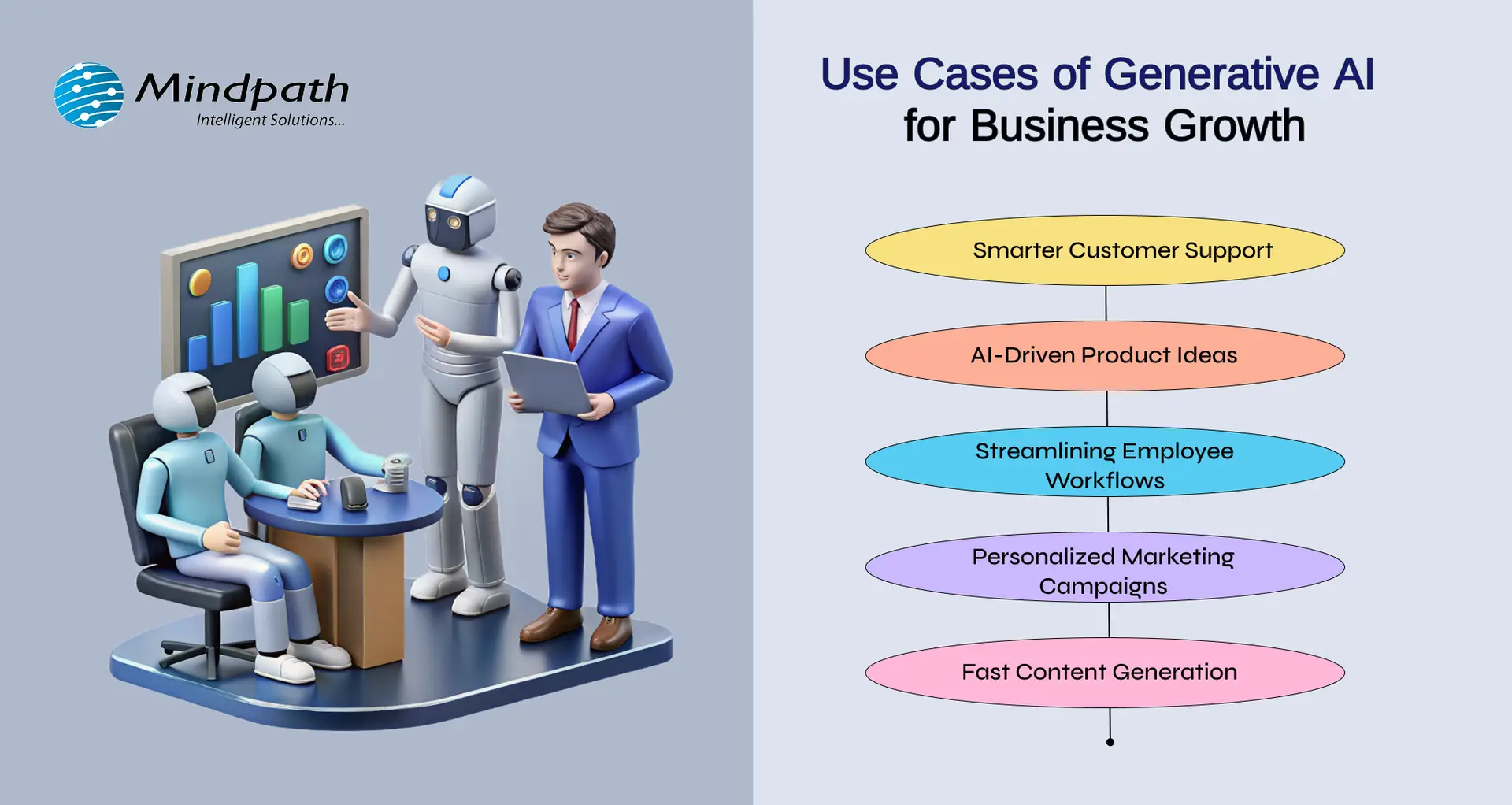
Generative AI for business is revolutionizing the way companies develop by enhancing customer experience, increasing productivity of employees, and accelerating innovation. From conversational tools like ChatGPT, Bard, and Midjourney to live business applications, the effects are tangible. Here are some simple yet impactful generative AI use cases that fuel business growth today:
Use Cases of Generative AI for Business Growth 

1. AI-Driven Product Ideas

With tools such as Midjourney, businesses are able to create product ideas, packaging, and graphics. It illustrates how AI can be applied in innovation, by assisting teams to come up with creative ideas quicker and validate what is effective with actual audiences.

2. Smarter Customer Support

Tools like ChatGPT help companies create AI-powered chatbots that answer customer questions instantly. This improves response time and frees up human agents to focus on complex issues. It’s a simple way to offer 24/7 support and boost customer satisfaction.

3. Streamlining Employee Workflows

According to the McKinsey Generative AI Report, generative AI can automate tasks that take up 60–70% of employees’ time today. This includes writing emails, summarizing reports, and generating presentations—especially helpful for knowledge workers and high-skill roles.

4. Personalized Marketing Campaigns

Generative AI technology assists companies in crafting customized ads and suggestions based on user data. This renders marketing more precise and efficient, enabling more engagement and sales while saving time for marketers.

5. Fast Content Generation

With platforms like Bard, teams can quickly write blogs, product descriptions, and emails. This saves time and allows employees to focus on strategy. It’s one of the most practical generative AI examples used daily across industries. 

Looking to leverage generative AI for smarter, more adaptive app solutions? Explore our blog on Generative AI in App Development highlights practical applications, transformative benefits, and strategies to stay ahead in the digital landscape.

Ready to Make Your Business AI-Ready? 

Generative AI is changing the way businesses work, think, and grow. It’s not just about automation, it’s about helping teams be more creative, make faster decisions, and offer better experiences to customers. Be it creating content, improving support, or building new ideas, generative AI for business is making every day work smarter and more efficient. 

At Mindpath, we specialize in delivering cutting-edge AI development services tailored to meet the unique needs of modern businesses. Our expertise in generative AI enables companies to streamline operations, boost productivity, and create intelligent solutions that drive real value. Whether you’re looking to implement AI-powered automation, enhance customer engagement, or accelerate innovation, Mindpath is your trusted technology partner for consistent business growth! 

Frequently Asked Questions

Generative AI for business refers to AI systems that create new content, ideas, designs, or solutions based on existing data. Instead of only analyzing information, it generates emails, reports, marketing copy, product concepts, and more. Business users can apply it to improve creativity, automate tasks, and make smarter decisions faster.
Businesses use generative AI for content creation, customer support chatbots, product design concepts, personalized marketing campaigns, and financial risk analysis. It also helps generate reports, automate emails, and create digital assets. These applications support innovation, reduce manual work, and improve overall operational efficiency.
To implement GenAI effectively, businesses should first identify repetitive tasks and content-heavy processes. Next, integrate AI tools with existing systems like CRM or ERP platforms. Start with pilot projects, measure performance, and scale gradually. Proper data management and employee training are essential for long-term success.
The future of Generative AI for business looks highly promising. It will continue enhancing personalization, predictive decision-making, and intelligent automation. As technology advances, AI systems will become more context-aware and collaborative, working alongside humans to drive innovation, improve productivity, and create smarter digital ecosystems.
One major limitation of Generative AI for business is its dependence on data quality. If trained on biased or inaccurate data, outputs may be misleading. It also lacks true human judgment and emotional understanding, which means human oversight remains necessary to ensure accuracy, brand alignment, and ethical use.

Support Is One Click Away

Featured Posts

Related Post

Langchain for AI Agent Developement

Every business leader today is asking the same question in some form: how do we bring AI agents into our workflows without breaking what already works? This is exactly where LangChain AI agent development enters the conversation. As companies move past simple chatbots and into agents that can plan, reason, and take action, choosing the right framework becomes a decision that shapes the entire product roadmap.

Key Takeaways

  • 01 LangChain simplifies complex agent workflows. It reduces the need to build custom logic for memory, tools, and multi-step reasoning from scratch.
  • 02 It fits best when tasks involve multiple steps. Simple single-response bots rarely need it, but workflows involving tools, memory, and data retrieval benefit significantly.
  • 03 Multi agent architecture supports scalability. Splitting tasks across specialized agents improves accuracy and makes systems easier to manage as they grow.
  • 04 Use cases span far beyond customer support. Businesses are applying it to document processing, internal knowledge assistants, and workflow automation across departments.
  • 05 The right framework depends on your actual needs. LangChain works well for teams that want faster development without sacrificing flexibility or control.

Not every project needs the same tools, and not every AI initiative should default to the most popular option on the market. Some businesses need speed; others need control, and many need both at once. In this blog, we are going to explore when LangChain genuinely makes sense for your business and when it might not be the right fit.

Looking to build scalable AI agents with LangChain? At Mindpath, we provide AI agent development services that integrate seamlessly with your existing business systems.

How AI Agents are Shaping Business in 2026?

AI agents have moved far beyond scripted responses. In 2026, they are expected to understand context, call external tools, retrieve live data, and make decisions with minimal human input. A customer support agent today might check order history, apply a refund policy, and email a confirmation, all without a human touching the process. A research agent might pull data from five different sources, compare them, and summarize findings in a format a manager can actually use.

This shift has pushed businesses to look for frameworks that can orchestrate these complex, multi-step behaviors reliably. That is where LangChain has built its reputation. It gives development teams a structured way to connect large language models with memory, tools, APIs, and decision logic, rather than gluing everything together from scratch. Understanding how LangChain works helps explain why so many teams reach for it first when a project moves beyond a single prompt and response.

What is the LangChain Framework and How Does It Work?

The langchain framework is essentially a toolkit that helps developers chain together prompts, models, memory, and external data sources into a working pipeline. Instead of writing custom logic for every single interaction an AI agent needs to have, LangChain provides pre-built components that handle the repetitive parts, so teams can focus on the actual business logic.

At its core, it works by breaking a task into smaller steps. A user query comes in, the agent decides which tool or data source is needed, it retrieves the relevant information, and then it generates a response based on everything it has gathered. This modular approach is a big part of why LangChain AI agent development has become a preferred choice for teams building anything more advanced than a basic chatbot.

1. Chains Connect Logic in Sequence

A chain links one action to the next, so the output of a search step can feed directly into a summarization step without manual handoffs.

2. Memory Keeps Context Alive

The framework can retain earlier parts of a conversation, which means the agent does not lose track of what a user already said.

3. Tool Integration Extends Capability

LangChain lets an agent call APIs, databases, or search engines, turning it from a text generator into something that can actually perform tasks.

4. Prompt Templates Standardize Behavior

Teams can define reusable prompt structures, which keeps agent responses consistent across different use cases.

Key LangChain Use Cases Businesses Are Adopting

Once a team understands the basics, the next question is usually where it actually fits into daily operations. There are several langchain use cases that have become common across industries, and most of them share one thing in common: they involve multiple steps that would be difficult to manage with a single prompt alone.

1. Customer Support Automation

Agents can pull order details, check policies, and respond with accurate, personalized answers instead of generic scripted replies.

2. Internal Knowledge Assistants

Employees can ask questions and get answers pulled directly from internal documents, wikis, or databases, cutting down time spent searching.

3. Document Processing and Summarization

Long contracts, reports, or research papers can be broken down, analyzed, and summarized in a fraction of the time it would take a person.

4. Data Retrieval and Analysis Agents

Businesses use LangChain to connect language models with structured data sources, allowing agents to answer questions that require real-time information.

5. Workflow Automation Across Tools

Agents can trigger actions in other software, such as updating a CRM record or sending a notification, based on a single instruction.

When to Use LangChain for AI Agent Development?

Deciding when to use LangChain really comes down to the complexity of what you are trying to build. A simple FAQ bot does not need this level of infrastructure. But once a project involves multiple tools, ongoing context, or decision-making across several steps, LangChain starts to make a lot more sense.

1. Your Project Needs Multiple Tools

If your agent has to search, calculate, and then write a response, LangChain manages that coordination cleanly.

2. You Need Memory Across Interactions

Businesses building assistants that remember previous conversations benefit from LangChain’s built-in memory handling.

3. You Are Integrating With Several Data Sources

When an agent needs to pull from a database, an API, and a document store in one flow, LangChain simplifies that connection.

4. You Expect the System to Scale

As agent complexity grows, LangChain’s modular structure makes it easier to add new capabilities without rewriting everything.

5. Your Team Wants Faster Development Cycles

Because so many components already exist, teams often build and test working prototypes much faster than building everything from the ground up.

Understanding LangChain Multi-Agent Architecture

As businesses take on more ambitious projects, a single agent handling everything often becomes a bottleneck. This is where langchain multi agent architecture becomes relevant. Instead of one agent trying to do research, analysis, and writing all at once, the work gets split across specialized agents that each handle a specific part of the task and then hand off their results to the next one.

1. Specialized Roles Improve Accuracy

A research agent focused only on gathering data tends to perform better than one agent trying to do everything at once.

2. Parallel Processing Saves Time

Multiple agents can work on different parts of a task simultaneously instead of waiting in a single sequence.

3. Easier Debugging and Monitoring

When something goes wrong, it is far easier to trace the issue back to one specific agent rather than digging through a single massive workflow.

4. Better Scalability for Complex Systems

As business needs grow, new agents can be added to the architecture without disrupting the ones already working well.

This kind of setup is becoming increasingly common for businesses that are serious about long-term LangChain AI agent development, especially when the use case involves research, reporting, or any workflow with distinct stages.

Is LangChain the Right Choice for Your Business?

Choosing a framework is never just about following what is popular. It comes down to what your business actually needs to accomplish, how complex your workflows are, and how much your team wants to build versus manage. LangChain has earned its place as one of the strongest options for teams building agents that need to reason, remember, and act across multiple steps. For businesses working on genuine LangChain AI agent development rather than a simple one-off script, it offers a level of structure and flexibility that is hard to match with a lighter tool.

At Mindpath, we work closely with businesses to design and build AI agents that fit their actual operations, not a generic template. Whether you need a single well-trained assistant or a full multi-agent system handling different parts of your workflow, our team brings the technical depth to build it right. We provide AI agent solutions that are tailored to your data, your tools, and your goals, so the technology actually solves the problem you started with.

Frequently Asked Questions

low code development

In the past, when we would build software, we would talk about long timelines, large budgets and complex code. But things have shifted, and businesses are demanding faster results, meaning teams need to leverage simpler tools to build applications without completely relying on developers. This dramatic change would not be possible without low-code development. Low code provides a more intelligent way for people to develop applications through visual, straightforward logic and less coding. The hope is that this will translate into shorter timeframes, lower costs, and faster teams. Doesn’t that sound exciting?

So, many companies are using these platforms to build apps for websites, mobiles, and internal use that can be launched without waiting months. Are you interested in finding out more about this technology? Great, because this blog is going to teach you everything you need to know about low-code development! 

Want to modernize your business applications without long development cycles or heavy coding? Contact us to get the needed expertise from Mindpath to turn your low-code strategy into results.

What is Low-Code Development?

Low-code development refers to the simplest and fastest way to build software. Instead of writing long lines of code, developers can now use visual tools to create apps by just clicking, dragging and choosing from ready-made features that are available. This method can help in saving a lot of time and making the whole process easier, even for teams without deep coding experience.  

It provides developers with a very flexible and user-friendly space to build anything starting from small tools to full business apps. It has many features like drag-and-drop editors, built-in templates and easy-to-use interfaces, which make it possible for low-code platforms to design and launch apps quickly. This can contribute in businesses growing faster, working more efficiently and getting better results from their software projects.

Don’t know what is a low-code platform? Let’s learn about that too!

A low-code platform is a tool that helps people build software without writing a lot of code. It uses a simple visual interface where users can drag and drop elements to create apps. This makes it much easier for both developers and non-technical users to build digital solutions. These platforms come with ready-made features like templates, forms, and automation tools. They reduce the need for complex coding and speed up the development process.  

An interesting study according to Fortune Business Insights reveals that the global low-code development platform market size was valued at USD 28.75 billion in 2024. It is expected to grow to USD 264.40 billion by 2032, showing a strong CAGR of 32.2% during the forecast period. This rapid growth highlights how more businesses are turning to low-code development platforms for faster and smarter software development. 

Low Code Development Platform Market

Benefits of Low-Code

Low-code is shaping how organizations approach application and software development. By streamlining the process and reducing the need for manual coding, they offer practical advantages for both technical and business teams. Here are some of the key benefits: 

1. Speeds Up App Delivery

Low-code tools come with drag-and-drop features and built-in parts, so building apps is much quicker. Both tech teams and non-tech users can build apps quickly with the help of these pre-built components. This means businesses can launch apps in weeks, not months. 

2. Boosts Team Productivity

With low-code, business teams can build their own apps without always needing help from developers. This means less waiting around and more work getting done. It’s a great way to turn ideas into real solutions quickly. 

3. Makes Updates Simple

Low-code apps are easier to manage and update because they use pre-built parts that work well together. Changes can be made without breaking existing features, which means the business can stay up to date without major disruptions. 

4. Reduces Development Costs

Since low-code tools require less coding, businesses don’t need to hire large teams of developers. Projects take less time to complete, which saves both time and money. This makes it a cost-effective choice, especially when building multiple apps. 

5. Improves Business Agility

Low-code helps businesses respond quickly to changes in the market. When a new tool or feature is needed, it can be built and launched without delay. This keeps companies flexible and ahead of the competition. 

6. Enhances Decision Making

Low-code apps connect with real-time data, giving teams fast access to the insights they need. This allows business leaders to make informed decisions more quickly. Having accurate information often leads to stronger results. 

7. Enable the Use of New Technologies

Low-code makes it easier to add modern features like AI and automation into applications. These advanced tools can be integrated without needing complex coding skills. It helps businesses stay up-to-date and competitive in a fast-moving digital world. 

Curious how low-code platforms are integrating cutting-edge technologies like artificial intelligence to build smarter apps? Explore the latest AI trends to see how your business can leverage automation and intelligence for more innovative solutions.

Now let us have a quick look at the features of low-code: 

Key Features of Low-Code Development

Low-code stands out because of the powerful features it brings to the table. These features make it easier to build, customize, and manage applications with less effort. Let’s take a look at what makes low-code so efficient and user-friendly: 

1. Simple Drag-and-Drop Design

The drag-and-drop feature is one of the most useful parts of low-code. It lets users add buttons, fields, and other elements by simply placing them on the screen. This is helpful for both business users and developers who want to build apps quickly as it saves time and keeps things organized. 

2. Easy Visual Tools

Low-code platforms come with visual tools that help show how an app works in a way that everyone can understand. These tools use built-in blocks to represent processes and data clearly. Whether someone is a beginner or an experienced developer, the visual approach is helpful. It makes the development process simple and easy to follow. 

3. Ready-to-Use Templates

Many parts of an app are already built into the platform and can be reused. These pre-made modules make it faster to build new apps without starting from scratch. Teams can also save and share parts of their apps with others, which improves teamwork and speeds up future projects. 

4. Model-Based Development

Model-based development helps users create apps faster by using visual flows and logic. It allows business teams to build what they need by following models they already understand. This makes the process smoother, especially for those who are not expert coders. A good low-code platform supports this method, so users can focus on logic, not code. 

5. Cross-Platform Accessibility

Low-code makes it easy to build apps that work on different devices like phones, tablets, and desktops. This means teams can use the app from anywhere, whether in the office or on the move. It also helps companies stay connected with their teams. A flexible app is always more useful in today’s fast-paced work environment. 

Cross-platform apps are more powerful when they leverage AI to engage users intelligently. Check out these real-life AI chatbot examples to see how automation and smart interactions can enhance your app’s reach and performance.

Want to Boost Your Business Growth with Low-Code?

Low-code development is changing the way software is built by making it faster and easier. It helps teams create apps quickly using simple visual tools instead of writing complex code. This approach is helping businesses stay flexible and move ahead in a fast-changing world. 

At Mindpath, we offer powerful application development services using low-code platforms. Whether it’s for internal tools or customer-facing apps, our team makes development smooth and affordable. Let us help turn your ideas into working solutions faster than ever before. 

Frequently Asked Questions

1. Is low-code development suitable for building complex business applications?

Low-code development can support complex applications when combined with proper architecture and integrations. While it simplifies many processes, advanced use cases may still require custom coding. It works best for speeding up development while allowing flexibility where deeper technical control is needed.

2. How does low-code development impact the role of traditional developers?

Low-code development does not replace developers but changes their role. Developers focus more on complex logic, integrations, and system architecture, while simpler tasks are handled through visual tools. This improves efficiency and allows technical teams to concentrate on high-value work.

3. What should businesses consider before adopting a low-code platform?

Businesses should evaluate scalability, integration capabilities, security features, and vendor support. It is important to ensure the platform aligns with long-term goals and can handle future growth. Proper planning helps avoid limitations as application needs become more advanced.

4. Can low-code platforms integrate with existing business systems?

Yes, most low-code platforms are designed to integrate with existing systems such as databases, APIs, and third-party tools. This allows businesses to extend current workflows instead of replacing them, ensuring smoother transitions and better use of existing infrastructure.

5. How secure are applications built using low-code platforms?

Security depends on the platform and how it is implemented. Reputable low-code platforms include built-in security features like authentication, data protection, and compliance support. However, businesses must still follow best practices such as regular updates and access control to ensure strong protection.

AI use cases 

Currently, cloud computing, data analytics, and machine learning are influencing the way companies are innovating. Do companies have the capability to leverage AI use cases to remain competitive in the market? All industries are under pressure to become efficient and customer-focused and make better decisions. Investigating these technologies stimulates novelties and challenges leaders with the need to reconsider the old methods.

With smarter systems embraced in organizations, the actual question is what AI applications are the most valuable. Is it possible to have teams that open up and simultaneously cut down on mistakes and costs? Numerous leaders are creating, trying and revising solutions every day. In this blog, we are going to examine the most successful AI business use cases that are going to transform business in 2026. So, keep reading further!

Planning to adopt AI but unsure how to turn emerging use cases into measurable business outcomes? Mindpath offers end-to-end AI development services that guide you from strategy to implementation.

Why are Businesses Turning to Artificial Intelligence?

Businesses embrace the use of artificial intelligence to operate more quickly, cheaply, and make better decisions. Numerous businesses using AI automate routine work and enhance day-to-day operations. Data insights help the leaders to influence strategy and planning. McKinsey reports that about two thirds of organizations continue to test or pilot AI with careful adoption across industries.

Careful consideration of real value AI use cases has become a priority among companies. Teams make the experiences of customers personal and their supply chains efficient through intelligent systems. According to McKinsey, 64 percent of the respondents claim that AI helps support innovation goals. Companies that pair AI with their expansion policies tend to achieve greater productivity and quicker innovations and improved competitive placements.

Not sure how to move from AI ideas to real business impact? Discover the AI roadmap to check out how structured planning turns AI use cases into scalable results.

Practical AI Use Cases Driving Business Transformation

Businesses do not consider AI as an experiment anymore, they use it to solve daily problems. The current trends of many businesses utilizing artificial intelligence are based on measurable results and quicker outcomes. AI helps make smarter decisions, smoother operations and makes industry growth scalable. Below are the use cases that demonstrate how companies can transform AI strategies into a real business impact.

1. Personalized Customer Journeys

AI assists brands to know customer preferences and behavior patterns in real time. The AI use cases in teams are used to customize recommendations and interactions. This will enhance interactivity and customer retention. The experiences offered by many companies using AI make them appear relevant and timely.

2. Predictive Equipment Monitoring

AI monitors the machine information by sensors and performance history. Such AI applications detect problems prior to failure. There is a decrease in downtime and maintenance costs incurred in business. Repairs are scheduled ahead of time and unexpected breakdowns prevented.

3. Intelligent Customer Support

AI chatbots respond to queries in real-time in digital mediums. These applications of AI decrease response time and workload. Customers are provided with regular assistance all the time. Support teams are responsive to complicated customer demands.

Looking for practical inspiration beyond theoretical AI use cases? Discover AI chatbot examples to check out how businesses are automating support, sales, and workflows.

4. Smart Workforce Planning

AI forecasts the staffing requirement based on the previous demand. AI use cases provide managers with the ability to manage workloads. Staffs are given timetables that are based on availability and capabilities. Teams do not experience staffing problems during peak times.

5. Content and Campaign Creation

AI examines trends with the purpose of recommending topical content. GenAI use cases assist teams to write articles and social posts more quickly. Marketers minimize tasks used up in repetitive work. Creative teams dwell on message and strategy.

6. Advanced User Security

AI makes authentication based on biometrics and behavioral monitoring. These AI use cases minimize fraud and unauthorized entry. Real-time systems identify the abnormal activity. The users enjoy secure and easier logins.

7. Quality Testing Automation

During development cycles, AI tests applications are tested continuously. Enterprise AI use cases enable teams to identify defects in the beginning. Products are developed to fix bugs prior to release. Enterprises provide quality software with a reduced amount of errors.

Want to know what makes AI applications smarter behind the scenes? Check out the role of vector databases in AI applications and discover how they improve relevance and decision-making.

8. Operational Intelligence Management

AI is used to keep track of systems in order to detect problems in performance. AI use cases help teams to avoid service outages. Issues are resolved faster with the use of automated alerts. Operations continue to be stable and efficient.

9. Safety and Risk Monitoring

AI examines the surroundings based on camera and live data. There are the AI use cases that detect risks in advance of events. Companies enhance the safety conformity in operations. Simultaneously, the teams react quicker to threats.

10. Conversational Product Assistance

Artificial intelligence assistants help customers in choosing products. AI agents use cases provide real-time questions and recommendations. Customers get the correct answers immediately. Brands enhance interactivity and buying assurance.

Ready to understand what powers self-learning and action-oriented AI applications? Discover the role of AI agents to learn how they manage tasks, decisions, and execution end to end.

Real-World AI Use Cases Examples

Companies have outgrown strategy and are concerned with real achievement in their daily activities. These AI use cases demonstrate how companies use intelligence to address real-world problems in various sectors. The following are illustrative of the ways AI is providing quantifiable value to real businesses.

1. Amazon suggests products about browsing and buying history, enhancing cross-selling and upselling using the AI use cases in action.

2. Netflix applies AI to recommend films and movies according to viewing history to keep the users active and decrease churn.

3. Tesla enhances car security through the Autopilot that helps them monitor the road and drivers to avoid collisions.

3. Apple makes iPhones secure using Face ID which offers quick and smooth authentication but ensures sensitive user data remains intact.

4. Walmart trains new workers with AI, which guarantees consistency in training and leaves managers to do valuable work.

5. Coca-Cola manages logistics and inventory through AI to enhance the efficiency of the supply chain and minimize operational expenses.

6. IBM uses Robotic Process Automation on routine work, enhancing precision and allowing workers to undertake high-value tasks.

7. L’Oréal applies conversational AI to provide individual beauty tips and recommendations, which enhances engagement and purchases.

Wondering what separates traditional automation from true AI-driven transformation? Learn about AI models to check out how they power modern enterprise use cases.

Ready to Transform Your Business with AI?

AI is reshaping how companies operate, improve efficiency, and engage customers. Practical AI use cases help businesses automate tasks, enhance decision-making, and boost innovation. From personalized experiences to predictive maintenance, AI is driving measurable value. Companies adopting these technologies can grow faster, reduce costs, and stay ahead in competitive markets while building smarter and scalable operations.

At Mindpath, we offer expert AI development services to help businesses implement these solutions. Our team builds custom AI systems, chatbots, and predictive tools that fit your operations. With Mindpath, companies using artificial intelligence can automate workflows, personalize customer experiences, and improve efficiency. We guide businesses to apply AI effectively and achieve real growth through smart technology.

FAQs

1. What are common AI use cases in business?

Artificial intelligence is used to automate work, assess information, and create better customer experiences. There are numerous applications of AI use cases in many businesses aimed at efficiency. Predictive analytics, chatbots, and recommendation engines are commonly used.

2. How do businesses identify the right AI use cases?

Begin with redundant operations or data-intensive processes that reduce the speed of teams. Analyze the areas that businesses using artificial intelligence achieve the best outcomes. Focus on the high-value areas in accordance to the goals.

3. Will AI replace human jobs in companies?

AI does the routine work and human beings concentrate on strategy and creativity. AI in real life is not a substitute, but a partner. Reskilling will be fundamental due to its increasing adoption.

4. What industries lead in adopting AI technologies?

AI is applied in finance, healthcare and retail to make predictions, analyze and recommend. Enterprise AI use cases are effective in boosting efficiency and customer experience. Every industry implements AI to address certain issues.

5. How can small businesses benefit from AI adoption?

AI schedules, reports and supports small teams automatically. Companies using AI are able to conserve time and minimize errors. Smart tools allow small businesses to compete better.