Hiring a WordPress Developer – An Ultimate Checklist

Join our Newsletter!

Featured Posts

Support Is One Click Away

Home

Hiring a WordPress Developer – An Ultimate Checklist

hiring a wordpress developer

Hiring a WordPress Developer – An Ultimate Checklist

WordPress remains a top choice for website development due to its scalability, ease of use, and flexibility. However, to unlock WordPress’s true potential, it is crucial to hire the right developer- an expert who can understand your goals, the technical nuances of WordPress, and your customers. Yet, hiring a WordPress developer is a major investment.

It is not just about finding a professional who can write code; it is a strategic partnership between your business and an expert who can offer you the required solutions. Besides, it involves more than just checking technical skills. This detailed hiring WordPress developer guide will guide you through the hiring process, helping you make an ultimate hiring a WordPress developer checklist.

Are you looking for expert help to build your WordPress site? At Mindpath, you can hire WordPress developers who are highly skilled and dedicated to building high-performing websites that drive measurable results.

Top Reasons for Hiring a WordPress Developer

Before diving into the WordPress developer checklist to ensure a successful hiring, let’s understand why you should hire expert WordPress developer.
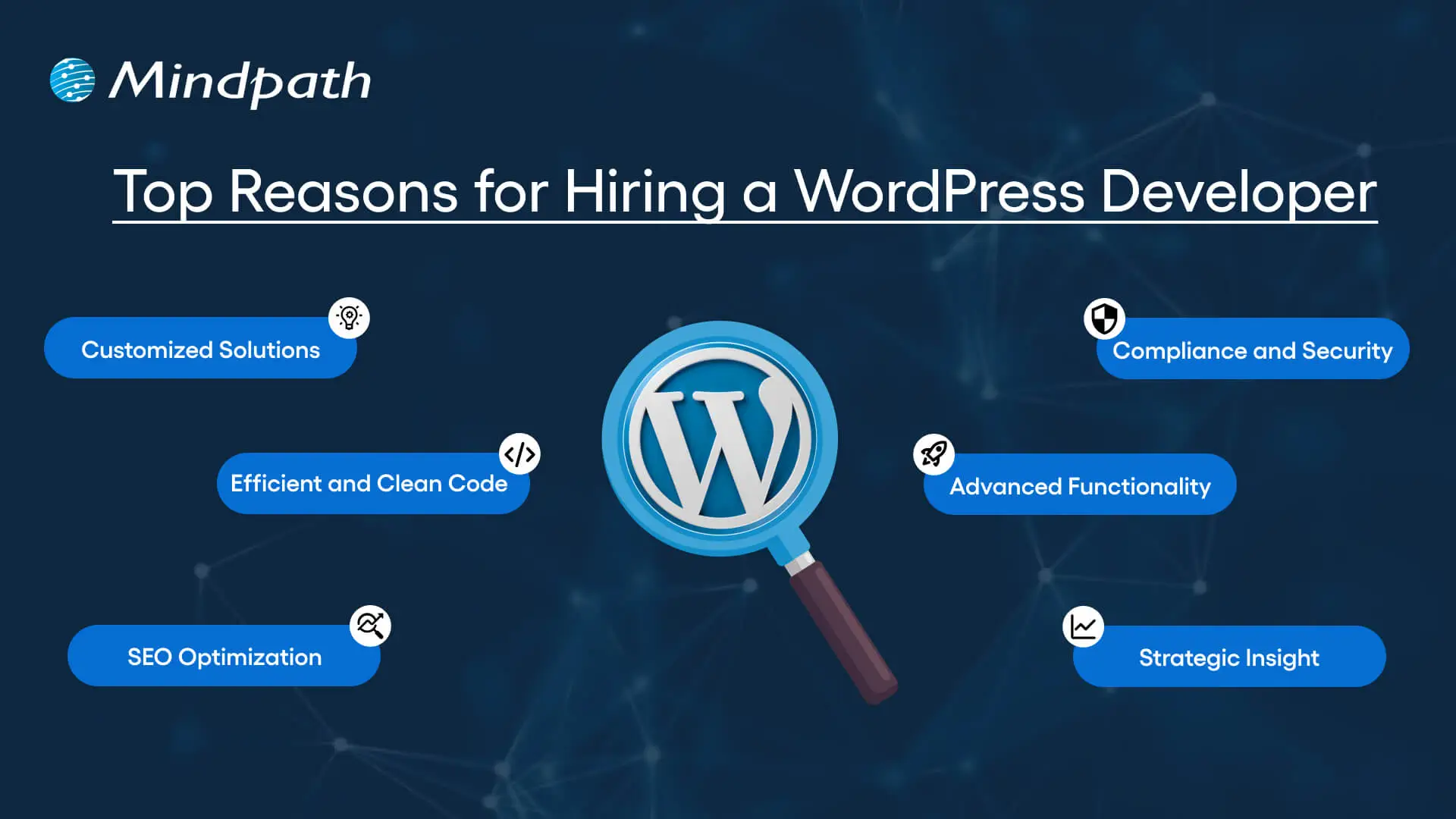
Top Reasons for Hiring a WordPress Developer

1. Customized Solutions

A professional WordPress developer can provide custom WordPress development for the site to match your unique brand identity, functional requirements, and user experience goals. Pre-built themes or plugins won’t offer you such flexibility.

2. Efficient and Clean Code

Skilled developers always prioritize writing scalable, secure, and optimized code. This ensures better SEO scores, fewer compatibility issues, and faster load times.

3. SEO Optimization

Developers know how to develop a website for search engines. For example, they use schema markup, semantic HTML, image optimization tools, and caching techniques that boost visibility and improve rankings.

4. Compliance and Security

From database protection to SSL configuration and plugin installation, professional WordPress developers deploy best security practices to protect your site from data breaches and malware. Besides, they ensure that all the plugins and elements are updated to the latest versions.

5. Advanced Functionality

Do you need a custom API integration or booking system? Well, a skilled WordPress developer knows how to integrate complex features that align with your user needs and business goals. They can also create custom plugins to expand the features of your site.

6. Strategic Insight

Apart from coding, WordPress developers help businesses to get detailed insight into conversion optimization, user behavior, latest trends, and more. All these things will help businesses in making smarter decisions.

Want to make sure your WordPress site is accessible to everyone? Check out our post on improve WordPress web accessibility to learn practical steps for making your site more inclusive and user-friendly.

Types of WordPress Experts- Which One Should You Hire

Understanding the benefits and value a developer can bring is just the beginning. To make the right decision on hiring a WordPress Developer, it is crucial to learn about the different types of WordPress developers you can hire. Remember that each brings a unique focus area and skill set.

1. Front-End WordPress Developers

These experts specialize in interactive and visual aspects of websites. They manage styling, layouts, and user experience and responsiveness using JavaScript, CSS, page builders, and HTML.

2. Back-End WordPress Developers

They focus on database management, server-side functionality, custom theme development, and plugin development. They work with WordPress core functions, MySQL, PHP, and more to create scalable websites.

3. Full-Stack WordPress Developers

Such experts handle back-end and front-end development tasks. They can create a website from scratch while ensuring seamless integration.

While hiring dedicated WordPress developer, you should choose the right type of developer to ensure your project aligns with the design goals, technical needs, and vision.

Curious about which developer’s role best suits your project? Dive into our article on Front-End vs Back-End vs Full-Stack to understand each role and decide which path aligns with your website’s needs.

WordPress Developer Checklist- Skills to Consider

Your hiring WordPress developer checklist should cover the key skills of WordPress developers. HTML, CSS, PHP, MySQL, and JavaScript rank among the key languages for WordPress development. Most developers are familiar with these languages, but knowledge of these technologies is not enough. Here are some skills that matter the most.

Hard Skills or Technical Capabilities

  • Knowledge of using core languages such as jQuery, JS, HTML5, CSS3, PHP, MySQL, React.js, and other languages.
  • Clear understanding of plugin architecture and WordPress core.
  • Building and customizing themes from scratch, and experience with various page builders like Beaver Builder, Gutenberg, Thrive Architect, Elementor, and Themify Builder.
  • Familiarity with REST API.
  • Knowledge of various optimization methods like scheme markup, image compression, caching, Core Web Vitals, minifying CSS, use of CDN, and more.
  • Understating security issues and applying fixes

Soft Skills

  • Ability to explain technical concepts in practical and simple terms.
  • Habit of making clear documentation.
  • Clarity and responsiveness in replies.
  • Ability to collaborate with backend teams and designers.
  • Familiarity with various management tools such as Jira, Trello, and Slack.
  • Willingness to accept feedback and incorporate it quickly.

Some Bonus Skills that Add Value

These skills are not that important for every project, but they can make a developer more valuable. These skills can include:

  • Experience in handling WooCommerce.
  • Knowledge about Headless WordPress configurations.
  • Use of Git or similar tools to manage collaborative workflows and code.
  • Experience in creating responsive and accessible designs to help websites meet the legal requirements of ADA.gov, etc.
  • A better understanding of the business’s goals, like lead generation, conversions, etc.

Want a more flexible and user-friendly website than a static HTML page can offer? Explore our blog on converting HTML to WordPress to see how shifting to WordPress can simplify maintenance and boost performance.

Hiring A WordPress Developer: Best Practices

Hiring a skilled WordPress developer can be a challenging process. That’s why utilizing a structured hiring a WordPress developer checklist is vital. A well-defined hiring checklist can help you save time, and you can hire the best talent for your projects. Here is how to begin your process to hire expert WordPress developer using a proven checklist.

1. Understand your Project Requirements and Goals

Before starting to search for a WordPress developer, it would be better for you to understand your project requirements. Do you want to create a new WordPress site from scratch or optimize an existing site? Are you creating a blog site, business website, or eCommerce platform?

Understanding these things will help narrow down the skills required. For instance, if you want to integrate APIs or advanced features into your site, then hiring a developer with skills in JavaScript or PHP would be a great choice.

Avoiding this step can lead to mismatched expectations. The more precise your needs, the easier your hiring a WordPress developer would be.

2. Selecting the Right Hiring Model

While hiring a WordPress developer, selecting the right engagement model is vital to aligning your development project budget, timeline, and scope. In general, WordPress developers come under three key categories these are:

  • Freelancers: Ideal for short-term and small projects due to their cost-effectiveness and flexibility.
  • Agencies: Offer complete solutions, including website design, development, SEO optimization, and maintenance. Agencies are ideal for large-scale and complex projects.
  • In-House Web Developers: They are best for organizations with ongoing development requirements. Businesses will enjoy faster turnaround and full control. However, this model requires businesses to invest in salaries, management overhead, and benefits.

Consider your budget, long-term objectives, and project size to choose the right model.

3. Developer’s Industry Experience

When using a hiring WordPress developer checklist, an important factor to consider is the developer’s industry-specific experience.

Working with a WordPress developer familiar with your business niche can significantly improve the outcomes while reducing costly trial and error. For instance, for creating an eCommerce website, hiring a developer with WooCommerce expertise will be the best option.

On the other hand, for a blog site, you should prefer to hire an expert with deep SEO and performance optimization knowledge.

This approach will accelerate development and boost functionality. And always ask developers whether they have built websites like yours.

4. Check References and Review Portfolios

Start by examining developers’ portfolios for design consistency, quality, and diversity of development projects that match your business niche. Also, check the custom developer tasks completed by developers to get an idea about their technical skills as well as problem-solving skills.

If possible, assess site performance, usability, and responsiveness to understand the developer’s attention to detail. Also, go through client references to confirm the developer’s support quality, professionalism, and reliability.

5. Conduct Technical Tests and Interviews

Don’t just rely on resumes. Conduct thorough practical tests and interviews. Start by creating targeted interview questions. For instance, you can ask, “How do you solve plugin conflicts”? Or “How do you check a site’s responsiveness?”

Practical tests can include fixing a site speed problem or creating a custom feature or post type. Such tests show developers’ technical skills, efficiency, and creativity. Besides, it helps you to know whether they can work under pressure. This step is pivotal for confident hiring decisions.

Stuck deciding whether WordPress or Drupal is a better match for your business? Our WordPress vs Drupal guide breaks down key differences to help you pick the perfect solution.

Common Mistakes to Avoid

Even with a solid WordPress checklist, mistakes can happen. Here are some common mistakes that you should avoid during the hiring process.

1. Don’t hire an expert based on just low rates. Focusing on the cost factor over quality can lead to poor site performance, missed deadlines, and you may end up with a site that may not meet your business goals.

2. Avoid developers who don’t want to sign confidential agreements. After all, keeping your business data, personal information, and intellectual property safe is important, especially when sharing sensitive details and backend access.

3. Don’t overlook maintenance service and ongoing support offered by the developer. Without this, your site may become vulnerable to bugs and security issues, affecting user experience, speed, and scalability.

4. Don’t ignore red flags such as lack of references, unclear communication, or vague answers.

5. Don’t make your hiring process long and complicated. Excessive interview rounds and lengthy assessments can frustrate candidates, and you may lose top talent.

6. Developers can only create and customize your site. They are not content strategist or designers. So, expecting them to handle everything would be a big mistake, leading to missed opportunities and misaligned results.

Want to ensure your WordPress site is running on the right PHP version for top performance and security? Check out our guide on WordPress PHP compatibility to keep your site efficient, stable, and future-ready.

Hire Smart and Built Better with Mindpath

Hiring a WordPress developer is a major investment that you make in your business. This can greatly influence your business’s digital future. By following this detailed WordPress developer checklist, you can avoid common mistakes and find a WordPress developer who can create a website that will boost your online presence.

If you are searching for a trusted platform to hire an experienced WordPress developer, you may not find a better option than Mindpath. We specialize in providing the industry’s best WordPress developers, who combine creative design skills, deep technical knowledge, and commitment to quality to develop a perfect solution. Your website needs creative vision, thoughtful design, and expert attention that can bring your brand to life. And for this, you can always count on Mindpath.


Related Post

Discover how to hire a freelance software developer with our easy guide. Learn steps to define needs, evaluate talent, and set clear terms for success.
Discover why ReactJS is perfect for Progressive Web App (PWA) development. Learn how Mindpath can help you build high-quality PWAs.

Related Post

MVP in software development

MVP in Software Development is also known as Minimum Viable Product. It is the particular version of a software application with enough core features so that it can be released to the early users. The fundamental goal of developing MVP software is to validate it and get it to the market quickly.

As innovation in the current market setting is growing at a rapid pace, it is essential for businesses to realize the importance of software development MVPs. You need to develop an MVP before investing a significant amount of money in the full-scale product. This strategic development methodology can be implemented by the development team without having to build a complete software product. It is the right time to explore the relevance of MVP in software development.

Wondering how to validate your software idea before committing full resources? Mindpath’s MVP development services help businesses build functional prototypes and gather real user feedback quickly.

What is MVP Development?

In the era of digitalization, startup businesses may wonder – what is MVP in software development? In simple words, MVP or Minimum viable product is the test version of a product or software. This strategic development approach begins with the creation of the beta version of the software that a business plans to create. 

This basic version consists of the essential features and functions. These elements are included by taking into consideration the pain points of clients. The core idea behind the MVP development process is to build customer-oriented software applications. It helps businesses to ascertain whether their product is up to the mark or if it requires improvement. MVP development focuses on minimizing costs and business operations. It even helps to build the software in a smarter and efficient manner.

Stages for Building an MVP

In order to build an MVP in the context of software development, a systematic approach has to be adopted. The MVP development process involves a series of stages that you need to be aware of. You need to follow the steps in a methodical manner so that you can succeed while developing an MVP. 

1. Defining the Problem 

The fundamental step is to know the problem or pain points of your users. If businesses do not have insight into this area, they may end up creating an app that no one will use. So you need to clearly define the specific problem that your software application is going to solve. At this stage, startup businesses can consider using MVP development services. Otherwise, they can sit and discuss with their development team the problem that the application is going to solve. It is also important to understand how important the application will be for people who will be using it. 

2. Knowing the Target Audience

At this stage of the MVP development process, it is essential for you to decide who will be your target audience. A common mistake that some developers make is that they decide to create an app for everyone. It is advisable to target a niche group when startups develop an application. It can help narrow the focus of the project and develop well-functioning software. Businesses need to build the target audience persona and make it as detailed as possible.  Some of the details that should be included in the persona include profession, age, and income group. 

3. Ascertaining Key Features

Startups need to determine the key features that the first version of the product must have. It is an important thing you need to look at after defining the problem and identifying your target audience. At this stage, businesses need to list down all the possible features of the product. Then you must decide the essential features that need to be incorporated to make the software application usable. From the list of features, you can choose the most essential features that need to be included in the MVP. 

Must Read: MVP for Startups

4. Building the MVP

Once you have clarity about the features of your MVP, it is time to start creating the product. At this stage, you have to determine the programming language, framework, and other tools that you plan to use. You can even consider taking the help of an MVP development company if you wish to build your MVP. At this particular stage, you do not have to think about making a perfect product. Instead, startup businesses must focus on building a product that is usable for the intended audience. The ultimate goal must be to develop a functional product within the shortest period of time. 

5. Testing the Product

After you have created your MVP, it is time to test it. You must reach out to early adopters who are going to be the actual users of your software application. It is vital to search for the people who match the created buyer persona. You must request them to try out your MVP. If it is possible, you can reach out to them via social media or email. At this stage, your ultimate goal should be to get a good number of people and gather feedback from them. Collecting honest feedback is crucial to making improvements in the software application MVP. 

6. Using Feedback for Product Improvement

Once users start giving feedback about your MVP, you need to start collecting it. Moreover, you need to see what the best way is to implement them so that your software can meet the needs of the target audience. Initially, you need to focus on how your software solves the problem for users. If you receive positive feedback, you need to look at additional features that you can incorporate into your actual product. The feedback loop can guide you to develop the ideal product that can effectively meet the needs of the intended users. 

Ready to push your MVP from idea to functional product? Explore our blog on hiring full stack developers for MVP to learn what abilities truly drive strong outcomes.

Advantages of Developing a Successful MVP

The creation of an effective MVP can give rise to a host of advantages for startup businesses. You need to be aware of the chief benefits.

1. An MVP can help a business quickly decide whether the solution genuinely resonates with the target audience or not. It can save valuable time as well as resources of your business while helping you to test the core assumptions with the actual users. 

2. An MVP can enable businesses to test their business concept with limited investment, as it can minimize the financial exposure that is associated with full-scale software development. So businesses can avoid making costly mistakes. 

3. The invaluable feedback that businesses can gather can help in iterating and refining the product. So you can take into account the actual needs and preferences of your customers and create value for them through the software solution.

4. An MVP can help you launch your software application sooner in the market. This will be possible since you can focus on the essential features and key functionalities. The MVP can help you gain a competitive edge in the market setting. 

In the current times, when the needs and preferences of customers are rapidly changing, businesses need to understand the importance of an MVP. A successful MVP can enable businesses to create something that can create value at a comprehensive level.  

Curious about the different ways software can be built? Check out our guide on the types of software development to learn which approach fits your project best.

Final Words

In the context of software development, the relevance of a minimum viable product cannot be ignored. If businesses plan to develop a new software solution in the market, they need to adopt the MVP approach. The systematic development approach can enable businesses to create software that can create value for the ultimate users in the market. Businesses need to understand the strategic value of a minimum viable product. The knowledge can empower them to build software applications that perfectly match the needs of their target audience.

Mindpath’s MVP development services can help businesses develop their minimum viable product in an effective and efficient manner. Our experts will guide you to make refinements in your software by taking into account the needs of your target audience. 

AI in Cybersecurity

Imagine being in a world where each online action gets monitored, analyzed, and at times, even targeted. In this world, safeguarding digital data is one of an organization’s biggest challenges. This is where AI in cybersecurity takes effect because it brings intelligence and speed to the way we identify and halt a threat. It allows the system to learn, adapt, and respond in real time, creating a more intelligent defence against an ever-evolving threat environment.

As cyberattacks become more sophisticated, companies are searching for solutions that can think faster than the attackers can. AI accomplishes this by providing a way to leverage raw data into insights that drive security improvements. AI is changing cybersecurity from a reactive to a predictive process. In this post, we will discuss how AI is improving cybersecurity and helping organizations to secure themselves in today’s digital world.

In today’s digital world, cyber threats are evolving fast. Our AI development services will help you in building smarter defenses that will protect against attacks and keep your data and system safe.

Understanding the Concept of AI in Cybersecurity

AI ‍‍in cybersecurity means the application of AI technologies such as machine learning, deep learning, and data analytics to security issues that result from evil actors on the net. By doing so, the systems become capable of going through a huge volume of security logs, finding the abnormal patterns, and foreseeing the potential attacks with a much higher level of accuracy and in less time as compared to conventional security‍‌‍ ‍‍‌measures.

When AI and cybersecurity combine, they create intelligent defense systems that detect and adjust to continuously evolving threats. These defense systems continuously learn from every new piece of data, becoming increasingly smart, adaptive, and flexible with each new piece of data. Organizations are able to utilize human judgment in conjunction with AI-enabled data analysis to develop defenses that are stronger, faster, and more dependable to protect their networks and digital ecosystems.

Concerned about securing applications against evolving cyber threats? Explore application security best practices for web and mobile apps to discover proven methods for strengthening digital defenses.

Benefits of Using AI in Cybersecurity

With AI, cybersecurity is changing the manner in which enterprises are protecting their digital systems. One of the key features of this technology is that the introduced intelligent tools are capable of quick thinking, learning, and acting, thus they can be a great support to the overall protective measures against cyber risks which keep on ‍‌evolving.

1. Smarter Threat Detection

AI in cybersecurity expedites the identification of threats by utilizing enormous amounts of data from multiple sources. It will find strange behaviors and advanced attacks that humans would not normally be able to put together. With AI detection, organizations are then better prepared to make timely decisions and strengthen cybersecurity.

2. Adaptive Learning Against New Threats

AI tools are distinct from conventional tools in that they also learn from recent data and attacking behaviours. Ongoing learning enables a rapid adaptation to new and unknown threats, even before they spread. With this flexibility, the effectiveness of AI cybersecurity and reliance on it will only grow in the future.

3. Automated Processes with Fewer Errors

Artificial Intelligence takes over the tedious security tasks that are usually done wrong by humans. It will handle monitoring, scanning, and alerting in a more timely and accurate manner. This allows security teams to shift their attention towards the strategy and high-priority security decisions.

Also Read: AI Consulting

4. Stronger Vulnerability Detection

AI in cybersecurity examines systems and applications to uncover vulnerabilities before an attacker can exploit them. It points out anything that may require immediate action, and can help avoid problems down the line. When issues are detected and resolved in real-time, organizations can better protect their digital environments.

5. Faster Incident Handling

AI decreases response time through automation, performing alerting and preliminary analysis, increasing recovery time through threat prioritizing and assisting the expert in additional fast decision-making. Rather promptly, taking action reduces the potential for damage or disruption while helping mitigate the impact on systems.

6. Deeper Behavioral Insights

AI’s examination of ordinary usage and activity behavior leads to the detection of deviant behaviour patterns. A change in behaviour can indicate an insider threat, or a compromised account and/or device. AI’s behavioural insights give organizations the ability to respond quickly and maintain a higher level of control over their digital assets.

How can organizations respond faster to security threats using intelligent insights? Read about AI in decision-making to understand how AI improves cybersecurity decisions.

Use Cases of AI In Cybersecurity

The intersection of cybersecurity and AI technologies will change the way businesses identify, prevent, and respond to digital attacks. Through the utilization of intelligent systems which learn and adapt, organizations can construct greater and more proactive security strategies for the contemporary digital environment.

Use Cases of AI In Cybersecurity

1. Automated Response Systems

With AI, security incidents can be detected and acted instantly by taking actions such as isolating devices, or blocking malicious IPs, which mitigates attack impact and time to respond.

2. Smart Threat Detection

Artificial intelligence will scan data in near real-time, detect abnormal patterns, and uncover hidden, discreet threats that traditional tools may miss, such as phishing or network intrusions.

3. Predictive Threat Intelligence

AI will analyze behaviors and outside factors related to threats around the world and can predict and potentially prevent the next attack by turning data into actionable and meaningful defense-in-depth.

4. Intelligent Vulnerability Management

To help organizations stave off attacks, AI in cybersecurity finds all system vulnerabilities and ranks them based on severity, so that teams can manage the top-priority vulnerabilities and patch the most critical ones first.

5. Behavioral Security Monitoring

Cybersecurity and AI combine security monitoring with tracking users and better monitoring for suspicious behavior, stopping insider attacks and credential-based attacks before damage occurs.

6. Data-Driven Security Improvement

AI in cybersecurity changes data into usable intelligence based on the data, helping organizations improve detection, prevention, and overall protection.

Struggling to manage cybersecurity risks with limited visibility? Explore the importance of data-driven decision-making for businesses to discover how data strengthens security strategies.

Ready to Strengthen Your Cybersecurity with AI?

Artificial intelligence in cybersecurity is transforming the methods by which organizations protect their digital systems. It adds intelligence, speed and agility to security operations enabling organizations to proactively identify, prevent and respond to threats in real time. Given the growth of cyber risks, AI helps organizations be prepared, proactive, and resilient in the digital age.

At Mindpath, we offer advanced AI development solutions that help businesses enhance security and efficiency. Our expert team builds intelligent systems that detect risks, automate responses, and strengthen digital protection. With innovative AI-driven strategies, Mindpath helps organizations stay ahead of threats and achieve a safer, smarter, and more secure future.

Discover how AI enhances cybersecurity with smarter threat detection, faster responses, and proactive vulnerability management to protect your business in the digital age.
Cloud security tools

The rising popularity of cloud computing technology in the business world has automatically led to the popularity of cloud security tools. If you leverage cloud solutions in any manner, you need to be aware of the top cloud-based security tools that are available in the market right now. These tools can certainly make or break the cloud cybersecurity posture of your organization. 

Now is the best time to learn about the top 10 cloud security tools. The insight can definitely empower you to derive optimum benefits from these tools while leveraging cloud computing technology. It is time to dive into the world of the best cloud security tools.

Want to stay ahead of evolving cloud security threats with the right tools? Mindpath’s managed cloud services combine expert management with advanced security tools to keep your cloud safe and optimized.

What are Cloud Security Tools?

Cloud security tools include a diverse range of technologies, practices, and controls. They collaborate in order to protect data, the cloud infrastructure, along with all the applications within the cloud environment. The main objective of cloud computing security tools is to defend users against internal or external cybersecurity threats. They also play a catalytic role in mitigating business disruptions that may be caused by power outages, natural disasters, or other kinds of serious events. 

Business entities need to bear in mind that the need for cloud security solutions is multidimensional in nature. Encryptions as well as antimalware tools help shield applications and data from possible threats. Similarly, firewalls are responsible for regulating traffic flows to cloud resources for determining which data can pass through. Identity and Access Management (IAM) solutions make sure that only authorized individuals can be given access to resources on the cloud. The role of cloud security tools and solutions is of high strategic importance for organizations.

Wondering how emerging trends are shaping cloud security? Check out the latest cloud computing trends to learn what’s driving secure cloud adoption.

Top 10 Cloud Security Tools

Now that you have a basic understanding of cloud computing security solutions, it is essential to look at some of the top cloud security products that are available to you. You need to familiarize yourself with the most popular tools so that you can choose the best product that can meet all your needs perfectly.

1. Auth0

Auth0 is a well-known identity and access management solution that is available in the market today. It can enhance cloud security by offering secure authentication as well as authorization for applications, users, and APIs. It is a highly developer-friendly platform that offers flexible security solutions. 

It is highly adaptable in nature, which makes it extremely suitable for businesses of varying sizes. Its robust APIs, coupled with extensive integration options, make it simpler to embed identity and access management into the applications of organisations without compromising the experience of users.

2. Datadog

Datadog is a highly versatile and robust cloud monitoring platform. It integrates in a seamless manner with popular cloud service providers such as AWS, Google Cloud, and Microsoft Azure. The real-time analytics, as well as customizable dashboards, make it easy for businesses to not only track but also to secure their cloud environments. The tool offers the right kind of insights that businesses require in order to maintain security while scaling their operations in a flexible manner.

3. Microsoft Defender for Cloud

These cloud security products offer robust security solutions for Google Cloud, Azure, and AWS. The best thing about this tool is that it perfectly integrates with the Microsoft ecosystem of other security solutions. Some of its core offerings include vulnerability management, threat detection, and compliance monitoring. The built-in automation feature can even help business organizations to detect and mitigate different types of cybersecurity risks and threats.

Also Read: AI in Cybersecurity

4. Wiz

Wiz is a robust cloud security platform that offers complete visibility along with protection across diverse cloud environments. This tool is capable of continuously scanning the cloud infrastructure, containers, and virtual machines for the purpose of identifying misconfigurations. 

It also helps locate vulnerabilities as well as compliance risks.  It adopts an agentless approach, unlike conventional agents. It connects directly to cloud service providers for rapid deployment.  It not only correlates security findings to highlight the most critical risks, but it also helps teams prioritize the remedial solution.

5. Sysdig

Sysdig is among the popular cloud security tools that can monitor as well as safeguard cloud native applications and services. With the help of this tool, business entities can ensure real-time compliance. A unique feature of this cloud security tool is that it makes use of an open-source threat detection engine. This tool can scan container images prior to their deployment, thereby preventing vulnerabilities. Some of the other offerings of Sysdig include runtime protection, visibility, and cloud audit activities.

Planning to build scalable applications without managing servers? Check out our blog on serverless architecture in cloud computing to learn how it simplifies deployment while supporting secure and efficient workloads.

6. Tenable Cloud Security

Tenable Cloud Security is a popular tool in the market that can safeguard your cloud workloads. It can even monitor threats and assess vulnerabilities in an effective and efficient manner. It is considered to be an ideal solution for dynamic cloud environments. With Tenable, you can customize your security policies and streamline the compliance of your cloud infrastructure. You can leverage the continuous monitoring feature in order to keep a constant tab on cloud activities on a frequent basis.

7. Check Point Cloud Guard

Check Point Cloud Guard is a holistic cloud security platform. It has been designed to protect workloads, assets, and applications across private, public, and hybrid cloud environments. It serves as a useful tool since it offers advanced threat prevention along with posture management and network security. 

It offers proper visibility into configurations and helps in detecting misconfigurations as well as vulnerabilities on the cloud. Check Point Cloud Guard helps business entities maintain a solid cloud security thanks to its AI-driven threat intelligence coupled with unified management.

Must Read: Benefits of AI

8. Palo Alto Networks Prisma Cloud

Palo Alto Networks Prisma Cloud is a highly scalable cloud security tool that is available in the market today. It safeguards hybrid environments along with multi-cloud environments. This tool places high emphasis on proactive detection of cloud computing threats and their mitigation. You can leverage this tool to ensure there is seamless compliance as well as risk assessment management. This solution integrates advanced analytics along with AI insights to strengthen security on the cloud.

9. Trend Vision One Cloud Security

Trend Vision One Cloud Security is among the best cloud native security tools that you can find today. It is designed to secure cloud environments throughout their entire lifecycle. This tool offers visibility along with compliance management and threat detection. It effectively integrates cloud workload protection and cloud security posture management, which can help in the identification of vulnerabilities and misconfigurations on a real-time basis. It helps business entities detect, investigate, and respond to threats quickly since it is powered by AI-driven analytics and threat intelligence.

10. CrowdStrike Falcon Cloud Security

In order to address cloud security risks, you can choose CrowdStrike Falcon Cloud Security. It serves as a comprehensive platform that can secure your workloads, containers, and the entire cloud infrastructure. These cloud security solutions offer real-time visibility and threat detection. You can use the flexible tool in order to update or change your cloud security strategy. This tool can connect with the cloud ecosystems and identify and resolve cloud computing attacks and risks. You can also discover misconfigurations and ensure data security. 

There exists a diverse range of cloud computing security tools today. You need to know your needs well. The insight can certainly help you choose the right tools and solutions in order to deal with cloud computing vulnerabilities and risks.

Looking to improve cloud security as environments become more complex? Learn more about cloud-native development and how it supports secure and scalable apps.

Final Words

You need to familiarize yourself with the best cloud security tools that are available for users today. Your ideal choice depends on diverse factors such as your needs, the features of the tool, and many more. Some of the top tools that exist today include Auth0, Datadog, Microsoft Defender for Cloud, and many more. You need to know the strengths of each of these tools so that you can effectively identify the tool that perfectly aligns with your needs. 

Mindpath’s excellent managed cloud services can help businesses effectively identify and choose the best cloud computing security solutions. The experts will use their capabilities and experience to help businesses find the best security solution that perfectly aligns with their business needs and expectations. You can definitely rest assured by partnering with the trusted name.