Home

Custom WordPress Development: Why Your Business Needs It?

Custom WordPress Development: Why Your Business Needs It?

Join our Newsletter!

custom wordpress development

In the rapidly changing digital age, your website is more than just a digital face or a virtual business card. It creates a foundation to support your brand identity, marketing strategy, and customer experience. With more than 43% of websites powered by WordPress (source: w3techs), it is clear that WordPress is an excellent choice for website development. There are different pre-built WordPress themes that provide you with an affordable and easy way to bring your business online. However, they may not be able to meet the unique requirements of your growing business. This is where a custom WordPress development comes in.

Whether you are a local business, an enterprise, or a startup, a custom-built website can unlock performance, long-term growth, and brand credibility. In this guide, you will learn more about custom WordPress development and understand why it is crucial for your business. Besides, we will also discuss the best practices and how to choose the right custom WordPress development company to enjoy the desired results.

Want to elevate your online presence with a custom WordPress site tailored to your business objectives? Mindpath’s offers wordpress developemnt services that help you in creating a unique digital website that sets you apart from your competitors.

Custom WordPress Development- An Introduction

In simple words, custom WordPress development involves creating a website from scratch, tailored to your unique requirements. Instead of using pre-made themes or inefficient plugins, a professional WordPress developer utilizes tailored themes, functionalities, and plugins that align with your business goals. It gives you complete control over all aspects of your website, including performance, security, scalability, and design. Custom development can be an excellent solution for organizations looking for:

1. Advanced functionality

2. Unique custom WordPress website design and branding

3. Optimized SEO and performance

4. Hassle-free third-party integration

5. Robust security and long-term scalability

Custom WordPress development services can transform your generic site into a strategic digital asset to drive growth.

Now that you understand what it is, let’s understand the limitations of using a standard WordPress theme and the benefits you will witness by opting for custom development.

The Need for Custom WordPress Development

Pre-built themes are easy to use, and you can use them with minimal technical knowledge. However, they come with various drawbacks that can greatly affect your site’s potential.

1. Bloated Code

WordPress’s theme store has a lot of themes with a large number of unnecessary plugins and features. Such features and code can reduce your website’s performance, affecting ranking and user experience.

2. Security Issues

If the themes are not updated regularly by the developer, it can become a major security risk, damaging your business’s credibility.

3. Generic Design

You can find a pre-made theme being used by thousands of websites. Using them, it will be challenging for your site to stand out. Such themes lack uniqueness and may not meet your brand’s needs.

4. Lack of Functionality

Such themes offer limited functionalities and features. You will have to use additional plugins to add more features, and this can cause compatibility issues and reduced speed.

Planning upgrading your website but unsure if switching from HTML to WordPress is the right move? Learn the benefits of converting HTML to WordPress and how it can boost your site’s performance, scalability, and user experience.

Key Benefits of Custom WordPress Development

Generic themes may help you get your brand online, but as mentioned above, you will have to compromise on a lot of things. By opting for custom development services, you can create a tailor-made digital asset. Here are some major benefits of custom WordPress development.

1. Tailored Design

Your website should have elements to reflect your brand’s unique tone, personality, and value. Custom development lets you create a custom WordPress website design and a unique user interface based on your target audience. Developers can integrate creative layouts to boost user interaction. Besides, you can customize various website elements, from color schemes and typography to animation and layouts, to make your website stand out.

2. Enhanced Security

Custom WordPress websites allow you to add and configure advanced security mechanisms. This way, you can ensure data confidentiality, integrity, as well as availability. You can implement security measures like SSL certificates, custom security plugins, two-factor user authentication, data validation, and more.

3. Optimized Website Performance

Custom WordPress sites are faster as they don’t have unnecessary plugins and bloated code. As your site will load faster, you will witness improvements in bounce rates, SEO rankings, and user experience. Besides, developers can use techniques such as caching, lazy loading, CDN integration, and image compression to reduce load time.

4. Scalability

As your business expands, your website should grow with it. Custom WordPress websites are developed with future scalability in mind. It allows you to add new pages, new features, additional external tools such as payment gateways, CRM tools, and more. Custom WordPress development will make it easier to adjust your site for increasing traffic without facing any performance issues.

5. Optimized SEO Aspects

Custom websites have structured data, optimized speed, and clean code, which are crucial for better search engine visibility. Developers can use custom metadata, URL structure, and advanced schema markup to boost organic traffic.

6. Hassle-Free Third-Party Integrations

Do you want to connect your website with useful tools like Salesforce, Mailchimp, HubSpot, etc.? Well, custom website developers ensure seamless API integrations designed for your workflow. This will improve data flow as well as automation across multiple platforms.

7. Content Management Flexibility

With a custom site, users will enjoy flexible backend interfaces. As a result, non-technical users can easily manage content. Developers can create custom fields, taxonomies, and post types, simplifying content updates and publishing.

Are you unsure if your website development project is on the right track? Discover our WordPress developer checklist to ensure every critical step is covered for a smooth and successful website launch.

Major Components of Custom WordPress Development

A custom WordPress design and development may include multiple components based on your business goals. However, some core components are:

1. Custom Website Development

It involves creating a fully functional website with custom design, structure, functionalities, and features. It also includes performance optimization, layout design, navigation configuration, etc.

2. Custom Theme Development

Developers create unique themes that meet your brand identity. It includes creating responsive themes that can offer a seamless user experience.

3. Backend Customization

It covers customization of the admin panel to make it easy to use for users. Developers may add user roles, dashboards, custom taxonomies, and post types while prioritizing the site’s security.

4. Plugin Development

Developing custom plugins for your WordPress site that can help increase functionality without affecting performance. Experts focus on creating scalable and secure plugins based on your unique needs.

5. Migration Services

It includes offering migration services for hassle-free data transfer with minimal downtime.

6. API Integration

This process involves connecting your site with third-party platforms, marketing tools, CRMs, or payment gateways.

Want to make sure your WordPress website runs seamlessly with the latest technology? Discover how WordPress PHP compatibility can protect your site and enhance its performance.

Template-Based Vs Custom WordPress Websites – Differences

Choosing between a custom WordPress site and a template-based site can greatly impact scalability, flexibility, as well as cost. Understanding the differences will help you make the right decision.
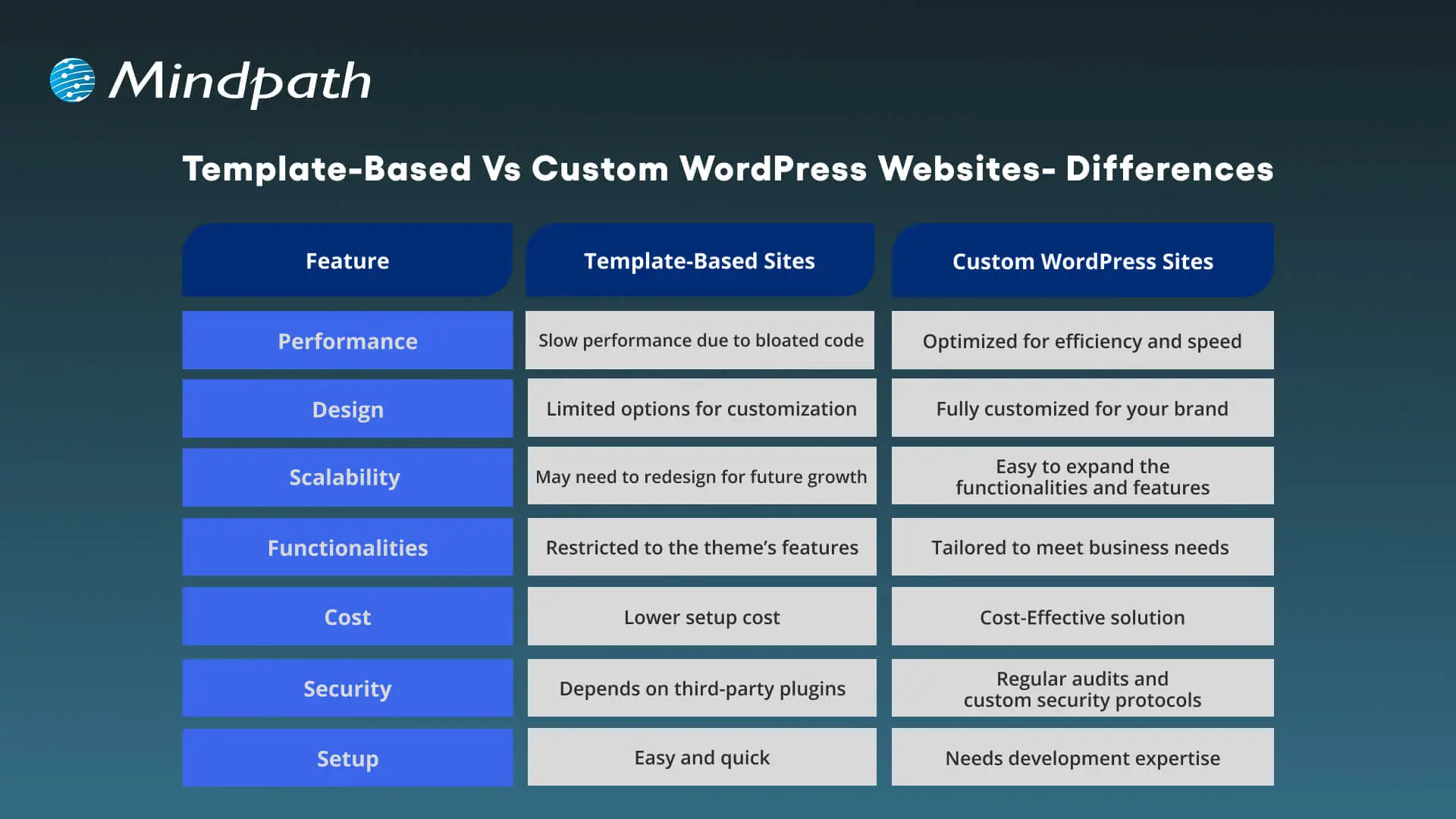
Template-Based Vs Custom WordPress Websites

Best Practices for Custom WordPress Development

To make sure your new custom WordPress development project offers desired results, it is advisable to follow these best practices:
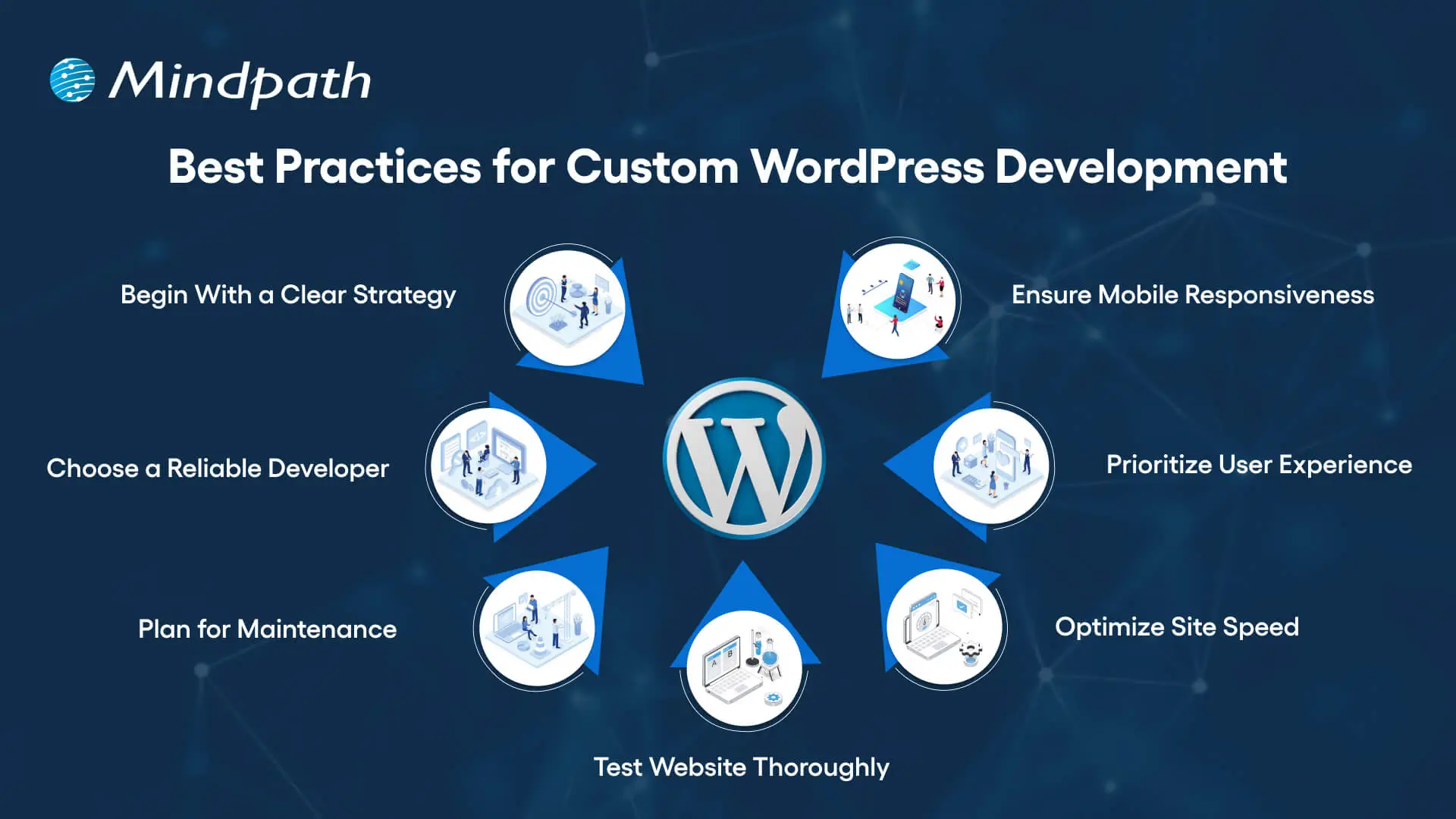
Best Practices for Custom WordPress Development

1. Begin With a Clear Development Strategy

Whether you need WordPress development for a small business or a large organization, you should first understand your target audience, desired functionalities, and goals. A well-documented strategy can help prevent scope creep, and you can ensure a perfect alignment between developers and stakeholders.

2. Focus on Mobile Responsiveness

With people increasingly using mobile phones and tablets for browsing, you should ensure that your website is responsive across all browsers and screen sizes. Custom WordPress development involves the use of a mobile-first design, which can boost SEO and usability.

3. Prioritize User Experience

Even though you have a beautiful website, it will be useless if users face issues while using it. An experienced developer will focus on a smooth user experience, making it easier for visitors to locate the things they need.

4. Optimize Your Site for Maximum Speed

Utilize techniques such as caching, image compression, CDN, and lazy loading to make sure your site loads faster. Tools such as Lighthouse, GTmetrix, Pingdom, and SEO Site Checkup can be used to detect bottlenecks.

5. Test Your Website Thoroughly

Before you make your site live, make sure that it has gone through proper testing. It helps identify compatible issues, loopholes, and missing functionalities. Prefer to carry out device testing, usability testing, and cross-browsing testing. Refine UX and optimize elements based on user feedback.

6. Plan For Smooth Maintenance

A custom WordPress site needs regular security checks, backups, and updates. So, create a proper maintenance plan or work with a professional WordPress developer to ensure constant support. Ongoing maintenance is crucial to keep your site functional and secure.

7. Partner With a Reliable Developer

Work with an experienced and trustworthy development company with a proven track record of offering quality WordPress website development services and creating high-performance websites. While helping you with technical execution, they can offer strategic input.

Do you want your website to be accessible to every visitor? Learn how to improve WordPress web accessibility can help you reach more users and create an inclusive online experience.

Tips to Choose The Right WordPress Development Company

Choosing the right expert for custom WordPress development is crucial to ensure success. While looking for the best one, prefer to consider the following points:

1. Evaluate The Experience

Ensure that the developer has years of experience in WordPress, especially in custom development. Go through their portfolio and check if they have ever created similar websites that you want to create. They should have a deep knowledge of the best practices and core functionalities of WordPress.

2. Technical Expertise

Confirm that the service provider has proficiency in JavaScript, CSS, MySQL, HTML, PHP, plugins, and more. Choose one with strong technical skills for the desired results.

3. Check Their Process:

Ask the company who they plan, carry out, and test the development projects. Ensure that they can offer a comprehensive custom development service based on your requirements.

4. Transparency and Communication

Only a trusted partner can keep you informed through the WordPress development project and will remain transparent about the costs and timelines. Choose one who prioritizes clear reporting and reacts to your queries promptly.

5. SEO Knowledge

The custom WordPress development expert should have a proper understanding of the latest SEO trends and be able to deploy necessary on-page optimization from the beginning. Furthermore, they should know how to configure different SEO plugins.

6. Post-Launch Support

Without regular updates and maintenance, your site will become vulnerable to various issues. So, partner with a development company that offers additional support along with maintenance services to keep your site performing at its best.

This is how you can hire an expert for professional WordPress web development to get your website listed higher in SERPs.

Wondering how to hire the right WordPress developer to help your business grow online? Explore our detailed guide to hire WordPress Developer to discover expert insights that guide you toward making the best hiring decision.

Looking to Elevate Your Business with Custom WordPress Development?

Undoubtedly, WordPress offers organizations the flexibility, affordability, and speed they need to start. Custom WordPress development is more than just writing code and creating a website. It is a strategic process to craft a unique digital experience that can effectively support your organizational goals, reflect your brand, and scale with you. It provides you with robust security, future scalability, and innovations that you will not get with template-based solutions.

If you want to elevate your business’s online presence and are looking for a future-proof platform, you can always count on Mindpath’s WordPress development service. As a leading WordPress development company, we combine custom development with scalable architecture and creative design to bring your unique vision to life. At Mindpath, we understand that every business needs uniqueness when it comes to developing a website. That’s why we offer tailored solutions that can set you apart from your competitors. We specialize in CMS development, custom plugin development, theme development, and more. Create a solid presence in this evolving digital landscape with us!


Outgrown Off-the-Shelf WordPress?

We build custom themes and plugins around your workflow.

Frequently Asked Questions

For businesses serious about growth, yes. Free themes come with limitations that quietly cost more over time through poor performance, security risks, and constant plugin workarounds. A custom build gives you a site that actually works for your specific goals.
It depends on the complexity and features required. A straightforward custom site can take four to eight weeks, while larger projects with complex integrations and custom functionality can run three to six months. Clear planning upfront keeps timelines on track.
Small businesses can absolutely invest in custom development, especially when the site is central to revenue. Many development companies offer phased approaches, meaning you build what you need now and scale later without rebuilding the entire site from scratch.
Maintenance is often overlooked during planning. Regular updates, security patches, backups, and performance checks are essential. Most reliable development partners offer post-launch support packages so the site stays secure and functional well after it goes live.
Look beyond the portfolio. Ask how they handle communication, testing, and unexpected problems mid-project. A good partner is transparent about timelines and costs, asks the right questions early, and treats your goals as their own throughout the entire process.

Support Is One Click Away

Featured Posts

Related Post

healthcare software

Ever pondered how doctors can diagnose faster now-a-days? Or what helps hospitals and clinics to carry out all the operations smoothly? What’s powering the virtual health check-ups? Well, the answer to all these questions in your mind lies in one powerful solution and that is healthcare software. In this blog, we will walk you through the top 20 types of healthcare software in 2026. 

Before learning about the types, let us learn what is the meaning of healthcare software and some of its benefits. 

Looking to reduce manual errors and speed up patient care? Mindpath’s Healthcare Software Development Services build intelligent systems that enhance decision-making and patient satisfaction.

What is Healthcare Software?

Healthcare software is a software that is created to help hospitals, clinics, doctors and patients in managing health related tasks smoothly. It assists in various tasks like booking appointments, keeping digital health records of patients, sending reminders, managing billing process and even making sure medicines get delivered on time. This kind of software makes it easier for the medical staff to focus on their work and help patients to get better care, both in person as well as online. 

The majority of people often get confused between medical software and healthcare software. Medical software is mainly used with medical devices to check and analyze a patient’s health which helps to decide the right treatment. On the other hand, healthcare software mainly focuses on improving the daily operations in healthcare and making patient experience organized and smoother. 

The demand for software in healthcare industry is growing rapidly around the world. According to Dimension Market Research, the global healthcare software as a service market was projected to reach about USD 36.8 billion and experts believe that this number will keep going up every year by around 10.9%, and by 2033, it can reach USD 93.4 billion which indicates that more hospitals and clinics are using this software to make their healthcare better and easier for everyone. 

healthcare software as a service

Benefits of Healthcare Software

Now that we have an idea about the definition of healthcare software and what it can do to the industry, let us know about some of its benefits: 

1. Boost Hospital Operations

It helps hospitals run more smoothly by making tasks like scheduling, billing, and patient record-keeping much faster and easier for staff. 

2. Better Data Handling

Doctors and nurses can quickly access up-to-date patient information, which helps them make better and faster decisions during treatment. 

3. Cost-Effective

By reducing paperwork and cutting down on mistakes, hospitals can save a lot of time and money in their daily operations. 

4. Easy Bookings for Patients

Patients can easily book their appointments online without the stress of long phone calls or waiting in line. 

5. Improve Patient Care from Anywhere

Even if someone lives far from a hospital, they can still talk to their doctor through video calls and get care from the comfort of home. 

6. Easy Monitoring and Health Tracking

Health apps and reminders make it easier for patients to take their medicine on time and keep track of how they’re feeling every day. 

Curious how AI is transforming industries and healthcare? Explore Generative AI use cases across diverse sectors and see how it’s reshaping healthcare platforms.

Let us come to our main topic now, the types of healthcare software: 

Top Healthcare Software in 2026

Having the best healthcare software is very important for making daily tasks easier in clinics, hospitals and labs. Today, many types of software in hospitals help doctors, nurses, and patients to work together and smoothly. Let’s have a look at some of them: 

1. Electronic Health Record (EHR) Software

EHR software stores patient data like medications, procedures, and doctor notes which helps doctors make better decisions and often includes billing features and a patient portal for easy access to health records and prescriptions. 

2. Medical Diagnosis Software

Medical diagnosis software allows doctors to share anonymized patient records to fill information gaps and improve diagnoses. It often uses AI to analyze data and suggest probable diagnoses. There are apps available for individuals to help users assess if they need medical attention. 

3. Medical Imaging Software

Medical imaging software processes MRI/CT/PET scans and creates 3D models. It helps with human anatomy modeling for individual patients, like creating a 3D print of teeth for orthodontics, or designing medical equipment such as artificial limbs. 

4. Medical Research Software

Medical research software aids in education and sharing research within the medical community. It trains healthcare professionals and supports diagnoses by referencing external cases, while also streamlining research processes to reduce costs and improve financial outcomes. 

5. Appointment Scheduling (Booking) Software

This software helps healthcare facilities manage appointments online. It allows patients to schedule appointments through an app or website, with email notifications and automatic reminders for both doctors and patients about upcoming appointments. 

6. Medical Database Software

This medical computer software stores data by disease, not by patient. It helps doctors make better treatment decisions by comparing similar cases and supports learning by offering access to detailed clinical case histories. 

7. Telemedicine Software

Telemedicine software lets doctors see patients online through apps or browsers. Some tools also offer e-prescriptions and billing. It’s super convenient for both patients and doctors, which is why it’s growing fast in the healthcare world. 

8. E-prescribing Software

E-prescribing software helps doctors manage prescriptions easily. They can track, renew, or cancel them digitally. It also connects with national drug databases, making the whole process quicker, safer, and more accurate for both doctors and patients. 

9. Medical Billing Software

Medical billing software helps hospitals manage invoices, payments, and other financial tasks. It’s often built into larger systems like EHRs, making it easier for accounting teams to handle everything in one place, quickly and accurately. 

10. Medical Equipment Management Software

Medical equipment management software helps clinics avoid manual tracking by automating maintenance schedules and sending inventory alerts. It keeps everything running smoothly and reduces the risk of missing important upkeep. 

11. Hospital Management Software

Hospital management software helps hospitals handle daily tasks like billing, accounting, patient management, inventory, bed management and others. It automates these operations to make hospital workflows smoother and more efficient for staff and administrators. 

12. Mobile Health (mHealth) Apps

mHealth apps make healthcare easier by helping patients book appointments, pay bills, and consult doctors online. They connect with EHR systems, so doctors can see medical records during virtual visits, improving care and saving time. 

13. Laboratory Information Management Systems (LIMS)

LIMS helps labs track samples, manage test data, and stay compliant with regulations. It reduces errors, speeds up processing, and keeps lab operations smooth, making sure patients get accurate and timely results. 

14. Personal Health Record Software (medical diaries)

Personal Health Record software, like the Tulipa app for Parkinson’s disease, allows patients to track symptoms, medication, and treatments. It helps generate health reports for doctor visits and alerts healthcare providers if a patient’s condition worsens. 

15. Radiology Information System (RIS)

A Radiology Information System (RIS) manages and stores radiology images and results. It works alongside PACS to streamline radiology department operations, ensuring efficient image storage and integration with EHR/EMR systems for enhanced patient care. 

16. ERP System

An ERP system for healthcare focuses on operational management, optimizing financial, supply chain, and human resources processes. It supports strategic planning, including expansions and mergers, without directly managing patient-facing tasks or data. 

17. Pharmacy Management Software

Pharmacy management software helps control and monitor inventory by classifying medicines, ensuring adequate stock, and avoiding shortages. It also supports drug price management and integrates with prescription systems for seamless access to medication information. 

18. Clinical Trial Management Software

Clinical trial management software records all the information related to the trials, such as patient information, study files, and approval from regulatory bodies. It is utilized mostly in top-class hospitals undertaking large-scale research to maintain compliance and proper trial management. 

19. Health Tracking Apps

Health tracking apps assist users in tracking fitness, diet, stress, and sleep. Many syncs with IoT devices like FitBit or Oura Ring to collect data. They’re popular for making healthy habits easier and more trackable every day. 

20. Remote Patient Monitoring (RPM)

Remote Patient Monitoring (RPM) enables healthcare professionals to gather patient information beyond the confines of standard settings, i.e., hospitals and clinics. RPM encompasses devices like blood glucose meters and heart rate monitors, which improve post-operative care and chronic disease care. 

Looking to speed up hospital operations and reduce errors? See how AI in healthcare is making hospital management smarter and more efficient.

Ready to Revolutionize Your Healthcare Solutions?

Healthcare is changing at a lightning pace, and software is leading the charge. From helping hospitals operate more effectively to making it easier for patients to access care, healthcare software is making a difference. In 2026, these technologies will continue to expand and make care easier, quicker, and more patient centered. 

At Mindpath, we recognize the need for state-of-the-art technology in the healthcare industry. Our healthcare software development services are built to improve operations, enhance patient care, and increase overall efficiency. Let Mindpath help you empower your health care business with robust, scalable, and innovative software that keeps up with the evolving healthcare environment. Let’s create a healthier tomorrow together! 

Frequently Asked Questions

1. How do I choose the right healthcare software for my organization?

Choosing the right healthcare software depends on your facility size, patient volume, budget, and operational needs. Start by identifying workflow challenges, integration requirements, and compliance standards. Always look for scalable solutions that can grow with your organization and support future technological advancements.

2. Is healthcare software secure for storing patient information?

Yes, most modern platforms are built with strong security measures such as encryption, access controls, and regulatory compliance standards. However, healthcare providers must ensure proper implementation, regular updates, and staff training to maintain data privacy and protect sensitive patient information from cyber threats. 

3. Can small clinics afford advanced healthcare software in 2026?

Absolutely. Many healthcare software solutions are now available through cloud-based or SaaS models, making them more affordable for small clinics. These subscription-based systems reduce upfront costs and allow smaller healthcare providers to access advanced features without investing heavily in infrastructure. 

4. How does healthcare software improve patient satisfaction?

Healthcare software enhances patient satisfaction by reducing waiting times, simplifying appointment bookings, enabling digital communication, and ensuring accurate records. When systems run smoothly, patients experience faster service, clearer communication, and more personalized care throughout their treatment journey. 

5. Will healthcare software replace administrative staff in hospitals?

No, healthcare software is designed to support administrative teams, not replace them. It automates repetitive tasks like billing and scheduling, allowing staff to focus on higher-value responsibilities such as patient coordination, service improvement, and overall operational management. 

Legacy modernization roadmap 

Enterprise systems drive day-to-day operations, but most leaders eventually experience the burden of outdated platforms. Businesses want speed, security, and scale, yet legacy complexity can slow down critical decisions and digital initiatives. A clear legacy modernization roadmap brings direction and control to this transformation. It helps organizations align technology with business objectives and make measurable changes with greater confidence.

Key Takeaways

  • 01
    A legacy modernization roadmap gives enterprises a structured path for transforming outdated systems while aligning technology with business goals.
  • 02
    A strong roadmap can help reduce technical debt, control costs, improve security, and increase enterprise agility.
  • 03
    The modernization process typically includes system assessment, strategy definition, risk planning, phased execution, testing, and continuous monitoring.
  • 04
    Enterprise modernization works best when technical decisions are connected to measurable business outcomes and ROI targets.
  • 05
    Continuous monitoring after deployment helps organizations maintain performance, security, scalability, and long-term modernization value.

Nevertheless, modernization does not only require technology upgrades. It requires clarity, leadership focus, and effective execution at every level. That is why enterprise leaders need to consider modernization as a strategic priority rather than a side project. The right roadmap connects business vision with technical action, manages risk, and creates a structured path toward long-term growth. In this blog, we break down a practical legacy modernization roadmap designed with enterprise decision-makers in mind.

Looking to align technology upgrades with your overall business strategy? Mindpath’s legacy modernization services help ensure your systems support growth and deliver better ROI.

What Is a Legacy Modernization Roadmap?

A legacy modernization roadmap gives enterprises a clear, structured plan to upgrade outdated IT systems. It takes leaders through system evaluation, objective creation, strategy selection, planning, implementation, and optimization while keeping business goals in focus. Consequently, organizations can reduce technical debt, enhance performance, and develop secure, cloud-ready systems that support long-term growth.

In simple terms, an enterprise modernization roadmap connects the current state of legacy systems with the desired future state. It defines what needs to change, why it needs to change, how the transformation should happen, and how success will be measured.

Legacy system transformation focuses on turning rigid, high-maintenance platforms into agile and scalable architectures. Teams can divide large systems into manageable stages and adopt approaches such as cloud, microservices, and automation. This can enhance flexibility, improve security, and help enterprises respond more quickly to changing market needs.

Want to understand how modernizing legacy systems can transform your business operations? Explore the benefits of modernizing legacy systems to drive efficiency and growth.

Why Do Enterprises Need a Legacy Modernization Roadmap?

Companies often face sluggish systems, rising maintenance expenses, security concerns, and difficulty adapting to new business requirements. A clear legacy modernization roadmap, supported by a strong legacy modernization strategy, helps leaders improve performance while creating a more structured path toward sustainable business growth.

The roadmap also helps organizations decide which systems should be modernized first, which modernization approach is appropriate, and how technical changes should connect to measurable business outcomes.

1. Strong Business Alignment

Businesses require a sense of direction that links technology with expansion strategies. A clear roadmap converts IT initiatives into long-term business goals and helps turn existing systems into growth enablers.

2. Lower Costs and Better Returns

Legacy systems can be demanding in terms of maintenance and repair. Modern platforms can lower operating expenses and provide stronger returns through improved efficiency and smarter resource utilization.

3. Better Security and Compliance

Obsolete software can expose businesses to security risks and compliance gaps. Modern systems can strengthen data protection and help companies meet industry requirements more effectively.

4. Greater Agility and Scalability

Companies have to react quickly to market changes, shifting customer expectations, and new opportunities. A legacy modernization roadmap supports flexible architectures that enable faster releases and more seamless scaling.

5. Smarter Technology Adoption

Businesses want to adopt innovation without creating unnecessary conflicts within their existing technology environment. The application of AI in legacy modernization can support smart tools that improve insights, automation, and decision-making.

6. Reduced Operational Risk

Changing core systems without a strategy can create disruption and uncertainty. A structured modernization roadmap keeps transition risks under control and helps businesses maintain continuity throughout the transformation.

Looking to modernize your systems with advanced AI technologies? Learn from AI-driven legacy system modernization to accelerate your transformation journey.

A Step-by-Step Legacy Modernization Roadmap

A good modernization plan makes transformation objectives measurable. A practical legacy modernization roadmap can help enterprise leaders progress with greater organization, control, and certainty.

The process can be viewed as six connected stages: system assessment, strategy definition, risk planning, phased execution, testing, and continuous optimization. Each stage supports the next and helps organizations reduce transformation risk.

1. System Discovery and Assessment

Teams map existing systems and identify dependencies. They evaluate technical health, identify performance bottlenecks, and flag areas that may create transformation risks. They can also use legacy modernization tools to uncover hidden risks and code issues.

2. Strategy and Value Definition

Leaders establish the future architecture and define desired business outcomes. They select the appropriate modernization strategy based on business objectives, system complexity, technical constraints, and expected value.

A legacy modernization roadmap helps align technical decisions with measurable ROI targets, ensuring that modernization remains connected to business priorities.

3. Planning and Risk Readiness

Teams develop a clear execution plan using milestones. They define the process for data migration, compliance, security controls, testing, and operational continuity. The legacy application modernization roadmap helps teams reduce risks before implementation begins.

4. Phased Execution and Deployment

Professionals upgrade systems through manageable stages instead of attempting a complete transformation at once. Controlled deployment cycles help reduce disruption and allow teams to validate progress at each stage.

A legacy modernization roadmap keeps teams focused on stability, measurable milestones, and steady progress throughout implementation.

5. Testing and Quality Validation

Automated, functional, security, and performance tests should be performed at each stage. Teams can measure system functionality against defined KPIs and business objectives. This step helps validate whether the modernized system can deliver reliable performance under real workloads.

6. Optimization and Continuous Monitoring

After deployment, leaders monitor system health, performance metrics, security, and user feedback. Teams can then optimize processes and infrastructure to support future scaling and long-term business growth.

Wondering how SaaS can reduce the complexity of legacy systems? Explore SaaS trends to streamline your transformation process.

How to Measure a Legacy Modernization Roadmap

A modernization roadmap should not end when the new system goes live. Enterprises need measurable KPIs to determine whether the transformation is delivering the expected business and technical value.

1. System Performance

Organizations can track response times, uptime, application performance, and system reliability to determine whether modernization has improved technical efficiency.

2. Cost Efficiency

Teams can compare infrastructure, maintenance, support, and operational costs before and after modernization to understand the financial impact.

3. Security and Compliance

Security incidents, vulnerabilities, compliance gaps, and remediation requirements can help organizations assess whether modernization has strengthened their security posture.

4. Business Agility

Release frequency, development speed, integration time, and the ability to respond to changing business requirements can indicate whether the modernized architecture provides greater agility.

5. User Experience

Organizations can also measure user satisfaction, task completion, adoption, and feedback to understand whether the transformation improves the experience for customers and employees.

Ready to Build a Future-Ready Enterprise with a Clear Roadmap?

A strong legacy modernization roadmap gives enterprise leaders clarity and control. It connects business objectives with technology action systematically. Phased execution helps organizations reduce risk, control costs, and improve performance. Teams can support long-term digital growth with greater certainty through proper planning, governance, and continuous optimization.

At Mindpath, we provide legacy modernization services that help businesses achieve measurable outcomes using a successful legacy modernization framework tailored to their enterprise-specific needs. Our specialists evaluate existing systems, establish modernization strategies, and execute transformation with a focus on security, scalability, and quantifiable value.

FAQs

1. Why Should Enterprise Leaders Prioritize a Legacy Modernization Roadmap Now?

Competitive pressure and rising maintenance costs demand faster innovation. A legacy modernization roadmap helps leaders align technology with strategic growth goals. It creates clarity, reduces operational risk, and strengthens long-term scalability in an increasingly digital business environment.

2. How Long Does a Legacy Modernization Roadmap Typically Take?

Timelines depend on system complexity, data volume, and business readiness. Some initiatives move quickly with a focused scope, while large transformations require phased execution. A well-structured legacy modernization roadmap defines milestones early and keeps teams aligned with realistic delivery targets.

3. How Do We Measure Success During Modernization?

Enterprises should measure improvements in performance, cost efficiency, uptime, security, and user experience. Business impact should guide every technical decision. A clear legacy modernization roadmap establishes KPIs at the start and tracks measurable outcomes throughout the transformation journey.

4. Which Architecture Approach Suits Complex Legacy Systems?

Enterprises often evaluate cloud-native, microservices, or hybrid models based on workload demands. Technical audits help identify system dependencies and scalability limits. A legacy modernization roadmap supports informed architecture decisions that balance innovation, risk control, and operational stability.

5. How Can We Manage Data and Compliance Risks During Modernization?

Data migration requires strong governance and phased validation. Teams should conduct security reviews and compliance checks before execution. A structured legacy modernization roadmap reduces exposure to data loss and regulatory gaps. Mindpath’s legacy modernization services provide expert guidance for secure and compliant transitions.

What is serverless architecture 

Currently, companies are striving to create applications capable of scaling at a moment’s notice while requiring very little overhead. In this major transition, digital leaders need to grasp the concept of what is serverless architecture. It suggests a move towards fast development, less concern with the technical infrastructure, and a focus on generating real business ‍value.

While seeking agility and innovation, organizations will probably come across serverless computing since it is often praised for its great benefits. However, any architectural decision brings along some critical considerations that impact control and performance. So, in this blog, we will explore the fundamentals of serverless architecture to help you consider how it fits into the bigger picture. So, keep reading further!

Ready to build a scalable and efficient serverless ecosystem for your business? Explore Mindpath cloud infrastructure services to design, deploy, and manage high-performance cloud environments tailored to your needs.

What is Serverless Architecture?

Serverless architecture is a cloud computing model in which the cloud provider automatically manages the infrastructure. It eliminates server management, scaling, and maintenance. This means developers can concentrate on code to fulfil business needs. This enhances the speed, agility, and efficiency of application development.

Cloud providers automatically run application code in stateless, event-driven environments. They manage deployment, scaling, and availability automatically. So, developers avoid operational complexity and focus on innovation. This approach enables rapid deployment, optimal resource allocation, and performance under variable load.

Also Read: Serverless Architecture in Cloud Computing

Why are Businesses Choosing Serverless Architecture in 2026?

The serverless architecture market was worth USD 9.42 billion in 2023 and continues to grow at a robust pace, according to Grand View Research reports. It’s projected to grow at a CAGR 28.2% from 2024 to 2030. This is why serverless is gaining traction in various sectors. In 2026, companies will use serverless to address application development challenges more effectively.

Serverless helps deliver responsive and scalable applications in growing demand. It is easier to build and has a faster development cycle. Organizations are now embracing it to keep up with the digital shift. Let’s take a look at the components of serverless architecture that make it so powerful.

1. Event Sources

Invoke serverless functions via APIs, database operations, or storage events.

2. Data Services

Offer scalable data storage for access and management.

3. Compute Layer (FaaS)

Runs code based on events without server management.

4. Observability Layer

Monitors logs, metrics and performance for visibility.

5. API Gateway Layer

Controls access and routes traffic to serverless functions.

6. Orchestration

Manages the execution of multiple functions for complex tasks.

What are the Key Advantages of Serverless Architecture?

Knowing what is serverless architecture helps to explain its increasing popularity with businesses. Companies are looking for ways to ease development and increase efficiency. The benefits below demonstrate how it addresses the needs of applications.

1. Faster Application Delivery

Without the need to build infrastructure, teams are able to roll out features at a faster pace. Hence, it mitigates the occurrence of delays and enhances release cycles.

2. No Server Management Required

Developers are not responsible for the management of servers and operating systems. That makes development quite straightforward and that greatly contributes to the reduction of technical burden.

3. Flexible Event-Based Execution

Applications that recognize and react to events such as a change in data or a new file being uploaded. This feature unleashes the power of modern and customized workflows.

4. Better Cost Efficiency

Companies only get billed for the times they actually run their code, so there is no cost for unused resources. This approach leads to more effective financial management and better use of money.

5. High Availability by Design

Applications are deployed across multiple zones to improve their reliability. With this, they can maintain their performance even in cases of failures or when there is high demand.

6. Easy and Automatic Scaling

Applications automatically increase their capacity based on the traffic demand. There is no need for manual intervention during traffic spikes.

7. Improved Developer Focus

Development teams fully dedicate their efforts to enhance application logic and including new features. This is a direct indication of the major serverless benefits for contemporary software development.

8. Reduced Operational Effort

It significantly reduces the requirement for near-constant supervision and the upkeep of infrastructure. Consequently, it diminishes the level of operational work and dependence on resources.

Key Challenges of Serverless Architecture

While we are discussing the benefits of serverless computing, we should also consider its challenges. It may enhance development, but there are some constraints that impact control and performance. Here are some of the challenges that businesses need to consider.

1. Limited Control Over Performance

Serverless systems can have different response times depending on whether there are sudden changes in traffic or periods of inactivity.

2. Dependency on Cloud Providers

Functional applications are highly dependent on specific provider services, making migration difficult.

3. Complex Debugging Process

It is hard to debug errors across multiple distributed functions, as there is no central point of control. 

4. Stateless Architecture Limitations

Functions do not maintain internal state and rely on external systems for state management. 

5. Security Management Challenges

A web of interconnected services expands the attack surface and needs security attention.

6. Constraints in Application Design

Serverless may not be suitable for long-running applications or memory-intensive tasks.

7. Difficult Local Testing

Local testing of applications becomes complex because of service integration. 

8. Cold Start Delays

Time is required to start inactive functions so this is a problem for applications with a rapid response requirement. 

Trends Shaping the Future of Serverless Architecture

Just knowing the concept of what is serverless architecture is not sufficient in the ever-changing technology landscape. Companies must also know how it is evolving. These trends are just a glimpse of how serverless architecture is going to transform the way apps are built and used in future.

1. AI and Machine Learning Growth

Serverless frameworks enable quicker AI model deployment and scaling. This facilitates real-time intelligent applications.

2. Edge Computing Expansion

Applications are executed near end-users. This enhances performance and lowers latency.

3. Support for Complex Applications

Serverless can run complex and high-performance applications. This extends its application in modern apps.

4. Multi Cloud Adoption

Companies adopt serverless on multiple cloud providers. This lowers risk of vendor lock-in.

5. Stateful Serverless Evolution

Enhancements enable improved function state management. This simplifies workflow and eliminates external state.

Ready to Embrace the Future with Serverless Architecture?

Knowing what is serverless architecture enables better tech choices. It enables rapid development, scalable resource management, and easy maintenance. In the digital age, keeping up with the times is crucial. The rise of serverless architecture is transforming the development and deployment of applications in the competitive landscape.

At Mindpath, we provide cloud computing services tailored to modern business needs. We assist in creating scalable and efficient serverless solutions. Our goal is to deliver speed, agility and value for your digital transformation.