Top Mistakes to Avoid When Building Custom Software 

Join our Newsletter!

Featured Posts

Support Is One Click Away

Home

Top Mistakes to Avoid When Building Custom Software 

Custom software development mistakes

Top Mistakes to Avoid When Building Custom Software 

What can cause a well-planned software project to stray off track? Have you ever thought about this? Most of you must have found yourself in a similar situation, right? If so, you are not alone. Many organizations, just like yours, start with the right intentions, a highly skilled team, and a strong idea, but often face delays or an unexpected outcome. Typically, the problem dwells in small custom software development mistakes that begin in the early phases, and it ultimately grows into bigger challenges. If you ignore the early warning signs, it can quickly slow down the whole process. So, how do you keep a custom software project on target, on a clear and quick path toward your business goals?

Every custom software project is full of important decisions that shape the final product. From how you outline your needs to how your team communicates, every aspect matters a little more than you think. Without a defined process, even good ideas have a tendency to derail. In this blog, we will highlight the key custom software development pitfalls you need to avoid, making sure your custom software project stays on track! So, keep reading to find out!

Looking forward to tailoring a software which exactly fit your organizational needs? At Mindpath, we offer custom software development services that help in designing and developing software that meets your business goals.

Why Choose Custom Software Development for Your Business?

Custom software development is a process to create tailor-made software for your organization. It reflects your exact workflow, needs, and goals of the users. It is designed to suit your needs by solving your problems, rather than using predefined features as is the case with off-the-shelf software. Custom software offers better performance, is easily scaled, and puts you in control of the functionality, design, and updates as your business adapts and grows.

Standard software may be quicker to set up; however, it is inflexible, comes with ongoing licensing, and requires ongoing hardware changes. Custom software, on the other hand, is a long-term investment. It does not have unnecessary features, it supports your effective operation, and it also fits in smoothly with your systems. Interestingly, if it is designed by your team, it reduces time, minimizes long-term costs to improve decision-making throughout your business.

Let us take a quick dive into the benefits of custom software development:

1. Custom software will scale with your business as it grows. It also adapts easily when you expand your services or change your processes without incurring the costs of upgrades.

2. It is developed around your specific workflows and business objectives. This provides you with smoother operations without the restrictions and inefficiencies of a one-size-fits-all system.

3. Custom software also integrates well with your current systems. It allows data to flow from one platform to another with minimal manual work and with fewer mistakes.

4. It ultimately saves you money over time, and you won’t incur future licensing fees. You pay for only what you require, and the total cost of ownership is lower.

5. Custom solutions differentiate you in the marketplace. With unique features and enhancements to the user experience, you can be more competitive and more customer-centric.

6. It makes teams more productive in their daily tasks. When software matches each role, teams work faster, make fewer mistakes, and deliver better results.

Want to know more about the benefits of custom software development for your business? Head to our blog: Top Benefits of Custom Software Development

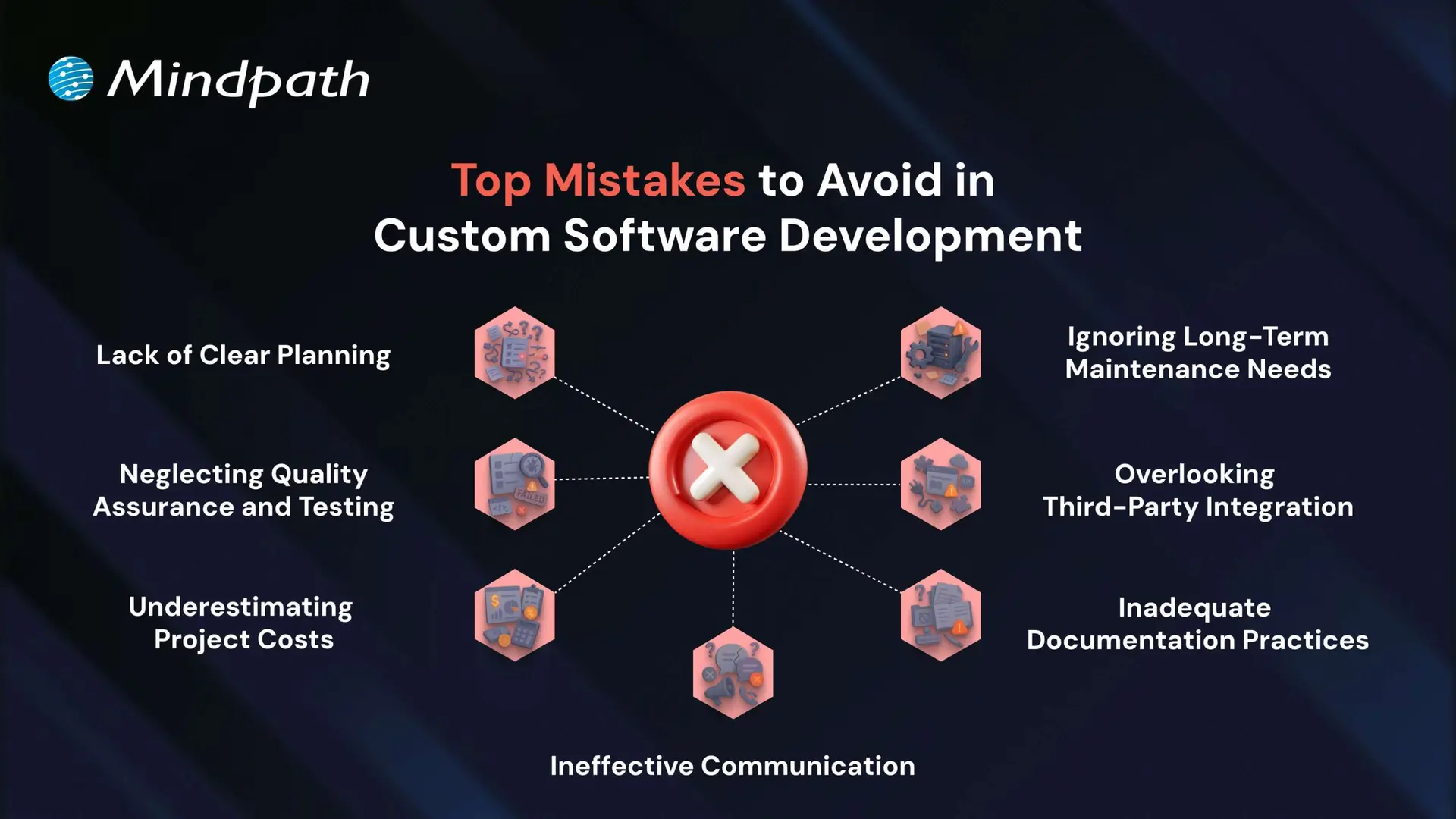
Top Mistakes to Avoid in Custom Software Development

Knowing the common challenges of custom software development is important for creating a successful solution. Many teams overlook some small but critical details, which are often the reason why custom software projects fail or are delayed.
Top Mistakes to Avoid in Custom Software Development

1. Lack of Clear Planning

A very frequently made mistake in custom software development is a lack of planning. If the business objectives are unclear and there is no well-structured roadmap in place, projects like these can end up with inflated costs and delays.

To prevent this, first ensure that key stakeholders are engaged and assess current processes, technologies, and long-term needs. Specify system requirements in detail, including integrations, UI/UX, architecture, and security, before you start the development.

2. Neglecting Quality Assurance and Testing

Omitting or neglecting testing is one of the common custom software development mistakes that can result in considerable problems post-launch. In many instances, some form of quality assurance takes place; however, in sufficient time to perform quality assurance, or altogether ignoring QA means bugs are left unidentified until it has become much harder (and much more expensive to fix).

In order to eliminate custom software mistakes like this, testing should be completed by qualified individuals using legitimate QA and UAT practices to deliver software that provides the customer or user, by and large, what they require to a fully qualified and operational level.

3. Underestimating Project Costs

Cost overruns are one of the most frequent custom software mistakes, primarily due to vague requirements and complexities not being properly assessed. When there is no clear requirement scope, budgets can easily become unbounded, creating delays and the likelihood of project failure.

To tackle this issue, establish a clear MVP with key features and distinguish them from desirable features. This will lead to realistic budgets and phases that can be developed incrementally and in alignment with business goals.

4. Ignoring Long-Term Maintenance Needs

Lack of planning for the ongoing maintenance of software is a challenge in the software development process. It can result in performance and obsolescence issues. Many well-built software solutions are inefficient and potentially vulnerable when support doesn’t happen, and you should not be surprised if yours is in the same boat when software support does not take place.

How can you prevent this? One place to start is with a clear maintenance strategy from the beginning. Budget for planned updates, security patches, and feature improvements so your software can run efficiently and securely.

If you’re planning a custom solution, our step-by-step guide to the custom software development process will help you understand each stage clearly.

5. Overlooking Third-Party Integration

Not considering compatibility issues with third-party systems is a custom software development mistake that can slow down development and reduce software performance. A poor integration strategy can result in data flow problems, missing functionality, and even unanticipated system failures.

To avoid this possibility, complete a full tech audit and feasibility study at the beginning of the project to help ensure the intended integration will go smoothly when the project is complete. This allows you to make informed decisions to move forward with a strategy that meets your business needs.

6. Inadequate Documentation Practices

Poor documentation is a custom software development mistake that results in a misalignment of expectations, confusion, and challenges for long-term maintenance. Documenting decisions and details of the project is imperative. Without documentation, teams cannot go back to understand or support the software later.

To avoid this mistake, be sure to define the scope of the project in advance and document as you go. Another solid practice is to have complete user documentation and technical documentation to enhance transparency, ease of handoff, and longevity.

7. Ineffective Communication

Poor communication is a common issue that leads to misunderstandings, missed deadlines, and project inefficiencies. When teams and stakeholders are not aligned, important decisions and updates can be lost or misinterpreted.

Following custom software development best practices involves maintaining open communication channels, regular check-ins, and clear documentation. This helps ensure transparency, accountability, and better collaboration throughout the development process.

Want to Build Smarter by Avoiding Common Custom Development Mistakes

Successful software projects rely on clear planning, communication, testing, and proper budgeting. Avoiding these common custom software development mistakes helps keep your solution on track and aligned with your business goals. By recognizing early pitfalls and following best practices, your team can build scalable, efficient software that delivers long-term value.

As a trusted custom software development company, we at Mindpath provide tailored solutions built around your unique business goals. Our custom software development services ensure seamless integration, ongoing support, and full transparency throughout the project lifecycle. Partner with us to turn your vision into a secure, high-performing solution that grows with your business.


Related Post

Explore how is AI transforming future, impacting data privacy, job markets, and business automation. Learn about Mindpath’s AI Services.
How much does hiring a ReactJS developer cost? Learn about factors affecting rates, and how to find the best talent within your budget.

Related Post

Benefits of IT Staff Augmentation vs. Traditional Hiring 

IT staff augmentation offers a flexible, scalable, and cost-effective alternative to traditional hiring models. It enables businesses to quickly access specialized talent, adapt to changing project needs, and optimize resource allocation without long-term commitments. This approach enhances operational efficiency, speeds up hiring processes, and supports strategic growth in dynamic markets.

Are you struggling to find the right talent for your IT projects or facing challenges with traditional hiring processes? Traditional hiring could take months, but what if there was a faster, more flexible solution? Now, with IT staff augmentation, you may satisfy your project goals fast and effectively without the long-term commitment and expense associated with traditional employment. This blog will explore the key benefits of IT staff augmentation compared to traditional hiring models, helping you make an informed decision for your business. 

Staying competitive in today’s changing business world frequently requires the capacity to expand quickly and adapt. Businesses must make crucial choices about how best to find and retain talent to satisfy the needs of IT projects. IT staff augmentation boosts your current workforce with additional workers that have specialized skills or knowledge. In contrast to traditional hiring, which usually entails long-term employment contracts, staff augmentation provides the freedom to scale resources up or down in accordance with project demands. 

Let us dig deep and explore the primary benefits that IT staff augmentation services offer compared to traditional hiring models. Understanding these benefits allows firms to make educated decisions in line with their strategic goals and operational requirements. Additionally, recognizing the power of remote development teams can further enhance flexibility, access to global talent, and cost-efficiency, enabling businesses to scale their projects effectively. 

What are the traditional hiring models?   

Traditional hiring models cover a range of techniques used by businesses to onboard new staff members. Here’s a short breakdown: 

  • Direct Hiring: This is the most popular approach used by businesses to hire people directly for full- or part-time jobs. It includes posting job positions, evaluating applications, setting up interviews, and choosing job applicants.


  • Temporary Hiring: Businesses employ people to do certain tasks or for a set amount of time. Temporary hires are made by the company itself or through employment agencies to cover short-term positions like project-based labour or seasonal labour.


  • Contractual Hiring: Contractual hiring is employing individuals or businesses under a formal contract to do certain activities or projects. Contractors may labour for a certain amount of time until the project is finished, and they are normally compensated for their services in accordance with the conditions specified in the contract.


  • Freelancers or Independent Contractors: Businesses employ independent contractors or freelancers on a project-by-project basis. They work for themselves and supply specialized knowledge or services on demand, frequently from a distance. They are not employees.


Drawbacks of traditional hiring models    

Despite being frequently employed, traditional employment strategies include several drawbacks that businesses need to consider:  

  • Time and Resource Inefficiency: It might take a while and a lot of resources to advertise job positions, evaluate applications, hold interviews, and decide who gets hired. This inefficiency frequently leads to protracted spells of unemployment, which affects output and pushes back project deadlines.


  • Cost Implications: Conventional hiring includes indirect costs like pay, benefits, and overhead related to permanent workers in addition to direct expenditures like advertising, onboarding charges, and recruiting agency fees (if applicable). Budgetary constraints may be strained by these costs, especially if turnover rates are significant or if highly skilled personnel require premium pay.


  • Rigidity in Staffing: In traditional models, once employed, workers usually commit to long-term jobs that might not match project-specific requirements or changing corporate demands. This lack of adaptability may cause resources to be overextended during peak hours or underutilized during off-peak hours, which would reduce overall operating efficiency.


  • Skills and Expertise Gaps: Access to the knowledge or abilities required for specialized projects or cutting-edge technology could not always be ensured by traditional recruiting practices. Talent with specialized skills may be difficult for organizations to find and keep, which might impede innovation and competitiveness in quickly changing sectors. 

Overview of IT Staff Augmentation    

Businesses use IT staff augmentation services, a dynamic outsourcing approach, to improve internal skills and meet project objectives. This strategy entails hiring outside experts, frequently through direct contracts or staffing firms, to assist and enhance current internal teams. Staff augmentation, which provides temporary or project-based solutions, enables flexibility in workforce management in contrast to traditional recruiting, which involves bringing on board individuals for permanent employment. The first step in the process of augmenting IT professionals is to determine exactly what knowledge and abilities are required to carry out a specific project or cover a void in the organization. Then, using a range of channels, such as independent contractors, freelancers, and specialized recruiting agencies, companies look for people or teams with the necessary training and expertise.  

Key Benefits of IT Staff Augmentation  

  •  Flexibility and Scalability   

Two important benefits of hiring more IT professionals are flexibility and scalability, which enable companies to modify their workforce in response to shifting demands and market dynamics. Through the on-demand availability of specialized skills and knowledge, IT staff augmentation provides organizations with flexibility in response to a wide range of project needs. For a new campaign, for example, a marketing agency may add digital advertising professionals to its team to ensure they have the requisite knowledge without having to commit to long-term hiring. This flexibility improves the way projects are carried out by utilizing outside resources just how projects are carried out by utilizing outside resources to when they are specifically needed. Scalability in IT staff augmentation allows companies to efficiently allocate resources. Compared to keeping a set, full-time staff, organizations may control expenses more effectively by expanding to match expanded project scope or by shrinking following project completion. Because it may be expanded geographically or into new markets, its scalability also helps strategic objectives by offering flexible workforce options that are customized to local needs. 

  • Cost-Effectiveness   

Cost-effectiveness gives companies effective ways to manage project budgets and acquire specialized talents. In contrast to traditional recruiting, which entails high upfront expenditures such as onboarding and recruitment fees, staff augmentation lowers these costs. Since agencies find and screen candidates, businesses may save money on hiring expenses. Additionally, firms save money on long-term costs like benefits, office space, and equipment because augmented workers are not full-time employees. Because of this flexibility, businesses may minimize expenses during downtime by allocating staff in accordance with project phases. 

  • Access to Specialized Talent   

access to specialized talent enables companies to swiftly and effectively obtain knowledge that might not be present internally. Through agencies or direct contracts, companies may hire outside experts and access a wide range of specialized talents and industry-specific information. This strategy works especially well for projects needing specialized technical skills or temporary requirements that don’t warrant hiring people on a long-term basis. Businesses may improve project outcomes, innovate successfully, and tackle difficult problems with specialized knowledge by utilizing the experience and skill of augmented workers. IT staff augmentation guarantees operational excellence and competitiveness in quickly changing sectors by giving businesses access to specialized expertise when and when it’s needed. 

  • Faster Hiring Process   

One clear benefit of contracting IT staff augmentation over traditional recruitment techniques is that it allows firms to integrate qualified individuals more quickly. Employing agencies with pre-screened applicants or directly engaging with appropriate contractors can help companies find contractors more rapidly. This expedited procedure shortens the time it takes to fill roles, jumpstarts projects, and improves flexibility in meeting market needs. IT staff augmentation helps companies to achieve project deadlines, deploy workers quickly, and keep up operational momentum without sacrificing quality or knowledge. It does this by reducing administrative delays and expediting onboarding procedures. 

Choosing Between IT Staff Augmentation and Traditional Hiring   

Criteria IT Staff Augmentation Traditional Hiring 
Flexibility High – Can scale up/down as needed Low – Fixed, long-term commitments 
Cost Cost-effective, reduced overhead Higher costs, including benefits and office space 
Time to Hire Fast – Quick onboarding with pre-vetted candidates Slow – Lengthy recruitment and onboarding process 
Access to Talent Access to specialized, global talent quickly Limited to available local talent 
Project Adaptability Easily adapt to changing project needs Rigid, less adaptable to project changes 
Commitment Short-term or project-based Long-term employment contracts 

Conclusion 

Lastly, IT staff augmentation provides a new answer for firms facing the problems of old employment strategies. It gives businesses unmatched scale, flexibility, and access to specialized personnel, enabling them to successfully and economically satisfy project requirements. Businesses may boost agility, optimize resource allocation, and sustain competitiveness in volatile market settings by utilizing on-demand external knowledge.  

Whether you’re expanding for a new project or looking for specialized expertise, Mindpath provides flexible hiring solutions without the long-term obligations of traditional recruitment. With Mindpath, you can streamline your processes and provide better outcomes. Get in touch with us right now to talk about your IT staffing needs and see how our solutions may benefit your company. 

Get in touch! 

Discover the advantages of IT staff augmentation over traditional hiring. Learn how it offers flexibility, cost savings, and quick access to specialized talent for your projects.
DevOps
Are you looking for a way to lower your business costs while boosting efficiency? What if you could achieve both by simply improving how your teams collaborate and work together? DevOps offers a powerful approach to streamline operations, automate processes, and eliminate waste—all of which can lead to significant savings. Curious about how DevOps can impact your bottom line? In this blog, we will explore the ways this methodology can transform your business and help you save money in the process.  DevOps is a method that brings together the development (Dev) and IT operations (Ops) teams to collaborate closely and effectively. It entails automating and improving the software development, testing, and deployment processes via the use of methods and tools. The purpose of DevOps is to make the entire process quicker, easier, and more dependable by increasing collaboration and communication among developers and IT workers. DevOps began in 2007 when individuals realized that the conventional style of working, in which developers and IT teams worked independently, was holding down progress. DevOps enables enterprises to produce software faster and with fewer issues by merging the work of both teams. It’s all about working together, automating tasks, and optimizing processes.  So, let’s dive in to explore how DevOps can help save business costs! 

How DevOps Can Help Saving Business Costs

1. Using Cloud Infrastructure

Cloud infrastructure is an effective means to reduce IT expenditures while increasing flexibility and efficiency. Cloud services enable enterprises to scale their resources up or down in real time. Additional resources can be allocated during peak demand periods, while they can be lowered during quieter periods. This guarantees that you only pay for what you use, reducing needless costs and optimizing your budget. Cloud platforms also make processes more efficient by providing automation tools. Tasks like resource management, monitoring, and upgrades can be automated, minimizing the need for human intervention and saving both time and money. Furthermore, the cloud eliminates the need for expensive on-premises infrastructure, resulting in lower maintenance and hardware costs. Businesses that integrate cloud infrastructure into DevOps techniques can save money while also improving efficiency, flexibility, and overall performance. This establishes a solid platform for providing dependable and scalable solutions. 

2. Automating with Infrastructure-as-Code (IaC)

Infrastructure-as-Code (IaC) is a method of managing your IT infrastructure that involves writing it as code, similar to providing precise instructions. Instead of manually configuring servers, databases, or networks, you describe the configurations and dependencies in code, and tools like Terraform or AWS CloudFormation do the rest. This strategy saves time, assures consistency, and allows you to easily replicate or upgrade your infrastructure. With IaC, you can make changes fast, scale resources, and maintain a dependable environment without having to do repeated manual tasks. It also lowers the need for additional documentation, as the code itself is the most accurate and up-to-date reference. To ensure success with IaC, it’s essential to securely configure resources, automate tests to validate the code, and continuously monitor the infrastructure. By adopting IaC as part of your DevOps practices, businesses can simplify infrastructure management, minimize errors, and cut costs through better efficiency and automation. 

3. Optimizing with Containers

Container orchestration makes it easier to manage a large number of containers running on many computers or servers. Containers are self-contained containers that include everything an application needs to function, such as code, libraries, and dependencies. Managing a few containers manually may be possible, but as the number of containers increases, the process gets more complicated. Container orchestration automates this process, ensuring that containers are deployed, scaled, and managed efficiently. It also enables containers to communicate and collaborate easily, eliminating human effort and minimizing mistakes. Kubernetes is a popular container orchestration tool that provides enterprises with a dependable approach to manage large-scale applications. Businesses that use container orchestration may achieve easier operations, improved resource utilization, and cost reductions while preserving application performance. 

4. Streamlining with CI/CD Pipelines

Implementing a Continuous Integration and Continuous Delivery (CI/CD) pipeline is an important DevOps approach that allows firms to save money by automating software development and delivery operations. During the Continuous Integration (CI) phase, developers routinely communicate and integrate code updates into a common repository. Automated systems then test and compile the code to guarantee that everything works properly. This avoids costly complications by identifying problems early in the development phase. CI also saves time on manual integration activities, freeing up resources for other important work. Continuous Delivery (CD) follows CI by automating the deployment of tested code to production or other environments. With solutions like Kubernetes or Docker, the process becomes more frictionless, minimizing delays and the need for manual labor. Automated testing guarantees that only stable and dependable updates are delivered, reducing downtime and mistakes that might result in increased costs. 

DevOps Development Services at Mindpath

At Mindpath, we provide DevOps services that streamline software development and reduce costs. Our team uses cloud infrastructure, automation, and container management to help your business scale efficiently. We automate IT processes with Infrastructure-as-Code (IaC) and manage container orchestration using Kubernetes. Our Continuous Integration and Continuous Delivery (CI/CD) pipelines ensure faster, error-free software delivery. With our DevOps expertise, businesses can improve efficiency, cut costs, and achieve high-quality results with minimal manual effort. 

Final Thought!

Incorporating DevOps into your business processes is a strong method to save costs and increase efficiency. Businesses can reduce operating costs by using cloud infrastructure, automating with Infrastructure-as-Code, optimizing with containers, and simplifying processes with CI/CD pipelines. DevOps not only reduces human work and mistakes, but it also speeds up software delivery and improves team cooperation. Mindpath’s DevOps services are meant to help organizations realise these benefits, allowing them to prosper in a fast-paced, competitive market. By implementing DevOps, you can improve productivity, cut expenses, and provide higher-quality outcomes with less work. 

Ready to optimize your business operations with DevOps?

Partner with Mindpath today to streamline your processes, reduce costs, and achieve high-quality results effortlessly!

Discover how DevOps can save your business costs by improving efficiency, and enhancing collaboration across teams for high-quality delivery.
Hire ReactJS developers in New Jersy

New Jersey is gradually emerging as a popular tech hub with many big enterprises and budding startups setting up their base in the Garden State. These organizations want to hire ReactJS developers in New Jersey to create the most attractive interfaces that grab the attention of customers. The demand for skilled ReactJS developers is on the rise due to the growing competition among businesses to establish a robust online presence.

Do you want to build dynamic web apps that can stand up to the emerging benchmarks of performance? ReactJS offers you the best open-source framework to translate your ideas into real web solutions that bridge the gap between your business and customers. This post offers a comprehensive guide to understanding the important things to keep in mind while hiring React developers in New Jersey.

Looking to engage your users with an interactive and seamless web application? Mindpath’s expert ReactJS developers in New Jersey specialize in creating solutions that are perfectly aligned with business goals.

Exploring the Tech Landscape in New Jersey

The first thing that you must know before hiring ReactJS developers is the way in which New Jersey is an ideal place for ReactJS projects. The demand for Hiring ReactJS developers in New Jersey is growing consistently as the state harbors a vibrant and thriving tech landscape. It is also important to remember that cities like Princeton, Jersey City, and Newark are gradually emerging as notable technology hubs. On top of it, the arrival of major corporations and startups in New Jersey has also made the state more attractive for skilled tech professionals.

Another prominent factor that contributes to the growth of the tech landscape in New Jersey is the presence of academic institutions that contribute to the state’s talent pool. The React Developer Job Market in New Jersey has also been gaining momentum owing to its geographical proximity to New York. New Jersey might have a higher cost of living than the national average. However, it has a lower living cost than New York, which makes it a promising choice for top-tier tech talent.

Also Read: ReactJS Trends 2025

Is ReactJS Still Relevant in New Jersey in 2025?

The world has progressed a lot since the arrival of ReactJS in 2013. With many new frontend development tools and frameworks in the market, it is reasonable to wonder about the reasons to choose ReactJS. Before you hire React developer in New Jersey, you must know why ReactJS is still a powerful framework for designing intuitive web apps. The one thing that no one can take away from ReactJS is the fact that it was developed by Meta, one of the biggest tech giants in the world. On top of it, it is an open-source JavaScript library, making it easier to access and understand.

The most prominent features of ReactJS that have been responsible for its popularity are the component-based architecture, declarative syntax, and virtual DOM. Component-based or modular architecture of ReactJS enables developers to break down UIs into smaller and reusable components. The reusable components play a crucial role in accelerating development and improving efficiency. On top of it, the declarative syntax helps in declaring exactly how you want the user interface to look. The virtual DOM helps in enhancing performance by identifying the most efficient approach to update the actual DOM.

Businesses have been searching for React developer hiring tips to capitalize on these features and build high-performance, maintainable, and scalable web applications. ReactJS is also a powerful choice for web UI development with its massive community that offers a treasure of libraries, tools, and resources. The actively growing community also offers the assurance of faster and efficient development alongside support for troubleshooting.

Curious why businesses are choosing ReactJS for their web projects? Discover the top benefits of React JS development services that make web applications more scalable and maintainable.

Crucial Skills to Look for in ReactJS Developers

Choosing the best ReactJS developers in New Jersey is not all about finding developers who know ReactJS. Business owners and hiring managers must verify whether candidates for React developer jobs have the essential skills required to address the responsibilities. The list of crucial ReactJS developer skills to look for in candidates includes a blend of technical and soft skills. Furthermore, employers should also keep an eye on candidates with skills that may add more value to web projects.

1. Core Technical Skills

You cannot expect to hire ReactJS developers without any technical skills. Every ReactJS developer must have an in-depth understanding of ReactJS and its core principles. The candidate must know about the component lifecycle, React hooks, the virtual DOM, state management, and props. In addition, React developers must be fluent in the ES6+ specifications of JavaScript with proficiency in new JavaScript features. The notable modern JavaScript features include arrow functions, modules, restructuring, and promises.

The answers to “What skills should a ReactJS developer in New York have?” will also focus on state management libraries such as Redux, routing libraries like React Router, and version control tools like Git. ReactJS developers must have a strong command of these aspects of ReactJS development to deliver effective results. On top of it, candidates for ReactJS developer jobs should know how to work with HTML and CSS, build tools, and API integration.

2. Must-Have Soft Skills

The skill requirements for React developer jobs also focus beyond the code as technical fluency alone cannot lead to success. Hiring managers must look for developers who have the soft skills required to work as part of an organization in changing environments. The essential soft skills required for a ReactJS developer include problem-solving, communication, collaboration, attention to detail, and adaptability.

Soft skills are the most crucial influencers of ReactJS developer cost in New Jersey as businesses need developers who create and nurture projects with other teams. You cannot expect a ReactJS developer without problem-solving skills to come up with an innovative UI design for your next web app. On the contrary, a developer with critical thinking can break down the problem and come up with elegant solutions.

Communication and collaboration are essential skills for React developers as they help in fostering teamwork. With multiple experts working in coordination on web development projects, ReactJS developers can achieve the best output. Furthermore, adaptability is a useful skill in the modern technology landscape, where new technologies and trends can lead to changing requirements for web development.

3. Bonus Skills

The search for skilled ReactJS developers may also bring you across some candidates with additional skills. Will the additional skills of the candidates be of any value to your business? Organizations that want to hire ReactJS developers in New Jersey must know the bonus skills that are nice to have in React developers. For instance, developers with fluency in server-side rendering frameworks like Next.js are a huge plus for employers.

The other additional skills that you can look for in React developer job applicants include TypeScript, testing frameworks, performance optimization, and UI component libraries. Each additional skill enhances how developers work and offers the assurance of a better final output. On top of it, knowledge of web accessibility standards and practical experience with cloud platforms like AWS and Azure can make ReactJS developers more useful.

Is your business looking for a reliable framework to power modern web experiences? Learn how React web development can improve performance, usability, and scalability.

Selecting the Ideal Hiring Model to Recruit React Developers

The choice of a hiring model is also another crucial decision in the hiring process. Most important of all, the answers to “What is the cost of hiring a ReactJS developer in New Jersey?” depend significantly on the hiring model adopted by an organization. Businesses can choose in-house developers, remote developers, freelancers, or professional ReactJS development services. Each hiring model presents distinct implications for your web development project, and you should choose one according to your requirements.

1. In-House ReactJS Developers

In-house ReactJS developers become a part of an organization’s internal teams and its culture. Business owners can have direct control over in-house developers and their work. In-house developers will be deeply integrated into the business as they align with the company’s values and vision. The biggest setback of choosing in-house ReactJS developers is the time-intensive recruitment process and the higher cost of hiring.

2. Remote Developers and Freelancers

Hiring managers can choose remote ReactJS developers in New Jersey to avoid the troubles that come with hiring in-house developers. Remote developers can work dedicatedly on web projects without imposing the costs of hiring a full-time employee. Freelancers, vetted thoroughly for their skills and experience, can also help businesses complete web projects with desired results.

3. Professional ReactJS Development Services

As a business owner, you must know that professional service providers are a trusted pick for any project. The experience of New Jersey-based ReactJS development services in web development projects across different industries can work in your favor. For instance, you will get to work with the best ReactJS developers without the need to manage them. As a result, businesses can also get relief from the burden of management overhead.

Is your business struggling to find the right tech talent locally? Discover the Key benefits of hiring remote developers to explore how remote teams expand your access to skilled developers worldwide.

Steps in the Process to Hire ReactJS Developers

Once you are familiar with the prerequisites before hiring, the next step is about preparing for the hiring process. Hiring managers might come up with many complex ideas to make the hiring process more meticulous and effective. On the contrary, you can rely on the following steps to hire the best ReactJS developers for your web projects.

1. Create an Attractive Job Description

Many people don’t know that the job description gets half the job done in the hiring process. How? The job description provides an outline of the job title, key responsibilities, skill requirements, and complexity of the job. As a result, the right applicants who check all the boxes in the job description will apply for the job.

Hiring managers can attract top ReactJS talent in New Jersey with job descriptions when created in the best way possible. You can create better job descriptions with details about the web projects and the level of experience required for the job.

2. Find the Best Platforms to Discover Talent

The job description is obviously the most powerful resource to help businesses get the best ReactJS developers. At the same time, hiring managers need to identify the right places to publish the job descriptions and seek talent. Professional networking platforms like LinkedIn or job boards can be some of the top places to begin with.

Hiring managers can also opt for unconventional approaches and visit online forums, conferences, and meetings between React developers to interact with them. Business owners can always rely on professional ReactJS development services to capitalize on the skills and experience of pre-vetted developers.

3. Comprehensive Screening and Interview

The screening process helps in picking the most capable candidates from the multiple applications for React developer jobs. In the initial screening, hiring managers must review the resume and portfolio of applicants. Hiring managers can also opt for a phone call or video call to evaluate their communication skills and experience of candidates.

After the screening is complete, you must have a structured interview process. The mandatory steps in an interview to hire ReactJS developers in New Jersey include coding challenges in simulated exercises, live coding sessions, and code reviews. The interview questions should test the depth of knowledge of the applicants about React concepts, JavaScript fundamentals, and UI design. Most important of all, the interview must also include questions to test the behavioral competence of candidates. Behavioral interview questions should measure whether the applicant will fit into the organization’s culture.

4. Know the Costs of Hiring ReactJS Developers

The most crucial aspect in any hiring process is the cost of hiring ReactJS Developers to the organization. Hiring managers look for ReactJS developer hourly rates when they need freelancers or remote developers. On the contrary, the salary or the hourly compensation does not represent all hiring costs.

According to ZipRecruiter, the average annual salary of ReactJS developers in New Jersey is almost $130,000 (Source). On the other hand, Glassdoor indicates that ReactJS developers can earn around $119,000 on average in New Jersey (Source). The hiring costs will not only include the salary but also the recruitment and onboarding costs.

Looking for a trusted partner to build scalable and high-performing React applications for your business? Explore how a React development company can turn your ideas into reliable, growth-driven digital solutions.

Final Thoughts

The task of finding a competent and experienced ReactJS developer in New Jersey can be significantly challenging for hiring managers. After reading a guide on how to hire ReactJS developers, you can get the confidence to pick the top ReactJS talent for your business. If you think that hiring ReactJS developers is a tough job, then you can rely on professionals.

We have the solutions for end-to-end web development at Mindpath with a team of experienced developers. Our specialization in ReactJS has helped us earn the trust of clients with outputs that deliver desired results. We strive to complete every project in alignment with the client’s vision while offering the assurance of cost-effectiveness and efficiency. Reach out to us for developing elegant as well as scalable web applications.

Discover the ultimate guide to hiring Node.js developers in London. Learn about the skills, benefits, and cost factors involved in finding the right talent for your project.