Understanding AI Safety: The Key to Responsible AI Development

Join our Newsletter!

Featured Posts

Support Is One Click Away

Home

Understanding AI Safety: The Key to Responsible AI Development

AI Safety

Understanding AI Safety: The Key to Responsible AI Development

Have you ever wondered how artificial intelligence (AI) could impact our lives if left unchecked? As AI continues to evolve, ensuring its safe and responsible use has become a major concern. What exactly is AI safety, and why is it so important for the future? In this blog, we’ll explore what AI safety means and why it’s needed to protect both humanity and technological progress. So, let’s dive in! 

What is AI Safety?

AI safety is the act of ensuring that artificial intelligence (AI) systems function properly without causing damage or creating unexpected risks. It entails developing rules and policies that govern how AI is created, developed, and used. The objective is to avoid mistakes, safeguard customers, and guarantee that AI works as developers planned. AI safety entails ensuring that algorithms are dependable, data is secure, and systems adhere to ethical and legal guidelines. This helps ensure that AI benefits society while posing minimal hazards. 

Why is AI Safety Important?

AI safety is particularly essential because as AI grows more powerful, it will have an impact on many aspects of our life, including how we work, interact with computers, and make decisions. Without adequate safeguards, AI can worsen inequality by favoring specific groups or making unjust decisions based on biassed data. Another important reason for AI safety is to keep AI from being used harmfully, such as distributing misleading information or compromising privacy. By prioritizing safety, we can ensure that AI contributes to the improvement of our environment rather than creating difficulties. This makes AI safety essential for creating a better, more equitable future for everyone. 

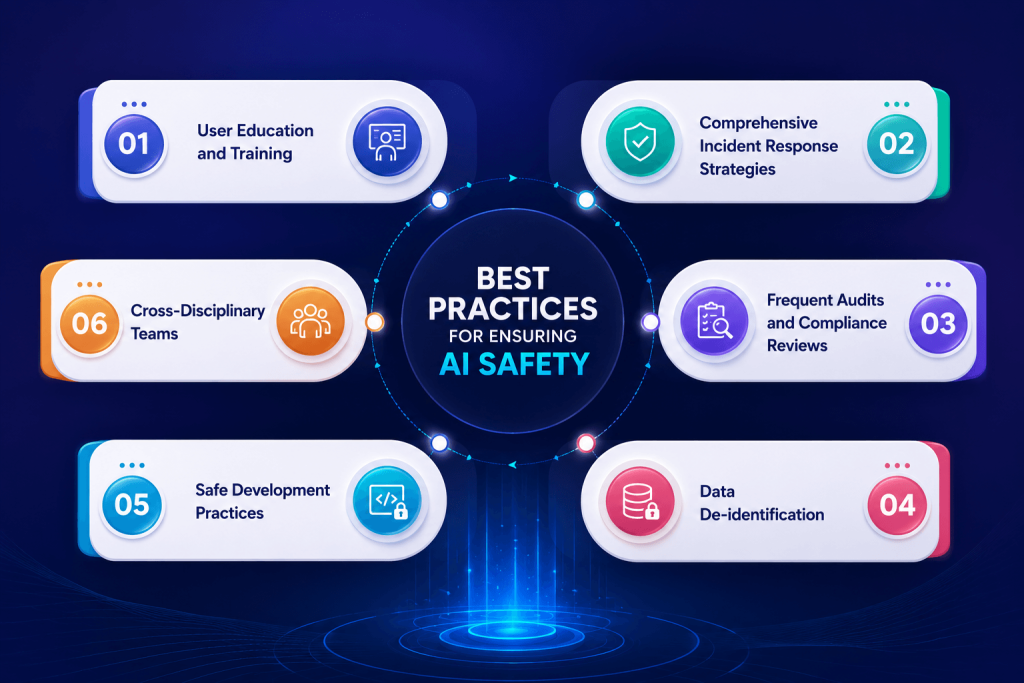
Best Practices for Ensuring AI Safety
AI Safety Best Practices

1. User Education and Training

Teaching individuals responsible AI development is essential for ensuring their safety and effectiveness. This training should include how to use the AI appropriately, identify possible hazards, and learn how to prevent them. When consumers understand how AI works, they can use it responsibly and promptly identify any concerns that require reporting. Trained users are also better able to offer useful feedback, which can aid in the AI’s effectiveness. They can offer improvements, report errors, and confirm that the AI is operating properly. This produces a cycle of continual development, gradually increasing the AI’s reliability.  Furthermore, user training fosters a sense of responsibility and awareness, lowering the risk of unintentionally abuse or security breaches. Organizations that engage in user education guarantee that their AI systems are not only appropriately utilized, but also safer and more effective in the long term. 

2. Comprehensive Incident Response Strategies

Developing robust incident response procedures is essential for dealing with AI safety problems promptly and efficiently. These strategies should contain specific actions for recognizing, reporting, and responding to any events or breaches that occur. A well-defined response strategy enables organizations to quickly isolate and resolve problems, limiting potential harm while preserving the system’s security and reliability. Organizations can secure their AI systems while still maintaining user confidence by being prepared.   

A thorough incident response plan should also include frequent team training and simulations to ensure that everyone understands their roles and responsibilities during an event. This proactive attitude promotes confidence and readiness to deal with unanticipated problems successfully. 

It is also important to evaluate and update response plans on a regular basis, taking into account new threats and learning from previous catastrophes. Organizations can improve their reaction tactics over time by taking feedback into account and adjusting to the changing environment of AI hazards. 

Furthermore, good communication throughout an event is crucial. The strategy should contain procedures for notifying stakeholders, users, and regulatory organizations of any breaches or safety issues. Transparent communication promotes confidence and reassures users that the organization is treating the matter seriously. 

3. Frequent Audits and Compliance Reviews

Conducting frequent audits and compliance checks is essential for guaranteeing AI safety. These audits should evaluate Artificial Intelligence systems to ensure that they meet established safety standards, ethical norms, and regulatory requirements. By completing these assessments on a regular basis, organizations can find possible hazards and areas where they may not be compliant, allowing them to make required modifications and improvements swiftly. 

These audits not only assist in detecting flaws, but they also encourage accountability and openness inside the organization. They urge teams to take AI safety seriously and make sure that everyone understands the necessity of following standards. 

4. Data Confidentiality

Data confidentiality is a crucial strategy for ensuring privacy in AI operations. This method entails eliminating personally identifying information (PII) from data sets, rendering it hard to link data back to people. Techniques like k-anonymity, differential privacy, and synthetic data creation are frequently employed to safeguard individual privacy while still making the data relevant for training and analysis. 

Organizations can use anonymized data to build AI models while protecting user privacy. Users will feel more confident knowing their personal information is secured, which helps to create trust. Furthermore, anonymized data can comply with numerous privacy standards, allowing organizations to avoid legal concerns while still gaining important insights. 

5. Secure Development Lifecycle

A secure development lifecycle (SDL) is essential for assuring AI safety. This strategy incorporates security precautions into all stages of AI development, from planning and design to implementation, testing, and deployment. This lifecycle’s key practices include undertaking security risk assessments, adhering to secure coding standards, and thoroughly testing to find and fix vulnerabilities. 

Organizations that include security throughout the development process can spot possible concerns early and mitigate risks before the AI system goes live. Furthermore, security measures must be updated on a regular basis to respond to new threats and technological advancements. This proactive strategy not only contributes to the development of safer AI systems, but it also improves general technological reliability and confidence. 

6. Cross-Disciplinary Teams

Utilizing cross-disciplinary groups in AI research is essential for improving AI safety by providing a varied variety of viewpoints and experience. These teams should include professionals from a variety of domains, including ethics, psychology, law, and particular industrial areas, as well as AI experts. This variety is essential for addressing the difficult issues of AI safety because it assures that the systems built are not just technically strong, but also socially responsible and ethically sound. 

Cross-disciplinary groups can detect possible concerns that people focused primarily on technical elements might have ignored. This collaborative approach fosters a more thorough grasp of the implications of AI systems, resulting in better decisions and more deliberate solutions. 

AI Safety with Mindpath

Mindpath is committed to ensuring the safety and security of AI. Our approach is focused on ensuring that AI systems function effectively and do not cause harm. We take significant precautions to secure users and data, ensuring that everything is handled appropriately. We give training to users to assist them understand how to utilize AI safely. Our teams comprise specialists from several domains, including ethics and technology, to ensure that we cover all elements of AI safety. 

We periodically check our systems to detect possible hazards and enhance our procedures. We also employ techniques such as data confidentiality to safeguard people’s personal information. By following a secure development methodology, we ensure that safety is included in every stage of the AI creation process. 

Final Thought!

In a society dominated by artificial intelligence, understanding and prioritizing AI safety is essential for establishing a responsible technology environment. As previously discussed, successful AI safety measures include user education, robust incident response techniques, frequent audits, data confidentiality, a secure development lifecycle, and collaboration among cross-disciplinary teams. 

At Mindpath, we are committed to following these guidelines, ensuring that AI systems not only function well but also adhere to the highest safety and ethical standards. We hope to increase trust and confidence in artificial intelligence technology by taking proactive actions to reduce risks and secure user data. As we traverse the difficulties of AI development, our dedication to safety will play an important part in defining a future in which AI serves as a beneficial force for society, empowering individuals and promoting equitable progress. 

Curious about how Mindpath can enhance your AI safety?

At Mindpath, we prioritize responsible AI development to protect users and data.

Related Post

Explore how is AI transforming future, impacting data privacy, job markets, and business automation. Learn about Mindpath’s AI Services.
Discover the ultimate guide to hiring Node.js developers in London. Learn about the skills, benefits, and cost factors involved in finding the right talent for your project.
Enhance your WordPress site’s inclusivity with our expert tips and services. Discover how to improve accessibility and explore our comprehensive WordPress solutions.

Related Post

types of software development

Picture a scenario in which you are running a growing business, and things are moving at a fast pace. At this point, your customers will expect more; teams will need better tools, and competition will just be a click away. You must keep in mind that the real game changer isn’t just having software but rather, its choosing the right kind of software. For this, understanding the types of software development can make a huge difference.  

Behind every great digital solution, there lies a specific type of development which is tailored to a specific need. Understanding the key categories of software development enables businesses to make smarter, confident investments while choosing the right technology teams to partner with for the future. So, if you are interested in knowing about the software development types, then this blog will guide you perfectly. We will explore the major kinds of software development, which every business should know to make smarter investments and drive meaningful growth. 

To begin with, let us first have a basic understanding of software development. 

What is Software Development?

Software development refers to the act of creating, designing, testing, and maintaining applications or systems that run on devices or computers. It combines the imaginative and creative process with the technical process of building software that can help your business work smarter and serve your clients better. Developers take your ideas and combine programming languages, libraries and frameworks to develop working software that solves real problems. 

There are many advantages to software development for businesses. It can increase productivity via automation and lower costs by streamlining processes. It also increases customer satisfaction through user-friendly overall features and allows companies to stay ahead of competitors by providing innovative solutions. Software can also be customized to provide better management of growth within the business and can enhance data cybersecurity protocols and processes while supporting better collaboration across teams.  

What are 5 Principles of Software Development?

Strong software development relies on key principles that guide the process and ensure reliable, high-quality results. These principles help teams build software that is efficient, adaptable, and easy to maintain over time. 

  • Working in Iterations: Working in short cycles allows teams to test, adjust, and improve regularly. This keeps the software flexible and ready for change. 
  • Reuse Components: Building with ready-to-use parts speeds up development and keeps the software consistent. It also makes updates and maintenance much easier. 
  • Set Quality Standards: Setting clear quality standards from the start helps catch problems early. It ensures the final product meets expectations and works reliably. 
  • Plan Architecture First: A strong foundation starts with early architectural planning. It helps avoid confusion, improves decisions, and sets the direction for smooth development. 
  • Control Changes Effectively: A clear system for handling changes keeps the project stable. It helps teams adapt without causing confusion or risk to the software. 

What are Different Types of Software Development?

Software development comes in many forms, each designed to meet specific business or user needs. Understanding these different types helps businesses choose the right solutions for their goals and growth. 

1. Frontend Development

Frontend development is a software development type that focuses on the part of an application users see and interact with. It involves creating user interfaces that are smooth, responsive, and visually clear. Frontend developers work with tools and technologies like React, CSS, JavaScript, and Flutter. Their goal is to ensure a great user experience on both web and mobile platforms. 

2. Backend Development

Backend development focuses on the parts of an application that users don’t see. It includes building servers, databases, and the internal logic that powers the software. Backend developers use technologies like Java, Python, and Django to make sure everything runs smoothly. They connect the front end with data and functions to keep the application working behind the scenes. 

3. API Development

API development is about creating connections that let different software systems talk to each other. Developers build APIs to help applications share data and work together more easily. This is useful for adding features like payment systems, login tools, or maps from other services. API development makes software more flexible and able to work with a wide range of platforms. 

4. Cloud Computing Development

Cloud computing development is the software development process of building applications that run on platforms like AWS, Microsoft Azure, or Google Cloud. It helps businesses store data, manage services, and scale their systems more easily. Cloud developers set up secure and flexible environments tailored to company needs. This process supports smooth operations and better performance without relying on local servers. 

5. Database Development

Database development focuses on building systems to store, manage, and organize data. Developers work with different types like SQL for structured data and NoSQL for more flexible, unstructured data. Some databases are made to handle huge amounts of information, often used for big data and real-time analytics. The goal is to keep data accurate, secure, and easy to access when needed. 

6. DevOps

DevOps engineering combines development and operations to build and deliver software more efficiently. It focuses on teamwork, automation, and continuous improvement throughout the project. DevOps engineers use skills like coding, testing, and scripting with languages such as Python, Java, and PHP. One big advantage is that quality checks continue even after the software is launched. 

7. Full-Stack Development

Full-stack development covers both front-end and back-end work to create complete, user-friendly software. A full-stack developer understands how to build smooth interfaces and also manage server-side systems that power the application. They often use a wide range of software development tools to deliver reliable and efficient results. Teams can also achieve this by having front-end and back-end developers work closely together. 

8. Mobile Development

Mobile development focuses on creating apps for smartphones and tablets. Developers may specialize in building for Android using Kotlin or Java, or for Apple devices using Swift or Objective C. Some also work on hybrid apps that run on multiple platforms, which need special skills. Mobile developers handle coding, design, and maintenance to make sure apps work well on different screen sizes and devices. 

Which Type of Software Development Fits Best to Your Business Needs?

Understanding the various types of software development helps businesses choose the right solutions to grow and succeed. Each type plays a unique role in creating software that meets specific goals, improves efficiency, and enhances user experience. Knowing these types allows smarter decisions and better investments in technology. 

At Mindpath, we provide expert development services tailored to your business goals. Our skilled team works with you to build reliable, efficient, and user-friendly software solutions. Partner with us to get the right development support and technology expertise for your next project. 

Discover how AI is transforming the world. Explore the top 10 benefits of artificial intelligence, from solving complex problems to enhancing customer experiences.
Are you looking to build a fast and scalable web application? Do you need expert NodeJS developers in New York to bring your ideas to life? Finding the right developers can be challenging, but with the right team, you can create high-performance applications that drive business success. But where can you find the best talent? Hiring Node.js developers in New York is essential for businesses seeking scalable and high-performance applications. With its event-driven architecture and non-blocking I/O, Node.js enables fast and efficient development, making it a preferred choice for real-time applications, APIs, and enterprise solutions. New York’s dynamic tech ecosystem offers access to highly skilled Node.js developers with expertise in modern frameworks and development best practices. Whether you’re building a startup or expanding an existing platform, choosing the right developers ensures seamless execution, optimized performance, and long-term success. Let’s explore how you can hire top NodeJS developers to take your project to the next level!

Steps to Hire Node.js Developers in New York

1. Define the Role

Begin by writing a comprehensive job description that outlines the responsibilities, requisite abilities, and credentials for the Node.js developer position. Indicate your proficiency in JavaScript, Express.js, databases (MongoDB, PostgreSQL), and cloud services. Mention your experience with API development, real-time data management, and performance optimization. Clearly identify soft skills such as problem-solving, teamwork, and communication to ensure alignment with the business culture. To attract the best candidates, mention if the position is onsite, remote, or hybrid, as well as the project requirements. A clearly defined position guarantees that only the most qualified and relevant Node.js engineers in New York apply.

2. Build a Hiring Process

Create a systematic hiring funnel to evaluate prospects efficiently. Begin with scanning resumes to identify competent individuals, followed by technical examinations to evaluate coding abilities. Next, conduct behavioral and cultural fit interviews to evaluate collaborative abilities. Include a test project to evaluate real-world problem-solving ability. Ensure that the process is in accordance with the business’s needs, timetables, and project scope. A well-planned recruitment strategy makes recruitment easier, allowing firms to find the top Node.js developers in New York who meet both technical and cultural requirements.

3. Find Candidates

Finding the appropriate Node.js developers are essential. Post job openings on LinkedIn, Indeed, Glassdoor, and the local NYC tech employment boards. Use networking events, hackathons, and developer meetings to connect with talent. Alternatively, work with a Node.js development agency in New York to have access to pre-vetted professionals. Agencies manage the vetting process, saving time while assuring high-quality personnel. Whether you’re recruiting freelancers, in-house developers, or outsourcing to an agency, using different sourcing channels will help you identify the most competent and experienced Node.js individuals for your project.

4. Assess Candidates

Review portfolios and GitHub repositories to assess technical and problem-solving skills. Check past projects to see experience in Node.js frameworks, databases, and cloud deployment. Ask candidates about coding methodologies, debugging strategies, and security best practices. Consider administering a practical coding test to determine efficiency in handling real-world scenarios. Pay attention to soft skills such as communication, adaptability, and teamwork to ensure compatibility with your current team. A thorough examination assures you choose professional and skilled Node.js developers in New York who can produce high-quality apps.

5. Interview Candidates

Prepare an organized interview procedure that includes technical and behavioral questions. Begin with a screening interview to examine experience, previous projects, and technical expertise. Follow up with a detailed code interview that covers Node.js architecture, performance optimization, and database administration. Include a live coding session or case study to put your real-time problem-solving abilities to the test. Conduct team interviews to evaluate collaboration and cultural fit. In New York’s competitive tech industry, a rigorous but fast interview process is required to obtain top personnel while assuring alignment with your company’s vision and goals.

6. Hire candidates

After conducting interviews, choose the finest Node.js engineers based on technical knowledge, problem-solving skills, and cultural fit. Check references to confirm previous performance and professionalism. To recruit excellent people, provide competitive compensation that is in line with New York’s technology market requirements. Prior to onboarding, clearly describe job expectations, team structure, and project goals. Integrating new personnel into your development workflow and introducing them to the team can help to ensure a pleasant onboarding experience. Hiring the best Node.js engineers in New York guarantees the success of your online and software development projects.

Ready to Hire the Best Node.js Developers in New York?

At Mindpath we provide top-tier Node.js development services to help businesses build scalable, high-performance applications. Whether you need a dedicated developer or a full-scale development team, our experts are ready to bring your vision to life.
Contact Mindpath today and get the right Node.js developers for your project.

Discover the ultimate guide to hiring Node.js developers in London. Learn about the skills, benefits, and cost factors involved in finding the right talent for your project.
ReactJS and AI

Have you ever wondered how you can make your React applications even smarter? What if you could combine the power of Artificial Intelligence with React to create more intuitive and dynamic user experiences? In this blog, we’ll explore how integrating AI with React can take your front-end development to the next level, making your apps smarter, faster, and more engaging.  

Combining React with Artificial Intelligence (AI) is transforming front-end development. When combined with AI, React, which is recognized for its speed and flexibility in creating user interfaces, improves application intelligence. This connection allows developers to create dynamic, data-driven experiences that anticipate user desires, automate procedures, and offer personalized interactions. As AI continues to alter sectors, incorporating its capabilities into React apps is crucial for remaining competitive in creating smart, intuitive, and adaptable frontend solutions. 

Let’s dive in to explore the benefits of combining React and AI for front-end development! 

Benefits of Combining React and AI For Front-end Development

1. Real-Time Decision Making

The combination of React with AI enables frontend apps to make intelligent judgements instantaneously, directly within the user interface. This capacity is especially valuable in situations when prompt and precise replies are required. For example, an e-commerce platform can identify and respond to suspicious activity while the user is still interacting with it, assuring real-time security. Similarly, an application can analyze user emotions via text or graphics and tailor its replies or propose actions based on the user’s requirements.  This connection enhances application intelligence by allowing them to interpret data, analyze trends, and deliver answers in real time. Users benefit from a seamless experience in which choices are made automatically in the background, improving security, engagement, and personalization without disrupting the flow of interaction. 

2. Visual and Text Recognition

Integrating AI with React enables frontend apps to recognize images and respond to voice instructions, resulting in a more engaging and intuitive user experience. AI-powered technologies incorporated directly into React components enable apps to seamlessly analyze photos and understand spoken language, resulting in smoother and more engaging interactions. For example, a user can upload a photo, and the system can recognize objects, words, or patterns in the image, delivering quick insights or actions depending on the input. Similarly, users can employ voice commands to explore the program, run searches, and operate other features while remaining hands-free. These features are essential for accessibility, since they allow people with impairments to engage with the software easily. This combination not only improves usability, but it also creates new opportunities for applications in fields such as e-commerce, healthcare, and education. Visual and speech recognition driven by AI and React improves how customers interact with digital platforms, making the experience richer, smarter, and more inclusive.   

3. Predicting User Behavior

Combining AI with React enables apps to anticipate user needs and make proactive suggestions, making the experience smoother and more engaging. By analyzing user behavior and trends, AI systems can forecast future actions or preferences, providing relevant material or actions before the user ever requests them. 

For example, an e-commerce website can provide things based on a user’s browsing history, whereas a media app can suggest movies or music depending on their likes. With React components constantly changing in real time, these ideas show smoothly inside the interface, ensuring that customers receive timely and personalized advice. This predictive feature improves user happiness by reducing effort and providing just what the customer requires. It turns programs into intuitive tools that seem one step ahead, resulting in a smooth, intelligent, and highly engaging experience. 

4. Smart Form Handling

Frontend application forms get smarter and more adaptable when AI is integrated with React. These forms can analyze user input patterns and dynamically modify their structure to make appropriate suggestions or simplify data entry. AI algorithms work in the background, learning from past user inputs to provide intelligent auto suggestions while reducing repetitive typing. 

For example, if a user repeatedly submits the same information, such as an address or email, the form might anticipate, and auto-fill fields based on previous entries. Forms can be modified in real time by rearranging parts or offering context-specific alternatives to improve the user experience. This clever handling of forms not only saves time but also enhances accuracy and user satisfaction. By reducing the effort required to input data, applications become more user-friendly and efficient, making the overall interaction smoother and more enjoyable.

5. Personalized Experiences

When React and AI work together, frontend apps can deliver highly personalized experiences that adjust to each user’s preferences and behavior. AI analyses user interactions in real time, learning their preferences, dislikes, and behaviors. This information is then utilized to dynamically customize the content, layout, and interface, ensuring that each user’s trip is unique and entertaining. 

For example, an e-commerce platform can provide items depending on a user’s browsing history or previous purchases. Similarly, a news app can prioritize articles about topics that the user frequently reads. With React components that update in real time, these personalized modifications display quickly, improving the user experience without interruptions. 

Dynamic personalization not only improves user happiness but also enhances engagement by offering material and features that seem tailored to them. This clever flexibility converts programs into engaging, user-centric platforms that keep users returning for more. 

Also Read: Step By Step Guide To Choose React Development Company

How Can Mindpath Help?

Mindpath leverages the power of React and AI to create intelligent, user-friendly frontend apps. Our team of professionals develops solutions that are tailored to your users’ demands, making your app more engaging and effective. We can help you include real-time decision-making, visual and speech recognition, smart forms, and personalized experiences into your application. Whether you want to forecast user activities, give fast suggestions, or build dynamic designs, we’ll make your app stand out. Mindpath is a dependable partner who knows the newest technologies and works to develop front-end solutions that actually connect with your target audience. 

Final Thought!

Integrating AI with React elevates frontend development, enabling smarter, more intuitive applications. By combining React’s flexibility with AI’s capabilities, you can enhance user experiences with real-time decision-making, visual and voice recognition, predictive behavior, and dynamic personalization. At Mindpath, we harness the power of these technologies to create intelligent, user-friendly applications tailored to your needs. With our expertise in React and AI, we help you build engaging, efficient, and personalized solutions that connect with your audience and drive success. 

Ready to elevate your front-end development?

Partner with Mindpath to create intelligent, AI-powered React applications that engage and delight your users.

Learn how combining React and AI enhances front-end development, offering smarter, personalized user experiences and dynamic features.