Home

How AI and Automation Accelerate Legacy System Modernization? 

How AI and Automation Accelerate Legacy System Modernization? 

Lorem ipsum dolor sit amet, consectetur adipiscing elit. Ut elit tellus, luctus nec ullamcorper mattis, pulvinar dapibus leo.

Join our Newsletter!

AI-driven legacy system modernization

AI-driven legacy system modernization is transforming how businesses approach aging technology. Firms are under increasing pressure to remain competitive and deal with complicated and old systems. Is it possible to make this process smarter with the help of technology? The dilemma is how to balance innovation and stability, and how several are looking at the active reformation of legacy workflow by AI and automation.

The adoption of smart solutions enables organizations to be agile and fast in integrating main systems. They are able to detect bottlenecks, minimize mistakes and streamline processes to a much greater accuracy. This solution triggers the debate of efficiency and future-proofing. In this blog, we will explore how AI and automation can bring the legacy systems up to date. Keep reading further!

Looking to future-proof your legacy applications with AI-driven solutions? Mindpath’s legacy modernization services help organizations upgrade systems efficiently and stay ahead in the digital landscape.

What is AI-Driven Legacy System Modernization?

AI-driven legacy system modernization is the use of artificial intelligence and machine learning to update, translate, and migrate outdated enterprise software into modern, cloud-native environments. It automates key activities such as code refactoring, documentation, and testing while identifying system dependencies and preserving core business logic without requiring high-risk “rip and replace” overhauls. This approach accelerates modernization, reduces errors, and lowers costs, helping organizations transition ageing systems into agile and cloud-ready infrastructure.

The adoption of AI in legacy modernization will allow decisions to be made more intelligently when upgrading the system. Machine learning suggests trends, risks forecasts and provides best optimized solutions. Generative AI can help generate proper code and documentation and minimal disruption. Through AI, organizations can modernize in a shorter time, continue working with the existing systems, and optimize them to grow in the future.

Why AI-Driven Legacy Modernization Matters?

Old systems have been known to slack innovation and amplify risks in operation. These are the advantages of AI and automation in legacy system modernization.

1. Faster Modernization Cycles

AI-driven legacy system modernization speeds up system upgrades by automating repetitive tasks. Organizations accomplish projects in lesser time, downtime is minimized and efficiency enhanced.

2. Cost Reduction

AI maximizes the investment of the resources and reduces errors that reduce the expenses of the modernization. The process of legacy application modernization is predictable and more cost-effective.

3. Improved Accuracy

AI is very accurate in analyzing code and data which minimizes human errors. This makes sure that the updates do not affect business logic and system stability.

4. Enhanced Security

Artificial intelligence-based devices identify threats immediately and indicate vulnerabilities. Companies enhance protection and comply successfully.

5. Scalability and Flexibility

AI allows legacy systems to manage increasing data and traffic. They are unified with modernization based on cloud, IoT, and advanced platforms.

6. Future-Proofing Operations

AI-driven legacy system modernization supports incremental upgrades, extending system lifespan while adapting to evolving technologies. This makes systems up to date and capable of future expansion.

Wondering how to balance AI innovation with a strong modernization plan? Discover the legacy modernization strategy to achieve a more effective transformation.

Role of AI in Legacy System Modernization

AI-driven legacy system modernization is reshaping how organizations update and optimize outdated systems. Here are the roles of AI-driven legacy system modernization in transforming legacy operations efficiently.
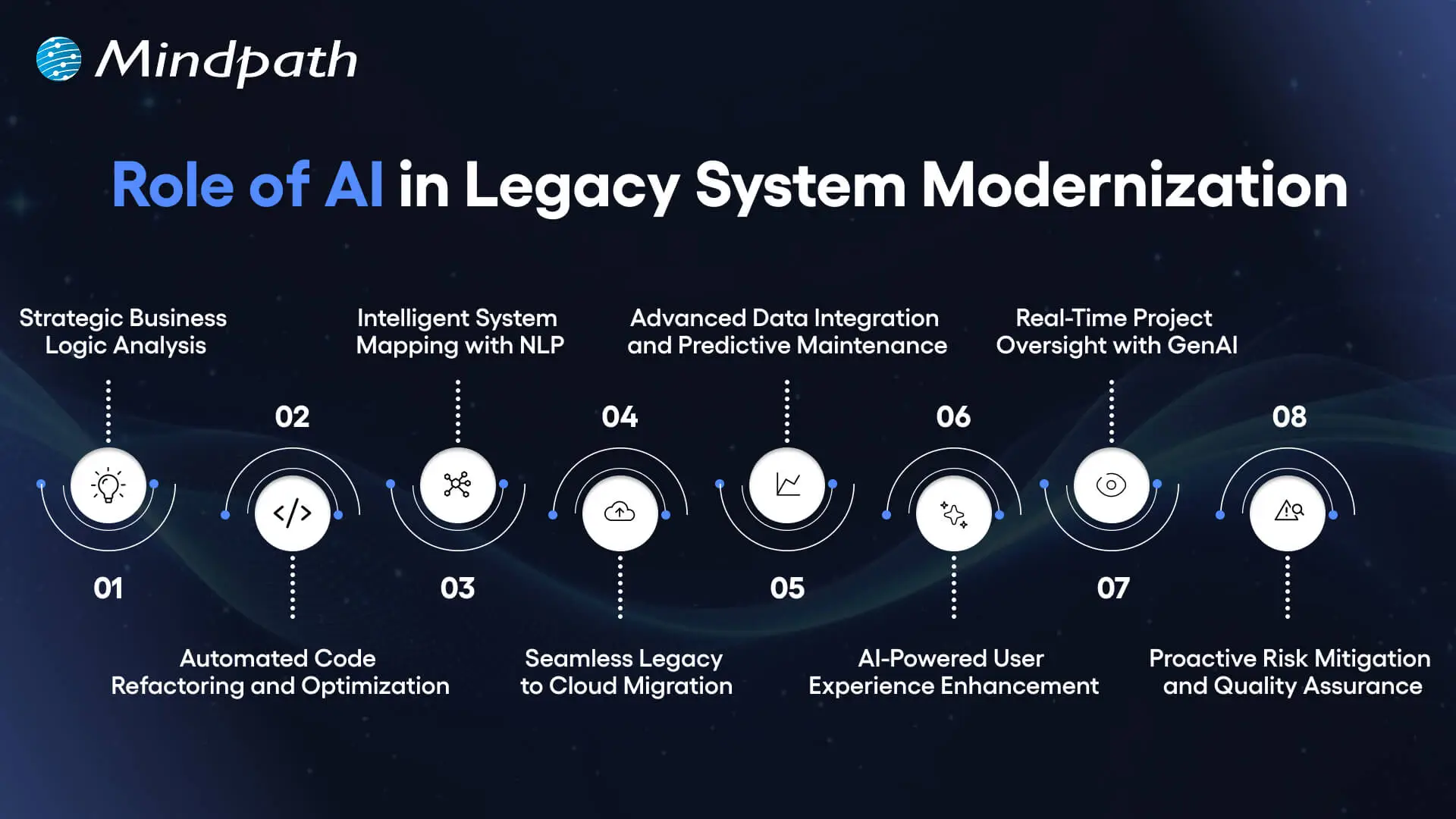
role of ai in legacy system modernization

1. Strategic Business Logic Analysis

AI-driven legacy system modernization starts by uncovering hidden business logic. It plots dependencies and decision rules. Modernization becomes smarter and data-driven, and teams are given a clear understanding.

2. Automated Code Refactoring and Optimization

AI rewrites the old code to new cloud-ready codes. Refactoring is faster, fewer errors in the system, and the system itself is much better with generative AI.

3. Intelligent System Mapping with NLP

Natural language processing transforms the complex old code into canned knowledge. Inefficiencies and bottlenecks are promptly found and assist in accelerating modernization.

4. Seamless Legacy-to-Cloud Migration

AI-driven legacy system modernization enables smooth cloud transitions. It also re-architectures code to reflect the current architectures and best practices.

5. Advanced Data Integration and Predictive Maintenance

AI integrates multiple sources of data to allow a smooth integration. Predictive analytics will identify possible problems before they happen and minimize downtime and operational problems.

6. AI-Powered User Experience Enhancement

AI interprets the user behavior in order to streamline interfaces. Chatbots and virtual assistants automate the repetitive field of work making it more engaging and efficient.

7. Real-Time Project Oversight with GenAI

AI offers invaluable real-time insight into the state of modernization. Predictive analytics and automated documentation keep the stakeholders updated and project on schedule.

8. Proactive Risk Mitigation and Quality Assurance

AI reduces the human factor and promotes uniformity. Modernization with structures and low risk can have safety nets that are provided through automated testing and monitoring.

Looking to create a clear path for modernization powered by AI and automation? Check out the legacy modernization roadmap to organize your approach effectively.

Ready to Transform Your Legacy Systems?

AI-driven legacy system modernization empowers businesses to update old systems quickly and accurately. It reduces errors, lowers costs, and improves performance. Companies gain clear insights into business logic and system dependencies, enabling smarter decisions. Modernization also ensures systems stay scalable, secure, and ready to support future growth efficiently.

Mindpath legacy modernization services help organizations implement AI-driven solutions smoothly. Our team analyzes existing systems, refactors code, and enables cloud integration. We provide predictive analytics, risk mitigation, and real-time monitoring. With our services, companies can modernize legacy systems efficiently while preserving core business logic and maintaining operational continuity.

Frequently Asked Questions

AI-driven legacy system modernization helps companies scale systems to handle more data and traffic. It ensures faster decision-making, improves performance, and keeps core business logic intact. Mindpath’s services guide businesses in adopting AI to modernize efficiently and support long-term growth.
Yes. AI-driven legacy system modernization enables integration with cloud platforms, IoT, and modern applications. Mindpath’s legacy modernization services ensure your system becomes compatible with emerging technologies while maintaining stability and operational continuity.
Modernization reduces manual work, shortens upgrade timelines, and minimizes errors. By applying AI-driven legacy system modernization, companies achieve faster operations, lower costs, and higher system reliability. Mindpath helps organizations implement these efficiency improvements effectively.
AI maps business logic, automates code refactoring, analyzes dependencies, and predicts potential failures. Tools like generative AI and NLP convert complex legacy code into modern, cloud-ready formats. Mindpath applies these techniques to ensure smooth, accurate modernization.
AI identifies vulnerabilities, monitors system performance, and flags potential failures early. AI-driven legacy system modernization reduces errors and ensures consistent updates. Mindpath’s services integrate these safeguards, creating structured, low-risk modernization projects.

Support Is One Click Away

Featured Posts

Related Post

Html to Wordpress

Anyone who has a HTML website might feel left out in the era of websites that load within seconds. Did you know that HTML websites were a thing when there was not content management system in the market? The transition from HTML to WordPress is no longer an option in an extremely competitive digital market. With static HTML pages, you would have to struggle to get the top ranks in search engine results.

Key Takeaways

  • 01
    WordPress loads faster and ranks better than static HTML websites today.
  • 02
    Anyone can manage a WordPress site without needing advanced coding skills.
  • 03
    Regular security updates and plugins keep WordPress websites well protected.
  • 04
    Mobile responsive themes ensure websites perform well across all devices.
  • 05
    Plugins let businesses add new features without relying on developers.

The biggest problem with HTML websites is that they come with duplicate code on every page, thereby making them slow. On the other hand, WordPress is faster, more secure and offers more flexibility to build any type of website. As a matter of fact, more than 43% of websites in the world run on WordPress. Let us find out why you should ditch HTML and switch to WordPress now.

Want to convert your static HTML site into a fully functional WordPress site with enhanced features and performance? Mindpath offers WordPress development services to help you build a custom website according to your business demands.

The Rise of WordPress in Website Building

WordPress started off as a blogging platform and the open source nature empowered it to transform into a website builder. Before WordPress, you would need a technical team to create a website and manage it. The search for a HTML to WordPress converter tool has been growing because WordPress has made it easier to build websites. You can now install the WordPress software and use the desired themes or plugins to develop websites with sophisticated functionalities and updated designs.

If you have been wondering whether switching to WordPress is a good decision, then you must take a look at websites powered by WordPress. Big names in the world of business such as Disney, Times Magazine, Sony Music and many others use WordPress. The versatile mix of power and simplicity with WordPress has been one of the biggest reasons for its widespread adoption.      

Is WordPress a Reliable CMS for Website Building?

Giving up on HTML, which has been a trusted ally of website developers for a long time, can be difficult. However, the need to convert HTML to WordPress is growing as WordPress is the top content management system in the world right now. It works as an open-source ecosystem that offers benefits for beginners as well as experienced developers.

WordPress offers a user-friendly interface in its dashboard, which you can use to create websites from scratch. The best thing about the WordPress dashboard is that you don’t need advanced technical expertise to use it. In addition, you can also find thousands of themes and plugins in WordPress that help you customize your website the way you want.

Want to build a website that truly reflects your brand’s unique identity and goals? Explore our guide to custom WordPress development to discover how tailored solutions can enhance your site’s performance and impact.

Why Should You Choose WordPress Over HTML?

With so many powerful features, it is hard to ignore the urge to switch to WordPress right away. You should search for a HTML website to WordPress converter that makes it easier to embrace the benefits of WordPress. Don’t you know how WordPress will enhance your HTML website? An overview of the advantages of transitioning to WordPress can offer some help in finding the answer to such questions.

Key Reasons to Choose WordPress Over HTML

1. Easy for Beginners

The best thing about WordPress is that beginners will find it easy to use without any technical complexities. You don’t need coding skills to create your website and manage it on WordPress. The intuitive dashboard of WordPress allows you to create customized layouts, add more pages and update menus at one place. 

WordPress offers better flexibility than traditional website development approaches with more control over design, content management and functionality. Furthermore, the themes and plugins offered by WordPress help you add new features without waiting for developers. In other words, anyone can build a website without technical skills when they know how to use WordPress.   

2. Optimize Your Website for Smartphones

Do you know that most of the traffic to your business will come from mobile users? Many of you would need a HTML to WordPress converter online when you discover that WordPress offers mobile responsiveness. Most of the WordPress themes are tailored to function seamlessly on different screen sizes and device types. 

The interesting part of mobile responsiveness with WordPress is that your website will have the same aesthetic appeal on all devices. Apart from the consistent user experience on different devices, mobile responsiveness also makes your website rank higher on Google. With a few modifications to theme files and some new WordPress plugins, your static HTML website will run seamlessly on all mobile devices.

3. Assurance of Better Security

Businesses should also trust WordPress for its commitment to safeguarding any website hosted on the platform. You will get regular security updates on WordPress, which help in combating new security threats. On top of it, WordPress also offers additional security plugins and SSL certificates to enhance your website’s security. The biggest benefit of converting HTML to WordPress is visible in the efforts made by WordPress to address emerging vulnerabilities.

You must understand that modern approaches to website security need multiple layers of protection. For instance, you will need data encryption, backup systems and malware scanning to maintain the security of your website. WordPress offers the complete package to safeguard your website from hackers and unprecedented security breaches.

4. Build Any Type of Website

In its initial days, WordPress served as a useful tool for blogging alone. The transition of WordPress to a powerful driving force behind some of the biggest websites shows how it has evolved over the course of time. You should know how to add HTML to WordPress for switching from an outdated format to a versatile toolset. You can use WordPress for any type of website, whether it is for a small business or a large corporation.

WordPress is capable of hosting e-commerce websites, communities or social media networks. Businesses can always find WordPress plugins that will make their website better. Most important of all, you don’t have to worry about adaptability when your website needs to grow alongside your business. It is definitely a huge advantage for websites in an extremely competitive business landscape.

Unsure whether your WordPress project is following the right development standards and best practices? Check out our WordPress developer checklist to make sure every essential step is covered for a smooth and successful build.

5. Adopt the Design You Want

The problem with a static HTML website is that you don’t have any control over the design once it’s published. WordPress does not let you worry about changing the design of your website according to emerging trends. When you convert a website to WordPress, you get the advantage of capitalizing on its extensive theme library. You can have a business site, blog or an ecommerce site and still ensure that their design matches with your needs and style. 

The theme library of WordPress offers free and premium themes that you can choose for your website. You can also find additional themes from third-party developers and design marketplaces that bring unique features and layouts. The live previews of each theme help you check each design without affecting website functionality or content.  

6. Rank Higher with SEO Support

WordPress stands out as the most popular option to create websites now because of its SEO support. What will you gain from a website that never shows up on the first page of search results? You can download WordPress and capitalize on its strong SEO foundation to ensure a higher rank on search engines. The advantages of WordPress for SEO revolve around its strict coding guidelines that call for clean and structured code.

The code is not the only thing that makes WordPress websites easier to rank on Google and other search engines. You will also find user-friendly URLs, meta-descriptions and titles to gain more visibility in search engines. On top of it, the SEO plugins on WordPress will provide a lot of support in optimizing your website.

7. Vibrant Community of Developers

The biggest strength of WordPress is its large and active community of developers. As an open-source platform, WordPress continues growing with the contributions of multiple users and developers. The community not only introduces updates to the source files but also makes WordPress more secure and updated along the lines of latest trends. 

Another promising reason to convert HTML to WordPress theme for your website is the accessibility to website creation tools offered by the community. It ensures that developers alone don’t have the exclusive rights to use WordPress tools. Even a blogger or business owner can be a part of the WordPress community and capitalize on its diverse offerings.

8. Add New Features without Developers

Websites have to evolve and add new features to accommodate the emerging requirements of users. WordPress allows you to add new features to your website without the intervention of developers. The collection of powerful plugins available with WordPress can help you introduced advanced features without code changes. 

Plugins are the ideal tools for adding shopping carts, contact forms and other features on WordPress websites. You can also explore custom WordPress plugins by third-party developers to enhance their websites. On top of it, you can activate or deactivate plugins as required, which offers the flexibility for customizing a website to your needs. 

Final Thoughts

The decision to convert your website from HTML to WordPress should not be a difficult one, considering the benefits of WordPress. It allows anyone to create a website without technical knowledge alongside offering the flexibility to add new features. In addition, you cannot ignore the benefits of regular security updates, a supportive community and control over website design. 

Mindpath specializes in converting HTML websites to WordPress for any type of website. We have years of experience in WordPress development that brings more credibility to our services. Our services for switching your website to WordPress also offer the assurance of an easy conversion procedure. If you want a website that is easier to update and maintain, then Mindpath is here to help you.

Frequently Asked Questions

1. How long does it usually take to convert an HTML website to WordPress?

The timeline depends on website size and complexity. Simple sites can be converted within a few days, while larger websites with custom features may take a few weeks to ensure everything transfers smoothly without losing existing content or functionality.

2. Will switching from HTML to WordPress affect existing search engine rankings?

A proper conversion process actually tends to improve rankings over time. WordPress offers stronger SEO support through clean code and optimization plugins. However, redirects and URL structures need careful handling during migration to avoid any temporary ranking drops.

3. Can an existing HTML website design be preserved after converting to WordPress?

Yes, the existing design can often be recreated or closely matched using custom WordPress themes. Developers can convert the original HTML layout into a WordPress theme, keeping the same look while adding the flexibility WordPress offers for future updates.

4. Is WordPress secure enough for businesses handling sensitive customer information?

WordPress provides solid security through regular updates, SSL support, and dedicated security plugins. Businesses handling sensitive data should still follow best practices like strong passwords, backups, and trusted plugins to maintain a secure and reliable website environment.

5. Does converting to WordPress require ongoing technical maintenance after launch?

Some maintenance is recommended, such as updating plugins, themes, and the WordPress core regularly. However, WordPress is designed to be manageable even for non-technical users, making routine upkeep far simpler compared to maintaining a static HTML website.

mobile app maintenance

Mobile app maintenance plays a key role in keeping the application stable, secure, and ready for real-world use. A new app can be created with great design and functionality, but its functionality is often determined by how well it is updated since it is released. The expectation of the users is flawless navigation, quick reaction, and no interruptions. Then how does an app keep these expectations going as technology, devices and user behaviour keep evolving?

This is where regular maintenance is necessary to achieve success in the long term. Regular updates assist in enhancing performance, repairing latent problems, and maintaining security as threats change. Simultaneously, it keeps the app running at the expectations of the user. In its absence, even a well-developed application may soon lose its worth in a competitive market. In this blog, we will be exploring the importance of mobile app maintenance.

Ready to reduce risks and keep your mobile app performing at its best? Mindpath offers maintenance and support services to support continuous performance and stability.

What is Mobile App Maintenance?

Mobile app maintenance is the continuous process that maintains an application after its release. It consists of performance enhancements, bug fixes and feature additions. Developers also tune UI and UX to user requirements. Moreover, applications can be updated regularly and checked to ensure that they remain compatible with new operating systems and versions of devices.

Mobile application maintenance helps reduce technical issues, security risks, and performance slowdowns. It makes the experience of users smooth and non-interrupted as well as crash-free. This leads to improved customer satisfaction and low uninstall rates. Ongoing maintenance makes the app stable, predictable, and up-to-date with the evolving technology and user needs.

Must Read: Proactive vs. Reactive

Types of Mobile App Maintenance

Maintenance of mobile applications involves various strategies that make an application stable, current and user friendly even after its launch. These are the categories of application maintenance services that will provide seamless operation and sustainability.

1. Corrective Maintenance

Corrective maintenance fixes post-release bugs, crashes and errors. It maintains a smooth running of the app in the hands of the users.

2. Preventive Maintenance

The preventive maintenance mitigates future problems by updating the codes and improving performance. It assists in preventing the issues before they arise.

3. Perfective Maintenance

Perfective maintenance enhances features, depending on user feedback. It also keeps the app in compliance with the evolving business requirements.

4. Adaptive Maintenance

Adaptive maintenance upgrades the app to new operating systems and devices. It maintains the compatibility of the app with evolving technology.

5. Emergency Maintenance

The emergency maintenance addresses urgent problems that influence the stability of the app. It promptly recovers normal functioning following critical failures.

Importance of Mobile App Maintenance

Mobile app maintenance keeps an application stable, secure, and high performing once it is launched. The following are the major significance of having mobile application:

1. App Security Updates

Mobile application maintenance enhances security by addressing vulnerabilities and preventing cyber threats. It protects the data of users and generates trust in the long term.

2. Performance Monitoring

Constant monitoring will assist in the monitoring of the performance of the apps and in the identification of problems in time. It guarantees the rapid repairs and maintains the smooth operation of the app.

3. Regular Feature Updates

The frequent updates are the features that make the app relevant and interesting. They also enhance usability and general user satisfaction.

4. App Store Compliance

It is necessary that apps adhere to the new app store policies to be available to users. Maintenance guarantees adherence and avoid removal or suspension.

5. Bug Fixing

Bug fixing is used to correct the errors that compromise the stability and performance of the apps. It enhances trustworthiness and delivers an easier user experience.

6. UI/UX Improvements

The UI/UX enhancements increase the design and usability of the app. They simplify navigation and enhance user interaction.

7. Downtime Reduction

Maintenance will assist in minimizing crashes and downtime surprises. This is to guarantee that users are not interrupted when availing services.

8. Technology Updates

Applications need to adapt to new technologies and operating system modifications. Maintenance will guarantee compatibility and maintain the app up to date.

9. Business Growth Support

A properly maintained app will attract and retain more users in the long run. This promotes business development and sustainability.

10. User Experience Enhancement

Frequent upgrades enhance user engagement with the application. They make the performance smoother and user satisfaction higher.

Best Practices for Mobile App Maintenance

Mobile application maintenance services is most effective when they are a well-planned and regularly followed process. The following are some of the most effective ways to maintain mobile applications.

1. Code Structure and Modularity

If the code is divided into distinct units, it becomes easier to resolve problems and make modifications. Also, when updating the main functions, the level of risk is minimized.

2. Continuous App Monitoring

If you use monitoring devices, they will assist you in following the application functioning in the real-time environment. They are capable of promptly identifying faults and failures.

3. User Feedback Analysis

Users’ comments and criticisms throw light on the genuine problems people experience using the app. So they allow developers to come up with the enhancement of the functions that respond to users’ specific requirements.

4. Issue Prioritization

The first thing to do is to classify the defects according to the extent to which they affect users. This will make sure that the most severe problems are resolved first.

5. Testing Before Release

It is important to do thorough testing to each and every updated version before making it available to the users. In doing so, you can be sure that users will not be subjected to any newly-introduced bugs.

6. Post Update Review

Checking ‍ performance and collecting user feedback after an update is a great way to make sure things are really working according to your ‍expectations.

Ready to Keep Your App Strong and Future Ready?

App maintenance is extremely important if you want to keep your app running smoothly, securely and in a way that users would enjoy even after it has been launched. It leads to improved performance, lesser bugs, and a seamless user experience. Besides that, regular updates are a way of standing out in a digitally-advanced world that is changing fast and also, apps that are well-maintained tend to be on the path of success.

At Mindpath, we offer maintenance and support services, aiming at keeping your app up-to-date, secure, and running efficiently. Our team works on increasing the overall stability of the app, resolving the bugs, as well as improving the user experience. We assist businesses in minimizing the periods of downtime and ensuring that the app runs smoothly, which in turn promotes growth and customer satisfaction.

Frequently Asked Questions

1. Why does mobile app maintenance matter after launching an app?

Mobile app maintenance ensures the app stays stable, secure, and smooth after launch. It helps fix hidden issues, improve performance, and keep users satisfied. Without regular updates, even a good app can become outdated and lose users over time in a competitive market.

2. How often should an app be maintained for best performance?

Maintenance should happen regularly, not only when problems appear. Monthly checks and timely updates help prevent bugs and performance issues. Continuous monitoring also ensures the app stays compatible with new devices, operating systems, and changing user expectations for a smooth experience.

3. What are the common issues solved through app maintenance?

App maintenance mainly fixes crashes, slow performance, and security gaps. It also addresses UI issues and improves overall usability. These updates ensure users face fewer interruptions and enjoy a smooth, reliable experience every time they use the app.

4. How is mobile app maintenance cost usually decided for businesses?

The mobile app maintenance cost depends on app complexity, features, and update frequency. Apps with advanced features or high user traffic may need more frequent updates, which increases cost. Regular maintenance, however, helps avoid bigger issues and expensive fixes later.

5. Can poor maintenance affect user experience and app success?

Poor maintenance directly impacts user satisfaction and trust. Users may face bugs, crashes, or slow performance, leading to uninstalls. Over time, this reduces engagement and affects business growth, making consistent updates essential for long-term app success.

AI tools for devops

Artificial Intelligence has certainly surfaced as a transformative force in the DevOps realm. In the current times, DevOps teams and professionals have the opportunity to leverage top Artificial Intelligence tools in order to streamline the software development process while promoting resource optimisation. 61% entities have reported that the adoption of AI in DevOps has significantly boosted their delivery ability.

Both novice and experienced DevOps professionals need to familiarise themselves with the strategic role of AI for the DevOps approach. The insight is crucial to capitalise on the capabilities of AI and strengthen how the DevOps approach is adopted while developing software solutions. Let’s identify some of the major AI tools that are revolutionising DevOps at the moment.

Want to adopt AI in DevOps with full potential? Mindpath’s AI Development Services provide full assistance on how you can select and implement the right tool according to your specific requirements.

Best AI Tools for DevOps Teams

Artificial Intelligence has been gaining high prominence in the DevOps arena. Within a short span of time, diverse AI tools have emerged that have simplified the work of DevOps teams. These tools have immense potential to redefine the DevOps approach.

It is imperative to identify the AI tools for DevOps so that you can simplify diverse processes relating to automation, security, code development and many more. Some of the top AI tools for DevOps professionals include:

1. GitHub Copilot

GitHub Copilot is undoubtedly one of the most popular AI tools for DevOps experts that exists today. It can be used as an extremely useful tool that is powered by Artificial Intelligence, which simplifies coding. It is capable of making suggestions to coders. Moreover, it can also assist coders by providing valuable assistance in entire functions. As a result, by leveraging the specific tool in the DevOps landscape, it is possible for developers to write code in an efficient manner. Furthermore, by leveraging the specific tool, the possibility of making errors is substantially reduced. GitHub Copilot represents a significant step toward the future of AI in software development and DevOps workflows.

2. AWS Codeguru

The popularity of Amazon Codeguru has been skyrocketing in recent times. It serves as a perfect tool that DevOps professionals can use for the purpose of automating code analysis. A highlight of this particular artificial intelligence for DevOps is that it is capable of making intelligent recommendations relating to code reviews. Coders and software developers can also rely on the specific tool to gain insightful suggestions relating to the performance of applications. With the help of this top-grade AI tool, DevOps teams can locate issues and improve the quality of their code, and fully leverage the benefits of AI in their development workflows.

3. Datadog

Datadog is a popular AI-driven platform that simplifies the processes for development teams. It is certainly among the top DevOps for business tools that can be used for diverse purposes such as monitoring, security, and performance. This tool offers rich insights to DevOps teams in terms of the behaviour of the software application and the overall health of the infrastructure. It certainly serves as a holistic tool that can offer observability power in an end-to-end manner to DevOps teams. You can definitely capitalise on this tool to achieve goals relating to real-time observability, unified monitoring, and troubleshooting.

4. Splunk

Splunk has gained a solid reputation in the DevOps scene of the current times. It acts as a robust data analytics and monitoring platform that can be used by DevOps teams. By choosing the specific AI-based tool, you can get complete visibility across the full software development lifecycle. In case you have limited familiarity with the particular tool, you can consider partnering with top providers of DevOps services. DevOps teams can leverage Splunk for diverse purposes, including monitoring of performance, event and log monitoring.

5. Sysdig

Sysdig serves as one of the most comprehensive DevOps platforms available for software developers at present. It has been specifically designed for diverse purposes such as monitoring and security in containerised environments. A chief highlight of the tool is that it integrates operations along with top security and offers unified control and visibility to teams. Thus, throughout the software development lifecycle, DevOps professionals can have a solid insight into the process. Moreover, you can rest assured about compliance and monitoring aspects by utilising the tool.

Trying to keep up with the rapidly evolving DevOps landscape as we move into 2026? Explore the latest DevOps trends shaping modern development, automation, and AI-driven workflows.

6. Dynatrace

In the contemporary DevOps landscape, the Dynatrace tool has been playing a cardinal role. It acts as an ideal observability platform that can be leveraged by DevOps teams while developing top-notch software applications. You can take advantage of this app to simplify processes relating to monitoring, collaboration, and automation. Furthermore, Dynatrace offers a broad range of tools that can create value for you relating to resilience engineering, release validation, and automated remediation of problems. The powerful capabilities of the AI tool can empower your DevOps team while developing novel software solutions.

7. Ansible

Ansible is a popular open source automation tool that streamlines DevOps practices for professionals. This tool is primarily used for the purpose of streamlining as well as automating a broad range of IT tasks and processes. It significantly contributes to the DevOps process by focusing on areas such as configuration management, deployment of applications, and the provisioning of infrastructure. Moreover, DevOps teams can leverage the AI-based tool to perform orchestration. This is because Ansible facilitates the orchestration of complex workflows and supports the coordination of multiple tasks.

8. Harness

In the current DevOps realm, Harness has emerged as a holistic software delivery platform., By using the specific tool, your DevOps team can automate the full software development process. Therefore, starting from continuous integration and continuous delivery, you can automate ongoing tracking of errors. Harness has been recognised as one of the most useful tools for DevOps professionals. With the help of the AI tool, your DevOps team can certainly accelerate the software development process and minimize the possibilities of errors and mistakes.

9. Argo CD

In recent times, Argo CD has surfaced as a popular AI tool that can be used by DevOps professionals. It is basically a declarative continuous delivery tool. By using the tool, it is possible for DevOps teams to automate the management as well as the deployment of software apps within Kubernetes clusters. The fact that it is open source in nature enables DevOps teams to use it in a highly versatile and flexible manner. The specific tool offers a broad range of features to users, such as single sign-on integration, multi-cluster management, and many more.

10. Snyk

While adopting the DevOps approach to develop software solutions, one cannot ignore the security aspect. This is when the Snyk tool comes into the picture. Snyk is a developer-first platform that incorporates security elements into the software development process. You can utilize this specific AI tool in your DevOps process for scanning vulnerabilities in code, containers and open-source dependencies. This tool is well-suited for diverse DevOps teams since it perfectly integrates with various elements, such as developer workflow, as well as cloud platforms. You can leverage the tool since it offers actionable insights that can enhance the overall quality of your software solution.

Looking to overcome DevOps hurdles such as security risks, and scalability issues? Discover DevOps challenges and solutions that help organizations overcome these issues and improve operational efficiency.

Benefits of AI Tools in DevOps

The use of AI tools in DevOps processes can give rise to a host of benefits for DevOps teams. Some of the major benefits that you must be aware of include:

1. Better reliability

DevOps teams can leverage AI capabilities to create highly reliable software solutions. This is mainly possible by making use of the predictive analysis function of AI technology.

2. Faster Software creation process

Software development can be quite time-consuming. However, by leveraging AI tools, it is possible to automate diverse processes. It can ultimately speed up the software development process for teams.

3. Proactive resolution of issues

Issues can act as major bottlenecks while developing software applications. With the help of the right AI tools, it is possible for DevOps teams to proactively deal with issues. Therefore, the overall quality of the software solution can also improve.

4. Improved collaboration

By using AI tools or generative AI tools for DevOps, it is possible for professionals to enhance collaboration. Collaboration can certainly open up new and better opportunities that can strengthen the overall process relating to the development of software solutions.

Want to learn how DevOps can transform your business and accelerate your development processes? Discover the benefits of DevOps for a deeper understanding of its impact and value.

Final Words

In the dynamic DevOps arena, the use of artificial intelligence tools is considered to be a necessity. DevOps teams need to be aware of the top tools so that they can strategically use them while creating software solutions. The selection of the right kinds of tools can certainly streamline the software development processes for you. Some of the top tools that you must be aware of include GitHub Copilot, AWS Codeguru, Datadog, Splunk, Sysdig, etc.

We at Mindpath help businesses to make the most of the top AI tools for DevOps with our AI Development Services. Our professionals ensure that the perfect AI tools are chosen that are in line with your DevOps processes. Moreover, you can see how intelligent DevOps can strengthen the quality of your software solutions.