Home

Top DevOps Trends Businesses Must Embrace in 2026

Top DevOps Trends Businesses Must Embrace in 2026

Join our Newsletter!

DevOps Trends

DevOps trends are evolving rapidly, helping businesses improve workflows and deliver value faster. Whether you’re managing a tech team or scaling operations, staying updated on the latest DevOps practices is essential for long-term success.

Finding the answer to this question involves understanding the trends that affect how we run businesses in the real world. DevOps best practices today are designed to bring automation, cloud-native tools, or security-first approaches to solve the problems we face in modern situations.

Being aware of what’s meaningful and useful can help your team be more effective while accelerating time to market. In this blog, we will examine key trends and look at how they can create real results for your organization.

As businesses embrace DevOps in 2026, the need for expert guidance becomes crucial. At Mindpath, our DevOps Consultation & Implementation services ensure organizations can adopt the right strategies and technologies to stay competitive.

Understanding DevOps: A Quick Dive-in

DevOps is a software development approach that brings development and IT operations teams together to improve collaboration, automate tasks, and deliver software faster. It helps businesses identify issues early, streamline workflows, and improve efficiency.

With DevOps, teams collaborate across coding, testing, deployment, and maintenance. Automation reduces manual errors, while integrating security throughout the development process helps protect applications. This approach enables businesses to release reliable software faster while maintaining system stability and security.

Here are some of the benefits that DevOps can offer:
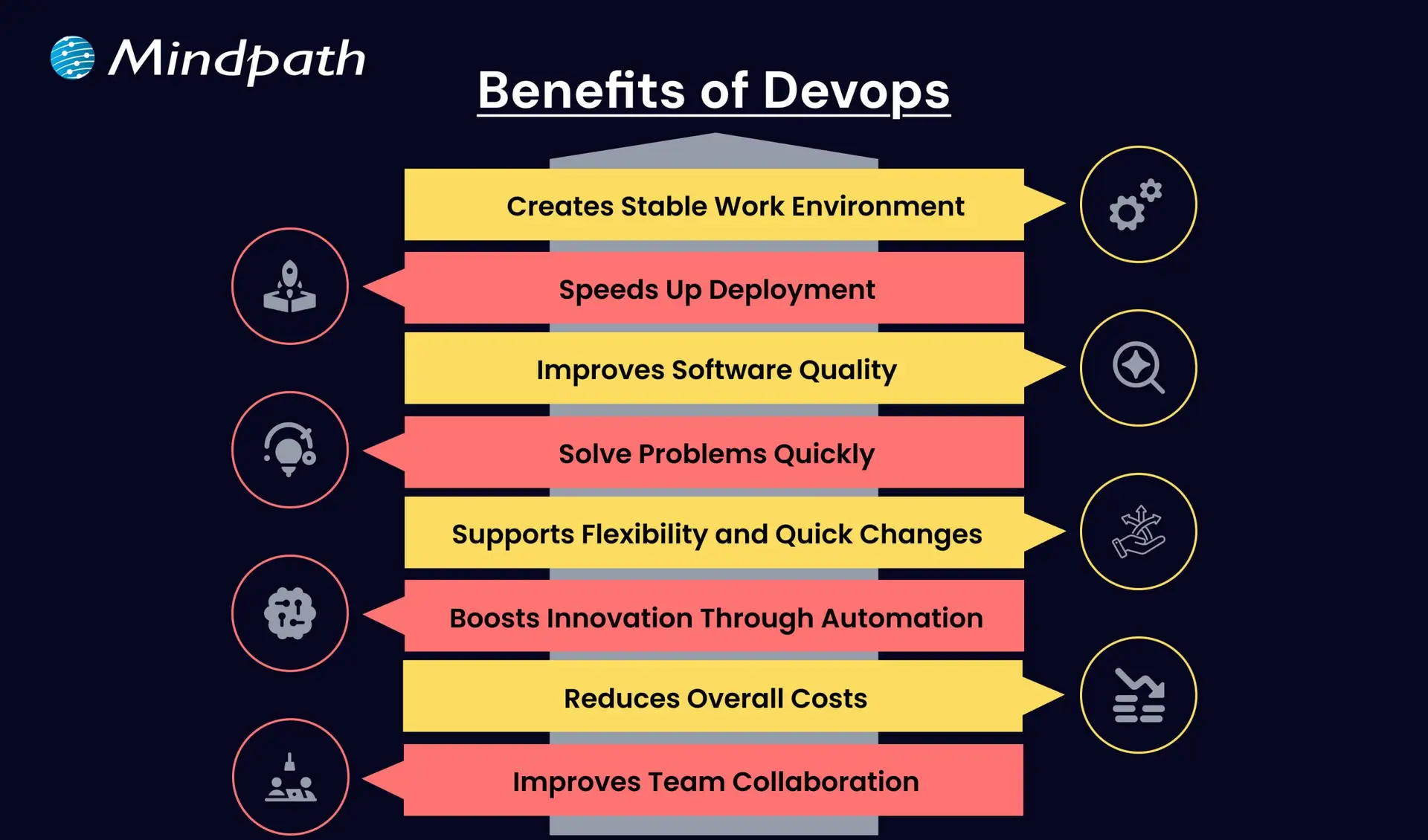
Benefits of Devops

1. Creates a Stable Work Environment

DevOps helps teams handle changes easily without stress. It brings a better balance to daily work and keeps operations running smoothly.

2. Speeds Up Deployment

DevOps allows faster software releases with fewer delays. This helps businesses deliver new features quickly and stay ahead in the market.

3. Improves Software Quality

With regular testing and feedback, DevOps helps catch bugs early. Teams can focus on creating better products with fewer errors.

4. Solve Problems Quickly

DevOps uses monitoring tools to spot issues fast. Smaller and frequent updates make fixing problems easier and more reliable.

5. Supports Flexibility and Quick Changes

DevOps builds a flexible work style where teams can respond to change easily. It helps businesses adapt to market needs faster.

6. Boosts Innovation Through Automation

By reducing manual tasks, DevOps gives teams more time for new ideas. This leads to faster improvements and better products.

7. Reduces Overall Costs

DevOps combines tasks and reduces the need for rework. This saves time, uses resources better, and cuts down project costs.

8. Improves Team Collaboration

DevOps encourages better teamwork and shared goals. Clear communication between teams leads to faster decisions and stronger results.

Aiming to enhance operational efficiency and reduce development risks? Check out our blog on DevOps Challenges and Solutions to discover proven approaches that improve performance, stability, and cross-team cooperation.

Top DevOps Trends 2026

As technology continues to evolve, companies are rethinking how they build, test, and deliver software. DevOps trends for businesses in 2026 show a clear shift toward smarter tools, stronger collaboration, and faster delivery. By following the latest DevOps transformation strategies, organizations can stay ahead and build systems that are both efficient and future-ready.
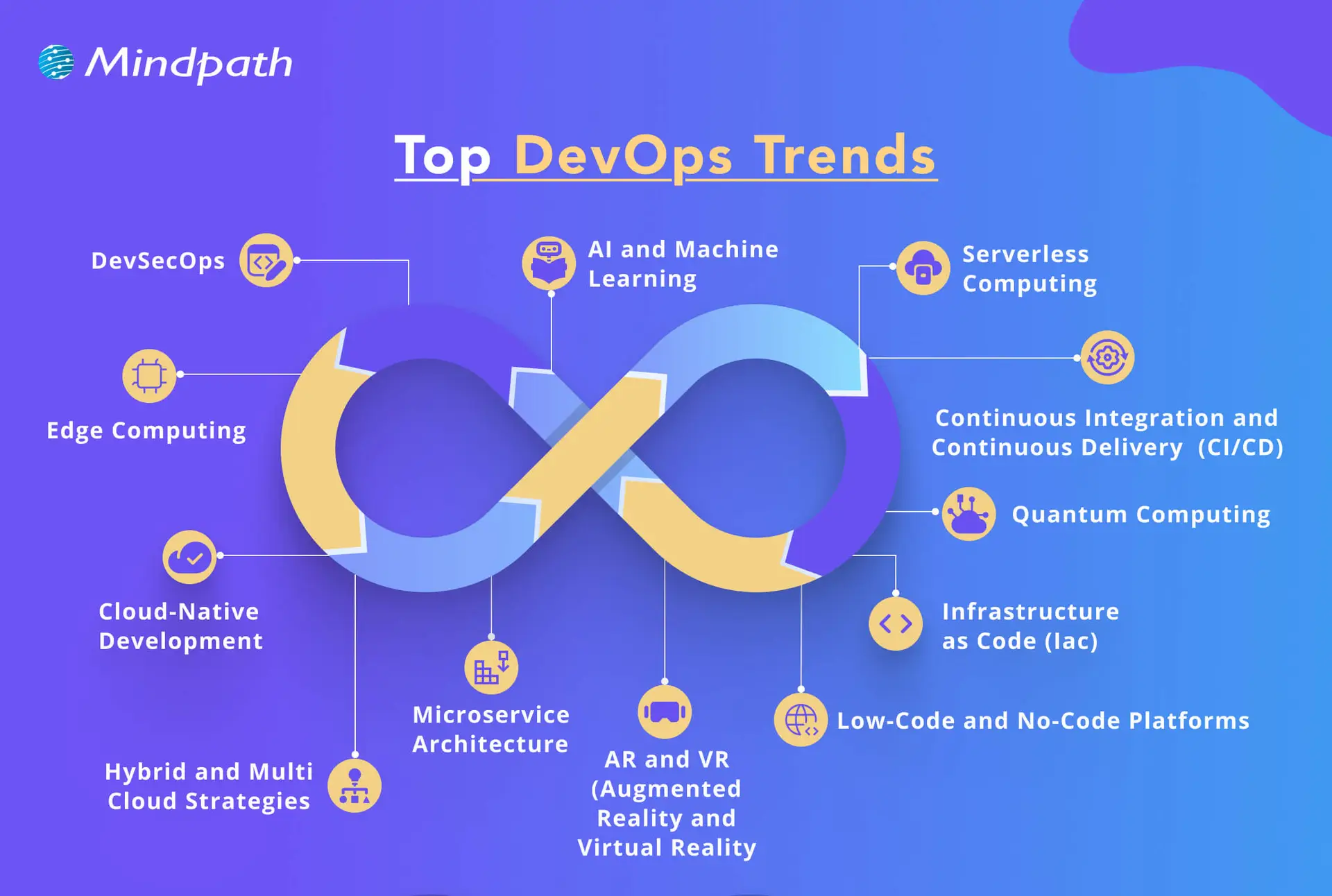
top devops trends

1. DevSecOps

DevSecOps is becoming a key part of DevOps innovation, where security is built into every stage of the development process. Instead of adding security at the end, teams now include it early to catch risks before they grow. This trend helps businesses create safer applications by using automated testing and continuous monitoring within the DevOps workflow.

2. AI and Machine Learning

AI and machine learning is one of the latest DevOps trends, helping teams work faster and smarter. These technologies support intelligent monitoring, find unusual behavior in systems, and give early warnings before issues grow. By using data to guide decisions, DevOps teams can improve system performance and reduce downtime.

3. Serverless Computing

Serverless computing is becoming a popular trend in DevOps for business success because it removes the need to manage servers. It allows teams to focus only on writing code, which speeds up development and reduces overhead. This approach also helps businesses save costs by using resources only when needed, making operations more efficient.

4. Continuous Integration and Continuous Delivery (CI/CD)

Continuous Integration and Continuous Delivery (CI/CD) is a key DevOps trend that helps teams deliver software faster and with fewer errors. It allows developers to regularly merge code changes, test them automatically, and deploy updates smoothly. This approach improves software quality and supports a steady flow of new features to users.

5. Infrastructure as Code (IaC)

Infrastructure as Code is a growing trend that helps teams manage infrastructure through written code instead of manual steps. It ensures consistency across development, testing, and production, reducing errors and saving time. As one of the leading DevOps tools and technologies, it allows automated setup and easy tracking of changes in infrastructure.

6. Microservices Architecture

Microservices architecture is a DevOps approach where an application is built using many small, separate services. Each service handles a specific function and can be updated or scaled on its own without affecting the rest of the system. This makes the software more flexible, easier to manage, and better at handling changes or failures.

7. Cloud-Native Development

Cloud-native development is a modern way of building applications that fully uses the power of cloud computing. It is one of the key DevOps trends helping businesses create software that can easily grow, move, and adapt to changing needs. By using containers and microservices, teams can build flexible and efficient systems that are ready for fast updates and smooth scaling.

8. Edge Computing

Edge computing is a growing part of modern DevOps trends that focuses on processing data close to where it is created. This reduces delays and improves the speed of applications by handling data locally instead of in a central server. It also helps save bandwidth and supports real-time decision-making, making systems faster and more efficient.

9. Hybrid and Multi-Cloud Strategies

Hybrid and multi-cloud strategies are important DevOps trends that give businesses more flexibility and control over their cloud usage. By using services from different cloud providers, teams can choose the best tools and features for each task. This approach improves performance, reduces risk, and avoids being tied to one provider.

10. Low-Code and No-Code Platforms

Low-code and no-code platforms are shaping the future of DevOps by making application development easier and faster. These tools allow non-developers to build and launch apps with simple interfaces, helping teams save time. By handling basic tasks through these platforms, developers can focus on more complex work and boost overall productivity.

11. Quantum Computing

Quantum computing is an emerging part of DevOps trends with the potential to solve complex problems much faster than traditional systems. Although still in the early stages, it may one day help teams handle advanced computing tasks more efficiently. As the technology grows, it could bring powerful new capabilities to DevOps in areas like testing, simulation, and optimization.

12. AR and VR (Augmented Reality and Virtual Reality)

Augmented Reality and Virtual Reality are becoming new DevOps trends that support better training, simulation, and team collaboration. These technologies create realistic, hands-on experiences that help teams learn and solve problems more effectively. AR and VR also improve remote teamwork by making interactions more engaging and productive.

Looking to combine fast DevOps practices with automated security checks? Check out our blog on DevOps vs DevSecOps to understand how DevSecOps adds proactive, automated safeguards to every stage of your pipeline.

Is Your Business Ready to Benefit from the Latest DevOps Trends?

DevOps trends continue to shape how businesses grow through faster delivery, better collaboration, and smarter tools. Staying updated helps teams move quickly, improve software quality, and remain competitive in a rapidly changing market. By understanding and applying these trends, companies can build stronger systems and create real value with every software release.

At Mindpath, we offer expert DevOps services that help businesses streamline processes, boost collaboration, and deliver software faster. Our team uses modern tools and proven strategies to support automation, cloud-native development, and continuous delivery. Contact us and we’ll guide you through each stage with clear planning, smooth implementation, and reliable support tailored to your business goals.


Is Your DevOps Strategy Future-Ready?

Stay ahead with modern DevOps practices.

Frequently Asked Questions

DevOps trends in 2026 are directly changing how teams plan, build, and ship software daily. Automation reduces manual work, AI flags issues earlier, and cloud-native tools speed up deployments. Teams that adopt these shifts experience fewer bottlenecks, faster releases, and significantly better collaboration across development and operations functions.
DevOps works exceptionally well for businesses of all sizes. Smaller teams actually benefit faster because there is less organizational resistance to change. Adopting automation, CI/CD pipelines, and cloud tools helps small businesses compete with larger players by delivering software faster and maintaining higher quality with leaner resources.
Most businesses notice improvements in deployment frequency and team collaboration within three to six months. Deeper results like reduced downtime and better software quality take longer to measure accurately. The speed of results depends heavily on team readiness, tooling choices, and how consistently DevOps practices are applied across workflows.
The biggest challenge is rarely technical. It is cultural. Getting development and operations teams to share responsibilities, communicate openly, and trust automated processes takes time and strong leadership. Many organizations underestimate this human side of DevOps adoption and focus too heavily on tools while neglecting team alignment and mindset shifts.
Traditional security is applied after development is complete, which creates costly delays and vulnerabilities. DevSecOps integrates security checks at every stage of the pipeline from day one. This proactive approach catches risks earlier, reduces remediation costs, and ensures that security never becomes a bottleneck slowing down release cycles.

Support Is One Click Away

Featured Posts

Related Post

Web performance with Nodejs

For many organizations that are seeking speed, scalability, and smooth user experiences, improving web performance with Node.js has become a top priority. Users today expect web applications and websites to be fast, responsive, and dependable. Users expect applications and websites to basically load instantaneously, be able to process many requests at the same time, and to be reliable during sudden traffic spikes. If an application lags or is slow, the user is quick to move on. In today’s modern development landscape, this is precisely why Node.js can be a game-changer.

Node.js is unique because it combines performance, flexibility, and real-time capabilities all in one environment. Developers can create performant applications while maintaining speed and availability, all at a lower cost to the business, which improves customer satisfaction. Isn’t that exactly the target for every brand today? When speed meets stability, natural growth occurs. Therefore, Node.js development could be a wise way to improve overall web performance. We will elaborate on how it can help you gain results in this blog.

Looking to enhance your web application performance to deliver speed and scalability? Mindpath’s Node.js development services will help you achieve business goals by developing high performing solutions.

How Node.js Powers High Web Performance?

Web performance with Node.js is optimal due to its structure and technical advantages. Node.js operates using a non-blocking, event-driven I/O model that allows applications to handle many requests at once and is able to execute tasks without waiting for one to complete before the next begins. When unauthorized, the single-threaded event loop cycles through the tasks, executing code sequentially while managing multiple or concurrent tasks. The V8 JavaScript engine makes Node.js fast by compiling JavaScript into machine language, allowing user more response to real-time tasks in their application. With the speed, responsiveness, and efficiency of Node.js, it is best suited for I/O-heavy and data-driven applications.

A second important reason why Node.js drives web performance optimization is that its ease of scalability, combined with real-time capabilities, handles thousands of concurrent connections seamlessly, which leads to the development of fast and interactive solutions. Developers can scale their application both horizontally and vertically and develop features and solutions while obtaining the best performance possible. Node.js supports real-time applications that incorporate instant messaging, gaming, and webpages that require live updates. The ability to provide immediate responses provides users with reliable experiences and, in turn, could effectively lead to stronger performance results.

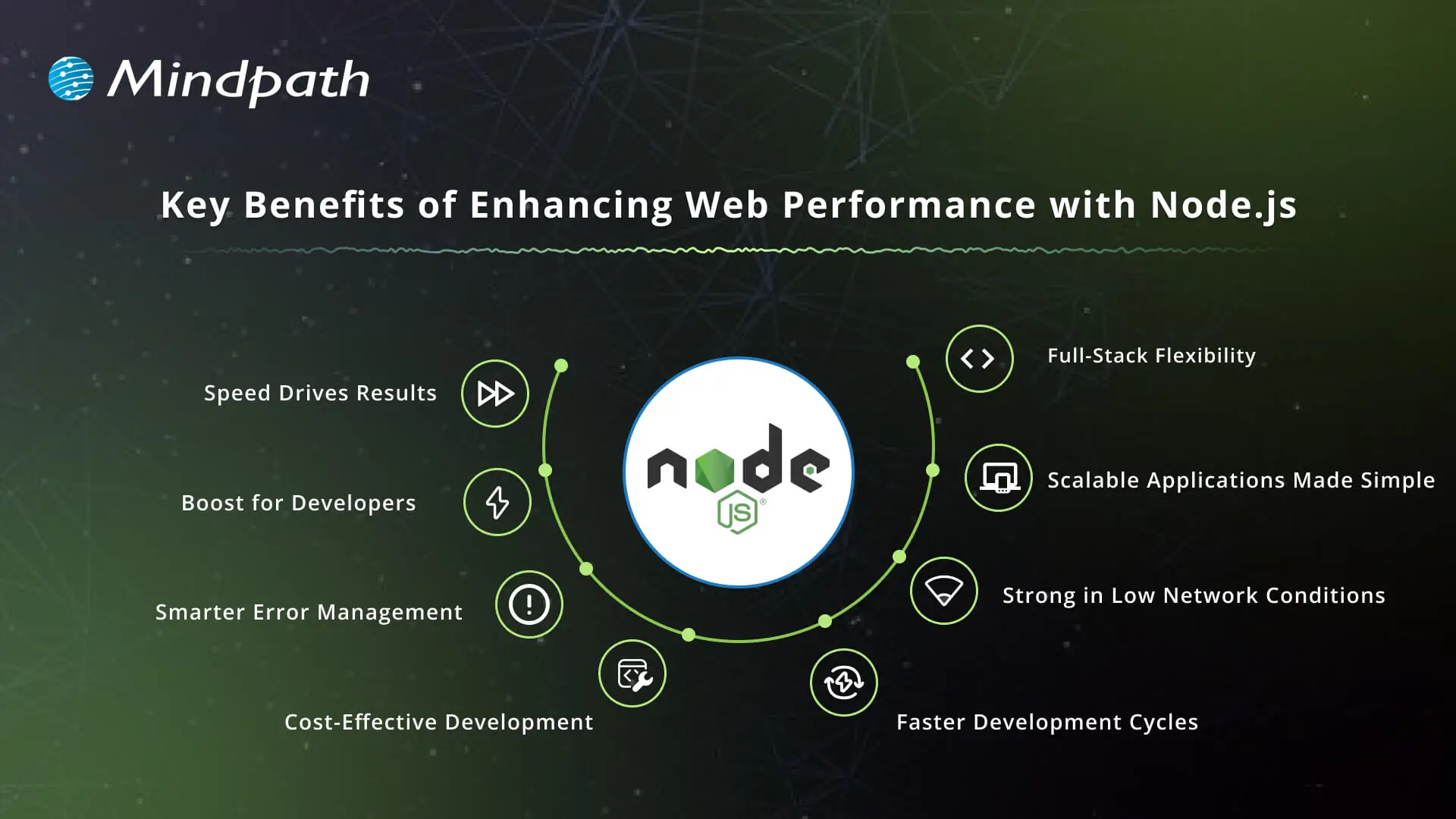
Key Benefits of Enhancing Web Performance with Node.js

Enhancing the performance of web applications is critical for providing an experience that is fast, scalable, and reliable. Node.js has unique benefits that make it a strong candidate for crafting optimized solutions.

Key Benefits of Enhancing Web Performance with Node.js

1. Speed Drives Results

Node.js provides unparalleled speed with its event-driven, non-blocking I/O model, which allows applications to handle multiple requests simultaneously. This means faster response for multiple incoming requests, despite how much traffic the application will be dealing with. Companies that rely on real-time interactions benefit from significant overall web app performance.

2. Productivity Boost for Developers

The single-threaded, event-driven design of Node.js is incredibly fast, efficient, and allows for development to move quickly. Teams can build fully interactive solutions like chats, live streams, and collaborative tools in one simple app, as opposed to other methods that are more complicated. When businesses hire Node.js developers, they can create productivity advantages that let them get the products into the market faster, hence improving web performance with Node.js.

3. Smarter Error Management

Node.js offers robust error-handling mechanisms for developers built into its framework. Developers can readily catch and process errors during runtime. This allows applications to be much more stable, thus improving reliability; all of this while enhancing the user experience regardless of the environment.

4. Cost-Effective Development

Node.js lowers the needed infrastructure with lower resource needs, while still accommodating high load needs. Business savings include operating costs such as licenses, maintenance contracts, and hardware upgrades. Such cost mitigation makes Node.js development services appealing to enterprises that prioritize long-term value.

5. Faster Development Cycles

Developers let you quickly create applications with Node.js, especially when developers are creating modular and reusable code. Node.js is normally used in conjunction with Node.js micro services, allowing smaller microservices to work well together as part of larger systems. This allows for quicker launches of applications and provides for easier updates to accommodate changing business requirements, while enhancing web performance with Node.js.

6. Strong in Low Network Conditions

Node.js handles slow or unstable networks efficiently. The asynchronous nature of Node.js allows each request to be immediately started without waiting, which results in helping to get rid of lags. This particular stability allows organizations to focus on delivering the best possible digital experience to users under various conditions.

7. Scalable Applications Made Simple

One of the primary benefits of Node.js is scalability, which is suitable for applications where demand is unpredictable. Developers can grow horizontally by using more instances or vertically by using better resources. A model of growth with both horizontal and vertical scaling provides growth where sustainability is the framework for implementation, resulting in Node.js performance.

8. Full-Stack Flexibility

JavaScript provides the opportunity for end-to-end development and client-side and server-side programming with Node.js. With good performance, full-stack developers can build responsive and dynamic web applications. Using Node.js allows organizations to realize efficiencies in their processes and provide similar experiences across their clients’ ecosystems.

Want to enhance your web performance with full-stack development? Learn how to build fast and reliable applications by reading our blog on Mastering Full-Stack Development with Node.js.

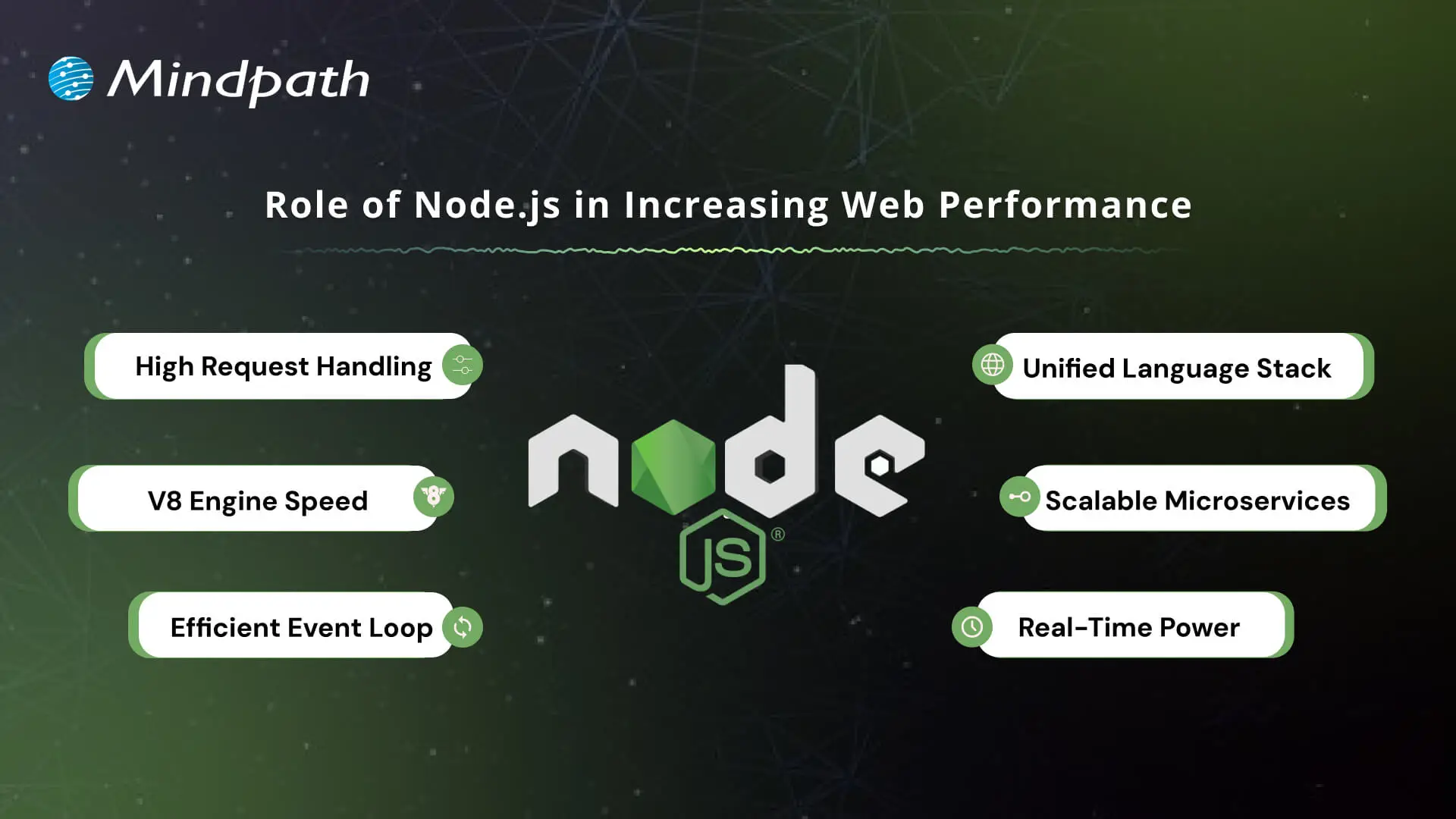
Role of Node.js in Increasing Web Performance

Node.js contributes significantly to building applications that are fast, scalable, and dependable. Its architecture allows developers to build solutions that are responsive and can handle a high volume of requests and traffic.

Role of Node.js in Increasing Web Performance

1. High Request Handling

Node.js accepts multiple requests simultaneously and does not wait for one request to finish before handling another. These attributes contribute to fast and responsive applications, especially important in real-time services like chats and streaming.

2. V8 Engine Speed

The platform utilizes the Google V8 engine to compile JavaScript into machine code. This improves performance by optimizing execution speed, which also indirectly improves the performance of web apps.

3. Efficient Event Loop

Node.js utilizes its event loop to manage asynchronous tasks, such as a file read or a database query. In this way, the server will never get stuck while waiting, which keeps applications smooth and seamless.

4. Unified Language Stack

Using JavaScript for both the front and back end simplifies the development process. In addition, it allows for improved code optimization and helps with better web performance with Node.js.

5. Scalable Microservices

Node.js allows for microservices, which break large applications into smaller, independent parts. Microservices make applications easier to scale and makes it easier to optimize for specific components.

6. Real-Time Power

For applications that need live updates, such as analytics tools or online games, Node.js is a great choice. It improves overall web performance with Node.js because it can handle multiple connections simultaneously.

Boost your Node.js application speed and efficiency by using the right tools. Check out the Top 25 Node.js Libraries in 2025 and take development to the next level.

Ready to Boost Your Web Performance with Node.js?

Node.js has shown its strength by improving speed, scalability, and reliability in modern applications. Through real-time features, effective architecture, and even inexpensive scalability, it can build digital experiences that users actually enjoy. Organizations that want to improve customer satisfaction can invest in Node.js to improve their chances of long-term success in competitive markets today.

At Mindpath, we are known to provide professional Node.js development services across globe, designed to develop scalable, high-performing solutions. When you hire Node.js developer teams with us, you tap into dedicated professionals who specialize in faster, secure, and business-ready apps. Our approach is to combine technical skills with business goals to ensure our clients achieve seamless performance, making meaningful growth with Node.js.

Unlock the power of Node.js to boost web performance and scalability. Learn how Node.js development services can transform your web app.
Cost to build an AI Agent

Small businesses today are watching AI agents handle customer queries, automate workflows, and close sales round the clock. Exciting? Absolutely. But many business owners jump in without truly understanding the cost to build an AI agent. That gap between excitement and reality often leads to budget overruns. So, let’s talk numbers, trade-offs, and what actually goes into building one.

Key Takeaways

  • 01
    The cost to build an AI agent ranges from $3,000 to $50,000 upfront.
  • 02
    Complexity, integration, and data readiness are the biggest cost drivers.
  • 03
    Hidden costs like token bloat and API fees catch most small businesses off guard.
  • 04
    Starting with one narrow task keeps your budget controlled and ROI measurable.
  • 05
    Consistent maintenance and prompt tuning protect your long-term agent investment.

Furthermore, the pricing rarely tells the full story. Vendors show you the entry plan; they rarely show you integration fees, maintenance costs, or what happens when your agent scales. Every layer adds up quietly. In this blog, we break down every real cost involved so you can plan smarter, spend better, and build an AI agent that actually works for your business. So, let us read further and know more!

Looking for a cost-effective way to implement AI? Our Agentic AI development services help businesses build scalable AI solutions with measurable ROI.

What Factors Influence the Cost to Build an AI Agent?

Building an AI agent is never one flat price. Implementing an AI agent cost shifts dramatically based on what you need, how complex your workflows are, and which technology stack your team chooses. Several moving parts quietly push the budget up or down. Understanding these factors upfront saves you from nasty surprises later. Let’s break down exactly what drives the cost.

1. Scope and Complexity

Rule-based chatbots follow fixed scripts and cost far less to build. True agentic AI that reasons, plans, and adapts autonomously demands significantly more development effort and budget.

2. Integrations and Tooling

Every external system your agent connects to, such as your CRM, ERP, or payment gateway, adds development time. Giving the agent capabilities like web browsing or database querying also requires rigorous security testing.

3. Data Readiness and Preparation

Unstructured or siloed data needs heavy cleanup before your agent can use it effectively. Setting up vector databases and memory architecture to support long-term recall adds another layer to your AI automation cost.

4. Technology Stack

Your choice between proprietary LLMs, open-source models, and no-code builders directly shapes both upfront and recurring costs. Custom frameworks like LangChain offer more control but require significantly more development time.

5. Security and Compliance

Regulated industries like healthcare and finance carry strict compliance requirements including HIPAA and GDPR. Penetration testing, security audits, and data privacy measures push the AI automation cost noticeably higher.

6. Maintenance and Continuous Training

Launching your agent is only the starting point. Production environments demand ongoing prompt tuning, knowledge updates, and performance monitoring throughout the agent’s entire lifecycle.

What Is the Actual Cost to Build an AI Agent for Small Businesses?

The AI customer service agent cost for small businesses ranges from $3,000 to $50,000 upfront. Monthly maintenance and token fees add $50 to $1,000 more.

1. Cost Breakdown by Agent Type

Costs vary widely depending on complexity and autonomy level. Here is what each tier typically costs small businesses today.

2. Off-the-Shelf Configured Agents: $3,000 – $10,000+

No coding is needed here. You pay for prompt setup, branding, and basic routing configuration.

3. Basic Custom Agents (MVP): $10,000 – $25,000

These agents handle customer support, lead qualification, and simple automation. They connect to your website or one external API.

4. Mid-Level and Internal Agents: $25,000 – $50,000+

These require multi-step planning and deep CRM integration. Human-in-the-loop oversight adds complexity and cost.

5. Ongoing Operational Costs

Building the agent covers only the starting investment. Monthly operational costs keep it running and improving.

6. API and Token Usage: $20 – $500+ Per Month

Usage costs depend on query volume and your chosen LLM. OpenAI, Anthropic, and Gemini all price differently.

7. Cloud Hosting: $50 – $300 Per Month

This covers serverless functions and knowledge base storage. Costs scale as your agent handles more traffic.

8. Maintenance: 15% – 30% of Build Cost Annually

Regular updates, bug fixes, and prompt refinements are essential. Strong ROI of AI agent development depends heavily on consistent maintenance investment.

Hidden Costs of AI Agents Nobody Talks About

1. Agentic Token Bloat

Reasoning loops silently stack up your LLM API charges.

2. AI Drift Maintenance

Changing business rules add 15-20% to annual build costs.

3. System Integration and API Fees

Custom API connections cost $25,000 to $75,000 additionally.

4. Debugging and Monitoring

Silent agent failures waste valuable developer time and money.

How Can Small Businesses Reduce the Cost to Build an AI Agent?

Building an AI agent does not have to drain your budget. Smart planning and the right approach can significantly cut costs without compromising on quality or performance.

1. Leverage No-Code Agent Builders

Skip expensive developer fees with visual drag-and-drop platforms. Non-technical staff can build and integrate agents independently and affordably.

2. Mix Models and Use Open-Source

Avoid paying GPT-4 prices for every routine task. Smaller open-source models like Llama 3 cut token costs significantly.

3. Start With a Single Narrow Task

Target one high-volume process like scheduling or email replies. This keeps your initial AI agent ROI for small businesses measurable and clear.

4. Run in Parallel First

Test your agent alongside existing workflows for four to six weeks. This catches errors before full deployment and protects your investment.

5. Optimize Your Prompt Engineering

Well-structured prompts use fewer tokens and reduce unnecessary back-and-forth. This directly lowers how much does an AI agent cost per month operationally.

Is the Cost to Build an AI Agent Worth It for Your Small Business?

For most small businesses, the answer is yes. The cost to build an AI agent pays back quickly through saved labor, faster response times, and scalable automation. Start small, measure results, and expand only where it genuinely moves your bottom line.

At Mindpath, we provide AI development services tailored specifically for small business budgets and goals. We help you skip the guesswork, avoid hidden costs, and build agents that actually deliver results. Let us help you make the right investment from day one. Contact us today for a free consultation, and discover how the right AI solution can help your business save time, reduce costs, and grow with confidence.

role of vector database in ai application

Have you ever thought to yourself about how AI can interpret images, voices, or texts so accurately? Well, it is due to the rapid growth of the role of vector databases in AI applications. Standard databases do a good job of storing structured data, while much of AI work involves dealing with complex and unstructured information. Vector databases provide methods for storing and comparing information which allow machines to recognize patterns, context, and meaning much faster and with higher accuracy.

As AI systems become more intelligent, the demand for methods to support thinking beyond the simple data is also increasing. Vector databases provide that opportunity for AI to correlate information, learn from it, and generate more impactful results. They are quickly becoming the framework of modern AI innovation. In this blog, we will take a look at the power of vector databases in AI applications and why they are a necessary future element of intelligent systems.

Key Takeaways

  • 01
    Vector databases help AI applications search and compare information based on meaning and context.
  • 02
    They support AI use cases such as semantic search, RAG, recommendations, and computer vision.
  • 03
    Vector embeddings convert text, images, audio, and other data into numerical representations that AI can compare.
  • 04
    Fast similarity search allows AI systems to retrieve relevant information from large and complex datasets.
  • 05
    Vector databases can act as a memory layer for AI systems and agents that need to store and retrieve contextual information.

Looking for a way to enhance personalization with the help of AI in your apps using a vector database? Explore Mindpath’s AI development services, which provide expert guidance and knowledge on how to maximize the value of the vector database to elevate your AI capabilities.

What is a Vector Database for AI?

A vector database is a specific type of database that enables storing and searching for data represented as vectors. Vectors are sets of numbers that represent the meaning or features of data such as text, images, and audio. Instead of searching for exact matches of data, a vector database searches for similar items, based on the context, illuminating AI’s capacity to perform at a more intelligent level based on context.

In basic terms, it works like the brain of AI systems that require memory and comparison. A vector database in AI enables quick and accurate data searches among very large and complex datasets. They are often used in applications such as chatbots, recommendation engines, and image searches where the response time and clearly related results mean everything.

In simple terms, a vector database helps AI applications store, search, and retrieve information based on meaning rather than exact keyword matches.

Curious how AI chatbots can boost engagement and revenue? Discover AI Chatbot examples to learn how vector database-driven intelligence improves customer interactions.

How Does a Vector Database Work?

Vector databases assist artificial intelligence to comprehend and look through data in terms of meaning rather than precise words. Data is stored as numbers that illustrate what the data depicts. This helps AI connect ideas, find similarities, and give more accurate and useful results.

1. Creating vector embeddings

AI models process raw data to create vectors, which are sets of numbers that represent the meaning of the data. Vectors are mechanisms for AI to understand the connections among different data points.

2. Storing and indexing vectors

The vectors are kept within a vector database, which can be indexed with smart indexing methods, such as HNSW (Hierarchical Navigable Small World) or IVF (Inverted File Index). The role of vector databases in AI applications here is to store, group, and quickly find similar data when needed.

3. Performing similarity search

When the search begins, it will convert the query into a vector, which it begins to compare to other stored vectors. The database returns the closest elements based on meaning, so the AI can accurately and relevantly respond to the user.

Looking to optimize AI models without heavy computational costs? Explore Low-Rank Adaptation (LoRA) to discover techniques that improve vector database-powered AI efficiently.

Role of Vector Databases in AI Applications

The importance of the vector database for the AI application is becoming more necessary and prevalent as AI works with larger and more complicated data. Below are the main ways in which it helps and enhances the AI systems.

1. Smarter Search with Meaning

An AI application that utilizes a vector database can perform searches on meaning, rather than just a specific word. It finds things that are contextually similar in vector space; this is a lot more precise and much more human-like. This is incredibly useful, because the AI system can determine what users mean, not simply what they type.

2. Supporting Retrieval-Augmented Generation (RAG)

Vector databases provide large language models with access to current facts, knowledge, and data points from the public domain. The user’s inquiry is converted to a vector, which retrieves information from data similar to that represented in the user’s question. The information and materials retrieved help the AI provide responses that are elevated in relevance and made to be factually accurate.

3. Managing Complex Data Types

The role of vector database in AI application is to be able to manage unstructured data including images, text, and audio. A vector database does this by representing the unstructured data as numerical vectors that convey meaning. This allows AI to be able to compare unstructured data types more easily.

4. Enabling Fast Similarity Search

Vector databases leverage novel algorithms to identify similar items quickly, even among massive datasets. This capability is crucial for a number of artificial intelligence (AI) applications that depend on real-time results. The vector database in the AI application in this case is to return results quickly and still maintain precision.

5. Improving Recommendations

Recommendation systems utilized vector databases to recommend similar attributes to items or products that users had liked before. AI uses patterns in the vectors and can customize content for each individual. This leads to a more meaningful and engaging experience for the user.

6. Powering Computer Vision

In computer vision, a vector database in AI helps identify and compare images or videos efficiently. It supports tasks like face recognition, image search, and visual content filtering. By finding visually similar vectors in AI systems it improves speed and accuracy.

7. Building AI Memory

The role of the vector database in AI applications is that it is a dependable memory mechanism for the AI agents. It strengthens the AI agent’s ability to store and retrieve information in support of reasoning and decision-making. Thus, vector capacity increases the multi-step capabilities of AI agents when solving complex tasks.

8. Hybrid and Refined Search

Vector databases have the ability to merge traditional filters like date or category with similarity search. This hybrid effort increases the precision and relevance of a search result. Users can quickly and clearly find exactly what they are looking for.

Wondering how AI systems focus on the most important information in complex datasets? Discover the Attention Mechanism to learn how it enhances AI performance in combination with vector databases.

Ready to Build Smarter AI Solutions with Vector Databases?

Vector databases are transforming how AI systems process and understand information. They enable faster searches, handle complex data, and make AI responses more meaningful and accurate. As technology continues to advance, the role of vector databases in AI applications will remain central to building intelligent and scalable solutions across industries.

At Mindpath, our AI development services combine the power of vector databases with advanced machine learning models to build smarter and more efficient systems. We help businesses create intelligent applications that learn, adapt, and deliver real results. Partner with us to design AI solutions that drive innovation and long-term success.