Home

AI in Cybersecurity: Enhancing Protection in the Digital Age

AI in Cybersecurity: Enhancing Protection in the Digital Age

Join our Newsletter!

AI in Cybersecurity

Imagine being in a world where each online action gets monitored, analyzed, and at times, even targeted. In this world, safeguarding digital data is one of an organization’s biggest challenges. This is where AI in cybersecurity takes effect because it brings intelligence and speed to the way we identify and halt a threat. It allows the system to learn, adapt, and respond in real time, creating a more intelligent defence against an ever-evolving threat environment.

As cyberattacks become more sophisticated, companies are searching for solutions that can think faster than the attackers can. AI accomplishes this by providing a way to leverage raw data into insights that drive security improvements.

AI is changing cybersecurity from a reactive to a predictive process. In this post, we will discuss how AI is improving cybersecurity and helping organizations to secure themselves in today’s digital world.

In today’s digital world, cyber threats are evolving fast. Our AI development services will help you in building smarter defenses that will protect against attacks and keep your data and system safe.

Understanding the Concept of AI in Cybersecurity

AI ‍‍in cybersecurity means the application of AI technologies such as machine learning, deep learning, and data analytics to security issues that result from evil actors on the net. By doing so, the systems become capable of going through a huge volume of security logs, finding the abnormal patterns, and foreseeing the potential attacks with a much higher level of accuracy and in less time as compared to conventional security‍‌‍ ‍‍‌measures.

When AI and cybersecurity combine, they create intelligent defense systems that detect and adjust to continuously evolving threats. These defense systems continuously learn from every new piece of data, becoming increasingly smart, adaptive, and flexible with each new piece of data.

Organizations are able to utilize human judgment in conjunction with AI-enabled data analysis to develop defenses that are stronger, faster, and more dependable to protect their networks and digital ecosystems.

Concerned about securing applications against evolving cyber threats? Explore application security best practices for web and mobile apps to discover proven methods for strengthening digital defenses.

Benefits of Using AI in Cybersecurity

With AI, cybersecurity is changing the manner in which enterprises are protecting their digital systems. One of the key features of this technology is that the introduced intelligent tools are capable of quick thinking, learning, and acting, thus they can be a great support to the overall protective measures against cyber risks which keep on ‍‌evolving.

1. Smarter Threat Detection

AI in cybersecurity expedites the identification of threats by utilizing enormous amounts of data from multiple sources. It will find strange behaviors and advanced attacks that humans would not normally be able to put together. With AI detection, organizations are then better prepared to make timely decisions and strengthen cybersecurity.

2. Adaptive Learning Against New Threats

AI tools are distinct from conventional tools in that they also learn from recent data and attacking behaviours. Ongoing learning enables a rapid adaptation to new and unknown threats, even before they spread. With this flexibility, the effectiveness of AI cybersecurity and reliance on it will only grow in the future.

3. Automated Processes with Fewer Errors

Artificial Intelligence takes over the tedious security tasks that are usually done wrong by humans. It will handle monitoring, scanning, and alerting in a more timely and accurate manner. This allows security teams to shift their attention towards the strategy and high-priority security decisions.

Also Read: AI Consulting

4. Stronger Vulnerability Detection

AI in cybersecurity examines systems and applications to uncover vulnerabilities before an attacker can exploit them. It points out anything that may require immediate action, and can help avoid problems down the line. When issues are detected and resolved in real-time, organizations can better protect their digital environments.

5. Faster Incident Handling

AI decreases response time through automation, performing alerting and preliminary analysis, increasing recovery time through threat prioritizing and assisting the expert in additional fast decision-making. Rather promptly, taking action reduces the potential for damage or disruption while helping mitigate the impact on systems.

6. Deeper Behavioral Insights

AI’s examination of ordinary usage and activity behavior leads to the detection of deviant behaviour patterns. A change in behaviour can indicate an insider threat, or a compromised account and/or device. AI’s behavioural insights give organizations the ability to respond quickly and maintain a higher level of control over their digital assets.

How can organizations respond faster to security threats using intelligent insights? Read about AI in decision-making to understand how AI improves cybersecurity decisions.

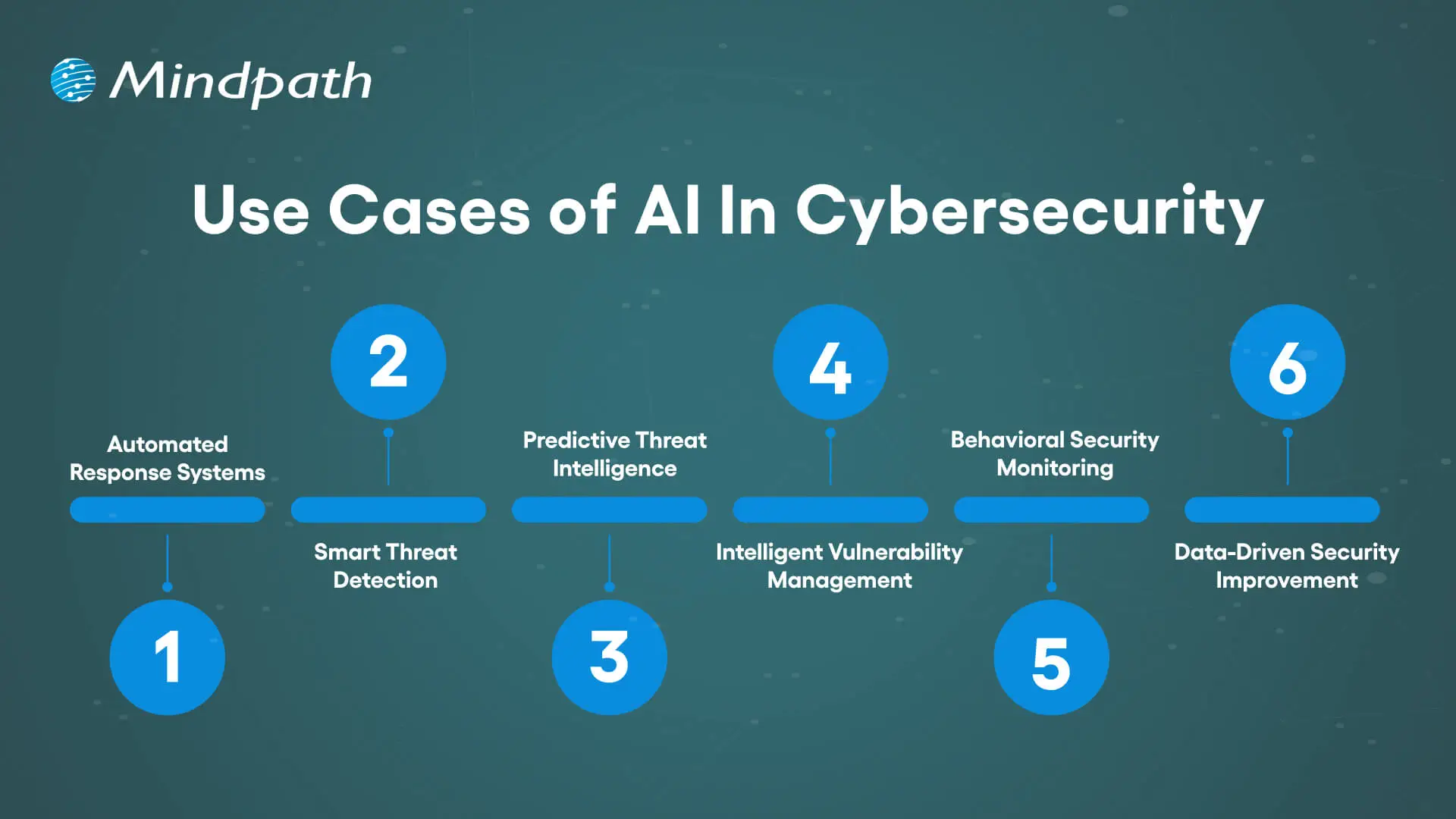
Use Cases of AI In Cybersecurity

The intersection of cybersecurity and AI technologies will change the way businesses identify, prevent, and respond to digital attacks. Through the utilization of intelligent systems which learn and adapt, organizations can construct greater and more proactive security strategies for the contemporary digital environment.
Use Cases of AI In Cybersecurity

1. Automated Response Systems

With AI, security incidents can be detected and acted instantly by taking actions such as isolating devices, or blocking malicious IPs, which mitigates attack impact and time to respond.

2. Smart Threat Detection

Artificial intelligence will scan data in near real-time, detect abnormal patterns, and uncover hidden, discreet threats that traditional tools may miss, such as phishing or network intrusions.

3. Predictive Threat Intelligence

AI will analyze behaviors and outside factors related to threats around the world and can predict and potentially prevent the next attack by turning data into actionable and meaningful defense-in-depth.

4. Intelligent Vulnerability Management

To help organizations stave off attacks, AI in cybersecurity finds all system vulnerabilities and ranks them based on severity, so that teams can manage the top-priority vulnerabilities and patch the most critical ones first.

5. Behavioral Security Monitoring

Cybersecurity and AI combine security monitoring with tracking users and better monitoring for suspicious behavior, stopping insider attacks and credential-based attacks before damage occurs.

6. Data-Driven Security Improvement

AI in cybersecurity changes data into usable intelligence based on the data, helping organizations improve detection, prevention, and overall protection.

Struggling to manage cybersecurity risks with limited visibility? Explore the importance of data-driven decision-making for businesses to discover how data strengthens security strategies.

Ready to Strengthen Your Cybersecurity with AI?

Artificial intelligence in cybersecurity is transforming the methods by which organizations protect their digital systems. It adds intelligence, speed and agility to security operations enabling organizations to proactively identify, prevent and respond to threats in real time. Given the growth of cyber risks, AI helps organizations be prepared, proactive, and resilient in the digital age.

At Mindpath, we offer advanced AI development solutions that help businesses enhance security and efficiency. Our expert team builds intelligent systems that detect risks, automate responses, and strengthen digital protection. With innovative AI-driven strategies, Mindpath helps organizations stay ahead of threats and achieve a safer, smarter, and more secure future.

Frequently Asked Questions

1. Can AI completely replace human cybersecurity experts?

No, AI works best when combined with human expertise. AI can quickly detect threats and automate repetitive tasks, but human professionals are still needed for strategy, investigation, and handling complex security situations that require judgment and

experience.

2. Is AI cybersecurity only useful for large enterprises?

Not at all. Small and medium businesses also face cyber threats every day. AI-powered security tools are becoming more accessible and affordable, helping businesses of all sizes improve protection, monitor risks, and respond to attacks more efficiently.

3. How long does it take to implement AI in cybersecurity systems?

The timeline depends on the size of the organization, existing infrastructure, and security goals. Some AI security tools can be integrated within weeks, while more advanced enterprise-level implementations may require several months for proper setup and training.

4. Can AI help prevent ransomware attacks?

Yes, AI can identify unusual behavior patterns linked to ransomware before major damage happens. It can detect suspicious file activity, unauthorized access attempts, and abnormal network behavior, helping security teams respond faster and reduce the impact of attacks.

5. What industries benefit the most from AI in cybersecurity?

Industries handling sensitive data benefit greatly from AI-powered security. Healthcare, banking, e-commerce, government, and education sectors use AI to protect customer information, detect fraud, secure networks, and manage growing cybersecurity risks more effectively.


Ready to Strengthen Cybersecurity With AI?

Use AI-driven security solutions to detect threats, improve protection, and safeguard your digital assets.

Frequently Asked Questions

Support Is One Click Away

Featured Posts

Related Post

agentic ai examples

Agentic AI examples show how businesses can use AI agents to plan tasks, work with connected systems, and take actions toward defined goals. Unlike AI tools that only generate content or answer questions, agentic AI systems can coordinate multiple steps, use approved tools, evaluate results, and adjust their approach when circumstances change.

Key Takeaways

  • 01
    Agentic AI systems can plan and execute multi-step tasks using approved tools, business data, and defined objectives.
  • 02
    Business use cases include customer support, cybersecurity, workflow automation, software development, sales, product planning, operations, and HR.
  • 03
    AI agents can coordinate tasks and work across connected systems, but their effectiveness depends on reliable data, permissions, and integration quality.
  • 04
    Businesses should begin with a measurable use case, evaluate the results, and expand automation only when the evidence supports it.
  • 05
    Human oversight, access controls, monitoring, and clear escalation rules are essential when AI agents can affect customers, data, or business operations.

Businesses can apply agentic AI to customer support, cybersecurity, sales, software development, human resources, and operational workflows. The right use case depends on the business problem, available data, system integrations, and the level of human oversight required. Starting with a clearly defined workflow helps organizations evaluate the technology without introducing unnecessary operational risk.

Considering AI agents for your business? Explore Mindpath’s agentic AI development services to discuss how agent-based workflows can support your operational goals.

What is Agentic AI?

Agentic AI refers to AI systems designed to pursue defined goals through a sequence of actions. Depending on their design, these systems can interpret a task, break it into smaller steps, use tools or external systems, evaluate intermediate results, and determine what to do next.

For example, a conventional AI assistant might summarize a customer complaint. An agentic workflow could classify the complaint, retrieve the relevant order information, check an approved refund policy, prepare a response, and route the case for approval when required. The agent’s actual capabilities depend on the tools, permissions, rules, and integrations configured for it.

Agentic AI often uses large language models (LLMs) for reasoning and language tasks, alongside APIs, business rules, data sources, and other software components. Some systems operate as a single agent, while others coordinate multiple specialized agents. For a broader foundation, read our guide to agentic AI and the different types and benefits of AI agents.

Why are Businesses Considering Agentic AI?

Many business processes involve more than one isolated task. Employees may need to gather information from several systems, apply policies, coordinate with colleagues, and update records before completing a workflow. Agentic AI can help coordinate parts of these processes when the required tools and permissions are available.

Potential benefits include:

  • Automating repetitive, multi-step workflows.
  • Reducing manual information gathering and handoffs.
  • Supporting faster access to relevant business information.
  • Personalizing responses based on approved customer context.
  • Coordinating tasks across connected applications.
  • Helping employees focus on exceptions, judgment, and higher-value work.

These benefits are not automatic. Results depend on process design, data quality, integration reliability, evaluation methods, and the level of autonomy granted to the system. Businesses should identify the intended outcome and establish a baseline before measuring whether an agent improves the workflow.

For a related perspective, read our guide to AI decision-making use cases to understand how AI can support business analysis and operational decisions.

8 Practical Agentic AI Examples for Businesses

The following agentic AI examples illustrate how businesses can apply goal-oriented agents to common workflows. They are practical implementation scenarios rather than claims that every organization has already deployed these systems successfully.

Use case Example agent workflow Potential business value Important control
Customer support Retrieve order information, check policies, prepare a response, and route exceptions. Faster case handling and fewer manual steps. Approval for refunds, account changes, or sensitive cases.
Cybersecurity Correlate alerts, gather evidence, assess severity, and recommend or trigger approved responses. More consistent alert triage and investigation support. Restricted permissions and approval for disruptive actions.
Enterprise workflows Extract action items from meeting notes, create tasks, and update project systems. Reduced administrative work and fewer missed handoffs. Validation of task ownership, deadlines, and updates.
Software development Inspect an issue, propose a code change, run tests, and prepare a review request. Support for repetitive engineering tasks. Code review, testing, and controlled deployment.
Sales and lead management Enrich approved lead records, prioritize prospects, and draft personalized follow-ups. Better-organized sales pipelines and reduced manual research. Data privacy and approval of customer communications.
Product roadmap planning Group customer feedback, identify recurring themes, and prepare feature recommendations. More structured product research and prioritization. Human review of recommendations and supporting evidence.
Operations and supply chains Monitor inventory signals, identify exceptions, and recommend replenishment or routing changes. Earlier visibility into operational issues. Approval for purchases and consequential operational changes.
Human resources Answer policy questions, retrieve approved documents, and coordinate routine employee requests. Reduced administrative effort and faster information access. Privacy controls and human review of employment decisions.

1. Customer Support Automation

Customer support often requires agents to retrieve information from order systems, customer relationship management platforms, knowledge bases, and service policies. An agentic AI system can coordinate these steps to help resolve routine requests without requiring an employee to handle every action manually.

For example, when a customer asks about a delayed order, an agent could retrieve the order status, check delivery information, summarize the situation, and prepare an appropriate response. If the issue requires a refund, policy exception, or sensitive account change, the workflow can request approval or transfer the case to a human representative.

This approach extends beyond the question-and-answer capabilities commonly associated with chatbots. It can be particularly useful when support requests involve several systems or steps. Businesses should measure resolution time, escalation accuracy, customer satisfaction, and the rate of incorrect actions to assess the results. Read more about AI for customer service.

2. Proactive Threat Detection and Cybersecurity

Security teams must review alerts, correlate events, investigate suspicious activity, and determine which incidents require immediate attention. Agentic AI can assist with this work by collecting evidence from approved security tools, grouping related alerts, summarizing possible causes, and recommending next steps.

For example, an agent could correlate an unusual login with other suspicious account activity, assemble relevant logs, and create an incident report for the security team. In a carefully controlled environment, it might also initiate predefined response actions when specific conditions are met.

Security-related agents should not receive unrestricted access to production systems. Organizations need role-based permissions, detailed audit logs, clear escalation rules, and testing against false positives. High-impact actions, such as disabling critical accounts or changing network configurations, may require human authorization.

3. Enterprise Workflow Automation

Enterprise processes often span collaboration platforms, project management software, document repositories, and internal business applications. An agent can help coordinate routine steps across these systems when the relevant integrations and permissions are available.

For example, after a project meeting, an agent could summarize decisions, identify action items, draft tasks, assign proposed owners based on the meeting notes, and prepare updates in a project management tool. Team members can review uncertain details before the tasks are finalized.

This type of workflow can reduce repetitive administration and improve the consistency of handoffs. Businesses should start with processes that have clear rules and measurable outcomes, then expand to more complex workflows after evaluating accuracy and reliability.

4. Software Development Assistance

Software engineering involves issue analysis, code changes, testing, documentation, debugging, and code review. Agentic AI can help coordinate parts of this lifecycle by retrieving relevant project context, proposing code changes, running approved tests, and preparing a change for developer review.

For instance, an agent could analyze a reported defect, locate the related code, propose a fix, execute an available test suite, and summarize the results. A developer would then review the changes and decide whether they are suitable for merging or deployment.

The goal is to support engineering teams, not to assume generated code is correct. Code quality checks, security scanning, automated tests, human review, and controlled deployment remain important. Organizations should evaluate accepted changes, defect rates, rework, and review time rather than relying only on the amount of code produced.

Related reading: See the benefits of custom software development when evaluating software solutions for specific business workflows.

5. Sales and Lead Conversion

Sales teams often spend considerable time researching prospects, updating records, reviewing engagement history, and preparing follow-up messages. Agentic AI can help organize these activities by combining approved customer data with defined sales workflows.

For example, an agent could review permitted CRM records, summarize a prospect’s previous interactions, identify missing information, and prepare a tailored follow-up draft. It could also flag leads that meet agreed qualification criteria and recommend which ones deserve attention first.

Sales teams should validate lead-scoring criteria and review communications before sending them when accuracy, consent, or brand reputation is at stake. Useful performance measures include qualified lead rates, follow-up completion, conversion rates, and the time representatives spend on administrative work.

6. Product Roadmap Planning

Product teams receive input from customer interviews, surveys, support tickets, usage analytics, and sales conversations. Organizing this information can be difficult when feedback is spread across different systems and stakeholders have competing priorities.

An agentic AI workflow can group related feedback, identify recurring themes, summarize supporting evidence, and prepare recommendations for product managers. It may also compare requests with existing roadmap items and highlight potential duplication.

The agent should support prioritization rather than make final roadmap decisions independently. Product teams still need to consider business strategy, development effort, technical dependencies, customer impact, and available resources. Recommendations should remain traceable to their source data so that decision-makers can assess their reliability.

7. Operations and Supply Chain Management

Operations teams coordinate inventory, suppliers, logistics, production schedules, and delivery commitments. Agentic AI can assist by monitoring approved data sources, identifying exceptions, and coordinating the next steps in a defined process.

For example, an agent could detect that inventory has fallen below a specified threshold, check recent demand and supplier lead times, prepare a replenishment recommendation, and notify the responsible team. More advanced workflows may compare delivery alternatives or flag potential disruptions for review.

The quality of these recommendations depends on the accuracy and freshness of inventory, supplier, and logistics data. Businesses should establish approval limits for purchasing and routing changes, and measure outcomes such as stockout frequency, exception resolution time, and forecast accuracy.

8. Human Resources Operations

HR teams manage recurring requests related to company policies, onboarding, internal documentation, benefits, and employee support. An agent can retrieve information from approved knowledge sources, answer routine questions, prepare documents, and coordinate administrative tasks.

For example, an onboarding agent could provide a new employee with relevant policy documents, generate a checklist, and prepare requests for access to approved systems. HR staff could review sensitive requests or exceptions before the workflow proceeds.

Employee information requires careful handling. HR agents should follow data-access restrictions, avoid exposing confidential records, and escalate sensitive matters appropriately. Decisions involving hiring, performance, compensation, or termination should not be delegated without suitable governance, legal review, and meaningful human oversight.

Agentic AI vs. Traditional Automation and Generative AI

Agentic AI, traditional automation, and generative AI can work together, but they serve different purposes. Understanding the distinctions helps businesses select an approach that fits the task rather than using autonomous agents where a simpler solution would be sufficient.

Aspect Traditional automation Generative AI Agentic AI
Primary purpose Execute predefined rules and workflows Generate text, code, images, or other content Work toward a goal through coordinated actions
Typical operation Follows configured steps Responds to instructions and context Can plan steps, use tools, and evaluate results
Adaptability Depends on the configured rules and exceptions Can adapt generated output to the prompt and context Can adjust a workflow based on observations and defined objectives
External actions Runs configured actions in connected systems Usually generates output unless connected to tools Can use authorized tools to execute multi-step tasks
Human oversight Depends on workflow design and risk Useful for reviewing generated content and decisions Should be determined by task risk, permissions, and reliability

These approaches are not mutually exclusive. A business may use traditional automation for predictable steps, generative AI to summarize information, and an agent to coordinate the workflow. In many cases, a simple rule-based process is more predictable and cost-effective than an agentic system.

How to Choose the Right Agentic AI Use Case

The best starting point is a business process with a clear objective, repeatable steps, accessible information, and a measurable outcome. A useful initial project should be valuable enough to justify implementation but limited enough to test under controlled conditions.

1. Identify a Specific Business Problem

Choose a workflow where employees spend significant time gathering information, coordinating steps, or handling routine exceptions. Document the current process and identify where delays, errors, or unnecessary handoffs occur.

2. Evaluate Data and Integrations

Determine whether the agent can access the information and tools needed to complete its task. Review data quality, API availability, system permissions, privacy requirements, and the reliability of connected services before committing to an implementation.

3. Define the Agent’s Permissions

Specify what the agent can read, create, change, or approve. Begin with limited permissions and low-impact actions. Require human approval for consequential operations such as financial transactions, access changes, sensitive customer decisions, or production deployments.

4. Set Measurable Success Criteria

Choose metrics that reflect the intended business outcome. Depending on the use case, these may include processing time, task completion rate, escalation accuracy, error rate, employee effort, or customer satisfaction. Establish a baseline before deployment so results can be compared meaningfully.

5. Test and Expand Gradually

Test the agent with representative scenarios, including ambiguous requests, missing data, incorrect tool outputs, and unexpected errors. Start with a pilot, review the results, and expand the agent’s responsibilities only when its performance and controls meet the required standards.

Challenges and Risks of Agentic AI

Agentic AI introduces additional considerations because an agent may interact with business systems and take actions rather than only generate responses. Organizations should plan for these risks before deploying agents in production workflows.

1. Data Quality and Context

Incomplete, outdated, or conflicting information can lead to poor decisions. Use approved sources, define how conflicts should be handled, and ensure the agent can recognize when it lacks sufficient information.

2. Unintended Actions

An agent may misunderstand a request, select an unsuitable action, or repeat a failed step. Restrict tool permissions, validate inputs, set execution limits, and require approval for high-impact actions.

3. Privacy and Security

Agents may access sensitive information through connected applications. Apply least-privilege access, secure credentials, protect data in transit and at rest, and maintain audit logs. Test how the system handles untrusted instructions in documents, messages, and external content.

4. Reliability and Accountability

An agent can produce incorrect results or fail when a connected service becomes unavailable. Define fallback procedures, monitor performance, preserve records of important actions, and assign clear responsibility for reviewing and correcting errors.

5. Cost and Complexity

Multi-step workflows can involve repeated model calls, tool usage, integration work, and ongoing monitoring. Estimate total operating costs and compare the results with a simpler automation option before expanding the system.

Build Smarter Business Workflows with Agentic AI

These agentic AI examples demonstrate how businesses can apply goal-oriented agents to customer support, cybersecurity, enterprise workflows, software development, sales, product planning, operations, and HR. The strongest starting point is not the most complex application, but a clearly defined problem where automation can be measured and managed responsibly.

Before deploying an agent, assess the workflow, data access, integration requirements, security controls, and need for human approval. A focused pilot can help your team determine whether agentic AI provides meaningful value compared with existing processes or simpler automation.

Mindpath supports businesses evaluating AI solutions for their operational needs. Visit our AI development services page or review our agentic AI development services to discuss a suitable approach for your business.

healthcare software

Ever pondered how doctors can diagnose faster now-a-days? Or what helps hospitals and clinics to carry out all the operations smoothly? What’s powering the virtual health check-ups? Well, the answer to all these questions in your mind lies in one powerful solution and that is healthcare software. In this blog, we will walk you through the top 20 types of healthcare software in 2026. 

Before learning about the types, let us learn what is the meaning of healthcare software and some of its benefits. 

Looking to reduce manual errors and speed up patient care? Mindpath’s Healthcare Software Development Services build intelligent systems that enhance decision-making and patient satisfaction.

What is Healthcare Software?

Healthcare software is a software that is created to help hospitals, clinics, doctors and patients in managing health related tasks smoothly. It assists in various tasks like booking appointments, keeping digital health records of patients, sending reminders, managing billing process and even making sure medicines get delivered on time. This kind of software makes it easier for the medical staff to focus on their work and help patients to get better care, both in person as well as online. 

The majority of people often get confused between medical software and healthcare software. Medical software is mainly used with medical devices to check and analyze a patient’s health which helps to decide the right treatment. On the other hand, healthcare software mainly focuses on improving the daily operations in healthcare and making patient experience organized and smoother. 

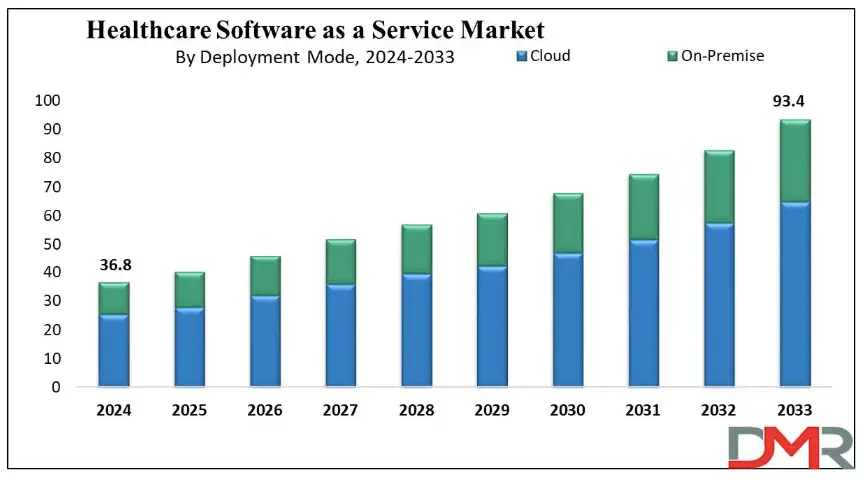
The demand for software in healthcare industry is growing rapidly around the world. According to Dimension Market Research, the global healthcare software as a service market was projected to reach about USD 36.8 billion and experts believe that this number will keep going up every year by around 10.9%, and by 2033, it can reach USD 93.4 billion which indicates that more hospitals and clinics are using this software to make their healthcare better and easier for everyone. 

healthcare software as a service

Benefits of Healthcare Software

Now that we have an idea about the definition of healthcare software and what it can do to the industry, let us know about some of its benefits: 

1. Boost Hospital Operations

It helps hospitals run more smoothly by making tasks like scheduling, billing, and patient record-keeping much faster and easier for staff. 

2. Better Data Handling

Doctors and nurses can quickly access up-to-date patient information, which helps them make better and faster decisions during treatment. 

3. Cost-Effective

By reducing paperwork and cutting down on mistakes, hospitals can save a lot of time and money in their daily operations. 

4. Easy Bookings for Patients

Patients can easily book their appointments online without the stress of long phone calls or waiting in line. 

5. Improve Patient Care from Anywhere

Even if someone lives far from a hospital, they can still talk to their doctor through video calls and get care from the comfort of home. 

6. Easy Monitoring and Health Tracking

Health apps and reminders make it easier for patients to take their medicine on time and keep track of how they’re feeling every day. 

Curious how AI is transforming industries and healthcare? Explore Generative AI use cases across diverse sectors and see how it’s reshaping healthcare platforms.

Let us come to our main topic now, the types of healthcare software: 

Top Healthcare Software in 2026

Having the best healthcare software is very important for making daily tasks easier in clinics, hospitals and labs. Today, many types of software in hospitals help doctors, nurses, and patients to work together and smoothly. Let’s have a look at some of them: 

1. Electronic Health Record (EHR) Software

EHR software stores patient data like medications, procedures, and doctor notes which helps doctors make better decisions and often includes billing features and a patient portal for easy access to health records and prescriptions. 

2. Medical Diagnosis Software

Medical diagnosis software allows doctors to share anonymized patient records to fill information gaps and improve diagnoses. It often uses AI to analyze data and suggest probable diagnoses. There are apps available for individuals to help users assess if they need medical attention. 

3. Medical Imaging Software

Medical imaging software processes MRI/CT/PET scans and creates 3D models. It helps with human anatomy modeling for individual patients, like creating a 3D print of teeth for orthodontics, or designing medical equipment such as artificial limbs. 

4. Medical Research Software

Medical research software aids in education and sharing research within the medical community. It trains healthcare professionals and supports diagnoses by referencing external cases, while also streamlining research processes to reduce costs and improve financial outcomes. 

5. Appointment Scheduling (Booking) Software

This software helps healthcare facilities manage appointments online. It allows patients to schedule appointments through an app or website, with email notifications and automatic reminders for both doctors and patients about upcoming appointments. 

6. Medical Database Software

This medical computer software stores data by disease, not by patient. It helps doctors make better treatment decisions by comparing similar cases and supports learning by offering access to detailed clinical case histories. 

7. Telemedicine Software

Telemedicine software lets doctors see patients online through apps or browsers. Some tools also offer e-prescriptions and billing. It’s super convenient for both patients and doctors, which is why it’s growing fast in the healthcare world. 

8. E-prescribing Software

E-prescribing software helps doctors manage prescriptions easily. They can track, renew, or cancel them digitally. It also connects with national drug databases, making the whole process quicker, safer, and more accurate for both doctors and patients. 

9. Medical Billing Software

Medical billing software helps hospitals manage invoices, payments, and other financial tasks. It’s often built into larger systems like EHRs, making it easier for accounting teams to handle everything in one place, quickly and accurately. 

10. Medical Equipment Management Software

Medical equipment management software helps clinics avoid manual tracking by automating maintenance schedules and sending inventory alerts. It keeps everything running smoothly and reduces the risk of missing important upkeep. 

11. Hospital Management Software

Hospital management software helps hospitals handle daily tasks like billing, accounting, patient management, inventory, bed management and others. It automates these operations to make hospital workflows smoother and more efficient for staff and administrators. 

12. Mobile Health (mHealth) Apps

mHealth apps make healthcare easier by helping patients book appointments, pay bills, and consult doctors online. They connect with EHR systems, so doctors can see medical records during virtual visits, improving care and saving time. 

13. Laboratory Information Management Systems (LIMS)

LIMS helps labs track samples, manage test data, and stay compliant with regulations. It reduces errors, speeds up processing, and keeps lab operations smooth, making sure patients get accurate and timely results. 

14. Personal Health Record Software (medical diaries)

Personal Health Record software, like the Tulipa app for Parkinson’s disease, allows patients to track symptoms, medication, and treatments. It helps generate health reports for doctor visits and alerts healthcare providers if a patient’s condition worsens. 

15. Radiology Information System (RIS)

A Radiology Information System (RIS) manages and stores radiology images and results. It works alongside PACS to streamline radiology department operations, ensuring efficient image storage and integration with EHR/EMR systems for enhanced patient care. 

16. ERP System

An ERP system for healthcare focuses on operational management, optimizing financial, supply chain, and human resources processes. It supports strategic planning, including expansions and mergers, without directly managing patient-facing tasks or data. 

17. Pharmacy Management Software

Pharmacy management software helps control and monitor inventory by classifying medicines, ensuring adequate stock, and avoiding shortages. It also supports drug price management and integrates with prescription systems for seamless access to medication information. 

18. Clinical Trial Management Software

Clinical trial management software records all the information related to the trials, such as patient information, study files, and approval from regulatory bodies. It is utilized mostly in top-class hospitals undertaking large-scale research to maintain compliance and proper trial management. 

19. Health Tracking Apps

Health tracking apps assist users in tracking fitness, diet, stress, and sleep. Many syncs with IoT devices like FitBit or Oura Ring to collect data. They’re popular for making healthy habits easier and more trackable every day. 

20. Remote Patient Monitoring (RPM)

Remote Patient Monitoring (RPM) enables healthcare professionals to gather patient information beyond the confines of standard settings, i.e., hospitals and clinics. RPM encompasses devices like blood glucose meters and heart rate monitors, which improve post-operative care and chronic disease care. 

Looking to speed up hospital operations and reduce errors? See how AI in healthcare is making hospital management smarter and more efficient.

Ready to Revolutionize Your Healthcare Solutions?

Healthcare is changing at a lightning pace, and software is leading the charge. From helping hospitals operate more effectively to making it easier for patients to access care, healthcare software is making a difference. In 2026, these technologies will continue to expand and make care easier, quicker, and more patient centered. 

At Mindpath, we recognize the need for state-of-the-art technology in the healthcare industry. Our healthcare software development services are built to improve operations, enhance patient care, and increase overall efficiency. Let Mindpath help you empower your health care business with robust, scalable, and innovative software that keeps up with the evolving healthcare environment. Let’s create a healthier tomorrow together! 

Frequently Asked Questions

1. How do I choose the right healthcare software for my organization?

Choosing the right healthcare software depends on your facility size, patient volume, budget, and operational needs. Start by identifying workflow challenges, integration requirements, and compliance standards. Always look for scalable solutions that can grow with your organization and support future technological advancements.

2. Is healthcare software secure for storing patient information?

Yes, most modern platforms are built with strong security measures such as encryption, access controls, and regulatory compliance standards. However, healthcare providers must ensure proper implementation, regular updates, and staff training to maintain data privacy and protect sensitive patient information from cyber threats. 

3. Can small clinics afford advanced healthcare software in 2026?

Absolutely. Many healthcare software solutions are now available through cloud-based or SaaS models, making them more affordable for small clinics. These subscription-based systems reduce upfront costs and allow smaller healthcare providers to access advanced features without investing heavily in infrastructure. 

4. How does healthcare software improve patient satisfaction?

Healthcare software enhances patient satisfaction by reducing waiting times, simplifying appointment bookings, enabling digital communication, and ensuring accurate records. When systems run smoothly, patients experience faster service, clearer communication, and more personalized care throughout their treatment journey. 

5. Will healthcare software replace administrative staff in hospitals?

No, healthcare software is designed to support administrative teams, not replace them. It automates repetitive tasks like billing and scheduling, allowing staff to focus on higher-value responsibilities such as patient coordination, service improvement, and overall operational management. 

Chatbot examples

AI chatbots are molding the future of customer engagement in 2026 by providing accuracy and efficacy. The real-life chatbot examples demonstrate how intelligent systems analyze user interactions, offer relevant and timely recommendations, and aid in decision-making as it unfolds.

Organizations that are leveraging these types of solutions notice concrete results in user satisfaction and conversions. This clearly shows that AI chatbot assistants can convert complex customer journeys into simple, actionable experiences.

These examples of chatbots have also shown us the benefits of predictive insights and targeted communication. When brands effectively leverage AI chatbots, they minimize friction in their customer journey, maximize retention, and achieve measurable growth.

By looking at these real-life use cases, we can evaluate the strategies we can adopt to improve digital experiences and obtain better data-driven results. So, keep reading this blog as we are going to showcase real-life examples of AI chatbots that have aided businesses in increasing conversion.

Market Demand of AI Chatbots

According to Fortune Business Insights, the global AI chatbot market is growing rapidly, from USD 9.90 billion in 2026 to USD 65.94 billion by 2032, a CAGR of 31.1%. Customer demand for instant service, cost savings through automation, advances in NLP, wider industry adoption, and the rise of generative AI with human-like conversations are driving this growth.

These important figures illustrate the strong market demand: Outgrow says that sales through chatbots are up 67%, Tidio states that 62% of users prefer to chat rather than wait for a human agent, Master of Code says 26% of sales transactions begin with a bot, and 35% of leaders said that they closed sales because of digital assistants.

Outgrow also states that 57% of businesses have seen better ROI, and that 45% of businesses have seen reduced response time through chatbots. Looking at these numbers, it shows that AI chatbot examples are demonstrating how businesses can become more efficient, collaborative, and create greater sales.

How AI Chatbots Increase Conversions?

Do chatbots really increase conversions? Businesses worldwide are beginning to embrace AI chatbots to transform customer experiences and make them smoother, faster, and more personalized. Here are the insights that demonstrate that chatbots are very much influencing conversions.

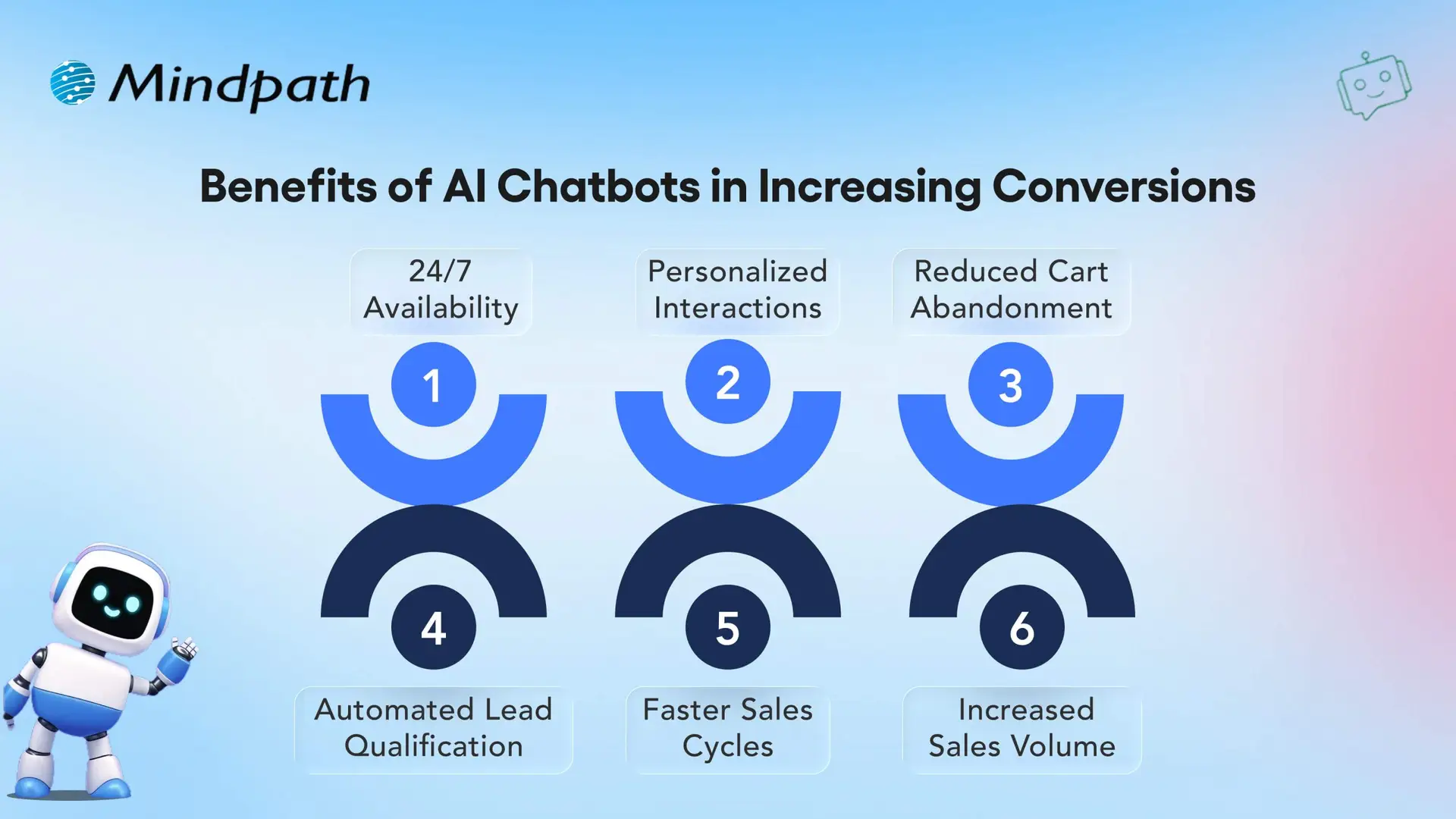
Benefits of AI Chatbots in Increasing Conversions

1. 24/7 Availability

AI chatbots are always-on and provide 24/7 access for customers to quickly find answers for whoever, whenever they want assistance. Being constantly available keeps customers engaged and increases the likelihood of execution of a purchase.

2. Personalized Interactions

Real-world Chatbot examples illustrate how AI reads customer engagement data to provide personalized recommendations, product suggestions, etc. This personalization creates more meaningful conversations and promotes higher conversion rates.

3. Reduced Cart Abandonment

AI chatbots minimize cart abandonment by helping consumers through checkout and by answering last-minute questions. This kind of assistance is simple, but improves selling and makes customers feel good about purchasing.

4. Automated Lead Qualification

Chatbot applications can qualify leads with the right questions and key details. The sales team will not have to waste time with any unqualified prospects.

5. Faster Sales Cycles

Utilizing conversational AI for business growth by speeding up the sales process, provides immediate support and follow-ups to customers. The quickness is what allows businesses to turn a lead into a customer quickly and effectively.

6. Increased Sales Volume

Successful chatbot examples illustrate how AI recommends products, engages customers, and inspires repeat purchases. These real-world examples show businesses can also drive revenues while lower acquisition costs.

Want to reduce operational costs while improving customer engagement? Discover how conversational AI chatbots streamline business operations and drive efficiency across teams.

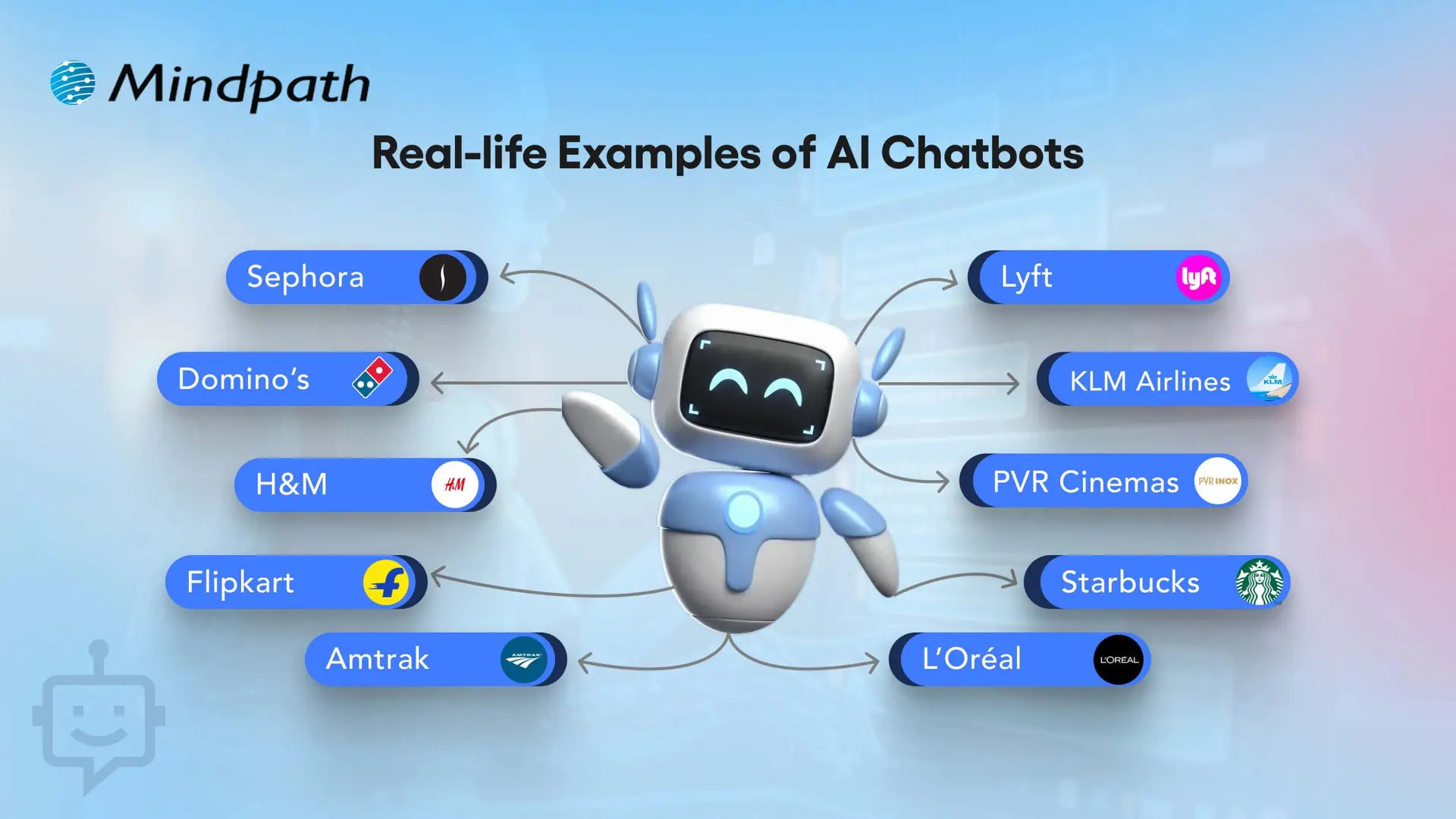
10 Real-life Examples of AI Chatbots

Real-life examples of artificial intelligence chatbots highlight how companies are using artificial intelligence (AI) to innovate the way that organizations interact with potential and current customers. More and more companies are turning to chatbots for lead generation and conversions, thus effectively proving their worth as tools for enhancing sales and ultimately customer experience.

10 Real-life Examples of AI Chatbots

1. Sephora – Personalized Shopping Assistant

Sephora utilizes an AI chatbot to assist customers in selecting makeup and skincare products, to support customers based on their preferences. This chatbot example assists shoppers in finding the right products, much quicker than a human, resulting in higher conversions overall. This video definitely ranks as one of the best chatbot examples in the retail world.

2. Domino’s – Easy Food Ordering

Domino’s has incorporated a chatbot that allows the customers to order pizza directly through a messaging app. This practical application of chatbot makes ordering easy while also cutting down on wait time and increases customer satisfaction. It is one of the most effective AI chatbots that increased sales in the food industry.

3. H&M – Style Recommendations

H&M has a chatbot that suggests clothing based on user style preferences. These website-chatbot examples improve the shopping experience by making it more personal. It shows how real-life examples of AI chatbots in business can drive higher engagement.

4. Flipkart – Seamless E-commerce Recommendations

Flipkart’s chatbot provides personalized product suggestions based on browsing history and preferences. This example of chatbots enhances shopping experiences, boosts conversions, and increases customer satisfaction. It is among the best AI chatbot examples in online retail.

5. Amtrak – Julie Virtual Assistant

Amtrak’s virtual assistant Julie answers millions of passengers queries every year. These examples of chatbots on websites save time for both customers and staff. The company reported significant cost savings and better chatbot ROI examples.

6. Lyft – Ride Booking Made Easy

Lyft allows users to book rides via its chatbot on Messenger or Slack. This real-life example of AI chatbots in business shows how brands can remove friction in customer journeys. It directly improves bookings and conversions.

7. KLM Airlines – Travel Assistant

KLM Airlines uses a chatbot to provide booking confirmations, flight updates, and boarding passes. This website chatbot example streamlines travel support. It is one of the AI chatbots that increased sales through seamless customer care.

8. PVR Cinemas – Movie Booking Assistant

PVR Cinemas uses a chatbot to help customers check movie schedules, book tickets, and view offers instantly. This chatbot example simplifies the booking process, improves customer engagement, and drives higher ticket sales. It is one of the best AI chatbot examples in the entertainment and cinema industry.

9. Starbucks – Coffee Ordering Chatbot

Starbucks has a chatbot that lets customers place their orders ahead via mobile. This application of chatbot reduces wait time and encourages repeat purchases. It’s among the strongest chatbot ROI examples in food service.

10. L’Oréal – Beauty Genius for Personalized Shopping

L’Oréal launched ‘Beauty Genius’, an AI chatbot that gives personalized beauty tips and product recommendations. It uses AI and AR to analyze selfies and suggest the best skincare and makeup from over 750 products. This chatbot improves customer engagement and drives more conversions for the brand.

Looking for AI systems that can plan and act independently for your business? Discover Agentic AI to learn how intelligent agents are transforming decision-making and workflow automation.

Want to Transform Your Business with Chatbot Solutions?

AI chatbots play a vital role in boosting sales, improving efficiency, and creating better customer experiences. These chatbot examples highlight how leading brands use AI to personalize interactions, reduce friction, and drive measurable growth. By learning from real-life cases, your business can adopt similar strategies to maximize ROI and conversions.

At Mindpath, we specialize in developing bespoke chatbot solutions designed to align with your unique business needs. Our tailored approach ensures your chatbot goes beyond generic automation and instead creates real value through seamless user journeys. With expertise in crafting solutions inspired by the best chatbot examples, we help you enhance engagement, streamline processes, and accelerate business growth.