Top 20 Types of Healthcare Software in 2026

Join our Newsletter!

Featured Posts

Support Is One Click Away

Home

Top 20 Types of Healthcare Software in 2026

healthcare software

Top 20 Types of Healthcare Software in 2026

Ever pondered how doctors can diagnose faster now-a-days? Or what helps hospitals and clinics to carry out all the operations smoothly? What’s powering the virtual health check-ups? Well, the answer to all these questions in your mind lies in one powerful solution and that is healthcare software. In this blog, we will walk you through the top 20 types of healthcare software in 2026. 

Before learning about the types, let us learn what is the meaning of healthcare software and some of its benefits. 

Looking to reduce manual errors and speed up patient care? Mindpath’s Healthcare Software Development Services build intelligent systems that enhance decision-making and patient satisfaction.

What is Healthcare Software?

Healthcare software is a software that is created to help hospitals, clinics, doctors and patients in managing health related tasks smoothly. It assists in various tasks like booking appointments, keeping digital health records of patients, sending reminders, managing billing process and even making sure medicines get delivered on time. This kind of software makes it easier for the medical staff to focus on their work and help patients to get better care, both in person as well as online. 

The majority of people often get confused between medical software and healthcare software. Medical software is mainly used with medical devices to check and analyze a patient’s health which helps to decide the right treatment. On the other hand, healthcare software mainly focuses on improving the daily operations in healthcare and making patient experience organized and smoother. 

The demand for software in healthcare industry is growing rapidly around the world. According to Dimension Market Research, the global healthcare software as a service market was projected to reach about USD 36.8 billion and experts believe that this number will keep going up every year by around 10.9%, and by 2033, it can reach USD 93.4 billion which indicates that more hospitals and clinics are using this software to make their healthcare better and easier for everyone. 
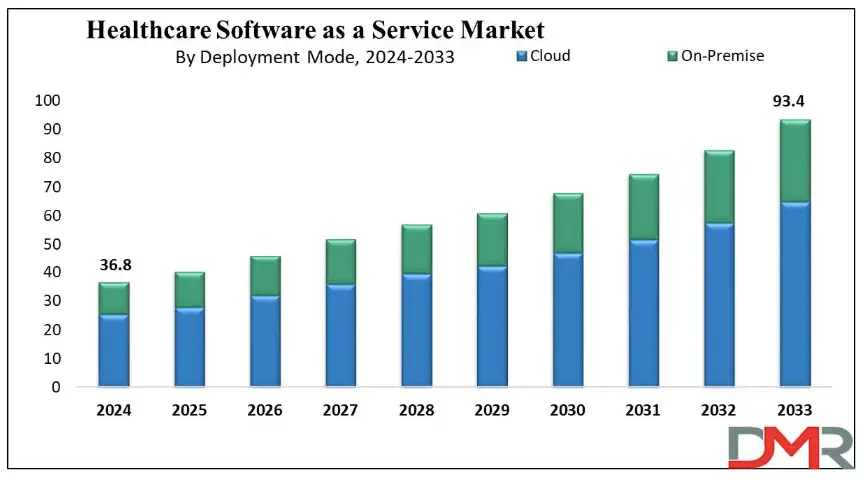
healthcare software as a service

Benefits of Healthcare Software

Now that we have an idea about the definition of healthcare software and what it can do to the industry, let us know about some of its benefits: 

1. Boost Hospital Operations

It helps hospitals run more smoothly by making tasks like scheduling, billing, and patient record-keeping much faster and easier for staff. 

2. Better Data Handling

Doctors and nurses can quickly access up-to-date patient information, which helps them make better and faster decisions during treatment. 

3. Cost-Effective

By reducing paperwork and cutting down on mistakes, hospitals can save a lot of time and money in their daily operations. 

4. Easy Bookings for Patients

Patients can easily book their appointments online without the stress of long phone calls or waiting in line. 

5. Improve Patient Care from Anywhere

Even if someone lives far from a hospital, they can still talk to their doctor through video calls and get care from the comfort of home. 

6. Easy Monitoring and Health Tracking

Health apps and reminders make it easier for patients to take their medicine on time and keep track of how they’re feeling every day. 

Curious how AI is transforming industries and healthcare? Explore Generative AI use cases across diverse sectors and see how it’s reshaping healthcare platforms.

Let us come to our main topic now, the types of healthcare software: 

Top Healthcare Software in 2026

Having the best healthcare software is very important for making daily tasks easier in clinics, hospitals and labs. Today, many types of software in hospitals help doctors, nurses, and patients to work together and smoothly. Let’s have a look at some of them: 

1. Electronic Health Record (EHR) Software

EHR software stores patient data like medications, procedures, and doctor notes which helps doctors make better decisions and often includes billing features and a patient portal for easy access to health records and prescriptions. 

2. Medical Diagnosis Software

Medical diagnosis software allows doctors to share anonymized patient records to fill information gaps and improve diagnoses. It often uses AI to analyze data and suggest probable diagnoses. There are apps available for individuals to help users assess if they need medical attention. 

3. Medical Imaging Software

Medical imaging software processes MRI/CT/PET scans and creates 3D models. It helps with human anatomy modeling for individual patients, like creating a 3D print of teeth for orthodontics, or designing medical equipment such as artificial limbs. 

4. Medical Research Software

Medical research software aids in education and sharing research within the medical community. It trains healthcare professionals and supports diagnoses by referencing external cases, while also streamlining research processes to reduce costs and improve financial outcomes. 

5. Appointment Scheduling (Booking) Software

This software helps healthcare facilities manage appointments online. It allows patients to schedule appointments through an app or website, with email notifications and automatic reminders for both doctors and patients about upcoming appointments. 

6. Medical Database Software

This medical computer software stores data by disease, not by patient. It helps doctors make better treatment decisions by comparing similar cases and supports learning by offering access to detailed clinical case histories. 

7. Telemedicine Software

Telemedicine software lets doctors see patients online through apps or browsers. Some tools also offer e-prescriptions and billing. It’s super convenient for both patients and doctors, which is why it’s growing fast in the healthcare world. 

8. E-prescribing Software

E-prescribing software helps doctors manage prescriptions easily. They can track, renew, or cancel them digitally. It also connects with national drug databases, making the whole process quicker, safer, and more accurate for both doctors and patients. 

9. Medical Billing Software

Medical billing software helps hospitals manage invoices, payments, and other financial tasks. It’s often built into larger systems like EHRs, making it easier for accounting teams to handle everything in one place, quickly and accurately. 

10. Medical Equipment Management Software

Medical equipment management software helps clinics avoid manual tracking by automating maintenance schedules and sending inventory alerts. It keeps everything running smoothly and reduces the risk of missing important upkeep. 

Must Read:  Hospital Management System Guide

11. Hospital Management Software

Hospital management software helps hospitals handle daily tasks like billing, accounting, patient management, inventory, bed management and others. It automates these operations to make hospital workflows smoother and more efficient for staff and administrators. 

12. Mobile Health (mHealth) Apps

mHealth apps make healthcare easier by helping patients book appointments, pay bills, and consult doctors online. They connect with EHR systems, so doctors can see medical records during virtual visits, improving care and saving time. 

13. Laboratory Information Management Systems (LIMS)

LIMS helps labs track samples, manage test data, and stay compliant with regulations. It reduces errors, speeds up processing, and keeps lab operations smooth, making sure patients get accurate and timely results. 

14. Personal Health Record Software (medical diaries)

Personal Health Record software, like the Tulipa app for Parkinson’s disease, allows patients to track symptoms, medication, and treatments. It helps generate health reports for doctor visits and alerts healthcare providers if a patient’s condition worsens. 

15. Radiology Information System (RIS)

A Radiology Information System (RIS) manages and stores radiology images and results. It works alongside PACS to streamline radiology department operations, ensuring efficient image storage and integration with EHR/EMR systems for enhanced patient care. 

16. ERP System

An ERP system for healthcare focuses on operational management, optimizing financial, supply chain, and human resources processes. It supports strategic planning, including expansions and mergers, without directly managing patient-facing tasks or data. 

17. Pharmacy Management Software

Pharmacy management software helps control and monitor inventory by classifying medicines, ensuring adequate stock, and avoiding shortages. It also supports drug price management and integrates with prescription systems for seamless access to medication information. 

18. Clinical Trial Management Software

Clinical trial management software records all the information related to the trials, such as patient information, study files, and approval from regulatory bodies. It is utilized mostly in top-class hospitals undertaking large-scale research to maintain compliance and proper trial management. 

19. Health Tracking Apps

Health tracking apps assist users in tracking fitness, diet, stress, and sleep. Many syncs with IoT devices like FitBit or Oura Ring to collect data. They’re popular for making healthy habits easier and more trackable every day. 

20. Remote Patient Monitoring (RPM)

Remote Patient Monitoring (RPM) enables healthcare professionals to gather patient information beyond the confines of standard settings, i.e., hospitals and clinics. RPM encompasses devices like blood glucose meters and heart rate monitors, which improve post-operative care and chronic disease care. 

Looking to speed up hospital operations and reduce errors? See how AI in healthcare is making hospital management smarter and more efficient.

Ready to Revolutionize Your Healthcare Solutions?

Healthcare is changing at a lightning pace, and software is leading the charge. From helping hospitals operate more effectively to making it easier for patients to access care, healthcare software is making a difference. In 2026, these technologies will continue to expand and make care easier, quicker, and more patient centered. 

At Mindpath, we recognize the need for state-of-the-art technology in the healthcare industry. Our healthcare software development services are built to improve operations, enhance patient care, and increase overall efficiency. Let Mindpath help you empower your health care business with robust, scalable, and innovative software that keeps up with the evolving healthcare environment. Let’s create a healthier tomorrow together! 

Related Post

Discover how Generative AI is revolutionizing customer service with automation, efficiency, enhancing customer experience and more.
Discover the latest DevOps trends to enhance collaboration, streamline processes, and drive business success.
Explore how to structure React components for maintainability, efficiency, and scalability in large-scale applications.

Related Post

DevOps Trends

Have you been paying attention to the speed at which DevOps trends are changing and how they are affecting businesses? If you’re managing a tech team or are just about to scale up your operations, you may already be thinking about the implications of these trends on your success. As more companies adapt to smarter workflows and quicker ways of delivering value, being up to date is critical. So, how can you stay on top of it without falling behind?

Finding the answer to this question involves understanding the trends that affect how we run businesses in the real world. DevOps best practices today are designed to bring automation, cloud-native tools, or security-first approaches to solve the problems we face in modern situations. Being aware of what’s meaningful and useful can help your team be more effective while accelerating time to market. In this blog, we will examine key trends and look at how they can create real results for your organization.

As businesses embrace DevOps in 2026, the need for expert guidance becomes crucial. At Mindpath, our DevOps services ensure organizations can adopt the right strategies and technologies to stay competitive.

Understanding DevOps: A Quick Dive-in

DevOps is a development approach in which software developers and IT teams collaborate on software and business processes. By working together, they share responsibilities and use tools to speed things up and facilitate the flow of work. DevOps is centered around good communication, collaboration, and automation. In essence, DevOps can deliver near-instant software, identify issues sooner, and get a better and quicker flow between building and deploying applications. As a result, many organizations leverage DevOps for business strategy and agility since it can enhance both speed and efficiency.

In this approach, one team often takes care of everything, including coding, testing, releasing, and maintaining the software. This removes delays and improves software quality. Teams use automation tools to speed up tasks and reduce errors. DevOps also brings security into the process right from the beginning, so it becomes part of every step. This working method helps businesses launch better software faster while keeping systems stable and secure.

Here are some of the benefits that DevOps can offer:

Benefits of Devops

1. Creates a Stable Work Environment

DevOps helps teams handle changes easily without stress. It brings a better balance to daily work and keeps operations running smoothly.

2. Speeds Up Deployment

DevOps allows faster software releases with fewer delays. This helps businesses deliver new features quickly and stay ahead in the market.

3. Improves Software Quality

With regular testing and feedback, DevOps helps catch bugs early. Teams can focus on creating better products with fewer errors.

4. Solve Problems Quickly

DevOps uses monitoring tools to spot issues fast. Smaller and frequent updates make fixing problems easier and more reliable.

5. Supports Flexibility and Quick Changes

DevOps builds a flexible work style where teams can respond to change easily. It helps businesses adapt to market needs faster.

6. Boosts Innovation Through Automation

By reducing manual tasks, DevOps gives teams more time for new ideas. This leads to faster improvements and better products.

7. Reduces Overall Costs

DevOps combines tasks and reduces the need for rework. This saves time, uses resources better, and cuts down project costs.

8. Improves Team Collaboration

DevOps encourages better teamwork and shared goals. Clear communication between teams leads to faster decisions and stronger results.

Aiming to enhance operational efficiency and reduce development risks? Check out our blog on DevOps Challenges and Solutions to discover proven approaches that improve performance, stability, and cross-team cooperation.

Top DevOps Trends 2026

As technology continues to evolve, companies are rethinking how they build, test, and deliver software. DevOps trends for businesses in 2026 show a clear shift toward smarter tools, stronger collaboration, and faster delivery. By following the latest DevOps transformation strategies, organizations can stay ahead and build systems that are both efficient and future-ready.

top devops trends


1. DevSecOps

DevSecOps is becoming a key part of DevOps innovation, where security is built into every stage of the development process. Instead of adding security at the end, teams now include it early to catch risks before they grow. This trend helps businesses create safer applications by using automated testing and continuous monitoring within the DevOps workflow.

2. AI and Machine Learning

AI and machine learning is one of the latest DevOps trends, helping teams work faster and smarter. These technologies support intelligent monitoring, find unusual behavior in systems, and give early warnings before issues grow. By using data to guide decisions, DevOps teams can improve system performance and reduce downtime.

3. Serverless Computing

Serverless computing is becoming a popular trend in DevOps for business success because it removes the need to manage servers. It allows teams to focus only on writing code, which speeds up development and reduces overhead. This approach also helps businesses save costs by using resources only when needed, making operations more efficient.

4. Continuous Integration and Continuous Delivery (CI/CD)

Continuous Integration and Continuous Delivery (CI/CD) is a key DevOps trend that helps teams deliver software faster and with fewer errors. It allows developers to regularly merge code changes, test them automatically, and deploy updates smoothly. This approach improves software quality and supports a steady flow of new features to users.

5. Infrastructure as Code (IaC)

Infrastructure as Code is a growing trend that helps teams manage infrastructure through written code instead of manual steps. It ensures consistency across development, testing, and production, reducing errors and saving time. As one of the leading DevOps tools and technologies, it allows automated setup and easy tracking of changes in infrastructure.

6. Microservices Architecture

Microservices architecture is a DevOps approach where an application is built using many small, separate services. Each service handles a specific function and can be updated or scaled on its own without affecting the rest of the system. This makes the software more flexible, easier to manage, and better at handling changes or failures.

Must Read: DevOps for Business

7. Cloud-Native Development

Cloud-native development is a modern way of building applications that fully uses the power of cloud computing. It is one of the key DevOps trends helping businesses create software that can easily grow, move, and adapt to changing needs. By using containers and microservices, teams can build flexible and efficient systems that are ready for fast updates and smooth scaling.

8. Edge Computing

Edge computing is a growing part of modern DevOps trends that focuses on processing data close to where it is created. This reduces delays and improves the speed of applications by handling data locally instead of in a central server. It also helps save bandwidth and supports real-time decision-making, making systems faster and more efficient.

9. Hybrid and Multi-Cloud Strategies

Hybrid and multi-cloud strategies are important DevOps trends that give businesses more flexibility and control over their cloud usage. By using services from different cloud providers, teams can choose the best tools and features for each task. This approach improves performance, reduces risk, and avoids being tied to one provider.

10. Low-Code and No-Code Platforms

Low-code and no-code platforms are shaping the future of DevOps by making application development easier and faster. These tools allow non-developers to build and launch apps with simple interfaces, helping teams save time. By handling basic tasks through these platforms, developers can focus on more complex work and boost overall productivity.

11. Quantum Computing

Quantum computing is an emerging part of DevOps trends with the potential to solve complex problems much faster than traditional systems. Although still in the early stages, it may one day help teams handle advanced computing tasks more efficiently. As the technology grows, it could bring powerful new capabilities to DevOps in areas like testing, simulation, and optimization.

12. AR and VR (Augmented Reality and Virtual Reality)

Augmented Reality and Virtual Reality are becoming new DevOps trends that support better training, simulation, and team collaboration. These technologies create realistic, hands-on experiences that help teams learn and solve problems more effectively. AR and VR also improve remote teamwork by making interactions more engaging and productive.

Looking to combine fast DevOps practices with automated security checks? Check out our blog on DevOps vs DevSecOps to understand how DevSecOps adds proactive, automated safeguards to every stage of your pipeline.

Is Your Business Ready to Benefit from the Latest DevOps Trends?

DevOps trends continue to shape how businesses grow through faster delivery, better collaboration, and smarter tools. Staying updated helps teams move quickly, improve software quality, and remain competitive in a rapidly changing market. By understanding and applying these trends, companies can build stronger systems and create real value with every software release.

At Mindpath, we offer expert DevOps services that help businesses streamline processes, boost collaboration, and deliver software faster. Our team uses modern tools and proven strategies to support automation, cloud-native development, and continuous delivery. Contact us and we’ll guide you through each stage with clear planning, smooth implementation, and reliable support tailored to your business goals.

Discover the latest DevOps trends to enhance collaboration, streamline processes, and drive business success.
Are you looking to build a fast and scalable web application? Do you need expert NodeJS developers in New York to bring your ideas to life? Finding the right developers can be challenging, but with the right team, you can create high-performance applications that drive business success. But where can you find the best talent? Hiring Node.js developers in New York is essential for businesses seeking scalable and high-performance applications. With its event-driven architecture and non-blocking I/O, Node.js enables fast and efficient development, making it a preferred choice for real-time applications, APIs, and enterprise solutions. New York’s dynamic tech ecosystem offers access to highly skilled Node.js developers with expertise in modern frameworks and development best practices. Whether you’re building a startup or expanding an existing platform, choosing the right developers ensures seamless execution, optimized performance, and long-term success. Let’s explore how you can hire top NodeJS developers to take your project to the next level!

Steps to Hire Node.js Developers in New York

1. Define the Role

Begin by writing a comprehensive job description that outlines the responsibilities, requisite abilities, and credentials for the Node.js developer position. Indicate your proficiency in JavaScript, Express.js, databases (MongoDB, PostgreSQL), and cloud services. Mention your experience with API development, real-time data management, and performance optimization. Clearly identify soft skills such as problem-solving, teamwork, and communication to ensure alignment with the business culture. To attract the best candidates, mention if the position is onsite, remote, or hybrid, as well as the project requirements. A clearly defined position guarantees that only the most qualified and relevant Node.js engineers in New York apply.

2. Build a Hiring Process

Create a systematic hiring funnel to evaluate prospects efficiently. Begin with scanning resumes to identify competent individuals, followed by technical examinations to evaluate coding abilities. Next, conduct behavioral and cultural fit interviews to evaluate collaborative abilities. Include a test project to evaluate real-world problem-solving ability. Ensure that the process is in accordance with the business’s needs, timetables, and project scope. A well-planned recruitment strategy makes recruitment easier, allowing firms to find the top Node.js developers in New York who meet both technical and cultural requirements.

3. Find Candidates

Finding the appropriate Node.js developers are essential. Post job openings on LinkedIn, Indeed, Glassdoor, and the local NYC tech employment boards. Use networking events, hackathons, and developer meetings to connect with talent. Alternatively, work with a Node.js development agency in New York to have access to pre-vetted professionals. Agencies manage the vetting process, saving time while assuring high-quality personnel. Whether you’re recruiting freelancers, in-house developers, or outsourcing to an agency, using different sourcing channels will help you identify the most competent and experienced Node.js individuals for your project.

4. Assess Candidates

Review portfolios and GitHub repositories to assess technical and problem-solving skills. Check past projects to see experience in Node.js frameworks, databases, and cloud deployment. Ask candidates about coding methodologies, debugging strategies, and security best practices. Consider administering a practical coding test to determine efficiency in handling real-world scenarios. Pay attention to soft skills such as communication, adaptability, and teamwork to ensure compatibility with your current team. A thorough examination assures you choose professional and skilled Node.js developers in New York who can produce high-quality apps.

5. Interview Candidates

Prepare an organized interview procedure that includes technical and behavioral questions. Begin with a screening interview to examine experience, previous projects, and technical expertise. Follow up with a detailed code interview that covers Node.js architecture, performance optimization, and database administration. Include a live coding session or case study to put your real-time problem-solving abilities to the test. Conduct team interviews to evaluate collaboration and cultural fit. In New York’s competitive tech industry, a rigorous but fast interview process is required to obtain top personnel while assuring alignment with your company’s vision and goals.

6. Hire candidates

After conducting interviews, choose the finest Node.js engineers based on technical knowledge, problem-solving skills, and cultural fit. Check references to confirm previous performance and professionalism. To recruit excellent people, provide competitive compensation that is in line with New York’s technology market requirements. Prior to onboarding, clearly describe job expectations, team structure, and project goals. Integrating new personnel into your development workflow and introducing them to the team can help to ensure a pleasant onboarding experience. Hiring the best Node.js engineers in New York guarantees the success of your online and software development projects.

Ready to Hire the Best Node.js Developers in New York?

At Mindpath we provide top-tier Node.js development services to help businesses build scalable, high-performance applications. Whether you need a dedicated developer or a full-scale development team, our experts are ready to bring your vision to life.
Contact Mindpath today and get the right Node.js developers for your project.

Discover the ultimate guide to hiring Node.js developers in London. Learn about the skills, benefits, and cost factors involved in finding the right talent for your project.
Custom Wordpress development

A website truly reflects your business motive and what it offers to its targeted audiences. Without a proper website, your organization can’t stand in this massive digital world. However, if you think your website is just to highlight your business, then you are misguided. As per a statistic of Stanford University, around 75% users judge the credibility of a business through their website design. So, for your long-term success, you must adopt a well-optimized website. 

This is where custom WordPress development serves uniqueness. Being the most popular software for creating websites, it powers over 43% of the internet. Instead of limiting your vision to a similar theme, custom development accesses your site to be curated from the core. 

Ready to turn your website into a powerful business asset? Mindpath offers expert WordPress development services to create scalable and high-performance solutions built for your business growth.

What Does Custom WordPress Development Explain?

Custom WordPress development talks about creating a website that is uniquely yours, starting from its backend frameworks to the forefront features. Instead of depending on pre-existing themes that hundreds of other sites use, a custom website allows you to craft a site from scratch. This will be precisely designed as per your business preferences, requirements, and values. 

  • Pre-existing themes might be convenient for many users as they are a bit affordable. However, they come with certain risks of flexibility and generic layout. 
  • On the other hand, a custom WordPress website leverages creative freedom. You can develop your own layouts and include features that suit your interests.

Must Read: WordPress and PHP Compatibility

How Adopting Custom WordPress Development Services Can Be Beneficial for Your Business?

Let us go through some major benefits that you can discover by choosing the custom WordPress development services

1. Seamless and Faster Development

You don’t require a backend in WordPress website development. Unlike traditional website creation, where every element is generated individually, WordPress sites allow you to choose a framework as per your business requirements and preferences. This enables you to quickly develop your site. With rapid development, you can also save your time and resources. 

2. Custom Theme Creation

In custom WordPress development, you can’t only transform the tagline but also change the overall appearance and functionality of your site. You can decide the changes as per the growing demand of your business. You can transform all such things by shifting the color palette, layout design, and widgets. Moreover, WordPress delivers a wide range of layouts that support multiple levels of business objectives. 

3. User-Friendly Web Designs

Ease of use is another significant factor that makes businesses prefer custom WordPress development services. It offers intuitive and straightforward operations. So, you don’t require any coding expertise to operate your business site effectively. The availability of multiple customizable plugins and themes can help you create a business site that meets your business expectations widely. 

4. Adopt Scalability

Getting a WordPress website developer can assist you in scaling your website as your company scales. You can also discover flexibility with custom WordPress development as per the dynamic nature of your company. So, be it an e-commerce or an advanced site, WordPress can help you effortlessly scale without compromising on quality. This offers you the benefit of staying relevant in such a digital era. 

5. Wonderful Designs

A pleasing, satisfying design can help your site attract prominent prospects while making your website look more professional. So, with the help of WordPress custom website design, you can easily enhance its reach while making its user interface valuable. Moreover, it puts a valuable first impression while converting your visitors into loyal customers. 

6. Social Media Handle Integrations

This is one such major value of a custom WordPress development, where your site can adopt social media implementation into your feed. This feature allows you to highlight your social accounts on your site. The valuable addition of the accounts can help you attract a larger number of visitors to your page without utilizing several media handles for your organization. 

7. Long-Term Support and Maintenance

One such overlooked advantage of a WordPress custom website is the seamless partnership and assistance you leverage. With the evolving nature of your business, your team can integrate new features and redesign without initiating it from scratch. This ensures quick integration and minimal downtime.

Looking to make your custom WordPress site usable for everyone? Explore our guide on web accessibility guidelines to learn practical ways to enhance your WordPress site and improve user experience.

What are Some Common Misconceptions People Have Regarding Custom WordPress Development?

WordPress comes with a series of features that remain unmatched. Further, a WordPress website developer can help you design a site that truly reflects your authenticity. However, there are some misconceptions that people have regarding this platform, as follows. 

1. Security Lapses

Many people consider that plugin incorporation can give rise to security threats in WordPress. However, the platform is extremely secure. Further, the platform has started investing in security releases. 

2. The Platform Is Solely for Blogs

WordPress generally powers around half of all the sites available on the internet. So, it has much more to offer beyond serving only as a blogging platform. 

3. Limited Support

This is another piece of misinformation that is spreading over the market. For your information, WordPress has a dedicated and active community of contributors who introduce new features and themes. Moreover, this community offers significant help to user challenges and fixes bugs rigorously. 

Concerned about security risks in custom WordPress development? Check out our blog on safeguarding common WordPress vulnerabilities to understand how to prevent attacks and data loss.

Who Should Opt for Custom WordPress Development Services?

A WordPress custom website is not only for tech influencers and huge corporations. It can be a smart strategy for many businesses that want to strengthen their online presence. Custom development delivers flexibility while keeping you aware of long-term values. 

1. Small Businesses

It is essential for a small business to stand out in a competitive market. So, a template website might make you go live quickly, but it doesn’t reflect any professionalism or significance. So, you should stay true to the business goals that can help you build trust while maximizing the conversion rate. 

With custom WordPress development, you can get a real and purpose-efficient site that matches your customers’ expectations. Accordingly, local SEO efforts can be included directly into your site structure. Most importantly, you can avoid the risks of basic themes along with other features.

2. E-commerce Businesses

E-commerce websites always come with complex requirements, starting from product page handling to up-to-date inventory management. So, a pre-existing layout can’t offer your customers a seamless shopping experience. But custom WordPress development can eliminate such issues with the right solutions. 

You can customize your checkout strategies and customer experience for better conversion. Further, you can integrate your site with other necessary tools. 

3. Startups

Startups always require scalability and agility. So, with your audience growth and offering shift, your website should be ready to evolve. Here, it is essential to get a flexible backend that gives you access for easy scaling and feature additions. In order to do that, you can build a site that highlights credibility and innovations. 

4. Content-oriented Platforms

Media brands, agencies, and bloggers mostly prefer publishing bulk content while handling their consistency and site performance. This is where a WordPress website developer can be your ultimate help. You can design a secure workflow that excels your editorial practices. 

Looking to get the most out of custom WordPress development for your website? Explore our guide to hire a WordPress developer and ensure your site is built for performance, security, and scalability.

Conclusion

Your site is generally the foremost impression users have of your brand. So, it shouldn’t be ordinary at all. In today’s quick digital world, where user experience, speed, and site design decide the conversions, custom WordPress development is a necessity. So, by hiring a WordPress developer and  prioritizing a custom WordPress site, you can discover a platform that understands your business terms and goals. 

If you are ready to proceed towards the next step of building a site that fuels results, it’s time for you to partner with experts who breathe WordPress. Mindpath specializes in excellent custom WordPress site development services and ultimate support. Starting from custom functionality to precise optimization, it ensures your website is up to the mark.

Discover the top benefits of custom WordPress development—easy maintenance, SEO-friendly, quick launch, and more. Transform your website today with Mindpath!