Home

AI in Web Development – Everything You Need to Know

AI in Web Development – Everything You Need to Know

Join our Newsletter!

ai in web development

Have you ever pondered if machines could design, code or even personalize user experiences better than humans? Sounds like a dream, right? Well, this isn’t a dream anymore, it is the power of Artificial Intelligence. You heard it right; artificial intelligence is becoming a powerful tool in web development in today’s digital world. Want to know how AI in web development can be beneficial for you? From accelerating development to building smarter sites, AI is quietly revolutionizing the construction and experience of digital platforms. 

But what does this revolution look like? And why are businesses and developers embracing AI more than ever? The answers may surprise you. Stay tuned as we uncover the ways AI is transforming the future of web development! 

Are you ready to elevate your website? Contact us for top-notch AI development services and we will bring your AI-driven web vision to life.

Role of AI in Web Development

AI in web development refers to the use of artificial intelligence to build, test, and maintain websites faster, smarter, and easier to manage. It helps with writing code, fixing bugs, automating repetitive tasks, and even assisting with design. AI saves time, reduces errors, and enables developers to create more personalized web experiences. That said, human oversight remains essential for security, architecture decisions, and design consistency. AI works best as a tool that supports developers, not replaces them.

AI plays a major role in making websites better by suggesting designs, writing parts of the code and even testing how well a website works. Once the site goes live, AI can watch how people use it and make things smoother. Now you must have got a good idea about AI in web development. Let us also learn about some of its benefits: 

Benefits of AI in Web Development

AI is simplifying website creation for everyone. It assists with coding, designing, and even communicating with users. If you’re creating a website or just beginning, AI can help you save time and get things to work more efficiently. Here are some easy ways it can actually help.
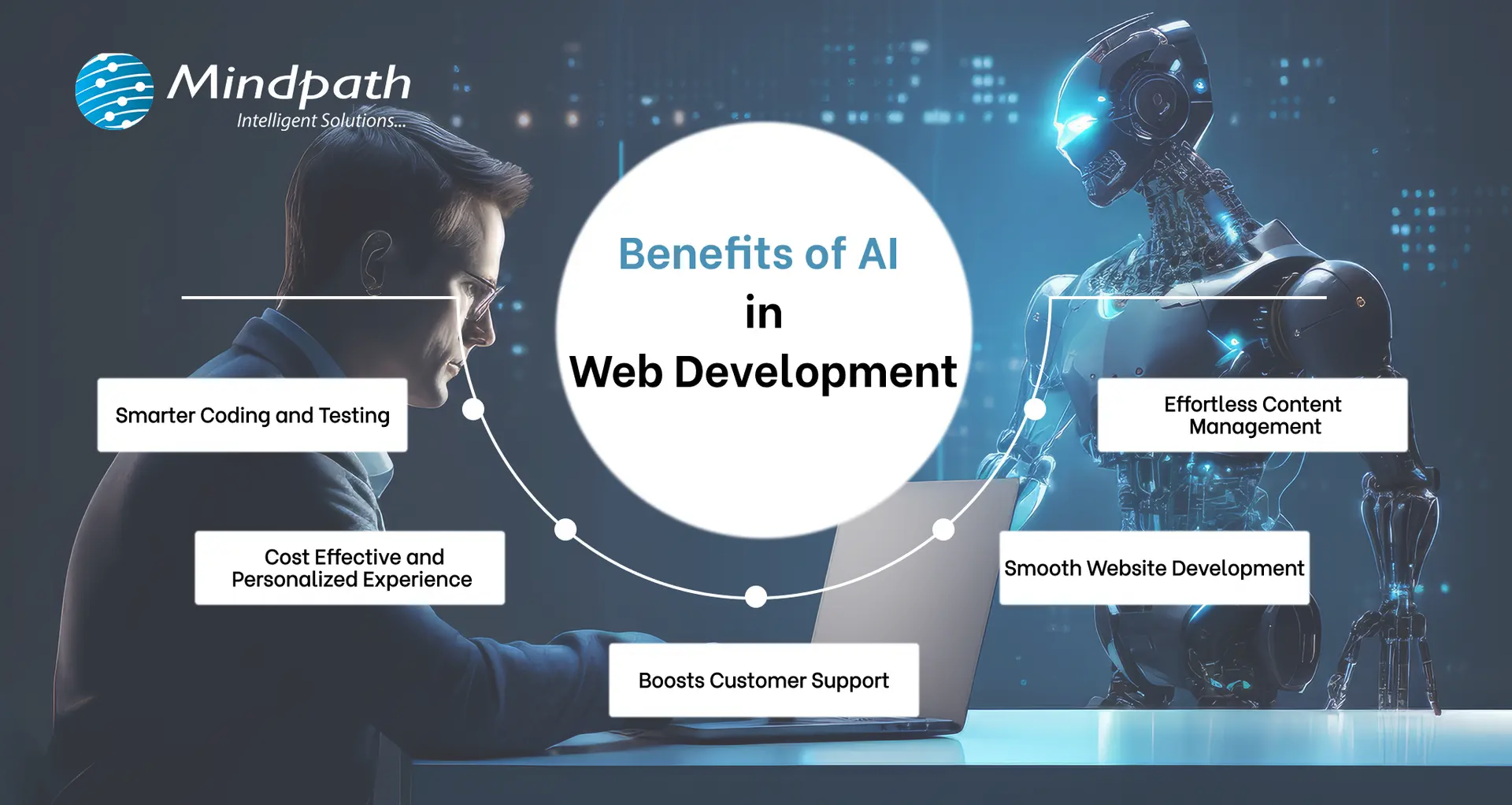
Benefits of AI in Web Development

1. Smarter Coding and Testing

The powerful combination of AI and web development can help developers to write cleaner codes by spotting bugs early and improving how the code works. With deep learning, AI-based tools also facilitate automated testing, which assists quality assurance teams in verifying whether the website functions correctly. Although some problematic areas continue to require manual testing, AI streamlines the process and reduces costs. That’s one of the reasons why QA and testing budgets have declined over the past few years, and why more individuals are using AI websites for improved results. 

2. Smooth Website Development

AI in web development handles mundane and time-consuming work so developers can concentrate on the larger aspects of a project. With smart tools and data-driven choices, the entire web development process becomes more efficient and faster. This is incredibly useful, particularly if you’re new to it. By using AI to create websites, you save time and effort while building something awesome and making web development feel less stressful and a lot more efficient from the very start. 

3. Boosts Customer Support

AI in customer service makes it simple to integrate smart chatbots onto websites that are able to engage with visitors’ day and night. These virtual assistants comprehend questions and respond in natural, friendly terms. They provide instant answers, resolve issues rapidly, and never require breaks. This allows owners of websites to assist users without requiring a support team full-time. It’s an easy method to ensure visitors are satisfied and that they always receive assistance, even when there is no one present. 

4. Cost Effective and Personalized Experience

With the help of AI tools, websites are now able to provide customers with a more personalized and seamless experience at reasonable costs. Work that required time can now be processed automatically, saving time for both users and website owners. AI also assists in identifying fraudulent or toxic activities, protecting users. This is why many top AI websites utilize intelligent features to serve customers better. Ultimately, AI assists in providing more value to the customer at a low cost. 

5. Effortless Content Management

Website content management becomes a lot simpler with the assistance of AI. Through analyzing user behavior on a website, AI provides clear concepts regarding what type of content users like most. Website owners can develop improved posts, videos, or pages that genuinely interest visitors due to this. With the assistance of AI web templates and smart recommendation tools, you can lead users to whatever they require and retain them for a longer period. It’s an easy way to make content better and make each visit feel more personal.

Is your business making the most of AI to stay ahead of the competition? Explore how integrating AI in your business strategy can optimize processes, drive growth, and improve decision-making.

How to Use AI in Web Development?

Today, web development thrives on the partnership between AI and human expertise. While AI handles repetitive tasks and enhances efficiency, it still relies on human creativity and problem-solving. Here’s how you can use AI in web development to streamline your process and improve results. 

1. Artificial Design Intelligence (ADI)

Artificial Design Intelligence (ADI) assists you in creating a complete website by simply responding to a few simple questions. It selects the most suitable layout, design, and content depending on your requirements. It’s like having an intelligent assistant that designs a professional-looking site that reflects your style and objectives. This AI website generator makes the process fast and efficient, ensuring you get the site you want with minimal effort.  

2. Search Easier with Voice Assistants

Rather than typing and reading lengthy pages, users can simply speak their question. Voice AI listens, the correct answer quickly, and voices it back. Voice AI assists websites in providing rapid and clear responses, speeding up searches, making it easier, and more accessible to all. 

3. Coding Assistants

Developers can use smart coding assistants to speed up their work. These tools suggest code, spot errors, and help build websites faster. Even when working on big ideas, they take care of the small stuff. It’s like having a smart helper while writing your code. 

4. Personalize User Help with Chatbots

AI chatbots make it easy for users to get the info they need. They can ask questions in simple language, and the bot instantly provides answers or links. The benefit of chatbot is that it provides fast, accurate responses, making the experience more personal and efficient by using the website’s content.

5. Easy Search Engine Optimization (SEO)

AI can make SEO much easier by providing the best keywords, topics, and headlines for your content. It can even write parts of your text, ensuring the right keyword density for better search engine rankings. This helps your website attract more visitors without the hassle of manual research. 

AI is reshaping industries by automating the processes, empowering faster decision-making, and providing data-driven insights. Learn how AI is e-commerce is transforming the future of e-commerce sector.

Ready to Transform Your Website with AI?

AI is changing web development by making tasks faster and more efficient. From designing and coding to improving user experience, AI helps developers focus on what truly matters. By integrating AI, your website can become smarter, more personalized, and easier to manage for everyone involved. 

Mindpath offers top-tier AI development services and delivers high-performing artificial intelligence solutions that enhance your website’s design, performance, and functionality. Our expert team utilizes AI tools to streamline processes, boost user experience, and create custom solutions.  

Frequently Asked Questions

Want AI Built Into Your Website?

Add search, chat, and personalization that actually get used.

Frequently Asked Questions

Yes, AI in web development is highly suitable for small businesses and startups. It helps reduce development costs, automate repetitive tasks, and speed up website launches. Even with limited resources, businesses can build professional, scalable, and user-friendly websites without needing a large technical team.
No, AI is designed to assist, not replace, web developers. While it can automate coding suggestions, testing, and design support, human creativity, strategy, and problem-solving remain essential. Developers use AI as a productivity tool to work faster and more efficiently, not as a substitute for expertise.
AI-powered websites can be highly secure when properly configured. AI tools can detect unusual behavior, prevent fraud, and monitor vulnerabilities in real time. However, security also depends on proper development practices, regular updates, and human oversight to ensure strong protection against evolving cyber threats.
AI in web development enhances user engagement by analyzing visitor behavior and delivering personalized content, recommendations, and experiences. It can adjust layouts, suggest relevant products or articles, and provide instant support through chatbots, making interactions more meaningful and increasing the chances of conversions.
To start using AI in web development, basic knowledge of programming, APIs, and web frameworks is helpful. Familiarity with AI tools, automation platforms, and data analysis can be beneficial. However, many modern AI platforms are beginner-friendly and require minimal technical expertise to get started.

Support Is One Click Away

Featured Posts

Related Post

Have you ever asked yourself what makes a web application run perfectly while another one continues to crash, raise issues, or slow down? The answer often relates to tech stack alternatives. Think of technology stack choices as the foundation and building blocks of your project. They can make your web application more robust or scalable, and easier or harder to maintain. So, how do you know which technologies should run your next big idea? It’s a decision that impacts the success of your project.

The options can seem endless, but if you understand your desired outcomes and the function of every piece of the technology stack, then this decision doesn’t need to feel too overwhelming. When you pick the right combination of tools, you could save yourself a lot of time and money. In this blog, we are going to explain the basics/fundamentals for web application tech stacks, highlight important considerations, and hopefully help you feel confident in regard to choosing the right technology stack for your web application project. So, let’s explore!

Planning to build a new web application? Mindpath’s web development services will help you in choosing the right tech stack and developing applications as per your business needs.

What is a Technology Stack?

A technology stack, or tech stack, is a combination of tools, frameworks, and programming languages that work together to build and run a web application. It serves as the base for your project. Each part of the stack reflects a specific function. Whether handling user actions or managing data behind the scenes, and effectively, they all need to work together if your application is going to function well.

Finding the right combination will have a significant effect on how your application performs and compounds. A prudent choice will allow you to build an organized, flexible, and scalable web application that you can easily maintain and grow as your needs change.

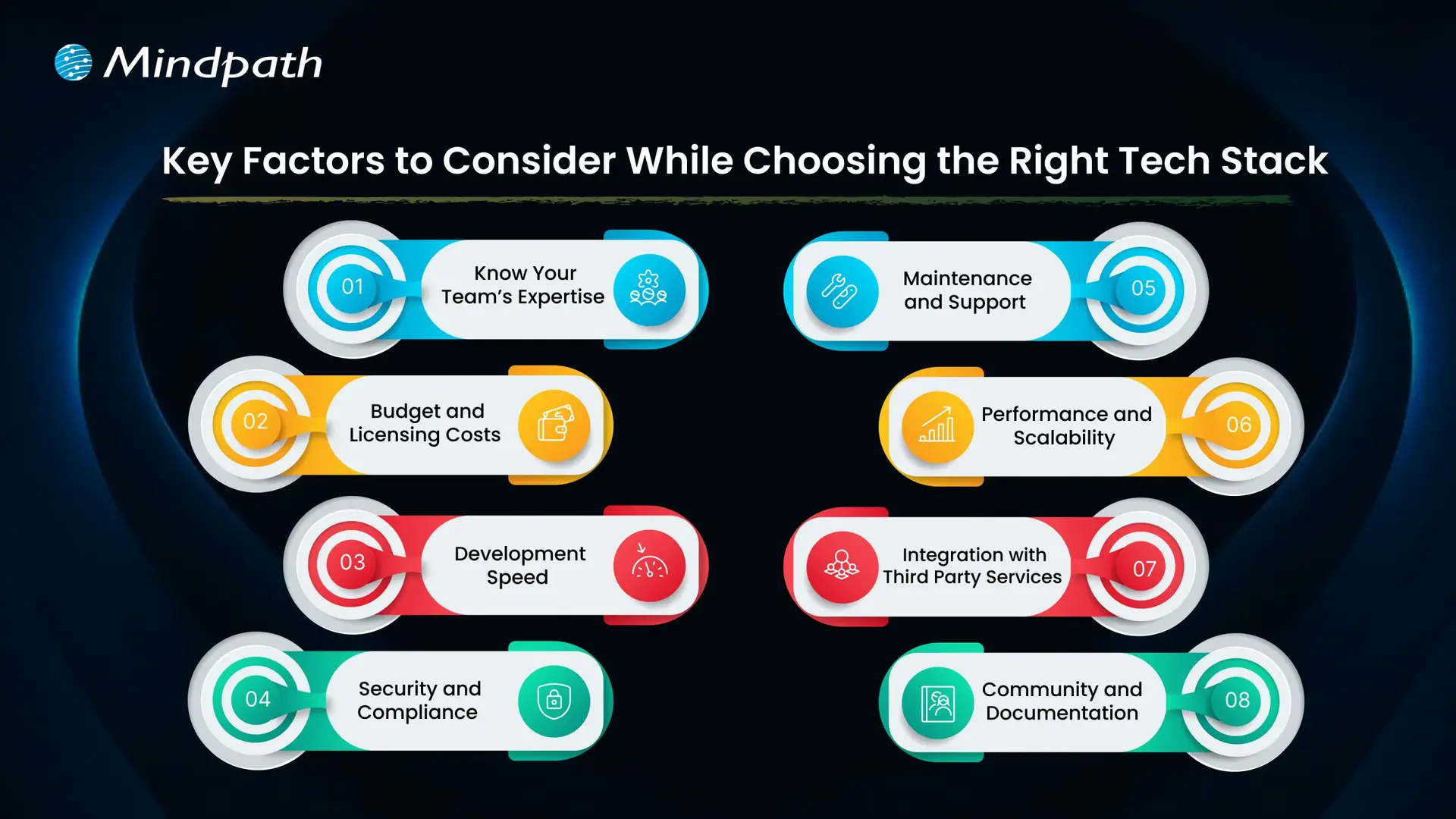
Key Factors to Consider While Choosing the Right Tech Stack

Choosing the right tech stack for web development is one of the most important things you’ll do to ensure the success of your project. The tools and technologies you decide to use will dictate how your application performs, scales, and is kept secure. Here are some key factors to keep in mind while selecting the best tech stack for web development.

Key Factors to Consider While Choosing the Right Tech Stack

1. Know Your Team’s Expertise

Look at what technologies your team already knows well. Using familiar tools can help you develop faster and avoid extra training costs. Make sure the tech stack matches your team’s size and experience to keep the project on track.

2. Budget and Licensing Costs

Think about any licensing fees for paid tools and compare them with free, open-source options. Remember to plan for costs related to maintenance, updates, and security. Also, include cloud service expenses that may grow as your project expands.

3. Development Speed

Getting your product ready fast can be a big advantage, especially for new businesses. Choosing proven frameworks and useful libraries can help your team build features quickly. This saves time and lets you focus on improving your web app for users.

4. Security and Compliance

Prioritizing security is essential, especially if your application handles sensitive data. Choose a tech stack that supports robust security features and aligns with industry regulations. This will help protect user information and maintain compliance as your project grows.

5. Maintenance and Support

Choose technologies that have strong community or vendor support so you can get help when needed. A reliable tech stack with regular updates will make it easier to fix issues and improve your application over time. This helps you avoid unexpected costs and keeps your project stable in the long run.

6. Performance and Scalability

Make sure your tech stack can handle the speed and load your application needs. If you expect real-time processing or heavy traffic, choose tools that keep response times fast. This helps your web app run smoothly as more users come on board.

7. Integration with Third-Party Services

Check that your tech stack works well with the third-party services your app needs. Good API compatibility makes it easier to connect features like payments, analytics, or social media. This saves time and helps your app deliver a smooth user experience.

8. Community and Documentation

Choose technologies with an active developer community and plenty of shared resources. Strong documentation makes it easier for your team to build, test, and maintain your web application. This support can save time and help solve issues more quickly.

Wondering how your tech stack fits into the bigger picture of web app development? Explore our comprehensive Web App Development Roadmap for 2026 to see how each decision impacts your project’s success.

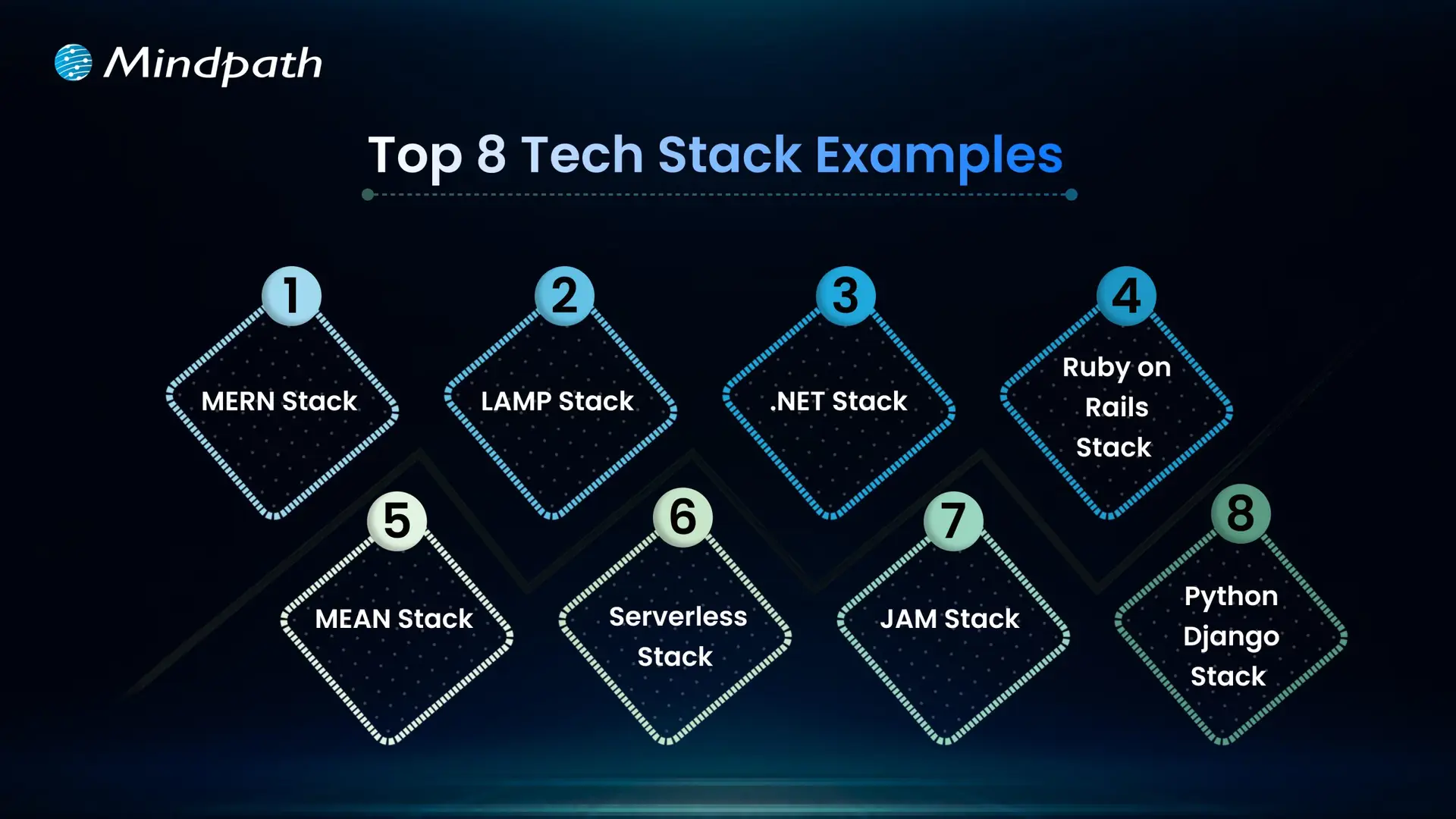
Top 8 Tech Stack Examples

Exploring technology stack examples can help you see what works best for different types of projects. Here are some of the most popular examples to consider in 2026.

Top 8 Tech Stack Examples  

1. MERN Stack

MERN includes MongoDB, Express.js, React, and Node.js for flexible, dynamic sites. It’s widely chosen as a modern web application stack for responsive interfaces.

2. LAMP Stack

The LAMP stack combines Linux, Apache, MySQL, and PHP to build reliable, cost-effective websites. It is one of the oldest and most trusted web stacks in use today.

3. .NET Stack

The .NET stack is known for secure, large-scale enterprise applications. Many companies choose this web dev stack for its strong integration with Microsoft tools.

4. MEAN Stack

The MEAN stack uses JavaScript across MongoDB, Express.js, Angular, and Node.js. This tech stack for web development is popular for real-time and single-page apps.

5. Ruby on Rails Stack

Ruby on Rails offers a simple, clean approach for rapid web projects. This technology stack example is still a favorite for startups and MVPs.

6. Python-Django Stack

The Python-Django stack helps developers build powerful sites quickly. Many prefer this as a flexible web development stack with great community support.

7. JAM stack

JAM stack uses JavaScript, APIs, and Markup to deliver fast static sites. It is considered one of the best tech stacks for web development for content-heavy projects.

8. Serverless Stack

Serverless architecture removes the need to manage servers directly. It’s a growing example of a tech stack that cuts costs and improves scalability.

Not sure if your business really needs a custom web application? Discover the key signs that your business needs a custom web application that indicate it’s time to invest in a tailored solution for your needs.

Need Help Choosing the Right Tech Stack for Your Web Project?

Selecting the right tech stack for web development shapes how well your application performs, scales, and adapts over time. By knowing your goals, team strengths, and key factors like security, costs, and integrations, you can make informed choices that save you time and money. A thoughtful approach will help you build a reliable, future-ready web application that supports your business growth.

At Mindpath, we help you build secure, high-performing web applications with the best-fit tech stack for your needs. Our experts offer end-to-end web application development services, covering design, development, testing, and support. We make sure your solution stays flexible, scalable, and easy to maintain as your business grows. Let’s create a web app that works for you.

Frequently Asked Questions

1. How do you choose the right tech stack for a web application without overcomplicating the decision?

Start with three clear questions: What does the application need to do, who will build it, and what is the budget? Matching the tech stack to team expertise, project complexity, and long-term scalability requirements eliminates most confusion. Overthinking the decision often leads to choosing unnecessarily complex technologies that slow development considerably.

2. Can switching tech stacks midway through a web project cause serious problems?

Significantly yes. Changing the tech stack mid-development typically means rebuilding foundational components, retraining the team, and resetting timelines entirely. The cost and disruption are rarely justified unless the original choice was fundamentally flawed. Making a thoroughly researched decision before development begins is always far more efficient than course-correcting later.

3. Is an open-source tech stack always better than a paid licensed one?

Not necessarily. Open-source stacks eliminate licensing fees but may require more internal expertise for maintenance, security patching, and troubleshooting. Paid stacks often include vendor support and compliance features that save time in regulated industries. The right choice depends entirely on team capability, budget structure, and specific application requirements.

4. How does the tech stack choice directly affect a web application’s long-term scalability?

Certain technologies handle growing traffic and expanding features far more gracefully than others. A stack chosen purely for rapid initial development may create serious performance bottlenecks as user numbers increase. Evaluating scalability requirements honestly at the planning stage prevents expensive infrastructure overhauls that become necessary when applications grow beyond their original technical foundations.

5. Does the size of a developer community really matter when selecting a technology stack?

Considerably more than most people initially expect. An active community means readily available documentation, faster bug fixes, regular framework updates, and easier access to experienced developers when hiring. Technologies with shrinking or inactive communities gradually become liabilities, making maintenance harder and recruitment significantly more difficult as fewer developers maintain proficiency in them.

Logistics Software Development

Managing transportation, warehouses, inventory, and deliveries can become complicated as a logistics business grows. Disconnected systems, manual data entry, delayed shipment updates, and inefficient delivery routes can increase operational costs and affect customer satisfaction.

This is where logistics software development becomes valuable. By creating digital solutions that connect logistics operations, businesses can automate repetitive tasks, improve shipment visibility, and manage resources more efficiently.

Key Takeaways

  • 01
    Logistics software development helps businesses automate transportation, warehouse operations, inventory management, and delivery workflows.
  • 02
    Custom logistics software solutions can support unique business requirements, improve visibility, and connect existing systems.
  • 03
    Essential features include real-time shipment tracking, route optimization, inventory management, automated notifications, and reporting.
  • 04
    AI, machine learning, and predictive analytics can help logistics companies make informed decisions and anticipate operational challenges.
  • 05
    A successful logistics software project starts with clear business goals, suitable technology, reliable integrations, and a scalable development strategy.

Modern logistics software can support everything from fleet management and warehouse operations to last-mile delivery and supply chain analytics. With artificial intelligence (AI), cloud computing, and automation, businesses can also improve planning and respond to changing operational conditions.

For logistics providers, e-commerce companies, manufacturers, and third-party logistics (3PL) businesses, investing in the right software can create a more connected and efficient supply chain.

In this guide, we explore logistics software development, its main types, essential features, business benefits, emerging technologies, and the steps involved in building a suitable solution.

Looking to develop a scalable software solution for your business? Explore Mindpath to learn about its software development and AI development services, and discuss your project requirements with the team.

What Is Logistics Software Development?

Logistics software development is the process of designing, building, integrating, and maintaining software applications that help businesses manage the movement, storage, and delivery of goods.

These applications organize logistics activities through centralized dashboards, automated workflows, tracking systems, and data analytics.

For example, a logistics company managing multiple delivery vehicles can use custom software to assign drivers, plan routes, monitor shipments, and notify customers about delivery updates. Managers can review operational data from one platform instead of switching between multiple tools.

Depending on business requirements, logistics software may include:

  • Transportation management systems (TMS)
  • Warehouse management systems (WMS)
  • Fleet management applications
  • Inventory and order management systems
  • Shipment tracking and delivery management software
  • Supply chain visibility platforms
  • Freight management and logistics analytics solutions

Businesses can adopt ready-made software, customize an existing platform, or invest in custom logistics software development. The right approach depends on operational complexity, integration requirements, budget, and long-term goals.

Types of Logistics Software Solutions

Different logistics businesses require different digital solutions. Understanding the main types helps organizations select the right technology for their operations.

1. Transportation Management System (TMS)

A transportation management system helps businesses plan, execute, and monitor the movement of goods.

It can support shipment scheduling, carrier selection, freight cost tracking, route planning, and delivery status monitoring.

For example, a distribution company shipping products across multiple cities can use a TMS to coordinate carriers, manage delivery schedules, and identify transportation inefficiencies.

2. Warehouse Management System (WMS)

A warehouse management system manages activities within a warehouse or distribution center.

Common capabilities include inventory tracking, receiving, picking, packing, stock transfers, and dispatch management.

A WMS helps warehouse teams maintain better inventory visibility, reduce manual errors, and process orders more consistently.

3. Fleet Management Software

Fleet management software helps companies monitor vehicles, drivers, fuel consumption, maintenance schedules, and vehicle utilization.

When integrated with GPS and telematics systems, it can provide vehicle location updates and operational information that supports better fleet planning.

This type of solution is particularly useful for transportation providers, courier businesses, and companies operating their own delivery fleets.

4. Last-Mile Delivery Software

Last-mile delivery software manages the final stage of delivering a shipment to its destination.

Features may include automated dispatching, driver applications, delivery route planning, estimated arrival times, customer notifications, and electronic proof of delivery.

These capabilities can help e-commerce businesses and delivery providers improve communication and coordinate multiple deliveries more effectively.

5. Supply Chain Management Software

Supply chain management software connects activities involving suppliers, inventory, procurement, transportation, and distribution.

It can provide a broader view of product movement and help businesses coordinate different stages of their supply chain.

When connected with enterprise resource planning (ERP), warehouse, and transportation systems, it can reduce information gaps between departments.

Essential Features of Logistics Management Software

The right features depend on the business model, operational scale, and user requirements. However, several capabilities are commonly valuable in modern logistics software solutions.

1. Real-Time Shipment Tracking

Shipment tracking provides updates about shipment locations and delivery status using carrier integrations, GPS, or other tracking data sources.

It helps logistics managers identify delays and gives customers better visibility into their orders.

2. Route Optimization

Route optimization software evaluates factors such as delivery locations, vehicle capacity, traffic information, and delivery windows to recommend efficient routes.

More efficient routes may reduce unnecessary mileage, fuel consumption, and delivery times.

3. Inventory and Order Management

Inventory management helps businesses monitor available stock, incoming shipments, outgoing orders, and stock movement.

Order management connects order processing with warehouse fulfillment and transportation, reducing the need for repetitive manual updates.

4. Automated Notifications

Automated notifications keep customers, drivers, and operations teams informed about shipment dispatch, delivery progress, delays, and completed deliveries.

These updates can reduce routine customer inquiries and improve communication.

5. Reporting and Analytics

Logistics dashboards can display key performance indicators such as on-time delivery rates, shipping costs, vehicle utilization, inventory accuracy, and order fulfillment times.

These insights help managers identify bottlenecks and make decisions based on operational data.

6. System Integration

Logistics software often needs to exchange data with ERP platforms, e-commerce stores, accounting applications, warehouse systems, carrier APIs, and customer relationship management (CRM) tools.

Reliable integrations help maintain consistent information across business systems and reduce duplicate data entry.

7. Security and Access Control

Logistics applications may handle customer details, shipment records, commercial information, and operational data.

Role-based permissions, encryption, secure authentication, backups, and appropriate monitoring help protect this information.

Benefits of Custom Logistics Software Development

Custom logistics software development can be useful when existing platforms cannot fully support a company’s workflows or integration requirements.

1. Improved Operational Efficiency

Automating repetitive activities such as dispatch assignments, shipment updates, and order processing allows teams to spend less time on manual coordination.

2. Better Supply Chain Visibility

A connected platform can provide a more complete view of shipments, inventory, vehicles, and delivery progress. This helps teams identify issues and coordinate responses more quickly.

3. Reduced Operational Waste

Route optimization, inventory visibility, and automated workflows can help businesses identify avoidable expenses and use their resources more effectively. Actual savings depend on the existing process and the quality of implementation.

4. Enhanced Customer Experience

Customers benefit from clearer shipment updates, more accurate delivery estimates, and convenient access to order information.

5. Greater Scalability

A well-designed system can accommodate additional warehouses, users, vehicles, locations, and integrations as business requirements evolve.

6. Workflow Customization

Custom software can reflect specific business rules, reporting requirements, pricing structures, and approval processes that generic tools may not support adequately.

However, custom development also requires ongoing maintenance, security updates, testing, and technical support. Businesses should evaluate these responsibilities alongside the expected benefits.

How AI Is Transforming Logistics Software Development

Artificial intelligence is expanding the capabilities of logistics management software by helping businesses analyze operational data, forecast demand, and automate selected decisions.

Here are some important applications.

1. AI-Powered Route Optimization

AI-assisted systems can evaluate historical delivery information, traffic conditions, delivery windows, and other available data to recommend suitable routes.

Depending on data quality and system capabilities, this can help dispatchers respond to changing conditions and improve delivery planning.

2. Predictive Demand Forecasting

Machine learning models can analyze historical orders, seasonal patterns, and other relevant business data to estimate future demand.

These forecasts can help businesses plan inventory levels, staffing, and transportation capacity.

3. Predictive Fleet Maintenance

When reliable vehicle and telematics data is available, predictive models can identify patterns associated with possible equipment problems.

Maintenance teams can use these insights to investigate potential issues and plan servicing before a breakdown disrupts operations.

4. Intelligent Document Processing

AI-powered document processing can extract information from invoices, shipping documents, delivery receipts, and other logistics records.

With appropriate validation and human review, this can reduce repetitive data entry and improve document processing workflows.

5. Logistics Analytics and Decision Support

AI-assisted analytics can help teams identify unusual delivery delays, changes in transportation costs, and operational patterns that require attention.

AI should support well-defined business processes rather than being added simply because the technology is available. Data quality, integration, accuracy, privacy, and human oversight remain important considerations.

Logistics Software Development Process

Building effective logistics software requires a structured approach that connects technical decisions with actual business needs.

Step 1: Identify Business Requirements

Determine the main challenges the software should solve. These might include shipment delays, poor inventory visibility, manual dispatching, or disconnected operational systems.

Define measurable objectives before selecting features.

Step 2: Select the Right Software Type

Decide whether the business needs a TMS, WMS, fleet management application, delivery platform, or an integrated solution.

Compare custom development with ready-made software to understand the cost, implementation effort, flexibility, and maintenance requirements.

Step 3: Plan Features and Integrations

Prioritize essential features for the initial release. Identify the systems, APIs, devices, and data sources the application must connect with.

Starting with a focused minimum viable product (MVP) can help businesses validate the solution before expanding its functionality.

Step 4: Design the User Experience

Create intuitive interfaces for dispatchers, warehouse staff, drivers, administrators, and customers.

Mobile usability is particularly important for drivers and field teams who may need to access information while working away from an office.

Step 5: Develop and Test the Application

Develop the software using an architecture and technology stack suited to the required functionality.

Testing should cover application performance, integration reliability, access permissions, data accuracy, security, and real-world operational scenarios.

Step 6: Deploy and Integrate

Deploy the application in the selected environment and connect it with the required business systems.

A phased rollout can help teams identify implementation issues and provide feedback before the software is introduced across the entire organization.

Step 7: Monitor and Improve

After launch, monitor system performance, user adoption, delivery KPIs, errors, and feedback.

Regular maintenance and planned improvements help keep the application reliable as business requirements change.

How to Choose the Right Logistics Software Development Company

Selecting a development partner is an important decision because logistics systems often involve complex workflows and multiple integrations.

Evaluate potential partners using the following criteria:

  • Relevant technical experience: Look for experience with custom software, APIs, cloud platforms, mobile applications, and data integration.
  • Understanding of logistics workflows: The team should understand the requirements of transportation, warehousing, fleet operations, or delivery management relevant to your project.
  • Scalable architecture: Confirm that the proposed solution can accommodate expected business growth.
  • Security practices: Ask about data protection, access control, backups, testing, and ongoing maintenance.
  • Clear project communication: Ensure the development process includes defined milestones, testing procedures, documentation, and feedback cycles.
  • Post-launch support: Understand how updates, technical issues, integrations, and future improvements will be handled.

Ask for relevant case studies or demonstrations where available, and evaluate whether the proposed solution addresses your specific business requirements.

Conclusion

Logistics software development helps businesses connect transportation, warehouse management, fleet operations, and delivery workflows through digital solutions designed around their needs.

From real-time shipment tracking to AI-assisted route optimization, the right capabilities can improve visibility, reduce manual work, and support more informed operational decisions.

The best solution is not necessarily the one with the most features. It is the one that solves the most important business problems, integrates reliably with existing systems, and can evolve as requirements change.

If your organization is exploring logistics software modernization, begin by identifying operational bottlenecks, defining measurable objectives, and prioritizing the features that will deliver the greatest practical value.

Explore how digitization transforms logistics with real-world use cases, benefits, and cutting-edge technologies that boost efficiency, reduce costs, and enhance customer experience.
ai ethics guide

AI ethics is the multidisciplinary field that governs the responsible design, deployment, and regulation of artificial intelligence systems in alignment with human values. It plays a key role in making sure that AI systems create measurable value for society while protecting human rights and preventing harm. It involves a broad range of considerations such as fairness, transparency, privacy, security, accountability, and the prevention of bias and discriminatory outcomes in automated decision-making.

While talking about the topic relating to artificial intelligence, one cannot ignore the importance of AI ethics. As AI is growing at an exponential rate, it is essential to understand the role of AI ethics in the prevailing AI realm. As AI is impacting the lives of people in diverse ways today, it is the right time to broaden the insight into AI ethics. The AI Ethics guide will help you explore AI Ethics at an in-depth level and understand why it matters so much today. 

Ready to adopt AI in a way that it operates ethically and protects your business from risks as you scale? Mindpath offers trusted AI development services that help you build transparent, responsible, and future-ready AI solutions.

Key Areas of AI Ethics

The definitions of AI may vary considerably. However, AI ethics combines a number of elements, including security, safety, and human concerns. It also involves the responsible use of AI by taking into consideration the environmental concerns. The chief areas of the AI ethics framework include:

1. Avoiding AI Bias 

AI systems learn from data. The systems with poor design are likely to demonstrate biased behavior. You must remember that AI models with poor training may showcase bias against minorities. This is when AI ethics principles come into the picture. AI ethics principles relating to fairness and justice can make sure that the possibility of bias can be curbed effectively. 

2. Artificial Intelligence and Privacy 

Artificial intelligence relies on information in order to learn. A considerable amount of this information comes from users. Thus, it automatically gives rise to privacy concerns for users. This is because not all users are well-aware of the information that has been gathered about them and how it is being used. An AI ethics framework can make sure that there is no compromise when it comes to the privacy of users. It even ensures that their information is used in a responsible manner.

3. Avoiding AI Mistakes 

It is essential to bear in mind that poorly constructed AI systems are prone to making mistakes. Such mistakes may lead to diverse consequences, such as the loss of revenue or accidents. This is why the AI Ethics guide stresses the importance of adequate and proper testing so that AI will not pose a risk to humans. 

4. Management of AI Environmental Impact 

With each passing day, AI models are getting larger and bigger. These large models consume a high volume of energy for the purpose of training. Thus, AI has become a large consumer of resources in the prevailing times. Ensuring the ethicality of AI is essential so that researchers can design energy-efficient AI systems that can strike a balance between energy efficiency and performance. 

Planning to align innovation with responsible governance? Discover the types of AI to learn how each category impacts compliance and ethical standards.

Understanding AI Ethical Principles

The AI Ethics guide sheds light on the five Ethical principles of AI that you need to bear in mind. You need to familiarize yourself with the AI ethics principles so that you can understand their relevance in the real-world setting.

1. Transparency

One of the fundamental ethical principles relating to AI revolves around transparency. AI systems and tools need to be transparent in nature so that people can understand how they work. The role of transparency is cardinal to understanding how AI systems make decisions. It will help disclose the overall functionality of AI systems to humans. 

2. Fairness

In case you are wondering, what are the 5 ethics of AI? You need to remember that one of the key principles is related to fairness. AI systems need to be fair and just in nature so that the possibility of biased behavior can be eliminated. While creating AI models and systems, developers need to adopt a fair approach so that these systems will not generate discriminatory outcomes. The AI systems need to treat all individuals and groups in an equitable manner. One of the key AI ethics examples involves addressing biased behavior in hiring algorithms.

3. Accountability 

While talking about – What are the 5 ethics of AI? You cannot ignore the importance of accountability. In fact, accountability is a critical component of AI ethics. A chain of accountability should be in place so that appropriate individuals and organizations can be held responsible while using AI systems. There needs to be a clear line of responsibility so that systems can operate in a trustworthy way. When it comes to accountability in the context of AI teams, they need to understand the importance of prevention as a cure. 

4. Reliability

In order to be ethical in nature, AI systems need to function in a reliable manner. It can ensure that the outcomes that have been achieved by the particular system are consistent and reproducible. Reliability is especially important when AI is being used in important areas such as healthcare and finance. It is fundamental to monitor AI systems to ensure that they are reliable and dependable in nature. 

5. Privacy and Security

AI systems need to respect the privacy as well as the security of users. It is essential to have in place proper security measures so that sensitive data can be stored in a secure and safe manner. Some of the measures organizations can adopt include data encryption, identifying system vulnerabilities, and safeguarding against malicious attacks. It is fundamental to adopt responsible data collection practices along with the deployment of robust data governance practices. One of the common AI ethics examples involves protecting user data privacy in the healthcare setting. 

Want to implement artificial intelligence responsibly without risking compliance or trust? Discover an AI roadmap to learn how a structured approach ensures ethical and sustainable adoption.

Technical Requirements for Creating Ethical AI Systems

In order to make sure that AI systems are ethical in nature, it is essential to focus on the technical aspects. Organizations need to fulfill a number of technical requirements so that AI systems can function in an ethical and responsible manner.   

1. Focus on Bias Detection

There is a need to use diverse data sets in order to detect as well as correct bias in AI models. It is a key step that has to be taken in order to ensure that AI systems can operate in a fair manner. 

2. Focus on Explainability

The role of explainability and transparency is high while talking about AI ethics. The developed AI systems should function transparently for users. Methods such as decision trees and feature importance scores can be adopted to boost transparency. 

3. Data Privacy

The safe management of data used by AI systems is a must. Moreover, proper compliance with relevant privacy laws is essential so that the privacy of users will not be compromised at any stage. Practices such as anonymization and data encryption need to be adopted while using AI systems. 

Curious why some organizations struggle with responsible AI rollout? Check out challenegs of AI adoption and discover how the right approach balances innovation with ethical oversight.

Ready to Build Ethical AI That Drives Real Business Value?

In the era of artificial intelligence, the role of AI ethics is extremely important. It helps ensure that this powerful technology is used in a responsible and trustworthy way. As AI continues to evolve rapidly, understanding and applying ethical principles becomes essential for businesses, developers, and organizations. By prioritizing ethical practices, organizations can adopt AI with greater confidence while creating long-term value for society. 

At Mindpath, we provide expert AI development services which help organizations build responsible and future-ready AI solutions with strong ethical foundations. Our experts focus on transparency, data security, and fairness so businesses can innovate confidently while protecting trust and compliance. Partner with Mindpath to turn AI innovation into responsible and sustainable growth.