Choosing the Right Tech Stack for Your Web Application

Join our Newsletter!

Featured Posts

Support Is One Click Away

Home

Choosing the Right Tech Stack for Your Web Application

tech stack for web app success

Choosing the Right Tech Stack for Your Web Application

Have you ever asked yourself what makes a web application run perfectly while another one continues to crash, raise issues, or slow down? The answer often relates to tech stack alternatives. Think of technology stack choices as the foundation and building blocks of your project. They can make your web application more robust or scalable, and easier or harder to maintain. So, how do you know which technologies should run your next big idea? It’s a decision that impacts the success of your project.

The options can seem endless, but if you understand your desired outcomes and the function of every piece of the technology stack, then this decision doesn’t need to feel too overwhelming. When you pick the right combination of tools, you could save yourself a lot of time and money. In this blog, we are going to explain the basics/fundamentals for web application tech stacks, highlight important considerations, and hopefully help you feel confident in regard to choosing the right technology stack for your web application project. So, let’s explore!

Planning to build a new web application? Mindpath’s web development services will help you in choosing the right tech stack and developing applications as per your business needs.

What is a Technology Stack?

A technology stack, or tech stack, is a combination of tools, frameworks, and programming languages that work together to build and run a web application. It serves as the base for your project. Each part of the stack reflects a specific function. Whether handling user actions or managing data behind the scenes, and effectively, they all need to work together if your application is going to function well.

Finding the right combination will have a significant effect on how your application performs and compounds. A prudent choice will allow you to build an organized, flexible, and scalable web application that you can easily maintain and grow as your needs change.

To understand how technology choices fit into the complete development journey, explore our detailed guide on the web application development process.

Key Factors to Consider While Choosing the Right Tech Stack

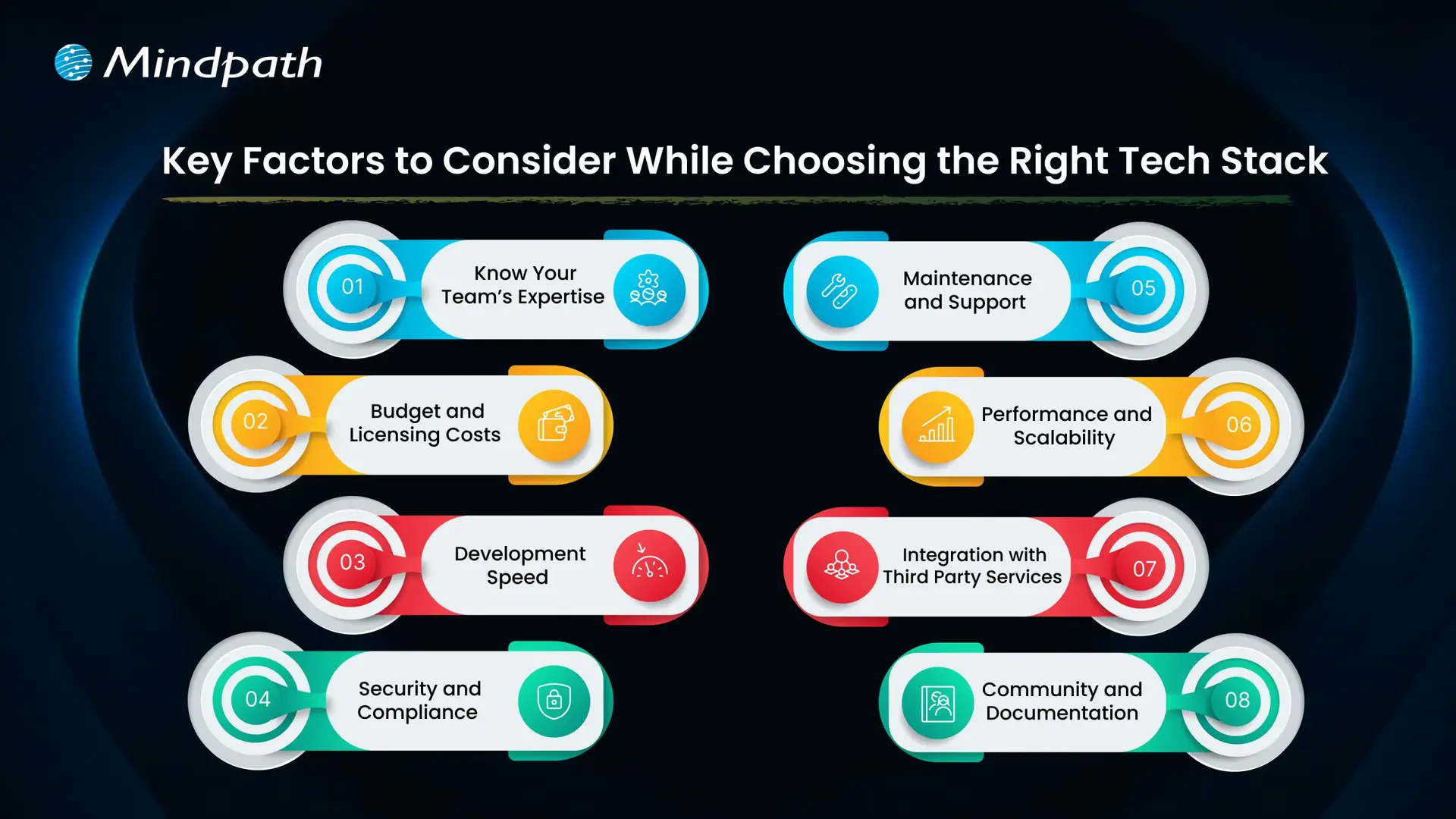
Choosing the right tech stack for web development is one of the most important things you’ll do to ensure the success of your project. The tools and technologies you decide to use will dictate how your application performs, scales, and is kept secure. Here are some key factors to keep in mind while selecting the best tech stack for web development.
Key Factors to Consider While Choosing the Right Tech Stack

1. Know Your Team’s Expertise

Look at what technologies your team already knows well. Using familiar tools can help you develop faster and avoid extra training costs. Make sure the tech stack matches your team’s size and experience to keep the project on track.

2. Budget and Licensing Costs

Think about any licensing fees for paid tools and compare them with free, open-source options. Remember to plan for costs related to maintenance, updates, and security. Also, include cloud service expenses that may grow as your project expands.

3. Development Speed

Getting your product ready fast can be a big advantage, especially for new businesses. Choosing proven frameworks and useful libraries can help your team build features quickly. This saves time and lets you focus on improving your web app for users.

4. Security and Compliance

Prioritizing security is essential, especially if your application handles sensitive data. Choose a tech stack that supports robust security features and aligns with industry regulations. This will help protect user information and maintain compliance as your project grows.

Must Read: Application Security Best Practices 

5. Maintenance and Support

Choose technologies that have strong community or vendor support so you can get help when needed. A reliable tech stack with regular updates will make it easier to fix issues and improve your application over time. This helps you avoid unexpected costs and keeps your project stable in the long run.

6. Performance and Scalability

Make sure your tech stack can handle the speed and load your application needs. If you expect real-time processing or heavy traffic, choose tools that keep response times fast. This helps your web app run smoothly as more users come on board.

7. Integration with Third-Party Services

Check that your tech stack works well with the third-party services your app needs. Good API compatibility makes it easier to connect features like payments, analytics, or social media. This saves time and helps your app deliver a smooth user experience.

8. Community and Documentation

Choose technologies with an active developer community and plenty of shared resources. Strong documentation makes it easier for your team to build, test, and maintain your web application. This support can save time and help solve issues more quickly.

Wondering how your tech stack fits into the bigger picture of web app development? Explore our comprehensive Web App Development Roadmap for 2026 to see how each decision impacts your project’s success.

Top 8 Tech Stack Examples

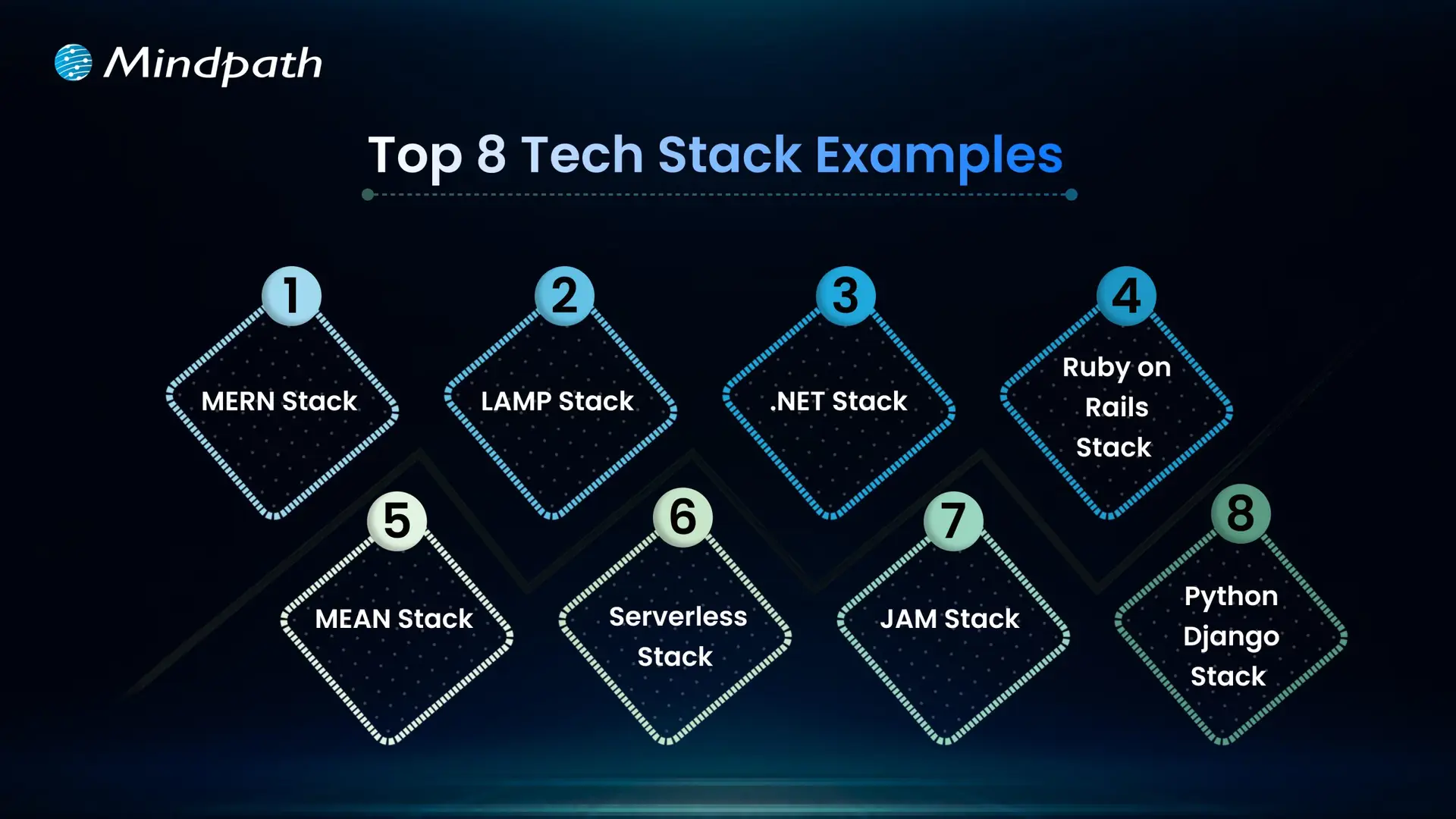
Exploring technology stack examples can help you see what works best for different types of projects. Here are some of the most popular examples to consider in 2026.
Top 8 Tech Stack Examples  

1. MERN Stack

MERN includes MongoDB, Express.js, React, and Node.js for flexible, dynamic sites. It’s widely chosen as a modern web application stack for responsive interfaces.

2. LAMP Stack

The LAMP stack combines Linux, Apache, MySQL, and PHP to build reliable, cost-effective websites. It is one of the oldest and most trusted web stacks in use today.

3. .NET Stack

The .NET stack is known for secure, large-scale enterprise applications. Many companies choose this web dev stack for its strong integration with Microsoft tools.

4. MEAN Stack

The MEAN stack uses JavaScript across MongoDB, Express.js, Angular, and Node.js. This tech stack for web development is popular for real-time and single-page apps.

5. Ruby on Rails Stack

Ruby on Rails offers a simple, clean approach for rapid web projects. This technology stack example is still a favorite for startups and MVPs.

6. Python-Django Stack

The Python-Django stack helps developers build powerful sites quickly. Many prefer this as a flexible web development stack with great community support.

7. JAM stack

JAM stack uses JavaScript, APIs, and Markup to deliver fast static sites. It is considered one of the best tech stacks for web development for content-heavy projects.

8. Serverless Stack

Serverless architecture removes the need to manage servers directly. It’s a growing example of a tech stack that cuts costs and improves scalability.

Not sure if your business really needs a custom web application? Discover the key signs that your business needs a custom web application that indicate it’s time to invest in a tailored solution for your needs.

Need Help Choosing the Right Tech Stack for Your Web Project?

Selecting the right tech stack for web development shapes how well your application performs, scales, and adapts over time. By knowing your goals, team strengths, and key factors like security, costs, and integrations, you can make informed choices that save you time and money. A thoughtful approach will help you build a reliable, future-ready web application that supports your business growth.

At Mindpath, we help you build secure, high-performing web applications with the best-fit tech stack for your needs. Our experts offer end-to-end web application development services, covering design, development, testing, and support. We make sure your solution stays flexible, scalable, and easy to maintain as your business grows. Let’s create a web app that works for you.

Related Post

Discover how hyperautomation can transform your business by boosting efficiency, productivity, and ROI. Learn how Mindpath can help.

Related Post

Wordpress vs workflow

In the year 2025, the debate of WordPress vs Webflow is hotter than ever. This is because business entities and content creators are looking for the best platform to build secure as well as SEO-friendly websites. It is true that WordPress has been dominating the CMS market thanks to its vast plugin ecosystem coupled with high flexibility. But it is essential to bear in mind that Webflow has been gaining momentum with designers as well as startups, thanks to its no-code visual editor along with built-in hosting. 

In case you are wondering, is Webflow better than WordPress? You need to look at the main difference between these tools. You need to know which one is better so that you can choose the tool that perfectly aligns with your needs. The guide breaks down everything you need to know while choosing Webflow or WordPress.

Choosing the right platform makes all the difference when it comes to performance and growth for your online presence. Explore Mindpath’s WordPress development services for expert guidance on what your business needs.

A Deep Dive into WordPress

WordPress is undoubtedly the most popular content management system in the world. It powers a large number of websites that exist in the online realm. WordPress has gained massive popularity thanks to its ease of use coupled with flexibility. It serves as an ideal tool for beginners, professionals, and businesses in the digitalized setting.  

At the core of WordPress is open-source software. It means that WordPress is free to use. Moreover, it is supported by a global community of developers. One of the biggest strengths of WordPress is its SEO-friendly structure. The novel platform generates clean and crawlable code that adds value to search engines’ index content efficiently. Users can even leverage useful plugins such as Yoast SEO and Rank Math for optimizing titles and meta descriptions that can improve the visibility in search results.

An Insight into Webflow

Webflow serves as a robust no-code website builder. It is capable of bridging the gap between design and development. Unlike conventional drag-and-drop platforms, Webflow provides a visual interface that allows users to write clean and production-ready code. This feature of Webflow certainly makes it a favorite among designers who want to have creative freedom without relying on developers.

A standout feature of Webflow that you need to be aware of is related to its design flexibility. Users have the option to create fully custom layouts as well as animations without having to write a single line of code. Webflow basically combines the best of graphic design tools along with the functionality of a content management system. For businesses that need more tailored solutions, custom WordPress development offers similar flexibility with the added power of plugins, themes, and scalability, allowing organizations to build websites that precisely meet their unique requirements. It serves as a valuable tool for businesses and startups that wish to leverage its ability to deliver professional and responsive websites effectively and efficiently.

Must Read: WordPress Developer Checklist

Comparison Between WordPress and Webflow

Now that you have an insight into Webflow WordPress, it is time to look at the difference between these novel tools. Developers as well as businesses need to understand the difference between WordPress and Webflow so that they can make a wise selection. The core differences have been presented by focusing on specific areas such as ease of use, design, customisation, and many other features. 

1. Ease of Use

Webflow offers a visual no-code editor. It is highly appealing to designers as well as marketers. In fact, it is great for rapid prototyping along with pixel-perfect layouts. On the other hand, WordPress requires setup with a theme or page builder. So beginners may take some time to learn how to use the tool. However, developers with proper knowledge and experience can get full control over the tool. Thus, while discussing Webflow vs WordPress, a major difference between them revolves around the ease of use.  

2. Design and Customization

Webflow serves as an ideal tool for making custom designs without requiring any coding. The responsive control built in can ensure that users can derive optimum value from the tool even if they have limited coding-related skills. On the other hand, WordPress has a large ecosystem of themes as well as plugins. These elements make it highly customizable in nature. But this maturity also makes it plugin-dependent at times.

3. SEO Features

Webflow provides built-in SEO tools such as meta tags and schema options. It even delivers strong performance when it comes to integrated hosting. However, WordPress relies on plugins such as Yoast SEO for advanced SEO control. Thus, this feature makes WordPress extremely powerful, which is capable of precise optimization. You need to bear in mind that, starting from Webflow to WordPress, the role of top SEO features is a must for users.

Stuck deciding whether WordPress or Drupal is a better match for your business? Our WordPress vs Drupal guide breaks down key differences to help you pick the perfect solution.

4. Security

While talking about WordPress vs Webflow, it is a must to take into account the security aspects. Webflow is certainly more secure by default in comparison to WordPress. This is mainly because it offers built-in security features such as DDoS and SSL protection. The top-notch security feature of Webflow acts as its major strength. When it comes to WordPress, the security mainly depends on users. You need to manage separate security plugins and carry out frequent maintenance in order to prevent vulnerabilities. In order to boost the level of security, you need to make sure that you, as a user, maintain cybersecurity resilience while developing your website. 

5. Performance

Webflow is capable of offering better out-of-the-box performance. This is mainly because of integrated hosting coupled with a global Content Delivery Network and clean code. On the other hand, when it comes to WordPress, its performance mainly depends on the chosen hosting and plugins. The selected theme can also impact the performance that is delivered by the tool. If you use Webflow, your website can load faster by default. But if you choose WordPress, you can rest assured about the site performance if you choose appropriate hosting. 

6. Pricing

If you are wondering – is Webflow similar to WordPress in terms of pricing, the answer is no. The pricing of WordPress is variable in nature. You may have to incur separate costs for different things, such as hosting and a domain. Similarly, the price also depends on the chosen plugins and themes. So it may seem cheaper initially, but its price may increase with additional functionality. When it comes to Webflow, the pricing is based on the all-inclusive subscription model. It can become expensive for you if you opt for higher-tier plans.  

Want to make sure your WordPress site is accessible to everyone? Check out our post on improve WordPress web accessibility to learn practical steps for making your site more inclusive and user-friendly.

WordPress vs Webflow – Comparison Table

The difference between WordPress and Webflow has been presented in the table below. You need to understand how Webflow and WordPress are different from each other so that you can choose the ideal tool wisely. The insight can surely guide you to decide which platform you intend to use to fulfil your specific needs. 

Features Webflow WordPress
Ease of Use  No Coding Knowledge needed  Coding knowledge is not strictly needed but can help for advanced customization
Design and Customization Highly flexible in nature  Availability of extensive themes for customization
SEO Features Built-in SEO tools Availability of SEO friendly structure 
Security  High security  Low security 
Performance High optimization for speed Performance depends on hosting 
Pricing Subscription-based pricing model Variable pricing model

Final Winner Between WordPress and Webflow

You must choose Webflow if you prioritize visual design control along with built-in hosting. Webflow is the better choice if you need to manage your website in a simple way. It is well-suited for small business entities as well as startups that want to launch their site quickly with a clean and modern design.

WordPress is an ideal choice for you if you are looking for scalability and advanced SEO capabilities, along with flexibility through plugins. In such cases, WordPress can certainly act as a stronger platform that can meet your needs perfectly. The platform is best-suited for enterprises and e-commerce stores that wish to have full control over SEO as well as integrations. 

Therefore, both Webflow and WordPress serve as useful tools. You need to choose between WordPress and Webflow by considering your needs. In case you are wondering – Does Webflow work with WordPress? The good news is, yes! Webflow can definitely work along with WordPress if you utilize the official Webflow Pages plugin. It will certainly allow you to build pages in Webflow while serving them on your WordPress site.

Worried about security risks and vulnerabilities on your WordPress site? Read our guide on safeguarding WordPress vulnerabilities to learn how to protect your site and keep it secure against threats.

Final Words

The emergence of WordPress and Webflow has been transformational in the prevailing business world. Both these platforms have their unique strengths and advantages. The ultimate choice between WordPress and Webflow in the year 2025 mainly depends on the goals of your website and your budget. You also need to take into consideration the long-term growth plan before making the choice between WordPress and Webflow.

If you wish to derive optimum value from WordPress, you need to partner with a reliable partner. Mindpath’s top-grade WordPress development services can certainly help you develop a world-class website. It can offer the ultimate go-to solution in terms of scalability as well as limitless customization. You can also take advantage of the advanced SEO-friendly structure in order to boost the online visibility of your website. It can certainly give an edge to businesses in the competitive business world.

React Roadmap

React is one of the most powerful and useful JavaScript libraries that developers around the world are using to build amazing web applications. ReactJS allows developers to create fast, interactive user interfaces for websites and apps, and has even improved their workflows. When you have the intention to progress your skills or improve your existing projects, a React roadmap can help you navigate what to learn next. Rather than blindly choosing where to begin and what is most important, a roadmap allows you to advance in your learning with confidence and real intent.

React trends in 2026 are expanding forward with new capabilities such as server components, rendering methods, and development tools, to make learning React more valuable for new and expert users. Seeing how to use your time wisely and knowing what you may look at for a specific reason helps to save you time, but also helps to make modern applications. In this blog, you will discover a step-by-step process of learning, which can simplify mastering and using React in a project. Let’s get started!

If you’re planning to leverage React in your next project, our ReactJS development services can help you in creating modern, scalable web applications meeting your business goals.

Need for React Roadmap

It’s essential to have a clear learning plan when starting with React. A ReactJS roadmap for beginners allows you to learn complex subjects such as JSX, components, state, and hooks by breaking these subjects down into smaller, more manageable pieces. Having step-by-step tasks gives you a foundation and keeps a focus on what matters. Instead of doing random tutorials every day, you have a learning path that makes sense and keeps your learning organized and flowing.

With new features and developments coming in the future of React, it’s good to be prepared. Having a React developer roadmap can give you a path of what you can learn and when you can learn it. This can help you eliminate confusion and wasted time. Roadmaps can often have actual projects where you actually perform them as a learning experience. This kind of experience will only help you to grow and develop your learning experience and skills, but it will also keep you motivated because you are able to see your progress clearly on your journey!

Planning to improve user engagement and deliver smoother interactions on your platform? Learn how the benefits of ReactJS development services help businesses create more responsive apps.

Key Concepts to Master Before Learning ReactJS

Before diving into React, it’s helpful to understand some core web development concepts that make learning smoother and more effective. These basics form the starting point of any React roadmap and give you the confidence to build with React efficiently.

Key Concepts to Master Before Learning ReactJS

1. JavaScript Basics

It is important for you to understand variables, functions, arrays, and objects in JavaScript. These are the building blocks for the logic and data in React.

2. Understanding the DOM

It is important for you to understand what the browser is doing in terms of displaying things and changing things via the DOM. React uses the DOM structure to show on the screen and make changes to it easily and efficiently.

3. Version Control with Git

It is important for you to understand how to track and manage your changes in your projects, via version control, specifically with Git. It is a vital part of a real-world React application, especially when working with a team.

4. HTML and CSS

Learning the fundamentals of HTML for structuring web pages and CSS for styling them is important. Understanding layouts related to flexbox or grids is necessary for developing responsive user interfaces in React. 

Curious to identify which technology aligns best with your development team’s strengths? Read about the practical implications of choosing React vs Vue for your business projects.

ReactJS Roadmap 2026

To become a skilled React developer in 2026, it’s important to follow a clear and practical learning path. This React tutorial, based on the latest ReactJS roadmap 2026, will guide you through the key topics to focus on at each stage of your journey.

ReactJS Roadmap

1. Setup & Basics

Start by setting up your environment with tools like Node.js and npm to begin working with React. Learn how JSX works and how it allows writing HTML-like code inside JavaScript, which is essential in any React roadmap.

2. React Components

Understand the structure and role of components, which form the UI of any React application. Functional components, props, and state are core parts of this architecture, making them a key focus in the front-end roadmap.

3. React Hooks

Hooks let you use features like state and lifecycle in functional components without writing classes. Mastering built-in hooks such as useState, useEffect, and useContext is crucial in any modern React Roadmap.

4. Routing

Routing allows smooth navigation between pages in single-page applications using tools like React Router. It enhances user experience by loading components based on the URL, as commonly seen in apps.

5. State Management

State holds the data that drives your UI and updates the app when changes. Techniques like React Context API and Redux help manage local and global states effectively within your project.

Also Read: Techniques to Optimize ReactJS Performance

6. Event Handling

React handles user actions such as clicks, form submissions, and scrolls through event handlers. Learning how to work with these events improves interactivity and responsiveness in your application.

7. Advanced & Custom Hooks

Explore patterns like component composition, higher-order components, and custom hooks to reuse complex logic. These advanced topics align with current React trends and best practices.

8. React Animations

Animations create smooth transitions and improve the user experience using tools like Framer Motion or React Spring. These libraries offer a flexible way to add motion to your interface.

9. React Frameworks

Explore frameworks built on top of React, such as Next.js and Gatsby, that enhance app performance and SEO. These tools are often mentioned in ReactJS blogs for speeding up development.

10. Projects

Apply what you learn by building real-world applications that solve problems and test your skills. Project-based learning is a major part of the React tutorial approach and strengthens your understanding of concepts in the JavaScript roadmap.

Looking for ways to improve user engagement and overall app performance? Read the top reasons to choose ReactJS for app development and see why it’s preferred by many leading businesses.

Ready to Start Your React Journey?

Following a structured React roadmap helps you learn React with purpose and confidence. This blog covered everything from the basics to advanced tools and trends that matter in 2026. By focusing on key concepts, building projects, and staying updated, you’ll be better prepared to grow as a skilled React developer in today’s fast-moving web world.

This React roadmap is just the beginning. At Mindpath, we bring these React concepts to life through modern and scalable solutions built by expert developers. Our ReactJS development services align perfectly with what you’ve explored in this blog, delivering clean architecture, smart component reuse, and performance-focused interfaces that work seamlessly across devices. Let us help you turn learning into real results through expert-driven development.

Hiring React Developers

Are you ready to take your project to the next level with top-notch React developers? But how do you ensure you’re hiring the right talent? With so many factors to consider, finding the perfect React developer can be overwhelming. In this blog, we will explore the key considerations before hiring the perfect React developers which can be beneficial for your project.  

React is a popular technology for developing websites and web applications. It is a JavaScript library that assists developers in creating user interfaces, which are the components of a website or app that users interact with. React makes it easy to create and manage interactive components like buttons, forms, and menus. It enables developers to create these features in a modular manner, allowing them to reuse and change portions of their website without beginning from scratch. 

React developers are important because they specialize in designing dynamic and efficient user interfaces for websites and applications. Their proficiency with React, a popular JavaScript package, allows them to create highly interactive and responsive elements that improve the user experience. React developers can employ React’s modular architecture to quickly manage complicated data and ensure smooth performance, making applications easier to update and maintain. Their ability to work with other technologies and frameworks, like Flux and React Native, broadens their effect, allowing them to contribute to web and mobile projects. 

So, let’s dig in to explore the key considerations to make your hiring process smooth and successful! 

Key Considerations Before Hiring React Developers

1. Deep Knowledge of ReactJS Basics

When hiring React developers, make sure they have a thorough knowledge of React’s key features. They should be conversant with JSX, which allows them to seamlessly combine HTML with JavaScript to create components. It is also essential that they grasp the Virtual DOM, which is a technology that allows React to refresh web pages rapidly by handling changes effectively.  These abilities are vital because they allow developers to construct quick, dynamic websites and apps. Make sure the developer is familiar with these aspects in order to efficiently manage the demands of modern web development. 

2. Proficiency In HTML/CSS

When hiring a React developer, make sure they are familiar with HTML and CSS. They should be able to write HTML tags to structure web pages and use CSS to design them. Understanding concepts such as the box model and flexbox is essential for layout and design. 

They should also understand how to utilize a CSS reset to ensure that styles appear consistently across various browsers, as well as how to use media queries to make websites look appealing on all platforms, from phones to desktops. An excellent React developer must understand these fundamental front-end abilities in order to create well-designed and effective websites. 

3. Strong JavaScript Skills

A React developer must be proficient in JavaScript, as it is the fundamental language used in React. They must be able to generate reusable components, which are critical for developing efficient and maintainable user interfaces. Strong JavaScript skills also entail understanding how to manage application state, execute asynchronous processes, and interact with various front-end frameworks and tools. Mastery of these JavaScript foundations enable a React developer to create robust, engaging, and high-performance websites and apps. 

4. Expertise In Writing Clean Code

A React developer should excel at producing code that is straightforward and understandable. Well-organized and simple code not only speeds up development, but also makes it easier to detect and correct mistakes. Clear coding conventions guarantee that when the project is passed on to another developer or team, they can easily comprehend and work with the current codebase. This is essential for sustaining and expanding the project over time. Clean coding techniques also assist in reducing technical debt, improving team cooperation, and ensuring that future upgrades or alterations may be deployed efficiently without creating new issues. 

5. Experience With ReactJS Workflows

A React developer should be familiar with data structure frameworks and processes such as Flux or Redux. These technologies are essential for managing application state and complicated data relationships, particularly in large-scale or dynamic applications. Flux and Redux enable to simplify data flow and manage state changes and asynchronous updates. 

Understanding these routines is essential but developers must first master the fundamentals of React. A solid React foundation guarantees that they can successfully integrate and use these advanced tools. Mastery of data management libraries helps the developer’s ability to develop strong and scalable applications, as well as overall code quality and maintainability. 

6. Familiar With REST APIs

Many applications require frontend components to be integrated with external data sources, therefore React developers must be familiar with REST APIs. A REST API enables developers to link React apps to back-end systems and get or transmit data such as user information, goods, or content. Understanding how to communicate with APIs is essential for creating dynamic, data-driven apps. 

A React developer should be familiar with HTTP request methods such as GET, POST, PUT, and DELETE, which are often used in REST APIs. They should also understand how to handle answers, failures, and data formats like JSON. A strong understanding of REST APIs enables developers to effectively connect their React code to other services and databases, resulting in a seamless user experience. 

7. Experienced With Unit Testing and Tools

Experience with unit testing, Git, GitHub, and other React developer tools is essential for effective development. Many firms use Git and GitHub to store and maintain their work, therefore React engineers must be familiar with these technologies. Daily development tasks include change tracking, branching, code merging, and resolving merge conflicts. 

Unit testing also guarantees that each component of the code functions as intended, which aids in the early detection of errors and the maintenance of code quality. Developers that are familiar with unit testing technologies such as Jest or Mocha can validate their work more effectively, resulting in more dependable and stable apps. Together, these technologies serve to shorten the development process and promote communication, resulting in more efficient project workflows and higher-quality output. 

Hire ReactJS Developers at Mindpath

At Mindpath, we make it simple to engage experienced ReactJS developers for your project. Our method is straightforward, ensuring that you receive the greatest personnel and outcomes. From understanding your requirements to providing ongoing assistance, we are with you every step of the way. This is how it works: 

1. Requirements Gathering

Start by contacting us to discuss your project’s goals and needs. We’ll review your requirements and create a detailed plan that includes our approach, timeline, and estimated cost. 

2. Shortlist The Right Talent

We carefully select ReactJS developers who are a perfect match for your project. You can interview and choose the developers who best fit your needs. 

3. Project Kick-off

Once your team is ready, we kick off the project with a clear plan and timeline. Our team stays in close contact, providing regular updates and making sure everything aligns with your vision. 

4. Ongoing Support

We continue to support you throughout the development process and even after the project is done, ensuring that all your goals are met, and the project runs smoothly. 

Wrapping Up!

Finding the right React developers is essential for creating dynamic and efficient apps. Skilled developers specialize in React.js, JavaScript, HTML/CSS, and the tools required for seamless integration and performance. Mindpath ensures that you have access to the best React expertise, resulting in clean code, scalable architecture, and optimized user experience. With the correct Mindpath team, your project is positioned for success, guaranteeing that web applications match the highest modern development standards. 

Ready to elevate your project with expert React developers?

Mindpath brings top-tier talent to deliver high-performing, scalable solutions.

Discover key considerations for hiring React developers. Learn how Mindpath can provide the right talent for your project.