Full Stack Development Trends for 2026

Join our Newsletter!

Featured Posts

Support Is One Click Away

Home

Full Stack Development Trends for 2026

full stack development trends

Full Stack Development Trends for 2026

The full-stack development landscape is changing rapidly, and 2026 is already showing great possibilities for new ideas and better tools. Getting familiar with the newest full-stack development trends can help developers, startups, and businesses create smarter solutions. User needs are increasing, along with the requirement for flexible and efficient development solutions, which means teams are taking a fresh look at how they build, test, and scale applications. Knowing how to navigate these changes can have a significant impact next time whenever you develop a new item or launch a new product.

With speed, scalability, and seamless user experience as the new focus, developers are integrating advanced front-end technologies with back-end solutions to develop modern digital products. With cloud platforms available everywhere and low-code solutions evolving more rapidly, full-stack development is moving to a whole new level.  These solutions are transforming processes that not only save time but also improve quality and naturally foster greater teamwork. In this blog, we will provide further insight into the most important trends shaping full-stack development in 2026.

Looking to implement the advantages of full-stack development in your next project? Take a look at our full-stack development services, where our team will support and guide you to bring those benefits to the real world.

Understanding Full-Stack Development

Full-stack development refers to building both the front-end and back-end of a software application. Let’s dive in to understand! Every application has two main sections. The front-end is what users see and interact with, like buttons, images, and forms. The backend encompasses all the activities that take place in the background – saving data, running logic, interacting with other systems, etc.

Each side requires different skill sets and tool sets. Full-stack development combines both sides into one process. Full-stack development enables developers to create complete applications and allows us to develop the application seamlessly from the user interface through the server and database. This means that the application includes both of those components as one shared system, which makes development more efficient and organized.

Some advantages of full-stack development include:

  1. A full-stack developer saves money by doing both front-end and back-end work, minimizing the need for multiple specialists.
  2. They speed-up the development process by working across the entire tech stack, ensuring faster delivery and smooth collaboration.
  3. With strong knowledge of current tools and trends, they support modern full-stack development by integrating advanced features like AI and responsive design.
  4. Full-stack developers take full ownership of the codebase, simplifying responsibility and streamlining debugging.
  5. They deliver well-rounded, quality solutions by working across the UI, backend logic and business processes, database activities and data expansion, and testing.
  6. They even provide ongoing support and maintenance, which ensures long-term stability, security, and enhancement.

Read in detail: Full-stack development benefits.

Full-Stack Development Trends 2026

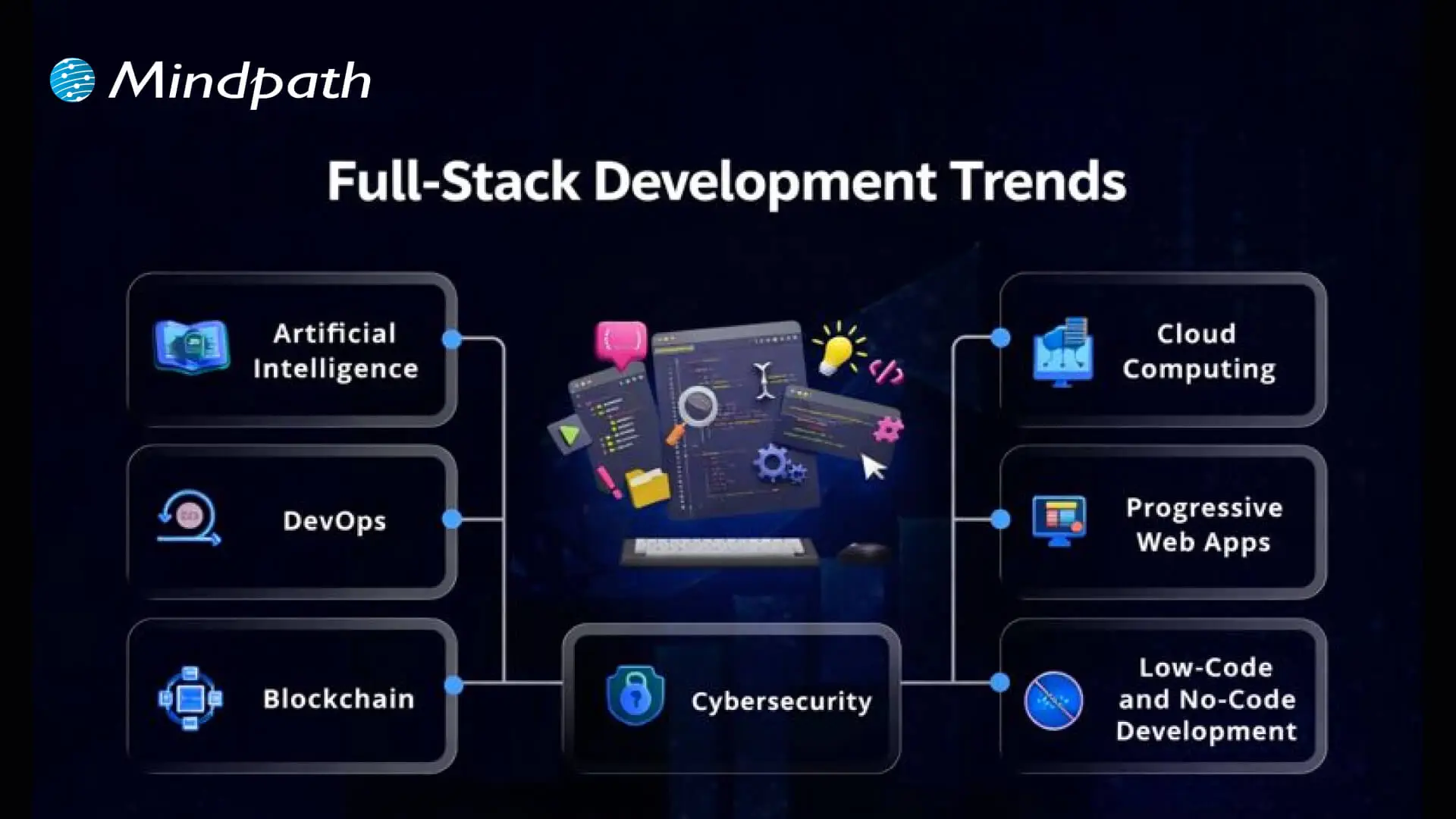
As technology continues to grow, developers are embracing smarter tools and faster methods to build complete applications. The emerging trends in full-stack development are shaping how teams work, improve performance, and deliver better user experiences in 2026. Here are the top trends to watch:
full-stack development trends


1. Artificial Intelligence

Artificial Intelligence is one of the key full-stack development trends shaping how modern applications are built. It helps solve complex problems faster and allows systems to work without human interruption. Full-stack developers are well-suited for AI roles because they understand both design and logic, making it easier to build intelligent solutions. As the future of full-stack development evolves, AI will play a major role in improving performance and user experience.

2. Cloud Computing

Cloud computing is a fast-growing technology that allows access to data storage, processing power, and other resources over the internet. It supports the future tech stack for developers by offering flexibility, easy scaling, and pay-as-you-go pricing. Full-stack cloud developers are in demand to build and manage cloud-based applications that support collaboration and performance. To grow in this area, developers should understand IaaS, PaaS, SaaS and gain hands-on experience with platforms like AWS, Azure, and Google Cloud.

Also Read: Cloud Computing Trends

3. DevOps

DevOps is a practice that combines development and operations to improve how software is built, tested, and deployed. It helps teams work better together and use tools like continuous integration and delivery to release updates faster. DevOps plays an important role in improving application speed, quality, and reliability. As part of full-stack development trends, it supports the demand for efficient workflows and strong collaboration in building modern applications.

4. Progressive Web Apps

Progressive Web Apps (PWAs) are web applications that offer an app-like experience using modern browser features. They work offline, load quickly, send push notifications, and can be installed on devices without using much storage. As part of web development trends 2026, PWAs help businesses reach more users, especially on mobile, while keeping development simple and cost-effective. Their flexibility and performance make them a smart choice for companies looking to improve user experience.

5. Blockchain

Blockchain is a secure and transparent technology that stores data across a network of computers, making it difficult to change or hack. It is widely used in industries like finance and healthcare to protect transactions and manage decentralized systems. As part of full-stack development trends and the latest trends in web development, blockchain allows developers to build safer and more reliable applications. To work in this area, full-stack developers need skills in decentralized tools, enterprise systems, and Web3 architecture.

Must Read: AI in Cybersecurity

6. Cybersecurity

Cybersecurity is the practice of protecting systems, networks, and applications from online threats like malware, phishing, and DDoS attacks. It has become a key part of full-stack development trends as developers need to build secure applications from the ground up. Companies are now including cybersecurity in their future tech stack for developers to keep data and systems safe. Full-stack developers aiming to work in this field should learn network security, web application security, cryptography, and secure coding practices.

7. Low-Code and No-Code Development

Low-code and no-code development platforms allow users to build websites and apps with minimal or no programming skills. These tools are growing as part of full-stack development trends because they save time, reduce costs, and make development accessible to more people. While they are great for simple projects, they may not be suitable for complex or large-scale solutions. As part of the trends in software development, LCNC tools offer fast results and full-stack capabilities for quick product launches.

Looking for the best way to scale your digital growth? Discover why full stack development for web projects is becoming the smart choice for businesses.

Ready to Leverage Full-Stack Development Trends for Your Next Project?

Full-stack development trends are shaping how modern applications are built, improved, and maintained. With advancements like AI, cloud, DevOps, and PWAs, developers and businesses can achieve faster, smarter, and more secure results. Staying updated with these trends will help you build stronger digital products that meet the growing demands of users in 2026 and beyond.

At Mindpath, we offer expert full-stack development services tailored to your business goals. Our skilled developers handle everything from front-end design to back-end logic, delivering complete, scalable solutions. If you’re looking to hire full-stack developers who understand the latest tools and technologies, our team is here to help you build your web and mobile applications with confidence and efficiency.

Related Post

Discover the ultimate guide to hiring Node.js developers in London. Learn about the skills, benefits, and cost factors involved in finding the right talent for your project.
Learn how to hire remote software developers in New York with expert tips on defining needs, skills, and onboarding for project success.

Related Post

node js development company

Imagine you need to create a high-speed, scalable web or mobile app, what technology do you think you should use? Well, most companies will opt for Node.js since it has emerged as one of the leading options in providing high-performance digital solutions. Whether you are starting a new startup or refactoring an existing platform, the success of your project usually begins with selecting the right Node.js development company. But with so many Node.js companies out there, isn’t it difficult to make the right choice? Don’t worry, we’ve got you covered!

This blog offers a nicely constructed checklist through which you can be guided in choosing the optimal Node.js development agency. By following this checklist, you will have some idea and direction during the selection process and also be assured of being aligned with a company that not only meets your technical needs but also comes with you through your long-term success. 

Need professional assistance with your upcoming project? Hire Node.js developers from Mindpath to make sure your application is highly scalable, faster, and high performing.

Understanding Node.js

Node.js is a technology that helps developers create the back end of websites and applications using JavaScript. It is server-side and open source, so programmers can use the same language, JavaScript, on both the front end and back end. It makes the development process easier by making it faster and simpler.

Node.js can handle real-time apps, single-page apps, and applications with a lot of users at the same time. It is used in mobile app development because it has a strong system and beneficial tools. With frameworks like Nest.js, the developer can make elegant, well-structured apps using Node.js. 

Wondering why NodeJS is the preferred choice for modern business applications? Read our blog on advantages of NodeJS for business to discover how it boosts performance, scalability, and development efficiency.

Benefits of Choosing Node.js Development Company

Selecting a Node’s web development company, which is trusted, can make your project faster, smoother and more scalable. With the abilities of Node.js, your app can handle high traffic and real-time updates with ease. Let us look at some of its benefits: 

1. Skilled and Experienced Team

A Node.js development firm can bring a team of experts who know how to build strong and flexible applications. They have hands-on experience with different types of projects and can offer smart, custom solutions and their knowledge can also help to avoid mistakes and deliver better results from the start. 

2. Complete Development Services Availability

A Node.js development services provider takes care of everything, starting from the discussion to launching and maintaining your app. You don’t need to work with different teams for each part, which can save a lot of time and effort.  Having all the services in one place keeps your project organized and moving forward smoothly. 

3. Latest Tools and Practices

A trusted Node.js web development company always works with the latest tools, updates, and frameworks as they follow modern development practices to build fast, secure, and scalable applications which means your app will be future-ready and can perform well under changing user needs. 

4. Strong Security and Stability

Security is a top priority for a professional Node.js development agency, and they take steps to protect your app from threats by using tested methods to keep your data safe and your app stable. You can count on them to deliver a secure and reliable product that works smoothly. 

5. Quick Launch and Results

When you hire a Node.js development firm, your project moves quickly from idea to launch as their process is streamlined, so that you can get your product out to users much faster which helps you stay ahead of the competition and respond to the market more effectively. 

Looking to supercharge your applications with AI capabilities? Explore our blog on NodeJS Libraries for AI Integrations to learn which NodeJS libraries can simplify and enhance your AI-powered applications.

By now, you must have had a clear idea about Node.js, so let us learn about the most important topic: 

Key Considerations While Choosing the Right Node.js Development Company

When you are looking for the right company, keep in mind that not all software development companies providing Node.js services are the same. Understanding the following key factors can help you find a team that delivers quality and meets your specific needs: 

1. Industry Experience Matters

How long a company has been working in software development shows their reliability and knowledge. Experienced Node.js companies know the best ways to work with clients and handle projects smoothly. They are familiar with popular Node.js tools and frameworks and use proven methods like Agile and DevOps to deliver projects on time and with quality. 

2. Skilled Team

A good Node.js company has a strong team with different skills, so they can start your project quickly and build exactly what you need. A team that understands micro services in Node.js can divide tasks smartly and deliver results faster. Having experts like project managers, DevOps specialists and cloud professionals makes the process smoother and more efficient. 

3. DevOps Implementation

Using DevOps helps a company build software faster and more smoothly. It brings developers and operations teams together, so everyone works closely and avoids delays. This way of working also makes the project more secure and organized. A company that follows DevOps can handle changes better and deliver a high-quality product with fewer issues. 

Also Read: Benefits of DevOps

4. Takes Full Responsibility

A good Node.js company takes full responsibility for the work they do. If something goes wrong, they don’t hide it or blame others. Instead, they fix it and learn from it. This honest attitude builds trust, improves communication, and shows they truly care about the success of your project. 

5. Company Working Methods

The way a Node.js company handles projects says a lot about them. It’s not just about good reviews, but also how they talk to you and what value they bring. You can learn more by checking their website, blogs, case studies and social media to see how they share ideas and show their work to the world. 

6. Focused on Your Business Goals

The right Node.js development firm takes time to understand what your business wants to achieve. They work in a way that supports your goals and helps your business grow. With the right knowledge and experience, they can build a strong and future-ready project that fits your budget and timeline. 

7. Strong Partnership Mindset

A trusted Node.js company doesn’t just build your project and leave. They work with you like a real partner, staying connected and involved at every step.  They provide clear communication, teamwork, and support, even after the project is done which helps make everything run smoothly and lead to better results for your business. 

Want to ensure your NodeJS applications run efficiently and reliably? Explore our blog on hire expert NodeJS developers for high-performance apps to learn how skilled developers can boost performance and scalability.

Ready to Choose the Right Node.js Development Company?

Selecting the right Node.js Development firm plays a big role in how fast, secure, and scalable your project becomes. By focusing on experience, team skills, DevOps culture, and a true partnership approach, you can ensure you’re working with a reliable team. A trusted Node.js development company will not only build a great product but support your long-term success too. 

At Mindpath, we offer end-to-end NodeJS development services that are designed for speed, performance, and future scalability. From building real-time apps to using micro services in Node.js, our team brings deep experience and modern practices. As a top-rated Node’s web development company, we ensure your product is secure, stable, and ready for the market. 

Looking to hire Node.js developers who understand your goals? At Mindpath, our experts bring strong technical skills, creativity, and a collaborative mindset. Startups and enterprises trust us for quality, future-ready solutions. Connect with Mindpath and let’s build something great together. 

Discover key factors for choosing the right Node.js development company. Learn how Mindpath ensures success!
Remote work tools

The global workforce went through a seismic shift in the last four to five years, with remote work gaining momentum. Just like many other remote jobs, developers need remote work tools to deliver their best in all tasks. As remote development teams become the norm in many organizations, it is important to know which tools can boost their productivity and efficiency.

Remote work has introduced many opportunities, such as easier access to global talent, cost reduction, and flexibility to work. At the same time, you must also take note of the prominent challenges for remote development teams, such as communication gaps and a lack of transparency. Therefore, remote development teams need reliable tools to achieve better results in their work.

Ready to boost your development capacity with the talented remote experts whom you can trust? At Mindpath, we will match you with skilled developers according to your specific requirements.

Do Remote Developers Need Special Tools?

Yes, every remote developer needs tools that help them improve their productivity. The utility of different tools for remote workers revolves around the fact that they don’t have an office-like infrastructure in their homes. Remote developers have complex responsibilities, which call for attentiveness and focus on strategic tasks. How will developers achieve all this while working in collaboration with other teams? You must look for tools that can help remote workers with different aspects of their work in the comfort of their homes.

Remote developers need different types of tools to boost their productivity in every stage of the development lifecycle. Development teams can use tools for remote work to streamline unwanted complexities in coding and tracking work. The diverse assortment of working from home productivity tools for developers focuses on development environments, collaboration tools, virtual assistants, and complete developer platforms. Developers working from their homes can leverage these tools to boost their productivity and deliver results in alignment with business goals. 

Must Read: Benefits of Hiring Remote Developers    

Unraveling the Top Remote Work Tools for Developers in 2025

The growing adoption of remote work in almost every organization is a testament to the fact that workers will need tools that fill essential resource gaps. For instance, the top 10 remote working tools for developers will not only allow them to communicate with their teammates but also find spaces for shared programming. An overview of the distinct traits of different tools used for remote work by development teams in 2025 can help you understand their significance.

1. GitHub

You can pick any list of developer tools used worldwide, and there’s no way you wouldn’t find GitHub on it. GitHub is the most popular tool used by developers and offers a comprehensive development experience with access to various tools. It is one of the best tools for remote working as it facilitates the benefits of code collaboration and DevOps in one package. 

Development teams can use GitHub Copilot as their AI coding partner to boost their productivity. GitHub also provides cloud-based development environments through Codespaces, thereby reducing resource requirements. On top of it, the features for code scanning, dependency updates, and secret detection help in identifying vulnerabilities before they enter the production stage.

2. Slack

Communication is one of the biggest priorities for any remote development team. Slack is the best tool for remote work in development teams as it centralizes communication for the entire development workflow. For instance, the Huddles feature in Slack allows developers to conduct quick calls without scheduling. 

The best thing about Slack is that it manages all conversations across the toolchain on one interface. With Slack, you can know when Jira updates the ticket status or GitHub provides notifications for pull requests. Another crucial feature of Slack is ChatOps, which offers a command-line approach to development operations on a simple chat interface.      

3. Visual Studio Live Share

The workflow of remote development teams will be incomplete without screen sharing. Some of the best tools for remote work in the domain of software development are screen sharing apps. Remote developers can use screen sharing to review code or write it together. Virtual Studio Live Share offers a transformative experience in shared programming, which empowers developers with control and flexibility.

VS Live Share is a powerful tool for shared debugging or welcoming new developers to the team. It offers a collaborative debugging feature that helps remote development teams streamline the process. Senior developers can inspect the variables and set important breakpoints that serve as guiding lights for junior developers. On top of it, junior developers can also ask questions in real-time and learn crucial debugging techniques.  

4. Zoom

Collaboration through video can be a prominent strength or a setback for remote development teams. Zoom is probably one of the best working from home tools that remote workers rely on for video conferencing. It can help you handle team meetings, client calls and even shared programming sessions. The biggest positive point of Zoom is video quality, which helps remote developers run critical operations without glitches in communication.

One of the prominent features of Zoom that helps developers is the set of robust APIs that help in building custom integrations. In addition, developers can also utilize the SDK options in Zoom for video embedding in the applications they create. The screen sharing feature offers the facility of annotations, which makes it easier for participants to communicate consistently. 

5. Figma

The collection of top tools for remote development teams in 2025 also includes Figma, a reliable design and development platform. It is one of the best tools for remote developers to solve one of the most troublesome aspects in product development. Figma helps in managing the transition from design to code with ease by leveraging different features. The real-time collaboration feature of Figma allows multiple users to edit code simultaneously. 

When combined with the Dev Mode of Figma, the real-time collaboration feature helps in bridging the gap between creativity and practical solutions. The component-based approach of Figma brings the best of modern development frameworks, thereby making it a must-have for remote developers.

Looking to boost productivity and innovation while working remotely? Explore our blog on the top GenAI Tools driving the future of AI development to understand how these tools are empowering developers beyond traditional remote work platforms.

6. Jira

Thousands of developers vouch for Jira as their first choice for project management, especially in remote teams. It is one of the digital working tools that come with a steep learning curve albeit with undisputed benefits for remote developers. Jira is a formidable software development tool that offers extensive customization options and the value advantages of agile methodologies. 

Engineering teams can capitalize on Jira for sprint planning, issue tracking and tracing the entire development lifecycle. With the right configuration and training, remote developers can use Jira to create any workflow model. Furthermore, the Jira Query Language also helps remote development teams extract relevant and productive insights.

7. Confluence

The next top tool for remote development teams is Confluence, a reliable tool for structured documentation. It is a trusted addition in the list of WFH tools that offer a broad set of features and options for better scalability. The support for Jira integration in Confluence streamlines the workflow, starting from ideation and planning to deployment. 

Confluence also helps in maintaining comprehensive documentation with the flexibility for arranging information according to project requirements. The most crucial advantage of Confluence is the assurance of access to updated information and extensive search capabilities.

8. Linear

The competition for effective project management tools in remote work is growing continuously, and Linear is a top competitor. It is a promising remote work tool for project management that works effectively for fast-paced development workflows. Linear provides one intuitive platform for tracking issues, team collaboration, and project planning. 

Remote development teams can capture, categorize, and resolve bugs in their apps with Linear and access real-time updates for better collaboration. The clear interface and collection of features, such as an issue tracker and team collaboration tools, make it a trusted alternative to popular project management tools.

9. Notion

Can developers find tools that offer an all-in-one workspace? Notion has the answer as it is a trusted remote working platform with the flexibility required by developers. It can help in creating engineering knowledge bases with database links for team members, technical decisions, and projects. 

Many remote development teams have adopted Notion for project documentation, combining meeting notes, personal task management, and onboarding guides. On top of it, developers can also leverage Notion AI for generating content and summaries.

10. Miro

The final addition to this list of promising tools for remote development teams is Miro. It is an online whiteboard platform on which developers can collaborate with each other through visual tools. Miro is the top pick among apps for remote workers that make collaboration as easy as possible. The unlimited canvas allows remote developers to organize massive volumes of information while creating a visualization of complex ideas.

Miro can help remote developers in brainstorming with other team members, contributing to the session in real-time. It also facilitates built-in communication tools that allow remote development teams to conduct interactive meetings and workshops. 

Wondering how teams can work smarter in remote environments? Explore how AI Consulting helps in enhancing productivity, collaboration, and decision-making by AI-driven strategies.

Final Thoughts

The insights on some of the most commonly used tools by remote development teams reveal that each tool brings something unique to the table. Many teams want to try free remote work tools before taking the subscription, and that holds them back from experiencing the best tools for remote development. Whether it is a workspace or a collaboration tool, remote developers must pick the ideal tools that enhance their productivity without any burden.

Expert development services at Mindpath bring you peace of mind as we offer remote development teams for different types of projects. We have built our reputation in delivering the best staffing services for various development projects across industries. You can rely on our remote development teams to make the most of top technology stacks suited to your project requirements. Contact us to consult with our experts and capitalize on the benefits of remote development services now.

Discover the top 7 tools for managing remote development teams, boosting collaboration, communication, and productivity.
sustainable technology

Ever wondered why many businesses are rushing into sustainable tech? Why is it so crucially important in today’s fast-changing world? In this blog we will explore how sustainable technology is changing business, and why it is essential. Understanding how these technologies work and the value they can bring to business enterprises can help in meeting regulatory requirements, enhancing brand reputation, and enhancing environmental performance. We can learn how embracing sustainable technology is already helping companies meet today’s needs while positioning themselves for a successful and responsible tomorrow. 

So, let us dive in! 

What is Sustainable Technology?   

Sustainable technology is the design and use of technology to benefit the environment, society, and the economy. This means two things: creating technology with eco-friendly processes and materials and using technology to help solve environmental and social problems. Other examples include solar panels, which provide clean energy, and software enabling businesses to trace their environmental footprint.  

While developing sustainable technology, companies are very considerate about the resources used, their origin, and how to reduce the negative effects in the form of pollution or electronic waste. Businesses use sustainable technologies to realize some of the desired environmental targets, such as reducing fossil fuel use or source reduction of waste.  

For example, they can work on an electric car or initiate projects that reduce carbon emissions. Businesses can also make use of technologies such as Artificial Intelligence to find areas where it can slash down on waste and reduce emissions, thus switching over to renewable energy sources and decreasing their carbon footprint. 

Sustainable Technology Solutions That are Revolutionizing Modern-day Businesses    

1. AI-Powered ESG Reporting 

AI-powered ESG reporting is the intelligent and faster way for a business to track its efforts toward sustainability. In sharp contrast to manual methods of ESG reporting, AI-driven methods are not only far more accurate but also have the dexterity to bring out results within a remarkably short time, incomparably faster than human ability. Using the AI, businesses would be updated in real time—basically, companies can directly see what effect any sustainability change they make will have. Such technology can scan documents, analyze keywords against them, and store important data from relevant files for easy retrieval at reporting time. This automation not only saves time and money but also gives the accuracy of the ESG data. 

2. Embracing Digital Documentation 

The digital revolution makes it easy and secure for businesses to create, share, store, and edit important documents. The shift to digital can reduce office waste by a potential 70% since the average office worker uses around 10,000 sheets of paper yearly. The switch from paper to digital can be challenging, but with OCR technology, it allows the user to quickly scan physical pages and digitize them into documents. This reduces the burden of using too much paper and makes files accessible to all. Additionally, file storage in the Cloud is another area that companies should consider. Cloud computing uses less energy compared to running many different servers for companies, and the amount of storage space can increase as required with less hassle. 

3. Remote Work Technology 

Most of the business units have adopted work from home throughout the pandemic and closed doors to offices for good. It saves the carbon print left if one must commute to their workplace every day. Such a change is made possible with the help of technologies that include workflow technology, tools for integration, e-mail, apps for screen recording, and instant messenger applications. The use of this technology has reduced significantly the need to travel to conferences and other business events, which means a concurrent reduction in carbon emissions. However, the sustainability benefits of remote working depend on the set-up of the home office by the employee. For example, the carbon footprint of an employee may be considerably reduced when the job requires driving more than 6 km to work. In contrast, when the driving distance is less or if public transport is used, home-working may increase CO2 emissions because of the additional use of energy in the home. Hence there is a need to encourage employees to be green at home. 

4. The Internet of Things (IoT) 

The IoT is the network of connected devices, including smart home devices and sensors. Businesses can apply IoT in PACE dimensions related to understanding their ecological footprint and emission reduction. IoT makes workspaces more energy-efficient through monitoring and controlling devices. Some companies that deliver products have the potential to reduce their environmental impact with smart fleets. IoT-enabled fleets send vehicle data back to the office through telematics, which will enable managers to plan efficient routes that can save fuel and be more effective. This data might underline the best driving practices that would help further cut fuel use and boost sustainability. 

Sustainable Technology Use Cases    

1. Decreasing Carbon Footprints 

Sustainable technologies help companies transition from a linear economy, where the use of raw materials is very high, to a circular economy, which is based on leasing, recycling, refurbishing, repairing, re-using, and sharing products as far as possible. This space, therefore, helps companies lower their carbon footprints while serving the interests of both the people and the planet. Sustainable technologies now assist companies in keeping track of crucial ESG metrics, including energy use, emissions, and water consumption. This will enable businesses to understand their position in trends of sustainability, beef up actions to cut emissions, and, as a result, help in answering healthy regulatory requirements and improving the environmental performance of the company. 

2. Improving Brand Reputation 

Sustainability is important for reputation and success. It attracts a workforce and investors sensitive to environmental and social issues in the world. Sustainable technologies attract environmentally aware talent and meet the needs of investors who value transparency of information. Sustainable technologies help businesses keep track of and improve their efforts in sustainability. For example, IoT devices track energy consumption, allowing them to benchmark and, therefore, report on progress, demonstrating commitment to sustainability. 

3. Meeting Regulatory Requirements and Global Standards 

Regulations are constantly changing, with laws like the Corporate Sustainability Reporting Directive (CSRD) requiring companies to report on their environmental impact. Even without mandatory rules, companies are encouraged to follow the United Nations’ Sustainable Development Goals (SDGs), which promote environmentally friendly technologies. To stay ahead, organizations should use sustainable technologies that track, measure, and report their ESG performance. This helps them meet current and future regulatory requirements and global standards. 

4. Visualizing Supply Chains 

One of the ways in which sustainable technologies make a difference is through complete transparency, which can be used to improve supply chains. For instance, AI can trace carbon emissions to identify ESG opportunities and risks. Machine learning is applied in demand forecasting and fleet management to avoid waste and achieve higher energy efficiency. Moreover, with the help of such technologies, companies can be kept updated with their partners and suppliers, which is useful in ESG reporting. Tools like GRI or TCFD require reporting on Scope 3 emissions, which are related to operations outside the company’s direct influence. This helps businesses to be ahead and give a cleaner picture of the supply chains. 

Curious About How Mindpath Can Transform Your Tech?

Find out how our bespoke solutions in modernization and AI can benefit your business.

Mindpath: A Leader in Innovative IT Solutions 

Mindpath is a forerunner in IT innovation and offers customized solutions for your business. We are an Innovation Centre focused on staff augmentation—bringing experienced and qualified professionals to integrate with your team for any short- or long-term project. Our modernization services upgrade legacy systems and optimize processes for better efficiency, security, and long-term growth. We are leaders in digitization. Therefore, we have State-of-the-Art Web Development and App Solutions to enhance your presence online. In addition, with our excellence in bespoke chatbot development and artificial intelligence, your business will harness the very latest technology available to help give you that edge.  

Conclusion 

In the current world complexities, businesses have found sustainable technology to be central to their way of growth and competitiveness. Evermore, innovations that businesses embrace these days are the ESG reporting powered by AI, digital documentation, remote work technology, and the IoT, which help these companies in the reduction of their environmental impacts and bring about an increase in operational efficiency and reputation. These technologies are pivotal for organizations to meet regulatory requirements, visualize their supply chains, and, of course, their sustainability targets. The commitment to sustainability practices is not a fad but a strategic edge, one that imbibes the global norm of standards and sets the pace toward long-term success.  Mindpath leads in IT innovation and can help your business grow. Staff augmentation by Mindpath deals with the integration of top professionals in your team for the implementation of various short- and long-term projects. Besides that, our modernization services update your legacy systems and aid in enhancing your company’s efficiency and security. Advanced web and application development with bespoke chatbot and AI solutions complete the comprehensive services in ensuring our business stays at the cutting edge of technology. 

Ready to Innovate?

Discover how Mindpath’s tailored IT solutions can transform your business.

Explore how sustainable technology is transforming businesses. Discover its benefits, from AI-driven ESG reporting to digital documentation and IoT innovations.