React vs Vue: Which JavaScript Framework is Best for Frontend Development?

Join our Newsletter!

Featured Posts

Support Is One Click Away

Home

React vs Vue: Which JavaScript Framework is Best for Frontend Development?

React vs Vue

React vs Vue: Which JavaScript Framework is Best for Frontend Development?

The software development industry keeps evolving incredibly with new technologies and innovations, breaking down traditional precedents. At the same time, software applications have become more complicated as businesses seek better ways to come up with successful products. The React vs Vue debate plays a major role in determining the difference between success and failure for your new software solutions. You might have many questions about the need to focus specifically on these two frontend development tools. Let’s dive in to get answers to all your questions.

With more frontend development technologies coming to the forefront, it is difficult to make the right choice for your project. React and Vue are the most preferred JavaScript technologies for web development. Both of them have become the strongest competitors among frontend development frameworks for their unique features. Let us learn the differences between React.js and Vue.js to choose the ideal pick according to your requirements.

Struggling to choose the right frontend framework for building fast and interactive web applications? Mindpath offers expert ReactJS development services to help you create scalable, high-performance solutions that align with your growth goals.

Understanding the Fundamentals of React and Vue

If you take a look at the top apps you use in everyday lives, most of them have either React.js or Vue.js in their tech stack. Choosing one of the ideal frameworks for software development can pose significant challenges. You must know what each of them has to offer for frontend development before making a decision. The following sections will provide insights on the fundamental details of React and Vue that can help you compare them.

Quick Overview of React

React.js is a well-known javascript framework for frontend development that delivers promising edge in creating interactive user interfaces (UI). Remarkable features of this tool include its origin which – it was created by Facebook in 2011 for internal purposes. Although most of us frequently refer to React as a framework, it’s an open-source javascript library for frontend development. One of the notable aspects in the Vue vs React debate is the use of JSX in React.js syntax. The role of JSX (JavaScript Syntax Extension) is very important in writing HTML elements in JavaScript code without making use of JavaScript functions.

React is among popular, dynamic, and versatile JavaScript frontend libraries used for developing frontend applications. It is most preferably used to create scalable applications with dynamic user interfaces and cross-platform capabilities. React developer tools also provide the support to identify performance issues and ensure a faster debugging process. Another striking feature of React is the flexibility to develop single-page applications and server-side apps as well as mobile apps.

Quick Overview of Vue

While React is a JavaScript library, Vue is an open-source JavaScript framework for frontend development. Vue.js grabbed headlines upon its arrival in 2014 for the shorter and simpler learning curve. As a matter of fact, the React vs Vue vs Angular comparison reflects on the fact that the design of Vue draws inspiration from Angular. The creator of Vue, a former Google engineer, picked the best components of Angular and the same approach as React.js to create a versatile framework.

Developers choose Vue for its easy-to-use interface and efficiency in developing web apps with a component-based model. The framework also includes a large library that empowers developers to create apps with better performance. Many developers prefer Vue over React for its simpler approach to coding with a less complex structure and plain syntax. On top of it, the collection of plugins available with Vue ensures efficient incorporation of additional functionalities in the app.

Looking to build a high-performance frontend that scales with your business and delivers real ROI? Learn from our ReactJS for App Development guide to understand how React empowers business owners to make smarter, future-ready technology decisions.

Let’s have a look at the React vs Vue comparison with Google Trends:
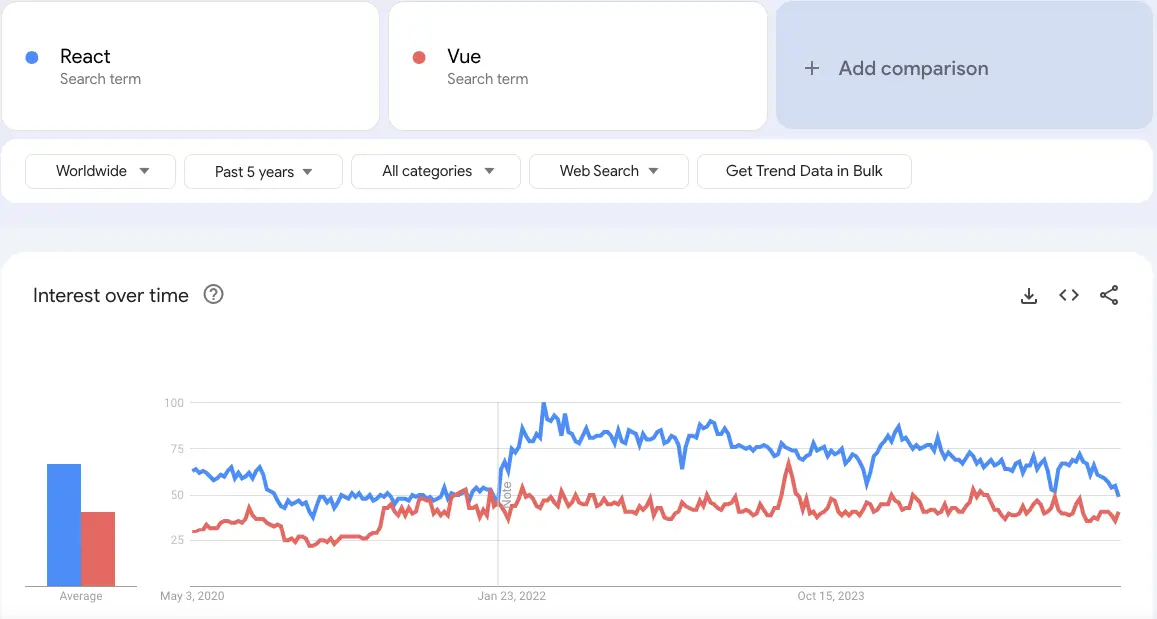
react vs vue google trends

Unraveling the Differences between React and Vue

While React is a JavaScript library, Vue is an open-source JavaScript framework for frontend development. Vue.js grabbed headlines upon its arrival in 2014 for the shorter and simpler learning curve. As a matter of fact, the React vs Vue vs Angular comparison reflects on the fact that the design of Vue draws inspiration from Angular. The creator of Vue, a former Google engineer, picked the best components of Angular and the same approach as React.js to create a versatile framework.

Developers choose Vue for its easy-to-use interface and efficiency in developing web apps with a component-based model. The framework also includes a large library that empowers developers to create apps with better performance. Many developers prefer Vue over React for its simpler approach to coding with a less complex structure and plain syntax. On top of it, the collection of plugins available with Vue ensures efficient incorporation of additional functionalities in the app.

1. App Size and Performance

The size of app in each framework speaks a lot about the ReactJS performance they can offer in the development process. You can use the Vue vs React performance benchmark to discover how Vue.js is the better pick to create small and faster apps. Vue allows you to compress the code so that it can consume significantly less space. As a matter of fact, applications created in Vue are almost 10% to 30% smaller than React-based applications.

The smaller app size enables faster coding as you will need limited inputs, thereby providing the assurance of better performance. Vue also stands as a formidable contender in terms of performance with its efficient default library. The testing library of Vue.js makes applications run quickly and more efficiently. On the other hand, React requires you to download additional libraries to introduce new features that increase app size and reduce performance.

2. Scalability

Another noticeable factor in the comparison between React.js and Vue.js is scalability as businesses seek ways to expand their apps with new functionalities. Which JavaScript frontend framework can come to your rescue when your app attracts more customers? React and Vue have efficient scalability solutions, albeit for different categories of apps. While React is the best pick to create large and complex apps, Vue is suitable for faster and simpler apps.

However, Vue and React both works on the same infrastructure and relies on a unidirectional data flow. In addition, Vue also offers support for two-way reactive data binding that allows simpler data management. The reactivity system of Vue ensures that you can track changes and introduce updates in the DOM. While React has a larger developer ecosystem and more templates and tools, Vue provides the guarantee of better scalability.

Where does React fail when it comes to scalability? You can find smart components in React.js that feature state management library functions. On the other hand, the dumb components help in executing simple functions and presenting things to the virtual DOM.

Must Read: ReactJS Web Development Guide

3. Operational Performance

The next important point of the difference between React and Vue will focus on their performance in different operations. Vue has been the favourite of companies as it offers exceptional performance in less complex and smaller projects. According to recent tests conducted on both frameworks, the operational performance depends on type of tasks where you can apply them. The tests focused on important metrics such as memory usage, rendering time and row creation speed for operations like clearing large tables or introducing updates.

React.js leverages a virtual DOM to ensure efficient management of UI updates and showcases impressive performance in all benchmarks. The operational performance of React is significantly higher in scenarios that require dynamic updates and content rendering. On the other side of the debate, Vue.js also leverages a virtual DOM alongside offering a reactive data-binding system. Vue has consistently shown competitive performance at par with React in different test scenarios.

4. Syntax and Learning Curve

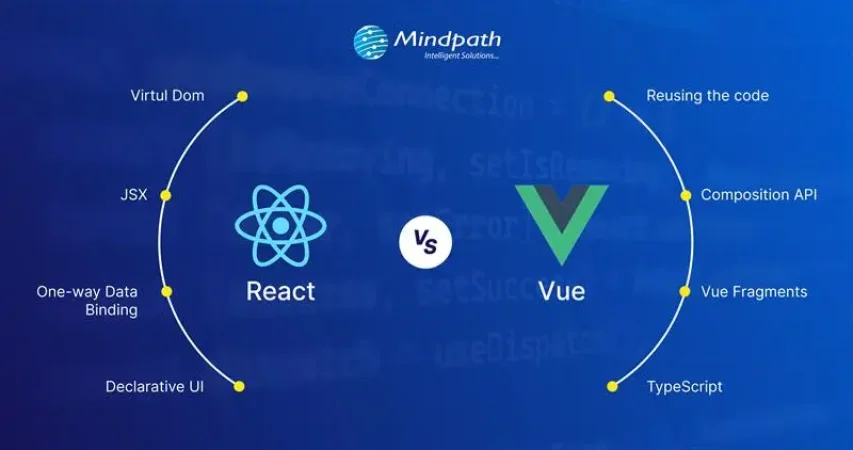
You should also review the React js vs Vue js debate from the perspective of their syntax. React uses the JSX syntax while Vue uses the template syntax for developing user interfaces. Vue uses HTML templates by default albeit with the option to write code in JSX. On the other hand, React relies solely on JSX for the syntax. The isolation of HTML, JS and CSS in Vue ensures that beginners can also create web application frontends with ease. Developers with limited experience in JavaScript or the ones who have been using HTML/CSS will love working with Vue.

React presents a steeper learning curve as developers need in-depth understanding of JavaScript to work with the framework. Even if JSX offers more power and flexibility, beginners will find it more complex for frontend development.

5. Official Documentation

The documentation for React and Vue also play a crucial role in the React vs Vue comparison. Official documentation of any framework or library provides guidance on their components and the best ways to use them. Tools with clear and comprehensive documentation can also attract businesses which need clear directions for usage and troubleshooting. Vue has always maintained well-organized documentation that serves as its formidable strength. The decision to choose from React or Vue becomes simpler with the assurance of the simpler learning process and troubleshooting in Vue. On top of it, the latest improvements in official Vue documentation provide more comprehensive resources to help developers.

React is far behind Vue in terms of documentation because it focused only on basic concepts and advanced uses. The updated version of React documentation promises some changes such as better accessibility, clear explanations and real-world examples. With time, React will also have documentation that will help developers learn about its functionalities and best practices.

Wondering what separates a good ReactJS project from a truly successful one? Read the essential ReactJS Developer Skills for successful web projects to make smarter hiring and development decisions.

2025 Developer Survey by Stack Overflow

The 2025 Developer Survey by Stack Overflow, recorded the responses of over 65,000 developers about the technologies, coding, and tools they are interested to learn and use, and experience at work. Here’s the outcome of 38,132 (58.3%) responses received by professional developers on the popularity of web frameworks and technologies.
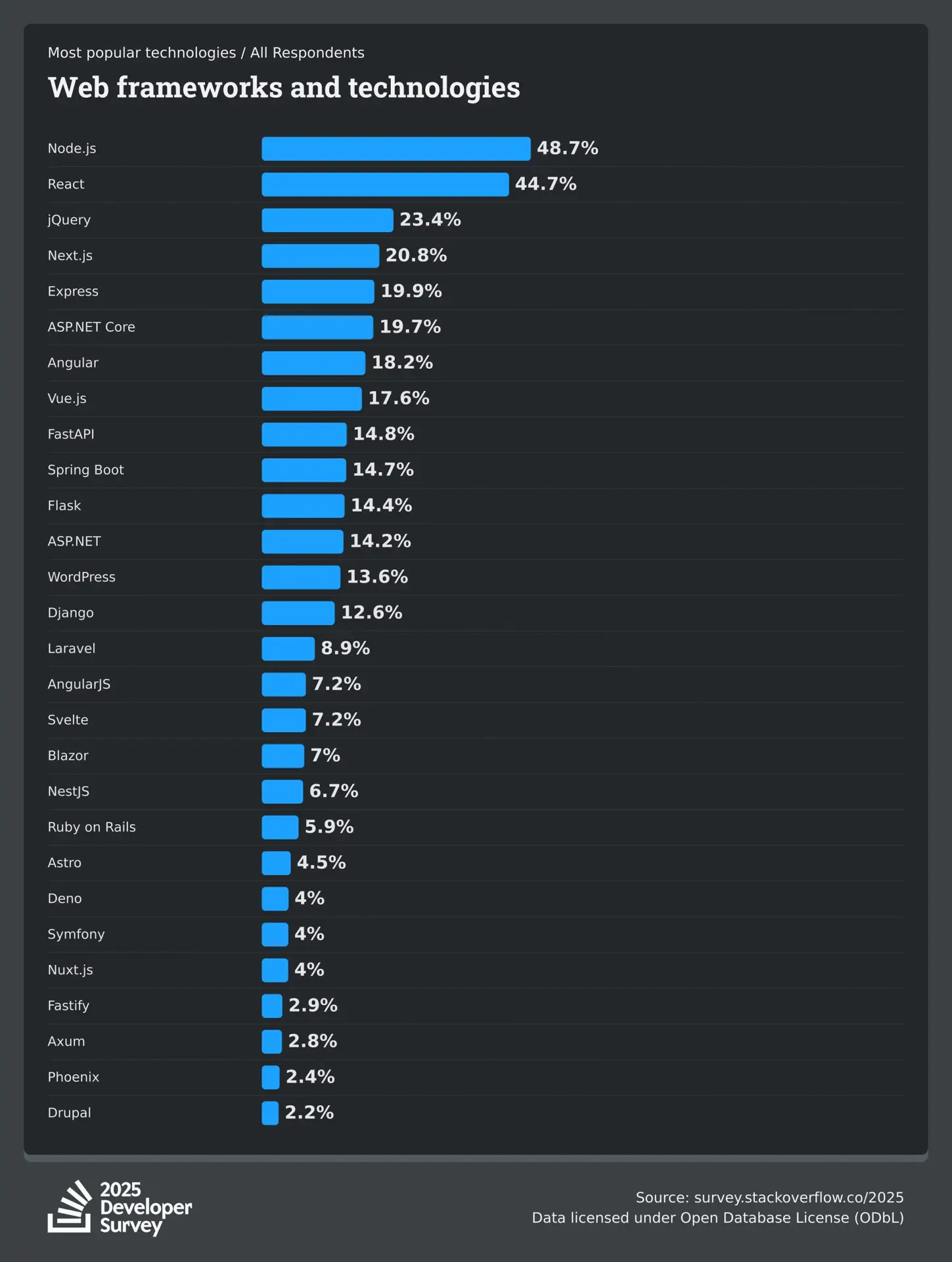
Stack Overflow Developer Survey

ReactJS vs VueJS: Which is Better for Your Project?

The differences between React and Vue mentioned above depict that each one of them has some distinguishing pulses and minuses. It is important to use the example of a React-based application and the example of a Vue-based application at the same time to understand their adoption in the real world. Some of the noteworthy companies that use React.js are instagram, Netflix, and Uber.

On the other side of the spectrum, industry giants like GitLab, Zoom, Upwork use Vue.js. Therefore, the choice of a frontend development framework depends completely on your needs. Still confused about choosing the right framework for your next project? No worries, Mindpath offers ReactJS development services and is ready to help you make the right decision. Take the first step now to choose the right framework for your dream project.


Frequently Asked Questions

1. How do I decide between React and Vue for a long-term project? 

When comparing React vs Vue, consider your project size, team expertise, and future scalability plans. React is often chosen for enterprise-level applications with complex requirements, while Vue works well for faster development cycles. Maintenance needs, ecosystem maturity, and community support also influence long-term sustainability.

2. Is React or Vue better for hiring developers?

React has a larger global talent pool, which can make hiring developers easier for growing businesses. Vue developers are also in demand, but React’s widespread adoption often gives companies more hiring flexibility. The decision depends on project complexity and long-term technical strategy. 

3. Can React and Vue be integrated with existing backend systems?

Yes, both frameworks integrate smoothly with REST APIs, GraphQL, and modern backend technologies. They work well with backend stacks like Node.js, Python, and PHP, as well as cloud services. This flexibility allows businesses to upgrade the frontend without rebuilding their entire backend system. 

4. How does state management differ in React and Vue?

In the React vs Vue comparison, React typically uses external libraries like Redux or the Context API for complex state handling. Vue provides built-in reactivity with structured tools such as Vuex or Pinia. Vue feels more guided, while React offers greater flexibility for large-scale applications. 

5. Which framework performs better in server-side rendering?

Both frameworks support server-side rendering to improve SEO and performance. React commonly uses Next.js, while Vue relies on Nuxt.js. Performance mainly depends on project architecture and optimization strategies. The implementation approach plays a bigger role than the framework choice itself. 

Related Post

How much does hiring a ReactJS developer cost? Learn about factors affecting rates, and how to find the best talent within your budget.
Discover the top cloud computing trends for 2025, including AI, quantum computing, and hybrid solutions, and learn how they can shape your business’s future.
Discover how digital twin technology boosts efficiency, enhances product quality, and supports sustainability. Learn its impact on modern businesses and industry sectors.

Related Post

AI in Decision Making

Do you know that 75% of leaders believe that AI gives them a major edge when it comes to making smart decisions? That’s a big number, isn’t it? Through this, we get an idea of how much trust today’s decision makers are placing in AI. If you ever thought about how AI can help in better business decisions, you are not alone. Today, AI in decision-making has developed into a legitimate, trusted resource for leaders embracing the opportunity to work with greater clarity and confidence.

Artificial intelligence is becoming more prevalent in various industries today to aid in planning, minimize uncertainty, and achieve increased efficiency. It is assisting teams with understanding the needs of customers, forecasting demand, and many other areas. AI is quickly becoming a valuable business partner in day-to-day decision-making. Pretty fascinating, right? In this blog, we will review practical implementations and the advantages of using artificial intelligence in decision-making. So, let us dive in!

Ready to elevate your decision-making with AI? Discover how Mindpath’s advanced AI solutions can transform your business strategies and drive success. 

What is AI Decision Making?

Artificial intelligence decision-making refers to computer systems that support intelligent decision-making based on data. Think of it as a super advanced program to assess large volumes of data (i.e., numbers, text, images, sensors, etc.) and determine the best action. These systems process information and provide intelligent actions following rules or models, including sophisticated models like neural networks. AI systems can also learn from previous decisions and improve performance over time through machine learning.

Unlike conventional methods that require human effort for collecting, cleaning, and analyzing information, AI can take any combination of messy and complicated input and not get confused with too many opinions or fatigued by too many details. AI moves quickly, doesn’t miss patterns, and continually learns. This makes artificial intelligence a useful mechanism for businesses that deal with enormous amounts of data and need to make clean decisions quickly and accurately.  

Curious about bringing AI into your business but unsure how to begin? Read our blog: Is Your Business Ready for AI?

Benefits of AI in Decision Making

Using AI for decision-making is becoming a key part of how modern businesses operate. With AI adoption on the rise, it’s important to understand what makes this technology so valuable in today’s decision-making process.  

1. Boost Productivity

AI works like a nonstop helper that gives decision makers quick answers and useful insights. It saves time by handling data and helps people focus on bigger tasks. With decision maker AI, you can get more done without working extra hours.

2. Lower Risks

AI benefits help in spotting problems early by studying past data and finding patterns. It can warn decision makers about things like fraud or sudden changes in the market. This helps businesses act early and avoid big mistakes.

3. Make Faster Decisions

AI looks at data quickly and gives answers in real time, helping businesses respond fast. It saves time by doing the hard work of sorting and studying information. This helps decision makers act faster and stay ahead in a fast-moving market.

4. Improve Efficiency

AI helps speed up tasks by collecting and studying data without delays. It shows decision makers the right information fast and helps fix weak spots in the process. This means teams can work better and get more done every day.

5. Ensure Consistency

AI follows the same rules every time, which helps make decisions fairer and steadier. It removes personal bias and uses data to guide choices in the same way for everyone. This helps businesses build trust and keep their work smooth and reliable.  

Curious to know how AI can enhance your e-commerce strategy and give your business a competitive edge? Read our detailed blog on how AI in e-commerce is transforming the future.

Real World Use Cases of AI in Decision Making

Real-world use cases of AI in decision-making highlight how this technology supports smarter choices in everyday business. Many industries are using AI to handle complex tasks, spot patterns, and guide important decisions with greater confidence.

1. Sales

In sales, AI in business strategy studies customer data to help teams focus on the best leads and plan better strategies. It suggests the right prices, products, and ways to talk to customers based on what works best. AI also checks team performance and gives ideas to improve sales results.

2. Manufacturing

The role of AI in decision-making is helping manufacturers keep machines running smoothly by spotting problems before they happen. It also helps manage materials, workers, and production by studying live data and showing the best way to use resources. AI gives useful ideas to improve processes and keep product quality high at every step. 

3. Marketing

In marketing, AI for customer service helps teams understand different customer groups and choose the best ones to focus on. It studies what people like and helps create content and ads that feel more personal and effective. By checking results from ads and social media, AI supports better decisions that improve marketing success.

Also Read: AI in Healthcare

4. Finance

AI helps financial experts find market trends by studying large amounts of data and giving clear insights. It also checks for possible risks and suggests safer ways to manage money and plan investments. With this support, decision makers can adjust portfolios and make smarter financial choices.

5. Customer Relationship Management

AI helps businesses understand what customers need by studying their behavior and feedback. It supports better decisions in improving service, keeping customers happy, and reducing the chance of losing them. AI also shows the best ways and times to talk to customers for stronger relationships. 

6. HR Operations

AI helps HR teams find the right candidates faster by quickly checking resumes and matching skills. It also looks at how employees are doing at work and gives useful ideas to support their growth. AI suggests fair pay and benefits by studying company budgets and market trends, helping keep employees happy and motivated.

Ready to leverage the transformative power of AI? Explore our blog AI transforming the future, to learn how to create a clear strategy and successfully adopt AI technologies in your organization

Ready to Make Smarter Business Decisions with AI?

AI in decision-making is helping businesses move faster, reduce risk, and improve results. It supports better planning, smarter insights, and more consistent actions. Many industries are now using AI as a trusted tool for everyday decisions. With the right approach, AI becomes a reliable partner that helps businesses grow with confidence.

At Mindpath, we deliver AI development services tailored to your unique business goals. Our expert team builds intelligent solutions that help you work smarter and stay ahead. With a focus on innovation, performance, and simplicity, we are here to support your digital journey. Let’s build intelligent systems that shape your future. 

Frequently Asked Questions

1. How can AI really help in making faster business decisions?

AI can process large volumes of data in real time, identify patterns, and provide actionable insights quickly. This allows decision-makers to respond promptly to market changes, optimize operations, and reduce delays in critical business decisions without relying solely on manual analysis.

2. Does AI completely replace human judgment in decision-making?

AI does not replace human judgment but complements it. It provides data-driven insights, highlights trends, and reduces errors, enabling decision-makers to focus on strategy and creativity while leaving repetitive or data-heavy analysis to the AI system.

3. Can AI help reduce risks in business operations?

Yes, AI identifies potential risks by analyzing historical and real-time data. It can detect early signs of fraud, supply chain disruptions, or market fluctuations, allowing businesses to act proactively and minimize losses, improving overall decision accuracy and reliability.

4. How does AI improve efficiency in decision-making?

AI processes data faster than manual methods, highlights critical insights, and identifies weak spots in operations. This allows teams to make better decisions quickly, streamline workflows, and achieve higher productivity.

5. How does AI ensure consistent and unbiased decision-making?

AI applies the same rules and data-driven models every time it analyzes information. Unlike humans, it is not influenced by emotions or personal bias, ensuring fair, repeatable, and consistent decisions, which builds trust and reliability across business operations.

custom software development

Custom software development is becoming the primary driver for businesses to get ahead of the curve in 2026. Businesses no longer rely on ready-made tools as existing tools fall short of meeting unique requirements. More recently, there is a higher need for tailored solutions that incorporate an organization’s goals and can scale as the firm grows. So, how will businesses ensure their software not just helps with their operations, but ultimately provides a legitimate competitive advantage?

In today’s fast-paced digital landscape, the right software is not only technology but also a strategy in practice. With custom software, businesses foster solutions that face specific challenges and ignite innovation. This guide walks through the core aspects of custom software development, including its definition, different types, benefits, key factors, and process. With a successful approach, adequately designed custom-built systems will enable progress and lead to long-term success.

At Mindpath, our custom software development services deliver secure and scalable services that  meet your business goals and enhance your business performance.

What is Custom Software Development?

Custom software development builds software solutions designed for a business’s specific needs. Instead of using generic tools developed for all businesses, many companies are developing their own custom software applications to support their unique company goals, internal workflows, and their customers. The custom software process includes planning, designing, developing custom software, and then ongoing software updates. This proactive approach might help a business increase efficiency, allow the business to expand, and create a steady stream of revenue.

The basis of this method is personalization. Developers create each feature with intention, supporting groups like marketing or sales, and enhancing customer brand participation through apps and platforms. These tailored solutions align and integrate smoothly into existing processes, improving productivity. When businesses select the right design and functionality, they receive a competitive advantage and increase their ability to outgrow the competition in a rapidly evolving digital landscape.

Must Read: Software Development Cost

Types of Custom Software Solutions

Businesses face unique challenges, so they will need specific solutions to meet their goals. When used effectively, there are many kinds of custom software development solutions that can take advantage of that to drive efficiency and growth.

Types of Custom Software Solutions

1. E-commerce and Online Platforms

Online businesses require more than a basic website. Custom platforms take care of payment, inventory, and customers quickly and accurately.

2. Data Management and Analytics Tools

Companies generate a never-ending amount of data every day. Analytics tools provide actionable insights from that data, which decision-makers can invest in, as there is confidence in the analytics.

3. Compliance and Regulatory Tools

The industries with strict rules continue to change at a breakneck speed. Compliance software can help you track, report, and reduce risks.

4. Customer-Facing Applications

Customers expect a seamless digital experience, and mobile apps, portals, or self-service tools can provide a simple and engaging interaction.

5. Integration and Middleware Solutions

It’s not very common for systems to connect themselves. Middleware acts as a bridge between those systems and allows for the free flow of information across platforms.

6. Enterprise Grade Solutions

Large organizations need powerful systems to maintain efficiency. ERP, CRM, and BI software all gather data into one controllable system.

7. Internal Software Systems

Day-to-day operations require intelligent systems. HR management platforms, scheduling software, and inventory solutions help maintain workflow efficiency.

8. Business Process Automation (BPA)

Manual tasks challenge the organization as a whole. Custom software development will provide a BPA solution that reduces repetitive, verifiably redundant work and frees up time.

Want to know the method behind building scalable and maintainable software? Learn how the software development life cycle helps you streamline development by providing a structured approach that improves efficiency and overall project outcomes.

Benefits of Custom Software Development

Each organization operates differently, so that’s why software customizations are very important. When you choose custom solutions, companies will have the tools that meet their needs and bring value over the long term.

Benefits of Custom Software Development

1. Strong Security Measures

Every day, businesses deal with the threat of crime, and good protection is necessary. With custom solutions, businesses can create the security features that fit their unique needs.

2. Smarter Automation

Repetitive work that wastes time is unnecessary. Automated workflows make everything more efficient, giving teams more time to focus on innovative opportunities.

3. Future-Ready Upgrades

Technology will continue to change, and existing systems are often outdated. A custom solution is easy to upgrade, so businesses can stay up to date.

4. Cost Savings Over Time

It’s common to think of generic tools as the less costly option, but they come with hidden costs. A custom-built system can expand with the business and reduce your long-term costs.

5. Tailored to Your Business

Every company has its own workflows, and off-the-shelf, one-size-fits-all tools rarely truly fit. Custom software design considers workflows and goals to create solutions tailored to specific needs.

6. Full Control and Flexibility

Companies have the decision on how their software evolves. From additional feature requests to maintenance, a company is in control of all aspects of software.

7. Edge Over Competitors

To be different, you need unique solutions. Custom software development allows companies to create custom tools that enhance their efficiency and develop stronger customer relationships.

Curious how businesses are building world-class software teams without geographical limits? Explore how our offshore software development can deliver skilled talent and cost-effective solutions.

Step-by-Step Custom Software Development Process

Custom software development has a well-defined process to deliver the best quality product. Using the proper methodology, a custom software development process business makes certain that everything is completed to specific objectives for each project. Here is the process:

1. Requirements and Planning

The process begins with identifying and researching the client’s needs to lay the right framework. The team documents goals, scope, and technology decisions in order to have a clear foundation. During this clarity stage, teams quickly put together custom-made software with a common understanding.

2. UX/UI & System Design

Once they define the requirements, designers and architects start creating wireframes, prototypes, and system architecture for the solution. They start defining the database structure, user experience (UX), and technical workflow in order to ensure everything flows and goes according to plan. Designers create all custom software to be easy to use, scalable, and low-risk.

3. Development Execution

Developers write code based on the approved design and requirements. They develop using agile and best practices and build the functional modules incrementally. Organizations will receive reliable solutions designed to promote their long-term success.

4. Testing & Quality Assurance

Testing validates both functional and performance on devices, platforms, and use cases. Testers perform unit, integration, and regression tests to detect any issues as soon as possible. This step guarantees quality standards in custom software development solutions before delivery.

5. Deployment & Continuous Support

Once testing verifies quality, the team deploys the software on-premises or in cloud environments. The team will continually provide updates, fixes, and improvements to help maintain the effectiveness of the system. We will perform a continuous improvement process to generate value and to prolong the entire application lifecycle.

Concerned about risks that could slow down your custom software build? Explore the major custom software development mistakes that can disrupt progress and find out how to avoid them.

Key Factors to Consider When Building Custom Software

When it comes to building a custom piece of software, it’s more than just writing the code. It’s important to pay attention to the factors that drive the success and make sure your software aligns with your vision of the future in your business.

1. Build vs Buy Decision

Evaluate if building from scratch or buying ready-made solutions best supports your custom software development goals.

2. In-House Team or Outsourcing

Choose between in-house development and outsourcing based on expertise, resources, and project scope.

3. Right Development Methodology

Select the right approach, like Agile or Waterfall, to match your project’s complexity and goals.

4. Focus on User Experience

Design software with intuitive navigation, usability, and efficiency to boost adoption

5. Scalability and Future Growth

Plan for growth by ensuring the custom software development solution can scale easily as your business expands and technology evolves.

Trying to understand the common pitfalls in creating custom software? Check out our blog to learn the essential custom software development dos and don’ts that every business should follow for a smooth process.

Ready to Transform Your Business with Custom Software?

Custom software development continues to be the core driver of innovation, growth, and competitive advantage. By focusing on tailored solutions, businesses overcome unique challenges, streamline operations, and stay prepared for the future. With the right approach, companies build systems that scale seamlessly, improve efficiency, and deliver long-term results in today’s fast-moving digital world.

Partnering with a trusted custom software development company gives you access to expert guidance, advanced technologies, and proven strategies. At Mindpath, our custom software development services empower businesses to create secure, scalable, and future-ready solutions. From strategy to execution, we ensure every step adds measurable value, helping organizations achieve their vision with confidence and clarity.

hiring a wordpress developer

WordPress remains a top choice for website development due to its scalability, ease of use, and flexibility. However, to unlock WordPress’s true potential, it is crucial to hire the right developer- an expert who can understand your goals, the technical nuances of WordPress, and your customers. Yet, hiring a WordPress developer is a major investment.

It is not just about finding a professional who can write code; it is a strategic partnership between your business and an expert who can offer you the required solutions. Besides, it involves more than just checking technical skills. This detailed hiring WordPress developer guide will guide you through the hiring process, helping you make an ultimate hiring a WordPress developer checklist.

Are you looking for expert help to build your WordPress site? At Mindpath, you can hire WordPress developers who are highly skilled and dedicated to building high-performing websites that drive measurable results.

Top Reasons for Hiring a WordPress Developer

Before diving into the WordPress developer checklist to ensure a successful hiring, let’s understand why you should hire expert WordPress developer.

Top Reasons for Hiring a WordPress Developer

1. Customized Solutions

A professional WordPress developer can provide custom WordPress development for the site to match your unique brand identity, functional requirements, and user experience goals. Pre-built themes or plugins won’t offer you such flexibility.

2. Efficient and Clean Code

Skilled developers always prioritize writing scalable, secure, and optimized code. This ensures better SEO scores, fewer compatibility issues, and faster load times.

3. SEO Optimization

Developers know how to develop a website for search engines. For example, they use schema markup, semantic HTML, image optimization tools, and caching techniques that boost visibility and improve rankings.

4. Compliance and Security

From database protection to SSL configuration and plugin installation, professional WordPress developers deploy best security practices to protect your site from data breaches and malware. Besides, they ensure that all the plugins and elements are updated to the latest versions.

5. Advanced Functionality

Do you need a custom API integration or booking system? Well, a skilled WordPress developer knows how to integrate complex features that align with your user needs and business goals. They can also create custom plugins to expand the features of your site.

6. Strategic Insight

Apart from coding, WordPress developers help businesses to get detailed insight into conversion optimization, user behavior, latest trends, and more. All these things will help businesses in making smarter decisions.

Want to make sure your WordPress site is accessible to everyone? Check out our post on improve WordPress web accessibility to learn practical steps for making your site more inclusive and user-friendly.

Types of WordPress Experts- Which One Should You Hire

Understanding the benefits and value a developer can bring is just the beginning. To make the right decision on hiring a WordPress Developer, it is crucial to learn about the different types of WordPress developers you can hire. Remember that each brings a unique focus area and skill set.

1. Front-End WordPress Developers

These experts specialize in interactive and visual aspects of websites. They manage styling, layouts, and user experience and responsiveness using JavaScript, CSS, page builders, and HTML.

2. Back-End WordPress Developers

They focus on database management, server-side functionality, custom theme development, and plugin development. They work with WordPress core functions, MySQL, PHP, and more to create scalable websites.

3. Full-Stack WordPress Developers

Such experts handle back-end and front-end development tasks. They can create a website from scratch while ensuring seamless integration.

While hiring dedicated WordPress developer, you should choose the right type of developer to ensure your project aligns with the design goals, technical needs, and vision.

Curious about which developer’s role best suits your project? Dive into our article on Front-End vs Back-End vs Full-Stack to understand each role and decide which path aligns with your website’s needs.

WordPress Developer Checklist- Skills to Consider

Your hiring WordPress developer checklist should cover the key skills of WordPress developers. HTML, CSS, PHP, MySQL, and JavaScript rank among the key languages for WordPress development. Most developers are familiar with these languages, but knowledge of these technologies is not enough. Here are some skills that matter the most.

Hard Skills or Technical Capabilities

  • Knowledge of using core languages such as jQuery, JS, HTML5, CSS3, PHP, MySQL, React.js, and other languages.
  • Clear understanding of plugin architecture and WordPress core.
  • Building and customizing themes from scratch, and experience with various page builders like Beaver Builder, Gutenberg, Thrive Architect, Elementor, and Themify Builder.
  • Familiarity with REST API.
  • Knowledge of various optimization methods like scheme markup, image compression, caching, Core Web Vitals, minifying CSS, use of CDN, and more.
  • Understating security issues and applying fixes

Soft Skills

  • Ability to explain technical concepts in practical and simple terms.
  • Habit of making clear documentation.
  • Clarity and responsiveness in replies.
  • Ability to collaborate with backend teams and designers.
  • Familiarity with various management tools such as Jira, Trello, and Slack.
  • Willingness to accept feedback and incorporate it quickly.

Some Bonus Skills that Add Value

These skills are not that important for every project, but they can make a developer more valuable. These skills can include:

  • Experience in handling WooCommerce.
  • Knowledge about Headless WordPress configurations.
  • Use of Git or similar tools to manage collaborative workflows and code.
  • Experience in creating responsive and accessible designs to help websites meet the legal requirements of ADA.gov, etc.
  • A better understanding of the business’s goals, like lead generation, conversions, etc.

Want a more flexible and user-friendly website than a static HTML page can offer? Explore our blog on converting HTML to WordPress to see how shifting to WordPress can simplify maintenance and boost performance.

Hiring A WordPress Developer: Best Practices

Hiring a skilled WordPress developer can be a challenging process. That’s why utilizing a structured hiring a WordPress developer checklist is vital. A well-defined hiring checklist can help you save time, and you can hire the best talent for your projects. Here is how to begin your process to hire expert WordPress developer using a proven checklist.

1. Understand your Project Requirements and Goals

Before starting to search for a WordPress developer, it would be better for you to understand your project requirements. Do you want to create a new WordPress site from scratch or optimize an existing site? Are you creating a blog site, business website, or eCommerce platform?

Understanding these things will help narrow down the skills required. For instance, if you want to integrate APIs or advanced features into your site, then hiring a developer with skills in JavaScript or PHP would be a great choice.

Avoiding this step can lead to mismatched expectations. The more precise your needs, the easier your hiring a WordPress developer would be.

2. Selecting the Right Hiring Model

While hiring a WordPress developer, selecting the right engagement model is vital to aligning your development project budget, timeline, and scope. In general, WordPress developers come under three key categories these are:

  • Freelancers: Ideal for short-term and small projects due to their cost-effectiveness and flexibility.
  • Agencies: Offer complete solutions, including website design, development, SEO optimization, and maintenance. Agencies are ideal for large-scale and complex projects.
  • In-House Web Developers: They are best for organizations with ongoing development requirements. Businesses will enjoy faster turnaround and full control. However, this model requires businesses to invest in salaries, management overhead, and benefits.

Consider your budget, long-term objectives, and project size to choose the right model.

3. Developer’s Industry Experience

When using a hiring WordPress developer checklist, an important factor to consider is the developer’s industry-specific experience.

Working with a WordPress developer familiar with your business niche can significantly improve the outcomes while reducing costly trial and error. For instance, for creating an eCommerce website, hiring a developer with WooCommerce expertise will be the best option.

On the other hand, for a blog site, you should prefer to hire an expert with deep SEO and performance optimization knowledge.

This approach will accelerate development and boost functionality. And always ask developers whether they have built websites like yours.

4. Check References and Review Portfolios

Start by examining developers’ portfolios for design consistency, quality, and diversity of development projects that match your business niche. Also, check the custom developer tasks completed by developers to get an idea about their technical skills as well as problem-solving skills.

If possible, assess site performance, usability, and responsiveness to understand the developer’s attention to detail. Also, go through client references to confirm the developer’s support quality, professionalism, and reliability.

5. Conduct Technical Tests and Interviews

Don’t just rely on resumes. Conduct thorough practical tests and interviews. Start by creating targeted interview questions. For instance, you can ask, “How do you solve plugin conflicts”? Or “How do you check a site’s responsiveness?”

Practical tests can include fixing a site speed problem or creating a custom feature or post type. Such tests show developers’ technical skills, efficiency, and creativity. Besides, it helps you to know whether they can work under pressure. This step is pivotal for confident hiring decisions.

Stuck deciding whether WordPress or Drupal is a better match for your business? Our WordPress vs Drupal guide breaks down key differences to help you pick the perfect solution.

Common Mistakes to Avoid

Even with a solid WordPress checklist, mistakes can happen. Here are some common mistakes that you should avoid during the hiring process.

1. Don’t hire an expert based on just low rates. Focusing on the cost factor over quality can lead to poor site performance, missed deadlines, and you may end up with a site that may not meet your business goals.

2. Avoid developers who don’t want to sign confidential agreements. After all, keeping your business data, personal information, and intellectual property safe is important, especially when sharing sensitive details and backend access.

3. Don’t overlook maintenance service and ongoing support offered by the developer. Without this, your site may become vulnerable to bugs and security issues, affecting user experience, speed, and scalability.

4. Don’t ignore red flags such as lack of references, unclear communication, or vague answers.

5. Don’t make your hiring process long and complicated. Excessive interview rounds and lengthy assessments can frustrate candidates, and you may lose top talent.

6. Developers can only create and customize your site. They are not content strategist or designers. So, expecting them to handle everything would be a big mistake, leading to missed opportunities and misaligned results.

Want to ensure your WordPress site is running on the right PHP version for top performance and security? Check out our guide on WordPress PHP compatibility to keep your site efficient, stable, and future-ready.

Hire Smart and Built Better with Mindpath

Hiring a WordPress developer is a major investment that you make in your business. This can greatly influence your business’s digital future. By following this detailed WordPress developer checklist, you can avoid common mistakes and find a WordPress developer who can create a website that will boost your online presence.

If you are searching for a trusted platform to hire an experienced WordPress developer, you may not find a better option than Mindpath. We specialize in providing the industry’s best WordPress developers, who combine creative design skills, deep technical knowledge, and commitment to quality to develop a perfect solution. Your website needs creative vision, thoughtful design, and expert attention that can bring your brand to life. And for this, you can always count on Mindpath.

Discover the essential factors for hiring a top WordPress developer. Learn about expertise, communication, experience, cost, and finding the right platform.