Home

Cloud Computing Trends 2026: What’s Coming Next?

Cloud Computing Trends 2026: What’s Coming Next?

Join our Newsletter!

cloud computing trends

Have you been following the newest cloud computing trends? It seems that every day, there is something new to change how we store, share, and secure data. Perhaps you’ve been wondering if your business is missing out on smarter ways of working or worried about staying ahead of the game in this digital world. Whatever your thoughts are, there is one thing for sure: cloud technology is not just for tech giants anymore; it is shaping the way we all connect, create, and grow.

As we move to 2026, these cloud trends will continue to open bigger opportunities for businesses, no matter how big or small. With faster, many times AI-driven services, greener cloud solutions, a flexible and secure future is more promising than ever. Being aware of what is next will enable you to make an informed decision about the future and give you a competitive edge. If you’re wanting to find out more about where the cloud is headed, continue reading. In this blog, you will learn what’s coming next.

Looking to build scalable, secure cloud applications that drive business growth? Mindpath offers expert cloud Infrastructure services to help you design and optimize cloud solutions tailored to your needs

Understanding Cloud Computing

Cloud computing is the on-demand delivery of computing services, including servers, storage, databases, networking, and software, over the internet, instead of storing and accessing everything on your computer’s hard drive. Rather than owning and maintaining physical data centers, businesses and individuals can rent access to these resources from cloud providers, typically on a pay-as-you-go basis. This internet-based model also means less maintenance on your end, which translates into lower costs for storing files, documents, images, and more. Overall, cloud computing offers flexibility while keeping important data secure and available.

It works through remote servers hosted online that store, manage, and process data rather than relying on local hardware. Users can access these resources whenever they need and scale them up or down as their needs change. This makes it easy to save money on physical infrastructure, increase efficiency, and keep operations running smoothly with more reliability and speed.

The market for this technology keeps expanding rapidly as more businesses adopt cloud solutions. According to Grand View Research, the global cloud computing market size was around USD 752.44 billion in 2024 and is projected to reach USD 2,390.18 billion by 2030. This growth is mainly driven by the rise of big data, artificial intelligence, and machine learning, which all depend on powerful and scalable cloud infrastructure.

Curious how modern cloud apps run without servers? Explore our blog on Serverless Architecture in Cloud Computing to see how serverless solutions are shaping the future of cloud trends.

What are the Latest Trends in Cloud Computing?

Staying updated with cloud computing trends 2026 can help your business stay competitive and ready for what’s next. Companies everywhere are paying close attention to the current trends in cloud computing to boost efficiency and security. Here are some key developments you should watch for in the coming year.
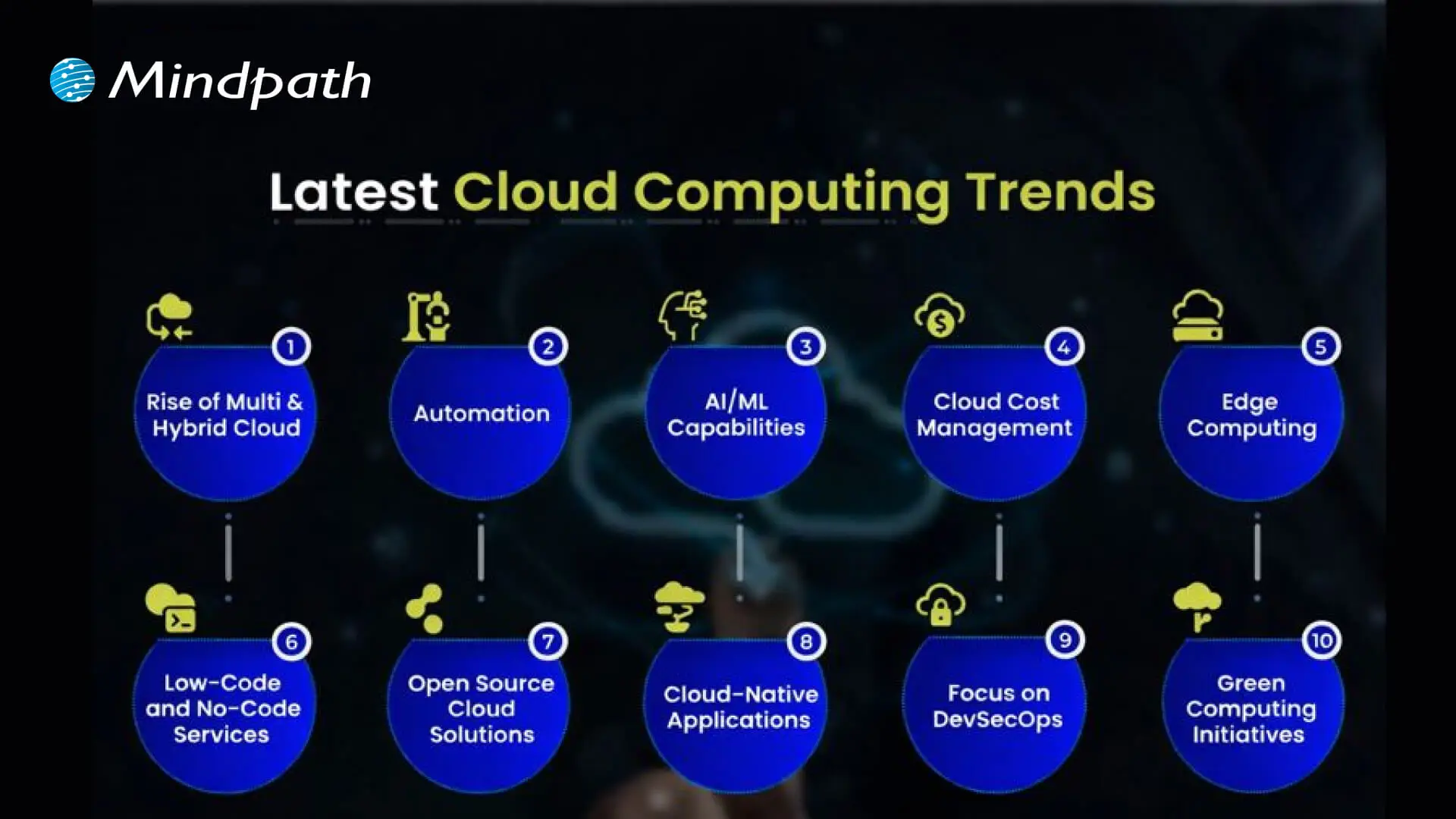
Cloud computing trends

1. Rise of Multi & Hybrid Cloud

Many companies now use a multi-cloud strategy and hybrid cloud approach to run workloads across different cloud providers and their own data centers. This setup lets them combine the strengths of public and private clouds while keeping sensitive data secure. Using multi and hybrid cloud solutions also gives businesses more flexibility and better control over risks.

2. Automation

One of the latest trends in cloud computing is using automation to make systems work faster and more efficiently. Good automation helps teams deliver better results, reduce downtime, and improve overall quality. With better AI tools and user-friendly platforms, cloud providers are making automation easier for everyone to use.

3. AI/ML Capabilities

Better AI and machine learning are becoming the next big thing in cloud computing. Many providers now offer smart tools that help businesses use advanced analytics and automation. These cloud computing trends make it easier to build intelligent applications and boost efficiency without needing deep technical skills.

4. Cloud Cost Management

Managing expenses is a big part of the future of cloud computing as more businesses move to the cloud. New tools and services help companies track and control their spending more easily. These cost management features make it simple to budget, monitor usage, and find ways to save money.

5. Edge Computing

Edge computing is one of the cloud latest trends bringing data processing closer to where it’s created. This helps reduce delays and cuts down on the amount of data that needs to travel long distances. By doing this, businesses can work faster and use their networks more efficiently.

6. Low-Code and No-Code Services

One of the growing cloud services trends is using low-code and no-code tools to build apps faster. These solutions help people create software without needing advanced programming skills. Such cloud computing trends save time and lower development costs for businesses.

7. Open-Source Cloud Solutions

One of the growing cloud computing trends is the move toward open-source cloud solutions. These solutions give businesses more control and flexibility to adjust their cloud setup as needed. Open-source options can also help companies save money compared to traditional cloud providers.

8. Cloud-Native Applications

Building cloud-native applications is an important part of the future of cloud computing. These apps are made to run smoothly on cloud systems and use all the benefits the cloud offers. More tools are now available to help businesses create and launch these apps quickly and easily.

9. Focus on DevSecOps

DevSecOps brings security into every step of software development instead of adding it later. This approach helps teams find and fix issues early, keeping systems safe. Many cloud providers now offer tools that make it easier for businesses to build secure applications from the start.

10. Green Computing Initiatives

One of the important cloud computing trends is the push for greener solutions. Providers are using renewable energy and building energy-efficient systems to cut down on carbon emissions. These efforts help businesses meet their sustainability goals while using cloud services.

Struggling with speed, collaboration, or automation in DevOps? Our DevOps Challenges and Solutions blog explains how modern businesses address these issues.

Which Industries are Adopting Cloud the Fastest?

Many industries are moving to the cloud to work faster and serve their customers better. Companies see cloud solutions as a way to cut costs and stay flexible in a changing market. Let’s look at which sectors are adopting cloud the fastest right now.
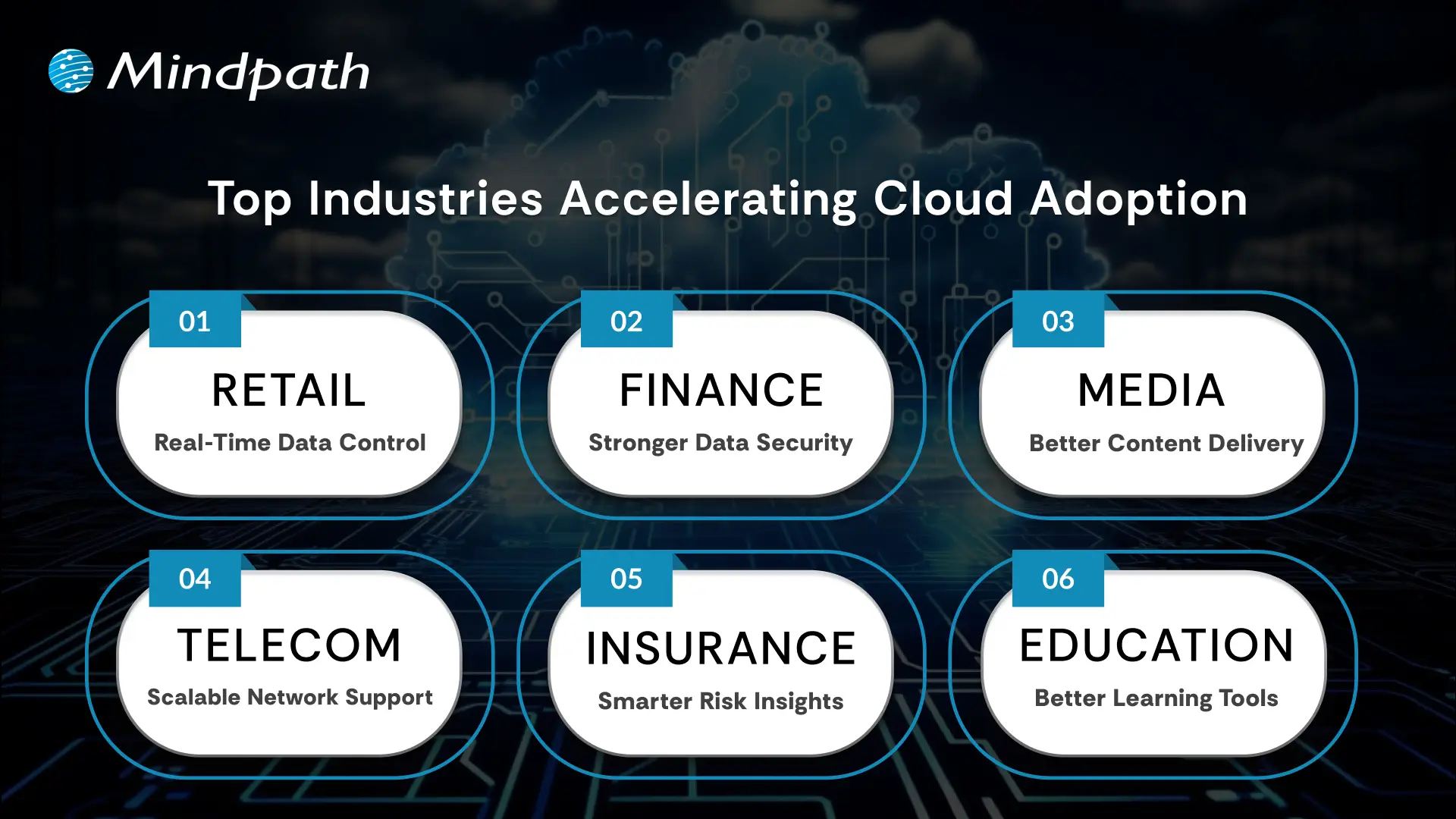
Top Industries Accelerating Cloud Adoption

1. Retail: Real-Time Data Control

Retailers use the cloud to manage sales, stock, and customer data in one system. Real-time updates improve supply chains and marketing campaigns. This boosts profits and keeps work going smoothly.

2. Financial: Stronger Data Security

Banks and financial firms trust the cloud for secure data storage and better protection. They can handle tasks like billing and client help more easily. Better security helps them grow safely.

3. Media: Better Content Delivery

Media companies use the cloud to create, store, and share content worldwide. Teams can work together from different places and finish faster. They handle big audiences without spending more.

4. Telecom: Scalable Network Support

Telecom companies use cloud solutions to manage networks and huge data. This helps them handle changing demands and roll out 5G and IoT services. Cloud computing trends keep people connected and ready for new tech.

5. Insurance: Smarter Risk Insights

Insurance companies use the cloud for flexible data and cost savings. They analyze big data to predict risks and detect fraud early. This helps them stay competitive with better customer service.

6. Education: Better Learning Tools

Schools adopt the cloud to manage tight budgets and get new technology. Teachers and students can share lessons and resources in one secure place. This makes learning flexible and improves teamwork.

Looking for ways to optimize your cloud strategy? Explore our Multi-Cloud Strategy blog to see why businesses are spreading workloads across multiple clouds.

Is Your Business Cloud Ready for 2026?

Staying on top of cloud computing trends can help any business unlock new opportunities, save money, and stay secure. As you’ve seen, trends like automation, AI, green computing, and smart cost management are shaping the way companies grow and compete. Keeping an eye on what’s next means you’re always ready to adapt and make smarter technology decisions.

At Mindpath, we help you stay ahead with trusted cloud computing services designed to match your goals. Our team can support your move to the cloud, help manage costs, and keep your data secure. We focus on delivering solutions that fit your business needs today and tomorrow. Connect with us and see how we can make your cloud journey easier.


Frequently Asked Questions

Frequently Asked Questions

Choosing the right cloud model depends on factors like data sensitivity, budget, and scalability needs. Businesses should evaluate whether public, private, or hybrid cloud fits their operations best. A clear understanding of workloads and long-term goals helps in making a practical and cost-effective decision.
Common risks include data security concerns, vendor dependency, and unexpected costs. Without proper planning, businesses may face compliance issues or performance challenges. Implementing strong security practices, monitoring usage, and choosing reliable providers can help reduce these risks effectively.
Cloud computing allows businesses to scale resources quickly, launch services faster, and respond to market changes efficiently. It supports innovation by enabling access to advanced tools like analytics and AI, helping companies stay competitive and deliver better customer experiences.
Cloud costs vary based on usage and management. While it reduces upfront investment in hardware, ongoing costs can increase without proper monitoring. Using cost management tools and optimizing resources ensures businesses maintain efficiency while keeping expenses under control over time.
Data security requires a combination of strong encryption, access controls, and regular monitoring. Businesses should follow best practices like multi-factor authentication and compliance standards. Working with trusted cloud providers and maintaining clear security policies helps protect sensitive information effectively.

Support Is One Click Away

Featured Posts

Related Post

progressive web apps

Many companies are now looking into progressive web apps to improve their ways of communicating with people using mobile devices. This solution has the capability of being responsive and reliable, while providing users with an experience that reflects expectations in today’s world. Companies are wishing to provide users with something that has simplicity and speed. This change is not only about changing ideal trends, but rather the relationships that effectively span through the utilization of mobile devices and help establish long-term commitment to retention.

This shift to a modern approach is allowing organizations to rethink how they plan differently today for mobile-first users. It enables organizations to offer something new with a sense of reality and cost-effectiveness. Users benefit without even realizing what goes on behind the scenes, while businesses reap the benefits by providing an experience that works. This blog will ultimately help you understand why so many people are considering this path forward. Let’s dive in!

Want to develop a Progressive Web Application and increase your business growth four times? Contact us and talk to our experts, they will help you achieve your business objective with an unexceptional progressive web app. 

What is a Progressive Web App?

A Progressive Web App (PWA) is a modern type of web application that works like a regular app but runs through a web browser on any device. It combines the best parts of websites and mobile apps, allowing users to access it easily without needing to download anything. PWAs can work offline and continue running in the background, giving people a smooth and reliable experience wherever they are.

Businesses are turning to PWAs to offer better performance and engagement for their customers.  According to Gartner, more than 50% of consumer-facing apps will be PWAs by 2027, showing just how important this technology is becoming for the future of digital experiences. A survey by Grand View Research reveals that the global PWA (progressive web app) market is expected to reach $9,425.9 million by 2030, growing at a rate of 30.5% from 2024 to 2030.

Benefits of PWAs (Progressive Web Apps)

Adopting PWA is genuinely beneficial for companies trying to remain competitive in a mobile-first environment. These solutions offer the advantages of both web and native apps features to provide users with a seamless experience. The following are some key benefits to consider:

Benefits of PWAs (Progress Web Apps (1)

1. Cost Efficiency

Developing a web app is often much more affordable than building a native app. Instead of creating separate versions for web, iOS, and Android, one project works across all major platforms. A progressive web app iOS solution uses a single codebase, which keeps development simple and costs less. Ongoing updates and maintenance are also easier and more budget-friendly than managing multiple native apps.

2. Responsive Design Across Devices

The responsive design makes PWA development valuable for reaching users on any device. A single PWA can adapt to mobile phones, desktops, laptops, or tablets without needing separate builds. For example, it works just as well on a Google Pixel phone as it does on a Windows computer. This approach helps businesses offer a consistent experience everywhere while keeping development simple.

3. Instant Updates for Users

A PWA stays current whenever it’s online, so users always see the latest version. There’s no need to download or install updates manually. New features and content appear automatically without extra steps. This makes the experience smooth and hassle-free for everyone.

4. Simple and Quick to Install

A progressive web app makes installation easy for users. There’s no need to visit an app store or follow long steps to get started. Everything happens right in the browser with just a few clicks. This gives users faster access to content without any extra hassle.

5. Effortless to Share and Access

PWA can be shared easily through a direct URL, just like any standard website. This means users can pass it along to others without any special steps or downloads. It works smoothly across devices, making access simple and convenient. This flexibility helps businesses reach a wider audience with minimal effort.

6. Native App-Like Experience

A progressive web app offers many of the same features people love about native apps. It works even when there’s little or no internet connection, keeping access smooth and reliable. Push notifications help keep users engaged and informed on most devices. With home screen installation and familiar mobile navigation, it gives users a true app-like experience.

Worried about keeping your apps secure? Explore Application Security Best Practices to learn essential strategies for protecting your web and mobile applications.

Real-World Examples of PWAs

Many leading brands are proving the value of this technology through real progressive web app examples. These practical cases show how businesses can offer faster, more reliable experiences that keep users engaged.

Real world use examples of pwas

1. Starbucks

Starbucks created a PWA to boost customer engagement with a smoother ordering process and rewards program. This solution replaced its old mobile site to offer a consistent experience on any device. Customers can easily customize drinks, check store details, and view nutrition information.

2. Flipkart

Flipkart’s PWA helps shoppers enjoy a smooth browsing experience, even with poor connections. Users can explore product categories, special deals, and bestsellers with ease. This approach keeps customers engaged longer and makes online shopping more accessible across India.

3. Walmart

Walmart uses a PWA to handle thousands of products while making ordering and delivery seamless. Geo-tracking shows top-selling items nearby to personalize recommendations. Push notifications to keep users updated on deals and new arrivals.

4. Pinterest

Pinterest launched a PWA to expand its global reach with a faster, lighter site. Compared to its old version, the new app loads quicker and uses less data. This led to more time spent, higher ad engagement, and improved click-through rates.

5. Twitter

Twitter Lite was one of the first big brands to adopt a PWA to boost daily user activity. It consumes less data, loads quickly on slower networks, and still feels like a native app. As a result, page views, tweets sent, and overall engagement increased significantly.

6. Uber

Uber is a strong example of progressive web app design focused on speed and convenience with minimal storage use. It loads quickly, even when the network is weak, so users can book rides without delays. Depending on the location, people can also order food or rent bikes and scooters.

Looking to build a robust web application? Discover choosing the right tech stack for your web application and make informed decisions on frameworks, languages, and databases.

Are You Looking to Elevate Your Digital Presence?

Progressive web apps prove that businesses can deliver fast, reliable, and engaging user experiences without the high costs of traditional apps. With examples like Starbucks, Flipkart, and Uber leading the way, it’s clear that investing in this approach helps brands stay competitive in a mobile-first world. Adopting the right strategy ensures you get the most out of modern application development services.

At Mindpath, we develop future-ready AI solutions that unlock the true value of progressive web apps. Our expert web application development services help you create mobile-first experiences that are cost-effective, secure, and easy to maintain. From planning to launch, we ensure your app stands out and keeps your customers engaged. Let’s shape your next success story together.

generative ai in app development

Just imagine, an app could build itself, suggest new features, and even write its own code. Doesn’t that sound like something out of the future? Well, it’s not just a thought, this imagination is becoming a reality with the rise of generative AI in app development. Whether you are a business owner looking to develop your next mobile app or a developer looking to become more efficient and innovate faster, generative AI is changing how we think about creating software.

Yes, you read that correctly, the use of GenAI in app development can now add creativity and efficiency into the application development process. Many developers struggle when it comes to UI development, and with the use of GenAI, it can develop interface UI components, suggest code snippets to complete a function, and even assist in application testing and performance feedback.

Curious to know more about it? In this blog, we will cover how this powerful technology is reshaping the app development process. Let us first have some ideas about generative AI

Looking to harness the power of GenAI to drive innovation and efficiency in your business? Mindpath delivers tailored AI development services to turn your ideas into intelligent, scalable solutions.

What is Generative AI?

Generative AI is a type of artificial intelligence that can create new things like text, images, music, or even computer code. It learns from a lot of information and then uses that learning to make something new. For example, it can write stories, draw pictures, or help build apps, almost like how a human would. Tools like GPT-4 can write like a person, and DALL·E can make pictures from just a few words. GenAI helps people work faster and be more creative in many fields, including app development.

GenAI learns patterns from a lot of data, like text, images or code by using a type of computer system called a neural network to understand this data and then create something new from it. That’s the basic idea behind how generative AI works. For example, it can write an article from a small text prompt or make a picture from just a few words. Tools like ChatGPT and Stable Diffusion use this technology to help people create content quickly and easily.

Benefits of Generative AI in App Development

Generative AI is significantly changing the app development landscape by increasing efficiency and enabling more innovative solutions. It allows developers to create high-quality apps faster and with greater precision. Here’s a simple look at how generative AI is transforming app development in today’s fast-moving tech world:

1. Automated Coding Assistance

AI can write code snippets or even full parts of an app based on simple descriptions from developers. This saves time and reduces mistakes, letting developers focus on more important tasks.

2. Faster Idea Generation and Prototyping

Generative AI helps speed up idea generation by analyzing existing apps and user feedback to suggest new features. It also creates quick visual designs, making it easier for developers and designers to build and improve prototypes fast.

3. Smarter Debugging and Testing

GenAI can find and fix bugs automatically while creating test cases to check the app thoroughly. This leads to better quality apps and less time spent on manual testing.

4. Optimized Resource Planning

GenAI helps teams plan their work by predicting how much time and effort tasks will need. It also spots areas where the app can run smoother, helping save resources and improve performance.

5. Tailored User Experiences

AI analyzes how users behave to create apps that feel personal and relevant to each person. It can recommend content or change the app’s design to better match user preferences.

Curious about where Generative AI is headed next? Explore the top Generative AI Trends for 2025 and stay ahead of the innovation curve.

Applications of Generative AI in App Development

AI-powered app development is transforming the software industry by introducing smarter and more efficient ways to build applications. This technology helps developers overcome challenges and speeds up the entire development cycle. By integrating GenAI, teams can deliver higher-quality apps with greater creativity and precision. Let us have a look at how developers can use this technology in app development:

1. Generating Code Faster

Generative AI helps developers by writing code from simple descriptions. It speeds up the process and cuts down on errors. Tools like GitHub Copilot and OpenAI Codex suggest ready-to-use code, saving time and effort which lets developers focus more on creative and complex parts of app building.

2. Smarter Testing and Bug Fixing

In AI-driven software development, GenAI plays a big role in making testing and bug fixing much easier. It can find problems in the code and suggest or apply fixes automatically which helps in saving time, improving code quality, and reducing the need for manual testing work.

3. Easy Content Creation and Management

AI helps create text, images, and more, making content tasks easier for developers and designers. Tools like GPT-4 and DeepArt save time by producing high-quality content fast. This keeps everything consistent and reduces the effort needed to create large amounts of content for apps.

4. Improving App Performance and Efficiency

In generative AI app development, AI tools like AI-driven profilers and automated refactoring tools can help make apps faster and smoother. They find ways to use memory and power better, which helps apps run well on all devices. These tools can also fix slow parts of the code early, leading to better performance and longer battery life.

5. Faster Prototyping and Design Ideas

GenAI helps designers quickly turn ideas into wireframes and mockups. Tools like DALL-E and Sketch2Code make it easy to create visuals from text or drawings. This speeds up the early design process and gives designers a strong starting point with fresh and creative design suggestions.

6. Smart Documentation and Information Sharing

AI makes it easy to create and update app documentation automatically. It helps write guides, manuals, and technical notes based on the code. This saves time, keeps everything accurate, and helps new developers quickly understand the project and start contributing without any confusion.

7. Creating Personalized User Experiences

Generative AI helps apps understand what users like and how they behave. It can customize content, recommendations, and even app design to fit each person. This makes apps more enjoyable and easier to use, keeping users engaged and coming back for more.

Curious about the tools powering AI? Check out our list of Top GenAI Tools that are driving the future of AI development to understand which platforms are leading the world of AI.

Want to Transform Your App with Generative AI?

Generative AI development is revolutionizing how apps are created by making the process faster, smarter, and more creative. With generative AI in app development, businesses and developers can build high-quality applications that adapt to user needs while saving time and resources. This technology is not just a trend but a powerful tool shaping the future of software creation.

If you want to leverage the full potential of GenAI in your projects, Mindpath’s GenAI solutions offer expert guidance and cutting-edge tools tailored to your unique development needs. From automating coding tasks to enhancing user experiences, Mindpath AI development services helps you innovate efficiently and stay ahead in the competitive app development landscape. Get in touch today!

Frequently Asked Questions

1. How can generative AI in app development reduce development time?

Generative AI in app development helps speed up the process by automating tasks like coding, testing, and design suggestions. It reduces manual effort and allows developers to complete projects faster while maintaining quality, making it easier to meet deadlines and deliver efficient applications.

2. Is generative AI in app development suitable for beginners or only experienced developers?

Generative AI in app development can support both beginners and experienced developers. Beginners can use it to learn faster through code suggestions and guidance, while experienced developers can improve productivity by automating repetitive tasks and focusing on more complex aspects of development.

3. What types of apps can benefit the most from generative AI?

Many types of apps can benefit, especially those that need frequent updates, personalization, or large amounts of content. Apps like e-commerce platforms, content-driven apps, and customer-focused tools gain more value as AI helps improve user experience and streamline development processes.

4. How does generative AI help improve app quality and performance?

Generative AI improves app quality by identifying bugs, suggesting fixes, and optimizing code for better performance. It also helps test different scenarios automatically, ensuring the app runs smoothly across devices while reducing the chances of errors after deployment.

5. What should businesses consider before adopting generative AI in app development?

Businesses should consider data quality, project goals, and integration with existing systems before adopting generative AI. It is also important to evaluate costs, security, and team readiness to ensure smooth implementation and long-term success with AI-driven development.

Custom software development mistakes

What can cause a well-planned software project to stray off track? Have you ever thought about this? Most of you must have found yourself in a similar situation, right? If so, you are not alone. Many organizations, just like yours, start with the right intentions, a highly skilled team, and a strong idea, but often face delays or an unexpected outcome. Typically, the problem dwells in small custom software development mistakes that begin in the early phases, and it ultimately grows into bigger challenges. If you ignore the early warning signs, it can quickly slow down the whole process. So, how do you keep a custom software project on target, on a clear and quick path toward your business goals?

Every custom software project is full of important decisions that shape the final product. From how you outline your needs to how your team communicates, every aspect matters a little more than you think. Without a defined process, even good ideas have a tendency to derail. In this blog, we will highlight the key custom software development pitfalls you need to avoid, making sure your custom software project stays on track! So, keep reading to find out!

Looking forward to tailoring a software which exactly fit your organizational needs? At Mindpath, we offer custom software development services that help in designing and developing software that meets your business goals.

Why Choose Custom Software Development for Your Business?

Custom software development is a process to create tailor-made software for your organization. It reflects your exact workflow, needs, and goals of the users. It is designed to suit your needs by solving your problems, rather than using predefined features as is the case with off-the-shelf software. Custom software offers better performance, is easily scaled, and puts you in control of the functionality, design, and updates as your business adapts and grows.

Standard software may be quicker to set up; however, it is inflexible, comes with ongoing licensing, and requires ongoing hardware changes. Custom software, on the other hand, is a long-term investment. It does not have unnecessary features, it supports your effective operation, and it also fits in smoothly with your systems. Interestingly, if it is designed by your team, it reduces time, minimizes long-term costs to improve decision-making throughout your business.

Let us take a quick dive into the benefits of custom software development:

1. Custom software will scale with your business as it grows. It also adapts easily when you expand your services or change your processes without incurring the costs of upgrades.

2. It is developed around your specific workflows and business objectives. This provides you with smoother operations without the restrictions and inefficiencies of a one-size-fits-all system.

3. Custom software also integrates well with your current systems. It allows data to flow from one platform to another with minimal manual work and with fewer mistakes.

4. It ultimately saves you money over time, and you won’t incur future licensing fees. You pay for only what you require, and the total cost of ownership is lower.

5. Custom solutions differentiate you in the marketplace. With unique features and enhancements to the user experience, you can be more competitive and more customer-centric.

6. It makes teams more productive in their daily tasks. When software matches each role, teams work faster, make fewer mistakes, and deliver better results.

Want to know more about the benefits of custom software development for your business? Head to our blog: Top Benefits of Custom Software Development

Top Mistakes to Avoid in Custom Software Development

Knowing the common challenges of custom software development is important for creating a successful solution. Many teams overlook some small but critical details, which are often the reason why custom software projects fail or are delayed.

Top Mistakes to Avoid in Custom Software Development

1. Lack of Clear Planning

A very frequently made mistake in custom software development is a lack of planning. If the business objectives are unclear and there is no well-structured roadmap in place, projects like these can end up with inflated costs and delays.

To prevent this, first ensure that key stakeholders are engaged and assess current processes, technologies, and long-term needs. Specify system requirements in detail, including integrations, UI/UX, architecture, and security, before you start the development.

2. Neglecting Quality Assurance and Testing

Omitting or neglecting testing is one of the common custom software development mistakes that can result in considerable problems post-launch. In many instances, some form of quality assurance takes place; however, in sufficient time to perform quality assurance, or altogether ignoring QA means bugs are left unidentified until it has become much harder (and much more expensive to fix).

In order to eliminate custom software mistakes like this, testing should be completed by qualified individuals using legitimate QA and UAT practices to deliver software that provides the customer or user, by and large, what they require to a fully qualified and operational level.

3. Underestimating Project Costs

Cost overruns are one of the most frequent custom software mistakes, primarily due to vague requirements and complexities not being properly assessed. When there is no clear requirement scope, budgets can easily become unbounded, creating delays and the likelihood of project failure.

To tackle this issue, establish a clear MVP with key features and distinguish them from desirable features. This will lead to realistic budgets and phases that can be developed incrementally and in alignment with business goals.

4. Ignoring Long-Term Maintenance Needs

Lack of planning for the ongoing maintenance of software is a challenge in the software development process. It can result in performance and obsolescence issues. Many well-built software solutions are inefficient and potentially vulnerable when support doesn’t happen, and you should not be surprised if yours is in the same boat when software support does not take place.

How can you prevent this? One place to start is with a clear maintenance strategy from the beginning. Budget for planned updates, security patches, and feature improvements so your software can run efficiently and securely.

If you’re planning a custom solution, our step-by-step guide to the custom software development process will help you understand each stage clearly.

5. Overlooking Third-Party Integration

Not considering compatibility issues with third-party systems is a custom software development mistake that can slow down development and reduce software performance. A poor integration strategy can result in data flow problems, missing functionality, and even unanticipated system failures.

To avoid this possibility, complete a full tech audit and feasibility study at the beginning of the project to help ensure the intended integration will go smoothly when the project is complete. This allows you to make informed decisions to move forward with a strategy that meets your business needs.

6. Inadequate Documentation Practices

Poor documentation is a custom software development mistake that results in a misalignment of expectations, confusion, and challenges for long-term maintenance. Documenting decisions and details of the project is imperative. Without documentation, teams cannot go back to understand or support the software later.

To avoid this mistake, be sure to define the scope of the project in advance and document as you go. Another solid practice is to have complete user documentation and technical documentation to enhance transparency, ease of handoff, and longevity.

7. Ineffective Communication

Poor communication is a common issue that leads to misunderstandings, missed deadlines, and project inefficiencies. When teams and stakeholders are not aligned, important decisions and updates can be lost or misinterpreted.

Following custom software development best practices involves maintaining open communication channels, regular check-ins, and clear documentation. This helps ensure transparency, accountability, and better collaboration throughout the development process.

Want to Build Smarter by Avoiding Common Custom Development Mistakes

Successful software projects rely on clear planning, communication, testing, and proper budgeting. Avoiding these common custom software development mistakes helps keep your solution on track and aligned with your business goals. By recognizing early pitfalls and following best practices, your team can build scalable, efficient software that delivers long-term value.

As a trusted custom software development company, we at Mindpath provide tailored solutions built around your unique business goals. Our custom software development services ensure seamless integration, ongoing support, and full transparency throughout the project lifecycle. Partner with us to turn your vision into a secure, high-performing solution that grows with your business.

Frequently Asked Questions

1. How do businesses know if they really need custom software?

Businesses usually need custom software when existing tools no longer support their workflows, growth, or customer needs. If teams rely heavily on manual workarounds or disconnected systems, custom software can provide a more efficient and scalable solution.

2. Who should be involved in custom software planning?

Project managers, business stakeholders, end users, developers, and IT teams should all be involved early in the planning stage. Their input helps create software that meets business goals while also being practical and easy for employees to use.

3. How can businesses reduce delays during software development?

Clear communication, realistic timelines, and regular progress reviews help reduce delays. Businesses should also avoid adding too many new requirements during development, as frequent changes can slow progress and increase project complexity.

4. What makes a custom software project successful in the long run?

Long-term success depends on scalability, proper maintenance, user adoption, and ongoing improvements. Software should continue evolving with business needs instead of remaining static after launch, helping companies stay efficient and competitive over time.

5. Can custom software improve customer experience directly?

Yes, custom software can create faster, smoother, and more personalized customer interactions. Businesses can build features specifically around customer expectations, making services easier to access and improving overall satisfaction and engagement.