Home

Is Full-Stack Development the Future of Web Projects? Here’s Why 

Is Full-Stack Development the Future of Web Projects? Here’s Why 

Join our Newsletter!

full-stack development for web projects 

Building a website today is about combining design, speed, and performance, all in one place. That’s where full-stack development for web projects plays a big role, as it encompasses everything from the look of a site to how it performs. As websites grow bigger and more complex, the full-stack development approach allows teams to work smarter rather than harder and deliver stronger solutions without any delay or confusion. This is why full-stack development is an increasingly popular way to develop truly distinct web projects.

Key Takeaways

  • 01
    Full-stack development combines front-end and back-end work into one smooth process.
  • 02
    Hiring one full-stack developer saves time and cost over two separate specialists.
  • 03
    Fewer handoffs between teams lead to faster fixes and clearer communication.
  • 04
    Full-stack developers solve problems faster by understanding the entire system together.
  • 05
    Growing market demand makes full-stack skills valuable across nearly every industry.

By managing the front-end and back-end together, teams can react more quickly to updates and allow them to maintain their website without interruptions. In addition, it allows for greater control of the entire process, which leads to much better user experiences. Many companies are adopting this approach to develop websites that will grow and improve over time. Curious to know more? Well, in this blog, we will discuss how full-stack development is going to shape the future of web projects in detail.

Want to bring future-ready development to your business? Explore how Mindpath’s full-stack development services can help you stay ahead and provide end-to-end support.

Fundamentals of Full-Stack Development

Full-stack development means building both the front-end and the back-end of a website or app. The front part is what we interact with and see, such as buttons, images, menus, and links. The back part is what is going on behind the screen to make everything work: saving things, logging in, sending emails, etc. A full-stack developer knows how to build and manage both parts of a project, so it all works properly from beginning to end.

Companies want websites that are visually appealing, load quickly, and are easy to navigate. Most companies prefer hiring one full-stack developer rather than two separate developers (one for front-end and one for back-end) because this saves time and avoids paying for two separate developers. Full-stack developers can build complete web projects on their own. That’s why companies continue to search for strong full-stack developers that can do the full job and help make better websites quicker.

Reasons Why Full-Stack Development is the Future of Web Projects

Full-stack development makes end-to-end web development more effective by combining both the visual design and the behind-the-scenes logic into one smooth process. As we move toward full-stack development in 2025, more businesses are choosing this method for its flexibility, speed, and complete control over web projects. Here are some key reasons why:
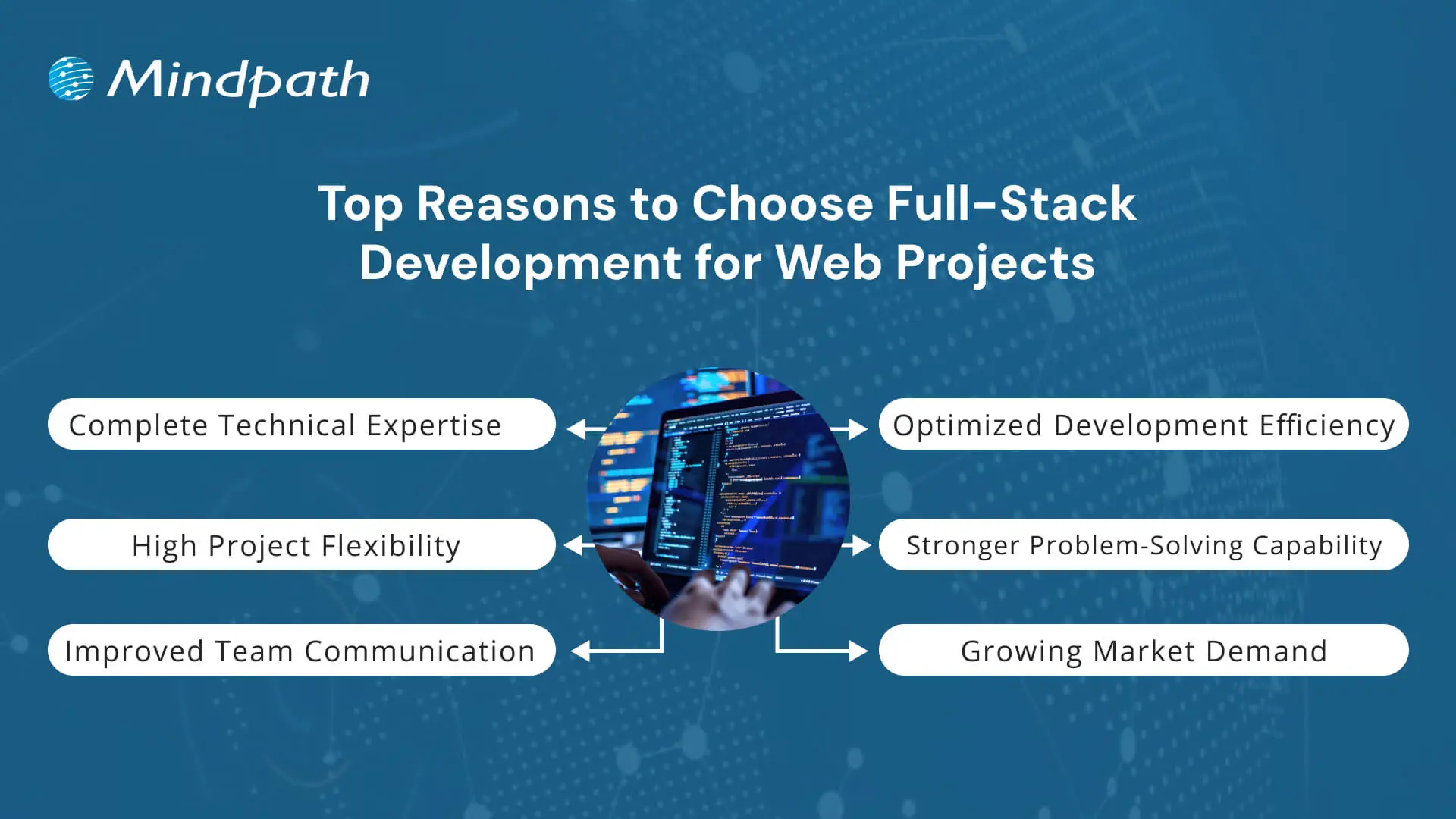
Top Reasons to choose full-stack development for web projects

1. Complete Technical Expertise

Full-stack development for web projects requires knowledge of both front-end and back-end technologies. Developers in this field work with HTML, CSS, and JavaScript for user interfaces and use tools like Node.js or Python for server-side logic. They also manage databases such as MySQL or MongoDB to store and retrieve data efficiently. This complete skill set makes full-stack development for businesses highly practical and reliable.

2. Optimized Development Efficiency

One of the key advantages of full-stack development for web projects is the ability to complete tasks faster without needing multiple specialized developers. It reduces development time, lowers project costs, and helps deliver results more quickly. Teams can avoid delays caused by handovers between front-end and back-end teams. That’s why many companies now prefer full-stack development to keep their projects on track and within budget.

3. High Project Flexibility

Developers skilled in full-stack development can switch between tasks easily based on what the project needs. They are comfortable using different tools and frameworks and can adjust to changes without slowing down progress. This flexibility is valuable when requirements evolve or when rapid updates are needed. It also supports the use of the best tech stack for web projects tailored to each client’s goals.

4. Stronger Problem-Solving Capability

A full-stack developer understands how both the client-facing side and the server work together. This broad view helps in identifying issues quickly and finding effective solutions without back-and-forth between teams. It leads to fewer errors and a more stable final product. As a result, full-stack development for web projects brings stronger control and problem-solving to the entire build process.

5. Improved Team Communication

Fewer handoffs mean fewer communication gaps between developers and project managers. In full-stack development for web projects, one person or a small team handles most of the workflow, which keeps messaging clear and consistent. This improves team collaboration and speeds up approvals and fixes. It also supports better planning throughout the stages of full-stack web development.

6. Growing Market Demand

With digital needs growing, full-stack development has become one of the most valuable skills in the tech world. Companies are hiring developers who can handle everything from front-end to database, increasing demand across industries. It also offers room to grow in multiple areas, including project leadership and architecture, through understanding full-stack development trends. This rise is a direct result of businesses investing more in full-stack development for modern digital solutions.

Key Skills Required in a Full-Stack Web Project Team

A successful full-stack web project relies on more than just writing code. It needs the right mix of skills across the team, covering everything from design to database management for smooth and efficient web solutions. Let’s have a quick look at the skills:

1. Front-End Development

Developers need strong skills in HTML, CSS, and JavaScript to build the structure and style of web pages. Frameworks like React, Angular, or Vue.js help create dynamic and responsive user interfaces.

2. Back-End Development

Understanding server-side languages such as Node.js, Python, or Java is essential for creating logic and functionality. Frameworks like Express.js or Django support faster and more organized development.

Planning to build smarter web solutions? Discover how full-stack development with Node.js can streamline your digital growth.

3. Database Management

Developers should know how to use both SQL and NoSQL databases like MySQL, PostgreSQL, or MongoDB. Good database skills help manage, store, and retrieve data efficiently.

4. API Development

Designing RESTful APIs is important for connecting front-end and back-end systems. APIs must be secure, scalable, and easy to maintain in web projects.

5. DevOps and Deployment

Version control with Git and CI/CD tools helps automate code testing and deployment. Cloud platforms like AWS or Azure make it easier to launch and scale applications smoothly.

6. Soft Skills for Team Performance

Effective communication, adaptability, and time management help teams meet deadlines and solve problems together. These qualities support a smooth workflow in full-stack development for web projects.

Confused between full stack and traditional web development? Discover how smart businesses choose from full-stack vs traditional web development for the success of project. 

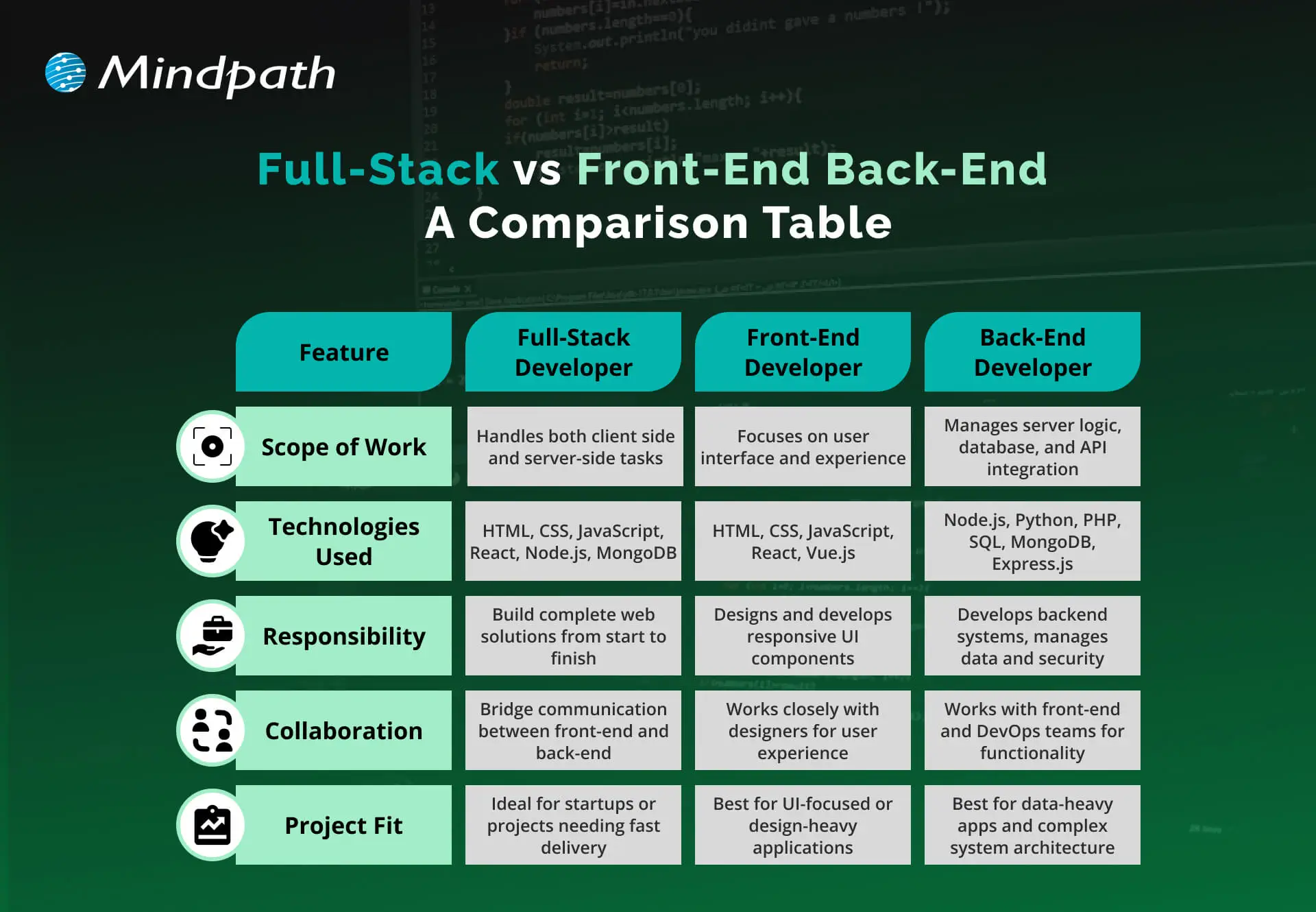
Full-Stack vs Front-End and Back-End: A Comparison Table

Understanding the difference between full-stack vs front-end and back-end roles helps in choosing the right approach for a web project. Below is a comparison table that highlights their core responsibilities and capabilities.
Full-Stack vs Front-End and Back-End A Comparison Table

Ready to Elevate Your Next Web Project with Full-Stack Development?

Full-stack development for web projects offers a balanced, future-ready approach that blends front-end creativity with back-end power. It simplifies workflows, speeds up launches, and ensures better user experiences. As digital needs continue to evolve, adopting full-stack practices gives businesses the edge to build smarter and scale faster with fewer roadblocks.

At Mindpath, we offer full-stack development services tailored to support your business growth. Our expert full-stack developers handle everything from user interface to server-side logic, ensuring smooth performance and cohesive functionality. With deep technical knowledge and a collaborative mindset, we deliver reliable, scalable, and efficient digital solutions that meet your unique project needs.

Frequently Asked Questions

1. How does full-stack development for web projects actually save businesses money in the long run?

Hiring one developer to handle both front-end and back-end work reduces payroll costs compared to hiring two specialists. It also speeds up delivery timelines, which means projects launch faster and start generating value sooner instead of sitting in extended development cycles.

2. Is full-stack development suitable for large, complex websites or only smaller projects?

Full-stack development works well for both. Larger projects often use a small team of full-stack developers who divide responsibilities while maintaining shared knowledge of the entire system. This balance keeps even complex websites manageable without losing the speed and flexibility full-stack development offers.

3. What should businesses look for when hiring a full-stack development team for their next project?

Look for proven experience across both front-end frameworks and back-end technologies, along with database and API knowledge. Strong communication skills also matter, since full-stack teams often work with fewer handoffs, meaning clarity and collaboration directly affect how smoothly the project actually progresses.

4. How does full-stack development improve the overall user experience of a website?

When one team understands how the front-end and back-end work together, performance issues get caught earlier and fixed faster. This results in quicker load times, smoother navigation, and fewer bugs reaching the final product, all of which directly shape how users experience the website.

5. Does choosing full-stack development mean a business loses specialized expertise in certain areas?

Not necessarily. Many full-stack developers still have deeper strengths in either front-end or back-end work while maintaining solid knowledge of both. Businesses get the benefit of broad technical coverage without sacrificing quality, especially when working with experienced developers who understand the full development lifecycle.


Want Better Web Development Results?

Simplify development with end-to-end full stack expertise.

Frequently Asked Questions

Support Is One Click Away

Featured Posts

Related Post

Benefits of AI in Customer Service

Have you recognized how AI for customer service is changing the way you receive services from your favorite brands? Perhaps you’ve engaged with a virtual assistant at midnight or received an immediate answer without waiting on hold. It feels good, right? That’s the benefit of smart technology working behind the scenes for you. Companies all around the world are now depending on AI to deliver fast, friendly, and 24/7 customer support. It’s amazing that using AI is transforming the future of customer service; every interaction you have will ultimately be quicker and more personal.

The adoption of smart tools is indeed one of the most important ways businesses gain an edge and keep you satisfied in 2026. From chatbots that understand your problem much better than any human agent to virtual agents that don’t get tired of responding, it makes you feel like somebody is listening and making sure you are being helped every time you reach out. The benefits of chatbots help brands get better at solving problems faster and even predict what you might want next, resulting in an environment that you would love to come back to. In this blog, you’ll learn about the top benefits of using AI for customer service in 2026.

Planning to gain a competitive edge by providing exceptional customer support? Mindpath’s AI development services can help you deliver exceptional customer experience and unlock growth! 

What is AI in Customer Service?

AI in customer service is all about using intelligent technology to support customers in accessing customer support efficiently and conveniently. It includes services like chatbots and virtual assistants that can understand questions, respond to questions, and fix basic issues 24/7. This means consumers can access customer support for basic requests and not wait in long queues or hold to speak with a person.

With AI taking care of regular tasks such as order tracking, password resets, or account changes, human agents can dedicate their time and energy to more personalized or complex issues that need a human touch. AI can also provide insight into the customer’s previous interactions to make the service seem more tailored to the customer and more supportive in general. AI in business strategy helps businesses to better understand the needs of customers. Overall, AI makes the service process faster, more efficient, and more comfortable for both businesses and customers.

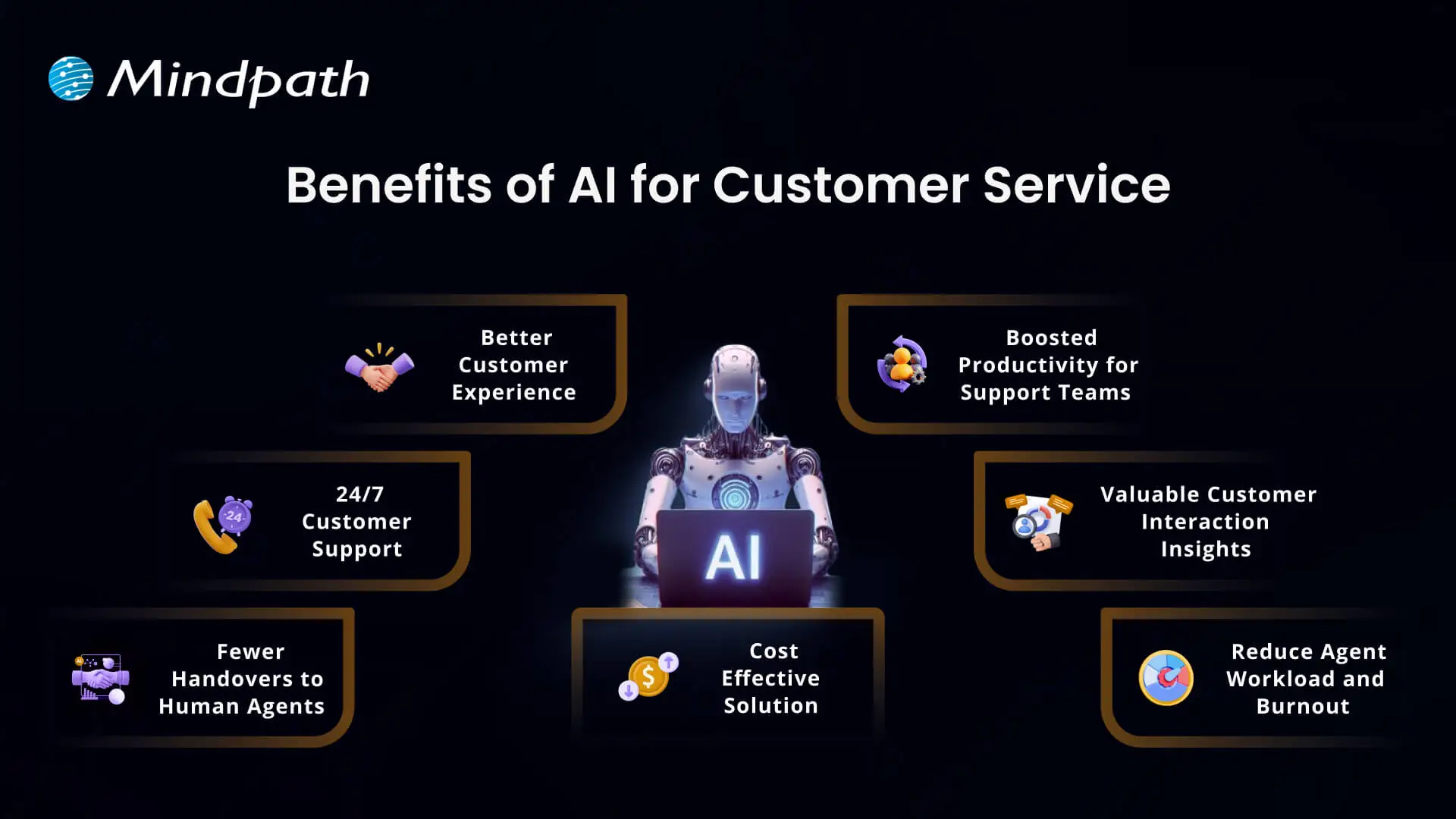
Benefits of AI for Customer Service

There are numerous advantages of AI for customer service that are changing the way customer relations are formed. Companies today use intelligent tools to improve the performance of their service and the way they follow through on solving problems. Let’s look closely at what makes this initiative worthwhile.

Benefits of AI for Customer Service

1. Better Customer Experience

AI can help create a better experience in customer service by making every interaction easier and more efficient for the customer. People are more comfortable engaging in conversations with chatbots and virtual assistants to get instant answers to their questions than they ever were before. AI tools such as agent assist and sentiment analysis can break down what customers want and prioritize how to respond, which allows support teams to drive a faster and more personal experience to satisfy customers.

2. 24/7 Customer Support

One of the main benefits of AI is that it offers businesses the opportunity to provide customer support 24/7 and every day of the year. With customer service AI tools such as virtual agents and voice bots, customers can get help immediately, even outside normal business hours. This has the impact of conveniences customers and keeping them happy. It also demonstrates how the benefits of AI chatbots improve customer service, making it quicker, easier, and always available.

3. Fewer Handovers to Human Agents

With smarter chatbots today, AI tools for customer service are becoming more human-like in their conversations and helping customers with simple questions. As a result, customers receive a quick answer, without having to wait for a human agent. Support teams now spend more time aiding customers with complex issues which require a more human touch. This solution was designed to balance the workload and ultimately improve the overall support experience.

4. Cost Effective Solution

Using AI customer services helps companies spend less on handling customer questions and problems. Chatbots and voice bots can answer many requests on their own, which means fewer calls and messages for human agents. These AI tools work all day and night without extra pay or breaks. This saves money on hiring, training, and keeping large support teams.

5. Boosted Productivity for Support Teams

AI makes customer service agents more productive by handling simple tasks automatically. It can sort and route requests and even suggest answers, so agents work faster and more accurately. This means they have more time to focus on complex problems that need a human touch. So, AI helps support teams get more done and provide better service.

6. Valuable Customer Interaction Insights

Using AI to track how customers feel during calls gives businesses a clearer picture of every interaction. It helps measure customer satisfaction and see where service can improve. Managers can also spot training needs for their team based on these insights. Looking at past data, AI can even help predict what customers might expect in the future.

7. Reduce Agent Workload and Burnout

Working in customer service can be stressful and lead to burnout when agents handle too many repetitive tasks. AI helps by taking care of simple questions and routine work, so agents have more time for important tasks. This reduces daily pressure and keeps the workload more balanced. Over time, it can help teams feel more supported and less burned out.

Want to know if your business is ready to implement AI in the right way? Explore our blog – AI Readiness Checklist.

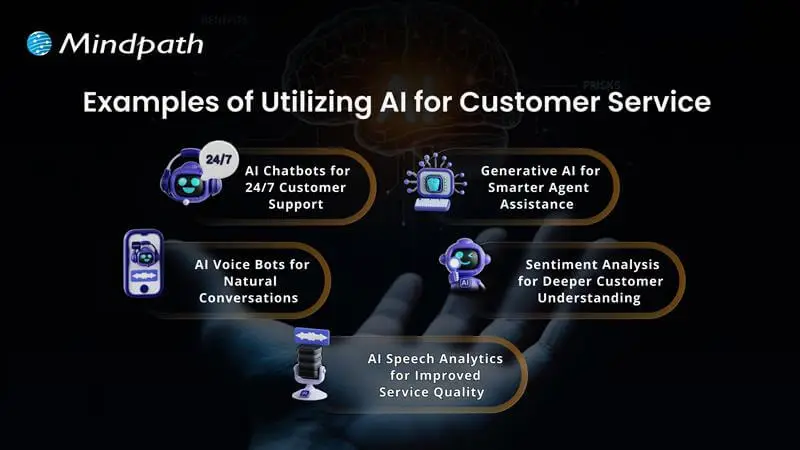
Examples of Utilizing AI for Customer Service

Companies across industries are finding new ways to use AI to improve how they help their customers. This smart technology is making customer service more effective and reliable than ever. Let’s explore some real-world examples of how this is happening.

Examples of Utilizing AI for Customer Service 

1. AI Chatbots for 24/7 Customer Support

Conversational AI chatbots help businesses assist customers in getting answers any time, day or night. They can handle common questions, check orders, and even help with returns. This keeps support teams free for more complex problems.

2. AI Voice Bots for Natural Conversations

AI voice bots answer calls and talk to customers naturally, just like a human agent. They can share product details, update accounts, or book appointments. This reduces routine calls for human teams and keeps service smooth.

3. AI Speech Analytics for Improved Service Quality

AI speech analytics tools listen to customer calls to find useful patterns. They help managers see what customers care about and how agents are doing. This helps improve service and spot issues early.

4. Sentiment Analysis for Deeper Customer Understanding

Sentiment analysis uses AI to understand how a customer feels during a call. It looks at tone and pitch to score conversations as positive, neutral, or negative. This helps companies see where they can do better and train their teams.

5. Generative AI for Smarter Agent Assistance

Generative AI helps support agents work faster by giving them ready-made answers. It pulls information from your knowledge base and CRM, so agents don’t waste time searching. This means customers get quicker, more accurate help.

Ready to adopt the recent trends of Gen AI into your business? Read our detailed blog on Gen AI trends, which provides a deeper understanding of how to implement Gen AI into your business for future growth.

Ready to Unlock the Full Potential of AI for Customer Service?

Using AI for customer service is one of the smartest ways to keep your customers happy and your support teams working smoothly. From 24/7 chatbots to tools that understand customer feelings, AI makes service faster and more personal. By adding these smart solutions now, businesses can handle more requests, save time, and build stronger customer trust for the future.

At Mindpath, we provide custom AI development services that help companies improve customer service and stay ahead of the curve. Our team can build AI chatbots, voice bots, analytics, and more, all tailored to your business goals. We focus on making your service more efficient and personal. Connect with our experts to see how our AI development services can transform your customer experience.

Frequently Asked Questions

1. What are the most practical benefits of AI for customer service that businesses see immediately?

The most immediate wins are 24/7 availability, faster response times, and reduced agent workload on repetitive queries. Customers stop waiting on hold for basic requests, agents focus on complex issues, and overall satisfaction improves noticeably. Businesses typically see measurable cost reductions and efficiency gains within the first few months of implementation.

2. Will AI customer service tools eventually replace human support agents entirely?

Not realistically. AI handles routine, repetitive tasks exceptionally well but struggles with emotionally complex or nuanced situations that genuinely require human judgment. The most effective customer service models combine both, letting AI manage high-volume simple requests while human agents focus their energy on interactions that truly need a personal, empathetic touch.

3. How does sentiment analysis actually improve the customer service experience?

Sentiment analysis reads tone and emotional cues during customer interactions, flagging negative experiences in real time. This allows managers to intervene before situations escalate and identify recurring pain points across thousands of conversations simultaneously. Over time, these insights directly shape better training, smarter responses, and noticeably improved overall service quality.

4. Is AI customer service only practical for large enterprises with big budgets?

Not anymore. Scalable AI tools have become significantly more accessible and affordable for businesses of all sizes. Small and mid-sized businesses now deploy chatbots and voice bots without massive infrastructure investments. The cost savings from reduced staffing needs and improved efficiency typically outweigh implementation costs relatively quickly regardless of company size.

5. How does AI actually reduce burnout among customer service teams?

By consistently absorbing the high volume of repetitive, low-complexity queries that drain agent energy daily. When AI handles password resets, order tracking, and FAQs automatically, agents spend their time on meaningful, engaging work. This shift in daily responsibilities keeps teams more motivated, reduces turnover, and creates a noticeably healthier working environment.

AI Integration Cost

AI integration cost is rarely a fixed figure. It depends on the use case, existing technology stack, data readiness, integrations, security requirements, and business scale. A simple AI feature connected through an existing API can require a very different budget than a complex enterprise AI system spanning multiple applications, data sources, and workflows.

Key Takeaways

  • 01
    AI integration budgets vary based on use case, data readiness, integrations, security, infrastructure, and business scale.
  • 02
    Initial development costs are only part of the investment required to operate AI systems successfully.
  • 03
    Data preparation, legacy integrations, security, API usage, and infrastructure can create unexpected expenses.
  • 04
    Recurring costs include model usage, cloud resources, monitoring, maintenance, optimization, and technical support.
  • 05
    Phased implementation and continuous cost monitoring can help businesses manage AI spending and reduce budget overruns.

The initial development budget is only part of the equation. Model usage, cloud infrastructure, monitoring, maintenance, security, and ongoing optimization can continue adding costs after deployment. For technology leaders, understanding these factors early helps prevent unrealistic estimates and poorly scoped AI initiatives. In this blog, we break down the key costs businesses should consider when planning AI integration in 2026.

Not sure what your AI integration could cost?

We help businesses scope AI projects, identify cost drivers, and plan practical implementation strategies.

Plan Your AI Integration →

What is Included in AI Integration Cost?

AI integration involves more than connecting an AI model to an existing application. The overall budget covers the technical work required to make the system useful, secure, reliable, and compatible with existing business processes. The scope can include several layers, depending on the project.

Common one-time costs include:

1. Discovery and Architecture

Defining the use case, technical architecture, workflows, and integration requirements.

2. Data Preparation

Cleaning, structuring, transforming, and connecting the data required by the AI system.

3. Development and Integration

Connecting AI capabilities with applications, databases, APIs, CRM, ERP, or internal tools.

4. Testing and Deployment

Validating accuracy, security, performance, and reliability before production use.

These initial costs are only one part of the budget. Businesses also need to account for recurring expenses such as model or API usage, cloud infrastructure, monitoring, maintenance, security updates, and ongoing optimization.

How Much Does AI Integration Cost in 2026?

There is no standard price for AI integration. The budget changes significantly based on the number of systems involved, data complexity, security requirements, user volume, and the level of customization required. The ranges below can serve as practical planning estimates.

Business / Project Scale Typical 2026 Budget Common Scope Cost Complexity
Small AI Integration $10K–$30K AI chatbot, single API, basic workflow automation Low
Mid-Size Integration $30K–$100K Multiple APIs, document processing, custom workflows Moderate
Complex AI Implementation $100K–$250K+ Advanced data pipelines, custom AI workflows, several business systems High
Enterprise AI $250K–$1M+ Large-scale AI platforms, governance, security, multiple departments Very High

These figures are illustrative planning ranges, not fixed market prices. A mid-size project with clean data and existing infrastructure could cost less than a smaller project involving legacy systems, complex integrations, or strict security requirements.

What Factors Increase AI Integration Cost?

Several technical factors can significantly change the final project budget. The complexity often comes from the environment surrounding the AI rather than the model itself.

1. Data Readiness

Incomplete, inconsistent, or poorly structured data requires additional engineering before it can support reliable AI workflows.

2. Integration Complexity

Connecting AI with CRMs, ERPs, databases, internal applications, legacy systems, and third-party APIs increases development effort.

3. Model Requirements

A basic API-based model has different infrastructure and development needs than RAG and fine-tuning, or agentic AI workflows.

4. Security and Compliance

Sensitive data may require encryption, access controls, audit logs, private deployments, and additional security testing.

5. Infrastructure

Cloud compute, storage, databases, vector databases, networking, and monitoring can add both implementation and operational expenses.

6. Specialized Expertise

AI engineers, data engineers, solution architects, and security specialists may be required for complex implementations.

The biggest cost increases often occur when these requirements are discovered late. Defining the architecture, data requirements, integration scope, and security expectations early can make the budget far more predictable.

Hidden Costs That Can Increase AI Integration Cost

The initial AI implementation cost does not always reflect the full investment required to move an AI system into production. Some expenses appear during integration, scaling, or ongoing operations and can affect the final budget.

1. Data Cleanup

Business data may require cleaning, restructuring, labeling, or enrichment before it can support reliable AI workflows.

2. Legacy Integration

Older systems may need custom connectors, middleware, or additional development to work with modern AI tools.

3. API Usage

The API integration cost can increase with request volume, connected services, data transfer, and usage-based pricing.

4. Security Requirements

Encryption, access controls, compliance checks, audit trails, and security testing can add development effort.

5. Infrastructure Scaling

Growing usage can increase spending on compute, storage, databases, networking, and other cloud resources.

6. Monitoring and Maintenance

Production AI systems require performance monitoring, testing, updates, troubleshooting, and ongoing optimization.

7. Employee Adoption

Training, documentation, workflow changes, and technical support may be needed for successful adoption.

Accounting for these expenses early gives businesses a clearer view of their total AI investment. It also helps teams distinguish the initial project budget from the ongoing costs required to operate and scale the system.

What are the Ongoing Costs After AI Integration?

Launching an AI system is only the beginning of the investment. Once it is in production, businesses need to budget for the resources required to keep it accurate, available, secure, and cost-efficient as usage grows.

Key recurring expenses can include:

1. Model and API Usage

Costs can increase with higher request volumes, larger inputs, and frequent model calls.

2. Cloud Infrastructure

Compute, storage, databases, networking, and supporting services contribute to monthly operating expenses.

3. Monitoring

Production systems need monitoring for performance, latency, errors, usage patterns, and unexpected outputs.

4. Model Optimization

Prompts, retrieval pipelines, workflows, or models may need periodic improvements as requirements change.

5. Maintenance

Integrations can require updates when connected applications, APIs, or business processes change.

6. Support and Security

Ongoing technical support, vulnerability management, access reviews, and compliance activities can add operational costs.

Businesses should therefore calculate total cost of ownership, rather than evaluating an AI project only by its initial development price. Tracking these recurring expenses against measurable outcomes also makes it easier to determine if the system is delivering the expected business value.

How to Build a Realistic AI Integration Budget?

A practical AI budget starts with the business problem, not the technology. Before selecting a model or development approach, teams should establish what the system needs to achieve and what resources are already available.

A simple budgeting process can include:

1. Define the Use Case

Identify the workflow, users, expected outcomes, and measurable business goals.

2. Map the Technical Scope

List the applications, APIs, databases, data sources, and workflows that need to connect with the AI system.

3. Assess Data Readiness

Determine whether existing data is accessible, structured, secure, and suitable for the intended application.

4. Select the Implementation Approach

Compare existing AI platforms, custom development, and hybrid approaches based on technical requirements and internal capabilities. A build vs buy AI assessment can help frame this decision.

5. Separate Initial and Recurring Costs

Account for development, integration, and deployment separately from API usage, infrastructure, maintenance, and support.

6. Plan for Contingencies

Reserve part of the budget for unexpected data, integration, security, or infrastructure requirements.

7. Use Phased Implementation

Start with a defined scope, measure results, and expand the system after validating its performance and business value. Businesses considering in-house vs outsourcing AI development can also factor internal expertise and long-term maintenance into this planning process.

How Should Your Business Budget for AI Integration?

AI integration requires a budget that accounts for development, data preparation, integrations, infrastructure, security, and ongoing operations. AI integration cost varies with every project, making it important to assess the use case, technical readiness, implementation scope, and recurring expenses before committing to an investment.

Mindpath AI development services help businesses plan and build AI systems around their specific workflows and technical requirements. Our team supports AI architecture, data engineering, integrations, RAG development, fine-tuning, and AI agent development, helping businesses move from planning to production with a practical roadmap.

legacy modernization

Technology is a high-paced thing, and companies are under pressure to keep up with it. Legacy Modernization has come to be a serious agenda among companies that currently use the old systems to conduct their daily operations. You may find that the performance is slowing down, maintenance costs are increasing, and security threats are increasing yearly. All these problems cause tension amongst teams and restrict innovation. Then, what actually happens when the old systems are retarding progress? And how do companies get back in control without derailing the fundamental processes?

Meanwhile, leaders desire systems that can enable development, flexibility, and more intelligent decision-making. Their goals are to enhance performance besides safeguarding the vital data and business logic. Such an equilibrium needs a good technical direction and strategy. Thus, it is critical to comprehend the acceptable strategy to achieve success in the long term. This blog will discuss all the major points of legacy modernization step by step.

Ready to move beyond outdated systems that slow down your business? Mindpath offers legacy modernization services to help you upgrade and transform legacy applications into scalable and future-ready solutions.

What is Legacy Modernization?

Legacy modernization is the strategic process of updating, re-architecting, or replacing outdated software systems to align with modern technology capabilities, security standards, and business objectives. It improves performance, security, and scalability while preserving core business logic. Businesses rely on it to remain competitive, reduce technical debt, and drive growth transforming aging systems into scalable, agile, and cost-effective solutions without disrupting day-to-day operations.

However, legacy system modernization goes beyond technical upgrades. Companies need to reconsider procedures, user experience and long term objectives. They enhance efficiency, mitigate risk and facilitate innovativeness with strategic change. An effective modernization strategy puts technology into business performance and establishes a platform to achieve the long-term digital development.

Why is Legacy Modernization Important?

Outdated systems slow progress and increase risk. The modernization of legacy applications helps businesses improve performance, security, and flexibility. Here are some of its key benefits:

1. Legacy modernization reduces high maintenance and infrastructure costs. It also reduces the reliance on the old systems and costly specialists support.

2. It enhances the rate of speed and general dependability of the system. Teams are also able to update at a higher pace and handle changes with ease.

3. It enhances security because it eliminates the risks associated with outdated software. Organizations remain updated on new compliance standards and regulations as well.

4. It improves agility and promotes inter-team innovation. Companies are able to introduce new functionality in a shorter time and react to the needs of the market.

5. Contemporary systems can easily manage increasing traffic and information. They are also compatible with cloud computing and other sophisticated analytics solutions.

6. It improves user experience by making the user interfaces and performance cleaner. There is a greater work efficiency and confidence among the employees when using the system.

Curious about the best way to transition from legacy systems to modern platforms? Check out our legacy modernization roadmap blog to uncover proven steps and strategies.

How to Modernize Legacy Applications?

Organizations must take a clear and strategic approach to legacy modernization to avoid disruption and control risk. A structured plan helps teams upgrade systems efficiently while supporting business goals and future growth.

benefits of legacy modernization

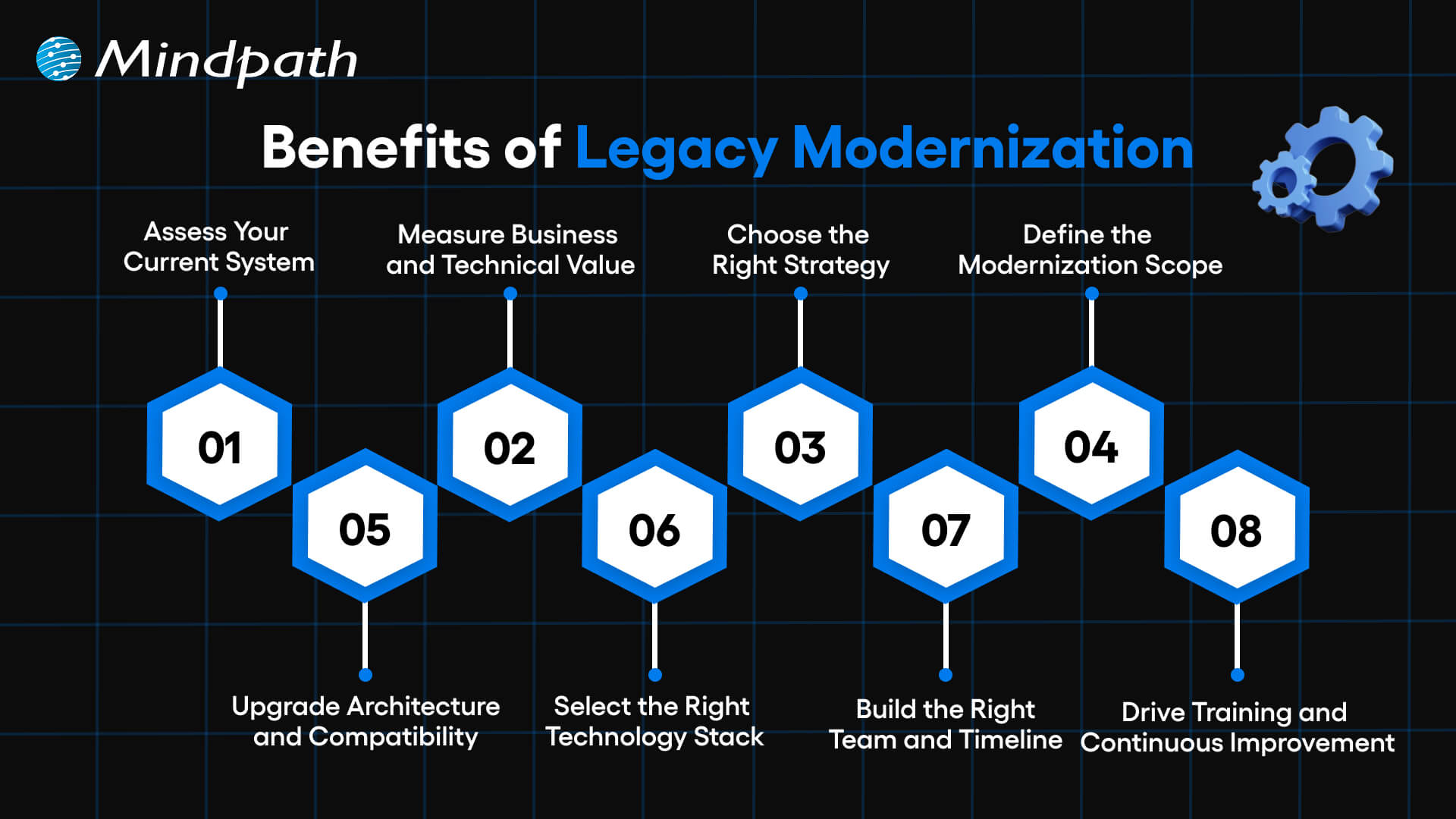
1. Assess Your Current System

Evaluate your applications both business and IT. Determine deficiencies in performance, security and scalability. This step builds a strong base for legacy modernization decisions.

2. Measure Business and Technical Value

Assess business fit, agility, cost, complexity and risk. Know the amount of value each system brings in the present day. Clear insights strengthen your legacy app modernization strategy.

3. Choose the Right Strategy

Select a legacy modernization approach that aligns with business goals. Compare such options as rehost, refactor, rebuild or replace. Take the course of action that brings more quickly and reduces the risk.

4. Define the Modernization Scope

Target key points that lead to business performance. Eliminate the old and unwanted functions that complicate things. A clear scope helps teams modernize legacy applications with confidence.

5. Upgrade Architecture and Compatibility

Use scalable architecture when needed e.g. microservices. Enhance dynamism and streamline administration of the system. Enhance seamless integration with other tools/ platforms.

6. Select the Right Technology Stack

Select technologies that will be able to accommodate existing needs and expand in the future. Never act on your judgment without consulting experts. Good testing will guarantee effectiveness, protection and dependability.

7. Build the Right Team and Timeline

Create a cross functional team with established responsibilities and ownership. Develop and maintain documentation. Set realistic milestones to guide legacy modernization progress.

8. Drive Training and Continuous Improvement

Train the staff on effective use of the new system. Onboarding is encouraged by means of structured support. Continuous updates keep legacy modernization relevant and sustainable.

Want to align your legacy systems with your long-term business goals? Explore the legacy modernization strategy for business growth to build a result-driven transformation plan.

Key Challenges in Legacy Modernization

There are some valid advantages of legacy modernization, but it also possesses actual challenges. During the transition, organizations have to be ready to overcome technical, financial, and operational challenges.

1. Complex Legacy Code

Systems are difficult to comprehend and expand due to old-fashioned code and lack of documentation. Such complexity slows the development and raises its maintenance costs.

2. Integration Barriers

The old systems also fail to make connections with cloud providers and new APIs. Architecture reengineering will require teams to be mindful of downtime and the gaps in security.

3. Security and Compliance Gaps

The existing security and regulations are not met in aging systems. It is necessary that Legacy Modernization involves proactive protocols, encryption, and compliance control updates.

4. High Costs and Limited Resources

Modernization demands investment in equipment, education, and infrastructures. Lack of a proper roadmap will increase costs and strain internal resources.

5. User Resistance to Change

Employees tend to be at ease with the well-known systems. Good communication, training will enable teams to adjust to Legacy Modernization programs.

6. Performance and Scalability Limits

Old applications are unsuitable to meet the increasing data and user requirements. Legacy Modernization enhances speed, stability, as well as long term scalability.

7. Knowledge and Skill Gaps

It may be challenging to locate professionals with knowledge of old technologies. Lack of experience will put risks and time delays at a higher level and make the project more complex.

8. Data Migration Risks

Migration of mass volumes of old data can result in loss, corruption or compatibility problems. There has to be audits, backups and testing of data to ensure data integrity in Legacy Modernization.

Planning to integrate AI into your legacy infrastructure for better decision-making? Learn about AI-driven legacy system modernization to transform your systems intelligently.

8 Legacy Modernization Strategies for Modern Businesses

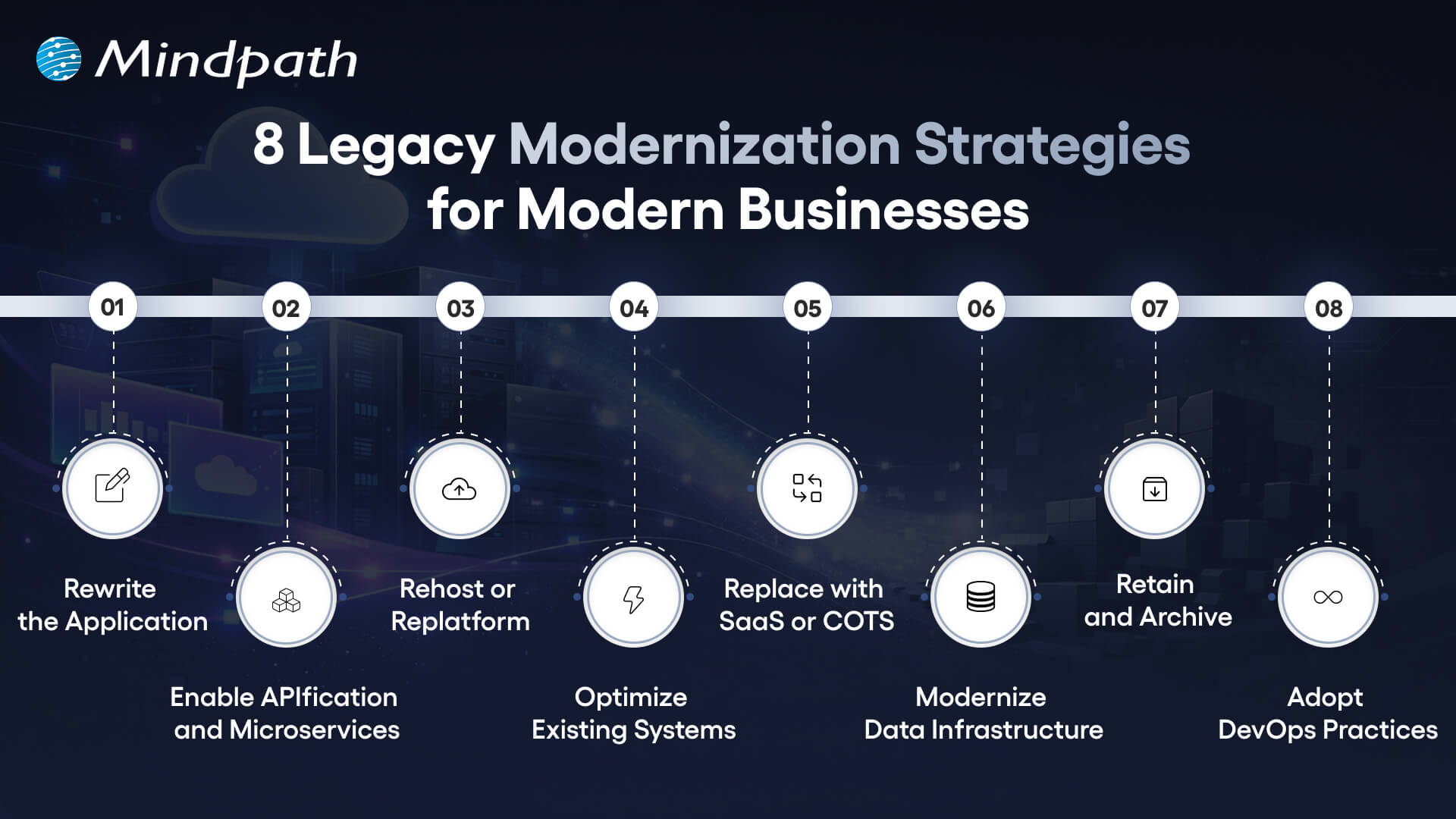
Companies must have a strategy in place when modernizing old systems. The right legacy modernization strategies assist in decreasing risk and faster business worth.

8 legacy modernization strategies for modern businesses

1. Rewrite the Application

Rewrite the old systems using new languages. This strategy will modernize the application and enhance quicker updates. It also reduces the long term maintenance.

2. Enable APIfication and Microservices

Divide monolithic systems into small services. APIs can be used to better integrate them. Innovation is accelerated through this model.

3. Rehost or Replat form

Migration to the cloud with minimal code modification. It is a move that minimizes infrastructure expenses within a very short time. The teams enhance scalability without causing much disturbance.

4. Optimize Existing Systems

Check the workloads as well as code performance gaps. Minimize the usage of infrastructure and operations expenditures. Utilize savings to finance additional upgrades.

5. Replace with SaaS or COTS

Use pre-made platforms that will satisfy business requirements. Accomplish security and compliance. Implement solutions in a shorter time and with reduced risk.

6. Modernize Data Infrastructure

Move the old databases to scaled systems. Enhance the speed, analytics, and flexibility. This step should be aligned to Legacy Modernization.

7. Retain and Archive

Retain those systems that retain the necessary value. Audits of applications that are rarely used in the archive. Unnecessary changes and risks should be avoided.

8. Adopt DevOps Practices

Implement continuous integration and testing. Publishing is faster and teamwork becomes better. Enhance the performance and stability of the systems.

Planning to enhance your modernization efforts with better automation and continuous delivery? Discover DevOps best practices to build a more agile and scalable transformation process.

Key Trends for Legacy Modernization System

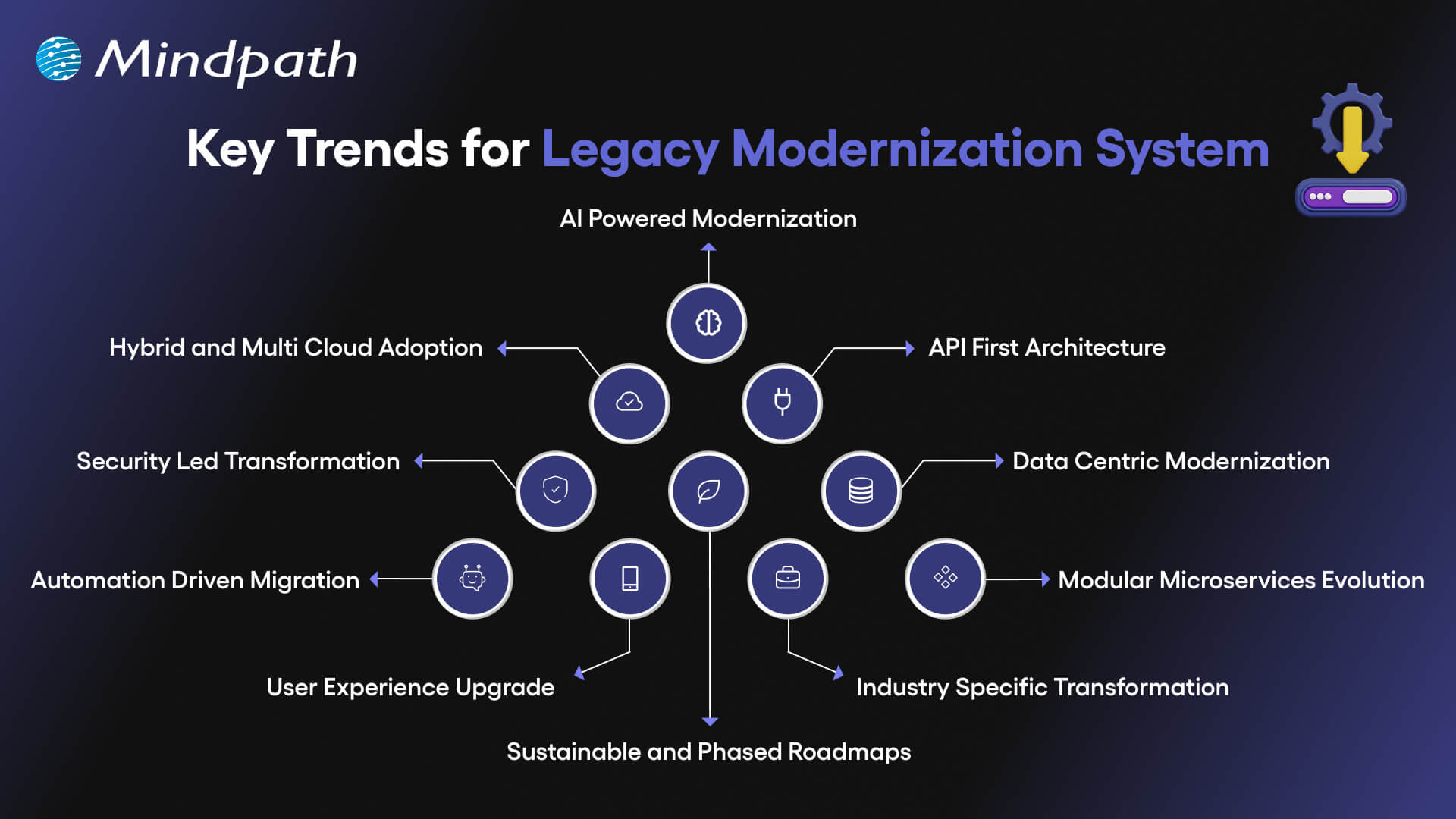
Organizations are still redefining their technology environment to remain competitive. The modernization trends point to the new directions that lead to faster, smarter and more scalable transformation.

key trends for legacy modernization system

1. AI Powered Modernization

Code refactoring, re-architecture and system analysis are now assisted by AI. According to legacy modernization trends, many enterprises spend lots of money in AI. It enhances preciseness, less threat, and accelerates change.

2. Hybrid and Multi Cloud Adoption

Organizations have stopped relying on one cloud provider. They operate hybrid and multi cloud environments to be flexible and resilient. Container platforms assist systems to operate efficiently in environments.

3. API First Architecture

Enterprises substitute monolithic models with modular API based models. The APIs enhance integrations, scalability, and expedited feature upgrade. The change holds its ground in the contemporary legacy modernization patterns.

4. Security Led Transformation

The presence of stringent rules encourages companies to advance the old security checks. Zero trust models, encryption, and enhanced access management are implemented in teams. Every modernization roadmap is currently being influenced by security.

5. Data Centric Modernization

Isolated data warehouses are sent to unified lake house platforms by businesses. This measure enhances real-time understanding and information controls. Powerful data strategy is a key to successful legacy software modernization.

Curious about how AI can reduce costs and improve system capabilities? Check out the benefits of AI to transform your business operations.

6. Automation Driven Migration

Code scanning, risk detection, and recommendation are processes performed by AI-based tools. Jurisdictional testing and documentation lowers the manual work involved. These applications reduce migration time.

7. Modular Microservices Evolution

Businesses upgrade microservices using containers and orchestration technology. AI assists in tracking and optimization of working loads. This will enhance system stability and scalability.

8. User Experience Upgrade

The future UX concentrates on customization, usability, and functionality. Component based design models substitute strict legacy interfaces. These enhancements are in line with wider patterns of legacy modernization.

9. Industry Specific Transformation

Banks, healthcare providers, and manufacturers need individual solutions. Modern systems are now able to comply with strict industry rules. A strong legacy modernization framework supports niche requirements effectively.

10. Sustainable and Phased Roadmaps

Companies are ready to upgrade slowly than to rewrite everything. Planned phase will guarantee the sustainability of long term and reduce disruption. This approach makes modernization anticipative and expandable.

Want to make your legacy modernization efforts more environmentally responsible? Explore sustainable technology to build eco-friendly and future-ready systems.

Examples of Legacy Systems

Several organizations are still using the old systems to execute important activities. These are the legacy systems that are still in use and support day-to-day processes in spite of low adaptability and scalability.

1. Cloud Enablement in Financial Services

To enhance scaling and reporting, a fintech company has transferred the core systems to the cloud. This legacy modernization decreased manual labor and increased reliability.

2. Clinical Platform Enhancement

A microservices-based upgrade of an oncology system to speed up its performance. The transformations enhanced integration and helped to make medical decisions faster.

3. High-Performance Trading Systems

Microservices and automated deployments were embraced in a trading platform. This legacy modernization enabled speed and increased volume of transactions.

4. Digital Leasing Transformation

One leasing system upgraded its infrastructure to initiate operations more quickly. The upgrade made the operations less complex and efficient.

5. Smart Assessment Innovation

One of the education platforms presented AI-based grading tools. The educators used to save some time and received more rapid performance feedback.

6. Scalable K-12 Learning Infrastructure

One school system optimized its cloud environment to its maximum. The upgrade also enhanced the uptime and made the learning process stable.

Wondering how to connect legacy modernization with broader business goals? Explore about digital transformation for business to align technology with strategic growth.

Ready to Future Proof Your Business?

Legacy systems limit growth, increase risk, and slow innovation. Organizations that invest in legacy modernization improve performance, security, and scalability while reducing long term costs. A clear strategy helps teams modernize in phases and avoid disruption. With the right approach, businesses build flexible systems that support innovation, improve user experience, and create lasting competitive advantage in a fast changing digital market.

Mindpath stands as a trusted legacy modernization service provider delivering practical and scalable solutions. Our team assesses existing systems, defines a clear roadmap, and executes modernization with minimal disruption. We focus on performance, security, and cloud readiness to create measurable business value. With proven expertise and strong technology partnerships, Mindpath helps enterprises modernize confidently and achieve sustainable digital growth.