Home

Native vs. Cross-Platform: Choosing the Right Approach for Your Mobile App

Native vs. Cross-Platform: Choosing the Right Approach for Your Mobile App

Join our Newsletter!

Native vs Cross Platform app development

Key Takeaways

  • 01
    Native development offers better control over performance and platform-specific features.
  • 02
    Cross-platform development allows code reuse across iOS and Android.
  • 03
    Development costs depend on testing, maintenance, integrations, and future updates.
  • 04
    Product requirements, team expertise, and launch timelines help determine the right approach.
  • 05
    Scalable architecture and quality engineering support long-term mobile app growth.

Choosing the right mobile app architecture can shape your product’s performance, development budget, and ability to grow. A decision made too early without evaluating business needs can lead to unnecessary costs, technical limitations, and maintenance challenges as user expectations evolve.

Native vs cross-platform app development is a strategic decision that influences user experience, development timelines, platform integration, and long-term scalability. Neither approach is universally better; the right choice depends on your product requirements, target platforms, engineering capabilities, and growth plans. In this blog, we compare both approaches and explain how to choose the right fit for your business.

Ready to build a mobile app that fits your business goals?
Mindpath offers tailored mobile app development services to help you choose the right technology, build scalable applications, and deliver exceptional user experiences.

What is Native App Development?

Native app development involves building applications specifically for an operating system. Developers use Swift or SwiftUI for Apple platforms and Kotlin with Jetpack Compose for Android. This approach provides direct access to platform APIs, native interface components, and device capabilities, making it suitable for applications that require deep system integration and precise control over user experience.

Here are the benefits of Native App Development:

1. High Performance

Native applications offer direct access to operating system capabilities, making them suitable for demanding workloads and complex interactions.

2. Better Platform Integration

Developers can use device features, system APIs, biometrics, notifications, and hardware capabilities with greater control.

3. Platform-Specific User Experience

Native interfaces follow iOS and Android design conventions, supporting familiar navigation and interactions.

4. Greater Technical Control

Teams can optimize application behavior, manage platform-specific functionality, and adopt new operating system features.

5. Reliable Feature Customization

Native development supports specialized functionality that depends on advanced device capabilities or platform-specific libraries.

What is Cross-Platform App Development?

Cross-platform app development uses frameworks such as Flutter and React Native to build applications for multiple operating systems while sharing much of the codebase. This can reduce duplicated development effort and simplify updates across platforms.

However, shared code does not eliminate platform-specific implementation, testing, or maintenance. Some features still require native modules or operating-system-specific adjustments. The choice between these approaches depends on the product’s complexity, performance requirements, available resources, and long-term goals.

Here are the benefits of Cross-Platform App Development:

1. Code Reusability

Teams can share substantial portions of the codebase across iOS and Android, reducing duplicated implementation.

2. Faster Development

Shared components and business logic can help teams deliver features across platforms more efficiently.

3. Lower Development Effort

Maintaining a shared codebase can reduce engineering effort when compared with building two largely separate applications.

4. Consistent Functionality

Shared logic helps maintain consistent workflows, validation rules, and core features across platforms.

5. Simplified Feature Updates

Teams can implement many changes in shared code, making updates easier to coordinate across supported platforms.

Native vs. Cross-Platform: Key Differences That Matter

Choosing between native and cross-platform development requires evaluating how each approach handles performance, user experience, development effort, and ongoing maintenance. The following comparison highlights the factors that matter most when planning a mobile application.

Decision Factor Native Development Cross-Platform Development
Performance Offers direct platform integration and fine-grained optimization Delivers strong performance for many applications, depending on implementation
User Experience Provides precise control over platform-specific interfaces Supports consistent experiences with platform-specific customization
Development Effort Often requires separate implementations for iOS and Android Reuses code across platforms, reducing duplicated work
Device Integration Provides direct access to platform APIs and device capabilities Depends on framework support, plugins, and native modules
Maintenance Requires managing platform-specific codebases Shared code can simplify updates, although platform-specific work remains
Testing Requires separate platform validation and regression testing Requires cross-platform testing and platform-specific validation
Scalability Supports products requiring deep platform-specific control Supports shared product functionality across multiple platforms

1. Performance and Responsiveness

Native applications provide direct access to operating system capabilities, making them suitable for graphics-intensive workloads, complex animations, and demanding device interactions.

Cross-platform frameworks can also deliver strong performance, particularly for standard business applications. Actual results depend on application architecture, implementation quality, and workload complexity.

2. User Experience and Platform Integration

Native development offers greater control over platform conventions, accessibility, biometrics, notifications, and hardware integration. Cross-platform frameworks support polished interfaces across operating systems, but specialized interactions may require platform-specific adjustments to maintain a consistent user experience.

3. Development Efficiency and Maintenance

Native development can require separate implementations and coordinated updates for each platform. Cross-platform development allows teams to reuse business logic and selected interface components, potentially reducing duplicated effort.

However, framework upgrades, device compatibility, third-party dependencies, and platform-specific features still require ongoing maintenance.

Ultimately, Native vs cross-platform app development involves balancing technical control with development efficiency. The best approach depends on the application’s requirements, available engineering resources, and expected product evolution.

When Should You Choose Native App Development?

Native development is a strong choice when an application’s core functionality depends on advanced device capabilities, demanding workloads, or precise control over the operating system. Businesses should consider the following factors before committing to a native architecture.

1. Performance-Critical Applications

Apps involving complex animations, intensive graphics, real-time interactions, or specialized processing may benefit from native optimization and direct platform access.

2. Advanced Device Integration

Applications that rely heavily on Bluetooth, specialized sensors, background services, biometrics, or emerging operating system APIs can benefit from native capabilities.

3. Platform-Specific Experiences

Products requiring distinct iOS and Android interfaces, platform conventions, or deeply integrated system features may need separate native implementations.

4. Complex Product Requirements

Applications with specialized libraries, demanding technical workflows, or extensive platform-level integrations can benefit from greater architectural control.

5. Long-Term Technical Flexibility

Native development allows teams to optimize each platform independently and adopt new operating system capabilities as product requirements evolve.

Businesses considering native app development services should also evaluate the additional engineering effort involved in maintaining separate codebases, testing platform-specific releases, and coordinating updates.

When Is Cross-Platform App Development the Better Choice?

Cross-platform app development is a practical option for businesses that want to launch on iOS and Android while reusing a substantial portion of their application code. It can reduce duplicated engineering effort and help teams deliver core features efficiently without compromising essential product requirements.

1. Launching on Multiple Platforms

Businesses can build applications for iOS and Android using a shared codebase, helping coordinate feature releases and maintain consistent functionality.

2. Building a Minimum Viable Product (MVP)

Startups can validate product assumptions, gather user feedback, and refine core features before committing to separate native implementations.

3. Managing Development Resources

Shared code can reduce duplicated implementation and help engineering teams use their time more efficiently.

4. Maintaining Consistent Functionality

Reusing business logic and validation rules helps maintain consistent workflows across platforms while allowing necessary interface adjustments.

5. Supporting Frequent Product Updates

Teams can implement many feature changes in shared code, simplifying updates across platforms when framework capabilities support the requirements.

Choosing suitable cross-platform app development services also requires evaluating framework maturity, third-party library support, native integration requirements, and the availability of skilled developers.

How to Choose the Right Approach for Your Business?

Choosing between native and cross-platform development requires evaluating your product requirements, budget, team expertise, and long-term goals. The right approach should support your current priorities without creating unnecessary technical complexity as your application grows.

1. Evaluate Product Requirements

Identify essential features, performance expectations, device integrations, offline capabilities, and accessibility needs before selecting a development approach. Reviewing development technologies can also help you understand the available options when planning your product architecture.

2. Compare Total Cost of Ownership

Consider initial development, testing, maintenance, platform upgrades, third-party dependencies, and future enhancements when estimating long-term costs.

3. Assess Time to Market and Team Expertise

Evaluate release deadlines, existing technical skills, and developer availability to determine which approach best fits your delivery plan. Businesses should hire mobile app developers with relevant native or cross-platform expertise.

4. Plan for Growth

Consider future features, security requirements, integrations, and expected usage. Scalability also depends on backend architecture, data design, and engineering quality. Following agile development practices can help teams adapt as requirements change.

5. Align Development with Startup Goals

For native vs cross-platform for startup apps, consider whether rapid validation, platform coverage, or specialized functionality matters most. Choose the approach that supports your product roadmap and available resources.

Which Mobile App Development Approach Is Right for Your Business?

Choosing the right mobile app architecture depends on your performance requirements, budget, user expectations, and long-term goals. Native vs cross-platform app development requires careful evaluation of technical needs and business priorities. Which approach will best support your product’s growth? Make an informed decision before development begins.

At Mindpath, we provide mobile app development services tailored to your business requirements, helping you select suitable technologies, build scalable applications, and deliver reliable user experiences. Our development expertise supports your product goals through thoughtful architecture and quality engineering. Partner with us to plan your next mobile application.


Build the Right Mobile App

Get expert guidance to choose the right app development approach.

Frequently Asked Questions

Native apps require separate platform updates, while cross-platform apps can simplify shared-code maintenance. Actual costs depend on complexity, integrations, and team expertise.
Consider your product requirements, budget, launch timeline, device integrations, and long-term roadmap. Choose the approach that best supports your business priorities.
Yes, but migration may require rewriting features, adapting integrations, and additional testing. A flexible architecture can reduce future transition challenges.
Not necessarily. Many features are supported through frameworks and plugins, while specialized capabilities may require native modules or platform-specific implementation.
Evaluate technical expertise, architectural planning, testing practices, maintenance support, and the ability to align development decisions with long-term business goals.

Support Is One Click Away

Featured Posts

Related Post

Custom mobile application development

Businesses are increasingly using digital products to improve customer experiences, streamline operations, and respond to changing market needs. Custom mobile application development supports these goals by creating applications around an organization’s specific workflows, users, and business objectives.

Key Takeaways

  • 01
    Custom mobile application development aligns app features and workflows with specific business goals.
  • 02
    Purpose-built apps can improve customer experiences, automate processes, and support data-driven decisions.
  • 03
    Integration, security, accessibility, and scalability should be considered from the planning stage.
  • 04
    Businesses should evaluate custom apps against off-the-shelf alternatives based on requirements, costs, and long-term needs.
  • 05
    Clear objectives and measurable performance indicators help assess the business value of a mobile application.

Unlike generic applications, a custom mobile app can be designed around the features, integrations, and user journeys a business needs. When planned and implemented effectively, it can help teams reduce manual work, provide more convenient services, and respond to new opportunities. This makes custom app development a potential component of a broader digital transformation strategy.

In this article, we explain how custom mobile applications support digital transformation, the business benefits they can provide, and the factors organizations should consider before investing in development.

Planning a mobile app for your business? Explore Mindpath’s custom mobile application development services to discuss a solution aligned with your business requirements.

What is Custom Mobile Application Development?

Custom mobile application development is the process of designing, building, testing, and maintaining a mobile application around an organization’s specific requirements. The app may serve customers, employees, business partners, or internal operational teams.

Development typically involves requirements analysis, user experience design, application architecture, coding, testing, deployment, and ongoing maintenance. The scope may also include integrations with existing software, identity systems, payment gateways, analytics platforms, and other business tools.

A business can work with a suitable mobile app development company to determine the right approach, technology stack, and delivery plan. The goal is to create an application that addresses real user needs while remaining maintainable, secure, and adaptable as requirements change.

How Does Custom Mobile Application Development Drive Digital Transformation?

Digital transformation involves using technology to improve business processes, customer interactions, and service delivery. A custom mobile application can contribute to this transformation by connecting users with services, simplifying workflows, and making relevant information available through a convenient interface.

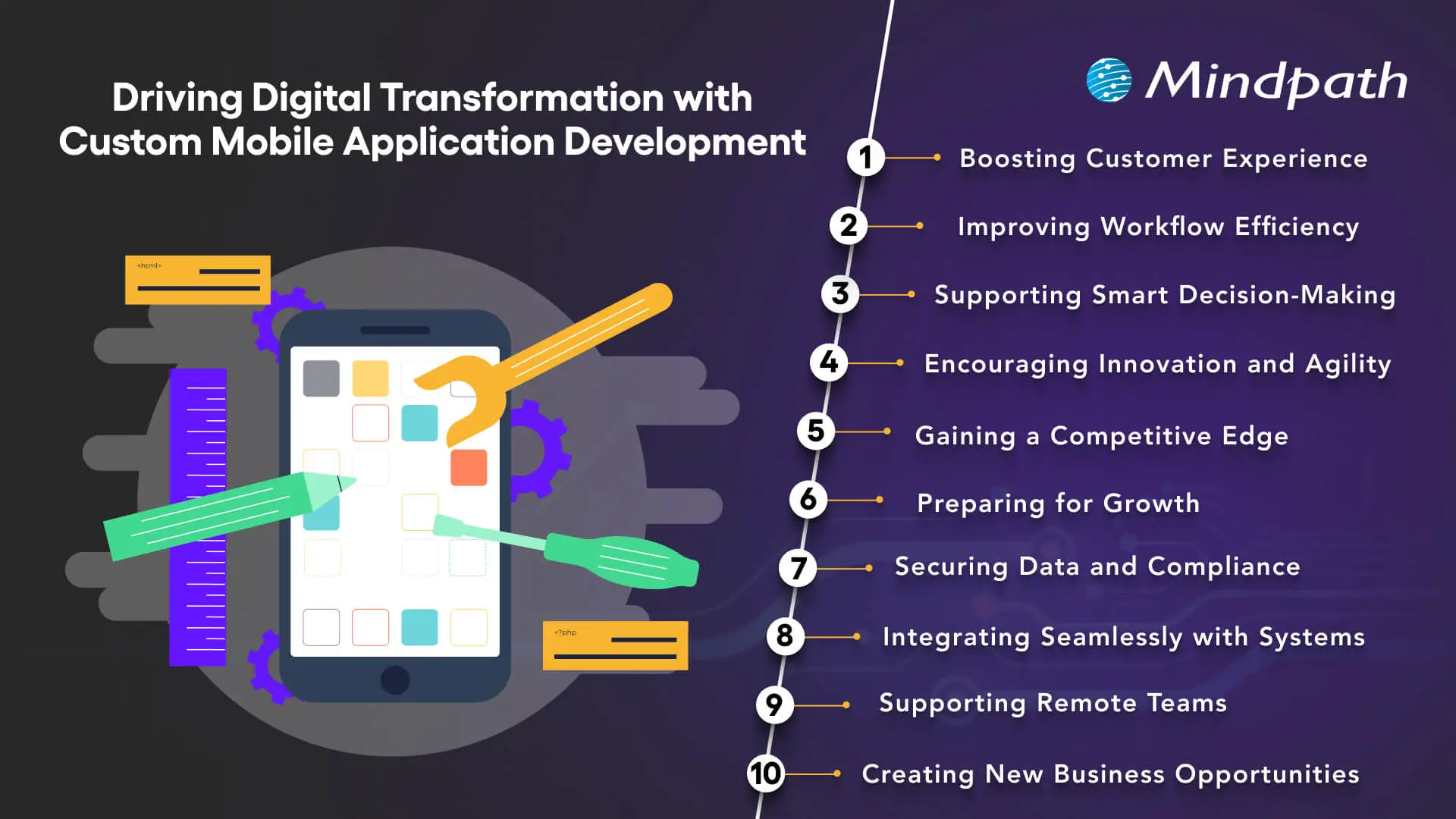
How custom mobile application development supports digital transformation

1. Improving Customer Experience

A well-designed mobile app gives customers a convenient way to access services, manage accounts, receive updates, and complete transactions. Businesses can tailor navigation, features, and communication to the needs of their audience rather than relying entirely on a generic user experience.

Features such as personalized dashboards, appointment scheduling, order tracking, and relevant notifications can reduce friction in common customer journeys. Usability testing and customer feedback help businesses identify which features provide genuine value.

2. Streamlining Workflow Efficiency

Custom applications can simplify operational processes by replacing repetitive manual activities with structured digital workflows. For example, employees may use an app to submit requests, update records, access task assignments, or capture information directly from the field.

When these workflows are designed around existing business processes, they can reduce duplicate data entry and improve consistency. Businesses should map their current processes before automating them so that unnecessary steps are not simply transferred into a new application.

3. Supporting Data-Driven Decisions

Mobile applications can collect operational and usage data that helps businesses understand how their services are performing. Depending on the application, teams may monitor completed transactions, feature adoption, customer interactions, service requests, and workflow bottlenecks.

When data is accurate and collected with appropriate consent and controls, these insights can help decision-makers identify improvement opportunities. Connecting app data to reporting or analytics systems can also provide a broader view of business performance.

Choosing the right technology matters. Review Mindpath’s guide to mobile app development technologies when evaluating the technical requirements of your application.

4. Encouraging Innovation and Agility

Custom development gives businesses greater control over how an application evolves. Teams can prioritize features based on customer feedback, test new services, and adjust workflows as operational needs change.

A modular architecture and a well-managed development process can make future updates easier to deliver. However, flexibility depends on sound technical decisions, available resources, and ongoing maintenance rather than customization alone.

5. Creating a Competitive Advantage

A mobile application can differentiate a business by making its services easier to access or by supporting workflows that competitors do not offer in the same way. Examples include specialized booking experiences, customer self-service tools, personalized service portals, and industry-specific functionality.

The strongest advantage comes from solving a meaningful customer or operational problem. Businesses should validate user needs and measure adoption instead of assuming that a larger feature set automatically creates differentiation.

6. Supporting Business Growth and Scalability

As an organization grows, its mobile application may need to support more users, new services, additional integrations, or changing data volumes. Scalability should therefore be considered during architecture and infrastructure planning.

Cloud infrastructure, modular components, appropriate database design, and performance testing can help a system accommodate changing demand. Capacity planning and monitoring remain important because scalability is not guaranteed simply by choosing a particular technology.

7. Strengthening Data Security and Compliance

Custom mobile apps can incorporate security controls suited to the organization’s data and operational requirements. Depending on the use case, these may include secure authentication, role-based access, encryption, session management, and protected API communication.

Businesses should identify applicable privacy and regulatory requirements before development begins. Security testing, dependency updates, access reviews, and incident response planning should continue after launch. Custom development provides control over implementation, but it does not automatically make an application secure or compliant.

8. Integrating With Existing Business Systems

A custom app can connect with existing business software through APIs and other supported integration methods. Depending on business needs, this may include customer relationship management platforms, enterprise resource planning systems, inventory software, payment services, or internal databases.

Well-designed integrations reduce the need to maintain separate records across disconnected systems. Before development, teams should assess API availability, data ownership, synchronization requirements, error handling, and access permissions.

The right mobile app development tools can support implementation and maintenance, but integration quality also depends on system architecture and the reliability of connected services.

9. Enabling Distributed and Remote Teams

Custom mobile applications can give employees access to approved business information and workflows while working across different locations. Field teams, service technicians, sales representatives, and remote staff may use apps to view assignments, submit updates, capture records, or coordinate with colleagues.

Mobile access should be designed with secure authentication, appropriate device permissions, and clear rules for handling company data. Offline access may also be important for employees working in areas with unreliable connectivity.

10. Creating New Digital Business Opportunities

A mobile app can support new ways of delivering and monetizing services. Depending on the business model, these may include subscriptions, premium features, digital bookings, in-app purchases, or customer self-service offerings.

Before introducing a new revenue model, businesses should validate customer demand, assess payment and platform requirements, and estimate the ongoing costs of development and support. The app should support a clear business proposition rather than add complexity without a defined purpose.

Planning your next app release? Read about mobile app development trends to assess emerging capabilities and their relevance to your product roadmap.

Custom Mobile App Development vs. Off-the-Shelf Applications

Custom development is not the right choice for every business. Off-the-shelf applications may be more practical when standard features meet existing needs, while a custom solution may be suitable when the business requires specialized workflows or deeper integration.

Evaluation factor Custom mobile application Off-the-shelf application
Features Can be designed around specific requirements. Uses features defined by the product provider.
Initial investment Often requires a larger upfront development budget. May offer lower initial costs through a subscription or license.
Implementation time Depends on scope, complexity, integrations, and testing. May be faster to deploy when requirements are already supported.
Integrations Can be planned around business systems and workflows. Depends on the integrations supported by the provider.
Maintenance The business and its development partner must plan for ongoing updates and support. The provider typically maintains the core product, subject to its service terms.
Best suited for Specialized processes, differentiated services, or requirements not met by standard products. Common business needs that existing products can address effectively.

Businesses should compare total cost of ownership, implementation effort, integration needs, flexibility, and vendor dependency before deciding. A configurable existing platform may be sufficient for some requirements, while a custom app may offer a better fit for others.

How to Plan a Successful Custom Mobile Application

A structured development process helps businesses connect technical decisions with user needs and operational goals. The following steps provide a practical starting point.

1. Define the Problem and Target Users

Identify who will use the app, what they need to accomplish, and where the current process falls short. Gather input from customers, employees, and other stakeholders to prioritize problems that matter most.

2. Prioritize Features

Separate essential features from optional enhancements. Start with a manageable scope that addresses the core user journey, then use feedback and performance data to guide later improvements.

3. Select the Right Technology Approach

Evaluate native, cross-platform, and other suitable development approaches based on performance needs, platform requirements, integrations, team capabilities, and long-term maintenance. The best choice depends on the application rather than a universal preference for one technology.

4. Plan Security and Integrations Early

Define authentication, authorization, data storage, API access, privacy requirements, and error handling before implementation. Early planning helps reduce integration problems and avoid costly changes late in development.

5. Test With Real Users

Conduct functional, usability, accessibility, security, and performance testing appropriate to the application. Pilot the app with representative users to identify problems before a wider rollout.

6. Measure Results After Launch

Monitor adoption, reliability, user feedback, and business outcomes. Use these findings to prioritize improvements and determine whether the app is meeting its intended objectives.

How to Measure the Business Impact of a Mobile App

Businesses should define success measures before development begins. The most relevant metrics depend on the application’s purpose and should be compared against a baseline where possible.

Objective Possible metric What it indicates
Improve customer experience Task completion rate, customer satisfaction, support requests Whether users can complete important activities effectively.
Increase engagement Active users, feature adoption, repeat usage Whether the app provides ongoing value to its intended audience.
Improve operational efficiency Task completion time, manual steps, error rate Whether the app improves the workflow it was designed to support.
Improve reliability Crash rate, response time, service availability Whether the application performs consistently under expected conditions.
Support business growth Conversion rate, completed transactions, cost per transaction Whether the app contributes to the intended commercial outcome.

Metrics should be interpreted in context. For example, high download numbers do not necessarily indicate sustained engagement, and lower processing time does not automatically translate into financial savings. Businesses should connect app performance to outcomes that matter to the organization.

Drive Digital Transformation With Custom Mobile App Development

Custom mobile application development can help businesses improve customer experiences, simplify operations, connect digital systems, and support new service models. Its value comes from aligning the application with a defined business need, selecting suitable technologies, and measuring outcomes after launch.

At Mindpath, we provide custom mobile application development services for businesses seeking applications tailored to their workflows and users. From planning and development to integration and ongoing improvement, the approach should focus on usability, security, maintainability, and business objectives.

AI Agents in CI/CD Pipelines

Modern software teams push updates faster than ever, yet speed alone no longer defines success. AI Agents in CI/CD Pipelines are changing how teams build, validate, and release software with greater accuracy and consistency. As delivery cycles grow more demanding, many organizations now look beyond traditional automation. They want systems that can analyze, decide, and act intelligently throughout development workflows.

Key Takeaways

  • 01
    AI agents improve CI/CD workflows through faster analysis, smarter decisions, and automated actions.
  • 02
    Automated code reviews help developers identify quality issues and security risks earlier.
  • 03
    Intelligent testing reduces maintenance work while improving test coverage and pipeline speed.
  • 04
    Predictive insights help teams detect deployment risks before they affect production environments.
  • 05
    AI-driven monitoring and rollbacks support reliable releases and faster incident recovery.

As a result, AI-driven development practices continue to gain momentum across modern engineering teams. Developers now expect faster feedback, stronger code quality, and smoother releases without increasing operational pressure. At the same time, businesses seek reliable ways to improve delivery performance and reduce costly errors. In this blog, we will explore how AI agents are reshaping CI/CD workflows and driving smarter software delivery.

Planning to integrate AI agents into your CI/CD pipeline? Mindpath provides AI Agents development services that improve development efficiency, reduce errors, and accelerate release cycles.

What are AI Agents in CI/CD Pipelines?

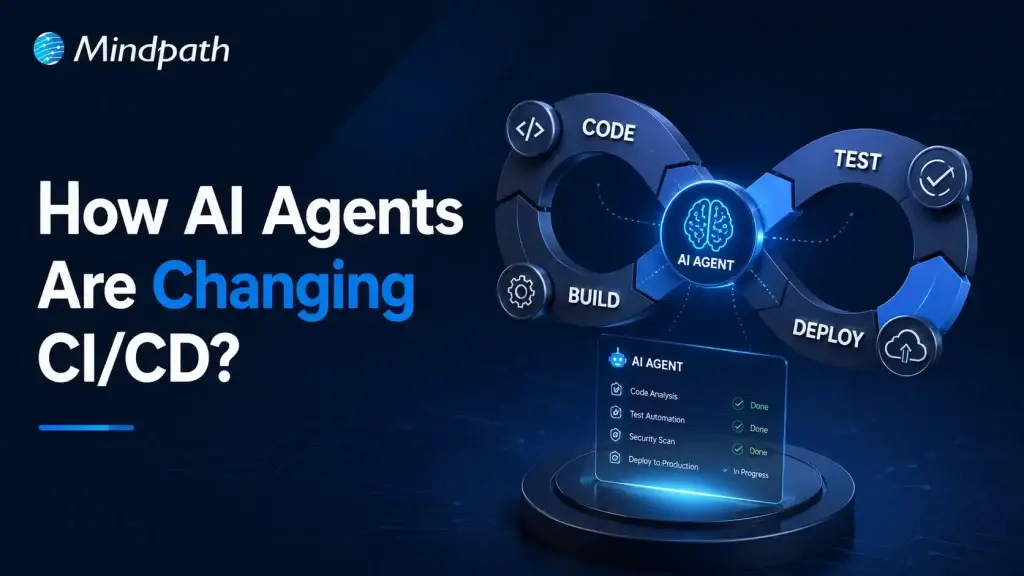
AI agents in CI/CD pipelines are intelligent systems that help automate and improve software delivery processes. Powered by large language models and machine learning, they analyze pipeline activities, identify issues, and support faster decisions throughout the AI agents’ software development lifecycle.

Unlike traditional automation tools that follow fixed rules, AI agents can learn from data and adapt to changing conditions. They monitor workflows, recommend improvements, and respond to problems in real time, helping teams maintain efficient, reliable, and scalable CI/CD operations.

What are the Key Functionalities of AI Agents in CI/CD Pipelines?

AI agents bring intelligence and adaptability to every stage of the CI/CD process. They go beyond traditional automation by analyzing data, making decisions, and continuously improving workflow efficiency.

The following functionalities highlight how AI agents help development teams deliver software faster, improve quality, and reduce operational challenges across modern CI/CD pipelines.

1. Autonomous Failure Analysis

AI agents quickly analyze logs, test results, and system activity when failures occur. They identify the root cause faster, helping teams resolve issues without lengthy investigations.

2. Self-Healing Test Execution

AI agents adjust tests automatically when minor UI or code changes appear. This reduces unnecessary test failures and keeps pipelines running smoothly.

3. Intent-Driven Test Generation

Developers can describe testing requirements using simple language. AI agents convert those requirements into executable test cases with minimal manual effort.

4. Proactive Risk and Anomaly Detection

AI agents monitor build history, code changes, and error patterns continuously. They detect potential risks early and alert teams before problems escalate.

5. Intelligent Test Selection and Parallelization

AI agents identify which tests relate to specific code changes. They run only the necessary tests and optimize execution time across the pipeline.

6. Automated Security and Compliance

AI agents scan applications for vulnerabilities and policy violations automatically. They help teams maintain security standards and support compliance requirements.

7. Auto-Remediation and Rollbacks

AI agents respond quickly when deployment issues or production incidents occur. They can initiate corrective actions, perform rollbacks, and support faster recovery.

Why are Traditional CI/CD Pipelines No Longer Enough?

1. Limited Infrastructure Awareness

Complex cloud environments require deeper context than scripts provide.

2. Struggles with AI-Generated Changes

High-volume code updates overwhelm traditional review workflows.

3. Security Risks Increase

Broad credentials create larger attack surfaces across pipelines.

4. Tight System Coupling

Connected processes reduce flexibility and slow scaling efforts.

5. Lack of Intelligent Decision-Making

Static rules cannot adapt to changing development conditions.

How Do AI Agents Improve Modern CI/CD Workflows?

AI Agents for DevOps bring intelligence to software delivery by continuously analyzing data, automating decisions, and responding to issues in real time. Instead of relying only on predefined rules, they help teams optimize workflows, improve code quality, reduce deployment risks, and accelerate release cycles across modern CI/CD environments.

1. Automated Code Review

AI Agents in CI/CD Pipelines analyze code changes and identify bugs, security gaps, and coding issues automatically. They provide instant feedback, helping developers improve code quality before merging changes.

2. Intelligent Test Case Generation

AI agents create test cases based on application logic, requirements, and code changes. This reduces manual effort and strengthens DevOps and test automation practices.

3. Smarter Software Testing

Modern AI software testing tools use AI agents to execute, optimize, and maintain tests continuously. They improve test coverage while reducing repetitive testing tasks.

4. Self-Healing Test Automation

AI agents detect minor application changes and automatically update affected test scripts. This keeps automated testing reliable and reduces maintenance workloads.

5. Predictive Failure Detection

AI agents analyze historical pipeline data, build logs, and deployment patterns. They identify risks early and help teams prevent failures before production releases.

6. Intelligent Deployment Management

AI agents evaluate deployment readiness using performance metrics, test results, and risk indicators. They support safer releases by recommending the best deployment actions.

7. Continuous Monitoring and Incident Response

AI agents monitor applications and infrastructure after deployment in real time. They quickly detect anomalies, investigate issues, and support faster resolution.

8. Automated Rollbacks and Pipeline Optimization

When deployments cause problems, AI agents can trigger rollback actions automatically. They also analyze pipeline performance and recommend improvements for faster software delivery.

Ready to Build Smarter CI/CD Pipelines with AI?

AI agents in CI/CD pipelines help teams improve code quality, strengthen testing, and manage deployments with greater confidence. They bring faster insights to complex delivery workflows while reducing repetitive work. As software releases become more frequent, intelligent automation can help organizations maintain speed, reliability, and control.

At Mindpath, we provide AI Agent development services that help businesses build practical, scalable, and secure solutions. Our team can support your journey with AI agents in CI/CD that align with your development workflows, testing needs, and deployment goals.

Frequently Asked Questions

Data Preparation for AI

Business data holds valuable insights, but poor quality, scattered records, and inconsistent formats can make those insights difficult to unlock. When businesses introduce AI without addressing these issues, even capable models can produce unreliable results. The real challenge is making existing data accurate, relevant, and usable for meaningful business decisions.

Key Takeaways

  • 01
    Assess existing data sources to identify gaps, inconsistencies, and information needed for specific AI applications.
  • 02
    Clean and validate records to improve data reliability and reduce misleading AI outputs.
  • 03
    Transform business data using suitable encoding, feature engineering, and formatting techniques.
  • 04
    Prepare documents for AI retrieval using text extraction, chunking, embeddings, and metadata.
  • 05
    Maintain reliable data pipelines with automated quality checks, governance, and continuous performance monitoring.

Data preparation for AI helps bridge this gap by turning raw information into reliable inputs for AI applications. From correcting data inconsistencies to organizing documents for generative AI applications, each step influences the quality of the outcome. In this blog, we will cover the practical steps to prepare business data for AI and build a reliable foundation for long-term success.

Need support with your AI data strategy?

Our AI data consulting services can help organizations prepare their data foundations and move forward with greater confidence.

Understanding Your Business Data Before AI Implementation

Before preparing data for AI, businesses need a clear picture of the information they already have. Customer records, sales reports, transaction histories, and support conversations often sit across different platforms. Understanding where this data lives and how it is maintained helps identify what is useful, what needs improvement, and what is missing.

Start by reviewing your data sources, formats, volume, and frequency of updates. Exploratory data analysis (EDA) can reveal missing values, unusual patterns, inconsistent entries, and relationships between variables. These findings help teams assess whether the available information can support the intended AI application.

Business goals should guide this assessment. For example, a retailer planning to forecast product demand needs reliable sales history, inventory records, and information about seasonal promotions. Missing or inconsistent records could affect the quality of its predictions.

This initial review also helps teams identify access restrictions, data ownership issues, and gaps in historical records. These factors matter when planning AI-driven data analytics and deciding which datasets are suitable for a specific use case. A focused assessment gives businesses a practical starting point and prevents time and resources from being spent preparing irrelevant information.

How to Prepare Business Data for AI Applications?

Once businesses understand their existing data, the next step is to improve its quality and consistency. Data collected across different systems often contains missing values, duplicate entries, outdated records, or conflicting formats. Addressing these issues early helps AI models work with dependable information and reduces the risk of misleading results.

The following practices make data preparation for AI more effective:

1. Handle Missing Values

Identify incomplete records and decide whether to fill gaps, retain them with appropriate indicators, or remove affected entries. The right choice depends on the data and its intended use.

2. Correct Inconsistent Formats

Standardize dates, currencies, measurement units, naming conventions, and data types so information from different sources can work together.

3. Remove Duplicate Records

Find repeated entries without accidentally deleting legitimate transactions or multiple interactions associated with the same customer.

4. Identify Errors and Outliers

Investigate unusual values before removing them. An unexpected transaction or sudden change in demand may reflect a genuine business event rather than a data error.

5. Apply Validation Rules

Check required fields, acceptable value ranges, and relationships between connected records. Repeat these checks whenever new data enters the system.

6. Maintain Data Traceability

Document where information comes from and how it has been changed. This helps teams investigate unexpected AI outputs and maintain confidence in the underlying data.

Steps to Make Business Data AI-Ready Through Transformation

With data cleaned and validated, the next step is to transform it into a format that suits the intended AI application. Raw information often needs restructuring before a model can identify patterns, make predictions, or generate useful responses. The right transformations depend on the data type, the model, and the business objective.

The key steps to make business data AI-ready include:

1. Standardize Numerical Data

Adjust the scale of numerical values when needed. For example, a machine learning model analyzing customer age and annual income may benefit from scaling because these variables have very different ranges.

2. Encode Categorical Information

Convert fields such as product categories, customer segments, and payment methods into representations that the selected model can process.

3. Create Meaningful Features

Derive useful variables from existing records. A retailer, for instance, can calculate average monthly sales or purchase frequency to help a forecasting or customer behaviour model identify relevant patterns.

4. Structure Data for Training

Organize records into suitable training, validation, and test datasets. Keep information that would not have been available at prediction time out of the training process to prevent data leakage.

5. Preserve Relevant Context

Retain important relationships between fields and records instead of flattening the dataset in ways that remove useful business information.

Preparing Unstructured Data for AI Applications

Structured data, such as sales figures and customer records, is only one part of a business’s information. Emails, PDFs, contracts, product manuals, and support conversations often contain valuable context that AI systems can use. However, this information needs additional processing before it can support reliable search, analysis, or generative AI applications.

Key considerations when preparing data for AI include:

1. Extract Text from Documents

Use parsing tools to retrieve content from PDFs, Word files, and emails. Apply optical character recognition (OCR) to scanned documents and images containing text.

2. Remove Irrelevant Content

Eliminate repeated headers, broken characters, and redundant material while preserving important details and the original meaning.

3. Divide Content into Meaningful Chunks

Split lengthy documents into smaller, related sections. Appropriate chunk sizes help retrieval systems find relevant information without losing essential context.

4. Generate Embeddings for Semantic Search

Convert text into numerical representations that help systems identify content with similar meanings. This is particularly useful for embeddings and retrieval-augmented generation (RAG).

5. Preserve Metadata and Permissions

Retain details such as document source, date, category, and access restrictions so AI systems can retrieve relevant information without exposing unauthorized content.

Building a Reliable Data Pipeline for AI

Once structured and unstructured data are prepared, businesses need a reliable way to keep that information updated and consistent. A one-time cleanup cannot account for new records, changing business requirements, or unexpected changes in data formats. A well-designed data pipeline automates recurring tasks and maintains data quality as AI applications evolve.

Key elements of a reliable pipeline include:

1. Automate Data Ingestion

Collect information from business applications, databases, APIs, and document repositories through scheduled or event-driven workflows.

2. Run Continuous Quality Checks

Validate incoming records for missing fields, duplicates, format changes, and inconsistent values before they reach AI systems.

3. Establish Data Governance

Define data ownership, access permissions, retention rules, and privacy requirements to protect sensitive business information.

4. Monitor Data Freshness and Drift

Track how frequently datasets are updated and identify changes that could affect model performance.

5. Maintain Data Lineage

Record where information originates and how it moves through the pipeline, making errors easier to investigate.

6. Design for Future Growth

Build infrastructure that can accommodate additional data sources, increasing volumes, and new AI use cases without requiring a complete redesign.

Businesses can use AI data engineering services to build and maintain these pipelines, integrate disconnected systems, and establish dependable data workflows that support their growing AI requirements.

Measuring Data Quality and AI Readiness

A reliable data pipeline helps maintain consistency, but businesses also need to measure whether their data is ready to support the intended AI application. Regular evaluation helps teams identify weaknesses early, prioritize improvements, and understand how data quality affects model performance.

Businesses can assess their progress through a few practical measures:

1. Data Completeness

Track the percentage of records containing all required fields for the intended use case.

2. Data Accuracy

Compare selected records against trusted sources to identify incorrect values and inconsistencies.

3. Data Freshness

Measure how recently information was updated, particularly for applications that depend on current business data.

4. Model Performance

Evaluate relevant metrics, such as forecast error, precision, recall, or retrieval relevance, based on the AI application.

5. Business Impact

Monitor changes in decision-making time, manual effort, prediction reliability, or customer support efficiency.

Ready to Make Your Business Data AI-Ready?

Successful AI adoption begins with reliable data. From assessing existing records and correcting inconsistencies to transforming information and maintaining quality, data preparation for AI helps businesses build dependable applications. A structured approach allows teams to reduce data-related risks, improve model performance, and make informed decisions as their AI needs grow.

Mindpath offers AI development services to help businesses build practical, scalable AI applications backed by reliable data infrastructure. Our AI data consulting services and data engineering expertise help organizations prepare their data foundations and move forward with greater confidence. Connect with Mindpath to discuss your AI goals.