
Home

Angular vs React vs Vue: Which One You Should Choose?

Angular vs React vs Vue: Which One You Should Choose?

Lorem ipsum dolor sit amet, consectetur adipiscing elit. Ut elit tellus, luctus nec ullamcorper mattis, pulvinar dapibus leo.

Join our Newsletter!

Angular vs React vs Vue

Do you want to create web applications for your business, but are unsure about which framework to choose? Choosing the correct framework for your next project can be challenging because it must be perfect in terms of speed, performance and creating attractive UIs. When we discuss ideal frameworks; React, Angular and Vue are the most popular ones that come to our minds. But the main question is – which one should you choose from these three, i.e., Angular vs React vs Vue?

Confused, right? Well, we got you covered! This blog will walk you through the difference between Angular vs React vs Vue which will give you a clear idea about which one to choose for your next project. So, let us find out! 

Confused about whether Angular, React, or Vue is the right framework for your next project? Mindpath offers expert ReactJS development services to help you choose and build scalable, high-performing web applications.e

Overview of Angular, React, and Vue

When you’re setting out to develop a website or web application, one of the initial choices is selecting an appropriate front-end framework. Angular, React, and Vue are three of the leading choices today. All three work differently, and the choice of the best one is based on your project requirements, your team’s expertise, and your long-term objectives. Let us try to understand their fundamentals: 

What is Angular?

Angular is a popular, open-source front-end framework maintained by Google, designed to build dynamic, single-page web applications (SPAs). Built with TypeScript, a type-safe variant of JavaScript, it gives developers a complete toolkit to handle UI rendering, routing, forms, and client-server communication without relying on third-party libraries. This makes it particularly well-suited for large and complex applications.

One of the greatest things about Angular is that it only gets better with periodic updates, every six months. Such updates tend to introduce new features, enhancements, and bug fixes, which make your app up-to-date and secure. 

Here are the important features of Angular:

1. Dependency Injection

Angular makes it easy to share data and logic between parts of your app using services. These services are “injected” where needed, helping keep your code clean and testable.

2. Angular CLI

Angular comes with a command-line tool that helps you quickly create, test, and build apps. It saves time by automating common tasks like generating files or setting up projects.

3. Cross-Platform Development

With Angular, you can use the same code to build web, mobile, or even desktop apps. This means faster development and less work for different platforms.

4. MVC Architecture

Angular organizes your code into three parts: data (model), display (view), and logic (controller). This structure keeps things neat and easy to manage.

5. Reactive Programming

Angular handles real-time updates smoothly using reactive programming. It helps your app respond to user actions instantly without waiting on the server.

Want to know how React skills can help you build portfolio-ready applications? Explore our detailed ReactJS web development guide to understand its real-world potential.

What is React?

React is a free, open-source JavaScript library used for building interactive user interfaces (UIs). Maintained by Meta (formerly Facebook) and a large open-source community, it is designed primarily for creating web and mobile applications.

One of the reasons developers adore React is that it’s so flexible. You can use the tools and features you require, without being locked into a rigid structure. This allows you to have greater control over how your app is constructed. React also makes development quicker by enabling you to reuse snippets of code in various portions of your application.  

Here are the important features of React:

1. Virtual DOM

React uses a virtual copy of the real DOM to check for changes before updating the screen. This avoids reloading everything and makes the app faster.

2. One-Way Data Binding

In React, data flows in just one direction, data transferred from top to bottom. This makes it easier to control how data moves in the app.

3. JSX (JavaScript + HTML)

JSX lets you write HTML inside JavaScript, which makes the code cleaner and easier to understand. It helps developers work faster without switching between languages.

4. High Performance

Due to virtual DOM and reusable components, React apps run very smoothly. Only the parts that change are updated, which saves time.

5. Component-Based Structure

React breaks the app into small pieces called components. Each one handles its own look and logic, and you can reuse them anywhere. 

Wondering how to keep your React app fast as it becomes more complex? Explore our detailed guide on optimizing React performance for large applications to learn easy ways to keep your app fast and smooth.

What is Vue?

Vue (pronounced “view”) is an open-source, progressive JavaScript framework for building interactive user interfaces and web applications. It focuses on front-end development and is flexible enough to scale from a simple script on a single page to a full-scale single-page application (SPA), all while staying fast and lightweight.

What distinguishes Vue is that it brings together useful aspects of React and Angular. It’s easy to learn and suits well for developing apps that must be fast to market without compromising on performance or quality. Due to its clean structure and simple syntax, developers can start using Vue easily and develop apps that are easy to maintain. 

Here are the important features of Vue:

1. Lightweight and Fast

Vue is a small framework (just 21KB), allowing for quick load times and faster development. It enables developers to write clean, concise code and speed up the process.

2. Excellent Performance

With its virtual DOM lighter than React, Vue updates only what’s needed, making apps faster and more efficient. It delivers impressive performance, even with large data sets or complex tasks.

3. Easy Debugging

Vue provides live feedback on how the UI looks as you write code, making debugging quick and straightforward. This helps developers catch errors early, even if they’re new to coding.

4. Built-in Tools

Vue includes Vue Router for easy navigation and Vuex for efficient state management. These built-in features save time by providing everything needed to build a full application.

5. Flexibility and Reactivity

Vue can be used for both small and large apps, giving developers flexibility. Its reactive system ensures real-time updates when data changes, keeping the app fast and responsive.

Now that we have understood the fundamentals of Angular, React and Vue, let us learn about the difference between Angular vs Vue vs React.

Planning to build your next project with React but not sure what expertise to prioritize? Discover the key ReactJS developer skills you should look for by reading this comprehensive breakdown.

Angular vs React vs Vue – A Quick Comparison

Here’s a quick comparison of React, Angular, and Vue to help you understand their strengths in terms of popularity, ecosystem, learning curve, performance, and architecture. This will give you a clear view of what each offers:  

1. Popularity

React is extremely popular in web development with most big players using it to support their front-end requirements. Angular is robust in features, commonly used by big applications and top companies like Google and Upwork. Vue is becoming more popular as a light, adaptive framework, a favorite among both businesses and developers. 

2. Ecosystem

In the debate of React vs Vue vs Angular, React has a robust ecosystem with state management in React using tools like Redux, and the ability to create mobile apps with React Native. Angular also supports state management and mobile development with NativeScript while providing a structured framework for building apps. Vue offers useful libraries, state management with Vuex, and smooth integration with Laravel for full-stack development.

3. Learning Curve

In Angular vs React vs Vue comparison, Angular comes with a steeper learning curve due to its complex project structure and TypeScript requirement while React is easier to start with, due to its simpler, component-based approach and Vue, though a bit more complex than React, is still beginner-friendly and has a syntax similar to HTML, making it accessible for most developers.

4. Performance and Memory

For performance in Vue vs React vs Angular, Angular uses real DOM, which can slow down larger applications, while React and Vue leverage virtual DOM for faster rendering and better memory management. This makes React and Vue more efficient in handling dynamic web apps and scaling performance effectively.

5. Architecture

React, when compared with Vue vs Angular architecture, is flexible without having a set design pattern and emphasizes components as building blocks. Angular has the MVC pattern but is component-based and gives a clean structure. Vue uses the MVVM pattern but is flexible enough to use different patterns and can integrate smoothly with third-party tools.

Need a clear path to build React expertise across your team? Discover a strategic React roadmap that helps teams build scalable, high-quality applications faster.

ReactJS vs Angular vs Vue Comparison Table

Here’s a quick comparison of Angular, React, and Vue across key factors. This table highlights their unique strengths to help you choose the right framework for your project: 
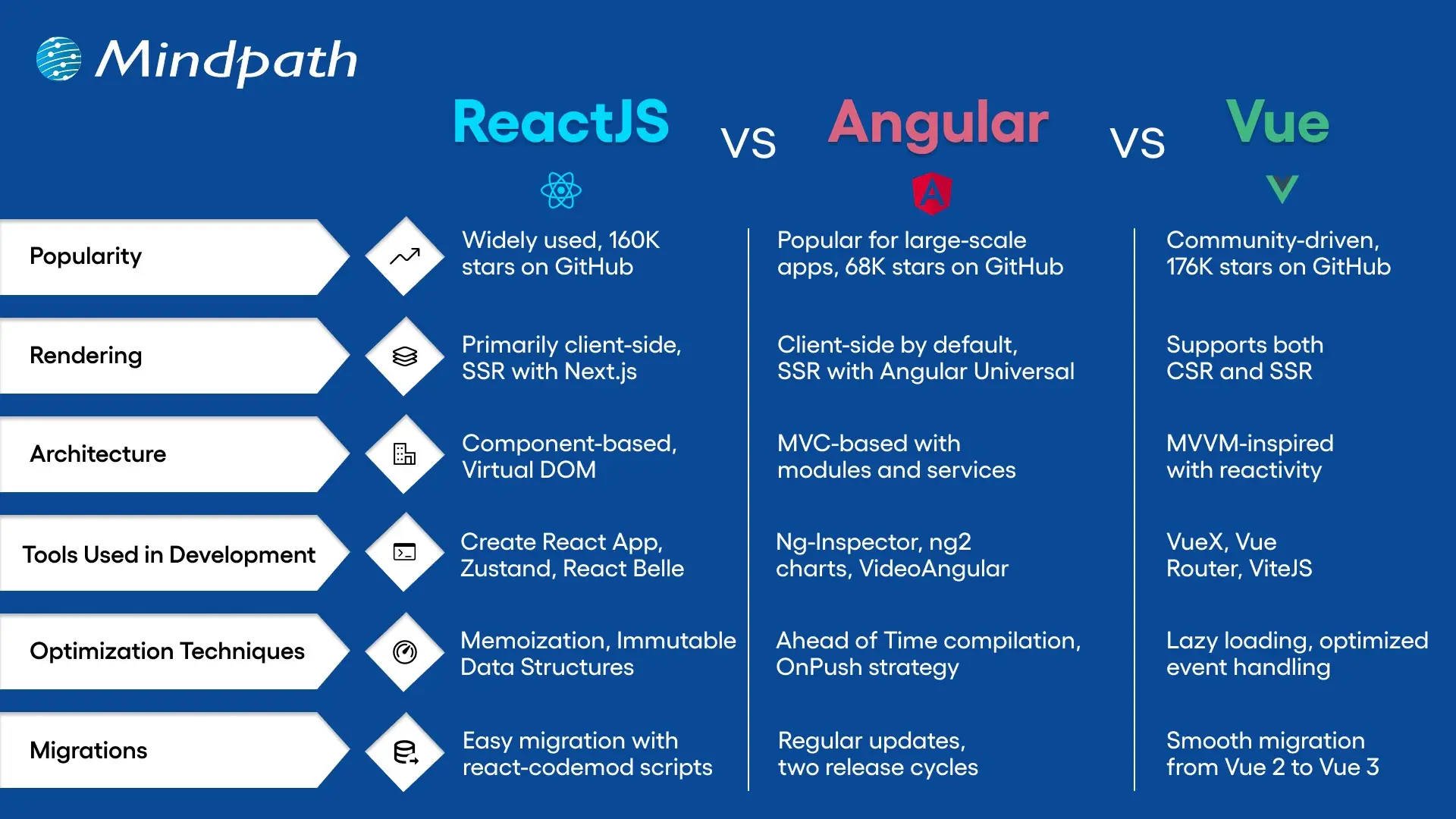
reactjs vs angular vs vue

Choose the Right Framework for your Web Applications

Selecting between Angular vs React vs Vue is based on your project and team expertise. Each offers distinct advantages for web applications today. Angular is best for big-scale, enterprise-oriented applications with a full toolkit. React provides flexibility, reusability, and an enormous ecosystem and is best for dynamic and quick-loading UI. Vue is small in size, simple to learn, and ideal for small to medium-sized applications with a nice balance of simplicity and performance. 

At Mindpath, we specialize in delivering high-performance web solutions with our ReactJS development services. Our experienced developers build scalable, responsive, and feature-rich applications tailored to your business needs. No matter if you’re upgrading an existing product or starting from scratch, our team ensures seamless development and fast delivery, backed by modern tools and proven practices. 

Frequently Asked Questions

Web application security protects websites and applications from cyber threats, data breaches, and unauthorized access, ensuring business continuity and customer trust.
Common threats include SQL injection, cross-site scripting (XSS), cross-site request forgery (CSRF), authentication attacks, insecure APIs, and broken access controls.
Businesses should implement secure coding practices, regular vulnerability testing, encryption, multi-factor authentication, and continuous security monitoring.
Security testing tools identify vulnerabilities, detect misconfigurations, and help developers resolve security issues before applications are deployed.
Yes. Regularly updating frameworks, libraries, plugins, and application components helps patch known vulnerabilities and reduces the risk of cyberattacks.

Support Is One Click Away

Featured Posts

Related Post

AI use cases 

Currently, cloud computing, data analytics, and machine learning are influencing the way companies are innovating. Do companies have the capability to leverage AI use cases to remain competitive in the market? All industries are under pressure to become efficient and customer-focused and make better decisions. Investigating these technologies stimulates novelties and challenges leaders with the need to reconsider the old methods.

With smarter systems embraced in organizations, the actual question is what AI applications are the most valuable. Is it possible to have teams that open up and simultaneously cut down on mistakes and costs? Numerous leaders are creating, trying and revising solutions every day. In this blog, we are going to examine the most successful AI business use cases that are going to transform business in 2026. So, keep reading further!

Planning to adopt AI but unsure how to turn emerging use cases into measurable business outcomes? Mindpath offers end-to-end AI development services that guide you from strategy to implementation.

Why are Businesses Turning to Artificial Intelligence?

Businesses embrace the use of artificial intelligence to operate more quickly, cheaply, and make better decisions. Numerous businesses using AI automate routine work and enhance day-to-day operations. Data insights help the leaders to influence strategy and planning. McKinsey reports that about two thirds of organizations continue to test or pilot AI with careful adoption across industries.

Careful consideration of real value AI use cases has become a priority among companies. Teams make the experiences of customers personal and their supply chains efficient through intelligent systems. According to McKinsey, 64 percent of the respondents claim that AI helps support innovation goals. Companies that pair AI with their expansion policies tend to achieve greater productivity and quicker innovations and improved competitive placements.

Not sure how to move from AI ideas to real business impact? Discover the AI roadmap to check out how structured planning turns AI use cases into scalable results.

Practical AI Use Cases Driving Business Transformation

Businesses do not consider AI as an experiment anymore, they use it to solve daily problems. The current trends of many businesses utilizing artificial intelligence are based on measurable results and quicker outcomes. AI helps make smarter decisions, smoother operations and makes industry growth scalable. Below are the use cases that demonstrate how companies can transform AI strategies into a real business impact.

1. Personalized Customer Journeys

AI assists brands to know customer preferences and behavior patterns in real time. The AI use cases in teams are used to customize recommendations and interactions. This will enhance interactivity and customer retention. The experiences offered by many companies using AI make them appear relevant and timely.

2. Predictive Equipment Monitoring

AI monitors the machine information by sensors and performance history. Such AI applications detect problems prior to failure. There is a decrease in downtime and maintenance costs incurred in business. Repairs are scheduled ahead of time and unexpected breakdowns prevented.

3. Intelligent Customer Support

AI chatbots respond to queries in real-time in digital mediums. These applications of AI decrease response time and workload. Customers are provided with regular assistance all the time. Support teams are responsive to complicated customer demands.

Looking for practical inspiration beyond theoretical AI use cases? Discover AI chatbot examples to check out how businesses are automating support, sales, and workflows.

4. Smart Workforce Planning

AI forecasts the staffing requirement based on the previous demand. AI use cases provide managers with the ability to manage workloads. Staffs are given timetables that are based on availability and capabilities. Teams do not experience staffing problems during peak times.

5. Content and Campaign Creation

AI examines trends with the purpose of recommending topical content. GenAI use cases assist teams to write articles and social posts more quickly. Marketers minimize tasks used up in repetitive work. Creative teams dwell on message and strategy.

6. Advanced User Security

AI makes authentication based on biometrics and behavioral monitoring. These AI use cases minimize fraud and unauthorized entry. Real-time systems identify the abnormal activity. The users enjoy secure and easier logins.

7. Quality Testing Automation

During development cycles, AI tests applications are tested continuously. Enterprise AI use cases enable teams to identify defects in the beginning. Products are developed to fix bugs prior to release. Enterprises provide quality software with a reduced amount of errors.

Want to know what makes AI applications smarter behind the scenes? Check out the role of vector databases in AI applications and discover how they improve relevance and decision-making.

8. Operational Intelligence Management

AI is used to keep track of systems in order to detect problems in performance. AI use cases help teams to avoid service outages. Issues are resolved faster with the use of automated alerts. Operations continue to be stable and efficient.

9. Safety and Risk Monitoring

AI examines the surroundings based on camera and live data. There are the AI use cases that detect risks in advance of events. Companies enhance the safety conformity in operations. Simultaneously, the teams react quicker to threats.

10. Conversational Product Assistance

Artificial intelligence assistants help customers in choosing products. AI agents use cases provide real-time questions and recommendations. Customers get the correct answers immediately. Brands enhance interactivity and buying assurance.

Ready to understand what powers self-learning and action-oriented AI applications? Discover the role of AI agents to learn how they manage tasks, decisions, and execution end to end.

Real-World AI Use Cases Examples

Companies have outgrown strategy and are concerned with real achievement in their daily activities. These AI use cases demonstrate how companies use intelligence to address real-world problems in various sectors. The following are illustrative of the ways AI is providing quantifiable value to real businesses.

1. Amazon suggests products about browsing and buying history, enhancing cross-selling and upselling using the AI use cases in action.

2. Netflix applies AI to recommend films and movies according to viewing history to keep the users active and decrease churn.

3. Tesla enhances car security through the Autopilot that helps them monitor the road and drivers to avoid collisions.

3. Apple makes iPhones secure using Face ID which offers quick and smooth authentication but ensures sensitive user data remains intact.

4. Walmart trains new workers with AI, which guarantees consistency in training and leaves managers to do valuable work.

5. Coca-Cola manages logistics and inventory through AI to enhance the efficiency of the supply chain and minimize operational expenses.

6. IBM uses Robotic Process Automation on routine work, enhancing precision and allowing workers to undertake high-value tasks.

7. L’Oréal applies conversational AI to provide individual beauty tips and recommendations, which enhances engagement and purchases.

Wondering what separates traditional automation from true AI-driven transformation? Learn about AI models to check out how they power modern enterprise use cases.

Ready to Transform Your Business with AI?

AI is reshaping how companies operate, improve efficiency, and engage customers. Practical AI use cases help businesses automate tasks, enhance decision-making, and boost innovation. From personalized experiences to predictive maintenance, AI is driving measurable value. Companies adopting these technologies can grow faster, reduce costs, and stay ahead in competitive markets while building smarter and scalable operations.

At Mindpath, we offer expert AI development services to help businesses implement these solutions. Our team builds custom AI systems, chatbots, and predictive tools that fit your operations. With Mindpath, companies using artificial intelligence can automate workflows, personalize customer experiences, and improve efficiency. We guide businesses to apply AI effectively and achieve real growth through smart technology.

FAQs

1. What are common AI use cases in business?

Artificial intelligence is used to automate work, assess information, and create better customer experiences. There are numerous applications of AI use cases in many businesses aimed at efficiency. Predictive analytics, chatbots, and recommendation engines are commonly used.

2. How do businesses identify the right AI use cases?

Begin with redundant operations or data-intensive processes that reduce the speed of teams. Analyze the areas that businesses using artificial intelligence achieve the best outcomes. Focus on the high-value areas in accordance to the goals.

3. Will AI replace human jobs in companies?

AI does the routine work and human beings concentrate on strategy and creativity. AI in real life is not a substitute, but a partner. Reskilling will be fundamental due to its increasing adoption.

4. What industries lead in adopting AI technologies?

AI is applied in finance, healthcare and retail to make predictions, analyze and recommend. Enterprise AI use cases are effective in boosting efficiency and customer experience. Every industry implements AI to address certain issues.

5. How can small businesses benefit from AI adoption?

AI schedules, reports and supports small teams automatically. Companies using AI are able to conserve time and minimize errors. Smart tools allow small businesses to compete better.

Custom web application development

A growing business often reaches a point where off-the-shelf solutions no longer match its unique needs. Right? This is where custom web application development comes in. It gives you the web applications that work exactly the way you want them to, based on your specific requirements. Think about how much easier your daily operations would be if every feature were custom-made based solely on how your team works day to day, rather than trying to adapt to a generic application. It happens when technology becomes more than just a tool or a utility and partners with you to scale with your business.

Over time, certain changes in daily operations start to hint that your business might benefit from such a tailored solution. While these changes often seem subtle, they show up as your team performs operations, handles data, or relates to customers. When the shifts appear, it is highly likely that operational efficiency, productivity, or growth will be impacted. Understanding these signals can help you determine the proper time to invest in a strategy that is specifically built to suit the needs of the business.

Every business challenge needs a custom solution. Look how Mindpath’s custom web app development services resolve the issues and support businesses to convert unique needs into powerful digital tools.

What are Custom Web Applications?

Custom web application development for business means you’re building software that is specific to a business’s needs. This means instead of general tools that are often not specific to the goal of the software, you can tailor the application to a business’s workflows and goals, thus providing better efficiency and customer experience. In short, a custom web application for business will be able to manage data, create automation, provide reporting, and centralize operations. This process will result in a secure, scalable solution that supports the overall growth of the business.

Developers choose programming languages, frameworks, and tools relevant to particular project requirements. They communicate with the business to understand the challenges while integrating within the existing systems. During the web application development, the team regularly checks for progress and verifies if everything is aligned, keeping the cost, time, and risk to an acceptable level. The result is a working, well-designed, reliable application that the business finds intuitive, enhances the business, and can adapt as the business grows.

Benefits of Custom Web Application Development

Knowing the custom web application benefits can help you understand how the proper solution can have an impact on how you work. When considering why to build a custom web application, it is usually due to the fact that it can fit your precise requirements, allow you to work more efficiently, and facilitate growth. It is a strategic investment that will provide a return reflecting your investment and your growth aspirations.

Benefits of Custom Web Application Development

1. Built for Your Business Goals

When you use Custom web application development, you have every feature custom development to suit your needs. This makes integrating workflows easier and an easier experience for your employees.

2. Cost-Effective in the Long Run

A custom solution takes out the licensing fees and unnecessary features, which will save you in the long run. You can also reduce some infrastructure and hardware costs if you are going to outsource the development, too.

3. Designed to Reflect Your Brand

Custom web app development allows you to create every aspect of the application, to your brand’s identity. It can give your application a customized, professional, and unique identity that users will definitely recognize.

4. Flexible and Scalable for Growth

Custom-built applications will grow with your business and meet new demands. You will be able to add new features, accommodate increased traffic and usage, and still have a smooth performance.

5. Stronger Security Measures

Security is a key feature of Custom web application development, ensuring that your business is safe from common cyber threats. Custom apps will be fun to breach and take over than commercial apps found on the market.

6. Easy Integration with Existing Systems

Custom web applications will integrate easily with your current systems and databases. This allows you to keep data synchronized, accurate, and consistent across all platforms.

Choosing a custom web application is a strategic business decision! Discover web development trends to ensure your development strategy aligns with current and future digital demands.

10 Signs Your Business Needs a Custom Web Application

As businesses change, many times their needs exceed what generic software can deliver. Knowing the signs that you need a custom web application will allow you to reduce the damage that can happen before inefficiencies grind your business down.

10 Signs Your Business Needs a Custom Web Application

1. Struggling With Too Many Tools

Switching between spreadsheets, emails, and multiple apps slows work and causes mistakes. A custom web app centralizes your operations in one platform for better efficiency.

2. Current Software Limits Your Work

Generic software forces you to adjust your process to fit its features. Custom web application development creates solutions that match your exact workflows.

3. Security Risks are Growing

Using outdated systems leaves sensitive data exposed. A custom web app includes strong security controls, encryption, and adheres to all industry standards.

4. Your Systems Can’t Scale

Organizations evolve. As your business grows, so should your tools increase their users, data, and functionality. Custom software is built to scale without performance issues.

5. Customers Face a Poor Experience

Using slow, outdated, or limited platforms can leave users frustrated. A custom web app will provide users with modern interfaces, fast service, and customized experiences.

6. Reporting Takes Too Much Time

If your reporting is done manually, or it takes too long to collect and analyze, it will limit your decision-making. Custom web apps will provide real-time dashboards and allow for instant self-serve reporting.

7. Too Much Manual Work

When staff are tied up with repetitive data entry or repetitive tasks, it is hard to be productive. A custom application can be built with automation features to allow staff to concentrate on high-value opportunities or higher-skilled work.

8. Limited Access Outside the Office

If your employees can’t easily access your systems while off-site or, even worse, don’t have access to them at all, your flexibility is limited. A custom web application can be secured and hosted in the cloud, allowing staff to work from anywhere.

9. Competitors Are Moving Ahead Digitally

If you’re used to out-of-date tools and systems, keeping up will mostly be impossible. Custom web application development will give you the opportunity to develop useful features that are unique to your organization.

10. Technology Can’t Keep Up with Change

If your business pivots, expands, or introduces new services, the old systems won’t accommodate this change. Custom applications allow you to adapt to these opportunities, adding integrations, and are designed with flexibility.

Wondering what comes next after deciding to build a custom web application? Explore the web app development roadmap to gain clarity on development stages, timelines, and technology choices.

Ready to Build a Solution That Fits Your Business?

A growing business needs tools that adapt to its pace, processes, and vision. Custom web application development delivers tailored solutions that improve efficiency, strengthen security, and enhance customer experience. Recognizing the signs early allows you to invest in a platform that aligns perfectly with your goals and supports sustainable growth.

At Mindpath, our Custom web application development services create secure, scalable, and user-friendly platforms that integrate seamlessly with your operations. We focus on understanding your unique workflows and delivering features designed to simplify tasks, automate processes, and empower your team. The result is technology that becomes a true partner in your business journey.

full stack nodejs

Companies are now seeking scalable and robust applications, which can meet both years of functional performance and user expectations. That’s when full-stack Node.js development comes into play, uniting the power of frontend and backend within a single environment. It allows developers to build faster and smarter while creating applications to remain adaptable as the business continues to grow.

In this way, constructing end-to-end solutions is more fluid and intelligent. With cohesive databases, APIs, and user interfaces integrating and interfacing, developers can automate some of the hassle proactively. Understanding full-stack Node.js ultimately gives developers an advantage to think forward as technology grows and gives organizations tangible opportunities to grow with applications that perform and scale easily. So, let’s dive in to know how this expertise truly makes a difference.

Want to build an advanced application without compromising performance? At Mindpath, our full-stack development services will help you provide the best solutions, handling both front-end and back-end with efficiency.

Understanding the Fundamentals of Full-Stack Development

Full-stack development means developing on the front end and back end of a web application. The front end refers to all the things that the user responds to and interacts with, such as buttons, layouts, designs, etc. The back end refers to all of the things that run in the background, like databases, servers, etc., and all the logic that makes it run smoothly, working together.

A full-stack developer has the capability to deal with both sides. They are capable of building UX and the technology that serves the app. This gives them agile skills that allow them to build comprehensive applications entirely from front to back.

Understanding the Basics of Node.js

Node.js is a platform that allows you to run JavaScript code in a JavaScript runtime outside of the browser. It is built on Google’s V8 engine, which is extremely fast and built to be efficient. Node.js allows developers to write server-side applications using the same exact language as for the front end, making development and management easier and smoother.

An advantage of Node.js is that it operates asynchronously, which allows tasks to not have to wait for one another to complete, meaning that applications can handle multiple requests at once. Because of this, the use of full-stack Node.js is quickly becoming a good choice when building scalable, real-time, and modern applications.

The success of using Node.js in full-stack development depends on hiring the best developer. Discover the key Factors to Consider while Hiring Node.js Developers.

Why is Node.js Important for Full-Stack Development?

Utilizing Node.js full-stack technology is an impressive approach to developing a complete web application. Here are reasons that Node.js is a valuable technology option in the full-stack.

Importance of Node.js for Full-Stack Development

1. High Performance Delivery

Node.js utilizes a non-blocking I/O hardware model that can handle hundreds or even thousands of requests simultaneously, providing faster response times and greater user-specific.

2. Cross-Platform Power

With the Node.js full stack, developers can write mobile and desktop apps to run on Windows, macOS, Linux, and more. By relying on a single JavaScript code base, developers can save time and effort writing for multiple platforms.

3. Microservice Architecture Made Easy

Full-stack Node allows users to break one larger application down to multiple smaller independent services using infrastructure that is easier to work with. This approach lets developers build faster, stay flexible, and rely on proven solutions.

4. Scalable Solution

Full-stack Node.js is used by major players like Walmart, Uber, and Trello to handle millions of users. It helps to lower load time significantly, and it ensures your applications will scale seamlessly, as your demands increase.

5. Real-Time Advantage

When it comes to applications that leverage chat, live streaming, food delivery, or payments, Node.js full-stack is the way to go. It seamlessly provides real-time updates to keep the user engaged and connected.

Key Steps to Use Node.js in Full-Stack Development

A full-stack Node.js developer is involved in both the front end and the back end of web application development and will work to build complete web applications. Below is a synopsis of the primary steps to utilize Node.js in full-stack development that is easy and productive.

Key Steps to Use nodejs in full stack development

1. Set Up the Development Environment

To begin your application-building experience, you will need to install Node.js and npm (Node Package Manager). These tools will allow you to execute JavaScript beyond the browser, and they will also help manage libraries with ease. Verify the setup by checking versions with simple commands in your terminal.

2. Initialize the Project

Make a new folder for your app, and use ‘npm init’ to create a ‘package.json’ file. A package.json file holds important information, such as your project name, dependencies, and scripts. It will serve as the basis for managing everything in your project.

3. Build the Server with Express.js

Install Express.js so you’ll be able to set up the backend server and handle all of the different routes. Express.js makes handling requests, responses and APIs supposedly easy. This step will ensure the backend runs appropriately with the frontend.

4. Connect to a Database

Based on your needs for this project, select a database like MongoDB or PostgreSQL. This should be paired with a Node.js library like Mongoose or Sequelize, which will allow you to connect to and perform both read and write operations on your data. At this point, you will have the ability for your application to persist and retrieve your data.

5. Design the Front-End

Build the front-end using a library such as React, Angular, or Vue. You can link the front-end through RESTful APIs or GraphQL to your Node.js back end. At this point, players will finish the bridge for a Full-stack Node.js application.

6. Manage Authentication and Security

Use libraries like Passport.js or JWT to add secure login and registration. Secure necessary paths so that any authorized user can get to those routes. You should always consider security in any Full-stack Node.js application.

7. Test and Deploy the Application

Create unit and integration tests to ensure that your application does what you intended. Deploy the application to cloud hosting solutions like Google Cloud, AWS, or Heroku. To utilize your Full-stack Node.js application’s performance tool on different scales, you should monitor its performance!

Looking to integrate AI in your Node.js projects? Explore our Ultimate Guide to Node.js Libraries for AI Integration to discover the most effective libraries for building smart, scalable, and future-ready applications.

Ready to Unlock the Power of Full-Stack Node.js?

Full-stack Node.js has proved to be a smart choice for building scalable, high-performing, and real-time applications. It unites front-end and back-end seamlessly, helping developers create complete solutions with speed and flexibility. With its ability to handle microservices, cross-platform apps, and real-time updates, it has become an essential technology for modern web development.

At Mindpath, we provide expert full-stack development services designed to match your business goals. Our skilled Node.js developers bring deep technical knowledge and practical experience to build secure, scalable, and user-friendly applications. If you are looking to transform your digital ideas into reality, hiring a Node.js expert from our team ensures growth and lasting impact.

Master full-stack development with Node.js! Its scalability, performance, and seamless frontend-backend integration.