Home

AI Solutions for Small Businesses and Startups

AI Solutions for Small Businesses and Startups

Join our Newsletter!

ai solutions for small businesses

AI solutions for small businesses help owners and startup teams automate routine work, improve customer communication, analyze business information, and create content with fewer manual steps. These solutions range from ready-to-use AI applications to custom systems integrated with a company’s existing software. The right choice depends on the business problem, available budget, team capacity, and data requirements.

Key Takeaways

  • 01
    AI solutions for small businesses can support content creation, customer service, marketing, bookkeeping, reporting, and routine workflow automation.
  • 02
    The main benefits include reduced manual effort, more consistent workflows, faster access to information, and better support for business decisions.
  • 03
    Tools such as ChatGPT, Microsoft 365 Copilot, HubSpot AI, Canva Magic Studio, and customer support platforms serve different business needs.
  • 04
    Businesses should compare features, pricing, integrations, privacy controls, and expected value before selecting an AI solution.
  • 05
    Starting with a measurable, low-risk use case helps small teams test AI, review the results, and expand adoption responsibly.

Small businesses do not need to build a complex AI system to benefit from the technology. They can begin with focused tasks such as drafting emails, organizing customer enquiries, summarizing documents, analyzing sales data, or preparing marketing content. By selecting tools that solve specific problems and measuring their results, smaller teams can evaluate AI’s value before making a larger investment.

Looking to apply AI to your business workflows? Mindpath’s AI development services can help you evaluate suitable solutions and plan an implementation aligned with your business goals.

What are AI Solutions for Small Businesses?

AI solutions for small businesses are tools and applications that use artificial intelligence to assist with specific business activities. Depending on the product, they may generate text, summarize information, answer customer questions, classify documents, analyze data, recommend actions, or automate parts of a workflow.

These solutions include ready-to-use software, AI features built into existing business platforms, and custom applications developed for particular requirements. A small retailer might use AI to prepare product descriptions, while a professional services firm could use it to summarize documents or organize client enquiries. A startup with more specialized needs might integrate an AI model with its customer relationship management system or internal knowledge base.

The objective is not to introduce AI into every process. It is to identify tasks where AI can provide practical value while maintaining appropriate human review, data protection, and quality standards. Businesses can begin with AI for customer service or other focused applications before considering more advanced implementations.

Benefits of AI Solutions for Small Businesses and Startups

Small businesses often work with limited budgets and lean teams. AI can help address some operational constraints by assisting with repetitive tasks and making business information easier to use. The actual benefits depend on the chosen tool, the process being improved, and how effectively the solution is implemented.

1. Increased Productivity

AI writing assistants, summarization tools, and workflow applications can help employees complete routine tasks with fewer manual steps. For example, a team member could use AI to prepare a first draft of a proposal, summarize a lengthy report, or organize notes from a meeting.

Employees should still review the output for accuracy and relevance. Measuring time saved and the amount of rework required can help businesses determine whether the tool improves productivity.

2. Improved Customer Engagement

AI can support customer communication by helping businesses draft personalized messages, answer common questions, summarize support conversations, and organize incoming requests. AI-enabled chatbots can also handle selected routine enquiries when connected to reliable information sources.

Businesses should make it easy for customers to reach a human representative when an issue is sensitive, complex, or outside the system’s capabilities. Customer satisfaction and resolution quality are more useful measures than automation volume alone.

3. Automation of Repetitive Tasks

AI-enabled applications can assist with tasks such as scheduling, document classification, data extraction, email drafting, and processing routine enquiries. When connected to business software, they may help coordinate multiple steps in a workflow.

Not every repetitive task requires AI. Fixed, predictable processes may be better suited to conventional automation. Businesses should choose the simplest approach that reliably addresses the problem.

4. Better-Informed Business Decisions

AI-powered analytics tools can help business owners summarize sales records, identify patterns, compare performance indicators, and prepare forecasts. These insights can support decisions about inventory, marketing campaigns, staffing, and customer retention.

AI-generated analysis should be checked against the underlying data and business context. Owners remain responsible for interpreting results and considering factors the system may not capture. Read our guide to AI decision-making use cases for related applications.

5. More Consistent Marketing and Content

AI tools can help small teams generate content outlines, prepare social media drafts, rewrite product descriptions, and adapt messages for different channels. They can also support brainstorming and editing when a business has limited in-house marketing resources.

Human review remains important for factual accuracy, brand voice, originality, and audience relevance. AI-generated content should reflect the company’s expertise and actual offerings rather than relying on generic material.

6. Support for Business Growth

As a business grows, the volume of customer enquiries, transactions, documents, and internal coordination can increase. Suitable AI tools may help a small team manage some of this additional work without immediately adding manual steps to every process.

Growth still depends on product quality, customer demand, sound operations, and effective management. AI can support these activities, but it does not guarantee revenue growth or eliminate the need for skilled employees.

For a broader view of business applications, read our article on the benefits of artificial intelligence.

11 AI Solutions Small Businesses Can Consider

The right AI tool depends on the work a business needs to improve. Some applications focus on writing and content creation, while others support customer service, marketing, accounting, analytics, or online store management. The following options reflect the tools covered in this guide; available features, product names, integrations, and plans may change over time.

Tool Primary use Potential business application What to evaluate
ChatGPT Writing, analysis, brainstorming, and general assistance Drafting emails, preparing outlines, summarizing documents, and organizing ideas Output accuracy, data handling, and suitability for the task
Microsoft 365 Copilot Assistance within supported Microsoft applications Working with documents, email, meetings, and business data Plan availability, application support, and organizational permissions
HubSpot AI Marketing, sales, and CRM assistance Supporting outreach, CRM workflows, and customer communication Existing CRM setup, feature availability, and pricing
Shopify Sidekick Assistance for Shopify merchants Supporting store-related tasks and understanding store information Shopify plan, supported capabilities, and store requirements
Grammarly Writing and communication support Reviewing grammar, clarity, tone, and professional messages Language support, integrations, and data policies
Canva Magic Studio Visual design and content creation Preparing marketing graphics, social content, and presentations Design requirements, brand consistency, and usage rights
Bookkeeping.ai Bookkeeping-related assistance Supporting transaction organization and financial workflows Accounting integrations, accuracy, and review requirements
Zendesk AI Customer service and support workflows Supporting ticket classification, responses, and service operations Support volume, integration needs, and plan availability
Tableau Pulse Business intelligence and metric insights Reviewing business performance and key indicators Data sources, analytics requirements, and licensing
Buffer Social media management Planning posts and coordinating social media activity Supported channels, scheduling needs, and available AI features
Lumen5 Video content creation Turning written material into video content Video formats, branding needs, licensing, and plan limits

1. ChatGPT

ChatGPT can assist small businesses with drafting content, brainstorming ideas, summarizing information, analyzing supported data, and preparing customer communication. For example, a business owner could use it to draft a product description, organize a meeting agenda, or create an initial response to a frequently asked question.

The tool is most useful when employees provide clear context, review the output, and adapt it to the business’s needs. Sensitive customer information and confidential company data should only be shared in accordance with the organization’s privacy requirements and the tool’s applicable data controls.

2. Microsoft 365 Copilot

Microsoft 365 Copilot brings AI assistance into supported Microsoft applications and workflows. Depending on the plan and configuration, businesses may use it to help draft documents, summarize meetings, work with email, or analyze information in supported applications.

It may be useful for small teams that already rely on Microsoft 365. Before adopting it, businesses should review licensing, supported features, data access permissions, and how the tool works with their existing documents and collaboration practices.

3. HubSpot AI

HubSpot offers AI capabilities across parts of its customer relationship management, marketing, sales, and service platform. Depending on the available features and plan, businesses can use AI assistance to support content creation, customer communication, sales workflows, and the organization of CRM information.

For a small business managing leads and customer relationships, the main consideration is how well the platform fits its current sales process. Review available integrations, automation limits, data quality requirements, and pricing before moving essential workflows into a new system.

4. Shopify Sidekick

Shopify Sidekick is an AI assistant designed for Shopify merchants. Depending on the supported capabilities, it can help store owners work with store information, understand business activity, and carry out selected store-management tasks.

An online retailer should assess whether the available features address its actual needs, such as managing product information or reviewing store performance. Verify the current availability and scope of features for the store’s plan before relying on them in daily operations.

5. Grammarly

Grammarly provides writing assistance that can help businesses improve grammar, clarity, tone, and professional communication. It may be useful when preparing proposals, customer emails, internal documents, and marketing copy.

Writing assistance can reduce editing effort, but it cannot replace subject-matter review. Employees should confirm names, figures, contractual details, and other important information before sending or publishing a document.

6. Canva Magic Studio

Canva Magic Studio provides AI-powered features for supported design and content workflows. Small businesses can use available capabilities to help prepare social media graphics, presentations, promotional materials, and other visual assets.

These tools can help teams produce initial design concepts, but the results should be checked for brand consistency, readability, factual accuracy, and appropriate use of visual assets. Important brand materials may still require review by a professional designer.

7. Bookkeeping.ai

Bookkeeping.ai is a bookkeeping-focused option to evaluate when looking for support with financial administration. Depending on its current capabilities and integrations, a tool in this category may help organize transaction information, support reconciliation workflows, or prepare financial summaries.

Financial records require a high degree of accuracy. Before adopting any bookkeeping tool, verify its supported accounting systems, data security practices, audit trail, and review process. Reconciliation results, tax-related information, and financial reports should be checked by a qualified person where appropriate.

8. Zendesk AI

Zendesk offers AI capabilities for customer service workflows. Depending on the configuration and plan, these may support ticket classification, response assistance, customer self-service, and other support operations.

Businesses with recurring customer enquiries can assess whether these features reduce manual triage and help representatives resolve cases efficiently. They should also define escalation rules for sensitive issues, complaints, and requests that require human judgment.

9. Tableau Pulse

Tableau Pulse is designed to help users engage with business metrics and data insights through supported analytics capabilities. Small businesses with organized sales, marketing, or operational data may use business intelligence tools to review performance and identify areas that need attention.

The usefulness of analytics depends on accurate data, well-defined metrics, and appropriate interpretation. Businesses should confirm that the product fits their data sources, licensing requirements, reporting needs, and level of analytical complexity.

10. Buffer

Buffer helps businesses organize and schedule social media content across supported platforms. Its available AI-assisted features may help users brainstorm ideas or prepare and adapt post drafts.

For a small marketing team, the main benefit is having a more organized publishing workflow. Content should still be reviewed for accuracy, brand voice, platform requirements, and relevance to the intended audience.

11. Lumen5

Lumen5 is a video creation platform that can help turn written material into video content using supported templates and media features. Small businesses may evaluate it when adapting blog posts, scripts, or other content into videos for marketing and communication.

Before choosing a video tool, assess the available formats, editing controls, branding options, media licensing, and export limits. Generated videos should be reviewed for visual consistency, captions, factual accuracy, and accessibility.

For more content-focused options, read our guide to generative AI tools for content creation.

How to Choose the Right AI Solution for Your Small Business

The best AI solution is not necessarily the one with the largest feature set. Small businesses should choose tools based on their most pressing needs, existing systems, budget, and ability to maintain the solution over time.

1. Identify a Specific Business Problem

Start by identifying a task that consumes time, creates avoidable errors, or delays customer service. Examples include drafting routine emails, sorting enquiries, preparing reports, or organizing product information. Define what a successful improvement would look like before choosing a tool.

2. Compare Features and Total Cost

Compare the features required for the task rather than paying for capabilities the team may not use. Consider subscription costs, usage limits, setup time, integration expenses, training, and ongoing maintenance when estimating the total cost of adoption.

3. Check Integrations and Compatibility

An AI tool is easier to adopt when it works with the software the business already uses. Check whether it integrates with existing email, accounting, CRM, e-commerce, or collaboration systems. Also consider whether information can be exported if the business changes tools later.

4. Review Privacy and Security

Understand what information the tool processes, how data is stored, who can access it, and what controls are available. Avoid entering sensitive business, financial, employee, or customer information into a service without reviewing its data handling practices and the business’s obligations.

5. Test Before Expanding

Run a small pilot with a defined workflow and a limited group of users. Compare the results with the existing process, including time required, error rates, output quality, and user experience. Expand adoption only when the results justify the cost and the risks are adequately managed.

How Small Businesses Can Implement AI Step by Step

A practical implementation process helps small teams move from experimentation to reliable use without committing to a large project too early.

1. Document the Current Workflow

Record how the task is completed today, who is involved, which systems are used, and where delays or errors occur. This provides a baseline for evaluating whether AI improves the process.

2. Select a Low-Risk Use Case

Choose a task where errors can be identified and corrected easily, such as preparing internal summaries or drafting marketing content. Keep a human reviewer involved while the team evaluates the output.

3. Configure the Tool and Set Guidelines

Define the information employees can use, the tasks the AI may support, the outputs that need review, and the situations that require escalation. Provide examples and instructions that help employees use the tool consistently.

4. Train Employees and Review Results

Show employees how to use the tool, recognize unreliable output, protect confidential information, and report problems. Collect feedback from the people using the system and compare performance with the original baseline.

5. Expand Based on Evidence

If the pilot produces meaningful improvements, consider applying the approach to similar tasks. Review the cost, accuracy, employee experience, and operational risks before expanding to more complex workflows or introducing greater automation.

Challenges of Using AI in Small Businesses

AI tools can be accessible, but adoption still involves practical considerations. Recognizing these challenges early can help small businesses select suitable applications and avoid unnecessary expense.

1. Cost and Subscription Management

Multiple subscriptions, usage-based charges, integrations, and training can increase the total cost of adoption. Businesses should review recurring expenses and confirm that the solution provides enough value to justify its ongoing cost.

2. Accuracy and Reliability

AI-generated text, analysis, or recommendations can contain errors or omit important context. Establish review procedures for customer-facing content, financial information, legal documents, and other outputs where mistakes could have significant consequences.

3. Privacy and Data Protection

Small businesses may handle confidential client records, financial information, or employee data. Review the provider’s data practices, set appropriate access controls, and ensure that employees understand what information can be entered into AI tools.

4. Employee Training and Adoption

A tool may not deliver value if employees do not understand how to use it or when to question its output. Provide practical training, clear usage guidelines, and a process for sharing feedback and resolving problems.

5. Choosing the Right Level of Automation

Not every task should be automated completely. Begin with AI assistance or draft generation when human judgment is important. Allow systems to take actions only when permissions, testing, monitoring, and recovery procedures are appropriate for the task.

The Future of AI Solutions for Small Businesses

AI tools continue to develop across content creation, analytics, customer support, workflow automation, and business software. Small businesses may increasingly encounter AI features built directly into applications they already use, reducing the need to adopt a separate tool for every task.

AI agents may also help coordinate multiple steps across connected systems, while low-code and no-code platforms can make selected workflows easier to configure. However, more advanced capabilities may introduce additional costs, integration requirements, and governance needs.

Rather than adopting technology based on predictions alone, businesses should evaluate new features against real operational needs. Tools that fit existing processes, protect business data, and deliver measurable improvements are more useful than systems selected simply because they are new.

For a related topic, read our guide to conversational AI and its role in customer communication.

Choose AI Solutions That Support Your Business Goals

AI solutions for small businesses can support everyday work across customer service, marketing, content creation, reporting, and operations. The most effective approach is to start with a clear business problem, choose a tool that fits the team’s requirements, and measure whether it improves the existing process.

As requirements become more specialized, businesses may need integrations or custom AI applications that connect their data, workflows, and existing systems. A planned approach helps teams balance potential benefits with cost, reliability, privacy, and ongoing maintenance.

Mindpath provides AI development services for businesses evaluating tailored AI solutions. Discuss your goals and technical requirements to determine whether an existing tool, an integration, or a custom application is the right fit.


Can AI Grow Your Business?

Simplify operations with practical AI solutions.

Frequently Asked Questions

AI automates repetitive tasks, improves customer support, analyzes business data, enhances marketing, and increases productivity while reducing operational costs.
AI chatbots, marketing automation, predictive analytics, CRM automation, inventory management, and AI-powered content creation are widely adopted.
Yes. Many cloud-based AI solutions offer scalable pricing, allowing small businesses to adopt AI without significant upfront investment.
Yes. AI chatbots provide instant support, answer common questions, qualify leads, and deliver personalized customer experiences around the clock.
Identify a business challenge, choose a suitable AI tool, begin with a pilot project, measure results, and expand implementation gradually.

Support Is One Click Away

Featured Posts

Related Post

Hiring NodeJS Developers
When hiring a NodeJS developer it’s essential to ensure they possess key technical skills that are fundamental to the role. Here are the core skills to look for:

1. Proficiency in JavaScript

A strong grasp of JavaScript fundamentals is crucial. This includes understanding core concepts like syntax, functions, and event handling, along with modern JavaScript features such as ES6+ (e.g., arrow functions, promises) that improve code readability and efficiency.

2. Asynchronous Programming Knowledge

NodeJS excels in handling multiple tasks concurrently, so developers need to be skilled in asynchronous programming. They should be comfortable using techniques like callbacks, promises, and async/await to perform non-blocking tasks, improving app performance.

3. Understanding of RESTful APIs

NodeJS excels in handling multiple tasks concurrently, so developers need to be skilled in asynchronous programming. They should be comfortable using techniques like callbacks, promises, and async/await to perform non-blocking tasks, improving app performance.

4. Database Handling Expertise

NodeJS developers must be familiar with various database technologies such as MongoDB, PostgreSQL, and MySQL. They should be capable of designing efficient data structures and querying the database effectively to meet the project’s data requirements.

5. Experience with Node.js Frameworks

Experience with NodeJS frameworks, like Express.js, NestJS, or Koa, is valuable. These frameworks streamline development by offering built-in solutions for routing, middleware, and handling HTTP requests, making it easier to build scalable applications.

6. Knowledge of NPM (Node Package Manager)

NPM is essential for managing third-party packages in NodeJS projects. A proficient developer should be familiar with using NPM to install and manage dependencies, ensuring the project remains organized and up-to-date with necessary tools.

7. Effective Error Handling

Proper error handling is essential for maintaining app stability. Developers should know how to catch and manage errors effectively, using techniques like try/catch blocks and logging, ensuring that the application remains reliable and easy to troubleshoot.
At Mindpath we offer a team of expert Node.js developers ready to take on your most challenging projects. With years of experience in building fast, scalable, and efficient applications, our developers specialize in leveraging Node.js to deliver top-tier web solutions. Whether it’s creating real-time applications, managing APIs, or integrating with various databases, we ensure your project is completed on time and within budget. Looking for skilled Node.js developers who can bring your ideas to life? Mindpath offers top-tier Node.js development services, ensuring high-performance, scalable, and reliable applications. Ready out now  to discuss your project needs and see how we can help you succeed!
How much does hiring a ReactJS developer cost? Learn about factors affecting rates, and how to find the best talent within your budget.
React Roadmap

React is one of the most powerful and useful JavaScript libraries that developers around the world are using to build amazing web applications. ReactJS allows developers to create fast, interactive user interfaces for websites and apps, and has even improved their workflows. When you have the intention to progress your skills or improve your existing projects, a React roadmap can help you navigate what to learn next. Rather than blindly choosing where to begin and what is most important, a roadmap allows you to advance in your learning with confidence and real intent.

React trends in 2026 are expanding forward with new capabilities such as server components, rendering methods, and development tools, to make learning React more valuable for new and expert users. Seeing how to use your time wisely and knowing what you may look at for a specific reason helps to save you time, but also helps to make modern applications. In this blog, you will discover a step-by-step process of learning, which can simplify mastering and using React in a project. Let’s get started!

If you’re planning to leverage React in your next project, our ReactJS development services can help you in creating modern, scalable web applications meeting your business goals.

Need for React Roadmap

It’s essential to have a clear learning plan when starting with React. A ReactJS roadmap for beginners allows you to learn complex subjects such as JSX, components, state, and hooks by breaking these subjects down into smaller, more manageable pieces. Having step-by-step tasks gives you a foundation and keeps a focus on what matters. Instead of doing random tutorials every day, you have a learning path that makes sense and keeps your learning organized and flowing.

With new features and developments coming in the future of React, it’s good to be prepared. Having a React developer roadmap can give you a path of what you can learn and when you can learn it. This can help you eliminate confusion and wasted time. Roadmaps can often have actual projects where you actually perform them as a learning experience. This kind of experience will only help you to grow and develop your learning experience and skills, but it will also keep you motivated because you are able to see your progress clearly on your journey!

Planning to improve user engagement and deliver smoother interactions on your platform? Learn how the benefits of ReactJS development services help businesses create more responsive apps.

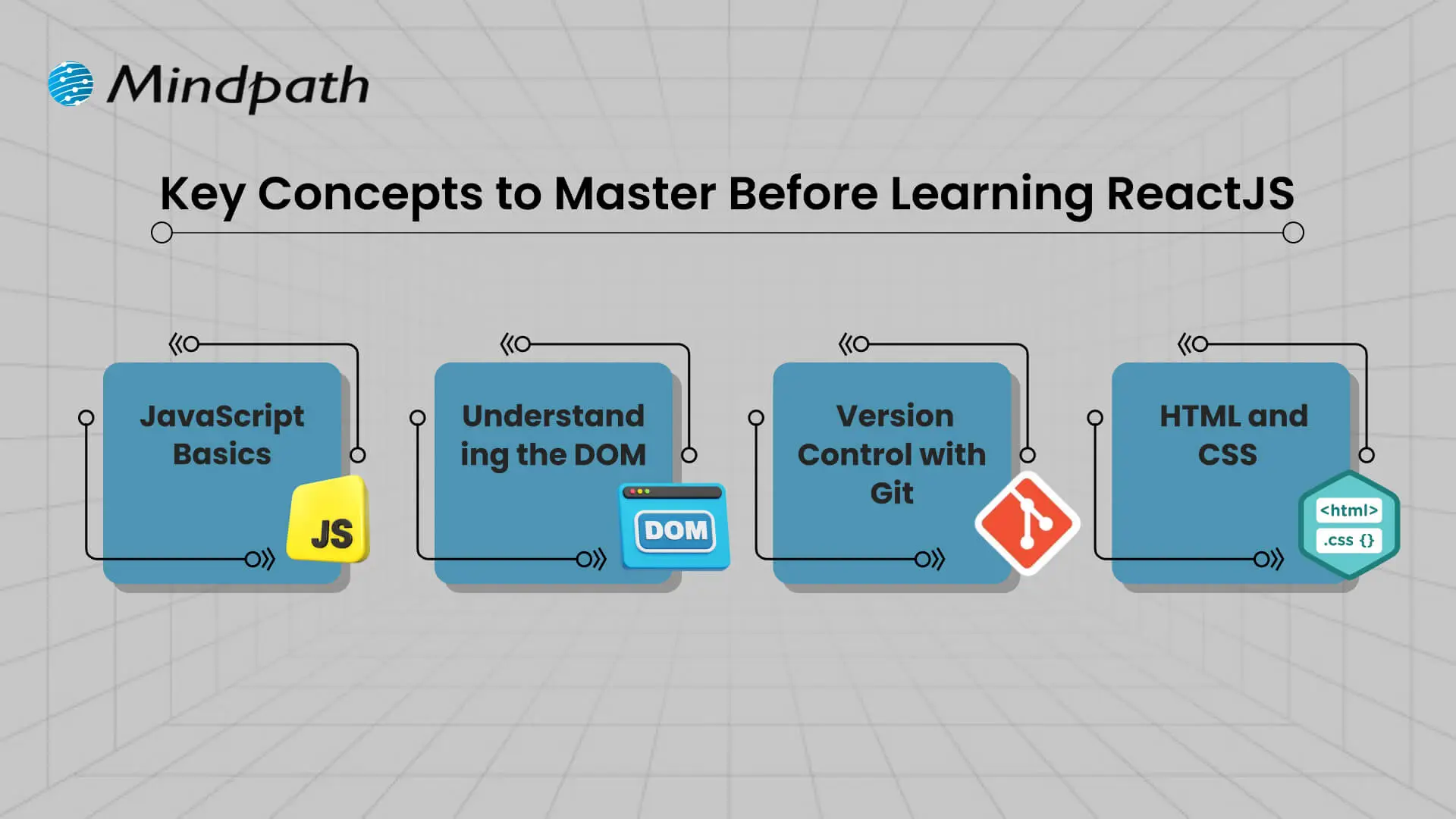
Key Concepts to Master Before Learning ReactJS

Before diving into React, it’s helpful to understand some core web development concepts that make learning smoother and more effective. These basics form the starting point of any React roadmap and give you the confidence to build with React efficiently.

Key Concepts to Master Before Learning ReactJS

1. JavaScript Basics

It is important for you to understand variables, functions, arrays, and objects in JavaScript. These are the building blocks for the logic and data in React.

2. Understanding the DOM

It is important for you to understand what the browser is doing in terms of displaying things and changing things via the DOM. React uses the DOM structure to show on the screen and make changes to it easily and efficiently.

3. Version Control with Git

It is important for you to understand how to track and manage your changes in your projects, via version control, specifically with Git. It is a vital part of a real-world React application, especially when working with a team.

4. HTML and CSS

Learning the fundamentals of HTML for structuring web pages and CSS for styling them is important. Understanding layouts related to flexbox or grids is necessary for developing responsive user interfaces in React. 

Curious to identify which technology aligns best with your development team’s strengths? Read about the practical implications of choosing React vs Vue for your business projects.

ReactJS Roadmap 2026

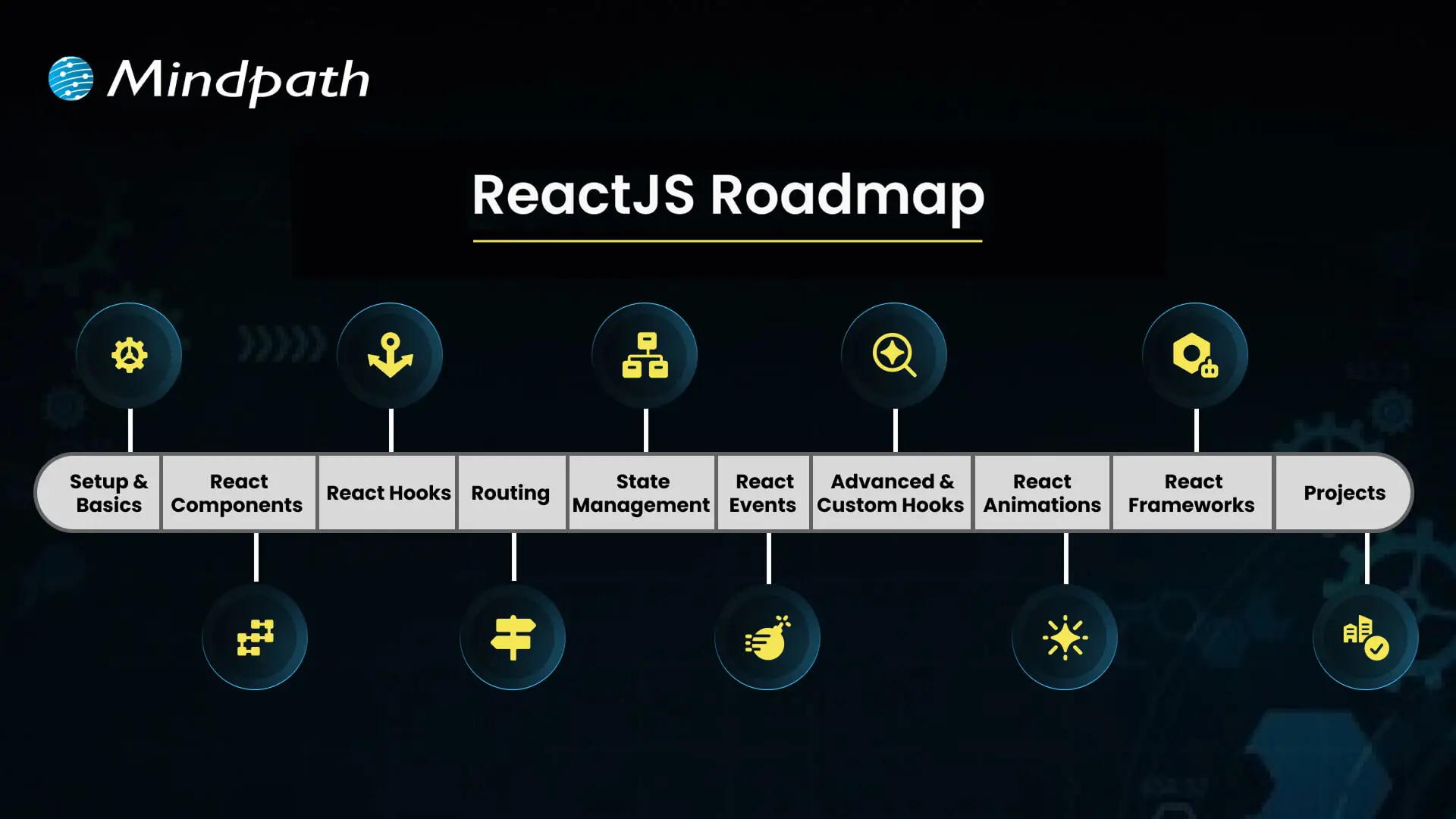
To become a skilled React developer in 2026, it’s important to follow a clear and practical learning path. This React tutorial, based on the latest ReactJS roadmap 2026, will guide you through the key topics to focus on at each stage of your journey.

ReactJS Roadmap

1. Setup & Basics

Start by setting up your environment with tools like Node.js and npm to begin working with React. Learn how JSX works and how it allows writing HTML-like code inside JavaScript, which is essential in any React roadmap.

2. React Components

Understand the structure and role of components, which form the UI of any React application. Functional components, props, and state are core parts of this architecture, making them a key focus in the front-end roadmap.

3. React Hooks

Hooks let you use features like state and lifecycle in functional components without writing classes. Mastering built-in hooks such as useState, useEffect, and useContext is crucial in any modern React Roadmap.

4. Routing

Routing allows smooth navigation between pages in single-page applications using tools like React Router. It enhances user experience by loading components based on the URL, as commonly seen in apps.

5. State Management

State holds the data that drives your UI and updates the app when changes. Techniques like React Context API and Redux help manage local and global states effectively within your project.

6. Event Handling

React handles user actions such as clicks, form submissions, and scrolls through event handlers. Learning how to work with these events improves interactivity and responsiveness in your application.

7. Advanced & Custom Hooks

Explore patterns like component composition, higher-order components, and custom hooks to reuse complex logic. These advanced topics align with current React trends and best practices.

8. React Animations

Animations create smooth transitions and improve the user experience using tools like Framer Motion or React Spring. These libraries offer a flexible way to add motion to your interface.

9. React Frameworks

Explore frameworks built on top of React, such as Next.js and Gatsby, that enhance app performance and SEO. These tools are often mentioned in ReactJS blogs for speeding up development.

10. Projects

Apply what you learn by building real-world applications that solve problems and test your skills. Project-based learning is a major part of the React tutorial approach and strengthens your understanding of concepts in the JavaScript roadmap.

Looking for ways to improve user engagement and overall app performance? Read the top reasons to choose ReactJS for app development and see why it’s preferred by many leading businesses.

Ready to Start Your React Journey?

Following a structured React roadmap helps you learn React with purpose and confidence. This blog covered everything from the basics to advanced tools and trends that matter in 2026. By focusing on key concepts, building projects, and staying updated, you’ll be better prepared to grow as a skilled React developer in today’s fast-moving web world.

This React roadmap is just the beginning. At Mindpath, we bring these React concepts to life through modern and scalable solutions built by expert developers. Our ReactJS development services align perfectly with what you’ve explored in this blog, delivering clean architecture, smart component reuse, and performance-focused interfaces that work seamlessly across devices. Let us help you turn learning into real results through expert-driven development.

Frequently Asked Questions

1. How long does it realistically take to follow a React roadmap completely?

It depends on your current skill level and daily learning commitment. Most beginners take six to twelve months to move from basics to advanced concepts. Consistent practice, building real projects, and staying updated with React trends 2026 will accelerate your progress far more than just watching tutorials passively.

2. Is JavaScript expertise necessary before starting with React?

A solid understanding of JavaScript fundamentals is strongly recommended before touching React. Concepts like functions, arrays, objects, and DOM manipulation appear constantly throughout React development. Jumping into React without this foundation often leads to confusion and slower progress, making the overall learning experience frustrating rather than rewarding.

3. What is the best way to practice React skills beyond tutorials?

Building real projects is the most effective way to solidify React knowledge. Start with simple apps like to-do lists or weather dashboards, then move toward more complex builds. Real projects force you to solve actual problems, which builds the kind of confidence and muscle memory that tutorials alone cannot provide.

4. Do developers still need to learn Redux in 2026 with React Context available?

Both still have their place depending on project scale. React Context works well for simpler state needs, while Redux handles complex, large-scale applications more predictably. Understanding both is part of a well-rounded React roadmap for 2026 and makes developers more versatile across different project types and team environments.

5. Should beginners learn Next.js alongside React or wait until React is fully mastered?

It is better to get comfortable with core React concepts first before moving to Next.js. Rushing into frameworks too early creates gaps in foundational understanding. Once routing, hooks, and state management feel natural, exploring Next.js becomes significantly easier and more productive as a next step in the learning journey.

CI/CD Pipelines

Continuous Integration and Continuous Deployment (CI/CD) pipelines have revolutionized modern DevOps best practices. In fact, they are the backbone of DevOps in recent years. CI/CD pipelines allow teams to release high-quality software faster and more reliably. This is possible because a CI/CD pipeline can automate the key stages of the software development lifecycle.

CI/CD Pipelines have empowered software teams and developers like never before. You need to have an in-depth understanding of what is CI/CD in DevOps, as it has been acting as a game-changer. In the business context, a CI/CD Pipeline allows faster product releases and creates value by reducing costs and streamlining the overall development process. It is time to explore what is CI/CD pipeline at a deeper level.

Want to reduce deployment delays and boost business efficiency? Mindpath’s DevOps Consultation and Implementation services streamline DevOps processes to deliver smooth and scalable software delivery.

CI/CD Pipeline Meaning: Continuous Integration and Continuous Deployment

CI/CD, short for Continuous Integration and Continuous Deployment, is an automated workflow that enables software teams to build, test, and release code changes rapidly and reliably. A CI/CD pipeline refers to the series of steps that automate this process, helping teams deliver new software versions while minimizing manual errors and ensuring every code change is validated before it reaches users. CI/CD pipelines are also defined as the practice that improves software delivery throughout the development lifecycle, and they have been transforming the software development process through automation.

CI/CD pipeline introduces automation throughout diverse stages such as development, testing, production, and monitoring.  Teams are in a position to develop top-quality software in a fast and secure manner. The automated testing process allows the identification of dependencies and other issues at an early stage, thereby saving valuable time later. 

Ready to maximize the impact of your CI/CD workflows? Explore the benefits of DevOps to understand how it boosts performance, reduces errors, and accelerates releases.

Mechanism of CI/CD Pipeline

Now that you know CI,CD pipeline full form, and its meaning, it is time to explore its underlying mechanism. The insight can definitely help you understand how a CI/CD pipeline works. To understand how it works, you need to bear in mind that there exist three interrelated methods, including Continuous Integration, Continuous Delivery, and Continuous Deployment.

1. Continuous Integration

Continuous Integration refers to the process of fusing changes to code into a shared repository several times a day. An automated system is responsible for building the app and running tests every time the developer works on the code. CI fundamentally encompasses automated unit tests and static code analysis.

The fundamental goal at this stage is to discover issues relating to integration. In the absence of continuous integration, bugs may surface after multiple changes have been made at the time of a major release. This makes it challenging to find as well as fix them. Continuous Integration minimizes the specific threat by performing tests of every minute change in an isolated manner. 

2. Continuous Delivery

Continuous delivery lays emphasis on the automation of the process that takes place after the code passes the CI stage. CD prepares each change for release so that the deployment can be done smoothly to production at a given time. In the case of a CD pipeline, after the verification of the build, it is moved through the staging environment as well as the pre-production environment in an automatic manner.

It is essential to bear in mind that continuous delivery does not involve the deployment of code to production in an automatic way. The codebase is kept in a deployment-ready state so that software development teams will be able to release as per their need or convenience. CD enables organizations to release software more regularly. 

3. Continuous Deployment

Continuous deployment is responsible for automatically releasing code changes to end-users after passing a series of predefined tests. These predefined tests could be integration tests that test code in a copycat environment and help to ensure code integrity.

This automated process of releasing software code changes directly to the production environment after they have passed all the necessary automated tests eliminates the need for manual intervention. It enables teams to deliver updates and new features to users quickly. It also helps to fix bugs fast. Basically, it accelerates the feedback loop with customers and minimizes the risk relating to large and infrequent releases.   

Looking to understand how CI/CD pipelines are becoming smarter and more efficient? Check out the role of AI in DevOps to learn how automation and intelligence are transforming pipeline performance and reliability.

Key Benefits of CI/CD Pipeline

Now that you know what is CI/CD pipeline it is time to look at some of its key benefits. CI/CD pipeline benefits allow software teams to develop software in an agile manner while ensuring quality. Some of the top benefits include:

1. Faster Time to Market

One of the main benefits of CI/CD pipelines is that teams are able to deliver new features and fix bugs for users faster as well as more often. In fact, this is how major tech giants have been making incremental improvements in their products and creating value for their target market audience. 

With the help of CI/CD tools in DevOps businesses are able to quickly respond to user feedback and develop quality software apps. A typical CI/CD pipeline example automates the build, test, and deployment of a web application, thereby ensuring that the software is introduced in the market in a timely manner. 

2. High-Quality Codes

While releasing software, the role of proper testing is of paramount importance. Now that you know what is CI/CD in DevOps, you can say that high priority is given to testing. A central part of any CI/CD pipeline involves a series of automated tests that are run on every build. 

Automated tests ensure that teams can perform tests in a continuous manner, and the quality of software solutions can be maintained. The automated nature of tests plays a key role in enhancing the quality of code that is generated. 

3. Shorter Feedback Loops

While talking about the CI/CD pipeline example, a thing that is non-negotiable is rapid feedback. Getting feedback early ensures that teams can save sufficient time as well as effort while developing software applications. Teams are able to give frequent updates, which helps in receiving immediate feedback from the users. It thus helps to bring about appropriate changes and increase user satisfaction. 

4. Less Downtime

Even with automated testing, there is a possibility that bugs may sometimes sneak their way through production. A key benefit of using CI/CD tools in DevOps and making regular updates is that it makes it easier to locate the cause of an issue. As the commits are smaller, teams and developers can roll back the change without having to remove necessary elements. This certainly simplifies how issues are fixed and reduces the overall downtime. 

5. Better Communication and Collaboration

One of the main benefits of CI/CD pipelines revolves around improved communication and collaboration among team members. This practice enables members to function in a cohesive manner and make changes to the code. They can also respond to the queries and comments of one another in a transparent manner. The ongoing feedback loop makes sure that there is no communication gap among the team members. The rise in effectiveness in team collaboration is reflected in the ultimate software solution. 

Wondering how CI/CD pipelines are evolving in modern DevOps practices? Discover the latest DevOps trends to learn which tools, methodologies, and innovations are driving smarter and more reliable pipelines.

Final Words

In the prevailing software development arena, the concept of CI/CD pipeline has emerged as a breath of fresh air. It has shown the power that automation can bring while developing software solutions. Some of the key benefits of CI/CD pipelines that you should be aware of include high-quality code, faster time to market, and many more. The explanation of the underlying mechanism of the CI/CD pipeline is there so that you can understand how the process works. 

Mindpath’s top-grade DevOps solutions can certainly assist modern business organizations to leverage CI/CD pipelines to the fullest. Our experts will ensure that, through continuous integration and continuous delivery, your business can develop excellent software applications that can improve user satisfaction.