Home

Skills to Look for While Hiring NodeJS Developers

Skills to Look for While Hiring NodeJS Developers

Join our Newsletter!

Hiring NodeJS Developers
When hiring a NodeJS developer it’s essential to ensure they possess key technical skills that are fundamental to the role. Here are the core skills to look for:

1. Proficiency in JavaScript

A strong grasp of JavaScript fundamentals is crucial. This includes understanding core concepts like syntax, functions, and event handling, along with modern JavaScript features such as ES6+ (e.g., arrow functions, promises) that improve code readability and efficiency.

2. Asynchronous Programming Knowledge

NodeJS excels in handling multiple tasks concurrently, so developers need to be skilled in asynchronous programming. They should be comfortable using techniques like callbacks, promises, and async/await to perform non-blocking tasks, improving app performance.

3. Understanding of RESTful APIs

NodeJS excels in handling multiple tasks concurrently, so developers need to be skilled in asynchronous programming. They should be comfortable using techniques like callbacks, promises, and async/await to perform non-blocking tasks, improving app performance.

4. Database Handling Expertise

NodeJS developers must be familiar with various database technologies such as MongoDB, PostgreSQL, and MySQL. They should be capable of designing efficient data structures and querying the database effectively to meet the project’s data requirements.

5. Experience with Node.js Frameworks

Experience with NodeJS frameworks, like Express.js, NestJS, or Koa, is valuable. These frameworks streamline development by offering built-in solutions for routing, middleware, and handling HTTP requests, making it easier to build scalable applications.

6. Knowledge of NPM (Node Package Manager)

NPM is essential for managing third-party packages in NodeJS projects. A proficient developer should be familiar with using NPM to install and manage dependencies, ensuring the project remains organized and up-to-date with necessary tools.

7. Effective Error Handling

Proper error handling is essential for maintaining app stability. Developers should know how to catch and manage errors effectively, using techniques like try/catch blocks and logging, ensuring that the application remains reliable and easy to troubleshoot.
At Mindpath we offer a team of expert Node.js developers ready to take on your most challenging projects. With years of experience in building fast, scalable, and efficient applications, our developers specialize in leveraging Node.js to deliver top-tier web solutions. Whether it’s creating real-time applications, managing APIs, or integrating with various databases, we ensure your project is completed on time and within budget. Looking for skilled Node.js developers who can bring your ideas to life? Mindpath offers top-tier Node.js development services, ensuring high-performance, scalable, and reliable applications. Ready out now  to discuss your project needs and see how we can help you succeed!

Frequently Asked Questions

Support Is One Click Away

Featured Posts

Related Post

AI integration in business

Artificial intelligence is one of the most powerful technologies for business transformation in 2026. As more examples of AI integration in business come to the limelight, business owners and managers want to discover effective ways to embrace AI. Businesses have been adopting AI not only to automate tasks but also to find new solutions to foster innovation, enhance process efficiency, and drive customer engagement.

Organizations have been using AI in different capacities for over a decade, and the success of their AI initiatives paved the path for broader adoption. You can come across different use cases of AI in the domain of business, ranging from predicting market trends to developing marketing content. Let us find out how AI use cases deliver results for businesses in the real world. 

Watching the use case of AI is not enough; want to adopt AI for your business? Mindpath, an AI Integration Services provider, has expertise in providing intelligent solutions that help businesses move towards real-world success.

Is AI Important for Businesses?

The biggest concern for any business in the existing technological landscape is about AI adoption. While AI use cases in business have been delivering promising results, business owners want to find out whether AI is necessary for their business. How will a business embrace AI? Artificial intelligence is still an elusive concept for many business owners owing to a lack of awareness. As a matter of fact, many people believe that the use of AI in business is only about automation. On the contrary, the utility of AI in business revolves around leveraging machine learning, natural language processing, and other AI technologies to streamline operations. 

You can discover numerous use cases of artificial intelligence for business that help in resolving challenges in different departments. For example, AI can enhance customer satisfaction levels, enable intelligent workflows, and reduce the time invested in repetitive tasks. The applications of AI in almost every department of an organization, such as sales, customer service, and operations, lead to results that add more value to the business.  

Unraveling the Top Use Cases of AI for Business

The advantages of AI for business in different real-world use cases encourage more companies to integrate AI into their operations. Artificial intelligence not only powers personalized ads and consumer-facing technologies like Alexa but also revolutionizes how businesses work, compete, and innovate. According to a survey by EY, almost 72% of executives have reported that employees use AI every day in the workplace for tasks like communication, software development, and data analysis (Source). The following real-world AI use cases will offer the best insights into the utility of artificial intelligence in the business landscape.

1. Enhancing Process Efficiency

Artificial intelligence helps in achieving significant improvements in the operational efficiency of businesses. AI plays a crucial role in automation repetitive tasks and optimizing resource allocation, thereby reducing waste. Artificial intelligence tools help in cutting costs and also contribute to the bottom line of a business. For instance, supply chain optimization tools can leverage AI to draw accurate predictions for demand and optimize the inventory.

Business leaders can also utilize AI business applications for the automation of document processing tasks, which are generally repetitive in nature. Automation of invoice processing and data entry offers an easy solution to enhance operational efficiency. On top of it, businesses can also enhance process efficiency through the use of AI in energy management. AI-powered solutions can analyze patterns of energy usage and automate processes like lighting, heating, and cooling according to usage trends.    

2. Improved Workplace Productivity

The automation capabilities of artificial intelligence can also serve a crucial role in enhancing workplace productivity. Employees can use AI for automation of repetitive tasks that consume a lot of time, thereby finding the time to focus on strategic tasks. At the same time, the benefits of AI in business point to how employees can make more informed decisions with AI. Virtual meeting assistants are the most promising example of embracing artificial intelligence to make informed decisions. 

AI tools can not only provide meeting transcriptions but also a summary of key points in the meetings. As a result, employees can focus on activities that bring more value to their organization. Artificial intelligence tools for task automation also serve as useful choices for the automation of project management workflows. For instance, Google Smart Compose allows employees to use AI for writing emails faster with better accuracy. Therefore, employees don’t have to waste a lot of time getting their emails right without compromising the quality of communication.

Curious about the different AI approaches companies are using today? Check out the types of AI and discover how they power automation, analytics, and customer engagement.

3. Predictive Analytics

The next most popular use case of artificial intelligence in the modern business landscape is predictive analytics. Companies can use AI for business growth by analysing historical data, identifying patterns, and predicting future outcomes. Businesses have been adopting AI to make smarter decisions, whether it is about identifying customer needs, reducing risk, or optimizing inventory. Artificial intelligence can tap into the power of advanced algorithms and real-time data streams to empower businesses with insights that help them make proactive decisions.

The utility of AI in predictive analytics not only helps in making informed decisions but also improves efficiency and empowers businesses to deliver better customer experiences. The value of AI for decision makers is visible in examples across retail, finance, and healthcare sectors. AI-powered predictive analytics can help businesses in the retail sector forecast demand and optimize their inventory to avoid running out of stock. Similarly, healthcare companies can use AI predictive analytics to evaluate patient history and determine the risk of diseases.       

4. Content and Product Development

Artificial intelligence gained significant popularity owing to the arrival of generative AI tools. One of the most notable use cases of generative AI is content development, which can help businesses in many ways. The curiosity to learn how businesses use AI will also point to how artificial intelligence can help in generating content, product designs, and functional prototypes for product development. As a matter of fact, many businesses already use generative AI in marketing, product innovation, and software development. 

The use cases of AI in marketing content generation involve creating blog posts, personalized emails, ad copies, and product descriptions. Businesses can also create custom training content and simulations with the help of generative AI. Artificial intelligence also provides a new direction for approaches to creating e-commerce product content based on customer behavior trends. On top of it, generative AI can offer product ideas, creative concepts, and UI mockups according to user instructions.

Want to accelerate content production and streamline coding tasks in your business? Discover generative AI tools for content creation and code creation to learn how they boost efficiency and creativity.

5. New Benchmarks of Security

The biggest impact of artificial intelligence in business is visible in the domain of cybersecurity. The advantages of AI integration in business can help in fighting against emerging security threats. Artificial intelligence can serve as a protective layer for businesses by improving threat detection capabilities with seamless analysis of datasets to recognize potential anomalies and risks of breaches. The proactive approach to cybersecurity with AI empowers businesses to respond quickly and address risks before they inflict damage. 

Artificial intelligence can not only enhance detection but also facilitate automation of incident response and alerting mechanisms. As a result, businesses can reduce the burden on security teams by initiating countermeasures instantly. AI-powered simulations can also help businesses strengthen cybersecurity training and enhance their overall resilience. For instance, AI tools can detect fraudulent transactions and anomalies in user behavior for better security in finance. 

6. Talent Acquisition and Management

Managing talent is one of the formidable challenges for business owners. Starting from the process of attracting talent to retention, businesses can use AI to empower their workforce with skilled resources. The different examples of AI implementation in companies showcase the automation capabilities of AI. Businesses can use AI-powered automation in different steps of the talent management cycle. 

The use cases of AI for talent acquisition point to the use of AI tools for resume and portfolio analysis. In addition, recruiters can also use AI to review video interviews of candidates. The comprehensive assessment with AI helps in identifying the right talent for a company. Artificial intelligence also helps in boosting employee retention, as evident in the example of LinkedIn Talent Insights. It uses AI to offer accurate predictions for employee attrition rates and also offers recommendations to enhance employee retention.

Planning to integrate AI into your business strategy but unsure where to start? Discover AI solutions for small businesses and startups to learn how tailored technologies can deliver measurable results.

Want to Harness AI to Drive Real Business Growth?

The applications of artificial intelligence in the business landscape have helped business owners discover new perspectives on efficiency and innovation. As the demand for digital transformation with AI continues to gain momentum, more businesses will join the bandwagon. However, professional assistance can help a business identify the ideal strategic approach to leverage AI for its operations.

We at Mindpath have helped thousands of clients with AI adoption in different business departments. Our experts specialize in end-to-end AI solutions, and the experience of serving a wide range of clients enhances our strengths. We are committed to understanding the client’s requirements and vision to help them achieve the best outcomes for their business with AI. Consult with our experts and find the ideal use cases to embrace AI in your business right now.

Website Development Cost

It may sound easy to create a site in 2026, yet one must be very careful with planning. The web development cost is a topic that can cause a real debate between business owners and project teams. People desire to make a good investment. Although a budget is significant, the ultimate outcomes must be considered first. The overall cost is dependent on the design, features, and future needs. Having experience in a tech-expert company, we observe that people tend to stop at this point and reconsider themselves. Such a break enables them to become wiser with digital decisions.

In fact, knowing the cost is not just a matter of money. It is a matter of aligning your idea with the appropriate solution. Companies nowadays require speedy websites that can develop without any problems and remain safe. The prices are being influenced by these demands gradually. However, the latter still goes on changing because of new tools and trends. This puts cost planning at a higher level than before. So, in this blog, we explain what shapes website development prices in 2026 and how to plan them clearly.

Want a website that works effectively for your business without exceeding your budget? Mindpath’s web development services create tailored solutions that are reliable, scalable, and affordable.

Why Cost Matters While Creating a Website?

Cost planning determines the degree of strength of your website, and it influences all decisions. Website development cost directly dictates the quality of design, functionality, security, and user experience, and ultimately your site’s conversion rate. An effective budget allows one to employ talented professionals and prevent poor growth. It also helps avoid hidden fees and expensive redesigns caused by poor performance or technical downtime. Webpage development cost also includes hosting, tools, and testing. A combination of these components forms a site that can support business objectives and generate long-term value.

The site also requires routine maintenance to continue to be useful after launching. Web development service costs involve updates, security checks, and performance improvements. These measures make the site stable and reliable. A preplanned budget also regulates the alterations in features and averts unnecessary costs. You can monitor the leads and sales with proper cost planning. This enables the site to be a powerful, quantifiable business resource.

Want to avoid unexpected website development costs? Check out the web development roadmap to understand project milestones and cost drivers.

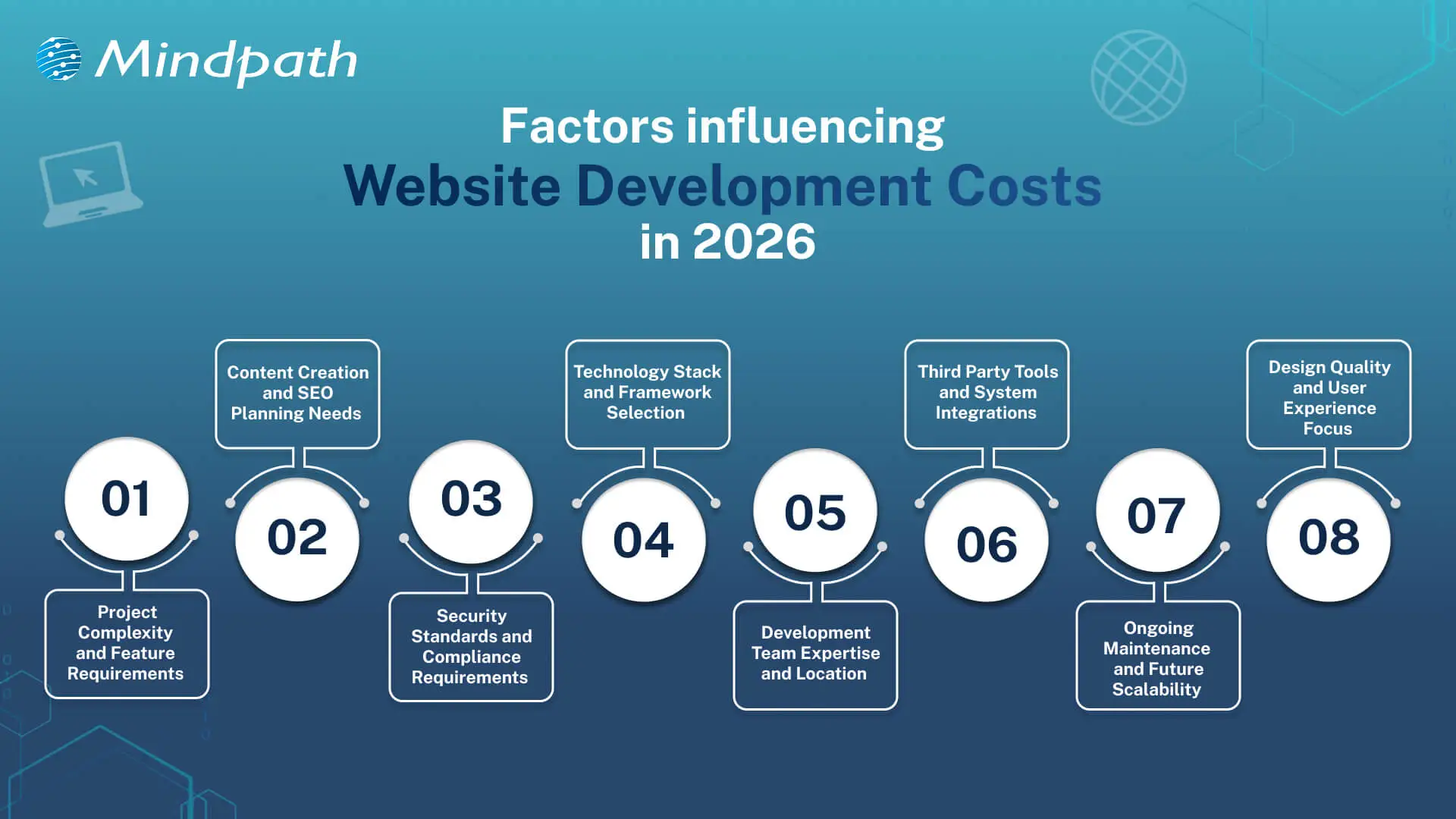
Factors Influencing Website Development Costs in 2026

Website expenses in 2026 are based on a combination of various intertwined aspects that will inform the course of planning decisions. Webpage development and website design cost makes businesses understand how to establish a realistic budget early.

Factors Influencing Website Development Costs in 2026

1. Project Complexity

Basic websites are inexpensive and will satisfy fundamental requirements. The inclusion of more specific features like e-commerce or user accounts complicates and adds more planning. All these additions increase the average website development costs.

2. Content and SEO Requirements

Excellent content is advantageous to the user and the search engines. Establishing the SEO takes serious planning and technical effort. This increases visibility but increases the budget.

3. Security and Compliance Needs

Secure websites save the data of users and maintain the reputations of the business. Compliance regulations impose additional development phases, which introduce relevant layers of costs.

4. Technology Stack Choices

The contemporary tools determine the strength of a web site. It is time-consuming to work with AI, AR, and sophisticated frameworks. This option has a powerful influence on the website development costs.

Curious why some web projects cost more than others? Discover web development tools and see how technology choices influence productivity and expenses.

5. Development Team and Location

Expert teams provide scalable and stable websites. Compared to freelancers, agencies are more expensive due to their wider knowledge. Location is also a factor that affects rates and total expenditure.

6. Third Party Integrations

Websites usually have a connection with payment or CRM tools. Additional setup and testing time is added in every connection. An increase in integrations implies increased development effort.

7. Maintenance and Scalability

Websites need updates after launch. Hosting, fixes, and growth planning require steady investment. These costs support long-term performance and ROI.

8. Design and User Experience

Good design improves trust and user flow. Custom layouts need research and testing across devices. This work increases value and raises the average website development cost.

Looking to understand how emerging trends affect website development costs? Check out the latest web development trends to see how new technologies and practices influence project scope.

Understanding Website Development Costs

Website development costs depend on planning, technology, and business goals working together. Understanding these costs helps businesses make smart decisions before starting development.

1. Enterprise Website

The cost usually starts from £50,000 and can exceed £150,000 based on scale. Pricing increases due to security, integrations, and multi-language requirements.

2. Single-Page Website

Costs typically range between £250 and £800 for a basic setup. The price stays low because development time and features remain minimal.

3. Custom Web Platform

These platforms cost between £15,000 and £75,000 or more depending on logic. Higher costs reflect custom development, testing, and long build cycles.

Curious how web development costs compare to full-scale software projects? Discover software development cost insights to understand long-term budgeting and investment planning.

4. Small Business Website

The average cost falls between £800 and £3,000 for 5 to 10 pages. Pricing depends on CMS use, design level, and basic SEO setup.

5. E-Commerce Website

Costs usually start around £2,500 and can exceed £20,000. The final price depends on products, payment systems, and inventory complexity.

6. Advanced Brochure Website

Pricing ranges from £3,000 to £8,000 for custom design builds. Costs rise due to animations, performance hosting, and lead-focused features.

Planning your web development budget more effectively? Explore web development technologies to see how choosing the right stack affects cost and performance.

Ready to Plan Your Website Budget with Confidence?

Planning a website in 2026 needs clarity and smart thinking. Costs connect with design, features, security, and growth plans. Website development costs change with every decision you make. Clear planning avoids confusion later. It also helps balance value and spending. When you understand web development pricing, you invest with purpose and confidence.

Mindpath web development services focus on clarity, quality, and growth. Our teams plan projects with clear goals and transparent charges for website development. We build secure, scalable websites that support real business needs. Every solution balances performance and cost. With Mindpath, planning stays simple and results stay strong.

React state management

React has no doubt changed the way modern web applications are created. This library has become beneficial for many high-profile companies in making their web applications efficient and user-centric. Because of its features like UI elements and component-based architecture, it handles updates effortlessly. As per the trends, React usage has significantly increased, with around 100,000 new websites for better interfaces. But if the complexities of your app grow over time, it might be challenging for you to manage the state.

Key Takeaways

  • 01
    React state management helps developers manage, share, and update dynamic data across React applications.
  • 02
    React state can be global, local, derived, or server state, depending on how and where the data is used.
  • 03
    Built-in tools such as useState and useReducer can handle many local and complex state management requirements.
  • 04
    External libraries such as Redux can help manage complex global state requirements in larger React applications.
  • 05
    Keeping state simple, splitting it logically, managing side effects, and using debugging tools can improve maintainability and scalability.

So, in this blog, we will go through an in-depth analysis of React state management. No matter if you are a beginner dealing with the struggles of uplifting your state or an experienced developer who is curious about Context API, this guide includes everything for your reference.

Want a faster, smarter web app that boosts your business? At Mindpath, we offer expert ReactJS development services to build high-performance, scalable apps tailored to your needs.

What Does ReactJS State Interprets?

A state is an essential object present in React that involves significant data related to a component. It prominently represents the components that might change with time because of some critical events. Unlike props that pass down to child components from parents, the state remains mutable, and you can manage it within the component only.

ReactJS state is a crucial fundamental for giving rise to interactive React components while enabling seamless UI whenever your data changes or adopts certain updates. State is effectively used for conditionally rendering elements or to update form inputs. Further, it traces user interactions like inputs and clicks and stores API responses. Here, you can go through some key characteristics of the state.

1. Enables Re-renders

React is capable of re-rendering a component automatically when it sees changes in the state. This ensures your UI is in sync with the core data.

2. Local Scope

State is generally local to a component, but it can be easily shared with other components with the use of props.

3. Fixed Updates

It is necessary to update the state with the usage of dedicated methods like setState or the useState hook. State objects directly mutating can lead to unpredictable attributes and bugs.

Curious about the latest trends shaping React development and how they impact your projects? Explore our in-depth guide on ReactJS trends to stay ahead and make informed decisions.

The Core Difference between State and Props

Before we move forward with state management in React, it is necessary to understand how state differs from props.

  • Props are generally read-only values that pass down from parent to child components.
  • On the other hand, the state is managed within a component and can differ over time.

While props help in passing the data down the component tree, state manages the dynamic data. Moreover, issues arise when the state needs to be shared over multiple components. This leads developers to review how it manages and structures the state precisely.

What Does State Management in React Define?

State management in React refers to how the data or state is managed, shared, or updated in your React app. Further, state management ReactJS ensures that all the valuable components are in sync with the app’s state. This assures the developers of leveraging a seamless user experience.

  • You need state management to handle dynamic data and critical UI changes.
  • This is also valuable to share your data between the components.
  • It ensures the app’s maintainability and scalability.
  • Further, it simplifies the debugging and developmental approaches.
Looking for ways to optimize your React development workflow? Explore how leveraging ReactJS and AI can transform your frontend development in our detailed guide.

What are the Essential Types of ReactJS State?

Not all states available in a React application serve the same purpose. So, it is necessary for you to understand the type of ReactJS state to choose the right one for your management strategies. This will also help you prevent unnecessary complexities when your application grows.

1. Global State

It is shared over multiple components and highlights the data that needs to be accessed throughout the application. Some prominent examples include language preferences, user data, and much more. Further, handling the global state efficiently is viable for large-scale apps, as poor management can ruin your performance.

2. Local State

This state is famous among developers as it helps them manage UI-centric aspects. Moreover, this includes handling input values. You can discover its utmost potential by using React hooks. This keeps the components intact while keeping the handling seamless.

3. Derived State

This state management React is not stored directly, but you can calculate it from the existing state or props. While it minimizes duplication, overusing this state can give rise to severe risks. Further, it makes the debugging practices more challenging.

4. Server State

This state refers to data from external APIs like reports or dashboards. Unlike UI state, server state needs precise handling of loading states along with proper synchronization and caching.

What are Some of the Best Tools for React State Management?

React includes a series of native tools that can be the legit foundation for your app’s state management. Here, you can go through the list of eminent tools that major developers use.

1. UseState

UseState is the simplest way of state management in React. It is highly beneficial for straightforward use cases where data changes within a component locally. However, with the growth of your application, handling several UseState hooks through multiple components can be challenging for you.

2. UseReducer

useReducer can offer you a seamless structure when the state logic invites a series of complexities. It gives rise to a single source of truth and predictable state transitions. Further, your complex workflows can adopt quick and impactful debugging features. useReducer is exceptionally beneficial for multi-step processes, forms, and states that heavily depend on previous values.

External Libraries for Modern React State Management

With the scaling up of applications, developers usually turn to external libraries to handle complex state requirements more efficiently. So, out of all eminent options, Redux has turned out to be a beneficial choice as it handles global state in React apps. Apart from this, it offers a centralized store and predictable state updates. If you want to build large-scale applications, Redux can be a perfect match.

Developers in the recent scenario have shifted their interest towards adopting flexible solutions that can reduce risks while encouraging scalable features. So, some alternatives that you can prefer instead of Redux include state containers and hook-based global state solutions. However, picking the solution completely depends on your team’s experience and requirements.

Wondering how mastering React’s state management can impact your project’s growth? Exploring building scalable applications with React can provide the strategies and best practices you need.

Tips for Effective State Management in React

To be assured of seamless and valuable state management in ReactJS, you need to approach the process with the right elements. Some effective steps can help you achieve better growth while managing your state precisely.

1. Start Simple

Make sure to never over-architect your application. In fact, make sure to only store values that actually change over time in your React state. Further, your computed data should be calculated when required to avoid inefficiencies of duplication. Moreover, it can reduce the chances of inconsistent data.

2. Lift State Only When Required

You must lift the state to a common parent component only when multiple components need access to similar data.

3. Logically Split State

Instead of handling one large state object, make sure to divide the state into smaller pieces. This approach offers readability while making the updates more user-centric. Moreover, you can prevent your app from uncertain side effects.

Struggling to decide which framework to use for your next web application? Read this guide to explore how ReactJS for progressive web app development complements effective state management.

4. Maintain the Side Effects Effectively

It is useful to leverage hooks like useEffect only to maintain side effects such as API calls. So, segmenting the side effects from the state logic can assure you of clean and effective components.

5. Use Debugging Tools

To keep your React state management productive, you can leverage tools like React DevTools. This is how you can monitor and debug the changes when required.

What are Some Common Mistakes that a Developer Must Avoid in React State Management?

Experienced developers might commit some mistakes while doing React state management. For your reference, we have mentioned the major ones here.

  • Mutating the state directly instead of generating new copies.
  • Storing too much state globally.
  • Making your simple state logic heavily complex.
  • Ignoring essential performance implications.

So, being aware of such challenges can help your React applications to be extremely scalable while maintaining their performance for the user base.

Curious about how efficient ReactJS app development can improve your state management strategies? Read this in-depth guide on ReactJS app development to enhance your workflow.

Conclusion

React state management is considered to be the backbone of any successful React app. So, a thoughtful approach towards state management, React combined with the right tools, can help your app to be extremely scalable and enjoyable to work with. Organizations that want to create robust React solutions benefit from teams that understand how React works.

This is where you must prioritize partnership with experienced development partners like Mindpath. Here, the professionals can incorporate their technical aspects to keep your project unique. Further, you can customize your development process to suit your business goals.

Master state management in React with this in-depth guide. Learn about local state, global state, and third-party libraries.