Home

How Custom Mobile Application Development Drive Digital Transformation?

How Custom Mobile Application Development Drive Digital Transformation?

Join our Newsletter!

Custom mobile application development

Businesses are increasingly using digital products to improve customer experiences, streamline operations, and respond to changing market needs. Custom mobile application development supports these goals by creating applications around an organization’s specific workflows, users, and business objectives.

Key Takeaways

  • 01
    Custom mobile application development aligns app features and workflows with specific business goals.
  • 02
    Purpose-built apps can improve customer experiences, automate processes, and support data-driven decisions.
  • 03
    Integration, security, accessibility, and scalability should be considered from the planning stage.
  • 04
    Businesses should evaluate custom apps against off-the-shelf alternatives based on requirements, costs, and long-term needs.
  • 05
    Clear objectives and measurable performance indicators help assess the business value of a mobile application.

Unlike generic applications, a custom mobile app can be designed around the features, integrations, and user journeys a business needs. When planned and implemented effectively, it can help teams reduce manual work, provide more convenient services, and respond to new opportunities. This makes custom app development a potential component of a broader digital transformation strategy.

In this article, we explain how custom mobile applications support digital transformation, the business benefits they can provide, and the factors organizations should consider before investing in development.

Planning a mobile app for your business? Explore Mindpath’s custom mobile application development services to discuss a solution aligned with your business requirements.

What is Custom Mobile Application Development?

Custom mobile application development is the process of designing, building, testing, and maintaining a mobile application around an organization’s specific requirements. The app may serve customers, employees, business partners, or internal operational teams.

Development typically involves requirements analysis, user experience design, application architecture, coding, testing, deployment, and ongoing maintenance. The scope may also include integrations with existing software, identity systems, payment gateways, analytics platforms, and other business tools.

A business can work with a suitable mobile app development company to determine the right approach, technology stack, and delivery plan. The goal is to create an application that addresses real user needs while remaining maintainable, secure, and adaptable as requirements change.

How Does Custom Mobile Application Development Drive Digital Transformation?

Digital transformation involves using technology to improve business processes, customer interactions, and service delivery. A custom mobile application can contribute to this transformation by connecting users with services, simplifying workflows, and making relevant information available through a convenient interface.
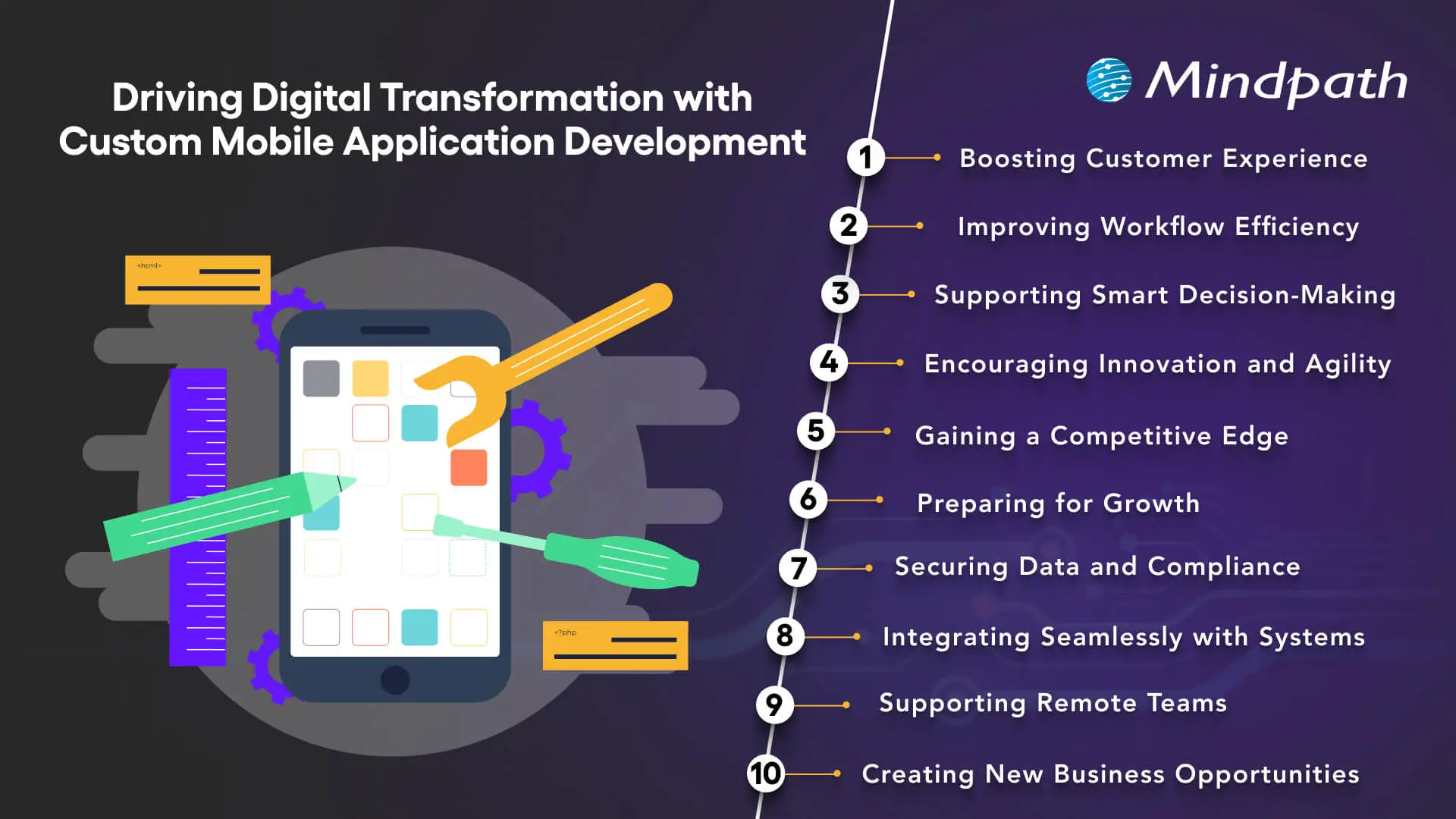
How custom mobile application development supports digital transformation

1. Improving Customer Experience

A well-designed mobile app gives customers a convenient way to access services, manage accounts, receive updates, and complete transactions. Businesses can tailor navigation, features, and communication to the needs of their audience rather than relying entirely on a generic user experience.

Features such as personalized dashboards, appointment scheduling, order tracking, and relevant notifications can reduce friction in common customer journeys. Usability testing and customer feedback help businesses identify which features provide genuine value.

2. Streamlining Workflow Efficiency

Custom applications can simplify operational processes by replacing repetitive manual activities with structured digital workflows. For example, employees may use an app to submit requests, update records, access task assignments, or capture information directly from the field.

When these workflows are designed around existing business processes, they can reduce duplicate data entry and improve consistency. Businesses should map their current processes before automating them so that unnecessary steps are not simply transferred into a new application.

3. Supporting Data-Driven Decisions

Mobile applications can collect operational and usage data that helps businesses understand how their services are performing. Depending on the application, teams may monitor completed transactions, feature adoption, customer interactions, service requests, and workflow bottlenecks.

When data is accurate and collected with appropriate consent and controls, these insights can help decision-makers identify improvement opportunities. Connecting app data to reporting or analytics systems can also provide a broader view of business performance.

Choosing the right technology matters. Review Mindpath’s guide to mobile app development technologies when evaluating the technical requirements of your application.

4. Encouraging Innovation and Agility

Custom development gives businesses greater control over how an application evolves. Teams can prioritize features based on customer feedback, test new services, and adjust workflows as operational needs change.

A modular architecture and a well-managed development process can make future updates easier to deliver. However, flexibility depends on sound technical decisions, available resources, and ongoing maintenance rather than customization alone.

5. Creating a Competitive Advantage

A mobile application can differentiate a business by making its services easier to access or by supporting workflows that competitors do not offer in the same way. Examples include specialized booking experiences, customer self-service tools, personalized service portals, and industry-specific functionality.

The strongest advantage comes from solving a meaningful customer or operational problem. Businesses should validate user needs and measure adoption instead of assuming that a larger feature set automatically creates differentiation.

6. Supporting Business Growth and Scalability

As an organization grows, its mobile application may need to support more users, new services, additional integrations, or changing data volumes. Scalability should therefore be considered during architecture and infrastructure planning.

Cloud infrastructure, modular components, appropriate database design, and performance testing can help a system accommodate changing demand. Capacity planning and monitoring remain important because scalability is not guaranteed simply by choosing a particular technology.

7. Strengthening Data Security and Compliance

Custom mobile apps can incorporate security controls suited to the organization’s data and operational requirements. Depending on the use case, these may include secure authentication, role-based access, encryption, session management, and protected API communication.

Businesses should identify applicable privacy and regulatory requirements before development begins. Security testing, dependency updates, access reviews, and incident response planning should continue after launch. Custom development provides control over implementation, but it does not automatically make an application secure or compliant.

8. Integrating With Existing Business Systems

A custom app can connect with existing business software through APIs and other supported integration methods. Depending on business needs, this may include customer relationship management platforms, enterprise resource planning systems, inventory software, payment services, or internal databases.

Well-designed integrations reduce the need to maintain separate records across disconnected systems. Before development, teams should assess API availability, data ownership, synchronization requirements, error handling, and access permissions.

The right mobile app development tools can support implementation and maintenance, but integration quality also depends on system architecture and the reliability of connected services.

9. Enabling Distributed and Remote Teams

Custom mobile applications can give employees access to approved business information and workflows while working across different locations. Field teams, service technicians, sales representatives, and remote staff may use apps to view assignments, submit updates, capture records, or coordinate with colleagues.

Mobile access should be designed with secure authentication, appropriate device permissions, and clear rules for handling company data. Offline access may also be important for employees working in areas with unreliable connectivity.

10. Creating New Digital Business Opportunities

A mobile app can support new ways of delivering and monetizing services. Depending on the business model, these may include subscriptions, premium features, digital bookings, in-app purchases, or customer self-service offerings.

Before introducing a new revenue model, businesses should validate customer demand, assess payment and platform requirements, and estimate the ongoing costs of development and support. The app should support a clear business proposition rather than add complexity without a defined purpose.

Planning your next app release? Read about mobile app development trends to assess emerging capabilities and their relevance to your product roadmap.

Custom Mobile App Development vs. Off-the-Shelf Applications

Custom development is not the right choice for every business. Off-the-shelf applications may be more practical when standard features meet existing needs, while a custom solution may be suitable when the business requires specialized workflows or deeper integration.

Evaluation factor Custom mobile application Off-the-shelf application
Features Can be designed around specific requirements. Uses features defined by the product provider.
Initial investment Often requires a larger upfront development budget. May offer lower initial costs through a subscription or license.
Implementation time Depends on scope, complexity, integrations, and testing. May be faster to deploy when requirements are already supported.
Integrations Can be planned around business systems and workflows. Depends on the integrations supported by the provider.
Maintenance The business and its development partner must plan for ongoing updates and support. The provider typically maintains the core product, subject to its service terms.
Best suited for Specialized processes, differentiated services, or requirements not met by standard products. Common business needs that existing products can address effectively.

Businesses should compare total cost of ownership, implementation effort, integration needs, flexibility, and vendor dependency before deciding. A configurable existing platform may be sufficient for some requirements, while a custom app may offer a better fit for others.

How to Plan a Successful Custom Mobile Application

A structured development process helps businesses connect technical decisions with user needs and operational goals. The following steps provide a practical starting point.

1. Define the Problem and Target Users

Identify who will use the app, what they need to accomplish, and where the current process falls short. Gather input from customers, employees, and other stakeholders to prioritize problems that matter most.

2. Prioritize Features

Separate essential features from optional enhancements. Start with a manageable scope that addresses the core user journey, then use feedback and performance data to guide later improvements.

3. Select the Right Technology Approach

Evaluate native, cross-platform, and other suitable development approaches based on performance needs, platform requirements, integrations, team capabilities, and long-term maintenance. The best choice depends on the application rather than a universal preference for one technology.

4. Plan Security and Integrations Early

Define authentication, authorization, data storage, API access, privacy requirements, and error handling before implementation. Early planning helps reduce integration problems and avoid costly changes late in development.

5. Test With Real Users

Conduct functional, usability, accessibility, security, and performance testing appropriate to the application. Pilot the app with representative users to identify problems before a wider rollout.

6. Measure Results After Launch

Monitor adoption, reliability, user feedback, and business outcomes. Use these findings to prioritize improvements and determine whether the app is meeting its intended objectives.

How to Measure the Business Impact of a Mobile App

Businesses should define success measures before development begins. The most relevant metrics depend on the application’s purpose and should be compared against a baseline where possible.

Objective Possible metric What it indicates
Improve customer experience Task completion rate, customer satisfaction, support requests Whether users can complete important activities effectively.
Increase engagement Active users, feature adoption, repeat usage Whether the app provides ongoing value to its intended audience.
Improve operational efficiency Task completion time, manual steps, error rate Whether the app improves the workflow it was designed to support.
Improve reliability Crash rate, response time, service availability Whether the application performs consistently under expected conditions.
Support business growth Conversion rate, completed transactions, cost per transaction Whether the app contributes to the intended commercial outcome.

Metrics should be interpreted in context. For example, high download numbers do not necessarily indicate sustained engagement, and lower processing time does not automatically translate into financial savings. Businesses should connect app performance to outcomes that matter to the organization.

Drive Digital Transformation With Custom Mobile App Development

Custom mobile application development can help businesses improve customer experiences, simplify operations, connect digital systems, and support new service models. Its value comes from aligning the application with a defined business need, selecting suitable technologies, and measuring outcomes after launch.

At Mindpath, we provide custom mobile application development services for businesses seeking applications tailored to their workflows and users. From planning and development to integration and ongoing improvement, the approach should focus on usability, security, maintainability, and business objectives.


Off-the-Shelf Apps Not Enough?

We build custom mobile apps around how your business runs.

Frequently Asked Questions

Custom mobile application development involves building an app specifically around a business’s goals, workflows, users, features, and integration requirements rather than using generic solutions.
Custom mobile apps can improve customer experiences, streamline internal processes, support business-specific workflows, and provide greater control over features and integrations.
They help businesses replace outdated processes, connect existing systems, improve customer interactions, introduce digital services, and create new opportunities for growth.
Yes, custom applications can be designed with scalability in mind, allowing businesses to add features, support more users, and integrate new systems as they grow.
The cost depends on features, platforms, integrations, design complexity, security requirements, development time, and the level of customization needed for the application.

Support Is One Click Away

Featured Posts

Related Post

energy efficient computing

Every application, server, database, and cloud workload uses computing resources. As businesses continue to move more of their operations online, the amount of processing power and infrastructure they rely on also grows. That makes energy use an important part of modern IT planning.

Energy-efficient computing is about getting the work done without using more computing power than necessary. That can mean optimizing an application, reducing unnecessary database processing, choosing the right cloud resources, improving server utilization, or replacing inefficient infrastructure. The goal is not simply to use less power. It is to make technology work more efficiently without compromising the performance a business depends on.

For enterprises, this matters for both operational and sustainability reasons. Better resource utilization can help control technology costs, while more efficient systems can support broader environmental goals. As cloud computing, AI, and data-intensive applications become part of everyday business operations, energy efficiency is becoming a more practical consideration in technology decisions.

Looking to make your technology environment more efficient? Talk to Mindpath about software, cloud, and technology solutions built around performance, scalability, and smarter resource usage.

What is Energy-Efficient Computing?

Energy-efficient computing means designing and running computing systems in a way that uses fewer energy and infrastructure resources while still delivering the required results. It applies to more than the physical devices in an IT environment. Software, databases, cloud infrastructure, servers, storage, networks, and workloads can all affect how efficiently a system operates.

Consider a cloud application that runs several servers around the clock even though most of them are only lightly used. The infrastructure is doing its job, but some of that capacity may not be necessary. The same applies to an application that repeatedly processes information that could have been cached or a database that performs expensive queries unnecessarily.

Energy-efficient computing looks at these situations and asks a simple question: can the same work be completed with fewer resources?

What Makes Computing Energy Efficient?

There is no single technology that makes a computing environment energy efficient. It usually comes from a combination of better software, appropriate infrastructure, efficient hardware, sensible workload management, and regular monitoring.

For one organization, the biggest opportunity may be cloud resource optimization. For another, it could be application modernization or database optimization. The right approach depends on how the technology environment is built and how it is being used.

How Does Energy-Efficient Computing Work?

Improving computing efficiency usually starts with understanding where resources are being consumed. A business needs to know which applications, servers, databases, and workloads are using significant processing, storage, or network capacity before it can decide what needs to change.

For example, a company may discover that some cloud resources are running continuously despite having very little activity. Another company may find that an application is making repeated API requests or processing the same information multiple times. A database may also be spending unnecessary resources on queries that could be improved through better indexing or data handling.

Once these areas are identified, teams can optimize the application, adjust infrastructure, consolidate suitable workloads, or introduce automation. The results should then be monitored to make sure the changes actually improve efficiency without affecting performance or reliability.

A Practical Approach

  1. Understand the current environment: Review applications, infrastructure, cloud resources, databases, storage, and workloads.
  2. Find areas of waste: Look for idle resources, unnecessary processing, inefficient queries, repeated operations, and over-provisioned infrastructure.
  3. Optimize the technology: Improve application code, databases, APIs, cloud resources, and infrastructure where appropriate.
  4. Match capacity to demand: Use scaling, scheduling, consolidation, or automation when workloads do not require constant capacity.
  5. Measure the outcome: Monitor resource usage, performance, infrastructure costs, and other relevant metrics after making changes.

Principles of Energy-Efficient Computing

Energy efficiency can be improved at several levels of an IT environment. The following areas are particularly relevant for businesses that want to reduce unnecessary computing resources without sacrificing the performance of their systems.

1. Algorithm and Code Optimization

The way software is written can affect how much computing power an application requires. Inefficient algorithms, repeated calculations, unnecessary background processes, and excessive data processing can all increase resource usage.

Developers can improve efficiency by selecting appropriate algorithms, reducing redundant operations, optimizing data processing, improving API usage, and using caching where it makes sense. These changes can also improve application performance, which means energy efficiency does not necessarily have to come at the expense of speed.

2. Efficient Hardware

Hardware remains an important part of the equation. Processors, memory, storage, networking equipment, and other components all have different performance and resource requirements.

Businesses should choose hardware based on actual workload requirements rather than simply selecting the most powerful option available. Hardware that is significantly over-sized for its workload may provide capacity that is rarely used.

3. Power and Workload Management

Not every workload needs to run at maximum capacity all the time. Systems can often be configured to respond to actual demand instead.

Autoscaling, workload scheduling, resource consolidation, and automated management can help match infrastructure capacity with usage. This is particularly useful for applications where demand changes significantly throughout the day or week.

4. Cloud Resource Optimization

Moving to the cloud does not automatically make an IT environment energy efficient. Poorly managed cloud resources can still result in unnecessary computing capacity and operating costs.

Businesses can review instance sizes, storage, databases, containers, and other cloud resources to determine whether they are being used effectively. Removing unused resources and adjusting capacity according to actual demand can make a meaningful difference to overall resource utilization.

5. Sustainable Software Development

Software architecture influences how much infrastructure an application needs. An application that performs unnecessary processing or handles data inefficiently may require more resources as usage grows.

Efficient data handling, appropriate caching, well-designed APIs, sensible architecture, and careful resource management can help applications remain efficient as they scale.

Want to explore technology strategies that can improve business efficiency? Check out emerging technologies for small businesses to see how modern technology can support more efficient IT operations.

Energy-Efficient Computing vs. Green Computing

Energy-efficient computing and green computing are closely related, but they are not exactly the same thing. Energy efficiency focuses mainly on reducing the resources required to perform computing tasks. Green computing takes a broader view of the environmental impact associated with technology.

Energy-Efficient Computing Green Computing
Focuses on using computing resources more efficiently. Looks at the broader environmental impact of technology.
Includes software, hardware, infrastructure, and workload optimization. Can include energy use, hardware lifecycle, materials, recycling, and electronic waste.
Focuses on completing required work with fewer resources. Focuses on reducing the overall environmental impact of technology.
Often considers resource utilization and computing efficiency. Can include broader sustainability and lifecycle considerations.

Benefits of Energy-Efficient Computing

For businesses, energy efficiency is not only about environmental responsibility. It can also affect infrastructure costs, application performance, resource utilization, and the way technology is managed as the organization grows.

1. Lower Energy Consumption

When applications and infrastructure perform unnecessary work, they consume resources that may not contribute any real business value. Optimizing those workloads can reduce unnecessary processing and make better use of available computing capacity.

2. Lower IT Operating Costs

More efficient use of infrastructure can help reduce some of the ongoing costs associated with computing resources. In cloud environments, for example, removing unused resources and choosing capacity according to actual demand can help avoid unnecessary spending.

3. Better Infrastructure Utilization

Energy-efficient computing encourages businesses to understand how their infrastructure is actually being used. This can reveal systems that are underutilized, over-provisioned, or performing unnecessary work.

4. Reduced Environmental Impact

Using fewer computing resources can reduce the energy requirements associated with digital operations. When combined with responsible hardware and infrastructure practices, efficiency can become part of a wider technology sustainability strategy.

5. Easier Scaling

Efficient systems are often easier to scale because they make better use of available resources. Applications designed with sensible architecture and resource management can adapt to changing demand without automatically requiring a large increase in infrastructure.

6. Better Resource Planning

Tracking resource usage gives technology teams better information when planning infrastructure investments. Instead of relying entirely on assumptions, teams can use actual usage patterns to make decisions about capacity and modernization.

Real-World Examples of Energy-Efficient Computing

Energy-efficient computing can be applied in many different ways. The right approach depends on the technology environment, workload, and business requirements.

1. Cloud Workload Optimization

Imagine a business running several cloud servers continuously even though application demand changes throughout the day. Some of those resources may spend a significant amount of time underutilized.

Reviewing resource usage, adjusting instance sizes, using appropriate scaling, and removing resources that are no longer required can help bring infrastructure closer to actual demand.

2. Software Optimization

An application may perform the same calculation repeatedly, make unnecessary API requests, or process more information than it actually needs. Developers can review these workflows and reduce unnecessary operations.

Caching, better algorithms, more efficient data processing, and improved API design are some of the approaches that can help.

3. Database Optimization

Databases can become resource intensive when queries are poorly designed or when applications repeatedly request information that could be handled more efficiently.

Query optimization, appropriate indexing, caching, data lifecycle management, and database architecture can all contribute to more efficient data processing.

4. AI Workload Optimization

AI workloads can require substantial computing resources, depending on the model, task, and volume of requests. Businesses can look at whether every task requires the same type of model or amount of computing capacity.

Using an appropriate model for the task, reducing unnecessary model calls, improving inference workflows, and managing workloads carefully can help avoid using more computing resources than the application requires.

5. Infrastructure Consolidation

Some organizations operate separate infrastructure for workloads that could potentially share resources. Where the architecture and business requirements allow it, consolidation can improve utilization and reduce unnecessary infrastructure capacity.

How Enterprises Can Implement Energy-Efficient Computing

For an enterprise, improving energy efficiency is usually an ongoing process. It is not necessary to replace the entire technology environment at once. A more practical approach is to identify the areas where inefficient resource usage is having the greatest impact and address them gradually.

1. Start With an Infrastructure Audit

Begin by understanding what is currently running. This includes servers, cloud resources, databases, applications, storage, networking, and other infrastructure.

The goal is to create a clear picture of what resources are available, how they are being used, and where potential inefficiencies exist.

2. Identify High-Consumption Workloads

Not every application deserves the same level of attention. Look for workloads that consume significant processing, memory, storage, or network resources.

Idle infrastructure, over-provisioned resources, repeated data processing, and inefficient applications can all be candidates for optimization.

3. Optimize Applications and Databases

Review application code, database queries, APIs, data processing, and background tasks. Small changes in these areas can sometimes remove a significant amount of unnecessary work, particularly in applications with high traffic or large datasets.

4. Review Cloud Resources

Cloud environments should be reviewed regularly rather than treated as set-and-forget infrastructure. Check whether resources are appropriately sized and whether unused storage, instances, databases, or other services can be removed or adjusted.

5. Consider Legacy Modernization

Older systems can sometimes require more resources to perform tasks that newer architectures can handle more efficiently. Modernization does not always mean rebuilding everything from scratch. Depending on the application, businesses can evaluate approaches such as refactoring, replatforming, restructuring, or selective replacement.

6. Match Resources to Demand

Applications with variable demand may not need the same infrastructure capacity at all times. Scaling and workload scheduling can help align resources with actual usage when the architecture supports it.

7. Monitor the Results

Optimization should be measured after implementation. Teams should compare resource utilization, application performance, infrastructure costs, and other relevant metrics to understand whether a change actually delivered the expected result.

Want to improve IT infrastructure efficiency while preparing for changing technology requirements? Explore cloud computing trends to learn more about how modern cloud approaches can support efficient enterprise computing.

How to Measure Computing Efficiency?

It is difficult to improve efficiency if there is no way to measure it. The right metrics will depend on the organization’s infrastructure and workloads, but several measurements can provide useful insight into how efficiently computing resources are being used.

Metric What It Tells You
Energy Consumption Shows how much energy is being used by computing infrastructure or a specific workload.
CPU Utilization Provides insight into how much available processing capacity is actually being used.
Server Utilization Helps identify infrastructure that may be underused or over-provisioned.
Cloud Resource Utilization Shows whether cloud capacity is aligned with actual application demand.
Energy per Workload Helps compare the resources required to complete a particular computing task.
Infrastructure Cost Shows the operational cost associated with the computing resources being used.

Energy-Efficient Computing and Modern Technology

The conversation around computing efficiency is becoming more relevant as businesses adopt cloud platforms, AI applications, distributed systems, and data-intensive software. These technologies can provide significant business value, but they also make resource planning more important.

1. AI and Computing Efficiency

AI applications can involve repeated model inference, large datasets, and specialized computing resources. Businesses should consider the actual requirements of each AI use case rather than automatically choosing the most resource-intensive option.

Model selection, inference optimization, efficient data processing, and workload management can all be considered when building AI-powered systems.

2. Cloud Computing and Resource Efficiency

Cloud platforms give businesses flexibility, but that flexibility needs to be managed carefully. Resources that are provisioned but rarely used can still contribute to unnecessary operating costs and resource consumption.

Regular reviews of cloud infrastructure, resource sizing, storage, databases, and scaling policies can help businesses keep their environments aligned with actual requirements.

3. Software Architecture and Efficiency

Architecture decisions can have a long-term effect on how much infrastructure an application requires. Efficient APIs, appropriate caching, sensible data flows, and well-designed services can reduce unnecessary processing as an application grows.

4. Legacy Technology and Modernization

Legacy applications are another area worth reviewing. Some older systems are difficult to scale or maintain efficiently because of outdated architecture and tightly connected components.

When modernization is appropriate, businesses can evaluate different approaches based on application complexity, business requirements, performance, security, scalability, and long-term maintenance needs.

Challenges of Energy-Efficient Computing

Improving computing efficiency sounds straightforward, but enterprise environments are rarely simple. Technology teams have to balance efficiency with performance, availability, security, scalability, and business requirements.

1. Legacy Infrastructure

Older systems may depend on technologies that are difficult to modify or integrate with newer infrastructure. In these cases, optimization may require careful planning rather than a quick technical change.

2. Limited Visibility

It is difficult to optimize infrastructure when teams do not have enough information about how resources are being consumed. Monitoring and observability therefore play an important role in identifying inefficient workloads.

3. Performance Trade-Offs

An efficiency improvement is only useful if the application continues to meet its business requirements. Reducing resources should not result in slower applications, poor user experiences, reduced availability, or security problems.

4. Complex Technology Environments

Enterprise environments often combine cloud services, on-premises infrastructure, SaaS applications, APIs, databases, and distributed applications. Improving efficiency requires looking at how these components work together rather than optimizing each one in isolation.

How Mindpath Helps Businesses Build Sustainable IT Solutions

Making technology more efficient is not always about replacing existing infrastructure. In many cases, the biggest improvements come from understanding how a system is being used and then making targeted changes to its software, architecture, infrastructure, or workload management.

At Mindpath, we help businesses build and modernize technology solutions with a focus on performance, scalability, and efficient resource usage. This can include software development, application modernization, cloud-focused improvements, architecture planning, and other technology initiatives based on the organization’s specific requirements.

Whether you are improving an existing application or planning a new digital product, an efficiency-focused approach can help create systems that are easier to manage, scale, and optimize over time.

Discover how energy-efficient computing can reduce costs, helping businesses create a sustainable, future-ready infrastructure.
qualities of a good software engineer

The tech space is moving faster than it ever has, and businesses need professionals who are adaptable in the face of frequent change. Conversations about the qualities of a good software engineer often extend beyond coding. Businesses want engineers to contribute to real change and add some actual value through their work. The demand is not only for talent in the area of technical skills but also for people who can demonstrate impact in other areas of development.

Key Takeaways

  • 01
    Great software engineers combine technical skills with strong problem-solving abilities.
  • 02
    Knowledge of software architecture helps engineers build reliable and scalable systems.
  • 03
    Debugging and testing skills reduce surprises and improve overall software quality.
  • 04
    Empathy and teamwork create healthier team dynamics and better project outcomes.
  • 05
    Curiosity and willingness to learn keep engineers relevant in a fast-changing field.

At the same time, a job as a successful engineer shows far more than what a résumé can include. Simply put, this job involves constant learning, being a good team player, and being able to adapt to evolving project needs. Every organization is looking for individuals who can maintain the idea of long-term while developing ideas into effective solutions. In this blog, we look through the top qualities that describe a truly good software engineer.

To transform your idea into a powerful solution with the help of the right guidance. Contact us, and we will help you to implement the action that brings long-term success.

Why are Good Software Engineers Essential in a Company?

Good software engineers are essential to developing and sustaining the core systems that drive modern business. They design reliable, scalable responses, implement security, and develop user-friendly applications that facilitate growth. Their individual or team ability to resolve complex technical problems contributes to efficiency and drives innovation, and as such, they are a fundamental pillar of long-term success in competitive markets.

In addition to their role in custom software development, they also test, debug, and service software, while negotiating the escalating complexity of digital systems and software. By merging the business objectives with the technical implementation of the project, they can realize a project that provides real value. These roles articulate the qualities of a good software engineer and are fundamental to taking a business idea and transforming it into a meaningful and forward-looking outcome.

What are the Qualities of a Software Engineer?

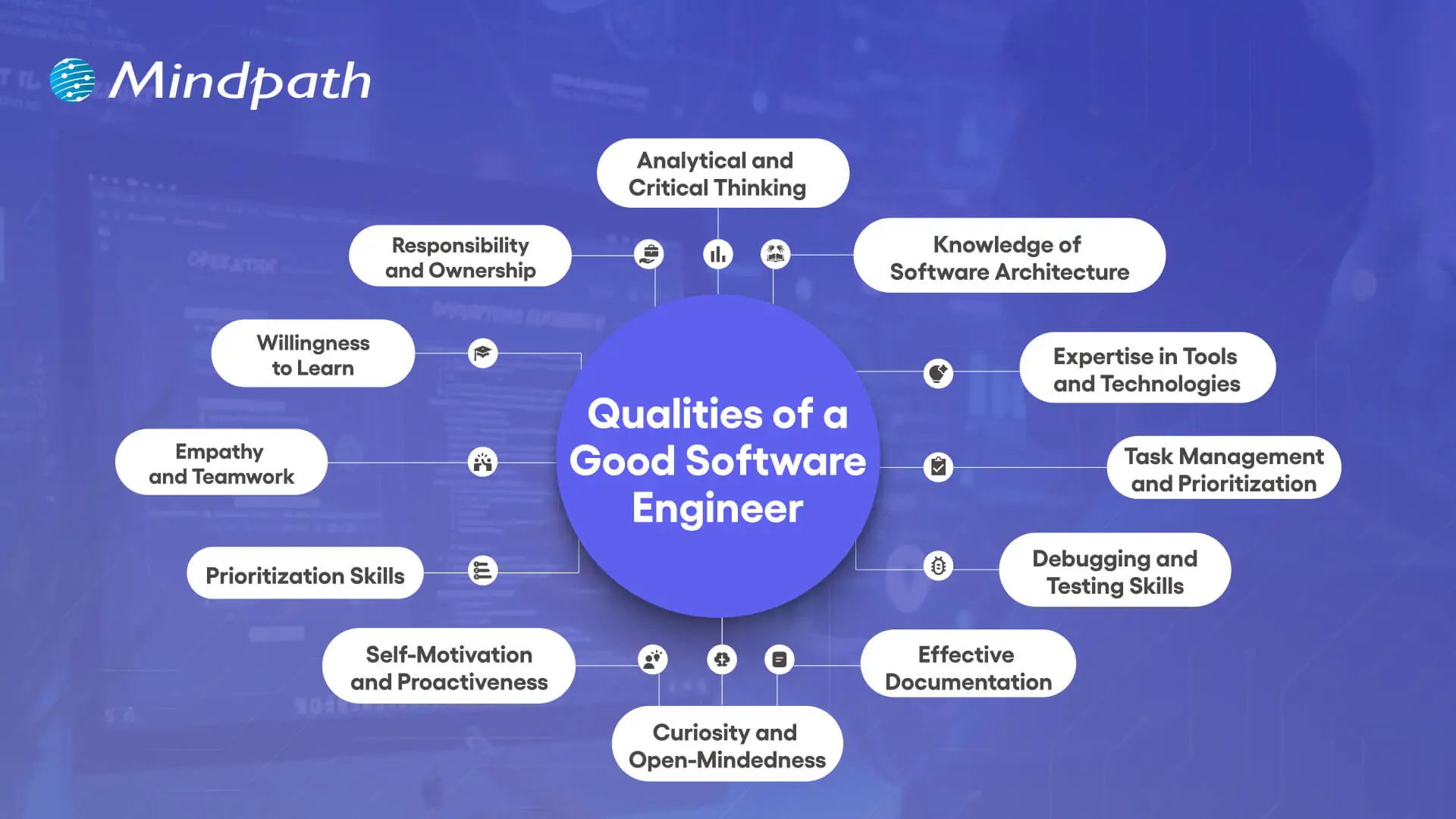
When companies are looking for quality people, they will be interested in the traits of a good software engineer that extend beyond their programming capabilities. These traits combine technical skills with problem-solving, teamwork, and flexibility, making engineers quality adders to any project. Below are the key characteristics that define them.

Qualities of a Good Software Engineer

1. Analytical and Critical Thinking

A great quality of a good software engineer is having analytical and critical thinking skills. Software engineers often work on unfamiliar systems with very little direction, so understanding how to break the system down into its components is helpful in realizing how the system really works. In doing this, the software engineer can recognize large patterns, see how inputs and outputs follow, and find a way to add value to the solution.

2. Knowledge of Software Architecture

Being knowledgeable about software architecture is an important software engineering characteristic that enables solid system designs. Engineers need to understand the flow of data through a system and how each element transforms that data. That knowledge supports engineers in building robust systems by allowing them to select the best architectural pattern that will last into the future.

3. Expertise in Tools and Technologies

It is a powerful strength of a software engineer to know development tools and alternative technologies. Software engineers need to investigate new options, balance trade-offs of risks to benefits on each alternative technology, and pivot accordingly to use the development tools that best contextual fit the immediate problem. If only to remain curious and current, software engineers have the opportunity to not make archaic choices.

4. Task Management and Prioritization

Managing multiple projects effectively is a key characteristic of a software engineer. All engineers perform some form of balancing act between regular day-to-day items and urgent tasks, including outages or bug fixes. With a little planning and prioritization, engineers can respond to urgent tasks while maintaining a steady pace on all projects.

5. Debugging and Testing Skills

Debugging and testing form an essential part of the qualities of a good software engineer. Engineers often occupy their time to sustain and upgrade developed projects; thus, referencing the strengths of their debugging skills will allow them to get to the root of an issue efficiently and start unpicking it. Testing will confirm that the software is functioning according to the specifications, while it will also reduce any risk of surprises.

6. Effective Documentation

Good documentation is an often-neglected, but vital, characteristic of software engineering. Engineers who write and update their documentation when they develop and change the software make it easier for others to understand the system and maintain it later. Good documentation, where records are kept clearly and accurately, will help reduce confusion, save time, and enhance collaborative efforts across teams.

Curious about the different kinds of software a skilled engineer might work on? Explore the various types of software development and see how each requires unique skills and expertise.

7. Curiosity and Open-Mindedness

Curiosity and open-mindedness are important qualities of a good software engineer because technology moves quickly. Great engineers investigate different ways of doing things, accept new ideas, and change how they do things – every time the new way is better. This mindset propels the innovation needed to successfully help teams solve problems.

8. Self-Motivation and Proactiveness

A successful software engineer is a self-starter who is proactive in identifying threats to successful project outcomes before they turn into large problems. Successful software engineers seek out opportunities to solve problems rather than waiting for someone to instruct them or blindly ignoring a potential risk altogether. A proactive software engineer can help dramatically improve team performance and produce better long-term project outcomes.

9. Prioritization Skills

Tremendous prioritization skills are a functional strength of a software engineer. Since not every task becomes urgent, engineers must focus on how to properly handle critical issues versus long-term goals. When the decisions are made competently enough, all teams can focus on issues that need immediate resources.

10. Empathy and Teamwork

Teamwork and empathy are defining qualities of a good software engineer in collaborative environments. Clear communication, attentive listening, and being mindful to consider the viewpoint of others are important to collectively solving problems as a team. These interpersonal skills cultivate healthier team dynamics and improve the likelihood of successfully completing the project.

11. Willingness to Learn

Having humility is a powerful software engineering characteristic, as no one can know everything in such a broad discipline. Engineers who are open to feedback and learn from others use their time wisely and bolster their skills. When an engineer is humble, they help cultivate stronger, more supportive teams that drive performance.

12. Responsibility and Ownership

A positive sense of responsibility is one key qualities of a good software engineer. Engineers understand their systems very well and will have to take responsibility, whether it be for successes or failures. Being responsible for their thoughts and actions earns engineers trust among the stakeholders that will, in time, improve user experiences.

Want to see how skilled engineers turn concepts into working software? Explore the custom software development process to understand the stages that ensure quality and efficiency.

Ready to Work with Skilled Software Engineers?

The qualities of a good software engineer show how vital they are in shaping ideas into real, impactful solutions. Strong technical skills combined with collaboration, adaptability, and ownership make them essential to building reliable and scalable systems. These qualities ensure not only innovation but also long-term success in today’s competitive and constantly changing digital landscape.

At Mindpath, our custom software developers bring these qualities into every project. They combine expertise, curiosity, and responsibility to create solutions tailored to your business needs. By focusing on innovation, reliability, and long-term value, our team ensures that your ideas are developed into secure, scalable, and user-friendly software designed to drive growth and meet evolving market demands.

Frequently Asked Questions

1. How do the qualities of a good software engineer impact the success of a business project?

Engineers who combine technical depth with strong communication and ownership tend to deliver more reliable results. Their ability to spot risks early, collaborate well, and take responsibility for outcomes directly reduces project delays and helps businesses achieve their goals more consistently and efficiently.

2. Is technical expertise more important than soft skills when evaluating a software engineer?

Both matter equally in practice. Technical skills get the work done, but soft skills determine how well an engineer collaborates, communicates issues, and adapts to change. Companies that prioritize only technical ability often struggle with team friction and missed expectations, especially in complex or long-term projects.

3. How can businesses identify strong software engineering qualities during the hiring process?

Look beyond the resume by including practical assessments, real-world problem-solving scenarios, and behavioral interview questions. How a candidate explains their past decisions, handles ambiguity, and collaborates during the process often reveals more about their actual qualities than technical tests alone.

4. Can a software engineer with strong qualities make a real difference in a small business environment?

Absolutely. In smaller teams, each engineer carries more responsibility across different parts of a project. An engineer who is proactive, self-motivated, and takes full ownership can have an outsized positive impact, often driving progress that would otherwise require a much larger team to achieve.

5. How important is documentation as a quality in software engineers working on long-term projects?

It is often undervalued but critically important. Poor documentation slows down onboarding, creates confusion during handovers, and makes maintenance harder over time. Engineers who document their work clearly save teams significant time and reduce the risk of costly errors as projects grow in scale and complexity.

application security best practices

In this modern tech world, keeping your app safe and secure isn’t just a minor task anymore, but rather it has become a business priority. Whether you have built a mobile app or a web platform, the users trust you with their personal information every time they log in or make any transaction. Isn’t it true? This is the reason for which you should follow application security best practices because it can help you in protecting your app from hackers, data leaks and even costly breaches.

Strong security starts when you understand the correct strategy, starting from secure coding to regular updates and data protection. Do you want to know what is the best practice for application security for your web and mobile apps? Don’t worry, we will cover essential techniques for securing your applications in this blog, which can help you in staying one step ahead of threats and building trustworthy digital experience.

According to MarketsandMarkets Analysis, The mobile apps and web analytics market is expected to grow from 9.4 billion in 2022 to USD 20.2 billion by 2027, at a CAGR of 16.4%.

What is Application Security?

Application security refers to the practice of protecting your apps from threats that could steal all the data and even harm the system. It involves adding security features during the development stage and continuing to protect your app even after it is launched. This can ensure that both your app as well as the information it handles, are safe from hackers and other risks.

This protection can include hardware tools, software settings and regular security settings. For instance, a powerful router that obscures a device’s IP address provides hardware protections, while an application firewall embedded in the software frames actions. Security protocols, such as routine testing and upgrades, help to ensure risks are identified and rectified quickly so that the app continues to secure itself for years to come.

What are the 3 Pillars of Application Security?

To build a strong foundation for protecting any app, it’s important to focus on the core elements of security. These three pillars work together to keep applications safe and trustworthy.

1. Process:

This pillar includes the policies, procedures, and workflows that help manage and secure applications. These processes are designed to reduce risk and protect the app throughout its entire lifecycle.

2. Technology

Technology covers the tools and security controls used to keep applications safe. While new solutions keep emerging, it’s important to focus on the core security needs that protect the application effectively.

3. People

People are often the most overlooked part of application security, even though they play a key role. This pillar focuses on managing human risk, which includes the behaviors and actions of employees, contractors, and partners who have access to the system.

Web Application Security Best Practices

In today’s digital world, keeping your application and security strong is more important than ever. A single loophole can lead to serious trouble. That’s why it’s essential to follow a smart plan to protect your app from threats. Here are some best practices you can follow:

Web application security Best Practices

1. Spot and Understand the Weak Points in Your App

After setting up your app security plan, it’s time to check for weak spots. You are likely to find many issues, but not all are serious. Focus on the most dangerous ones first. Use a custom threat model or OWASP risk scores to help you sort and fix them smartly

2. Use Quick Fixes Like Virtual Patching and WAF

Waiting months to fix app issues is risky. Virtual patching and a Web Application Firewall (WAF) can protect your app right away. They block attacks, even before a complete fix is ready. Also, limit app features and keep watching traffic to catch problems early and stay safe.

3. Start with Fixing the Most Important Issues

Fixing every issue at once can feel overwhelming. Focus first on the critical and high risks that could hurt your business or brand the most. Once those are handled, move on to the lower-risk ones. This smart step-by-step plan helps save time and protects what matters most.

4. Group Your Apps by Risk Level

When you have many apps, it helps to sort them by priority. Put them in buckets like critical, serious, and normal based on how sensitive the data is. Fix the most important ones first. Retire unused apps, and keep your list updated to stay organized and reduce risk.

5. Build a Clear Map of Your App Security

When apps grow fast, it’s easy to lose track. Start by making a full list of all your apps, their purpose, and update status. Add details like how they’re used and update security steps. This clear picture helps you fix issues quickly and build stronger web application security.

6. Monitor Your Application Every Time

Virtual patching through a WAF helps you fix issues faster and keeps your app under watch. It shows which attacks are blocked and where they come from. This ongoing monitoring builds useful security insights and also helps stop app-layer DDoS attacks before they cause trouble.

Curious about the next step in mobile innovation? Explore Progressive Web Apps (PWA): The Future of Mobile-First Development to see how PWAs combine the best of web and mobile apps for faster, engaging experiences.

Mobile Application Security Best Practices

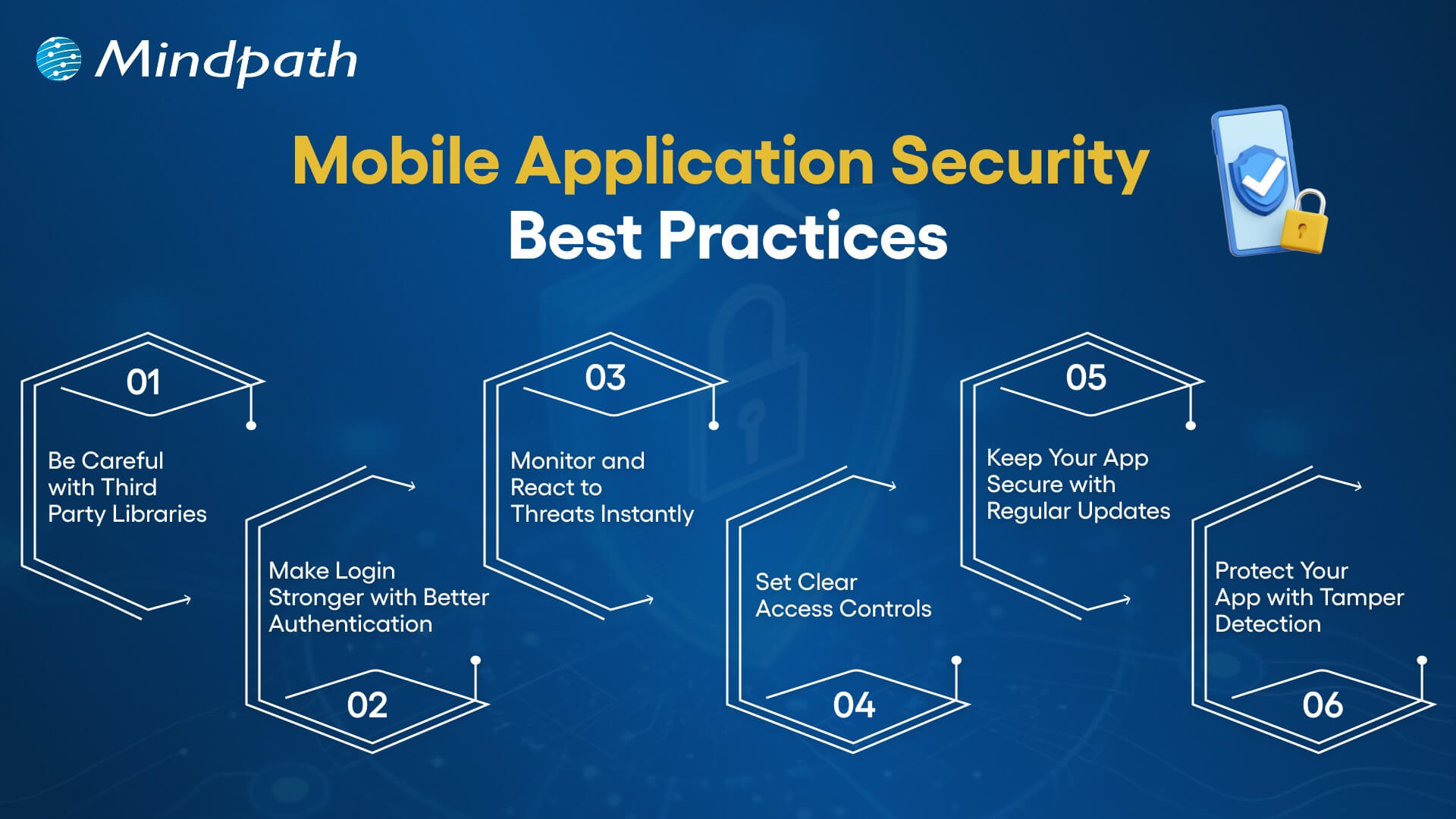
Mobile apps are a big part of our daily lives and keeping them secure is a must. Whether you’re building an app or managing one, these simple practices can help you protect your users and data from unwanted threats.

mobile application security best practices

1. Be Careful with Third-Party Libraries

Third-party libraries can save time but might bring security risks if not handled right. Always keep them updated and patched. Take time to check their safety before using them to avoid accidentally opening doors for hackers.

2. Make Login Stronger with Better Authentication

Use strong login methods to keep your app safe. Combine passwords with extra checks like one-time codes or fingerprint scans. Multi-factor authentication (MFA) makes sure only the right users can get in by asking for two or more ways to prove who they are.

3. Monitor and React to Threats Instantly

Use tools that keep an eye on your app and spot threats right away. When something suspicious happens, act quickly to protect your app. Having a clear plan for responding helps your team fix issues fast and keeps your app secure, following the best mobile security practices.

4. Set Clear Access Controls

Control what users can see and do in your app to keep data safe. By limiting access, you prevent unauthorized people from reaching sensitive information. This simple step is key to strong mobile app security and helps protect your app and users effectively.

5. Keep Your App Secure with Regular Updates

Regularly update your app and fix any security issues quickly. Patching helps close gaps that hackers could exploit. Setting up a routine for updates ensures your app stays protected and reduces the chance of breaches, keeping both your app and users safe.

6. Protect Your App with Tamper Detection

Use tamper detection to spot if your app’s code has been changed. Tools like checksums or digital signatures check the app’s integrity. If something is off, the app can stop running, alert your team, or even erase sensitive data to keep everything secure.

Wondering how a mobile app can boost your business? Explore the Benefits of Mobile App Development to discover how apps improve engagement, sales, and customer loyalty.

Are You Protecting Your App in the Right Way?

Application security best practices matter for everyone, not just tech teams. They help build trust, prevent data leaks, and keep users safe. Simple actions like checking your code, controlling access, and updating often can make a big difference. Staying secure today means staying ahead of threats.

At Mindpath, building secure digital experiences is our priority. Our web and mobile application development services follow proven application security best practices to ensure safety, performance, and reliability at every step. Partner with us to deliver robust and secure solutions you can trust.

Frequently Asked Questions

1. Why are application security best practices important for both web and mobile apps?

Application security best practices help protect user data, prevent unauthorized access, and reduce the risk of cyberattacks. Since both web and mobile apps handle sensitive information, following these practices ensures safer user experiences and helps maintain trust over time.

2. When should application security best practices be applied during development?

Security should be considered from the very beginning of the development process, not added later. Building security into design, coding, testing, and deployment stages helps prevent vulnerabilities early and reduces the chances of costly fixes after launch.

3. What are common mistakes that can weaken application security?

Common mistakes include ignoring regular updates, using outdated libraries, weak authentication methods, and poor access control. These gaps can make applications vulnerable to attacks, which is why consistent monitoring and timely fixes are essential for maintaining strong security.

4. How often should applications be tested for security issues?

Applications should be tested regularly, especially after updates or new feature releases. Continuous testing, including vulnerability scans and security audits, helps identify risks early and ensures the app remains protected against evolving threats over time.

5. Can small businesses also follow strong application security practices?

Yes, even small businesses can implement effective security measures. Simple steps like using secure coding practices, enabling strong authentication, and keeping systems updated can significantly reduce risks without requiring large resources or complex infrastructure.