Top Qualities of a Good Software Engineer

Join our Newsletter!

Featured Posts

Support Is One Click Away

Home

Top Qualities of a Good Software Engineer

qualities of a good software engineer

Top Qualities of a Good Software Engineer

The tech space is moving faster than it ever has, and businesses need professionals who are adaptable in the face of frequent change. Conversations about the qualities of a good software engineer often extend beyond coding. Businesses want engineers to contribute to real change and add some actual value through their work. The demand is not only for talent in the area of technical skills but also for people who can demonstrate impact in other areas of development.

At the same time, a job as a successful engineer shows far more than what a résumé can include. Simply put, this job involves constant learning, being a good team player, and being able to adapt to evolving project needs. Every organization is looking for individuals who can maintain the idea of long-term while developing ideas into effective solutions. In this blog, we look through the top qualities that describe a truly good software engineer.

To transform your idea into a powerful solution with the help of the right guidance. Contact us, and we will help you to implement the action that brings long-term success.

Why are Good Software Engineers Essential in a Company?

Good software engineers are essential to developing and sustaining the core systems that drive modern business. They design reliable, scalable responses, implement security, and develop user-friendly applications that facilitate growth. Their individual or team ability to resolve complex technical problems contributes to efficiency and drives innovation, and as such, they are a fundamental pillar of long-term success in competitive markets.

In addition to their role in development, they also test, debug, and service software, while negotiating the escalating complexity of digital systems and software. By merging the business objectives with the technical implementation of the project, they can realize a project that provides real value. These roles articulate the qualities of a good software engineer and are fundamental to taking a business idea and transforming it into a meaningful and forward-looking outcome.

What are the Qualities of a Software Engineer?

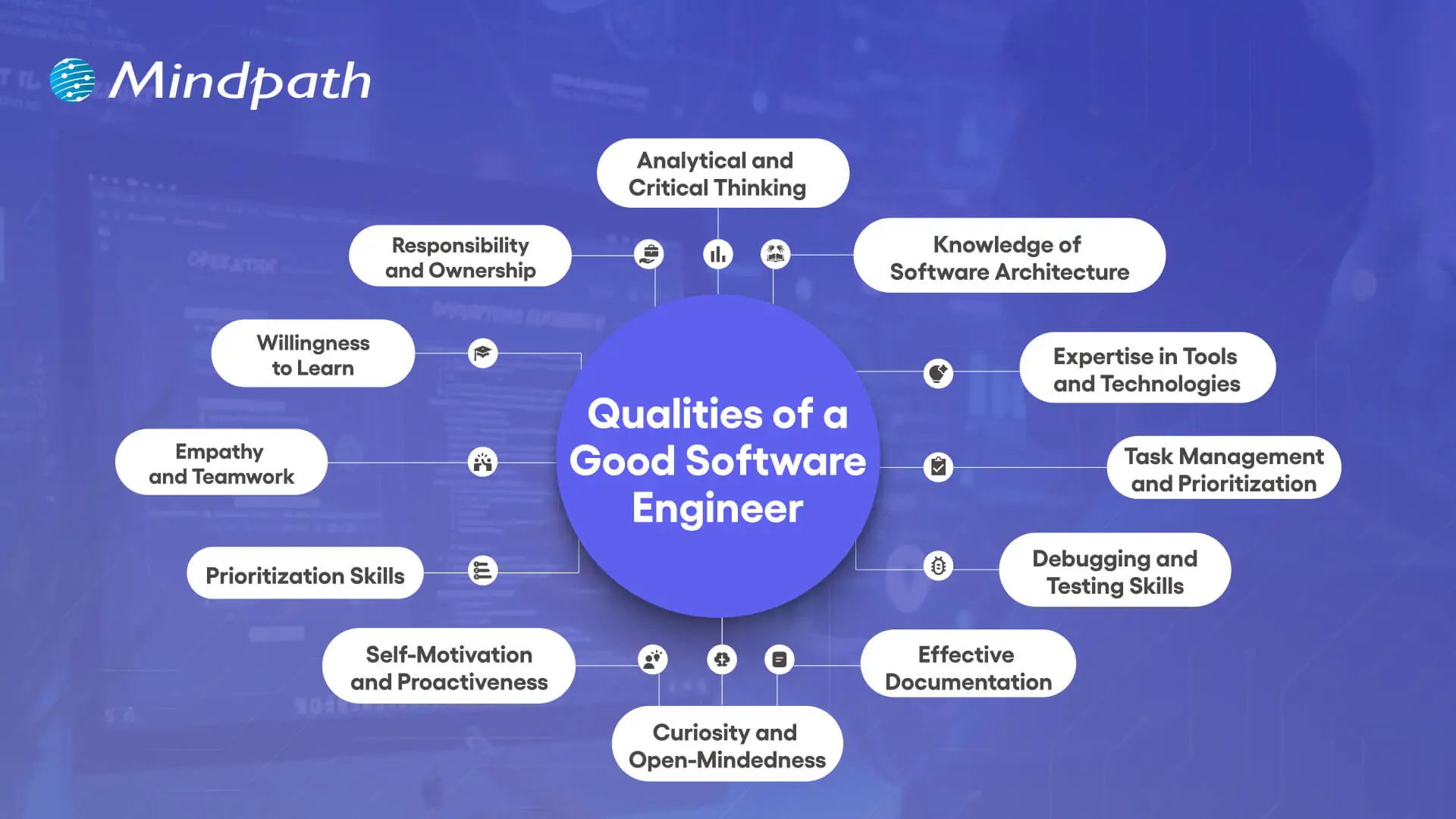
When companies are looking for quality people, they will be interested in the traits of a good software engineer that extend beyond their programming capabilities. These traits combine technical skills with problem-solving, teamwork, and flexibility, making engineers quality adders to any project. Below are the key characteristics that define them.
Qualities of a Good Software Engineer

1. Analytical and Critical Thinking

A great quality of a good software engineer is having analytical and critical thinking skills. Software engineers often work on unfamiliar systems with very little direction, so understanding how to break the system down into its components is helpful in realizing how the system really works. In doing this, the software engineer can recognize large patterns, see how inputs and outputs follow, and find a way to add value to the solution.

2. Knowledge of Software Architecture

Being knowledgeable about software architecture is an important software engineering characteristic that enables solid system designs. Engineers need to understand the flow of data through a system and how each element transforms that data. That knowledge supports engineers in building robust systems by allowing them to select the best architectural pattern that will last into the future.

3. Expertise in Tools and Technologies

It is a powerful strength of a software engineer to know development tools and alternative technologies. Software engineers need to investigate new options, balance trade-offs of risks to benefits on each alternative technology, and pivot accordingly to use the development tools that best contextual fit the immediate problem. If only to remain curious and current, software engineers have the opportunity to not make archaic choices.

4. Task Management and Prioritization

Managing multiple projects effectively is a key characteristic of a software engineer. All engineers perform some form of balancing act between regular day-to-day items and urgent tasks, including outages or bug fixes. With a little planning and prioritization, engineers can respond to urgent tasks while maintaining a steady pace on all projects.

5. Debugging and Testing Skills

Debugging and testing form an essential part of the qualities of a good software engineer. Engineers often occupy their time to sustain and upgrade developed projects; thus, referencing the strengths of their debugging skills will allow them to get to the root of an issue efficiently and start unpicking it. Testing will confirm that the software is functioning according to the specifications, while it will also reduce any risk of surprises.

6. Effective Documentation

Good documentation is an often-neglected, but vital, characteristic of software engineering. Engineers who write and update their documentation when they develop and change the software make it easier for others to understand the system and maintain it later. Good documentation, where records are kept clearly and accurately, will help reduce confusion, save time, and enhance collaborative efforts across teams.

7. Curiosity and Open-Mindedness

Curiosity and open-mindedness are important qualities of a good software engineer because technology moves quickly. Great engineers investigate different ways of doing things, accept new ideas, and change how they do things – every time the new way is better. This mindset propels the innovation needed to successfully help teams solve problems.

8. Self-Motivation and Proactiveness

A successful software engineer is a self-starter who is proactive in identifying threats to successful project outcomes before they turn into large problems. Successful software engineers seek out opportunities to solve problems rather than waiting for someone to instruct them or blindly ignoring a potential risk altogether. A proactive software engineer can help dramatically improve team performance and produce better long-term project outcomes.

9. Prioritization Skills

Tremendous prioritization skills are a functional strength of a software engineer. Since not every task becomes urgent, engineers must focus on how to properly handle critical issues versus long-term goals. When the decisions are made competently enough, all teams can focus on issues that need immediate resources.

10. Empathy and Teamwork

Teamwork and empathy are defining qualities of a good software engineer in collaborative environments. Clear communication, attentive listening, and being mindful to consider the viewpoint of others are important to collectively solving problems as a team. These interpersonal skills cultivate healthier team dynamics and improve the likelihood of successfully completing the project.

11. Willingness to Learn

Having humility is a powerful software engineering characteristic, as no one can know everything in such a broad discipline. Engineers who are open to feedback and learn from others use their time wisely and bolster their skills. When an engineer is humble, they help cultivate stronger, more supportive teams that drive performance.

12. Responsibility and Ownership

A positive sense of responsibility is one key qualities of a good software engineer. Engineers understand their systems very well and will have to take responsibility, whether it be for successes or failures. Being responsible for their thoughts and actions earns engineers trust among the stakeholders that will, in time, improve user experiences.

Ready to Work with Skilled Software Engineers?

The qualities of a good software engineer show how vital they are in shaping ideas into real, impactful solutions. Strong technical skills combined with collaboration, adaptability, and ownership make them essential to building reliable and scalable systems. These qualities ensure not only innovation but also long-term success in today’s competitive and constantly changing digital landscape.

At Mindpath, our custom software developers bring these qualities into every project. They combine expertise, curiosity, and responsibility to create solutions tailored to your business needs. By focusing on innovation, reliability, and long-term value, our team ensures that your ideas are developed into secure, scalable, and user-friendly software designed to drive growth and meet evolving market demands.

Related Post

Discover how to choose the right ReactJS development company with our step-by-step guide and learn about Mindpath’s expert services.
Discover how DevOps can save your business costs by improving efficiency, and enhancing collaboration across teams for high-quality delivery.

Related Post

Remote development team
Globalization has been a phenomenon that blurred boundaries and helped many businesses expand internationally. While the world is reaching toward realizing the idea of a “Global Village”, reservations and misconceptions about hiring remote employees and teams prevail.   COVID-19 showed business leaders the endless potential of remote working. While the world remained locked up, remote working allowed businesses to keep going, especially the ones dependent heavily on IT services  With rapid digitization, IT services have become more crucial than ever for businesses belonging to all categories and industries. According to Statista, the revenue of the IT services market is projected to reach USD 1,420 billion by 2024. Out of the total revenue, the IT Outsourcing segment is dominating the market with a projected volume of USD 541.10 billion in 2024.   Hiring a remote development team is a sound business decision with multiple benefits. In this blog, we will cover all the information essential if you are considering hiring remote developers or development teams for your business.  

Remote IT Development Teams: An Overview

Remote development teams consist of developers and tech professionals working from different geographical locations. These teams collaborate with businesses virtually, understanding their requirements, creating various wireframes, creating delivery plans, working on development, and delivering, deploying, and testing the final product. When hiring talent via staff augmentation, it’s essential to ensure that these remote teams are well-integrated into your project, enabling seamless collaboration and meeting your business goals efficiently.  Businesses are inclined towards hiring remote developers to access a wide talent pool within budget. Especially mid-sized and small businesses that cannot accommodate a full-fledged IT team to develop and maintain their website, apps, and other digital platforms can hugely benefit from hiring an offshore team.  

Benefits of Hiring a Remote Development Team

1. Access to a Global Talent Pool

One of the primary benefits of hiring a remote development team is the ability to access a diverse range of skills and expertise. Casting a wider net can help businesses recruit the top talents in the technology fields such as development, design, implementation, etc.   Emerging technologies like AI, ML, data science, DevOps, Blockchain, Cloud Computing are taking over the world. By looking beyond geographical boundaries, you can find developers with specific technical capabilities that may not be available locally.

2. Cost Efficiency

Hiring remote developers can be more cost-effective than maintaining an in-house team. A report by Deloitte suggests that 63% of companies outsource their development tasks to reduce costs.   You can reduce expenses related to office space, equipment, and other overhead costs. Moreover, the ability to hire from regions with lower living costs can further reduce payroll expenses without compromising on talent quality. 

3. Flexibility and Scalability

Remote teams offer greater flexibility. You can scale your team up or down based on project requirements without the logistical challenges associated with in-house teams. According to studies, 53% of businesses have dealt with capacity issues, and 38% improved the service quality by hiring a remote development team.   This flexibility allows you to manage resources more efficiently and respond quickly to changing project needs. 

4. Increased Productivity

Remote developers often experience fewer distractions than traditional office environments, increasing productivity. There is also no time for commuting to a physical workplace, saving time for more strategic actions.   With a properly managed remote team, you can leverage different time zones to maintain a near-continuous workflow, ensuring that your project progresses even outside typical working hours. 

5. Environmental Benefits

Hiring a remote development team not only saves your costs and improves productivity but can also contribute to reducing your company’s carbon footprint. With fewer employees commuting to a central office, there are fewer greenhouse gas emissions, aligning your business with environmentally sustainable practices.

Challenges to Consider

1. Communication Barriers

Effective communication is crucial for the success of any development project. When working with a remote team, time zone differences and language barriers can pose significant challenges. It is essential to establish clear communication protocols and utilize collaboration tools to ensure everyone is on the same page.

2. Managing Productivity

Tracking productivity can be more challenging with a remote team. Setting clear expectations, establishing measurable goals, and using project management tools are vital for keeping remote developers on track. Regular check-ins and progress updates can also help in maintaining accountability. 

3. Cultural Differences

Cultural differences can impact team dynamics and workflow. Understanding and respecting these differences is important for fostering a collaborative environment. Encouraging an inclusive culture where all team members feel valued can help mitigate potential conflicts and improve overall productivity. 

Best Practices for Working with Remote Developers

1. Define Clear Objectives

Before hiring a remote development team, define your project goals, timelines, and deliverables. Clear objectives provide a roadmap for the team and help in aligning their efforts with your business objectives. 

2. Invest in the Right Tools

Leverage technology to bridge the gap between remote team members. Tools like Slack/MS Teams for communication, Jira/Azure DevOps for project management, and GitHub for version control can enhance collaboration and streamline workflows. 

3. Build a Strong Onboarding Process

A well-structured onboarding process ensures that remote developers understand your company culture, project expectations, and their specific roles. Providing comprehensive training and resources can help new team members integrate smoothly and start contributing quickly. 

4. Foster Team Engagements

Regular team-building activities, virtual meetups, and open communication channels can help in building a cohesive team. Encouraging social interaction and recognizing individual contributions can boost morale and foster a sense of belonging among remote developers. When comparing IT staff augmentation vs. traditional hiring, these practices are essential in maintaining a strong, engaged team, regardless of the hiring model, while benefiting from the flexibility and scalability that staff augmentation offers.

Wrapping Up

Hiring a remote development team can offer numerous benefits, from access to a global talent pool to cost savings and scalability. However, it also requires careful planning and management to overcome challenges such as communication barriers, productivity tracking, and cultural differences.  If you’re considering hiring a remote development team, Mindpath’s Team Augmentation services can be an invaluable resource. Our experienced professionals can seamlessly integrate with your existing team, bringing specialized skills and expertise to help you achieve your project goals. With Mindpath, you get the flexibility and scalability of remote development without the common pitfalls. Partner with us to unlock the full potential of your development projects.  Feel free to reach out to us with any questions or to discuss your specific requirements. Together, we can build something great! 
Hiring a remote development team is a sound business decision with multiple benefits. Read things to keep in mind while hiring a remote team.
Understanding Causal AI

Ever wondered how some businesses make decisions that seem almost too good to be true? What if there was a way to predict outcomes with greater accuracy and solve problems more effectively? Welcome to the world of Causal AI! In this blog, we’ll explore how Causal AI is not just a buzzword but a powerful tool transforming industries. So, let’s dig in! 

What is Causal AI?

Causal AI is a type of artificial intelligence that focusses on understanding the causes behind events. Unlike other AI systems, that only look at patterns and trends, Causal AI investigates deeper to determine cause-and-effect connections. This implies that Causal AI doesn’t only predict what will happen next based on previous data; it also explains why something happened in the first place. By determining these causes, people can gain greater insights and make more intelligent decisions. In short, Causal AI is about discovering the “why” behind the “what,” making it a valuable tool for analyzing difficult circumstances and enhancing decision-making. 

Why is Causal AI Essential?

Causal AI is significant because it helps us understand the root cause of events rather than simply predicting what will happen next. Most AI systems utilize past information to estimate future results, but they frequently ignore the real reasons for these outcomes, which can lead to errors. For example, if a corporation utilizes AI to anticipate sales but looks at previous sales data, it could overlook why particular goods performed better during specific times of year. Causal AI can determine if greater sales were due to holiday advertising or changes in customer behavior. This greater insight enables the organization to make more accurate projections and better judgments regarding future promotions and inventories. 

Benefits of Causal AI

1. Cost Efficiency

Causal AI is cost-effective as it enables businesses to learn vital information from data without requiring costly and time-consuming experiments. Traditional approaches can include conducting complex and expensive experiments to determine what causes certain outcomes, which can prove both time-consuming and highly resource intensive. Businesses can employ Causal AI to analyze data and determine the causes of events without the need for these complex setups. This method saves both money and time, enabling businesses to get useful insights and make intelligent decisions swiftly.  

2. Risk Assessment

Causal AI enables businesses to identify the true causes of potential problems, making it easier to develop risk reduction methods. Instead of just forecasting that something would go wrong, Causal AI examines the elements that contribute to failures, providing businesses with an improved understanding of what may occur. This allows firms to figure out how many factors may create problems and take preventative measures before they arise. For example, if a corporation is concerned about possible supply chain concerns, Causal AI may help identify the root causes of these risks. With this knowledge, the organization can plan and implement actions to minimize the effects of these issues, allowing them to remain ahead and reduce unforeseen unexpected events. 

3. Durability and Flexibility

Causal AI provides durability and flexibility by focusing on understanding relationships that remain the same even when their surroundings change. This means that AI models established on causal knowledge are durable and adaptive. For organizations, this implies that their AI systems will continue to function well even if external variables change, such as market trends or fresh challenges. Instead of dealing with faulty predictions when things change, Causal AI helps to keep systems functional and accurate. This way, businesses can rely on their AI technologies to work consistently, regardless of how everything changes around them. 

4. Better Decision Making

Causal AI improves decision-making by assisting organizations in understanding how various actions will affect their outcomes. It demonstrates how various adjustments or decisions may affect results, allowing businesses to foresee what may occur and plan appropriately. This implies that firms can prepare for potential future events rather than simply reacting to issues as they arise. For example, if a corporation plans to launch a new product, Causal AI can help them understand how many circumstances can influence the product’s performance. With this knowledge, businesses can make better judgments and manage their plans more efficiently, ensuring they are prepared for many scenarios rather than merely coping with unexpected. 

5. Root Cause Analysis (RCA)

Causal AI excels in identifying the actual causes of issues or failures in business operations. Instead of just knowing that something went wrong, Causal AI investigates further to determine the root reasons of the problems. This thorough insight enables organizations to target particular areas that require improvement. For example, if a production line is constantly suffering delays, Causal AI can figure out if the cause is equipment failure, staffing issues, or something else completely. By identifying the root causes, businesses can implement targeted remedies to avoid future problems. This technique helps avoid continuous problems and reduces downtime and increases operational reliability, resulting in smoother and more efficient company performance. 

6. Clear Explainability

Causal AI models make it easier to figure out how and why decisions are made by highlighting the cause-and-effect relationships within the data. This implies that organizations can understand exactly how different elements contribute to certain outcomes, making the findings more transparent and reliable. For businesses, this level of transparency is essential. It enables people to comprehend how AI systems arrive at conclusions, which is essential for winning stakeholder trust. When the rationale behind AI-driven judgements is transparent, everyone involved may have more confidence in their accuracy and fairness. This transparency promotes confidence and ensures that decisions are made based on trustworthy and clear information. 

Want to stay ahead with cutting-edge technology?

Discover the benefits of Causal AI with Mindpath and drive your business forward.

Implement Causal AI for your Business with Mindpath

Implementing Causal AI for your company with Mindpath may drastically improve the way you utilize data to make decisions.  

Mindpath helps you make smarter decisions using Causal AI by delivering explicit insights into cause-and-effect relationships. Whether you want to improve your products, simplify your operations, or alter your tactics, our expertise guarantees that you receive reliable and useful data. This understanding enables you to address problems more effectively and keep them from being repeated, resulting in smoother and more efficient business operations. 

By choosing Mindpath, you are not only implementing new technology; you are also redefining how you comprehend and act on data, making your company smarter and more efficient.  

Final Thought!

Causal AI represents a significant shift in how organizations comprehend and use data. Causal AI enables organizations to make better decisions, foresee possible hazards, and increase operational efficiency by uncovering the underlying causes of events and outcomes. It provides not just a clearer picture of what transpired, but also a plan for handling future obstacles with greater certainty and accuracy.  

Implementing Causal AI with Mindpath calls for embracing a new way of thinking about data and decision-making. We are here to assist you navigate this new strategy and unleash its full potential to create success and achieve your company objectives. 

Ready to elevate your business with Causal AI?

Partner with Mindpath to unlock powerful insights and make smarter decisions.

Software Development Cost

When thinking about software development cost in 2025, it is not strictly about budgeting; it is about making informed decisions that end up delivering a successful project. New tools, frameworks, and approaches to development appear every year; therefore, how businesses spend money on development is also changing. How do you maximize your investment while being innovative and keeping your project on track? The solution is to know what drives the cost, and how those drivers may steer the final outcome.

The software world is fast-moving, and when you do not pay attention to these details, you can be setting yourself up for struggles later on when you want to scale. Companies today are not just looking at the bottom-line costs, but at a different perspective centered around value, flexibility, and speed of delivery. This makes it essential to look at the real cost drivers in depth. Understanding all the factors can better inform their decisions, maintain their agility, reduce certain risks, and build software projects that are set up for considerable success in 2025 and the following years. Keep reading to learn more about the cost of software development in detail.

If you need to boost efficiency, growth, and customer satisfaction, that will transform your business. Mindpath’s software development services will help you achieve these goals. Contact us now to unlock the long-term impact.

Why Understanding Software Development Costs Matters?

Comprehending software development costs is significant because it establishes the complete journey of a project. Given the right cost information, it enables teams to plan budgets that are realistic, deploy skilled resources, and be confident with their risk management. This implies avoiding unnecessary costs and deadlines. This also means delivering a project on time, within scope, and within the levels of quality expected by clients.

Moreover, knowing the cost factors will help organizations remain competitive and make better decisions. It can enhance transparency with clients, add trust with clarity and financial planning, and facilitate long-term sustainability by considering upkeep and future capacity. These insights support stronger profitability, but more importantly, they allow organizations to achieve longevity and value for all software development endeavors.

Key Factors Influencing Software Development Cost

The cost of development in 2025 will be a combination of many important factors, which are not limited to coding. Each of the elements potentially influences the budget, timeline, and success of the software.

Key Factors Influencing Software Development Cost

1. Project Scope and Complexity

A project’s scope indicates the required features, integrations, and functionality. In complex applications that have advanced features, automation, or leveraged AI, you will need to find skilled experts, which increases the costs of development. Simple apps and apps with basic or limited functions require fewer resources and typically have a faster build time and are less expensive.

2. Technology Stack

The choice of technology stack and cloud platform will have a direct impact on the budget. Some are more advanced, and some integration services will necessitate higher expertise by the team; thus, software development cost estimation is even more important. Arriving at an appropriate compromise will maintain performance within a budget constraint.

3. Team Size and Skills

The size and the expertise level of a team will dictate how well a project moves through its lifecycle. More people or more specialized roles will increase costs, but the outcome is generally better. The right mix of skills to bring down custom software development cost and to meet business outcomes is possible.

4. Development Methodology

A project’s management approach is critical in terms of both its time and cost outcomes. Agile approaches provide flexibility and collaboration, while Waterfall is more rigid and less flexible. Choosing the right method will make your team more efficient and control overall software development costs and capitalization.

5. Geographical Location

When hiring talent from different regions, it changes the total price you pay, which comes down to the cost of living and hourly rates in that area. Outsourcing or offshoring gives you access to skilled professionals at a lower cost. You still maintain quality while keeping your software development cost clear and manageable.

Software Development Cost Breakdown

When you break down the software development cost, it shows where your money goes in a project. Having an understanding of development costs will allow businesses to leverage that information to plan better, to manage costs, and to optimize value for the end product.

Software Development Cost Breakdown

1. Team Composition

The type of team you choose has an immediate impact on the overall software development cost. Freelancers charge approximately $30 – $80/hour, in-house developers in the UK cost about $65,000 – $120,000/year, while agencies charge about $90 – 150/hour, or approximate project fees of $50,000 – $260,000+. A software development cost calculator is helpful to analyze these various options against your overall business requirements.

2. UI/UX Design

User experience and budget have significant implications for design. In the UK, organisations will typically allocate between 15% and 25% on design within the total cost, with costs of a simple/basic layout around $4,000 – $9,000, to a complex layout with advanced animations and branding costing $10,000 – $33,000+. High-quality design conserves software development costs and increases user adoption.

3. Project Scope & Complexity

The complexity of your app is one of the biggest determinants of software development cost. A simple MVP may cost around $20,000 – $40,000; basic mediums such as CRMs or booking systems will cost $40,000 – $100,000; anything that is enterprise SaaS or an AI platform would start at $100,000 – $325,000+. There is a direct correlation: the more features, the more time and money it takes to develop.

4. Development Time

The number of hours it takes to build an app can also affect the budget. A simple app in the UK requiring approximately 500 hours of work may cost $50,000. A medium app that needs 800 – 1,000 hours might cost $65,000 to $100,000. A large or complex project of 1500+ hours may run over $130,000. All of these estimates are inclusive of coding, testing, and debugging.

Key Strategies to Manage Software Development Cost

Managing software development costs requires smart planning and clear decisions. By focusing on efficiency and resources, businesses can reduce expenses without losing quality.

Key Strategies to Manage Software Development Cost

1. Start with Clear Planning

A strong plan with well-defined requirements keeps the project on track. It helps avoid confusion, delays, and extra costs later in development.

2. Adopt Agile Development

Agile methods allow teams to work in small, flexible cycles. This makes it easier to fix issues early and adjust to changes without wasting resources.

3. Use Cloud Infrastructure

Cloud services remove the need for heavy hardware investments. They provide scalable resources on a pay-as-you-go model, which keeps expenses under control.

4. Automate for Efficiency

Automation in testing, integration, and deployment saves time and reduces manual effort. It improves quality and keeps the workflow faster and smoother.

5. Focus on MVP First

Building a Minimum Viable Product gets the core idea to users quickly. It helps validate the concept before committing to a larger software development cost.

Ready to Take Control of Your Software Development Cost?

In 2025, managing software development cost is about making smart choices that balance innovation, speed, and value. By understanding the real cost drivers and applying strategies like Agile, cloud adoption, and focusing on MVPs, companies can deliver projects that scale efficiently, reduce risks, and ensure long-term success in a competitive digital market.

At Mindpath, we provide end-to-end software development services that optimize cost and quality. Our skilled teams combine planning, design, and modern frameworks to create scalable solutions. With transparent pricing models and deep technical expertise, we help businesses control software development costs while delivering impactful applications built to perform and grow with your vision.

Discover the key factors influencing software development costs and how to optimize your budget. Learn how Mindpath can help.