Home

Top 10 Benefits of Custom Software Development for Growing Businesses

Top 10 Benefits of Custom Software Development for Growing Businesses

Lorem ipsum dolor sit amet, consectetur adipiscing elit. Ut elit tellus, luctus nec ullamcorper mattis, pulvinar dapibus leo.

Join our Newsletter!

custom software development benefit

Imagine this: your company is moving so fast, but your off-the-shelf software can’t keep pace. There are bottlenecks in your processes, your teams are slowing down, and your customers can feel the gulf. Here’s where the custom software development benefits can make a difference. You get tools that will be designed and built for your business goals. No extra features that you don’t need, and no limits that constrain you. It’s like you’re developing a system that scales with your growth, not against it. It’s smart, flexible, and designed for your journey.

As more organizations acknowledge the value of custom technology, businesses are increasingly demanding custom solutions to meet their specific requirements and functionality. Custom software solutions enable consistency and quality for your operational tasks, enhance the experience for your customers, and increase productivity for your team. Unlike off-the-shelf software, which offers limited flexibility and options for your business, custom solutions not only evolve with your organization but can reduce loss of time and expense in the long run. The benefits are real and tangible. In this blog, we will examine the top ten benefits of custom software development for growing businesses.

At Mindpath, our custom software development services are designed to help growing businesses build scalable, secure, and high-performing software solutions.

What is Custom Software Development?

Custom software development is the process of designing, building, deploying, and maintaining software solutions specifically tailored to a business’s unique requirements. Unlike off-the-shelf software sold to a wide audience, custom solutions are built from scratch to adapt to your exact workflows, rather than forcing your business to adapt to the software. A custom-built solution helps overcome specific challenges, streamline important processes, and exceed business goals. The overall process includes planning, designing, developing, testing, deploying, and maintaining to ensure long-term continued use.

Interestingly, Grand View Research reports substantial growth in the custom software development market. According to the reports, its market value was USD 43.16 billion in 2024, and it is projected to grow to USD 146.18 billion by 2030 at a CAGR of 22.6%, from 2025. This growth in market size represents an increase in demand for digital solutions that are flexible and designed for the unique needs of organizations. The enterprise software segment represented over 60% of the market, while cloud deployment comprised 57%, all showing a movement toward systems that can be scaled and accessed remotely. Large enterprises made up more than 60% of the total revenue in the market.

Top 10 Benefits of Custom Software Development

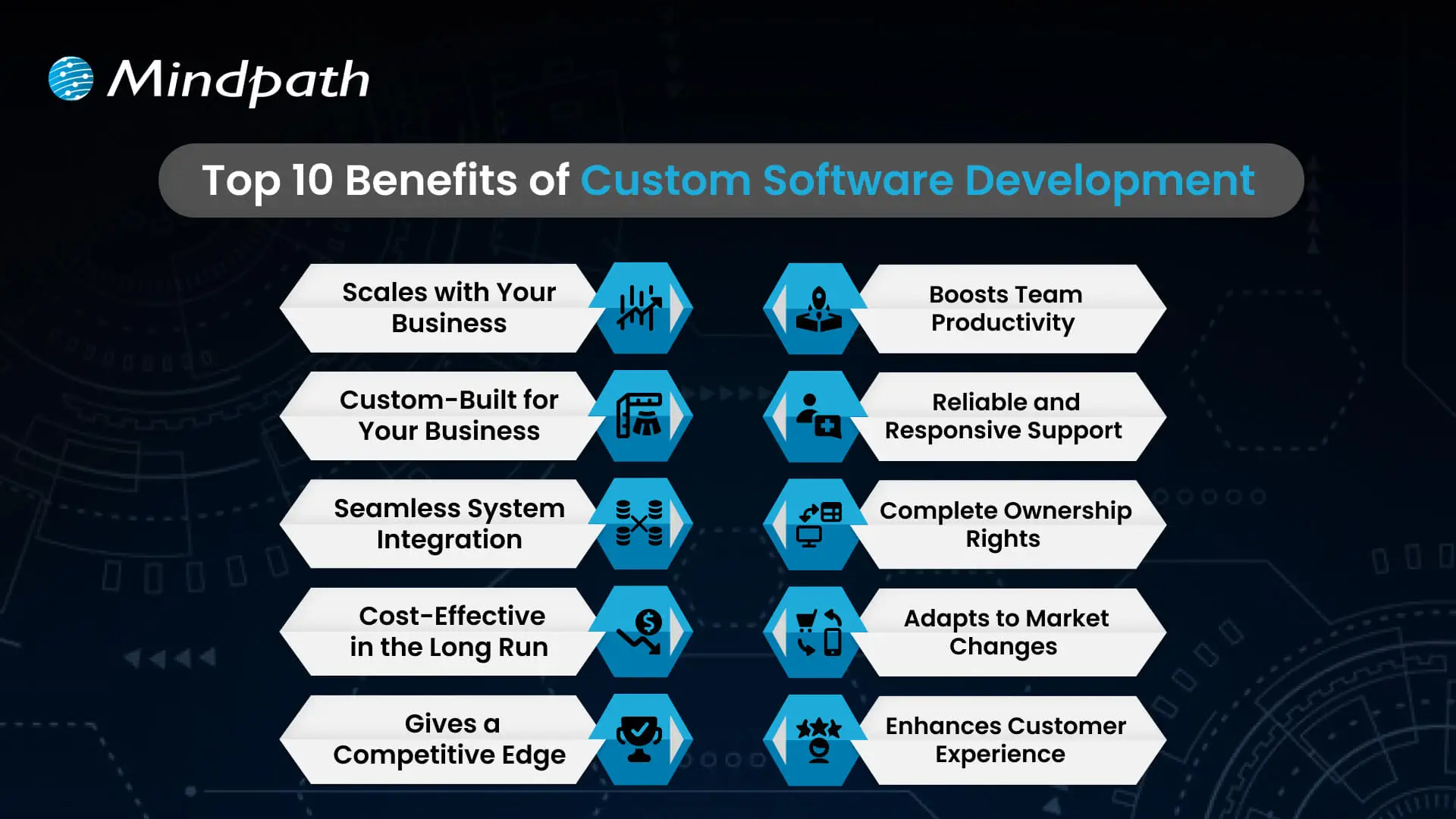
Picking the right software that meets the needs of your business is becoming increasingly important. If you are considering custom software development benefits for businesses, here are some of the greatest advantages that make it a brilliant and future-proof solution.
Top 10 Benefits of Custom Software Development

1. Scales with Your Business

One of the important custom software development benefits is that it grows as your business expands. Whether you open new locations or add services, customized software can easily adapt to your changing needs. It removes the limitations of ready-made tools that often require costly upgrades. With flexible and scalable features, your software stays aligned with your business goals.

2. Custom-Built for Your Business

Custom software is designed to match your specific workflows, goals, and daily operations. It helps avoid the inefficiencies that come with generic tools that don’t align with how you work. From logistics to finance, every feature is built to support what your business truly needs. This leads to better performance, less waste, and smoother processes across teams.

3. Seamless System Integration

Custom software works smoothly with your current tools and platforms. It helps different systems share data without the need for manual updates. This reduces errors and saves time across departments. The result is a more connected and efficient business operation.

4. Cost-Effective in the Long Run

A major custom software development benefit is reduced long-term costs. Unlike off-the-shelf tools, there are no ongoing license fees or expensive upgrades. You pay for what your business needs, and it stays efficient as you grow. Over time, this leads to better value and lower total cost of ownership.

5. Gives a Competitive Edge

Using custom software for a small business helps you create unique features that set you apart from others. It allows you to offer better user experiences and services tailored to your audience. This can increase customer loyalty and build a stronger brand. Staying ahead with the right technology gives your business a clear competitive advantage.

Wondering what it really takes to develop software that perfectly aligns with your business’s unique needs and goals? Explore the detailed custom software development process to see how thoughtful steps provide smooth execution and successful outcomes.

6. Boosts Team Productivity

Custom software streamlines your workflows by removing repetitive tasks and simplifying daily operations. It helps each team work faster and with fewer errors. When tools are designed for specific roles, employees can focus more on results than on fixing problems. This leads to better performance and a more efficient workplace.

7. Reliable and Responsive Support

With custom software, you get direct support from the team that understands your system inside out. This ensures quick responses and accurate fixes when issues arise. This custom software development benefits results in reduced downtime and improved reliability. Your business stays on track with expert help tailored to your specific setup.

8. Complete Ownership Rights

With custom software, your business has full control over features, updates, and improvements. You don’t have to rely on outside vendors or wait for scheduled upgrades. You can make changes anytime to match your growing needs. This gives you the freedom to make fast decisions and stay in control.

9. Adapts to Market Changes

Custom software allows your business to respond quickly when market demands shift. You can add new features or make changes without delay. This helps you stay competitive and meet customer expectations in real time. Being able to adapt fast keeps your business strong and relevant.

10. Enhances Customer Experience

Custom software allows you to create features that match your customers’ needs, making their experience smoother and more personal. This leads to higher satisfaction and stronger customer loyalty. It lets you design every interaction to reflect your brand and serve your audience better. It turns regular experiences into memorable ones that keep customers coming back.

Trying to understand the common pitfalls in creating custom software? Check out our blog to learn the essential custom software development dos and don’ts that every business should follow for a smooth process.

Looking to Build Software That Fits Your Business?

Custom software brings real value by helping your business grow, cut costs, and work more efficiently. It supports your goals with flexible tools that fit how you operate. Every custom software development benefit contributes to improving your team’s workflow and customer experience. Choosing the right solution now means fewer challenges and better results in the future.

At Mindpath, we offer expert custom software development services tailored to your business. As a trusted custom software development company, we build tools that match your goals and grow with you. From design to long-term support, our team works closely with you to deliver strong, flexible, and reliable solutions that keep your operations smooth and ready for the future.


Frequently Asked Questions

Absolutely. Small businesses often benefit the most because custom software eliminates unnecessary features and focuses only on what matters. It reduces manual work, improves daily efficiency, and scales as the business grows. The long-term savings and productivity gains far outweigh the initial investment for most growing businesses.
Customizing an existing tool means adjusting settings within someone else’s system. Custom software is built from scratch around your specific workflows and goals. You own it completely, control every update, and face no vendor restrictions. That level of flexibility and ownership is simply not possible with any off-the-shelf product.
Almost every industry can benefit, but healthcare, logistics, finance, retail, and manufacturing see the strongest results. These sectors have complex, unique workflows that generic tools struggle to handle. Custom solutions built around industry-specific needs improve accuracy, compliance, and operational speed in ways that standard software rarely achieves.
Custom software lets businesses design every customer touchpoint intentionally. From faster response times to personalized interactions, the experience feels smoother and more relevant. When backend operations run efficiently, customers notice the difference in speed and service quality, which directly drives satisfaction, retention, and long-term brand loyalty.
Yes, and that is one of its strongest advantages. Many businesses juggle five to ten disconnected tools daily. Custom software can consolidate those functions into one integrated system, reducing confusion, errors, and subscription costs. A unified platform built around your workflows is almost always more efficient than multiple separate tools.

Support Is One Click Away

Featured Posts

Related Post

WordPress maintenance
Is your WordPress site running as smoothly as possible? Do you know what kind of essential maintenance activities should be done on your website to keep it secure and running well? In this blog, we will explore the essential maintenance tasks that will keep your WordPress site in top shape. So, let’s dive in! 

Importance Of Website Maintenance   

Routine WordPress maintenance will help your website to be stable, secure, with better loading speed, and compatible with different browsers and devices. Regular backups guarantee that there is no loss of data in case of website crashing or malware attacks. Up-to-date plugins will ensure that slowdowns and security risks are prevented. Monitoring and analytics on user behavior help you make informed decisions and optimize your content. This provides better maintenance of your website, thus keeping it in top shape, and gives a better experience to the visitor. 

How Much Does WordPress Maintenance Cost?  

The cost of maintaining a WordPress site will be based on the size and complexity of the website. Routine maintenance in 2024 can range from as low as $5 a month to $120 per month or $40 a year to $1,200 a year. For a personal site, maintenance might be as low as $4 a month or $40 annually. Business sites usually start at about $8 per month or $80 per year. The pricing for running corporate websites is usually in the region of $12 a month or $120 yearly. The websites related to entertainment and eCommerce usually cost more, with the former starting at $16 per month and the latter at $20 a month. Routine maintenance includes updating plugins, themes, and WordPress core, managing backups, ensuring security, and keeping up performance. 

The Complete Checklist of Monthly WordPress Maintenance Tasks   

1. Optimize Your Database   

Over time, your WordPress database can become bloated with extraneous data from things like old post revisions, spammy comments, and deleted items, which slow down your site. To clean up your database, first back it up using a tool like Solid Backups to ensure all your data is safe. Then use a plugin such as WP Optimize to clear out any unnecessary data and boost database performance. Alternatively, if you know how to manipulate a database, you can clean up manually with phpMyAdmin. This method is useful when custom settings must be considered, and in all probability, it would be good to talk this over with a developer in case you are unsure. 

2. Manage Backups   

Backing up your website is something you should do regularly for safety against losses and quick recoveries in case of issues. Besides, with Solid Backups, you can configure backups automatically by using the plug-in known as UpdraftPlus. Schedule the backups frequently and let them be safely kept in the cloud, optimally. Moreover, review the process of restoration month by month to confirm that your backup procedure is working well, and in case of need, you will be in a good position to recover your site. 

3. Update WordPress Core, Plugins, And Themes   

WordPress core, theme, and plugin updating have implications for security, compatibility, and accessing new features. According to the Wordfence 2022 State of WordPress Security report, plugins in particular are a weak point, so keeping them up to date is very important. Keep checking for updates, and when found, update them one after the other. Begin with the WordPress core and then proceed to plugins and themes. Remember to always back up before doing any big update and update on a staging site so you can be sure everything works well with your current setup. 

4. Perform Security Scans   

Security scans to vulnerabilities, malware, and unauthorized access should be regularly scheduled. Run full site scans with a plugin like Shield Security, check the logs for any suspicious activity, and configure settings. You should, however, schedule these scans to run periodically, but at least revise them once a month. 

5. Analyze Site Speed   

A website’s speed has a massive impact on user experience and SEO. Among others, you can use Google PageSpeed Insights, GTmetrix, or Pingdom to check how fast your website loads. After testing, fix performance issues of your website against the results. If the speed problems continue, see if there’s a need to review and upgrade your hosting plan. 

6. Check For Broken Links   

Checking for broken links is important both for delivering a good user experience and SEO. Broken links may make visitors and search engines end up in so-called ‘dead ends,’ harming your site’s rankings and authority. Run a check using a plugin such as Broken Link Checker. Thereafter, repair or remove broken links upon finding them, possibly looking into scheduling automated checks to help identify new broken links in the future. 

7. Optimize Images   

Optimizing images will help to increase your site speed and performance radically, particularly when you have a heavy share of images on the site. Tools like Smush or ShortPixel do really well when it comes to compressing existing images. Remember the right formats—JPEG for photos and PNG for graphics where the requirement is transparency. Enable lazy loading; this defers the loading of off-screen images to further speed up page load times. 

8. Submit Your Sitemap   

Making sure that you are regularly submitting your sitemap to search engines will let them index your website in a better way and give you more exposure. Use a plugin such as Yoast SEO to create an updated sitemap, then take the time to manually submit this to search engines via their webmaster tools—like Google Search Console—to check that all your pages are correctly crawled and indexed for maximum search engine visibility. 

9. Monitor Site Performance   

Monitoring your site’s performance frequently will let you know when there is a problem. It helps in making informed decisions and will let you act swiftly. Use tools like Google Analytics and Jetpack to look through key metrics such as page views, bounce rate, and conversion rates. This setting of performance alerts about major changes or problems will let action be taken in time and thus your site runs smoothly. 

10. Test Your Forms   

Testing of forms at regular intervals is paramount to ensure that they work right and harvest data from users effectively. All forms should work well, and process input correctly. Check that email notifications are going to the right addresses, then test for user experience to make sure forms are usable, accessible, and responsive on different browsers and devices. 

11. Clear Site Cache 

It ensures that your site visitors have the most recent content. In addition, it will boost your website’s performance. Sometimes, cached data can become corrupt or outdated, causing display issues and slowing download time. Flush the server cache, then reset any plugin-built caches. Test your site for improved performance after flushing the cache. This can also be done in many ways depending on your unique setup. If you are not comfortable doing it yourself, use something like WP Super Cache and W3 Total Cache

Ready to optimize Your WordPress Experience?

Learn More About Mindpath’s Maintenance Services!

WordPress Development Services at Mindpath   

At Mindpath, we ensure your WordPress website runs at its best with comprehensive maintenance services. This includes regular updates to WordPress Core, plugins, and themes; daily backups for data security; and optimization of the performance of the site so that it loads faster. Our team conducts security scanning to save from threats, monitors and fixes broken links, and looks through analytics to bring about better user engagement. We test forms to make sure they are working well. You just focus on your business while we keep your site secure and efficient with our expert maintenance. 

Conclusion 

Maintenance, on the other hand, will ensure your WordPress site is not only smooth, safe, and high performing, but it will also be defended from many problems for the best user experience. From checking for broken links to analyzing site speed or running security scans, every step is important in keeping your website at its best. 

At Mindpath, we cut down the complexity of WordPress maintenance by offering every necessary service in one place to keep your site in top condition. Let our team take care of updates, backups, performance optimization, security checks, and more, so you can focus on growing your business while we work on keeping your website reliable and engaging. Our expert team at Mindpath makes sure your WordPress site is running at peak performance, ensuring you can get on with business and not worry about it. 

Want to achieve a Faster, Safer WordPress Site?

Find Out More About Mindpath’s Maintenance Solutions!

Ensure your WordPress site runs smoothly with essential maintenance tasks like updates, backups, security scans, and performance optimization.
Web accessibility guidelines

Your website acts as the gateway to your business’s digital world. It is the first impression that visitors get. However, for millions of users around the globe, those with motor, visual, cognitive, and hearing impairments, that door can remain locked if your website is not completely accessible. This is where web accessibility guidelines become pivotal. 

Key Takeaways

  • 01
    Web accessibility ensures every visitor, including those with disabilities, can use a site.
  • 02
    The POUR principles guide websites to be perceivable, operable, understandable, and robust.
  • 03
    Accessible WordPress themes and plugins make compliance easier without major redesigns.
  • 04
    Proper alt text, color contrast, and heading structure improve usability and SEO.
  • 05
    Regular accessibility testing with tools like WAVE keeps websites compliant and inclusive.

For WordPress website owners, implementing the web accessibility standards not only enhances usability but also increases SEO, brand reputation, and user engagement. In this detailed blog, you will learn more about web page accessibility and explore important accessibility principles and effective strategies. Besides, we have also mentioned some useful tools that can help you ensure your site meets the necessary standards. 

Looking to make your website accessible for your visitors and users? Mindpath’s WordPress development services help you create a user-friendly website that will meet accessibility standards and deliver seamless results.

What are Web Accessibility Guidelines?

Web accessibility guidelines are internationally recognized standards that help make websites accessible to everyone, including people with disabilities. The most widely adopted standard is the Web Content Accessibility Guidelines (WCAG), developed by the World Wide Web Consortium (W3C).

These guidelines help businesses design websites that users can perceive, navigate, understand, and interact with using assistive technologies such as screen readers, keyboard navigation, voice recognition software, and magnifiers.

Following web accessibility guidelines helps organizations:

  • Improve user experience for all visitors
  • Meet accessibility regulations and compliance requirements
  • Increase search engine visibility
  • Reach a larger audience
  • Build trust and strengthen brand reputation

Web Accessibility and Its Importance

In simple words, it means designing and creating websites that can be easily used and navigated by every user, including users with disabilities. Web accessibility ensures equal access to functionality as well as information to all, aligning with various legal mandates and standards, such as: 

1. The Americans with Disabilities Act or ADA

2. Section 508 of the Rehabilitation Act of 1973 (USA)

3. The Rights of Persons with Disabilities or RPWD Act (India)

4. The European Accessibility Act 2019

5. Equality Act 2001 (the United Kingdom)

6. Web Content Accessibility Guidelines 2.1 and 3.0

Accessible sites don’t just benefit individuals with disabilities or temporary impairment. Such websites tend to rank higher in SERPs due to their enhanced usability and semantic structure. 

Web Accessibility Standards- POUR Principles

Apart from the specific requirements, businesses should familiarize themselves with the key principles of web accessibility guidelines. These are known by the acronym- POUR. 

1. Perceivable

The interface and content of websites should be presented in such a way that every user can perceive or interpret, regardless of their disabilities. 

2. Operable

Visitors should be able to interact and navigate with websites utilizing different input methods, including assistive devices and keyboards. 

3. Understandable

Content as well as functionality of a website should be consistent, clear, and comprehensible for users with different cognitive levels. 

4. Robust

Websites should be compatible with various modern assistive technologies. This helps ensure long-term reliability and accessibility. 

Is your WordPress site truly secure from cyber threats and vulnerabilities? Find out how safeguarding WordPress vulnerabilities can help you protect your website and maintain your customers’ trust.

Accessibility in WordPress: Why it Matters?

WordPress powers a major portion of the web, making it an important platform for accessibility. Whether you have an e-commerce platform, a blog site, or a business website, you should carry out a web accessibility test and ensure it meets all the standards. WordPress accessibility is crucial for many reasons, like: 

1. Aider Audience Reach

By creating a website with an inclusive design, you can make it accessible for individuals with disabilities. Besides, it shows your business supports disabled people and understands their needs. 

2. Legal Protection

Following the required accessibility standards, you can avoid penalties and lawsuits. 

3. Better SEO

All search engines favor accessible WordPress websites with proper alt text, semantic structure, etc. 

4. Establishing Reputation

Digital accessibility has become an ethical issue. If you are not following the web accessibility guidelines, it can affect the reputation of your business.

5. Better UX

With the help of various accessibility features, you can boost usability for every user, including those with physical limitations and mobile visitors. 

Want to ensure your WordPress site is running on the right PHP version for top performance and security? Check out our guide on WordPress PHP compatibility to keep your site efficient, stable, and future-ready.

Some Common Web Accessibility Barriers

Before diving into the solutions to meet accessibility web standards, it is important to understand some common accessibility barriers that can significantly affect user experience while limiting your website’s inclusivity. 

1. Use of incorrect and missing Alt Text of images

2. Non-descriptive link text like “read more” or “click here.”

3. Poor color contrast between the background and the text

4. Use of inaccessible forms, lacking keyboard support

5. Keyboard navigation problems

6. Lack of transcripts or captions for multimedia

7. Wrong heading structure

8. Auto-play content with missing controls

Recognizing these issues is the first step toward crafting a more accessible and inclusive WordPress website that can serve every user ethically as well as effectively. 

Are you struggling to decide which platform will best support your business goals? Compare Magento vs WordPress to discover which option offers the features and flexibility your website needs.

Strategies to Boost Your WordPress Website Accessibility

Now that we have understood the importance of web accessibility and common barriers to it, it’s time to move to the practical solutions. Increasing your WordPress site’s accessibility doesn’t require a complete transformation. It can be achieved through the right web accessibility tool, thoughtful adjustment, and an inclusive design. Here are actionable ways to make your website more accessible and compliant. 

1. Opt For an Accessibility-Ready WordPress Theme

When working on web accessibility, always begin with a solid foundation, i.e., themes. You should always choose an accessibility-ready theme. Such themes follow the web page accessibility guidelines, such as keyboard navigation, semantic HTML, and more. 

Some popular accessible WordPress themes you can try are: 

  • Monument Valley
  • Gutenix
  • Neve
  • Icelander
  • OceanWP 
  • Astra

While choosing a theme, always check for WCAG compliance and evaluate the performance with a screen reader. 

2. Proper Heading Structure and Semantic HTML

Semantic HTML allows assistive technologies to properly interpret your website content. Ensure that all the headers are used in a logical order, like H1, H2, H3, so that users can easily understand the page structure. Here are some best practices to keep in mind: 

  • Only use one heading per page, generally the title.
  • Use proper headings for main sections and subsections
  • Don’t skip heading levels 

You can use a web accessibility tool like Axe to check heading structure and make changes accordingly. 

3. Install Right Accessible Plugins

Plugins are great ways to add new functionality and features to your website. However, if not selected carefully, you may end up with various accessibility problems. Always use plugins designed to make your site more accessible. Some recommended plugins are:

  • Equalize Digital: Offers a plugin to test websites for WCAG compliance.
  • WP Accessibility: Helps identify common web accessibility problems. 
  • One Click Accessibility: Allows an easy way to add various accessibility features.
  • Accessible Poetry: Helps enhance accessibility by integrating features such as focus styles and skip links

These plugins can complement your selected accessibility-ready theme and keep your site compliant.

4. Ensure Sufficient Color Contrast

While creating an accessible WordPress website, ensure that the color contrast between background and text meet necessary WCAG guidelines. It should be at least 4.5:1 for normal text. 

High contrast enhances readability for individuals with visual impairment. There are many WordPress accessibility-ready themes that offer easy ways to customize colors to meet web accessibility guidelines.

Apart from this, you should also use a readable font size and line height. Recommended font size is at least 16 pixels. The line height and word spacing should be 1.5x and 0.16x of the font size, respectively.  

5. Tab Indexing

Users with motor skill challenges generally depend on keyboard navigation, especially the Tab key, to navigate through your website. Unlike trackpad or mouse users, they rely on a predictable, logical tab order to access buttons, menus, and other interactive elements. So, ensure that you have enabled tab indexing for your site. 

Furthermore, make sure that all interactive elements follow the correct flow, i.e., left to right and top to bottom. A well-designed tab index can create a more inclusive and smoother browsing experience. 

6. Offer a Consistent and Clear Navigation

Even though you have deployed tab indexing for smooth navigation, there are other important things you should consider.

  • Breadcrumbs: Use breadcrumbs to show users their current location within your website, reducing confusion. 
  • Descriptive links: Prefer to use descriptive link text that clearly shows action or destination. Skip using phrases like “read more” or “click here”. 
  • Consistent navigation menu: Make sure that your site’s menu is consistent across all pages. 

Clear and consistent navigation is vital for user experience as well as accessibility. 

7. Optimize Media and Images

Media and images are crucial elements of a website. To ensure their accessibility, consider these web accessibility examples:

  • Captions and Transcripts: Use captions for videos and transcripts for audio content. This will help users with hearing impairments and who prefer to read instead of listening. 
  • Alt Text: For images, you should use descriptive alt text. This will help a screen reader to describe images to users. 
  • Descriptive File Name: Using descriptive file names for media files and images can help you boost SEO and web accessibility. 

With accessible images and media, it will be easier to make your site compatible with assistive technologies. 

8. Leverage Access Keys

Access keys work like keyboard shortcuts, enabling users to jump to a specific section of the website using assigned keys. For example, by pressing a key like “1”, they can go to the homepage, and by pressing “2”, they can access your contact page. 

9. Avoid Auto-Animations and Flashing Content

Blinking and flashing content can cause seizures in individuals with photosensitive epilepsy. Besides, auto-animations can also cause distraction among users. Best practices to follow here are: 

  • Don’t flash content more than three times per second
  • Allow users to pause animations
  • Utilize motion purposefully

By following the above-mentioned tips, you can ensure that your website welcomes all users while offering a user-friendly web experience. 

Ready to upgrade your HTML site to something more powerful and manageable? Explore why converting HTML to WordPress can streamline updates and improve your online presence.

Tools to Ensure Your Site’s Accessibility

Once you are done with implementing accessibility features following the web accessibility guidelines, you should carry out a comprehensive test to ensure your site is working as intended. Here are some useful tools to test your site.

1. WAVE

Web Accessibility Evaluation Tool, designed by WebAI, helps content creators and developers to make sure their websites are accessible for all. It offers visual feedback on the web content’s accessibility, making it easier to detect and resolve accessibility problems. It’s free to use. 

2. EqualWeb

This tool is designed to offer manual and automated accessibility solutions. Using this, businesses can stay compliant with ADA standards and WCAG 2.1. With AI-powered features, EqualWeb offers an easy way to identify and fix accessibility issues.  

3. Axe

This powerful web accessibility test tool can be integrated into any browser and development environments for a detailed web accessibility analysis. 

4. Level Access

This web accessibility checker provides developers with an API and a web interface, making it a highly flexible tool for testing accessibility throughout the web development lifecycle. 

5. NVDA

NonVisual Desktop Access is an open-source, free-to-use screen reader for Windows. Using this, visually impaired individuals can easily interact with your digital content. Developers can use it to evaluate web applications and websites’ accessibility. 

Wondering how to hire the right WordPress developer to help your business grow online? Explore our detailed guide on Hiring a WordPress Developer to discover expert insights that guide you toward making the best hiring decision.

Create an Inclusive Website that Welcomes Everyone

Web accessibility goes beyond just legal compliance. It focuses on fostering empathy, digital equity, and inclusion. By following web accessibility guidelines and leveraging the robust ecosystem of WordPress, you can create a website that is intuitive, usable, and can help all users. 

Making your site accessible is a journey of continuous improvement, and Mindpath can be an ideal partner in this journey. With our web accessibility services designed for this changing digital space, you can witness the desired results. Our expert guidance and tailored solutions, created based on web accessibility guidelines, will help you meet all compliance requirements and create a website that embodies innovation, openness, and user engagement. 

Frequently Asked Questions

Tech Trends

Curious about what’s going to be big in tech this year? Want to know the trends that will shape our world in 2024? In this blog we will explore the latest technology trends that are set to shape the future. 

The world today is fast-moving and changing constantly; hence, businesses and professionals need to keep up with the latest technologies.  Be it learning new skills to get ahead in your career or just knowing what’s happening around you to effectively communicate in your workplace, knowing the changes in technology makes all the difference.  It would make the workflow easier, save much time, and increase productivity.  Much of today’s job search is conducted through digital tools and platforms, so keeping ahead of the game to ensure you present yourself in the best light possible is highly important. In addition, updated technology has made it possible for businesses to better reach their potential customers with very relevant content across social media, apps, and blogs. Staying ahead of the technology curve better engages and understands your audience, establishes stronger relationships, and helps to differentiate you in the marketplace. 

So, let’s dive into the latest technology trends that can help you stay updated as well as transform the future! 

Top 10 Technology Trends 2024  

1.  AI-Generated Content   

One of the major tech trends of 2024 should be AI-created content. Artificial intelligence is capable of creating high-quality content in textual, visual, video, and even musical formats. For example, tools like GPT can write articles or help with education-related materials, such as generating summaries for textbooks or creating engaging blog posts. DALL-E will produce unique and different images based on simple descriptions, like custom illustration designs for a website or to use for adding visuals to a social media campaign. It eases and speeds content creation, especially for small businesses or individuals with meager budgets. For example, a small online shop could use AI to create promotional graphics for a sale or quickly generate product descriptions. AI-generated content saves time and money, giving more opportunities to let their ideas be heard on a greater scale. 

2. Quantum Computing   

Quantum computing is one of the most exciting technology trends that will make a difference in 2024. A quantum computer avails itself of the law of quantum mechanics to deal with information much more quickly compared to traditional computers, especially for specific tasks. This could be applied to cryptography: quantum computers would resolve cryptographic codes and change the idea of securing data. The quantum computer can accelerate the process of drug discovery by emulating a complex structure of molecules precisely, and thus aid in the development of new medicines. Though still in its infant stage, quantum computing is sure to be a game-changer in different industries; it gives solutions to problems that ordinary computers cannot solve. It stands on the verge of reshaping everything about how complications are handled and can be of vital importance in domains such as cybersecurity or pharmaceuticals. 

3. 5G Expansion   

Compared to previous generations, 5G offers much greater data speed, far superior coverage, and connections more reliable. This huge growth in 5G has spurred the development of technologies that are considered transforming—for example, the Internet of Things, augmented reality, and autonomous vehicles. 5G underpins the very fast and efficient communication among many IoT devices leading to smart homes and cities. Augmented reality experiences, like interactive games or virtual training, require ultra-low-latency connections of 5G. In the same way, the quick data interchange feature and high-speed data processing ability of 5G technology are applied in autonomous vehicles for safe and very accurate self-driving capability. 

4. Virtual Reality (VR) 2.0   

Virtual Reality 2.0 provides even more realistic and engaging experiences. Improved VR technologies enhance display resolution, motion tracking, and interaction features, giving a world that is brimming with activity and character. For instance, in gaming, next-generation VR provides highly detailed graphics and motion tracking to give users the impression of complete immersion into their video game environments. In training, it is used in simulating scenarios of the real world for effective learning. Moreover, VR also brings benefits in therapeutic settings where controlled virtual environments can treat a wide range of anxiety or PTSD cases. Recent improvements are also geared toward making VR more user-friendly, with lighter headsets and longer battery life that may see more people using VR in daily life.  

5. Augmented Reality (AR) in Retail   

Augmented Reality (AR), in the retail sector, created something different this 2024 by providing consumers with new ways of shopping. In other words, AR technology really makes it possible for shoppers to see products in their real-world environment right on their smartphones or tablets. For instance, AR applications that will let you have a virtual trial of specific attire, showing you how you are likely to look in it. Likewise, AR can show furniture fitting and appearance in a room prior to one making a purchase. Such kinds of interactions provide more than better customer satisfaction since people can make better decisions. Rather, they increase sales and reduce return rates. By providing customers with a better feel for how products are going to work in their lives, AR is revolutionizing the retail experience to make it not only more fun, but more convenient. 

6. Internet of Things (IoT) in Smart Cities   

Smart cities are being implemented in 2024 through the power of the Internet of Things. IoT technology interlinks a variety of sensors and devices involved in running the resources and services of cities for easy gathering and analysis of data. For example, it can monitor traffic patterns and public transport systems to bring about ease in congestion and reduce travel time. On the other hand, smart grids make use of IoT to optimize energy consumption and, hence, make cities more energy-efficient and cost-effective. IoT facilitates public safety by interconnecting various emergency services and monitoring public places against incidents to enable quicker responses. As cities continue to grow in population, IoT helps deal with the increasingly complex management of urban areas to ensure an improved quality of life through responsive and sustainable cities. 

7. Blockchain Beyond Crypto   

This blockchain technology, first developed for Bitcoin, is making waves way beyond just cryptocurrency in 2024. It’s very unique features are harnessed across a plethora of industries: transparency, security, and reduction of fraud. For example, blockchain will track where something came from and its journey in supply chains to ensure authenticity and prevent counterfeiting. In voting systems, blockchain provides a tamper-proof way of recording votes, hence making elections safer and more trustworthy. Moreover, blockchain is useful in managing secure medical records and thus in safeguarding sensitive health information against unwarranted access. These new applications underline blockchain’s potential for improving transparency and security within different fields, stretching its benefits far from the world of digital currency. 

8. Neuromorphic Computing   

Neuromorphic computing is one of the most exciting tech trends looking forward to 2024, which is basically a kind of computing intended to develop computer chips like the neural structure of the human brain. In contrast to traditional computers, chips process information like our brains. This approach improves efficiency, especially in tasks like pattern recognition and sensory data processing. It can make Technologies that require real-time learning and adaptation—in terms of advanced robotics or AI systems that work in interaction with their environment—much better. Such chips offer enormous gains in energy efficiency and computational power, hence making them ideal for uses where quick, adaptive responses are needed. When completely developed, this technology has the potential to cause revolutions in how we look at complex computing tasks. 

9. Autonomous Vehicles   

Autonomous vehicles are among the top tech trends for 2024. These are cars that use AI, sensors, and machine learning to drive on roads and navigate without human intervention. Even though a completely self-driving car has not yet been developed, remarkable development has happened in having different degrees of autonomy within public transport and freight logistics. For example, cities are testing autonomous buses to make public transport more efficient and safer. In freight logistics, self-driving trucks are already applied to facilitate deliveries, reducing traffic accidents by ensuring that the right routes are followed while lowering emissions. The further development of these technologies will provide higher road safety, reduce congestion, and contribute to cleaner air. 

10. Edge Computing 

Edge computing is another leading technology trend. It deals with processing data closer to its source and thus does not have any central data center. This is quite critical for applications requiring real-time processing and quick decision-making, which was hitherto faced with latency in the case of cloud computing. For example, edge computing in autonomous vehicles performs instantaneous processing of sensor data to support quick driving decisions. In industrial IoT, it helps real-time monitoring and control of machinery for increased efficiency and safety. Moreover, edge computing supports local data processing in remote areas where internet connectivity may be poor, hence ensuring that crucial data is well processed and acted on. This technology enhances performance and lowers latency across a wide variety of applications. 

Ready to Transform Your Future?

At Mindpath, our expert team is here to guide you through modernization, digitization, and innovation, ensuring you stay ahead of the curve.

Lead the Way in Technology with Mindpath 

In the fast-changing technological world today, one needs innovation, expertise, and strategic planning to be ahead. Mindpath empowers your business to lead in this by offering cutting-edge IT services that are tailor-made for you. Our team works hard to ensure you leverage new technologies, optimize your processes, and drive growth to be competitive and successful in a changing digital world. Here are the services we offer: 

1. Modernization 

Bring your business up to speed with legacy system upgrades, process optimization, and state-of-the-art technologies. We provide modernization services to help you keep up with the ever-changing world of business. 

2. Digitization 

Get proper visibility online through our all-rounded Web Development and App solutions. We give you the tools and strategies to help your business remain relevant and competitive across the digital space. 

3. Innovation Hub 

Our Innovation Hub is where creativity meets implementation. We are an innovative, collaborative space for ideas, project development, and making things happen. From an initial concept to the final execution, we will guide you through your innovation journey. 

4. Custom Chatbot Development 

Take user experience to another level by our bespoke chatbot solutions. Our intelligent, conversational chatbots will smooth interactions and great insights that improve customer engagement and support. 

5. Artificial Intelligence Development 

Leverage AI to unlock new insights to do what really matters, automate processes, and predict trends. Tailored AI solutions will let you drive efficiency and foster innovation while lining them up with your business goals. 

6. Staff Augmentation 

Make use of our skilled professionals in aiding you to achieve your project objectives—short- or long-term. Experts integrate into your team to raise your business to the next level with exceptional results. 

Conclusion 

2024 is the handiwork of innovation that will change our world in immense ways. From AI-generated content to quantum computing, the very pervasiveness of 5G, and the transformative power of augmented and virtual reality, keeping ourselves conversant and adaptable becomes imperative. These trends call for more innovation than ever but equally demand readiness to tap their full potential. The reason for embracing these technologies is threefold: efficiency, growth, and new opportunities within many industries.   In this age of rapidly changing technology, Mindpath stands ready to guide and lead you in the digital age. Our suite of expertise in IT services is crafted for you and your specific needs to move your business forward. From modernizing systems to digitizing an online presence or innovation in our collaborative hub, Mindpath is equipping businesses like yours for success. Our services are developed in the belief in the easy integration of bespoke chatbot development, advanced AI solutions, and skilled staff augmentation, giving wings to your goals and elevating your projects. 

Ready to Embrace the Future?

Dive into the latest tech trends with Mindpath and explore how our tailored IT solutions can transform your business!

Discover the top tech trends for 2024 and how Mindpath’s cutting-edge IT services, from modernization to AI, can help you stay ahead and drive innovation.