Home

Top Benefits of Professional Web Design and Development Services

Top Benefits of Professional Web Design and Development Services

Join our Newsletter!

web design and development services

Web design and development services help businesses build websites that do more than establish an online presence. A well-planned website makes it easier for customers to understand your offerings, find relevant information, contact your team, and complete important actions. Its design, functionality, performance, and security all influence how people interact with your business.

Professional web design and development bring visual design, user experience, technical implementation, and business strategy together. Whether you need a corporate website, an e-commerce platform, or a custom web application, the right approach can support customer acquisition, operational efficiency, and long-term growth.

Key Takeaways

  • 01
    Professional web design and development services combine usability, visual consistency, and technical functionality to support business goals.
  • 02
    A responsive, accessible, and fast website helps customers navigate content and complete tasks across devices.
  • 03
    Custom functionality, secure integrations, and scalable architecture can help a website adapt as business requirements change.
  • 04
    Website performance, clear calls to action, and intuitive navigation can support lead generation and conversions, but results depend on the overall customer journey.
  • 05
    Choosing the right development partner requires evaluating technical expertise, security practices, communication, maintenance, and long-term costs.
Planning a new website or redesign? Mindpath offers web development services to help businesses build functional, responsive, and scalable digital experiences.

What are Web Design and Development Services?

Web design and development services cover the planning, design, construction, testing, launch, and ongoing improvement of websites and web applications. Web design focuses on the visual presentation and user experience, while web development implements the functionality, integrations, and technical systems that make a website work.

Depending on the project, these services may include website strategy, information architecture, UI/UX design, front-end development, backend development, content management systems, e-commerce functionality, accessibility, performance optimization, security, and ongoing maintenance.

Service area What it covers Business purpose
Website strategy Goals, audiences, requirements, and site structure Align the website with business priorities
UI/UX design Layouts, navigation, visual hierarchy, and interactions Make information and tasks easier to understand
Front-end development Responsive interfaces and browser interactions Deliver a usable customer-facing experience
Backend development Business logic, databases, APIs, and server-side functionality Support website operations and data processing
Integrations CRM platforms, payment gateways, and third-party systems Connect website activity with business workflows
Maintenance Updates, monitoring, bug fixes, and security improvements Keep the website reliable over time

The exact scope depends on the website’s complexity, business model, and technical requirements. A simple corporate website may need a different combination of services than a large e-commerce platform or an application with user accounts and complex integrations.

7 Key Benefits of Professional Web Design and Development Services

Professional web design and development can help businesses create a stronger digital presence when the website is built around clear user needs and measurable business objectives. The following benefits explain how thoughtful design and reliable engineering can support growth.

1. A Better User Experience

A website should help visitors find information and complete tasks without unnecessary effort. Professional design teams organize content, create clear navigation, establish visual hierarchy, and design interfaces around the needs of the target audience.

For example, a B2B company can organize its service pages around customer problems, explain its capabilities clearly, and make consultation requests easy to find. An e-commerce business can simplify product discovery, filtering, and checkout.

A consistent experience across mobile phones, tablets, and desktops also helps users interact with the website in the way that suits them.

Business impact: Easier navigation, fewer usability obstacles, and a clearer path from the first visit to the desired action.

2. Scalability as Your Business Grows

Business requirements change over time. A website may need additional service pages, new markets, customer portals, e-commerce capabilities, or integrations with internal systems. A suitable architecture makes these changes easier to plan and implement.

Professional developers assess expected traffic, content management needs, integration requirements, and future functionality before selecting a technical approach. Depending on the project, this may involve a content management system, a custom application architecture, or modular components that can be extended as requirements evolve.

Scalability does not mean choosing the most complex technology from the beginning. It means building an appropriate foundation that can accommodate realistic growth without unnecessary expense.

Business impact: A website that can adapt to new services, changing workflows, and additional functionality with a manageable level of rework.

3. Improved Website Performance

Website speed and responsiveness affect how easily visitors browse content, interact with forms, and complete transactions. Professional development teams can identify performance bottlenecks and address issues involving large images, excessive JavaScript, unnecessary requests, caching, and inefficient rendering.

Performance work should be based on measurement rather than assumptions. Teams can use real-user monitoring, browser tools, and Core Web Vitals reports to identify pages and interactions that need attention.

  • Optimize image dimensions and delivery formats.
  • Reduce unnecessary scripts and dependencies.
  • Use caching and content delivery techniques where appropriate.
  • Load non-essential resources only when needed.
  • Monitor loading, responsiveness, and visual stability after launch.

Business impact: Faster, more responsive experiences that help visitors complete important tasks with less friction.

Related reading: Web Development Trends shaping modern websites and digital products.

4. Stronger Security and Reliability

Websites may process contact information, customer records, account credentials, payments, and other sensitive data. Professional development practices help reduce risks through secure implementation, appropriate access controls, dependency management, and ongoing maintenance.

Security measures may include HTTPS, secure authentication, input validation, authorization checks, protected secrets, dependency updates, logging, backups, and monitoring. The specific controls depend on the application’s architecture and the sensitivity of the information it handles.

Security is not a one-time feature. Software dependencies, infrastructure, and threats change, so businesses need a plan for updates, incident response, and recovery.

Business impact: Better protection for customer information, reduced exposure to preventable vulnerabilities, and more reliable website operations.

5. Integration With Business Systems

A website becomes more useful when it connects to the systems that support daily operations. Professional development teams can integrate websites with CRM platforms, payment gateways, marketing tools, inventory systems, analytics platforms, and internal APIs when the requirements and available interfaces support those connections.

For example, a service business can send qualified form submissions to its CRM, while an online store can connect product availability and order information to inventory systems. These integrations can reduce duplicate data entry and improve visibility across business processes.

Integrations should include appropriate authentication, error handling, data validation, and monitoring. A poorly implemented connection can introduce operational risks even when the website’s interface appears to work correctly.

Business impact: More connected workflows, reduced manual administration, and better coordination between website activity and internal systems.

6. Better Lead Generation and Conversion Opportunities

A business website often supports specific actions, such as requesting a consultation, submitting an inquiry, booking a demonstration, or completing a purchase. Professional design and development help make these actions clear and reduce unnecessary steps.

Effective conversion-focused design includes relevant messaging, visible calls to action, trustworthy information, usable forms, and clear explanations of products or services. Teams can also use analytics and controlled experiments to identify where visitors abandon a journey.

A redesigned website does not automatically generate more revenue. Results depend on factors such as audience quality, offer relevance, pricing, traffic sources, sales follow-up, and the wider customer experience.

Business impact: A clearer path to inquiries and purchases, with measurable opportunities to improve conversion rates.

7. A Distinct and Consistent Brand Identity

A website communicates a company’s identity through its typography, colors, imagery, layout, content, and interactions. A consistent design system helps keep the experience recognizable across pages while supporting the brand’s positioning and communication style.

Professional design teams can create reusable components, establish visual guidelines, and ensure that service pages, landing pages, and other sections follow a consistent structure. This is particularly useful for businesses with multiple offerings or a growing content library.

Brand consistency should also support usability. Decorative elements, animations, and visual effects are most effective when they reinforce the message rather than distract from the content.

Business impact: A more recognizable digital presence and a consistent experience across important customer touchpoints.

Essential Features of an Effective Business Website

The right features depend on the website’s purpose, but most business websites benefit from a set of foundational capabilities that support usability, visibility, security, and ongoing improvement.

Feature Why it matters What to check
Responsive design Supports users across different screen sizes Navigation, content, and forms work on mobile and desktop
Accessible interface Helps people with different abilities use the website Keyboard access, labels, contrast, and semantic structure
Performance optimization Reduces delays during browsing and interactions Core Web Vitals and important user journeys
Search-friendly structure Helps search engines understand and index useful pages Titles, headings, crawlability, canonical URLs, and internal links
Security controls Protects systems and information Authentication, permissions, updates, backups, and monitoring
Analytics Helps teams understand website performance Conversion events, traffic quality, and engagement metrics
Content management Makes content updates easier Publishing workflow, permissions, and maintainability

Custom Website Development vs. Template-Based Websites

Businesses can build websites using pre-designed templates, customized content management systems, or fully custom development. The best option depends on the required functionality, budget, time frame, maintenance resources, and expected growth.

Factor Template-based approach Custom development
Initial setup Often faster when requirements match the template Usually requires more planning and implementation
Design flexibility Depends on the template and customization options Can be tailored to specific brand and user requirements
Functionality Uses available features, plugins, or extensions Can support specialized workflows and integrations
Maintenance Depends on the platform, theme, plugins, and support model Depends on architecture, documentation, and ongoing support
Best suited for Projects with common requirements and limited customization Projects with distinct requirements or specialized functionality

Custom development is not automatically better for every business. A well-maintained template-based website may be the more practical option when requirements are straightforward. Custom development becomes more valuable when standard solutions cannot adequately support the desired experience, integrations, or workflows.

For more detail, read about the benefits of custom website development services.

How to Choose the Right Web Design and Development Company

Choosing a development partner involves more than comparing portfolios or initial quotes. Businesses should evaluate whether the team understands their goals, can explain technical decisions, and has a reliable process for delivery and ongoing support.

1. Review Relevant Experience

Look for experience with projects that have similar business requirements, technical complexity, integrations, or audience needs. Ask how the team approached challenges and what evidence supports the results described in its case studies.

2. Evaluate the Discovery and Design Process

A capable partner should clarify business objectives, audience needs, functionality, content requirements, and success metrics before implementation. Wireframes and design reviews can help stakeholders identify problems before they become expensive development changes.

3. Ask About Technology and Integrations

Discuss the proposed platform, architecture, APIs, content management requirements, and future maintenance. The technology should suit the business rather than being selected simply because it is popular.

4. Check Security and Quality Assurance

Ask how the team handles testing, accessibility, performance, security updates, backups, and deployment. Clarify who is responsible for testing and how issues discovered after launch will be addressed.

5. Understand Communication and Project Ownership

Agree on project milestones, review cycles, responsibilities, documentation, source-code ownership, and handover requirements. Clear communication helps stakeholders identify risks and resolve decisions without unnecessary delays.

6. Compare Total Cost, Not Just the Initial Quote

Consider design and development, hosting, licenses, third-party services, content migration, maintenance, support, and future enhancements. A lower initial quote may not represent the lowest total cost over the website’s useful life.

Before making a decision, use this guide: Questions to Ask a Website Design Company.

Common Website Development Mistakes to Avoid

  • Starting without clear goals: Define what the website should help the business achieve before selecting features or visual styles.
  • Ignoring mobile usability: Test important pages and user journeys on different screen sizes and devices.
  • Prioritizing appearance over usability: Visual design should help users understand content and complete tasks.
  • Adding unnecessary functionality: Avoid features that introduce cost or complexity without solving a defined problem.
  • Neglecting accessibility: Include accessible navigation, meaningful labels, readable content, and keyboard support.
  • Launching without adequate testing: Check forms, integrations, links, redirects, performance, and security before release.
  • Ignoring maintenance: Plan for updates, backups, monitoring, and ongoing technical support.
  • Failing to measure results: Track relevant indicators after launch and use the findings to prioritize improvements.

How to Measure the Success of Your Business Website

A website’s effectiveness should be assessed against its intended business purpose. Traffic alone does not establish whether the site is generating qualified leads, supporting customer tasks, or contributing to revenue.

Objective Useful metrics
Generate leads Qualified inquiries, form completion rate, and cost per lead
Increase online sales Purchase conversion rate, checkout completion, and revenue
Improve usability Task completion, form errors, and user feedback
Improve performance Core Web Vitals, page loading behavior, and interaction responsiveness
Strengthen organic visibility Relevant search impressions, clicks, rankings, and organic conversions
Support operations Manual processing time, data errors, and successful system integrations

Set a baseline before making significant changes, then compare performance over an appropriate period. This makes it easier to distinguish genuine improvements from changes caused by traffic mix, seasonality, marketing activity, or other external factors.

Build a Website That Supports Your Business Goals

Professional web design and development services help businesses create digital experiences that combine usability, functionality, performance, and security. The right approach can make it easier for customers to engage with your brand, complete important tasks, and access the services they need.

Mindpath provides web development services tailored to business requirements, from customer-facing websites to more complex digital solutions. By aligning design decisions with technical requirements and measurable objectives, businesses can build a website that supports their current needs and future growth.


Need a Website That Drives Business Growth?

Build a high-performing website that strengthens your brand, engages users, and supports business goals.

Frequently Asked Questions

Professional web design improves user experience, strengthens brand credibility, boosts website performance, and helps convert visitors into customers through intuitive design and seamless functionality.
Professional developers build fast, mobile-friendly, and SEO-optimized websites with clean code, helping improve search engine rankings, website visibility, and organic traffic.
Yes. Professional websites are built with scalable architecture, allowing businesses to add new features, handle increased traffic, and adapt to evolving customer and market demands.
Responsive web design ensures your website works seamlessly across desktops, tablets, and smartphones, delivering a consistent user experience and improving customer engagement.
Businesses should expect custom design, responsive layouts, strong security, SEO optimization, third-party integrations, fast loading speeds, and ongoing support for long-term website performance.

Support Is One Click Away

Featured Posts

Related Post

Need Expert Legal Software Solutions

Looking for that one legal software developer who will turn your idea into a real project? Choosing a partner may seem truly overwhelming, but it doesn’t have to be. In this blog we will know about the factors to consider while hiring legal software developers.

The legal tech market is growing beyond walled gardens, with newly built tools fueled by demand from law firms, corporate legal departments, and individual practitioners. Legal software is specialized to be applied in managing specific legal tasks such as secure electronic signatures and contract reviews; it’s not quite like the general genre of technological tools illustrated by email systems or file-sharing services. This can take the form of tools for in-house legal departments that streamline internal processes, such as document management and compliance; law firm management software for keeping cases, billing, and client communications in check; and consumer applications to help them with personal legal problems, whether concerning bankruptcy or parking tickets.

Hiring legal software developers becomes essential to ensure that your legal software development services runs effectively and does everything that you would want it to do. The developers working on this legal software specialize in creating and customizing solutions regarding case file management, deadline tracking, document management, and more. They help build tools that better law firms by handling tasks such as searching case files, running calendars, following tasks, even access to information on-the-go through their mobile features. By hiring skilled legal software developers, you get the assurance that your software will be well-designed and secure, coupled with features tailored to meet your specific requirements, making the task of managing legal cases and firm operations much smoother and efficient.

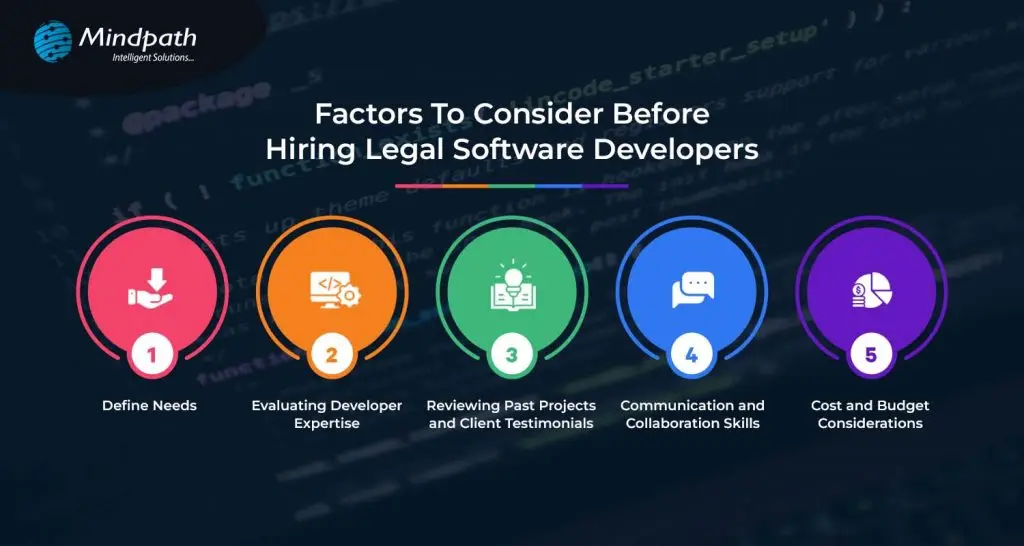
Factors To Consider Before Hiring Legal Software Developers 

Factors To Consider Before Hiring Legal Software Developers

1. Define Needs

Before you hire legal software developers, the needs must be clearly defined. It means determining what one wants the developers to be able to do. Consider the integration of the software with other systems in use like email and file storage for perfect workflow. This includes setting a budget, which will serve as a guideline regarding priorities and finding a developer or developers to deliver what you will need within your financial limits. Defining your needs will allow you to communicate your needs to the developers, hence bridging to a more successful, tailor-made software solution.

2. Evaluating Developer Expertise

Before hiring, critically evaluate the expertise of legal software developers. Are they technically competent? Do they have the skill sets and experience using their tools? Engage developers who have experience in working with legal software. After all, their better understanding of the unique needs of law firms and legal departments is good enough for saying so. Just look at all the client testimonials that app developers have gotten to understand that they do quality work. Make sure they are good at communication and that they are responsive, friendly developers. That way, by appraising their expertise, you can find developers who would be well equipped to build the software for you.

3. Reviewing Past Projects and Client Testimonials

Before you start hiring legal software developers, view their past projects; what kind of work they have done, how many projects they have handled. See if they have done any similar projects as you want. They can deliver qualitative software related to the legal field. Moreover, you can look over the client testimonials and reviews to know how the previous clients feel about their experience. It will provide you with positive feedback, thereby giving you confidence in their ability and reliability. This step helps in choosing a developer who has the potential to prove his results and satisfy your needs accordingly.

4. Communication and Collaboration Skills

When looking to hire legal software developers, try and pay attention to their communication and collaboration skills. Pick the ones you can talk with easily and hear you out. They should be responsive, updating you on the progress of their work. Good collaboration means they can work well with your team, share ideas, and solve problems together. Effective communication means everyone is on the same page, thus leading to a smoother development process toward a successful software solution.

5. Cost and Budget Considerations

The cost or budget for hiring a legal software developer should be considered. It will be important for you to decide just how much you are prepared to pay for your project and then compare legal software developers who can work within your budget. Different pricing models—like fixed price or hourly rate—might suit your needs better. Be sure to discuss extra costs that may arise. This will help you to understand better the financial aspects of the matter and find out the developers who offer maximum value for your money.

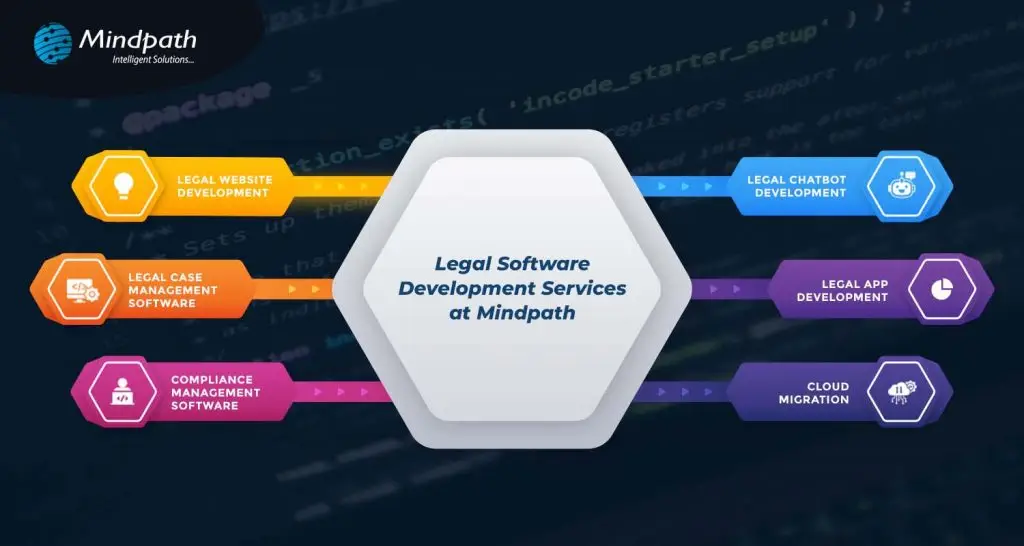
Legal software development services at Mindpath 

We have a variety of legal software development services designed to make your life simple and give you more time. Our solutions improve client service, streamline operations, and help remain compliant with regulations.

legal software development services designed

1. Legal Website Development

We provide law firms with professional websites that are attractive, user-friendly, and search engine friendly, so you will have an excellent online presence that really attracts potential clients.

2. Legal Chatbot Development

Our chatbots automate client interactions through answering questions, setting up appointments, and providing updates. They offer support 24/7 to help reduce the admin workload and increase client satisfaction.

3. Legal Case Management Software

Our software simplifies case management by providing real-time data and automated tasks so you will be able to have full control over your cases and gain valuable insights into their progress.

4. Legal App Development

We create user-friendly apps on iOS and Android to handle client interactions and case information from anywhere, creating a better experience for the client.

5. Compliance Management Software

This software takes extra care to keep you compliant with the legal framework and provides automated tracking of risk management to keep your practice updated.

6. Cloud Migration

We ensure the safe transfer of your data to the cloud so that flexibility and security are enhanced with easy access anywhere, along with system performance during cloud optimization.

Conclusion

The fast-changing legal technology landscape dictates that law firms and legal departments should catch up. In the modern world, technology is the way to achieve efficiency, better customer service, and compliance. While hiring a legal software developer, due consideration of things such as defining your needs, evaluating experience, and good communication can result in successful partnering and effective software solutions.

At Mindpath, we look to simply your process and introduce you to innovation that will automate your legal practice. By choosing Mindpath, you’re putting your money into innovation and expertise to drive your success against competition in the legal arena. Stay ahead with Mindpath and focus on what you do best by providing exceptional legal services.  
Get In Touch!

Looking to Revolutionize Your Legal Practice?

At Mindpath, we build custom legal software websites, chatbots, and case management systems just for you.

Discover essential factors for hiring legal software developers and see how Mindpath’s custom solutions like websites and chatbots can transform your practice.
React vs Vue

The software development industry keeps evolving incredibly with new technologies and innovations, breaking down traditional precedents. At the same time, software applications have become more complicated as businesses seek better ways to come up with successful products. The React vs Vue debate plays a major role in determining the difference between success and failure for your new software solutions. You might have many questions about the need to focus specifically on these two frontend development tools. Let’s dive in to get answers to all your questions.

With more frontend development technologies coming to the forefront, it is difficult to make the right choice for your project. React and Vue are the most preferred JavaScript technologies for web development. Both of them have become the strongest competitors among frontend development frameworks for their unique features. Let us learn the differences between React.js and Vue.js to choose the ideal pick according to your requirements.

Struggling to choose the right frontend framework for building fast and interactive web applications? Mindpath offers expert ReactJS development services to help you create scalable, high-performance solutions that align with your growth goals.

Understanding the Fundamentals of React and Vue

If you take a look at the top apps you use in everyday lives, most of them have either React.js or Vue.js in their tech stack. Choosing one of the ideal frameworks for software development can pose significant challenges. You must know what each of them has to offer for frontend development before making a decision. The following sections will provide insights on the fundamental details of React and Vue that can help you compare them.

Quick Overview of React

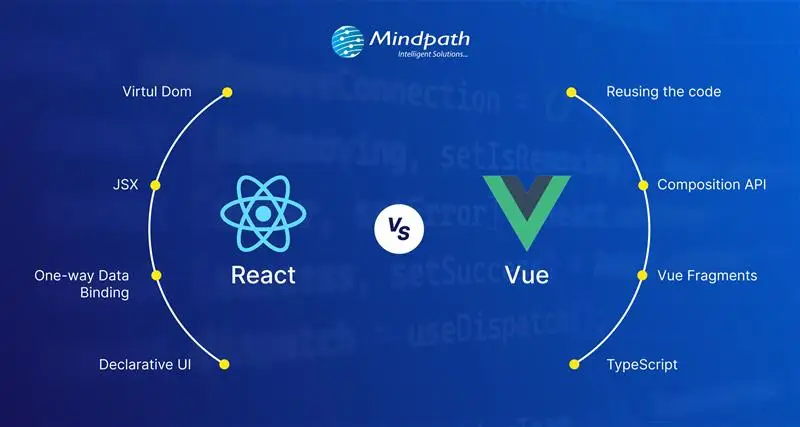
React.js is a well-known javascript framework for frontend development that delivers promising edge in creating interactive user interfaces (UI). Remarkable features of this tool include its origin which – it was created by Facebook in 2011 for internal purposes. Although most of us frequently refer to React as a framework, it’s an open-source javascript library for frontend development. One of the notable aspects in the Vue vs React debate is the use of JSX in React.js syntax. The role of JSX (JavaScript Syntax Extension) is very important in writing HTML elements in JavaScript code without making use of JavaScript functions.

React is among popular, dynamic, and versatile JavaScript frontend libraries used for developing frontend applications. It is most preferably used to create scalable applications with dynamic user interfaces and cross-platform capabilities. React developer tools also provide the support to identify performance issues and ensure a faster debugging process. Another striking feature of React is the flexibility to develop single-page applications and server-side apps as well as mobile apps.

Quick Overview of Vue

While React is a JavaScript library, Vue is an open-source JavaScript framework for frontend development. Vue.js grabbed headlines upon its arrival in 2014 for the shorter and simpler learning curve. As a matter of fact, the React vs Vue vs Angular comparison reflects on the fact that the design of Vue draws inspiration from Angular. The creator of Vue, a former Google engineer, picked the best components of Angular and the same approach as React.js to create a versatile framework.

Developers choose Vue for its easy-to-use interface and efficiency in developing web apps with a component-based model. The framework also includes a large library that empowers developers to create apps with better performance. Many developers prefer Vue over React for its simpler approach to coding with a less complex structure and plain syntax. On top of it, the collection of plugins available with Vue ensures efficient incorporation of additional functionalities in the app.

Looking to build a high-performance frontend that scales with your business and delivers real ROI? Learn from our ReactJS for App Development guide to understand how React empowers business owners to make smarter, future-ready technology decisions.

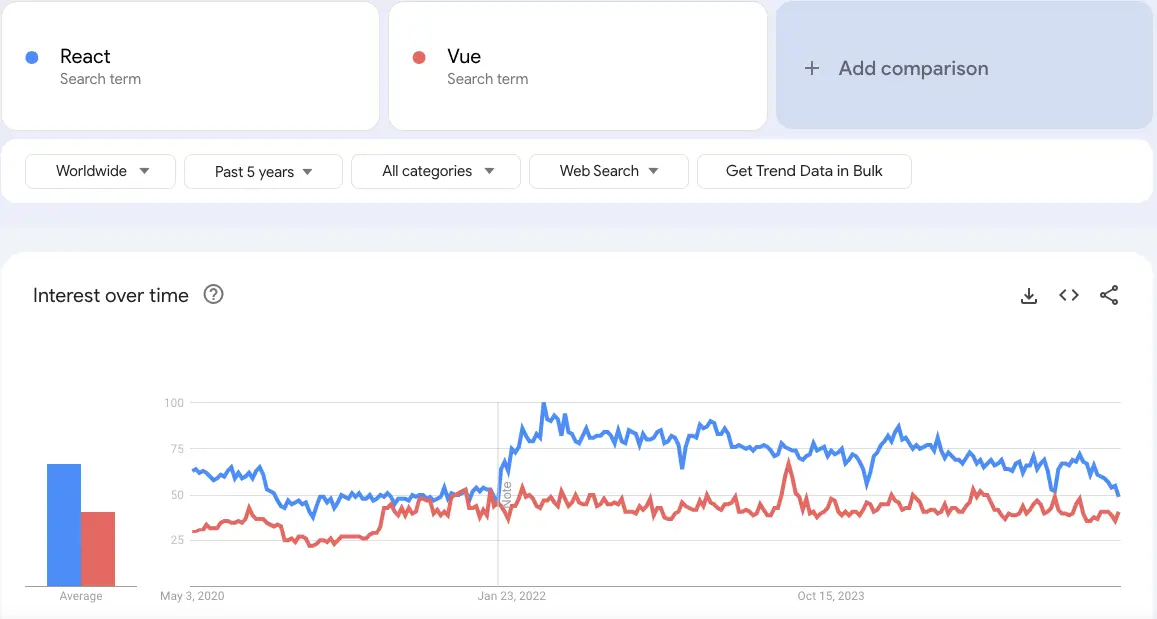
Let’s have a look at the React vs Vue comparison with Google Trends:

react vs vue google trends

Unraveling the Differences between React and Vue

While React is a JavaScript library, Vue is an open-source JavaScript framework for frontend development. Vue.js grabbed headlines upon its arrival in 2014 for the shorter and simpler learning curve. As a matter of fact, the React vs Vue vs Angular comparison reflects on the fact that the design of Vue draws inspiration from Angular. The creator of Vue, a former Google engineer, picked the best components of Angular and the same approach as React.js to create a versatile framework.

Developers choose Vue for its easy-to-use interface and efficiency in developing web apps with a component-based model. The framework also includes a large library that empowers developers to create apps with better performance. Many developers prefer Vue over React for its simpler approach to coding with a less complex structure and plain syntax. On top of it, the collection of plugins available with Vue ensures efficient incorporation of additional functionalities in the app.

1. App Size and Performance

The size of app in each framework speaks a lot about the ReactJS performance they can offer in the development process. You can use the Vue vs React performance benchmark to discover how Vue.js is the better pick to create small and faster apps. Vue allows you to compress the code so that it can consume significantly less space. As a matter of fact, applications created in Vue are almost 10% to 30% smaller than React-based applications.

The smaller app size enables faster coding as you will need limited inputs, thereby providing the assurance of better performance. Vue also stands as a formidable contender in terms of performance with its efficient default library. The testing library of Vue.js makes applications run quickly and more efficiently. On the other hand, React requires you to download additional libraries to introduce new features that increase app size and reduce performance.

2. Scalability

Another noticeable factor in the comparison between React.js and Vue.js is scalability as businesses seek ways to expand their apps with new functionalities. Which JavaScript frontend framework can come to your rescue when your app attracts more customers? React and Vue have efficient scalability solutions, albeit for different categories of apps. While React is the best pick to create large and complex apps, Vue is suitable for faster and simpler apps.

However, Vue and React both works on the same infrastructure and relies on a unidirectional data flow. In addition, Vue also offers support for two-way reactive data binding that allows simpler data management. The reactivity system of Vue ensures that you can track changes and introduce updates in the DOM. While React has a larger developer ecosystem and more templates and tools, Vue provides the guarantee of better scalability.

Where does React fail when it comes to scalability? You can find smart components in React.js that feature state management library functions. On the other hand, the dumb components help in executing simple functions and presenting things to the virtual DOM.

3. Operational Performance

The next important point of the difference between React and Vue will focus on their performance in different operations. Vue has been the favourite of companies as it offers exceptional performance in less complex and smaller projects. According to recent tests conducted on both frameworks, the operational performance depends on type of tasks where you can apply them. The tests focused on important metrics such as memory usage, rendering time and row creation speed for operations like clearing large tables or introducing updates.

React.js leverages a virtual DOM to ensure efficient management of UI updates and showcases impressive performance in all benchmarks. The operational performance of React is significantly higher in scenarios that require dynamic updates and content rendering. On the other side of the debate, Vue.js also leverages a virtual DOM alongside offering a reactive data-binding system. Vue has consistently shown competitive performance at par with React in different test scenarios.

4. Syntax and Learning Curve

You should also review the React js vs Vue js debate from the perspective of their syntax. React uses the JSX syntax while Vue uses the template syntax for developing user interfaces. Vue uses HTML templates by default albeit with the option to write code in JSX. On the other hand, React relies solely on JSX for the syntax. The isolation of HTML, JS and CSS in Vue ensures that beginners can also create web application frontends with ease. Developers with limited experience in JavaScript or the ones who have been using HTML/CSS will love working with Vue.

React presents a steeper learning curve as developers need in-depth understanding of JavaScript to work with the framework. Even if JSX offers more power and flexibility, beginners will find it more complex for frontend development.

5. Official Documentation

The documentation for React and Vue also play a crucial role in the React vs Vue comparison. Official documentation of any framework or library provides guidance on their components and the best ways to use them. Tools with clear and comprehensive documentation can also attract businesses which need clear directions for usage and troubleshooting. Vue has always maintained well-organized documentation that serves as its formidable strength. The decision to choose from React or Vue becomes simpler with the assurance of the simpler learning process and troubleshooting in Vue. On top of it, the latest improvements in official Vue documentation provide more comprehensive resources to help developers.

React is far behind Vue in terms of documentation because it focused only on basic concepts and advanced uses. The updated version of React documentation promises some changes such as better accessibility, clear explanations and real-world examples. With time, React will also have documentation that will help developers learn about its functionalities and best practices.

Wondering what separates a good ReactJS project from a truly successful one? Read the essential ReactJS Developer Skills for successful web projects to make smarter hiring and development decisions.

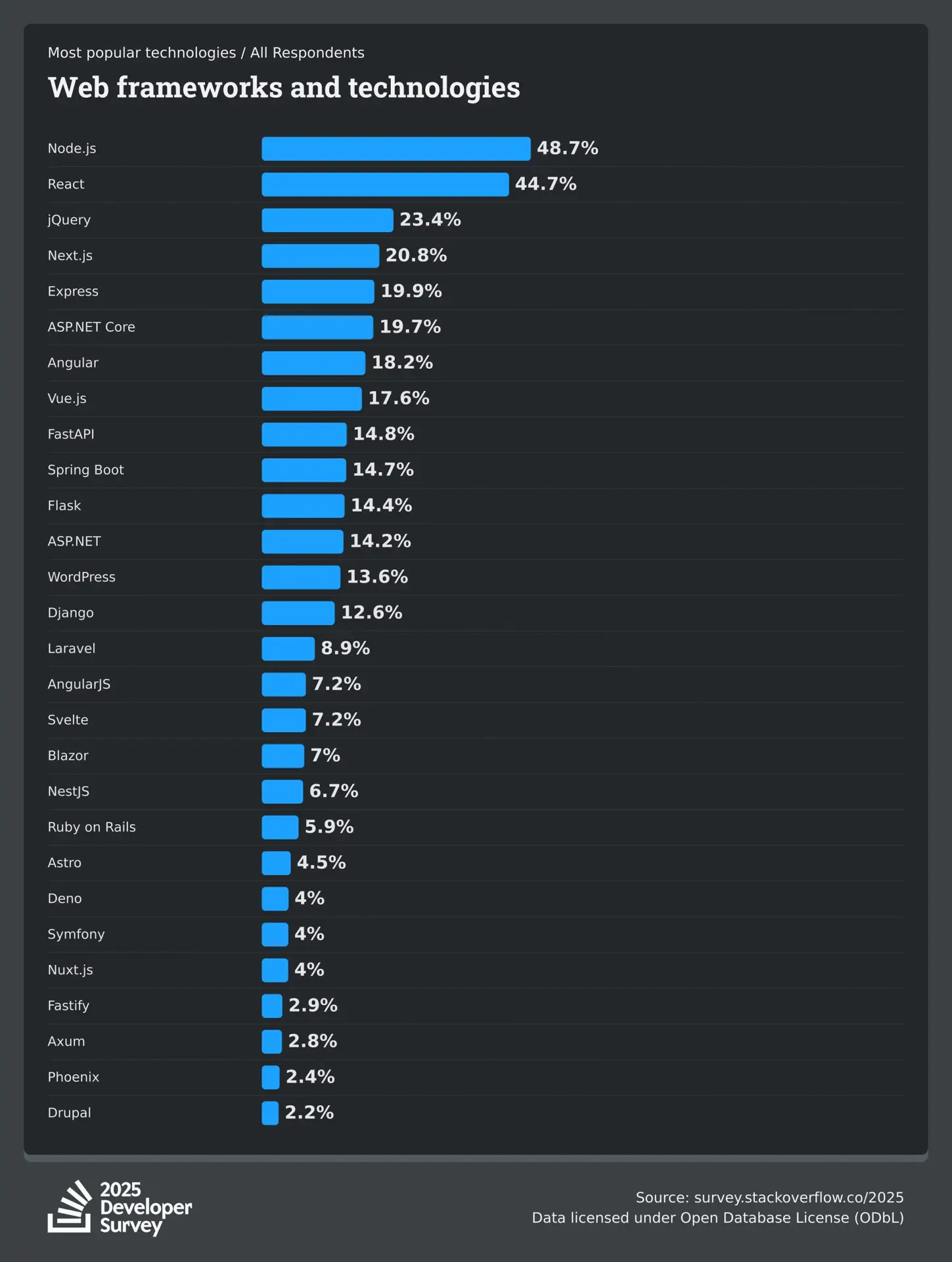
2025 Developer Survey by Stack Overflow

The 2025 Developer Survey by Stack Overflow, recorded the responses of over 65,000 developers about the technologies, coding, and tools they are interested to learn and use, and experience at work. Here’s the outcome of 38,132 (58.3%) responses received by professional developers on the popularity of web frameworks and technologies.

Stack Overflow Developer Survey

ReactJS vs VueJS: Which is Better for Your Project?

The differences between React and Vue mentioned above depict that each one of them has some distinguishing pulses and minuses. It is important to use the example of a React-based application and the example of a Vue-based application at the same time to understand their adoption in the real world. Some of the noteworthy companies that use React.js are instagram, Netflix, and Uber.

On the other side of the spectrum, industry giants like GitLab, Zoom, Upwork use Vue.js. Therefore, the choice of a frontend development framework depends completely on your needs. Still confused about choosing the right framework for your next project? No worries, Mindpath offers ReactJS development services and is ready to help you make the right decision. Take the first step now to choose the right framework for your dream project.

AI in Decision Making

75% of leaders believe AI gives them a major edge in making smart decisions. This highlights the growing trust leaders place in AI to improve clarity and confidence in business decisions.

AI is helping businesses plan effectively, reduce uncertainty, forecast demand, understand customers, and improve efficiency. In this blog, we’ll explore practical applications and key benefits of using AI in decision-making.

Ready to elevate your decision-making with AI? Discover how Mindpath’s advanced AI solutions can transform your business strategies and drive success. 

What is AI Decision Making?

AI decision-making uses data-driven systems to analyze large volumes of information and recommend or determine actions using rules, models, and machine learning.

Unlike traditional methods, AI can process complex data quickly, identify patterns, and learn from previous decisions. This helps businesses make faster, more accurate decisions when handling large amounts of data.

Curious about bringing AI into your business but unsure how to begin? Read our blog: Is Your Business Ready for AI?

Benefits of AI in Decision Making

Using AI for decision-making is becoming a key part of how modern businesses operate. With AI adoption on the rise, it’s important to understand what makes this technology so valuable in today’s decision-making process.  

1. Boost Productivity

AI works like a nonstop helper that gives decision makers quick answers and useful insights. It saves time by handling data and helps people focus on bigger tasks. With decision maker AI, you can get more done without working extra hours.

2. Lower Risks

AI benefits help in spotting problems early by studying past data and finding patterns. It can warn decision makers about things like fraud or sudden changes in the market. This helps businesses act early and avoid big mistakes.

3. Make Faster Decisions

AI looks at data quickly and gives answers in real time, helping businesses respond fast. It saves time by doing the hard work of sorting and studying information. This helps decision makers act faster and stay ahead in a fast-moving market.

4. Improve Efficiency

AI helps speed up tasks by collecting and studying data without delays. It shows decision makers the right information fast and helps fix weak spots in the process. This means teams can work better and get more done every day.

5. Ensure Consistency

AI follows the same rules every time, which helps make decisions fairer and steadier. It removes personal bias and uses data to guide choices in the same way for everyone. This helps businesses build trust and keep their work smooth and reliable.  

Curious to know how AI can enhance your e-commerce strategy and give your business a competitive edge? Read our detailed blog on how AI in e-commerce is transforming the future.

Real World Use Cases of AI in Decision Making

Real-world use cases of AI in decision-making highlight how this technology supports smarter choices in everyday business. Many industries are using AI to handle complex tasks, spot patterns, and guide important decisions with greater confidence.

1. Sales

In sales, AI in business strategy studies customer data to help teams focus on the best leads and plan better strategies. It suggests the right prices, products, and ways to talk to customers based on what works best. AI also checks team performance and gives ideas to improve sales results.

2. Manufacturing

The role of AI in decision-making is helping manufacturers keep machines running smoothly by spotting problems before they happen. It also helps manage materials, workers, and production by studying live data and showing the best way to use resources. AI gives useful ideas to improve processes and keep product quality high at every step. 

3. Marketing

In marketing, AI for customer service helps teams understand different customer groups and choose the best ones to focus on. It studies what people like and helps create content and ads that feel more personal and effective. By checking results from ads and social media, AI supports better decisions that improve marketing success.

4. Finance

AI helps financial experts find market trends by studying large amounts of data and giving clear insights. It also checks for possible risks and suggests safer ways to manage money and plan investments. With this support, decision makers can adjust portfolios and make smarter financial choices.

5. Customer Relationship Management

AI helps businesses understand what customers need by studying their behavior and feedback. It supports better decisions in improving service, keeping customers happy, and reducing the chance of losing them. AI also shows the best ways and times to talk to customers for stronger relationships. 

6. HR Operations

AI helps HR teams find the right candidates faster by quickly checking resumes and matching skills. It also looks at how employees are doing at work and gives useful ideas to support their growth. AI suggests fair pay and benefits by studying company budgets and market trends, helping keep employees happy and motivated.

Ready to leverage the transformative power of AI? Explore our blog AI transforming the future, to learn how to create a clear strategy and successfully adopt AI technologies in your organization

Ready to Make Smarter Business Decisions with AI?

AI in decision-making is helping businesses move faster, reduce risk, and improve results. It supports better planning, smarter insights, and more consistent actions. Many industries are now using AI as a trusted tool for everyday decisions. With the right approach, AI becomes a reliable partner that helps businesses grow with confidence.

At Mindpath, we deliver AI development services tailored to your unique business goals. Our expert team builds intelligent solutions that help you work smarter and stay ahead. With a focus on innovation, performance, and simplicity, we are here to support your digital journey. Let’s build intelligent systems that shape your future.