Home

Making Smarter Choices: The Impact of Decision Intelligence on Business Success

Making Smarter Choices: The Impact of Decision Intelligence on Business Success

Join our Newsletter!

Decision Intelligence

Have you ever wondered how top companies make quick, informed decisions that keep them ahead of the competition? That’s where decision intelligence comes in! But what does this mean for businesses like yours? How can harnessing decision intelligence help you navigate uncertainty and drive success? In this blog, we will explore the fascinating world of decision intelligence and uncover its potential. So, let’s dive in!

What is Decision Intelligence?

Decision Intelligence (DI) is the way organizations utilize artificial intelligence (AI) to make smarter decisions. It focusses on achieving results that assist the organization to achieve its objectives. Companies can employ Decision Intelligence to improve the efficiency of each department and increase overall performance. A firm, for example, can utilize DI to analyze sales data, better understand client preferences, and develop new methods to generate profit. Businesses can become more efficient and productive by leveraging smart technology to support their choices.

Why is Decision Intelligence Important for Businesses?

Decision intelligence is important because it enables businesses to make rapid and precise decisions by combining AI and data. This implies that firms can resolve problems more quickly and better satisfy their customers’ requirements. Companies that use Decision Intelligence can collect and analyze data using smart technologies to predict the best results for their decisions. However, Decision Intelligence does not replace people in decision-making processes. Instead, it empowers people by improving their access to all corporate data. This allows them to comprehend the full picture and make the best decisions possible. Businesses can use Decision Intelligence to make data-driven choices at all levels. Additionally, it improves their operational visibility, which can offer thrilling outcomes that could revolutionize their success!

Benefits of Decision Intelligence (DI)
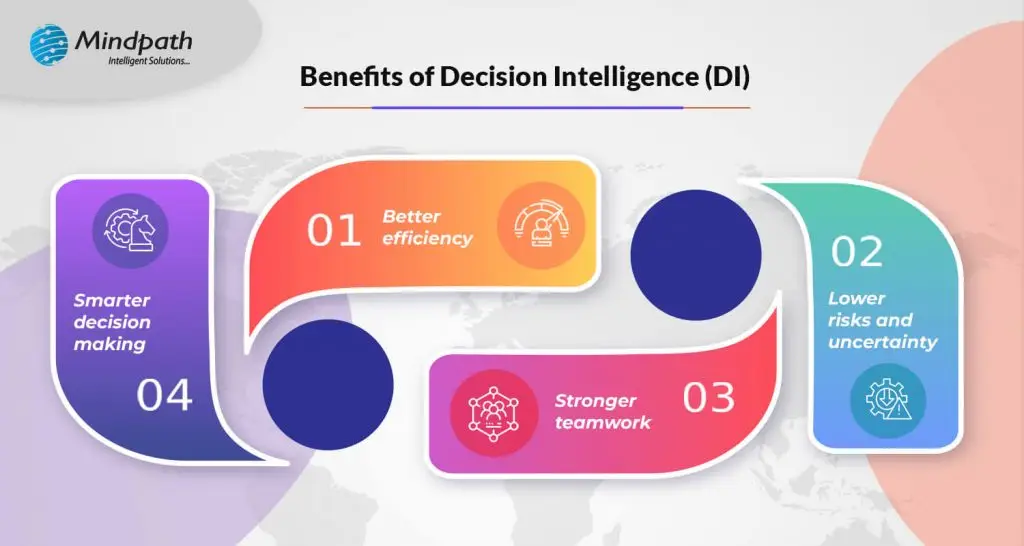
1. Better efficiency

One of the primary advantages of Decision Intelligence is its capacity to increase organizational efficiency. Decision Intelligence allows leaders to make faster and more informed decisions by delivering the relevant information at the right time. When leaders have access to real-time data, they can quickly analyze circumstances and comprehend the consequences of their decisions. This urgency is essential in today’s fast-paced corporate climate, when delays can result in missed opportunities or bad consequences. For example, if a corporation observes a rapid shift in client behavior, Decision Intelligence can assist executives in immediately analyzing the data, allowing them to adjust their strategy without wasting time.

Furthermore, Decision Intelligence enables organizations to simplify their operations. When executives have easy access to important insights, they can eliminate superfluous processes in the decision-making process. This not only saves time, but also allows teams to focus on what is genuinely important, resulting in improved cooperation and more successful outcomes. As a result, businesses using Decision Intelligence become more responsive. They can adjust to market developments, client requirements, and internal issues more quickly and adaptably.

2. Lower risks and uncertainty

Another significant benefit of Decision Intelligence is its capacity to assist organizations in reducing risks and uncertainties. While risks are always there in business, Decision Intelligence enables businesses to detect possible dangers earlier. Organizations can detect warning indicators, such as diminishing customer satisfaction, and take proactive efforts to resolve issues before they worsen.

In addition to recognizing risks, Decision Intelligence enables firms to investigate several potential consequences of their actions. Organizations can utilize predictive analytics to model numerous scenarios and better understand the possible consequences of their decisions. This competence allows leaders to balance the benefits and drawbacks of many alternatives, making it simpler to select the best course forward while minimizing unwanted consequences. Furthermore, decision intelligence enables organizations to design effective risk management methods. Companies that anticipate possible issues might develop plans to limit their effect. For example, if a company expects supply chain interruptions, it might seek alternate suppliers ahead of time.

3. Stronger teamwork

Improved teamwork is another significant advantage of Decision Intelligence. Decision Intelligence helps stakeholders align throughout the organization by providing a single source of truth for data and analytics. When everyone has access to the same correct information, it is simpler for teams to communicate effectively and collaborate on common goals.

With Decision Intelligence, different departments can turn to the same data, minimizing misconceptions and promoting a cohesive strategy. This transparency guarantees that everyone understands the same thing, whether it’s about sales objectives, customer feedback, or operational issues. When teams understand their common goals and have accurate facts to back up their talks, they can work more effectively. Furthermore, Decision Intelligence promotes collaboration by breaking down the barriers between departments. When individuals from several departments exchange thoughts and data, it results in improved problem-solving and new solutions.

4. Smarter decision-making

Improved decision-making is a major advantage of Decision Intelligence. Executives can more effectively recognize and analyze distinct scenarios by utilizing analytics in key moments. This helps people to better assess the probable repercussions of their choices, resulting in more informed judgements.

When leaders use data-driven insights, they can consider the benefits and drawbacks of several solutions before making a decision. For example, if a firm is thinking about releasing a new product, Decision Intelligence can help executives evaluate market trends and client preferences. This thorough examination enables them to make the best choice that matches the company’s objectives.

Also Read: 5 Conversational AI Trends To Watch Out For In 2024

Decision Intelligence Services at Mindpath

Mindpath’s Decision Intelligence services help organizations make informed choices by integrating advanced analytics with human insights. Unlike traditional artificial intelligence, which mostly automates processes and makes predictions, our methodology assists executives in evaluating many scenarios and outcomes, ensuring they have a comprehensive perspective of their corporate objectives.
By offering a single source of truth for data, we encourage stakeholder engagement and minimize divisions between departments. This alignment enables everyone to work towards shared goals, resulting in better informed, effective decision-making throughout the organization.

Wrapping Note!

In today’s fast-paced corporate environment, decision intelligence is essential for organizations attempting to succeed in the face of uncertainty. Companies can make better, quicker choices by integrating modern analytics and human insights. The benefits like increased efficiency, lower risks, stronger cooperation, and better decision-making, show how Decision Intelligence can alter operations and drive performance.

At Mindpath, we are dedicated to assisting organizations in achieving their objectives by using decision intelligence. By offering a single source of truth and encouraging cooperation, we enable organizations to successfully handle problems and grasp opportunities. Mindpath’s Decision Intelligence services can help you unleash your organization’s full potential.

Ready to transform your business with smarter decision-making?

Partner with Mindpath’s Decision Intelligence services for data-driven success.

Contact Us!

Support Is One Click Away

Featured Posts

Related Post

Web accessibility guidelines

Your website acts as the gateway to your business’s digital world. It is the first impression that visitors get. However, for millions of users around the globe, those with motor, visual, cognitive, and hearing impairments, that door can remain locked if your website is not completely accessible. This is where web accessibility guidelines become pivotal. 

Key Takeaways

  • 01
    Web accessibility ensures every visitor, including those with disabilities, can use a site.
  • 02
    The POUR principles guide websites to be perceivable, operable, understandable, and robust.
  • 03
    Accessible WordPress themes and plugins make compliance easier without major redesigns.
  • 04
    Proper alt text, color contrast, and heading structure improve usability and SEO.
  • 05
    Regular accessibility testing with tools like WAVE keeps websites compliant and inclusive.

For WordPress website owners, implementing the web accessibility standards not only enhances usability but also increases SEO, brand reputation, and user engagement. In this detailed blog, you will learn more about web page accessibility and explore important accessibility principles and effective strategies. Besides, we have also mentioned some useful tools that can help you ensure your site meets the necessary standards. 

Looking to make your website accessible for your visitors and users? Mindpath’s WordPress development services help you create a user-friendly website that will meet accessibility standards and deliver seamless results.

What are Web Accessibility Guidelines?

Web accessibility guidelines are internationally recognized standards that help make websites accessible to everyone, including people with disabilities. The most widely adopted standard is the Web Content Accessibility Guidelines (WCAG), developed by the World Wide Web Consortium (W3C).

These guidelines help businesses design websites that users can perceive, navigate, understand, and interact with using assistive technologies such as screen readers, keyboard navigation, voice recognition software, and magnifiers.

Following web accessibility guidelines helps organizations:

  • Improve user experience for all visitors
  • Meet accessibility regulations and compliance requirements
  • Increase search engine visibility
  • Reach a larger audience
  • Build trust and strengthen brand reputation

Web Accessibility and Its Importance

In simple words, it means designing and creating websites that can be easily used and navigated by every user, including users with disabilities. Web accessibility ensures equal access to functionality as well as information to all, aligning with various legal mandates and standards, such as: 

1. The Americans with Disabilities Act or ADA

2. Section 508 of the Rehabilitation Act of 1973 (USA)

3. The Rights of Persons with Disabilities or RPWD Act (India)

4. The European Accessibility Act 2019

5. Equality Act 2001 (the United Kingdom)

6. Web Content Accessibility Guidelines 2.1 and 3.0

Accessible sites don’t just benefit individuals with disabilities or temporary impairment. Such websites tend to rank higher in SERPs due to their enhanced usability and semantic structure. 

Web Accessibility Standards- POUR Principles

Apart from the specific requirements, businesses should familiarize themselves with the key principles of web accessibility guidelines. These are known by the acronym- POUR. 

1. Perceivable

The interface and content of websites should be presented in such a way that every user can perceive or interpret, regardless of their disabilities. 

2. Operable

Visitors should be able to interact and navigate with websites utilizing different input methods, including assistive devices and keyboards. 

3. Understandable

Content as well as functionality of a website should be consistent, clear, and comprehensible for users with different cognitive levels. 

4. Robust

Websites should be compatible with various modern assistive technologies. This helps ensure long-term reliability and accessibility. 

Is your WordPress site truly secure from cyber threats and vulnerabilities? Find out how safeguarding WordPress vulnerabilities can help you protect your website and maintain your customers’ trust.

Accessibility in WordPress: Why it Matters?

WordPress powers a major portion of the web, making it an important platform for accessibility. Whether you have an e-commerce platform, a blog site, or a business website, you should carry out a web accessibility test and ensure it meets all the standards. WordPress accessibility is crucial for many reasons, like: 

1. Aider Audience Reach

By creating a website with an inclusive design, you can make it accessible for individuals with disabilities. Besides, it shows your business supports disabled people and understands their needs. 

2. Legal Protection

Following the required accessibility standards, you can avoid penalties and lawsuits. 

3. Better SEO

All search engines favor accessible WordPress websites with proper alt text, semantic structure, etc. 

4. Establishing Reputation

Digital accessibility has become an ethical issue. If you are not following the web accessibility guidelines, it can affect the reputation of your business.

5. Better UX

With the help of various accessibility features, you can boost usability for every user, including those with physical limitations and mobile visitors. 

Want to ensure your WordPress site is running on the right PHP version for top performance and security? Check out our guide on WordPress PHP compatibility to keep your site efficient, stable, and future-ready.

Some Common Web Accessibility Barriers

Before diving into the solutions to meet accessibility web standards, it is important to understand some common accessibility barriers that can significantly affect user experience while limiting your website’s inclusivity. 

1. Use of incorrect and missing Alt Text of images

2. Non-descriptive link text like “read more” or “click here.”

3. Poor color contrast between the background and the text

4. Use of inaccessible forms, lacking keyboard support

5. Keyboard navigation problems

6. Lack of transcripts or captions for multimedia

7. Wrong heading structure

8. Auto-play content with missing controls

Recognizing these issues is the first step toward crafting a more accessible and inclusive WordPress website that can serve every user ethically as well as effectively. 

Are you struggling to decide which platform will best support your business goals? Compare Magento vs WordPress to discover which option offers the features and flexibility your website needs.

Strategies to Boost Your WordPress Website Accessibility

Now that we have understood the importance of web accessibility and common barriers to it, it’s time to move to the practical solutions. Increasing your WordPress site’s accessibility doesn’t require a complete transformation. It can be achieved through the right web accessibility tool, thoughtful adjustment, and an inclusive design. Here are actionable ways to make your website more accessible and compliant. 

1. Opt For an Accessibility-Ready WordPress Theme

When working on web accessibility, always begin with a solid foundation, i.e., themes. You should always choose an accessibility-ready theme. Such themes follow the web page accessibility guidelines, such as keyboard navigation, semantic HTML, and more. 

Some popular accessible WordPress themes you can try are: 

  • Monument Valley
  • Gutenix
  • Neve
  • Icelander
  • OceanWP 
  • Astra

While choosing a theme, always check for WCAG compliance and evaluate the performance with a screen reader. 

2. Proper Heading Structure and Semantic HTML

Semantic HTML allows assistive technologies to properly interpret your website content. Ensure that all the headers are used in a logical order, like H1, H2, H3, so that users can easily understand the page structure. Here are some best practices to keep in mind: 

  • Only use one heading per page, generally the title.
  • Use proper headings for main sections and subsections
  • Don’t skip heading levels 

You can use a web accessibility tool like Axe to check heading structure and make changes accordingly. 

3. Install Right Accessible Plugins

Plugins are great ways to add new functionality and features to your website. However, if not selected carefully, you may end up with various accessibility problems. Always use plugins designed to make your site more accessible. Some recommended plugins are:

  • Equalize Digital: Offers a plugin to test websites for WCAG compliance.
  • WP Accessibility: Helps identify common web accessibility problems. 
  • One Click Accessibility: Allows an easy way to add various accessibility features.
  • Accessible Poetry: Helps enhance accessibility by integrating features such as focus styles and skip links

These plugins can complement your selected accessibility-ready theme and keep your site compliant.

4. Ensure Sufficient Color Contrast

While creating an accessible WordPress website, ensure that the color contrast between background and text meet necessary WCAG guidelines. It should be at least 4.5:1 for normal text. 

High contrast enhances readability for individuals with visual impairment. There are many WordPress accessibility-ready themes that offer easy ways to customize colors to meet web accessibility guidelines.

Apart from this, you should also use a readable font size and line height. Recommended font size is at least 16 pixels. The line height and word spacing should be 1.5x and 0.16x of the font size, respectively.  

5. Tab Indexing

Users with motor skill challenges generally depend on keyboard navigation, especially the Tab key, to navigate through your website. Unlike trackpad or mouse users, they rely on a predictable, logical tab order to access buttons, menus, and other interactive elements. So, ensure that you have enabled tab indexing for your site. 

Furthermore, make sure that all interactive elements follow the correct flow, i.e., left to right and top to bottom. A well-designed tab index can create a more inclusive and smoother browsing experience. 

6. Offer a Consistent and Clear Navigation

Even though you have deployed tab indexing for smooth navigation, there are other important things you should consider.

  • Breadcrumbs: Use breadcrumbs to show users their current location within your website, reducing confusion. 
  • Descriptive links: Prefer to use descriptive link text that clearly shows action or destination. Skip using phrases like “read more” or “click here”. 
  • Consistent navigation menu: Make sure that your site’s menu is consistent across all pages. 

Clear and consistent navigation is vital for user experience as well as accessibility. 

7. Optimize Media and Images

Media and images are crucial elements of a website. To ensure their accessibility, consider these web accessibility examples:

  • Captions and Transcripts: Use captions for videos and transcripts for audio content. This will help users with hearing impairments and who prefer to read instead of listening. 
  • Alt Text: For images, you should use descriptive alt text. This will help a screen reader to describe images to users. 
  • Descriptive File Name: Using descriptive file names for media files and images can help you boost SEO and web accessibility. 

With accessible images and media, it will be easier to make your site compatible with assistive technologies. 

8. Leverage Access Keys

Access keys work like keyboard shortcuts, enabling users to jump to a specific section of the website using assigned keys. For example, by pressing a key like “1”, they can go to the homepage, and by pressing “2”, they can access your contact page. 

9. Avoid Auto-Animations and Flashing Content

Blinking and flashing content can cause seizures in individuals with photosensitive epilepsy. Besides, auto-animations can also cause distraction among users. Best practices to follow here are: 

  • Don’t flash content more than three times per second
  • Allow users to pause animations
  • Utilize motion purposefully

By following the above-mentioned tips, you can ensure that your website welcomes all users while offering a user-friendly web experience. 

Ready to upgrade your HTML site to something more powerful and manageable? Explore why converting HTML to WordPress can streamline updates and improve your online presence.

Tools to Ensure Your Site’s Accessibility

Once you are done with implementing accessibility features following the web accessibility guidelines, you should carry out a comprehensive test to ensure your site is working as intended. Here are some useful tools to test your site.

1. WAVE

Web Accessibility Evaluation Tool, designed by WebAI, helps content creators and developers to make sure their websites are accessible for all. It offers visual feedback on the web content’s accessibility, making it easier to detect and resolve accessibility problems. It’s free to use. 

2. EqualWeb

This tool is designed to offer manual and automated accessibility solutions. Using this, businesses can stay compliant with ADA standards and WCAG 2.1. With AI-powered features, EqualWeb offers an easy way to identify and fix accessibility issues.  

3. Axe

This powerful web accessibility test tool can be integrated into any browser and development environments for a detailed web accessibility analysis. 

4. Level Access

This web accessibility checker provides developers with an API and a web interface, making it a highly flexible tool for testing accessibility throughout the web development lifecycle. 

5. NVDA

NonVisual Desktop Access is an open-source, free-to-use screen reader for Windows. Using this, visually impaired individuals can easily interact with your digital content. Developers can use it to evaluate web applications and websites’ accessibility. 

Wondering how to hire the right WordPress developer to help your business grow online? Explore our detailed guide on Hiring a WordPress Developer to discover expert insights that guide you toward making the best hiring decision.

Create an Inclusive Website that Welcomes Everyone

Web accessibility goes beyond just legal compliance. It focuses on fostering empathy, digital equity, and inclusion. By following web accessibility guidelines and leveraging the robust ecosystem of WordPress, you can create a website that is intuitive, usable, and can help all users. 

Making your site accessible is a journey of continuous improvement, and Mindpath can be an ideal partner in this journey. With our web accessibility services designed for this changing digital space, you can witness the desired results. Our expert guidance and tailored solutions, created based on web accessibility guidelines, will help you meet all compliance requirements and create a website that embodies innovation, openness, and user engagement. 

Frequently Asked Questions

custom software development

Custom software development is becoming the primary driver for businesses to get ahead of the curve in 2026. Businesses no longer rely on ready-made tools as existing tools fall short of meeting unique requirements. More recently, there is a higher need for tailored solutions that incorporate an organization’s goals and can scale as the firm grows. So, how will businesses ensure their software not just helps with their operations, but ultimately provides a legitimate competitive advantage?

In today’s fast-paced digital landscape, the right software is not only technology but also a strategy in practice. With custom software, businesses foster solutions that face specific challenges and ignite innovation. This guide walks through the core aspects of custom software development, including its definition, different types, benefits, key factors, and process. With a successful approach, adequately designed custom-built systems will enable progress and lead to long-term success.

At Mindpath, our custom software development services deliver secure and scalable services that  meet your business goals and enhance your business performance.

What is Custom Software Development?

Custom software development builds software solutions designed for a business’s specific needs. Instead of using generic tools developed for all businesses, many companies are developing their own custom software applications to support their unique company goals, internal workflows, and their customers. The custom software process includes planning, designing, developing custom software, and then ongoing software updates. This proactive approach might help a business increase efficiency, allow the business to expand, and create a steady stream of revenue.

The basis of this method is personalization. Developers create each feature with intention, supporting groups like marketing or sales, and enhancing customer brand participation through apps and platforms. These tailored solutions align and integrate smoothly into existing processes, improving productivity. When businesses select the right design and functionality, they receive a competitive advantage and increase their ability to outgrow the competition in a rapidly evolving digital landscape.

Types of Custom Software Solutions

Businesses face unique challenges, so they will need specific solutions to meet their goals. When used effectively, there are many kinds of custom software development solutions that can take advantage of that to drive efficiency and growth.

Types of Custom Software Solutions

1. E-commerce and Online Platforms

Online businesses require more than a basic website. Custom platforms take care of payment, inventory, and customers quickly and accurately.

2. Data Management and Analytics Tools

Companies generate a never-ending amount of data every day. Analytics tools provide actionable insights from that data, which decision-makers can invest in, as there is confidence in the analytics.

3. Compliance and Regulatory Tools

The industries with strict rules continue to change at a breakneck speed. Compliance software can help you track, report, and reduce risks.

4. Customer-Facing Applications

Customers expect a seamless digital experience, and mobile apps, portals, or self-service tools can provide a simple and engaging interaction.

5. Integration and Middleware Solutions

It’s not very common for systems to connect themselves. Middleware acts as a bridge between those systems and allows for the free flow of information across platforms.

6. Enterprise Grade Solutions

Large organizations need powerful systems to maintain efficiency. ERP, CRM, and BI software all gather data into one controllable system.

7. Internal Software Systems

Day-to-day operations require intelligent systems. HR management platforms, scheduling software, and inventory solutions help maintain workflow efficiency.

8. Business Process Automation (BPA)

Manual tasks challenge the organization as a whole. Custom software development will provide a BPA solution that reduces repetitive, verifiably redundant work and frees up time.

Want to know the method behind building scalable and maintainable software? Learn how the software development life cycle helps you streamline development by providing a structured approach that improves efficiency and overall project outcomes.

Benefits of Custom Software Development

Each organization operates differently, so that’s why software customizations are very important. When you choose custom solutions, companies will have the tools that meet their needs and bring value over the long term.

Benefits of Custom Software Development

1. Strong Security Measures

Every day, businesses deal with the threat of crime, and good protection is necessary. With custom solutions, businesses can create the security features that fit their unique needs.

2. Smarter Automation

Repetitive work that wastes time is unnecessary. Automated workflows make everything more efficient, giving teams more time to focus on innovative opportunities.

3. Future-Ready Upgrades

Technology will continue to change, and existing systems are often outdated. A custom solution is easy to upgrade, so businesses can stay up to date.

4. Cost Savings Over Time

It’s common to think of generic tools as the less costly option, but they come with hidden costs. A custom-built system can expand with the business and reduce your long-term costs.

5. Tailored to Your Business

Every company has its own workflows, and off-the-shelf, one-size-fits-all tools rarely truly fit. Custom software design considers workflows and goals to create solutions tailored to specific needs.

6. Full Control and Flexibility

Companies have the decision on how their software evolves. From additional feature requests to maintenance, a company is in control of all aspects of software.

7. Edge Over Competitors

To be different, you need unique solutions. Custom software development allows companies to create custom tools that enhance their efficiency and develop stronger customer relationships.

Curious how businesses are building world-class software teams without geographical limits? Explore how our offshore software development can deliver skilled talent and cost-effective solutions.

Step-by-Step Custom Software Development Process

Custom software development has a well-defined process to deliver the best quality product. Using the proper methodology, a custom software development process business makes certain that everything is completed to specific objectives for each project. Here is the process:

1. Requirements and Planning

The process begins with identifying and researching the client’s needs to lay the right framework. The team documents goals, scope, and technology decisions in order to have a clear foundation. During this clarity stage, teams quickly put together custom-made software with a common understanding.

2. UX/UI & System Design

Once they define the requirements, designers and architects start creating wireframes, prototypes, and system architecture for the solution. They start defining the database structure, user experience (UX), and technical workflow in order to ensure everything flows and goes according to plan. Designers create all custom software to be easy to use, scalable, and low-risk.

3. Development Execution

Developers write code based on the approved design and requirements. They develop using agile and best practices and build the functional modules incrementally. Organizations will receive reliable solutions designed to promote their long-term success.

4. Testing & Quality Assurance

Testing validates both functional and performance on devices, platforms, and use cases. Testers perform unit, integration, and regression tests to detect any issues as soon as possible. This step guarantees quality standards in custom software development solutions before delivery.

5. Deployment & Continuous Support

Once testing verifies quality, the team deploys the software on-premises or in cloud environments. The team will continually provide updates, fixes, and improvements to help maintain the effectiveness of the system. We will perform a continuous improvement process to generate value and to prolong the entire application lifecycle.

Concerned about risks that could slow down your custom software build? Explore the major custom software development mistakes that can disrupt progress and find out how to avoid them.

Key Factors to Consider When Building Custom Software

When it comes to building a custom piece of software, it’s more than just writing the code. It’s important to pay attention to the factors that drive the success and make sure your software aligns with your vision of the future in your business.

1. Build vs Buy Decision

Evaluate if building from scratch or buying ready-made solutions best supports your custom software development goals.

2. In-House Team or Outsourcing

Choose between in-house development and outsourcing based on expertise, resources, and project scope.

3. Right Development Methodology

Select the right approach, like Agile or Waterfall, to match your project’s complexity and goals.

4. Focus on User Experience

Design software with intuitive navigation, usability, and efficiency to boost adoption

5. Scalability and Future Growth

Plan for growth by ensuring the custom software development solution can scale easily as your business expands and technology evolves.

Trying to understand the common pitfalls in creating custom software? Check out our blog to learn the essential custom software development dos and don’ts that every business should follow for a smooth process.

Ready to Transform Your Business with Custom Software?

Custom software development continues to be the core driver of innovation, growth, and competitive advantage. By focusing on tailored solutions, businesses overcome unique challenges, streamline operations, and stay prepared for the future. With the right approach, companies build systems that scale seamlessly, improve efficiency, and deliver long-term results in today’s fast-moving digital world.

Partnering with a trusted custom software development company gives you access to expert guidance, advanced technologies, and proven strategies. At Mindpath, our custom software development services empower businesses to create secure, scalable, and future-ready solutions. From strategy to execution, we ensure every step adds measurable value, helping organizations achieve their vision with confidence and clarity.

Frequently Asked Questions

1. How long does it usually take to develop custom software?

The timeline depends on the project size, features, and complexity. Small solutions may take a few months, while enterprise-level systems can take longer. Proper planning and regular communication help keep development on schedule and reduce unexpected delays.

2. Can custom software work with existing business systems?

Yes, custom software is designed to integrate with existing tools, databases, and platforms. This helps businesses avoid replacing everything at once while improving workflow efficiency and keeping operations connected across departments.

3. What happens if business requirements change during development?

Custom software projects are flexible, especially when using Agile development methods. Features and priorities can be adjusted during the process to match changing business needs without starting the project from scratch.

4. How do businesses maintain custom software after launch?

After deployment, businesses usually receive ongoing support, updates, bug fixes, and performance improvements. Regular maintenance keeps the software secure, efficient, and compatible with new technologies as the business grows.

5. Is custom software a good option for startups?

Yes, startups can benefit from custom software because it supports unique business ideas and future scalability. It helps create personalized customer experiences and gives startups more flexibility to adapt quickly in competitive markets.

ecommerce software development  

E-commerce is rapidly changing, and brands have to cope with it on a daily basis. Customer journeys need fast loading, effective information display, and dependable performance across all the devices. This compulsion makes e-commerce software development a fundamental business priority and not a peripheral activity. It influences product loading processes, payment processing, and growth of systems. We, as technology experts, are well aware of this change. It calls on teams to rebuild platforms in a purposeful, precise, and long-term growth perspective.

Based on this fact, attention turns to the planning and reinforcement of platforms. Intelligent e-commerce systems bridge the gap between business objectives and reality. They permit change and maintain performance. They also enhance brand confidence in an increasingly competitive environment. The connection between technology and strategy results in smarter decision-making. It initiates necessary debates in emerging businesses. So, this blog focuses on analyzing this field in detail and discussing what really makes e-commerce sites successful. Let’s dive in to know more!

Ready to transform your online store with a reliable and feature-rich platform? Mindpath’s software development services help businesses build innovative and scalable e-commerce solutions.

What Does E-commerce Software Development Mean?

To put it simply, e-commerce software development implies the development of digital systems that can assist businesses in selling online without any issues. These systems handle products, prices, orders, and activities of customers centrally. They assist e-stores in loading quickly and operating without failure. They are created by developers to suit the needs of customers and business objectives. Due to increasing online demand, powerful software assists brands to remain organized, responsive and engage in daily sales activity.

The process also facilitates growth and flexibility as business goes online. Through e-commerce development services, teams create a platform to facilitate payments, track orders, and manage users conveniently. Quality software links all the store’s functions intelligently. It makes teamwork easy and customers’ shopping straightforward. Such transparency enables businesses to win trust and provide a uniform online experience.

Key Benefits of E-commerce Software Development

In the contemporary world, online selling requires more than a simple web site. Brands seek speed, control and growing demand platforms. The e-commerce software development services facilitate this transition with smarter digital basics. The following are some of the main advantages which make this method worth considering.

1. Built for Your Business Needs

Each business operates in its unique way, and software must be aware of that fact. E-commerce software development assists teams to mould features in accordance with actual workflow and objectives.

2. Ready to Grow with Demand

E-commerce stores evolve with the growth of products, customers, and purchase orders. E-commerce software development helps it grow without slowing down systems and disrupting normal operations.

3. Better Control Over Design and Experience

Brands desire stores that are appealing and feel right to the customers. This method offers complete ownership over layout and flow as well as shopping experience.

4. Smooth Connection with Existing Tools

Several companies are already utilizing accounting, inventory, or CRM software. All these systems are linked through a well-planned software that maintains smooth operations of the system.

5. Faster Performance for Shoppers

Speed is important when the customers are browsing or paying over the internet. Powerful development pays attention to a rapid load and seamless action in each step.

6. Stronger Protection for Customer Data

E-commerce sites deal with personal customer information on daily basis. Dedicated systems implement protection rules which secure data and establish enduring customer confidence.

Curious how businesses build platforms aligned with their exact workflows? Check out custom software development and discover how it ensures better control and security.

Features of an E-commerce Software Development

The demand of e-commerce software will keep increasing as the online firms continue to grow all over the world. Grand View Research estimated the market of e-commerce software in the world to be USD 7.12 billion in 2022. The market has the potential of reaching USD 20.90 billion in 2030 with a CAGR of 15.3 percent. This expansion is an indication that it requires functionality to handle inventory, taxation, and day-to-day operations.

1. Simple Navigation Flow

Good layouts enable the user to navigate through easily without wasting time. E-commerce software development makes categories and checkout user-friendly.

2. Smart Product Control

The stores update and sort listings effectively. This will enable customers to find products easier and also make shopping more enjoyable.

3. Secure Payment Handling

There are various payment methods, which enhances customer confidence. E-commerce software solution development assures that all dealings remain secure and intact.

4. Order Tracking System

Teams have a chance to track orders between placement and delivery. This enhances coordination, as well as minimizes errors in shipping.

5. Mobile-Ready Experience

Mobile users anticipate hassle-free browsing and purchase. Responsive design will ensure an easy experience across all gadgets.

Want to keep your online store competitive in a rapidly evolving market? Discover software development trends to learn how modern innovations are transforming e commerce platforms.

Emerging Trends in E-commerce Software Development

E-commerce environment continues to evolve along with technology and consumer demands. The trends in e-commerce software development are currently geared towards enhancing growth and user satisfaction.

1. Mobile-First Shopping

Smartphones are now taking over the online purchases. E-commerce software development achieves seamless and quick experiences across all mobile devices.

2. Smarter Recommendations

AI and ML can assist platforms in recommending the products that the users desire. This enhances interaction and marketing prospects successfully.

3. Virtual Product Experience

AR allows customers to have a virtual experience on the use of products and then purchase. It enhances confidence and decreases returns in online shopping.

4. Voice-Activated Buying

Voice commerce enables purchases by commands. It accelerates and simplifies the process of shopping among the tech-savvy customers.

5. Subscription Models

Subscription-based services provide customers with products at regular intervals. Recurring orders and automated billing are efficiently supported on platforms.

Want to plan your e commerce project without unexpected expenses? Discover software development cost to learn what factors influence budgeting and long term investment.

What to Consider While Choosing the Right E-commerce Software Development Company?

Choosing the appropriate partner determines the success of your online shop. E-commerce software development requires skills, trustworthiness and business insight.

1. Find a company that has high competence in e-commerce software development and a track record. Check on their previous works so that they could be able to cope with their business requirements.

2. Ensure that the technology stack that they are based on is reliable and up to date. Ensure that they are adept at such popular platforms such as Shopify, Magento or WooCommerce.

3. Check out their capabilities regarding the capacity to customize solutions to your business needs. A dynamic strategy assists in developing a platform that actually suits your operations.

4. Make sure that the firm is capable of developing scaled systems that increase with your business. With time, your platform is supposed to support increased traffic, products, and transactions.

5. Pay attention to effective communication and cooperation during the project. The development process is smooth and predictable due to regular updates and open discussions.

6. Consider their after-launch services such as support and maintenance. Constant support makes your online store efficient and modern.

Planning to upgrade your existing e commerce system for better performance? Discover how a skilled software development agency can modernize your platform with advanced technologies.

Ready to Take Your E-commerce to the Next Level?

E-commerce is changing at an alarming rate, and good software is one of the major factors to remain competitive. E-commerce software development assists companies to handle merchandise, finances and customer experiences effectively. It helps in growth, enhances performance, and establishes trust. Selecting suitable software and features is a guarantee of ease of operation, ease of use, and success over time. With intelligent planning and development, online stores become viable and scalable business platforms.

At Mindpath, we provide professional software development services that are specific to your business objectives. Our team is highly skilled in e-commerce software development and incorporates modern technologies in speed, security, and efficiency. They provide platforms that grow with your business, are easy to manage, and improve user experiences. Ongoing support and development means your online store will be competitive, receptive, and available to future possibilities.