Home

How Much Does It Cost to Build an Enterprise AI Knowledge Base?

How Much Does It Cost to Build an Enterprise AI Knowledge Base?

Join our Newsletter!

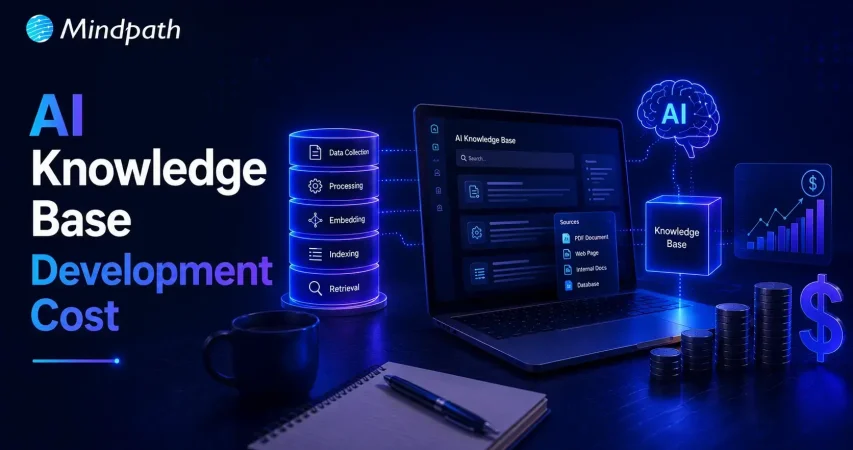
AI Knowledge Base Development cost

Every organization depends on quick access to accurate business information, yet many still struggle with scattered documents and disconnected systems. Understanding the Enterprise AI knowledge base cost is becoming a priority as companies invest in AI solutions that improve knowledge access, increase productivity, and support better decision-making across every department.

Key Takeaways

  • 01
    Enterprise AI knowledge bases centralize business information, improving productivity and organization-wide decision-making.
  • 02
    Development costs depend on data quality, system integrations, security requirements, and AI capabilities.
  • 03
    Clean, well-structured data improves AI accuracy, response quality, and implementation success.
  • 04
    Starting with a focused, high-impact use case helps reduce implementation costs and project risks.
  • 05
    Continuous optimization, maintenance, and scalable AI architecture maximize long-term business value and ROI.

An enterprise AI knowledge base does much more than store documents. It uses artificial intelligence to understand user questions, retrieve relevant information from multiple sources, and deliver reliable answers within seconds. As businesses continue adopting AI, knowing the factors that influence development costs helps them plan the right investment and avoid unexpected expenses. In this blog, we’ll break down the key cost factors, typical pricing, and practical ways to build an enterprise AI knowledge base within your budget.

Looking to improve your enterprise AI knowledge base with a custom RAG solution? At Mindpath, we offer RAG Development Services to create AI systems that retrieve reliable information and generate accurate business insights.

What Is an Enterprise AI Knowledge Base and Why Do Businesses Need One?

An enterprise AI knowledge base is an intelligent platform that stores, organizes, and retrieves business information using artificial intelligence. Unlike traditional knowledge repositories, it understands natural language queries and provides relevant answers from trusted company data. Many organizations also use a RAG knowledge base to improve response accuracy with real-time business information.

As organizations create more documents, policies, customer records, and operational data, finding the right information becomes increasingly difficult. An enterprise AI knowledge base solves this challenge by making knowledge instantly accessible, reducing manual searches, and helping teams work more efficiently. It also creates a single source of truth that supports consistent decision-making across the business.

Businesses need an enterprise AI knowledge base because it helps them:

  • Reduce the time employees spend searching for information.
  • Improve productivity by providing instant access to business knowledge.
  • Deliver faster and more consistent responses to customer queries.
  • Centralize information from multiple systems into one trusted source.
  • Support informed decision-making with accurate and up-to-date knowledge.
  • Scale knowledge management without increasing manual effort.

Advantages of Enterprise AI Knowledge Base

As businesses continue building a knowledge base in artificial intelligence, they gain more than faster information access. An enterprise AI knowledge base improves operational efficiency, supports better decisions, and enables teams to work with accurate, up-to-date knowledge across the organization.

  • Faster Information Retrieval: Employees can find relevant answers in seconds instead of searching through multiple systems.
  • Higher Employee Productivity: Teams spend less time looking for information and more time completing valuable work.
  • Consistent Knowledge Access: Everyone receives the same accurate and up-to-date information from a centralized source.
  • Better Decision-Making: Quick access to reliable business knowledge helps leaders and employees make informed decisions.
  • Reduced Operational Costs: Automating knowledge retrieval lowers manual effort and reduces support and training costs.
  • Scalable Knowledge Management: The system grows with your business while managing increasing volumes of information efficiently.

Drawbacks at a Glance

  • High Initial Investment: Development, integration, and infrastructure can require a significant upfront budget before delivering long-term value.
  • Data Quality Challenges: AI can only provide accurate answers when the underlying business data is complete, organized, and regularly updated.
  • Complex Implementation: Integrating AI with existing business systems and workflows often requires specialized technical expertise.
  • Ongoing Maintenance Requirements: The knowledge base must be continuously updated, monitored, and optimized to keep responses accurate and relevant.
  • Security and Compliance Risks: Sensitive business information requires strong access controls, encryption, and governance to meet regulatory requirements.
  • User Adoption Takes Time: Employees may need training and change management before fully trusting and using the AI knowledge base in their daily work.

What Factors Affect the Enterprise AI Knowledge Base Cost?

The cost of an enterprise knowledge management system depends on multiple technical and business factors. Understanding these helps businesses estimate the right budget for AI knowledge base projects and plan their investment more effectively.

1. Business Requirements

The project scope directly impacts the overall cost. More use cases and advanced features require greater development effort.

2. Data Quality

AI needs clean, organized, and updated data to deliver accurate results. Preparing business data often adds to implementation costs.

3. Knowledge Base Size

Larger knowledge bases require more storage and processing resources. This increases infrastructure and maintenance expenses.

4. AI Model Selection

The choice of AI model affects both development and operating costs. Advanced models generally require a higher investment.

5. System Integrations

Connecting the knowledge base with CRM, ERP, or other business applications increases implementation complexity. More integrations usually mean higher costs.

6. Security and Compliance

Enterprises often need encryption, access controls, and regulatory compliance. These requirements add to the overall development cost.

7. Maintenance and Support

Regular updates, monitoring, and performance improvements are essential after deployment. Ongoing maintenance should always be included in the project budget.

Enterprise AI Knowledge Base Cost Breakdown

The cost of an enterprise AI knowledge base depends on factors such as project complexity, data volume, integrations, and security requirements. Whether you’re building a traditional AI solution or an LLM knowledge base, understanding these cost components helps businesses estimate the required investment and plan their implementation more effectively.

Component Description Estimated Cost
Basic AI Knowledge Base 10–50 documents, managed cloud setup $8,000 – $18,000
Mid-Market Solution Multi-source data with custom interface $25,000 – $80,000
Enterprise AI Knowledge Base 10,000+ documents, deep integrations, compliance $100,000 – $300,000+
Offshore Development Custom enterprise implementation $30,000 – $80,000
SaaS Subscription Pre-built AI knowledge platform ~$30/user/month
Cloud Infrastructure Hosting, storage, vector database $50 – $300+/month
LLM API Usage AI model token consumption Usage-based
Annual Maintenance Updates, monitoring, optimization 15%–30% of build cost/year
Security & Compliance Encryption, audit logs, regulatory compliance Up to 7% extra budget

How to Reduce the Cost of Building an AI Knowledge Base Without Compromising Quality?

Reducing Enterprise AI knowledge base cost does not mean sacrificing performance or scalability. The right strategy and technology choices can help businesses maximize value while keeping development and operational expenses under control.

1. Start with a High-Impact Use Case

Begin with one department or business process instead of building an enterprise-wide solution. This reduces upfront costs and allows you to scale based on proven results.

2. Improve Data Before Implementation

Remove duplicate, outdated, and irrelevant content before training the system. Clean data improves AI accuracy and reduces implementation effort.

3. Use Existing Cloud AI Services

Leverage managed AI platforms instead of building infrastructure from scratch. This lowers deployment time and reduces infrastructure costs.

4. Choose the Right Knowledge System Building Tools in AI

Select tools that support integrations, scalability, and automation out of the box. The right knowledge system building tools in AI minimize custom development and long-term maintenance costs.

5. Integrate with Existing Business Systems

Connect the AI knowledge base with current CRM, ERP, and document management platforms. Reusing existing systems avoids unnecessary redevelopment expenses.

6. Monitor and Optimize Continuously

Track AI performance, user feedback, and operational costs after deployment. Regular optimization improves accuracy while preventing unnecessary spending over time.

Is an Enterprise AI Knowledge Base Worth the Investment?

Businesses looking at how to build an AI knowledge base should evaluate both the upfront investment and the long-term value it delivers. When implemented correctly, it becomes a strategic asset that improves efficiency, knowledge sharing, and decision-making.

  • Reduces the time employees spend searching for information, leading to higher productivity.
  • Delivers faster and more accurate responses by providing access to trusted business knowledge.
  • Improves collaboration by creating a single source of truth across teams and departments.
  • Scales easily as business data, users, and operational requirements continue to grow.
  • The implementation cost of AI knowledge base is often offset over time through lower operational costs, improved efficiency, and better customer experiences.
  • Provides long-term business value by supporting informed decisions and enabling AI-driven workflows across the organization.

Ready to Optimize Your Enterprise AI Knowledge Base Cost?

Building an enterprise AI knowledge base is a strategic investment that improves knowledge accessibility, operational efficiency, and business decision-making. The final cost depends on your data, integrations, security requirements, and AI capabilities, making careful planning essential for maximizing long-term value and return on investment.

At Mindpath, we design secure, scalable, and customized AI knowledge base solutions tailored to your business goals. From AI strategy and RAG implementation to enterprise integrations and ongoing optimization, our experts help you build reliable solutions that deliver measurable business outcomes while optimizing your investment.

Pricing an AI Knowledge Base?

Get a scoped estimate covering setup, data, and running costs.

Frequently Asked Questions

Most enterprise AI knowledge base projects take 2 to 6 months, depending on data preparation, integrations, custom features, security requirements, and overall project complexity.
Yes. Most enterprise AI knowledge bases integrate with CRM, ERP, document management systems, cloud storage, and collaboration platforms to provide unified knowledge access.
Yes. Regular updates ensure the AI uses the latest business information, maintains response accuracy, improves performance, and supports changing organizational requirements.
It can use documents, PDFs, manuals, policies, knowledge articles, emails, FAQs, databases, and other structured or unstructured business content as knowledge sources.
Success is typically measured through faster information retrieval, reduced support workload, higher employee productivity, improved response accuracy, and better user satisfaction.

Support Is One Click Away

Featured Posts

Related Post

role of vector database in ai application

Have you ever thought to yourself about how AI can interpret images, voices, or texts so accurately? Well, it is due to the rapid growth of the role of vector databases in AI applications. Standard databases do a good job of storing structured data, while much of AI work involves dealing with complex and unstructured information. Vector databases provide methods for storing and comparing information which allow machines to recognize patterns, context, and meaning much faster and with higher accuracy.

As AI systems become more intelligent, the demand for methods to support thinking beyond the simple data is also increasing. Vector databases provide that opportunity for AI to correlate information, learn from it, and generate more impactful results. They are quickly becoming the framework of modern AI innovation. In this blog, we will take a look at the power of vector databases in AI applications and why they are a necessary future element of intelligent systems.

Key Takeaways

  • 01
    Vector databases help AI applications search and compare information based on meaning and context.
  • 02
    They support AI use cases such as semantic search, RAG, recommendations, and computer vision.
  • 03
    Vector embeddings convert text, images, audio, and other data into numerical representations that AI can compare.
  • 04
    Fast similarity search allows AI systems to retrieve relevant information from large and complex datasets.
  • 05
    Vector databases can act as a memory layer for AI systems and agents that need to store and retrieve contextual information.

Looking for a way to enhance personalization with the help of AI in your apps using a vector database? Explore Mindpath’s AI development services, which provide expert guidance and knowledge on how to maximize the value of the vector database to elevate your AI capabilities.

What is a Vector Database for AI?

A vector database is a specific type of database that enables storing and searching for data represented as vectors. Vectors are sets of numbers that represent the meaning or features of data such as text, images, and audio. Instead of searching for exact matches of data, a vector database searches for similar items, based on the context, illuminating AI’s capacity to perform at a more intelligent level based on context.

In basic terms, it works like the brain of AI systems that require memory and comparison. A vector database in AI enables quick and accurate data searches among very large and complex datasets. They are often used in applications such as chatbots, recommendation engines, and image searches where the response time and clearly related results mean everything.

In simple terms, a vector database helps AI applications store, search, and retrieve information based on meaning rather than exact keyword matches.

Curious how AI chatbots can boost engagement and revenue? Discover AI Chatbot examples to learn how vector database-driven intelligence improves customer interactions.

How Does a Vector Database Work?

Vector databases assist artificial intelligence to comprehend and look through data in terms of meaning rather than precise words. Data is stored as numbers that illustrate what the data depicts. This helps AI connect ideas, find similarities, and give more accurate and useful results.

1. Creating vector embeddings

AI models process raw data to create vectors, which are sets of numbers that represent the meaning of the data. Vectors are mechanisms for AI to understand the connections among different data points.

2. Storing and indexing vectors

The vectors are kept within a vector database, which can be indexed with smart indexing methods, such as HNSW (Hierarchical Navigable Small World) or IVF (Inverted File Index). The role of vector databases in AI applications here is to store, group, and quickly find similar data when needed.

3. Performing similarity search

When the search begins, it will convert the query into a vector, which it begins to compare to other stored vectors. The database returns the closest elements based on meaning, so the AI can accurately and relevantly respond to the user.

Looking to optimize AI models without heavy computational costs? Explore Low-Rank Adaptation (LoRA) to discover techniques that improve vector database-powered AI efficiently.

Role of Vector Databases in AI Applications

The importance of the vector database for the AI application is becoming more necessary and prevalent as AI works with larger and more complicated data. Below are the main ways in which it helps and enhances the AI systems.

1. Smarter Search with Meaning

An AI application that utilizes a vector database can perform searches on meaning, rather than just a specific word. It finds things that are contextually similar in vector space; this is a lot more precise and much more human-like. This is incredibly useful, because the AI system can determine what users mean, not simply what they type.

2. Supporting Retrieval-Augmented Generation (RAG)

Vector databases provide large language models with access to current facts, knowledge, and data points from the public domain. The user’s inquiry is converted to a vector, which retrieves information from data similar to that represented in the user’s question. The information and materials retrieved help the AI provide responses that are elevated in relevance and made to be factually accurate.

3. Managing Complex Data Types

The role of vector database in AI application is to be able to manage unstructured data including images, text, and audio. A vector database does this by representing the unstructured data as numerical vectors that convey meaning. This allows AI to be able to compare unstructured data types more easily.

4. Enabling Fast Similarity Search

Vector databases leverage novel algorithms to identify similar items quickly, even among massive datasets. This capability is crucial for a number of artificial intelligence (AI) applications that depend on real-time results. The vector database in the AI application in this case is to return results quickly and still maintain precision.

5. Improving Recommendations

Recommendation systems utilized vector databases to recommend similar attributes to items or products that users had liked before. AI uses patterns in the vectors and can customize content for each individual. This leads to a more meaningful and engaging experience for the user.

6. Powering Computer Vision

In computer vision, a vector database in AI helps identify and compare images or videos efficiently. It supports tasks like face recognition, image search, and visual content filtering. By finding visually similar vectors in AI systems it improves speed and accuracy.

7. Building AI Memory

The role of the vector database in AI applications is that it is a dependable memory mechanism for the AI agents. It strengthens the AI agent’s ability to store and retrieve information in support of reasoning and decision-making. Thus, vector capacity increases the multi-step capabilities of AI agents when solving complex tasks.

8. Hybrid and Refined Search

Vector databases have the ability to merge traditional filters like date or category with similarity search. This hybrid effort increases the precision and relevance of a search result. Users can quickly and clearly find exactly what they are looking for.

Wondering how AI systems focus on the most important information in complex datasets? Discover the Attention Mechanism to learn how it enhances AI performance in combination with vector databases.

Ready to Build Smarter AI Solutions with Vector Databases?

Vector databases are transforming how AI systems process and understand information. They enable faster searches, handle complex data, and make AI responses more meaningful and accurate. As technology continues to advance, the role of vector databases in AI applications will remain central to building intelligent and scalable solutions across industries.

At Mindpath, our AI development services combine the power of vector databases with advanced machine learning models to build smarter and more efficient systems. We help businesses create intelligent applications that learn, adapt, and deliver real results. Partner with us to design AI solutions that drive innovation and long-term success.

ReactJS Trends

Curious about what the future holds for ReactJS? Wondering how this powerful framework will evolve in the coming years? As we look ahead to 2025, there are exciting trends that every developer should know. What innovations will reshape web development, and how can you stay ahead of the curve? In this blog, we will dive into the ReactJS trends 2025 which will shape the future of development!

ReactJS is a free tool developed by Facebook that makes it easier to create user interfaces for websites and apps. It makes it easier for developers to construct interactive and dynamic features by dividing them down into smaller, more manageable components. These components can be reused and changed individually, which makes the development process more efficient and organized. React.js is intended to simplify the creation and maintenance of user interfaces, hence boosting performance and user experience.

Knowing the ReactJS trends for 2025 is vital since it keeps developers up to date on the newest improvements. Following these trends allows developers to create better, quicker, and more user-friendly websites. It also enables businesses to leverage cutting-edge technology to keep their websites and applications up-to-date and competitive. Staying informed about these trends allows you to enhance your abilities, solve challenges more quickly, and build projects that are ready for the future.

So, want to know about the ReactJS trends for 2025? Let’s dive in!

ReactJS Trends 2025

1. AI and Machine Learning in React

By 2025, AI and machine learning will play a far larger role in React development. Developers will begin to use AI technologies to help them create code quicker, rectify errors, and enhance website performance more quickly. This will make React development much faster and easier.

React will also integrate with machine learning technologies, enabling developers to create smarter apps. These apps will be able to recognize photos, comprehend voice or text, and forecast user behavior. This will make websites and applications more dynamic, intelligent, and capable of providing superior user experience.

2. Growing React Libraries

One of React’s greatest advantages is its ecosystem, which will continue to improve by 2025. We can anticipate additional frameworks and tools to make React even more powerful for tasks like data management, page navigation, information retrieval, and server-side website optimization.

Popular technologies such as Next.js and Gatsby will continue to evolve, providing developers with new options to build fast websites that include static pages, server-side rendering, and smart routing. New libraries will also be released to assist developers in addressing new issues while working with React. This will make the React ecosystem even more diverse and useful, allowing developers to create even better websites and applications.

3. Boosting React Performance

As apps expand in size and complexity, React developers will need to prioritize improving their performance. By 2025, we anticipate seeing new methods for making React apps quicker and more efficient. This will involve lowering code file size, enhancing lazy loading, and optimizing website rendering.

One technique to improve speed is to use better code splitting, which involves just loading the necessary sections of the code and keeping programs lightweight. Another option is progressive hydration, which makes server-rendered components more interactive by loading them in phases. Furthermore, better caching strategies will assist in eliminating superfluous data loading, allowing websites to load faster and offering a more seamless user experience.

4. React Native for More Mobile Apps

React Native, the mobile version of React.js, has gained popularity since its introduction. The language and components used for web development can be used to create mobile applications for both iOS and Android. With the increased need for mobile apps, we predict even more developers to choose React Native for their projects by 2025.

One of the key advantages of React Native is that it allows developers to reuse code across both platforms, which speeds up and simplifies app development. It also features a growing number of native modules and third-party connections that provide more functionality. By 2025, we can anticipate advancements in the design of React Native, which will optimize speed and bring the experience even closer to that of native apps.

5. Better Tools for Developers

By 2025, we can anticipate significant advancements in the tools that developers utilize for React. React DevTools, ESLint, and Prettier have already made it easier to develop applications. We can anticipate integrated development environments (IDEs) like VS Code to improve further, including greater support for React’s unique features like hooks and smart code suggestions. This will enable developers to create apps more quickly and precisely.

In addition, we should expect increasingly powerful tools that employ AI to analyze code and discover flaws. These new tools will allow developers to produce more dependable code with less effort, speeding up and smoothing out the development process.

6. React Server Components Rising

One of the most interesting recent developments in the React ecosystem is the release of React Server Components. These components enable developers to execute portions of their apps on the server while maintaining the familiar React API for client-side components. This implies that apps can render more effectively, lowering the amount of JavaScript transmitted to the client while improving overall speed.

By 2025, we predict React Server Components will be required for developing high-performance, server-driven apps. They will assist developers in creating apps that load quicker and perform better, particularly in scenarios with sluggish internet connections or restricted bandwidth. This will improve the overall user experience.

ReactJS Development Services at Mindpath

Mindpath specializes in high-quality ReactJS programming services suited to your specific requirements. Our professional developers keep up with the current trends, guaranteeing that we offer high-quality apps that function remarkably well.
We optimize speed using tactics such as code splitting and lazy loading to provide users with quick and smooth experiences. Our experience in integrating AI and machine learning improves functionality and interactivity. Furthermore, our React Native services allow us to develop cross-platform mobile apps for Android and iOS, maximizing reach and efficiency. Mindpath is committed to helping you realise your vision with unique ReactJS solutions, providing complete assistance from idea to implementation and beyond.

End Thought!

As we look toward 2025, the trends shaping ReactJS development promise to revolutionize how we build applications. From the integration of AI and machine learning to the rise of React Server Components, these advancements will enhance performance, user experience, and developer efficiency. At Mindpath, we are dedicated to leveraging these trends to create innovative, high-quality applications that meet your unique needs. By staying ahead of the curve, we empower our clients to thrive in an ever-evolving digital landscape.

Ready to elevate your project with cutting-edge ReactJS solutions?

Partner with Mindpath today to discuss how we can bring your vision to life!


Contact Us!

Explore the top ReactJS trends for 2025, including AI integration, performance optimization, and React Native growth.
benefits of devops

While building software, just think that the developers and the operations teams are working like a well-coordinated crew, being fast, smooth and always on the same page. Isn’t it an interesting combination? Well, that’s the power behind embracing the benefits of DevOps. It is a new method to simplify your software process, in a way that will help teams work more effectively in an increasingly fast-paced digital world.

As we approach 2026, DevOps continues to evolve the way businesses build and run software. DevOps is not just a fast way to deliver software; it is a cultural approach that allows for speed, scale, agility, and reliability. This blog will look at how DevOps is rewriting the development process and why it is now essential for progressive teams. 

Are you looking to implement DevOps in your organization? Mindpath provides customized solutions to help teams speed up the development process and reach quantifiable goals.

What is DevOps?

DevOps refers to the collaboration of development and IT operations teams working together for the software development processes. It helps them to build, test as well as launch software faster and smoother. The major idea behind DevOps is better teamwork, faster delivery, and fewer problems during the software process. 

Even though it is not a tool or a product, it often includes using helpful technologies such as cloud platforms, containers and real-time communication tools. A big part of it is CI/CD, which stands for continuous integration and continuous delivery. This helps teams update software more often without slowing down. With DevOps, both developers and operations teams can share tasks, improve quality, and make sure the final product reaches users quickly and safely. 

How Does DevOps Work?

DevOps works by bringing development and operations teams together to make software faster and more reliable. The process follows a cycle that includes planning, coding, building, testing, releasing, deploying, operating, monitoring, and collecting feedback. Each step is connected to keep the work smooth and continuous. What is the main purpose of DevOps? It is to create software that meets user needs, runs well from the start, and is delivered without delays. 

To support this, teams use DevOps tools like automation platforms, monitoring systems, and CI/CD pipelines. These tools help developers work independently and speed up tasks that used to take longer. For example, with continuous integration, developers can update shared code several times a day and quickly catch bugs. Teams also follow shared rules for testing and quality, so everyone stays on the same page. 

Planning to modernize your DevOps approach using automation and stronger safeguards? Check out our blog on DevSecOps to learn why automated security integration is essential for speed, stability, and resilience.

What are the Key Benefits of DevOps?

Adopting DevOps brings real improvements to how teams build and deliver software. The DevOps benefits focus on making the development process more efficient, reliable, and easier to manage. Let’s have a look at some of it: 

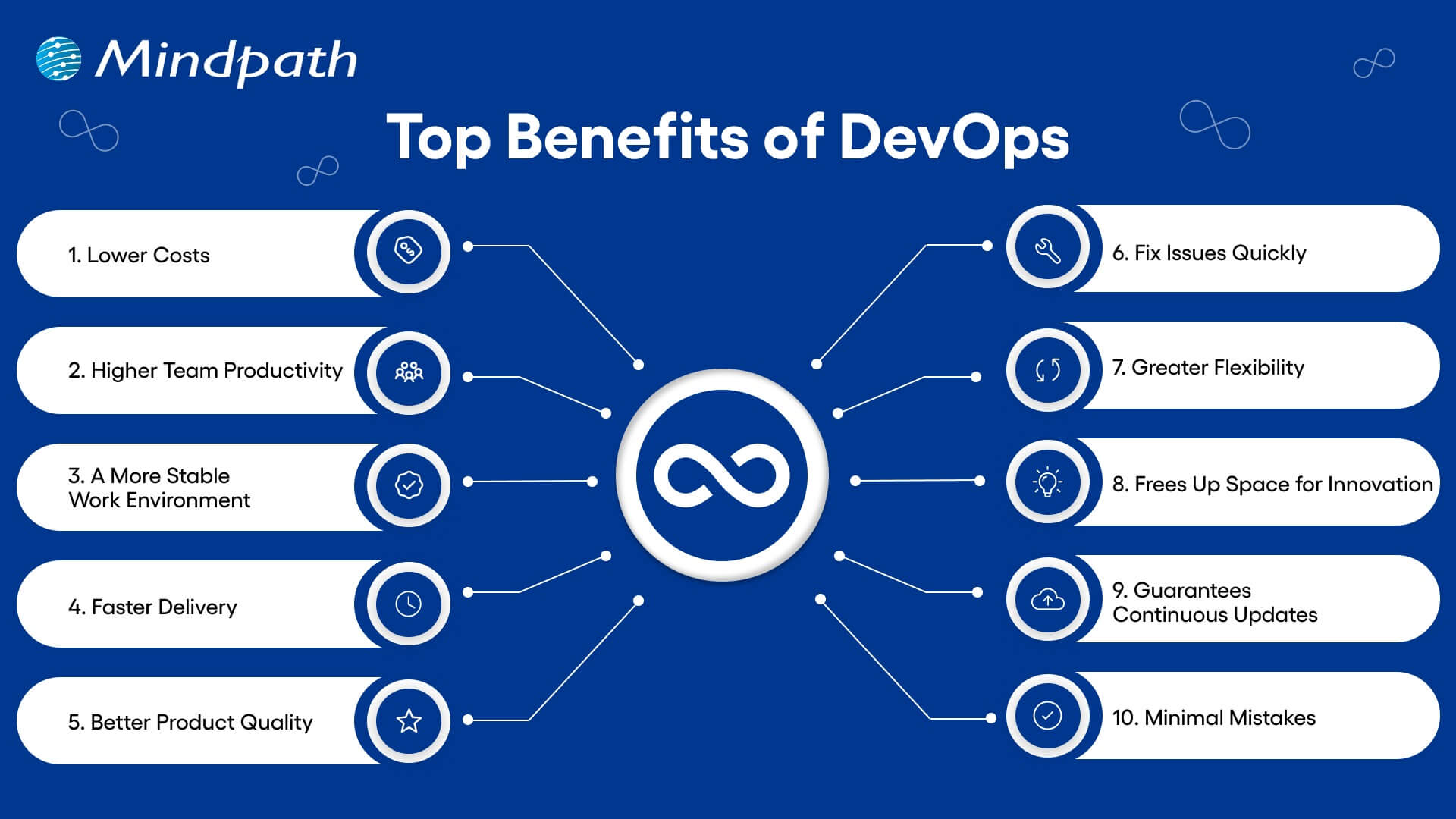
top benefits of devops

1. Lower Costs

Combining updates and maintenance in one process helps teams work more efficiently. DevOps reduces the need for last-minute fixes and wasted effort. This saves money and helps teams do more with the same resources.  

2. Higher Team Productivity

Open communication and fewer repeated tasks let teams focus on real progress. Everyone knows what to do and can work on high-value goals. As a result, productivity rises, and team members feel more involved.  

3. A More Stable Work Environment

DevOps helps create a calmer and more organized workplace by reducing the pressure of constant changes. Teams can handle updates with ease, due to smoother processes and clear communication. This balance helps everyone stay focused and productive. 

4. Faster Delivery

With DevOps, updates and new features can be launched more quickly. DevOps for business helps in meeting customer needs faster and staying ahead of the competition. Streamlined deployment also helps with fewer delays and more consistent results. 

5. Better Product Quality

Frequent feedback and testing throughout development help improve the final product. DevOps uses automation to catch up on problems early, before they grow. This keeps the focus on delivering quality and reduces the need for rework. 

6. Fix Issues Quickly

DevOps makes it easier to detect and solve issues early. Smaller releases and constant monitoring help teams act fast when something goes wrong. This keeps systems running smoothly and reduces downtime. 

7. Greater Flexibility

DevOps supports teamwork across different departments, helping companies respond quickly to change. Breaking down barriers between teams encourages flexibility in how work gets done. This leads to quicker decisions and faster progress. 

8. Frees Up Space for Innovation

When tasks like testing and deployment are automated, teams have more time for creative thinking. Developers can focus on building new ideas instead of repeating the same steps. This makes work more exciting and leads to better solutions. 

9. Guarantees Continuous Updates

DevOps supports a smooth flow of updates and new features with every release. Automation and teamwork make sure each change is tested and delivered quickly. This gives users regular improvements while keeping everything stable. 

10. Minimal Mistakes

Frequent code releases and testing help teams catch up with problems early. This keeps software quality high and prevents bigger issues later on. It’s a key benefit of DevOps that helps teams move forward with confidence. 

Aiming to enhance operational efficiency and reduce development risks? Check out our blog on DevOps Challenges and Solutions to discover proven approaches that improve performance, stability, and cross-team cooperation.

DevOps Best Practices

Following the right approach is key to getting the most out of DevOps. It helps teams collaborate better, improve software quality, and speed up delivery. Here are some of the most effective DevOps best practices to consider: 

1. Build a Culture of Trust and Teamwork

To make DevOps work well, teams need to feel safe to share ideas and learn from mistakes. When there is trust and open communication, collaboration becomes much easier. Breaking down walls between departments helps everyone work toward a shared goal. A culture of trust and empathy makes it easier to adopt DevOps smoothly.

2. Continuous Integration and Delivery

CI/CD DevOps practices involve adding small code changes frequently to a shared space. This helps teams spot issues early and keep the code clean. Once the code is tested, it moves into production smoothly through continuous delivery. This process saves time and gives developers confidence when releasing updates.

3. Automate Testing Early On

Automated testing is a key part of a strong CI/CD pipeline. Instead of waiting for manual tests, automated tests run every time a change is made. These tests can include everything from unit to load testing, depending on your needs. This helps reduce bugs and makes sure the software stays reliable.

4. Track the Right Metrics

To keep improving, teams need to measure what matters. Metrics like deployment speed, failure rates, and time to fix issues give a clear picture of performance. Each team may focus on different metrics based on their goals. It’s also important to collect logs and monitor systems to quickly fix problems and improve how everything runs.

5. Automate Repetitive Tasks

Manual tasks can slow down development and lead to mistakes. Automating these tasks speeds things up and keeps results consistent. It also frees up teams to focus on more valuable work. A reliable automation process adds confidence and improves overall efficiency.

Planning to strengthen your software delivery lifecycle? Explore our blog on DevOps vs DevSecOps to understand how shifting from simple automation to integrated security can elevate speed, reliability, and protection.

Ready To See How DevOps Can Boost Your Business?

The benefits of DevOps include enhanced collaboration, faster software delivery, and improved product quality. It also reduces costs while fostering a stable and efficient work environment. Through automation and continuous feedback, teams can quickly adapt and respond to changes, making DevOps a vital approach for building reliable software in today’s dynamic digital landscape. 

At Mindpath, we specialize in helping organizations successfully implement DevOps practices. We focus on automating processes, strengthening team collaboration, and accelerating software delivery with quality and security. Our expert guidance ensures your DevOps transformation aligns with your business objectives, enabling smoother and more efficient software development.