Latest Insights On
GenAI, Tech, and Digital Transformation
Stay updated with expert insights, success stories, and real-world applications of cutting-edge technology.
The modern world requires rapidity, precision, and intelligent choices in the construction of excellent software. Teams tend to take breaks and reconsider the scaling of their work without the loss of control or quality. That is where the outsourcing software development comes into the discussion and alters the speed. It generates interest, brings up practical issues and encourages open-minded judgment. Consequently, making the appropriate development decision becomes a business decision, rather than a band-aid solution.
Additionally, this method leads to knowledge, adaptability and quicker advances when managed with caution. It helps leaders to think more incisively questions and demand more definitive results. Simultaneously, it requires planning, trust and effective communication. Then the question is how do you take a step in confidence and purpose? In this blog, we walk through the complete picture, helping businesses understand the path, mindset, and decisions involved.
Planning to outsource software development to accelerate growth and reduce operational costs? Mindpath’s software development services offer reliable and customized solutions that ensure timely delivery and excellent performance.
What is Outsourcing Software Development?
Software development outsourcing is the practice of hiring external firms or freelance developers to handle software projects, from building applications to system upgrades, testing, and optimization, instead of relying solely on an in-house team. Businesses use it as a strategic tool to cut costs, access specialized global talent, and speed up project timelines without long-term hiring commitments, while keeping internal teams focused on core priorities.
Nowadays, outsourcing software development is not only about saving money. They are able to reach efficient engineers and new technologies more quickly. This model minimizes pressure on hiring and day-to-day management. Teams are easily scaled according to the requirements of the project. Consequently, companies become more rapid and provide high-quality digital products.
The three types of outsourcing software development are as follows:
1. Offshore Outsourcing
Offshore outsourcing is associated with teams located in distant countries with distinct time zones. In outsourcing software development, businesses prefer this model to save money and grow more quickly with global talent.
2. Nearshore Outsourcing
Nearshore outsourcing collaborates with teams in local countries with close time zones. This model fosters outsourcing software development through enhanced communication and faster cooperation.
3. Onshore Outsourcing
Onshore outsourcing employs developers in the same country. This model of outsourcing software development is highly favored by companies due to its high compliance, security, and real-time coordination.
Looking to access specialized talent beyond your local market? Check out offshore software development and discover how it improves efficiency and project flexibility.
Key Benefits of Outsourcing Software Development
The current businesses desire quicker outcomes and greater technological skills. Software outsourcing enables businesses to remain focused and expand effectively, and below are the main advantages that businesses enjoy.
1. Lower Development Costs
By outsourcing software development, businesses save on the cost of hiring, training and infrastructure costs. Teams handle budgets more efficiently and have a stable project development.
2. Access to Skilled Talent
The companies network with seasoned developers in various technologies. This access enhances the quality of projects and sustains technical-specific requirements.
3. Flexible Team Scaling
Businesses can easily change the size of teams according to project needs. This flexibility ensures business continues uninterrupted when the business grows or slows down.
Also Read: Software Development Cost
4. Faster Hiring Process
External partners provide ready developers without long recruitment delays. Projects continue without interruptions caused by staffing gaps.
5. Specialized Technical Skills
Teams gain direct access to experts in advanced technologies. This approach saves time and avoids heavy internal training efforts.
6. Quicker Product Launch
Development moves faster through parallel work and clear coordination. Companies release products sooner and stay competitive in dynamic markets.
Want to choose the right approach before outsourcing your next tech project? Discover types of software development to learn which model best fits your business goals and budget.
Key Factors to Consider Before Outsourcing Software Development
Selecting the appropriate partner must be well planned and with good business alignment. Outsourcing software development services is most effective when the companies consider the needs, risks, and long term objectives.
1. Clear Project Requirements
First, define goals, features, and budget limits clearly. Outsourcing software development succeeds when teams share the same understanding early.
2. Transparent Pricing Structure
Next, review pricing models and payment terms carefully. This move prevents unnoticed expenses and contributes to assured financial decisions.
3. Proven Expertise and Portfolio
Then, study previous projects and industry experience closely. Outsourcing software development works best when partners show strong, relevant results.
Also Read: Software Development Trends
4. Reliable Delivery Timelines
After that, confirm the company meets deadlines consistently. Proper planning and skilled teams keep progress steady.
5. Company Reputation and Reviews
Also, read genuine client feedback on trusted platforms. These reviews show how the company handles challenges and commitments.
6. Strong Security and Communication
Finally, check data protection practices and communication tools. Regular updates and secure systems build trust throughout the project.
Curious how successful companies manage development from planning to deployment? Check out Software Development Life Cycle and discover how it improves transparency, control, and scalability.
Common Pitfalls to Avoid When Outsourcing Software Development
There are numerous companies that make haste decisions, and regret it subsequently. When teams are aware of likely risks and take action, outsourcing software development can result in success.
1. Most teams do not consider post-launch support and regret later. In the process of outsourcing software development, maintenance scope must always be verified to prevent security and performance problems.
2. There are companies that do not thoroughly investigate their partners and use Internet feedback as the only source. This shortcut tends to create low fit and project expectation failure.
3. Time zone issues and cultural differences are quick to decimate progress. These problems become severe in situations where projects require intense teamwork and expedited decision making.
4. Even in competent teams, weak communication leads to misunderstandings. Constant updates and discussions make the development stay on track with business objectives.
5. Most companies never pay attention to terms of NDA when signing contracts. This is an error that transfers the risk and restricts services even when fully paid.
Want to hire the right talent for your outsourced development projects? Discover the qualities of a good software engineer to learn what skills and traits ensure project success.
Ready to Make Smarter Software Decisions?
Outsourcing of software development assists businesses to operate at quicker speed without compromising on quality and control. It introduces talent and certain expertise, focus, and malleable development within a single strategy. This method is beneficial when organized effectively and helps to achieve improved outcomes and reduce risks. By making the right partner and goal alignment at an early stage, companies build confidence when selecting partners. Long-term success is defined by good communication and expectations.
At Mindpath, we support businesses with reliable teams and proven delivery experience. As a trusted software development outsource company, Mindpath focuses on clarity, speed, and quality. Our custom software development outsourcing services help you scale confidently while staying aligned with business goals. We value transparency, security, and strong collaboration at every step.
Front-end development trends in 2026 are shaping how businesses build websites, web applications, and digital products. Modern front-end development goes beyond visual design. It influences website speed, accessibility, customer experience, application scalability, and conversion performance. Businesses must therefore evaluate new technologies based on the problems they solve rather than adopting every emerging tool.
Key developments include AI-assisted coding, React Compiler, edge computing, WebAssembly, motion design, Progressive Web Apps, and performance-focused development. Understanding these trends helps business leaders and product teams make better technology decisions, improve digital experiences, and plan sustainable application development.
Key Takeaways
- 01
AI-assisted coding can accelerate front-end workflows, but developers must review generated code for security, accessibility, and maintainability. - 02
React Compiler, edge computing, and WebAssembly address different performance challenges and should be adopted when the application needs them. - 03
Motion UI and Progressive Web Apps can improve user experiences when they support usability, accessibility, and real customer needs. - 04
Core Web Vitals, responsive design, and accessibility should be considered throughout development, not only before launch. - 05
Businesses should prioritize front-end technologies according to performance needs, integration requirements, development costs, and long-term maintenance.
8 Important Front-End Development Trends in 2026
The most relevant front-end development trends in 2026 focus on improving development efficiency, application performance, interface usability, and the way web applications serve customers. The following technologies and practices offer different benefits depending on the product, its users, and its technical requirements.
| Trend | Primary purpose | Business benefit |
|---|---|---|
| AI-assisted coding | Support code generation, testing, and debugging | More efficient development workflows |
| React Compiler | Automate certain React performance optimizations | Less manual optimization work in suitable applications |
| Edge computing | Run supported workloads closer to users | Lower latency for suitable requests |
| WebAssembly | Execute supported compiled code in the browser | Better performance for computation-heavy features |
| Motion UI | Provide visual feedback and guide user interactions | Clearer, more intuitive interfaces |
| Performance optimization | Reduce unnecessary downloads, rendering work, and delays | Faster, more responsive experiences |
| Progressive Web Apps | Extend web experiences with supported app-like capabilities | Convenient access across supported devices |
| Core Web Vitals | Measure loading, responsiveness, and visual stability | Measurable user experience improvements |
1. AI-Assisted Front-End Development
AI coding assistants are becoming part of front-end development workflows. They can suggest code, generate component drafts, explain unfamiliar functions, help create tests, and identify potential errors. This allows teams to spend less time on repetitive tasks and more time on architecture, product decisions, and quality assurance.
For businesses, the value depends on how AI fits into the existing development process. Generated code still requires review because it may introduce security vulnerabilities, accessibility problems, unnecessary dependencies, or inconsistent design patterns.
Practical business applications
- Creating initial drafts of reusable interface components.
- Generating test cases for common user journeys.
- Identifying potential bugs during code review.
- Documenting existing components and development standards.
- Helping teams maintain consistent patterns across large applications.
Business consideration: Evaluate AI tools based on development time saved, review effort, code quality, data privacy, and compatibility with your technology stack. Faster code generation does not automatically mean faster delivery of a reliable product.
2. React Compiler and Automated Optimization
React Compiler is designed to optimize React applications by automatically handling certain memoization tasks. Traditionally, developers have used tools such as useMemo, useCallback, and React.memo in appropriate situations to avoid unnecessary recalculations or component renders.
The compiler can reduce the need for some manual optimizations when an application is compatible with it. However, it does not eliminate every performance issue. Network requests, large assets, inefficient data processing, third-party scripts, and poor component architecture can still affect the user experience.
When businesses may benefit
- Large React applications with complex component trees.
- Dashboards that update frequently as data changes.
- Business applications with interactive forms and reusable interface components.
- Products where unnecessary rendering contributes to measurable performance problems.
Business consideration: Confirm compiler compatibility, test the existing application, and measure performance before and after adoption. Automated optimization should complement, not replace, performance testing.
3. Edge Computing for Faster Web Experiences
Edge computing moves supported computation closer to the people or systems requesting it. Instead of sending every request to a central origin, applications can use geographically distributed infrastructure to process selected requests, deliver cached content, or run lightweight functions closer to users.
For a business serving customers across multiple regions, edge delivery can reduce latency for suitable workloads. It may also support authentication checks, request routing, personalization, and other functions when the chosen platform and architecture allow them.
Where edge computing can help
- Serving static assets and cached content to geographically distributed users.
- Running lightweight request-handling logic closer to customers.
- Supporting global websites and applications with regional traffic.
- Reducing repeated requests to the origin for cacheable resources.
Business consideration: Edge computing is not necessary for every website. Evaluate user locations, application architecture, data residency requirements, caching rules, operating costs, and the latency of the existing system before investing.
4. WebAssembly for Computation-Heavy Interfaces
WebAssembly, commonly called Wasm, is a portable binary instruction format that allows supported compiled code to run in compatible environments, including modern browsers. It can be useful when a web application needs computational performance that is difficult to achieve efficiently with JavaScript alone.
Businesses can use WebAssembly for specialized browser-based features such as image processing, audio and video tools, scientific calculations, complex visualizations, and certain document-processing workflows.
Potential use cases
- Interactive engineering or financial calculations.
- Browser-based image editing and media processing.
- Complex data visualization and simulation tools.
- Reusing suitable code written in languages that compile to WebAssembly.
Business consideration: WebAssembly is not a replacement for JavaScript across an entire website. Assess whether the workload is genuinely computation-heavy and account for integration complexity, download size, browser compatibility, and debugging requirements.
5. Motion UI and Meaningful Micro-Interactions
Motion UI uses animation and transitions to communicate changes in an interface. Micro-interactions provide feedback for actions such as submitting a form, saving a document, expanding a menu, or adding an item to a cart.
When used thoughtfully, these details help users understand what happened after an action and where to focus next. For businesses, this can make complex workflows easier to follow without adding unnecessary visual complexity.
Examples of useful micro-interactions
- Showing a clear loading state when a form is submitted.
- Confirming that a record has been saved successfully.
- Providing visual feedback when a menu opens or closes.
- Highlighting validation errors next to the relevant fields.
- Using subtle transitions to explain changes in page layout.
Business consideration: Motion should support the task rather than distract from it. Avoid excessive animation, provide appropriate reduced-motion behavior, and test interactions on mobile devices and with keyboard navigation.
6. Performance-First Front-End Development
Performance optimization is an ongoing engineering practice, not a final step before launch. Slow pages, delayed interactions, and unexpected layout shifts can frustrate users and interrupt important business tasks.
Modern front-end teams use techniques such as code splitting, lazy loading, image optimization, caching, font optimization, and the removal of unused JavaScript. The right combination depends on how the application is built and where performance bottlenecks occur.
Practical performance techniques
- Load only the JavaScript needed for the current page or feature.
- Compress images and serve appropriately sized formats.
- Defer non-essential scripts when appropriate.
- Reduce unnecessary third-party scripts and dependencies.
- Cache suitable assets and API responses.
- Measure real user performance in addition to running laboratory tests.
For businesses, the objective is to make key journeys such as account registration, product browsing, checkout, and dashboard navigation responsive and reliable. Performance work should be prioritized according to actual user impact.
7. Progressive Web Apps for Cross-Device Access
Progressive Web Apps (PWAs) use web technologies to provide app-like capabilities where supported by the browser and operating system. Depending on the implementation, a PWA can offer installation, offline access to selected content, caching, and certain device integrations.
For businesses, a PWA can provide a convenient way for users to access services without maintaining separate native applications for every platform. It may be suitable for customer portals, field-service tools, content platforms, retail experiences, and applications that need limited offline functionality.
Important considerations for PWA adoption
- Identify which features users need when connectivity is limited.
- Define how cached content and offline changes will be synchronized.
- Evaluate installation and notification support across target devices.
- Apply secure authentication and protect sensitive cached information.
- Test browser and operating system differences before launch.
Business consideration: A PWA is not automatically a replacement for a native application. The decision should depend on device integration needs, distribution requirements, offline behavior, user expectations, and development resources.
Read more about Progressive Web Apps and their role in modern web development.
8. Core Web Vitals and User Experience Measurement
Core Web Vitals are Google’s metrics for evaluating important aspects of the user experience. They focus on loading performance, responsiveness, and visual stability. Monitoring these metrics helps businesses identify technical issues that may affect the usability of their websites.
| Metric | What it measures | Good target |
|---|---|---|
| Largest Contentful Paint (LCP) | How quickly the main visible content loads | 2.5 seconds or less |
| Interaction to Next Paint (INP) | How responsive the page is to user interactions | 200 milliseconds or less |
| Cumulative Layout Shift (CLS) | How much unexpected layout movement occurs | 0.1 or less |
These thresholds are evaluated at the 75th percentile of page visits, with mobile and desktop experiences assessed separately. Businesses can use tools such as Google PageSpeed Insights, Search Console, and real-user monitoring systems to identify performance issues.
Good Core Web Vitals contribute to a better user experience, but they do not guarantee higher search rankings. Search visibility also depends on relevance, content quality, technical accessibility, competition, and other factors.
How AI Is Changing Front-End Development Workflows
AI is influencing several stages of front-end development, from initial implementation to testing and maintenance. Its most useful role is to support developers with repetitive or time-consuming tasks while leaving architectural decisions, validation, and accountability with the team.
1. Code Generation and Component Drafts
AI tools can produce initial component implementations from written requirements, suggest code patterns, and help developers adapt existing interfaces. Teams can use these drafts to accelerate routine work, provided the output follows the application’s design system and coding standards.
2. Error Analysis and Test Creation
AI assistants can help explain error messages, identify possible causes of bugs, and generate test cases. Developers should still reproduce problems, run automated tests, and verify fixes rather than relying on generated explanations alone.
3. Design System Consistency
When supplied with clear design rules, component specifications, and examples, AI tools can assist with implementing reusable UI patterns. A documented design system remains important because it defines approved components, typography, spacing, colors, and interaction behavior.
4. Documentation and Code Maintenance
AI can help summarize unfamiliar code, draft documentation, and identify opportunities to simplify existing components. Teams should review generated documentation and suggestions for correctness, especially in applications with complex business logic.
Recommended approach: Introduce AI into specific workflows, establish code review standards, protect confidential information, and measure its effect on delivery time and defect rates. This creates a more reliable basis for deciding where AI adds value.
Why Front-End Performance Matters to Businesses
Front-end performance affects how easily customers can complete tasks. A slow product page can interrupt shopping, a delayed dashboard can hinder decision-making, and an unresponsive form can prevent users from submitting important information.
The impact depends on the application and its users. Rather than optimizing every element equally, businesses should identify the pages and interactions that matter most to customers and measure their performance.
Performance Priorities by Business Goal
| Business goal | Front-end priority | What to measure |
|---|---|---|
| Improve e-commerce conversions | Optimize product images, checkout, and interaction speed | Checkout completion and page performance |
| Improve SaaS usability | Reduce delays in dashboards, forms, and navigation | Task completion and interaction responsiveness |
| Improve content discovery | Optimize content loading, navigation, and mobile layouts | Engagement and Core Web Vitals |
| Support international users | Use suitable caching and content delivery strategies | Regional latency and real-user performance |
Skills and Capabilities Front-End Teams Need in 2026
As front-end tools evolve, successful teams need more than familiarity with a particular framework. They must understand how to build accessible, secure, maintainable interfaces that support business requirements.
Core Technical Skills
- HTML, CSS, JavaScript, and TypeScript fundamentals.
- Component-based frameworks such as React and Vue.
- Responsive layouts and cross-browser compatibility.
- API integration, asynchronous programming, and error handling.
- Automated testing, debugging, and version control.
- Performance measurement and optimization.
- Accessibility standards and secure coding practices.
Product and Collaboration Skills
- Understanding user journeys and business requirements.
- Working with designers to implement consistent interfaces.
- Collaborating with backend engineers on APIs and data flows.
- Communicating technical trade-offs to stakeholders.
- Reviewing AI-generated code and maintaining quality standards.
Businesses should build teams around the needs of their products rather than requiring every developer to master every emerging technology. Strong fundamentals, continuous testing, and effective collaboration often provide more lasting value than chasing individual trends.
How Businesses Should Choose the Right Front-End Technologies
Not every front-end trend is suitable for every business. A technology that solves a performance problem in a large application may introduce unnecessary complexity to a small marketing website. Before adopting a new tool, evaluate its expected benefits alongside implementation and maintenance costs.
- Define the business problem. Identify whether the priority is faster loading, improved usability, development efficiency, accessibility, or a new product capability.
- Assess the existing technology stack. Review framework compatibility, current dependencies, infrastructure, and team expertise.
- Estimate total cost. Include implementation, training, testing, licensing where applicable, monitoring, and ongoing maintenance.
- Run a focused pilot. Test the technology on a representative page or workflow before expanding its use.
- Measure results. Compare performance, delivery effort, defect rates, user feedback, or other relevant baseline metrics.
- Plan for security and accessibility. Validate data handling, dependencies, keyboard navigation, contrast, and reduced-motion behavior where relevant.
This approach helps businesses adopt front-end technologies based on measurable needs instead of temporary popularity.
Common Mistakes to Avoid in Front-End Development
- Adopting tools without a clear need: New frameworks or infrastructure can increase complexity when they do not solve an actual problem.
- Ignoring accessibility: Interfaces should support keyboard navigation, readable content, meaningful labels, and assistive technologies.
- Overusing animation: Excessive motion can distract users, affect performance, and create accessibility barriers.
- Depending entirely on AI-generated code: Human review, testing, and security checks remain essential.
- Testing only on desktop: Mobile devices, different browsers, and varying network conditions can expose issues missed during development.
- Measuring performance only before launch: Real-user data and ongoing monitoring help teams identify regressions after releases.
- Ignoring long-term maintenance: Dependency health, documentation, and clear architecture matter as applications grow.
Build Better Digital Experiences with Mindpath
Front-end development trends in 2026 are most valuable when they address real business needs. AI-assisted coding can support development workflows, performance engineering can improve responsiveness, and thoughtful interface design can make digital products easier to use. The right combination depends on the product, its audience, and its long-term goals.
Mindpath helps businesses turn technical requirements into scalable digital solutions through its full-stack development services. By aligning front-end experiences with backend architecture, performance, and product objectives, businesses can build web applications designed for usability, maintainability, and growth.
AI-driven legacy system modernization helps businesses upgrade outdated technology, improve efficiency, and stay competitive. By using AI and automation, companies can modernize legacy workflows while balancing innovation and system stability.
The adoption of smart solutions enables organizations to be agile and fast in integrating main systems. They are able to detect bottlenecks, minimize mistakes and streamline processes to a much greater accuracy. This solution triggers the debate of efficiency and future-proofing.
Looking to future-proof your legacy applications with AI-driven solutions? Mindpath’s legacy modernization services help organizations upgrade systems efficiently and stay ahead in the digital landscape.
What is AI-Driven Legacy System Modernization?
AI-driven legacy system modernization is the use of artificial intelligence and machine learning to update, translate, and migrate outdated enterprise software into modern, cloud-native environments. It automates key activities such as code refactoring, documentation, and testing while identifying system dependencies and preserving core business logic without requiring high-risk “rip and replace” overhauls. This approach accelerates modernization, reduces errors, and lowers costs, helping organizations transition ageing systems into agile and cloud-ready infrastructure.
The adoption of AI in legacy modernization will allow decisions to be made more intelligently when upgrading the system. Machine learning suggests trends, risks forecasts and provides best optimized solutions. Generative AI can help generate proper code and documentation and minimal disruption. Through AI, organizations can modernize in a shorter time, continue working with the existing systems, and optimize them to grow in the future.
Why AI-Driven Legacy Modernization Matters?
Old systems have been known to slack innovation and amplify risks in operation. These are the advantages of AI and automation in legacy system modernization.
1. Faster Modernization Cycles
AI-driven legacy system modernization speeds up system upgrades by automating repetitive tasks. Organizations accomplish projects in lesser time, downtime is minimized and efficiency enhanced.
2. Cost Reduction
AI maximizes the investment of the resources and reduces errors that reduce the expenses of the modernization. The process of legacy application modernization is predictable and more cost-effective.
3. Improved Accuracy
AI is very accurate in analyzing code and data which minimizes human errors. This makes sure that the updates do not affect business logic and system stability.
4. Enhanced Security
Artificial intelligence-based devices identify threats immediately and indicate vulnerabilities. Companies enhance protection and comply successfully.
5. Scalability and Flexibility
AI allows legacy systems to manage increasing data and traffic. They are unified with modernization based on cloud, IoT, and advanced platforms.
6. Future-Proofing Operations
AI-driven legacy system modernization supports incremental upgrades, extending system lifespan while adapting to evolving technologies. This makes systems up to date and capable of future expansion.
Wondering how to balance AI innovation with a strong modernization plan? Discover the legacy modernization strategy to achieve a more effective transformation.
Role of AI in Legacy System Modernization
AI-driven legacy system modernization is reshaping how organizations update and optimize outdated systems. Here are the roles of AI-driven legacy system modernization in transforming legacy operations efficiently.
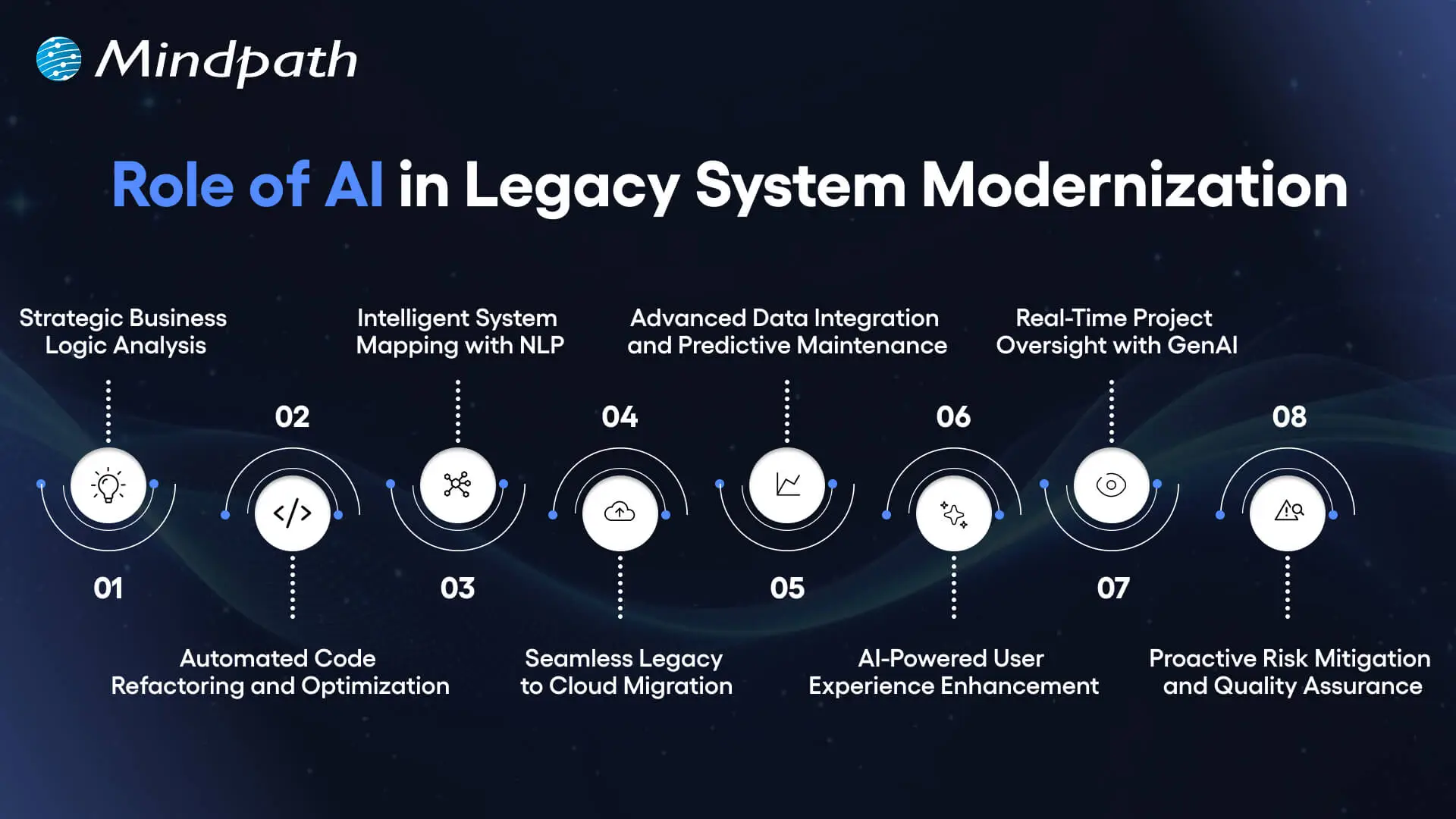
1. Strategic Business Logic Analysis
AI-driven legacy system modernization starts by uncovering hidden business logic. It plots dependencies and decision rules. Modernization becomes smarter and data-driven, and teams are given a clear understanding.
2. Automated Code Refactoring and Optimization
AI rewrites the old code to new cloud-ready codes. Refactoring is faster, fewer errors in the system, and the system itself is much better with generative AI.
3. Intelligent System Mapping with NLP
Natural language processing transforms the complex old code into canned knowledge. Inefficiencies and bottlenecks are promptly found and assist in accelerating modernization.
4. Seamless Legacy-to-Cloud Migration
AI-driven legacy system modernization enables smooth cloud transitions. It also re-architectures code to reflect the current architectures and best practices.
5. Advanced Data Integration and Predictive Maintenance
AI integrates multiple sources of data to allow a smooth integration. Predictive analytics will identify possible problems before they happen and minimize downtime and operational problems.
6. AI-Powered User Experience Enhancement
AI interprets the user behavior in order to streamline interfaces. Chatbots and virtual assistants automate the repetitive field of work making it more engaging and efficient.
7. Real-Time Project Oversight with GenAI
AI offers invaluable real-time insight into the state of modernization. Predictive analytics and automated documentation keep the stakeholders updated and project on schedule.
8. Proactive Risk Mitigation and Quality Assurance
AI reduces the human factor and promotes uniformity. Modernization with structures and low risk can have safety nets that are provided through automated testing and monitoring.
Looking to create a clear path for modernization powered by AI and automation? Check out the legacy modernization roadmap to organize your approach effectively.
Ready to Transform Your Legacy Systems?
AI-driven legacy system modernization empowers businesses to update old systems quickly and accurately. It reduces errors, lowers costs, and improves performance. Companies gain clear insights into business logic and system dependencies, enabling smarter decisions. Modernization also ensures systems stay scalable, secure, and ready to support future growth efficiently.
Mindpath legacy modernization services help organizations implement AI-driven solutions smoothly. Our team analyzes existing systems, refactors code, and enables cloud integration. We provide predictive analytics, risk mitigation, and real-time monitoring. With our services, companies can modernize legacy systems efficiently while preserving core business logic and maintaining operational continuity.
AI is transforming business communication, behavior, and decision-making. However, choosing the right intelligence layer can still be confusing. When teams compare chatbots vs AI agents vs LLMs, the choice can impact speed, cost, automation, and business growth. So, how do you align these technologies with actual business objectives?
Key Takeaways
- 01
Chatbots are primarily designed for conversations, customer support, FAQs, and straightforward user interactions. - 02
AI agents can reason, make decisions, use tools, and complete complex multi-step tasks with greater autonomy. - 03
LLMs provide language understanding and generation capabilities that can power chatbots, AI agents, and other AI systems. - 04
The right choice depends on task complexity, required autonomy, integration needs, budget, and business objectives. - 05
Understanding how chatbots, AI agents, and LLMs work together can help businesses choose a more suitable AI architecture.
Expectations are growing rapidly as the debate around automation continues. Customers want fast responses, smarter interactions, and consistent experiences. Meanwhile, business leaders want greater control, scalability, and measurable value. This makes choosing the right AI technology an important strategic decision. In this blog, we will compare chatbots, AI agents, and LLMs to help you understand their differences, strengths, and business use cases.
Ready to use the right AI technology to streamline and scale your business? Mindpath offers customised AI development services to build chatbots, AI agents, and LLM-powered solutions.
Choosing the Best: Chatbots vs AI Agents vs LLMs
In today’s industry, chatbots, AI agents, and LLMs play key roles in improving business operations. Each brings unique capabilities, but the right choice depends on your specific business needs.
In simple terms, chatbots are built primarily for user conversations, AI agents are designed to perform tasks and make decisions, while LLMs provide the language intelligence that can power these systems. Understanding this distinction makes it easier to select the right technology for a specific business requirement.
Let’s dive deeper into each technology to understand how it can best serve your goals.
What Is a Chatbot?
A chatbot is a computer application that converses with users through text or voice. It solves queries, provides information, and directs users in real time. Companies implement chatbots on websites and applications to assist customers, save time, and improve response speed.
Chatbots are particularly effective for direct and simple conversations. They can respond according to set patterns, rules, or trained responses, making them dependable for FAQs, bookings, and straightforward customer support tasks.
How Does a Chatbot Work?
Chatbots operate by reading user input and comparing it with trained data or predefined rules. They can apply AI, machine learning, and NLP to understand user intent. The chatbot then selects an appropriate response based on patterns, logic, or previous interactions.
There are two main chatbot types for chatbot for business use. Declarative chatbots act according to established rules and respond to frequently asked questions. Predictive chatbots are based on more advanced AI and learning capabilities. They can provide more dynamic, personalized, and predictive interactions.
What Are the Key Benefits of a Chatbot?
Chatbots are effective for addressing specific and repeatable tasks. Some of their notable advantages include the following:
- Offer 24/7 services that can enhance customer satisfaction.
- Provide quick and reliable customer experiences across channels.
- Drive growth and sales through personal and timely interactions.
- Gather customer information to improve business knowledge and practices.
- Minimize the expense of handling large volumes of customer queries.
Curious which chatbot capabilities deliver real value compared to AI agents and LLMs? Discover AI chatbot examples to check out practical use cases that support smarter decisions.
What Is an AI Agent?
An AI agent refers to a system that performs work with limited or no continuous human intervention through the use of tools and workflows. It can make decisions, resolve problems, respond to its environment, and take actions based on defined objectives.
In the chatbots vs AI agents vs LLMs comparison, AI agents are more effective for complex and multi-step tasks than simple chatbots. They can use LLMs for language and reasoning while connecting with tools, applications, and enterprise systems to automate workflows.
How Does an AI Agent Work?
AI agents operate based on a defined role, type of communication, and objectives. They follow instructions and use available tools to accomplish tasks. Depending on their design, agents can learn from interactions, improve accuracy, make decisions, and handle complex situations.
A clear persona can help maintain consistent behavior as the agent operates. Memories can store short-term, long-term, episodic, or shared information to support continuity. Tools enable access to data and systems, while LLMs can act as the reasoning and language engine that helps agents understand requests and generate responses.
What Are the Key Benefits of an AI Agent?
AI agents provide more intelligent automation and can work on advanced tasks beyond simple interactions. Some of their notable advantages include:
- Increase productivity by automating business tasks.
- Improve accuracy by identifying mistakes and producing consistent outputs.
- Work 24/7 to accomplish tasks and support teams at any time.
- Reduce expenses through workflow automation and fewer manual inefficiencies.
- Use business data to provide information and support better decisions.
Looking to decide whether AI agents are the right fit for your business operations? Check out the role of AI agents to learn how they handle complex tasks autonomously.
What Is an LLM?
Large language models (LLMs) are computer programs capable of understanding and producing text using deep learning algorithms. They learn from large amounts of data to identify patterns in language and understand human communication.
LLMs can form the language and reasoning foundation of chatbots and AI agents. They can interpret language, generate responses, summarize content, translate text, and support a wide range of business applications. Fine-tuning or integrating an LLM with other systems can improve its performance for specific tasks.
How Do LLMs Work?
LLMs learn language by training on massive text datasets. They apply Transformer neural networks and self-attention mechanisms to learn context, patterns, and relationships. This enables them to produce human-like text, respond to questions, summarize content, and perform other language-related tasks.
In LLMs for business, these models can support content creation, customer support, data analysis, and other language-intensive processes. They process patterns in language and generate responses based on the context provided. This can help companies save time, improve communication, and support smarter decisions.
What Are the Key Benefits of LLMs?
LLMs provide advanced language interpretation and generation capabilities that can redefine how businesses interact with data, customers, and internal systems. Some of their notable advantages include:
- Automate language and data processes to enhance productivity.
- Scale language-based operations to handle growing volumes of information.
- Provide fast responses for chatbot, assistant, and LLM-powered interactions.
- Support multiple languages for global communication and broader reach.
- Generate insights that can support informed business decisions.
Want to see how LLM capabilities will expand beyond text generation? Learn about the future of LLMs to discover trends redefining intelligent systems.
Chatbots vs AI Agents vs LLMs: Key Differences
Before settling on the appropriate AI technology, businesses should understand how chatbots, AI agents, and LLMs differ. The biggest distinction is their role within an AI system: chatbots primarily handle conversations, AI agents perform tasks and take actions, while LLMs provide language understanding and generation capabilities.
1. Functional Scope
Chatbots are based on guided responses and structured conversations. They are able to deal with direct user queries in day-to-day operations.
AI agents accomplish objectives through actions and decisions. They can work beyond simple conversations and control workflows with greater autonomy.
LLMs are language understanding and generation systems. They process language, generate content, and support analysis across different applications.
2. Intelligence Depth
In the Chatbots vs AI Agents vs LLMs comparison, chatbots can rely on predetermined logic and are competent in foreseeable and repetitive situations.
AI agents can use reasoning and contextual awareness to modify their behavior depending on objectives and results.
LLMs provide advanced language intelligence and can interpret intent, tone, and context.
3. Level of Autonomy
Chatbots are generally responsive and wait for users to prompt them. They do not independently initiate and manage tasks unless specifically designed to do so.
AI agents can operate with greater independence and act toward specified goals. Their planning and implementation do not require constant human guidance.
LLMs generally require prompts, applications, or integrations to perform tasks. They do not independently take action without being integrated into a broader system.
Also Read: LLaMA LLM
4. System Complexity
Chatbots can have relatively simple architectures and processes, making deployment and maintenance straightforward for basic use cases.
AI agents can involve multi-step systems containing memory, tools, planning, and integrations. They can control complex processes across platforms.
LLMs are based on advanced neural networks and can perform in-depth language processing.
5. Cost and Growth Readiness
Chatbots can provide cost-effective scaling for simple support requirements, and many teams can implement them relatively quickly.
AI agents can require greater investment because of their integrations, tools, memory, and automation capabilities. However, they can scale complex workflows across enterprise environments.
LLMs can be scaled through cloud APIs, with overall costs depending on factors such as model selection, usage volume, and application requirements.
6. Architectural Dependency
Chatbots can incorporate LLMs to support more advanced conversations. This relationship is important when comparing chatbots and LLMs.
AI agents can use LLMs as a reasoning and language engine while adding action, planning, memory, and tool-use layers.
LLMs can provide the language foundation across multiple AI systems. This relationship helps explain the differences between chatbots, AI agents, and LLMs.
Planning to deploy AI solutions that focus on instant communication and support? Discover conversational AI chatbot solutions and see how they fit modern business needs.
Chatbots vs AI Agents vs LLMs: Comparison Table
The following table provides a quick comparison of chatbots, AI agents, and LLMs across their core capabilities and business applications.
| Feature | Chatbots | AI Agents | LLMs |
| Interaction | Communicates with users through text or voice | Interacts with users and systems to complete tasks | Understands and generates language for multiple applications |
| Task Scope | Handles simple and repetitive tasks | Manages complex multi-step workflows independently | Performs advanced content, analysis, and language tasks |
| Decision-Making | Follows predefined rules and scripts | Makes autonomous decisions based on goals and context | Supports reasoning when integrated into systems or prompts |
| Learning | Learns through updates and rules | Can improve from past interactions and feedback | Learns from large datasets and identifies language patterns |
| Integration | Works alone or with basic systems | Integrates with tools, software, and workflows | Can power other systems and integrate into chatbots or AI agents |
| Efficiency | Provides quick responses for simple queries | Saves time through task automation | Processes large amounts of language data rapidly |
| Suitability | Ideal for basic customer support and FAQs | Best for enterprise automation and multi-step tasks | Suitable for advanced language intelligence and analysis |
| Scalability | Scales easily for repeated interactions | Handles growing workflows and processes | Scales through cloud APIs for large data and language tasks |
Ready to Choose the Right AI for Your Business?
The decision between chatbots, AI agents, and LLMs can influence how your business operates and develops. Each option addresses different problems and suits different objectives. Chatbots are effective at focused conversations and support tasks. AI agents are designed to handle complex tasks with greater autonomy. LLMs provide language comprehension and generation capabilities that can support both technologies.
Understanding your business requirements, task complexity, desired level of autonomy, integration needs, and budget can help you make a more informed AI technology decision. The right architecture should support your goals while delivering measurable value.
At Mindpath, our AI development services assist companies in converting AI concepts into practical solutions. Our professionals create chatbots, AI agents, and LLM-based systems designed around specific business objectives. We focus on speed, precision, scalability, and measurable value to help businesses improve operations, decision-making, and customer experiences.
FAQs
1. What Are the Major Differences Between Chatbots, AI Agents, and LLMs?
When comparing chatbots vs AI agents vs LLMs, each technology has a different role. Chatbots primarily focus on conversations and user guidance. AI agents perform tasks, make decisions, and interact with tools or systems. LLMs understand and generate language and can provide the intelligence layer for chatbots, agents, and other applications.
2. Can Chatbots Work Without LLMs?
Yes. Chatbots do not always require LLMs. A business chatbot can operate using predefined rules, scripts, or other AI approaches. LLMs can enhance chatbot capabilities by improving language understanding and enabling more flexible conversations.
3. Between Chatbots and AI Agents, Which Is More Advanced?
AI agents are generally more suitable for complex, multi-step tasks because they can use tools, make decisions, and take actions toward defined goals. Chatbots are primarily designed for conversations and predefined or focused interactions.
4. Do AI Agents Need LLMs to Function?
Not necessarily. AI agents can operate using rules, tools, workflows, and other technologies. However, LLMs can enhance agents by improving reasoning, language understanding, contextual responses, and natural language generation.
5. When Should a Business Choose an AI Agent, Chatbot, or LLM?
The right choice depends on the complexity of the task and the business objective. Chatbots are suitable for focused conversations and customer support. AI agents are better suited to complex workflows and autonomous task execution. LLMs are useful when advanced language understanding and generation are required.
Undoubtedly, the global retail landscape is going through a massive transformation. A major architect of this transformation is Artificial Intelligence, or AI. Today’s customers demand convenience, immediacy, and personalization. They expect companies to anticipate their needs. AI in the retail industry helps brands achieve that.
Key Takeaways
- 01
AI in retail helps businesses personalize shopping experiences, improve customer engagement, and make smarter data-driven decisions. - 02
Generative AI can support product recommendations, virtual assistants, personalized campaigns, visual search, and loyalty programs. - 03
Retailers use AI for demand forecasting, inventory optimization, customer segmentation, fraud prevention, pricing, and route planning. - 04
Technologies such as predictive analytics, NLP, computer vision, data management, and IoT form the foundation of retail AI solutions. - 05
The future of retail AI is moving toward hyper-personalization, virtual shopping assistants, emotion AI, sustainability insights, and smarter commerce.
If you want to create a seamless shopping experience and boost customer engagement, retail AI can be an excellent option. Today, we are moving beyond simple automation to a new phase of creative and predictive intelligence. This blog explores how generative AI in retail and other AI technologies are enhancing customer engagement, improving operations, and creating more personalized shopping experiences. Besides, we will discuss some AI in retail examples to get a better idea about this.
Looking to go beyond generic AI tools to create truly personalized retail experiences? Our AI development services help retailers build custom solutions that boost customer engagement and drive smarter growth.
AI in Retail Industry: A Short Brief
Artificial intelligence in retail stores means the use of technologies such as natural language processing, machine learning, generative AI, and computer vision. These technologies enhance or automate decision-making. They also play a crucial role in streamlining operations and personalizing customer journeys.
In simple terms, AI in the retail industry helps businesses understand customer behavior, personalize shopping experiences, automate repetitive processes, and make better decisions using data. From product recommendations and AI chatbots to demand forecasting and visual search, AI can be integrated across different stages of the retail customer journey.
By offering predictive recommendations and data-driven insights, AI in the retail industry can boost customer satisfaction and revenue. As per a recent survey, the use of AI in the retail sector can increase customer experience by 59 percent (Source: World Tea News).
Besides, generative AI creates massive economic potential for retailers. It is projected to offer between USD 240 billion to USD 390 billion in economic value (Source: McKinsey).
Whether it is a recommendation engine suggesting useful products or a retail AI chatbot helping shoppers, AI can be embedded into multiple aspects of the customer journey.
Must Read: AI in E-commerce
Generative AI in Retail: A Game-Changer for Customer Engagement
Generative AI for retail is pushing boundaries by offering personalized and dynamic content at scale. It can help retailers create more relevant interactions, improve product discovery, and deliver personalized experiences across different customer touchpoints.
Some of the most impactful applications include personalized recommendations, AI-powered chatbots, demand forecasting, targeted campaigns, visual search, loyalty programs, and sentiment analysis.
1. Hyper-Personalized Product Recommendations
AI in the retail industry effectively analyzes customers’ purchase history, preferences, and behavior. It can provide customized product recommendations based on the gathered data. In addition, such recommendations can appear in applications, emails, or websites. This can enhance conversion rates.
Customer satisfaction, shopping experience, and loyalty can be improved by offering customers relevant products at the right time. Personalized recommendations can also make product discovery more convenient. This reduces the effort required to find suitable products.
2. Smart Virtual Assistants and Chatbots
Retailers are able to provide 24/7 customer support using generative AI chatbots. Bots can handle multiple queries while also helping shoppers find products, answer questions, and navigate purchasing decisions.
Over time, intelligent bots can learn from customer interactions. This can improve personalization and accuracy. Besides, retailers can reduce the cost of customer support when using a chatbot.
Want to offer instant and personalized support to your online shoppers? Explore conversational AI chatbots to learn how they improve customer engagement and boost conversions.
3. Demand Forecasting
AI-driven demand forecasting involves using ML and data and analytics trends to predict the future demand for products. Retailers can optimize inventory, improve logistics, and reduce waste by analyzing market data, sales, and customer behavior.
These models can be trained to respond to changes in the market. This assists retailers in planning more effectively. As a result, businesses can react more quickly to changes in demand.
4. Dynamic SMS and Email Campaigns
Advanced AI tools for the retail industry can create personalized SMS and email campaigns. For this, they consider various elements such as behavioral data, seasonal trends, and customer segments. Some useful AI-powered tools include OptiGenie, HubSpot, Canva, and AdCreative.ai.
These messages and emails can be more relevant and engaging. This can lead to higher click-through rates, open rates, and conversions. Furthermore, retailers can automate outreach using these tools.
5. Visual Search and Styling
Thanks to generative AI, customers can now find their desired products quickly. They can upload an image of a product, and the search engine can display similar products instantly.
Besides, these tools can offer styling suggestions based on customer input. Visual search can enhance product discovery and interaction while minimizing friction. It can also help retailers create a shopping experience that feels more immersive and intuitive.
Planning to personalize every customer interaction at scale? Discover generative AI for customer service to learn how it delivers tailored responses and smarter assistance.
6. Custom Rewards and Loyalty Programs
AI assists retailers in designing custom loyalty and reward programs by analyzing the frequency and preferences of purchases. Special offers, targeted incentives, and personalized rewards can generate increased brand loyalty and repeat purchases.
The use of AI in the retail industry ensures that customers receive offers and experiences that are more relevant to their preferences. This helps establish stronger customer relationships.
7. Sentiment Analysis
The use of AI in the retail industry promotes sentiment analysis to monitor customer emotions and opinions. These tools analyze social media, reviews, feedback, and other sources to understand how customers feel about products and brands.
With the right data, retailers can identify negative sentiment and respond more effectively. In addition, these insights can support marketing plans and brand communication that align more closely with customer expectations.
Artificial intelligence is no longer a futuristic concept. It is changing customer interaction through hyper-personalized recommendations, automated customer support, visual search, and other intelligent retail experiences.
Wondering how to connect customer data with long-term planning? Check out AI in business strategy and discover how it improves forecasting, personalization, and operational efficiency.
Key AI Use Cases in Retail
AI use cases in the retail industry extend beyond customer engagement. Retailers also use AI to improve inventory management, understand customers, prevent fraud, optimize pricing, enhance virtual shopping, and improve logistics.
The following use cases demonstrate how AI can support both customer-facing experiences and behind-the-scenes retail operations.
| Use Cases | Description |
| Inventory Optimization | AI helps retailers stock the right products using predictive analytics. This helps avoid stockouts and overstock issues. |
| Customer Segmentation | AI can categorize customers based on their demographics, preferences, and behavior for targeted marketing. |
| Fraud Prevention | AI tools regularly monitor transactions for suspicious activities, protecting customers and retailers. |
| Price Optimization | Retail AI tools adjust pricing based on competition, demand, and customer behavior. |
| Virtual Try-Ons | AI allows shoppers to try products digitally, lowering return rates and enhancing customer engagement. |
| Route Planning | AI-assisted route planning helps retailers reduce service disruptions and manage changing conditions. |
Real-World Examples of Generative AI in Retail
The influence of AI in the retail industry revolves around customer behavior and business efficiency. Established retailers are using AI to offer more personalized experiences, optimize operations, and simplify shopping. The following AI in retail examples provide a clearer picture of how these technologies are being applied.
1. Amazon Go Stores
These stores use computer vision, deep learning, and sensors to help customers purchase their preferred products. AI tools monitor purchases and automatically charge the customer’s account.
2. Shopify
Shopify Magic is a product offered by Shopify that understands retail store requirements and creates content automatically.
3. Sephora
It supports AI-based virtual try-ons for beauty products. This can increase sales and improve customer confidence in the product.
4. Walmart
Walmart has implemented AI for predictive analytics and inventory management.
5. Zara
It applies predictive modeling systems supported by AI to analyze fashion trends. These models track social media platforms, sales data, and other information to understand customer preferences. The company can also streamline supply chains with the help of AI.
6. The North Face
The North Face uses IBM’s Watson to offer customers a conversational shopping assistant.
Looking to anticipate market shifts before your competitors do? Discover Generative AI trends to learn how predictive insights shape smarter retail strategies.
Technologies and Tools Powering AI in Retail
AI in the retail industry is driven by a robust ecosystem of tools and technologies. These technologies facilitate operational efficiency, customer understanding, and smarter decision-making. Read on to know a few major innovations supporting the retail sector.
1. Big Data & Predictive Analytics
These technologies evaluate large datasets to predict customer behavior, trends, and inventory requirements.
2. Data Management Tools
They help organize and retrieve both unstructured and structured data to support decision-making and personalization.
3. Salesforce Einstein
Salesforce Einstein offers features such as automated workflows, predictive analytics, and powerful generative AI tools.
4. NLP
Natural Language Processing helps understand and respond to customer queries, feedback, and reviews. It powers chatbots and enables personalized communication.
5. Computer Vision
This technology helps with shelf monitoring, smart mirrors, and visual search by processing video data and images in retail stores.
6. IoT or Internet of Things
IoT involves connected devices that can be used to detect foot traffic and monitor inventory.
Together, these technologies assist retailers in ensuring that customers remain the focal point of the interaction process. They also enable retailers to stay competitive in a changing market.
Want to make faster and more accurate business choices in retail? Discover AI in decision making to learn how data-driven insights improve customer engagement and operational efficiency.
AI and Retail: What Comes Next?
Due to the ongoing development of AI technology, the future of AI in the retail industry promises a more personalized shopping experience. Retailers worldwide will implement AI more often for operational efficiency, customer service, and personalization. As a result, the lines between digital and physical commerce will continue to become less distinct.
Some areas expected to shape the future of retail AI include:
1. Application of Emotion AI
AI will be able to understand customer emotions and assist retailers in enhancing customer satisfaction.
2. Hyper-Personalization
Generative AI in retail will offer context-aware and real-time experiences across multiple channels.
3. Sustainability Insights
AI will assist retailers in tracking and lowering their environmental impact.
4. Virtual Shopping Assistants
AI-powered virtual shopping assistants will offer real-time and personalized shopping support.
5. Blockchain Integration
Retail and e-commerce sectors will become more transparent and secure with the help of blockchain and AI.
Retailers who leverage AI can better meet customer expectations through personalized experiences, faster support, and smarter operations. As a result, the outcome can be stronger customer engagement, loyalty, and business growth.
Curious why businesses are rapidly adopting intelligent technologies? Check out the benefits of AI and discover how it improves decision-making and competitive advantage in retail and e-commerce.
Ready to Transform Your Retail Business with AI?
Artificial intelligence is revolutionizing retail by enhancing customer engagement, personalizing shopping experiences, and improving operational efficiency. Retailers leveraging AI can gain a competitive edge, optimize processes, and deliver smarter, data-driven experiences that delight customers and support growth.
At Mindpath, we provide tailored AI development services for the retail sector. Our experts design custom AI solutions that streamline operations, enable predictive analytics, and boost customer engagement. Partner with us to harness AI strategically and create innovative, scalable retail experiences that drive measurable results.
Enterprise systems tend to have one unified architecture that facilitates early expansion. Gradually, construction gets heavy and hard to ascend. Releases slow down. Minor modifications require huge test cycles. Teams become under pressure to be more innovative. This is where monolith to microservices will be a strategic move towards enterprise legacy modernization. It is not a trend. It is a realistic reaction to actual operation constraints that influence operation, agility, and long-term development.
As businesses grow, they require systems that are flexible and capable of constant delivery and autonomous growth. Nevertheless, a monolithic building goes down only with solid architectural design and business focus. The technology leaders need to reconsider their deployment models, data management, and ownership of teams. Each step requires thorough consideration. In this blog, we will discuss how businesses may proceed in a practical manner to modernize architecture with clarity. So, keep reading!
Looking to simplify complex legacy systems for better agility? Mindpath’s legacy modernization services make it easier to break monoliths into microservices while keeping operations smooth.
What is Monolithic Architecture?
A monolithic architecture integrates all the application elements into a single piece of code. The database layer, business logic and user interface are a single system. Teams develop, test and deploy the application as a whole. It is a structure that promotes centralized control and easy management.
This model has been used by many enterprises to embark on their digital journey. Growth, however, makes the process more complex and causes the changes to slow down. Such a challenge tends to motivate the migration of monolith to microservices to enhance scalability and agility. Nevertheless, it is important to comprehend the monolithic basis before strategizing in terms of modernization.
Some of the advantages of monolithic architecture are listed here:
1. Quick initial development
2. Simple deployment process
3. Managing codes centrally
4. Reduced initial infrastructure price
5. Suitable for small teams
What is Microservice Architecture?
Microservice architecture forms an application of tiny, concentrated services. Every service deals with a certain business operation. They have teams that construct and operate. Services interact via APIs or messaging, which are lightweight. It is a structure that enables quicker releases and better ownership over teams.
Companies that switch from monolith to microservices have the goal of enhancing agility and scalability. Complex systems are broken down into services by teams. They enhance update control and performance control. This model facilitates constant delivery and the alignment of technology to evolving business needs.
Some of the advantages of microservice architecture are listed here:
1. An independent deployment of service.
2. Faster feature releases
3. Better fault isolation
4. Loosely planned technology options.
5. Targeted scalability
Want to ensure your move from monolith to microservices follows a clear direction? Explore legacy modernization strategy to build a structured and effective transformation plan.
Why do Organizations Switch from Monolith to Microservices?
As organizations become more and more application-driven, they become more complex. Monolith to microservices migration becomes a strategic decision when traditional architectures start limiting growth and flexibility.
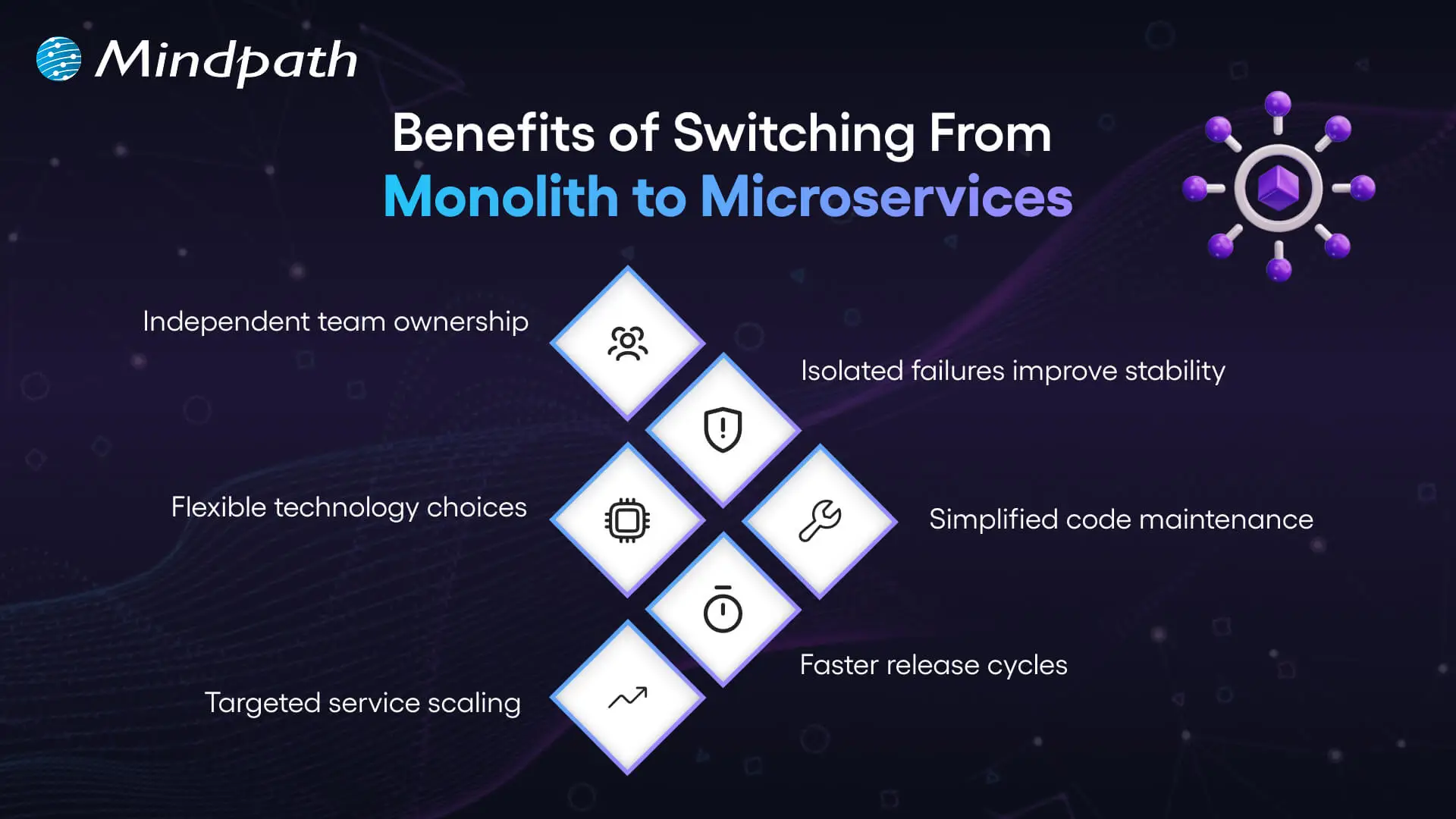
1. Independent Team Ownership
Microservices provide teams with a definite service scope. The teams are in charge of their updates and releases. This construction minimizes wasting of time and enhances concentration. Organizations that follow monolith-to-microservices patterns build stronger ownership models.
2. Flexible Technology Stack
The appropriate tools depend on the service selected by the teams. They do not rely on a common technology. This innovation and future development is supported by this flexibility. It makes architecture flexible to alterations.
3. Targeted Scalability
Monolithic systems need to scale the whole application. Microservices permit the scaling of particular services. This method enhances management of resources. This accuracy is why many enterprises are abandoning monolithic to microservices.
4. Better System Stability
Even a single problem within a monolith is capable of affecting all. Microservice provides isolation of failures in a single service. The teams address the issues without impacting the entire system. This improves reliability.
5. Faster Release Cycles
Teams create and implement services on their own. They make releases without necessarily having to recreate the system. This enhances the speed of delivery. Business enterprises migrate from monolithic to microservice to enhance momentum.
6. Easier Maintenance
The huge codebases become hard to handle. Microservices separate applications into smaller parts. Developers are able to maintain and update services with ease. This facilitates long-term clarity.
Planning to reduce system limitations while adopting modern architectures? Learn from the benefits of modernizing legacy systems to improve overall performance.
Key Steps for Migrating from Monolith to Microservices
Organizations need to strategize before they shred a monolithic system into smaller services. Successful migration to microservices is based on clear strategy and disciplined execution.
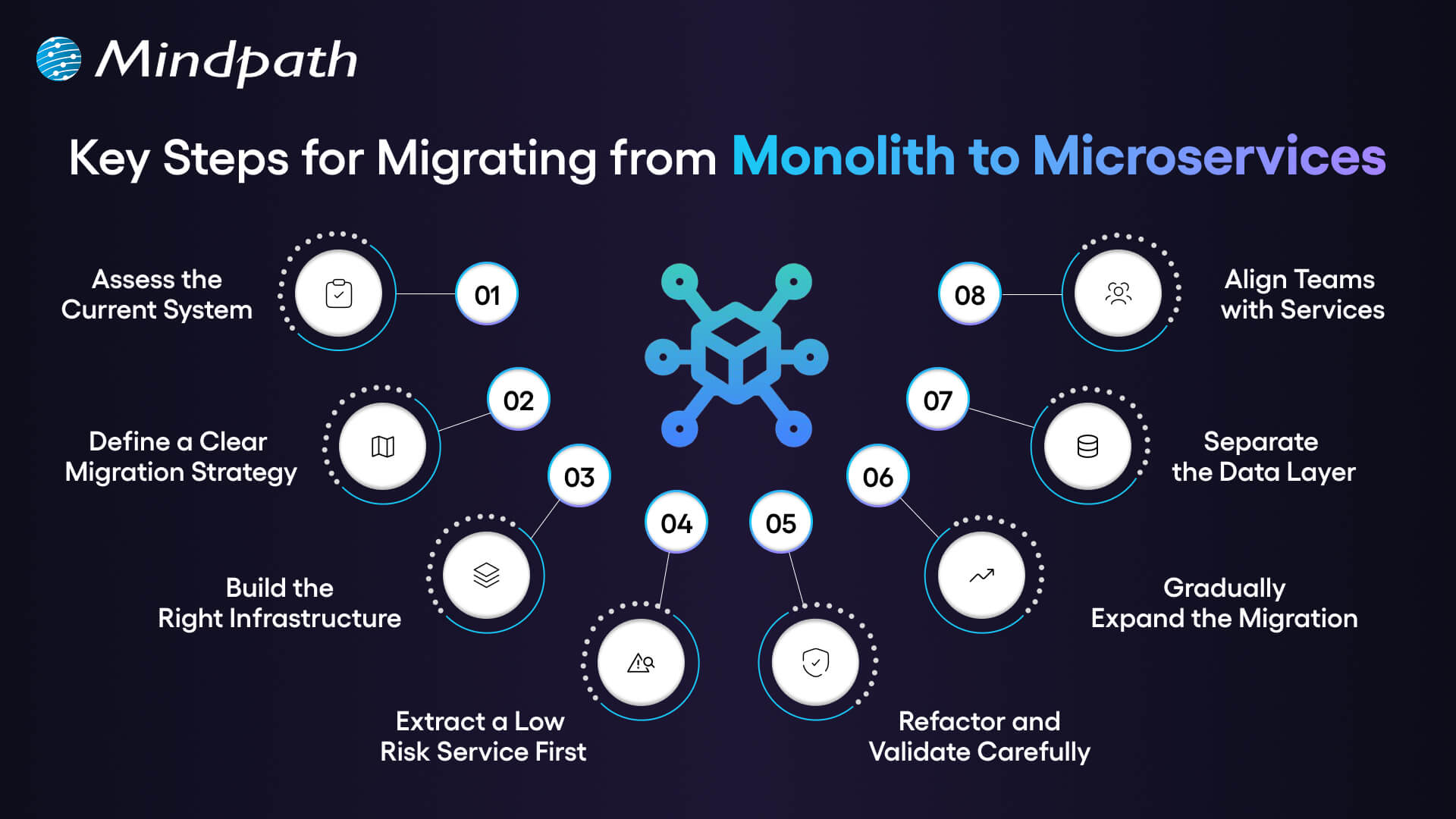
1. Assess the Current System
Begin by doing a line-by-line audit of your monolithic system. Check review services, dependencies, data flow, and performance gaps. This analysis forms the basis of successful monolithic to microservices migration.
2. Define a Clear Migration Strategy
Establish simple service boundaries on the capability of the business. Make decisions on the size of the service and the style of communication at the early stage. A strong monolithic to microservices migration strategy reduces confusion and prevents rework.
3. Build the Right Infrastructure
Finalize API gateway, service discovery and CI/CD pipelines. Insert containers and orchestration tools to introduce consistency. The powerful infrastructure promotes consistent monolithic to microservices conversion.
4. Extract a Low Risk Service First
Select a valuable module that is loosely coupled. Build it as a stand-alone service having its database. It is a risk-controlled step that is proving yourself.
5. Refactor and Validate Carefully
Refactor the chosen ones into a single service. Implement it and observe behavior closely. Logging and tracing helps to identify problems at an early stage.
6. Gradually Expand the Migration
Move other modules depending on the business priorities. Break-even monolith tasks gradually. This phased approach supports smooth monolithic application to microservices’ evolution.
7. Separate the Data Layer
Discontinue reliance on a corporate database. Allocate domain-owned datastores to each service. Synchronize the plan data keenly to ensure that it is consistent.
8. Align Teams with Services
Establish cross-functional teams for each microservice. Provide them with complete development and operations ownership. This is a structure that reinforces autonomy and long-term scalability.
Looking to enhance your modernization process with intelligent automation? Learn from AI-driven legacy system modernization to boost efficiency and performance.
Ready to Modernize Your Enterprise Architecture?
Contemporary business requires the ability to expand its systems as it grows and facilitate ongoing innovations. A clear shift from monolith to microservices improves agility, resilience, and operational control. The key to success lies in effective planning and implementation in phases and aligning a team. Through proper strategy, companies become simpler and create future ready digital platforms that underpin long-term business objectives.
At Mindpath, we provide legacy modernization services which help companies plan and implement legacy modernization with confidence and clarity. Our specialists evaluate architecture, establish migration roadmaps and deploy scalable microservices. We are performance-based, stability-centered and result-orientated. Collaborate with Mindpath to modify old systems into nimble, growth-motivated digital systems.
FAQs
1. Why should enterprises consider monolith to microservices today?
Enterprises face rapid market shifts and rising customer expectations. Monolith to microservices helps organizations build adaptable systems that support faster innovation. It also aligns technology with business domains, enabling better ownership, governance, and long-term digital growth without increasing structural complexity.
2. How do we know if our organization is ready for migration?
You should assess technical maturity, DevOps readiness, and team structure. Clear service boundaries and business alignment indicate strong readiness. Leadership commitment also plays a key role in successful transformation and sustainable architectural evolution.
3. Is monolith to microservices suitable for every business?
Not every system requires immediate migration. Smaller or stable applications may perform well as monoliths. However, enterprises planning aggressive scaling, multi-team collaboration, or global expansion often benefit from monolith to microservices as a long-term strategy.
4. What technical challenges arise during data separation?
Data decoupling often introduces consistency and transaction complexity. Teams must design domain owned databases and manage synchronization carefully. Event-driven patterns and API governance help maintain reliability during service level transitions.
5. How can Mindpath support our legacy transformation journey?
Mindpath’s legacy modernization services guide enterprises through assessment, planning, and execution. Our experts design scalable architectures and structured migration roadmaps. We help organizations transition confidently using proven monolith-to-microservices approaches aligned with measurable business outcomes.
Cloud expenses continue to grow with the expansion of apps, new services, and bolt-on speedy releases. Cloud cost optimization is now the core of every intelligent IT plan. You spend on flexibility and speed, but at the end of the month, you are surprised by the costs, which often exceed your budget due to unforeseen usage spikes and the complexity of managing multiple cloud services. So, what drives this gap? More importantly, how can you gain control without hindering innovation?
Contemporary companies require performance, safety, and swiftness simultaneously. Uncontrolled resources, idle work loads and lack of visibility, however, consume budgets very fast. Hence, leaders should reconcile finance and engineering using well-defined cost objectives. Intelligent budgeting turns cloud expenditure into quantifiable value. This blog will show a practical way of gaining control of cloud investments.
Ready to take control of your cloud costs and get more from your investment? Mindpath offers cloud managed services to help businesses optimize cloud usage, reduce waste, and scale efficiently.
What is Cloud Cost Optimization?
Cloud cost optimization is the strategic, ongoing process of reducing cloud computing expenses while maintaining or improving system performance. Companies check the usage, eliminate unnecessary services, and select appropriate pricing frameworks, ensuring resources are right-sized and properly utilized rather than left idle or oversized. This will enhance performance and minimize unwarranted expenditure as well as keep cloud investment in line with business objectives.
Cloud cost management helps in this endeavor to track, analyze, and plan cloud expenditure. Teams create the budgets, keep track of their usage, and reallocate the resources according to the demand. A combination of these practices aids companies in becoming financially clear, enhancing efficiency, and making superior decisions in long-term growth.
Must Read: Cloud Computing Trends 2026
Why is Cloud Cost Optimization Important?
Cloud services enable businesses to invest heavily in order to achieve growth, speed, and innovation. The reasons why cloud cost management is of critical importance in safeguarding budgets and enhancing financial control are as follows.
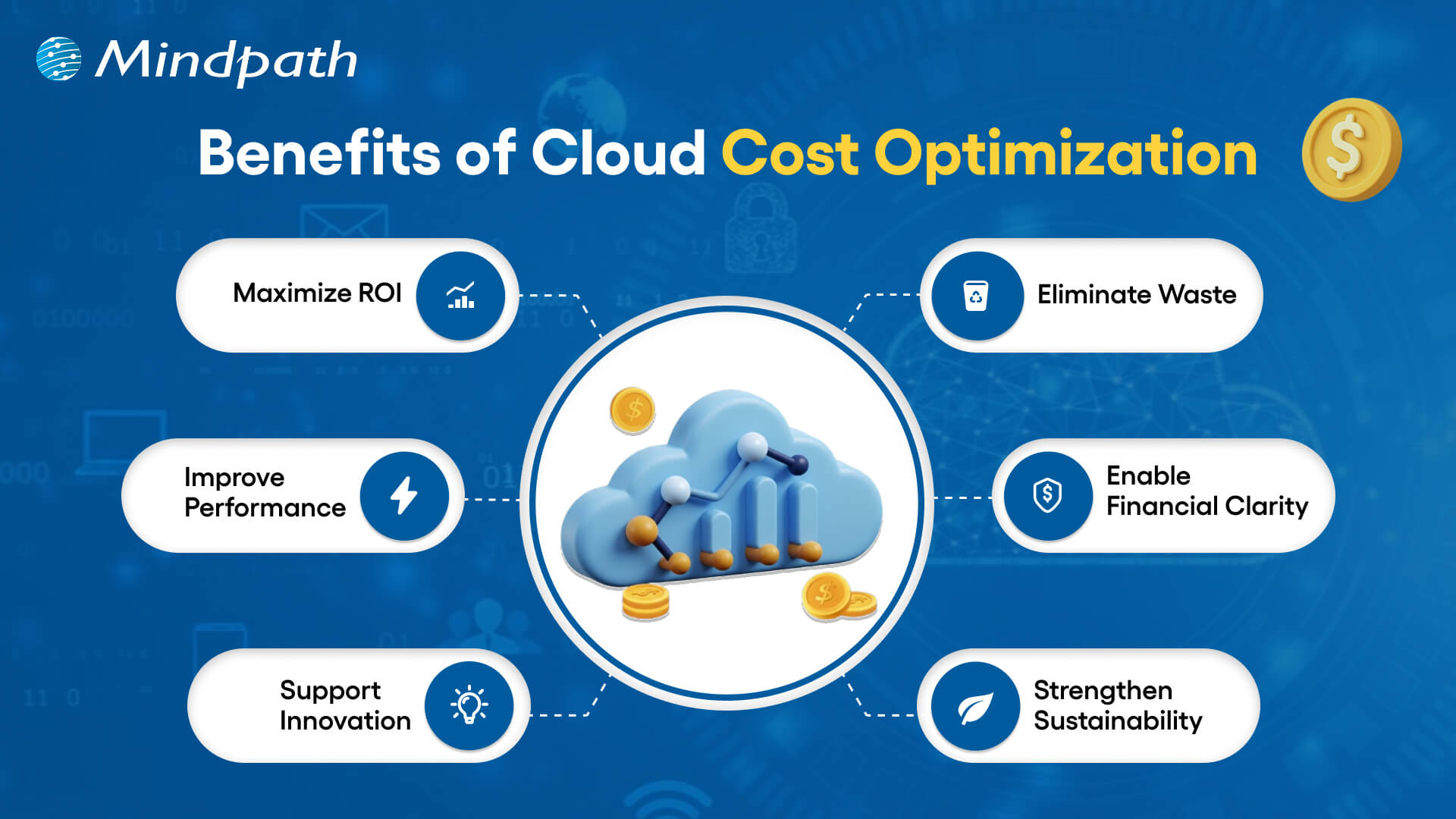
1. Maximize ROI
Cloud expense optimization enables businesses to match expenditures with objective goals. They make sure that each dollar helps in growth, performance, and quantifiable business worth.
2. Eliminate Waste
Teams eliminate wastage of resources and storage before their expenses increase. Cloud cost optimization assists businesses in ceasing spending on services that are unnecessary.
3. Improve Performance
Organizations right-size the workloads on the basis of actual demand. This balance is also fast and reliable, as it keeps the costs down, which ultimately supports the organization’s ability to invest in new projects and innovations.
4. Enable Financial Clarity
Leaders follow usage real-time and make budgets confidentially. Being visible will avert the presence of surprise bills and enable smarter forecasting, which allows leaders to make informed financial decisions and allocate resources more effectively.
5. Support Innovation
Firms invest saved amounts in product development and online expansion. Expenditures that are managed efficiently leave opportunity for new ideas and expediency.
6. Strengthen Sustainability
Economic utilization of resources minimizes energy wastage and decreases carbon influence. Clear governance also develops team and departmental accountability.
Want to reduce cloud costs while also making your infrastructure more eco-friendly? Explore sustainable technology to build efficient and environmentally responsible systems.
Cloud Cost Optimization Strategies for Modern Businesses
Contemporary companies require effective means to regulate cloud expenses without compromising performance and scalability. Some major strategies that help companies achieve effective cloud cost optimization include the following.
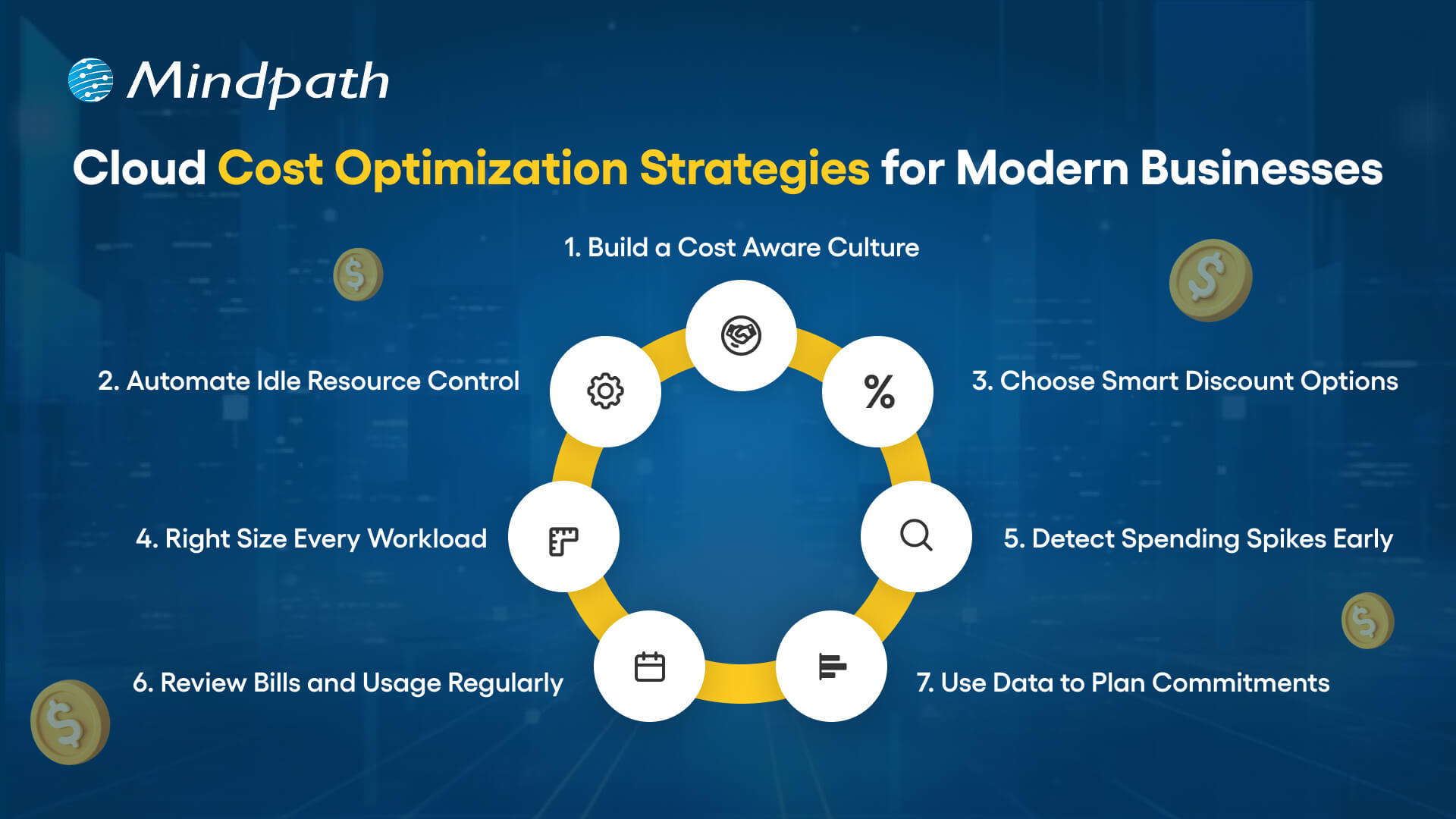
1. Build a Cost-Aware Culture
Clear ownership and shared responsibility are the beginning of strong cloud cost optimization. Leaders establish FinOps team and establish explicit spending policies. Teams go through regular reviews on usage and align the decisions with the business goals.
2. Automate Idle Resource Control
Unutilized servers and storage add up to high bills. Teams automate the scheduling of shutdowns and the removal of unused assets. Automation enhances the ability to optimize cost in the cloud because it avoids silent waste, which refers to the ongoing costs associated with unused resources that are not actively managed or monitored.
3. Choose Smart Discount Options
Cloud service providers also have savings plans and spot instances regarding flexibility in workloads. Workload stability is examined by teams, and then discount models are chosen. Smart commitments minimize the long-term expenses without jeopardizing performance.
Want to protect your cloud environment while optimizing costs? Explore cloud security to safeguard your systems and data effectively.
4. Right Size Every Workload
Excessively provisioned resources cost money and minimize efficiency. The teams keep tracking the CPU, memory, and storage usage. They align types of instances to actual workload requirements to facilitate cost optimization of clouds.
5. Detect Spending Spikes Early
Unplanned cost surges are hurtful to budgets and slow down planning. Real time alerts are used by teams to spot unusual usage in a short time. Timely behavior safeguards the financial control and enhances the cloud cost optimization.
6. Review Bills and Usage Regularly
The frequent examination of bills discloses outliers of costs and inefficiencies. The teams compare the present usage and the trends to identify gaps. This is followed up by constant monitoring of expenditure to ensure its congruence with approved budgets.
7. Use Data to Plan Commitments
Long-term contracts demand proper forecasting and clarity. Before commitment plans are locked teams analyze performance metrics. Data based decisions minimize risk and lead to a higher cost-efficiency.
Curious about how cloud migration supports cost optimization strategies? Check out the benefits of cloud migration to maximize your ROI.
Key Cloud Cost Optimization Tools
Businesses today need the appropriate tools to manage their expenditure and enhance visibility in the cloud setting. These are some of the important tools that can enable successful cloud cost optimization and smarter financial decisions.
1. Azure Cost Management + Billing assists teams to monitor their spending, budget and optimize Azure resources with visibility.
2. CloudZero relates cloud costs to products, features, and teams to make decisions related to the business.
3. AWS Cost Explorer and Trusted Advisor share cost-related information, usage data, and can offer recommendations applicable to make the process efficient.
4. Finout provides in-depth cost allocation analysis between various cloud and SaaS providers.
5. Google Cloud Cost Management helps to track spending and optimize usage in the GCP setups.
6. ProsperOps automates Savings Plans and Reserved Instances in order to make the maximum savings in the long term.
7. CloudHealth Victor by VMware provides business-level management, visibility and cost control in the environment.
8. Vantage provides visualized current multi cloud cost with straightforward and accurate reporting.
9. nOps applies AI based recommendations on the most economical AWS resources.
Wondering which cloud model can help you control costs and improve performance? Explore multi cloud vs. hybrid cloud to gain the clear insights.
Ready to Take Control of Your Cloud Spending?
Cloud cost optimization is beneficial to the modern business to perform cost control and enhance the performance and visibility. Businesses that audit usage, optimize resources, and automate the process of waste elimination obtain better financial control. Definite plans transform the investments in clouds into quantifiable value. By having teams focus on finance as well as engineering, teams eliminate surprise and develop long term and sustainable growth.
Mindpath is a leading provider of cloud infrastructure services, according to your business objectives. Our team is an analysis of how we use, and how we could use to waste less and be smarter with automation. We assist in the process of visibility enhancement, enhanced governance and increased returns on cloud investments. Collaborate with Mindpath to turn cloud spending into a competitive edge.
The technology environment that you operate in determines the rate at which your firm develops and competes. A clear legacy modernization strategy gives structure to change and turns outdated systems into growth drivers. You might feel like upgrading, but you need to know and understand. So, where do you start and how are you balancing technology objectives and business performance?
Nevertheless, modernization goes beyond updating the system. It must have a dedicated strategy that enhances scalability, security, and performance. Consequently, leaders should reason in the future and be purposeful. Innovative choices now result in robust systems in the future. In this blog, we look at how to make the correct decision that would be helpful in sustainable business growth.
Ready to turn legacy systems into growth enablers? Mindpath’s legacy modernization services guide organizations in choosing and executing strategies that unlock operational efficiency and business value.
What is a Legacy Modernization Strategy?
A legacy modernization strategy is a structured plan to update, transition, or replace outdated software and IT infrastructure, transforming legacy systems into agile, scalable digital platforms. Its core goal is to align foundational technology with current business demands, helping companies minimize technical debt, strengthen security, improve cost efficiency, and boost overall performance. When technology is aligned with business objectives, organizations build a platform that supports innovation, easier integration of advanced technologies like AI and data analytics, and sustained long-term growth.
Legacy system modernization consists of more practical strategies, including rehosting, replacing the platform or refactoring into microservices, or replacing systems with SaaS offerings. All the methods facilitate the adoption of clouds and efficiency. Organizations will be able to modernize with the right direction and remain stable and deliver improved user experiences.
Wondering how legacy upgrades can improve security and system reliability? Explore the benefits of modernizing legacy systems to strengthen your infrastructure.
Key Strategies of Legacy System Transformation
1. Refactoring
Enhance current code to eliminate technical debt to increase the efficiency without altering the experience of users using the system.
2. Replacing
Existing system to replace the old system and install a new SaaS or commercial system.
3. Rehosting
The application can be moved to newer infrastructure such as cloud with minimal or no changes in code.
4. Encapsulation (API-enabled)
Sometimes wrap legacy code with APIs to allow them to interface well with modern applications.
5. Re-architecting
Re-design the system into a new structure, e.g. microservices, to open up new possibilities.
6. Replatforming
Change to a new platform with some slight alterations in order to enhance performance without changing the core code.
7. Rebuilding or Rewriting
Build the system with a new technology but keeping the same business logic.
Looking to improve system flexibility during your modernization journey? Learn from monolith to microservices to enable faster and easier updates.
How to Choose the Right Legacy Modernization Strategy?
To make the appropriate decision, one has to be clear, plan and well aligned with business objectives. The right legacy modernization strategy depends on your system complexity, budget, risk tolerance, and long-term growth plans.

1. Perform a Comprehensive Assessment
Start with an elaborate system, dependency, and technical debt audit. Trace the architecture and locate the performance bottlenecks. Isolate mission critical components and features that are old. This evaluation strengthens your legacy modernization framework and guides smart investment decisions.
2. Define Clear Business Goals
Align your Legacy modernization strategy with measurable business outcomes. Clarify the need of modernization such as cost control, agility, or improved security. Establish targets of performance and scalability. Then choose an Application modernization strategy that directly supports these goals.
3. Evaluate Risk Tolerance
Determine the extent to which your organization can cope. Few risk solutions are API encapsulation or cloud rehosting. High transformation goals may require a bold legacy modernization technique like rearchitecting. Striking a balance between innovation and operational consistency is advisable before taking the final decision.
Must Read: AI-Driven Legacy System Modernization
4. Prioritize Data Integrity and Security
Protect critical and historical data during every transition phase. Create a structured migration plan with validation checkpoints. Embed security controls while modernizing legacy systems. Adopt zero trust practices to reduce exposure to cyber threats.
5. Adopt a Phased Approach
Secure valuable and historical data at all levels of transition. Develop a systematic migration strategy that has checkpoints. Embed security controls while modernizing legacy systems. Employ the concept of zero trust in order to minimize exposure to cyber threats.
6. Assess Internal Capabilities and Partner Support
Analyze the internal knowledge of innovative tools and websites. Identify skill gaps that may delay your Legacy modernization strategy. Arrange training of the plan or external assistance where necessary. Collaborate with skilled professionals offering end to end solutions.
Looking to simplify your modernization process with a proven framework? Learn from the legacy modernization roadmap to move forward with confidence.
Ready to Build a Smarter Future with the Right Strategy?
Choosing the right legacy modernization strategy drives growth, resilience, and long-term performance. Companies that think strategically lower the risk and open other digital opportunities. Clarity, planned implementation, and good governance bring sustainable value. By combining technology with business vision, leaders enhance their agility, security, and scalability and remain competitive in a fast-changing market.
Being a reliable legacy modernization service provider, Mindpath delivers practical and growth-oriented solutions. Our specialists evaluate systems, build customized road maps, and implement contemporary modernization accurately. We assist organizations to minimize technical debt and increase innovation. Mindpath provides sustainable transformation, with immense technical know-how and strategic acumen, to strengthen operations and ensure quantifiable business success.
Modern businesses strive for speed, control, and smarter growth every day. Technology plays an important role in achieving these goals, and that is where the benefits of cloud migration become valuable.
Businesses need systems that can scale quickly and easily. At the same time, they want greater visibility into costs and performance. Cloud computing can help meet these needs by changing how teams collaborate, plan, and deliver value. As a technology-focused organization, we have seen how this shift can influence decision-making across industries. As a result, interest in cloud adoption continues to grow.
Moreover, cloud migration is no longer viewed simply as an experiment. It has become a strategic move for companies that need greater flexibility, reliability, and room to innovate. Businesses want technology that supports growth without slowing down their momentum.
Cloud systems help teams collaborate more effectively and adapt to changing requirements. They can also simplify daily operations and planning. As a result, these benefits can contribute to long-term competitiveness. This blog explores the business value companies can gain from cloud migration in a digital-first environment.
Let’s dive in further!
Want to simplify your move to the cloud while keeping expenses in check? Mindpath’s cloud managed services help businesses migrate, optimize, and scale their cloud environments efficiently.
What Is Cloud Migration?
Cloud migration is the process of transferring data, applications, and systems from local servers or on-premises infrastructure to the cloud. Businesses typically make this move to modernize their IT environment and improve how technology supports daily operations.
With cloud computing, teams can work with online infrastructure instead of relying entirely on physical systems. As a result, businesses can change how they manage technology, applications, data, and day-to-day workloads.
The process may involve moving files, software, databases, and complete IT environments to the cloud. However, careful planning is essential to reduce disruption and manage potential risks. Although the benefits of cloud migration often drive interest, understanding the process is equally important. A clear migration strategy helps businesses prepare for long-term digital transformation.
Must Read: Cloud Computing Trends 2026
What Is the Process for Cloud Migration?
Cloud migration follows a structured process that helps businesses move systems with greater control and fewer disruptions. Understanding the main cloud migration phases allows teams to plan effectively, manage risks, and prepare their infrastructure before the migration begins.
1. Assess and Plan
First, teams establish clear business objectives and evaluate their existing systems, applications, data, and infrastructure.
This step creates a strong foundation for realizing the benefits of cloud migration without rushing important decisions.
2. Create the Foundation
Next, teams prepare the cloud environment and establish the foundation required for migration.
They configure security, networking, storage, and other essential resources to support a smooth transition.
3. Migrate and Improve
Teams then migrate data and applications according to a predetermined sequence.
After each migration, performance and security are tested to identify and address potential issues quickly.
4. Monitor and Optimize
Once the migration is complete, teams monitor system performance and manage cloud costs regularly.
They can then optimize resources and configurations to keep operations efficient, secure, and stable.
Wondering how to balance performance and cost in your cloud environment? Explore cloud cost optimization to achieve better financial control.
Why Migrate to the Cloud?
There are several reasons why businesses choose cloud computing. In particular, the benefits of moving to the cloud align with the need for greater speed, flexibility, scalability, and operational control.

1. Scalable Performance on Demand
Cloud platforms allow businesses to adjust computing resources based on changing demand. As a result, teams can handle traffic spikes without relying on fixed infrastructure.
During periods of peak demand, resources can be adjusted to support stable system performance. This flexibility is one of the key benefits of cloud migration for growing businesses.
2. Faster Product Innovation
Cloud environments can support faster development and testing. As a result, teams can release new features without spending as much time managing physical infrastructure.
In addition, automation can reduce repetitive tasks and support faster delivery cycles. These improvements make cloud migration valuable for businesses that need to innovate and respond quickly.
Want to understand the potential risks that come with cloud migration? Explore cloud computing vulnerabilities to strengthen your security strategy.
3. Strong Business Continuity
Cloud environments can operate across different locations and infrastructure resources. Therefore, businesses can improve their ability to continue operations when a system or infrastructure issue occurs.
Recovery can also be faster when appropriate backup and recovery strategies are in place. This reliability is another important benefit of cloud migration.
4. Smarter Cost Control
Cloud costs can be aligned more closely with resource usage. Teams can also track spending through cloud management tools and dashboards.
As a result, businesses can gain greater visibility into their technology expenses and make more informed budget decisions. Cost clarity remains one of the important benefits of cloud migration.
5. Improved Security Management
Cloud platforms provide security controls that help businesses manage access and protect their environments. Teams can define user roles and permissions based on specific requirements.
Furthermore, centralized monitoring can make it easier to identify and respond to security concerns. These controls can strengthen overall risk management.
Must Read: Cloud Security Tools
6. Better Data Insights
Cloud-based analytics tools can process and analyze data in real time. This gives teams faster access to information that can support business decisions.
Consequently, organizations can use data to improve daily operations and inform broader business strategies. This capability is another practical benefit of cloud migration.
7. Higher Developer Productivity
Cloud environments can provide developers with ready-to-use resources without lengthy infrastructure setup. In addition, automation can reduce repetitive manual work.
As a result, development teams can spend more time building and improving features. This can support long-term productivity and innovation goals.
8. Faster Market Adaptation
Cloud systems can make it easier for businesses to adjust services and applications as requirements change. Teams can test new ideas and change direction without being tied to rigid infrastructure.
Therefore, companies can respond more effectively to changing customer expectations. This agility is one of the key advantages of moving to the cloud.
9. Sustainable IT Operations
Cloud providers can use energy-efficient infrastructure and resource-sharing models. As a result, businesses may reduce unnecessary resource use compared with maintaining dedicated infrastructure for every workload.
Scalable systems can also help resources match actual demand more closely. In turn, efficient IT operations can support broader sustainability goals.
Looking to optimize energy usage in your cloud infrastructure? Learn from sustainable technology to improve efficiency and reduce waste.
10. Stronger Team Collaboration
Shared cloud environments make it easier for teams to access the systems and resources they need. Developers and operations teams can work more closely together.
As a result, feedback can move faster between teams, helping improve coordination and delivery quality.
11. Flexible Business Models
Cloud architectures support hybrid and multi-cloud setups. This flexibility allows businesses to choose different cloud environments based on their operational and technical requirements.
Teams can also design cloud solutions that support future growth and changing needs. Therefore, flexibility can contribute to long-term resilience and innovation.
Ready to Move Your Business to the Cloud with Confidence?
The benefits of cloud migration can help companies become more flexible, secure, and responsive. Cloud adoption can also support faster innovation, smarter scaling, and greater control over IT environments.
As organizations adapt to changing requirements, a well-planned migration can provide a strong foundation for continued digital growth. By treating migration as a structured process, businesses can manage risks while making better use of cloud capabilities.
At Mindpath, we help companies plan and implement their cloud journeys through our cloud infrastructure services. Our specialists focus on secure architecture, scalable solutions, and clear cost management.
We align cloud strategies with business objectives and provide dependable support throughout the journey. With a systematic approach to cloud computing, Mindpath helps organizations build the performance, stability, and flexibility needed for long-term digital growth.
Artificial intelligence is advancing rapidly, but not all AI systems are designed to operate at the same level of intelligence. Two concepts that often appear in discussions about the future of AI are Artificial General Intelligence (AGI) and Artificial Superintelligence (ASI). Although they are closely related, they describe different levels of potential machine intelligence.
AGI refers to a hypothetical form of AI that can understand, learn, and apply knowledge across a wide range of tasks at a level comparable to human intelligence. ASI describes a hypothetical stage in which AI surpasses human cognitive abilities across virtually all intellectual domains. Neither has been conclusively achieved, and their development timelines remain uncertain.
Understanding AGI vs ASI helps businesses, technology leaders, and researchers evaluate where AI could be heading. This guide explains their definitions, capabilities, potential business applications, key differences, and the challenges they may introduce.
Key Takeaways
- 01
AGI aims to perform and learn across a broad range of intellectual tasks at a human-comparable level. - 02
ASI refers to hypothetical AI that would exceed human intellectual capabilities across virtually all domains. - 03
Today’s AI systems can perform advanced tasks, but they have not established that they possess general human-level intelligence. - 04
AGI and ASI could influence research, decision-making, automation, and business operations, but their practical impact remains uncertain. - 05
Safety, transparency, governance, privacy, and human oversight will be important considerations as AI capabilities advance.
What Is Artificial General Intelligence (AGI)?
Artificial General Intelligence (AGI) is a theoretical form of artificial intelligence designed to understand, learn, reason, and solve problems across a wide range of tasks. Unlike narrow AI systems, which are developed for specific functions, AGI would be able to transfer knowledge from one task or subject to another without requiring a separate system for every application.
For example, an AGI system could potentially learn a new technical subject, apply that knowledge to solve an unfamiliar problem, communicate its reasoning, and adapt when circumstances change. Its abilities would be broad rather than limited to a predefined task.
AGI is generally described in relation to human-level general intelligence. However, researchers do not have one universally accepted definition or test for AGI. The exact capabilities required to qualify as AGI remain a subject of ongoing research and debate.
Current AI systems can demonstrate impressive capabilities in language, coding, image generation, and data analysis. However, performance across individual tasks does not automatically establish human-level general intelligence.
Key Characteristics of AGI
The following characteristics describe capabilities that an AGI system would ideally demonstrate. They are theoretical goals rather than a checklist that current AI systems have conclusively satisfied.
1. General Learning Ability
AGI would be able to learn across different subjects and tasks, applying previously acquired knowledge to unfamiliar situations. This ability to transfer learning would distinguish it from systems designed for a narrow set of functions.
2. Reasoning and Problem-Solving
An AGI system would be expected to analyze complex situations, evaluate possible solutions, and work through problems that it has not specifically been trained to solve. It would need to adapt its approach when new information becomes available.
3. Adaptability
AGI would be capable of responding to changing environments and new requirements. Instead of depending entirely on predefined instructions, it could adjust its methods based on the context of a task.
4. Knowledge Transfer
A key capability would be applying knowledge gained in one area to another. For instance, understanding mathematical concepts could help an AGI system approach engineering or scientific problems.
5. Independent Task Execution
AGI could potentially plan and complete complex, multi-step tasks with less task-specific guidance. The degree of autonomy would depend on how the system is designed, deployed, and controlled.
Potential Business Applications of AGI
If AGI becomes technically achievable and safe to deploy, it could influence how organizations manage knowledge, make decisions, and coordinate complex operations. These are potential future applications, not capabilities that businesses can currently purchase as established AGI solutions.
1. More Informed Decision-Making
An AGI system could potentially combine information from different business functions, identify relationships, and evaluate possible outcomes. This may support strategic planning and complex decisions while keeping human leaders responsible for important choices.
2. Research and Innovation
General-purpose intelligence could assist with research across multiple disciplines. It may help researchers generate hypotheses, evaluate approaches, and connect ideas from different fields to support the development of new products and technologies.
3. More Adaptive Customer Experiences
AGI could potentially understand a broader range of customer requests and context. This may enable more flexible interactions across support, recommendations, and service workflows than systems restricted to predefined conversation paths.
4. Complex Workflow Automation
Businesses may be able to use AGI to coordinate tasks across departments, respond to changing requirements, and manage workflows involving multiple tools and decision points. Human review would remain important for sensitive or high-impact operations.
5. Improved Resource Planning
An AGI system could potentially evaluate operational information across finance, supply chains, staffing, and customer demand. These insights may help organizations compare scenarios and plan resource allocation more effectively.
What Is Artificial Superintelligence (ASI)?
Artificial Superintelligence (ASI) is a hypothetical form of artificial intelligence that would surpass human intellectual abilities across virtually all areas. These areas could include scientific research, strategic planning, creativity, problem-solving, and complex decision-making.
While AGI aims to achieve broad intelligence comparable to human capabilities, ASI would go beyond that level. An ASI system could potentially analyze problems, generate solutions, and process information at levels that exceed the abilities of even highly skilled human experts.
ASI remains theoretical. No existing AI system has demonstrated superintelligence across all intellectual domains. Its possible development, behavior, and timeline are uncertain, and researchers continue to debate whether and how such a system could emerge.
It is also important to distinguish intelligence from consciousness. Superintelligence does not necessarily mean that a system would be self-aware or have human-like emotions. These are separate questions that should not be treated as automatic characteristics of ASI.
Key Characteristics of ASI
The following characteristics describe what ASI might be capable of if it were developed. They represent theoretical possibilities rather than proven features of an existing technology.
1. Intelligence Beyond Human Capabilities
ASI would exceed human performance across a broad range of intellectual activities. It could potentially handle scientific, technical, and strategic problems that are difficult or impossible for people to solve independently.
2. Advanced Problem-Solving
A superintelligent system could potentially evaluate highly complex problems, consider a wide range of possible approaches, and identify solutions beyond current human capabilities.
3. Rapid Learning and Adaptation
ASI might process new information and adapt its problem-solving strategies at a pace that exceeds human learning. The actual speed and method of learning would depend on the system’s architecture and constraints.
4. Advanced Scientific and Technical Research
ASI could potentially contribute to breakthroughs in areas such as medicine, engineering, materials science, and computing. It may identify relationships or research directions that human researchers have not considered.
5. Complex Strategic Planning
A system with superhuman reasoning capabilities could potentially evaluate interconnected variables and long-term scenarios. However, the reliability and safety of its decisions would depend on its objectives, constraints, and oversight.
Potential Business Applications of ASI
If ASI were developed and made available under appropriate safeguards, it could have far-reaching implications for industries and organizations. The following examples are speculative and should not be interpreted as existing business capabilities.
1. Advanced Research and Development
ASI could potentially accelerate research by analyzing complex datasets, generating scientific hypotheses, and evaluating technical solutions. This may influence industries that depend on intensive research and development.
2. Complex Market and Risk Analysis
A superintelligent system might evaluate large numbers of economic, operational, and market variables to model possible scenarios. However, predictions would still depend on data quality, assumptions, and uncertainty in real-world conditions.
3. Advanced Personalization
ASI could potentially interpret complex customer needs and preferences to support highly tailored services. Any use of personal information would require appropriate consent, privacy protections, and governance.
4. Large-Scale Operational Optimization
ASI might help coordinate complex systems such as logistics networks, manufacturing operations, and energy infrastructure. Human oversight and clearly defined operating limits would be essential for high-impact decisions.
5. Cybersecurity Research and Defense
Superintelligent systems could potentially help identify complex vulnerabilities, analyze emerging threats, and support defensive security research. At the same time, more capable AI could introduce new cybersecurity risks if misused or inadequately controlled.
AGI vs ASI: Key Differences Explained
The main difference between AGI and ASI is the level of intelligence they describe. AGI aims to match human-level general intelligence across a wide range of tasks, whereas ASI would exceed human intelligence across virtually all intellectual domains.
The comparison below summarizes their expected capabilities, current status, and potential impact.
| Feature | AGI | ASI |
|---|---|---|
| Full Form | Artificial General Intelligence | Artificial Superintelligence |
| Intelligence Level | Aims for general cognitive abilities comparable to human intelligence. | Would surpass human intellectual capabilities across virtually all domains. |
| Learning Ability | Would learn and apply knowledge across different tasks and subjects. | Could potentially learn and adapt beyond human capabilities. |
| Problem-Solving | Would address a broad range of unfamiliar problems at a human-comparable level. | Could solve problems beyond the capabilities of human experts. |
| Adaptability | Would transfer knowledge and adjust to new situations across domains. | Could adapt to highly complex situations beyond human-level performance. |
| Current Status | Not conclusively achieved; its definition and evaluation remain debated. | Hypothetical; no system has demonstrated ASI. |
| Potential Impact | Could support broad automation, research, and decision-making. | Could fundamentally transform science, technology, and society. |
| Examples | No universally accepted example of achieved AGI exists. | No real-world example exists; ASI remains theoretical. |
AGI vs ASI vs Narrow AI: Understanding the Difference
AGI and ASI are often discussed alongside narrow AI, which describes most AI systems currently used in practical applications. Understanding all three categories makes it easier to see how their intended capabilities differ.
1. Narrow AI
Narrow AI is designed to perform specific tasks or a limited range of related tasks. Examples include recommendation systems, image recognition tools, spam filters, and conversational AI applications. These systems can perform very well within their intended scope but do not demonstrate general intelligence across all domains.
2. Artificial General Intelligence (AGI)
AGI would have the ability to learn, reason, and apply knowledge across a broad range of tasks at a level comparable to humans. Rather than being limited to one specific function, it would demonstrate general-purpose problem-solving capabilities.
3. Artificial Superintelligence (ASI)
ASI would represent a level of intelligence beyond human capabilities across virtually all intellectual fields. It remains hypothetical and raises significant questions about safety, governance, and the control of advanced AI systems.
These categories describe different levels or scopes of capability. They should not be treated as a guaranteed development sequence or as a timeline that researchers have agreed upon.
Challenges and Risks of AGI and ASI
More advanced AI capabilities could create opportunities, but they could also introduce technical, ethical, and societal challenges. Preparing for these possibilities requires more than improving model performance. It also requires responsible development, testing, governance, and human oversight.
1. AI Safety and Alignment
Advanced AI systems would need to operate according to clearly defined objectives and constraints. Ensuring that their behavior remains aligned with human intentions is a major research challenge, particularly for systems capable of taking complex actions.
2. Privacy and Data Protection
AI systems may process sensitive business and personal information. Organizations must consider data minimization, access controls, consent, secure storage, and applicable privacy regulations when deploying AI applications.
3. Bias and Fairness
AI systems can reproduce or amplify biases present in their training data, evaluation methods, or deployment environments. Regular testing, representative data, transparent processes, and human review can help reduce these risks.
4. Accountability and Governance
As AI systems become more capable, organizations will need clear policies defining who is responsible for their decisions and actions. Governance frameworks should establish acceptable use, review procedures, escalation paths, and accountability.
5. Misuse and Security Risks
Powerful AI capabilities could be misused to support cyberattacks, fraud, misinformation, or other harmful activities. Security testing, access restrictions, monitoring, and responsible deployment practices will be important safeguards.
What Does the Future of AGI and ASI Look Like?
The future of AGI and ASI remains uncertain. Researchers continue to investigate how to improve AI reasoning, learning, reliability, and adaptability. However, there is no universally accepted timeline for achieving AGI, and the possibility or timing of ASI is even less certain.
In the nearer term, businesses are more likely to work with specialized AI applications, generative AI tools, and increasingly capable AI agents. These technologies can already support tasks such as content generation, software development, customer service, data analysis, and workflow automation without requiring AGI or ASI.
Organizations can prepare for future developments by building strong data foundations, evaluating AI use cases, improving security practices, and establishing responsible AI policies. The goal should be to adopt technologies that solve measurable business problems rather than assume that hypothetical systems will become available on a particular schedule.
How Businesses Can Prepare for Advanced AI
Businesses do not need to wait for AGI or ASI to benefit from artificial intelligence. They can begin by identifying practical opportunities for existing AI technologies while developing the technical and organizational foundations needed to evaluate future advances.
1. Identify Practical AI Use Cases
Start by identifying repetitive tasks, information-heavy processes, and operational challenges where current AI tools may provide measurable value. Prioritize use cases based on business requirements, feasibility, and potential risks.
2. Build a Reliable Data Foundation
AI applications depend on relevant, accurate, and appropriately governed data. Organizations should review data quality, integration requirements, access permissions, and privacy practices before implementing AI solutions.
3. Establish Security and Governance
Define how AI systems can access data, use external services, and interact with business applications. Establish human approval processes for sensitive actions and monitor systems after deployment.
4. Evaluate Performance Regularly
Measure AI applications against clear business and technical objectives. Monitor accuracy, reliability, response quality, operational costs, and user feedback to determine whether a solution is delivering its intended value.
5. Work With Experienced AI Development Teams
Developing reliable AI applications requires appropriate architecture, integration, testing, and ongoing maintenance. Working with an experienced development team can help organizations select suitable technologies and build solutions around their operational needs.
Conclusion
Understanding AGI vs ASI means recognizing two different ideas about the future of artificial intelligence. AGI aims to achieve general intelligence comparable to human capabilities, while ASI describes a hypothetical level of intelligence that would exceed humans across virtually all intellectual domains. Both concepts remain important areas of research, but neither should be confused with the specialized AI applications businesses use today.
For organizations, the practical priority is to adopt existing AI technologies responsibly, identify meaningful business applications, and build reliable systems with appropriate security and governance. As AI research advances, staying informed and preparing strong technical foundations can help businesses evaluate new opportunities without making assumptions about when AGI or ASI might become possible.
Mindpath helps businesses build AI-powered applications tailored to their operational requirements. Explore our AI Development Services to discuss how current AI technologies can support your business goals.
AI ethics is the field that ensures AI systems are designed and used responsibly, fairly, and transparently while protecting human rights and preventing harm. It focuses on key principles such as fairness, privacy, security, accountability, and reducing bias.
As AI continues to grow and influence everyday life, understanding AI ethics is essential. It helps ensure that AI benefits society while minimizing risks and promoting responsible innovation.
Ready to adopt AI in a way that it operates ethically and protects your business from risks as you scale? Mindpath offers trusted AI development services that help you build transparent, responsible, and future-ready AI solutions.
Key Areas of AI Ethics
The definitions of AI may vary considerably. However, AI ethics combines a number of elements, including security, safety, and human concerns. It also involves the responsible use of AI by taking into consideration the environmental concerns. The chief areas of the AI ethics framework include:
1. Avoiding AI Bias
AI systems learn from data. The systems with poor design are likely to demonstrate biased behavior. You must remember that AI models with poor training may showcase bias against minorities. This is when AI ethics principles come into the picture. AI ethics principles relating to fairness and justice can make sure that the possibility of bias can be curbed effectively.
2. Artificial Intelligence and Privacy
Artificial intelligence relies on information in order to learn. A considerable amount of this information comes from users. Thus, it automatically gives rise to privacy concerns for users. This is because not all users are well-aware of the information that has been gathered about them and how it is being used. An AI ethics framework can make sure that there is no compromise when it comes to the privacy of users. It even ensures that their information is used in a responsible manner.
Also Read: Large Language Model (LLM)
3. Avoiding AI Mistakes
It is essential to bear in mind that poorly constructed AI systems are prone to making mistakes. Such mistakes may lead to diverse consequences, such as the loss of revenue or accidents. This is why the AI Ethics guide stresses the importance of adequate and proper testing so that AI will not pose a risk to humans.
4. Management of AI Environmental Impact
With each passing day, AI models are getting larger and bigger. These large models consume a high volume of energy for the purpose of training. Thus, AI has become a large consumer of resources in the prevailing times. Ensuring the ethicality of AI is essential so that researchers can design energy-efficient AI systems that can strike a balance between energy efficiency and performance.
Planning to align innovation with responsible governance? Discover the types of AI to learn how each category impacts compliance and ethical standards.
Understanding AI Ethical Principles
The AI Ethics guide sheds light on the five Ethical principles of AI that you need to bear in mind. You need to familiarize yourself with the AI ethics principles so that you can understand their relevance in the real-world setting.
1. Transparency
One of the fundamental ethical principles relating to AI revolves around transparency. AI systems and tools need to be transparent in nature so that people can understand how they work. The role of transparency is cardinal to understanding how AI systems make decisions. It will help disclose the overall functionality of AI systems to humans.
2. Fairness
AI systems should treat all individuals and groups equally without discrimination. Developers must reduce bias in AI models to ensure fair outcomes. For example, hiring algorithms should evaluate candidates based on skills and qualifications rather than gender, age, or background.
3. Accountability
While talking about – What are the 5 ethics of AI? You cannot ignore the importance of accountability. In fact, accountability is a critical component of AI ethics. A chain of accountability should be in place so that appropriate individuals and organizations can be held responsible while using AI systems. There needs to be a clear line of responsibility so that systems can operate in a trustworthy way. When it comes to accountability in the context of AI teams, they need to understand the importance of prevention as a cure.
4. Reliability
In order to be ethical in nature, AI systems need to function in a reliable manner. It can ensure that the outcomes that have been achieved by the particular system are consistent and reproducible. Reliability is especially important when AI is being used in important areas such as healthcare and finance. It is fundamental to monitor AI systems to ensure that they are reliable and dependable in nature.
5. Privacy and Security
AI systems must protect user privacy and data security through measures such as encryption, vulnerability checks, and protection against cyberattacks. Organizations should also follow responsible data collection and strong data governance practices. For example, healthcare AI systems must keep sensitive patient information private and secure.
Want to implement artificial intelligence responsibly without risking compliance or trust? Discover an AI roadmap to learn how a structured approach ensures ethical and sustainable adoption.
Technical Requirements for Creating Ethical AI Systems
In order to make sure that AI systems are ethical in nature, it is essential to focus on the technical aspects. Organizations need to fulfill a number of technical requirements so that AI systems can function in an ethical and responsible manner.
1. Focus on Bias Detection
There is a need to use diverse data sets in order to detect as well as correct bias in AI models. It is a key step that has to be taken in order to ensure that AI systems can operate in a fair manner.
2. Focus on Explainability
The role of explainability and transparency is high while talking about AI ethics. The developed AI systems should function transparently for users. Methods such as decision trees and feature importance scores can be adopted to boost transparency.
3. Data Privacy
The safe management of data used by AI systems is a must. Moreover, proper compliance with relevant privacy laws is essential so that the privacy of users will not be compromised at any stage. Practices such as anonymization and data encryption need to be adopted while using AI systems.
Curious why some organizations struggle with responsible AI rollout? Check out challenegs of AI adoption and discover how the right approach balances innovation with ethical oversight.
Ready to Build Ethical AI That Drives Real Business Value?
In the era of artificial intelligence, the role of AI ethics is extremely important. It helps ensure that this powerful technology is used in a responsible and trustworthy way. As AI continues to evolve rapidly, understanding and applying ethical principles becomes essential for businesses, developers, and organizations. By prioritizing ethical practices, organizations can adopt AI with greater confidence while creating long-term value for society.
At Mindpath, we provide expert AI development services which help organizations build responsible and future-ready AI solutions with strong ethical foundations. Our experts focus on transparency, data security, and fairness so businesses can innovate confidently while protecting trust and compliance. Partner with Mindpath to turn AI innovation into responsible and sustainable growth.
Enterprise systems drive day-to-day operations, but most leaders eventually experience the burden of outdated platforms. Businesses want speed, security, and scale, yet legacy complexity can slow down critical decisions and digital initiatives. A clear legacy modernization roadmap brings direction and control to this transformation. It helps organizations align technology with business objectives and make measurable changes with greater confidence.
Key Takeaways
- 01
A legacy modernization roadmap gives enterprises a structured path for transforming outdated systems while aligning technology with business goals. - 02
A strong roadmap can help reduce technical debt, control costs, improve security, and increase enterprise agility. - 03
The modernization process typically includes system assessment, strategy definition, risk planning, phased execution, testing, and continuous monitoring. - 04
Enterprise modernization works best when technical decisions are connected to measurable business outcomes and ROI targets. - 05
Continuous monitoring after deployment helps organizations maintain performance, security, scalability, and long-term modernization value.
Nevertheless, modernization does not only require technology upgrades. It requires clarity, leadership focus, and effective execution at every level. That is why enterprise leaders need to consider modernization as a strategic priority rather than a side project. The right roadmap connects business vision with technical action, manages risk, and creates a structured path toward long-term growth. In this blog, we break down a practical legacy modernization roadmap designed with enterprise decision-makers in mind.
Looking to align technology upgrades with your overall business strategy? Mindpath’s legacy modernization services help ensure your systems support growth and deliver better ROI.
What Is a Legacy Modernization Roadmap?
A legacy modernization roadmap gives enterprises a clear, structured plan to upgrade outdated IT systems. It takes leaders through system evaluation, objective creation, strategy selection, planning, implementation, and optimization while keeping business goals in focus. Consequently, organizations can reduce technical debt, enhance performance, and develop secure, cloud-ready systems that support long-term growth.
In simple terms, an enterprise modernization roadmap connects the current state of legacy systems with the desired future state. It defines what needs to change, why it needs to change, how the transformation should happen, and how success will be measured.
Legacy system transformation focuses on turning rigid, high-maintenance platforms into agile and scalable architectures. Teams can divide large systems into manageable stages and adopt approaches such as cloud, microservices, and automation. This can enhance flexibility, improve security, and help enterprises respond more quickly to changing market needs.
Want to understand how modernizing legacy systems can transform your business operations? Explore the benefits of modernizing legacy systems to drive efficiency and growth.
Why Do Enterprises Need a Legacy Modernization Roadmap?
Companies often face sluggish systems, rising maintenance expenses, security concerns, and difficulty adapting to new business requirements. A clear legacy modernization roadmap, supported by a strong legacy modernization strategy, helps leaders improve performance while creating a more structured path toward sustainable business growth.
The roadmap also helps organizations decide which systems should be modernized first, which modernization approach is appropriate, and how technical changes should connect to measurable business outcomes.
1. Strong Business Alignment
Businesses require a sense of direction that links technology with expansion strategies. A clear roadmap converts IT initiatives into long-term business goals and helps turn existing systems into growth enablers.
2. Lower Costs and Better Returns
Legacy systems can be demanding in terms of maintenance and repair. Modern platforms can lower operating expenses and provide stronger returns through improved efficiency and smarter resource utilization.
3. Better Security and Compliance
Obsolete software can expose businesses to security risks and compliance gaps. Modern systems can strengthen data protection and help companies meet industry requirements more effectively.
Must Read: Application Security Best Practices
4. Greater Agility and Scalability
Companies have to react quickly to market changes, shifting customer expectations, and new opportunities. A legacy modernization roadmap supports flexible architectures that enable faster releases and more seamless scaling.
5. Smarter Technology Adoption
Businesses want to adopt innovation without creating unnecessary conflicts within their existing technology environment. The application of AI in legacy modernization can support smart tools that improve insights, automation, and decision-making.
6. Reduced Operational Risk
Changing core systems without a strategy can create disruption and uncertainty. A structured modernization roadmap keeps transition risks under control and helps businesses maintain continuity throughout the transformation.
Looking to modernize your systems with advanced AI technologies? Learn from AI-driven legacy system modernization to accelerate your transformation journey.
A Step-by-Step Legacy Modernization Roadmap
A good modernization plan makes transformation objectives measurable. A practical legacy modernization roadmap can help enterprise leaders progress with greater organization, control, and certainty.
The process can be viewed as six connected stages: system assessment, strategy definition, risk planning, phased execution, testing, and continuous optimization. Each stage supports the next and helps organizations reduce transformation risk.
1. System Discovery and Assessment
Teams map existing systems and identify dependencies. They evaluate technical health, identify performance bottlenecks, and flag areas that may create transformation risks. They can also use legacy modernization tools to uncover hidden risks and code issues.
2. Strategy and Value Definition
Leaders establish the future architecture and define desired business outcomes. They select the appropriate modernization strategy based on business objectives, system complexity, technical constraints, and expected value.
A legacy modernization roadmap helps align technical decisions with measurable ROI targets, ensuring that modernization remains connected to business priorities.
3. Planning and Risk Readiness
Teams develop a clear execution plan using milestones. They define the process for data migration, compliance, security controls, testing, and operational continuity. The legacy application modernization roadmap helps teams reduce risks before implementation begins.
Must Read: Monolith to Microservices
4. Phased Execution and Deployment
Professionals upgrade systems through manageable stages instead of attempting a complete transformation at once. Controlled deployment cycles help reduce disruption and allow teams to validate progress at each stage.
A legacy modernization roadmap keeps teams focused on stability, measurable milestones, and steady progress throughout implementation.
5. Testing and Quality Validation
Automated, functional, security, and performance tests should be performed at each stage. Teams can measure system functionality against defined KPIs and business objectives. This step helps validate whether the modernized system can deliver reliable performance under real workloads.
6. Optimization and Continuous Monitoring
After deployment, leaders monitor system health, performance metrics, security, and user feedback. Teams can then optimize processes and infrastructure to support future scaling and long-term business growth.
Wondering how SaaS can reduce the complexity of legacy systems? Explore SaaS trends to streamline your transformation process.
How to Measure a Legacy Modernization Roadmap
A modernization roadmap should not end when the new system goes live. Enterprises need measurable KPIs to determine whether the transformation is delivering the expected business and technical value.
1. System Performance
Organizations can track response times, uptime, application performance, and system reliability to determine whether modernization has improved technical efficiency.
2. Cost Efficiency
Teams can compare infrastructure, maintenance, support, and operational costs before and after modernization to understand the financial impact.
3. Security and Compliance
Security incidents, vulnerabilities, compliance gaps, and remediation requirements can help organizations assess whether modernization has strengthened their security posture.
4. Business Agility
Release frequency, development speed, integration time, and the ability to respond to changing business requirements can indicate whether the modernized architecture provides greater agility.
5. User Experience
Organizations can also measure user satisfaction, task completion, adoption, and feedback to understand whether the transformation improves the experience for customers and employees.
Ready to Build a Future-Ready Enterprise with a Clear Roadmap?
A strong legacy modernization roadmap gives enterprise leaders clarity and control. It connects business objectives with technology action systematically. Phased execution helps organizations reduce risk, control costs, and improve performance. Teams can support long-term digital growth with greater certainty through proper planning, governance, and continuous optimization.
At Mindpath, we provide legacy modernization services that help businesses achieve measurable outcomes using a successful legacy modernization framework tailored to their enterprise-specific needs. Our specialists evaluate existing systems, establish modernization strategies, and execute transformation with a focus on security, scalability, and quantifiable value.
FAQs
1. Why Should Enterprise Leaders Prioritize a Legacy Modernization Roadmap Now?
Competitive pressure and rising maintenance costs demand faster innovation. A legacy modernization roadmap helps leaders align technology with strategic growth goals. It creates clarity, reduces operational risk, and strengthens long-term scalability in an increasingly digital business environment.
2. How Long Does a Legacy Modernization Roadmap Typically Take?
Timelines depend on system complexity, data volume, and business readiness. Some initiatives move quickly with a focused scope, while large transformations require phased execution. A well-structured legacy modernization roadmap defines milestones early and keeps teams aligned with realistic delivery targets.
3. How Do We Measure Success During Modernization?
Enterprises should measure improvements in performance, cost efficiency, uptime, security, and user experience. Business impact should guide every technical decision. A clear legacy modernization roadmap establishes KPIs at the start and tracks measurable outcomes throughout the transformation journey.
4. Which Architecture Approach Suits Complex Legacy Systems?
Enterprises often evaluate cloud-native, microservices, or hybrid models based on workload demands. Technical audits help identify system dependencies and scalability limits. A legacy modernization roadmap supports informed architecture decisions that balance innovation, risk control, and operational stability.
5. How Can We Manage Data and Compliance Risks During Modernization?
Data migration requires strong governance and phased validation. Teams should conduct security reviews and compliance checks before execution. A structured legacy modernization roadmap reduces exposure to data loss and regulatory gaps. Mindpath’s legacy modernization services provide expert guidance for secure and compliant transitions.
Join our Newsletter!
categories
Join the world's largest training library and unlock new opportunities!
Featured Posts
Turn Insights Into
Real Business Solutions
Exploring trends is only the beginning. Whether you’re planning AI adoption, modernizing legacy systems, or building scalable software, our experts help transform ideas into practical business outcomes.