Latest Insights On

GenAI, Tech, and Digital Transformation 

Stay updated with expert insights, success stories, and real-world applications of cutting-edge technology.

top genAI tools

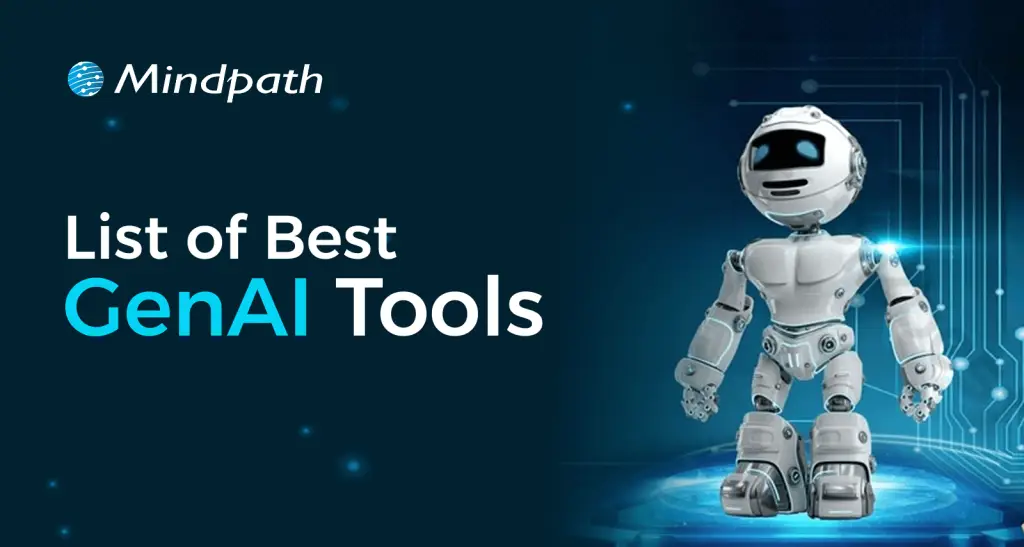
If you’ve been paying attention to the tech world lately, you must have seen how the best GenAI tools are revolutionizing the way we can accomplish our jobs. Whether it is writing content in seconds or smartly developing sophisticated apps without heavy layers of coding, innumerable examples exist of how these tools are helping people do more with less effort. These AI tools are quickly becoming the new solution for developers, creators, and organizations who want to increase their speed and get better results.

The evolution of GenAI is transforming how industries approach work and innovation. Work that could take hours, and manual efforts are now being dramatically reduced to minutes through intelligent tools. Developers and organizations are employing GenAI tools in many everyday tasks. They provide efficiency, less effort, and improved outcomes. In this blog, we will showcase the most powerful GenAI tools carving the future of AI development. You’ll get a quick look at what they do and why they matter.

Looking to transform your ideas into intelligent, future-ready solutions with Generative AI? Our expert Gen AI development services help you build scalable, smart systems that drive real business impact.

What is Generative AI?

Generative AI is an intelligent technology that creates new things using AI, like text, images, video, and even code. Generative AI can move beyond simply answering questions or completing simple tasks; it is able to generate something new. This allows businesses to operate more quickly and continually come up with new ideas.

Countless organizations are now taking advantage of generative AI to save time and operational efficiencies. Businesses apply it to write emails, design graphics, make advertisements as well as create chatbots. By leveraging generative AI, businesses can reduce manual labor, have fewer errors, and provide customers with their services in a more personalized and timely manner.

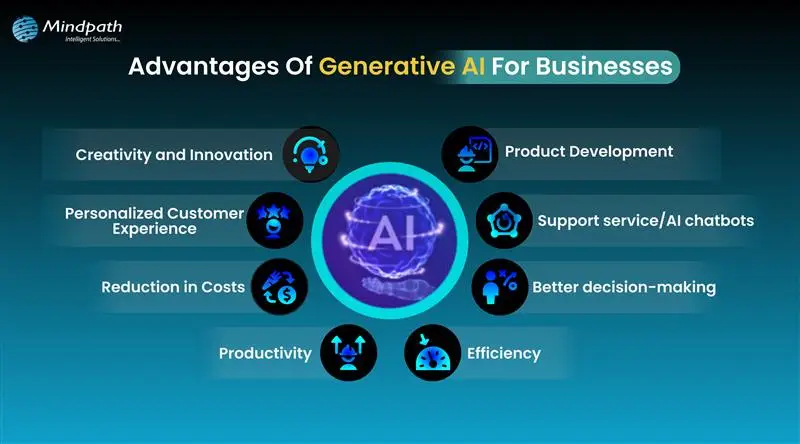
Here are some advantages of generative AI for businesses:

  • Creativity and Innovation – Generative AI allows businesses to develop more ideas and make new content.
  • Productivity – It saves time by taking responsibility for boring, menial tasks.
  • Efficiency – It allows work to be completed more quickly and with fewer errors.
  • Personalized Customer Experience – Business can create more personalized and relevant content for the customer.
  • Product Development – It can develop new products faster through automated coding, idea generation, and design enhancements.
  • Support Service/AI chatbots – It supports customer service chatbots that are capable of answering customer questions.
  • Better Decision-making – It provides some basic recommendations to businesses using data so they can make better decisions.
  • Reduction in Costs – It results in cost savings through automation of tasks and improved operations.

Curious about where Generative AI is headed next? Explore the top Generative AI Trends for 2025 and stay ahead of the innovation curve.

Best Generative AI Tools Driving the Future

Generative AI tools are making a big impact by helping businesses create content, improve services, and speed up their workflows. These tools are easy to use and offer smart solutions for many daily tasks. Below is a generative AI tools list that showcases the top tools shaping the future of work and technology.

1. Gemini 

Gemini is one of the best AI tools for students who need help with research, writing, and learning new topics. It works like a smart assistant that gives clear answers, supports multiple languages, and connects well with Google’s tools. It’s great for organizing ideas and understanding complex information more easily.

2. ChatGPT

ChatGPT is a helpful AI tool for writing, support, and idea generation. It can answer questions, create content, and help you think through new ideas. Whether you’re stuck on a project or need help with writing, it’s like having a smart assistant that’s ready to guide you anytime.

3. Cohere

Cohere is one of the useful generative AI tools for developers who want to build smart apps with language features. It helps create text for chatbots, search tools, and marketing content. Developers can use its API to train custom models and add natural language understanding to different types of projects.

4. GitHub Copilot

This tool is a great example of generative AI for coding, helping developers write code faster with real-time suggestions. It works smoothly with popular editors like Visual Studio Code and supports many languages. It also learns your coding style to give more personalized tips, making your development process easier and quicker.

5. AlphaCode

AlphaCode is a helpful generative AI coding tool that supports developers with tasks like writing code, fixing bugs, and learning new programming languages. It can save time by handling repetitive work and giving smart suggestions. It also helps improve code quality and makes team coding easier with shared ideas and solutions.

6. Microsoft Copilot

Microsoft Copilot is a smart assistant that helps with both coding and office work. It gives helpful code suggestions, writes documentation, and works well with tools like Visual Studio and Microsoft 365. It’s a great support tool for developers and teams who want to work faster and more efficiently.

7. Canva AI

Canva AI makes graphic design simple and fast, even if you’re not a designer. With its easy drag-and-drop setup and ready-made templates, you can create eye-catching visuals in minutes. It also gives smart design suggestions and helps keep your brand style consistent across all your projects.

8. DALL-E 2

This is one of the most creative generative AI applications, turning simple text into detailed images. You just describe what you want, and it creates visuals in different styles. It’s great for bringing ideas to life, whether you’re designing something new or showing a concept in a fun, visual way.

9. Microsoft Power Apps

This tool makes building apps easier by letting you use simple chat-like prompts instead of writing a lot of code. It helps create database layouts and app designs quickly. It’s great for teams working together and speeds up the whole process, though it works best within the Microsoft environment.

10. Turing’s CodeGen Copilot

This tool is one of the useful generative AI tools for programmers who want to save time and avoid repeating the same coding tasks. It fits well with tools like GitHub and Jira, making the workflow smoother. It helps boost productivity and lets developers focus more on creative and important work.

To explore how Generative AI is reshaping mobile and web experiences, check out our in-depth article on the Role of Generative AI in App Development. It dives into real-world applications and how this technology accelerates innovation in app design and functionality.

Want to Boost Your Workflows with the Best GenAI Tools?

GenAI tools are changing how we work, learn, and innovate. From faster coding to better customer service and content creation, these tools help users do more in less time. They are now essential for staying efficient, creative, and competitive in today’s fast-moving digital world.

Mindpath offers GenAI powered solutions to help businesses automate tasks, build smarter apps, and improve customer experience. Our expert team delivers AI tools that fit your goals, helping you reduce time, cut costs, and grow faster. Let us help you transform your business with our world-class, customised AI development services.

Discover top GenAI tools revolutionizing AI development. Enhance creativity, automate tasks, and streamline processes for your business success!
generative ai in app development

Just imagine, an app could build itself, suggest new features, and even write its own code. Doesn’t that sound like something out of the future? Well, it’s not just a thought, this imagination is becoming a reality with the rise of generative AI in app development. Whether you are a business owner looking to develop your next mobile app or a developer looking to become more efficient and innovate faster, generative AI is changing how we think about creating software.

Yes, you read that correctly, the use of GenAI in app development can now add creativity and efficiency into the application development process. Many developers struggle when it comes to UI development, and with the use of GenAI, it can develop interface UI components, suggest code snippets to complete a function, and even assist in application testing and performance feedback.

Curious to know more about it? In this blog, we will cover how this powerful technology is reshaping the app development process. Let us first have some ideas about generative AI

Looking to harness the power of GenAI to drive innovation and efficiency in your business? Mindpath delivers tailored AI development services to turn your ideas into intelligent, scalable solutions.

What is Generative AI?

Generative AI is a type of artificial intelligence that can create new things like text, images, music, or even computer code. It learns from a lot of information and then uses that learning to make something new. For example, it can write stories, draw pictures, or help build apps, almost like how a human would. Tools like GPT-4 can write like a person, and DALL·E can make pictures from just a few words. GenAI helps people work faster and be more creative in many fields, including app development.

GenAI learns patterns from a lot of data, like text, images or code by using a type of computer system called a neural network to understand this data and then create something new from it. That’s the basic idea behind how generative AI works. For example, it can write an article from a small text prompt or make a picture from just a few words. Tools like ChatGPT and Stable Diffusion use this technology to help people create content quickly and easily.

Benefits of Generative AI in App Development

Generative AI is significantly changing the app development landscape by increasing efficiency and enabling more innovative solutions. It allows developers to create high-quality apps faster and with greater precision. Here’s a simple look at how generative AI is transforming app development in today’s fast-moving tech world:

1. Automated Coding Assistance

AI can write code snippets or even full parts of an app based on simple descriptions from developers. This saves time and reduces mistakes, letting developers focus on more important tasks.

2. Faster Idea Generation and Prototyping

Generative AI helps speed up idea generation by analyzing existing apps and user feedback to suggest new features. It also creates quick visual designs, making it easier for developers and designers to build and improve prototypes fast.

3. Smarter Debugging and Testing

GenAI can find and fix bugs automatically while creating test cases to check the app thoroughly. This leads to better quality apps and less time spent on manual testing.

4. Optimized Resource Planning

GenAI helps teams plan their work by predicting how much time and effort tasks will need. It also spots areas where the app can run smoother, helping save resources and improve performance.

5. Tailored User Experiences

AI analyzes how users behave to create apps that feel personal and relevant to each person. It can recommend content or change the app’s design to better match user preferences.

Curious about where Generative AI is headed next? Explore the top Generative AI Trends for 2025 and stay ahead of the innovation curve.

Applications of Generative AI in App Development

AI-powered app development is transforming the software industry by introducing smarter and more efficient ways to build applications. This technology helps developers overcome challenges and speeds up the entire development cycle. By integrating GenAI, teams can deliver higher-quality apps with greater creativity and precision. Let us have a look at how developers can use this technology in app development:

1. Generating Code Faster

Generative AI helps developers by writing code from simple descriptions. It speeds up the process and cuts down on errors. Tools like GitHub Copilot and OpenAI Codex suggest ready-to-use code, saving time and effort which lets developers focus more on creative and complex parts of app building.

2. Smarter Testing and Bug Fixing

In AI-driven software development, GenAI plays a big role in making testing and bug fixing much easier. It can find problems in the code and suggest or apply fixes automatically which helps in saving time, improving code quality, and reducing the need for manual testing work.

3. Easy Content Creation and Management

AI helps create text, images, and more, making content tasks easier for developers and designers. Tools like GPT-4 and DeepArt save time by producing high-quality content fast. This keeps everything consistent and reduces the effort needed to create large amounts of content for apps.

4. Improving App Performance and Efficiency

In generative AI app development, AI tools like AI-driven profilers and automated refactoring tools can help make apps faster and smoother. They find ways to use memory and power better, which helps apps run well on all devices. These tools can also fix slow parts of the code early, leading to better performance and longer battery life.

5. Faster Prototyping and Design Ideas

GenAI helps designers quickly turn ideas into wireframes and mockups. Tools like DALL-E and Sketch2Code make it easy to create visuals from text or drawings. This speeds up the early design process and gives designers a strong starting point with fresh and creative design suggestions.

6. Smart Documentation and Information Sharing

AI makes it easy to create and update app documentation automatically. It helps write guides, manuals, and technical notes based on the code. This saves time, keeps everything accurate, and helps new developers quickly understand the project and start contributing without any confusion.

7. Creating Personalized User Experiences

Generative AI helps apps understand what users like and how they behave. It can customize content, recommendations, and even app design to fit each person. This makes apps more enjoyable and easier to use, keeping users engaged and coming back for more.

Curious about the tools powering AI? Check out our list of Top GenAI Tools that are driving the future of AI development to understand which platforms are leading the world of AI.

Want to Transform Your App with Generative AI?

Generative AI development is revolutionizing how apps are created by making the process faster, smarter, and more creative. With generative AI in app development, businesses and developers can build high-quality applications that adapt to user needs while saving time and resources. This technology is not just a trend but a powerful tool shaping the future of software creation.

If you want to leverage the full potential of GenAI in your projects, Mindpath’s GenAI solutions offer expert guidance and cutting-edge tools tailored to your unique development needs. From automating coding tasks to enhancing user experiences, Mindpath AI development services helps you innovate efficiently and stay ahead in the competitive app development landscape. Get in touch today!

what is a chabot

In this fast-paced world of business, companies are actively seeking smarter tools to improve customer service and communication. Chatbots are one of the most common, and a great way to get attention. If you have engaged with a virtual assistant on a website, chances are that you have seen it in action. So, what is a chatbot? You may have wondered about this when you are chatting with a brand online or if you are shopping on a website where you are getting instant replies.

As these types of digital assistants proliferate, they are quickly becoming an essential aspect of how businesses operate in 2026. With faster response times and the ability to interact with multiple customers at once, it is no surprise that chatbots are altering how companies relate to their customers. In this blog, we will provide you with everything you need to know about chatbots including benefits, features and examples of chatbots in action.

Struggling to keep up with customer queries or deliver 24/7 support efficiently? Mindpath’s GenAI-driven chatbot development services can help you manage customer service and boost business performance.

What is a Chatbot in Simple Words?

A chatbot is an artificial intelligence (AI) software application that is designed to have human-like conversations. They use natural language processing (NLP) to understand what users are stating and respond in a way that feels natural in a conversation and is helpful. They can help with answering questions, can guide the user, and can perform some tasks.

Chatbots can be a part of a website, an app, a messaging app, or a voice assistant. AI chatbots help businesses communicate with customers 24/7. They can perform tasks like making bookings, solving common problems, and providing information. AI chatbots are invaluable tools for improving customer experience and communication.

How does a Chatbot Work?

Chatbots work by using artificial intelligence and natural language processing to understand what users are saying. When someone types or speaks to a chatbot, it reads the message and tries to figure out what the person wants. It does this by matching the message with words or phrases it already knows.

Once the chatbot understands the request, it picks the most suitable response and replies to the user. Some chatbots follow simple rules, while others learn from past conversations to improve over time. This process allows chatbots to provide quick and helpful replies in a natural and professional way.

What are the Benefits of Using AI Chatbots for Businesses?

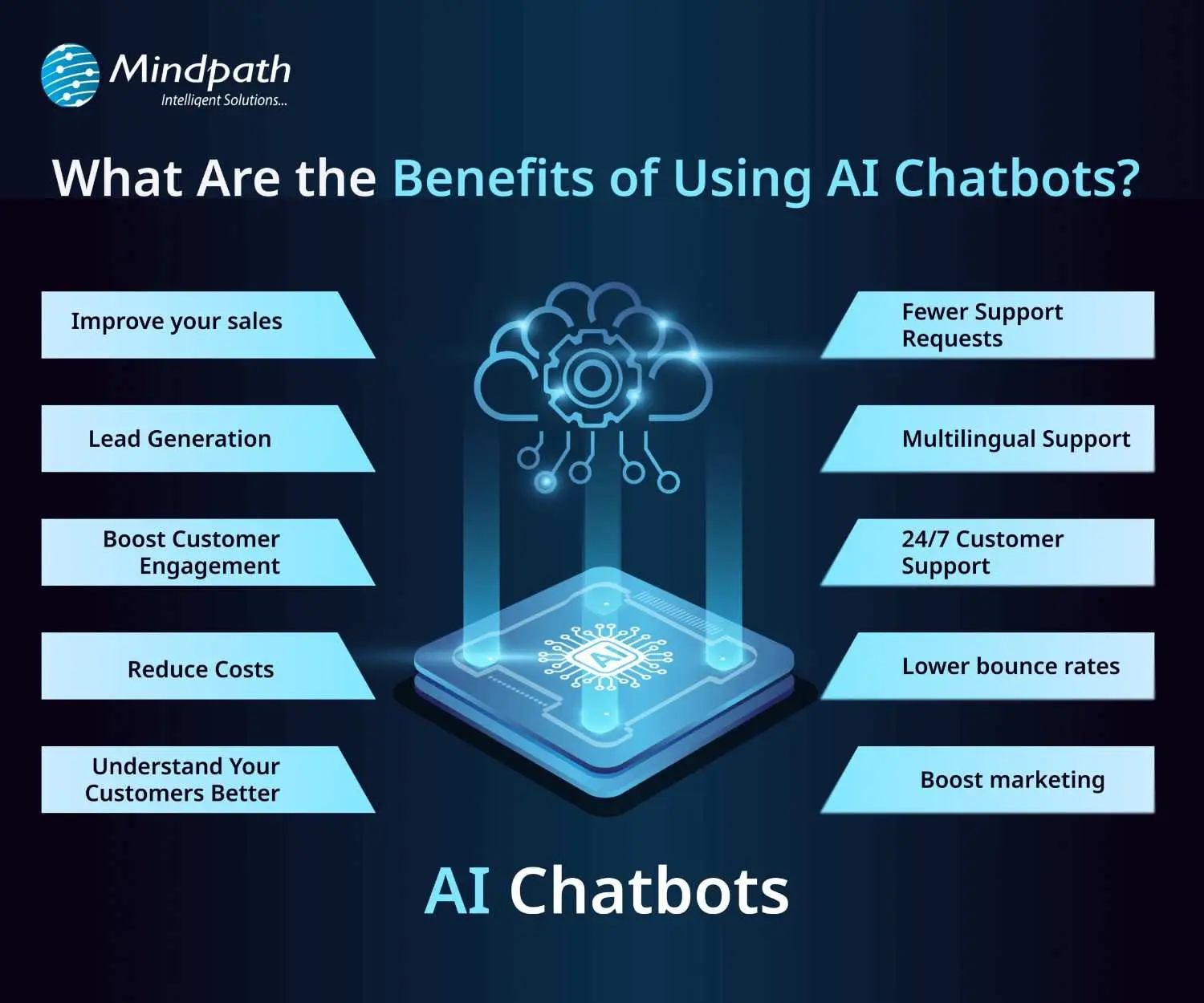
AI chatbots are now widely used by businesses to improve customer interaction and automate routine tasks. Here are some of the key benefits of chatbot technology that can help boost your business:
benefits-of-ai-chatbots-scale

1. Improve Sales

Chatbots can increase sales by showing new products or offering special discounts to website visitors. They send helpful messages that guide users toward making a purchase. These bots also assist in product selection and order placement. This makes it easier for new visitors to become paying customers.

2. Lead Generation

Chatbots help gather leads even before a conversation starts. They ask visitors for basic details like name and email to begin the chat. They can also qualify these leads by asking relevant questions based on customer needs. This helps your sales team know who they’re speaking with and what the customer is looking for.

3. Boost Customer Engagement

Chatbots make online experiences more interactive and personal. Instead of searching through a website, users can chat and get instant answers. Bots reply with clear information based on user questions. This keeps customers engaged and helps them find what they need quickly.

4. Reduce Costs

Using chatbots is more affordable than hiring multiple support agents. They can handle many tasks like answering FAQs or booking appointments, which saves time and money. You’ll still need some team members, but bots make the process faster. This is especially helpful for managing high volumes without extra costs.

5. Understand Your Customers Better

As chatbots collect important customer data during conversations, they can also run surveys to check customer satisfaction. By reviewing these chats, businesses can find out what customers like or dislike. This feedback helps improve products and services over time.

Wondering why chatbots are becoming essential for modern businesses? Explore the top Benefits of Chatbots Every Business Leader Should Know and learn how they drive growth.

6. Fewer Support Requests

Chatbots handle many common questions, which reduces the number of queries sent to human agents. This helps agents focus on more complex issues. It also improves customer satisfaction by providing quick solutions. A chatbot for business can balance automation and personal support effectively.

7. Multilingual Support

Multilingual support allows chatbots to speak different languages. This is helpful if your business has customers from various countries. The bot can reply in the language your customer prefers. This makes a chatbot for small businesses and large companies more accessible to global audiences.

8. 24/7 Customer Support

Chatbots are always available, even when your team is offline. If someone is browsing late at night and needs help, the bot can step in. It can guide them to the right product or answer their questions. This leads to better customer service and more satisfied clients.

9. Lower Bounce Rates

Chatbots can keep users on your site longer by offering help when someone is about to leave. They provide answers or discounts that encourage people to stay. This improves your website’s engagement and SEO performance. Visitors feel supported and are more likely to explore further.

10. Boost Marketing

Marketing chatbots can suggest products, offer deals, and guide customers through the buying process. They also collect useful data for future campaigns. One of the ideas can be a spinning wheel offering discounts, which encourages users to buy. This creates an engaging and effective marketing strategy.

How can conversational AI take your customer engagement to the next level? Explore the power of Conversational AI Chatbots for Business Growth and discover how they drive results.

Real-World Use Cases of Chatbots

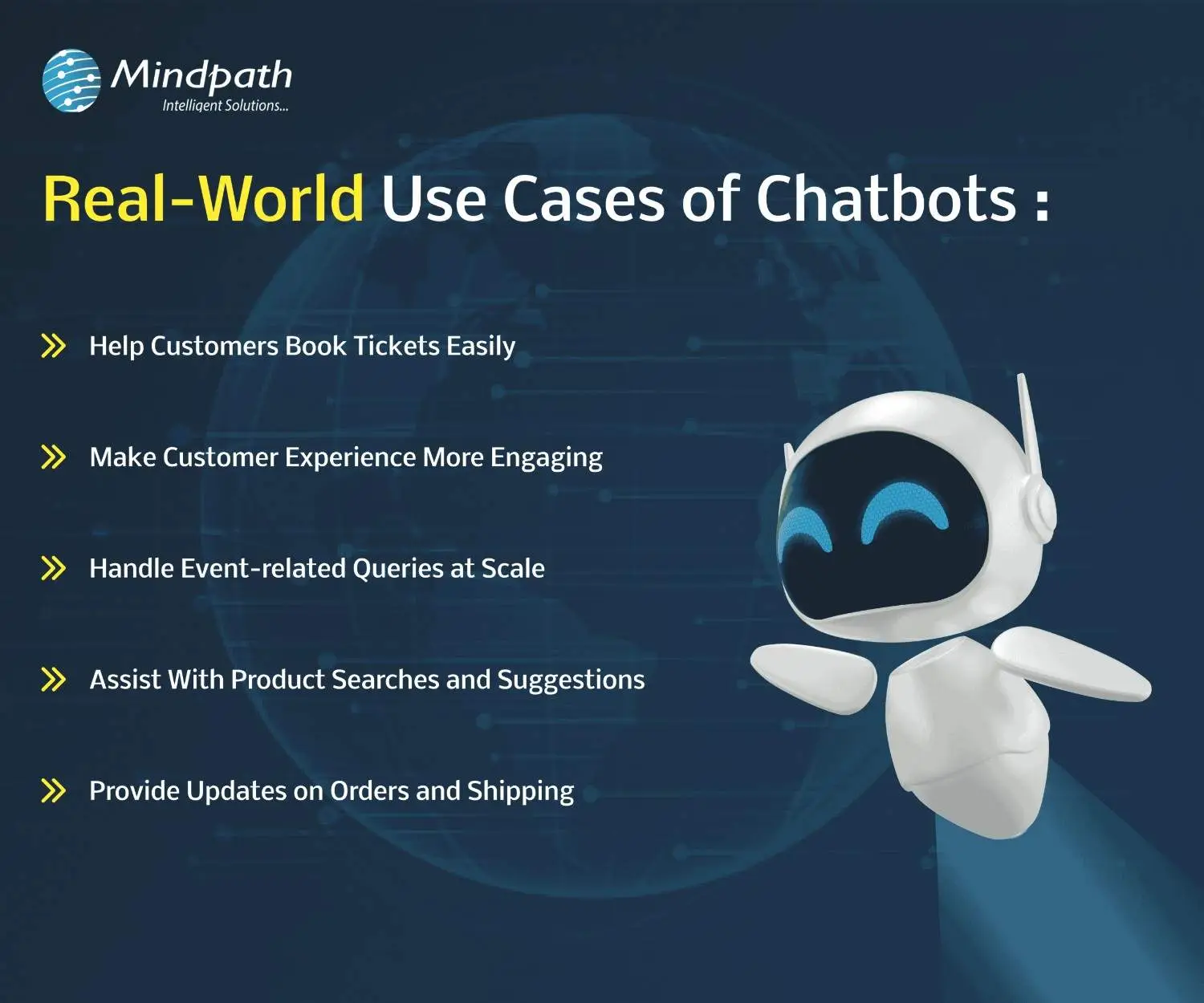
Chatbots are being used across many industries to simplify tasks and improve customer experiences. Here are some real-world chatbot examples that show how businesses are using them effectively for different needs.
use-cases-of-chatbots-scale

1. Help Customers Book Tickets Easily

A chatbot can answer common questions like seat availability, movie timings, and refund policies while guiding users to book tickets smoothly. PVR Cinemas uses this on their website to help visitors quickly complete bookings and check offers.

2. Make Customer Experience More Engaging

Chatbots can add personality by offering quizzes, jokes, and product suggestions in a fun and helpful way. LEGO’s chatbot Ralph helps users find the right gift through playful questions and interactive chat.

3. Handle Event-related Queries at Scale

When thousands of people need answers about an event, a chatbot can respond instantly with details like schedules, speakers, and directions. Slush uses one to manage large volumes of attendee questions efficiently on their event site.

4. Assist With Product Searches and Suggestions

A chatbot can search inventory and offer personalized product recommendations based on customer preferences. Sephora’s chatbot does this well by guiding users to suitable makeup products and checking stock availability.

5. Provide Updates on Orders and Shipping

Instead of navigating emails and websites, customers can enter their order ID in a chatbot to get instant shipping updates. H&M allows shoppers to track their deliveries directly through its chatbot.

Thinking about Using Chatbots to Elevate Customer Experience?

Chatbots are transforming how businesses interact with customers by offering fast, helpful, and personalized service. From booking tickets to answering questions, these tools simplify tasks and improve user satisfaction. With so many benefits, it’s no surprise that more companies are embracing chatbot technology to stay ahead in 2026.

At Mindpath, we offer custom chatbot development tailored to your business goals. Our chatbot development services are designed to help you improve customer interactions, increase engagement, and streamline operations. Whether you need a simple support bot or a fully integrated solution for sales, marketing, or service, our expert team builds smart, reliable chatbots that deliver real results.

Frequently Asked Questions

1. How can a chatbot improve customer experience on a website?

A chatbot improves customer experience by offering instant responses, guiding users to the right information, and reducing wait times. It creates a smooth journey by helping visitors find what they need quickly, which increases satisfaction and encourages them to stay longer on the website.

2. What is a chatbot used for in daily business operations?

A chatbot is used for handling routine tasks like answering FAQs, booking appointments, collecting customer data, and assisting with purchases. It helps teams save time by automating repetitive work while ensuring customers receive quick and consistent support throughout their interaction.

3. Can chatbots work effectively for both small and growing businesses?

Yes, chatbots are useful for both small and growing businesses. They help manage customer queries without needing a large team, making operations more efficient. As the business grows, chatbots can scale easily to handle more interactions without increasing costs significantly.

4. What should businesses consider before implementing a chatbot?

Before implementing a chatbot, businesses should define clear goals, understand customer needs, and choose the right type of chatbot. It is also important to plan integration with existing systems and ensure proper testing to deliver a smooth and effective user experience.

5. What is a chatbot’s role in improving website engagement?

A chatbot plays an important role in keeping users engaged by starting conversations, offering assistance, and providing relevant suggestions. It reduces bounce rates and encourages interaction, helping businesses create a more interactive and user-friendly website experience that keeps visitors interested.

Business Benefits of Chatbots

Imagine a customer browsing your website over the weekend. An AI chatbot can answer their questions instantly, improving customer satisfaction and experience. Chatbots help businesses respond faster, guide customers, and simplify everyday tasks, making operations more efficient.

An interesting report from Tidio reveals that around 60% of B2B companies and 42% of B2C companies already use chatbot software. By 2025, this number is expected to grow by 34%. With better tools, smarter features, and clear business value, AI chatbots are turning into a must-have.

If you are curious to know what are the typical benefits of AI chatbot for business, then this blog can guide you perfectly. So, what are you waiting for? Let’s dive in!

What is a Chatbot?

A chatbot is a software application that enables a user to engage in a conversation that imitates a human. In many cases, a chatbot can engage either through text or vocal conversation. By doing this, chatbots enable customers to answer questions, resolve problems, or complete tasks much quicker. Some chatbots adhere to a pre-set script. However, many modern chatbots rely heavily on artificial intelligence (AI) and natural language processing (NLP), to understand what the user is asking, and provide a thoughtful and natural response.

To put this in perspective, let’s assume you arrive at a bank’s website and begin typing your question (example: “How can I open a savings account?”). The chatbot will not only understand that you are asking about a savings account, but also guide you through the steps to take, without the help of any human agent.

The chatbot market is growing fast. According to a study by Grand View Research, the global chatbot market size was valued at USD 7.76 billion in 2024 and is projected to reach USD 27.29 billion by 2030, growing at a CAGR of 23.3% from 2025 to 2030. This rapid growth is driven by advancements in artificial intelligence and machine learning, making chatbots smarter, faster, and more valuable for businesses across industries.

What exactly is a chatbot, and why is everyone talking about them? Explore our in-depth guide: What is a Chatbot – Everything You Need to Know.

What are the Benefits of Chatbots?

If you are wondering what are the benefits of using AI chatbot, here is the answer. AI chatbots are becoming an essential part of modern business operations. Designed to assist in day-to-day tasks, they offer practical support across various business functions.

Here are some benefits of chatbots for businesses:

1. Smart Routing for Better Support

AI chatbots can handle simple questions and tasks on their own. When the issue needs a human touch, the chatbot collects key details from the customer at the beginning. It then sends the conversation to the right agent based on who is available and best suited to help. This smooth handover saves time and makes the support experience faster and more efficient.

2. Improves with Every Interaction

AI chatbots learn from each interaction to improve their responses over time. They collect data, understand patterns, and offer more accurate and personalized replies. They also recognize when to involve a human agent. By picking up on customer emotions, they provide better and more thoughtful support.

3. Enhance Sales

One of major benefits of chatbots is its ability to support sales teams by handling routine tasks. Chatbots can collect lead details, schedule demos, and guide visitors through your website. They also help move potential customers through the sales funnel by answering questions and sharing product information. This leads to higher conversions, fewer drop-offs, and better cross-sell and upsell opportunities.

4. Cost Effective Solution

Managing costs is important for any growing business. While chatbots need some setup at first, they help save money in the long run by handling common tasks and reducing the need for extra staff. They can quickly direct conversations to the right place, making support more efficient. With easy-to-use tools like no-code builders, businesses can launch chatbots faster and start seeing results sooner.

5. Generate Leads

AI chatbots can start natural conversations that feel more personal than standard forms. Instead of sending users to fill out long details, bots gather useful customer data while answering questions in real time. They use conversational AI to understand voice or text and guide the chat smoothly. This helps capture valuable information like visited pages, cart activity, location, and user preferences, making lead generation more effective.

Benefits of Chatbot For Customers

Let us also learn about the benefits of chatbots for customers:

1. Offers Omnichannel Support

Today’s customers use many platforms to reach out; like email, social media, websites, and messaging apps. They expect smooth conversations no matter which channel they choose. AI chatbots can help by answering common questions across all platforms and keeping the conversation connected. This creates a faster, more consistent experience that meets customers where they are.

2. Provides Multilingual Support

As businesses reach global audiences, language should not be a barrier to great service. AI chatbots can offer multilingual support by asking for the customer’s language or detecting it through the conversation. They can chat naturally in multiple languages through text, voice, or messaging. This helps provide clear and friendly support to every customer, no matter where they are.

3. Delivers 24/7 Customer Service

Customers expect fast and reliable service at any time of the day. AI chatbots make this possible by offering 24/7 support without delays, even during peak hours. They handle the first interaction instantly, reducing wait times and helping customers find answers quickly. This ensures a smooth and responsive experience, no matter when the customer reaches out.

4. Create More Personalized Customer Experiences

AI chatbots can offer tailored support by using customer data from tools like CRM or marketing software. They adjust messages based on where a customer is in their journey and suggest products that match their interests. Bots can also answer questions about orders or shopping carts without asking for extra details. When used thoughtfully, this creates a smooth, human-like experience that feels personal and helpful.

5. Ensure Proactive Customer Support

AI chatbots can take the first step by reaching out to customers based on their activity on your website. They can answer common questions, guide users through tricky pages, or remind them about unfinished tasks like a full cart or pending form. This kind of timely support helps reduce drop-offs and improves customer experience. When needed, chatbots can also suggest connecting with a human agent to move things forward smoothly.

Curious about the role of conversational AI in modern business strategy? Dive into Conversational AI Chatbots for Business Growth to see how companies are using them to gain a competitive edge.

Disadvantages of AI Chatbots

While AI chatbots offer many benefits, they also come with a few limitations that businesses should be aware of. Understanding these challenges can help you use chatbots more effectively and plan for the right balance between automation and human support.

1. Struggles with Complex Questions: AI chatbots may not understand sarcasm, unclear grammar, or complicated queries, leading to wrong answers.

2. Lacks Human Emotion: Chatbots can’t show empathy or handle emotional conversations the way a human can.

3. Takes Time to Set Up: Building a chatbot with the right questions, answers, and flow can take time and effort.

4. Can Risk Data Security: If not properly protected, chatbots may expose sensitive customer information to security threats.

5. Bias Responses: If trained on biased data, chatbots can unknowingly give unfair or inappropriate responses.

6. Hallucination: Chatbots can make up answers or provide incorrect details, which can confuse or mislead users.

Ready to Experience the Real Benefits of Chatbots?

Chatbots are helping businesses respond faster, cut costs, and improve customer service. From lead generation to 24/7 support, they make things easier and quicker. While they can’t replace humans fully, they’re a smart way to enhance service and give customers a better overall experience.

At Mindpath, we offer chatbot development services built to match your needs. We create smart, easy-to-use AI bots that improve support, boost engagement, and connect smoothly across platforms. Let us help you deliver faster, better service with a solution designed just for you.

how generative AI is transforming business

The generative AI revolution is changing the business landscape. From design automation to optimized operations and improved client experience,  GenAI is enabling new opportunities across the spectrum of industries. Companies now leverage this technology to not only save uptime, but to innovate more rapidly, customize and provide service to their consumers more favorably, and remain competitive in an ever-expanding digital world.

Generative AI allows machines to learn patterns and create new output in a number of ways. Businesses are now adapting to this change and thinking about how they can move forward in a new way. It is gradually becoming a key part of business innovation and digital evolution. In this blog we will discuss the growing influence of GenAI and its role in transforming the modern business environment. To begin with, let us have an understanding of GenAI.

Looking for ideas to reshape your business with generative AI? Unlock smarter growth, faster innovation, and personalized customer experiences with our robuts and scalable Gen AI development services.

What is Generative AI?

Generative AI is a form of artificial intelligence that can generate new things, such as text, images, music, or video, by learning from existing data. For example, if you give 1,000s of product descriptions from an online store, it will generate completely new and unique product descriptions for similar products, all by itself. GenAI does this by looking at patterns and learning about how things can be constructed so it can produce something new that looks very realistic.

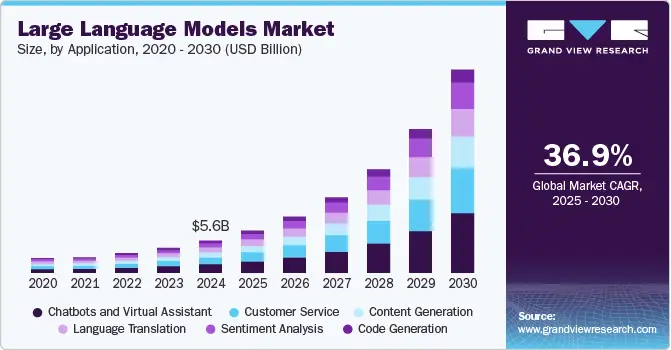
This type of technology is spreading and evolving rapidly across the globe. A research from Statista shares that the market size of generative AI is expected to be US$66.89 billion in 2025, with annual growth of 36.99% every year, reaching a market size of US$442.07 billion by the year 2031. Among all countries, the United States is estimated to have the largest market size in 2025 at US$21.65 billion.

How Does Generative AI Work?

Generative AI uses neural networks to examine existing data to identify patterns and create new data that appears to be real. Most generative AI models utilize an unsupervised or semi-supervised learning process that is less of a hurdle, because it tends to require a broad array of unlabeled data. Consequently, it becomes much simpler for organizations to develop more powerful AI systems.

Generative AI examples can be seen in all businesses today. For example, Jasper is a tool that helps marketers create blog posts or advertising copy, and DALL·E creates images based on simple text descriptions. These foundation models make it possible to perform tasks like writing, designing, or summarizing in seconds, improving speed and creativity.

Want to stay ahead in the rapidly evolving world of GenAI? Explore the top Generative AI Trends shaping the future of development and strategy.

How is Generative AI Transforming Business?

The generative AI revolution is changing the way companies operate, innovate, and treat their customers. With generative AI in business, tasks which took hours can now be completed in minutes, increasing speed and creativity for teams. Here’s the way it is changing the business world:
generative ai for business

1. Boost Creativity for Marketing and Innovation

GenAI is changing creative industries by bringing ideas to life faster by offering design concepts and fresh content ideas. This supports quicker campaign launches and product development. It also gives teams more time to focus on refining ideas or exploring new ones. As a result, human creativity grows while the creative process becomes faster and more effective.

2. Enhance Customer Support

The GenAI revolution is helping businesses improve customer service like never before. Instead of making customers wait for answers, generative AI can quickly find the right solution by pulling information from many sources. It also creates clear post-call summaries, making support faster, more accurate, and more personalized, leading to better customer satisfaction and trust.

3. Improve Sales Communication with Smart Insights

The economic potential of generative AI is clear in sales. It can write call summaries and follow-up emails, helping reps spend more time with customers. Sales managers can track how well AI-generated messages perform, like whether they speed up deals or increase order values. This leads to better sales processes and stronger customer communication.

Wondering how GenAI for business can be your key to success? Generative AI for business enhances innovation, and streamlines operations—thus empowers companies to stay competitive and get future-ready.

4. Boost Content Creation for Better Productivity

Generative AI helps businesses create high-quality content quickly by providing first drafts in just a few seconds. This allows teams to produce more sales messages, marketing content, and product documents in less time. As a result, companies can respond faster to customer needs while giving employees more time to focus on building stronger customer connections.

5. Create Personalized Customer Experiences

The role of AI in business growth and human empowerment is very clear when we think of how it can assist businesses in creating personalized customer journeys. By understanding their customer data, likes/dislikes, and behaviors, GenAI makes it easy for businesses to create personalized suggestions and relevant content. AI personalized customer experiences can truly bring better connections, embed customer loyalty, and create a better experience for everyone involved.

6. Speed Up Development with Smarter Coding

Generative AI applications can help developers save time by writing routine code and automating common tasks. The role of GenAI in app development brings unexpected benefits such as boosts productivity, reduces errors, and keeps projects on track. It also supports non-technical teams through no-code and low-code tools, making app creation easier for everyone, not just engineers, and allowing more people to contribute to digital solutions.

Ready to Embrace the Generative AI Revolution in Your Business?

The generative AI revolution is creating exciting new possibilities across industries by helping businesses work faster, smarter, and more creatively. From personalized customer experiences to automated content and improved development, generative AI is no longer a future trend; it’s the present opportunity. Now is the time to explore how it can redefine the way your business operates and grows.

At Mindpath, we offer smart and scalable GenAI solutions that help businesses unlock real value. From custom AI applications to intelligent automation and personalized customer engagement tools, our AI development services help businesses fuel innovation, boost productivity, and empower teams. Let us help you stay ahead in this fast-changing digital world with cutting-edge generative AI services..

conversational AI chatbots

How can businesses manage thousands of customer requests while providing timely support across digital channels? Conversational AI chatbots help address this challenge by automating customer interactions, answering common questions, assisting sales teams, and connecting users with relevant business information. They allow organizations to manage routine conversations more efficiently while giving employees more time to focus on complex customer needs.

As businesses expand their digital operations, conversational AI chatbots are becoming an important part of customer communication and task management. They can be integrated into websites, mobile applications, and messaging platforms to support customers throughout their journey. Understanding how these chatbots work, where they create value, and how businesses can implement them helps organizations make better decisions about automation.

Key Takeaways

  • 01
    Conversational AI chatbots use technologies such as NLP, machine learning, and large language models to understand user requests and generate relevant responses.
  • 02
    Businesses use chatbots to automate customer support, qualify leads, assist sales teams, and manage repetitive tasks.
  • 03
    Different chatbot approaches, including rule-based, menu-based, machine learning, and hybrid systems, serve different business requirements.
  • 04
    Integrating chatbots with business systems and human support teams can improve response workflows and customer experiences.
  • 05
    Businesses should measure chatbot performance through resolution rates, response times, customer satisfaction, lead quality, and operational efficiency.

What are Conversational AI Chatbots?

Conversational AI chatbots are software applications that use artificial intelligence to understand user messages and respond through natural language conversations. They help users find information, resolve queries, complete routine tasks, and interact with businesses through websites, applications, and messaging platforms.

These chatbots use technologies such as machine learning (ML), natural language processing (NLP), and large language models (LLMs) to interpret requests and generate relevant responses. Depending on their design, they can follow predefined workflows, understand conversational context, retrieve information from connected systems, or assist users with multi-step tasks.

For example, an e-commerce chatbot can answer product questions, check an order’s status, and guide a customer through a return request. A business-to-business chatbot can collect prospect information, answer service-related questions, and help visitors schedule a sales meeting.

Looking to build an AI chatbot around your business requirements? Explore our custom chatbot development services for solutions tailored to your workflows and customer needs.

How Do Conversational AI Chatbots Work?

A conversational AI chatbot processes a user’s message, identifies what the user needs, and generates an appropriate response. The exact workflow depends on the chatbot’s architecture and the systems connected to it. A typical interaction involves the following steps:

1. User Sends a Message

The process begins when a user enters a question or request through a website chat window, mobile application, or messaging platform. The input may be a simple question, a request for information, or an instruction to complete a task.

2. The Chatbot Interprets the Request

Natural language processing helps the chatbot interpret the user’s message. It identifies important details, recognizes intent, and uses conversational context to understand what the user is asking.

3. The Chatbot Retrieves Information or Executes an Action

Based on the request, the chatbot may generate an answer, retrieve information from an approved knowledge source, or interact with a connected business system. For example, it may check order details, retrieve account information, or create a support request, depending on its permissions and integrations.

4. The Chatbot Generates a Response

The chatbot provides a response based on the available information and the task being handled. More advanced systems can use conversational context to make responses relevant to the ongoing interaction.

5. The Conversation Continues or Escalates

If the user’s request is resolved, the conversation can end or move to another task. If the chatbot cannot answer confidently or the issue requires human judgment, it should transfer the conversation to an appropriate support representative with the relevant context.

Types of Conversational AI Chatbots

Conversational chatbots use different approaches to manage interactions. Some follow predefined rules, while others interpret natural language and use machine learning to handle more varied requests. Understanding these approaches helps businesses select a solution that matches their operational requirements.

1. NLP Chatbots

Natural language processing chatbots interpret user messages to identify intent, context, and relevant information. They can handle different ways of expressing the same request instead of relying only on exact keywords. Their effectiveness depends on the quality of the language model, training data, and supporting systems.

2. Menu-Based Chatbots

Menu-based chatbots guide users through predefined buttons, options, and decision paths. They are useful for structured interactions such as checking order status, viewing pricing information, or selecting a support category. However, they may struggle when users ask questions outside the available options.

3. Machine Learning Chatbots

Machine learning chatbots use patterns in data and user interactions to improve how they interpret requests and provide responses. Depending on their design, they may support personalization by using permitted information about user preferences or previous interactions. They require appropriate data management, evaluation, and ongoing monitoring.

4. Hybrid Chatbots

Hybrid chatbots combine predefined workflows with AI-powered language understanding. They can use structured flows for predictable tasks while allowing more flexible conversations for open-ended questions. They can also route complex or sensitive requests to human agents when necessary.

5. Rule-Based Chatbots

Rule-based chatbots operate using predefined conditions, keywords, and if-then logic. They work well for predictable questions with clearly defined answers, such as business hours, basic service information, or frequently asked questions. Their responses are limited to the rules and conversation paths configured by developers.

Businesses can combine these approaches within a broader conversational AI platform. The right architecture depends on the complexity of customer requests, the need for integrations, the available data, and the level of automation required.

Business Applications of Conversational AI Chatbots

Conversational AI chatbots can support multiple departments and customer touchpoints. Their role is not limited to answering questions. When connected to relevant business systems, they can help users complete tasks and support internal workflows.

1. Customer Support and Service

Chatbots can answer frequently asked questions, provide basic troubleshooting guidance, share service information, and route unresolved issues to support teams. This helps businesses manage common requests without requiring an agent for every interaction.

2. Sales and Lead Qualification

A chatbot can engage website visitors, ask qualifying questions, collect contact details, and identify prospects who may be ready to speak with a sales representative. It can also answer basic product questions and help visitors schedule demonstrations.

3. E-Commerce and Order Management

E-commerce businesses can use chatbots to answer product questions, provide order updates, guide customers through returns, and help shoppers find relevant products. These interactions can reduce friction during the buying process. Read more about AI in e-commerce.

4. Appointment Scheduling

Businesses that depend on appointments can use chatbots to share available options, collect booking details, confirm appointments, and send reminders. This can simplify scheduling for customers and administrative teams.

5. Employee Assistance

Internal chatbots can help employees find company policies, access approved documentation, submit routine requests, or locate information about internal processes. Their usefulness depends on accurate knowledge sources and appropriate access permissions.

6. Customer Onboarding

Chatbots can guide new customers through account setup, explain product features, answer initial questions, and direct users to relevant resources. This can make onboarding more consistent and reduce the number of routine requests handled by employees.

Benefits of Conversational AI Chatbots for Business Growth

Conversational AI chatbots help businesses improve customer communication and manage routine operations more efficiently. Their impact depends on how well they are designed, integrated, and maintained. Here are some important benefits they can provide.

1. Collect Useful Customer Feedback

Chatbots can request feedback immediately after a conversation through short surveys, ratings, or follow-up questions. Businesses can analyze this feedback and conversation patterns to identify recurring problems, understand customer expectations, and improve their services.

2. Understand Customer Needs

By interpreting user messages and conversation history, AI chatbots can identify what customers are trying to accomplish. Some systems can also detect signals of frustration or urgency, although sentiment detection is not always accurate. When a request needs personal attention, the chatbot can pass relevant context to a human agent.

3. Support Sales Teams

AI chatbots can engage website visitors, answer common product questions, collect lead details, and help schedule sales meetings. They can also guide customers toward relevant products or services. This allows sales representatives to spend more time on qualified prospects and complex discussions.

4. Automate Repetitive Questions

Chatbots can handle common requests such as order tracking, return instructions, account questions, and basic troubleshooting. Automating these interactions reduces repetitive work for support teams and allows agents to focus on issues that require investigation or human judgment.

Want to improve your support workflows with AI? Read our guide to AI for Customer Service to understand how intelligent tools can support customer interactions.

5. Improve Lead Generation

Instead of relying only on traditional forms, businesses can use conversational interactions to collect information about a visitor’s requirements, preferences, and purchase intent. With suitable integrations, these details can be passed to customer relationship management systems so marketing and sales teams can follow up.

6. Send Timely Customer Updates

Chatbots and connected messaging systems can provide order updates, appointment reminders, payment notifications, and service alerts. Businesses should configure these messages around customer preferences and applicable consent requirements to keep communication relevant.

7. Manage Operational Costs

By automating suitable routine interactions, chatbots can reduce the volume of requests that require manual handling. This can help businesses use existing support resources more efficiently. The actual cost impact depends on implementation, maintenance, integration, and the complexity of the conversations being automated.

8. Scale Customer Support

A chatbot can handle multiple conversations simultaneously, helping businesses respond to higher volumes of routine requests. This can support growth without requiring support capacity to increase at the same rate. Human agents remain important for complex, sensitive, or exceptional cases.

Planning to introduce AI into your business operations? Read our guide to AI Consulting Services for guidance on planning and implementing AI solutions.

How to Implement Conversational AI Chatbots in Your Business

Successful chatbot implementation starts with a clear business requirement. Choosing a tool before defining the problem can lead to unnecessary complexity or poor adoption. Businesses should consider the following steps before deploying a conversational AI solution.

1. Identify the Business Problem

Determine which process needs improvement. This could include reducing repetitive support requests, qualifying incoming leads, improving appointment scheduling, or helping employees access information. Start with a use case that has a clear and measurable outcome.

2. Define the Chatbot’s Scope

Decide which questions and tasks the chatbot should handle. Define what it should not handle as well. Clear boundaries help prevent the chatbot from responding beyond its knowledge or permissions.

3. Select the Right Chatbot Architecture

Choose between rule-based, menu-based, AI-powered, or hybrid approaches based on the complexity of the interactions. A simple FAQ assistant may not require the same architecture as a chatbot that retrieves account information or supports multi-step workflows.

4. Connect Relevant Business Systems

Identify the systems the chatbot needs to access, such as a CRM, helpdesk, order management platform, or approved knowledge base. Configure access permissions carefully and test integrations before making them available to customers.

5. Prepare and Test the Knowledge Sources

Provide accurate, current, and well-organized information for the chatbot to use. Test common questions, unusual wording, incomplete requests, and situations where the correct response is to ask for clarification or transfer the conversation to a human agent.

6. Establish Human Handoff and Monitoring

Create a clear escalation process for unresolved, sensitive, or complex requests. Monitor conversations regularly, review incorrect responses, update knowledge sources, and improve workflows based on real usage.

Key Metrics to Measure Chatbot Performance

Deploying a chatbot is only one part of the process. Businesses also need to evaluate whether it is improving customer experience and operational performance. The following metrics can help measure its effectiveness.

Metric What It Measures Why It Matters
Resolution Rate Percentage of conversations resolved by the chatbot without human intervention. Shows how effectively the chatbot handles its assigned requests.
First Response Time Time taken to provide the first response to a user. Helps evaluate responsiveness and waiting time.
Escalation Rate Percentage of conversations transferred to human agents. Helps identify requests the chatbot cannot resolve independently.
Customer Satisfaction Feedback or ratings collected after chatbot interactions. Indicates how users perceive the conversation experience.
Lead Conversion Rate Percentage of chatbot-generated leads that progress to the next sales stage or convert. Measures the chatbot’s contribution to sales and lead qualification.
Containment Rate Percentage of conversations completed within the chatbot experience. Helps assess how often users can complete their tasks without leaving the automated workflow.

These metrics should be reviewed together rather than in isolation. For example, a high containment rate is not necessarily positive if customers are unable to reach a human agent when needed. Businesses should balance automation performance with resolution quality and customer satisfaction.

Challenges of Using Conversational AI Chatbots

Although conversational AI chatbots offer several benefits, their implementation also comes with challenges. Understanding these limitations helps businesses set realistic expectations and build more reliable solutions.

1. Incorrect or Incomplete Responses

AI-powered chatbots may misunderstand a question or generate an inaccurate answer, particularly when the request is unclear or the supporting information is incomplete. Businesses should use reliable knowledge sources, test common scenarios, and provide escalation options.

2. Data Privacy and Security

Chatbots may process personal, account, or business information. Organizations should define what information can be collected, how it is stored, who can access it, and how it is protected. Sensitive actions should require appropriate authentication and authorization.

3. Integration Complexity

Connecting a chatbot with existing CRM, support, payment, or operational systems may require additional development and testing. Poorly configured integrations can lead to outdated information, failed actions, or inconsistent customer experiences.

4. Limited Understanding of Complex Requests

Even advanced chatbots may struggle with ambiguous questions, unusual situations, or requests that require judgment. Businesses should define clear limits and make it easy for users to reach a human representative.

5. Ongoing Maintenance

Business information, products, services, and policies change over time. Chatbot knowledge sources, integrations, and conversation workflows must be reviewed and updated to keep responses relevant and accurate.

Want to Transform Your Business with Conversational AI Chatbots?

Conversational AI chatbots are changing how businesses communicate with customers, manage support requests, and handle routine operations. From answering common questions to qualifying leads and connecting users with business systems, they can help teams work more efficiently while delivering accessible customer support.

At Mindpath, we help businesses develop custom chatbot solutions aligned with their goals and operational requirements. Whether you need to automate customer support, improve lead generation, or connect conversational AI with existing business systems, the right solution starts with understanding your workflows and users.

Discover the transformative power of conversational AI chatbots. From cost savings to increased sales, learn how chatbots can drive growth.
staff augumentation

In today’s world where technology is enhancing at a fast pace, businesses cannot afford to slow down, not even for a second. As deadlines are tighter, client demands are growing and skilled talents are harder to find, IT staff augmentation can be the perfect solution for these. Just think: what if you could access skilled professionals whenever you wanted them, whether it is to scale up a project or as expertise to reach a short-term goal, without having to go through the time-consuming hiring process? Isn’t it fascinating?

Staff augmentation allows you to grow as you need, with no boundaries, as many organizations are opting for faster and more flexible alternatives. If you hear this term frequently but aren’t sure exactly what it means and how it works, you are in the right place. In this blog, we will walk you through the essential things to know about staff augmentation. We will explain how staff augmentation works and describe the main benefits of this service in easy words! There is much value in exploring staff augmentation as a way to improve your team’s capabilities and altogether enhance your work outcomes. 

Looking for a partner you can trust to boost your IT projects? Mindpath is here to provide top-end services in the sphere of IT staff augmentation.

What is Staff Augmentation?

Staff Augmentation is when you hire competent professionals from an external agency to assist your in-house team for a defined period of time. These professionals aren’t permanent employees, but they will consider themselves regular members of your team. This is a flexible way to obtain extra assistance when your team is busy, or you require a special skill to complete a project.

To clarify, here’s a staff augmentation example. Suppose you are the owner of an online clothing store, and you want to introduce a mobile shopping app before the holiday season arrives. Your in-house developers are actively working on new updates for your website and are currently unable to take on other work. Instead of hiring full-time staff, you use IT staff augmentation to put some mobile app developers into your project through a trusted agency. The app developer will work with your task force, build the app, and when you are ready to launch it, their work will finish. This will give you the appropriate skills, at the appropriate time, without the lengthy hiring process or administrative burden of bringing full-time employees. 

Types Of Staff Augmentation

Staff augmentation comes in different types to match different business needs. Whether you need help with a short project or long-term support, there’s a model that fits just right.

1. Project-Based Staff Augmentation

This type is used when a company needs extra help for a specific project. Skilled professionals join the team just for that project and leave once the work is done. It’s a smart way to get things done faster without adding long-term costs.

2. Temporary Staff Augmentation

In this model, companies bring in experts for a short time to fill sudden gaps or meet urgent deadlines. It helps teams stay on track without rushing permanent hires. It’s great for short-term tasks or unexpected workload spikes.

3. Long-Term Staff Augmentation

Here, professionals work with the company for a longer time, often for months or even years. It’s helpful when you need ongoing support or special skills that your team doesn’t have. This model also helps reduce hiring costs while keeping projects moving.

4. Onshore Staff Augmentation

This means hiring professionals from the same country or region. It’s easier to work together because of the same time zone and better communication. Teams also benefit from cultural similarities and quicker collaboration.

5. Offshore Staff Augmentation

In this type, companies hire skilled people from other countries where labor costs are lower. It allows access to global talent and helps save money. It works well for remote projects that don’t need the team to be in the same location.

What is the IT Staff Augmentation Process?

The staff augmentation process may sound complex, but it’s actually quite simple when broken down into clear steps. Here’s how it works from start to finish to help you get the right talent for your business or project.

1. Identify Your Needs

Start by understanding what kind of skills or experience you need for the project. This helps you clearly define the roles and responsibilities for the temporary team members.

2. Estimate Team Size

Decide how many people you’ll need to get the job done smoothly and on time. Having a clear number makes it easier for your staffing partner to find the right talent.

3. Connect with a Staffing Partner

Once your needs are clear, your staff augmentation agency begins searching for the right professionals. They use their wide network to find candidates who match your project goals.

4. Screen and Shortlist Candidates

The agency carefully checks skills, experience, and qualifications before shortlisting the best profiles. You’ll then be invited to an interview and pick the ones who fit your team well.

5. Evaluate and Hire

Once you find the right candidates, you can try a short trial period to see how they perform. If everything goes well, you move forward by hiring and adding them to your team.

Benefits of Staff Augmentation

IT staff augmentation is becoming a go-to solution for businesses looking to strengthen their teams without long hiring delays. Here are the key benefits that make this approach a smart choice for many companies.

1. Team Scalability

One of the biggest benefits of staff augmentation is the ability to scale your team up or down as needed. You can bring in more people during busy times and reduce the team once the work is done. This is perfect for businesses with changing workloads or seasonal demands. It helps you stay efficient without overspending on full-time staff.

2. Access to Skilled Professionals

With staff augmentation, you get access to a large network of talented professionals through a trusted IT staff augmentation company. No matter what skill or experience level you need, there’s someone ready to support your project. This helps you find the right people faster without long hiring processes. It saves time and ensures your project is handled by experienced people.

3. Increased Productivity

Bringing in extra support allows your core team to focus on what they do best. They won’t get overwhelmed with too many tasks, and quality will stay high. With the right help in place, everyone works more efficiently. This leads to faster results and better outcomes.

4. Reduced Hiring Risk

Hiring full-time employees can be risky if they don’t turn out to be the right fit. With staff augmentation, you can try out professionals before making long-term decisions. It also allows you to bring in people who complement your team’s strengths. This makes your team stronger and reduces the risk of hiring mistakes.

5. Fresh Expertise and Ideas

Staff augmentation brings in people who have worked with many other companies and industries. They often come up with new ideas, fresh perspectives, and valuable insights. This can inspire your existing team and lead to better solutions. It’s a great way to bring innovation into your projects without a big change.

Ready to Boost Your Team the Smarter Way?

This blog gave us a complete look at how IT staff augmentation works and why it is becoming the smart choice for many businesses today. From types and processes to key benefits, everything you read helps you see how this flexible model can boost your team, meet project goals faster, and save hiring time without compromising quality. 

At Mindpath, we offer trusted staff augmentation services to help you grow your team quickly and smoothly. Whether you need short-term support or long-term experts, our skilled professionals are ready to join your projects. With the right talent at the right time, we help your business stay strong, flexible, and always ready for growth.  

Frequently Asked Questions

1. How does staff augmentation help during urgent project deadlines?

Staff augmentation allows businesses to quickly bring in skilled professionals when deadlines are tight. Instead of rushing the hiring process, companies can add experienced talent right away, helping projects move faster while maintaining quality and reducing pressure on the existing team.

2. Is staff augmentation suitable for small businesses or only large companies?

Staff augmentation works well for businesses of all sizes. Small businesses can use it to access specialized skills without long-term commitments, while larger companies use it to scale teams quickly. It offers flexibility that helps any business manage changing workloads effectively.

3. What factors should be considered before choosing staff augmentation services?

Before selecting staff augmentation services, businesses should evaluate project requirements, required skill sets, budget, and timelines. It is also important to ensure clear communication, cultural fit, and alignment with team workflows to achieve smooth collaboration and successful outcomes.

4. How can companies ensure smooth integration of augmented staff with internal teams?

Clear communication, defined roles, and proper onboarding are key to smooth integration. Providing access to tools, workflows, and team guidelines helps augmented professionals adapt quickly. Regular check-ins and collaboration ensure everyone stays aligned and works efficiently toward common goals.

5. Can staff augmentation support long-term business growth?

Yes, staff augmentation can support long-term growth by providing ongoing access to skilled professionals when needed. It helps businesses stay flexible, adapt to new opportunities, and manage evolving demands without committing to permanent hires, making it a practical strategy for sustainable expansion.

Discover staff augmentation for IT projects, its benefits, and top providers in the USA. Learn how it can bridge gaps and save costs.
LLaMA LLM

Are you hearing a lot about the LLaMA LLM lately and wondering what it is and why it’s special? If so, you’re not alone. Buzz regarding this powerful open large language model (LLM) continues to build and spread from technology forums to developer circles and the larger AI community. It’s fundamentally reshaping how many people think about AI tools and putting the spotlight on open-source innovation that has never been seen before.

The emergence of open-source LLMs fundamentally reshapes how AI is developed, shared, and scaled. Until now, the primary focus in the industry has been on the deployment and governance of closed prompts within a closed model. Large language models with open-source options, like LLaMA, are a welcome addition that now allows access for researchers, developers, and even startups, with fewer restrictions to experiment, customize, and build. It will not only provide greater access to advanced AI but also create a larger momentum for innovation across many sectors. In this blog, we’ll explore what sets LLaMA apart and how it’s driving this change. 

Looking to harness the power of LLMs and AI for your business but don’t know where to start? Mindpath offers AI Development Services to help you build, customize, and deploy intelligent solutions that drive real results.

Before diving further, let us have an idea about open LLMs: 

Understanding Open LLMs

Open-source large language models (LLMs) are incredible power AI models that can be deployed, changed, and shared for free by anyone. Where closed or paid models like OpenAI’s GPT are restricted to only those who pay to access the models, open-source LLMs are built on being open and transparent, meaning that developers and researchers can inspect, make improvements and train on their own data. These models are often contributed as a collaborative effort by communities or organizations who believe in promoting open innovation making it possible for others to learn and create new things with AI. 

There are many benefits to using open-source LLMs. They can save researchers a lot of money, because there’s no licensing fee and they can be adapted in very precise ways to what the researcher wants. Developers can also rely on strong open-source communities from which they can freely draw robust sets of tools, tutorials, and updates. This community effort often supports not only researchers’ progress but also helps more people get involved in shaping the future of these technologies. 

Curious about the different kinds of AI and how they impact businesses? Learn about the types of AI to understand where LLMs like LLaMA fit in the broader artificial intelligence landscape.

Among these Open-source LLMs, the most popular one is LLaMA LLM. Let’s dive into that! 
large-language-models-market

What is LLaMA LLM?

LLaMA is a large language model developed by Meta that can understand and generate human-like text. It learns from a huge amount of data and uses a special design, or architecture, to figure out patterns in language. This helps it give smart and relevant answers, whether it’s writing something, translating, or answering questions. 

What makes LLaMA stand out is its strong performance and the way it is available for the tech community. Many people ask, is LLaMA open source? While it’s not fully open like some models, Meta has made it available to researchers and developers, making it easier for them to explore, test, and build new AI tools using LLaMA. 

Why is LLaMa LLM So Popular?

LLaMA AI has quickly gained popularity in the AI community, and it’s easy to see why. Its performance, accessibility, and flexibility make it a strong choice for developers, researchers, and businesses alike. Here are some key reasons behind its rising popularity: 

1. Scalability and Efficiency

LLaMA is scalable, which means it can run on different kinds of hardware — from powerful GPUs to everyday computers. This makes it easier for researchers and developers who may not have access to expensive systems. By making advanced AI tools more reachable, LLaMA helps more people experiment and innovate. That’s why many developers now use LLaMA in app development without needing a huge setup or high costs. 

2. Adaptability

LLaMA can be trained for specific uses, which makes it really flexible. Whether it’s a chatbot for customer service or a tool that creates content, it’s possible to fine-tune LLaMA to fit different industries and goals. This adaptability means it can work well in many real-world situations. It’s not just a one-size-fits-all model, rather it adjusts to what you need it to do. 

3. State-of-the-Art Performance

LLaMA has shown top performance in different language tasks like translation, classification, and more. These results come from how well the model is designed and trained. Meta’s AI team used smart methods and architecture to make sure LLaMA performs at a high level. Because of this, it stands out as one of the most powerful tools in the language model space today. 

4. Open-Source Initiative

Meta has taken steps to make LLaMA more open and available to the research community. By releasing the models and sharing detailed documentation, they’ve made it easier for others to use, study, and build on LLaMA. As a leading example of an open source LLM, LLaMA is helping more people explore and contribute to the future of AI in a truly collaborative way.  

Want to customize large language models to fit your specific business needs? Learn how OpenAI’s Fine-Tuning API enables developers to fine-tune AI models for more accurate and specialized applications.

Real–World Applications of LLaMA

LlaMA LLM is being used in many real-life projects today. Its open nature makes it easier for developers to build and improve solutions, and it’s often seen as a strong example of how open models can drive real innovation. Here are a few practical ways people are using LLaMA today:

1. Faster Content Creation for Marketing Teams

A digital marketing agency can use LLaMA to write content like blog posts, social media captions, or newsletters. This helps them save time and focus more on creative ideas and strategies. Since LLaMA can quickly generate useful content, the team can keep up with deadlines without stress. It’s a great LLaMA open source LLM example that shows how AI can help marketing teams work faster and smarter. 

2. Smarter Chatbots for Customer Support

A business can use a chatbot powered by LLaMA to answer customer questions. The bot gives fast, helpful replies to common queries, so human support agents can handle more complex problems. Over time, the chatbot can learn from interactions and get even better. This helps improve customer satisfaction. You can even build one yourself by following a simple LLaMA open source LLM tutorial, which makes it easier for teams to create smart support tools. 

3. Breaking Language Barriers with AI

An international company can use LLaMA to translate emails, documents, or messages into different languages. This helps their teams communicate better across regions. LLaMA can provide quick and accurate translations, making global teamwork easier. With an open-source model like this, it’s possible to build tools that support real-time communication without high costs or complex setups. 

4. Understanding Customers Through Sentiment Analysis

A brand tracking tool can use LLaMA to understand how customers feel by reading reviews or social media posts. The tool can spot trends, positive feedback, or complaints. This helps companies make better decisions to improve their products or reputation. Because LLaMA is flexible and open, teams can customize it to track the right kind of feedback for their needs. 

Want to see AI in action, improving business outcomes? Explore AI chatbot examples to understand how LLM-powered chatbots are driving real-world results.

Curious about Using LLaMA for Your Business?

LLaMA LLM is changing the way people use and develop AI by making powerful language models more open and accessible. Its flexibility, strong performance, and the support of an open community allow researchers, developers, and businesses to build smarter, faster, and more customized AI solutions. As an open-source LLM example, LLaMA is helping drive innovation across many industries, breaking barriers and making advanced AI tools available to more people than ever before. 

If you want to harness the power of LLaMA in your own projects, Mindpath AI Development services can help. We specialize in building tailored AI tools using open-source models like LLaMA to meet your unique business needs. Whether you want to improve customer support, create content, or analyze data smarter, our team can guide you through every step to bring your AI vision to life efficiently and effectively. 
custom software development

In the digital-first world, businesses are leaning more towards custom software development to meet their own goals and support customer expectations. Whether automating a process, improving user experience, or improving team productivity, the right software makes all the difference. While custom software gives flexibility and power, the way they are built is not always a straightforward process. Small errors during the development can lead to large setbacks, and it is important to understand the best way to go about the process.

A successful custom software project starts with good direction and good decision-making, up front. Every step, from planning to production, is a critical one in the process. In this article, we will look into some fundamental dos and don’ts of custom software development to help you avoid mistakes and navigate confidently for the purpose of building software that works for you. 

Before we dive in, let’s have an idea of what is custom software development. 

Want software that actually solves your challenges instead of adding more? At Mindpath, we offer custom software development services that build tailored tools to improve efficiency and drive real results.

What is Custom Software Development?

Custom software development means creating software that is specially designed for a specific business or group. Unlike off-the-shelf software that’s made for everyone, custom software is built from the ground up to meet unique needs, solve particular problems, and support specific goals. It includes the planning, construction, testing, launch, and maintenance of the software to ensure it maintains its performance over time.

If you are asking, what is an example of customized software? A great example can be a custom search engine. It enables developers to modify how search results appear based on what the user is searching for. It is not just searching broadly; it is displaying whatever they are looking for using smart algorithms, so it helps them find and quickly display the most relevant information. 

Benefits of Custom Software

1. Personalization

Custom apps are made just for your business, so they fit your needs perfectly. This helps your project stand out and gives you a strong edge over others.  

2. Long-Term Cost Savings

Custom software may cost more at the start, but it saves money over time. You can build it part by part to fit your budget and save yourself later with unforeseen costs.  

3. Enhanced Security & Reliability

The security features of custom solutions follow the best security procedures to protect your data. Usually, all custom solutions are thoroughly tested, so your software will be more functional and safer to use.  

4. Built-In Flexibility & Growth

Your business can grow or change over time, and your custom software can too. You can add features or updates whenever the business needs it.  

5. Smooth System Integration

The custom tools can connect seamlessly with the systems you use today so you can do your job faster and your team make better decisions. 

Curious how custom solutions can support your growing business? Explore the key benefits of custom software development and see how it helps companies scale with confidence.

Dos of Custom Software Development

To achieve the best results from software development tailored specifically for your business needs, you want to make sure you follow the right steps from the beginning. These best practices will help to ensure your project stays on track and is a success. 

1. Be Clear on Goals

Before building custom software, you should be clear about your business objectives. Consider what issue you are trying to solve or what task you want to simplify. Speak to the people who are doing that work now and evaluate how existing tools are being used. It is equally useful to define existing software solutions and to evaluate what features you like or dislike. 

2. Define Requirements

It’s really important to provide clear software requirements, and it can be challenging to do this without appropriate support. If you don’t have the time or the team to devote to this type of analysis, then consider engaging the services of a professional, such as a solution architect or business analyst. They will help you articulate your requirements in a manner that the development team can understand and build.  

3. Choose the Right Software Development Company

Choosing the right custom software development company is a big step toward your project’s success. Look for a team that understands your industry, has done similar work before, and offers the skills your project needs. A good company will communicate clearly, follow a strong process, and take data security seriously. 

4. Utilize Existing Tools and Platforms

Using existing software tools and platforms can save time and money when building custom solutions. By combining off-the-shelf software with custom features, businesses get reliable systems without starting from scratch. This approach helps growing businesses cut costs while still getting great value from custom software development. 

5. Estimating Your Project’s Return on Investment (ROI)

When planning your project, it’s important to estimate the return on investment or ROI for different options. You might compare building custom software, integrate existing tools, or buying off-the-shelf solutions. ROI measures the benefits your business gains from using new software, like higher revenue or better productivity.  

Want to know the method behind building scalable and maintainable software? Learn how the software development life cycle helps you streamline development by providing a structured approach that improves efficiency and overall project outcomes.

Don’ts of Custom Software Development

Avoiding common mistakes is just as important as following the right steps when developing custom software. Here are some key things you should avoid during the custom software development process. 

1. Neglect Data Management

Never overlook data security when building custom software. A small mistake can lead to a data breach, which can hurt your business, cost money, and damage customer trust. Always use secure development practices and make sure your software partner handles your data carefully. 

2. Complex UX Design

Making the design too complex can confuse users and slow down development. A simple and clear user experience helps people use the software easily and keeps the project on track. Always focus on what your users really need and design with simplicity in mind. 

3. Overlook Integration Needs

It’s important to plan how your new software will connect with your existing tools. Ignoring integration can lead to extra work, errors, or missing features later. Make sure all needed integrations are listed early and tested properly before launching. 

4. Ignore Scope Change Impacts

Changing your software project’s scope during development can lead to more time, higher costs, and confusion. Even small changes may require big updates in design, development, and planning. It’s best to plan everything clearly from the start and avoid adding new features unless absolutely needed. 

5. Delay User Testing

Don’t wait until the end of your project to test the software. It’s important to test features and gather feedback while the software is still being built. This helps fix issues early and makes sure everything works well for your users. 

Concerned about risks that could slow down your custom software build? Explore the major custom software development mistakes that can disrupt progress and find out how to avoid them.

Ready to Build Custom Software that Truly Works for Your Business?

A successful software project depends on clear goals, careful planning, and avoiding common pitfalls like data mismanagement and scope changes. By following best practices and testing early, businesses can create powerful solutions that boost productivity and growth while meeting unique needs. 

At Mindpath, we provide custom software development services designed to meet your unique business needs. Our solutions are built to enhance efficiency and growth. We also offer business intelligence services that deliver valuable insights. These insights help you make informed decisions and drive long-term success. Partner with us to build software that truly supports your goals. 

Learn the essential dos and don’ts of custom software development to ensure project success and create tailored solutions.
software development life cycle

In today’s rapidly evolving technology landscape, the software development life cycle defines how powerful digital solutions are conceptualized, developed, and delivered. It provides structure to a multi-faceted process, which permits development teams to remain focused, minimize risk, and deliver stellar results. This life cycle clearly delineates the sequence of steps that support the journey from idea to launch, while ensuring that each phase contributes to the development of software that delivers user needs, as well as business needs.

Developing software requires following a more structured process than just writing code; it requires a clear and organized process to keep projects on-track and ensure value is being delivered. If you have an understanding of the journey, then you are more equipped to build software that does what it needs to do! To detail this journey is what this blog aims to do with some context on the phases, models, and best practices relating to the development life cycle. So, let’s dive in! 

Want to transform your business with smarter technology solutions? At Mindpath, we provide innovative software development services that build smart tools to meet your unique business needs.

What is SDLC?

The software development life cycle (SDLC) is a process that provides your team with a method for planning, building, and delivering software products. The SDLC divides the entire software development journey into distinct stages, allowing for better management of time, cost, and quality of the product being developed. Adhering to the SDLC can help reduce risks, avoid schedule delays, and deliver a system that meets the user’s requirements.

This approach can also help a team when dealing with changing requirements and multiple team members. It provides clarity in the process, aligns the development team on quarter goals, and improves communication between everyone. The process of custom software development becomes predictable, organized, and focused on providing value with the SDLC. 

Now that we are clear on the SDLC definition, let us learn about the software development life cycle stages. 

What Are The 7 Stages of the Software Development Life Cycle?

The SDLC is broken down into a series of well-defined stages, which provide guidance to a project from start to completion. Each stage has a distinct purpose and contributes towards ensuring the end product is functional, efficient, and meets user requirements. Here are the 7 stages: 

1. Planning

In the planning stage, the team comes together to define what the software should do and what problems it will solve. They also look at whether the project is realistic in terms of technology and budget. During this phase, important documents like the Project Plan and Software Requirement Specification are created to guide everyone. 

2. Requirements

In this stage, the team focuses on understanding what users need from the software. They gather information by talking to stakeholders through interviews and surveys. Then, they review the data to identify the essential features. This leads to a clear document that guides development and ensures the software meets user expectations. 

3. Design

Turning ideas into a clear plan during the design stage. The team maps out how the software will function, what it will look like, and how data will flow. All these details are recorded in a software design document that serves as a guide for developers. This stage bridges the gap between planning and building, ensuring the software works smoothly and is easy to use. 

Curious about what makes a software engineer truly effective at every stage of development? Discover qualities of a good software engineer and see the skills and traits that drive successful SDLC implementation.

4. Coding

This phase brings the software design to life through coding. Developers write the program following clear guidelines to ensure everything functions correctly. Regular code reviews help catch errors early and maintain quality. By the end, a working version of the software is ready to move on to testing and refinement. 

5. Testing

Quality checks take center stage during the testing phase to find any bugs or issues in the software. The team runs different tests, from checking small parts of the entire system, to making sure everything works well. When problems are found, they are recorded and sent back to the developers for fixing. This cycle continues until the software meets all the set requirements and runs smoothly. 

6. Deployment

Once the software is ready, it is carefully released to the users during the Deployment phase. Different methods are used to make sure the launch goes smoothly without disrupting users. Support, like user guides and training, is often provided to help users get started. 

7. Maintenance

After deployment, the maintenance stage keeps the software running smoothly and up to date. The team fixes bugs, makes improvements, and responds to user feedback to meet changing needs. Regular updates and support help users get the most from the software. Over time, the software may need major upgrades or replacement to stay useful and relevant. 

Curious how businesses are building world-class software teams without geographical limits? Explore how our offshore software development can deliver skilled talent and cost-effective solutions.

Models of Software Development Life Cycle

Different models guide how software development is planned and carried out. Each model offers a unique way to manage the process and reach project goals. Here are some popular software development life cycle models used by teams. 

1. Waterfall Model

The Waterfall Model is a step-by-step approach where each phase must finish before the next begins. It is very structured and relies on clear documentation at every stage. This model works best when requirements are well understood from the start. 

2. V-Shaped Model

The V-Shaped Model focuses heavily on testing at every stage of development. Each development step has a matching testing phase to make sure everything is working correctly. This helps find and fix problems early in the process. 

3. Iterative Model

The Iterative Model builds the software in small parts called iterations. After each part is developed and tested, feedback is used to improve the next version. This process repeats until the software meets all the requirements. 

4. Spiral Model

The Spiral Model mixes planning, prototyping, and testing in repeated cycles. Each cycle creates a new version of the software that can be improved based on feedback. This model helps manage risks but can be expensive and time-consuming. 

5. Big Bang Model

The Big Bang Model is very simple and starts development without detailed planning. It relies on trial and error, making it flexible but also unpredictable. This model is mostly used for small projects or when there is no fixed deadline. 

Looking for technology that fits your business perfectly instead of forcing you to adapt? Explore the custom software development benefits that deliver tailored solutions and real results.

Best Practices to Improve SDLC

Improving the Software Development Life Cycle (SDLC) helps teams deliver better software more efficiently. Following best practices can reduce errors, save time, and keep everyone on the same page throughout the project. 

1. Define the Scope Clearly

Without a clear scope, developers may feel lost and end up redoing tasks. Outlining deliverables, timelines, and milestones early avoids confusion and reduces wasted effort.

2. Manage Workflows Effectively

When work is not organized well, the development process slows down. Keeping an eye on key metrics like cycle time and sprint health helps teams plan tasks better and improve SDLC development.

3. Integrate Continuously

Using CI/CD allows teams to test and deploy code often, which prevents delays and reduces errors. It also makes the final product more secure and reliable.

4. Use Smart Scrum Practices

Following scrum routines like daily stand-ups and retrospectives helps teams stay connected. It also makes it easier to spot and fix problems early in the development cycle.

5. Keep Documentation Updated

Good documentation keeps everyone aligned and helps avoid repeated mistakes. It also saves time later by providing a clear record of security issues and project details.

Curious to know how small oversights in custom software development can cause major issues? Discover the most common custom software development mistakes and learn in detail how to prevent delays and deliver software that truly meets your business goals.

Why does the Software Development Life Cycle Matter Today?

The software development life cycle is key to building reliable, efficient, and user-friendly software. From planning to maintenance, every step in the SDLC adds structure and clarity to the process. By following best practices based on real software development examples, teams can deliver high-quality solutions with fewer setbacks. 

At Mindpath, we guide you through every stage of SDLC with our software development services. From gathering requirements to post-launch support, we help create software that fits your needs, goals, and timelines. Whether it’s a simple software or a full-featured application, our team ensures your vision becomes a successful reality. 

offshore software development

Offshore software development is redefining how businesses are developing digital solutions. Are you still wondering what we mean by offshore? It means working with teams or services located in another country, often to obtain cost-effective expertise and accelerate delivery. In the world of software, this approach opens doors to global talent, allowing companies to develop high-quality products without the high expenses of local hiring

To elaborate, what we are referring to is outsourcing software development tasks to overseas teams that specialize in the technology and services. These teams are often found in areas with proven traditional IT qualifications and strong pricing competitiveness such India, eastern Europe, and southeast Asia. Do you want to learn more about this development? Don’t worry, in this blog we will be going into all you need to know about offshore software development. 

Ready to take your business to the next level? Partner with Mindpath for expert offshore development services that drive innovation, efficiency, and growth. Contact Us!

What is Offshore Software Development?

Offshore software development refers to collaborating with a software team that is located in a different country to manage your tech initiatives. An example for it can be a UK-based company that hires a Philippine development team to build a website or software tool. This helps reduce costs and makes it easier to find the right talent. Businesses prefer this model because they get quality work without spending too much money. The Philippines, for instance, offers skilled developers who are experienced and reliable. While there might be challenges like time zone gaps or communication styles, this kind of software development still helps companies finish projects faster and focus on their main goals. 

Fascinatingly, according to a Business Research Insights survey, the software offshore market was worth roughly USD 160.9 billion in 2024, and is on track to reach USD 413 billion by 2033, with a CAGR of 11.04%. Factors for this growth in the offshore software market include the affordable technology needs to increase usage, the demand for tech solutions to better connect with the global community, and also the need for talented developers. Countries such as India, China, and parts of Eastern Europe have emerged as preferred locations, because they provide access to talent, sufficient infrastructure, and a business-friendly environment.  

What is the Offshore Development Process?

Offshore software development is the development of software with teams in other countries that help you in the efficient building and maintenance of your software. Here is a simple set of steps that companies tend to go through when working with offshore developers: 

offshore software development process

1. Recognizing the Need

The organization recognizes it has additional skills or resources requirements, and they must determine what to outsource like coding, testing, or support work.  

2. Finding an Offshore Partner

They seek a trusted team in another country with a solid skill set and experience, often in a region well known for technology. 

3. Beginning the Project

Both teams establish project goals, working timelines, and methods to communicate, likely via video calls or project tracking software. 

4. Developing and Coding

The offshore team will begin the project and communicate updates consistently, using project tracking and collaboration tools online 

5. Testing and Quality Assurance

The teams will thoroughly test the software to resolve any challenges, ensuring it all works before launching. 

6. Deployment of the Software Solution

The completed software solution will be deployed and the team will continue to provide services or updates according to demand. 

7. Continued Collaboration

The firm will still do business with the offshore team in terms of updating and improving and developing future work. 

While offshore development gives you access to global talent and cost advantages, you may also explore custom software development to better understand when tailor-made solutions are the right choice.

Benefits of Offshore Software Development

Development of offshore software is now a common approach for businesses that want to increase their tech potential. It fosters sustainable growth by providing a more intelligent way of managing development requirements across countries. Let us examine its benefits: 
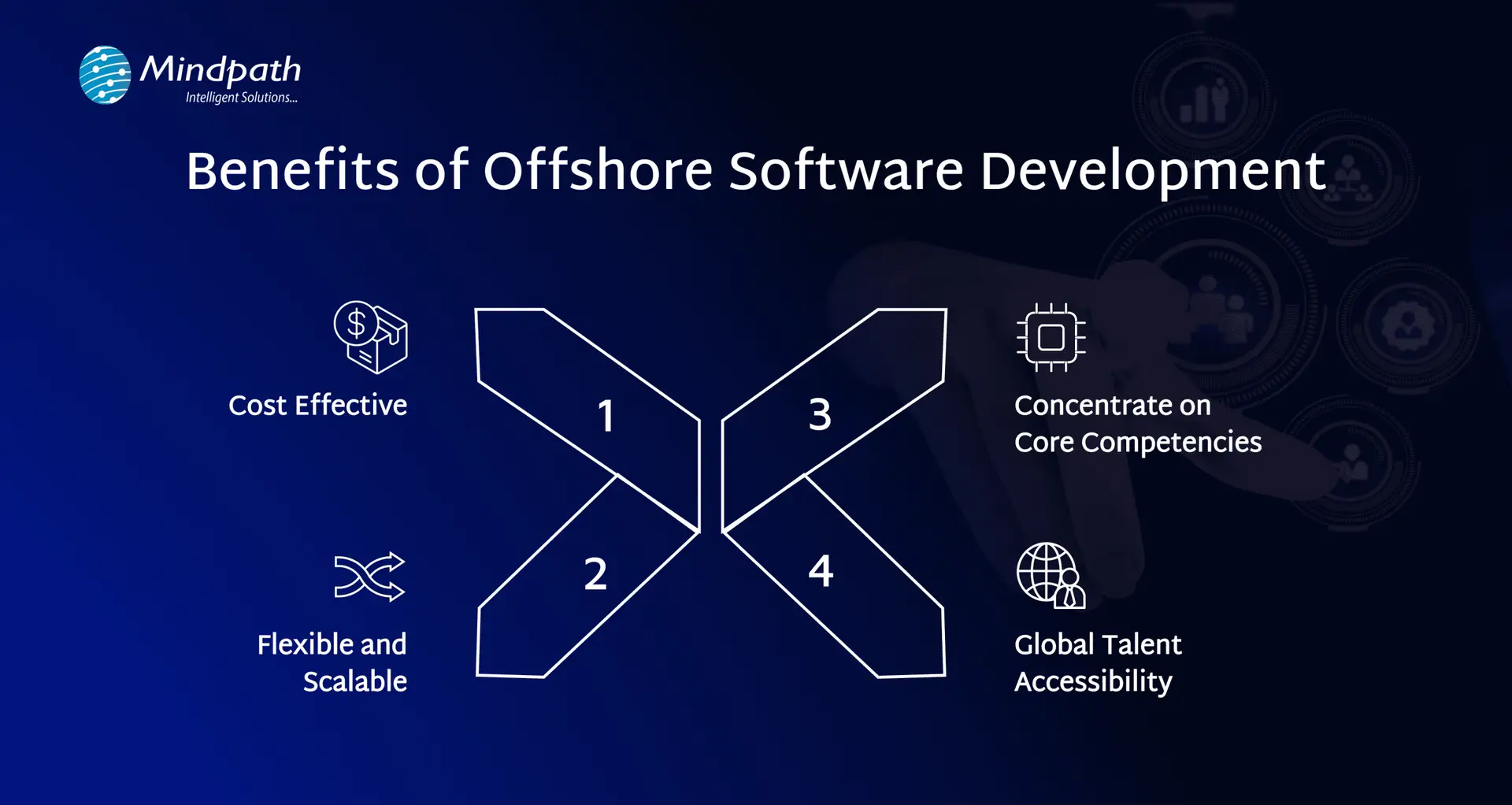
benefits of offshore software development

1. Cost-Effective

Sometimes, hiring developers from other countries can cost less than building a local team. This could help companies save money without sacrificing quality. The additional budget can be utilized to help grow the business, such as marketing or product upgrades. It is a more resourceful approach to balancing costs while remaining competitive.

2. Flexible and Scalable

Offshore development services easily allow you to adapt team sizes and add or downsize developers based on project needs. There is ease of access to add a number of developers to your team when your workload increases, or to scale down easily as workload begins to slow down. This provides operations with greater flexibility, gives you quicker access to talent while avoiding lengthy hiring processes. This engagement allows quicker delivery for your clients and provides a smoother operating working relationship for your offshore team.

3. Concentrate on Core Competencies

Future-proofing by outsourcing software work allows companies to turn their attention back to what they do best. They can manage just the right amount of technical detail, and spend more time on strategy, customer service, or new product growth. While offshore teams will take care of the technical detail while being very diligent and skilled in doing this work, allowing companies to focus on even bigger parts of the operation like overall performance

4. Global Talent Accessibility

Offshore teams also allow companies to expand their access to the world’s best talent. Instead of only hiring locally, your teams have access to experts from around the globe, which can be a huge advantage for partnerships and companies looking for the exact skills they need. Skilled and knowledgeable individuals will lead to improved, more diverse ideas, a wider range of perspectives, and improved quality assurance, all of which will lead to improved and better-quality results. It is a great opportunity to be more intentional about building and fine-tuning more creative teams. 

If reducing onboarding time and accessing a wider talent pool are priorities, our article on the key benefits of hiring remote developers shows how remote hires can complement offshore strategies.

Ready to Work with an Offshore Software Development Company?

Offshore software development has become a powerful strategy for companies looking to build high-quality digital products without stretching their budgets. By working with skilled teams from other countries, businesses can meet deadlines faster, access a wide talent pool, and stay focused on their core goals. While it may come with a few challenges like time zone gaps, the right planning and communication make it a highly effective and scalable approach for long-term success. 

At Mindpath, we provide reliable offshore software development services tailored to your business needs. Our global teams bring technical expertise, timely delivery, and smooth collaboration to every project. Whether you need help with custom software, mobile apps, or support and maintenance, we’re here to support your goals with cost-effective solutions. With clear communication and dedicated teams, Mindpath makes offshore development simple, efficient, and successful for companies of all sizes. 

Frequently Asked Questions

1. How can communication gaps be managed effectively in offshore software development?

Clear communication channels, regular meetings, and proper documentation help reduce misunderstandings. Using collaboration tools and setting overlapping working hours can improve coordination. A structured communication plan ensures both teams stay aligned, even when working across different time zones and cultural contexts.

2. What should businesses check before signing a contract with an offshore team?

It is important to review technical expertise, past projects, client feedback, and security practices. Clear agreements on timelines, deliverables, and communication methods should be defined. This helps avoid confusion later and ensures the partnership is built on transparency and mutual understanding from the start.

3. How does offshore development impact project timelines and delivery speed?

Offshore teams can often accelerate delivery by working in different time zones, enabling near round-the-clock progress. However, proper planning is essential to avoid delays caused by coordination issues. When managed well, it can significantly improve turnaround time and overall project efficiency.

4. Is offshore software development suitable for small and mid-sized businesses?

Yes, it is often a practical choice for smaller businesses looking to access skilled talent without high hiring costs. It allows them to build quality software within budget while focusing internal resources on growth, operations, and customer engagement.

5. How can businesses maintain quality control when working with offshore teams?

Quality can be maintained by setting clear standards, conducting regular reviews, and using testing frameworks throughout the project. Continuous monitoring, feedback loops, and defined performance metrics help ensure the final product meets expectations and aligns with business requirements.


types of software development

Picture a scenario in which you are running a growing business, and things are moving at a fast pace. At this point, your customers will expect more; teams will need better tools, and competition will just be a click away. You must keep in mind that the real game changer isn’t just having software but rather, its choosing the right kind of software. For this, understanding the types of software development can make a huge difference.  

Behind every great digital solution, there lies a specific type of development which is tailored to a specific need. Understanding the key categories of software development enables businesses to make smarter, confident investments while choosing the right technology teams to partner with for the future. So, if you are interested in knowing about the software development types, then this blog will guide you perfectly. We will explore the major kinds of software development, which every business should know to make smarter investments and drive meaningful growth. 

To begin with, let us first have a basic understanding of software development. 

PaAre manual operations draining time and resources from your business growth? At Mindpath, we offer end-to-end software development services to automate processes and enhance efficiency.

What is Software Development?

Software development refers to the act of creating, designing, testing, and maintaining applications or systems that run on devices or computers. It combines the imaginative and creative process with the technical process of building software that can help your business work smarter and serve your clients better. Developers take your ideas and combine programming languages, libraries and frameworks to develop working software that solves real problems. 

There are many benefits of custom software development for businesses. It can increase productivity via automation and lower costs by streamlining processes. It also increases customer satisfaction through user-friendly overall features and allows companies to stay ahead of competitors by providing innovative solutions. Software can also be customized to provide better management of growth within the business and can enhance data cybersecurity protocols and processes while supporting better collaboration across teams.  

What are the 5 Principles of Software Development?

Strong software development relies on key principles that guide the process and ensure reliable, high-quality results. These principles help teams build software that is efficient, adaptable, and easy to maintain over time. 

1. Working in Iterations

Working in short cycles allows teams to test, adjust, and improve regularly. This keeps the software flexible and ready for change. 

2. Reuse Components

Building with ready-to-use parts speeds up development and keeps the software consistent. It also makes updates and maintenance much easier. 

3. Set Quality Standards

Setting clear quality standards from the start helps catch problems early. It ensures the final product meets expectations and works reliably. 

4. Plan Architecture First

A strong foundation starts with early architectural planning. It helps avoid confusion, improves decisions, and sets the direction for smooth development. 

5. Control Changes Effectively

A clear system for handling changes keeps the project stable. It helps teams adapt without causing confusion or risk to the software. 

Curious why software development prices can vary so much? Explore the factors behind software development costs before your next project and avoid common budgeting mistakes.

What are the Different Types of Software Development?

Software development comes in many forms, each designed to meet specific business or user needs. Understanding these different types helps businesses choose the right solutions for their goals and growth. 

1. Frontend Development

Frontend development is a software development type that focuses on the part of an application users see and interact with. It involves creating user interfaces that are smooth, responsive, and visually clear. Frontend developers work with tools and technologies like React, CSS, JavaScript, and Flutter. Their goal is to ensure a great user experience on both web and mobile platforms. 

2. Backend Development

Backend development focuses on the parts of an application that users don’t see. It includes building servers, databases, and the internal logic that powers the software. Backend developers use technologies like Java, Python, and Django to make sure everything runs smoothly. They connect the front end with data and functions to keep the application working behind the scenes. 

3. API Development

API development is about creating connections that let different software systems talk to each other. Developers build APIs to help applications share data and work together more easily. This is useful for adding features like payment systems, login tools, or maps from other services. API development makes software more flexible and able to work with a wide range of platforms. 

4. Cloud Computing Development

Cloud computing development is the software development process of building applications that run on platforms like AWS, Microsoft Azure, or Google Cloud. It helps businesses store data, manage services, and scale their systems more easily. Cloud developers set up secure and flexible environments tailored to company needs. This process supports smooth operations and better performance without relying on local servers. 

5. Database Development

Database development focuses on building systems to store, manage, and organize data. Developers work with different types like SQL for structured data and NoSQL for more flexible, unstructured data. Some databases are made to handle huge amounts of information, often used for big data and real-time analytics. The goal is to keep data accurate, secure, and easy to access when needed. 

6. DevOps

DevOps engineering combines development and operations to build and deliver software more efficiently. It focuses on teamwork, automation, and continuous improvement throughout the project. DevOps engineers use skills like coding, testing, and scripting with languages such as Python, Java, and PHP. One big advantage is that quality checks continue even after the software is launched. 

7. Full-Stack Development

Full-stack development covers both front-end and back-end work to create complete, user-friendly software. A full-stack developer understands how to build smooth interfaces and also manage server-side systems that power the application. They often use a wide range of software development tools to deliver reliable and efficient results. Teams can also achieve this by having front-end and back-end developers work closely together. 

8. Mobile Development

Mobile development focuses on creating apps for smartphones and tablets. Developers may specialize in building for Android using Kotlin or Java, or for Apple devices using Swift or Objective C. Some also work on hybrid apps that run on multiple platforms, which need special skills. Mobile developers handle coding, design, and maintenance to make sure apps work well on different screen sizes and devices. 

Wondering what makes a software engineer truly effective in driving business success? Discover and understand the top qualities of a good software engineer that set top developers apart.

Which Type of Software Development Fits Best for Your Business Needs?

Understanding the various types of software development helps businesses choose the right solutions to grow and succeed. Each type plays a unique role in creating software that meets specific goals, improves efficiency, and enhances user experience. Knowing these types allows smarter decisions and better investments in technology. 

At Mindpath, we provide expert software development services tailored to your business goals. Our skilled team works with you to build reliable, efficient, and user-friendly software solutions. Partner with us to get the right development support and technology expertise for your next project. 

Discover how AI is transforming the world. Explore the top 10 benefits of artificial intelligence, from solving complex problems to enhancing customer experiences.

Join our Newsletter!

categories

Join the world's largest training library and unlock new opportunities!

Featured Posts

Turn Insights Into
Real Business Solutions

Exploring trends is only the beginning. Whether you’re planning AI adoption, modernizing legacy systems, or building scalable software, our experts help transform ideas into practical business outcomes.