Cloud Cost Optimization Guide for Modern Businesses 

Join our Newsletter!

Featured Posts

Support Is One Click Away

Home

Cloud Cost Optimization Guide for Modern Businesses 

Cloud cost optimization

Cloud Cost Optimization Guide for Modern Businesses 

Cloud expenses continue to grow with the expansion of apps, new services, and bolt-on speedy releases. Cloud cost optimization is now the core of every intelligent IT plan. You spend on flexibility and speed, but at the end of the month, you are surprised by the costs, which often exceed your budget due to unforeseen usage spikes and the complexity of managing multiple cloud services. So, what drives this gap? More importantly, how can you gain control without hindering innovation?

Contemporary companies require performance, safety, and swiftness simultaneously. Uncontrolled resources, idle work loads and lack of visibility, however, consume budgets very fast. Hence, leaders should reconcile finance and engineering using well-defined cost objectives. Intelligent budgeting turns cloud expenditure into quantifiable value. This blog will show a practical way of gaining control of cloud investments.

Ready to take control of your cloud costs and get more from your investment? Mindpath offers cloud infrastructure services to help businesses optimize cloud usage, reduce waste, and scale efficiently.

What is Cloud Cost Optimization?

Cloud cost optimization refers to the utilization of cloud resources in a smartest manner to prevent wastage and manage costs. Companies check the usage, eliminate unnecessary services, and select appropriate pricing frameworks. This will enhance performance and minimize the unwarranted expenditure as well as keep cloud investment in line with the business objectives.

Cloud cost management helps in this endeavor to track, analyze, and plan cloud expenditure. Teams create the budgets, keep track of their usage, and reallocate the resources according to the demand. A combination of these practices aids companies in becoming financially clear, enhancing efficiency, and making superior decisions in long-term growth.

Must Read: Cloud Computing Trends 2026

Why is Cloud Cost Optimization Important?

Cloud services enable businesses to invest heavily in order to achieve growth, speed, and innovation. The reasons why cloud cost management is of critical importance in safeguarding budgets and enhancing financial control are as follows.
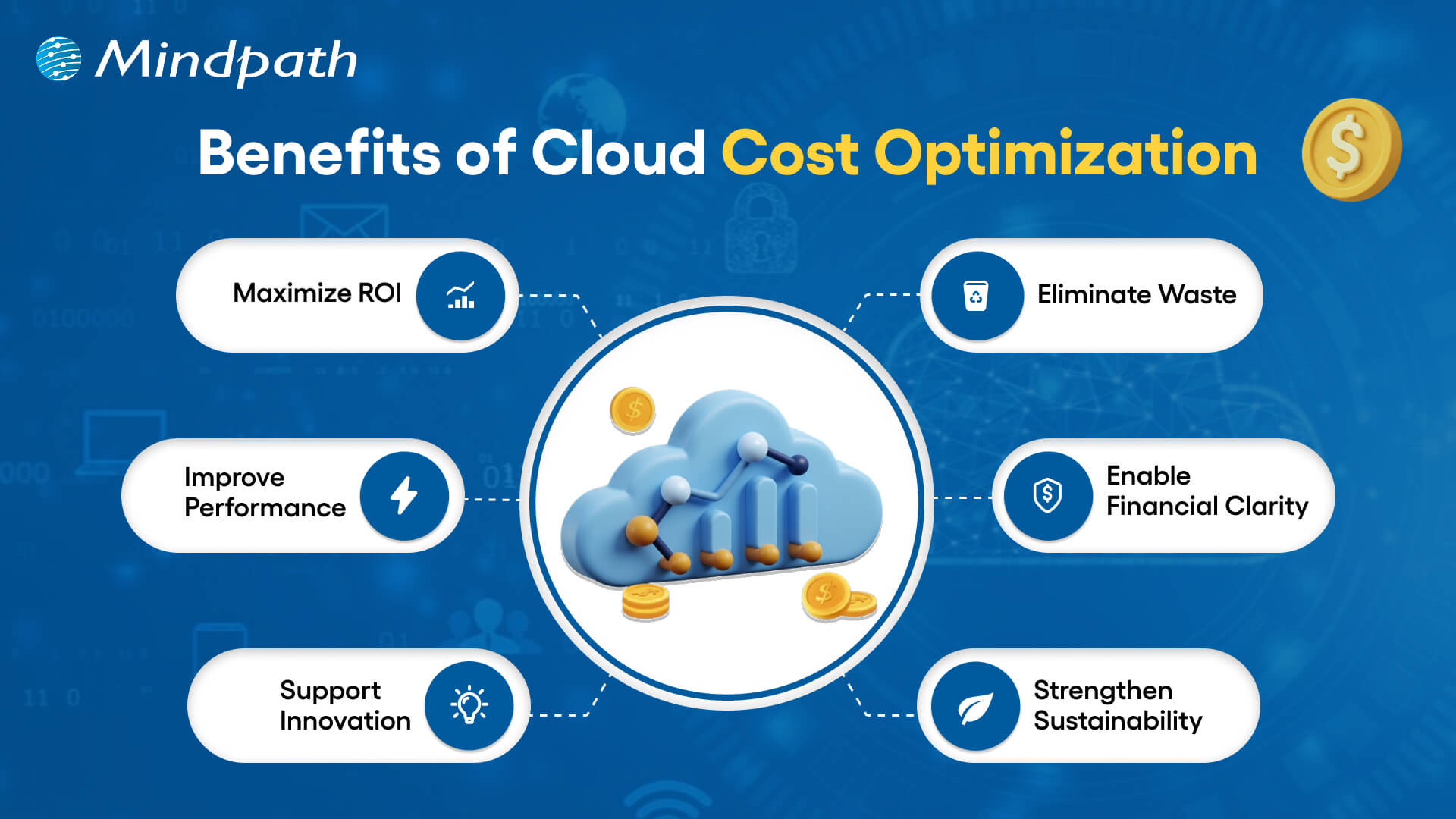
benefits of cloud cost optimization

1. Maximize ROI

Cloud expense optimization enables businesses to match expenditures with objective goals. They make sure that each dollar helps in growth, performance, and quantifiable business worth.

2. Eliminate Waste

Teams eliminate wastage of resources and storage before their expenses increase. Cloud cost optimization assists businesses in ceasing spending on services that are unnecessary.

3. Improve Performance

Organizations right-size the workloads on the basis of actual demand. This balance is also fast and reliable, as it keeps the costs down, which ultimately supports the organization’s ability to invest in new projects and innovations.

4. Enable Financial Clarity

Leaders follow usage real-time and make budgets confidentially. Being visible will avert the presence of surprise bills and enable smarter forecasting, which allows leaders to make informed financial decisions and allocate resources more effectively.

5. Support Innovation

Firms invest saved amounts in product development and online expansion. Expenditures that are managed efficiently leave opportunity for new ideas and expediency.

6. Strengthen Sustainability

Economic utilization of resources minimizes energy wastage and decreases carbon influence. Clear governance also develops team and departmental accountability.

Want to reduce cloud costs while also making your infrastructure more eco-friendly? Explore sustainable technology to build efficient and environmentally responsible systems.

Cloud Cost Optimization Strategies for Modern Businesses

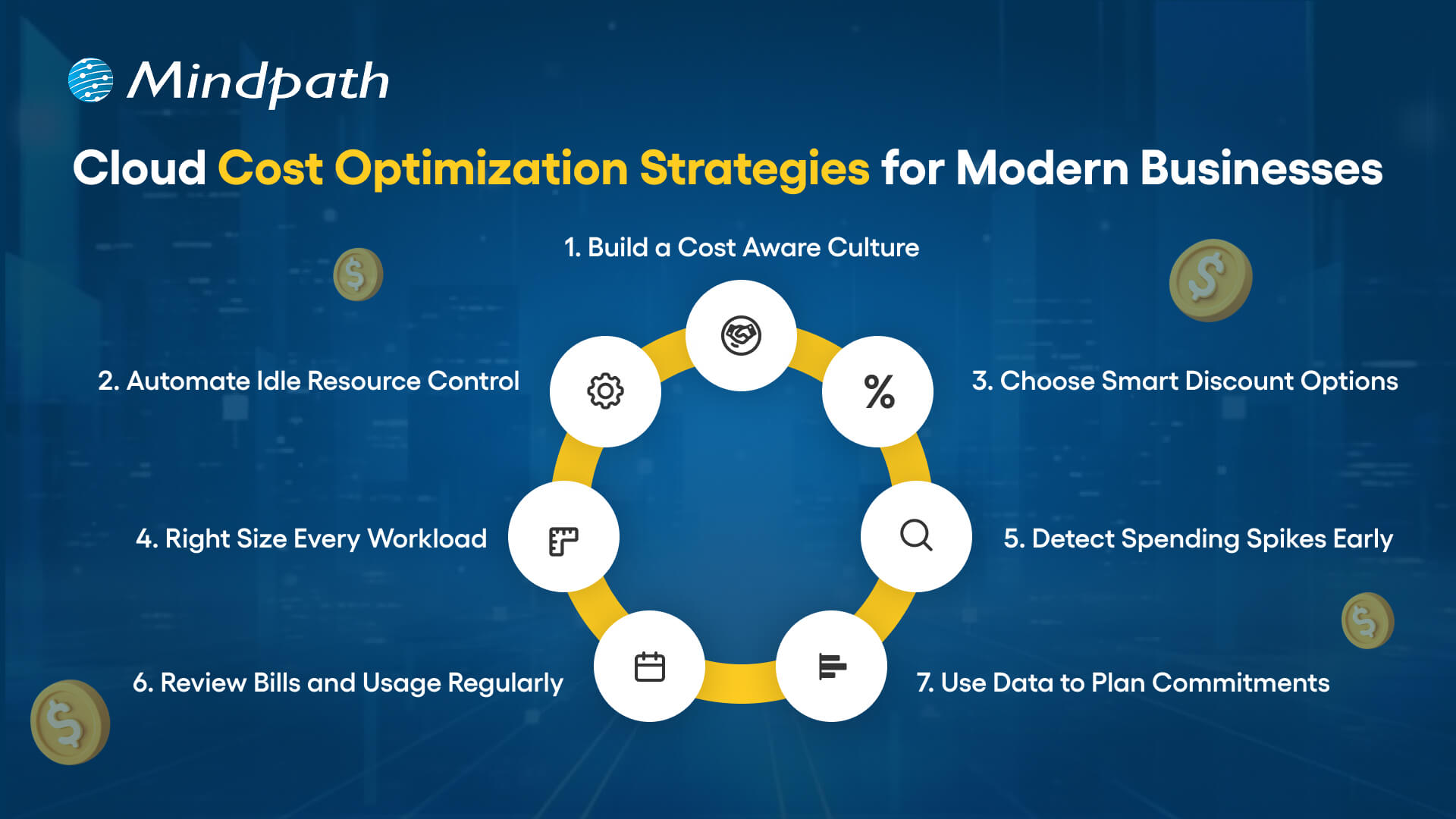
Contemporary companies require effective means to regulate cloud expenses without compromising performance and scalability. Some major strategies that help companies achieve effective cloud cost optimization include the following.
cloud cost optimization for modern businesses

1. Build a Cost Aware Culture

Clear ownership and shared responsibility are the beginning of strong cloud cost optimization. Leaders establish FinOps team and establish explicit spending policies. Teams go through regular reviews on usage and align the decisions with the business goals.

2. Automate Idle Resource Control

Unutilized servers and storage add up to high bills. Teams automate the scheduling of shutdowns and the removal of unused assets. Automation enhances the ability to optimize cost in the cloud because it avoids silent waste, which refers to the ongoing costs associated with unused resources that are not actively managed or monitored.

3. Choose Smart Discount Options

Cloud service providers also have savings plans and spot instances regarding flexibility in workloads. Workload stability is examined by teams, and then discount models are chosen. Smart commitments minimize the long-term expenses without jeopardizing performance.

Want to protect your cloud environment while optimizing costs? Explore cloud security to safeguard your systems and data effectively.

4. Right Size Every Workload

Excessively provisioned resources cost money and minimize efficiency. The teams keep tracking the CPU, memory, and storage usage. They align types of instances to actual workload requirements to facilitate cost optimization of clouds.

5. Detect Spending Spikes Early

Unplanned cost surges are hurtful to budgets and slow down planning. Real time alerts are used by teams to spot unusual usage in a short time. Timely behavior safeguards the financial control and enhances the cloud cost optimization.

6. Review Bills and Usage Regularly

The frequent examination of bills discloses outliers of costs and inefficiencies. The teams compare the present usage and the trends to identify gaps. This is followed up by constant monitoring of expenditure to ensure its congruence with approved budgets.

7. Use Data to Plan Commitments

Long-term contracts demand proper forecasting and clarity. Before commitment plans are locked teams analyze performance metrics. Data based decisions minimize risk and lead to a higher cost-efficiency.

Curious about how cloud migration supports cost optimization strategies? Check out the benefits of cloud migration to maximize your ROI.

Key Cloud Cost Optimization Tools

Businesses today need the appropriate tools to manage their expenditure and enhance visibility in the cloud setting. These are some of the important tools that can enable successful cloud cost optimization and smarter financial decisions.

1. Azure Cost Management + Billing assists teams to monitor their spending, budget and optimize Azure resources with visibility.

2. CloudZero relates cloud costs to products, features, and teams to make decisions related to the business.

3. AWS Cost Explorer and Trusted Advisor share cost-related information, usage data, and can offer recommendations applicable to make the process efficient.

4. Finout provides in-depth cost allocation analysis between various cloud and SaaS providers.

5. Google Cloud Cost Management helps to track spending and optimize usage in the GCP setups.

6. ProsperOps automates Savings Plans and Reserved Instances in order to make the maximum savings in the long term.

7. CloudHealth Victor by VMware provides business-level management, visibility and cost control in the environment.

8. Vantage provides visualized current multi cloud cost with straightforward and accurate reporting.

9. nOps applies AI based recommendations on the most economical AWS resources.

Wondering which cloud model can help you control costs and improve performance? Explore multi cloud vs. hybrid cloud to gain the clear insights.

Ready to Take Control of Your Cloud Spending?

Cloud cost optimization is beneficial to the modern business to perform cost control and enhance the performance and visibility. Businesses that audit usage, optimize resources, and automate the process of waste elimination obtain better financial control. Definite plans transform the investments in clouds into quantifiable value. By having teams focus on finance as well as engineering, teams eliminate surprise and develop long term and sustainable growth.

Mindpath is a leading provider of cloud infrastructure services, according to your business objectives. Our team is an analysis of how we use, and how we could use to waste less and be smarter with automation. We assist in the process of visibility enhancement, enhanced governance and increased returns on cloud investments. Collaborate with Mindpath to turn cloud spending into a competitive edge.
FAQs

1. What are the best practices for long term cloud cost optimization?

The following are the most appropriate practices towards long term cloud cost optimization:

  • Establish effective team ownership and accountability.
  • Set quantifiable cost targets and performance review monthly.
  • Automation is used to implement policies and avoid cost drift.
  • Use technical metrics with financial data to make smarter decisions.
  • Focus on permanent betterment to keep pace with the changing business priorities.

2. How often should businesses review their cloud cost strategy?

The teams need to observe the expenditure weekly and perform more thorough reviews every month. The regular tracking will enable the identification of trends before they turn into issues. Companies that view optimization as a continuous study make financial stability strong and give better predictions with time.

3. How can leadership teams support cloud cost management efforts?

The leadership needs to encourage transparency and foster common responsibility in spending. Effective communication between the engineering and finance enhances decision-making. Deliberate cloud cost management processes plus executive backing allow teams to remain efficiency-centered, accountable, and result-oriented.

4. What technical metrics should the team track for better cost control?

Teams need to keep track of the use of CPU resources, memory, the expansion of storage, and the pattern of data transfer. They should also monitor costs per workload and per user. These indicators assist engineers to fine-tune resources beforehand and uphold good performance without wasting resources.

5. How can Mindpath strengthen cloud cost optimization initiatives?

Mindpath provides intelligent cost control through its cloud services which offer strategic planning, automation and advanced analytics. Our professionals develop a scalable system of governance and introduce performance-driven optimization models. We assist the companies to develop sustainable cloud cost optimization that aids in growth and financial clarity.

Related Post

Explore how generative AI is transforming market research, enhancing data management, collection, analysis, and insight sharing for smarter decision-making. 
Discover how AI can revolutionize your business with predictive analytics, machine learning, and conversational AI for smarter decisions and improved efficiency.

Related Post

Hire wordpress developer

You have a great business idea and you just discovered that WordPress can help you build high-quality websites from scratch. Would you go for the DIY approach or choose an expert for the job? Many would choose to hire WordPress developer with the skills required to take up your project. With a large pool of WordPress developers in the world, it is difficult to navigate the hiring process.

The right WordPress developer can change the course of your web project with their skills to utilize available resources in the most efficient way. You may be launching a new site or switching your existing site to WordPress and in every case, you will need skilled developers to do the job. This guide will help you understand the hiring process for bringing a skilled WordPress developer to your team.

Ready to transform your online presence with a website designed to grow your business? At Mindpath, we offer expert WordPress development services to customize high-performing websites that drive your growth.

Unraveling the Reasons to Hire a WordPress Developer

The first thought that might come to your mind when conceptualizing a web project is the availability of website builders. You can use the ‘drag-and-drop’ features of website builders to create a website from scratch with preset themes. Why should you hire dedicated WordPress developers when you can do it on your own? When your website grows, you will need more features, specific design elements or better performance. Therefore, you cannot ignore the importance of a WordPress developer in the modern digital landscape.

You can rely on a professional developer to tailor the design of your website in a way that reflects your brand identity. Developers can add new features without relying solely on plugins and scale up your website as your business grows. Experienced developers also ensure that your website design is optimize for mobile devices and search engines. With the intervention of custom  WordPress development experts, you can create websites that work seamlessly on all types of devices and are more visible on search engines.

The next prominent advantage of WordPress experts for hire in any region is the assurance of security. Developers can take care of the security best practices, such as cleaning the code, using secure plugins and creating custom login URLs. In addition, you can rely on WordPress development professionals for ongoing maintenance and support services to keep your website running according to your expectations.

Also Read: Safeguarding WordPress Vulnerabilities

How Many Types of WordPress Developers are there?

Hiring professionals for WordPress development is quite difficult as you have to identify the right person for the role. Depending on the requirements of your project, you will have to hire the type of developer who will be the right fit for the project. While looking for expert WordPress developers, you must know that there are five distinct types of WordPress development experts.

The frontend developers work on user interface and design of websites with the help of JavaScript, HTML and CSS. Backend developers are responsible for creating the server-side logic, functionalities and managing database of the website with PHP and MySQL. If you need someone who can do both, then you should hire a full-stack developer.

The other notable types of WordPress development experts you will come across are WordPress theme developers and plugin developers. WordPress theme developers specialize in creating and customizing WordPress themes that you can use for your website. Similarly, WordPress plugin developers help in creating custom plugins that can help you add new features in a website.

What Does a WordPress Developer Do?

Anyone with general knowledge about WordPress would know that creating websites with WordPress doesn’t require coding. However, businesses want to hire WordPress programmers with design skills who can take care of their web projects. As a WordPress developer, you will have to fulfill various responsibilities that require programming skills. For instance, WordPress developer writes the code required to customize core WordPress files.

The WordPress developer is also responsible for testing and debugging the core WordPress software. In addition, developers have to update WordPress websites on a regular basis while working with different stakeholders. Another crucial responsibility of a WordPress developer revolves around creating WordPress themes and plugins according to client requirements.

Curious if your WordPress site is using the right PHP version for best performance and security? Our WordPress PHP Compatibility Guide will help you stay aligned with best practices and avoid technical issues.

Which Skills Should You Look for In a WordPress Developer?

The common thing about every business looking for a WordPress developer is that everyone wants the best professionals. How can you identify a WordPress expert from the crowd of applicants? Recruiters should have a candidate profile that helps them identify the essential skills required from a WordPress developer for their web projects.

Skills You Should Look for In a WordPress Developer

You should focus on the core competencies first to identify professionals who are capable of leveraging the capabilities of WordPress.

1. A skilled WordPress developer must be fluent in PHP, WordPress core, JavaScript, HTML and CSS.

2. The wordpress developer should have in-depth understanding and practical experience in building WordPress themes and plugins.

3. The core competencies of WordPress development experts also revolve around skills for ensuring cross-browser compatibility and responsive design.

4. A WordPress developer is expected to know the coding standards and best practices for WordPress development.

Ready to make your hiring process smooth and avoid picking the wrong developer? Our WordPress Developer Checklist gives you a clear, step-by-step framework to evaluate every candidate.

Are Core Competencies Enough for a WordPress Developer?

The core skills required from a WordPress developer showcase only one half of the picture. Recruiters must also look for candidates with additional skills that can bring more value to web projects. Business can hire remote WordPress developers or dedicated in-house experts after checking their capability to go beyond the norm. Candidates who know more than the core skills of a WordPress developer can take care of different aspects of web projects with minimal assistance.

You should look for candidates with experience in version control and performance optimization. On top of it, a WordPress developer who has in-depth understanding of SEO principles can be a valuable asset. The other additional skills that you can look for in a WordPress developer include familiarity with SQL and database management. Candidates with knowledge of working with WordPress REST API and RESTful APIs will definitely elevate the chances of creating better web projects.

While technical skills are a must-have for WordPress developers, it is impossible to ignore the importance of business acumen and soft skills. Any WordPress developer with business acumen can understand the vision and goals of a web project. In addition, they also need soft skills like communication and time management to work in a team and deliver their best performance.

Unsure if your WordPress site meets accessibility standards for all users? Explore our article on how to improve WordPress web accessibility and ensure your site is usable by everyone.

Which Hiring Model Should You Choose?

Diving straight into the hiring process without choosing a hiring option can lead recruiters into many roadblocks in future. Business owners and hiring managers must know the strengths and setbacks of each hiring model to figure out the ideal option for their web project. You can hire freelance developers or opt for an in-house developer and capitalize on different advantages. For instance, freelance developers are the best picks for web projects of small companies or startups. Freelance developers can work on tight budgets and serve as the most efficient assets for one-time web development projects.

The freelance hiring model may seem appealing due to the lower costs than hiring a dedicated in-house developer. However, many people don’t pay attention to the limitations that come with freelance developers. It is difficult to manage freelancers as they may be working with multiple clients and could not deliver your project on time. The alternative to a WordPress freelancer is an in-house developer who will work in your office. In-house developers understand your business goals and customer expectations more closely, which helps them create effective products.

You may have assumed that an in-house WordPress developer will be the ideal choice for your next web project. The problem with in-house developers is the cost and time required to welcome them into your team. Apart from the costs of salary and infrastructure, you will have to bear the burden of time required for onboarding an in-house developer.

Interestingly, you can find a solution to this setback in professional WordPress development agencies. Professional agencies offer access to a team of developers with full-stack development expertise and the assurance of project management. With a professional agency, you don’t have to worry about overheads or continuous maintenance and support.

Looking to scale your web project without long-term commitments? Check out our guide to hire a freelance full-stack developer and discover how to find skilled freelancers who meet your needs.

What are the Costs of Hiring WordPress Developers?

The type of hiring model you choose to hire expert WordPress developers for your web project will have a significant impact on the hiring costs. On top of it, you must also consider the location and experience of the developer to determine the hiring costs. It is also important to note that businesses can choose between hourly pricing and fixed pricing for different hiring models. For instance, a freelancer will charge around $20 to $100 per hour for their services or take a salary of $65,000 to $70,000 per year for different projects.

The location where a WordPress developer will work also has a significant influence on the hiring costs. The average WordPress developer salary in the United States varies between $42,000 and $103,000. On the other hand, the salary of a WordPress developer in Australia can be somewhere between $91,000 and $179,000. It is also important to note that the salary of WordPress developers may vary with changes in demand for talent and complexity of projects. Awareness of salary ranges can help you ensure that you make the right offers to skilled candidates.

Must Read: WordPress vs Drupal Guide

Roadmap for Hiring an Expert WordPress Developer

Once you know what you are looking for, the search for a skilled WordPress developer becomes a lot easier. You can follow a few simple steps to establish a solid hiring process for WordPress development projects.

1. Know Your Business Goals

The first step in the hiring process involves understanding that you are not listing WordPress jobs to follow a trend. You must identify the problems you want to solve with the help of a WordPress developer. Understanding your problems and business goals will help you identify developers with the skills required to solve them.

2. Establish a Clear Budget

Another area where you should be very clear while hiring WordPress development experts is the budget. As a matter of fact, your budget will determine the type of hiring model that will suit your project. The important factors that help you define a budget for web projects include the scope of the project and its complexity. On top of it, the experience of developers will also come into play as you will have to pay more to senior developers.

3. Rigorous Testing and Interview Process

The most common mistake recruiters make while hiring a WordPress developer is the lack of attention to the testing and interview process. You should use different types of tests to evaluate the proficiency of candidates in PHP, HTML, JavaScript and SQL. The best way to test the technical proficiency of candidates involves providing hands-on assignments. Furthermore, the interview process should be more sophisticated with questions to evaluate the business knowledge and soft skills of candidates.

4. Finalize the Hiring Process

After identifying the right candidate for your WordPress project, you can complete the hiring process. It is important to create verified contracts that include comprehensive details about the project scope, terms of payment and timeline of the project. The hiring contract must also specify the clauses of confidentiality, ownership rights and terms of contract termination. With both parties agreeing to the contract, you can finalize the hiring process and welcome the developer into your team.

Ready to upgrade your HTML site to something more powerful and manageable? Explore why converting HTML to WordPress can streamline updates and improve your online presence.

Ready to Hire the Right WordPress Developer for Your Project?

The benefits of working with a professional WordPress developer can elevate your web project. You can hire offshore WordPress developers or choose an in-house developer for your team, depending on your requirements. However, the process to choose the ideal candidate for WordPress development projects remains the same in almost every case.

Mindpath is a trusted WordPress development company that has been helping businesses discover new solutions to a better digital presence. Our experience in working on different types of WordPress development projects has empowered us with the skills and confidence to deliver the best results. We offer WordPress development services tailored to the needs and vision of each business, thereby ensuring that you get desired outcomes from your web projects. Consult with us and make the most of WordPress for web development projects now.

Learn how to hire the ideal freelance WordPress developer with our guide. From defining needs to securing the right talent, ensure a high-performance website.
low-rank adaptation (lora)

The landscape of artificial intelligence is advancing at a higher rate. And it has made it crucial to ensure efficient adoption of LLMs or Large Language Models.  Low-rank adaptation (LoRA) has emerged as an effective technique to fine-tune LLMs. Developers are now looking for scalable methods to customize AI models. Well, LoRA offers them a lightweight and cost-effective technique.

Furthermore, it has made the process of low-rank adaptation of LoRA in fine-tuning feasible, accessible, and efficient. In this detailed blog, we will explore more about the LoRA adaptation, understand what it is, and how it works. Besides, we will also discuss why it is an important method for fine-tuning LLMs in 2025. So, read on!

Struggling to figure out how advanced tuning methods like LoRA can give your business a competitive AI advantage? Mindpath’s AI development services help you harness LoRA-driven fine-tuning to build smarter, faster, and more efficient AI solutions.

Low-Rank Adaptation (LoRA) – An Overview

Before exploring more about low-rank adaptation (LoRA), let’s start with the basics, i.e., what is low-rank adaptation in LoRA? It is an efficient fine-tuning method that trains large LLMs to easily handle new tasks. The best part is, with this method, developers don’t need to change any parameters. Instead of updating all parameters. LoRA freezes the model weight and then injects a few new weights or trainable low-rank matrices. Fine-tuning with LoRA significantly lowers the number of trainable matrices without affecting the model’s base knowledge.

Importance of LoRA

Large language models such as ChatGPT are powered by massive neural networks. These networks have trillions of parameters. And during pre-training, these parameters are fine-tuned to make models work properly. While it makes AI models powerful, there is no guarantee that they will work efficiently for certain tasks. Adapting a larger language model to a specific use case, like custom support automation or legal documentation, requires full fine-tuning. For instance, if you want to fine-tune GPT-4, then you will have to work on around 1.8 trillion parameters. Besides, the process demands enormous infrastructure and GPU memory.

However, low rank adoption (LoRA) provides developers with a more efficient and smarter alternative. It allows them to inject small training parameters into specific layers. This, in turn, reduces GPU memory requirements. Furthermore, it leads to minimal disruption, lower costs, and quick training. If you think Low Rank Adoption is the only parameter-efficient method, let us inform you that QLoRA or Quantization LoRA is now gaining popularity in the industry. The reason behind this is that it combines high-precision computation with low-precision storage.

Low Rank Adaptation LoRA Example

Now, let’s have a look at a Low rank adaptation LoRA example in order to get a clear idea about the impact of LoRA. Let’s assume you want to fin-tune BERT. You may opt for a full fine-tuning. But for that, you will have to retrain nearly 108,314,886 parameters. Besides, the method is resource-intensive.

On the other hand, using LoRA, you can freeze the model’s original weights. It allows you to train only the necessary adapters related to your tasks. In fact, you can achieve the desired results just by training only 78,342 parameters. As a result, you will witness a significant reduction in training time as well as machine cost.

New to fine-tuning techniques like LoRA and unsure where to start? Explore Large Language Model (LLM) to build a strong foundation before diving deeper.

Low-Rank Adaptation (LoRA) Techniques

Now that you have a clear understanding of low rank adaptation (LoRA), let’s talk about the right way to use Low-Rank Adaptation (LoRA) Techniques. To ensure desired outcomes, developers can follow these steps.

1. Selecting a Base Model

 Begin by choosing a suitable AI model. You can opt for GPT-4 or GPT-3 as per your need.

2. Create Datasets

After the selection of a model, next, you need to collect quality datasets. Here, you must ensure that those datasets match your fine-tuning objectives.

3. Deploy LoRA Modules

While deploying LoRA adapters, choose the right attention layers. To avoid any issues, ensure a balance between performance and efficiency.

4. Rank Tuning

Select an appropriate rank. While smaller ranks can lower training costs, they can limit the model’s expressiveness. In general, the value can range between 4 and 46, based on the task.

5. Train Adapter Parameters

Here you need to be careful. First of all, freeze all the original parameters. Once done, you can start training low-rank parameters on your dataset. There is no need to train all parameters.

6. Process Validation

Use a separate validation set to monitor the performance of the model. Keep in mind that if the training data is limited and the rank is too high, this can increase the risk of overfitting.

7. PEFT Libraries Integration

To streamline the implementation process, developers can deploy libraries such as Hugging Face’s Parameter-Efficient Fine-Tuning library. It offers plug-and-play support.

Wondering how LoRA compares to traditional fine-tuning approaches? Discover OpenAI’s Fine-Tuning API to understand when efficient fine-tuning matters most.

The Hidden Cost of Full Fine-Tuning

To get a clear understanding of the importance of Low-rank adaptation (LoRA), it is critical to understand the exhaustive technique it replaces, i.e., Full Fine-Tuning.

A pre-trained large language model is essentially a huge network of weight matrices that encode the learned knowledge of the model. When developers go for a full fine-tuning, they feed the model specialized datasets. After that, the model adjusts each parameter to align with the new task.

This process involves calculating errors in the output and sending gradient updates through the entire network using an optimizer such as Adam. However, this technique comes with some critical drawbacks.

1. High Computational Cost

Fine-tuning a model with billions of parameters requires massive GPU memory. To store the AI model, optimizer stats, and necessary gradients, you will need enough VRAM, around hundreds of gigabytes.

2. Storage Inefficiency

Full fine-tuning creates a new model file. A 70B model, at 16-bit precision, can be around 140GB. Storing this size of file for every user who needs a custom AI model is unsuitable. That means maintaining separate models at large is nearly impossible.

3. Risk of Forgetting

Updating all weights to understand the new tasks can overwrite the existing capabilities of the model. For instance, it may not be able to translate language. This can significantly reduce the model’s versatility.

For years, AI model customization was exclusive to the AI labs that created them. However, things have started to change, all thanks to low-rank adaptation (LoRA). It has changed the rules of fine-tuning.

Curious about what LoRA actually optimizes inside modern AI models? Explore attention mechanism explained to understand the architecture behind efficient adaptation.

Why LoRA is an Excellent Option for Fine-Tuning LLMs?

Low rank adaptation (LoRA) is an ideal method for fine-tuning LLMs. After all, it brings efficiency, scalability and versatility to the process.

Here are some benefits of LoRA that prove why it is an excellent option.

1. Parameter Efficiency

As mentioned above, LoRA reduces the number of parameters. It makes fine-tuning possible utilizing low-resource hardware. Apart from this, it opens doors for independent developers to customize AI models.

2. Retain Pre-Trained Knowledge

By preserving base model weight, LoRA eliminates the risk of catastrophic forgetting. Using this, developers can ensure that a model’s general language understanding capability remains intact while expanding to new domains.

3. Scalable Fine-Tuning

With low rank adaptation (LoRA), fine-tuning is faster compared to other techniques. Developers can fine-tune multiple versions of models for various domains. There is no need to duplicate the entire model. As a result, version control will be easier.

4. Full Impact with Zero Latency

The weights of the adapter can be easily merged with the pre-trained models during inference. This helps maintain runtime performance without added latency.

5. Versatility

LoRA seamlessly integrates with popular transformer architectures such as BERT, T5, and GPT. That’s why it is a versatile fine-tuning solution in 2026.

Thinking about where LoRA-fine-tuned models create real business value? Discover generative AI use cases in diverse industries to see how efficient AI adaptation drives impact.

Final Thoughts

Low-rank adaptation (LoRA) is now transforming the process of fine-tuning large language models. By reducing the total number of trainable parameters while maintaining the model’s integrity, LoRA has made fine-tuning more scalable, cost-effective, and accessible. Whether you are developing a multilingual translator or a healthcare chatbot, it offers the precision and flexibility required to train AI for real-world applications.

Developing and fine-tuning AI models can get complicated. This is where Mindpath comes in. Our AI development services can help you in designing and fine-tuning models using low-rank adaptation (LoRA). While doing that, we also ensure that all the things fit perfectly into your workflows. Let us make your AI solution personalized and powerful.

Stability AI guide

In this generative AI revolution, one name that stands out as a leader of open-source AI models is Stability AI. The company has introduced many powerful AI models that have completely changed the way of generating digital content. In this comprehensive Stability AI guide, we will discuss more about this platform.

If you are looking to explore the most powerful, flexible, and accessible toolkit to create audio, videos, images, and more, this Stability AI guide is for you. Read on to find out what it is and the various models offered by Stability AI. Besides, here you will find the answer to an important question: “How can I use Stability AI?”

Want to explore Stability AI but need guidance on turning its capabilities into real business value? Mindpath provides end-to-end AI development services that bring your AI ideas to life with reliable, future-ready solutions.

What is Stability AI?

Let’s start this Stability AI guide by understanding the basics – what Stability AI is. Stability AI is a renowned company that was established in 2019. It strives to provide powerful and open-source AI models to perform different tasks. The brand is known for its Stable Diffusion model, a powerful image generation model.

Different from other platforms, Stability AI releases the source code and the weights of their models, as it emphasizes openness. This has made it a top choice among startups, hobbyists, and artists. Developers can easily fine-tune and build upon various models offered by Stability AI. The product portfolio of Stability AI expands beyond just image creation. The ecosystem includes multiple models for all types of digital content.

Must Read: Generative AI Tools for Content Creation

Now that you learn about Stability AI, it’s time to move into an important question in this Stability AI guide, i.e., how does it work?

How Does Stability AI Work?

In general, Stability AI creates as well as trains various foundational models, or we can say large neural networks. These models can generate content based on the patterns they have learned from different datasets. All these models are trained utilizing diffusion techniques, and the most popular of these is Stable Diffusion.

It basically starts with random noise. Next, by reversing the diffusion process, it eliminates the noise for generating realistic images that are based on the prompts of the user. For language-related tasks, Stability AI has advanced models such as StableVicuna and Stable LM. Stability AI wants to make modern AI technologies easier to access by making AI models open-source and offering comprehensive documentation.

Want to know what makes generative AI models so powerful? Discover the attention mechanism to learn how neural networks focus on important information during generation.

Understanding Various Stability AI Models

In order to maximize the use of Stability AI, it is essential to learn about its fundamental models. After all, these models are the basis of the incredible functionality of this platform. Continue reading this Stability AI guide and explore the key models. This will assist you in choosing the right one for your needs.

1. Stable Diffusion 3.5

This represents the ability of Stability AI to create an image based on text. This model produces high-quality and detailed images based on the user’s prompt. It is available in different sizes, like Medium, Turbo, and Large. It demonstrates a perfect combination of speed and quality. Whether you need an AI model for concept design, artwork, social media posts and product mockups, you can count on it.

2. Stable Diffusion XL

Even though it is an old model, it can still produce high-resolution and large images without compromising detail. It balances between quality and performance. This is the reason why this model is still being used by many workflows and community UIs.

3. Stable LM 2 12B

It is one of the popular Stability AI models, well-known for various types of natural language processing tasks. It supports 12 billion parameters and performs efficiently for tasks like question answering and text generation, as well as summarization.

4. Stable Point Aware 3D

We can say that it is a groundbreaking AI model for quick yet efficient 3D content generation. It can convert 2D images into detailed 3D models. It has made 3D modelling more accessible and easier than before. This model is valuable for industrial design, VR/ AR and gaming industries.

5. Stable Audio Open 1.0

This particular model lets users to create sound effects, instrumental tracks and music using text prompts. Using this, you can produce original audio content without worrying about royalty constraints. As the model is open-source, you can also fine-tune it for different projects.

You don’t need to learn about all these models at once. Just begin with Stable Diffusion as it is simple to learn.

Curious how generative AI models like Stability AI actually work? Read the Large Language Model (LLM) guide to gain clear insights into how these models process data and generate intelligent outputs.

How Can I Use Stability AI?

If you are wondering, “How can I use Stability AI?” then you are not alone. Well, the good news is that there is no specific answer to this question. You can get started with this platform through different methods. Check out the below sections to explore the methods.

1. Utilizing a Hosted Platform

This is the most convenient and quickest method of using Stability AI. You don’t have to deal with configuring the tools or downloads. All you have to do is use platforms such as DreamStudio or others using Stability AI models.

You can sign up for an account with platforms like Sinkin AI, Playground AI, DreamStudio, Childdrop or Invoke AI. Then, type your text prompt and click on the Generate button to view the result.

It is an ideal method if you want to learn the potential of Stability AI without developing any technical skills.

2. Online UI Built on Stable Diffusion

Do you want to have better control without dealing with code? There are many third-party websites offering easy-to-use interfaces developed on Stable Diffusion. These sites provide you with advanced features such as upscaling, guidance scale, negative prompts and more.

The best part is that you still don’t have to worry about local installation and spending money on high-end GPUs.

3. Run Stability AI Models Locally

This approach should be used when a user has a strong GPU and decent technical abilities. With this method, you can run AI models on your own system. It gives you maximum control, and you can switch between various models as per your needs.

Furthermore, you can even find-tune models and add LoRA. What’s more? Once configured, you can use features like outpainting, inpainting and more.

Local installation can be challenging and has a steeper learning curve. But in the long run, you will find it more secure, fast as well as highly customizable.

In short, as a beginner, you can prefer to follow the first two methods. After developing the required skills and knowledge, you can install the models locally and enjoy more creative possibilities.

Looking to customize AI models for your projects? Read OpenAI’s Fine-Tuning API tutorial to discover techniques for fine-tuning AI models and improving performance.

Real-World Stability AI Examples

Let’s end this Stability AI guide with some Stability AI examples that show the ways businesses and individuals are utilizing Stability AI.

1. For Creators

Using Stability AI image generator, creators can generate album covers, concept arts, book illustrations and more. The media tools make it easy to create unique visuals for digital campaigns and branding.

2. For Businesses

Organizations can use Stability AI to automate various tasks and save resources as well as time. Stability AI enables the creation of quality digital content, whether it is a video or a prototype design of a new product. These examples clearly show that you don’t need to be a technically skilled individual to leverage the power of Stability AI. It is one of the most effective AI solutions for small businesses, helping them streamline operations and create professional content without heavy technical expertise.

Want to understand how AI agents improve the performance of Stability AI? Explore the role of AI Agents to see how they guide generative processes and expand what Stability AI can achieve.

Ready to Explore the Full Potential of Stability AI?

Stability AI makes generative technology more accessible with powerful open-source models for images, audio, text, and 3D content. From beginners to businesses, anyone can create, experiment, and innovate by choosing the right tools, platforms, and workflows.

At Mindpath, we provide expert AI development services to help you turn Stability AI capabilities into real business outcomes. From model integration to deployment and optimization, our team ensures scalable, efficient, and future-ready solutions. Partner with us to build smarter AI-driven solutions.