Home

Top DevOps Trends Businesses Must Embrace in 2026

Top DevOps Trends Businesses Must Embrace in 2026

Join our Newsletter!

DevOps Trends

DevOps trends are evolving rapidly, helping businesses improve workflows and deliver value faster. Whether you’re managing a tech team or scaling operations, staying updated on the latest DevOps practices is essential for long-term success.

Finding the answer to this question involves understanding the trends that affect how we run businesses in the real world. DevOps best practices today are designed to bring automation, cloud-native tools, or security-first approaches to solve the problems we face in modern situations.

Being aware of what’s meaningful and useful can help your team be more effective while accelerating time to market. In this blog, we will examine key trends and look at how they can create real results for your organization.

As businesses embrace DevOps in 2026, the need for expert guidance becomes crucial. At Mindpath, our DevOps Consultation & Implementation services ensure organizations can adopt the right strategies and technologies to stay competitive.

Understanding DevOps: A Quick Dive-in

DevOps is a software development approach that brings development and IT operations teams together to improve collaboration, automate tasks, and deliver software faster. It helps businesses identify issues early, streamline workflows, and improve efficiency.

With DevOps, teams collaborate across coding, testing, deployment, and maintenance. Automation reduces manual errors, while integrating security throughout the development process helps protect applications. This approach enables businesses to release reliable software faster while maintaining system stability and security.

Here are some of the benefits that DevOps can offer:
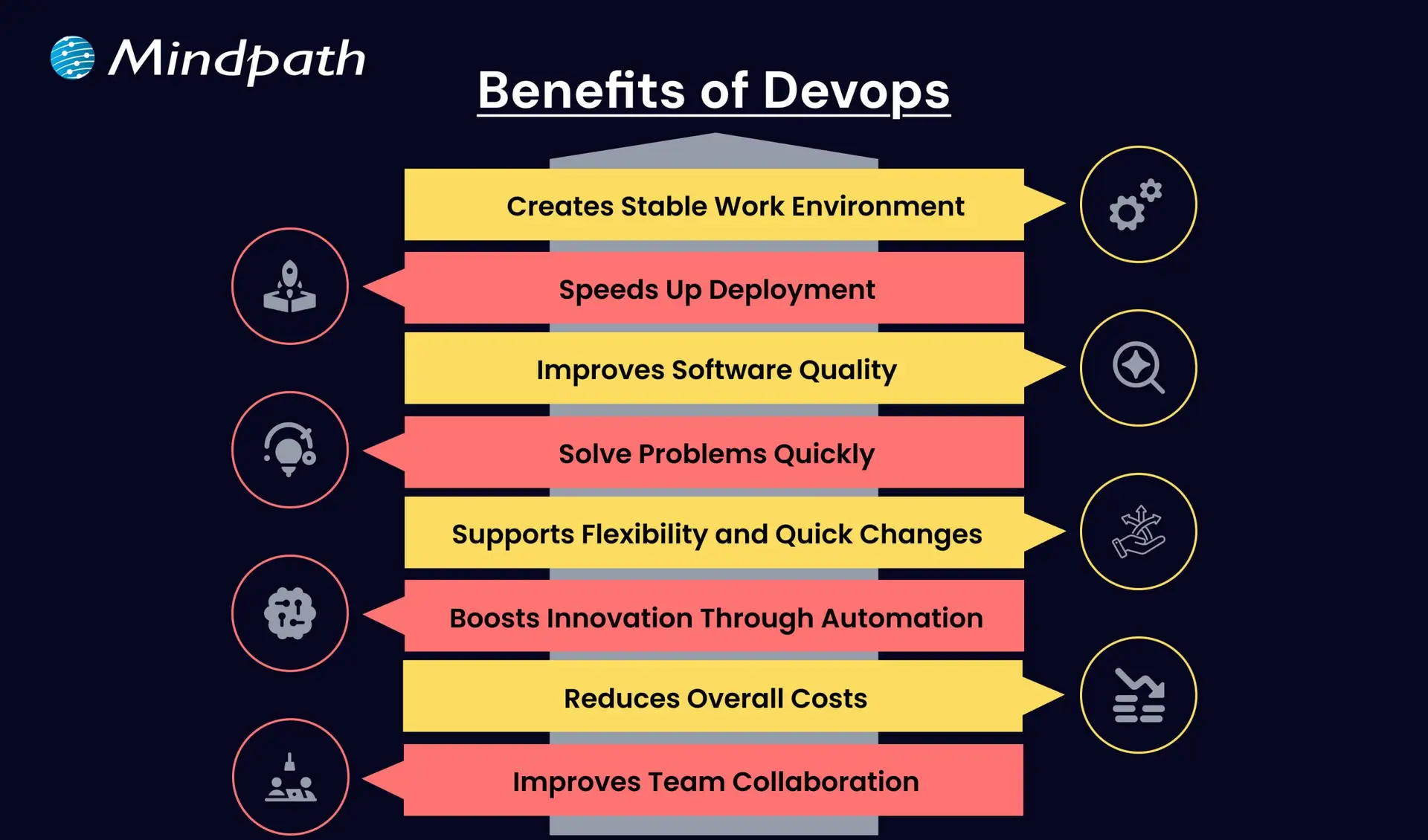
Benefits of Devops

1. Creates a Stable Work Environment

DevOps helps teams handle changes easily without stress. It brings a better balance to daily work and keeps operations running smoothly.

2. Speeds Up Deployment

DevOps allows faster software releases with fewer delays. This helps businesses deliver new features quickly and stay ahead in the market.

3. Improves Software Quality

With regular testing and feedback, DevOps helps catch bugs early. Teams can focus on creating better products with fewer errors.

4. Solve Problems Quickly

DevOps uses monitoring tools to spot issues fast. Smaller and frequent updates make fixing problems easier and more reliable.

5. Supports Flexibility and Quick Changes

DevOps builds a flexible work style where teams can respond to change easily. It helps businesses adapt to market needs faster.

6. Boosts Innovation Through Automation

By reducing manual tasks, DevOps gives teams more time for new ideas. This leads to faster improvements and better products.

7. Reduces Overall Costs

DevOps combines tasks and reduces the need for rework. This saves time, uses resources better, and cuts down project costs.

8. Improves Team Collaboration

DevOps encourages better teamwork and shared goals. Clear communication between teams leads to faster decisions and stronger results.

Aiming to enhance operational efficiency and reduce development risks? Check out our blog on DevOps Challenges and Solutions to discover proven approaches that improve performance, stability, and cross-team cooperation.

Top DevOps Trends 2026

As technology continues to evolve, companies are rethinking how they build, test, and deliver software. DevOps trends for businesses in 2026 show a clear shift toward smarter tools, stronger collaboration, and faster delivery. By following the latest DevOps transformation strategies, organizations can stay ahead and build systems that are both efficient and future-ready.
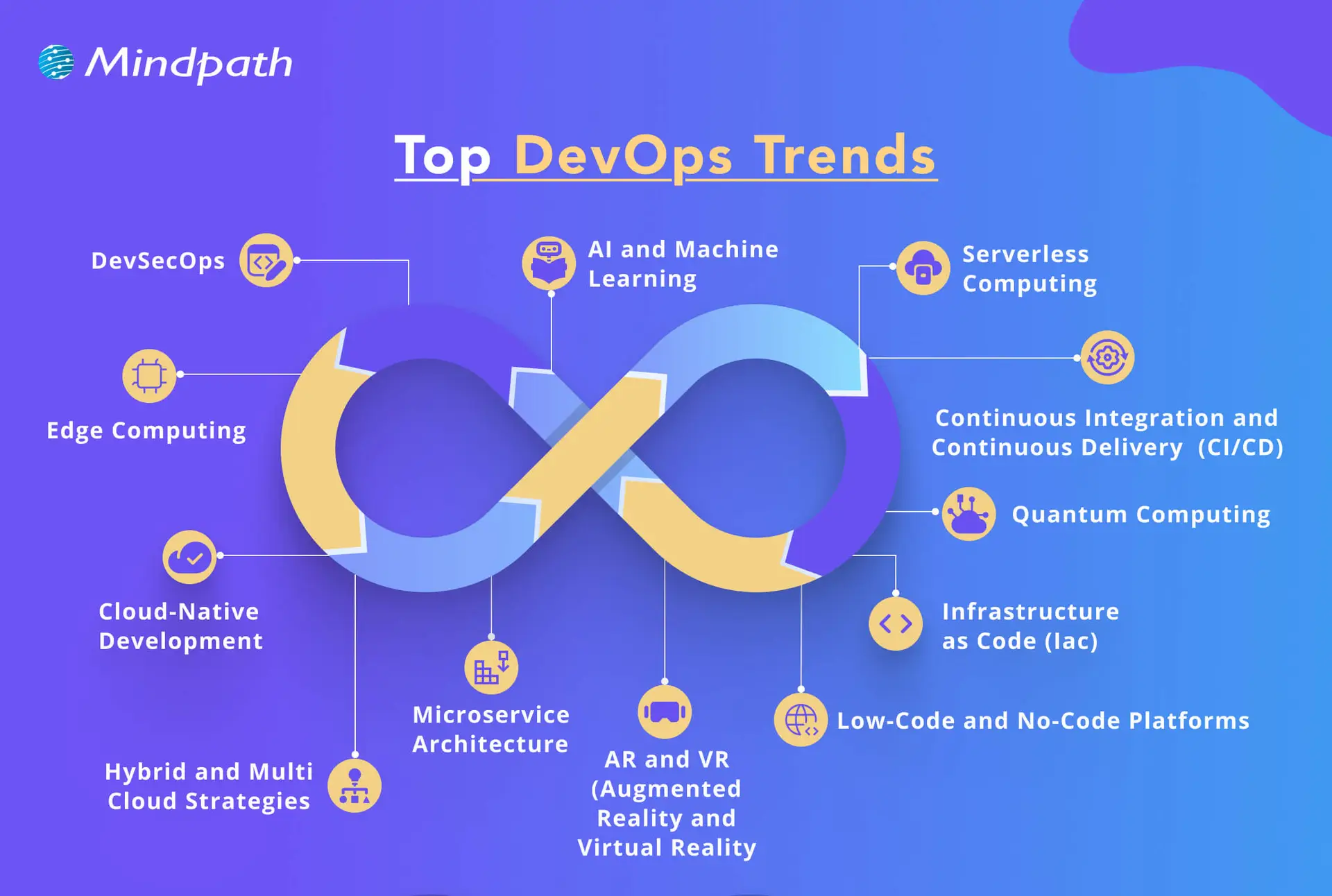
top devops trends

1. DevSecOps

DevSecOps is becoming a key part of DevOps innovation, where security is built into every stage of the development process. Instead of adding security at the end, teams now include it early to catch risks before they grow. This trend helps businesses create safer applications by using automated testing and continuous monitoring within the DevOps workflow.

2. AI and Machine Learning

AI and machine learning is one of the latest DevOps trends, helping teams work faster and smarter. These technologies support intelligent monitoring, find unusual behavior in systems, and give early warnings before issues grow. By using data to guide decisions, DevOps teams can improve system performance and reduce downtime.

3. Serverless Computing

Serverless computing is becoming a popular trend in DevOps for business success because it removes the need to manage servers. It allows teams to focus only on writing code, which speeds up development and reduces overhead. This approach also helps businesses save costs by using resources only when needed, making operations more efficient.

4. Continuous Integration and Continuous Delivery (CI/CD)

Continuous Integration and Continuous Delivery (CI/CD) is a key DevOps trend that helps teams deliver software faster and with fewer errors. It allows developers to regularly merge code changes, test them automatically, and deploy updates smoothly. This approach improves software quality and supports a steady flow of new features to users.

5. Infrastructure as Code (IaC)

Infrastructure as Code is a growing trend that helps teams manage infrastructure through written code instead of manual steps. It ensures consistency across development, testing, and production, reducing errors and saving time. As one of the leading DevOps tools and technologies, it allows automated setup and easy tracking of changes in infrastructure.

6. Microservices Architecture

Microservices architecture is a DevOps approach where an application is built using many small, separate services. Each service handles a specific function and can be updated or scaled on its own without affecting the rest of the system. This makes the software more flexible, easier to manage, and better at handling changes or failures.

7. Cloud-Native Development

Cloud-native development is a modern way of building applications that fully uses the power of cloud computing. It is one of the key DevOps trends helping businesses create software that can easily grow, move, and adapt to changing needs. By using containers and microservices, teams can build flexible and efficient systems that are ready for fast updates and smooth scaling.

8. Edge Computing

Edge computing is a growing part of modern DevOps trends that focuses on processing data close to where it is created. This reduces delays and improves the speed of applications by handling data locally instead of in a central server. It also helps save bandwidth and supports real-time decision-making, making systems faster and more efficient.

9. Hybrid and Multi-Cloud Strategies

Hybrid and multi-cloud strategies are important DevOps trends that give businesses more flexibility and control over their cloud usage. By using services from different cloud providers, teams can choose the best tools and features for each task. This approach improves performance, reduces risk, and avoids being tied to one provider.

10. Low-Code and No-Code Platforms

Low-code and no-code platforms are shaping the future of DevOps by making application development easier and faster. These tools allow non-developers to build and launch apps with simple interfaces, helping teams save time. By handling basic tasks through these platforms, developers can focus on more complex work and boost overall productivity.

11. Quantum Computing

Quantum computing is an emerging part of DevOps trends with the potential to solve complex problems much faster than traditional systems. Although still in the early stages, it may one day help teams handle advanced computing tasks more efficiently. As the technology grows, it could bring powerful new capabilities to DevOps in areas like testing, simulation, and optimization.

12. AR and VR (Augmented Reality and Virtual Reality)

Augmented Reality and Virtual Reality are becoming new DevOps trends that support better training, simulation, and team collaboration. These technologies create realistic, hands-on experiences that help teams learn and solve problems more effectively. AR and VR also improve remote teamwork by making interactions more engaging and productive.

Looking to combine fast DevOps practices with automated security checks? Check out our blog on DevOps vs DevSecOps to understand how DevSecOps adds proactive, automated safeguards to every stage of your pipeline.

Is Your Business Ready to Benefit from the Latest DevOps Trends?

DevOps trends continue to shape how businesses grow through faster delivery, better collaboration, and smarter tools. Staying updated helps teams move quickly, improve software quality, and remain competitive in a rapidly changing market. By understanding and applying these trends, companies can build stronger systems and create real value with every software release.

At Mindpath, we offer expert DevOps services that help businesses streamline processes, boost collaboration, and deliver software faster. Our team uses modern tools and proven strategies to support automation, cloud-native development, and continuous delivery. Contact us and we’ll guide you through each stage with clear planning, smooth implementation, and reliable support tailored to your business goals.


Is Your DevOps Strategy Future-Ready?

Stay ahead with modern DevOps practices.

Frequently Asked Questions

DevOps trends in 2026 are directly changing how teams plan, build, and ship software daily. Automation reduces manual work, AI flags issues earlier, and cloud-native tools speed up deployments. Teams that adopt these shifts experience fewer bottlenecks, faster releases, and significantly better collaboration across development and operations functions.
DevOps works exceptionally well for businesses of all sizes. Smaller teams actually benefit faster because there is less organizational resistance to change. Adopting automation, CI/CD pipelines, and cloud tools helps small businesses compete with larger players by delivering software faster and maintaining higher quality with leaner resources.
Most businesses notice improvements in deployment frequency and team collaboration within three to six months. Deeper results like reduced downtime and better software quality take longer to measure accurately. The speed of results depends heavily on team readiness, tooling choices, and how consistently DevOps practices are applied across workflows.
The biggest challenge is rarely technical. It is cultural. Getting development and operations teams to share responsibilities, communicate openly, and trust automated processes takes time and strong leadership. Many organizations underestimate this human side of DevOps adoption and focus too heavily on tools while neglecting team alignment and mindset shifts.
Traditional security is applied after development is complete, which creates costly delays and vulnerabilities. DevSecOps integrates security checks at every stage of the pipeline from day one. This proactive approach catches risks earlier, reduces remediation costs, and ensures that security never becomes a bottleneck slowing down release cycles.

Support Is One Click Away

Featured Posts

Related Post

Cursor vs GitHub Copilot

Choosing between Cursor vs GitHub Copilot is becoming less straightforward as AI coding tools take on larger parts of the development workflow. Developers are no longer comparing simple autocomplete features. They are evaluating how effectively an AI tool can understand a codebase, modify multiple files, reason through problems, and support day-to-day engineering work.

Key Takeaways

  • 01
    Cursor focuses on an AI-first coding environment, while Copilot integrates AI into existing development environments.
  • 02
    Both tools now support code generation, editing, chat, debugging, and agentic development workflows.
  • 03
    Cursor suits developers seeking deeper codebase interaction and multi-file AI-assisted development.
  • 04
    GitHub Copilot fits teams wanting AI assistance within familiar IDEs and GitHub workflows.
  • 05
    Security, usage, project complexity, and team adoption matter when selecting an AI coding tool.

The real distinction now lies in how AI fits into the development environment. Cursor takes an AI-first approach, while GitHub Copilot brings AI capabilities into familiar editors and the broader GitHub ecosystem. Both support code generation, chat, editing, and agentic workflows, but they shape the developer experience differently. In this blog, we compare their capabilities, workflows, pricing, limitations, and practical use cases to help you understand which approach fits your development environment.

Looking for the right AI coding workflow?

We help teams evaluate AI development tools and build practical workflows around their engineering needs.

Talk to Our AI Experts →

How Cursor and GitHub Copilot Approach AI-Assisted Development?

The biggest difference between these two AI coding tools is how deeply AI is embedded into the development environment. Both can generate code, explain functions, suggest fixes, and work across larger development tasks, but the surrounding workflow is different.

1. Cursor: An AI-First Development Environment

Cursor is built around the idea that AI should be a core part of the coding environment rather than an additional assistant. Developers can use its agent capabilities to understand a repository, plan changes, edit multiple files, run commands, and iterate on the result.

This approach becomes particularly useful when a task involves several connected parts of a codebase. Instead of asking for individual code snippets, developers can give the agent a broader objective and let it work across relevant files while maintaining repository context. Developers still need to review the generated changes, especially when the task involves business logic, dependencies, or production-critical code.

2. GitHub Copilot: AI Within Existing Development Environments

GitHub Copilot takes a more integrated approach. It brings AI assistance into established development environments, including VS Code, Visual Studio, JetBrains IDEs, and other supported editors.

Its capabilities extend well beyond inline suggestions. Developers can use Copilot for coding assistance, chat, code edits, debugging, code review, and agentic tasks. Its connection with GitHub also makes it a natural fit for teams already managing repositories, pull requests, issues, and development workflows within the GitHub ecosystem.

The distinction, therefore, is less about which tool has AI capabilities and more about where AI sits in the developer’s workflow. Cursor makes AI the center of the coding environment, while Copilot embeds AI into an environment many teams already use.

Cursor vs GitHub Copilot: Key Differences at a Glance

The differences become clearer when the tools are compared across the tasks developers handle every day. Cursor AI and GitHub Copilot overlap in code generation, chat, editing, and agentic development, but their approach to context, IDE integration, repository work, and developer interaction varies.

Feature Cursor GitHub Copilot
Development environment AI-first code editor AI assistant integrated into existing IDEs
Codebase context Designed for deep repository-level context Provides workspace and repository context across supported environments
Agentic workflows Agents can plan, edit files, run commands, and iterate Agent mode can analyze tasks, make changes, run commands, and iterate
Multi-file editing Strong focus on coordinated changes across files Supported through editing and agent workflows
Model selection Offers access to multiple AI models Provides model options depending on plan and feature
GitHub integration Supports GitHub alongside other development tools Deep integration with GitHub repositories and workflows
Code review Supports AI-powered code review through its development tools Provides Copilot code review capabilities
IDE flexibility Primarily centered around the Cursor editor Available across several established IDEs
Team management Team and enterprise administration features Business and Enterprise administration features
Workflow approach AI is deeply embedded into the coding experience AI is layered into an existing development workflow

Where Cursor and GitHub Copilot Fit in the Development Workflow?

Feature lists rarely show how an AI coding tool performs during actual development. The better comparison is how each fits into common engineering tasks, especially when the work moves beyond generating individual code snippets.

1. Code Completion and Routine Coding

GitHub Copilot can provide inline suggestions while developers work in their existing IDE. Cursor offers similar assistance, with AI deeply integrated into its editor and surrounding workflow.

2. Refactoring and Multi-File Changes

Cursor is designed for tasks that require broader codebase interaction, including coordinated changes across multiple files. Copilot’s agent mode can also handle multi-step coding tasks within supported environments.

3. Debugging and Testing

Both tools can explain errors, suggest fixes, generate tests, and assist with debugging. Developers still need to validate changes because AI-generated fixes can introduce incorrect assumptions or unexpected behavior.

4. Greenfield Development

Cursor can support building a new application through agent-driven planning, file creation, and implementation. Copilot can assist throughout the same process while keeping developers within their preferred IDE and GitHub workflow.

5. Working With Existing Codebases

For unfamiliar or complex repositories, context becomes critical. Cursor emphasizes repository-level understanding, while Copilot can use workspace and repository context to assist with existing projects.

Pricing, Security, and Team Adoption

When evaluating Cursor vs GitHub Copilot, teams should look beyond subscription costs. Usage, security, existing workflows, and adoption effort can all affect the decision.

1. Pricing

Both offer individual, team, and enterprise plans, with costs varying based on usage and available AI features.

Factor Cursor GitHub Copilot
Starting approach AI-first editor AI inside existing IDEs
Individual use Free and paid plans Free and paid plans
Team use Team and Enterprise plans Business and Enterprise plans
AI usage Varies by plan and model usage Varies by plan and AI credits
Security controls Team and Enterprise controls Business and Enterprise controls
Workflow adoption May require switching editors Works with supported existing IDEs

2. Security

Teams should review data handling, retention, access controls, and governance before using either tool with proprietary code. These considerations are also relevant when applying AI safety and alignment principles to development workflows.

3. Team Adoption

Copilot can fit naturally into existing IDE and GitHub workflows. Cursor may require a shift toward an AI-first coding environment.

Strengths and Limitations of Cursor and GitHub Copilot

Both tools can accelerate development, but AI-generated code still needs developer review. Their strengths become clearer when looking at control, context, reliability, and everyday usability.

1. Cursor AI Strengths

  • Strong codebase context
  • Multi-file editing
  • Agent-driven workflows
  • Flexible model selection
  • AI-first developer experience

2. Cursor AI Limitations

  • Requires adopting its editor
  • Higher usage can increase costs
  • Complex changes still need careful review

3. GitHub Copilot Strengths

  • Works across popular IDEs
  • Strong GitHub integration
  • Easy workflow adoption
  • Code completion and chat
  • Agentic development support

4. GitHub Copilot Limitations

  • Capabilities vary across IDEs
  • Usage limits depend on the plan
  • Generated code still requires validation

For both tools, productivity gains depend heavily on task complexity, codebase quality, and how effectively developers review AI-generated changes. This broader role of AI in engineering is also reflected in AI in software engineering.

Which AI Coding Tool Is Better?

The right choice depends on how your team already builds, reviews, and maintains software. Key factors include the development environment, project complexity, team workflow, and level of AI involvement.

1. Cursor May Fit Teams That:

  • Prefer an AI-first coding environment
  • Work frequently across multiple files
  • Need deeper codebase interaction
  • Want flexible model choices
  • Use agentic workflows extensively

2. GitHub Copilot May Fit Teams That:

  • Prefer their existing IDE
  • Already rely heavily on GitHub
  • Need broad IDE support
  • Want minimal workflow disruption
  • Need AI assistance across established development processes

Need the Right AI Coding Workflow for Your Team?

Cursor vs GitHub Copilot comes down to how developers want AI integrated into their daily work. Cursor centers the experience around an AI-first editor, while Copilot brings AI into established development environments. Project complexity, existing tools, security needs, and team preferences should guide the final decision.

Mindpath helps businesses evaluate and implement AI-driven development workflows aligned with their engineering goals. Our AI development services cover AI strategy, development, model integration, fine-tuning, and AI agent development to help teams build practical, scalable solutions.

React state management

React has no doubt changed the way modern web applications are created. This library has become beneficial for many high-profile companies in making their web applications efficient and user-centric. Because of its features like UI elements and component-based architecture, it handles updates effortlessly. As per the trends, React usage has significantly increased, with around 100,000 new websites for better interfaces. But if the complexities of your app grow over time, it might be challenging for you to manage the state.

Key Takeaways

  • 01
    React state management helps developers manage, share, and update dynamic data across React applications.
  • 02
    React state can be global, local, derived, or server state, depending on how and where the data is used.
  • 03
    Built-in tools such as useState and useReducer can handle many local and complex state management requirements.
  • 04
    External libraries such as Redux can help manage complex global state requirements in larger React applications.
  • 05
    Keeping state simple, splitting it logically, managing side effects, and using debugging tools can improve maintainability and scalability.

So, in this blog, we will go through an in-depth analysis of React state management. No matter if you are a beginner dealing with the struggles of uplifting your state or an experienced developer who is curious about Context API, this guide includes everything for your reference.

Want a faster, smarter web app that boosts your business? At Mindpath, we offer expert ReactJS development services to build high-performance, scalable apps tailored to your needs.

What Does ReactJS State Interprets?

A state is an essential object present in React that involves significant data related to a component. It prominently represents the components that might change with time because of some critical events. Unlike props that pass down to child components from parents, the state remains mutable, and you can manage it within the component only.

ReactJS state is a crucial fundamental for giving rise to interactive React components while enabling seamless UI whenever your data changes or adopts certain updates. State is effectively used for conditionally rendering elements or to update form inputs. Further, it traces user interactions like inputs and clicks and stores API responses. Here, you can go through some key characteristics of the state.

1. Enables Re-renders

React is capable of re-rendering a component automatically when it sees changes in the state. This ensures your UI is in sync with the core data.

2. Local Scope

State is generally local to a component, but it can be easily shared with other components with the use of props.

3. Fixed Updates

It is necessary to update the state with the usage of dedicated methods like setState or the useState hook. State objects directly mutating can lead to unpredictable attributes and bugs.

Curious about the latest trends shaping React development and how they impact your projects? Explore our in-depth guide on ReactJS trends to stay ahead and make informed decisions.

The Core Difference between State and Props

Before we move forward with state management in React, it is necessary to understand how state differs from props.

  • Props are generally read-only values that pass down from parent to child components.
  • On the other hand, the state is managed within a component and can differ over time.

While props help in passing the data down the component tree, state manages the dynamic data. Moreover, issues arise when the state needs to be shared over multiple components. This leads developers to review how it manages and structures the state precisely.

What Does State Management in React Define?

State management in React refers to how the data or state is managed, shared, or updated in your React app. Further, state management ReactJS ensures that all the valuable components are in sync with the app’s state. This assures the developers of leveraging a seamless user experience.

  • You need state management to handle dynamic data and critical UI changes.
  • This is also valuable to share your data between the components.
  • It ensures the app’s maintainability and scalability.
  • Further, it simplifies the debugging and developmental approaches.
Looking for ways to optimize your React development workflow? Explore how leveraging ReactJS and AI can transform your frontend development in our detailed guide.

What are the Essential Types of ReactJS State?

Not all states available in a React application serve the same purpose. So, it is necessary for you to understand the type of ReactJS state to choose the right one for your management strategies. This will also help you prevent unnecessary complexities when your application grows.

1. Global State

It is shared over multiple components and highlights the data that needs to be accessed throughout the application. Some prominent examples include language preferences, user data, and much more. Further, handling the global state efficiently is viable for large-scale apps, as poor management can ruin your performance.

2. Local State

This state is famous among developers as it helps them manage UI-centric aspects. Moreover, this includes handling input values. You can discover its utmost potential by using React hooks. This keeps the components intact while keeping the handling seamless.

3. Derived State

This state management React is not stored directly, but you can calculate it from the existing state or props. While it minimizes duplication, overusing this state can give rise to severe risks. Further, it makes the debugging practices more challenging.

4. Server State

This state refers to data from external APIs like reports or dashboards. Unlike UI state, server state needs precise handling of loading states along with proper synchronization and caching.

What are Some of the Best Tools for React State Management?

React includes a series of native tools that can be the legit foundation for your app’s state management. Here, you can go through the list of eminent tools that major developers use.

1. UseState

UseState is the simplest way of state management in React. It is highly beneficial for straightforward use cases where data changes within a component locally. However, with the growth of your application, handling several UseState hooks through multiple components can be challenging for you.

2. UseReducer

useReducer can offer you a seamless structure when the state logic invites a series of complexities. It gives rise to a single source of truth and predictable state transitions. Further, your complex workflows can adopt quick and impactful debugging features. useReducer is exceptionally beneficial for multi-step processes, forms, and states that heavily depend on previous values.

External Libraries for Modern React State Management

With the scaling up of applications, developers usually turn to external libraries to handle complex state requirements more efficiently. So, out of all eminent options, Redux has turned out to be a beneficial choice as it handles global state in React apps. Apart from this, it offers a centralized store and predictable state updates. If you want to build large-scale applications, Redux can be a perfect match.

Developers in the recent scenario have shifted their interest towards adopting flexible solutions that can reduce risks while encouraging scalable features. So, some alternatives that you can prefer instead of Redux include state containers and hook-based global state solutions. However, picking the solution completely depends on your team’s experience and requirements.

Wondering how mastering React’s state management can impact your project’s growth? Exploring building scalable applications with React can provide the strategies and best practices you need.

Tips for Effective State Management in React

To be assured of seamless and valuable state management in ReactJS, you need to approach the process with the right elements. Some effective steps can help you achieve better growth while managing your state precisely.

1. Start Simple

Make sure to never over-architect your application. In fact, make sure to only store values that actually change over time in your React state. Further, your computed data should be calculated when required to avoid inefficiencies of duplication. Moreover, it can reduce the chances of inconsistent data.

2. Lift State Only When Required

You must lift the state to a common parent component only when multiple components need access to similar data.

3. Logically Split State

Instead of handling one large state object, make sure to divide the state into smaller pieces. This approach offers readability while making the updates more user-centric. Moreover, you can prevent your app from uncertain side effects.

Struggling to decide which framework to use for your next web application? Read this guide to explore how ReactJS for progressive web app development complements effective state management.

4. Maintain the Side Effects Effectively

It is useful to leverage hooks like useEffect only to maintain side effects such as API calls. So, segmenting the side effects from the state logic can assure you of clean and effective components.

5. Use Debugging Tools

To keep your React state management productive, you can leverage tools like React DevTools. This is how you can monitor and debug the changes when required.

What are Some Common Mistakes that a Developer Must Avoid in React State Management?

Experienced developers might commit some mistakes while doing React state management. For your reference, we have mentioned the major ones here.

  • Mutating the state directly instead of generating new copies.
  • Storing too much state globally.
  • Making your simple state logic heavily complex.
  • Ignoring essential performance implications.

So, being aware of such challenges can help your React applications to be extremely scalable while maintaining their performance for the user base.

Curious about how efficient ReactJS app development can improve your state management strategies? Read this in-depth guide on ReactJS app development to enhance your workflow.

Conclusion

React state management is considered to be the backbone of any successful React app. So, a thoughtful approach towards state management, React combined with the right tools, can help your app to be extremely scalable and enjoyable to work with. Organizations that want to create robust React solutions benefit from teams that understand how React works.

This is where you must prioritize partnership with experienced development partners like Mindpath. Here, the professionals can incorporate their technical aspects to keep your project unique. Further, you can customize your development process to suit your business goals.

Master state management in React with this in-depth guide. Learn about local state, global state, and third-party libraries.
Legacy modernization roadmap 

Enterprise systems drive day-to-day operations, but most leaders eventually experience the burden of outdated platforms. Businesses want speed, security, and scale, yet legacy complexity can slow down critical decisions and digital initiatives. A clear legacy modernization roadmap brings direction and control to this transformation. It helps organizations align technology with business objectives and make measurable changes with greater confidence.

Key Takeaways

  • 01
    A legacy modernization roadmap gives enterprises a structured path for transforming outdated systems while aligning technology with business goals.
  • 02
    A strong roadmap can help reduce technical debt, control costs, improve security, and increase enterprise agility.
  • 03
    The modernization process typically includes system assessment, strategy definition, risk planning, phased execution, testing, and continuous monitoring.
  • 04
    Enterprise modernization works best when technical decisions are connected to measurable business outcomes and ROI targets.
  • 05
    Continuous monitoring after deployment helps organizations maintain performance, security, scalability, and long-term modernization value.

Nevertheless, modernization does not only require technology upgrades. It requires clarity, leadership focus, and effective execution at every level. That is why enterprise leaders need to consider modernization as a strategic priority rather than a side project. The right roadmap connects business vision with technical action, manages risk, and creates a structured path toward long-term growth. In this blog, we break down a practical legacy modernization roadmap designed with enterprise decision-makers in mind.

Looking to align technology upgrades with your overall business strategy? Mindpath’s legacy modernization services help ensure your systems support growth and deliver better ROI.

What Is a Legacy Modernization Roadmap?

A legacy modernization roadmap gives enterprises a clear, structured plan to upgrade outdated IT systems. It takes leaders through system evaluation, objective creation, strategy selection, planning, implementation, and optimization while keeping business goals in focus. Consequently, organizations can reduce technical debt, enhance performance, and develop secure, cloud-ready systems that support long-term growth.

In simple terms, an enterprise modernization roadmap connects the current state of legacy systems with the desired future state. It defines what needs to change, why it needs to change, how the transformation should happen, and how success will be measured.

Legacy system transformation focuses on turning rigid, high-maintenance platforms into agile and scalable architectures. Teams can divide large systems into manageable stages and adopt approaches such as cloud, microservices, and automation. This can enhance flexibility, improve security, and help enterprises respond more quickly to changing market needs.

Want to understand how modernizing legacy systems can transform your business operations? Explore the benefits of modernizing legacy systems to drive efficiency and growth.

Why Do Enterprises Need a Legacy Modernization Roadmap?

Companies often face sluggish systems, rising maintenance expenses, security concerns, and difficulty adapting to new business requirements. A clear legacy modernization roadmap, supported by a strong legacy modernization strategy, helps leaders improve performance while creating a more structured path toward sustainable business growth.

The roadmap also helps organizations decide which systems should be modernized first, which modernization approach is appropriate, and how technical changes should connect to measurable business outcomes.

1. Strong Business Alignment

Businesses require a sense of direction that links technology with expansion strategies. A clear roadmap converts IT initiatives into long-term business goals and helps turn existing systems into growth enablers.

2. Lower Costs and Better Returns

Legacy systems can be demanding in terms of maintenance and repair. Modern platforms can lower operating expenses and provide stronger returns through improved efficiency and smarter resource utilization.

3. Better Security and Compliance

Obsolete software can expose businesses to security risks and compliance gaps. Modern systems can strengthen data protection and help companies meet industry requirements more effectively.

4. Greater Agility and Scalability

Companies have to react quickly to market changes, shifting customer expectations, and new opportunities. A legacy modernization roadmap supports flexible architectures that enable faster releases and more seamless scaling.

5. Smarter Technology Adoption

Businesses want to adopt innovation without creating unnecessary conflicts within their existing technology environment. The application of AI in legacy modernization can support smart tools that improve insights, automation, and decision-making.

6. Reduced Operational Risk

Changing core systems without a strategy can create disruption and uncertainty. A structured modernization roadmap keeps transition risks under control and helps businesses maintain continuity throughout the transformation.

Looking to modernize your systems with advanced AI technologies? Learn from AI-driven legacy system modernization to accelerate your transformation journey.

A Step-by-Step Legacy Modernization Roadmap

A good modernization plan makes transformation objectives measurable. A practical legacy modernization roadmap can help enterprise leaders progress with greater organization, control, and certainty.

The process can be viewed as six connected stages: system assessment, strategy definition, risk planning, phased execution, testing, and continuous optimization. Each stage supports the next and helps organizations reduce transformation risk.

1. System Discovery and Assessment

Teams map existing systems and identify dependencies. They evaluate technical health, identify performance bottlenecks, and flag areas that may create transformation risks. They can also use legacy modernization tools to uncover hidden risks and code issues.

2. Strategy and Value Definition

Leaders establish the future architecture and define desired business outcomes. They select the appropriate modernization strategy based on business objectives, system complexity, technical constraints, and expected value.

A legacy modernization roadmap helps align technical decisions with measurable ROI targets, ensuring that modernization remains connected to business priorities.

3. Planning and Risk Readiness

Teams develop a clear execution plan using milestones. They define the process for data migration, compliance, security controls, testing, and operational continuity. The legacy application modernization roadmap helps teams reduce risks before implementation begins.

4. Phased Execution and Deployment

Professionals upgrade systems through manageable stages instead of attempting a complete transformation at once. Controlled deployment cycles help reduce disruption and allow teams to validate progress at each stage.

A legacy modernization roadmap keeps teams focused on stability, measurable milestones, and steady progress throughout implementation.

5. Testing and Quality Validation

Automated, functional, security, and performance tests should be performed at each stage. Teams can measure system functionality against defined KPIs and business objectives. This step helps validate whether the modernized system can deliver reliable performance under real workloads.

6. Optimization and Continuous Monitoring

After deployment, leaders monitor system health, performance metrics, security, and user feedback. Teams can then optimize processes and infrastructure to support future scaling and long-term business growth.

Wondering how SaaS can reduce the complexity of legacy systems? Explore SaaS trends to streamline your transformation process.

How to Measure a Legacy Modernization Roadmap

A modernization roadmap should not end when the new system goes live. Enterprises need measurable KPIs to determine whether the transformation is delivering the expected business and technical value.

1. System Performance

Organizations can track response times, uptime, application performance, and system reliability to determine whether modernization has improved technical efficiency.

2. Cost Efficiency

Teams can compare infrastructure, maintenance, support, and operational costs before and after modernization to understand the financial impact.

3. Security and Compliance

Security incidents, vulnerabilities, compliance gaps, and remediation requirements can help organizations assess whether modernization has strengthened their security posture.

4. Business Agility

Release frequency, development speed, integration time, and the ability to respond to changing business requirements can indicate whether the modernized architecture provides greater agility.

5. User Experience

Organizations can also measure user satisfaction, task completion, adoption, and feedback to understand whether the transformation improves the experience for customers and employees.

Ready to Build a Future-Ready Enterprise with a Clear Roadmap?

A strong legacy modernization roadmap gives enterprise leaders clarity and control. It connects business objectives with technology action systematically. Phased execution helps organizations reduce risk, control costs, and improve performance. Teams can support long-term digital growth with greater certainty through proper planning, governance, and continuous optimization.

At Mindpath, we provide legacy modernization services that help businesses achieve measurable outcomes using a successful legacy modernization framework tailored to their enterprise-specific needs. Our specialists evaluate existing systems, establish modernization strategies, and execute transformation with a focus on security, scalability, and quantifiable value.

FAQs

1. Why Should Enterprise Leaders Prioritize a Legacy Modernization Roadmap Now?

Competitive pressure and rising maintenance costs demand faster innovation. A legacy modernization roadmap helps leaders align technology with strategic growth goals. It creates clarity, reduces operational risk, and strengthens long-term scalability in an increasingly digital business environment.

2. How Long Does a Legacy Modernization Roadmap Typically Take?

Timelines depend on system complexity, data volume, and business readiness. Some initiatives move quickly with a focused scope, while large transformations require phased execution. A well-structured legacy modernization roadmap defines milestones early and keeps teams aligned with realistic delivery targets.

3. How Do We Measure Success During Modernization?

Enterprises should measure improvements in performance, cost efficiency, uptime, security, and user experience. Business impact should guide every technical decision. A clear legacy modernization roadmap establishes KPIs at the start and tracks measurable outcomes throughout the transformation journey.

4. Which Architecture Approach Suits Complex Legacy Systems?

Enterprises often evaluate cloud-native, microservices, or hybrid models based on workload demands. Technical audits help identify system dependencies and scalability limits. A legacy modernization roadmap supports informed architecture decisions that balance innovation, risk control, and operational stability.

5. How Can We Manage Data and Compliance Risks During Modernization?

Data migration requires strong governance and phased validation. Teams should conduct security reviews and compliance checks before execution. A structured legacy modernization roadmap reduces exposure to data loss and regulatory gaps. Mindpath’s legacy modernization services provide expert guidance for secure and compliant transitions.