Home

Cursor vs GitHub Copilot: Which AI Coding Tool is Better?

Cursor vs GitHub Copilot: Which AI Coding Tool is Better?

Join our Newsletter!

Cursor vs GitHub Copilot

Choosing between Cursor vs GitHub Copilot is becoming less straightforward as AI coding tools take on larger parts of the development workflow. Developers are no longer comparing simple autocomplete features. They are evaluating how effectively an AI tool can understand a codebase, modify multiple files, reason through problems, and support day-to-day engineering work.

Key Takeaways

  • 01
    Cursor focuses on an AI-first coding environment, while Copilot integrates AI into existing development environments.
  • 02
    Both tools now support code generation, editing, chat, debugging, and agentic development workflows.
  • 03
    Cursor suits developers seeking deeper codebase interaction and multi-file AI-assisted development.
  • 04
    GitHub Copilot fits teams wanting AI assistance within familiar IDEs and GitHub workflows.
  • 05
    Security, usage, project complexity, and team adoption matter when selecting an AI coding tool.

The real distinction now lies in how AI fits into the development environment. Cursor takes an AI-first approach, while GitHub Copilot brings AI capabilities into familiar editors and the broader GitHub ecosystem. Both support code generation, chat, editing, and agentic workflows, but they shape the developer experience differently. In this blog, we compare their capabilities, workflows, pricing, limitations, and practical use cases to help you understand which approach fits your development environment.

Looking for the right AI coding workflow?

We help teams evaluate AI development tools and build practical workflows around their engineering needs.

Talk to Our AI Experts →

How Cursor and GitHub Copilot Approach AI-Assisted Development?

The biggest difference between these two AI coding tools is how deeply AI is embedded into the development environment. Both can generate code, explain functions, suggest fixes, and work across larger development tasks, but the surrounding workflow is different.

1. Cursor: An AI-First Development Environment

Cursor is built around the idea that AI should be a core part of the coding environment rather than an additional assistant. Developers can use its agent capabilities to understand a repository, plan changes, edit multiple files, run commands, and iterate on the result.

This approach becomes particularly useful when a task involves several connected parts of a codebase. Instead of asking for individual code snippets, developers can give the agent a broader objective and let it work across relevant files while maintaining repository context. Developers still need to review the generated changes, especially when the task involves business logic, dependencies, or production-critical code.

2. GitHub Copilot: AI Within Existing Development Environments

GitHub Copilot takes a more integrated approach. It brings AI assistance into established development environments, including VS Code, Visual Studio, JetBrains IDEs, and other supported editors.

Its capabilities extend well beyond inline suggestions. Developers can use Copilot for coding assistance, chat, code edits, debugging, code review, and agentic tasks. Its connection with GitHub also makes it a natural fit for teams already managing repositories, pull requests, issues, and development workflows within the GitHub ecosystem.

The distinction, therefore, is less about which tool has AI capabilities and more about where AI sits in the developer’s workflow. Cursor makes AI the center of the coding environment, while Copilot embeds AI into an environment many teams already use.

Cursor vs GitHub Copilot: Key Differences at a Glance

The differences become clearer when the tools are compared across the tasks developers handle every day. Cursor AI and GitHub Copilot overlap in code generation, chat, editing, and agentic development, but their approach to context, IDE integration, repository work, and developer interaction varies.

Feature Cursor GitHub Copilot
Development environment AI-first code editor AI assistant integrated into existing IDEs
Codebase context Designed for deep repository-level context Provides workspace and repository context across supported environments
Agentic workflows Agents can plan, edit files, run commands, and iterate Agent mode can analyze tasks, make changes, run commands, and iterate
Multi-file editing Strong focus on coordinated changes across files Supported through editing and agent workflows
Model selection Offers access to multiple AI models Provides model options depending on plan and feature
GitHub integration Supports GitHub alongside other development tools Deep integration with GitHub repositories and workflows
Code review Supports AI-powered code review through its development tools Provides Copilot code review capabilities
IDE flexibility Primarily centered around the Cursor editor Available across several established IDEs
Team management Team and enterprise administration features Business and Enterprise administration features
Workflow approach AI is deeply embedded into the coding experience AI is layered into an existing development workflow

Where Cursor and GitHub Copilot Fit in the Development Workflow?

Feature lists rarely show how an AI coding tool performs during actual development. The better comparison is how each fits into common engineering tasks, especially when the work moves beyond generating individual code snippets.

1. Code Completion and Routine Coding

GitHub Copilot can provide inline suggestions while developers work in their existing IDE. Cursor offers similar assistance, with AI deeply integrated into its editor and surrounding workflow.

2. Refactoring and Multi-File Changes

Cursor is designed for tasks that require broader codebase interaction, including coordinated changes across multiple files. Copilot’s agent mode can also handle multi-step coding tasks within supported environments.

3. Debugging and Testing

Both tools can explain errors, suggest fixes, generate tests, and assist with debugging. Developers still need to validate changes because AI-generated fixes can introduce incorrect assumptions or unexpected behavior.

4. Greenfield Development

Cursor can support building a new application through agent-driven planning, file creation, and implementation. Copilot can assist throughout the same process while keeping developers within their preferred IDE and GitHub workflow.

5. Working With Existing Codebases

For unfamiliar or complex repositories, context becomes critical. Cursor emphasizes repository-level understanding, while Copilot can use workspace and repository context to assist with existing projects.

Pricing, Security, and Team Adoption

When evaluating Cursor vs GitHub Copilot, teams should look beyond subscription costs. Usage, security, existing workflows, and adoption effort can all affect the decision.

1. Pricing

Both offer individual, team, and enterprise plans, with costs varying based on usage and available AI features.

Factor Cursor GitHub Copilot
Starting approach AI-first editor AI inside existing IDEs
Individual use Free and paid plans Free and paid plans
Team use Team and Enterprise plans Business and Enterprise plans
AI usage Varies by plan and model usage Varies by plan and AI credits
Security controls Team and Enterprise controls Business and Enterprise controls
Workflow adoption May require switching editors Works with supported existing IDEs

2. Security

Teams should review data handling, retention, access controls, and governance before using either tool with proprietary code. These considerations are also relevant when applying AI safety and alignment principles to development workflows.

3. Team Adoption

Copilot can fit naturally into existing IDE and GitHub workflows. Cursor may require a shift toward an AI-first coding environment.

Strengths and Limitations of Cursor and GitHub Copilot

Both tools can accelerate development, but AI-generated code still needs developer review. Their strengths become clearer when looking at control, context, reliability, and everyday usability.

1. Cursor AI Strengths

  • Strong codebase context
  • Multi-file editing
  • Agent-driven workflows
  • Flexible model selection
  • AI-first developer experience

2. Cursor AI Limitations

  • Requires adopting its editor
  • Higher usage can increase costs
  • Complex changes still need careful review

3. GitHub Copilot Strengths

  • Works across popular IDEs
  • Strong GitHub integration
  • Easy workflow adoption
  • Code completion and chat
  • Agentic development support

4. GitHub Copilot Limitations

  • Capabilities vary across IDEs
  • Usage limits depend on the plan
  • Generated code still requires validation

For both tools, productivity gains depend heavily on task complexity, codebase quality, and how effectively developers review AI-generated changes. This broader role of AI in engineering is also reflected in AI in software engineering.

Which AI Coding Tool Is Better?

The right choice depends on how your team already builds, reviews, and maintains software. Key factors include the development environment, project complexity, team workflow, and level of AI involvement.

1. Cursor May Fit Teams That:

  • Prefer an AI-first coding environment
  • Work frequently across multiple files
  • Need deeper codebase interaction
  • Want flexible model choices
  • Use agentic workflows extensively

2. GitHub Copilot May Fit Teams That:

  • Prefer their existing IDE
  • Already rely heavily on GitHub
  • Need broad IDE support
  • Want minimal workflow disruption
  • Need AI assistance across established development processes

Need the Right AI Coding Workflow for Your Team?

Cursor vs GitHub Copilot comes down to how developers want AI integrated into their daily work. Cursor centers the experience around an AI-first editor, while Copilot brings AI into established development environments. Project complexity, existing tools, security needs, and team preferences should guide the final decision.

Mindpath helps businesses evaluate and implement AI-driven development workflows aligned with their engineering goals. Our AI development services cover AI strategy, development, model integration, fine-tuning, and AI agent development to help teams build practical, scalable solutions.


Build Faster With AI-Powered Development

Accelerate software development with AI tools built around your workflow.

Frequently Asked Questions

Both can handle multi-step coding tasks, but their workflows differ based on the editor, available context, tools, and level of AI integration.
No. Both offer advanced AI features. The bigger difference is how deeply those capabilities are integrated into the developer’s existing workflow.
IDE preferences, GitHub usage, security requirements, project complexity, AI usage, and developer adoption can all affect implementation across a team.
Yes. Both support workflows that can modify multiple files, although the experience depends on the task, repository context, and agent capabilities being used.
No. Subscription costs should be considered alongside usage, security controls, existing development tools, workflow changes, and the team’s actual AI requirements.

Support Is One Click Away

Featured Posts

Related Post

scalable web development with react

Talking about modern web development, scalability has turned out to be a major concern. With the growing complexities and size of your application, its architecture and inclusive technologies should match the pace. This is where React has come out as a famous JavaScript library for creating user interfaces that remain robust. Scalable web development with React is highly adopted due to its ingenious performance and flexibility. As per the recent trends, there are around 2 billion websites available on the internet, and out of these, more than 1.3 million sites have been designed through React. (Source: Click)

Key Takeaways

  • 01
    React’s component-driven architecture supports reusable and scalable web applications.
  • 02
    Context API and Redux help maintain consistent state management as applications grow.
  • 03
    The virtual DOM helps React update specific interface elements for better performance.
  • 04
    Feature-based structures, logical modules, and smart state management make growing applications easier to maintain.
  • 05
    Lazy loading and automated testing help maintain performance and stability as applications scale.

However, creating a scalable React app requires knowledge beyond basic elements related to the library. You are required to stick to the best practices to ensure your app’s efficiency with its growing customer base. Let us unveil how you can master such abilities in this blog.

Looking to build scalable and user-friendly web applications that keep your business ahead of the competition? At Mindpath, we offers expert ReactJS development services designed to deliver high-performance and future-ready digital solutions.

What Does Scalable Web Development Actually Mean?

Scalable web development ensures your developed app is handling growth without hampering its quality and performance values. In order to do this, your application might encounter growth in many forms, as given below.

  • Expansion of your site into new market domains.
  • A sudden increase in users to try your services.
  • Inclusion of complex features and integration with third-party applications.

So, scalable web applications can easily adapt to such changes seamlessly instead of complete new code rewriting. This is exceptionally necessary in today’s competitive digital environments where speed and reliability directly affect customer experience and retention.

Wondering which React trends are shaping modern web development? Explore emerging ReactJS trends that are shaping the future of scalable web solutions.

Why is ReactJS Development Viable for Scalable Web Applications?

React has emerged as a practical library instead of only being popular. Its effective ecosystem and architecture make it a viable preference for creating scalable web applications.

1. Component-Driven Architecture

ReactJS comes with a component-driven architecture. So, you can easily get its reusability features and independent parts. Each part of the component prioritizes specific functions, which enables you to effortlessly integrate React integrations. With such an approach, the more evolving your application gets, React will ensure the code of your application is intact.

Your team of developers can make necessary changes to the functionalities without redesigning the whole structure of the application. You can also enhance the quality of the code through interactive components. For more goal-oriented elements, you can hire ReactJS developers with years of experience.

2. State Management Along with the Inclusion of Context API and Redux

It is very seamless to maintain state management in React with the usage of tools like Context API and Redux. Due to the state management, you can ensure that your developers keep data consistency on large-scale apps. ReactJS, along with Redux for state management, can minimize code repetition.

This makes the app more manageable and scalable. Moreover, the environment of React ensures the UI components have exclusive data flow. So, with tools like this, your scaling efforts can be easier to handle while keeping the app clean and ready for scaling up.

3. Efficient Performance through Virtual DOM

React uses a virtual DOM to update the parts of the interface that actually change. So, instead of reloading the whole page, ReactJS development ensures updating specific components. Accordingly, it results in faster rendering and incredible performance, even if your application becomes more complex.

This valuable performance optimization plays a critical role in scalable web development with React. This is important for applications that require higher user retention.

4. Exclusive Tools and Ecosystem

Some apps come with built-in server-side rendering that easily improves the performance of your React app. Further, this has safeguarded the flexibility to suit the present development of the app. So, you can easily extend the structure of your application without making any major changes to your current app.

Most importantly, React is backed by a major global community and continuously diversifies its tools. So, starting from routing to performance optimization, the ReactJS development services support long-term growth. This also makes React a safe and future-proof library for developers.

How does Create React App Leverage Scalability?

If you want to create React app projects efficiently, CRA offers a seamless starting point. Moreover, it removes configuration risks and sets up a modern development environment quickly. With CRA, you can discover pre-built tools and dedicated development workflows. So, along with your growth needs, you can easily make changes within your projects.

While CRA is specifically designed for small projects, it can also offer an exclusive foundation for large applications when combined with authentic architecture.

Essential Elements to Create Scalable Web Development with React

Scalability is not automatic at all. You need proper planning to execute it. Below, you can go through some proven principles that can offer you long-term success when using React.

1. Target for Growth from the Initial Phase

Many scalability issues happen because applications were built to satisfy immediate requirements. However, they fail to meet the future growth. So, it becomes necessary to plan ahead. You can hire ReactJS developers who can help you structure your folders and define the reusable components. With better knowledge of the concerns, you can make future expansion easier. A well-structured React application grows naturally instead of becoming challenging to maintain.

2. Manage State Smartly

State management becomes more complicated with the scaling up of the application. So, improper handling can give rise to performance issues and unpredictable risks. With structured state management, you can be assured of predictable data flow and reduced unnecessary re-renders. Further, it will be easier for you to debug and make changes as per the requirements of your business. This is very important for scalable web application development with React.

3. Segment the Application into Logical Modules

Your large applications should not feel like one major block of code. With feature-based and module-based structuring, your team can independently work on multiple parts of the app without any conflicts.

4. Enhance Load Times

Your scalable app should adopt the relevance of loading faster, even as it grows with more users. Lazy loading ensures that users download only the code they require at a given moment. This incorporates load speed in the initial phase and user experiences, along with overall performance. Further, scalable web development with React adopts the built-in efficiency of lazy loading.

5. Be Prepared for Testing

With your application growth, it might give rise to undeniable bugs. So, automated testing ensures that new features and elements don’t hamper your existing functionality.

Ready to elevate your React projects with intelligent, user-centric features? Explore the powerful synergy of ReactJS and AI in this in-depth guide.

Why Are Businesses Consistently Investing in Quality ReactJS Development Services?

React is no doubt accessible, but creating a truly scalable system requires extensive knowledge and years of dedicated experience. This is why many businesses are turning to professional ReactJS development services instead of handling everything on their own.

The expert team always offers strategic architecture planning and has great performance optimization knowledge. Further, professionals include industry best practices to ensure your project meets the requirements while assuring faster time to market. This level of expertise ensures your application is built for growth and not just for the launch. Many companies can’t decide when they should hire ReactJS developers. So, you should prefer hiring experts if your demand is long-term growth, frequent updates, or complex workflows.

  • Skilled developers can help you stay away from costly rewrites.
  • They can design systems that scale seamlessly.
  • Professionals offer consistent user experiences and maintain high performance with the demand increase.

Common Challenges You Might Face in Scaling React Applications

Your scaling might come across certain challenges, even with the right tools. Some common issues include poor state management decisions and overly complex component structures. Further, performance issues and impractical coding efforts can also be a risk. These challenges highlight why experienced developers and structured workflows are necessary to be successful with your ReactJS development.

Struggling to find the right ReactJS developers who can scale your web applications efficiently? Explore factors to consider while hiring ReactJS developers for your project to ensure your team is equipped for scalable development.

Conclusion

Choosing the right technology is not enough for you to give rise to a scalable web development with React. It requires smart decision-making abilities and best practices to understand your growth. The flexibility and the robust ecosystem of React make it an excellent choice for creating scalable web applications that adapt to changing business requirements.

So, if you are ready to take a step ahead towards React web development, Mindpath can serve you the values. Here, you can get thoughtful and performance-driven ReactJS development solutions that prioritize usability and scalability. The team approaches every project with a clear understanding and utmost dedication to unique results. So, get ready to support your growth without compromising user experience.

Learn how web development with ReactJS is flexible, component-based structure and advanced features ensure seamless growth.
AI Roadmap

Companies are pressured to adapt, innovate, and make faster decisions. Rapid changes in markets and increased competition mean that traditional approaches are not effective enough now.

This is the role that an AI roadmap will serve. It provides leaders with a framework to use AI in ways that allow them to be more efficient, more innovative, and provide meaningful value to the business.

However, developing one requires an appropriate balance of vision and pragmatic planning.

Rather than following fragmented opportunities, leaders need to craft a plan with steps that link AI to business objectives. The real power lies in asking the right questions, assessing their resources, and establishing priorities before starting execution.

With a map pointing in the right direction, the AI effort becomes a coordinated effort with measurable influence. Now, let us consider how businesses can develop this map with confidence and clarity.

Do you want to adopt the AI roadmap in your business? Then you need to get the right expertise that can navigate you through the process. Our AI development services will deliver full support from planning to execution to help you attain real and measurable outcomes.

What is an AI Roadmap?

An AI roadmap for business offers a systematic approach for describing how a business plans to leverage Artificial Intelligence to meet its aims. It allows teams to create specific and manageable goals, outline the best potential use cases, allocate resources, and plan timelines.

With an AI roadmap, managers can explain how the employees will move toward the longer-term strategy while providing confidence to the employee base.

A roadmap is a great tool for helping teams create the right skills and focus on the priorities they should be focusing on. It helps connect every AI project directly back to the AI in business strategy to ensure that your team’s work creates actual value and is not just a random attempt to test out AI.

Companies can use it for an organization-wide adoption, or they can focus on those specific aspects of the business. In either case, the roadmap makes AI a viable contributor to your growth and success.

Advantages of Having a Roadmap for AI

Developing an AI roadmap gives businesses clarity and helps eliminate uncertainty in the implementation stage.

Rather than jumping to general-purpose AI without a clear structure, a roadmap ensures every action you take is aligned to your real goal with measurable results. Here are the primary benefits of having an AI roadmap.

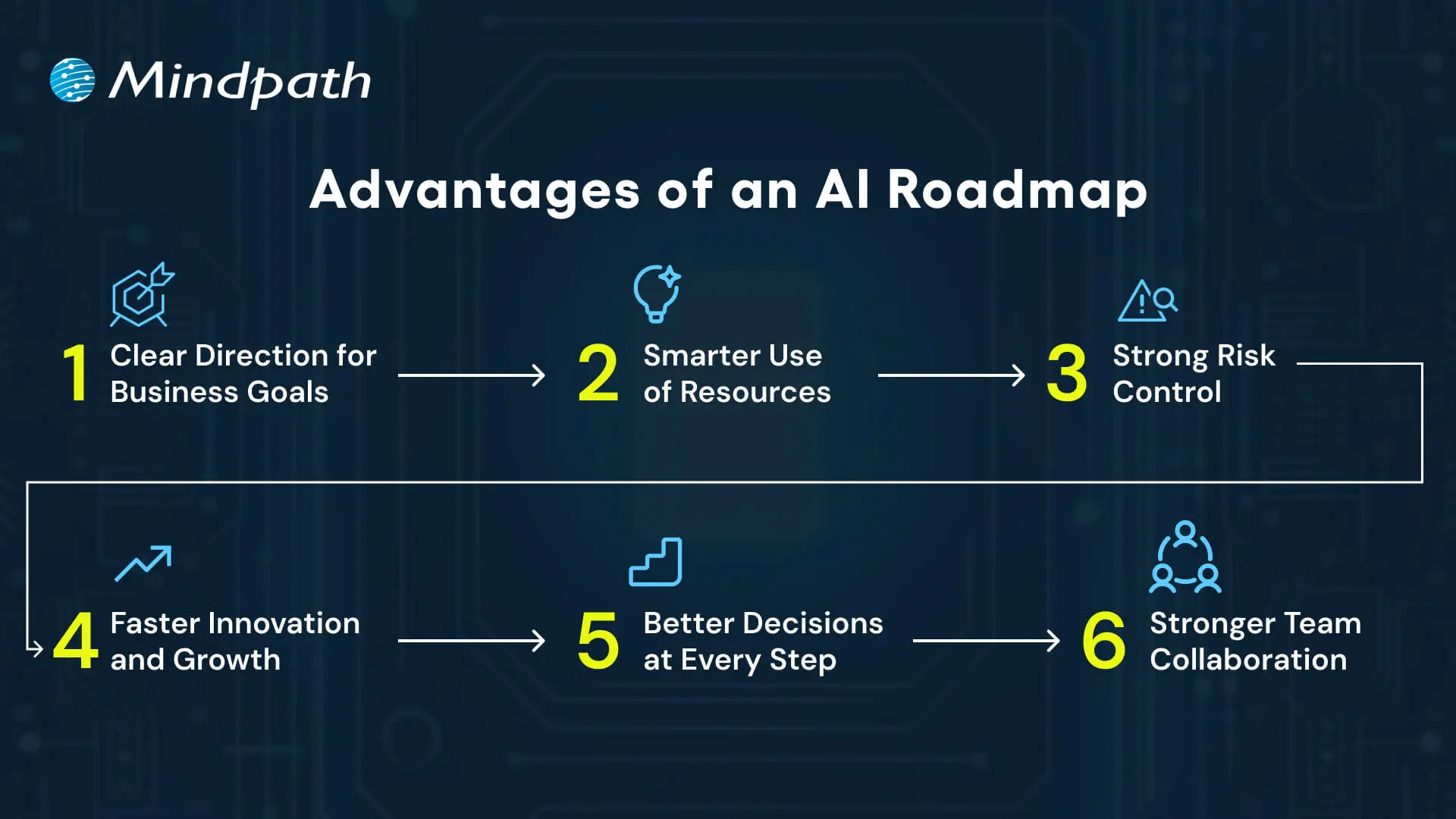
Advantages of an AI Roadmap

1. Clear Direction for Business Goals

An AI roadmap links all work to the company’s longer-term vision. This keeps both leaders and teams aligned and working towards the same purpose, minimizing any confusion or delays.

2. Smarter Use of Resources

Make each business plan deliberate and focused, so budget, skills, and tools are applied to the most impactful projects.

An AI roadmap generator can help you do this faster and with more precision.

3. Strong Risk Control

An AI roadmap allows organizations to tackle any aspects of security, compliance, or data quality up front.

Having a plan reduces risk for organizations and ensures a more streamlined implementation.

4. Faster Innovation and Growth

A roadmap allows organizations to have agility and the ability to experiment and scale solutions.

Even a beginner-friendly AI roadmap can outline the first steps that will lead to innovation and growth.

5. Better Decisions at Every Step

Leaders use the roadmap to select the appropriate use cases and monitor progress.

With this practical approach, it resembles an AI developer roadmap in which each step takes you to the next level of value.

6. Stronger Team Collaboration

An explicit roadmap promotes better communication across departments.

It builds teamwork and supports everyone in contributing to developing and using AI in the way it is most useful.

Struggling to make AI work for your business? Explore AI solutions for small businesses to discover practical, scalable solutions.

Key Steps to Build an AI Roadmap 2026

Constructing an AI roadmap in 2026 necessitates a defined plan that relates AI projects to real business objectives.

Companies must assess their focus on strategy, resources, and measurable outcomes in order to ensure the AI investments add value. Here are the key steps for building an effective roadmap.

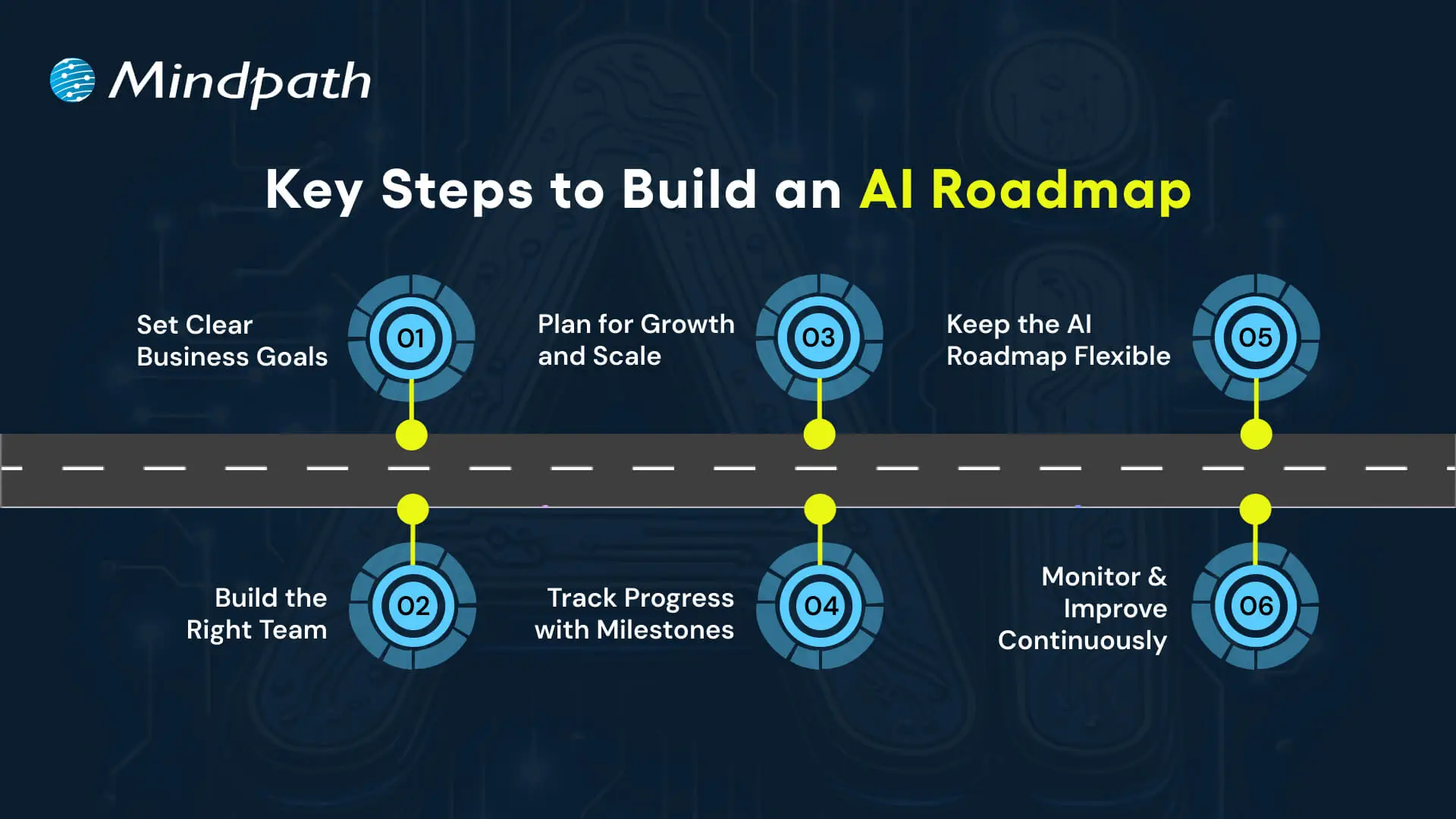
Key Steps to Build an AI Roadmap

1. Set Clear Business Goals

Every successful AI roadmap begins with a definitive goal. Set the desired outcomes that are most important.

Simply articulate it so everyone understands what it means to them. This clarity likewise connects each project to real business value.

2. Build the Right Team

A roadmap is only effective if the correct drivers are behind the wheel. Organize your engineers, strategists, and experts in the domain who can operate at the intersection of technology and business.

Taking a look at an AI engineer’s roadmap may help you frame up the skills you need to develop as a team.

3. Plan for Growth and Scale

A successful strategy looks to the future. Creating systems for larger datasets with multiple models and interconnected data with business apps.

It translates minor pilots into a comprehensive AI roadmap, facilitating ongoing growth.

Want to make faster and smarter business decisions? Discover how AI in decision-making enables leaders to transform data into actionable insights.

4. Track Progress with Milestones

Break the journey into smaller, actionable segments. Start with a pilot, grow to teams, and then link to enterprise systems.

As they reach a milestone, they will be able to see their progress and also validate that the roadmap is indeed compliant.

5. Keep the AI Roadmap Flexible

As the market landscape evolves, priorities shift.

Consistently update your AI roadmap to reflect new goals and possibilities. The adaptability within your roadmap will allow AI to remain relevant as your business develops.

6. Monitor and Improve Continuously

AI models must receive ongoing maintenance to remain valuable.

Form an AI team to monitor precision, solicit user feedback, and update models when the data or needs change.

Researching a generative AI roadmap can also help in developing new capabilities.

Wondering how your AI roadmap can go beyond automation to deliver smarter outcomes? Explore how Large Language Models (LLMs) can streamline operations and unlock new business value.

How will You Shape Your AI Roadmap for Success?

An AI roadmap provides businesses that want to adopt Artificial Intelligence with structure, direction, and confidence on their journey.

It allows business leaders to set and achieve organizational objectives, manage and allocate resources, reduce risk, and scale innovation with measurable outcomes.

With a flexible and constantly evolving AI roadmap, organizations can adapt their actions to changes in the market and continue to reap value from AI initiatives.

A solid plan will use a shared vision for long-term success.

At Mindpath, we are experts in conceptualizing and executing custom AI solutions, providing end-to-end AI consulting services, aligned with your business goals.

Throughout the entire process, from strategy & roadmap planning to development and scaling, our specialists will assist you.

Our passion for innovation and growth allows us to harness the real power of AI and transform complex problems into quantified outcomes.

generative AI for customer service

In the technology-driven era, the customer service landscape has undergone a transformational change.  A key technology that has been serving as a catalyst is generative AI. The rising popularity of generative AI for customer service is evident, as about 65 % of leaders in customer service intend to leverage the technology along with conversational AI to boost customer satisfaction (Source: IBM). 

The emergence of Gen AI has been nothing short of transformational for businesses. One of the main areas that has witnessed a remarkable change because of Gen AI is customer service. The novel technology has undoubtedly broadened the boundaries of customer support. Business entities across diverse industries can focus on enhancing customer experience with AI, especially generative AI. Let’s explore how modern businesses can capitalize on Generative AI in customer service.

If you are looking to leverage the user experience with the use of Gen AI. Contact us to unlock the full potential of Gen AI in enhancing your customer support and delivering personalized services.

An Insight into Generative AI

Before answering the question – How generative AI is improving customer service, it is crucial to have clarity on Gen AI. Generative AI refers to the specific branch of Artificial Intelligence that is capable of creating new content in the form of text, audio, video, and image formats. The output of Generative AI mainly depends on the type of data that it has been trained on.

In recent years, Generative AI has undoubtedly been considered a major breakthrough in the AI landscape. It has not only expanded the boundaries of Artificial Intelligence but also redefined how individuals and businesses interact with AI technology. The functionality of generative AI is not restricted to generating new content. It can also generate chat responses, create deepfakes, and personalize interactions.

Wondering how artists and creators are adapting to AI? Discover how Generative AI is changing the creative industry, and see how automation and imagination now work together.

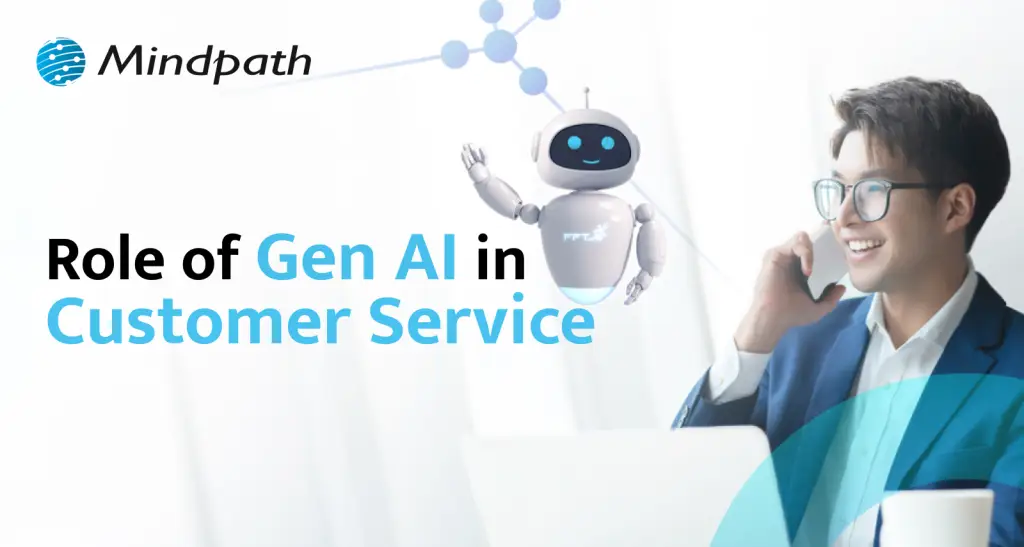
Role of Generative AI in Customer Service

Customer service is the specific domain where companies offer support and assistance to their customers. The assistance could be offered prior to, during, or after the purchase of their offering. Regardless of the timing of such service, the role of customer service is indispensable since it can have a major influence on the overall experience and satisfaction of customers. At present, the customer service arena has undergone revolutionary change thanks to the adoption of Gen AI by businesses.

Generative AI for customer service has been a boon in the business world. It has certainly equipped businesses to automate their customer service function. As a result, the overall efficiency of business entities to promptly respond to the queries and concerns of their customers has increased significantly. Today, the role of GenAI customer service is of high strategic importance for businesses. By leveraging the core capabilities of Generative AI, businesses are able to redefine how they deliver support to their customers.

Curious about how generative AI is applied in real-world scenarios? Explore Generative AI Use Cases to discover how businesses leverage AI for content, design and innovation.

Key Benefits of Generative AI-based Customer Service

The strategic deployment of Generative AI technology in a customer service setting can give rise to a host of benefits for businesses.  In order to take advantage of the novel technology in an optimum manner, it is a must for businesses to understand its potential at an in-depth level. Some of the major benefits that can arise for businesses by integrating generative AI in customer service include:

1. Prompt Response

By integrating Gen AI-powered customer service, businesses are able to promptly respond to the concerns or queries of their customers. Customers do not have to wait for long hours to get support from businesses. Gen AI undoubtedly empowers businesses to respond to their customers instantly. Moreover, thanks to the use of Gen AI in customer support, businesses are able to offer 24/7 assistance to their customers. This automatically increases the overall convenience of customers and strengthens their association with businesses.  

2. Personalization of Interactions

One of the chief benefits of gen AI in customer support is that it facilitates personalization. As a result, business entities can tailor the interaction to meet the exact needs of their customers. Generative AI technology is basically capable of accessing customer data and past interactions, thereby personalizing the conversations. The integration of Generative AI for chatbots has been revolutionary since it has taken personalization to the next level. Thus, in the competitive business environment, businesses are able to have meaningful conversations as well as interactions with their customers.  

3. Better Productivity of Customer Service Agents

One of the benefits of AI in support teams revolves around the higher productivity of agents. Thanks to the automation of conversations with customers, the workload of customer service agents has significantly reduced. Therefore, they are able to focus on complex interactions and deliver value to customers. Moreover, the possibility of customer service agents suffering from burnout and fatigue can also be significantly reduced.

4. Downside of Gen AI in Customer Service

Although Generative AI technology has been disrupting customer service like no other technology, it has also given rise to a few concerns. In order to get a holistic insight into the potential of Gen AI, it is crucial to take into consideration its shortcomings. By having a comprehensive insight into these next-gen customer service solutions, businesses can leverage the novel technology in an optimal manner.

5. Hallucinations 

One of the major shortcomings revolves around hallucinations. There may be a number of occasions when Gen AI may generate inaccurate or counterfeit responses that may seem plausible. However, due to their inaccuracy, the risk of misinformation may arise. Furthermore, customers may be on the receiving end because of this particular flaw. In sensitive industries such as healthcare or finance, it may act as a major hindrance for both businesses and customers.

6. Absence of domain knowledge

Another downside that businesses need to take into consideration is the lack of domain knowledge. Unless and until companies fine-tune Gen AI prior to its implementation, there may arise knowledge-related gaps. Due to such gaps, Gen AI may not be able to address complex queries that may be asked by customers. As a result, the results may not be relevant and useful for customers.  

7. High reliance on automation

The excessive reliance on automation has the potential to affect the personalization component of the interaction. When customers may expect to get empathetic and emotionally sensitive responses, generative AI may not be the ideal customer service solution to meet their needs. As a result, the issue relating to emotional disconnect may arise, diminishing customer satisfaction.  

It is imperative for businesses to take into account the positives as well as the negatives of Gen AI. It can certainly create an opportunity for businesses to capitalize on the core capabilities of Gen AI and redefine how they deliver customer service. As a result, they can strategically leverage Gen AI to strengthen their association with their target audience.

Trying to keep up with rapid AI advancements? Read Generative AI Revolution to learn how this transformation is redefining business and creativity.

Looking to Redefine Your Customer Experience with AI?

The customer service realm has undergone a dynamic change in recent years due to the adoption of Generative AI by businesses. Even though Gen AI is still in its nascent stage, it holds immense promise, especially in the customer service setting. It is essential to bear in mind the associated benefits as well as drawbacks of the generative AI technology.

The novel technology has given rise to a plethora of opportunities for firms to redefine how they interact and engage with their customers while extending customer support to them. In order to leverage Generative AI, you can choose Mindpath as your success partner. The novel digital solutions offered by the company can help businesses take advantage of Gen AI capabilities and enhance their customer service. Thus, businesses across diverse industries and sectors can strategically deploy Gen AI to reshape their customer interactions.

Frequently Asked Questions

1. How does generative AI handle complex or sensitive customer queries?

Generative AI can manage many queries effectively, but complex or sensitive issues often require human involvement. It works best when combined with human oversight, where AI handles routine interactions and escalates critical or nuanced cases to trained support professionals for accurate resolution.

2. What type of data is required to make generative AI effective in customer service?

Generative AI relies on high-quality, structured, and relevant data such as past customer interactions, FAQs, and product information. Well-prepared data ensures accurate responses, better personalization, and improved reliability, making it essential for delivering consistent and meaningful customer support experiences.

3. How can businesses maintain trust while using generative AI in customer interactions?

Trust can be maintained by ensuring transparency, accuracy, and clear communication. Informing users when they are interacting with AI, regularly monitoring responses, and providing easy access to human support helps build confidence and ensures a reliable customer experience.

4. What measures can reduce errors or hallucinations in generative AI responses?

Regular model monitoring, fine-tuning with domain-specific data, and implementing validation layers can significantly reduce errors. Combining AI outputs with predefined rules or human review ensures more accurate and dependable responses, especially in scenarios where precision is critical.

5. How does generative AI scale customer support operations effectively?

Generative AI can handle a large number of simultaneous interactions without delays, making it highly scalable. It allows businesses to manage increasing customer demands efficiently while maintaining response speed and consistency, without the need to proportionally increase support staff.

Discover how Generative AI is revolutionizing customer service with automation, efficiency, enhancing customer experience and more.