Angular vs React vs Vue: Which One You Should Choose?

Join our Newsletter!

Featured Posts

Support Is One Click Away

Home

Angular vs React vs Vue: Which One You Should Choose?

Angular vs React vs Vue

Angular vs React vs Vue: Which One You Should Choose?

Do you want to create web applications for your business, but are unsure about which framework to choose? Choosing the correct framework for your next project can be challenging because it must be perfect in terms of speed, performance and creating attractive UIs. When we discuss ideal frameworks; React, Angular and Vue are the most popular ones that come to our minds. But the main question is – which one should you choose from these three, i.e., Angular vs React vs Vue?

Confused, right? Well, we got you covered! This blog will walk you through the difference between Angular vs React vs Vue which will give you a clear idea about which one to choose for your next project. So, let us find out! 

Confused about whether Angular, React, or Vue is the right framework for your next project? Mindpath offers expert ReactJS development services to help you choose and build scalable, high-performing web applications.

Overview of Angular, React, and Vue

When you’re setting out to develop a website or web application, one of the initial choices is selecting an appropriate front-end framework.  Angular, React, and Vue are three of the leading choices today. All three work differently, and the choice of the best one is based on your project requirements, your team’s expertise, and your long-term objectives. Let us try to understand their fundamentals: 

Understanding Angular

Angular is a robust framework developed by Google that enables developers to create contemporary web applications. It is built in TypeScript, which is a type-safe variant of JavaScript, and it’s particularly well-suited for creating large and complex apps.  

One of the greatest things about Angular is that it only gets better with periodic updates, every six months. Such updates tend to introduce new features, enhancements, and bug fixes, which make your app up-to-date and secure. 

Here are the important features of Angular:

1. Dependency Injection

Angular makes it easy to share data and logic between parts of your app using services. These services are “injected” where needed, helping keep your code clean and testable.

2. Angular CLI

Angular comes with a command-line tool that helps you quickly create, test, and build apps. It saves time by automating common tasks like generating files or setting up projects.

Must Read: Reactjs Trends

3. Cross-Platform Development

With Angular, you can use the same code to build web, mobile, or even desktop apps. This means faster development and less work for different platforms.

4. MVC Architecture

Angular organizes your code into three parts: data (model), display (view), and logic (controller). This structure keeps things neat and easy to manage.

5. Reactive Programming

Angular handles real-time updates smoothly using reactive programming. It helps your app respond to user actions instantly without waiting on the server.

Want to know how React skills can help you build portfolio-ready applications? Explore our detailed ReactJS web development guide to understand its real-world potential.

Understanding React

React is a JavaScript library developed by Facebook that assists developers in creating user interfaces that are fast, smooth, and interactive. It’s commonly used to develop both websites and mobile applications.  

One of the reasons developers adore React is that it’s so flexible. You can use the tools and features you require, without being locked into a rigid structure. This allows you to have greater control over how your app is constructed. React also makes development quicker by enabling you to reuse snippets of code in various portions of your application.  

Here are the important features of React:

1. Virtual DOM

React uses a virtual copy of the real DOM to check for changes before updating the screen. This avoids reloading everything and makes the app faster.

2. One-Way Data Binding

In React, data flows in just one direction, data transferred from top to bottom. This makes it easier to control how data moves in the app.

3. JSX (JavaScript + HTML)

JSX lets you write HTML inside JavaScript, which makes the code cleaner and easier to understand. It helps developers work faster without switching between languages.

4. High Performance

Due to virtual DOM and reusable components, React apps run very smoothly. Only the parts that change are updated, which saves time.

5. Component-Based Structure

React breaks the app into small pieces called components. Each one handles its own look and logic, and you can reuse them anywhere. 

Wondering how to keep your React app fast as it becomes more complex? Explore our detailed guide on optimizing React performance for large applications to learn easy ways to keep your app fast and smooth.

Understanding Vue

Vue is a new JavaScript framework that helps in the construction of user-friendly and high-performance web applications by developers. It’s fast, lightweight, and extremely flexible, which is why more developers and businesses are starting to use it. 

What distinguishes Vue is that it brings together useful aspects of React and Angular. It’s easy to learn and suits well for developing apps that must be fast to market without compromising on performance or quality. Due to its clean structure and simple syntax, developers can start using Vue easily and develop apps that are easy to maintain. 

Here are the important features of Vue:

1. Lightweight and Fast

Vue is a small framework (just 21KB), allowing for quick load times and faster development. It enables developers to write clean, concise code and speed up the process.

2. Excellent Performance

With its virtual DOM lighter than React, Vue updates only what’s needed, making apps faster and more efficient. It delivers impressive performance, even with large data sets or complex tasks.

3. Easy Debugging

Vue provides live feedback on how the UI looks as you write code, making debugging quick and straightforward. This helps developers catch errors early, even if they’re new to coding.

4. Built-in Tools

Vue includes Vue Router for easy navigation and Vuex for efficient state management. These built-in features save time by providing everything needed to build a full application.

5. Flexibility and Reactivity

Vue can be used for both small and large apps, giving developers flexibility. Its reactive system ensures real-time updates when data changes, keeping the app fast and responsive.

Now that we have understood the fundamentals of Angular, React and Vue, let us learn about the difference between Angular vs Vue vs React.

Planning to build your next project with React but not sure what expertise to prioritize? Discover the key ReactJS developer skills you should look for by reading this comprehensive breakdown.

Angular vs React vs Vue – A Quick Comparison

Here’s a quick comparison of React, Angular, and Vue to help you understand their strengths in terms of popularity, ecosystem, learning curve, performance, and architecture. This will give you a clear view of what each offers:  

1. Popularity

React is extremely popular in web development with most big players using it to support their front-end requirements. Angular is robust in features, commonly used by big applications and top companies like Google and Upwork. Vue is becoming more popular as a light, adaptive framework, a favorite among both businesses and developers. 

2. Ecosystem

In the debate of React vs Vue vs Angular, React has a robust ecosystem with state management in React using tools like Redux, and the ability to create mobile apps with React Native. Angular also supports state management and mobile development with NativeScript while providing a structured framework for building apps. Vue offers useful libraries, state management with Vuex, and smooth integration with Laravel for full-stack development.

3. Learning Curve

In Angular vs React vs Vue comparison, Angular comes with a steeper learning curve due to its complex project structure and TypeScript requirement while React is easier to start with, due to its simpler, component-based approach and Vue, though a bit more complex than React, is still beginner-friendly and has a syntax similar to HTML, making it accessible for most developers.

4. Performance and Memory

For performance in Vue vs React vs Angular, Angular uses real DOM, which can slow down larger applications, while React and Vue leverage virtual DOM for faster rendering and better memory management. This makes React and Vue more efficient in handling dynamic web apps and scaling performance effectively.

5. Architecture

React, when compared with Vue vs Angular architecture, is flexible without having a set design pattern and emphasizes components as building blocks. Angular has the MVC pattern but is component-based and gives a clean structure. Vue uses the MVVM pattern but is flexible enough to use different patterns and can integrate smoothly with third-party tools.

Need a clear path to build React expertise across your team? Discover a strategic React roadmap that helps teams build scalable, high-quality applications faster.

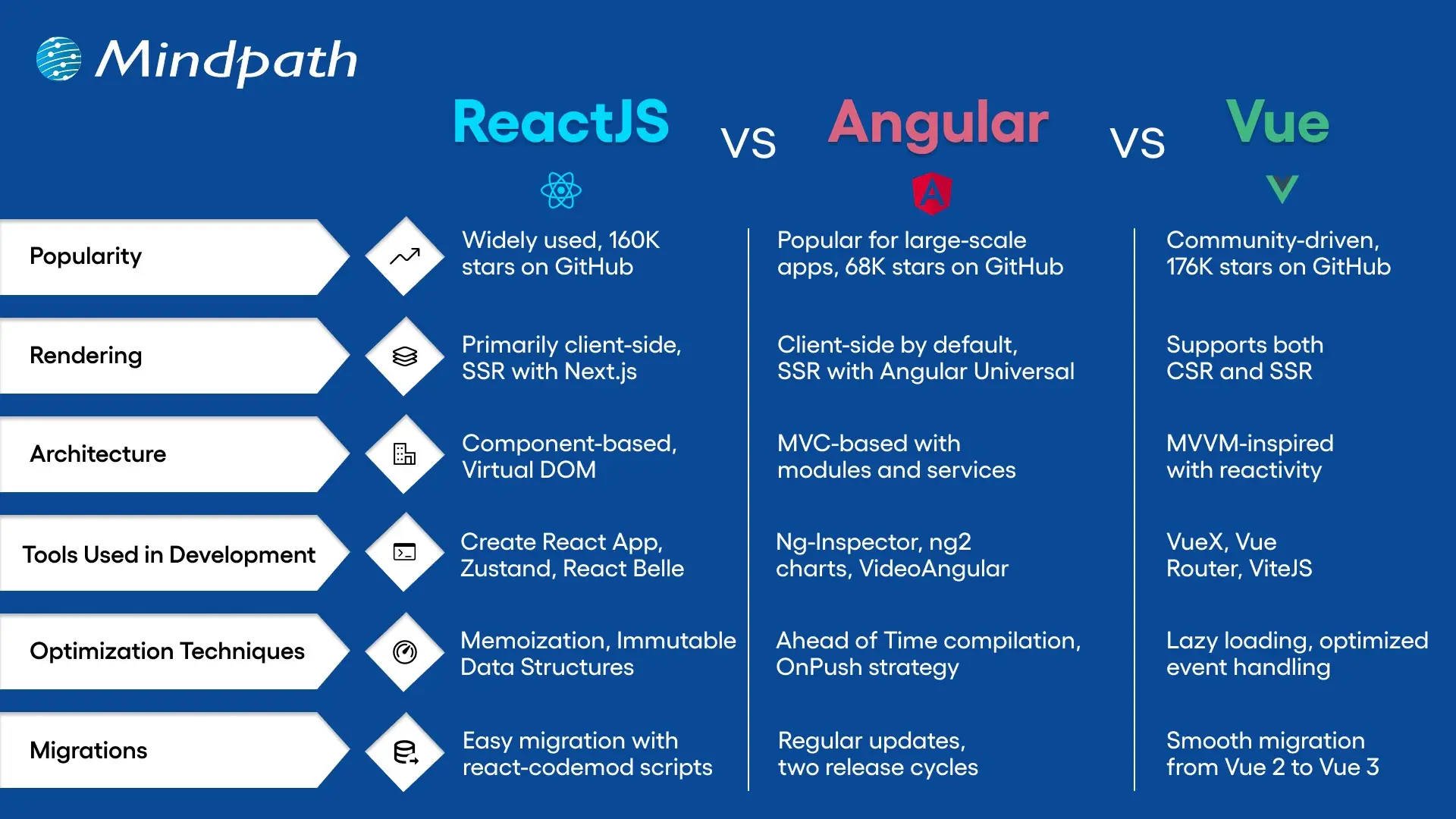
ReactJS vs Angular vs Vue Comparison Table

Here’s a quick comparison of Angular, React, and Vue across key factors. This table highlights their unique strengths to help you choose the right framework for your project: 
Choose the Right Framework for your Web Applications

Selecting between Angular vs React vs Vue is based on your project and team expertise. Each offers distinct advantages for web applications today. Angular is best for big-scale, enterprise-oriented applications with a full toolkit. React provides flexibility, reusability, and an enormous ecosystem and is best for dynamic and quick-loading UI. Vue is small in size, simple to learn, and ideal for small to medium-sized applications with a nice balance of simplicity and performance. 

At Mindpath, we specialize in delivering high-performance web solutions with our ReactJS development services. Our experienced developers build scalable, responsive, and feature-rich applications tailored to your business needs. No matter if you’re upgrading an existing product or starting from scratch, our team ensures seamless development and fast delivery, backed by modern tools and proven practices. 

Related Post

Explore the 5 benefits of React JS for web development, including performance, SEO, and scalability, with insights, case studies, and best practices for your projects.

Related Post

Node.js libraries 

In the modern application development landscape, having speed, flexibility, and smart tools is paramount to success. This is why Node.js libraries are so valuable to both developers and businesses, in that they are all about making a complex task easy, reducing development time, and inspiring innovation. In fact, you can think of libraries as the building blocks of development that enable you to focus on truly valuable features rather than repeatable boilerplate code.

Now, the issue isn’t even finding libraries but just figuring out which is the right one to choose. Each year, new alternatives come out, which provide interesting features and improved performance. So, which libraries really made a difference in 2026? Looking at the top 25 libraries below gives you a good glimpse into what aspects of development are affecting Node.js. Let’s walk through the best options to help you shape your projects for speed, ease of use, and reliability.

Choosing right NodeJS libraries is just the beginning of a successful project. Mindpath’s Node.js development services help you implement latest libraries and best practices effectively for seamless development.

What is a Node.js Library?

Many developers are curious and often wonder: Is Node.js a library? The answer is no. Node.js is a runtime environment that allows JavaScript to run outside of a browser. It is the groundwork to build fast, scalable applications, but it is not a library itself. It can be used with libraries, and it has the possibility to run countless libraries.

When we refer to Node.js libraries, we will consider them as tools explicitly designed to run in the Node.js environment. These libraries are reusable chunks of code that help you with repetitive or simple tasks, such as handling a database, authentication, or file processing. They give developers the freedom to add features without having to rewrite functions. Libraries also do not dictate the structure of a project like frameworks might; they allow developers to develop more intelligently and rapidly.

Must Read: Advantages of NodeJS 

Top 25 Libraries in Node.js

Choosing a Node library can drastically improve the speed and efficiency of your application build. These libraries can provide you with a pre-packaged solution to a common challenge, so you don’t need to write the code from scratch. Let’s take a look at the top 25 libraries that Node.js developers are using in 2026.

1. Async.js

Async.js is one of the most valuable Node.js libraries that enhances asynchronous code without complication. It inhibits render-blocking JavaScript, allowing webpages to load faster and make more fluid transitions. JavaScript content loads asynchronously alongside other page elements, resulting in better overall performance and user experience.

2. Request

Request is a widely used library for making HTTP calls in Node.js apps, and it is super easy and reliable to connect with external entities such as APIs or websites through the HTTP protocol and later retrieve data from them. There are so many libraries for Node.js, but developers often choose Request for tasks like authentication and establishing communication between apps.

3. Express

Express is one of the most popular libraries in Node.js for building fast and scalable web applications. It is important because it is designed to be minimal. This means that it is flexible enough for developers to add features as they like and not worry about excessive complexity. Express is one of the most downloaded NPM packages because it’s popular for building APIs and server-side applications.

4. Socket.io

Socket.io is a reliable library to help developers create real-time applications quickly. It allows for advanced two-way communication between servers and clients, making it ideal for chat apps, live feeds, or real-time updates of any kind. Counted as one of the most popular Node packages used today, the benefits of Socket.io include speed, reliability, and platform compatibility.

5. Jest

Jest is an open-source testing framework for React, Vue, and Angular projects. It is made up of a test runner, mocking library, and assertion library, all in one. Jest is trusted amongst the best Node.js libraries and minimizes velocity, allowing developers to ensure quality with a quick and safe test process.

Is your application quality strong enough to avoid costly bugs after launch? Learn how the right NodeJS development company ensures reliable testing and long-term stability.

6. CORS

CORS is part of the Express Libraries that enables cross-origin requests for Node.js applications. It ultimately allows the server to enable which domains can access it as a resource. It is one of the essential libraries and would enable developers to build a secure and modern web application.

7. UglifyJS2

UglifyJS2 is by far one of the best libraries for minifying and compressing JavaScript files with Node.js. It will minimize the file size, take up space on computer systems, and improve the ability for your pages to load quickly. Many developers utilize this option to improve performance for their web applications.

8. Ethers.js

Ethers.js is a fairly small library that can be used to build Ethereum-based apps. It has a clean API for wallets, smart contracts, and transactions. Developers like to use it because of its security, its flexibility, and its strong community support for Ethereum.

9. Mongoose

Mongoose is an Object Data Modeling library that allows developers to connect MongoDB to Node.js with ease. It provides schemas, validations, and hooks that allow developers to organize and manage data more conveniently. This library allows for a more organized and easier workflow when working with databases.

10. Multer

Multer is a Node.js middleware for handling file uploads. It is specifically for multipart forms, which handle file uploads gracefully. It is a very fast and lightweight middleware for managing files uploaded by the user.

Do heavy file uploads slow down your app and impact user experience? Explore how hiring skilled NodeJS developers helps optimize performance at scale.

11. Gulp

Gulp is a task runner used for automating repetitive tasks in a development process. Its job includes file minifications, compiling CSS, and optimizing a workflow. Gulp is one of the popular Node.js libraries that allows teams to save time and be more effective.

12. PM2

The PM2 is a process manager built to run Node.js applications in production, and has the ability to restart apps if necessary, monitor performance, and handle scaling. PM2 keeps serious applications running without any downtime.

13. Passport

Passport is a flexible authentication middleware that works smoothly with Express applications. It is easy to add new login methods as it can be extended by many plugins. Developers like it for its modularity, simplicity, and power to secure their apps.

14. Browserify

Browserify brings Node.js modules into the browser. It bundles dependencies for convenience when writing a client. It structures and organizes front-end projects.

15. Parser

In Node.js, parser middleware allows a developer to use something with a request body. Developers create parsers to take data from forms or JSON files. Parsers give developers a fast and clean way to interact with data.

Want to leverage your application data to build smarter, AI-driven features? Explore the top Node.js libraries for AI integrations to unlock business intelligence.

16. Nodemailer

Nodemailer sends emails using Node.js. Teams often use it for alerts, notifications, and transactions. It is simple to set up and very reliable.

17. Sequelize

Sequelize is an Object-Relational Mapping tool for Node.js and databases. It works with MySQL, PostgreSQL, SQLite, and more. It simplifies how developers work with data through its query and relation methods.

18. JSHint

JSHint is a linter for JavaScript code that looks for errors, syntax issues, and bad practices. It saves time by catching issues early.

19. Axios

Axios is a client based on promises to make HTTP requests. Works in Node.js and the browser. Among other libraries for Node.js, experts consider it safe and note that it supports modern clients.

20. Morgan

Morgan is middleware for Express applications dedicated to logging. It logs requests, responses, and errors. It can help you monitor your app and even debug.

Can you track performance issues before they impact your customers? Learn the key factors to consider when hiring NodeJS developers who build reliable, well-monitored applications.

21. Dotenv

Dotenv is a module that can manage your environment variables in your project. It helps keep sensitive information like passwords private. It’s safe, small, and very simple to use.

22. Faker

Faker generates fake data to test with. It’s quick to create names, emails, and addresses. Node.js libraries, such as Faker, help you build mock datasets quickly.

23. Puppeteer

Puppeteer is a powerful tool that automates Chrome and helps with tasks like frontend testing and performance checking. It makes website crawling and UI testing much faster and easier for developers.

24. Lodash

Lodash is a utility library that offers many functions to simplify common programming tasks. It helps developers keep their code clean, short, and easy to manage.

25. Winston

Winston is a logging library that helps manage and store logs in one place. It supports multiple formats and storage options, making application monitoring more reliable.

Can your business afford downtime caused by unseen application errors? Discover how expert NodeJS developers build high-performance apps with proactive logging and monitoring.

Ready to Choose the Right Node.js Libraries?

Exploring the top Node.js libraries in 2026 shows how much they improve speed, reliability, and ease of development. These tools help developers focus on features that matter most without wasting time on repetitive work. From testing and logging to database management and performance optimization, each library adds value and creates smoother workflows for modern applications.

At Mindpath, we offer expert Node.js development services that help businesses build scalable, secure, and efficient applications. Our skilled developers use proven Node.js libraries to design solutions tailored to your goals. With deep technical expertise and a focus on quality, we deliver results that save time and enhance performance. Let us help you bring your project to life.

The cost of hiring a ReactJS developer in Canada varies based on several factors, including experience level, location, project complexity, and hiring model. Developers with advanced skills command higher rates, while junior developers are more budget friendly. Additionally, hiring models like freelancers, agencies, or full-time employees can influence pricing. Understanding these cost variations helps businesses plan their budget effectively. Below is a breakdown of the hourly rates for ReactJS developers in Canada and the key factors that affect pricing.

1. Cost of Junior ReactJS Developers

Junior ReactJS developers in Canada typically charge $55 – $75 per hour. These developers have basic knowledge of React fundamentals, JavaScript, and frontend technologies but may lack hands-on experience with complex projects. They are ideal for small-scale applications, maintenance tasks, and assisting senior developers. While cost-effective, hiring junior developers may require additional training and guidance to ensure quality output. They are best suited for businesses looking for affordable development resources without the need for deep technical expertise.

2. Cost of Mid-Level ReactJS Developers

Mid-level ReactJS developers charge $80 – $120 per hour in Canada. They possess strong expertise in React, state management (Redux), API integration, and front-end best practices. These developers can handle end-to-end development, optimize performance, and manage application scalability. They are suitable for medium to complex projects where independent problem-solving is required. Businesses hiring mid-level developers can expect efficient coding, reduced development time, and well-structured applications while maintaining a balance between cost and expertise.

3. Cost of Senior ReactJS Developers

Hiring senior ReactJS developers in Canada costs $120+ per hour, depending on expertise and project scope. They have extensive experience with React, advanced state management, performance optimization, and architecture design. Senior developers are ideal for large-scale applications, enterprise solutions, and complex integrations. They provide technical leadership, mentoring, and strategic planning to ensure high-quality development. While expensive, their expertise significantly reduces project risks and ensures long-term success by delivering optimized, scalable, and maintainable applications.

4. Factors Affecting ReactJS Developer Costs

Several factors influence ReactJS developer rates in Canada:

Experience level: Senior developers demand higher rates due to their expertise.

Location: Cities like Toronto and Vancouver may have higher costs than smaller regions.

Project complexity: Advanced features, AI integration, or real-time capabilities increase pricing.

Hiring model: Freelancers may charge lower hourly rates, while agencies offer full-service teams at a premium. Full-time employees require salaries, benefits, and overhead costs. Businesses should assess these factors when planning their development budget.

Need skilled ReactJS developers in Canada at the right price? Mindpath, connects you with top-tier talent, from junior to senior developers, tailored to your budget and project needs. Whether you’re building a scalable web app or optimizing an existing one, our experts ensure high-quality, cost-effective development. Let’s bring your project to life with the best ReactJS professionals in Canada. Contact Mindpath today and hire expert developers for your business!

Get in Touch Now!

Discover the key factors influencing software development costs and how to optimize your budget. Learn how Mindpath can help.
Magento vs wordpess

The question relating to Magento vs WordPress is not new in 2025. However, businesses as well as professionals need to know how these platforms are different from one another so that they can make a wise selection. With Adobe pushing major updates to Magento WordPress has been continuing to dominate the CMS landscape like never before. 

Several modern businesses and professionals all across the globe have been wondering, “Which is better, Magento or WordPress?” You should be able to answer this question as well. This is because the WordPress vs Magento debate has been directly impacting how online stores compete with each other in the crowded digital marketplace. Let us look at these platforms at a deeper level so that you can choose the ideal tool that perfectly aligns with your needs. 

Selecting the right platform can define website success. At Mindpath, we offer WordPress development services that help you elevate your business by creating a custom website that maximizes performance and drives results.

A Quick Overview of Magento

Magento is a popular open-source e-commerce platform that came into existence in 2008. Currently, it is owned by Adobe, and it has been rebranded as Adobe Commerce. It has certainly emerged as a powerful eCommerce platform that is built for enterprises and growing online retailers. 

One of its unique features that has contributed to its popularity is its scalability. Magento supports large product catalogs and multi-store management. It has novel B2B features going beyond the capabilities of usual CMS platforms. It offers businesses robust tools for diverse purposes, including checkout optimization and marketing automation. Over the years, Magento has gained high popularity in the dynamic business community. 

Must Read: WordPress vs Webflow

A Brief Insight into WordPress

WordPress is a top web content management system (CMS) that is known to power a large number of websites on the internet. It is known for its flexibility, ease of use, and vast plugin ecosystem. WordPress serves as a valuable tool for businesses that allows them to launch everything from blogs and corporate sites to online stores, especially when supported by custom WordPress development, which tailors the platform to unique business needs. Moreover, they do not have to worry about high development overhead.

Some of the core strengths of WordPress lie in content publishing as well as SEO optimization with robust tools such as Yoast and Rank Math. Another unique feature of WordPress is the ability to scale through a large number of themes and extensions. It is time to answer the question: Is Magento better than WordPress?

Key Differences between Magento and WordPress

WordPress and Magento have emerged as revolutionary forces in the contemporary business world. It is a must for professionals and businesses, especially e-commerce businesses, to know about Magento vs WordPress. Some of the major differences between WordPress vs Magento that you must take into account are

1. Purpose of the Platform

One of the key differences between Magento and WordPress is related to the purpose of the platforms. Magento or Adobe Commerce has been built primarily for enterprise-grade eCommerce. Its unique features relating to catalog management and multi-store support are specifically designed to create value for e-Commerce businesses. especially as AI in e-commerce becomes more influential in driving personalization and automation. WordPress was originally created as a content management system. However, it can be extended into the e-Commerce realm through plugins. It is specifically ideal for small to medium-sized online stores.

2. Performance and Scalability

Magento is capable of handling large product catalogs and high traffic. It is also an ideal tool that is designed for complex integrations. It certainly serves as the best tool for mid-sized and large enterprise businesses. It is definitely easier to set up WordPress. In fact, users can scale it for moderate traffic. However, the specific platform may require managed hosting or heavy optimization for handling large stores.

3. Ease of Use

While choosing a platform, it is fundamental for you to take into account the ease of use. WordPress is certainly more user-friendly than Magento. In fact, professionals as well as businesses can easily navigate the tool even if they have limited technical knowledge. However, that is not the case with Magento. This is because it is more complex in nature and requires technical knowledge. You need to bear in mind that it is not beginner-friendly. In case you plan to use Magento, you need to seek support from experts. 

Worried about security risks and vulnerabilities on your WordPress site? Read our guide on safeguarding WordPress vulnerabilities to learn how to protect your site and keep it secure against threats.

4. Customization

Both WordPress and Magento offer extensive customization to users. Magento allows business entities to build custom product pages. You can also integrate third-party tools in a seamless manner. Users even have the option to capitalize on its advanced features and capabilities so that their needs can be perfectly met. Even though WordPress is also customizable in nature, it highly relies on plugins. It is true that essential e-Commerce functionalities are available. However, business entities may require additional plugins for features relating to payment gateways and inventory management.  

5. SEO Capabilities

If you wish to compare WordPress or Magento, it is a must to look at their SEO capabilities. This is because search engine optimization is a must for the success of e-commerce businesses in the prevailing business landscape. Both WordPress and Magento offer robust SEO capabilities to users. But WordPress has a small edge over Magento thanks to its large library of SEO plugins. The specific tool makes it easier for businesses to optimize their content and meta tags. You can certainly leverage these capabilities of WordPress and help your business website rank higher online. Although Magento offers excellent SEO capabilities, you need to possess technical knowledge to leverage them in an optimal manner. 

6. Security Features

One of the most common concerns for online businesses today revolves around cybersecurity. So it is critical to take into account the security features while choosing a novel platform for your e-Commerce business. One of the key strengths of Magento is related to its robust security features. It has built-in security patches along with data encryption features. Another key feature that you should not miss is related to advanced fraud protection features. These security features undoubtedly make Magento a reliable and safe choice for e-commerce businesses.  In the case of WordPress, the security fundamentally depends on third-party plugins. As WordPress is commonly used, there is a chance for you to get targeted by online hackers or cybercriminals. 

Ready to make your hiring process smooth and avoid picking the wrong developer? Our WordPress Developer Checklist gives you a clear, step-by-step framework to evaluate every candidate.

Magento vs WordPress – Comparison Table

The table below gives an insight into the major differences between WordPress and Magento. As the WordPress Magento debate is gaining momentum in the e-commerce realm, you need to look at the differences so that you can choose the ideal platform that best suits your needs. However, an important thing to bear in mind while looking at the differences is that users can use Magento in WordPress in order to use them together.

Magento WordPress
Platform Purpose Designed for e-Commerce Content Management System and can be extended to e-Commerce 
Performance and Scalability Ideal for large e-Commerce businesses Well-suited for small and medium-sized business sites 
Ease of Use Need for technical knowledge Easier to use 
Customization
SEO Capabilities Depends on technical expertise  Better SEO Capabilities 
Security Features High security  Lower security

Who is the Winner: WordPress or Magento?

The exact choice between Magento and WordPress entirely depends on the needs of the users, including their business size, goals, and technical needs. You need to remember that there is no clear winner between these two platforms. 

Magento is suited for enterprise-level stores, and it is ideal for high-volume sales along with multi-store management. In case your business needs advanced features such as B2B support along with custom checkout flows, you must choose the specific platform. You can definitely leverage its strong scalability and enterprise-grade security. However, you need to remember that if you choose Magento, your business must be ready to make a higher investment, and it must possess the necessary technical expertise.

WordPress is definitely a better choice for small to mid-sized businesses. It is an excellent choice for users who are in search of a simple and pocket-friendly tool. The strengths of WordPress, such as its excellence in content publishing and SEO flexibility, can create value for both businesses and professionals. 

Want to ensure your WordPress site is running on the right PHP version for top performance and security? Check out our guide on WordPress PHP compatibility to keep your site efficient, stable, and future-ready.

Final Words

While making the comparison between Magento vs WordPress, you need to remember that there exists no one-size-fits-all solution. Magento stands out for enterprises and fast-scaling retailers that depend on novel features. WordPress is a simpler choice for small and medium-sized businesses. It is great for you if you are in search of flexibility and lower upfront costs. The best platform for you entirely depends on your business needs and goals, its size, and the available technical resources.

If you’re planning to build a website and want to use the best of WordPress, Mindpath WordPress development services will help you with that. Our experts ensure that the capabilities and functionalities of the platform can be optimally utilized to create value for your business. The decision can certainly give an edge to your business in the competitive space.