Home

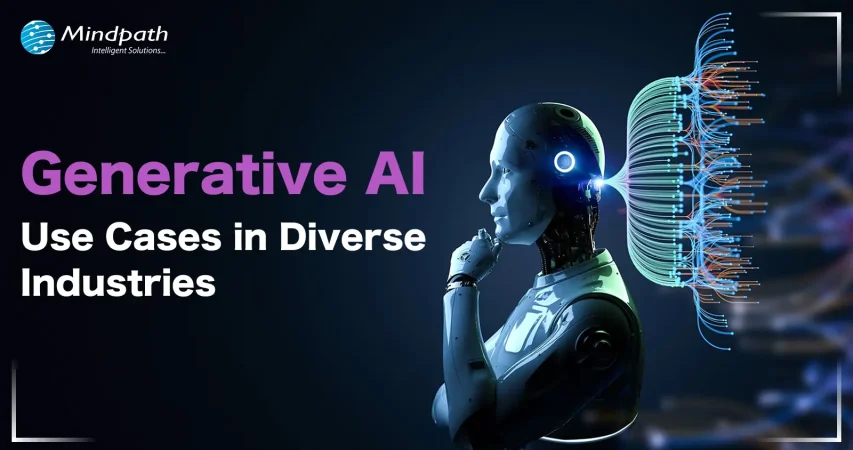
Generative AI Use Cases in Diverse Industries

Generative AI Use Cases in Diverse Industries

Lorem ipsum dolor sit amet, consectetur adipiscing elit. Ut elit tellus, luctus nec ullamcorper mattis, pulvinar dapibus leo.

Join our Newsletter!

Generative AI Use Cases in Diverse Industries

“Necessity is the mother of invention.” We have all encountered this phrase in our science textbooks or while reading about most scientific innovations. Be it the invention of the cell phone, the internet, or the World Wide Web, each of these has brought a paradigm shift in the world of technology.  

While technology is rapidly expanding its horizon, Artificial Intelligence remains the buzzword that every business can’t stop gushing about. Generative AI, a subfield of artificial intelligence, has gained massive momentum post the launch of ChatGPT by OpenAI in 2022. Since then, generative AI use cases have found their way in some of the major industries, including healthcare, banking & finance, gaming, and supply chain, to name a few, marking the beginning of the Gen AI revolution.

But what is Generative AI? Is it only limited to text or image generation, or can it help in other fields as well? In this blog, we will be answering some of the burning questions around Generative AI and generative AI use cases across industries.  

Want to implement cutting-edge GenAI solutions in your company? Mindpath offers end-to-end AI Development Services for deploying generative AI applications efficiently.

Introduction to Generative AI 

Let’s start with the basics: what is Generative AI? Generative AI is a subset of artificial intelligence that creates novel content, such as text, images, audio, video, and code, in response to user prompts. Rather than merely analyzing existing data, it uses deep learning models to predict and generate entirely new outputs based on patterns learned from vast training datasets.

Think of it as a magic lamp that fulfils many of your creative and analytical needs! With the help of machine learning models and neural networks, large volumes of data are analyzed, patterns are discovered, and new content is generated.

Here are some of the key components of Generative AI:  
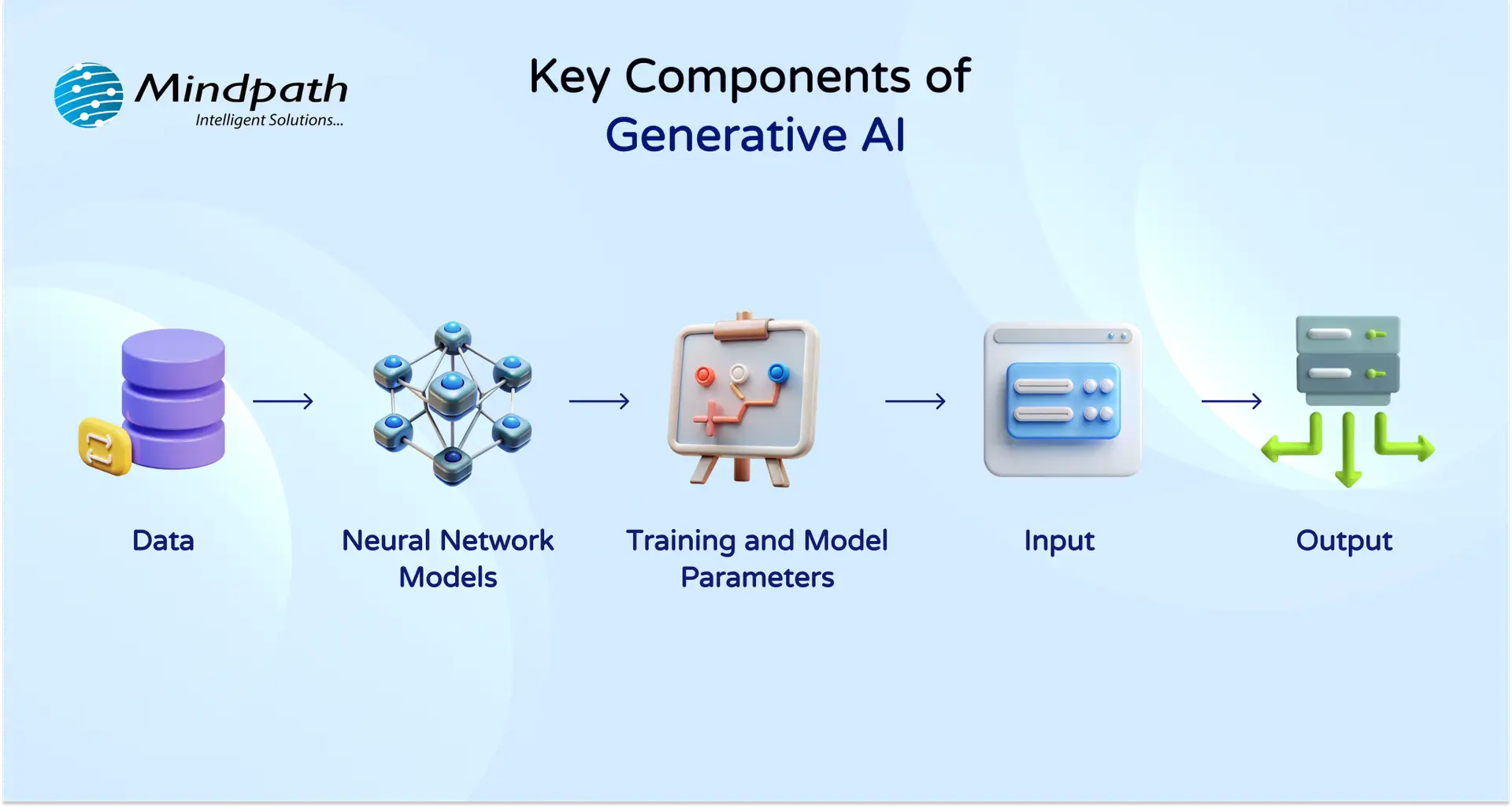
key components of Generative AI

  1. Data: Raw data such as documents, eBooks, ledgers, images, videos, codes and a lot more that Generative AI uses to learn.  
  2. Neural Network Models: They work just like a human brain; they help AI models to make sense of all the raw data we have put in the model.  
  3. Training and Model Parameters: There are some parameters that help AI models fine-tune the information, cut the noise and generate accurate output.  
  4. Input: When you ask a Gen AI model to create a cover letter for a job, create a report based on Excel data, generate a Ghibli image to roll with the current trends, that’s categorized as an “input”.  
  5. Output: Whatever results a Gen AI model, such as ChatGPT, MidJourney, Bart, delivers for your query is the output.  

Generative AI is gaining momentum, with a global market valued at USD 37.89 billion in 2025 which is projected to reach USD 1,005.07 billion by 2034 at a CAGR of 44.20%. (Source: Precedence Research)

Generative AI Use Cases Across Industries 

While Gen AI is growing, curating a business-first roadmap for its adoption is important for those seeking to leverage it to its fullest advantage.  Now that we have explored what Generative AI is, let’s move on to some prominent generative AI use cases in different industries, proving that it’s more versatile than we know!  

1. Healthcare 

According to a recent survey by Deloitte Center for Health Solutions, 75% of leading healthcare companies across the globe are either currently experimenting with generative AI or planning to scale Gen AI in the near future.  

In what area, you may wonder? Generative AI healthcare is being used to maintain patient records, drug discovery, interpreting and analyzing medical images such as X-rays, CT scans, MRIS, to mention a few.  

Scientist are using generative AI for modelling molecular structures that can help not just in creating new drug compounds but also in predicting their effectiveness.  

92% of healthcare leaders see a promising future of generative AI in improving efficiency as well as speeding the decision-making in critical scenarios.  

2. Banking  

Next up is the banking and finance industry. Generative AI in banking is fueling the fintech revolution in more ways than one. Generative AI is currently being leveraged for detecting fraud, assessing the credit score or credit risk based on the creditworthiness of an individual or an entity, customer support, automating routine tasks and compliance checks, creating investment strategies, among others.  

A recent report by KPMG revealed that around 76% of banking executives in the United States are planning to implement Gen AI for fraud detection and prevention, while 62% want to leverage it to improve their customer service, followed by 68% of professionals that believe Gen AI can be best used for regulatory compliance.  

3. Gaming  

One of the most exciting areas for generative AI applications could be gaming. According to Statista, over one-third of game developers across the globe are already using Gen AI tools in their studios. PCG, which stands for Procedural Content Generation, is the largest segment of the gaming industry where almost 30% gen AI is being used currently. PCG helps game developers create larger than life game world, environment and universe that intrigues the players and gives them a more immersive experience.  

Other than PCG, some other significant generative AI use cases in gaming include developing characters, detecting bugs, generating real-time content like new levels and challenges, and detecting any kind of irregularities or security breaches or threats.  

Wondering how AI can help your business to reach the exceptional level of growth? Read our blog to learn about the importance of generative AI for business.

4. Supply Chain 

When it comes to adopting Gen AI, the supply chain industry is no stranger to it. In fact, McKinsey’s survey revealed that a third of global businesses are effectively using generative AI in business areas, including operation processes automation (66%), production planning and scheduling (47%), quality control and inspection (44%), and inventory management (43%).  

Gen AI can support the supply chain industry with better demand forecasting, optimizing day-to-day operations, assessing and controlling supplier risks,  quality control, fraud detection, and much more!  

 5. Other Industries 

Apart from the above-mentioned industries, use cases of generative AI are prevalent in other industries such as sales and marketing, insurance, legal and compliance, human resources, product development, and many more.  

While many still utilize gen AI for content, image and code generation, the applications are certainly above and beyond. However, leveraging gen AI comes with its own set of challenges. Being AI-ready is in demand for every industry and business seeking to adapt and leverage AI to its advantage. There’s no one-size-fits-all guidebook or roadmap for AI adoption; rather, each business and industry needs to understand its niche and create a roadmap that generates true value.  

Wondering how generative AI is influencing content creation and design strategies? Check out our blog generative AI changing creative industries  to see how AI-driven creativity is shaping the future of industries.

Ready to Embrace Innovation with Generative AI?

Generative AI is expanding its horizon, and businesses have started to realize its true potential. While Gen AI continues to grow, it’s critical to assess all of its aspects that involve data security, lack of information, and overdependence.  

Businesses looking to adapt AI must look beyond the hype and create a strategy that works for them. At Mindpath, we help businesses create solutions that are based on their real pain points rather than creating just another software. When you talk to us, we attempt to understand your operations and what may work to make them more efficient.  

Our customer-first approach helps us identify gaps and curate a solution that works for you. Thus, if you’ve been wanting to adopt AI, the right time is now! Let’s discuss how our AI development services can help you make the best of up-and-coming technologies and get your business future-ready!  
Frequently Asked Questions

Generative AI use cases are expanding because businesses need faster innovation, better decision-making, and automation at scale. The technology can process vast datasets and generate meaningful outputs, helping industries respond quickly to market changes while improving efficiency, accuracy, and customer experience.
Businesses should start by analyzing operational challenges, repetitive workflows, and data-heavy processes. The most effective generative AI use cases solve real business problems rather than following trends. A clear roadmap, measurable goals, and strong data infrastructure help ensure successful adoption.
Yes, but with caution. Regulated industries like healthcare and finance must ensure data privacy, compliance, and transparency. Proper governance frameworks, human oversight, and secure infrastructure are essential to safely implement AI solutions without violating regulatory standards.
Organizations need a mix of AI engineers, data scientists, domain experts, and cybersecurity professionals. Beyond technical roles, leadership must understand strategy and change management. Training employees to collaborate with AI tools is equally important for long-term success.
Key risks include data bias, security vulnerabilities, inaccurate outputs, and overdependence on automation. Businesses should validate AI-generated results, maintain human supervision, and establish ethical guidelines. A balanced approach ensures innovation without compromising reliability or trust.

Support Is One Click Away

Featured Posts

Related Post

custom software development process

Whenever you are creating a tailored solution for your business, it is very important to clearly understand how the development process will be structured. The custom software development process clearly guides you in turning your ideas into a usable working solution. Every step matters – from understanding the requirements, conceptualizing the software, determining the specifications, and creating software that supports your goals. You will get to know what is to come, how teams will work together, and what to expect at every step as your project moves forward in purpose and clarity.

A thorough comprehension of how this process works gives you a better sense of clarity and confidence as you engage with the project. You will be able to understand each phase clearly and watch your vision come together step by step. Upon having this understanding, it is very easy and clear to collaborate with your development team. In this blog, you’ll go through the whole process and will understand how the custom software will come to life, step by step.

At Mindpath, we offer custom software development services to turn your vision into reality by guiding you through every step. Contact us today for a solution that turns your ideas into real-world project.

Importance of Custom Software Development for Businesses

Custom software development is valuable because it provides businesses with tools made solely for them. Unlike off-the-shelf software, custom software solutions fit unique business requirements and methods. This leads to improved performance, increased efficiencies, and better results. It also minimizes unnecessary rework, saving time and money, and allowing companies to be more efficient overall.

Custom software is scalable with your business. You will be able to add features or alter functionality based on your requirements. This adjustable system uniquely supports a company’s long-term goals and puts you ahead of your competitors. Custom software solutions offer a better experience for both the user and employees, which supports increased productivity and satisfaction.

Understanding the Custom Software Development Process

It is essential to know about the process to be followed prior to starting a software project. By getting familiar with the software development process steps, you can be an active participant and an advantageous decision-maker throughout the project. By understanding the process, you will also ensure value delivery by building software with clear goals, planning, and execution.

Custom Software Development Process

1. Define Clear Objectives and Project Scope

The custom software development process begins by defining your goals and understanding what the software must achieve. This includes identifying the target users, the problem it solves, and how it should perform differently from existing tools. A detailed list of features and expected outcomes is prepared. Both functional and non-functional requirements are clearly documented. This step sets the direction and purpose for everything that follows.

2. Planning Resources and Software Design

Planning involves creating a detailed timeline, setting milestones, and organizing resources for development. Budgets, risks, and deliverables are clearly outlined to avoid delays or extra costs. During software development design, wireframes and prototypes are created to visualize the interface and user flow. The architecture is also planned, including system components and how they will interact. Technologies such as programming languages, frameworks, and databases are chosen here.

3. Development and Code Execution

At this point in the custom software development process, the programmers will begin the actual coding based on the approved designs. The developers will prepare technical infrastructure with tools, servers, and version control. The front-end, back-end, and database modules are built and integrated together. Each piece of software functionality is developed based on the description created in the design documents. The functionality is translated into active, live software with working features to start testing.

Curious how software functions seamlessly from the user interface to the server? Explore the role of frontend and backend to understand how both sides work together to deliver smooth, secure, and engaging digital experiences.

4. Software Testing and Quality Assurance

After the software is developed, it will go through a series of testing strategies to check for quality and reliability. The first step, or unit testing, will cover each feature and try to eliminate some early problems. Then the following step, called integration testing, will check the work of modules and ensure they work as a system. Once that’s complete, the next phase is system testing, which ensures all performance, security, usability, and reliability aspects are achieved and validated prior to the release of the product.

5. Deployment, Maintenance, and Support

In the final step of the custom software development process, the solution moves to a live environment for end users. The deployment may include installing the software on servers, setting up databases, and giving users access. After launch, the software is continuously monitored for issues. Maintenance includes fixing bugs, adding new features, and updating it for better performance. Ongoing support keeps the software running smoothly over time.

Concerned about risks that could slow down your custom software build? Explore the major custom software development mistakes that can disrupt progress and find out how to avoid them.

Real-World Examples of Customized Software

Below are six real-world customized software examples that demonstrate how businesses are navigating unique challenges by investing in custom software to create a digital solution. These tools have been developed to improve usability, performance, and long-term sustainability.

Real-World Examples of Customized Software

1. Uber

Uber constructed a custom ride-booking system complete with GPS tracking, so you know where your ride is located, secure payment options, and updates on the driver’s progression. The app shifted transportation in cities globally.

2. Netflix

Netflix utilizes AI-based recommendation engines and adaptive streaming systems to provide an overall personalized viewing experience through a fully custom platform.

3. Amazon

Amazon uses custom software to manage inventory, predict customer preferences, and allow one-click ordering for a fast and reliable purchasing experience.

4. Airbnb

Airbnb built a custom platform for travelers to pay securely, check real-time availability, and search by location for hosted accommodations around the globe.

5. Tesla

Tesla uses customized software for its smart vehicles to drive the autopilot capabilities, over-the-air updates, and real-time diagnostics to enable sophisticated performance.

6. Starbucks

Starbucks utilizes a custom application to allow customers to mobile order, encrypt reward tracking, and offer options for contactless payments, making the product experience more convenient and helping to cultivate loyalty.

Curious how different kinds of software are built to serve unique business and user needs? Discover the various types of software development to understand how each one contributes to creating powerful digital solutions.

Ready to Create Software That Aligns with Your Business?

Custom software development is the process of creating digital solutions that fulfill your specific business goals. From clarifying your vision to deploying the software and providing ongoing support, every step of the official custom software development process undergoes proper plan and execution. The final outcome of custom software typically entails better efficiency, enhanced experiences for users, and long-term growth through technology that suits your needs.

As a premier custom software development company, we at Mindpath specialize in providing full-spectrum custom software development services that suit your specific business. Our team expertly develops scalable, secure, and simple solutions that integrate well into your workflows and future goals. Partner with us to turn your ideas into powerful, high-performance software built for results.

Frequently Asked Questions

1. How long does the custom software development process typically take?

Timelines vary based on project complexity, team size, and scope. A simple custom solution may take three to six months, while enterprise-level software can take over a year. Defining clear objectives and requirements from the start significantly reduces delays and keeps the custom software development process on track.

2. How do you know if your business actually needs custom software?

If existing tools require constant workarounds, limit your workflows, or fail to scale with your growth, custom software is worth considering. Businesses with highly specific processes or unique user needs often find that off-the-shelf solutions create more problems than they solve over time.

3. What happens if requirements change midway through development?

Requirement changes mid-project are common and manageable with proper planning. Agile development methodologies allow teams to adapt without derailing the entire project. However, significant scope changes can impact timelines and budgets, so communicating updates early and maintaining clear documentation throughout the process is always the smarter approach.

4. Who should be involved from the business side during custom software development?

Key stakeholders, department leads, and end users should all be involved at different stages. Their input during requirement gathering and testing phases ensures the software solves real problems. Leaving these voices out often leads to a final product that looks complete but fails to perform in practice.

5. What is the difference between custom software development and buying a SaaS product?

SaaS products offer quick setup and lower upfront costs but come with fixed features and limitations. Custom software development builds exactly what your business needs, with full ownership and flexibility to scale. For businesses with unique workflows, custom solutions deliver stronger long-term value despite the higher initial investment.

Hire ReactJS Developers in New York

Hiring skilled ReactJS developers in New York necessitates careful research to guarantee you get the best fit for your project. Given the city’s competitive tech sector, it’s critical to go beyond technical talents and consider aspects such as experience, problem-solving ability, and communication. A well-rounded developer should not only excel at ReactJS development but also integrate effortlessly into your team and project objectives.

Searching for ReactJS experts to bring your ideas to life? At Mindpath, we offer top ReactJS developers to create secure, scalable, and responsive applications.

1. Technical Skills

When hiring skilled ReactJS developers in New York, it is critical to assess their technical talents. A strong applicant should have a solid grasp of React essentials such as components, props, state, lifecycle methods, and hooks in order to construct efficient apps. Proficiency in JSX syntax is required for designing dynamic user interfaces smoothly. Experience with state management frameworks like Redux assures that they can efficiently manage complicated application logic. They should also be proficient in performance optimization strategies to improve speed and responsiveness. Understanding unit testing frameworks like Jest and React Testing Library helps to maintain code dependability and stability in production scenarios.

2. Front-End Development Skills

Hiring skilled ReactJS developers in New York necessitates advanced front-end development expertise. A thorough understanding of HTML and CSS is required for properly constructing and formatting web pages. Developers should be skilled in creating responsive and visually appealing user interfaces that improve the user experience. Advanced JavaScript expertise, including ES6 capabilities like arrow functions, destructuring, and async/await, is required to write clean and efficient code. Their ability to modify the DOM, handle events, and operate with latest JavaScript frameworks allows for seamless front-end development. An experienced ReactJS developer uses these technologies to create high-performance, dynamic web apps.

3. Project Experience

When selecting skilled ReactJS developers in New York, it is critical to consider their project experience. A rich portfolio of previous projects indicates their ability to work on applications of diverse complexity, ranging from simple web interfaces to large-scale, enterprise-class solutions. Reviewing their prior work allows you to evaluate their ability to create scalable, high-performance React apps. Consider their sector knowledge, especially if your project demands experience in a certain area. Developers with industry expertise can better understand your company’s demands and provide solutions that correspond with your objectives, resulting in a more efficient and specialized development process.

4. Development Workflow

Hiring competent ReactJS developers in New York requires a well-structured development methodology. Proficiency in version control systems such as Git is required for effective code management, collaboration, and smooth change tracking. To ensure a seamless workflow, developers should be conversant with Git repositories, branching methods, and pull requests. Furthermore, expertise with build tools like as Webpack or Parcel allows better bundling, shorter load times, and higher application performance. These tools assist to speed up the development process by automating processes like code minification, asset optimization, and module bundling, resulting in a more efficient and maintainable ReactJS application.

Looking to hire expert ReactJS developers in New York with the right skills and experience? At Mindpath, we connect you with top talent who excel in React development, version control, and modern build tools to create high-performance applications.
Contact Mindpath today

Discover the ultimate guide to hiring Node.js developers in London. Learn about the skills, benefits, and cost factors involved in finding the right talent for your project.
Html to Wordpress

Anyone who has a HTML website might feel left out in the era of websites that load within seconds. Did you know that HTML websites were a thing when there was not content management system in the market? The transition from HTML to WordPress is no longer an option in an extremely competitive digital market. With static HTML pages, you would have to struggle to get the top ranks in search engine results.

Key Takeaways

  • 01
    WordPress loads faster and ranks better than static HTML websites today.
  • 02
    Anyone can manage a WordPress site without needing advanced coding skills.
  • 03
    Regular security updates and plugins keep WordPress websites well protected.
  • 04
    Mobile responsive themes ensure websites perform well across all devices.
  • 05
    Plugins let businesses add new features without relying on developers.

The biggest problem with HTML websites is that they come with duplicate code on every page, thereby making them slow. On the other hand, WordPress is faster, more secure and offers more flexibility to build any type of website. As a matter of fact, more than 43% of websites in the world run on WordPress. Let us find out why you should ditch HTML and switch to WordPress now.

Want to convert your static HTML site into a fully functional WordPress site with enhanced features and performance? Mindpath offers WordPress development services to help you build a custom website according to your business demands.

The Rise of WordPress in Website Building

WordPress started off as a blogging platform and the open source nature empowered it to transform into a website builder. Before WordPress, you would need a technical team to create a website and manage it. The search for a HTML to WordPress converter tool has been growing because WordPress has made it easier to build websites. You can now install the WordPress software and use the desired themes or plugins to develop websites with sophisticated functionalities and updated designs.

If you have been wondering whether switching to WordPress is a good decision, then you must take a look at websites powered by WordPress. Big names in the world of business such as Disney, Times Magazine, Sony Music and many others use WordPress. The versatile mix of power and simplicity with WordPress has been one of the biggest reasons for its widespread adoption.      

Is WordPress a Reliable CMS for Website Building?

Giving up on HTML, which has been a trusted ally of website developers for a long time, can be difficult. However, the need to convert HTML to WordPress is growing as WordPress is the top content management system in the world right now. It works as an open-source ecosystem that offers benefits for beginners as well as experienced developers.

WordPress offers a user-friendly interface in its dashboard, which you can use to create websites from scratch. The best thing about the WordPress dashboard is that you don’t need advanced technical expertise to use it. In addition, you can also find thousands of themes and plugins in WordPress that help you customize your website the way you want.

Want to build a website that truly reflects your brand’s unique identity and goals? Explore our guide to custom WordPress development to discover how tailored solutions can enhance your site’s performance and impact.

Why Should You Choose WordPress Over HTML?

With so many powerful features, it is hard to ignore the urge to switch to WordPress right away. You should search for a HTML website to WordPress converter that makes it easier to embrace the benefits of WordPress. Don’t you know how WordPress will enhance your HTML website? An overview of the advantages of transitioning to WordPress can offer some help in finding the answer to such questions.

Key Reasons to Choose WordPress Over HTML

1. Easy for Beginners

The best thing about WordPress is that beginners will find it easy to use without any technical complexities. You don’t need coding skills to create your website and manage it on WordPress. The intuitive dashboard of WordPress allows you to create customized layouts, add more pages and update menus at one place. 

WordPress offers better flexibility than traditional website development approaches with more control over design, content management and functionality. Furthermore, the themes and plugins offered by WordPress help you add new features without waiting for developers. In other words, anyone can build a website without technical skills when they know how to use WordPress.   

2. Optimize Your Website for Smartphones

Do you know that most of the traffic to your business will come from mobile users? Many of you would need a HTML to WordPress converter online when you discover that WordPress offers mobile responsiveness. Most of the WordPress themes are tailored to function seamlessly on different screen sizes and device types. 

The interesting part of mobile responsiveness with WordPress is that your website will have the same aesthetic appeal on all devices. Apart from the consistent user experience on different devices, mobile responsiveness also makes your website rank higher on Google. With a few modifications to theme files and some new WordPress plugins, your static HTML website will run seamlessly on all mobile devices.

3. Assurance of Better Security

Businesses should also trust WordPress for its commitment to safeguarding any website hosted on the platform. You will get regular security updates on WordPress, which help in combating new security threats. On top of it, WordPress also offers additional security plugins and SSL certificates to enhance your website’s security. The biggest benefit of converting HTML to WordPress is visible in the efforts made by WordPress to address emerging vulnerabilities.

You must understand that modern approaches to website security need multiple layers of protection. For instance, you will need data encryption, backup systems and malware scanning to maintain the security of your website. WordPress offers the complete package to safeguard your website from hackers and unprecedented security breaches.

4. Build Any Type of Website

In its initial days, WordPress served as a useful tool for blogging alone. The transition of WordPress to a powerful driving force behind some of the biggest websites shows how it has evolved over the course of time. You should know how to add HTML to WordPress for switching from an outdated format to a versatile toolset. You can use WordPress for any type of website, whether it is for a small business or a large corporation.

WordPress is capable of hosting e-commerce websites, communities or social media networks. Businesses can always find WordPress plugins that will make their website better. Most important of all, you don’t have to worry about adaptability when your website needs to grow alongside your business. It is definitely a huge advantage for websites in an extremely competitive business landscape.

Unsure whether your WordPress project is following the right development standards and best practices? Check out our WordPress developer checklist to make sure every essential step is covered for a smooth and successful build.

5. Adopt the Design You Want

The problem with a static HTML website is that you don’t have any control over the design once it’s published. WordPress does not let you worry about changing the design of your website according to emerging trends. When you convert a website to WordPress, you get the advantage of capitalizing on its extensive theme library. You can have a business site, blog or an ecommerce site and still ensure that their design matches with your needs and style. 

The theme library of WordPress offers free and premium themes that you can choose for your website. You can also find additional themes from third-party developers and design marketplaces that bring unique features and layouts. The live previews of each theme help you check each design without affecting website functionality or content.  

6. Rank Higher with SEO Support

WordPress stands out as the most popular option to create websites now because of its SEO support. What will you gain from a website that never shows up on the first page of search results? You can download WordPress and capitalize on its strong SEO foundation to ensure a higher rank on search engines. The advantages of WordPress for SEO revolve around its strict coding guidelines that call for clean and structured code.

The code is not the only thing that makes WordPress websites easier to rank on Google and other search engines. You will also find user-friendly URLs, meta-descriptions and titles to gain more visibility in search engines. On top of it, the SEO plugins on WordPress will provide a lot of support in optimizing your website.

7. Vibrant Community of Developers

The biggest strength of WordPress is its large and active community of developers. As an open-source platform, WordPress continues growing with the contributions of multiple users and developers. The community not only introduces updates to the source files but also makes WordPress more secure and updated along the lines of latest trends. 

Another promising reason to convert HTML to WordPress theme for your website is the accessibility to website creation tools offered by the community. It ensures that developers alone don’t have the exclusive rights to use WordPress tools. Even a blogger or business owner can be a part of the WordPress community and capitalize on its diverse offerings.

8. Add New Features without Developers

Websites have to evolve and add new features to accommodate the emerging requirements of users. WordPress allows you to add new features to your website without the intervention of developers. The collection of powerful plugins available with WordPress can help you introduced advanced features without code changes. 

Plugins are the ideal tools for adding shopping carts, contact forms and other features on WordPress websites. You can also explore custom WordPress plugins by third-party developers to enhance their websites. On top of it, you can activate or deactivate plugins as required, which offers the flexibility for customizing a website to your needs. 

Final Thoughts

The decision to convert your website from HTML to WordPress should not be a difficult one, considering the benefits of WordPress. It allows anyone to create a website without technical knowledge alongside offering the flexibility to add new features. In addition, you cannot ignore the benefits of regular security updates, a supportive community and control over website design. 

Mindpath specializes in converting HTML websites to WordPress for any type of website. We have years of experience in WordPress development that brings more credibility to our services. Our services for switching your website to WordPress also offer the assurance of an easy conversion procedure. If you want a website that is easier to update and maintain, then Mindpath is here to help you.

Frequently Asked Questions

1. How long does it usually take to convert an HTML website to WordPress?

The timeline depends on website size and complexity. Simple sites can be converted within a few days, while larger websites with custom features may take a few weeks to ensure everything transfers smoothly without losing existing content or functionality.

2. Will switching from HTML to WordPress affect existing search engine rankings?

A proper conversion process actually tends to improve rankings over time. WordPress offers stronger SEO support through clean code and optimization plugins. However, redirects and URL structures need careful handling during migration to avoid any temporary ranking drops.

3. Can an existing HTML website design be preserved after converting to WordPress?

Yes, the existing design can often be recreated or closely matched using custom WordPress themes. Developers can convert the original HTML layout into a WordPress theme, keeping the same look while adding the flexibility WordPress offers for future updates.

4. Is WordPress secure enough for businesses handling sensitive customer information?

WordPress provides solid security through regular updates, SSL support, and dedicated security plugins. Businesses handling sensitive data should still follow best practices like strong passwords, backups, and trusted plugins to maintain a secure and reliable website environment.

5. Does converting to WordPress require ongoing technical maintenance after launch?

Some maintenance is recommended, such as updating plugins, themes, and the WordPress core regularly. However, WordPress is designed to be manageable even for non-technical users, making routine upkeep far simpler compared to maintaining a static HTML website.