Website Development Company: How to Choose the Right One? 

Join our Newsletter!

Featured Posts

Support Is One Click Away

Home

Website Development Company: How to Choose the Right One? 

Web Development Company

Website Development Company: How to Choose the Right One? 

An effective online presence begins with a site that actually represents your brand and surpasses your audience. Partnering with the right web development company turns your ideas into engaging interactive experiences. These experiences help your business achieve tangible results and connect effectively with your audience. In a modern digitalized environment, where everything is fast, businesses cannot survive with simple coding. They need a team that is creative, strategic, and technically skilled, and uses AI in web development to provide solutions that are personalized and unique.

Finding a team that aligns with your vision can make all the difference in execution and success. You may find that some companies will consistently deliver websites that are impressive and performing, whereas others will be lagging. This requires experience, innovation, and a clear workflow supported by evolving web development trends that enhance accuracy and efficiency. In this blog, we will explore important factors to help you select the ideal website development company for your business. So, keep reading further!

Looking to hire a website development company that can bring your ideas to life effectively? Mindpath offers web development services that provide dedicated teams and tailored solutions that help your business succeed online.

Importance of Choosing the Right Web Development Company

When establishing a good online presence, it is important to select the appropriate web development firm. Quality web development services guarantee quick, safe, and easy-to-use websites. They meet your business objectives, maximize performance and provide better user experience. An experienced team offers web development solutions which increase credibility, interaction, and conversions without making expensive errors.

Efficient web development solutions also emphasize on SEO, scalability, and support. They also employ optimal security, update and backup practices, which make your site dependable. The right web development services enable your website to expand with your business. The ability to choose the right partner saves time, minimizes risks, and guarantees online success in the long run.

Looking for a reliable website design company for your business? Explore our website design company blog to understand what to expect and how to choose the right partner.

Key Steps to Choose the Right Web Development Company

The appropriate development partner will determine your online brand performance. These are the main steps to select professional web development services that will help you meet your business objectives.

1. Set Clear Goals

Begin by establishing what your website should accomplish for your business. Well-defined objectives assist in shaping the structure, features and content at an early stage. This is the clarity that helps in the process of planning and implementation. It also assists teams in making accurate estimates related to timelines and costs. A developed web development company can then provide targeted results.

2. Know Your Audience

Knowing your audience is a way to develop valuable digital experiences. Think deeply about the needs of research users, their preferences, and online behavior. These lessons are used to make design-related decisions and prioritize features. Clarity of the audience enhances the results of the engagement and usability. It also assists in synchronizing development with actual market expectations.

3. Shortlist the Right Teams

Start with research on agencies that already have the industry experience. Look through portfolios to carry out quality, usability, and consistency assessments. Look beyond visuals to understand real project outcomes.  Client feedback provides a reflection of reliability and communication. This is a process that assists in refining choices with certainty.

4. Check Technical Strength

Good technical skills guarantee performance, security, and scalability. Consider the experience with the latest tools and frameworks. This is necessary during the selection of custom web development services. Proficient teams do not sacrifice quality in the process of managing complexity. They also prepare your website for future growth.

Also Read: Web Development Technologies 

5. Review Their Process

Clearly defined development processes facilitate easy collaboration. Learn about the management of planning, development, and testing. Constant communication makes the progress visible and manageable. Organized processes decrease the time wastage and miscommunication. This strategy results in predictability and reliability in delivery.

6. Plan for Ongoing Support

Post-launch support is an important part of long-term success. Periodic updates make your website safe and secure. Timely resolution of issues avoids performance hitches. Also, continuous support secures your online investment. This enhances the worth of web design and web development services.

7. Compare Proposals

Ask them to provide detailed proposals about scope, schedules and cost. Open information simplifies and provides equal comparisons. Emphasize on value and not just cost alone. Good proposals are indications of planning and commitment. This will assist in preventing future surprises.

8. Lock the Partnership

Go through the review of contracts thoroughly before committing to final decision. Make sure that there is a sense of ownership, payments, and responsibilities. Clear terms will help to avoid the disputes and misunderstandings in the future. An effective negotiation creates confidence and responsibility. This makes the right web development company a long-term partner.

Choosing the right development approach matters more than you think! Discover our Web Development vs Software Development blog to learn the key differences and choose what works best for your business.

Ready to Elevate Your Online Presence?

Choosing the right web development company is crucial for business growth. Clear goals, audience understanding, technical strength, and ongoing support ensure your website performs well. A structured approach avoids delays, reduces costs, and enhances user experience. Following the steps laid out in the article will assist in finding a partner that will provide superior quality, dependable, and scalable web development services.

At Mindpath, we offer expert website development services through a combination of creativity, strategy and technical expertise. The team at Mindpath creates responsive, secure, user-friendly sites designed specifically to meet business objectives. Mindpath’s focus is on the performance of the site, search engine optimization (SEO), scalability, and providing post-launch support. Partnering with Mindpath will allow companies to work with an established web development company that will support their long-term growth and online success.

Related Post

Discover the advantages of IT staff augmentation over traditional hiring. Learn how it offers flexibility, cost savings, and quick access to specialized talent for your projects.
Discover how Multimodal Generative AI enhance creativity, accessibility, and user experiences across industries.

Related Post

full-stack development for web projects 

Building a website today is about combining design, speed, and performance, all in one place. That’s where full-stack development for web projects plays a big role, as it encompasses everything from the look of a site to how it performs. As websites grow bigger and more complex, the full-stack development approach allows teams to work smarter rather than harder and deliver stronger solutions without any delay or confusion. This is why full-stack development is an increasingly popular way to develop truly distinct web projects.

By managing the front-end and back-end together, teams can react more quickly to updates and allow them to maintain their website without interruptions. In addition, it allows for greater control of the entire process, which leads to much better user experiences. Many companies are adopting this approach to develop websites that will grow and improve over time. Curious to know more? Well, in this blog, we will discuss how full-stack development is going to shape the future of web projects in detail.

Want to bring future-ready development to your business? Explore how Mindpath’s full-stack development services can help you stay ahead and provide end-to-end support.

Fundamentals of Full-Stack Development

Full-stack development means building both the front-end and the back-end of a website or app. The front part is what we interact with and see, such as buttons, images, menus, and links. The back part is what is going on behind the screen to make everything work: saving things, logging in, sending emails, etc. A full-stack developer knows how to build and manage both parts of a project, so it all works properly from beginning to end.

Companies want websites that are visually appealing, load quickly, and are easy to navigate. Most companies prefer hiring one full-stack developer rather than two separate developers (one for front-end and one for back-end) because this saves time and avoids paying for two separate developers. Full-stack developers can build complete web projects on their own. That’s why companies continue to search for strong full-stack developers that can do the full job and help make better websites quicker.

Planning to scale quickly? Learn why hiring a freelancer full-stack developer boosts your project.

Reasons Why Full-Stack Development is the Future of Web Projects

Full-stack development makes end-to-end web development more effective by combining both the visual design and the behind-the-scenes logic into one smooth process. As we move toward full-stack development in 2025, more businesses are choosing this method for its flexibility, speed, and complete control over web projects. Here are some key reasons why:

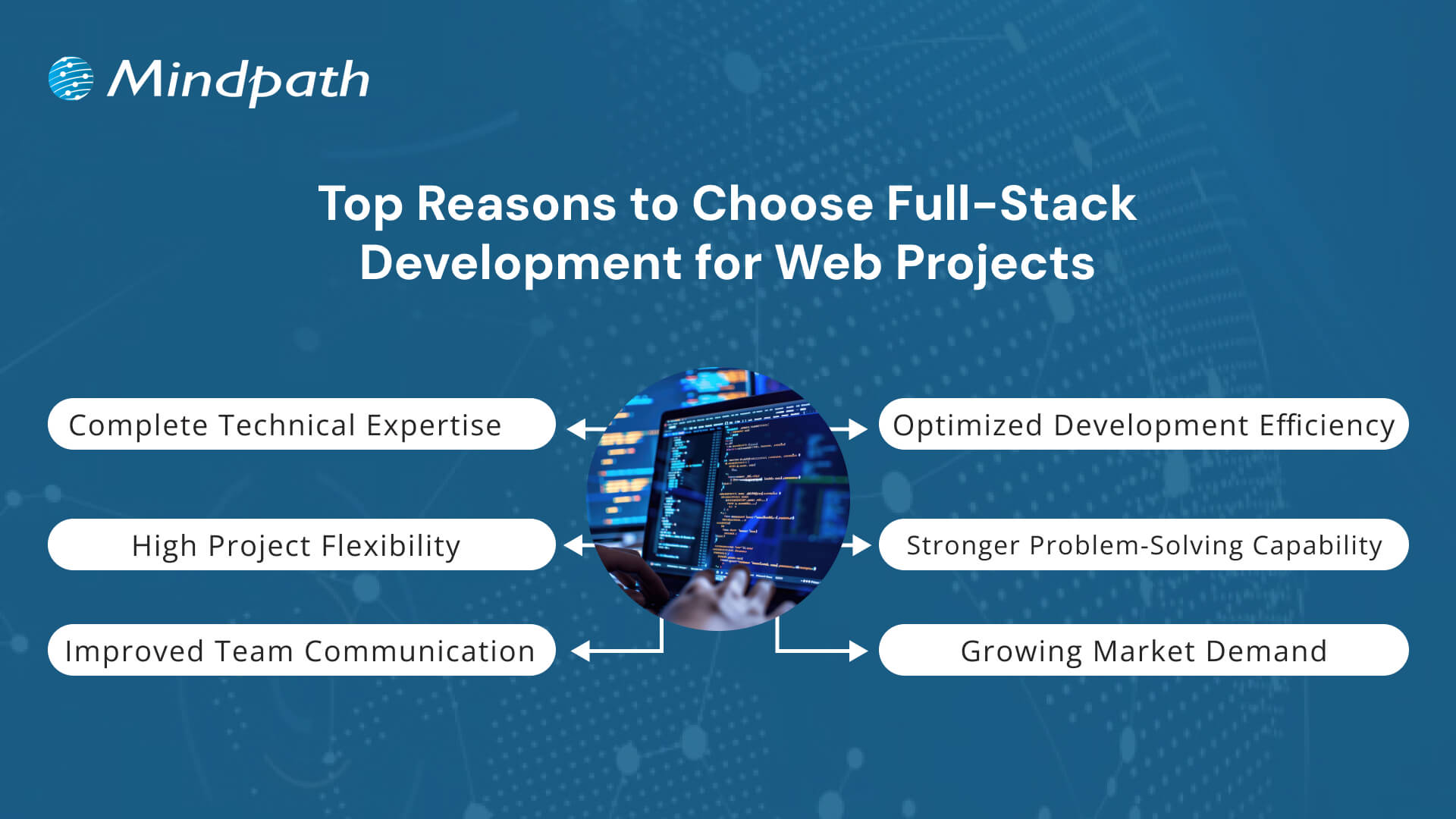
Top Reasons to choose full-stack development for web projects

1. Complete Technical Expertise

Full-stack development for web projects requires knowledge of both front-end and back-end technologies. Developers in this field work with HTML, CSS, and JavaScript for user interfaces and use tools like Node.js or Python for server-side logic. They also manage databases such as MySQL or MongoDB to store and retrieve data efficiently. This complete skill set makes full-stack development for businesses highly practical and reliable.

2. Optimized Development Efficiency

One of the key advantages of full-stack development for web projects is the ability to complete tasks faster without needing multiple specialized developers. It reduces development time, lowers project costs, and helps deliver results more quickly. Teams can avoid delays caused by handovers between front-end and back-end teams. That’s why many companies now prefer full-stack development to keep their projects on track and within budget.

3. High Project Flexibility

Developers skilled in full-stack development can switch between tasks easily based on what the project needs. They are comfortable using different tools and frameworks and can adjust to changes without slowing down progress. This flexibility is valuable when requirements evolve or when rapid updates are needed. It also supports the use of the best tech stack for web projects tailored to each client’s goals.

Also Read: Full-stack Development Benefits

4. Stronger Problem-Solving Capability

A full-stack developer understands how both the client-facing side and the server work together. This broad view helps in identifying issues quickly and finding effective solutions without back-and-forth between teams. It leads to fewer errors and a more stable final product. As a result, full-stack development for web projects brings stronger control and problem-solving to the entire build process.

5. Improved Team Communication

Fewer handoffs mean fewer communication gaps between developers and project managers. In full-stack development for web projects, one person or a small team handles most of the workflow, which keeps messaging clear and consistent. This improves team collaboration and speeds up approvals and fixes. It also supports better planning throughout the stages of full-stack web development.

6. Growing Market Demand

With digital needs growing, full-stack development has become one of the most valuable skills in the tech world. Companies are hiring developers who can handle everything from front-end to database, increasing demand across industries. It also offers room to grow in multiple areas, including project leadership and architecture, through understanding full-stack development trends. This rise is a direct result of businesses investing more in full-stack development for modern digital solutions.

Key Skills Required in a Full-Stack Web Project Team

A successful full-stack web project relies on more than just writing code. It needs the right mix of skills across the team, covering everything from design to database management for smooth and efficient web solutions. Let’s have a quick look at the skills:

1. Front-End Development

Developers need strong skills in HTML, CSS, and JavaScript to build the structure and style of web pages. Frameworks like React, Angular, or Vue.js help create dynamic and responsive user interfaces.

2. Back-End Development

Understanding server-side languages such as Node.js, Python, or Java is essential for creating logic and functionality. Frameworks like Express.js or Django support faster and more organized development.

Planning to build smarter web solutions? Discover how full-stack development with Node.js can streamline your digital growth.

3. Database Management

Developers should know how to use both SQL and NoSQL databases like MySQL, PostgreSQL, or MongoDB. Good database skills help manage, store, and retrieve data efficiently.

4. API Development

Designing RESTful APIs is important for connecting front-end and back-end systems. APIs must be secure, scalable, and easy to maintain in web projects.

5. DevOps and Deployment

Version control with Git and CI/CD tools helps automate code testing and deployment. Cloud platforms like AWS or Azure make it easier to launch and scale applications smoothly.

6. Soft Skills for Team Performance

Effective communication, adaptability, and time management help teams meet deadlines and solve problems together. These qualities support a smooth workflow in full-stack development for web projects.

Confused between full stack and traditional web development? Discover how smart businesses choose from full-stack vs traditional web development for the success of project. 

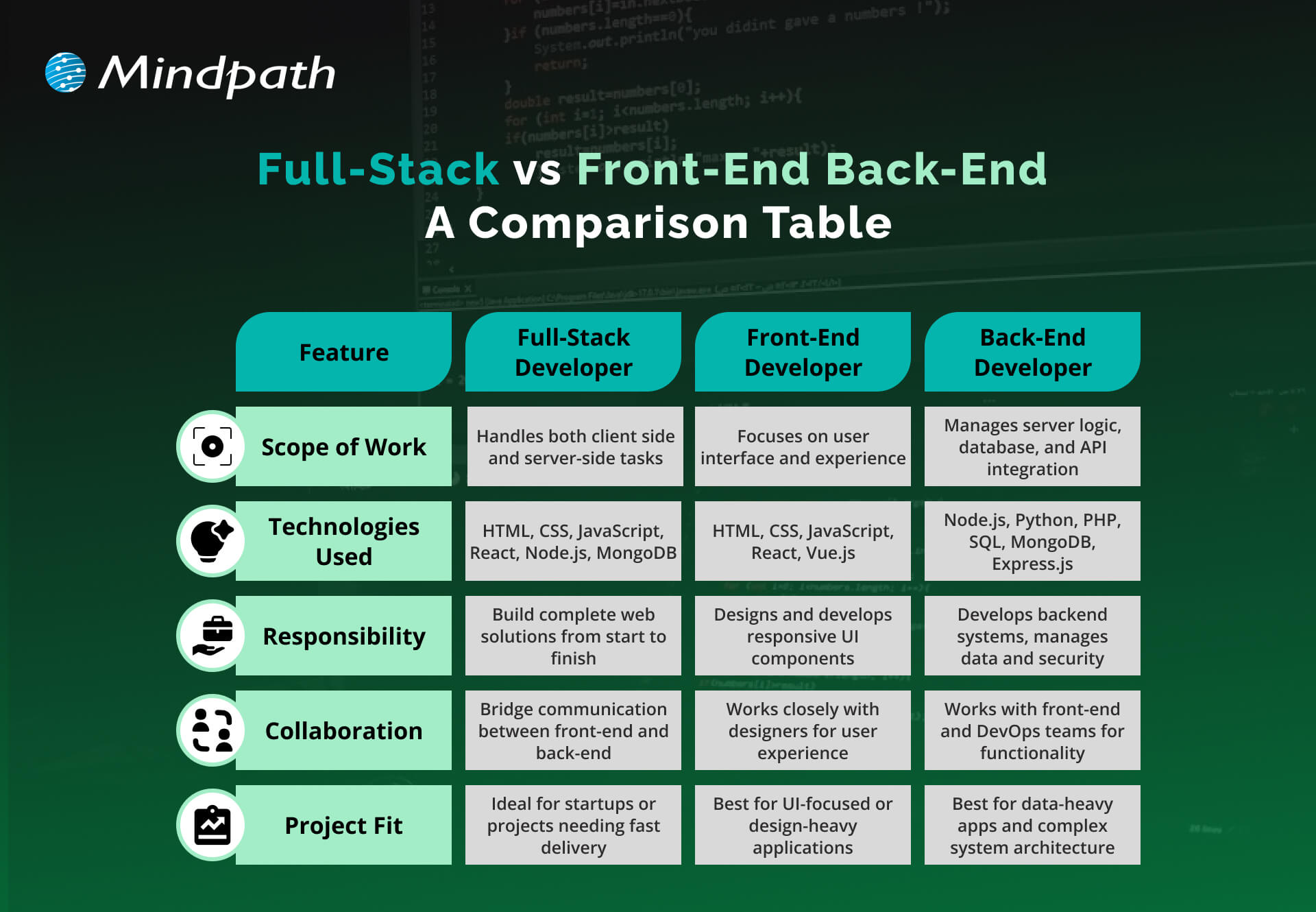
Full-Stack vs Front-End and Back-End: A Comparison Table

Understanding the difference between full-stack vs front-end and back-end roles helps in choosing the right approach for a web project. Below is a comparison table that highlights their core responsibilities and capabilities.

Full-Stack vs Front-End and Back-End A Comparison Table

Ready to Elevate Your Next Web Project with Full-Stack Development?

Full-stack development for web projects offers a balanced, future-ready approach that blends front-end creativity with back-end power. It simplifies workflows, speeds up launches, and ensures better user experiences. As digital needs continue to evolve, adopting full-stack practices gives businesses the edge to build smarter and scale faster with fewer roadblocks.

At Mindpath, we offer full-stack development services tailored to support your business growth. Our expert full-stack developers handle everything from user interface to server-side logic, ensuring smooth performance and cohesive functionality. With deep technical knowledge and a collaborative mindset, we deliver reliable, scalable, and efficient digital solutions that meet your unique project needs.

Unlocking Cyber Security

Ever wondered how secure your business really is in today’s digital age? What if we tell you that there are better ways to protect your digital assets from emerging threats? As cyber-attacks become more sophisticated, it’s essential to stay ahead of the curve. In this blog, we’ll explore effective strategies to enhance your business’s cyber security. 

Cybersecurity refers to protecting your computer systems and data against cyber-attacks. These risks include hackers attempting to steal or destroy your data, malware that locks your files until you pay a fee, and attacks that interrupt your business. With so many gadgets and more skilled hackers, it is essential to employ numerous levels of security. This includes employing tools to detect and resolve issues, as well as ensuring that your people and procedures are prepared to respond. Cybersecurity is all about integrating smart technology and behaviors to keep your digital world safe. Cybersecurity is essential because it protects us from online threats that might lead to catastrophic consequences, such as identity theft or data loss. Our everyday lives rely on secure systems like power plants, hospitals, and banking. If these systems are not secured, they can harm everyone. 

So, let’s dive in to explore the ways in which we can increase cyber security! 

Ways to Increase Cyber Security

1. Regular Updates

To keep your computers safe, update them on a regular basis. This includes desktop computers, laptops, and mobile devices. Keep your operating systems and web browsers up to date to guard against emerging threats. Check for updates to any software on your computer, including security programs. Cloud-based software often updates automatically, so you don’t have to worry about it. If the employees use mobile devices for work, make sure they maintain their software up to date, particularly security programs. This helps keep all your gadgets safe. 

2. Training Employees

Make sure your staff are aware of your company’s security plan. Begin by developing a cybersecurity policy that specifies best practices and processes for keeping information secure. This policy ought to specify what procedures to take if there is a security breach. Encourage staff to adopt strong, unique passwords for all accounts and devices. They should use different passwords for their PC, mobile devices, and corporate accounts. Whenever possible, enable two-factor authentication. This provides an additional security layer by needing a second device or code to complete the sign-in procedure. This helps to safeguard your accounts even when passwords are stolen. Additionally, provide regular training for your employees on cybersecurity. This helps them stay informed about the latest threats and best practices. 

3. Limiting Access

Make sure that only authorized individuals have access to company computers and accounts. Even trustworthy people should not access information or equipment that they are not authorized to use. For example, do not allow a customer to use a work laptop to search something up. Different workers may require varying degrees of access depending on their positions. Ensure that staff do not reveal their account details. For example, an accountant should never share their accounting software password with a salesman. When feasible, build unique logins for each employee. This enables you to restrict and limit what each individual may access depending on their function, therefore improving overall security.

4. Securing Wi-Fi

If your business’s Wi-Fi is not sufficiently safeguarded, it might pose a security concern. Make sure your Wi-Fi is password-protected so that only employees have access to it. Ideally, keep the WiFi password secret from employees. If you need to provide Wi-Fi connectivity to customers, create a separate network exclusively for them. This guest network should be separate from the network of your company to avoid unauthorized access to important files and data. Keeping these networks distinct helps secure your company’s information from potential security attacks. 

5. Create Backups

To avoid data loss, back up your computer’s information on a regular basis. If files are stolen or go missing, maintaining a backup allows you to restore them. Make sure that all vital data is backed up. For example, if you have vendor information on your desktop, keep a copy on the cloud. Both copies should be encrypted and password-protected to prevent unauthorized access. This way, if something goes wrong, you’ll still have access to vital data. 

6. Create Mobile Action Plan

Mobile devices may be a security issue, especially if they hold sensitive information or provide access to your business network. To reduce these dangers, ask users to password lock their devices and encrypt their data. Encourage them to use security programs to protect their information, particularly while accessing public networks. In addition, create explicit protocols for reporting missing or stolen devices. This allows you to respond swiftly to security breaches and guarantees that your data and network are protected. 

7. Passwords and Authentications

Ensure that staff use unique passwords for each account and update them every three months. To improve security, use multi-factor authentication (MFA), which needs more than just a password to access accounts and typically includes a second form of verification, such as a code texted to a mobile device. Additionally, check with providers who handle sensitive data, such as banking services, to determine if they provide MFA for your accounts. This extra step helps to secure your information from unauthorized access. 

Increase Your Cyber Security at Mindpath

At Mindpath, we make it easier to safeguard your company from cyber-attacks. We assist you in increasing your security by using strong passwords, keeping software up to date, and implementing additional levels of protection such as multi-factor authentication. Our staff guarantees that your data is safe and secure, providing you peace of mind while enabling you to concentrate on your company. Let us assist you in keeping your digital world safe! 

Wrapping Up!

Cybersecurity is more essential than ever in today’s digital environment. You can significantly boost your company’s cyber security by applying the measures we’ve covered, which include frequent updates, complete staff training, restricted access, secure Wi-Fi, dependable backups, a mobile action plan, and strong password restrictions. Our web development services are devoted to assisting you in navigating these challenges with ease. Our team is committed to providing you with the resources and assistance you require to safeguard your digital assets and keep your peace of mind. 

Ready to fortify your business against cyber threats?

Connect with Mindpath for top-notch security solutions tailored to your needs.

Web accessibility guidelines

Your website acts as the gateway to your business’s digital world. It is the first impression that visitors get. However, for millions of users around the globe, those with motor, visual, cognitive, and hearing impairments, that door can remain locked if your website is not completely accessible. This is where web accessibility guidelines become pivotal. 

For WordPress website owners, implementing the web accessibility standards not only enhances usability but also increases SEO, brand reputation, and user engagement. In this detailed blog, you will learn more about web page accessibility and explore important accessibility principles and effective strategies. Besides, we have also mentioned some useful tools that can help you ensure your site meets the necessary standards. 

Looking to make your website accessible for your visitors and users? Mindpath’s WordPress development services help you create a user-friendly website that will meet accessibility standards and deliver seamless results.

Web Accessibility and Its Importance

In simple words, it means designing and creating websites that can be easily used and navigated by every user, including users with disabilities. Web accessibility ensures equal access to functionality as well as information to all, aligning with various legal mandates and standards, such as: 

1. The Americans with Disabilities Act or ADA

2. Section 508 of the Rehabilitation Act of 1973 (USA)

3. The Rights of Persons with Disabilities or RPWD Act (India)

4. The European Accessibility Act 2019

5. Equality Act 2001 (the United Kingdom)

6. Web Content Accessibility Guidelines 2.1 and 3.0

Accessible sites don’t just benefit individuals with disabilities or temporary impairment. Such websites tend to rank higher in SERPs due to their enhanced usability and semantic structure. 

Web Accessibility Standards- POUR Principles

Apart from the specific requirements, businesses should familiarize themselves with the key principles of web accessibility guidelines. These are known by the acronym- POUR. 

1. Perceivable

The interface and content of websites should be presented in such a way that every user can perceive or interpret, regardless of their disabilities. 

2. Operable

Visitors should be able to interact and navigate with websites utilizing different input methods, including assistive devices and keyboards. 

3. Understandable

Content as well as functionality of a website should be consistent, clear, and comprehensible for users with different cognitive levels. 

4. Robust

Websites should be compatible with various modern assistive technologies. This helps ensure long-term reliability and accessibility. 

Is your WordPress site truly secure from cyber threats and vulnerabilities? Find out how safeguarding WordPress vulnerabilities can help you protect your website and maintain your customers’ trust.

Accessibility in WordPress: Why it Matters?

WordPress powers a major portion of the web, making it an important platform for accessibility. Whether you have an e-commerce platform, a blog site, or a business website, you should carry out a web accessibility test and ensure it meets all the standards. WordPress accessibility is crucial for many reasons, like: 

1. Aider Audience Reach

By creating a website with an inclusive design, you can make it accessible for individuals with disabilities. Besides, it shows your business supports disabled people and understands their needs. 

2. Legal Protection

Following the required accessibility standards, you can avoid penalties and lawsuits. 

3. Better SEO

All search engines favor accessible WordPress websites with proper alt text, semantic structure, etc. 

4. Establishing Reputation

Digital accessibility has become an ethical issue. If you are not following the web accessibility guidelines, it can affect the reputation of your business.

5. Better UX

With the help of various accessibility features, you can boost usability for every user, including those with physical limitations and mobile visitors. 

Want to ensure your WordPress site is running on the right PHP version for top performance and security? Check out our guide on WordPress PHP compatibility to keep your site efficient, stable, and future-ready.

Some Common Web Accessibility Barriers

Before diving into the solutions to meet accessibility web standards, it is important to understand some common accessibility barriers that can significantly affect user experience while limiting your website’s inclusivity. 

1. Use of incorrect and missing Alt Text of images

2. Non-descriptive link text like “read more” or “click here.”

3. Poor color contrast between the background and the text

4. Use of inaccessible forms, lacking keyboard support

5. Keyboard navigation problems

6. Lack of transcripts or captions for multimedia

7. Wrong heading structure

8. Auto-play content with missing controls

Recognizing these issues is the first step toward crafting a more accessible and inclusive WordPress website that can serve every user ethically as well as effectively. 

Are you struggling to decide which platform will best support your business goals? Compare Magento vs WordPress to discover which option offers the features and flexibility your website needs.

Strategies to Boost Your WordPress Website Accessibility

Now that we have understood the importance of web accessibility and common barriers to it, it’s time to move to the practical solutions. Increasing your WordPress site’s accessibility doesn’t require a complete transformation. It can be achieved through the right web accessibility tool, thoughtful adjustment, and an inclusive design. Here are actionable ways to make your website more accessible and compliant. 

1. Opt For an Accessibility-Ready WordPress Theme

When working on web accessibility, always begin with a solid foundation, i.e., themes. You should always choose an accessibility-ready theme. Such themes follow the web page accessibility guidelines, such as keyboard navigation, semantic HTML, and more. 

Some popular accessible WordPress themes you can try are: 

  • Monument Valley
  • Gutenix
  • Neve
  • Icelander
  • OceanWP 
  • Astra

While choosing a theme, always check for WCAG compliance and evaluate the performance with a screen reader. 

2. Proper Heading Structure and Semantic HTML

Semantic HTML allows assistive technologies to properly interpret your website content. Ensure that all the headers are used in a logical order, like H1, H2, H3, so that users can easily understand the page structure. Here are some best practices to keep in mind: 

  • Only use one heading per page, generally the title.
  • Use proper headings for main sections and subsections
  • Don’t skip heading levels 

You can use a web accessibility tool like Axe to check heading structure and make changes accordingly. 

3. Install Right Accessible Plugins

Plugins are great ways to add new functionality and features to your website. However, if not selected carefully, you may end up with various accessibility problems. Always use plugins designed to make your site more accessible. Some recommended plugins are:

  • Equalize Digital: Offers a plugin to test websites for WCAG compliance.
  • WP Accessibility: Helps identify common web accessibility problems. 
  • One Click Accessibility: Allows an easy way to add various accessibility features.
  • Accessible Poetry: Helps enhance accessibility by integrating features such as focus styles and skip links

These plugins can complement your selected accessibility-ready theme and keep your site compliant.

4. Ensure Sufficient Color Contrast

While creating an accessible WordPress website, ensure that the color contrast between background and text meet necessary WCAG guidelines. It should be at least 4.5:1 for normal text. 

High contrast enhances readability for individuals with visual impairment. There are many WordPress accessibility-ready themes that offer easy ways to customize colors to meet web accessibility guidelines.

Apart from this, you should also use a readable font size and line height. Recommended font size is at least 16 pixels. The line height and word spacing should be 1.5x and 0.16x of the font size, respectively.  

Must Read: Custom WordPress Development

5. Tab Indexing

Users with motor skill challenges generally depend on keyboard navigation, especially the Tab key, to navigate through your website. Unlike trackpad or mouse users, they rely on a predictable, logical tab order to access buttons, menus, and other interactive elements. So, ensure that you have enabled tab indexing for your site. 

Furthermore, make sure that all interactive elements follow the correct flow, i.e., left to right and top to bottom. A well-designed tab index can create a more inclusive and smoother browsing experience. 

6. Offer a Consistent and Clear Navigation

Even though you have deployed tab indexing for smooth navigation, there are other important things you should consider.

  • Breadcrumbs: Use breadcrumbs to show users their current location within your website, reducing confusion. 
  • Descriptive links: Prefer to use descriptive link text that clearly shows action or destination. Skip using phrases like “read more” or “click here”. 
  • Consistent navigation menu: Make sure that your site’s menu is consistent across all pages. 

Clear and consistent navigation is vital for user experience as well as accessibility. 

7. Optimize Media and Images

Media and images are crucial elements of a website. To ensure their accessibility, consider these web accessibility examples:

  • Captions and Transcripts: Use captions for videos and transcripts for audio content. This will help users with hearing impairments and who prefer to read instead of listening. 
  • Alt Text: For images, you should use descriptive alt text. This will help a screen reader to describe images to users. 
  • Descriptive File Name: Using descriptive file names for media files and images can help you boost SEO and web accessibility. 

With accessible images and media, it will be easier to make your site compatible with assistive technologies. 

8. Leverage Access Keys

Access keys work like keyboard shortcuts, enabling users to jump to a specific section of the website using assigned keys. For example, by pressing a key like “1”, they can go to the homepage, and by pressing “2”, they can access your contact page. 

9. Avoid Auto-Animations and Flashing Content

Blinking and flashing content can cause seizures in individuals with photosensitive epilepsy. Besides, auto-animations can also cause distraction among users. Best practices to follow here are: 

  • Don’t flash content more than three times per second
  • Allow users to pause animations
  • Utilize motion purposefully

By following the above-mentioned tips, you can ensure that your website welcomes all users while offering a user-friendly web experience. 

Ready to upgrade your HTML site to something more powerful and manageable? Explore why converting HTML to WordPress can streamline updates and improve your online presence.

Tools to Ensure Your Site’s Accessibility

Once you are done with implementing accessibility features following the web accessibility guidelines, you should carry out a comprehensive test to ensure your site is working as intended. Here are some useful tools to test your site.

1. WAVE

Web Accessibility Evaluation Tool, designed by WebAI, helps content creators and developers to make sure their websites are accessible for all. It offers visual feedback on the web content’s accessibility, making it easier to detect and resolve accessibility problems. It’s free to use. 

2. EqualWeb

This tool is designed to offer manual and automated accessibility solutions. Using this, businesses can stay compliant with ADA standards and WCAG 2.1. With AI-powered features, EqualWeb offers an easy way to identify and fix accessibility issues.  

3. Axe

This powerful web accessibility test tool can be integrated into any browser and development environments for a detailed web accessibility analysis. 

4. Level Access

This web accessibility checker provides developers with an API and a web interface, making it a highly flexible tool for testing accessibility throughout the web development lifecycle. 

5. NVDA

NonVisual Desktop Access is an open-source, free-to-use screen reader for Windows. Using this, visually impaired individuals can easily interact with your digital content. Developers can use it to evaluate web applications and websites’ accessibility. 

Wondering how to hire the right WordPress developer to help your business grow online? Explore our detailed guide on Hiring a WordPress Developer to discover expert insights that guide you toward making the best hiring decision.

Create an Inclusive Website that Welcomes Everyone

Web accessibility goes beyond just legal compliance. It focuses on fostering empathy, digital equity, and inclusion. By following web accessibility guidelines and leveraging the robust ecosystem of WordPress, you can create a website that is intuitive, usable, and can help all users. 

Making your site accessible is a journey of continuous improvement, and Mindpath can be an ideal partner in this journey. With our web accessibility services designed for this changing digital space, you can witness the desired results. Our expert guidance and tailored solutions, created based on web accessibility guidelines, will help you meet all compliance requirements and create a website that embodies innovation, openness, and user engagement. 

Enhance your WordPress site’s inclusivity with our expert tips and services. Discover how to improve accessibility and explore our comprehensive WordPress solutions.