Home

Unlocking the Potential of ReactJS in Social Media Platform Development

Unlocking the Potential of ReactJS in Social Media Platform Development

Join our Newsletter!

ReactJS for Social Media Platform

Key Takeaways

  • 01
    ReactJS helps build fast, interactive social media interfaces.
  • 02
    Reusable components make development and maintenance easier.
  • 03
    Real-time features can be integrated using technologies such as WebSockets.
  • 04
    Scalability depends on the complete architecture, not ReactJS alone.
  • 05
    Performance, security, SEO, and backend infrastructure should be considered during development.

Social media platforms need to deliver fast, interactive, and highly responsive experiences across devices. Users expect feeds to update quickly, notifications to appear without unnecessary delays, media to load smoothly, and interactions such as likes, comments, and messaging to feel seamless.

This is where ReactJS can be a strong technology choice for social media platform development. React is a JavaScript library for building user interfaces with reusable components, allowing development teams to create complex interfaces from smaller, maintainable building blocks.

For businesses planning a new social networking platform or modernizing an existing product, ReactJS can support both development efficiency and a consistent user experience when it is implemented with the right architecture.

Ready to stay ahead of the latest ReactJS trends? Our ReactJS development services help you build modern, scalable, and future-ready applications tailored to your unique business needs.

Why ReactJS is Suitable for Social Media Platforms

Social media applications contain many interactive elements: news feeds, profiles, reactions, comments, search, messaging, notifications, media galleries, and personalized recommendations.

React’s component-based approach makes it possible to build these interface elements independently and reuse them across different areas of an application. For example, a social media team could create reusable components for user profiles, post cards, reaction buttons, comment sections, and notification panels.

This approach can make large applications easier to maintain as new features are introduced.

React also supports modern rendering capabilities for web applications through React DOM, including client-side and server-side rendering APIs.

Key Benefits of ReactJS for Social Media App Development

1. Reusable UI Components

Social media platforms contain many repeated interface patterns. A post displayed in a user’s feed may also appear on a profile page, search result, or community page.

With React, developers can create reusable components instead of rebuilding the same interface repeatedly. This can improve development consistency and make future updates easier.

2. Interactive User Experiences

Social platforms depend heavily on real-time interaction. Users expect actions such as liking a post, opening comments, switching between tabs, or updating their profiles to respond quickly.

React is designed around components and state-driven UI updates, making it well suited to applications with frequent interface changes.

For example, when a user reacts to a post, the interface can update the relevant component without requiring the entire page to be rebuilt.

3. Scalable Front-End Architecture

As a social media product grows, its interface can become increasingly complex. New features may include groups, communities, live content, messaging, creator tools, advertisements, subscriptions, and recommendation systems.

A well-planned React architecture allows these features to be organized into manageable components and modules.

However, React itself does not automatically make an application scalable. Backend architecture, databases, APIs, caching, infrastructure, and application design also need to be planned for the expected traffic and data volume.

4. Performance Optimization Opportunities

Performance is particularly important for social media platforms because users frequently browse content and interact with multiple elements during a single session.

Development teams can use techniques such as code splitting, lazy loading, efficient component design, caching, optimized media delivery, and performance monitoring to improve the experience.

React also provides performance-focused developer tools that help teams analyze component rendering and identify potential performance issues.

5. Faster Feature Development

Reusable components can reduce repetitive front-end development work. Once common components are established, development teams can use them as building blocks for new features.

This can be useful for startups and growing businesses that need to test and launch new social features without rebuilding the entire interface each time.

ReactJS Features That Matter for Social Networking Platforms

A React-based social media application can support a wide range of user-facing functionality, including:

  • Personalized content feeds
  • User profiles and profile customization
  • Likes, reactions, comments, and shares
  • Real-time notifications
  • Search and filtering
  • Private messaging interfaces
  • Communities and discussion groups
  • Image and video content
  • Infinite scrolling
  • Content creation and editing
  • Moderation dashboards
  • Creator and business profiles

The important point is that React handles the user interface layer. Features such as real-time messaging, recommendation engines, authentication, data storage, video processing, and notifications typically require additional backend services and infrastructure.

ReactJS and Real-Time Social Media Features

Real-time functionality is one of the biggest requirements for modern social applications.

For example, users may need to receive notifications when someone comments on their post or sends them a message. These experiences can be implemented using technologies such as WebSockets or other real-time communication mechanisms alongside a React front end.

The React interface can then update the relevant components as new data becomes available.

This separation between the front end and backend services also allows development teams to design the application around APIs and independent services.

What Should Businesses Consider Before Choosing ReactJS?

ReactJS can be a strong option, but technology selection should be based on the product’s actual requirements.

Before starting development, businesses should consider:

1. User scale: How many users and concurrent sessions are expected?

2. Application complexity: Will the platform include messaging, live video, communities, or recommendation systems?

3. SEO requirements: Which pages need to be discoverable through search engines?

4. Performance: How will images, videos, scripts, and dynamic content be delivered efficiently?

5. Security: How will authentication, authorization, user data, and content moderation be handled?

6. Future development: Will the architecture make it easy to introduce new features?

React provides the front-end foundation, but successful social media platform development requires a broader technology and architecture strategy.

ReactJS for Social Media Platform Development: The Bottom Line

ReactJS offers a practical foundation for building modern social media interfaces because it supports reusable components, dynamic interactions, and flexible application architectures.

For businesses developing a social networking platform, the goal should not simply be to choose a popular framework. The technology should be combined with an appropriate backend, API architecture, database strategy, security model, cloud infrastructure, performance optimization, and product roadmap.

A well-designed ReactJS application can provide the responsive interface users expect while giving development teams a maintainable foundation for introducing new social features as the platform grows.

If you are planning to build or modernize a social media platform, a technical discovery phase can help determine whether ReactJS fits your product requirements, expected scale, performance goals, and long-term development strategy.

Build Your Social Media Platform with ReactJS

Turn your social media idea into a scalable, engaging platform with our ReactJS development expertise.

Frequently Asked Questions

Yes. ReactJS is well suited for building interactive social media interfaces such as feeds, profiles, comments, reactions, notifications, search, and messaging interfaces. Its reusable component architecture also helps teams maintain complex applications.
ReactJS provides reusable components, efficient UI updates, and a flexible architecture for building highly interactive web applications. These capabilities can help development teams create consistent and maintainable social media experiences.
Yes. ReactJS can be used for the user interface of real-time features such as notifications, messaging, comments, and activity updates. Technologies such as WebSockets or other real-time communication services can work alongside ReactJS to deliver live data.
ReactJS can support the front-end of a scalable social media platform, but scalability depends on the complete technology architecture. Backend services, APIs, databases, caching, cloud infrastructure, security, and performance optimization also play important roles.
ReactJS can be a strong choice for social media websites that require dynamic interactions and responsive user interfaces. It can be used to build features such as user profiles, content feeds, reactions, comments, search, communities, and notifications.

Support Is One Click Away

Featured Posts

Related Post

Openai fine tuning api tutorial

In current times of generative AI, prompt engineering is not sufficient to address the requirements of advanced applications. There is a need among content strategists, developers and product teams to have models that can be used to analyze domain-specific language and provide a uniform output. And that is where OpenAI’s fine-tuning tutorial comes in to guide developers through the complicated process of training various models. From healthcare to legal tech, fine-tuning has enabled customization of pre-trained models, opening new opportunities in AI-powered solutions. This blog will allow you to know more via a simple OpenAI fine-tuning API tutorial, as well as some OpenAI fine-tuning examples. We will also talk about why it is crucial for developers. 

Ready to use customised AI models that align precisely with your business data, goals, and customer expectations? Mindpath’s AI development services provide end-to-end solutions from design to deployment.

OpenAI’s Fine-Tuning – What is It All About?

Let’s begin this OpenAI fine-tuning API tutorial by understanding the basics, i.e, what OpenAI fine-tuning is. 

OpenAI models such as ChatGPT are trained on huge web-scale datasets and designed to perform across different domains. However, for specialised use cases, technical support, expert reasoning, or legal context analysis, these models need more targeted control.

OpenAI fine-tuning is a customization process that lets developers take a pre-trained model (like GPT-4o) and train it on a custom dataset using task-specific prompt-response pairs — teaching the model to consistently follow custom instructions, adopt a specific tone, or stick to a rigid formatting style without needing lengthy, repetitive prompts.

The OpenAI fine-tuning API makes this possible by enabling developers to train base models so they acquire new skills and behaviours based on business needs. Regardless of whether you are building a personalized chatbot, advanced summarisation systems, or scaling content generation, fine-tuning provides you with accuracy, performance, and control.

Importance of OpenAI Fine-tuning for Developers

The OpenAI fine-tuning API tutorial focuses on the crucial nature of AI model fine-tuning. Fine-tuning ChatGPT is an essential strategy for developers aiming to create custom AI solutions. By customizing models, they make those models offer more consistent and smarter outputs. The following are a few points that explain why fine-tuning is a necessity for every developer.

1. Better Relevance and Accuracy

For all domain-specific queries, fine-tuned models will perform better compared to generic models. They will offer more contextually relevant and accurate responses.

2. Reduced Cost and Latency

Fine-tuned OpenAI models are more efficient. How? Well, they can attain better results with fewer prompts, lowering token usage. Besides, it leads to a faster response time. 

3. Consistent Communication Style and Tone

Wouldn’t it be great if your AI model could speak just like your brand? You can make that a possibility with fine-tuning. You will be able to train the model with specific style, vocabulary and voice such that the outputs match the brand identity.

4. Enhanced Format Handling

If your application demands outputs in a specific reporting format or JSON structure, fine-tuning ensures the model follows those requirements. 

5. Robust Safety and Control

By training your AI models on domain-safe and curated data, you can reinforce desired behaviour. This, in turn, will significantly reduce the risk of harmful or off-brand responses. 

6. Unlocking New Opportunities

Fine-tuning OpenAI models can be used for multiple applications. Developers can train models to manage tasks, prioritizing expertise and specific interaction styles. 

Curious about the concepts that make AI models like OpenAI’s so powerful? Explore the attention mechanism explained, which shows how attention transforms the way models understand and generate data.e

OpenAI Models Developers Can Fine-Tune for Custom Tasks

As described in this OpenAI fine-tuning API tutorial, the fine-tuning API allows developers to fine-tune various advanced models, increasing their capabilities. Now, let’s have a look at the OpenAI models that can be fine-tuned for specialized applications. 

1. GPT-3.5

Undoubtedly, GPT 3.5 is a top choice among developers. Some major reasons behind this popularity are cost-effectiveness and low latency. Fine-tuning this model allows developers to reduce the complexity and increase consistency. Product recommendation guides, FAQ bots and customer service automation are some of the common uses of GPT 3.5.

2. GPT-4o

This is OpenAI’s flagship multimodal model. It can process images, audio, videos, and text. This model offers users advanced customization features without losing speed and efficiency. It can be optimized by the developers for domain-specific tasks that demand enhanced textual as well as visual comprehension. Financial document analysis and advanced customer support bots are some common OpenAI fine-tuning examples centered on GPT-4o.

3. GPT- 4.1

This OpenAI model is created to handle multi-step tasks, structured problem-solving and extensive reasoning. It is a perfect option for complicated processes. Fine-tuning this model allows developers to introduce the tools capable of adhering to the domain-specific formats, which makes them a great choice in case of technical planning or automating research.

4. O-Series Models

O-series models are based on GPT-4o and are optimized for efficiency and performance. You can use these models for tasks where GPT-4o’s functionality may be excessive. These models can be fine-tuned to be cost-effective and scaled to a large extent without reducing their accuracy. They come in handy with several industry-specific applications in sectors like SaaS, legal tech, and healthcare.

Wondering how large language models work behind the scenes? Explore the Large Language Model (LLM) detailed guide to discover the foundations of AI that make fine-tuning possible.

Tips to Use Open-AI Fine-Tuning API Effectively

The OpenAI fine-tuning API tutorial can provide useful information on the optimization methods of AI models. These practices can improve mode reliability if utilized in the right manner. Here are some best practices to consider for effective fine-tuning.

1. Data Quality

It’s obvious! The AI models will not be capable of providing precise results without clear, well-constructed, and relevant datasets.

2. Right Model

As mentioned above, only a few OpenAI models can be fine-tuned. For instance, GPT-3.5 or GPT-4o.

3. Tune Hyperparameters

Experiment with batch sizes, training cycles, and learning rates. This will help you find the right configuration. 

4. Evaluate Regularly

Properly monitor progress, identify overfitting, and optimize the training approach. 

By focusing on all these factors, developers can fine-tune OpenAI models with confidence. This is the foundation for fine-tuning ChatGPT or other models for tailored applications that can offer precise results.  

Want to know how fine-tuned AI models can improve business decisions? Explore AI in decision-making to discover how intelligence-driven insights optimize strategy and operations.

When to Fine-Tune vs When to Use Prompt Engineering?

This is a common question that most developers would ask when learning OpenAI fine-tuning API concepts. After all, choosing between prompt engineering and fine-tuning is a vital decision for every developer creating AI-powered tools. Let’s break it down. 

Begin With Prompt Engineering

Well, for most use cases, prompt engineering can be an ideal option. A well-developed system prompt, combined with clear instructions and examples, can enable a generic AI model to perform efficiently. In fact, they can attain around 80 to 90 percent task accuracy. Moreover, prompt engineering is cost-effective, fast, and there is no need to maintain a custom model for it. It is also ideal for low-volume tasks and prototyping.

Scenarios Where Fine-Tuning Actually Makes Sense

Based on this OpenAI fine-tuning API tutorial, we can state that in cases where you need to be more consistent and in control, fine-tuning makes a great choice. You can consider it when:

  • You want a consistent style and tone format in communications.
  • You wish to decrease the cost of the API.
  • The existing model offers irrelevant output that can be resolved through curated examples. 
  • You want to enhance the AI model’s ability to accurately process complex instructions. 

Fine-tuning is a major investment. It requires time for accurate data preparation and training costs. However, the long-term results are really impressive. Wondering how? Well, when you learn fine-tuning API methods, you can easily unlock the ability to boost the model’s efficiency, reliability, as well as performance.

Looking to understand where AI is headed next? Discover generative AI trends to explore emerging applications and practical use cases of intelligent systems.

Custom AI: The Future We Will Witness Soon

OpenAI’s fine-tuning API clearly shows a significant leap in making modern AI models bespoke and adaptable. It offers developers who want to go beyond what general AI does the means to add specific domain experience, brand voice, and intelligence to the models. This OpenAI fine-tuning API tutorial proves that it will unlock the next generation of custom AI models.

If you want to join the trend and enhance your business’s functionality with custom AI solutions, you can always count on Mindpath. We provide AI development services that help organizations develop as well as fine-tune their AI foundation models. Our team helps you align AI models with your workflows and domain-specific data. Partner with us today and build a custom AI solution to support your business growth. 

hiring a wordpress developer

WordPress remains a top choice for website development due to its scalability, ease of use, and flexibility. However, to unlock WordPress’s true potential, it is crucial to hire the right developer- an expert who can understand your goals, the technical nuances of WordPress, and your customers. Yet, hiring a WordPress developer is a major investment.

It is not just about finding a professional who can write code; it is a strategic partnership between your business and an expert who can offer you the required solutions. Besides, it involves more than just checking technical skills. This detailed hiring WordPress developer guide will guide you through the hiring process, helping you make an ultimate hiring a WordPress developer checklist.

Are you looking for expert help to build your WordPress site? At Mindpath, you can hire WordPress developers who are highly skilled and dedicated to building high-performing websites that drive measurable results.

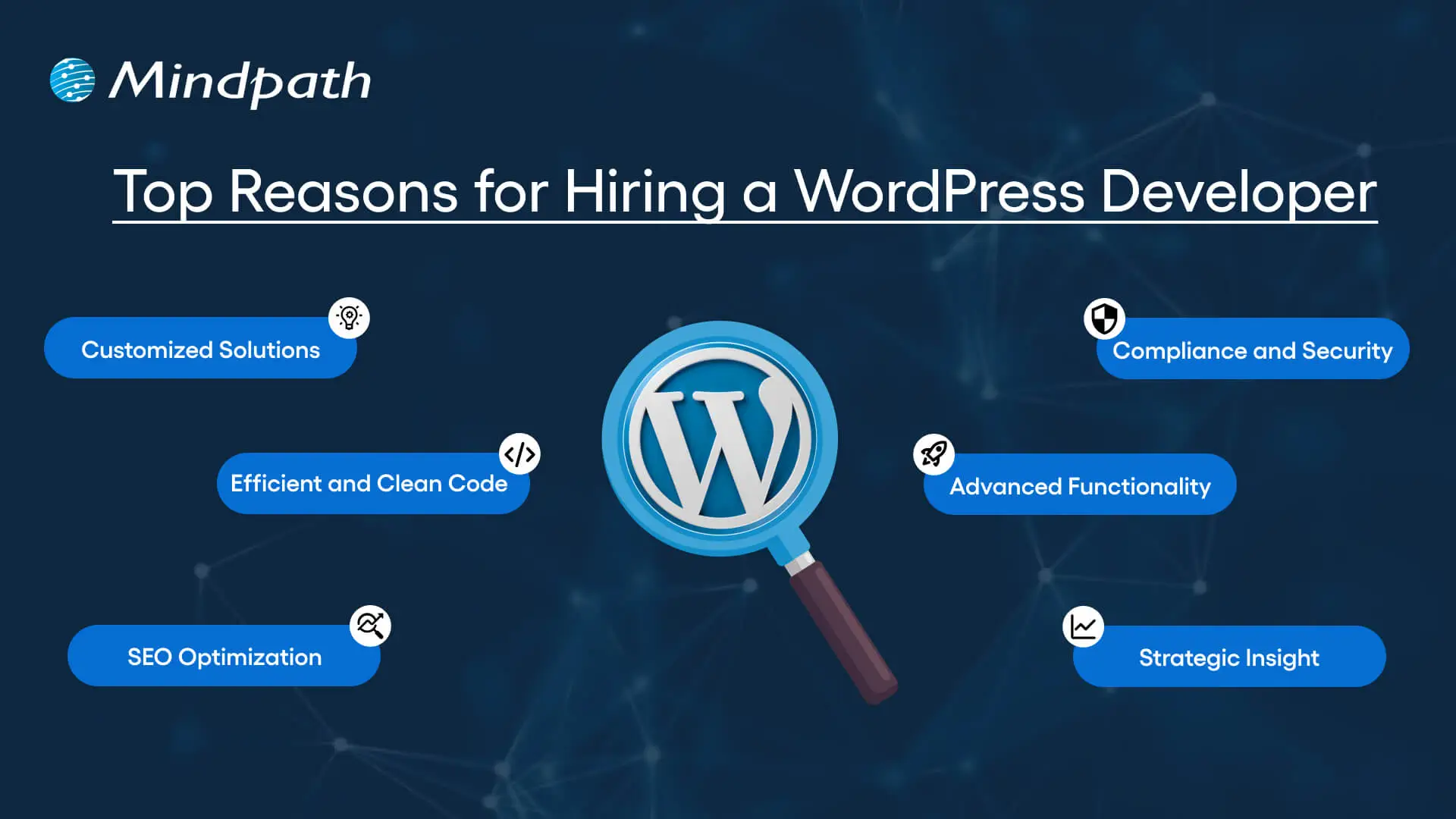
Top Reasons for Hiring a WordPress Developer

Before diving into the WordPress developer checklist to ensure a successful hiring, let’s understand why you should hire expert WordPress developer.

Top Reasons for Hiring a WordPress Developer

1. Customized Solutions

A professional WordPress developer can provide custom WordPress development for the site to match your unique brand identity, functional requirements, and user experience goals. Pre-built themes or plugins won’t offer you such flexibility.

2. Efficient and Clean Code

Skilled developers always prioritize writing scalable, secure, and optimized code. This ensures better SEO scores, fewer compatibility issues, and faster load times.

3. SEO Optimization

Developers know how to develop a website for search engines. For example, they use schema markup, semantic HTML, image optimization tools, and caching techniques that boost visibility and improve rankings.

4. Compliance and Security

From database protection to SSL configuration and plugin installation, professional WordPress developers deploy best security practices to protect your site from data breaches and malware. Besides, they ensure that all the plugins and elements are updated to the latest versions.

5. Advanced Functionality

Do you need a custom API integration or booking system? Well, a skilled WordPress developer knows how to integrate complex features that align with your user needs and business goals. They can also create custom plugins to expand the features of your site.

6. Strategic Insight

Apart from coding, WordPress developers help businesses to get detailed insight into conversion optimization, user behavior, latest trends, and more. All these things will help businesses in making smarter decisions.

Want to make sure your WordPress site is accessible to everyone? Check out our post on improve WordPress web accessibility to learn practical steps for making your site more inclusive and user-friendly.

Types of WordPress Experts- Which One Should You Hire

Understanding the benefits and value a developer can bring is just the beginning. To make the right decision on hiring a WordPress Developer, it is crucial to learn about the different types of WordPress developers you can hire. Remember that each brings a unique focus area and skill set.

1. Front-End WordPress Developers

These experts specialize in interactive and visual aspects of websites. They manage styling, layouts, and user experience and responsiveness using JavaScript, CSS, page builders, and HTML.

2. Back-End WordPress Developers

They focus on database management, server-side functionality, custom theme development, and plugin development. They work with WordPress core functions, MySQL, PHP, and more to create scalable websites.

3. Full-Stack WordPress Developers

Such experts handle back-end and front-end development tasks. They can create a website from scratch while ensuring seamless integration.

While hiring dedicated WordPress developer, you should choose the right type of developer to ensure your project aligns with the design goals, technical needs, and vision.

Curious about which developer’s role best suits your project? Dive into our article on Front-End vs Back-End vs Full-Stack to understand each role and decide which path aligns with your website’s needs.

WordPress Developer Checklist- Skills to Consider

Your hiring WordPress developer checklist should cover the key skills of WordPress developers. HTML, CSS, PHP, MySQL, and JavaScript rank among the key languages for WordPress development. Most developers are familiar with these languages, but knowledge of these technologies is not enough. Here are some skills that matter the most.

Hard Skills or Technical Capabilities

  • Knowledge of using core languages such as jQuery, JS, HTML5, CSS3, PHP, MySQL, React.js, and other languages.
  • Clear understanding of plugin architecture and WordPress core.
  • Building and customizing themes from scratch, and experience with various page builders like Beaver Builder, Gutenberg, Thrive Architect, Elementor, and Themify Builder.
  • Familiarity with REST API.
  • Knowledge of various optimization methods like scheme markup, image compression, caching, Core Web Vitals, minifying CSS, use of CDN, and more.
  • Understating security issues and applying fixes

Soft Skills

  • Ability to explain technical concepts in practical and simple terms.
  • Habit of making clear documentation.
  • Clarity and responsiveness in replies.
  • Ability to collaborate with backend teams and designers.
  • Familiarity with various management tools such as Jira, Trello, and Slack.
  • Willingness to accept feedback and incorporate it quickly.

Some Bonus Skills that Add Value

These skills are not that important for every project, but they can make a developer more valuable. These skills can include:

  • Experience in handling WooCommerce.
  • Knowledge about Headless WordPress configurations.
  • Use of Git or similar tools to manage collaborative workflows and code.
  • Experience in creating responsive and accessible designs to help websites meet the legal requirements of ADA.gov, etc.
  • A better understanding of the business’s goals, like lead generation, conversions, etc.

Want a more flexible and user-friendly website than a static HTML page can offer? Explore our blog on converting HTML to WordPress to see how shifting to WordPress can simplify maintenance and boost performance.

Hiring A WordPress Developer: Best Practices

Hiring a skilled WordPress developer can be a challenging process. That’s why utilizing a structured hiring a WordPress developer checklist is vital. A well-defined hiring checklist can help you save time, and you can hire the best talent for your projects. Here is how to begin your process to hire expert WordPress developer using a proven checklist.

1. Understand your Project Requirements and Goals

Before starting to search for a WordPress developer, it would be better for you to understand your project requirements. Do you want to create a new WordPress site from scratch or optimize an existing site? Are you creating a blog site, business website, or eCommerce platform?

Understanding these things will help narrow down the skills required. For instance, if you want to integrate APIs or advanced features into your site, then hiring a developer with skills in JavaScript or PHP would be a great choice.

Avoiding this step can lead to mismatched expectations. The more precise your needs, the easier your hiring a WordPress developer would be.

2. Selecting the Right Hiring Model

While hiring a WordPress developer, selecting the right engagement model is vital to aligning your development project budget, timeline, and scope. In general, WordPress developers come under three key categories these are:

  • Freelancers: Ideal for short-term and small projects due to their cost-effectiveness and flexibility.
  • Agencies: Offer complete solutions, including website design, development, SEO optimization, and maintenance. Agencies are ideal for large-scale and complex projects.
  • In-House Web Developers: They are best for organizations with ongoing development requirements. Businesses will enjoy faster turnaround and full control. However, this model requires businesses to invest in salaries, management overhead, and benefits.

Consider your budget, long-term objectives, and project size to choose the right model.

3. Developer’s Industry Experience

When using a hiring WordPress developer checklist, an important factor to consider is the developer’s industry-specific experience.

Working with a WordPress developer familiar with your business niche can significantly improve the outcomes while reducing costly trial and error. For instance, for creating an eCommerce website, hiring a developer with WooCommerce expertise will be the best option.

On the other hand, for a blog site, you should prefer to hire an expert with deep SEO and performance optimization knowledge.

This approach will accelerate development and boost functionality. And always ask developers whether they have built websites like yours.

4. Check References and Review Portfolios

Start by examining developers’ portfolios for design consistency, quality, and diversity of development projects that match your business niche. Also, check the custom developer tasks completed by developers to get an idea about their technical skills as well as problem-solving skills.

If possible, assess site performance, usability, and responsiveness to understand the developer’s attention to detail. Also, go through client references to confirm the developer’s support quality, professionalism, and reliability.

5. Conduct Technical Tests and Interviews

Don’t just rely on resumes. Conduct thorough practical tests and interviews. Start by creating targeted interview questions. For instance, you can ask, “How do you solve plugin conflicts”? Or “How do you check a site’s responsiveness?”

Practical tests can include fixing a site speed problem or creating a custom feature or post type. Such tests show developers’ technical skills, efficiency, and creativity. Besides, it helps you to know whether they can work under pressure. This step is pivotal for confident hiring decisions.

Stuck deciding whether WordPress or Drupal is a better match for your business? Our WordPress vs Drupal guide breaks down key differences to help you pick the perfect solution.

Common Mistakes to Avoid

Even with a solid WordPress checklist, mistakes can happen. Here are some common mistakes that you should avoid during the hiring process.

1. Don’t hire an expert based on just low rates. Focusing on the cost factor over quality can lead to poor site performance, missed deadlines, and you may end up with a site that may not meet your business goals.

2. Avoid developers who don’t want to sign confidential agreements. After all, keeping your business data, personal information, and intellectual property safe is important, especially when sharing sensitive details and backend access.

3. Don’t overlook maintenance service and ongoing support offered by the developer. Without this, your site may become vulnerable to bugs and security issues, affecting user experience, speed, and scalability.

4. Don’t ignore red flags such as lack of references, unclear communication, or vague answers.

5. Don’t make your hiring process long and complicated. Excessive interview rounds and lengthy assessments can frustrate candidates, and you may lose top talent.

6. Developers can only create and customize your site. They are not content strategist or designers. So, expecting them to handle everything would be a big mistake, leading to missed opportunities and misaligned results.

Hire Smart and Built Better with Mindpath

Hiring a WordPress developer is a major investment that you make in your business. This can greatly influence your business’s digital future. By following this detailed WordPress developer checklist, you can avoid common mistakes and find a WordPress developer who can create a website that will boost your online presence.

If you are searching for a trusted platform to hire an experienced WordPress developer, you may not find a better option than Mindpath. We specialize in providing the industry’s best WordPress developers, who combine creative design skills, deep technical knowledge, and commitment to quality to develop a perfect solution. Your website needs creative vision, thoughtful design, and expert attention that can bring your brand to life. And for this, you can always count on Mindpath.

challenges of saas

The software realm has been growing like never before. New software solutions have been emerging frequently. Customers need to bear in mind that the market is extremely fierce at the moment. However, there is a broad range of SaaS challenges that businesses have to struggle with.

Key Takeaways

  • 01
    SaaS helps businesses access software through the internet without managing or installing it on their own devices.
  • 02
    Overlapping SaaS tools can increase costs and make it difficult to maintain visibility across the software stack.
  • 03
    Shadow IT can create security, visibility, and unnecessary software spending risks for businesses.
  • 04
    Managing SaaS contracts, software spending, and data security is essential for controlling SaaS-related risks.
  • 05
    A well-managed SaaS stack helps businesses identify challenges early and use SaaS solutions more effectively.

It is time to look at some of the challenges of the Software as a Service solution that exist today. Businesses need to bear in mind that there exist countless obstacles that they have to encounter in their path. The insight into these challenges is the fundamental step to identifying effective solutions that can help to overcome the problems.

Ready to overcome the common challenges that slow business growth? Our SaaS Development Services help streamline development while improving reliability and scalability.

What is SaaS?

Software as a service, or SaaS, refers to the method of software delivery. In the SaaS model, applications are basically hosted by a provider and made available to users via the internet. This arrangement enables users to gain access to software solutions on a subscription basis, and they do not have to manage or install them on their own devices.

Some of the common examples of SaaS solutions for businesses include CRM software, online productivity tools, and many more. The emergence of SaaS is certainly a breath of fresh air for businesses. However, it is important to bear in mind that businesses may encounter a plethora of SaaS challenges in their path.

Planning to adapt your business strategy to emerging software trends? Discover SaaS trends to check out the innovations driving growth and efficiency.

Common SaaS Challenges That Businesses Encounter and Their Solutions

Using SaaS comes with its own hurdles and challenges. If you use SaaS, you may be facing a number of these challenges. You need to be aware of the challenges of SaaS so that you can find the right solutions to address them.

1. Use of Similar Types of Products

One of the most common challenges is related to the use of overlapping products. A large firm is likely to have a large number of SaaS tools in its IT stack. It may give rise to visibility concerns. Without proper visibility, it may be very challenging to identify whether teams are using the same or different SaaS tools.

For example, different teams may be using varying cost management SaaS apps. Although the two tools may be different, they may have the same functionality. It implies that your company may be paying for similar features and functionalities twice.

Solution

A suitable solution to deal with these challenges of SaaS is to use a robust Software as a Service management tool. This tool can help you identify any kind of overlap between diverse software solutions. Once you have identified that there is a product or feature overlap, you can identify novel techniques to cut down unnecessary costs.

2. Shadowing Information Technology

A common challenge that business entities may face from a SaaS IT stack revolves around shadow Information Technology. It basically encompasses all the Information Technology systems and solutions that your business makes use of without the approval or knowledge of the Information Technology team. Shadow IT may also refer to the situation when a firm and its personnel have bought an app, implying the company has to pay for a similar kind of tool twice. These challenges come with their unique set of risks, such as a high possibility of data breach, etc.

Solution

You can partner with a company that can help your IT team uncover every tool or app that is used by the employees. Such a partner can help flag the applications that are not yet provisioned. This implies that your business will have proper visibility into shadow Information Technology prior to it becoming a major problem that is difficult to handle.

3. High Spending on Software

Overspending is a serious issue that business entities need to avoid at all costs, regardless of their size and nature. The companies that leverage SaaS solutions may spend too much money on software. This is a serious challenge that may give rise to complexities in the long run for the business. Businesses must be careful while choosing their SaaS solutions so that they can keep a tab on the money that they have.

Solution

It is essential for your business to plan an annual budget. It can give you an insight into the money that you need to spend on your software solutions or SaaS stack. You also need to broaden your knowledge into cost aspects relating to the contract, account use, and many more. You can take help from the biggest SaaS companies to gain insight into these aspects.

4. Lack of Understanding of SaaS Contracts

One of the common challenges of SaaS arises when companies have limited insight into SaaS contracts. With the growth of your SaaS solution, the total software contracts may also grow. After the contract has been signed and the application has been implemented, you need to have a solid understanding of the contract and its requirements. In the absence of a proper understanding, you may not be able to leverage the software solution to the fullest.

Solution

In order to address such challenges of SaaS, it is essential for you to keep the contract details and data in an organized manner. This approach will help you manage the details of the biggest SaaS companies with whom you partner in an organized fashion. You can use novel tools to manage software-related contract details in a well-organized and manageable manner. With the help of such tools, you can receive notifications on a real-time basis so that you can keep tabs on the contractual obligations. The organized information can certainly create value for your business in diverse ways.

5. Poor Data Security Measures

While talking about SaaS problems, one cannot ignore the issue relating to poor data security measures. It may increase the risk relating to data breaches, phishing scams, and many more. As Saas tools house tons of useful information about your company, SaaS problems may give rise to serious consequences for your business. The lack of a robust cybersecurity posture on the cloud can impact your business in diverse ways.

Solution

You can leverage cloud cybersecurity tools in order to derive optimum value from SaaS. You can also implement practices such as strong Identity and Access Management (IAM) and adopt the principle of least privilege. Moreover, it is essential to monitor the activities of users on a regular basis so that you can identify any suspicious activities that may exist.

A plethora of challenges and issues of SaaS may arise that business entities need to be aware of in the current times, as the use of Saas is gaining momentum like never before. So companies need to familiarize themselves with the top issues of SaaS. The insight can certainly empower you to effectively leverage Saas solutions in the business context.

Looking to overcome common SaaS challenges with the right development partner? Check out how to choose the right SaaS development services to learn how selecting the right team ensures success.

Final Words

Businesses that use SaaS need to keep track of their SaaS stack. It is a fundamental step that will empower you to be aware of the challenges that arise in your path. The insight will act as a stepping stone that can help you find appropriate solutions to address the identified challenges.

SaaS can give rise to both opportunities and challenges for businesses. In such situations, businesses must be aware of both these areas so that they can use these novel solutions optimally. Some of the common challenges that have been identified include the use of overlapping products, excessive shadow IT, etc. Mindpath’s excellent SaaS development services are designed to help businesses address the SaaS challenges and resolve them with expertise.