Home

SaaS Development Cost in 2026: What Actually Drives the Number?

SaaS Development Cost in 2026: What Actually Drives the Number?

Join our Newsletter!

SaaS Development Cost

SaaS development cost can vary significantly depending on product complexity, technical requirements, and business goals. While a basic application may require a modest initial investment, platforms with advanced integrations, stringent security requirements, and complex workflows demand greater resources. Understanding these cost drivers helps businesses set realistic budgets and make informed development decisions.

Key Takeaways

  • 01
    SaaS development costs depend on product complexity, features, technology choices, and team expertise.
  • 02
    Starting with an MVP helps validate demand before investing in advanced features.
  • 03
    Infrastructure, security, and maintenance contribute to the total cost of ownership.
  • 04
    Clear requirements and contingency planning help prevent unexpected expenses and budget overruns.
  • 05
    Comparing development models and pricing structures helps businesses make informed investment decisions.

Several factors influence the final investment, including feature scope, team expertise, infrastructure, and ongoing maintenance. Without careful planning, overlooked requirements and unexpected expenses can push projects beyond budget. In this blog, we’ll examine the key factors affecting SaaS development cost and practical steps businesses can take to manage expenses and plan their budgets effectively.

Plan Your SaaS Development Budget?

Mindpath provides tailored SaaS development services to help businesses turn product ideas into scalable applications.

How Much Does It Cost to Develop a SaaS Product in 2026?

The SaaS development cost depends on its functionality, technical complexity, and expected user base. A basic product with essential features requires less development effort than a platform with advanced integrations, automated workflows, and complex data processing. The following estimates provide a general starting point for businesses planning a SaaS application in 2026.

SaaS Product Type Estimated Development Cost (USD) Typical Scope
Basic MVP $15,000–$30,000 User authentication, core features, basic dashboard, and essential integrations
Feature-Rich MVP $30,000–$60,000 Custom workflows, subscription management, reporting, and third-party integrations
Mid-Level SaaS Platform $60,000–$140,000 Advanced permissions, analytics, automation, and expanded integrations
Complex Enterprise SaaS $140,000–$300,000+ Multi-tenant architecture, complex business logic, advanced security, and scalability features

These figures are indicative planning estimates, not fixed industry rates. Actual SaaS development cost varies based on team location, hourly rates, technology choices, testing requirements, and project scope. They generally represent initial development expenses rather than ongoing hosting, maintenance, or third-party service charges.

For startups, beginning with a minimum viable product (MVP) can help validate demand before committing to a larger investment. A production-ready MVP should include reliable core functionality, essential security controls, appropriate testing, and a stable deployment process. Businesses can then prioritize additional features based on user feedback and measurable product needs. This approach helps control initial spending while creating a practical foundation for future growth.

What Factors Affect SaaS Development Cost?

Several factors determine the budget required to build a SaaS product. The most important ones include:

1. Feature Complexity

Basic features such as user registration and dashboards require less development effort. Advanced analytics, automation, and custom workflows increase engineering and testing time.

2. UI/UX Design

Standard layouts can keep design costs manageable. Custom interfaces, interactive dashboards, and accessibility requirements need additional planning and implementation.

3. Technology Stack

The choice of programming languages, frameworks, databases, and cloud services affects development effort. Specialized technologies may require experienced developers and additional integration work.

4. Development Team

Team size, experience, and location influence hourly rates and project expenses. An experienced team can help reduce costly rework through better planning and implementation.

5. Third-Party Integrations

Payment gateways, CRM systems, and external APIs can extend product capabilities. Integration complexity, licensing, and usage fees can increase the overall budget.

6. Security and Scalability

Data encryption, access controls, and secure authentication require careful implementation. Products designed for growing user traffic may also need more sophisticated infrastructure and performance testing.

7. Testing and Maintenance

Quality assurance helps identify defects before launch and improves product reliability. Ongoing maintenance, updates, and bug fixes add to the total cost of ownership.

Understanding these factors helps businesses estimate how much it costs to develop a SaaS product in 2026 based on their actual requirements. Defining priorities early makes it easier to allocate resources, avoid unnecessary features, and keep development aligned with the available budget.

Development Team, Timeline, and Pricing Models

The development team’s structure and working model have a direct impact on the cost to build a SaaS product. Businesses can choose an in-house team, outsource development, or combine internal staff with external specialists based on their budget, technical requirements, and delivery goals.

1. In-House Development

Hiring full-time developers provides greater control over product decisions and daily collaboration. However, salaries, recruitment, benefits, and infrastructure can make this option expensive.

2. Outsourced Development

Partnering with a SaaS development company gives businesses access to experienced developers without building an entire team internally. The overall cost depends on the provider’s rates, project scope, and required expertise.

3. Hybrid Development

An internal team can manage product strategy while external developers handle specialized engineering tasks. This approach offers flexibility but requires clear ownership and consistent communication.

4. Project Timelines

Shorter deadlines may require additional developers or parallel workstreams, increasing the initial investment. A realistic schedule allows sufficient time for development, testing, and deployment.

The pricing model also matters. Fixed-price contracts work well when requirements are clearly defined, while time-and-materials arrangements offer greater flexibility when product needs may change. Before selecting a model, businesses should compare deliverables, payment terms, testing coverage, and post-launch support rather than evaluating quotes on price alone. Businesses considering outsourced software development should also evaluate communication, delivery expectations, and the scope of ongoing support.

Infrastructure, Security, and Ongoing SaaS Costs

Infrastructure and security decisions influence both the initial SaaS development cost and the expenses a business must manage after launch. Choosing the right setup helps maintain performance, protect customer data, and support growth without investing in unnecessary resources.

1. Cloud Hosting and Scalability

Cloud platforms provide computing power, databases, storage, and monitoring based on application needs. Costs increase as user traffic, data volume, and processing requirements grow. Appropriate cloud and DevOps services can help businesses manage infrastructure and deployment requirements.

2. Security and Compliance

Encryption, secure authentication, access controls, and vulnerability testing help protect sensitive information. Applicable requirements, such as GDPR or HIPAA, can add implementation, documentation, and auditing expenses.

3. Maintenance and Updates

SaaS products need regular bug fixes, security patches, dependency updates, and performance improvements. Businesses should account for these recurring expenses when calculating the total cost of ownership.

4. Backup and Disaster Recovery

Automated backups, data restoration procedures, and recovery infrastructure help minimize disruption after unexpected failures. The required storage capacity and recovery targets can increase infrastructure expenses.

5. Monitoring and Performance Optimization

Application monitoring helps identify errors, slow response times, and resource bottlenecks before they affect users. Ongoing optimization may require additional engineering hours and monitoring tools.

These are important SaaS development factors because they affect reliability and long-term operating expenses, not just the initial build. Understanding what factors affect SaaS development cost helps businesses choose infrastructure, security measures, and operational tools that match their requirements, budget, and anticipated growth.

Hidden Costs That Can Increase Your SaaS Budget

The initial development estimate may not cover every expense required to launch and maintain a reliable product. During SaaS application development, overlooked requirements, additional testing, and changes to the original scope can increase the final budget.

1. Scope Creep

Adding features after development begins can extend timelines and increase engineering costs. Define essential requirements early and evaluate each new request against the available budget.

2. Quality Assurance and Testing

Functional, security, compatibility, and performance testing require dedicated time and resources. Skipping these activities can lead to expensive fixes after launch.

3. Third-Party APIs and Licenses

External services may charge subscription fees, transaction fees, or usage-based rates. Review pricing limits and renewal terms before integrating them into your product.

4. Data Migration

Moving existing customer records or business data into a new platform may require data cleaning, mapping, and validation. Complex migrations can increase development effort and require additional testing.

5. Deployment and Release Management

Production configuration, domain setup, monitoring, and deployment pipelines can add to the initial investment. Planning these requirements early helps prevent last-minute expenses.

Ready to Plan Your SaaS Development Budget?

Understanding SaaS development cost helps businesses make informed decisions about product scope, technology, infrastructure, and long-term maintenance. A clearly defined MVP, realistic timeline, and transparent budget can reduce unexpected expenses while creating a reliable foundation for future growth.

Mindpath provides tailored SaaS development services to help businesses turn product ideas into scalable applications. Our team supports technical planning, custom development, and deployment based on your requirements.


Planning Your SaaS Development Budget?

Build a scalable SaaS product with the right features and budget.

Frequently Asked Questions

Prioritize essential features, monitor infrastructure usage, and introduce new capabilities based on user feedback and business needs.
Consider expanding when user feedback validates demand, core features perform reliably, and usage data identifies clear opportunities for improvement.
Review the project scope, deliverables, testing, deployment, maintenance terms, and any third-party expenses excluded from the estimate.
Hire developers when the product requires custom workflows, specialized integrations, stronger control over architecture, or capabilities that no-code tools cannot support effectively.
Set aside a contingency budget, document requirements, review progress at milestones, and assess proposed changes before approving additional work.

Support Is One Click Away

Featured Posts

Related Post

website design company

Your website is the foundation of your online growth strategy, brand identity, and user experience. Whether you want to launch a new website, upgrade, or rebrand your digital presence, hiring the best website design company is a vital decision. A small mistake in this, and you would end up with a site that is unappealing, slow, and poorly optimized. 

However, with hundreds of web development agencies promising fast turnarounds and impressive designs, how do you pick the right web design company? Well, it lies in asking the right questions when hiring. 

This detailed guide breaks down the top 10 questions that you need to ask a website development company before making your final decision. Let’s get started with this. 

Want to build a high-performing website that defines uniqueness and provides you competitive advantage? Mindpath’s web development services will bring your ideas to life.

Why Choosing the Right Web Designer Partner Matters?

Selecting a professional website designer is an important decision that directly influences your business’s digital success. The right agency will be your strategic partner, helping you create a platform that can effectively drive conversions, growth, and engagement. Looking for more reasons to partner with a reliable website development company? Check the points below. 

1. SEO Optimization

Professional agencies deploy the best SEO practices into design and development, making your site attract more organic traffic and rank higher. 

2. User Experience

A certified website design company crafts intuitive navigation, responsive layouts, and fast-loading web pages to keep visitors engaged. 

3. Flexibility and Scalability

The right digital partner will offer solutions by keeping the future growth in mind. For this, they will ensure smooth integration, timely performance enhancement, and easy updates. 

4. Accessible Web Design

These experts create inclusive design and follow the POUR or Perceivable, Operable, Understandable, and Robust guidelines. That means your site will remain accessible to all audiences, including users with disabilities. 

5. Performance and Security

Professional web designers use secure coding practices. Besides, they optimize the code for speed, lowering bounce rates. It would not be wrong to say that investing in the top website design company can help you set a robust foundation for your current and future digital success. 

Want to see how AI can change the game for building and maintaining websites? Check out our post on AI in web development to learn how AI can make your site smarter, faster, and more efficient.

10 Questions to Ask a Website Design Company

Hiring a web design company is a process of choosing a strategic partner who can understand your business, long-term goals, and audience. Here are 10 questions you should ask before hiring these experts to avoid any costly mistakes in the future.

1. Do You Have Experience with My Business Type or Industry?

Remember that not all web design agencies are the same. While some specialize in service-based businesses, others are in e-commerce. By understanding an agency’s industry experience, you can decide whether they can create a site for your audience. 

Why It Matters:

  • You don’t have to spend hours explaining your business model.
  • Familiarity with necessary compliance is important.
  • Industry-specific expertise can result in a better understanding of UI/UX design trends and decisions. 

2. Do You Use Templates or Create Custom Designs? 

This question helps you analyze the agency’s design capabilities. Templates are cost-effective, but custom designs are great for uniqueness, scalability, and flexibility. Other benefits you will enjoy are: 

  • Accurate reflection of your brand identity 
  • smooth integrations and long-term growth
  •  Robust security features

3. What Are Your Strategies to Make a Site Mobile Responsive? 

Your website should look and function perfectly across desktops, tablets, smartphones, and web browsers. Ensure that their strategies include the following points: 

  • Creation of clear menus
  • Testing across various screen sizes and devices 
  • Checking compatibility with Edge, Chrome, Safari, etc.
  • Use of plugins for image optimization

4. What CMS Do You Always Recommend and Why?

The CMS, or Content Management System, decides how smoothly you can manage content, update the site, and scale. Some widely used platforms are Drupal, WordPress, Shopify, Webflow, and Joomla. With a robust CMS, you will enjoy benefits like: 

  • Solid security
  • Plugin compatibility
  • Ease of use 
  • Better SEO
  • Hassle-free integration with third-party systems

5. What is Your SEO Implementation Strategy in the Design Process?

Even though you have a great site, it will be useful if it is not ranking. An expert should implement the right SEO techniques during the design process. This may include site architecture, on-page optimization, and technical SEO. Things that you need to consider are: 

  • Core Web Vitals and mobile optimization
  • Faster loading and clearer code
  • Keyword-friendly metadata and URLs
  • Schema markup  

Ask them whether they provide a detailed SEO audit after the launch.

Must Read: WordPress vs Drupal

6. What type of Quality Assurance and Testing Method Do You Use?

Before the final launch, it is crucial to carry out rigorous testing of your site to detect bugs, layout issues, bottlenecks, and broken links. Only a trustworthy website design company will follow a structured QA process. Look at their checklist and ensure that it covers: 

  • Performance and load testing 
  • Functional testing of elements like navigation, forms, buttons, etc. 
  • Security audits 
  • Accessibility check following WCAG guidelines 

To know more, you can ask for a sample report of their previous projects.

7. Why Should I Select You Over Other Agencies?

This is a crucial question that can help you understand what sets a website design company apart. A transparent and confident agency will never fail to explain the reasons clearly. A reliable agency will highlight factors like: 

  • Their past results and expertise
  • Commitment to customer satisfaction and quality
  • Their approach aligns with your unique business goals
  • Process transparency

If they are not clear and confident while answering this question, you should look for another web design and development service provider agency.

8. What Ongoing and Website Maintenance Solutions Do You Offer?

Your website is a living asset. To keep running smoothly, they need backups, bug fixes, performance monitoring, and regular updates. So, while hiring an expert, clarify what type of support they offer and what will be billed separately. Some common support options to consider are: 

  • Plugin management
  • CMS update
  • Uptime monitoring and security patches
  • Monthly maintenance packages 
  • Performance reports 

Ask the agency about Service Level Agreements and evaluate their response times for support queries.

9. How Will You Communicate About the Project Progress?

We all know that clear communication is key to successful collaboration. So, while hiring web developers and designers, ask about the tools they use to communicate, their project management style, and the frequency of updates. Some important things to clarify are: 

  • Communication channels they use, i.e., Slack, Asana, Trello, email, etc. 
  • Point of contact (developer, designer, or project manager) 
  • Feedback and optimization protocols
  • Milestone reviews or weekly updates 

Apart from this, you should also understand how they handle unexpected delays and scope changes.

10. What Is Your Pricing Method, and What Is Covered?

Transparency in pricing can help prevent surprises in the future. So, clearly understand what is included in the service quote and what may lead to extra charges. In general, pricing models can include: 

  • Hourly billing
  • Fixed project charge
  • Monthly packages 
  • Cost of logo design, content creation, custom fonts, and custom graphics 
  • Hosting fees and domain registration

Always ask for a comprehensive quote and proposal with clear timelines, payment terms, and deliverables. 

Looking for a website that truly reflects your brand and scales with your growth? Check out our blog on the benefits of custom website development services to discover why custom development pays off in the long run.

Common Red Flags to Consider

As mentioned above, selecting the web design and development agency is a strategic decision. While asking questions, it is also crucial to understand the warning signs that may lead to issues. So, watch out for these five red flags while hiring an agency. 

1. Evasive or Vague Response

If a firm struggles to explain their web design process, gives generic answers, and doesn’t share their past work, stay away from the firm. It clearly shows a lack of transparency and experience. 

2. Overpromising

Be careful with the agencies that guarantee higher rankings, unrealistic timelines, and instant conversions without any analytics and case studies to support their claims. 

3. No Clear Timeline

A reliable website design company should clearly outline deliverables, milestones, as well as review cycles. A lack of a structured plan can lead to scope creep and delays. 

4. Not Focusing on Mobile Optimization and Accessibility

Well, these are non-negotiables when it comes to making your digital asset successful. If these are not present on your site, it may fall short on compliance reach and performance. 

5. Selection of Wrong CMC Platform

A bad agency may use a low-quality CMS, as it will be easier for them to create a beautiful website. But it would lack the features your business needs. 

Always opt for a web development company that is transparent, listens to your needs, and is committed to your long-term success. 

Want to build a complete website without coordinating with multiple developers? Explore our post on full-stack development for web projects to discover how a full-stack approach simplifies your workflow and accelerates delivery.

Make the Right Choice for a Successful Digital Future

Partnering with the right website design company sets the foundation your business needs to achieve the desired online success. By asking these questions and understanding red flags, you can make an informed decision. Remember that only the right agency can align with your business goals and develop a website that will not only look great, but also scale, perform, and convert. 

Choosing Mindpath as your website design and development partner can help you stay ahead in this competitive market. We always go beyond surface-level web design. Our experienced team combines the latest SEO strategies, an accessibility-first approach, as well as platform-specific optimization to offer websites that are high-performing and inclusive. Let Mindpath assist you with your next web development project and witness remarkable results. 

Frequently Asked Questions

Web performance with Nodejs

For many organizations that are seeking speed, scalability, and smooth user experiences, improving web performance with Node.js has become a top priority. Users today expect web applications and websites to be fast, responsive, and dependable. Users expect applications and websites to basically load instantaneously, be able to process many requests at the same time, and to be reliable during sudden traffic spikes. If an application lags or is slow, the user is quick to move on. In today’s modern development landscape, this is precisely why Node.js can be a game-changer.

Node.js is unique because it combines performance, flexibility, and real-time capabilities all in one environment. Developers can create performant applications while maintaining speed and availability, all at a lower cost to the business, which improves customer satisfaction. Isn’t that exactly the target for every brand today? When speed meets stability, natural growth occurs. Therefore, Node.js development could be a wise way to improve overall web performance. We will elaborate on how it can help you gain results in this blog.

Looking to enhance your web application performance to deliver speed and scalability? Mindpath’s Node.js development services will help you achieve business goals by developing high performing solutions.

How Node.js Powers High Web Performance?

Web performance with Node.js is optimal due to its structure and technical advantages. Node.js operates using a non-blocking, event-driven I/O model that allows applications to handle many requests at once and is able to execute tasks without waiting for one to complete before the next begins. When unauthorized, the single-threaded event loop cycles through the tasks, executing code sequentially while managing multiple or concurrent tasks. The V8 JavaScript engine makes Node.js fast by compiling JavaScript into machine language, allowing user more response to real-time tasks in their application. With the speed, responsiveness, and efficiency of Node.js, it is best suited for I/O-heavy and data-driven applications.

A second important reason why Node.js drives web performance optimization is that its ease of scalability, combined with real-time capabilities, handles thousands of concurrent connections seamlessly, which leads to the development of fast and interactive solutions. Developers can scale their application both horizontally and vertically and develop features and solutions while obtaining the best performance possible. Node.js supports real-time applications that incorporate instant messaging, gaming, and webpages that require live updates. The ability to provide immediate responses provides users with reliable experiences and, in turn, could effectively lead to stronger performance results.

Key Benefits of Enhancing Web Performance with Node.js

Enhancing the performance of web applications is critical for providing an experience that is fast, scalable, and reliable. Node.js has unique benefits that make it a strong candidate for crafting optimized solutions.

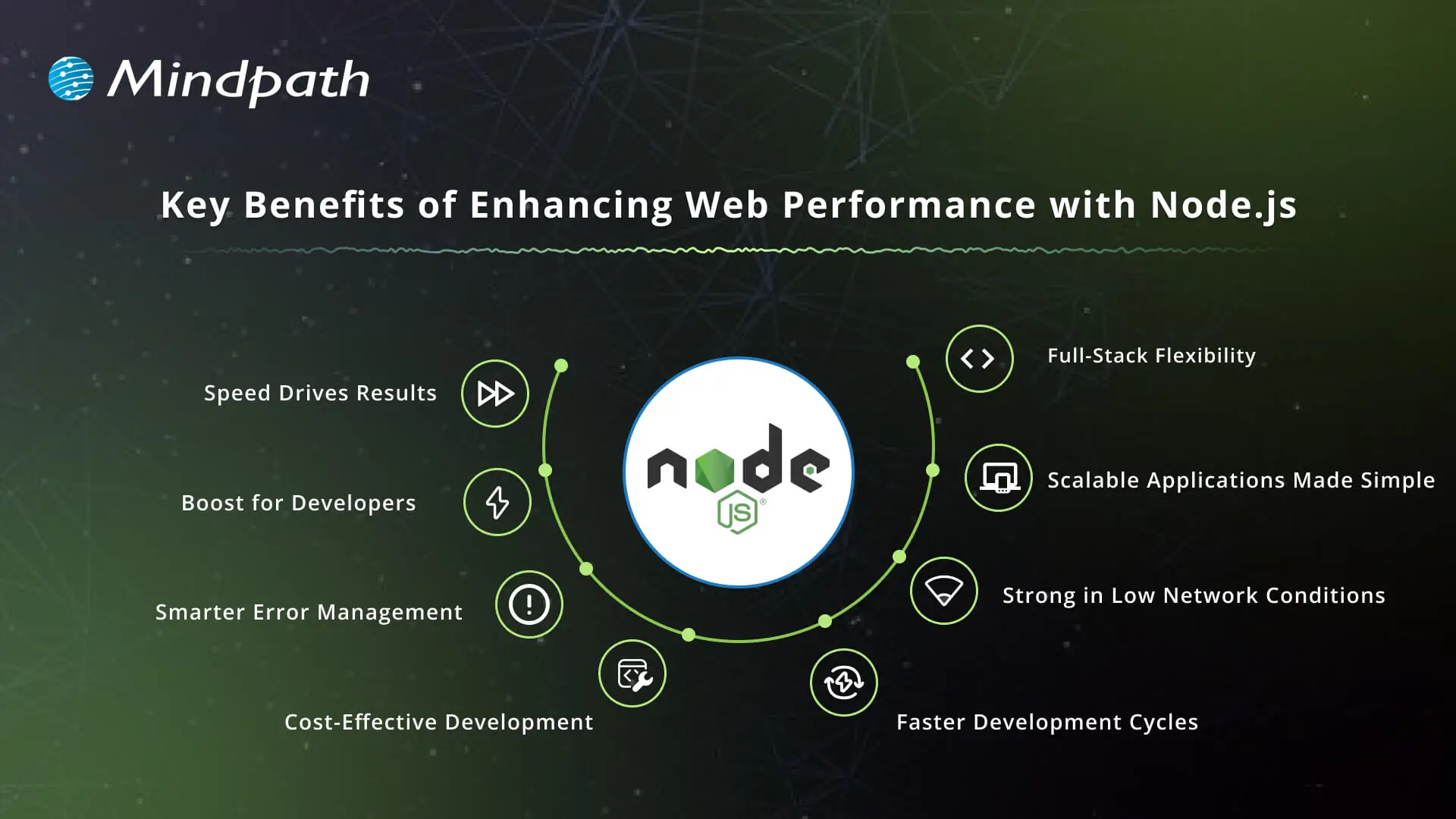
Key Benefits of Enhancing Web Performance with Node.js

1. Speed Drives Results

Node.js provides unparalleled speed with its event-driven, non-blocking I/O model, which allows applications to handle multiple requests simultaneously. This means faster response for multiple incoming requests, despite how much traffic the application will be dealing with. Companies that rely on real-time interactions benefit from significant overall web app performance.

2. Productivity Boost for Developers

The single-threaded, event-driven design of Node.js is incredibly fast, efficient, and allows for development to move quickly. Teams can build fully interactive solutions like chats, live streams, and collaborative tools in one simple app, as opposed to other methods that are more complicated. When businesses hire Node.js developers, they can create productivity advantages that let them get the products into the market faster, hence improving web performance with Node.js.

3. Smarter Error Management

Node.js offers robust error-handling mechanisms for developers built into its framework. Developers can readily catch and process errors during runtime. This allows applications to be much more stable, thus improving reliability; all of this while enhancing the user experience regardless of the environment.

4. Cost-Effective Development

Node.js lowers the needed infrastructure with lower resource needs, while still accommodating high load needs. Business savings include operating costs such as licenses, maintenance contracts, and hardware upgrades. Such cost mitigation makes Node.js development services appealing to enterprises that prioritize long-term value.

5. Faster Development Cycles

Developers let you quickly create applications with Node.js, especially when developers are creating modular and reusable code. Node.js is normally used in conjunction with Node.js micro services, allowing smaller microservices to work well together as part of larger systems. This allows for quicker launches of applications and provides for easier updates to accommodate changing business requirements, while enhancing web performance with Node.js.

6. Strong in Low Network Conditions

Node.js handles slow or unstable networks efficiently. The asynchronous nature of Node.js allows each request to be immediately started without waiting, which results in helping to get rid of lags. This particular stability allows organizations to focus on delivering the best possible digital experience to users under various conditions.

7. Scalable Applications Made Simple

One of the primary benefits of Node.js is scalability, which is suitable for applications where demand is unpredictable. Developers can grow horizontally by using more instances or vertically by using better resources. A model of growth with both horizontal and vertical scaling provides growth where sustainability is the framework for implementation, resulting in Node.js performance.

8. Full-Stack Flexibility

JavaScript provides the opportunity for end-to-end development and client-side and server-side programming with Node.js. With good performance, full-stack developers can build responsive and dynamic web applications. Using Node.js allows organizations to realize efficiencies in their processes and provide similar experiences across their clients’ ecosystems.

Want to enhance your web performance with full-stack development? Learn how to build fast and reliable applications by reading our blog on Mastering Full-Stack Development with Node.js.

Role of Node.js in Increasing Web Performance

Node.js contributes significantly to building applications that are fast, scalable, and dependable. Its architecture allows developers to build solutions that are responsive and can handle a high volume of requests and traffic.

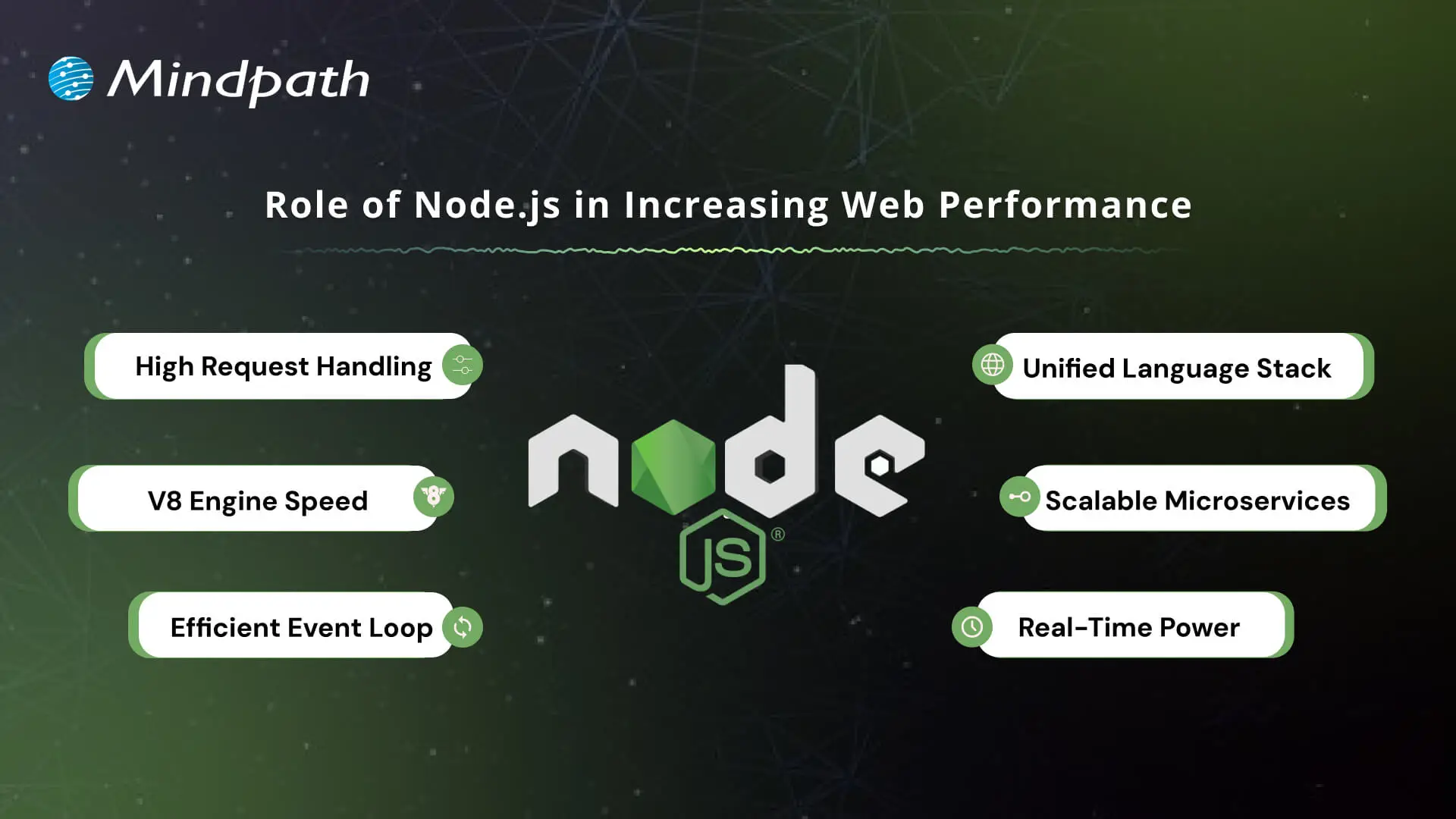
Role of Node.js in Increasing Web Performance

1. High Request Handling

Node.js accepts multiple requests simultaneously and does not wait for one request to finish before handling another. These attributes contribute to fast and responsive applications, especially important in real-time services like chats and streaming.

2. V8 Engine Speed

The platform utilizes the Google V8 engine to compile JavaScript into machine code. This improves performance by optimizing execution speed, which also indirectly improves the performance of web apps.

3. Efficient Event Loop

Node.js utilizes its event loop to manage asynchronous tasks, such as a file read or a database query. In this way, the server will never get stuck while waiting, which keeps applications smooth and seamless.

4. Unified Language Stack

Using JavaScript for both the front and back end simplifies the development process. In addition, it allows for improved code optimization and helps with better web performance with Node.js.

5. Scalable Microservices

Node.js allows for microservices, which break large applications into smaller, independent parts. Microservices make applications easier to scale and makes it easier to optimize for specific components.

6. Real-Time Power

For applications that need live updates, such as analytics tools or online games, Node.js is a great choice. It improves overall web performance with Node.js because it can handle multiple connections simultaneously.

Boost your Node.js application speed and efficiency by using the right tools. Check out the Top 25 Node.js Libraries in 2025 and take development to the next level.

Ready to Boost Your Web Performance with Node.js?

Node.js has shown its strength by improving speed, scalability, and reliability in modern applications. Through real-time features, effective architecture, and even inexpensive scalability, it can build digital experiences that users actually enjoy. Organizations that want to improve customer satisfaction can invest in Node.js to improve their chances of long-term success in competitive markets today.

At Mindpath, we are known to provide professional Node.js development services across globe, designed to develop scalable, high-performing solutions. When you hire Node.js developer teams with us, you tap into dedicated professionals who specialize in faster, secure, and business-ready apps. Our approach is to combine technical skills with business goals to ensure our clients achieve seamless performance, making meaningful growth with Node.js.

Unlock the power of Node.js to boost web performance and scalability. Learn how Node.js development services can transform your web app.
Legacy application modernization

There is need to make radical decisions in order to grow in 2026. Legacy application modernization now sits at the center of every CEO agenda. You are witnessing increasing prices, delayed launches, and systems to block innovation. So, what will you change first? Technology influences the degree, pace and consumer confidence. Consequently, leaders need to think radically about fundamental systems with expediency and conviction.

Nonetheless, the process of modernization is not a fast upgrade. It involves vision, alignment and good implementation. You would need to relate business objectives with contemporary architecture and cloud preparedness. Delay decreases the benefits as competition increases. Clearly, smart CEOs are early adopters and change agents. This blog discusses real-life tactics that help organizations grow in a scalable manner. So, keep reading further!

Want to turn legacy applications into a driver of growth and innovation? Mindpath provides legacy modernization services that help organizations modernize systems and unlock new business opportunities.

Why is Understanding Legacy Application Modernization Strategies Important?

Leaders must understand the right approach before investing in legacy application modernization. An effective plan will minimize risk, cost management, and adjust the technology to business objectives. It makes more intelligent choices, prevents interference, and long-term value. Modernization attempts to accelerate growth but lack guidelines; they tend to slack growth rather than improve it.

The world of business today is a busy environment where it is the speed and flexibility that determine the success of a business. Knowing the strategy behind legacy app modernization helps teams prioritize upgrades, strengthen security, and support innovation. It develops a blueprint to scalable systems, improved customer experience and a sustainable digital growth in competitive markets.

Key Strategies for Legacy Application Modernization

Powerful growth requires a definite course of action. Legacy application modernization strategies help businesses upgrade systems with less risk and better results. A narrow strategy makes the technology work in line with long-term objectives and innovation.

1. Refactor or Rearchitect

This is a method that re-architectures an application. Teams subdivide large systems into small and flexible services. It enhances scalability and is available with AI and real-time data tools. Many legacy modernization strategies recommend this for business-critical platforms. It drives true Legacy system transformation.

2. Rehost

Rehosting relocated applications in the cloud without altering code. It lowers data center expenditure within a short time. Companies achieve improved infrastructure and scalability. Although it does not fix deep design issues, it supports early legacy application modernization goals. It puts the systems into readiness to be improved in the future.

3. Retire

Retiring eliminates non-value-adding applications. Most organizations continue to incur the expense of unused or duplicated systems. Their closure saves on licensing and maintenance. This simple step strengthens application modernization plans. It liberates funds on high impact innovation projects.

4. Replatform

Replatforming transfers applications to the cloud with minor enhancements. Managed cloud services could replace self-managed databases in teams. This enhances performance and saves on operation. It balances cost and benefit during modernization of legacy applications. It eliminates chances of complete reconstructions.

5. Repurchase

Repurchasing involves substituting custom systems with cloud based SaaS products. Companies shift to subscription services run by reliable suppliers. This eliminates internal pressure of maintenance. It guarantees the availability of frequent updates and security patches. It supports faster legacy modernization decisions.

6. Relocate

Relocation takes virtual machines into the cloud without adjustment. It is efficient when implementing data centers of a large scale. Businesses are consistent and fast during migration. This method supports infrastructure goals in legacy application modernization programs. It keeps disruption low.

7. Retain

Retaining is maintaining the application in the existing environment. This is selected when systems continue to provide high returns to companies. It enables IT teams to work on more important upgrades. Not all systems are in need of urgent transformation. Smart legacy application modernization planning includes selective retention.

Want to ensure your modernization efforts follow a clear and structured path? Explore the legacy modernization roadmap to guide every step of your transformation journey.

Steps to Build an Effective Legacy Application Modernization Roadmap

A roadmap makes complicated upgrades into systematic improvement. The correct plan will help make sure legacy app modernization initiatives remain business-focused, budget-wise, and long-term.

Steps to Build an Effective Legacy Application Modernization Roadmap 

1. Evaluate Your Current Applications

Begin by taking a thorough analysis of your current systems. Quality of check codes, performance problems, integrations and infrastructure to identify the latent risks and areas of improvement.

2. Define Clear Business Objectives

Connect the leadership and stakeholders to the importance of modernization. Establish quantifiable objectives to ensure teams know priorities, expected results and schedules prior to technical change.

3. Select the Right Modernization Approach

Select a strategy that suits the business, e.g. rehosting, refactoring or rebuilding. The right choice reduces risk and supports long term legacy application modernization success.

4. Prioritize and Test with a Pilot

Divide the plan into achievable stages. Begin with high impact modules and put a proof of concept to confirm performance, security and scalability enhancements.

5. Execute in Controlled Phases

Move changes in steps so that there is no disruption. A structured rollout ensures stable operations and measurable value throughout the legacy application modernization journey.

Want to understand how updating legacy systems can boost business performance? Discover the benefits of modernizing legacy systems to achieve efficiency and scalable growth.

Ready to Lead Growth with a Clear Modernization Strategy?

Legacy application modernization offers CEOs the freedom to scale comfortably. It lowers the risk, enhances security and optimizes performance of the system. More significantly, it makes technology consistent with long term business objectives. The first mover companies are faster, more nimble and more trusted by their customers. An obvious guide transforms complicated systems into development drivers.

Mindpath is a reputed legacy modernization company who provide legacy modernization services that assists businesses in modernizing key systems in a clear and accurate manner. Our professionals evaluate, develop, and implement policies that facilitate creativity and business prowess. We put emphasis on quantifiable outcomes and value creation. Through Mindpath Legacy modernization services, companies create safe and scalable platforms that can support future developments.