

Latest Insights On
GenAI, Tech, and Digital Transformation
Stay updated with expert insights, success stories, and real-world applications of cutting-edge technology.
Importance Of Website Maintenance
Routine WordPress maintenance will help your website to be stable, secure, with better loading speed, and compatible with different browsers and devices. Regular backups guarantee that there is no loss of data in case of website crashing or malware attacks. Up-to-date plugins will ensure that slowdowns and security risks are prevented. Monitoring and analytics on user behavior help you make informed decisions and optimize your content. This provides better maintenance of your website, thus keeping it in top shape, and gives a better experience to the visitor.How Much Does WordPress Maintenance Cost?
The cost of maintaining a WordPress site will be based on the size and complexity of the website. Routine maintenance in 2024 can range from as low as $5 a month to $120 per month or $40 a year to $1,200 a year. For a personal site, maintenance might be as low as $4 a month or $40 annually. Business sites usually start at about $8 per month or $80 per year. The pricing for running corporate websites is usually in the region of $12 a month or $120 yearly. The websites related to entertainment and eCommerce usually cost more, with the former starting at $16 per month and the latter at $20 a month. Routine maintenance includes updating plugins, themes, and WordPress core, managing backups, ensuring security, and keeping up performance.The Complete Checklist of Monthly WordPress Maintenance Tasks
1. Optimize Your Database
Over time, your WordPress database can become bloated with extraneous data from things like old post revisions, spammy comments, and deleted items, which slow down your site. To clean up your database, first back it up using a tool like Solid Backups to ensure all your data is safe. Then use a plugin such as WP Optimize to clear out any unnecessary data and boost database performance. Alternatively, if you know how to manipulate a database, you can clean up manually with phpMyAdmin. This method is useful when custom settings must be considered, and in all probability, it would be good to talk this over with a developer in case you are unsure.2. Manage Backups
Backing up your website is something you should do regularly for safety against losses and quick recoveries in case of issues. Besides, with Solid Backups, you can configure backups automatically by using the plug-in known as UpdraftPlus. Schedule the backups frequently and let them be safely kept in the cloud, optimally. Moreover, review the process of restoration month by month to confirm that your backup procedure is working well, and in case of need, you will be in a good position to recover your site.3. Update WordPress Core, Plugins, And Themes
WordPress core, theme, and plugin updating have implications for security, compatibility, and accessing new features. According to the Wordfence 2022 State of WordPress Security report, plugins in particular are a weak point, so keeping them up to date is very important. Keep checking for updates, and when found, update them one after the other. Begin with the WordPress core and then proceed to plugins and themes. Remember to always back up before doing any big update and update on a staging site so you can be sure everything works well with your current setup.4. Perform Security Scans
Security scans to vulnerabilities, malware, and unauthorized access should be regularly scheduled. Run full site scans with a plugin like Shield Security, check the logs for any suspicious activity, and configure settings. You should, however, schedule these scans to run periodically, but at least revise them once a month.5. Analyze Site Speed
A website’s speed has a massive impact on user experience and SEO. Among others, you can use Google PageSpeed Insights, GTmetrix, or Pingdom to check how fast your website loads. After testing, fix performance issues of your website against the results. If the speed problems continue, see if there’s a need to review and upgrade your hosting plan.6. Check For Broken Links
Checking for broken links is important both for delivering a good user experience and SEO. Broken links may make visitors and search engines end up in so-called ‘dead ends,’ harming your site’s rankings and authority. Run a check using a plugin such as Broken Link Checker. Thereafter, repair or remove broken links upon finding them, possibly looking into scheduling automated checks to help identify new broken links in the future.7. Optimize Images
Optimizing images will help to increase your site speed and performance radically, particularly when you have a heavy share of images on the site. Tools like Smush or ShortPixel do really well when it comes to compressing existing images. Remember the right formats—JPEG for photos and PNG for graphics where the requirement is transparency. Enable lazy loading; this defers the loading of off-screen images to further speed up page load times.8. Submit Your Sitemap
Making sure that you are regularly submitting your sitemap to search engines will let them index your website in a better way and give you more exposure. Use a plugin such as Yoast SEO to create an updated sitemap, then take the time to manually submit this to search engines via their webmaster tools—like Google Search Console—to check that all your pages are correctly crawled and indexed for maximum search engine visibility.9. Monitor Site Performance
Monitoring your site’s performance frequently will let you know when there is a problem. It helps in making informed decisions and will let you act swiftly. Use tools like Google Analytics and Jetpack to look through key metrics such as page views, bounce rate, and conversion rates. This setting of performance alerts about major changes or problems will let action be taken in time and thus your site runs smoothly.10. Test Your Forms
Testing of forms at regular intervals is paramount to ensure that they work right and harvest data from users effectively. All forms should work well, and process input correctly. Check that email notifications are going to the right addresses, then test for user experience to make sure forms are usable, accessible, and responsive on different browsers and devices.11. Clear Site Cache
It ensures that your site visitors have the most recent content. In addition, it will boost your website’s performance. Sometimes, cached data can become corrupt or outdated, causing display issues and slowing download time. Flush the server cache, then reset any plugin-built caches. Test your site for improved performance after flushing the cache. This can also be done in many ways depending on your unique setup. If you are not comfortable doing it yourself, use something like WP Super Cache and W3 Total Cache.Ready to optimize Your WordPress Experience?
Learn More About Mindpath’s Maintenance Services!
WordPress Development Services at Mindpath
At Mindpath, we ensure your WordPress website runs at its best with comprehensive maintenance services. This includes regular updates to WordPress Core, plugins, and themes; daily backups for data security; and optimization of the performance of the site so that it loads faster. Our team conducts security scanning to save from threats, monitors and fixes broken links, and looks through analytics to bring about better user engagement. We test forms to make sure they are working well. You just focus on your business while we keep your site secure and efficient with our expert maintenance.
Conclusion
Maintenance, on the other hand, will ensure your WordPress site is not only smooth, safe, and high performing, but it will also be defended from many problems for the best user experience. From checking for broken links to analyzing site speed or running security scans, every step is important in keeping your website at its best.
At Mindpath, we cut down the complexity of WordPress maintenance by offering every necessary service in one place to keep your site in top condition. Let our team take care of updates, backups, performance optimization, security checks, and more, so you can focus on growing your business while we work on keeping your website reliable and engaging. Our expert team at Mindpath makes sure your WordPress site is running at peak performance, ensuring you can get on with business and not worry about it.
Want to achieve a Faster, Safer WordPress Site?
Find Out More About Mindpath’s Maintenance Solutions!
Overview of React
React is a JavaScript library that enables the building of user interfaces, mostly single-page applications. It gives a possibility to create interactive elements and dynamic web pages by breaking their content into smaller, re-usable components. It helps in managing updates to the user interface and hence makes applications faster and more responsive. React is essential to today’s digital makeup since it will help in the creation of a much faster, interactive, and dynamic web application that would go a long way in enhancing user experience. Due to its component-based architecture, React simplifies the development process and supports complex applications with high performance, making it a preferred choice for modern web development, where user engagement and responsiveness count the most.Overview of WordPress
WordPress is an extremely popular content management system, and millions of websites are running on it worldwide. Its user interface is very simple, so users can easily create, edit, and manage website content without needing to know how to code. With high flexibility in themes and various plugins, WordPress can be put to any purpose—from personal blogging to the most complicated business sites. WordPress is important due to the flexibility and user-friendliness in creating and managing websites efficiently for any kind of user. It provides access to unlimited customization because of its extended base of themes and plugins, hence becoming a mainstay tool in the modern world for web developers and content creators.Why Combining React and WordPress Can Be Beneficial for Developers.
Integration of React with WordPress enriches development by putting the power of both together. React is empowered for reusing the components, which means simplicity in terms of coding and speed in development. Fast rendering with efficient state management means web applications work harmoniously and respond as the user expects. JSX syntax, with its combination of JavaScript and HTML, enables easier writing and readability of codes. WordPress complements React by taking care of the content and providing a clear user interface. The fact that React can keep data away from the presentation and manage it nicely helps not to lose data under any conditions. Taken together, React and WordPress make the building process much faster and more convenient for creating powerful and extremely dynamic web apps.Key Considerations When Building Your Web App with React and WordPress
1. Existing Infrastructure
Your existing infrastructure does affect how well React and WordPress work together. If your current system is compatible, the integration of React will go through smoothly and more quickly. For example, a headless setup where React is doing the front end and WordPress the back end could be best for modern needs. This, however, requires more development work, changes in your back-end system, and special expertise to do it correctly.2. Maintenance And Updates
Regular updating and maintenance are vital in the case of a React and WordPress site. In case you do not update them regularly, your site will eventually have performance issues, it will be vulnerable to security exploits, or even crash. When it’s headless—in a setup where React and WordPress run separately—the updates become easier; one could independently update the front end and back end, which will be helpful in keeping the site’s stability and safety.3. Developer Skillset
It requires a wide skill set to build a website with React and WordPress. One needs to be proficient in JavaScript, to understand JSX, and to use state management tools like Redux. One would also want to be familiar with modern development tools like Webpack and Babel and know how to work with APIs. If these competencies are missing in your team, including an expert on a project basis will make the development process smoother and more efficient.4. SEO Considerations
SEO is critical to have your website show up in search results and bring in visitors. Using React with WordPress, SEO can be a little more complex. As its client-side rendering, React may make it hard for search engines to index your content. You can either implement SSR or SSG to make it easier for search engines to crawl and rank your site. Besides, meta, sitemaps, and canonical URLs should be properly set up for effective SEO within a headless WordPress setup.Ready to elevate your website to new heights?
At Mindpath, we seamlessly integrate React with WordPress to create dynamic, responsive web experiences.
Configuring React to Work with WordPress
1. Write Modular Code
Breaking your code into smaller, self-contained parts makes it easier to handle and reuse. This is like keeping your workspace organized: when everything has its place, it’s much easier to find anything that you may need and use it. Small, reusable components in React are ways by which you can keep your code neat, making changes or fixes on parts of your site without affecting the other parts.
2. Use A State Management Library
A state management library, like Redux, that keeps every bit of information of your app in one place. This is good for complicated websites where you deal with a great deal of information. This way, it becomes easy to handle changes and updates for your website to run smoothly and in the desired manner.
3. Optimize Performance
Performance optimization of the website enables quick and enjoyable usability by the user. This is achieved through caching, breaking down the code into smaller pieces that load only when needed, or lazy loading—parts of the website only load after becoming visible to the user. Doing this will get your site up and running quickly; this will also improve responsiveness.
4. Implement A Consistent API
A good API—like WordPress REST API or GraphQL—will help your React app and WordPress site to communicate smoothly. A consistent API would mean that data flows between the two without any problems. REST APIs offer flexibility, but their design is often varied. GraphQL APIs are more homogeneous and predictable, so it helps in use and understanding.
5. Plan For Extensibility
Make a site that will expand and evolve over time without a problem. That means keeping ahead by finding out ways to add new features or update existing ones without breaking the rest of the site. Having an extensible design means it will let your site easily change to meet future needs without having to start from square one.
6. Automated Testing
Automated testing means running your code for errors using tools automatically. This will ensure that mistakes are noted and cured in the beginning, thus ensuring that your website does what you want it to. Automated testing saves time and keeps your site stable; this reduces the chances of problems frustrating users.
Build Your Web Using React and WordPress with Mindpath
The experienced team at Mindpath uses React to improve user experience and WordPress as the foundation for creating powerful websites. With its incredibly strong and practical content management system, editing and managing website material is effortless. By integrating React, we can increase your site’s speed and amount of interaction while engaging users on a deeper level. Create a dynamic frontend for your website using React to make it load quickly and react to user input as smoothly as possible.
Mindpath offers the best of both worlds: the ease and versatility of WordPress paired with the contemporary, dynamic capabilities of React. We take care of the technical setup and customization so you can have an outstanding website experience and concentrate on your content and business objectives.
Conclusion
Combining React and WordPress gives synergy to your Web application, offering a digital experience that is at once impressive and compelling. Being able to interact with dynamically displayed interfaces from React and a robust content management system like WordPress, you are assured of having a site that is at once engaging, powerful, yet very easy to manage. Inherently, this automatically ensures the improvement of user interaction and performance while also making it seamless to update content and manage sites. Embrace this mix of technologies to develop a web app which would be fast, functional, and future-ready. This way, your web presence will always be at the top of its game.
Mindpath excels at bringing this integration to life. Our expert team combines the power of React with WordPress to deliver an ultra-fast, interactive site that is also easy to maintain and update. With Mindpath, you can confidently navigate the complexities of modern web development, ensuring your digital presence is both cutting-edge and effortlessly managed.
Looking to enhance your WordPress site with cutting-edge React features?
Mindpath is your go-to partner! We specialize in integrating React’s dynamic capabilities with WordPress’s robust CMS to deliver stunning web experiences.
What is AI Implementation?
AI implementation makes use of smart technology in making your business function better. It simply embeds AI tools into your daily activities to make them easier and more efficient. This could be anything from responding to customer inquiries to analyzing massive data or even predicting what the next possible sale to a given customer would be. Basically, this is meant to save time and improve customer service and think smarter. This way, your business will be able to grow and make your goals a reality very fast due to working smarter, not harder. Artificial Intelligence is important in today’s world because it makes life and working procedures easy. It helps organizations in automating tasks, analyzing data, and making speedy decisions. AI improves healthcare by supporting doctors in the diagnoses of diseases and improves the customer experience within retail shops through the personalization of shopping activities. As technology grows, AI becomes even more vital in helping us innovate and stay competitive.AI Implementation Strategy
1. Data Type
If you really want to start leveraging the power of AI properly, then it becomes quite important to use the right model for your data type. Use models that treat pictures well for image data, those that understand the language for text, and those that track changes over time for time-based information such as stock prices. Using the appropriate AI model according to your data makes it work better and gives you more accurate results.2. Problem Complexity
Keep in mind how complex your problem will be when using AI. Easy problems likely can be satisfactorily solved with some pre-trained model that has been set up for common issues. For more unique or complex problems, you will want an AI tailor-made for your requirements. Matching an AI model with your problem’s complexity enables much better results and effective solutions.3. Labeled Data
Deep learning requires a lot of labeled data—information that has been tagged with correct answers. Check whether you have enough labeled data for the project to be executed; otherwise, you can use techniques such as transfer learning, where you get a model that is already trained on similar data. In that case, you can still have good results with limited labeled data.4. Managing Computational Resources
While using AI, do not forget to think about what kind of computing power you have. Big models, like GPT-3, really eat through resources—of course, not all companies will have these resources. Therefore, ensure that your infrastructure can sustain the computing burden for the kind of AI model you intend to use. This way, it will align the needs of the model with your computing means, thus implementing both smoothly and effectively.5. Interpretability
Consider the interpretability at which you need to understand how your AI model works. In domains like healthcare or finance—where models must explain their decisions to be compliant and build trust—choose AI models that are transparent enough to interpret and justify their outputs.Step For Successful AI Implementation
1. Set Clear Goals and Objectives
Clearly define what you want to achieve before implementing AI in business. Be specific on the problems that must be solved, the gains to be achieved, improve customer satisfaction, or boost productivity. Knowing the target will help in choosing the correct tools and technologies of AI for you.2. Find the Best Data Sources
AI’s ability to work correctly depends on the use of relevant data sources. This can involve using either internally generated data, like customer information or financial information, or even external sources such as social media and news feeds. Ensure that data used is relevant, accurate, and up to date.3. Pick the Right AI Tools
With the plethora of tools in artificial intelligence at your fingertips, select only those that work for your business. These could be machine learning, language processing, or even analytic tools. Consider things like cost, scalability, and usability in finding the right fit for your business.4. Create a Solid Data Plan
AI systems require enormous amounts of data to perform well. Build a robust data plan indicating how you will collect, store, process, and analyze your data. This includes setting up data management policies, ensuring the security and privacy of your data, and architecting a data system that works for your AI needs.5. Invest in Training and Skill Development
An AI business can only succeed past the tools if equipped with the right people for the job. Invest in training and education for workers so that they develop appropriate skills for working with AI. The upskilling may entail learning more about data science, machine learning, or other skills that are relevant in AI. This will equip your team to effectively use the AI system to maximize its benefits.6. Start with Small Projects and Expand
AI implementations can be very complex and time-consuming. Start small, engage in doable tasks that will yield some sense of how AI works for you in business. Test it in only one area or department of your business. From the experience and confidence, you will build from these first projects, over time, you can spread AI to other areas of your business.7. Monitor and Adjust
Once your AI system is in place, monitor its performance. Key metrics should be observed, which include accuracy, speed, and efficiency. Monitor user feedback and adjust your AI algorithms or data strategy accordingly. Regular adjustments help ensure that your AI will continue working effectively for you.Ready to take your business to the next level with AI?
At Mindpath, we offer cutting-edge AI development services designed to enhance efficiency and drive innovation.
AI Development Services at Mindpath
Enrich your business with cutting-edge AI development services at Mindpath. We deal in predictive analytics, helping you foresee future trends and make decisions in advance. Machine learning applications will let you create automated decision-making for the enhancement of operational efficiency in your business. Additionally, data-driven insights are delivered to let your business understand and act upon the data appropriately. Our Business Intelligence services turn raw data into insightful visualizations and comprehensive reports so that you have a view of the performance of your business from a bird’s eye perspective. You could, therefore, make informed decisions that would drive strategic planning and make processes optimized with data-driven intelligence. We also offer conversational AI services in developing smart chatbots and virtual assistants that increase engagement, provide real-time support, and automate tasks to create a seamless, highly personalized experience for users. At Mindpath, our AI development services are designed to innovate efficiency in your business to make it thrive in the rapidly changing digital landscape.Conclusion
Artificial Intelligence offers transformative power to any business that can innovate and adapt. It aids in understanding and implementation of artificial intelligence at each level of your journey—from defining clear goals and selecting the right tools for your job through managing data—so that you unlock new levels of efficiency and insight. The AI development services offered at Mindpath will help you harness this power by turning complex data into actionable intelligence and automating processes for fueling growth. Embrace the future of technology with AI and see your business not only competing but leading in today’s dynamic market.Want to see how AI can revolutionize your business?
Mindpath’s expert team is here to help you leverage advanced AI technologies for smarter decision-making and greater success.
Technology is transforming how businesses operate, communicate, and serve customers. However, digital transformation also creates challenges, including energy consumption, electronic waste, and the environmental impact of computing infrastructure. As organizations become more dependent on digital solutions, adopting sustainable practices is becoming an important business consideration.
Key Takeaways
- 01
Sustainable technology helps businesses reduce environmental impact while improving operational efficiency. - 02
AI, cloud computing, IoT, and energy-efficient software can support more sustainable business operations. - 03
Green software development and responsible hardware management help reduce resource consumption and electronic waste. - 04
Businesses should measure energy usage, emissions, and resource efficiency to evaluate sustainability progress. - 05
A practical sustainability strategy combines suitable technology, measurable goals, and continuous improvement.
This is where sustainable technology plays a significant role. It helps organizations use digital tools, software, and infrastructure more responsibly while supporting long-term business objectives.
This sustainable technology essential guide explains what sustainable technology means, its key benefits, practical applications, and how businesses can incorporate sustainability into their technology strategies.
Ready to make sustainability a driver of business growth? Contact Mindpath to turn your sustainability goals into measurable business outcomes.
What Is Sustainable Technology?
Sustainable technology refers to the development and use of products, software, and systems that aim to minimize environmental harm, use resources efficiently, and support long-term social and economic well-being.
It includes technologies that reduce energy consumption, improve resource management, minimize waste, and help organizations monitor their environmental performance. Examples include renewable energy systems, energy-efficient data centers, smart monitoring systems, and software designed to use computing resources efficiently.
According to IBM, sustainable technology considers environmental, social, and economic factors throughout technology development and use. Read IBM’s sustainable technology guide.
Sustainable technology is not limited to manufacturing eco-friendly products. It also involves making everyday business technology more efficient, from cloud infrastructure and enterprise applications to data management and software development.
Why Is Sustainable Technology Important for Businesses?
Businesses increasingly rely on digital infrastructure to manage operations, customer relationships, and decision-making. Sustainable technology helps organizations address the environmental impact of these activities while identifying opportunities to improve efficiency.
1. Reduces Environmental Impact
Energy-efficient infrastructure, optimized software, and responsible equipment management can help reduce resource consumption and unnecessary waste.
For example, businesses can review server utilization, remove redundant computing workloads, and establish responsible electronic waste recycling practices.
2. Improves Operational Efficiency
Sustainable technology can help organizations identify inefficient processes and improve the use of existing resources. Automated systems and real-time monitoring can reduce unnecessary energy consumption, material waste, and repetitive manual work.
3. Supports Long-Term Cost Management
Cloud resource optimization, equipment reuse, and efficient software applications may reduce operating expenses over time. However, actual savings depend on implementation costs, existing infrastructure, and usage patterns.
4. Strengthens Business Responsibility
Customers, employees, investors, and business partners may consider environmental responsibility when evaluating organizations. Adopting measurable sustainability practices can help businesses demonstrate accountability and support their broader environmental, social, and governance objectives.
Key Types of Sustainable Technology
Several technology categories can help businesses improve sustainability.
1. Green Software Development
Green software development focuses on creating applications that use computing resources efficiently. Developers can optimize algorithms, reduce unnecessary processing, improve database queries, and avoid excessive data transfers.
For example, an application that processes only necessary information may require fewer computing resources than one that repeatedly performs redundant operations.
Efficient software can improve performance while potentially reducing the energy required to operate applications.
2. Cloud Computing and Energy-Efficient Infrastructure
Cloud computing allows organizations to access computing resources without maintaining all infrastructure themselves. When workloads are appropriately sized and managed, cloud services can improve resource utilization.
Businesses can support sustainable cloud computing by:
- Removing unused cloud resources.
- Scaling infrastructure according to demand.
- Monitoring server and storage utilization.
- Choosing suitable hosting and infrastructure providers.
- Evaluating energy efficiency and sustainability reporting.
Cloud migration alone does not guarantee environmental benefits. The outcome depends on workload efficiency, infrastructure choices, and how resources are managed.
3. Artificial Intelligence and Machine Learning
Artificial intelligence (AI) and machine learning can help businesses analyze large datasets, identify inefficiencies, and improve operational planning.
Common applications include energy demand forecasting, predictive maintenance, waste reduction, and supply chain optimization.
For instance, a manufacturing company could use predictive analytics to identify equipment maintenance requirements before major failures occur. This may help reduce downtime, unnecessary replacement, and material waste.
However, AI systems also consume energy and computing resources. Organizations should evaluate whether an AI solution provides meaningful benefits relative to its resource requirements.
4. Internet of Things (IoT)
IoT technology connects devices and sensors that collect information about physical environments and equipment.
Businesses can use IoT sensors to monitor electricity consumption, building temperatures, water usage, and machine performance. These insights help teams identify unusual consumption patterns and make informed adjustments.
5. Renewable Energy and Smart Energy Management
Renewable energy technologies, including solar and wind power, can help organizations reduce reliance on fossil fuels when appropriately implemented.
Smart energy management systems can monitor consumption, identify peak demand, and coordinate equipment operation. Combining these systems with energy-efficient computing infrastructure can support broader sustainability goals.
How Can Businesses Implement Sustainable Technology?
Organizations do not need to transform every system at once. A phased approach makes sustainability initiatives easier to manage and evaluate.
Step 1: Assess Current Technology Usage
Review existing applications, servers, cloud services, hardware, and data storage. Identify unused resources, inefficient processes, and equipment that consumes unnecessary energy.
Step 2: Set Measurable Sustainability Goals
Establish clear targets based on the organization’s current performance. Relevant measurements may include electricity consumption, cloud resource utilization, equipment lifespan, and electronic waste.
Step 3: Optimize Software and Infrastructure
Improve application performance, remove redundant processes, optimize databases, and right-size cloud resources. Prioritize changes that offer measurable operational improvements.
Step 4: Adopt Responsible Hardware Practices
Extend equipment lifespan through maintenance, repair, and reuse where practical. Purchase energy-efficient devices and use appropriate recycling channels for end-of-life equipment.
Step 5: Monitor Results and Improve Continuously
Track performance against a baseline and review results regularly. Where possible, measure energy and emissions directly rather than assuming that a technology change automatically improves sustainability.
Challenges of Adopting Sustainable Technology
Although sustainable technology offers potential benefits, implementation can present challenges.
- Initial investment: Infrastructure upgrades, monitoring systems, and employee training may require upfront spending.
- Legacy systems: Older applications may be difficult to optimize or integrate with newer technologies.
- Measurement difficulties: Businesses may lack reliable data about energy consumption, emissions, and supply chain impacts.
- Technical complexity: Sustainability improvements often require coordination between development, operations, procurement, and management teams.
- AI resource consumption: Advanced AI workloads can increase computing demand if they are not appropriately selected and optimized.
Businesses can address these challenges by starting with high-impact opportunities, establishing clear ownership, and measuring results before expanding their initiatives.
The Future of Sustainable Technology
Sustainable technology will continue to influence software engineering, cloud infrastructure, AI adoption, and business operations. Organizations are increasingly able to use data-driven systems to understand resource consumption and identify opportunities for improvement.
Energy-aware software development, efficient AI workloads, smart infrastructure, and circular approaches to hardware management are important areas to watch.
The most effective approach is not simply adopting the newest technology. It is selecting solutions that solve genuine business problems while considering their environmental impact throughout their lifecycle.
Conclusion
Sustainable technology provides businesses with a practical way to combine digital innovation with responsible resource management. From green software development and cloud optimization to AI-powered monitoring and IoT systems, organizations have multiple options for improving efficiency and reducing avoidable waste.
The key is to start with a clear assessment, establish measurable goals, and continuously evaluate results. By integrating sustainability into technology decisions, businesses can build more efficient digital operations and support long-term organizational resilience.
Looking to build efficient, scalable digital solutions for your business? Explore Mindpath’s AI Development Services to learn how AI-driven solutions can support business innovation and operational improvement.
Managing transportation, warehouses, inventory, and deliveries can become complicated as a logistics business grows. Disconnected systems, manual data entry, delayed shipment updates, and inefficient delivery routes can increase operational costs and affect customer satisfaction.
This is where logistics software development becomes valuable. By creating digital solutions that connect logistics operations, businesses can automate repetitive tasks, improve shipment visibility, and manage resources more efficiently.
Key Takeaways
- 01
Logistics software development helps businesses automate transportation, warehouse operations, inventory management, and delivery workflows. - 02
Custom logistics software solutions can support unique business requirements, improve visibility, and connect existing systems. - 03
Essential features include real-time shipment tracking, route optimization, inventory management, automated notifications, and reporting. - 04
AI, machine learning, and predictive analytics can help logistics companies make informed decisions and anticipate operational challenges. - 05
A successful logistics software project starts with clear business goals, suitable technology, reliable integrations, and a scalable development strategy.
Modern logistics software can support everything from fleet management and warehouse operations to last-mile delivery and supply chain analytics. With artificial intelligence (AI), cloud computing, and automation, businesses can also improve planning and respond to changing operational conditions.
For logistics providers, e-commerce companies, manufacturers, and third-party logistics (3PL) businesses, investing in the right software can create a more connected and efficient supply chain.
In this guide, we explore logistics software development, its main types, essential features, business benefits, emerging technologies, and the steps involved in building a suitable solution.
Looking to develop a scalable software solution for your business? Explore Mindpath to learn about its software development and AI development services, and discuss your project requirements with the team.
What Is Logistics Software Development?
Logistics software development is the process of designing, building, integrating, and maintaining software applications that help businesses manage the movement, storage, and delivery of goods.
These applications organize logistics activities through centralized dashboards, automated workflows, tracking systems, and data analytics.
For example, a logistics company managing multiple delivery vehicles can use custom software to assign drivers, plan routes, monitor shipments, and notify customers about delivery updates. Managers can review operational data from one platform instead of switching between multiple tools.
Depending on business requirements, logistics software may include:
- Transportation management systems (TMS)
- Warehouse management systems (WMS)
- Fleet management applications
- Inventory and order management systems
- Shipment tracking and delivery management software
- Supply chain visibility platforms
- Freight management and logistics analytics solutions
Businesses can adopt ready-made software, customize an existing platform, or invest in custom logistics software development. The right approach depends on operational complexity, integration requirements, budget, and long-term goals.
Types of Logistics Software Solutions
Different logistics businesses require different digital solutions. Understanding the main types helps organizations select the right technology for their operations.
1. Transportation Management System (TMS)
A transportation management system helps businesses plan, execute, and monitor the movement of goods.
It can support shipment scheduling, carrier selection, freight cost tracking, route planning, and delivery status monitoring.
For example, a distribution company shipping products across multiple cities can use a TMS to coordinate carriers, manage delivery schedules, and identify transportation inefficiencies.
2. Warehouse Management System (WMS)
A warehouse management system manages activities within a warehouse or distribution center.
Common capabilities include inventory tracking, receiving, picking, packing, stock transfers, and dispatch management.
A WMS helps warehouse teams maintain better inventory visibility, reduce manual errors, and process orders more consistently.
3. Fleet Management Software
Fleet management software helps companies monitor vehicles, drivers, fuel consumption, maintenance schedules, and vehicle utilization.
When integrated with GPS and telematics systems, it can provide vehicle location updates and operational information that supports better fleet planning.
This type of solution is particularly useful for transportation providers, courier businesses, and companies operating their own delivery fleets.
4. Last-Mile Delivery Software
Last-mile delivery software manages the final stage of delivering a shipment to its destination.
Features may include automated dispatching, driver applications, delivery route planning, estimated arrival times, customer notifications, and electronic proof of delivery.
These capabilities can help e-commerce businesses and delivery providers improve communication and coordinate multiple deliveries more effectively.
5. Supply Chain Management Software
Supply chain management software connects activities involving suppliers, inventory, procurement, transportation, and distribution.
It can provide a broader view of product movement and help businesses coordinate different stages of their supply chain.
When connected with enterprise resource planning (ERP), warehouse, and transportation systems, it can reduce information gaps between departments.
Essential Features of Logistics Management Software
The right features depend on the business model, operational scale, and user requirements. However, several capabilities are commonly valuable in modern logistics software solutions.
1. Real-Time Shipment Tracking
Shipment tracking provides updates about shipment locations and delivery status using carrier integrations, GPS, or other tracking data sources.
It helps logistics managers identify delays and gives customers better visibility into their orders.
2. Route Optimization
Route optimization software evaluates factors such as delivery locations, vehicle capacity, traffic information, and delivery windows to recommend efficient routes.
More efficient routes may reduce unnecessary mileage, fuel consumption, and delivery times.
3. Inventory and Order Management
Inventory management helps businesses monitor available stock, incoming shipments, outgoing orders, and stock movement.
Order management connects order processing with warehouse fulfillment and transportation, reducing the need for repetitive manual updates.
4. Automated Notifications
Automated notifications keep customers, drivers, and operations teams informed about shipment dispatch, delivery progress, delays, and completed deliveries.
These updates can reduce routine customer inquiries and improve communication.
5. Reporting and Analytics
Logistics dashboards can display key performance indicators such as on-time delivery rates, shipping costs, vehicle utilization, inventory accuracy, and order fulfillment times.
These insights help managers identify bottlenecks and make decisions based on operational data.
6. System Integration
Logistics software often needs to exchange data with ERP platforms, e-commerce stores, accounting applications, warehouse systems, carrier APIs, and customer relationship management (CRM) tools.
Reliable integrations help maintain consistent information across business systems and reduce duplicate data entry.
7. Security and Access Control
Logistics applications may handle customer details, shipment records, commercial information, and operational data.
Role-based permissions, encryption, secure authentication, backups, and appropriate monitoring help protect this information.
Benefits of Custom Logistics Software Development
Custom logistics software development can be useful when existing platforms cannot fully support a company’s workflows or integration requirements.
1. Improved Operational Efficiency
Automating repetitive activities such as dispatch assignments, shipment updates, and order processing allows teams to spend less time on manual coordination.
2. Better Supply Chain Visibility
A connected platform can provide a more complete view of shipments, inventory, vehicles, and delivery progress. This helps teams identify issues and coordinate responses more quickly.
3. Reduced Operational Waste
Route optimization, inventory visibility, and automated workflows can help businesses identify avoidable expenses and use their resources more effectively. Actual savings depend on the existing process and the quality of implementation.
4. Enhanced Customer Experience
Customers benefit from clearer shipment updates, more accurate delivery estimates, and convenient access to order information.
5. Greater Scalability
A well-designed system can accommodate additional warehouses, users, vehicles, locations, and integrations as business requirements evolve.
6. Workflow Customization
Custom software can reflect specific business rules, reporting requirements, pricing structures, and approval processes that generic tools may not support adequately.
However, custom development also requires ongoing maintenance, security updates, testing, and technical support. Businesses should evaluate these responsibilities alongside the expected benefits.
How AI Is Transforming Logistics Software Development
Artificial intelligence is expanding the capabilities of logistics management software by helping businesses analyze operational data, forecast demand, and automate selected decisions.
Here are some important applications.
1. AI-Powered Route Optimization
AI-assisted systems can evaluate historical delivery information, traffic conditions, delivery windows, and other available data to recommend suitable routes.
Depending on data quality and system capabilities, this can help dispatchers respond to changing conditions and improve delivery planning.
2. Predictive Demand Forecasting
Machine learning models can analyze historical orders, seasonal patterns, and other relevant business data to estimate future demand.
These forecasts can help businesses plan inventory levels, staffing, and transportation capacity.
3. Predictive Fleet Maintenance
When reliable vehicle and telematics data is available, predictive models can identify patterns associated with possible equipment problems.
Maintenance teams can use these insights to investigate potential issues and plan servicing before a breakdown disrupts operations.
4. Intelligent Document Processing
AI-powered document processing can extract information from invoices, shipping documents, delivery receipts, and other logistics records.
With appropriate validation and human review, this can reduce repetitive data entry and improve document processing workflows.
5. Logistics Analytics and Decision Support
AI-assisted analytics can help teams identify unusual delivery delays, changes in transportation costs, and operational patterns that require attention.
AI should support well-defined business processes rather than being added simply because the technology is available. Data quality, integration, accuracy, privacy, and human oversight remain important considerations.
Logistics Software Development Process
Building effective logistics software requires a structured approach that connects technical decisions with actual business needs.
Step 1: Identify Business Requirements
Determine the main challenges the software should solve. These might include shipment delays, poor inventory visibility, manual dispatching, or disconnected operational systems.
Define measurable objectives before selecting features.
Step 2: Select the Right Software Type
Decide whether the business needs a TMS, WMS, fleet management application, delivery platform, or an integrated solution.
Compare custom development with ready-made software to understand the cost, implementation effort, flexibility, and maintenance requirements.
Step 3: Plan Features and Integrations
Prioritize essential features for the initial release. Identify the systems, APIs, devices, and data sources the application must connect with.
Starting with a focused minimum viable product (MVP) can help businesses validate the solution before expanding its functionality.
Step 4: Design the User Experience
Create intuitive interfaces for dispatchers, warehouse staff, drivers, administrators, and customers.
Mobile usability is particularly important for drivers and field teams who may need to access information while working away from an office.
Step 5: Develop and Test the Application
Develop the software using an architecture and technology stack suited to the required functionality.
Testing should cover application performance, integration reliability, access permissions, data accuracy, security, and real-world operational scenarios.
Step 6: Deploy and Integrate
Deploy the application in the selected environment and connect it with the required business systems.
A phased rollout can help teams identify implementation issues and provide feedback before the software is introduced across the entire organization.
Step 7: Monitor and Improve
After launch, monitor system performance, user adoption, delivery KPIs, errors, and feedback.
Regular maintenance and planned improvements help keep the application reliable as business requirements change.
How to Choose the Right Logistics Software Development Company
Selecting a development partner is an important decision because logistics systems often involve complex workflows and multiple integrations.
Evaluate potential partners using the following criteria:
- Relevant technical experience: Look for experience with custom software, APIs, cloud platforms, mobile applications, and data integration.
- Understanding of logistics workflows: The team should understand the requirements of transportation, warehousing, fleet operations, or delivery management relevant to your project.
- Scalable architecture: Confirm that the proposed solution can accommodate expected business growth.
- Security practices: Ask about data protection, access control, backups, testing, and ongoing maintenance.
- Clear project communication: Ensure the development process includes defined milestones, testing procedures, documentation, and feedback cycles.
- Post-launch support: Understand how updates, technical issues, integrations, and future improvements will be handled.
Ask for relevant case studies or demonstrations where available, and evaluate whether the proposed solution addresses your specific business requirements.
Conclusion
Logistics software development helps businesses connect transportation, warehouse management, fleet operations, and delivery workflows through digital solutions designed around their needs.
From real-time shipment tracking to AI-assisted route optimization, the right capabilities can improve visibility, reduce manual work, and support more informed operational decisions.
The best solution is not necessarily the one with the most features. It is the one that solves the most important business problems, integrates reliably with existing systems, and can evolve as requirements change.
If your organization is exploring logistics software modernization, begin by identifying operational bottlenecks, defining measurable objectives, and prioritizing the features that will deliver the greatest practical value.
A website truly reflects your business motive and what it offers to its targeted audiences. Without a proper website, your organization can’t stand in this massive digital world. However, if you think your website is just to highlight your business, then you are misguided. As per a statistic of Stanford University, around 75% users judge the credibility of a business through their website design. So, for your long-term success, you must adopt a well-optimized website.
This is where custom WordPress development serves uniqueness. Being the most popular software for creating websites, it powers over 43% of the internet. (Source: Click) Instead of limiting your vision to a similar theme, custom development accesses your site to be curated from the core.
Ready to turn your website into a powerful business asset? Mindpath offers expert WordPress development services to create scalable and high-performance solutions built for your business growth.
What is Custom WordPress Development?
Custom WordPress development is the practice of building tailor-made websites, bespoke themes, and custom plugins from scratch, using WordPress as the foundation. Unlike relying on pre-existing themes that hundreds of other sites use, a custom website is architected specifically to align with your unique business workflows, design needs, and system integrations. This means every element, from backend frameworks to front-end features, is precisely crafted around your preferences, requirements, and values.
- Pre-existing themes might be convenient for many users as they are a bit affordable. However, they come with certain risks of flexibility and generic layout.
- On the other hand, a custom WordPress website leverages creative freedom. You can develop your own layouts and include features that suit your interests.
Must Read: WordPress and PHP Compatibility
How Adopting Custom WordPress Development Services Can Be Beneficial for Your Business?
Let us go through some major benefits that you can discover by choosing the custom WordPress development services.
1. Seamless and Faster Development
You don’t require a backend in WordPress website development. Unlike traditional website creation, where every element is generated individually, WordPress sites allow you to choose a framework as per your business requirements and preferences. This enables you to quickly develop your site. With rapid development, you can also save your time and resources.
2. Custom Theme Creation
In custom WordPress development, you can’t only transform the tagline but also change the overall appearance and functionality of your site. You can decide the changes as per the growing demand of your business. You can transform all such things by shifting the color palette, layout design, and widgets. Moreover, WordPress delivers a wide range of layouts that support multiple levels of business objectives.
3. User-Friendly Web Designs
Ease of use is another significant factor that makes businesses prefer custom WordPress development services. It offers intuitive and straightforward operations. So, you don’t require any coding expertise to operate your business site effectively. The availability of multiple customizable plugins and themes can help you create a business site that meets your business expectations widely.
4. Adopt Scalability
Getting a WordPress website developer can assist you in scaling your website as your company scales. You can also discover flexibility with custom WordPress development as per the dynamic nature of your company. So, be it an e-commerce or an advanced site, WordPress can help you effortlessly scale without compromising on quality. This offers you the benefit of staying relevant in such a digital era.
5. Wonderful Designs
A pleasing, satisfying design can help your site attract prominent prospects while making your website look more professional. So, with the help of WordPress custom website design, you can easily enhance its reach while making its user interface valuable. Moreover, it puts a valuable first impression while converting your visitors into loyal customers.
6. Social Media Handle Integrations
This is one such major value of a custom WordPress development, where your site can adopt social media implementation into your feed. This feature allows you to highlight your social accounts on your site. The valuable addition of the accounts can help you attract a larger number of visitors to your page without utilizing several media handles for your organization.
7. Long-Term Support and Maintenance
One such overlooked advantage of a WordPress custom website is the seamless partnership and assistance you leverage. With the evolving nature of your business, your team can integrate new features and redesign without initiating it from scratch. This ensures quick integration and minimal downtime.
Looking to make your custom WordPress site usable for everyone? Explore our guide on web accessibility guidelines to learn practical ways to enhance your WordPress site and improve user experience.
What are Some Common Misconceptions People Have Regarding Custom WordPress Development?
WordPress comes with a series of features that remain unmatched. Further, a WordPress website developer can help you design a site that truly reflects your authenticity. However, there are some misconceptions that people have regarding this platform, as follows.
1. Security Lapses
Many people consider that plugin incorporation can give rise to security threats in WordPress. However, the platform is extremely secure. Further, the platform has started investing in security releases.
2. The Platform Is Solely for Blogs
WordPress generally powers around half of all the sites available on the internet. So, it has much more to offer beyond serving only as a blogging platform.
3. Limited Support
This is another piece of misinformation that is spreading over the market. For your information, WordPress has a dedicated and active community of contributors who introduce new features and themes. Moreover, this community offers significant help to user challenges and fixes bugs rigorously.
Concerned about security risks in custom WordPress development? Check out our blog on safeguarding common WordPress vulnerabilities to understand how to prevent attacks and data loss.
Who Should Opt for Custom WordPress Development Services?
A WordPress custom website is not only for tech influencers and huge corporations. It can be a smart strategy for many businesses that want to strengthen their online presence. Custom development delivers flexibility while keeping you aware of long-term values.
1. Small Businesses
It is essential for a small business to stand out in a competitive market. So, a template website might make you go live quickly, but it doesn’t reflect any professionalism or significance. So, you should stay true to the business goals that can help you build trust while maximizing the conversion rate.
With custom WordPress development, you can get a real and purpose-efficient site that matches your customers’ expectations. Accordingly, local SEO efforts can be included directly into your site structure. Most importantly, you can avoid the risks of basic themes along with other features.
2. E-commerce Businesses
E-commerce websites always come with complex requirements, starting from product page handling to up-to-date inventory management. So, a pre-existing layout can’t offer your customers a seamless shopping experience. But custom WordPress development can eliminate such issues with the right solutions.
You can customize your checkout strategies and customer experience for better conversion. Further, you can integrate your site with other necessary tools.
3. Startups
Startups always require scalability and agility. So, with your audience growth and offering shift, your website should be ready to evolve. Here, it is essential to get a flexible backend that gives you access for easy scaling and feature additions. In order to do that, you can build a site that highlights credibility and innovations.
4. Content-oriented Platforms
Media brands, agencies, and bloggers mostly prefer publishing bulk content while handling their consistency and site performance. This is where a WordPress website developer can be your ultimate help. You can design a secure workflow that excels your editorial practices.
Looking to get the most out of custom WordPress development for your website? Explore our guide to hire a WordPress developer and ensure your site is built for performance, security, and scalability.
Conclusion
Your site is generally the foremost impression users have of your brand. So, it shouldn’t be ordinary at all. In today’s quick digital world, where user experience, speed, and site design decide the conversions, custom WordPress development is a necessity. So, by hiring a WordPress developer and prioritizing a custom WordPress site, you can discover a platform that understands your business terms and goals.
If you are ready to proceed towards the next step of building a site that fuels results, it’s time for you to partner with experts who breathe WordPress. Mindpath specializes in excellent custom WordPress site development services and ultimate support. Starting from custom functionality to precise optimization, it ensures your website is up to the mark.
The healthcare industry is increasingly adopting digital technologies to improve patient experiences, simplify administrative tasks, and support better access to healthcare services. From online appointment scheduling to virtual consultations and remote patient monitoring, healthcare applications are changing how patients, doctors, hospitals, and healthcare organizations interact.
Key Takeaways
- 01
Healthcare app developers build digital solutions that improve patient engagement, healthcare accessibility, and operational efficiency. - 02
Common healthcare applications include telemedicine apps, appointment booking platforms, remote patient monitoring apps, and electronic health record (EHR) systems. - 03
Data security, privacy, usability, and interoperability are essential considerations in healthcare app development. - 04
AI, cloud computing, and connected devices can support more personalized and efficient healthcare experiences. - 05
Choosing the right healthcare app development company helps businesses create scalable applications aligned with their clinical and operational requirements.
However, building a successful healthcare application requires more than technical expertise. Businesses need solutions that protect sensitive information, provide an intuitive user experience, integrate with existing healthcare systems, and support future growth.
This is where experienced healthcare app developers play an important role. They help healthcare providers, startups, hospitals, and medical technology companies transform their ideas into practical digital solutions.
In this guide, we explore healthcare app development, its benefits, essential features, emerging technologies, and the factors businesses should consider when selecting a development partner.
Ready to explore your healthcare application idea? Contact MindpathTech to discuss your software development requirements and potential next steps.
What Do Healthcare App Developers Do?
Healthcare app developers design, build, test, deploy, and maintain applications used by patients, healthcare professionals, hospitals, clinics, and other medical organizations.
Their work involves understanding healthcare workflows and translating business or clinical requirements into functional software.
Depending on the project, healthcare app developers may provide services such as:
- Healthcare mobile app development: Creating applications for Android and iOS devices.
- Custom healthcare software development: Building software around specific clinical or administrative workflows.
- Telemedicine app development: Enabling virtual consultations, video appointments, and digital communication between patients and healthcare professionals.
- EHR and EMR integration: Connecting applications with electronic health record systems where appropriate.
- Healthcare API integration: Supporting secure data exchange between applications and third-party platforms.
- AI-powered healthcare applications: Developing solutions for administrative automation, patient engagement, and selected clinical support use cases.
- Application maintenance: Updating software, improving performance, addressing vulnerabilities, and supporting new requirements.
A suitable development partner begins by understanding the intended users, business objectives, data requirements, and applicable regulations before selecting the technology stack.
Why Is Healthcare App Development Important?
Healthcare organizations often manage appointment scheduling, patient records, communication, billing, and follow-up activities across multiple systems. Well-designed applications can help simplify these processes.
1. Better Patient Engagement
Healthcare apps allow patients to access relevant services without relying entirely on phone calls or in-person visits. Features such as appointment reminders, secure messaging, digital health records, and medication reminders can make routine interactions more convenient.
2. Improved Operational Efficiency
Digital workflows can reduce repetitive administrative tasks, streamline appointment management, and help healthcare staff organize information more efficiently.
For example, an appointment management app can allow patients to select available time slots while helping clinic staff manage schedules through a centralized interface.
3. Remote Healthcare Access
Telemedicine and remote monitoring applications can help patients communicate with healthcare professionals without always traveling to a medical facility.
The suitability of remote care depends on the patient’s condition, available technology, and the healthcare professional’s judgment.
4. More Accessible Health Information
Applications that integrate with appropriate health information systems can help patients review their records, laboratory results, care instructions, and other relevant information.
Interoperability—the ability of different systems to exchange and use information—is an important consideration when developing applications for connected healthcare environments.
5. Data-Informed Decision-Making
Healthcare applications can organize operational and patient-generated information into dashboards and reports. When appropriately designed, these insights can help healthcare organizations identify workflow bottlenecks and monitor service delivery.
Types of Healthcare Applications You Can Build
Before hiring healthcare app developers, businesses should identify the type of application they need and the users it will serve.
1. Telemedicine Applications
Telemedicine apps support virtual consultations, appointment scheduling, secure communication, and follow-up interactions.
Ideal for: Clinics, hospitals, telehealth providers, and healthcare startups.
2. Patient Engagement Applications
These apps help patients manage appointments, access educational resources, receive reminders, and communicate with healthcare providers.
Ideal for: Hospitals, medical practices, and patient service platforms.
3. Remote Patient Monitoring Apps
Remote monitoring applications can collect information from connected devices, such as blood pressure monitors, glucose meters, or wearable devices, depending on the use case.
Ideal for: Healthcare providers, chronic care programs, and digital health businesses.
4. Electronic Health Record Applications
EHR-related applications help authorized users access, manage, and exchange patient information through appropriate systems and permissions.
Ideal for: Hospitals, clinics, healthcare networks, and health technology companies.
5. Healthcare Management Software
These applications support administrative activities such as appointment scheduling, staff coordination, billing workflows, inventory management, and reporting.
Ideal for: Hospitals, diagnostic centers, clinics, and healthcare service providers.
6. AI-Powered Healthcare Applications
AI-enabled applications can assist with tasks such as administrative documentation, patient support, information retrieval, and workflow automation. Clinical applications require additional validation, oversight, and risk assessment appropriate to their intended purpose.
Ideal for: Digital health startups, medical technology companies, and healthcare organizations exploring responsible AI adoption.
Essential Features of a Healthcare Application
The required features depend on the application type, intended users, and regulatory environment. However, several capabilities are commonly important.
| Feature | Purpose |
|---|---|
| User registration and authentication | Provides controlled access to the application |
| Appointment scheduling | Simplifies booking and managing appointments |
| Patient profiles | Organizes relevant user information |
| Secure messaging | Supports communication between authorized users |
| Notifications and reminders | Helps users stay informed about appointments and tasks |
| EHR or EMR integration | Enables appropriate access to health records |
| Video consultations | Supports remote communication where suitable |
| Payment integration | Enables relevant billing and payment workflows |
| Analytics dashboard | Helps monitor operational activity |
| Role-based access control | Limits access according to user responsibilities |
Healthcare businesses should prioritize features based on user needs rather than adding every possible functionality to the first release.
Security and Compliance Considerations in Healthcare App Development
Security and privacy are fundamental requirements because healthcare applications may handle sensitive personal and medical information.
Healthcare app developers should incorporate appropriate safeguards throughout the development lifecycle.
1. Data Encryption
Use suitable encryption to protect sensitive information during transmission and, where appropriate, while stored.
2. Strong Authentication and Access Control
Implement secure authentication, role-based permissions, and multifactor authentication where justified by the application’s risk profile.
3. Privacy by Design
Collect only the information necessary for the application’s purpose. Explain data collection and sharing clearly, obtain appropriate consent, and define retention and deletion practices.
4. Secure APIs and Integrations
Healthcare integrations should use appropriate authentication, authorization, monitoring, and secure data-exchange mechanisms.
5. Regulatory Assessment
Requirements depend on the application, location, data handled, and organizations involved. For example, HIPAA may apply to covered entities and their business associates in the United States. Other privacy and medical-device requirements may apply depending on the product and jurisdiction.
Developers should assess applicable obligations rather than assume that every healthcare app automatically falls under the same rules. The U.S. Department of Health and Human Services provides health app privacy and compliance resources.
Technologies Used by Healthcare App Developers
The technology stack should be selected according to project requirements, security needs, integrations, and expected scale.
- Mobile development: Native Android and iOS technologies or cross-platform frameworks.
- Web development: Modern frontend and backend technologies for patient portals and administrative dashboards.
- Cloud computing: Infrastructure and managed services for hosting, storage, monitoring, and application scaling.
- Artificial intelligence: Selected automation, information retrieval, and decision-support capabilities.
- APIs and interoperability standards: Technologies such as FHIR, where supported by the systems being integrated, to facilitate health information exchange.
- Analytics and reporting: Tools for understanding application usage, operational performance, and service delivery.
The Agency for Healthcare Research and Quality discusses interoperability considerations for patient-facing applications, including their interaction with electronic health record systems. Read its health IT interoperability resource.
How to Choose the Right Healthcare App Development Company
Selecting a development partner can influence the application’s quality, security, usability, and long-term maintenance.
Consider these factors before making a decision.
1. Relevant development experience
Review experience with mobile applications, healthcare workflows, sensitive data, and required integrations.
2. Security-first development
Ask how the team handles authentication, encryption, access controls, vulnerability testing, and incident response.
3. Integration capabilities
Confirm whether the team can work with your existing EHR, billing platform, cloud environment, and other required systems.
4. User experience
The application should be intuitive and accessible for patients, clinicians, and administrative staff.
5. Testing and quality assurance
Ask about functional, performance, usability, security, and integration testing.
6. Scalability and maintenance
Understand how the application will be updated, monitored, and expanded as requirements evolve.
7. Clear project planning
Look for transparent communication, defined deliverables, realistic timelines, and a documented development process.
A reliable healthcare app development partner should explain both the technical opportunities and the risks associated with the proposed solution.
What Is the Healthcare App Development Process?
A structured process helps reduce avoidable rework and ensures the product addresses real user needs.
1. Discovery and planning
Define business goals, target users, essential features, and regulatory considerations.
2. UI/UX design
Create user journeys, wireframes, and prototypes for the intended users.
3. Architecture and development
Select the technology stack, establish security controls, and build the application.
4. Integration
Connect relevant third-party services, devices, and healthcare information systems.
5. Testing and validation
Assess functionality, performance, accessibility, security, and integration reliability.
6. Deployment
Prepare the application for release and configure appropriate monitoring.
7. Ongoing maintenance
Address issues, release updates, monitor performance, and adapt to changing requirements.
For applications that support clinical decisions or medical-device functions, additional evidence, validation, and regulatory assessment may be necessary before deployment.
Conclusion
Healthcare applications offer opportunities to improve patient engagement, simplify administrative processes, and connect digital health services. However, successful development requires a careful balance of usability, technical reliability, data protection, interoperability, and compliance.
Experienced healthcare app developers can help businesses turn their requirements into secure, scalable digital solutions. The best starting point is to define the problem, understand the intended users, prioritize essential features, and choose a development approach that supports long-term growth.
At MindpathTech, businesses exploring custom software and AI-powered digital solutions can discuss their project requirements and identify a suitable development approach.
Looking for that one legal software developer who will turn your idea into a real project? Choosing a partner may seem truly overwhelming, but it doesn’t have to be. In this blog we will know about the factors to consider while hiring legal software developers.
The legal tech market is growing beyond walled gardens, with newly built tools fueled by demand from law firms, corporate legal departments, and individual practitioners. Legal software is specialized to be applied in managing specific legal tasks such as secure electronic signatures and contract reviews; it’s not quite like the general genre of technological tools illustrated by email systems or file-sharing services. This can take the form of tools for in-house legal departments that streamline internal processes, such as document management and compliance; law firm management software for keeping cases, billing, and client communications in check; and consumer applications to help them with personal legal problems, whether concerning bankruptcy or parking tickets.
Hiring legal software developers becomes essential to ensure that your legal software development services runs effectively and does everything that you would want it to do. The developers working on this legal software specialize in creating and customizing solutions regarding case file management, deadline tracking, document management, and more. They help build tools that better law firms by handling tasks such as searching case files, running calendars, following tasks, even access to information on-the-go through their mobile features. By hiring skilled legal software developers, you get the assurance that your software will be well-designed and secure, coupled with features tailored to meet your specific requirements, making the task of managing legal cases and firm operations much smoother and efficient.
Factors To Consider Before Hiring Legal Software Developers
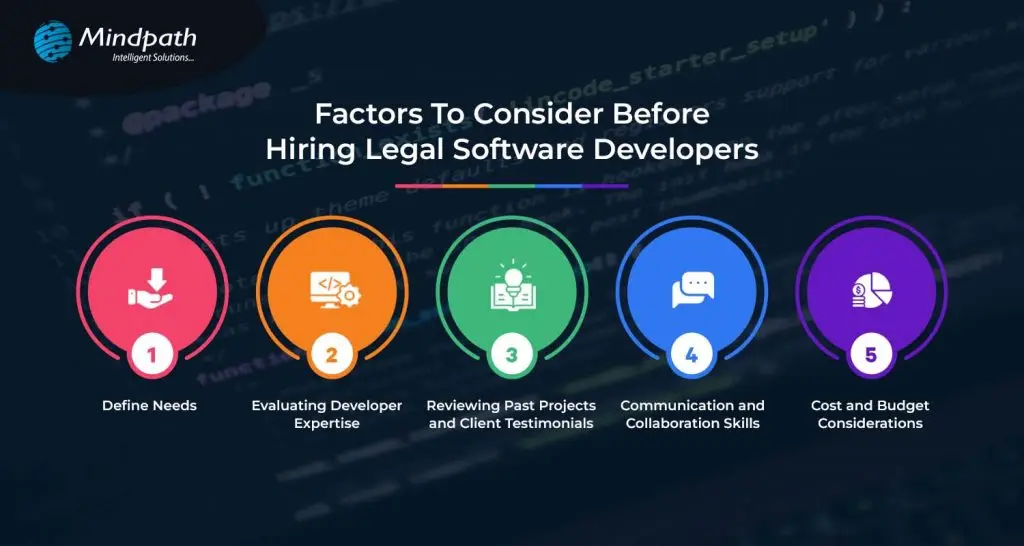
1. Define Needs
Before you hire legal software developers, the needs must be clearly defined. It means determining what one wants the developers to be able to do. Consider the integration of the software with other systems in use like email and file storage for perfect workflow. This includes setting a budget, which will serve as a guideline regarding priorities and finding a developer or developers to deliver what you will need within your financial limits. Defining your needs will allow you to communicate your needs to the developers, hence bridging to a more successful, tailor-made software solution.
2. Evaluating Developer Expertise
Before hiring, critically evaluate the expertise of legal software developers. Are they technically competent? Do they have the skill sets and experience using their tools? Engage developers who have experience in working with legal software. After all, their better understanding of the unique needs of law firms and legal departments is good enough for saying so. Just look at all the client testimonials that app developers have gotten to understand that they do quality work. Make sure they are good at communication and that they are responsive, friendly developers. That way, by appraising their expertise, you can find developers who would be well equipped to build the software for you.
3. Reviewing Past Projects and Client Testimonials
Before you start hiring legal software developers, view their past projects; what kind of work they have done, how many projects they have handled. See if they have done any similar projects as you want. They can deliver qualitative software related to the legal field. Moreover, you can look over the client testimonials and reviews to know how the previous clients feel about their experience. It will provide you with positive feedback, thereby giving you confidence in their ability and reliability. This step helps in choosing a developer who has the potential to prove his results and satisfy your needs accordingly.
4. Communication and Collaboration Skills
When looking to hire legal software developers, try and pay attention to their communication and collaboration skills. Pick the ones you can talk with easily and hear you out. They should be responsive, updating you on the progress of their work. Good collaboration means they can work well with your team, share ideas, and solve problems together. Effective communication means everyone is on the same page, thus leading to a smoother development process toward a successful software solution.
5. Cost and Budget Considerations
The cost or budget for hiring a legal software developer should be considered. It will be important for you to decide just how much you are prepared to pay for your project and then compare legal software developers who can work within your budget. Different pricing models—like fixed price or hourly rate—might suit your needs better. Be sure to discuss extra costs that may arise. This will help you to understand better the financial aspects of the matter and find out the developers who offer maximum value for your money.
Legal software development services at Mindpath
We have a variety of legal software development services designed to make your life simple and give you more time. Our solutions improve client service, streamline operations, and help remain compliant with regulations.
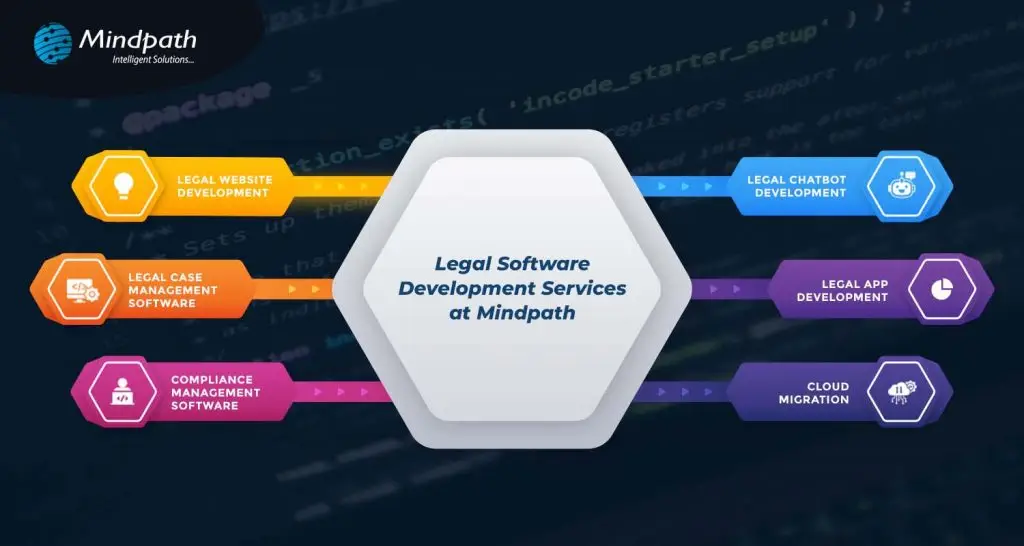
1. Legal Website Development
We provide law firms with professional websites that are attractive, user-friendly, and search engine friendly, so you will have an excellent online presence that really attracts potential clients.
2. Legal Chatbot Development
Our chatbots automate client interactions through answering questions, setting up appointments, and providing updates. They offer support 24/7 to help reduce the admin workload and increase client satisfaction.
3. Legal Case Management Software
Our software simplifies case management by providing real-time data and automated tasks so you will be able to have full control over your cases and gain valuable insights into their progress.
4. Legal App Development
We create user-friendly apps on iOS and Android to handle client interactions and case information from anywhere, creating a better experience for the client.
5. Compliance Management Software
This software takes extra care to keep you compliant with the legal framework and provides automated tracking of risk management to keep your practice updated.
6. Cloud Migration
We ensure the safe transfer of your data to the cloud so that flexibility and security are enhanced with easy access anywhere, along with system performance during cloud optimization.
Conclusion
The fast-changing legal technology landscape dictates that law firms and legal departments should catch up. In the modern world, technology is the way to achieve efficiency, better customer service, and compliance. While hiring a legal software developer, due consideration of things such as defining your needs, evaluating experience, and good communication can result in successful partnering and effective software solutions.
At Mindpath, we look to simply your process and introduce you to innovation that will automate your legal practice. By choosing Mindpath, you’re putting your money into innovation and expertise to drive your success against competition in the legal arena. Stay ahead with Mindpath and focus on what you do best by providing exceptional legal services.
Get In Touch!
Looking to Revolutionize Your Legal Practice?
At Mindpath, we build custom legal software websites, chatbots, and case management systems just for you.
Ever Wondered how technology is really influencing the healthcare sector? From electronic health records and telemedicine to mobile health apps, today healthcare software development plays a great role in changing the way patients receive and providers provide treatment.
But what exactly are healthcare software development services, and why are they crucial for modern medicine? In this blog we will explore healthcare software development services and how these cutting-edge solutions are going to shape the future of healthcare, improve patient outcomes, and smooth operations.
What is Healthcare Software?
Healthcare software development is the process of developing individualistic computer programs designed for hospitals, clinics, and all other types of healthcare organizations. These programs assist in enhancing how healthcare providers render care by making processes more effective, accurate, and oriented towards patients. Healthcare software creates a complete digital system within a healthcare organization.
This allows medical professionals to offer better and more accurate clinical services. To doctors, this represents an easy way to do follow-ups and monitor the health of their patients, schedule appointments, and get access to medical reports, all from the comfort of managing staff. To patients, it offers online appointment booking, live chat with doctors, sharing of medical reports, and receiving health advice.
These software solutions come with various benefits associated with the improvement in patient care, efficiency, and reduction in medical errors. They can digitize the traditional paper-based systems and take care that patient care is performed quicker and much more safely. Healthcare software is further creating new sectors, such as patient engagement, clinical robotics, and telehealth, driving a lot of startups to bring ideas into life.
Types of Healthcare Software Development Services
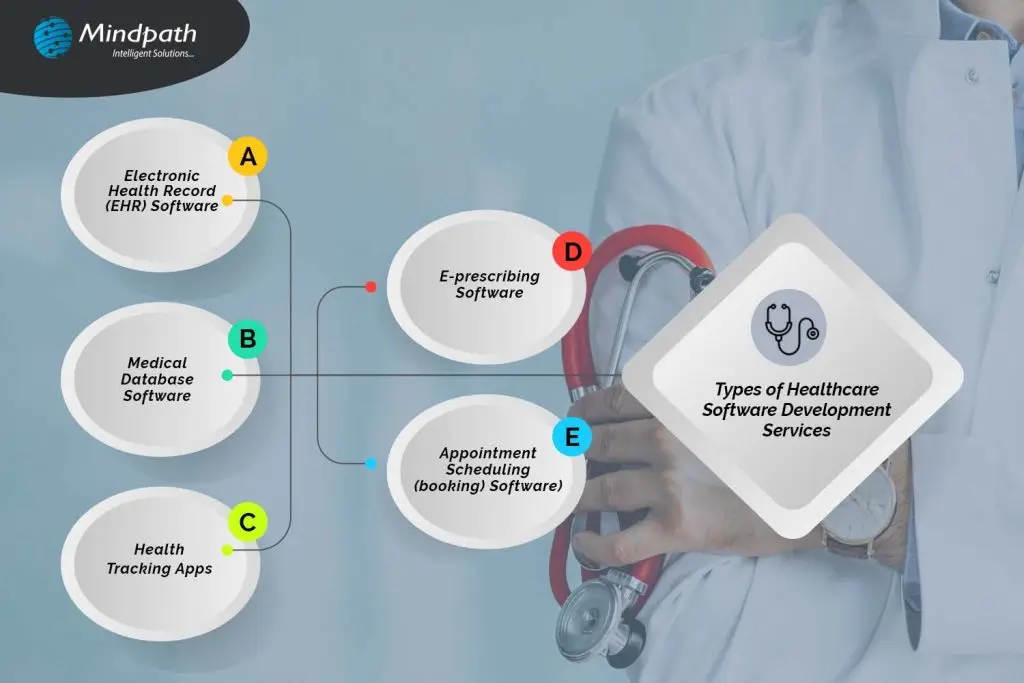
1. Electronic Health Record (EHR) Software
EHR software is being used by hospitals and clinics like any CRM, but with a healthcare tune. It contains all the relevant information concerning every patient, among them what medicines they use, the various doctors’ advice, and the medical processes that they have gone through. Many EHRs incorporate mechanisms for billing, collection, and even a patient portal that allows patients to view consultation history, medical records, and prescriptions. There are two types of EHR software: the electronic patient record, which is used in hospitals for management purposes concerning a patient internally, and the electronic medical record, which keeps track of information like medications, past and future procedures, and how well the patient is recovering.
2. Medical Database Software
Medical database software can be called a huge library of information about medicine, not according to the profiles of patients but according to diseases. This tool aids doctors in looking through cases like one that is being treated and thus making informed decisions about its cure. It is also used for learning by allowing doctors to know more about certain diseases. For example, a dermatologist using medical database software can view all the patients diagnosed with Atopic Dermatitis, compare their symptoms, treatments, and recovery plans, and find the best approach for their current patients.
3. Health Tracking Apps
Health-tracking apps are part of the fast-growing industry called mHealth, which stands for “mobile health.” This industry, valued at $37 billion globally for 2019 alone, allows users to trace and manage their health from their smartphones. Some of the popular health monitoring apps include fitness apps such as 8fit, diet apps such as Fitatu Calorie. For instance, sleeping patterns are monitored by the FitBit wristband, while the Oura Ring is responsible for monitoring several health metrics. Others include glucometers for testing blood sugar levels and, of course, thermometers in general—for instance, tracking menstrual cycles like the Kindara app. All these tools work together to give users a better understanding of their health and wellness.
4. E-prescribing Software
The e-prescribing software is becoming a tool that every doctor must have, with countries all over the world rapidly adopting electronic prescriptions. Such software allows doctors to easily manage all prescriptions for all patients by tracking, renewing, and canceling them as need be. It is also connected to national drug reference databases that help in picking up the right medications and making sure there is no error. Examples include MediTab and ScriptSure, two software programs designed to ease e-prescribing and improve the capabilities of health professionals to deliver accurate and effective care.
5. Appointment Scheduling (booking) Software
Appointment scheduling software is designed to assist hospitals, clinics, and medical practices in managing their appointments online. This normally allows the provision of a user-friendly platform through which patients can easily book appointments via an app or website without calling up the office. This type of software normally features email notifications and automatically sends reminders to doctors and patients about upcoming appointments. It accommodates multiple doctors’ schedules, cancellations, or rescheduling of appointments, and does much more to provide appointment trend data that helps in bringing efficiency to the practice. Additionally, AI chatbots are integrated into these systems to enhance the booking experience. These chatbots can handle appointment scheduling, provide immediate responses to patient inquiries, and assist with rescheduling or cancellations.
Looking to boost your healthcare operations with top-tier software solutions?
At Mindpath, we deliver cutting-edge, customized healthcare software to empower efficiency and elevate patient care.
Why Are Healthcare Practitioners Going Digital?
Health practitioners use digital technologies greatly because of the great advantages they present in improving patient care and practice management. Digital healthcare solutions help doctors in the management of patient information. Therefore, record-keeping becomes more accurate and efficient while diminishing the burdens of paperwork.
Healthcare IT has been one of the fast-growing markets and is expected to grow further. From $303.4 billion in 2022, this is projected to rise as high as $974.5 billion by 2027 with a good annual growth rate. The market is expected to grow to $728.63 billion by 2029 and even further to $1,069.13 billion by 2032. Healthcare provider solutions take up about 38% of the market, such as those in Electronic Health Records. On the other hand, IT services form 52% of the market, including online payments and cybersecurity. Growth is fueled by new technologies, increased spending by consumers, and government initiatives; however, challenges persist, with the most important ones being related to cybersecurity risks. It has the maximum market share in North America due to its better and advanced infrastructure. The European region is predicted to grow fast with government help and support, adoption of AI soon. Some major players in this field are GE Healthcare and Philips, which are carrying the industry forward.
Leading Healthcare Software Development Services at Mindpath
Mindpath offers a full cycle of healthcare software development services that meet all the needs of healthcare providers, patients, and all those concerned. Our offered solutions work toward better patient care while easing operations. Here are the services we provide:
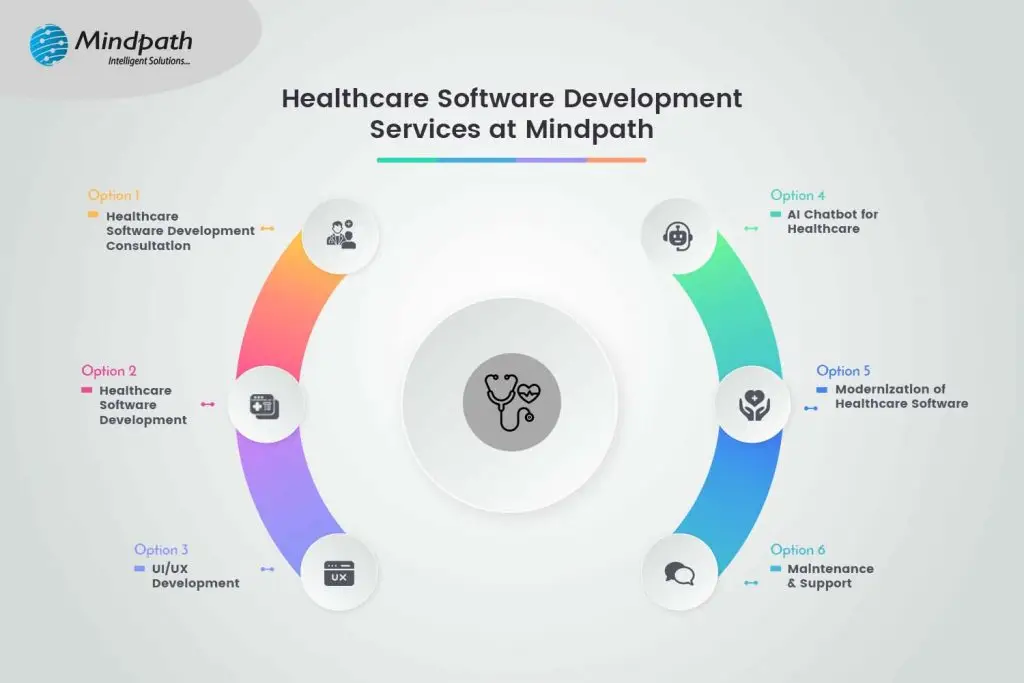
1. Healthcare Software Development Consultation:
We assist in planning and designing your healthcare software project from an idea to detailed planning. Our advice ensures you will have a clear roadmap for developing effective healthcare solutions.
2. Healthcare Software Development:
We develop various healthcare IT software solutions, including Electronic Health Record (EHR) software, practice management systems, patient portals, among others. The solutions are secure, scalable, and well-built according to the industry regulations to ensure better patient care and efficiency.
3. UI/UX Development:
We design easy-to-use interfaces that will be convenient and pleasant for the eye. We focus on bringing your healthcare software both functionality and user experience.
4. AI Chatbot for Healthcare:
Our AI chatbots for healthcare answer questions, provide appointment scheduling, and disseminate medical information. They help improve interaction with patients and relieve some workload from the health staff.
5. Modernization of Healthcare Software:
Legacy system upgrade and migration to state-of-the-art platforms, enrichment of new functionalities, and updating of old technologies to manage your software and keep it relevant.
6. Maintenance & Support:
Ongoing support and maintenance are available to make sure that your healthcare software keeps running smoothly and aligns with your changing needs.
Conclusion
The huge effects of rapid growth in technology reshaping healthcare to become more effective, accessible, and patient-centered are undeniable. It is evident from the adoption of electronic health records and e-prescribing software at the end of the spectrum to health-tracking apps and AI-driven tools that are revolutionizing how healthcare providers care for patients and their practices.
Such innovations not only improve the quality of care provided to patients but also the administrative flow, hence making healthcare very responsive and effective. Adopting the newest technology is crucial for healthcare organizations to keep ahead of these trends as the sector continues to change. This is where a holistic approach to healthcare software development is necessary. Healthcare providers may enhance patient outcomes, streamline operations, and more adeptly navigate the digital terrain by incorporating cutting-edge software solutions.
At Mindpath, we are dedicated to supporting healthcare providers through every step of this transformation. From development and consultation to UI/UX design and modernization—our services cover a large area of needs, all meant to make sure you can drive positive change in healthcare through digital technology. Be it building new systems, updating existing ones, or ensuring ongoing support, Mindpath makes sure that your healthcare software is of the highest quality and effectiveness.
Are you curious about how cutting-edge medical software might transform your business?
At Mindpath, we develop solutions that improve patient care and expedite operations.
Steps to Hire Education Software Developers
1. Define Clear Needs and Objectives
Be clear about the needs and goals that your organization wants to fulfill before any hiring. Determine whether you’re looking for web application-oriented developers or a UI designer. Since personalization features in an online learning environment are very important, the requirements should be focused on the position and objectives of your company in the EdTech industry. Define your project scope by determining whether you will create a new web application or improve the user interface of an existing platform to identify necessary skills.2. Conduct Rigorous Vetting Process
Finding the right kind of talent is hard in this busy online world, but Aloa, Google, and LinkedIn will help in this regard. One of the most important decisions for any startup entering the field of EdTech would be whether to build in-house or to outsource. In-house development brings more control directly to the fingertips, thereby providing customization and quicker changes. On the other hand, outsourcing brings outside expertise and can be more cost-effective.3. Create A Job Description
A detailed description of the job is one of the most important aspects in the acquisition of the right candidates. Clearly indicate what kind of responsibilities, skills, and experience will be required, with major emphasis on web application development, UI design, and knowledge of online learning. In such a well-written description of a job, there is an articulate roadmap for potential candidates to evaluate their fit for roles in education software development.4. Perform Virtual Interviews
Virtual interviews provide an efficient way to connect with a global talent pool for education software development. They allow you to evaluate candidates’ understanding of online learning environments, self-education mindset, and potential contributions. This step is crucial for assessing both practical skills and cultural fit.5. Reviewing Portfolios and Skills
In the case of a candidate who has worked on education software creation, this should be evident through their portfolio. The relationship with the candidate’s previous projects shows skills in the development of web applications, UI design, and personalization. Previous work should reflect clearly an understanding of the online learning environment and meet modern learners’ needs.6. Ensure Legal Compliance
Ensuring compliance with legal regulations is essential when hiring educational software developers. This includes clear contracts outlining work scope, intellectual property rights, and confidentiality, to prevent disputes. Protecting user data by adhering to privacy laws like GDPR is crucial, and following employment laws ensures fair treatment of employees. Proper legal compliance safeguards both parties and avoids future legal issues.Considerations While hiring Education Software Developers
1. Expertise in the Development
While considering recruiting professionals to education software development, people with a deep understanding of education and technology must be the most prospective candidates. You should seek professionals who have deep expertise in software development and an understanding of fine details of education. This will enable them to create pedagogically relevant solutions that leverage the best of technology.2. Strong Collaboration and Communication Skills
Seamless collaboration in the creation of education software solutions, involving developers, educators, designers, and other professionals, calls for cross-functional teams. Effective communication skills play a huge role in translating complex technical terms into easily understandable language for non-technical stakeholders. Assess people based on their technical prowess and how well they can function in a team that values communication.3. Innovations and Adaptability
Developers in the fast-moving education software field should be abreast of new technologies and trends. Seek those with experience in change and the ability to innovate in fulfilling educational needs. It is precisely this ability to evolve with technology and create new solutions that sets people apart in education software development.4. User-Centric Focus
Education software is aimed at enhancing learning. Hire education software developers for whom this would be the top priority, delivering user experience and learner outcomes with a strong sense of empathy toward educators and learners. This would ensure intuitive and effective software solutions.Mindpath has the expertise to help you succeed.
Searching for the best education software developers to transform your e-learning vision into reality?
How can Mindpath Help You Hire the Best Education Development Software?
Mindpath is here to help in hiring the best developers for creating educational software that will meet your needs. We understand the fact that education is constantly evolving and is changing with the wind; it needs the best technologies to survive the race. That is the reason we offer the facility to hire top developers for creating such software to fulfill your educational goals. Our team connects you to experienced developers who have expertise in developing educational platforms, Learning Management Systems (LMS), and school management software. Such professionals help in designing software that allows both student and educator engagement through the latest technology.
At Mindpath, we take pride in our educational technology experience. We’re quite sure user-centered software development makes our developed solution intuitive and easy to use. We provide scalable solutions, which will grow with your institution according to your needs. We keep providing technical support and maintenance to the developed software to make it keep upgrading and secure. Choosing Mindpath means you get a partner who is dedicated to making you succeed.
Conclusion
It is a fast-changing environment for education software technology, developers become very instrumental in shaping the future of learning. With emerging trends in artificial intelligence, virtual reality, and personalized learning platforms, among others, now more than ever is the need for skilled developers who can bring these innovations to life. Developers are not just writing software; they are building tools that will define a new way of teaching and learning.
By choosing Mindpath, you tap into a talent network of peer developers who understand the challenges and opportunities that exist in education technology. Our vetting process assures that the developers you intend to hire would be with the right skill set, experience, and mindset moving your projects forward. With our support, you can build a team capable of developing cutting-edge solutions that will enhance learning outcomes, help in positioning your institution as a leader in the education software.
Ready to Transform Your Educational Software?
Mindpath specializes in connecting you with top education software developers who can bring your vision to life.
Managing legal cases, preparing documents, tracking deadlines, and communicating with clients can consume significant time for law firms. When these activities depend on spreadsheets, emails, and disconnected applications, teams may struggle to maintain accurate records and coordinate their work efficiently.
Key Takeaways
- 01
Legal software solutions help law firms manage cases, documents, deadlines, billing, and client communication from a centralized platform. - 02
Custom legal software development allows firms to build features around their specific workflows and operational needs. - 03
AI-powered tools can assist with document review, contract analysis, legal research, and repetitive administrative tasks. - 04
Data security, access control, and regulatory requirements should be considered when selecting legal technology. - 05
The right legal software development partner can help law firms improve efficiency, client experience, and long-term scalability.
Legal software solutions help address these challenges by bringing essential legal operations into a connected digital environment. From case management and document automation to client portals and AI-assisted research, modern legal technology helps attorneys organize their work and reduce repetitive administrative tasks.
For law firms, corporate legal departments, and legal technology businesses, investing in the right software can support more efficient workflows and better client service. This guide explores the main types of legal software, their benefits, essential features, and how to choose the right solution.
Looking to transform your ideas into intelligent software? Mindpath provides expert AI Development Services to help businesses build scalable, efficient, and innovative AI-powered solutions.
What are Legal Software Solutions?
Legal software solutions are digital tools designed to support legal professionals in managing everyday legal and administrative activities. These applications can help organize case information, prepare documents, manage contracts, track billable hours, and maintain communication with clients.
For example, a law firm handling multiple corporate cases can use legal case management software to organize client records, assign tasks, and monitor deadlines. It can also store relevant documents in one place, making information easier to access.
Depending on business requirements, firms can choose ready-made applications or invest in custom legal software development. Custom solutions are particularly useful when existing tools cannot support specialized workflows, integrations, or reporting requirements.
Types of Legal Software Solutions
1. Legal Case Management Software
Legal case management software helps attorneys organize cases from initial client intake to final resolution. It centralizes important information, including case status, client details, assigned team members, upcoming deadlines, and related documents.
Automated reminders and task assignments help legal teams stay organized. As a result, they can reduce the risk of overlooking important activities and manage their caseloads more effectively.
2. Legal Document Management Software
Legal professionals handle contracts, agreements, evidence, research files, and confidential client records. To manage these documents efficiently, legal document management software provides a structured way to store, search, access, and share information.
Additionally, useful features include version control, permission-based access, document search, secure sharing, and automated document generation. As a result, legal teams can find the correct information more easily while maintaining better control over sensitive files.
3. Contract Management Software
Contract management software supports the creation, review, approval, signing, and renewal of contracts. It can help businesses monitor contractual obligations, identify important dates, and standardize document workflows.
AI-assisted contract analysis can also help flag specific clauses or inconsistencies for human review. However, attorneys should verify the findings before making legal decisions.
4. Legal Billing and Practice Management Software
Billing and practice management tools help firms track billable hours, prepare invoices, manage expenses, and monitor payments. Some platforms also provide reports on workload, outstanding invoices, and matter profitability.
By connecting billing with case management, law firms can reduce duplicate data entry and improve financial visibility. This makes it easier to monitor financial performance alongside daily legal operations.
5. AI-Powered Legal Software
AI in legal technology can support document summarization, contract review, legal research, and information retrieval. These tools can help professionals process large volumes of information more efficiently.
However, AI-generated results may contain errors or unsupported statements. Confidentiality controls, reliable source verification, and attorney oversight are essential when using AI for legal work.
Benefits of Custom Legal Software Development
1. Improved Operational Efficiency
Custom legal software can automate repetitive activities such as document generation, task assignments, appointment scheduling, and routine notifications. This allows legal professionals to spend more time on research, strategy, and client relationships.
By reducing manual work, firms can organize their processes more consistently. They can also minimize repetitive data entry and improve the flow of information across teams.
2. Better Collaboration
A centralized platform helps attorneys, paralegals, administrators, and clients access relevant information according to their permissions. Shared case records and task updates can improve coordination across departments and office locations.
Teams can also track progress without relying entirely on separate emails or spreadsheets. This creates a clearer view of responsibilities and upcoming tasks.
3. Enhanced Client Experience
Client portals can provide secure document sharing, appointment requests, billing information, and case updates. Better access to information can reduce unnecessary follow-ups and help clients understand the progress of their matters.
In addition, consistent communication helps clients stay informed throughout the legal process. Firms can use these tools to provide a more organized and accessible service experience.
4. Stronger Data Security
Legal organizations manage confidential information that requires careful protection. Custom applications can incorporate encryption, role-based access controls, multifactor authentication, audit logs, and secure backups.
Security requirements should be based on the firm’s risk profile, applicable privacy laws, and contractual obligations. Regular reviews can also help identify vulnerabilities and maintain appropriate access controls.
5. Greater Flexibility and Scalability
As a legal practice grows, its technology requirements may change. Custom software can be designed to support additional users, new practice areas, specialized workflows, and integrations with existing business systems.
This flexibility helps organizations adapt without relying entirely on manual workarounds. It also provides room to introduce new features as business needs evolve.
Essential Features to Look for in Legal Software
Before choosing a solution, consider whether it includes the following capabilities. The right combination will depend on your firm’s workflows, team size, and security requirements.
- Centralized case management: Organize case records, tasks, contacts, and deadlines.
- Document automation: Generate standardized documents using approved templates.
- Deadline tracking: Schedule hearings, filing dates, contract renewals, and reminders.
- Secure client portals: Share updates and documents with authorized clients.
- Billing and reporting: Track time, invoices, expenses, and operational performance.
- System integrations: Connect with email, calendars, accounting tools, and document platforms.
- AI-assisted workflows: Support document analysis and information retrieval with appropriate human review.
- Security and auditability: Apply access restrictions and maintain records of important actions.
The best feature set depends on the size of the organization, the type of legal work it performs, and its existing technology infrastructure. Evaluating these requirements early can help prevent unnecessary costs and functionality gaps.
How to Choose the Right Legal Software Development Company
Selecting a reliable legal software development company requires more than comparing prices or feature lists. You need a partner who understands your operational challenges and can translate them into a practical software solution.
Start by identifying the problems your team wants to solve. Next, evaluate the developer’s experience in custom software development, data security, system integration, and user-friendly application design.
Ask potential partners about their development process, testing standards, maintenance services, and ability to support future upgrades. Request a prototype or demonstration when possible, and confirm how confidential information will be handled.
It is also important to establish measurable goals. For example, a firm might track document processing time, missed deadlines, administrative workload, client response times, or billing accuracy before and after implementation.
Finally, consider using a phased rollout rather than introducing every feature at once. This allows teams to test essential functionality, gather feedback, and address usability issues before expanding the solution across the organization.
Why Choose Mindpath for Legal Software Development Services?
Mindpath helps businesses explore tailored software solutions aligned with their operational requirements. For legal organizations, the right development approach can bring case management, document workflows, client communication, and business processes into a more connected environment.
By focusing on usability, integration, scalability, and appropriate security controls, a development partner can help transform complex manual processes into efficient digital workflows. This can also create a stronger foundation for future improvements.
Whether you are planning a legal management platform, a client-facing application, or an AI-enabled legal tool, defining your requirements clearly is the first step toward a successful implementation. A well-planned solution should address current challenges while allowing room for future growth.
Looking to modernize your legal operations? Connect with Mindpath to discuss software development solutions tailored to your business needs.
Conclusion
Legal software solutions help modern law firms organize cases, manage documents, improve collaboration, and deliver a more consistent client experience. The right platform can also reduce repetitive work and provide better visibility into daily operations.
Before investing in new technology, evaluate your workflows, security requirements, integration needs, and long-term goals. While ready-made tools may suit standard requirements, custom legal software development can provide greater flexibility when specialized processes demand a tailored approach.
With a clear implementation strategy and the right technology partner, legal organizations can build a more secure, efficient, and scalable digital practice.
IT staff augmentation offers a flexible, scalable, and cost-effective alternative to traditional hiring models. It enables businesses to quickly access specialized talent, adapt to changing project needs, and optimize resource allocation without long-term commitments. This approach enhances operational efficiency, speeds up hiring processes, and supports strategic growth in dynamic markets.
Are you struggling to find the right talent for your IT projects or facing challenges with traditional hiring processes? Traditional hiring could take months, but what if there was a faster, more flexible solution? Now, with IT staff augmentation, you may satisfy your project goals fast and effectively without the long-term commitment and expense associated with traditional employment.
In today’s fast-changing business environment, companies need to scale quickly and adapt to project demands. IT staff augmentation allows businesses to add skilled professionals to their existing teams without long-term hiring commitments, making it easier to adjust resources as project needs change.
What are the traditional hiring models?
Traditional hiring models cover a range of techniques used by businesses to onboard new staff members. Here’s a short breakdown:
1. Direct Hiring
This is the most popular approach used by businesses to hire people directly for full- or part-time jobs. It includes posting job positions, evaluating applications, setting up interviews, and choosing job applicants.
2. Temporary Hiring
Businesses employ people to do certain tasks or for a set amount of time. Temporary hires are made by the company itself or through employment agencies to cover short-term positions like project-based labour or seasonal labour.
3. Contractual Hiring
Contractual hiring is employing individuals or businesses under a formal contract to do certain activities or projects. Contractors may labour for a certain amount of time until the project is finished, and they are normally compensated for their services in accordance with the conditions specified in the contract.
4. Freelancers or Independent Contractors
Businesses employ independent contractors or freelancers on a project-by-project basis. They work for themselves and supply specialized knowledge or services on demand, frequently from a distance. They are not employees.
Drawbacks of traditional hiring models
Despite being frequently employed, traditional employment strategies include several drawbacks that businesses need to consider:
1. Time and Resource Inefficiency
It might take a while and a lot of resources to advertise job positions, evaluate applications, hold interviews, and decide who gets hired. This inefficiency frequently leads to protracted spells of unemployment, which affects output and pushes back project deadlines.
2. Cost Implications
Conventional hiring includes indirect costs like pay, benefits, and overhead related to permanent workers in addition to direct expenditures like advertising, onboarding charges, and recruiting agency fees (if applicable). Budgetary constraints may be strained by these costs, especially if turnover rates are significant or if highly skilled personnel require premium pay.
3. Rigidity in Staffing
In traditional models, once employed, workers usually commit to long-term jobs that might not match project-specific requirements or changing corporate demands. This lack of adaptability may cause resources to be overextended during peak hours or underutilized during off-peak hours, which would reduce overall operating efficiency.
4. Skills and Expertise Gaps
Access to the knowledge or abilities required for specialized projects or cutting-edge technology could not always be ensured by traditional recruiting practices. Talent with specialized skills may be difficult for organizations to find and keep, which might impede innovation and competitiveness in quickly changing sectors.
Overview of IT Staff Augmentation
IT staff augmentation is a flexible outsourcing model that helps businesses quickly add skilled IT professionals to their existing teams. Instead of hiring full-time employees, companies bring in experts on a temporary or project basis to fill skill gaps and meet project goals. These professionals are typically hired through staffing agencies, freelancers, or direct contracts based on the specific expertise needed.
Key Benefits of IT Staff Augmentation
1. Flexibility and Scalability
Two key benefits of hiring more IT professionals are flexibility and scalability. IT staff augmentation lets companies quickly bring in skilled experts when needed without making long-term hiring commitments. This helps businesses adapt to changing project demands while keeping work on track. It also allows companies to scale their teams up or down as projects change, reducing costs and making it easier to expand into new markets when needed.
2. Cost-Effectiveness
Staff augmentation is a cost-effective way to access specialized talent without the high costs of traditional hiring. It reduces recruitment, onboarding, and long-term employee expenses like benefits and office space. Companies can also scale their workforce based on project needs, helping them manage budgets more efficiently.
3. Access to Specialized Talent
Access to specialized talent helps companies quickly bring in expertise they don’t have in-house. By hiring skilled professionals through agencies or direct contracts, businesses can handle technical or short-term projects without making long-term hires. This approach improves project outcomes, drives innovation, and helps companies stay competitive in fast-changing industries.
4. Faster Hiring Process
IT staff augmentation helps companies hire skilled professionals much faster than traditional recruitment. With access to pre-screened talent, businesses can quickly fill roles, start projects sooner, meet deadlines, and stay flexible while reducing hiring delays and maintaining quality.
Choosing Between IT Staff Augmentation and Traditional Hiring
| Criteria | IT Staff Augmentation | Traditional Hiring |
| Flexibility | High – Can scale up/down as needed | Low – Fixed, long-term commitments |
| Cost | Cost-effective, reduced overhead | Higher costs, including benefits and office space |
| Time to Hire | Fast – Quick onboarding with pre-vetted candidates | Slow – Lengthy recruitment and onboarding process |
| Access to Talent | Access to specialized, global talent quickly | Limited to available local talent |
| Project Adaptability | Easily adapt to changing project needs | Rigid, less adaptable to project changes |
| Commitment | Short-term or project-based | Long-term employment contracts |
Conclusion
In conclusion, IT staff augmentation helps businesses stay flexible, scale teams quickly, and access specialized talent without the commitment of traditional hiring. It improves efficiency, optimizes resources, and keeps companies competitive in a fast-changing market.
Whether you need to scale for a new project or hire specialized IT talent, Mindpath offers flexible staffing solutions tailored to your needs. Contact us today to learn how we can support your business.
Join our Newsletter!
categories
Join the world's largest training library and unlock new opportunities!
Featured Posts
Turn Insights Into
Real Business Solutions
Exploring trends is only the beginning. Whether you’re planning AI adoption, modernizing legacy systems, or building scalable software, our experts help transform ideas into practical business outcomes.